
Insight Blog
Agility’s perspectives on transforming the employee's experience throughout remote transformation using connected enterprise tools.
55 minutes reading time
(10941 words)
Employee Communication Software: The Complete Buyer's Guide for Modern Workplaces (2026)

Employee Communication Software: The Complete Buyer's Guide for Modern Workplaces (2026)
Stop relying on email and disconnected apps. Find the best employee communication software to improve engagement, collaboration and productivity.
Employee Communication Software: The Complete Buyer's Guide for Modern Workplaces (2026)

Choosing the right Employee Communication Software is no longer just an IT decision—it's one of the smartest investments a business can make.
Yet many companies still rely on endless email chains, scattered chat apps, and disconnected tools, leaving employees frustrated and important updates overlooked.
In fact, research from Gallup shows that businesses with highly engaged employees are 23% more profitable, proving that better communication directly impacts business performance.
If you're searching for the best software to communicate with employees, you're in the right place.
Whether you manage a growing business, lead an HR team, oversee internal communications, or support a large frontline workforce, this guide will help you understand what really matters before investing in a platform.
23%
Higher profitability
According to Gallup, organisations with highly engaged employees achieve 23% higher profitability than those with lower engagement levels, highlighting the direct connection between effective workplace communication, employee engagement and business performance.
Source: Gallup – State of the Global Workplace
By the end of this article, you'll know exactly what Employee Communication Software is, which features deliver the biggest return on investment, the common mistakes businesses make when choosing a solution, and how to find a platform that employees will actually use—not just another app they'll ignore.
If your goal is to reduce email overload, improve employee engagement, and bring your entire workforce together in one place, you're about to discover everything you need to make the right decision.
If you'd like, I can also make this opening even more compelling by adding a curiosity-driven hook in the first sentence to increase engagement and time on page.
Key Takeaways
- Modern employee communication software centralises announcements, documents, chat, knowledge sharing and collaboration into one secure digital workplace.
- Replacing disconnected emails, messaging apps and file-sharing tools helps employees find information faster while improving productivity and engagement.
- Mobile-first access is essential for frontline, remote and hybrid teams, ensuring every employee receives important updates regardless of location.
- Look for enterprise features such as role-based permissions, Single Sign-On (SSO), multi-factor authentication, analytics, integrations and advanced search to support long-term growth.
- The most successful organisations combine the right technology with strong leadership, user adoption and clear governance to maximise return on investment.
What Is Employee Communication Software?
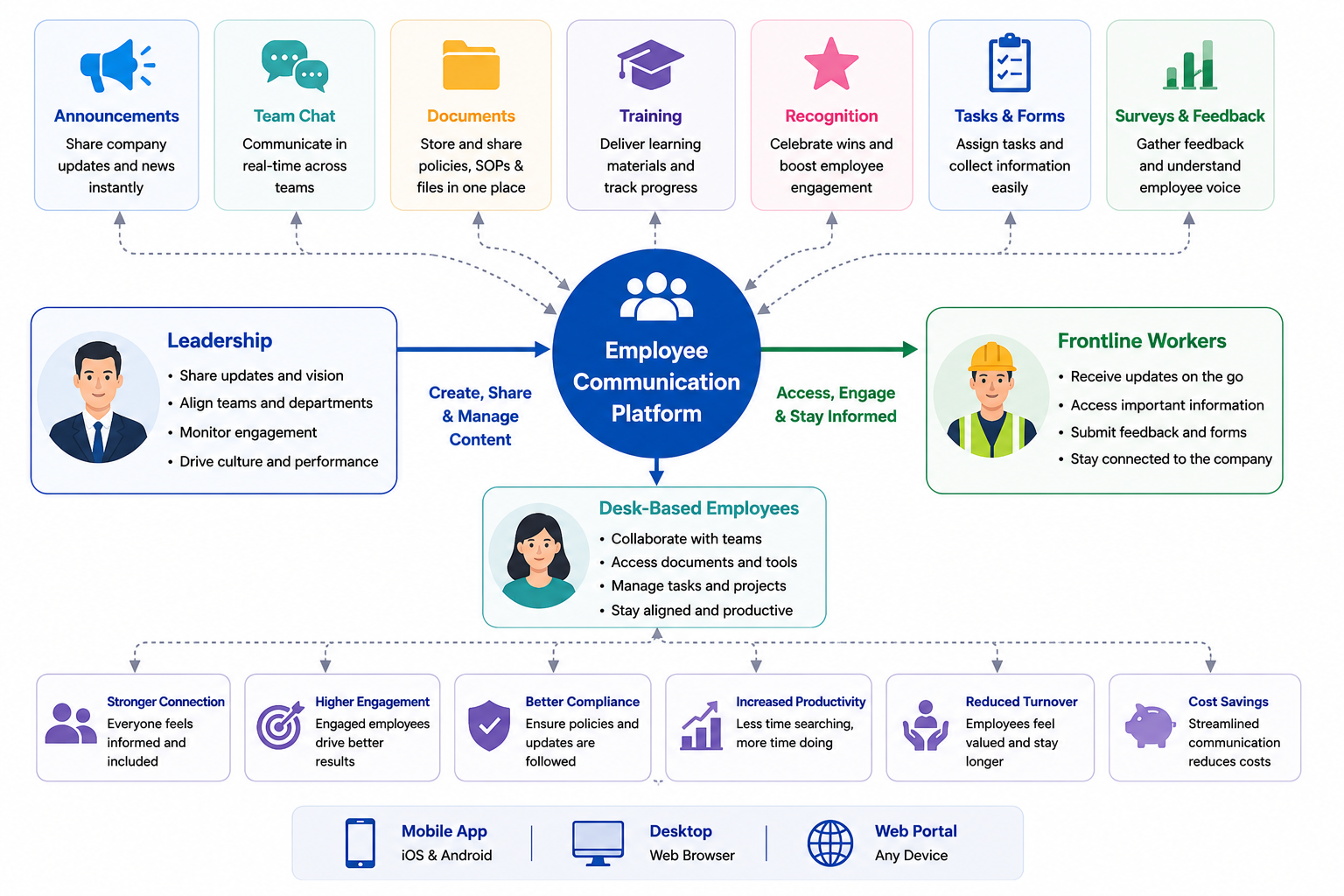
So let's get into what is an Employee Communication Software, well its a central platform that helps businesses share information, collaborate, and keep everyone connected, regardless of where they work.
Think of it as the modern replacement for relying on email, printed notices, WhatsApp groups, and disconnected chat apps.
Unlike traditional HR communication tools, modern employee communication platforms bridge the gap between leadership, desk-based, and frontline workers, ensuring everyone receives the same information at the same time.
Whether it's a company announcement, policy update, training material, shift change, or emergency notification, employees have one trusted place to find the information they need.
Platforms such as AgilityPortal provide businesses with an all-in-one software to communicate with employees, bringing together company news, team chat, employee directories, document management, knowledge bases, surveys, employee recognition, task management, and mobile access into a single digital workplace. Instead of switching between multiple disconnected tools, employees have one central hub where they can stay informed, collaborate with colleagues, and access everything they need to do their job effectively.
Instead of employees switching between multiple applications, everything they need is available in one secure location.
Without an Employee Communication Software solution, communication quickly becomes fragmented.
What Is Employee Communication Software
Office employees often receive updates through email or Microsoft Teams, while frontline workers—such as retail staff, healthcare professionals, warehouse employees, drivers, construction crews, and field technicians—are frequently left out because they don't have a company email address or spend their day behind a computer.
As a result, frontline employees may:
- Miss important company announcements and operational updates.
- Be unaware of new policies, safety procedures, or compliance requirements.
- Struggle to access documents, forms, or training materials when they need them.
- Feel disconnected from leadership and the wider organisation.
- Rely on word-of-mouth communication, increasing the risk of misinformation.
- Experience lower engagement, reduced productivity, and higher staff turnover.
A modern employee communication platform solves these challenges by giving every employee—whether they're in the office, working remotely, or on the frontline—instant access to the same information through a mobile app, desktop, or web browser.
This creates a more connected workforce, improves employee engagement, reduces communication gaps, and ensures no one is left out of the conversation.
Why Businesses Are Replacing Email With Employee Communication Software
For years, email was the default way to communicate with employees.
While it still has its place, it's no longer enough for today's workplaces.
With remote teams, hybrid working, and frontline employees spread across different locations, businesses need faster, smarter, and more reliable ways to keep everyone connected.
The biggest problem with email is that important messages are easy to miss. Employees receive dozens—sometimes hundreds—of emails every week, making it difficult to identify what really matters.
Company announcements get buried, policy updates are overlooked, and critical information often reaches employees too late.
This is why more organisations are investing in an employee communication software solution or a modern HR communication platform. Instead of relying on inboxes, these platforms centralise announcements, documents, conversations, tasks, and employee resources in one place, ensuring everyone has access to the latest information whenever they need it. Learn how to manage and reduce app fatigue.
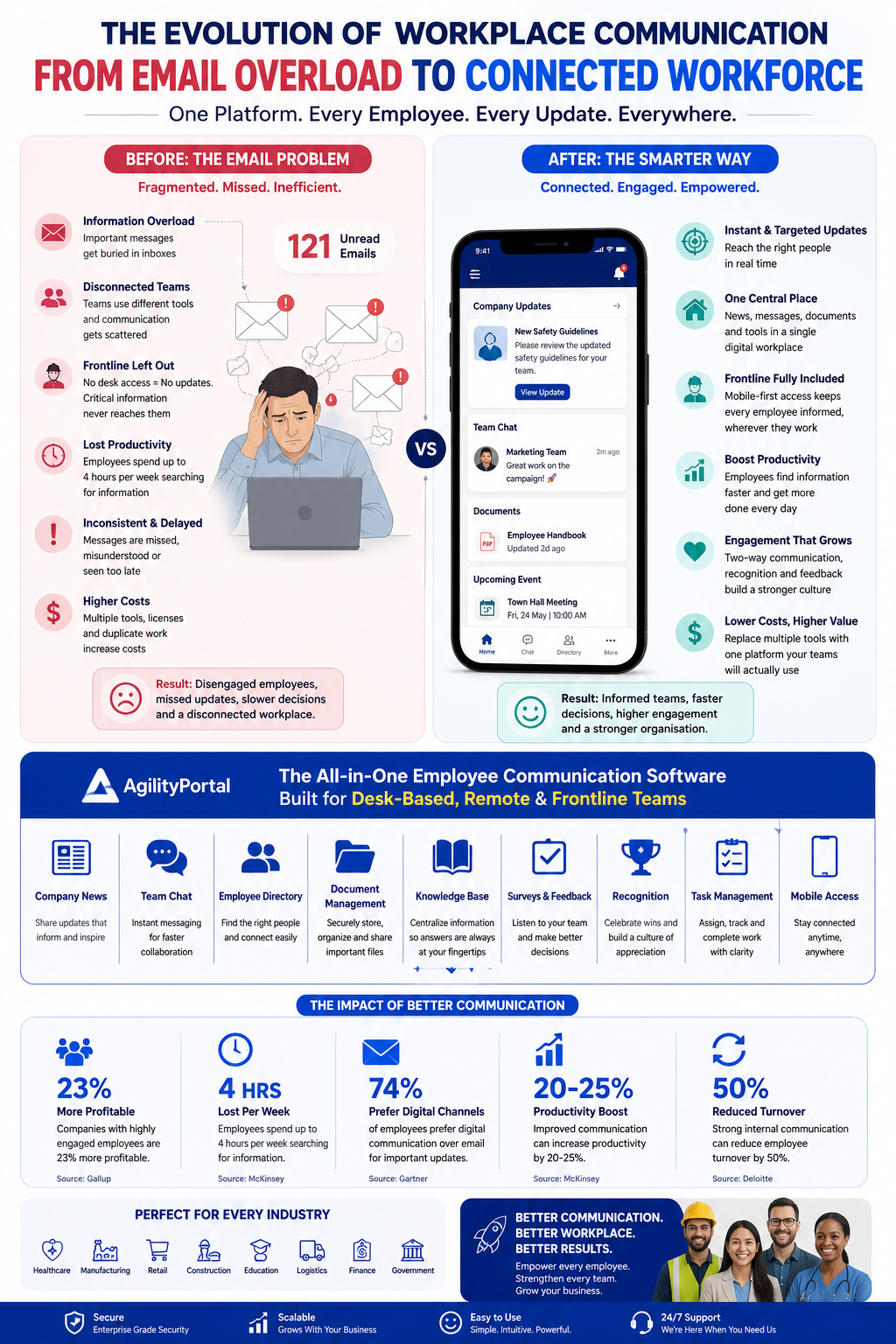
Unlike email, a dedicated staff instant messaging app allows teams to collaborate in real time, ask questions, share updates, and solve problems instantly without long email chains.
Combined with company news feeds, document libraries, knowledge bases, and mobile notifications, employees can stay connected whether they're working in an office, from home, or on the frontline.
Many organisations also rely on multiple software programs that employees can communicate with, such as Microsoft Teams for meetings, Slack for messaging, WhatsApp for quick updates, email for announcements, and SharePoint for documents.
While each tool has value, using too many disconnected applications often creates information silos, duplicated work, and confusion about where employees should go to find the latest information.
Modern employee communication platforms solve this by bringing everything together into a single digital workplace.
Employees no longer need to switch between multiple apps to stay informed, while managers can confidently communicate with the entire workforce—including desk-based and frontline employees—from one central location.
As businesses continue embracing hybrid work, mobile teams, and AI-powered collaboration, replacing traditional email with a unified communication platform is becoming less of a competitive advantage and more of a business necessity.
Related Internal Communication Guides You May Want to Read Next
This Internal Communication Platform guide helps you compare software and choose the right solution for your organisation. The related resources below explore internal communication strategies, campaign planning, team structures, common challenges, AI, and practical ways to improve communication across the workplace.
- Internal Communication Strategies for a More Connected Workforce
- Types of Internal Communication Campaigns With Practical Examples
- How to Write an Internal Communication Mission Statement
- Internal Communication Plan and Strategy Template
- How to Structure an Internal Communications Department
- How to Improve Internal Communication Across Your Business
- What Is an Internal Communication System and How Does It Work?
- Best Practices for a Successful Internal Communication Strategy
- Common Internal Communication Problems and How to Overcome Them
- How to Improve Internal Communication Within an Organisation
- Building an Effective Internal Communications Strategy
- Internal Communication Strategy: Steps, Goals, and Examples
- AI in Internal Communications: Benefits, Risks, and Use Cases
Together, these resources create a practical internal communications knowledge hub covering strategy, technology, employee engagement, campaign planning, communication measurement, and the use of AI in the modern workplace.
The Hidden Cost of Poor Workplace Communication
Poor workplace communication doesn't just create frustration—it quietly costs businesses thousands, and in some cases millions, every year. While many organisations invest in new technology, they often overlook the communication problems slowing everyone down.
Without a central internal communication platform, employees waste time searching for information, updates get missed, and important decisions are delayed.
Over time, these small issues add up, affecting productivity, employee morale, customer experience, and ultimately the bottom line. Learn how more aboure Internal Communication Plan & Strategy Template – A Complete.
Here are some of the biggest hidden costs businesses experience when communication breaks down:
- Lost productivity: Employees spend valuable time searching through emails, chat messages, and shared drives instead of completing meaningful work. Microsoft research found that workers spend a significant portion of their day switching between apps and searching for information.
- Missed company announcements: Important updates often get buried in crowded inboxes, meaning employees miss policy changes, operational updates, or leadership announcements.
- Frontline employees are left behind: Workers without a company email address or desk—such as retail associates, healthcare professionals, warehouse staff, drivers, and construction teams—often miss critical updates because they don't have access to the same communication channels as office-based employees.
- Increased safety and compliance risks: When health and safety procedures, compliance updates, or emergency notifications aren't delivered quickly, organisations increase the risk of workplace incidents and regulatory breaches.
- Duplicate work and wasted effort: Without a shared source of truth, different departments unknowingly recreate documents, answer the same questions, or repeat tasks that have already been completed.
- Poor employee engagement: Gallup research consistently shows that engaged employees are more productive and more likely to stay with their employer. Poor communication has the opposite effect, leaving employees feeling disconnected from leadership and the wider business.
- Longer onboarding times: New employees struggle to find policies, training materials, and company information when knowledge is spread across multiple systems instead of one digital workplace.
- Slower decision-making: Managers spend more time chasing information and waiting for responses instead of making informed decisions quickly.
- Higher employee turnover: Employees who feel uninformed or disconnected are more likely to look elsewhere, increasing recruitment and training costs.
- Lost revenue: Delayed communication, poor collaboration, and inefficient processes affect customer service, project delivery, and overall business performance.
Why Modern Businesses Are Investing in Better Communication
Forward-thinking organisations are replacing disconnected tools with a single software to communicate with employees that combines announcements, messaging, documents, knowledge sharing, tasks, and mobile access in one place.
Research from McKinsey found that improving communication and collaboration through digital technologies can increase productivity by 20–25%. Meanwhile, Gallup reports that organisations with highly engaged employees achieve 23% higher profitability, highlighting the direct link between communication and business success.
Rather than adding another application, a modern Employee Engagement Platform or employee messaging app gives every employee—from executives to frontline workers—one trusted place to receive updates, collaborate with colleagues, and access the information they need to do their job effectively.
25%
Higher productivity
Research from McKinsey found that organisations improving communication and collaboration through digital technologies can increase productivity by 20–25%. Combined with Gallup's finding that highly engaged employees achieve 23% higher profitability, the evidence shows that better workplace communication directly contributes to stronger business performance.
Sources: McKinsey Global Institute & Gallup – State of the Global Workplace
Signs Your Business Has Outgrown Email
Email has been a trusted communication tool for decades, but today's workplace looks very different.
With remote employees, hybrid teams, and frontline workers spread across multiple locations, relying on email alone often creates more problems than it solves.
If your business is experiencing any of the signs below, it may be time to replace scattered communication with a modern employee communication platform.

Signs Your Business Has Outgrown Email
Common warning signs include:
- Employees regularly say, "I never saw that email." Important announcements get buried beneath hundreds of other messages.
- Your teams rely on multiple WhatsApp groups, text messages, and personal apps to share company updates, creating security and compliance risks.
- Different departments use separate communication tools, making it difficult to know where conversations, documents, or announcements are stored.
- Employees ask the same questions repeatedly because policies, procedures, and company information are difficult to find.
- Frontline workers miss important updates because they don't have a company email address or easy access to workplace communication tools.
- Important documents exist in multiple locations, leading to outdated versions, duplicated work, and confusion.
- Managers spend hours chasing responses instead of focusing on leading their teams and driving business performance.
- New employees struggle to find information, slowing onboarding and increasing the workload for HR and managers.
- Company news reaches some employees but not others, creating communication gaps between office-based and frontline teams.
- Your workforce spends more time searching than working, switching between emails, chat apps, shared drives, and file storage systems.
If several of these challenges sound familiar, your business has likely outgrown email as its primary communication channel.
A modern internal communication software solution or staff communication app centralises announcements, documents, conversations, and knowledge into one digital workplace, ensuring every employee has access to the right information at the right time.
The result is faster collaboration, better employee engagement, and a more connected workforce.
Types of Workplace Communication Solutions
Not every business needs the same type of communication solution.
A company with office-based employees has very different requirements from a retail chain, healthcare provider, or manufacturing business with thousands of frontline workers.
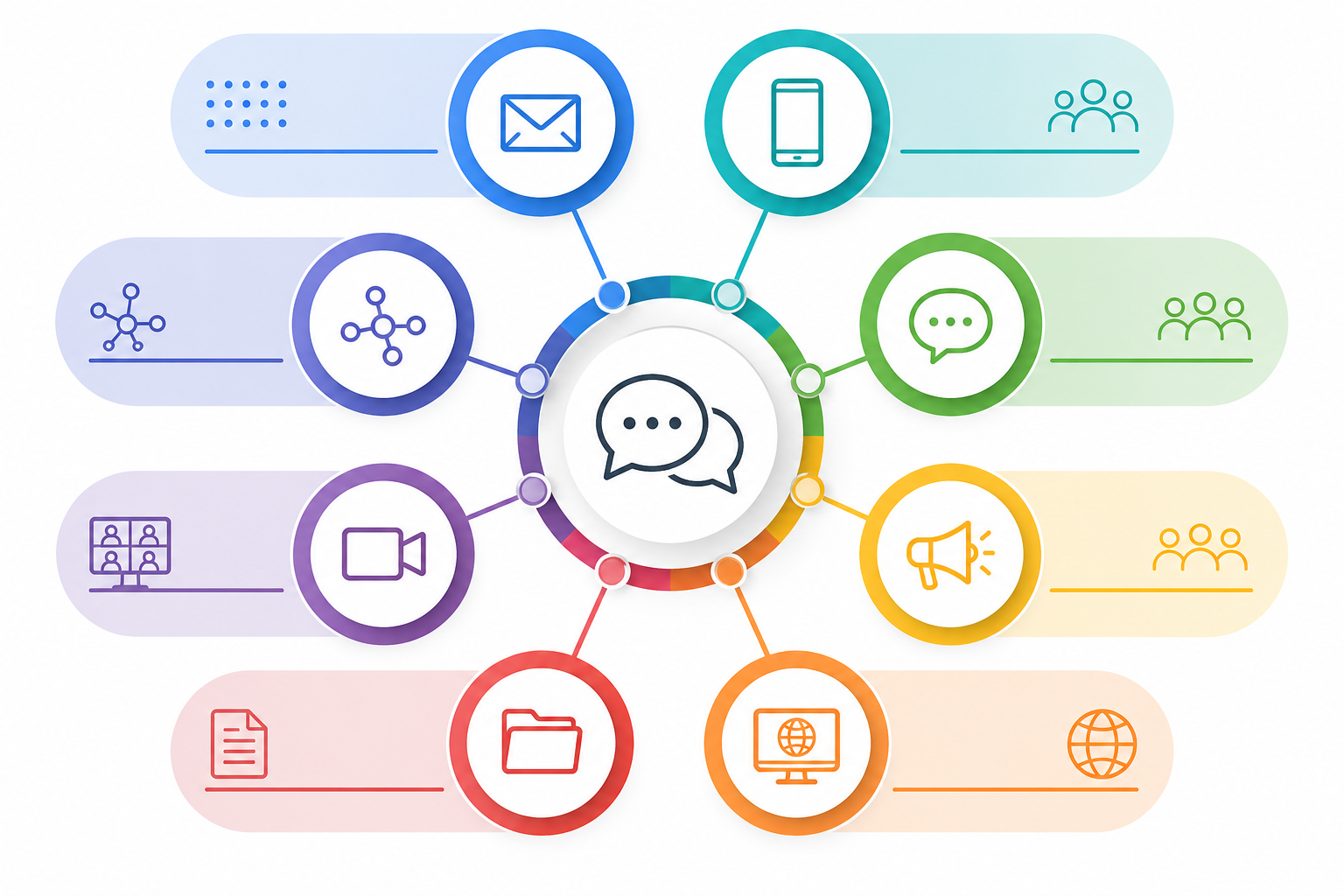
That's why it's helpful to choose a platform based on how your organisation communicates, rather than simply comparing feature lists. Below are the four most common categories of workplace communication solutions and where each one delivers the most value.
Types of Workplace Communication Solutions
1. Internal Communication Platforms
These platforms are designed to become the central hub for company-wide announcements, knowledge sharing, policies, documents, and employee engagement.
They help leadership communicate consistently while giving employees one place to access everything they need. To learn more about internal communication click here.
Popular examples include:
- AgilityPortal
- Staffbase
- Workvivo
- LumApps
- Interact
Best for: Organisations looking to build a connected digital workplace and reduce reliance on email.
2. Frontline Engagement Apps
Designed for employees who don't spend their day at a desk, these mobile-first platforms help organisations reach retail staff, healthcare workers, warehouse teams, hospitality employees, drivers, and field workers instantly.
Popular examples include:
- AgilityPortal
- Blink
- WorkJam
- YOOBIC
- Flip
Best for: Businesses with large deskless or mobile workforces that need real-time updates and easy access to company information.
3. Team Collaboration Software
These solutions focus on day-to-day conversations, meetings, file sharing, and project collaboration.
They help teams communicate quickly but often require additional tools for company-wide communication and knowledge management.
Popular examples include:
- AgilityPortal
- Slack
- Microsoft Teams
- Google Workspace
For a list of the best team collaboration software tools on the market click here.
Best for: Departmental collaboration, project teams, and hybrid working environments.
4. Employee Experience Platforms
Employee experience platforms combine communication, engagement, social networking, knowledge sharing, and workplace culture into a single solution.
Their goal is to improve how employees interact with the organisation throughout their entire journey.
Popular examples include:
Best for: Larger organisations focused on improving employee engagement, workplace culture, and the overall employee experience across multiple locations.
Essential Features to Look for in a Modern Workforce Communication Platform
Choosing the right communication solution isn't about finding the platform with the longest list of features.
It's about selecting a system that solves real business challenges, improves the employee experience, and helps people work more efficiently.
The best workforce communication platforms combine communication, collaboration, knowledge sharing, and engagement into one connected experience. Instead of switching between multiple applications, employees can access everything they need from a single digital hub.
When comparing solutions, look for features that deliver measurable business value rather than features you'll rarely use.
| Capability | Why It's Important | Business Benefit |
| Mobile Access | Gives deskless and remote employees instant access to company information from anywhere. | Improves communication across the entire workforce. |
| Company Announcements | Delivers business updates, leadership messages, and urgent notifications quickly. | Keeps employees informed while reducing reliance on email. |
| Central Document Hub | Stores policies, procedures, handbooks, and forms in one secure location. | Eliminates duplicate files and ensures employees always access the latest version. |
| Intelligent Search | Helps employees quickly locate documents, people, policies, and answers. | Saves time and increases productivity. |
| People Directory | Makes it easy to find colleagues by department, location, expertise, or role. | Encourages collaboration across teams. |
| Instant Team Messaging | Enables real-time conversations between individuals, departments, and project teams. | Speeds up decision-making and reduces communication delays. |
| Knowledge Centre | Creates a searchable library of company information and best practices. | Reduces repetitive questions and improves self-service. |
| Task & Action Management | Assigns responsibilities, tracks progress, and manages deadlines. | Increases accountability and project visibility. |
| Employee Pulse Surveys | Collects opinions, feedback, and sentiment across the organisation. | Helps leaders identify issues before they become larger problems. |
| Recognition & Rewards | Celebrates achievements and encourages peer-to-peer appreciation. | Strengthens workplace culture and employee motivation. |
| Reporting & Insights | Measures engagement, content performance, and communication effectiveness. | Enables data-driven decisions and continuous improvement. |
Features That Deliver the Biggest Return on Investment
While every organisation has different requirements, the most successful implementations typically include:
- Mobile-first access so office staff and frontline employees stay equally connected.
- A central knowledge repository that replaces scattered documents and outdated file shares.
- Secure team collaboration with messaging, file sharing, and discussions in one place.
- Employee feedback tools that give leadership a clear understanding of workforce sentiment.
- Smart analytics to measure engagement, communication reach, and platform adoption.
- Workflow automation for approvals, forms, reminders, and recurring business processes.
- Third-party integrations with Microsoft 365, Google Workspace, HR systems, payroll software, and other everyday business applications.
A platform that combines these capabilities helps create a more connected workplace, reduces operational inefficiencies, and provides employees with a better overall digital experience without adding unnecessary complexity.
How AI Is Transforming Workplace Communication
Artificial intelligence is changing the way organisations communicate with their workforce.
Instead of simply delivering messages, today's AI-powered workplace platforms help employees find information faster, reduce repetitive tasks, and personalise the way updates are shared.
As businesses generate more content than ever before, AI makes it easier for people to access the right information without wasting time searching across multiple systems.
Some of the biggest AI capabilities transforming workplace communication include:
- AI-powered search that instantly finds documents, policies, conversations, and answers using natural language.
- Automatic content summaries that condense lengthy announcements, meeting notes, and documents into quick, easy-to-read highlights.
- Knowledge assistants that answer employee questions using your company's policies, procedures, and internal documentation.
- AI chatbots that provide 24/7 support for HR, IT, onboarding, and frequently asked questions.
- Smart content recommendations that suggest relevant news, training, or resources based on an employee's role or department.
- Real-time translation that removes language barriers for global and multilingual teams.
- Intelligent notifications that prioritise important updates while reducing unnecessary alerts and notification fatigue.
- Voice-enabled assistants that allow employees to retrieve information hands-free using simple voice commands.
As AI continues to evolve, communication platforms are becoming more than places to share announcements—they're turning into intelligent digital workplaces that help employees work smarter, stay informed, and access knowledge in seconds.
How To Choose Employee Communication Software
How To Choose Employee Communication Software
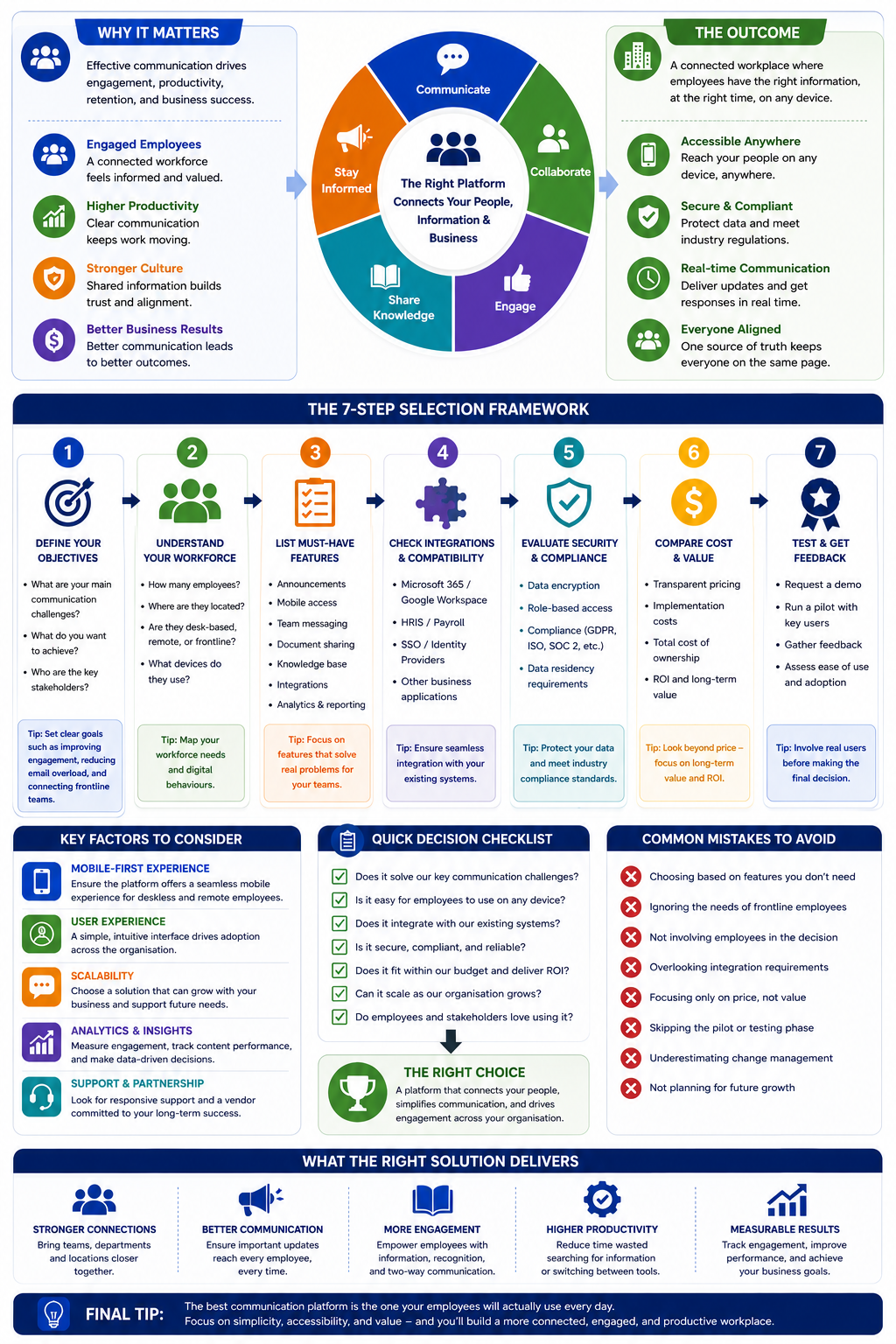
Selecting the right employee communication software starts with understanding how your organisation operates rather than choosing the platform with the most features.
Every business has unique communication challenges, so the ideal solution should align with your workforce, industry, and long-term goals.
Company size is often the first consideration.
Smaller businesses may need a simple platform for announcements, messaging, and document sharing, while larger enterprises typically require advanced permissions, integrations, analytics, and governance features. The way your employees work is equally important.
A remote workforce benefits from cloud-based collaboration and video communication, whereas hybrid organisations need tools that keep office and remote employees equally connected.
Industry-specific requirements also play a major role.
Manufacturing, retail, healthcare, and construction businesses often have large frontline workforces that rely on mobile access instead of company email.
Financial services and government organisations may prioritise compliance, audit trails, and enterprise-grade security, while education providers often require simple knowledge sharing and collaboration between staff and departments.
Finally, consider how well the platform integrates with your existing business systems. Compatibility with Microsoft 365, Google Workspace, HR software, payroll systems, and identity providers reduces manual work and encourages adoption across the organisation.
The best communication solution isn't necessarily the most expensive—it's the one that fits your workforce, simplifies collaboration, supports future growth, and helps employees stay informed, connected, and productive regardless of where they work.
Employee Communication Software Comparison
With so many workplace communication solutions available, finding the right platform can quickly become overwhelming.
Every vendor offers a different combination of features, pricing, deployment options, and target audiences.
Some platforms are designed primarily for large enterprises, while others focus on frontline communication, company intranets, employee engagement, or team collaboration.
Rather than choosing a solution based solely on popularity, businesses should compare products against their own requirements.
Consider factors such as mobile accessibility, AI capabilities, support for deskless workers, scalability, integrations, security, and overall value for money.
It's also worth checking whether a vendor offers a free trial or demo, allowing your team to evaluate the platform before making a long-term investment.
The comparison below highlights some of the leading platforms on the market, making it easier to understand how they differ. While pricing and features may change over time, this overview provides a useful starting point when creating your shortlist.
Whether you're a growing business looking to replace email or a large enterprise searching for a more connected digital workplace, comparing platforms side by side can help you identify the solution that best fits your organisation's communication goals, workforce structure, and future growth plans.
Employee Communication Software Comparison Table
| Software | Best For | Starting Price* | Mobile Apps | AI Features | Frontline Support | Free Trial | G2 Rating |
| AgilityPortal | All-in-one digital workplace & internal communications | Starts at $199/mo + Custom | ✅ | ✅ | ✅ | 14 Days + Free Demo | ⭐ 4.7 |
| Staffbase | Enterprise internal communications | Custom | ✅ | ✅ | ✅ | Demo | ⭐ 4.7 |
| Workvivo | Employee engagement & culture | Custom | ✅ | ✅ | ✅ | Demo | ⭐ 4.7 |
| Interact | Enterprise intranet | Custom | ✅ | Limited | Limited | Demo | ⭐ 4.6 |
| LumApps | Google & Microsoft digital workplace | Custom | ✅ | ✅ | Limited | Demo | ⭐ 4.6 |
| Blink | Frontline workforce communication | Custom | ✅ | Limited | ✅ | Demo | ⭐ 4.7 |
| Simpplr | Modern employee experience | Custom | ✅ | ✅ | Limited | Demo | ⭐ 4.8 |
| Happeo | Google Workspace intranet | Custom | ✅ | ✅ | Limited | Demo | ⭐ 4.5 |
| Axero | Social intranet & collaboration | Custom | ✅ | Limited | Demo | ⭐ 4.7 | |
| Firstup | Workforce communications | Custom | ✅ | ✅ | Demo | ⭐ 4.5 | |
| Cerkl Broadcast | Personalised internal communications | Custom | ✅ | ✅ | Limited | Demo | ⭐ 4.7 |
| Google Workspace | Productivity & collaboration | From $7/user/mo | ✅ | ✅ | ❌ | ✅ | ⭐ 4.6 |
| Microsoft Teams | Meetings & team collaboration | From $4/user/mo | ✅ | ✅ | Limited | ✅ | ⭐ 4.5 |
| Slack | Team messaging & collaboration | Free / From $8.75/user/mo | ✅ | ✅ | Limited | ✅ | ⭐ 4.5 |
* Prices shown are publicly available starting prices where published.
Enterprise pricing and feature availability may vary based on organisation size and requirements.
How to Pick the Right Employee Communication Tool
Choosing the best tool goes beyond comparing feature lists.
The goal is to find a solution that improves collaboration, keeps employees informed, and supports the way your workforce operates.
Whether you're replacing an outdated tool, introducing a mobile employee communication app, or investing in a new employee internal communication platform, certain capabilities have a much bigger impact on long-term success than others.
Here are the features worth prioritising during your evaluation.
1. User-Friendly Experience
No matter how feature-rich a platform is, it won't deliver value if employees don't actually use it.
One of the biggest reasons workplace software fails is poor user adoption. If the interface feels outdated, navigation is confusing, or employees require extensive training just to complete simple tasks, the platform quickly becomes another forgotten tool.
Any tool you select should feel familiar from the moment employees log in. A modern, social media-style interface—with intuitive navigation, personalised feeds, clear menus, and interactive features such as likes, comments, and reactions—helps users feel comfortable immediately.
When a platform looks and behaves like the apps employees already use every day, adoption happens much faster.
Employees should be able to find company news, documents, people, conversations, and resources within a few clicks, without needing lengthy training sessions or complicated user manuals.
A simple, well-designed experience encourages employees to return regularly, making communication part of their daily routine rather than another task to complete.
Ultimately, the easier a platform is to learn and navigate, the higher the engagement, the faster the rollout, and the greater the return on your investment.
2. Multi-Channel Communication
Modern employees work across different locations, departments, offices, and devices, so important updates need to reach the right people at the right time.
An effective communication platform should support multiple delivery channels, including desktop, mobile devices, email, Microsoft Teams, SharePoint, and digital signage, ensuring employees stay informed regardless of where they're working.
Equally important is the ability to target communications to specific audiences instead of sending every announcement to the entire organisation. This helps reduce information overload while ensuring employees only receive updates that are relevant to their role, team, or location.
For example, AgilityPortal allows organisations to organise employees into Spaces (private or public collaboration groups), Departments, and Office Locations.
Communications can then be targeted to a single group, multiple teams, specific departments, or entire office locations, making it easy to deliver relevant announcements, documents, discussions, events, and tasks to the people who need them most.
This targeted approach improves engagement, keeps communication organised, and ensures important information reaches the intended audience without unnecessary distractions for everyone else.
3. Personalised Content and Audience Targeting
One of the biggest mistakes organisations make is sending every announcement to every employee.
Not all information is relevant to everyone, and bombarding your workforce with generic updates often leads to employees ignoring important communications altogether.
A modern employee internal communication platform should allow you to target content to the people who actually need it.
Whether you're sharing a company-wide announcement, an HR policy, a departmental update, or a site-specific notice, messages should be delivered only to the relevant audience.
Look for software that lets you target communications by:
- Department
- Office location
- Teams or collaboration groups
- Job role or permission level
- Region or country
- Individual employees
- Project groups
For example, AgilityPortal communication app provides multiple ways to organise your workforce.
Administrators can create Spaces—private or public collaboration groups—for departments, projects, customers, or communities.
Employees can also be organised by Department, Office Location, and Role, making it easy to publish targeted announcements, documents, events, forms, tasks, and discussions to exactly the right audience.
This level of audience targeting not only makes communication more relevant but also reduces information overload, improves engagement, and ensures employees receive updates that matter to their role instead of filtering through company-wide messages that don't apply to them.
4. Two-Way Communication
Great communication encourages conversation, not just broadcasting.
Features such as comments, polls, surveys, employee recognition, reactions, and discussion forums give employees a voice while helping leadership gather valuable feedback.
5. Integration with Existing Business Systems
A communication platform should work alongside the tools your employees already use.
Integrations with Microsoft 365, Google Workspace, HR systems, payroll software, identity providers, and collaboration tools help reduce manual work and improve adoption across the business.
6. Enterprise Security and Compliance
When evaluating Employee Communication Software, security should never be an afterthought.
Your platform will likely store sensitive company information, employee data, internal discussions, and confidential documents, so choosing a solution with enterprise-grade security is essential.
Look for a platform that includes:
- Role-based access control (RBAC) to ensure employees only access information relevant to their role.
- Multi-factor authentication (MFA) and Single Sign-On (SSO) for secure, simplified authentication.
- End-to-end encryption and encrypted data storage to protect information both in transit and at rest.
- Comprehensive audit logs that record user activity and administrative changes for compliance and accountability.
- Granular permissions for documents, pages, Spaces, teams, departments, and individual content.
- GDPR compliance and support for regional data privacy regulations.
- Secure cloud hosting with automatic backups, disaster recovery, and high availability.
- Device and session management to control active logins and quickly revoke access when required.
- IP restrictions and conditional access policies for organisations with stricter security requirements.
- Data retention policies and secure document version control to support governance and compliance.
- Security certifications, such as SOC 2, ISO 27001, or HIPAA (where applicable), providing additional confidence that the vendor follows recognised security standards.
Strong security isn't just about protecting data—it's about giving employees, IT teams, and business leaders confidence that company information remains secure while still being easy to access for authorised users.
Choosing a platform with robust security and compliance capabilities helps reduce risk, simplify governance, and protect your organisation as it grows.
7. Mobile-First Access
For organisations with remote, hybrid, or frontline employees, mobile accessibility is essential.
A dedicated mobile app allows employees to receive notifications, access company resources, complete forms, and stay connected regardless of where they're working.
8. Analytics and Communication Insights
Without reporting, it's impossible to know whether employees are engaging with your content. Built-in analytics help measure announcement reach, user activity, content performance, acknowledgements, and engagement trends, allowing communication teams to continually improve their strategy.
When comparing vendors, don't focus solely on the number of features available. Instead, choose a solution that delivers a great user experience, supports your workforce today, integrates with your existing technology, and has the flexibility to grow as your organisation evolves.
Questions Every Buyer Should Ask Before Purchasing Employee Communication Software
Investing in Employee Communication Software is a long-term decision that can significantly impact how your organisation shares information, collaborates, and engages employees.
While many vendors offer similar features, not every software to communicate with employees is designed to meet the needs of every business.
Whether you're replacing an outdated Intranet, introducing a mobile employee communication app, or searching for a modern employee internal communication platform, asking the right questions before purchasing can help you avoid costly mistakes.
Use the checklist below to compare vendors and ensure the platform supports your current requirements while remaining flexible enough to grow with your organisation.
Can employees access the platform without a company email address?
Many frontline and deskless employees don't have corporate email accounts. Ensure the platform supports alternative login methods and provides secure mobile access so every employee can stay connected.
Can it replace multiple workplace applications?
The best solutions consolidate announcements, chat, document management, forms, knowledge sharing, and employee directories into a single platform, reducing software costs and improving productivity.
Is there a dedicated mobile employee communication app?
Employees increasingly expect to access company news, policies, schedules, and updates from their smartphones. A fully featured mobile experience is essential for remote, hybrid, and frontline workforces.
Does it include a modern Intranet?
A modern Intranet should do more than store documents. It should provide searchable knowledge, personalised content, company news, team spaces, and collaboration tools in one central location.
Can HR and internal communications publish company-wide updates?
Your HR and communications teams should be able to create announcements, publish policies, schedule content, and distribute important updates without relying on IT support.
Can managers target announcements to specific teams?
Look for audience targeting that allows updates to be delivered by department, office, location, role, project, or team, ensuring employees only receive information that's relevant to them.
How does the platform measure engagement?
Choose a solution that includes analytics for content views, employee reach, reactions, comments, acknowledgements, and user activity so you can measure communication effectiveness.
What happens when an employee leaves the business?
A secure employee internal communication platform should integrate with your identity provider or HR system to automatically revoke access, protecting company data and maintaining compliance.
Does it integrate with your existing business systems?
Check for integrations with Microsoft 365, Google Workspace, HRIS platforms, payroll software, single sign-on providers, and document management systems to minimise disruption and improve adoption.
How secure is the platform?
Security should be a top priority.
Look for features such as role-based permissions, encryption, audit logs, multi-factor authentication, data residency options, and compliance with standards like GDPR and SOC 2.
By asking these questions during your evaluation process, you'll be better equipped to choose Employee Communication Software that improves collaboration, strengthens employee engagement, and delivers long-term value for your organisation.
Calculate the ROI of Employee Communication Software
One of the biggest challenges when investing in Employee Communication Software is proving its business value.
While better communication improves collaboration, employee engagement, and productivity, decision-makers often want to understand the financial impact before approving a new platform.
A simple ROI calculator can help estimate how much poor communication is costing your organisation each year.
By calculating the time employees spend searching for information, switching between applications, or waiting for responses, you can build a clearer business case for investing in a modern communication solution.
For example, if a company has 400 employees with an average annual salary of £35,000, and each employee loses just 20 minutes per working day because of fragmented communication, outdated systems, or difficulty finding information, the annual productivity cost can quickly reach hundreds of thousands of pounds.
An ROI calculator allows you to estimate:
- Number of employees
- Average annual salary
- Time lost per employee each day
- Annual productivity cost
- Estimated annual savings after implementing a modern platform
- Potential return on investment (ROI)
- Estimated payback period
Rather than relying on assumptions, an interactive calculator gives business leaders real figures based on their own organisation, making it easier to justify investment and demonstrate the long-term value of improving workplace communication.
Interactive ROI Calculator
Calculate the ROI of a Modern Intranet
Your employees' time is one of your organisation's most valuable resources. Use this calculator to estimate how much time and money may be lost when employees struggle to find people, documents, conversations and important company information.
min
5 minutes
120 minutes
staff
10 employees
10,000 employees
£47
Money Lost Per Day
The estimated salary cost of time employees spend searching for relevant people and information.
1.04%
Working Day Lost
The percentage of each employee's working day spent searching instead of completing productive work.
204
Hours Lost Per Year
The estimated combined number of productive working hours lost across your organisation each year.
Estimated AgilityPortal Monthly Investment
Based on 10 employees at an illustrative cost of £1.50 per employee per month.
£15
estimated monthly cost
View Our Pricing
This calculator provides an illustrative estimate only. Actual productivity losses, subscription costs, savings and return on investment will vary depending on salaries, working patterns, adoption and organisational requirements.
*Illustrative example assuming approximately 50% of lost productivity is recovered through improved communication, faster access to information, and streamlined collaboration.
Actual results will vary depending on your organisation.
The Type of Employee Communication Software by Industry
No single workplace platform is right for every organisation.
A hospital has very different communication requirements from a construction company, hotel group or financial institution.
The right choice depends on where employees work, how they access information, the level of security required and whether most of the workforce is desk-based or frontline.
Healthcare
Healthcare organisations need to reach clinical, administrative and support teams working across hospitals, clinics, care facilities and community locations. Many employees work rotating shifts and may not have regular access to a company email account.
A suitable platform should provide secure mobile access, urgent alerts, policy libraries, role-based permissions, training resources and targeted updates.
It should also help staff quickly locate clinical guidance, compliance documents and contact information without searching through lengthy email threads.
Suitable tools for healthcare include:
- AgilityPortal for combining secure announcements, document management, staff directories, training and mobile access in one digital workplace.
- Staffbase for large healthcare groups that require structured, multi-channel corporate messaging.
- Microsoft Teams for organisations already operating within the Microsoft 365 environment.
- Blink for reaching nurses, carers and other shift-based workers through a mobile-first experience.
Security, auditability and access control should remain central to the buying decision, particularly when confidential employee or operational information is being shared.
Construction
Construction businesses often need to connect site workers, subcontractors, project managers and head-office teams spread across multiple locations. Relying on paper notices, personal messaging groups and informal phone calls can make it difficult to maintain consistent communication.
The most useful solutions provide mobile announcements, safety alerts, project Spaces, forms, document sharing, incident reporting and access to the latest policies or site instructions.
Suitable tools for construction include:
- AgilityPortal for creating separate digital workspaces for projects, sites, departments and contractor groups.
- Connecteam for workforce scheduling, task management, checklists and field-based operations.
- Microsoft Teams for project conversations, video meetings and document collaboration.
- Beekeeper for mobile communication with distributed and frontline workers.
Construction companies should prioritise simple mobile access, push notifications and the ability to target content by project or location. Frontline-focused platforms are particularly valuable where employees rarely sit at a desk.
Retail
Retailers must keep store employees, warehouse teams, regional managers and head-office staff aligned. Common communication needs include promotions, product updates, shift changes, operational procedures and urgent safety notices.
An effective solution should allow messages to be targeted by store, region, role or department. Mobile access is especially important because many retail employees do not use a desktop computer during their working day.
Suitable tools for retail include:
- AgilityPortal for combining company news, knowledge resources, surveys, employee recognition and store-specific Spaces.
- YOOBIC for frontline task execution, training and retail operations.
- Blink for delivering mobile updates to deskless employees.
- Staffbase for larger retail groups that need centrally controlled campaigns across multiple countries or brands.
Retail buyers should also look for read confirmation, translation, analytics and short-form training capabilities. Current frontline guidance frequently highlights mobile apps and push notifications as important channels for retail workforces.
Manufacturing
Manufacturing teams often operate across production floors, warehouses, offices and distribution sites. Employees may work different shifts, making it difficult to ensure everyone receives the same operational and safety information.
The chosen system should support shift-based announcements, safety alerts, digital signage, mobile access, procedure libraries, incident forms and acknowledgement tracking.
Suitable tools for manufacturing include:
- AgilityPortal for centralising operating procedures, training, announcements and departmental collaboration.
- Poppulo for organisations that want to combine digital signage with broader internal messaging.
- Beekeeper for connecting production and frontline employees.
- Microsoft Teams Frontline for manufacturers already invested in Microsoft tools.
Digital signage can be particularly useful on factory floors where workers cannot regularly check a phone or computer. Poppulo identifies warehouse corridors, factory floors and shared workspaces as important places for visible workplace messaging.
Education
Schools, colleges and universities need to communicate with teaching staff, administrators, support teams and employees working across multiple campuses. Important information may include policy changes, safeguarding notices, training, events, departmental news and emergency updates.
The most suitable platforms provide secure staff communities, searchable knowledge libraries, calendars, forms, surveys and integration with existing education systems.
Suitable tools for education include:
- AgilityPortal for building a central staff hub with departmental Spaces, document libraries, learning content and announcements.
- Microsoft Teams for Education for institutions already using Microsoft 365.
- Google Workspace for schools that rely heavily on Gmail, Drive and Google Classroom.
- LumApps for larger institutions seeking an employee experience layer connected to Google Workspace or Microsoft 365.
For internal staff communication, buyers should distinguish between platforms designed for employees and classroom apps intended mainly for communication between teachers, students and parents.
Hospitality
Hotels, restaurants, leisure venues and hospitality groups depend on employees who work irregular hours across reception, housekeeping, catering, maintenance and management.
The right solution should make it easy to distribute shift updates, service standards, training, event information, health and safety notices and urgent operational messages.
Content should be easy to access on a personal or shared mobile device.
Suitable tools for hospitality include:
- AgilityPortal for combining staff news, training, scheduling information, documents and employee recognition.
- Beekeeper for mobile-first communication across hotel and service teams.
- Connecteam for scheduling, operational checklists and frontline workforce management.
- Blink for fast access to company updates and resources.
Hospitality-specific platforms should support multilingual content, mobile notifications and communication across multiple venues. Industry solutions commonly focus on improving coordination between hotel teams and helping employees access updates without relying entirely on email.
Government and Public Sector
Government departments and public-sector organisations must balance accessibility with strict security, governance and record-keeping requirements.
Teams may be spread across offices, public facilities, remote locations and field services.
Important features include role-based permissions, audit logs, secure document storage, policy management, approval workflows, accessibility and controlled access to sensitive content.
Suitable tools for government include:
- AgilityPortal for secure departmental workspaces, policy libraries, forms, approvals and targeted public-sector updates.
- Microsoft Viva and Teams for departments operating within a Microsoft-based technology environment.
- Staffbase for large public organisations requiring centrally managed messaging.
- Unily for complex enterprise intranet deployments with extensive integration requirements.
Buyers should carefully evaluate data hosting, identity management, retention policies, accessibility standards and the supplier's security certifications before making a decision.
Finance
Banks, credit unions, insurance firms and other financial organisations operate in highly regulated environments.
Communications may include compliance notices, policy changes, cybersecurity guidance, market updates and confidential operational information.
The selected platform should offer granular permissions, encryption, Single Sign-On, multi-factor authentication, audit trails, document version control and reliable governance.
Suitable tools for finance include:
- AgilityPortal for secure collaboration, controlled document access, compliance resources and company-wide announcements.
- Microsoft Viva for financial firms already using Microsoft 365 and Entra ID.
- Staffbase for large institutions that need controlled campaigns across regions and business units.
- Simpplr for organisations looking for an AI-supported employee experience platform.
Financial organisations should avoid selecting a platform based solely on social or engagement features. Security, traceability, access controls and the ability to demonstrate compliance should carry greater weight during procurement. AgilityPortal positions its government, legal and finance workspace around centralised information, compliance and controlled collaboration.
Logistics and Transportation
Logistics companies need to reach drivers, warehouse employees, dispatchers, fleet managers and office staff who may be working across different sites, vehicles and time zones.
The most valuable features include mobile alerts, shift information, safety updates, document access, operational checklists, multilingual content and location-based targeting.
Suitable tools for logistics include:
- AgilityPortal for connecting warehouse, transport and office teams through mobile announcements, resources and location-specific Spaces.
- Blink for drivers and deskless employees who need quick access from a mobile device.
- Connecteam for workforce scheduling, forms, checklists and operational coordination.
- Beekeeper for frontline engagement across warehouses and distribution networks.
For this sector, the user experience must be fast and uncomplicated.
Drivers and warehouse employees are unlikely to navigate a complex intranet during a busy shift. Mobile alerts, short videos and concise operational messages are generally more practical than long emails or desktop-only pages.
Ultimately, the strongest option is the one that matches the way employees actually work.
Organisations with deskless teams should prioritise mobile access and targeted notifications, while regulated industries may place greater importance on security, governance and auditability.
Businesses with mixed workforces may benefit most from an all-in-one platform that combines communication, knowledge sharing, collaboration and employee services in a single environment.
Common Mistakes to Avoid When Choosing a Workplace Communication Platform
Investing in a new platform is only the first step.
Many organisations fail to achieve the expected return because they focus on technology instead of adoption, governance and long-term employee engagement.
Avoiding these common mistakes can significantly improve your chances of a successful rollout.
Buying Based on Features Alone
It's easy to compare long feature lists, but more functionality doesn't always translate into better outcomes.
Instead of choosing the platform with the most features, focus on how well it solves your organisation's communication challenges, integrates with existing systems and supports everyday workflows.
A simpler solution that employees actually use will often deliver far greater value than a feature-rich platform with poor adoption.
Ignoring Mobile Users
Many organisations still design their internal communications around desktop employees, even though large portions of the workforce operate on the frontline or in the field.
If employees cannot easily access company updates, documents and resources from their mobile devices, engagement will suffer.
A mobile-first experience should be a priority for businesses with remote, hybrid or deskless teams.
Failing to Secure Executive Sponsorship
Successful workplace transformation starts at the top.
When leadership actively communicates through the platform, shares company updates and encourages participation, employees are far more likely to adopt it.
Without visible support from executives and department leaders, even the best implementation can lose momentum after launch.
Providing Little or No Onboarding
Simply giving employees access isn't enough. Users need clear guidance on where to find information, how to collaborate and which features they should use.
Short training sessions, onboarding guides, video tutorials and internal champions can dramatically increase adoption and reduce resistance to change.
Continuing to Rely on Email for Everything
A common mistake is launching a new platform while continuing to send every announcement through email.
This creates confusion about where employees should look for important information and reduces the value of the new system.
Email should complement the platform rather than remain the primary communication channel.
Not Defining Governance and Ownership
Without clear ownership, content quickly becomes outdated, duplicated or inconsistent.
Every organisation should establish governance policies covering content ownership, publishing responsibilities, document reviews, permissions, approval workflows and archive schedules.
This helps maintain trust in the information employees rely on every day.
Sending Too Many Notifications
More notifications do not automatically improve communication. In fact, excessive alerts often cause employees to ignore important messages altogether.
Organisations should use audience targeting, priority levels and notification preferences to ensure employees only receive updates that are relevant to their role, department or location.
This reduces information overload and improves engagement with critical communications.
By avoiding these common pitfalls, organisations are far more likely to achieve high adoption rates, improve collaboration and maximise the long-term value of their investment.
Why Most Employee Communication Platforms Fail
Many organisations assume that introducing a new communication platform will automatically solve problems such as low engagement, poor collaboration and information overload.
In reality, the technology is rarely the reason projects fail. The biggest challenge is user adoption.
If employees continue relying on email, messaging apps or old habits, even the most advanced platform will struggle to deliver value.
This often happens because leadership fails to actively use the platform themselves, employees receive little or no training, or the system is simply too complicated for everyday use. Another common mistake is introducing yet another workplace application instead of replacing disconnected tools with a single, central hub.
When employees have to switch between multiple systems to find announcements, documents, conversations and resources, engagement quickly declines and the platform becomes another forgotten application.
Successful organisations approach implementation as a business transformation rather than a software deployment. They define a clear communication strategy, establish content ownership, provide practical onboarding and encourage managers to lead by example.
They also select a platform that matches how their workforce actually operates, whether employees are office-based, remote or on the frontline. Regularly publishing relevant content, targeting updates to the right audiences and measuring engagement helps maintain long-term adoption.
Ultimately, the organisations that achieve the greatest return are those that focus just as much on people, processes and culture as they do on technology.
When employees see genuine value in using the platform every day, it naturally becomes the central place for communication, collaboration and knowledge sharing.
Struggling With Disconnected Teams? Find the Right Employee Communication Platform
Struggling With Disconnected Teams? Find the Right Employee Communication Platform
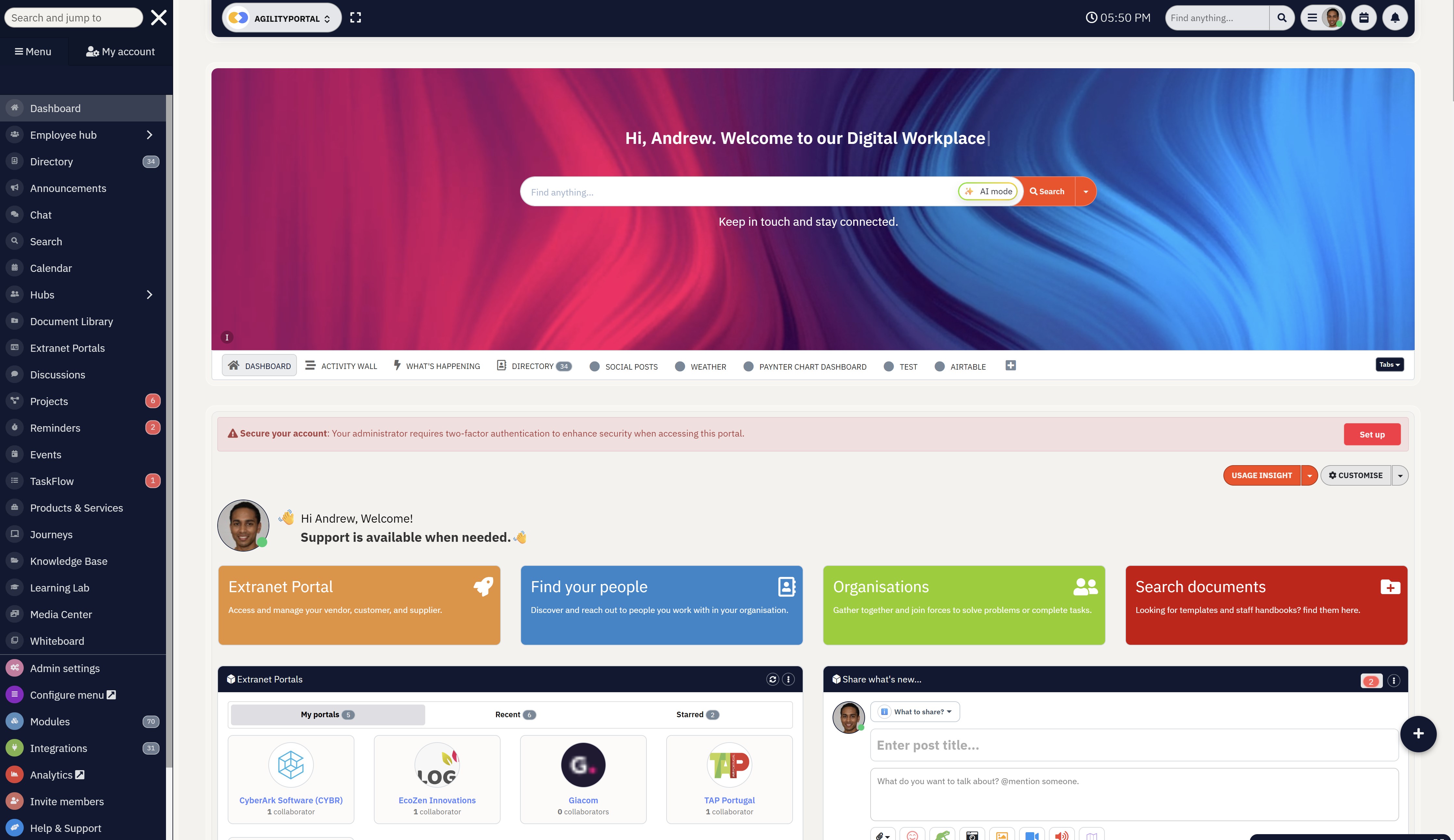
Keep every employee connected, informed and engaged with AgilityPortal. From frontline workers to office teams, AgilityPortal centralises company announcements, chat, documents, tasks and collaboration into one secure, mobile-first platform—so everyone has access to the information they need, wherever they work.
- Chat and messaging
- Personalized news feeds
- Newsletter creation and distribution
- Employee-generated content
- Mobile app access
- Onboarding support
- Reporting and analytics
- Automated workflows
Ready to transform your internal communication?
Start your free 14-day trial or book a personalised demo today to see how AgilityPortal can help you build a more connected, engaged and productive workforce.
AgilityPortal
One Employee Communication Platform for Your Entire Workforce
Still relying on email, chat apps and disconnected tools to communicate with employees? AgilityPortal brings company announcements, chat, documents, knowledge, employee engagement, tasks and collaboration into one secure, mobile-first platform. Whether your workforce is office-based, remote, hybrid or on the frontline, everyone stays informed, connected and productive from a single digital workplace.
Starts from $99/month for up to 100 employees
14-day free trial included
No credit card required
Final Thoughts
Successful workplace communication isn't about buying another application or adding yet another tool to your technology stack.
It's about creating a single digital workplace where employees always know where to find company news, important documents, policies, training, conversations and the resources they need to do their jobs effectively.
When information is scattered across emails, chat apps, shared drives and disconnected systems, productivity suffers, collaboration slows down and employees become frustrated trying to locate the right information.
The best platforms simplify the employee experience by bringing communication, collaboration and knowledge sharing into one central location.
Rather than forcing people to switch between multiple applications throughout the day, they provide a consistent experience that works across desktop and mobile devices, whether employees are in the office, working remotely or on the frontline.
Organisations that invest in a solution people genuinely enjoy using typically see stronger engagement, faster access to information, improved collaboration and a better return on investment.
Ultimately, the goal isn't simply to deploy new technology—it's to build a connected workplace where communication is clear, information is accessible and every employee feels informed, engaged and empowered to do their best work.
FAQ
What are employee communication platforms?
Employee communication platforms are centralised digital workplaces that help organisations share company news, policies, documents, events, conversations and knowledge from one location.
Unlike a basic staff messaging app or internal email tool, modern solutions combine announcements, collaboration, document management, employee recognition, surveys and knowledge sharing into a single experience.
Many businesses also use an employee communication and engagement platform to improve culture, increase engagement and reduce their reliance on email.
What is the best employee communication software?
The best solution depends on your workforce and business requirements.
Organisations with frontline or deskless employees often prioritise a mobile employee communication app, while office-based businesses may need stronger document management and collaboration features. Popular options include AgilityPortal, Workvivo, Staffbase, Beekeeper, Simpplr and Microsoft Viva.
If you're comparing products, requesting a Workvivo demo or exploring www Workvivo is one way to evaluate how it compares with other leading platforms before making a decision.
Are there any free employee communication platforms?
Yes, there are several free employee communication platforms, although they typically have limited functionality.
Microsoft Teams, Slack and Google Chat all offer free plans suitable for small teams.
However, businesses that require advanced permissions, intranet capabilities, analytics, employee engagement features and governance often outgrow free plans and move to a dedicated business solution.
Can a workplace platform replace Microsoft Teams or an internal email tool?
For many organisations, yes. While Microsoft Teams remains excellent for meetings and team collaboration, it is not designed to replace a complete employee internal communication platform.
A dedicated solution provides company-wide announcements, personalised news feeds, knowledge bases, policies, forms, employee directories and social communities that go far beyond chat.
Many organisations also reduce dependence on their internal email tool by delivering targeted updates directly through the platform.
Is WhatsApp suitable for employee communication?
Many businesses initially use WhatsApp for employee communication because employees are already familiar with it.
However, WhatsApp lacks governance, content management, audit trails, document version control and structured company announcements.
As organisations grow, they often move to a dedicated workforce communications platform or staff communication platform that provides better security, administration and compliance.
Do these platforms work well for frontline and mobile employees?
Absolutely.
Today's leading solutions are designed for distributed workforces and provide excellent mobile employee communication capabilities.
A dedicated employee communication mobile app or internal communications mobile app allows employees to receive announcements, access documents, complete forms, participate in surveys and stay connected regardless of whether they work in retail, healthcare, manufacturing, hospitality or construction.
What is an HR communication platform?
An HR communication platform helps Human Resources teams manage onboarding, policy distribution, employee updates, surveys, recognition programmes and important company communications.
Many modern HR communication platforms also include document management, learning resources, approval workflows and employee engagement tools, making it easier to support the entire employee lifecycle from recruitment through to retention.
What features should I look for in a staff communication platform?
Look for features such as company announcements, mobile access, document management, intelligent search, employee directories, chat, analytics, surveys, recognition, role-based permissions, integrations, workflow automation and enterprise security.
A good staff instant messaging app should complement these features rather than replace them, allowing employees to collaborate while keeping important company information organised and searchable.
Can AI improve internal communication?
Yes. AI is transforming workplace communication by automatically summarising long discussions, improving enterprise search, translating content, recommending relevant information and helping employees find answers more quickly.
Combined with using an internal intranet social intranet for employee interaction, AI can significantly improve knowledge sharing, employee engagement and productivity across the organisation.
What happened to SocialChorus and Dynamic Signal?
Both Dynamic Signal and SocialChorus merged to form Firstup.
You may still see searches for Dynamic Signal SocialChorus, SocialChorus Dynamic Signal, Firstup SocialChorus, SocialChorus Firstup, Studio SocialChorus, SocialChorus login or SocialChorus pricing, but these now relate to the Firstup platform and its legacy products.
Businesses evaluating these solutions should compare them alongside newer alternatives such as AgilityPortal, Staffbase, Workvivo and Beekeeper to determine which platform best fits their communication and employee experience goals.
Is Beekeeper a good choice for frontline communication?
The Beekeeper communication platform is widely used by organisations with large frontline workforces in industries such as hospitality, manufacturing, retail and logistics.
It focuses on mobile communication, operational updates and employee engagement for deskless workers.
Businesses that require broader intranet capabilities, document management, collaboration spaces and knowledge sharing may also compare Beekeeper with platforms such as AgilityPortal, Workvivo or Staffbase before making a final decision.
AI Summary
- Employee communication software brings announcements, chat, documents, company knowledge, employee engagement and collaboration into one central platform, reducing reliance on disconnected workplace tools.
- The best platforms support office, hybrid, remote and frontline employees with mobile apps, targeted communications, intelligent search, role-based permissions, integrations and real-time notifications.
- Organisations that continue relying on email, consumer messaging apps and shared drives often experience information silos, duplicate work, poor collaboration and lower employee engagement.
- Mobile-first communication helps ensure every employee stays informed, especially deskless workers who rarely access a desktop computer or company email during their working day.
- Leading solutions including AgilityPortal, Staffbase, Workvivo, Microsoft Viva, Simpplr, Beekeeper and Blink offer different strengths depending on business size, industry and workforce requirements.
- Choosing the right platform improves internal communication, increases employee engagement, reduces information overload and creates a more connected, productive and informed workplace.
Most Popular Posts

Effective communication among team members is vital for the productivity and success of any organization. Surprisingly, 60% of companies lack a long-term internal communication strategy, which p...


Businesses thrive on communication for efficiency, productivity and accomplishment. When the right information is passed from the right designation in the organization, it promotes positivity an...

Categories
Blog
(3228)
Business Management
(396)
Employee Engagement
(235)
Digital Transformation
(220)
Growth
(151)
Intranets
(142)
Internal communications
(110)
Remote Work
(68)
Sales
(53)
Collaboration
(53)
Customer Experience
(33)
Culture
(30)
Knowledge Management
(29)
Project management
(29)
Leadership
(20)
Comparisons
(9)
News
(1)

Related Posts

Have you ever welcomed a new employee, shared a mountain of information, and wondered how much they'll remember by tomorrow? A clear presentation can make the first day easier by showing new starters who to contact, where to find key informatio...

What would your leadership team do if a serious allegation about your business started spreading online before anyone knew whether it was true? That's where crisis communication and management really matter. An employee spots the post, screensh...

AI for personal injury law firms is becoming part of everyday casework. These tools can help teams sort through medical records, build timelines, draft demand packages and find details buried in a big case file. That could free up attorneys and...

Ever left an online meeting unsure what was decided—and wondered how to run an effective meeting without wasting everyone's time? A call can bring a distributed team together quickly, but when it starts late, includes people who don't know why ...

Where can I send a fax from in my area when a document needs to go out today? The answer might be a nearby print or shipping shop, a library or an online fax service, but what's available depends on your location. The UPS Store lists a ne...


Jill Romford
I am a digital nomad, lover of exploring new places and making friends.
I love to travel and I love the internet. I take pictures of my travels and share them on the internet using Instagram.
Traveler, entrepreneur, and community builder. I share my insights on digital marketing and social media while inspiring you to live your fullest life.
Ready to learn more? 👍
One platform to optimize, manage and track all of your teams. Your new digital workplace is a click away. 🚀
Free for 14 days, no credit card required.