What would your leadership team do if a serious allegation about your business started spreading online before anyone knew whether it was true?
That's where crisis communication and management really matter.
An employee spots the post, screenshots start circulating, and staff begin asking questions.
You need to respond quickly, but rushing out a statement before checking the facts can make things worse. Staying silent for too long can leave employees confused and rumours to fill the gap.
58%
58%:
of surveyed respondents across markets were concerned about what is real and fake in online news
The Reuters Institute’s 2025 Digital News Report found that 58%
of respondents across its surveyed markets were concerned about what is
real and fake in online news. This reflects wider public concern
about online information. It is not a measure of how often businesses
experience a crisis.
Online information
Public trust
Crisis context
Source:
Reuters Institute, Digital News Report 2025
The concern about what's true online is widespread.
The Reuters Institute's 2025 Digital News Report found that 58% of respondents across its surveyed markets worried about what is real and fake in online news.
That's a measure of public concern—not a count of business crises—but it helps explain why organisations need a calm, prepared response.
In this article, you'll learn how to spot when an online issue needs a coordinated response, decide who should take charge, check what's known, and keep employees and other audiences informed.
You'll also get practical steps for preparing a plan before a crisis hits—and reviewing it afterwards.
Why crisis communications matter
When harmful content starts spreading, employees and customers need a reliable source of information. Clear crisis communications help leaders explain what's known, what's still being checked, and what people should do next. Without that guidance, people may turn to screenshots, rumours, or conflicting updates to fill the gap.
A coordinated response also helps the organisation support people directly affected, keep messages consistent, and avoid making claims that may later need correcting. It won't control every post or stop every rumour, but it can give people a clearer way to understand what's happening.
Sometimes leaders are personally named or targeted as part of a crisis. ContentRemoval.com's executive reputation management guide places that work in the context of protecting a leader's online presence.
Key Takeaways
- A social media crisis management plan should define when to escalate an issue, who makes decisions, and where employees and the public will receive updates.
- Before responding to harmful online content, check what is confirmed, what is still being investigated, and whether anyone needs immediate support.
- Clear crisis communication team roles help leaders coordinate communications, HR, IT or security, legal or privacy, and operational teams without sending conflicting messages.
- Keep employee updates consistent with public statements, use accessible communication channels, and provide a confidential route for people who need help.
- Review how the response worked, practise the plan, and measure outcomes such as timely updates and completed actions—not just views, likes, or shares.
What does crisis communication and management mean in this situation?
Crisis communication and management is how an organisation shares accurate, timely information before, during, and after a serious incident.
It also means deciding who needs to act, what people need to know, and how updates will be shared as the situation develops.
A negative comment or complaint doesn't automatically mean you're facing a crisis. It may be something a customer service or HR team can handle through its usual process.
But if a post starts spreading quickly, makes a serious allegation, puts someone's privacy or safety at risk, or disrupts the business, it may need a coordinated response.
The UK Government Communication Service describes a crisis as an event involving threats such as public safety risks, financial loss, or reputational damage.
A social media crisis might begin with a misleading claim, a leaked document, online harassment, or a genuine mistake by the organisation.
The important thing is to check what happened before calling something "false" or "harmful."
That's why a social media crisis management plan should give your team time and space to verify the facts before deciding what to say.
Why can harmful online content become a workplace issue so quickly?
A post doesn't have to stay in one place.
Someone can screenshot it, share it in a group chat, repost it on another platform, or send it to a journalist.
Before your team has checked what happened, employees may be asking managers for answers and customers may be looking for reassurance.
That can affect more than the organisation's reputation.
A post that identifies an employee could put their privacy or safety at risk. Unclear or conflicting updates may damage trust, distract teams from their work, or leave customers unsure whether a service is affected.
It can also be upsetting for the people named or targeted.
Harmful online content might include:
- A false or misleading claim about the organisation, its products, or its employees
- A post sharing someone's private information without permission
- Threats, harassment, or abusive comments aimed at an employee
- A leaked document, image, or internal message
- Edited or AI-generated media presented as genuine
- A genuine mistake or incident that people are discussing online
Edited or AI-generated media can make verification harder, but a disputed image or video isn't automatically synthetic. Check the source and context before drawing conclusions.
Here's the difficult balance: move quickly, but don't guess
Here's the difficult balance: move quickly, but don't guess
Online communication can help you share warnings and updates quickly.
But if people pass on unverified claims—or different teams give different answers—the confusion can spread just as fast.
A steadier response has four parts: check what you know, look after anyone affected, agree on one clear update, and keep watching how the situation develops.
That applies to public posts and to the messages your employees are sharing internally. AgilityPortal's guide to internal communications for crisis management explores how organisations can keep staff informed during difficult situations.
A quick but important distinction: acknowledging an incident isn't the same as confirming an allegation. Saying, "We're aware of the post and are checking the facts," tells people you're looking into it. It doesn't say the post is true.
Before you respond, agree who owns the message and what's been confirmed.
Then share an update through a channel employees can find and trust. This is one reason to have a clear internal communications strategy and a reliable place to publish updates, policies, and answers.
The NCSC also advises organisations to communicate clearly and avoid speculation or assurances that later evidence could contradict.
What should leaders do in the first hour?
The first hour is about getting control of the response—not having every answer.
Your team needs to work out whether anyone is at risk, what can be confirmed, who is making decisions, and when people will hear from you again.
Use these steps to give the response structure.
1. Check whether anyone needs help right now
Start with the people involved, not the number of likes or shares.
A post can be getting attention without putting anyone in danger, while a single message can contain a serious threat.
Ask someone from HR, security, or operations to make a quick safety check:
- Has anyone been threatened, harassed, or encouraged to confront an employee?
- Has a person's home address, phone number, schedule, or other private information been shared?
- Is anyone being approached at work, at home, or through personal accounts?
- Could the content affect the safety of colleagues, customers, or the public?
- Is an essential service, workplace, or customer operation at risk?
If someone may be in immediate danger, follow your organisation's emergency and safeguarding procedures and contact the appropriate emergency services.
Don't wait for the communications team to finish reviewing the post before taking urgent safety steps.
For other cases, ask a named HR, security, or operations lead to contact the affected person privately.
Explain what the organisation knows so far, ask what support they need, and agree how they can report further contact. Keep the conversation confidential and share details only with people who need them to help.
The employee shouldn't have to respond publicly, investigate the post, or manage the organisation's online response themselves.
2. Preserve the information you may need
Before a post is edited, deleted, or shared elsewhere, make a careful record of what your team can see.
This doesn't mean spreading it around internally. It means keeping enough information for the people handling the crisis communication response to understand what happened and when.
Ask one person to record:
- The original link, account name, and date and time the post was found.
- A screenshot showing the post and enough surrounding context to understand it.
- Where else it has appeared, such as other social platforms, group chats, or news coverage.
- Any changes your team notices, such as a deleted post, edited wording, or a new version of an image.
- Who reported it and who collected the records.
Store the material in an access-controlled location and note who can view it.
Avoid sending sensitive screenshots through broad email lists or team chats, especially if they contain someone's personal information. Don't repost the content just to show colleagues what is happening; that can expose more people to it or spread it further.
This record can help your crisis communication team check the facts, track how the situation is developing, and make decisions based on what is actually known.
Follow your organisation's privacy, security, and evidence-handling rules.
If you're unsure what to keep or who should have access, check with your legal or privacy lead before sharing it.
3. Set up a small response group
Bring together the people who can check what's happening and make decisions. You don't need a large committee in the first hour; you need the right people, with clear ownership.
In a smaller organisation, one person might cover more than one area, but everyone should know which decisions they're responsible for.
Agree on two things straight away:
- Who handles the response: name the lead, the person checking facts, the message approver, and the person responsible for updating employees.
- How the group stays coordinated: choose a private channel, check who can access it, and use your crisis communication plan's contact list and escalation route.
Bring in legal, privacy, customer support, or operations if the situation affects their area.
Clear crisis communication team roles and responsibilities help prevent delays and conflicting messages. If you need a starting point for employee updates, see AgilityPortal's guide to internal communications for crisis management.
4. Write down what you know—and what you don't
When a post is spreading, it's easy for people to repeat what they've heard as if it's confirmed.
Slow that down by asking the people closest to the event what happened, then checking any relevant records, messages, or systems. If accounts differ, note the difference and find out what still needs checking.
A simple shared record helps your team stay clear about the facts:
- Confirmed: Information supported by reliable evidence, such as a verified system record or a direct account from someone involved.
- Unconfirmed: Information someone has reported, but the team hasn't checked yet.
- Unknown: Details the team needs to establish before it can give a fuller answer.
Add who checked each detail and when. If something changes, update the record rather than leaving two versions in circulation.
This gives the communications lead a sound basis for an update and helps the team explain what it knows without filling gaps with guesses.
Be careful with the words you use. Don't call a claim false simply because someone disputes it, and don't repeat it as fact just because it's being shared widely. The National Cyber Security Centre's guidance on communicating during a cyber incident advises organisations to avoid speculation or premature conclusions that may need to be corrected later.
The same discipline is useful in social media crisis management: say what you've confirmed, be open about what you're checking, and explain when people can expect another update.
For a broader look at keeping employees informed, see AgilityPortal's guide to internal communications for crisis management.
5. Decide how serious the issue is
Look beyond the number of likes, shares, or comments.
Ask:
- Could someone be in immediate danger?
- Is personal, confidential, or security-sensitive information exposed?
- Is the claim credible, and is there evidence to check?
- Are employees, customers, or business operations affected?
- Is the story spreading to other platforms or news outlets?
- Could the incident raise legal, regulatory, or contractual concerns?
A routine complaint can usually stay with the team that normally handles it. Escalate when there may be a safety, privacy, operational, or serious reputational impact. Set a time to reassess severity, because the situation can change.
6. Pause posts that could look out of place
Take a quick look at what's scheduled to appear on your organisation's social media accounts.
A cheerful promotion, joke, or routine campaign may feel completely wrong beside a serious incident, especially if employees or customers are worried.
If a post could seem insensitive or make it look as though your organisation hasn't noticed what's happening, pause it while the response team reviews the situation.
Check more than the next post in the queue.
Look at scheduled content across your organisation's accounts and any automated posts that might go out without someone reviewing them. Give the person managing each account a clear instruction about what to pause and who can approve posts while the incident is being handled.
That doesn't mean you should stop every message.
Updates that help people stay safe or understand what to do may still need to go out. The decision depends on the incident, the content, and how people affected are likely to read it.
Pausing unsuitable posts is a practical part of social media crisis management. Sprout Social recommends stopping scheduled content when it could appear inappropriate during a crisis. Read its advice on managing a social media crisis response.
The aim is to avoid adding an unnecessary distraction while your team focuses on accurate updates and the people who need support.
7. Agree on the next update before you leave the room
Decide who will communicate, which channel they will use, who needs the update, and when it will go out.
If you can't confirm everything yet, say what you are checking and when people can expect to hear from you again. Don't promise a resolution by a time you can't control.
For employees, use a channel they can readily access and give managers the same approved information to share. A clear internal communication strategy can help staff find updates and know where to raise questions.
By the end of the first hour, the team should have a safety check underway, a record of the available evidence, named decision-makers, an initial severity assessment, and a time for the next update.
That gives people a reliable starting point while the facts are still being checked.
Who should be responsible for the response?
A crisis response can slow down when everyone assumes someone else is in charge—or several people send different messages.
Agree on the key roles before an incident happens.
In a smaller organisation, one person may cover more than one role, but each decision still needs a named owner.
| Role |
Main responsibility |
Why it matters |
| Executive or crisis lead |
Activates the response, sets priorities, and resolves decisions between teams |
Keeps the response connected to the organisation's overall needs |
| Communications or PR lead | Coordinates messages, monitors public discussion, and prepares spokespeople | Helps prevent conflicting public statements |
| HR or People lead | Supports affected employees, briefs managers, and coordinates staff updates | Protects employee wellbeing and trust |
| IT or security lead | Checks accounts, systems, access, and possible data exposure | Helps establish whether there's a security or privacy issue |
| Legal or privacy lead | Advises on legal concerns, personal information, evidence handling, and wording | Helps the team avoid claims it may later need to correct |
| Operations or customer lead | Assesses service disruption and customer impact | Connects updates with practical steps customers may need |
| Managers | Share approved updates, raise staff concerns, and report new information | Helps reach employees who may not follow public channels |
| Backup approver or spokesperson | Steps in if the usual decision-maker is unavailable | Keeps the response moving |
Make sure the team knows who leads, who approves messages, and who takes over if someone is unavailable.
The UK Government's
emergency planning guidance recommends preparing roles and contact chains in advance. Its PRIMER framework also covers planning, rehearsing, implementing, maintaining, evaluating, and recovering.
What should a social media crisis management plan include?
A useful plan should be easy to find and follow when people are under pressure.
It should answer a few practical questions: When do we act? Who does what? What can we say? How will we keep people informed?
Don't leave those answers until a crisis is already unfolding.
25%
25%:
of surveyed UK businesses had a formal cyber security incident response plan
The UK Cyber Security Breaches Survey 2025/2026 found that 25%
of businesses had a formal incident response plan. This figure
is specifically about cyber security incident response, not crisis
communication plans. It offers broader context on how organisations
prepare for incidents.
UK businesses
Incident response
Preparedness
Source:
UK Government, Cyber Security Breaches Survey 2025/2026
The UK Government's 2025 public survey found that 84% of respondents thought it was important for the government to share information about its plans for large-scale emergencies.
That finding is about public expectations of government, not company crisis plans. Still, it underlines why people need to know where reliable updates will come from.
Build your plan around these elements:
- Activation criteria: Describe what needs a coordinated response. For example, an online issue may need escalation if it involves a credible threat, exposed personal information, serious allegations, disruption to services, or growing media attention. A negative comment alone may not meet the threshold.
- Severity levels: Set out who handles a local complaint, an emerging issue, or a high-impact crisis. State what triggers movement to the next level, and who makes that decision.
- Named contacts and backups: List primary and backup contacts, out-of-hours details, and escalation routes. Keep an accessible offline copy in case your systems are unavailable.
- Decision and approval rights: Name who can approve a holding statement, employee update, or public response. Include a backup approver so messages don't get stuck if someone is unavailable.
- Audiences and channels: Identify who may need information—employees, customers, partners, regulators, or media—and where to reach them. Include a backup channel and consider employees who don't regularly use email or a desktop computer.
- Message templates: Prepare adaptable holding statements, manager briefings, employee updates, and FAQs. Templates should help people communicate clearly, while leaving room to add verified details.
- Evidence and decision logs: Say who records key decisions, what information they record, and where relevant evidence is stored. Restrict access to sensitive material.
- Monitoring and review: Decide who watches how the issue develops and checks whether updates are reaching the right people. Set a time to review the plan after exercises, organisational changes, or a real incident.
- Practice: Run a realistic exercise. Test whether people can find the plan, contact each other, approve a message, and reach staff if normal systems are down.
A real example: what Tewkesbury Borough Council's response shows
In September 2024, Tewkesbury Borough Council shut down its IT systems after detecting suspicious activity. The Local Government Association's later case study says the council did not yet have an approved cyber incident playbook.
However, its experience responding to other emergencies helped staff mobilise teams, assign response roles, and communicate with residents and partners. The council used its website and social media for updates, and its regular, transparent communication helped build trust.
The incident also exposed gaps: some contact details and continuity plans were difficult to access once systems were switched off.
The council subsequently developed a cyber incident response plan and improved access to continuity resources.
The lesson is practical: a coordinated response can help people make decisions and keep others informed, but the plan needs to work when everyday systems are unavailable.
AgilityPortal's guide to internal communications for crisis management offers related advice on keeping employees informed. For broader preparation and rehearsal guidance, see the UK Government Communication Service's PRIMER framework.
How to create a crisis communication plan that people can actually use
A crisis communication plan shouldn't sit in a folder that nobody can find.
It should tell your team what to do when harmful online content starts spreading, a serious allegation appears, or employees need clear information quickly.
If you're wondering how to create a crisis communication plan, start with the situations your organisation could realistically face—not a template filled with generic instructions.
Use this checklist to build a practical social media crisis management plan:
- List plausible online incidents. Consider misleading claims, leaked information, threats or harassment, employee privacy breaches, and genuine mistakes that could attract public attention.
- Identify who could be affected. For each scenario, think about employees, customers, partners, and the public. Note who may need immediate help or a direct update.
- Set escalation triggers. Decide when an issue moves from routine customer service or HR handling to a coordinated response. Base the decision on potential harm, credibility, and business impact—not just likes or shares.
- Name the response team and backups. Assign a crisis lead, communications owner, HR contact, IT or security contact, legal or privacy adviser, and backup contacts. Make the crisis communication team roles and responsibilities clear.
- Agree who can make decisions. Set out who activates the plan and who approves an employee update, holding statement, or public response at each severity level.
- Choose communication channels. Identify official channels for employees and the public. Include alternatives in case your normal systems are unavailable, and check that staff can access them.
- Prepare adaptable message templates. Draft short holding statements, employee updates, manager briefings, and FAQs. Leave space to add confirmed facts; a template should help people respond clearly, not encourage them to guess.
- Set up monitoring and fact-checking. Decide who tracks the issue, checks new information, records decisions, and tells the response lead when the situation changes.
- Train managers and spokespeople. Make sure they know what they can share, what they shouldn't speculate about, and where to send questions they can't answer.
- Run a short tabletop exercise. Walk through a realistic scenario together. Note delays, unclear approvals, missing contacts, and channels that people couldn't access.
- Review and update the plan. Make changes after an exercise or real incident, and check contact details and responsibilities regularly.
The UK Government Communication Service's PRIMER framework can help structure the work: Plan, Rehearse, Implement, Maintain, Evaluate, and Recover. Its guidance stresses keeping the plan current and rehearsing the response, so people know what to do before a crisis begins.
The goal is a plan people can use under pressure: clear enough to guide the first response, flexible enough to fit the facts, and easy to update as the situation changes.
For more on keeping employees informed during an incident, see AgilityPortal's guide to internal communications for crisis management.
What should the first message say?
Your first message doesn't need to explain everything. Its job is to show people you're aware of the issue, share any immediate action they need to take, and tell them where to look for the next update.
That gives employees, customers, or partners a reliable source of information while your team checks the facts.
A useful holding statement should:
- Acknowledge the issue without repeating unverified claims.
- Say what your team is checking.
- Give any immediate safety or practical instruction.
- Name the official channel for updates.
- Set a time for the next update, even if the investigation is still underway.
Holding Statement Examples
A holding statement lets people know you’re aware of an issue while your
team checks the facts. Adapt the wording to the situation and share only
information you have confirmed.
When an allegation is still being checked
We’re aware of [brief description of the issue] and are checking the
information. We’re speaking with the people involved and will share
another update through [official channel] by [time]. Please send relevant
information to [contact or team].
When an employee may be affected
We’re aware that content involving a member of our team is circulating
online. We’re contacting the person directly and taking steps to support
their wellbeing and privacy. Please don’t share personal information.
Employees who need help can contact [HR or support contact].
When a service or operation is disrupted
[Service or operation] is currently affected by [confirmed issue].
We’re working to understand the impact and restore normal service.
Please use [alternative process or channel] for now. We’ll post the next
update at [time] on [official channel].
When the organisation has confirmed a mistake
We’ve confirmed that [brief, accurate description of what happened].
We’re sorry for the impact this has had on [affected people or group].
We’re taking [specific action] and will provide a further update through
[official channel] by [time].
Before using a statement: Replace the bracketed details,
check the wording with the appropriate response lead, and set a realistic
time for the next update. Don’t promise an outcome or repeat unverified
claims.
Adapt the wording to what you actually know.
Don't promise the issue will be resolved by a certain time unless you can control that. If you don't have a confirmed answer yet, say so and explain when people will hear from you again.
The National Cyber Security Centre's guidance on communicating during a cyber incident recommends clear, timely updates and warns against speculation or assurances that later evidence could contradict.
That's a good standard for a crisis communication response: be helpful and direct, while leaving room to update the message as the facts become clearer.
73%
73%:
of surveyed social media users expected brands to respond within 24 hours
Sprout Social’s 2025 Index found that 73% of social media users
expected brands to respond on social within 24 hours. This
indicates a consumer response expectation; it is not a universal deadline
for every crisis. Organisations should set response targets suited to
the incident and the people affected.
Response expectations
Social media
Brand communication
Source:
Sprout Social, 2025 Sprout Social Index finding
How should leaders communicate with employees during the incident?
Employees shouldn't have to rely on screenshots or rumours to work out what's happening.
Give them a clear update that explains what the organisation knows, what it's still checking, where updates will appear, and when they can expect to hear more.
You may not have every answer yet, but you can still tell people what's being done.
Make sure managers receive the same approved briefing as everyone else, along with a named contact for questions they can't answer.
Ask them to share the update with their teams, pass on concerns, and avoid guessing or giving unofficial explanations. Employees should also know not to repost or debate unverified material on the organisation's behalf.
Think about how all staff will receive the message:
- Provide a confidential contact for employees who are directly affected or worried.
- Use accessible, plain language and formats people can read on different devices.
- Consider staff who don't regularly use email or a desktop computer.
- Keep internal updates consistent with approved public statements, while answering employees' practical questions.
- Identify a backup channel in case your usual communication system is unavailable.
What can go wrong if the response is poorly coordinated?
Even when people are trying to help, unclear ownership can lead to conflicting statements, gaps in employee support, or messages that need to be corrected later.
Here are a few situations to plan for:
| Workplace situation |
Possible risk |
Recommended approach |
| A serious claim is circulating but hasn't been verified |
A public denial may later prove inaccurate |
Acknowledge awareness, check the facts, and give a clear time for the next update |
| An employee is named or targeted online | Their safety, wellbeing, or privacy may be at risk | Contact them privately, assess immediate safety, and offer a confidential support route |
| Several departments publish different explanations | Employees and customers may lose confidence or become confused | Give one communications lead ownership of updates and brief managers using approved guidance |
| Scheduled promotional posts continue during a sensitive incident | The organisation may appear unaware or insensitive | Review queued content and pause posts that could distract from the response |
| Employees ask questions before a public statement is ready | Staff may fill the information gap with rumours | Send a brief internal update explaining what's known, what's being checked, and when staff will hear more |
These scenarios are why a social media crisis management plan needs to cover employee communication as well as public statements.
Your internal crisis communication plan should name the message owner, manager contact, approval route, and backup channel before an incident happens.
How do privacy, security, and legal considerations affect the response?
A crisis communication response may involve sensitive information about employees, customers, or the organisation.
Share it only with people who need it to investigate or support those affected. Even if a post is already public, repeating someone's private details in a statement can spread them further.
If personal information, threats, or serious allegations are involved, bring in your privacy or legal lead early.
They can help the team assess what information to keep, who should see it, and what the organisation may need to do next. If the incident could involve a personal data breach, the ICO's guidance on assessing data breaches can help organisations consider the risk to people.
The right steps depend on the facts, so don't treat a general article—or a social media crisis management plan—as legal advice.
It's also important to distinguish an employer's crisis response from rules that apply to online services.
Ofcom's crisis response protocol relates to certain service providers in scope of the Online Safety Act and serious public-safety situations involving a significant increase in relevant illegal or harmful content.
A business is not automatically subject to that protocol just because a post about the business or an employee is spreading online.
A realistic example: a misleading post names an employee
- What happened: An edited image begins circulating online with an allegation about a named employee. Colleagues share screenshots in internal chats, and customers start asking managers for an explanation. The organisation hasn't yet confirmed where the image came from or whether the allegation is accurate.
- What could go wrong: The employee may face unwanted contact or feel pressured to defend themselves publicly. Managers might give different answers, while an official post could accidentally repeat private details or present an unverified claim as fact.
- What the team should do: First, check whether the employee is safe and offer a private route to support. Keep a restricted record of the post and relevant evidence. Ask the people closest to the situation to verify what happened, then agree who owns the response and who approves messages. Give employees a short internal update explaining what's being checked, where the next update will appear, and who they can contact with concerns. If there are threats, personal data, or possible legal issues, involve the relevant security, privacy, or legal specialists.
- The lesson: A coordinated crisis communication plan helps the organisation protect the person involved, check the facts, and give employees consistent information. It doesn't mean assuming the allegation is true—or dismissing it before it has been checked.
How should organisations know whether their response worked?
A busy comment section doesn't automatically mean your crisis communication worked.
Views and shares tell you that people saw a message; they don't tell you whether employees understood it, whether the people affected got help, or whether the organisation followed through.
After an incident, review both the communication and the response process.
You could track:
- Time to triage: How long did it take to assess the first report and assign an owner?
- Time to an accurate update: When did employees first receive information the team had checked?
- Reach and understanding: Did affected groups receive the update, and did they know where to find more information?
- Consistency: Were any statements contradicted, corrected, or shared without approval?
- Escalation: Did anyone miss a warning sign or wait too long to involve the right team?
- Employee impact: What questions, concerns, or support requests came in?
- Follow-through: Did the organisation complete the actions it promised?
- Lessons closed: What changes were made to the crisis communication plan, training, or contact lists?
Use the review to decide what to change, not to blame individuals.
The Government Communication Service's RESIST 3 guidance says evaluation should go beyond simple metrics and consider real-world outcomes and how well the response process worked.
Related Guides on Crisis Communication and Employee Updates
These AgilityPortal guides explore practical ways to coordinate internal crisis communication, keep employees informed, and make important updates easier to find across office, remote, and frontline teams.
Together, these resources offer ideas for planning crisis updates and giving employees a clear, reliable place to find them.
What could crisis communication look like in the future?
Organisations may need to plan for online content appearing in different formats and moving across platforms.
Edited images, video, and AI-generated content can make verification more complicated, but that doesn't mean every disputed post is synthetic.
The Government Communication Service's RESIST 3 guidance recognises AI-generated content as one possible information threat and discusses monitoring tools that can help teams spot and assess emerging narratives.
There's a useful example in the same guidance: HMRC used an AI-enabled early-warning system to spot a rise in misinformation about tax on second-hand sales.
Its communications team then worked across social media, press, video, and GOV.UK to provide corrections and clear information. HMRC reported that its first response post received more than one million views.
That shows how monitoring can help a team notice and respond to a developing issue; views alone don't prove the misinformation stopped or that every audience understood the correction.
For employers, the practical lesson is to build skills that remain useful whatever tools are available: checking sources, using sound judgement, protecting privacy, writing clearly, and training managers to escalate concerns.
AI may help teams monitor activity or prepare a first draft, but a person should verify the facts, review the wording, and take responsibility before sensitive communication is sent.
The UK Government's AI Playbook covers safe and responsible AI use in government; organisations should also follow their own data and security rules.
How AgilityPortal helps teams keep employees informed during a crisis
How AgilityPortal helps teams keep employees informed during a crisis
During an incident, employees need to know where to find reliable updates.
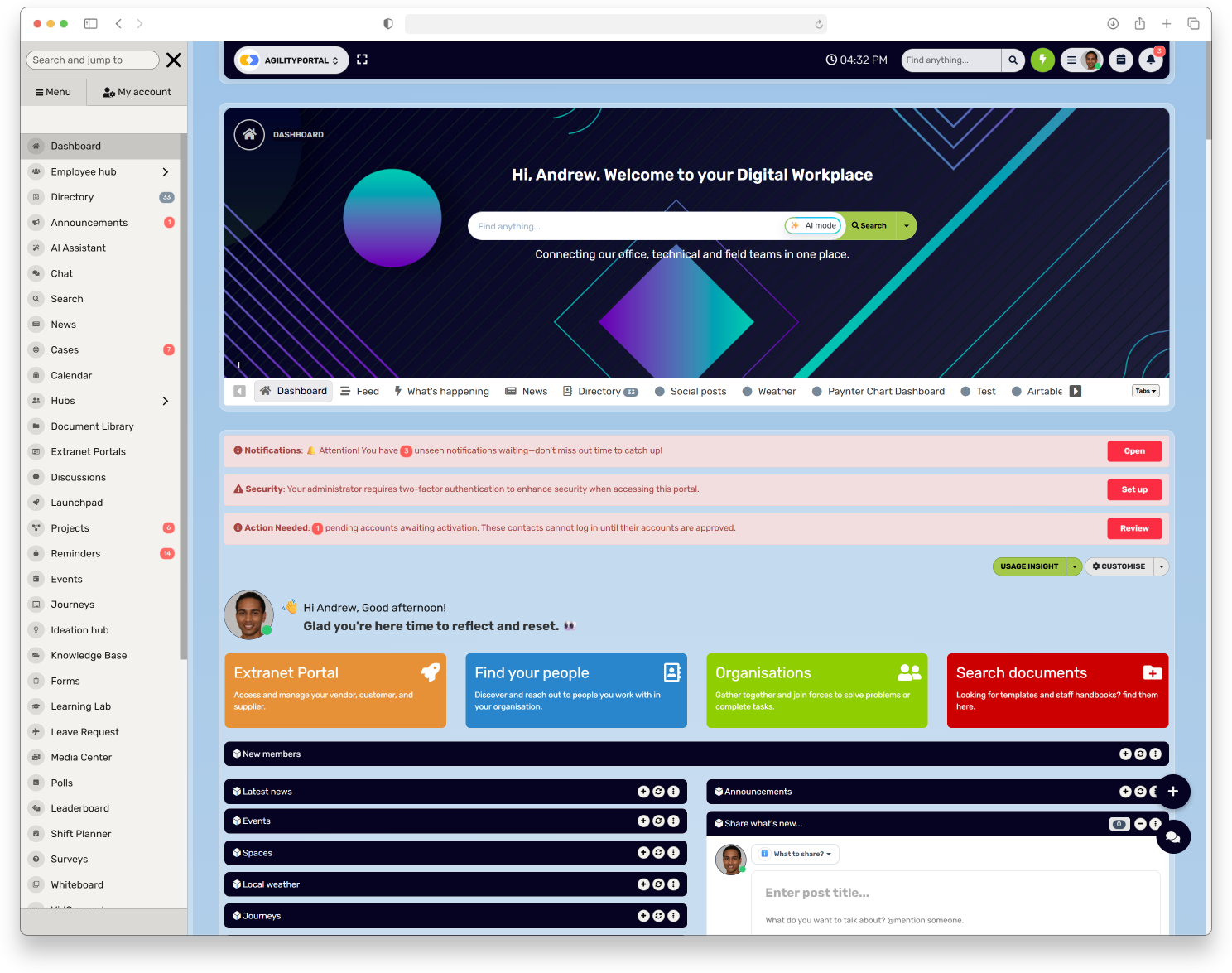
AgilityPortal gives organisations a central digital workplace for sharing internal communications, policies, documents, and answers.
Teams can use announcements, pages, and other workplace tools to keep information accessible across desktop and mobile.
With AgilityPortal, organisations can:
- Share approved updates with employees in one place.
- Keep crisis guidance, policies, and FAQs easy to find.
- Give managers a consistent source of information to share with their teams.
- Support employees who need to access updates while away from a desk.
AgilityPortal can support your internal communication process, but it doesn't replace a crisis communication plan or the people responsible for checking facts and approving messages.
Explore AgilityPortal
AgilityPortal · Support clear internal crisis communication
Give employees one trusted place for crisis updates
When an online issue is unfolding, employees need to know what’s been
confirmed, where to find the latest update and who to contact with
questions. AgilityPortal gives your organisation a central digital
workplace to share approved messages and useful guidance with your people.
- Publish employee announcements from a central place
- Keep approved guidance, policies and FAQs easy to find
- Give web and mobile users access to the same workplace information
Start your free 14-day trial. No credit card required. AgilityPortal supports
your internal communication process; your organisation still needs clear
response roles, fact-checking and approval procedures.
Final Thoughts
Organisations can't control every post, screenshot, or rumour that appears online.
But they can decide how prepared they are to respond.
A clear crisis communication plan helps people know when to escalate an issue, who makes decisions, and how to share updates while the facts are being checked.
That preparation doesn't guarantee a post will stop spreading.
It does make it easier to respond with care and accuracy: check what's known, support anyone affected, give employees a trusted place to find updates, and follow through on the actions you promise.
Clear roles, an escalation route, and a realistic practice exercise can help your team do that under pressure.
The deeper lesson is that crisis communication and management isn't just about protecting a brand. It's about helping people feel supported and informed when the situation is uncertain.
Employees shouldn't have to piece together what their organisation knows from social media or guess where to ask for help.
A steady, honest update—and a clear next step—can make a difficult moment easier to navigate.
FAQ on Workplace Operations Platform
What is crisis communication and management?
It's how an organisation prepares to communicate before, during, and after a serious incident.
A clear plan helps people know who is responsible, what information has been confirmed, and where affected groups can get updates.
What does "crisis comm" mean in business?
"Crisis comm" is shorthand for crisis communications: the messages and communication process an organisation uses during a serious issue. The aim is to share accurate updates, support affected people, and explain what happens next.
What is PR crisis management?
PR crisis management is the public relations work involved in preparing for and responding to an incident that could harm an organisation's reputation.
It includes coordinating statements, answering media questions, and sharing verified information with the public.
How does public relations crisis management work with internal communication?
Public relations crisis management deals mainly with external audiences, such as customers, partners, and media. Internal communication keeps employees informed.
The messages should be consistent, but staff also need practical information about what the incident means for them and where to raise concerns.
How do public relations and crisis management work together?
Public relations helps an organisation explain its response to external audiences, while crisis management coordinates the decisions and actions behind that response.
The best approach connects both: clear public messages should reflect what the organisation is actually doing.
How do PR and crisis management work together during an online incident?
The PR lead can coordinate external updates, while the wider crisis team checks facts, supports employees, and decides what action is needed.
Agree on message ownership and approval routes early to avoid conflicting statements.
What counts as a social media crisis for a business?
It's an online issue that could seriously affect people, operations, customer confidence, or the organisation's reputation.
Consider the content's credibility, reach, and potential harm; a negative comment alone doesn't automatically make it a crisis.
How do you create a crisis communication plan?
Set clear activation and escalation criteria, assign owners and backups, identify audiences and communication channels, prepare adaptable message templates, and practise the plan.
Review it after exercises or real incidents.
Who should be on a crisis communication team?
Usually a senior decision-maker, communications lead, HR representative, IT or security contact, and legal or privacy adviser.
Add other specialists when the situation calls for them, and name backups for key roles.
What should a company say when harmful content starts spreading?
Acknowledge the issue, explain what's being checked, give any immediate practical or safety guidance, and say where and when the next update will appear.
Don't present an unverified claim as fact or promise an outcome you can't guarantee.
Should a business respond to every negative post?
No. Check the post's credibility, reach, potential harm, and business impact first.
Sometimes it's better to monitor quietly; responding publicly can draw more attention to a minor issue.
When should a business contact crisis PR firms?
Consider contacting crisis PR firms when an incident involves serious public scrutiny, complex media attention, or a response your team lacks the capacity or experience to manage.
Choose support that fits the incident, and keep internal leaders accountable for decisions and facts.
How often should a crisis communication plan be reviewed?
Review it after a real incident or practice exercise, and whenever key contacts, roles, systems, or communication channels change.
Check regularly that the plan and its contact details are still accessible and current.
How should a company keep employees informed during an online crisis?
Use a trusted internal channel, give managers the same approved briefing, and provide updates at predictable times.
Offer a private way for affected employees to ask questions or get support.
Can employers remove harmful online content?
They can report content to the platform or manage content on channels they control, but what's possible depends on the content, who owns the channel, and the applicable rules.
Get specialist advice if the content involves threats, personal information, or possible legal issues.
AI Summary
- Crisis communication and management helps organisations prepare for, respond to, and recover from serious incidents involving harmful online content.
- A social media crisis management plan should set escalation criteria, name response owners and backups, and identify the channels employees and the public can use for updates.
- Before responding, teams should check what is confirmed, what remains uncertain, and whether anyone needs immediate safety or wellbeing support.
- Communications, HR, IT or security, legal or privacy, and operational teams should coordinate their decisions so employees and external audiences receive consistent information.
- Organisations should protect personal information, preserve relevant evidence appropriately, avoid speculation, and get specialist advice when an incident raises privacy, security, or legal concerns.
- After an incident or practice exercise, review how the response worked, update the plan, and measure outcomes such as timely updates and completed actions—not just views or shares.