
Insight Blog
Agility’s perspectives on transforming the employee's experience throughout remote transformation using connected enterprise tools.
30 minutes reading time
(6044 words)
Where Can I Send a Fax From in My Area? 7 Local and Online Options for Small Teams

Where Can I Send a Fax From in My Area? 7 Local and Online Options for Small Teams
Looking for where can I send a fax from in my area? Compare local fax shops, libraries and online options, plus costs, privacy checks and tips for small teams.
Where Can I Send a Fax From in My Area? 7 Local and Online Options for Small Teams

Where can I send a fax from in my area when a document needs to go out today?
The answer might be a nearby print or shipping shop, a library or an online fax service, but what's available depends on your location.
The UPS Store lists a network of more than 5,600 locations, while advising customers about its fax service; check with your local branch before making the trip.
More than 5,600:
The UPS Store locations offer a starting point when looking for in-person faxing
The UPS Store says it has more than 5,600 locations. Its faxing service page says customers can send and receive faxes at its stores. That gives readers a large network to search, but it doesn’t guarantee that every branch offers the same service. Call the specific location before travelling.
Source: The UPS Store, Faxing Services
Prices vary too. As one local example, Wandsworth Libraries lists faxing at £1.30 for the first sheet and 60p for each additional sheet.
Those are Wandsworth prices, not a UK-wide rate, so check with your own library or service provider.
For a small team, a one-off fax can turn into wasted time if a branch doesn't offer the service or can't receive documents.
In this guide, you'll learn how to find and verify nearby options, compare local and online faxing, check costs and protect business documents before you send them.
Key Takeaways
- If you’re wondering “where can I send a fax from in my area,” check nearby shipping or print shops, office supply stores and libraries—but confirm faxing is available at that branch.
- Call ahead to check opening hours, prices, destination limits, payment options and whether the location can send or receive your type of fax.
- For one-off paperwork, a confirmed local service may be convenient. For remote employees or regular faxing, an online service may fit the workflow better.
- Before sending sensitive business or employee information online, review the provider’s security controls, access permissions, storage and deletion practices.
- Small teams can avoid wasted trips and missed documents by giving employees approved sending options and clear instructions for checking delivery.
Where can I send a fax from in my area?
Where can I send a fax from in my area
If you need to send one fax, start with nearby shipping and print shops, office supply stores, and libraries. Search Maps for "fax service near me," then check the specific branch's website or call before you go.
A general listing may show a shop that prints or ships parcels but doesn't offer faxing.
In the US, The UPS Store advertises fax services, and FedEx Office offers faxing at locations with self-service copiers.
FedEx says availability and prices can vary by branch. In the UK, some libraries and local print shops provide faxing, but there isn't one service list that covers every area.
Wandsworth Libraries, for example, lists sending and receiving faxes at its branches; check your own council's library pages to see what's available nearby.
When you call, ask:
- Can I send a fax to this destination?
- Can you receive faxes, or only send them?
- What will it cost, and how can I pay?
- What time does the service close?
- Will I get a confirmation that it was sent?
- Shipping and print shops - A shipping or print shop may be a convenient choice if you have paper documents and want staff help. The UPS Store advertises sending and receiving fax services. FedEx Office describes a self-service option at participating locations, with staff help available at some branches. Call first if you need a specific destination, want help using the machine, or need to know whether the location can receive a fax for pickup.
- Office supply stores and copy centres - Some office supply stores and independent copy centres offer faxing alongside printing, scanning, or photocopying. Don't assume faxing is available just because printing is listed. Look for "fax" in the branch's service information, or call and ask directly.
- Public libraries - Libraries can be a useful local option, but each library service sets its own rules, prices, and opening hours. Wandsworth Libraries, for instance, publishes fax services and prices for its branches. That's a helpful example of what to look for on your local council's website, but it doesn't mean every UK library offers the same service.
- Hotels and business centres - If you're travelling, ask the hotel reception whether its business centre can send a fax. The service may only be available to guests, and the hotel may not have a fax machine, so check before relying on it for a deadline.
- Online fax services - If no suitable location is nearby, or your team sends faxes regularly, an online fax service may let you send a document from a computer or phone. For business use, check whether the service is approved by your organisation, especially if the document contains employee, customer, financial, or health information. The UK Information Commissioner's Office says online fax security depends on how the service is implemented, including how it handles encryption, storage, deletion, and transmission records.
- Example: an HR form due today - Imagine an employee needs to send a signed benefits form before the end of the day. They find a nearby shop on Maps, but its listing only mentions printing and parcel services. Before travelling, they call and ask whether it can send a fax to the destination number and provide a confirmation. If it can't, they check a nearby library or use the organisation's approved online fax service.
That quick check can prevent a wasted trip and give the employee a clear record of what happened to the form. If the document contains sensitive details, they should use the company's approved process rather than uploading it to an unfamiliar service.
How do I find a fax service near me and check it's open?
A map result can help you find nearby options, but it may not tell you whether that particular branch still offers faxing. Check the provider's own location page, then call before setting off.
FedEx says faxing is available only at locations with self-service copiers, and that prices and availability vary by store.
Use this quick check:
- Search Maps. Try "fax service near me" or "where can I go to send a fax." Add your town or postcode if the results aren't local enough.
- Check the provider's location finder. Look for faxing as a listed service; don't rely on the address alone.
- Call the branch. Ask if it can send a fax to your destination, or receive one for you to collect. These may be separate services.
- Confirm the practical details. Check opening hours, price, payment methods, page or destination limits, and whether someone can help you use the machine.
- Ask about proof of sending. Find out whether you'll receive a printed or digital transmission confirmation.
You could say: "Hi, I'm looking to send a fax today. Do you offer faxing at this branch, can you send it to [destination], and what will it cost? Will I get a confirmation when it's sent?"
If you're sending a business or HR document, keep the confirmation with the relevant record and follow your organisation's document-handling process.
What should I compare before choosing local or online faxing?
The best option depends on the document, how quickly it needs to be sent and whether your team faxes occasionally or regularly.
A local service may be convenient for a one-off paper document; an online service may suit staff who already have a digital file or work remotely.
Check the details with the provider: for example, FedEx says fax service and prices vary by location.
| Workplace situation | A local service may suit you if… | An online fax service may suit you if… |
| One urgent fax | You've confirmed a nearby branch is open and can send to the destination. | There's no convenient branch, and you have the document ready digitally. |
| Printed paperwork | The document is already on paper, and you can keep track of it while it's sent. | You can scan the document and upload it through an approved service. |
| Regular team use | Staff can conveniently visit a provider when needed. | Several employees need to send or receive faxes without making separate trips. |
| Sensitive employee records | You can stay with the document and collect the confirmation promptly. | The provider's access, security, storage and deletion controls meet your organisation's requirements. |
| Receiving a fax | The branch confirms it can receive the fax and explains how it will be held for collection. | The team needs faxes delivered to a managed account that authorised staff can access. |
Don't compare options by page price alone.
A nearby service may charge per page, while an online plan may have a recurring fee or page limit. Add in travel and staff time too.
The lowest advertised price may not be the lowest overall cost for your team.
Once you've chosen a method, make the approved steps easy for employees to find.
A central workplace guide can keep fax instructions alongside related procedures; see our advice on helping employees find information at work and managing workplace documents in an intranet.
3 Online Fax Services for Small Teams: Features, Limits and Best Fit

3 Online Fax Services for Small Teams: Features, Limits and Best Fit
Compare each service's trial or free allowance, sending limits, and intended use.
The free services are mainly suited to short, occasional faxes; teams sending documents regularly should check the costs and terms before choosing a service.
| Product | Standout feature | Free tier or trial |
| Fax.xyz | Web and mobile apps, fax sending and receiving, and a US or Canada fax number on the Plus plan. Its website claims HIPAA compliance and 256-bit SSL encryption. | Three-day trial of Basic or Plus. The current page lists 200 pages/month for Basic and 500 pages/month for Plus; annual prices shown are $99.99 and $199.99 respectively. |
| GotFreeFax | Send without creating an account; the service says it doesn't add ads or branding to the fax. | Permanently free for up to 2 faxes per day, with up to 3 pages per fax to the US and Canada. |
| FaxZero | Highest daily free sending limit of the three: 5 faxes per day. | Permanently free for up to 3 document pages plus a cover page per fax to the US and Canada. |
Fax.xyz: Best for a Paid, Cross-Device Fax Workflow
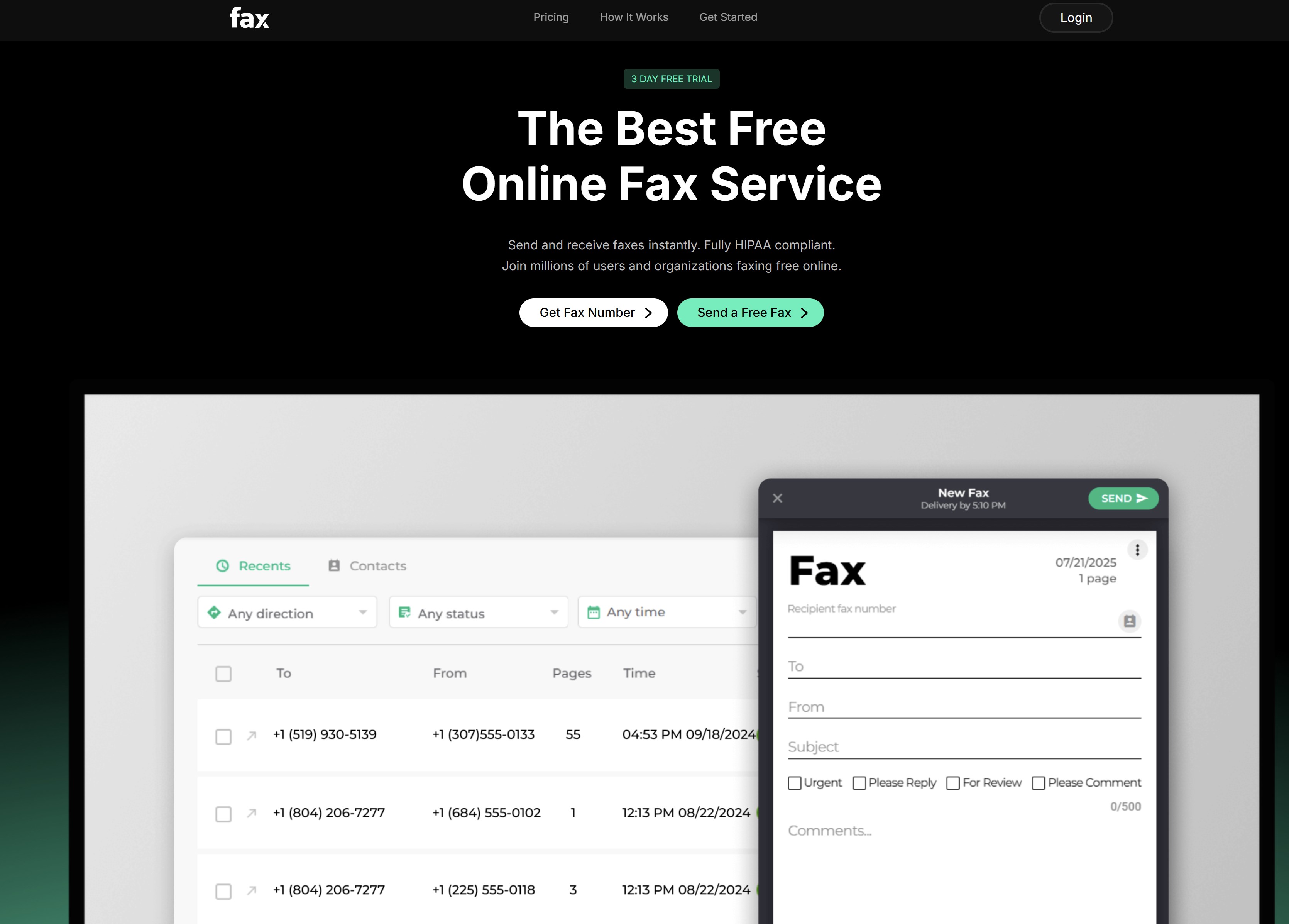
Fax.xyz: Best for a Paid, Cross-Device Fax Workflow
Fax.xyz offers browser access and apps for desktop and mobile devices, with plans for sending and receiving faxes.
Its pricing page lists a three-day trial, followed by paid plans: Basic includes 200 pages per month and Plus includes 500.
The prices shown are billed annually.
The verdict:
- Security: Fax.xyz advertises HIPAA compliance and 256-bit SSL encryption. However, its terms say that some information is encrypted and warn that faxes may be intercepted. Don't describe it as verified for regulated documents based on the marketing claims alone. For electronic protected health information, HHS guidance says a covered entity or business associate needs an appropriate business associate agreement with the service provider and must meet HIPAA requirements.
- Trial and limits: The three-day trial lets teams test the service, but it's short. Check the billing and cancellation terms carefully; Fax.xyz's terms say a paid charge may follow an offered trial.
- Tracking and ease of use: The service advertises delivery tracking and notifications. I couldn't verify the "clear audit trail" claim from the public information reviewed, so avoid promising that feature.
- Cross-device access: Fax.xyz lists web, Windows, Mac, iOS and Android access.
The bottom line: Fax.xyz may suit a small business looking for an ongoing service that works across devices. Before sending confidential or regulated documents, verify the specific security controls, plan terms and any required agreement directly with the provider.
Five faxes per day:
FaxZero’s published maximum for its free service
FaxZero allows up to five free faxes per day, with a maximum of three document pages per fax, plus its cover page. Its free service is for sending to the United States and Canada. The limit may suit a small, occasional task, but the branded cover page and daily cap may not fit every business document or workflow.
Source: FaxZero, Free Fax
GotFreeFax: Best for Quick, No-Account Sending
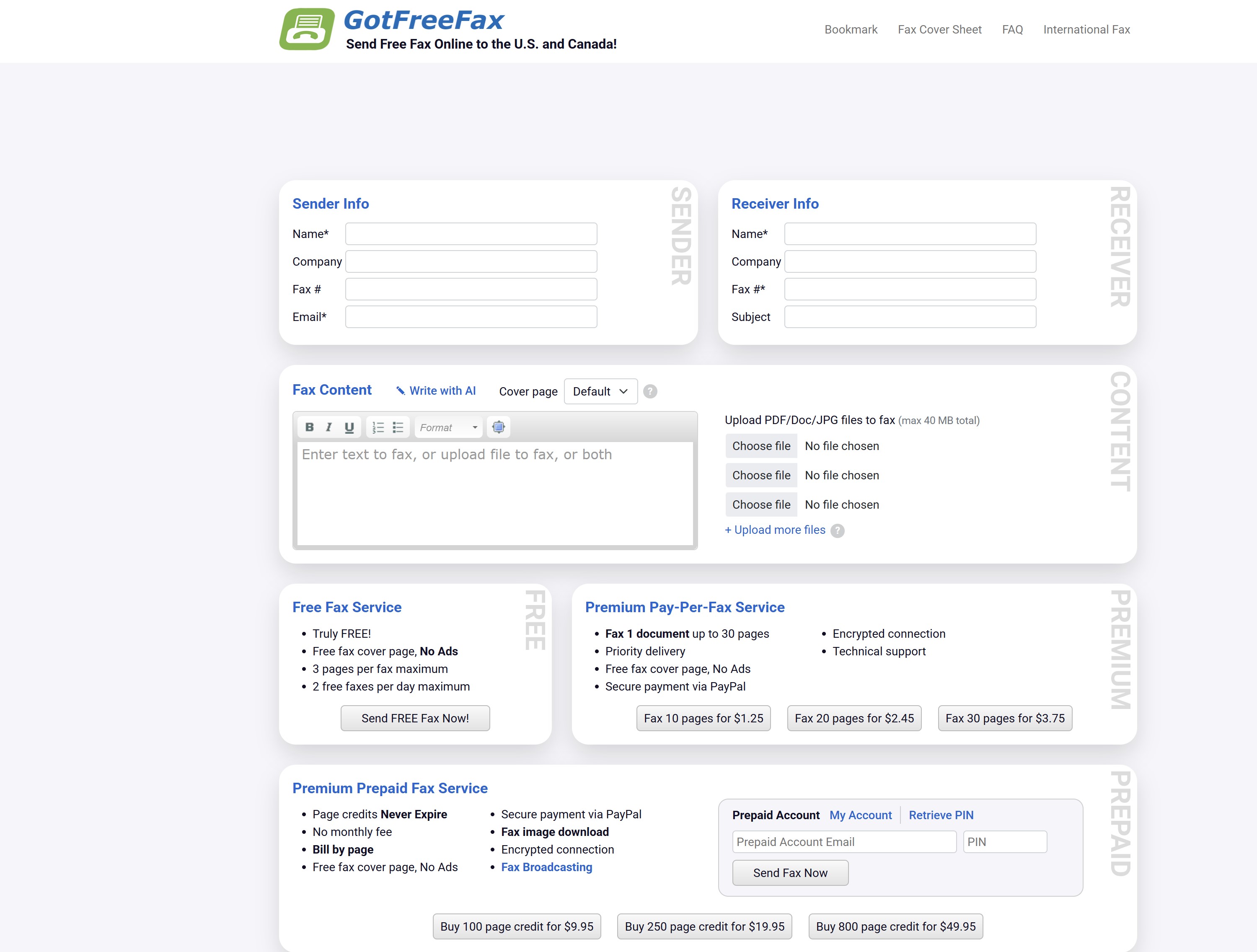
GotFreeFax: Best for Quick, No-Account Sending
GotFreeFax lets users send faxes through a browser without creating an account.
Its free service is limited to the US and Canada, with paid options for larger documents and international destinations.
The verdict:
- Security: GotFreeFax says it encrypts connections. Its public information doesn't establish that it meets specialised compliance requirements, so don't assume it's appropriate for highly sensitive records.
- Free-tier limits: Two faxes per day, up to three pages per fax, to the US and Canada. That's enough for occasional short documents, but restrictive for regular business use.
- Tracking and ease of use: A free fax is sent after the user confirms through an email link. GotFreeFax also provides a delivery status page.
- Cross-device access: It works through a browser on a computer or phone. The public information reviewed doesn't list dedicated desktop or mobile apps.
- Branding: The service says it doesn't add ads or branding to transmitted faxes.
The bottom line: GotFreeFax is a practical option for sending an occasional, short fax without registering for an account. It's less suited to teams that need recurring volume, a shared management workflow or documented compliance assurances.
Two faxes per day:
GotFreeFax’s published maximum for its free service
GotFreeFax allows up to two free faxes per day, with a maximum of three document pages per fax. The provider says its free sending service covers the United States and Canada and doesn’t require an account. That can work for occasional, short documents, but check the current terms and avoid using a free service for sensitive records unless it meets your organisation’s requirements.
Source: GotFreeFax, Free Fax Service
FaxZero: Best for Several Short Faxes a Day
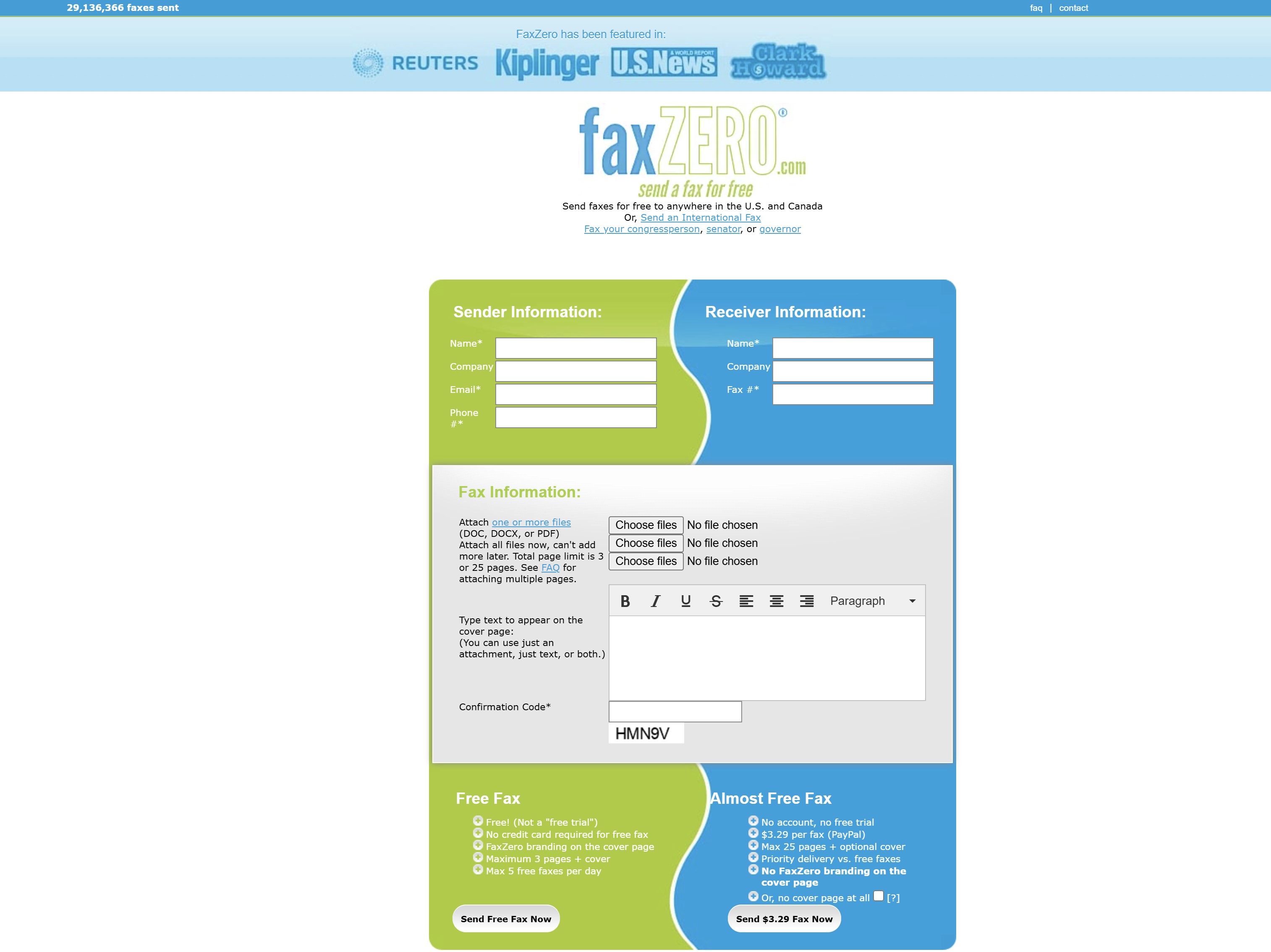
FaxZero: Best for Several Short Faxes a Day
FaxZero is another browser-based option for sending faxes without setting up a regular subscription.
Its free service supports up to five faxes per day to the US and Canada.
The verdict:
- Security: FaxZero's public information reviewed here doesn't provide enough detail to rate it for confidential or regulated documents. Use an approved business service for sensitive material.
- Free-tier limits: Each free fax can contain up to three document pages plus a cover page, with a five-fax daily limit.
- Tracking and ease of use: Users confirm the fax by email and receive an email update about whether it was delivered or failed.
- Branding: Free faxes include a FaxZero-branded cover page. The provider says the free service is supported by advertising; the cover page includes its logo and slogan. This may not suit every business document.
- Cross-device access: It can be used through a web browser. The public information reviewed doesn't identify a dedicated app advantage.
The bottom line: FaxZero may work for several short, low-sensitivity faxes in one day, if the branded cover page is acceptable.
Its page limit, geography and limited public security information make it a poor fit for confidential records or a managed team workflow.
These individual reviews help, but comparing a wider range offree online fax services can give you more clarity on which features matter most for your specific situation.
Five faxes per day:
FaxZero’s published maximum for its free service
FaxZero allows up to five free faxes per day, with a maximum of three document pages per fax, plus its cover page. Its free service is for sending to the United States and Canada. The limit may suit occasional, short documents, but the branded cover page and daily cap may not fit every business need.
Source: FaxZero, Free Fax
What should I bring when I send a fax?
A little preparation can save a second trip. Before leaving, put the pages in the right order and check with the fax recipient that you have the correct number.
Bring:
- The complete document, with all pages in order.
- The recipient's full fax number, including the country or area code. If you're unsure, confirm it with the recipient before sending.
- A cover sheet, if the recipient requires one. Ask the fax location whether it provides one; FedEx Office, for example, says it offers a complimentary cover sheet at participating locations.
- An accepted payment method. Call the branch to check its price and whether it takes cash or card.
- A way to keep the confirmation, such as your phone or email address. Ask whether the location provides a printed or digital receipt.
For a business or HR document, stay with the pages while they're being sent and don't leave them unattended at a shared machine or counter. If you're sending personal information online, review the ICO's guidance on encryption and fax services.
Example: An employee is sending a signed HR form. They confirm the recipient's fax number, check whether a cover sheet is required, keep the pages together until the fax is sent, and save the delivery confirmation.
Is online faxing a sensible option for a small team?
It can be. If employees work remotely, send faxes regularly or need to receive documents without visiting a shop, an online service may save time and keep the process in one place. It can also help when a document is already digital and there's no convenient fax location nearby.
But online doesn't automatically mean secure.
The UK Information Commissioner's Office says protection depends on how the service is set up.
It recommends checking whether the provider encrypts faxes, how it stores them, whether documents can be deleted, whether it keeps an audit trail and how securely its service is hosted. If faxes are delivered to an email inbox, consider who can access that inbox and how long the documents remain there.
What should we check about a provider?Before choosing a service for business use, check:
- Security: What is encrypted, and when?
- Access: Can the team restrict fax access to authorised employees?
- Storage and deletion: How long are sent and received faxes kept, and can they be deleted?
- Records: Does the service provide delivery confirmations or an audit trail?
- Workflow: Can the team send and receive documents in the way it needs?
- Support and cost: How do you get help, and what happens when the trial or included pages run out?
If the team handles sensitive employee or customer information, ask the provider for details about its safeguards and terms. Don't rely on a general claim that the service is "secure."
When might a local service be the better choice?A nearby shop or library may be simpler for a one-off fax, especially if the document is already on paper or your organisation hasn't approved an online provider. It can also make sense when an employee needs to send a document straight away and can confirm the branch offers the service.
Whichever option you choose, give employees a clear place to find the approved process.
What happens when an employee needs to fax an HR document?
Imagine an employee needs to send a signed benefits form before a deadline.
They search for a nearby fax service, find a shipping shop and travel there—only to discover that the branch doesn't offer faxing.
Now they've lost time and still need to send the form.
- What went wrong: The employee relied on a general location listing without checking whether the branch offered fax services.
- What it can affect: The employee may miss a deadline, and the team may not know whether the document was sent successfully.
- A better process: Give employees clear instructions on which methods are approved, what to confirm with a local branch, and how to save a transmission record. If the document contains sensitive information, HR or the organisation's privacy lead should decide which channels are suitable. For online faxing, the ICO recommends checking the provider's security, storage, deletion and audit-trail arrangements.
Who should own faxing guidance at work?
Faxing guidance doesn't need a committee. In a small company, one person may cover several responsibilities.
The key is to make sure each task has a clear owner.

Who should own faxing guidance at work
| Role | Responsibility |
| HR Director or People lead | Decide how employees should send HR forms and records, and which methods are approved for sensitive documents. |
| IT Director or IT manager | Review online fax services, user access and technical safeguards before staff use them. |
| Data Protection Officer or privacy lead | Advise on handling personal information, including storage and deletion. |
| Legal or Compliance lead | Check any relevant industry, contractual or location-specific requirements. |
| Operations manager | Keep local branch instructions up to date if staff rely on in-person faxing. |
| Employees and department managers | Check recipient details, follow the approved steps and report failed or misdirected faxes. |
Publish the instructions somewhere employees can find them when they need them.
AgilityPortal's guide to helping employees find workplace information may help with planning where that guidance should live.
How can a small team set up a reliable fax process?
A reliable process helps employees know which option to use, what to check before sending, and what to do if a fax fails. Start with these steps:
- Decide how often the team faxes. If it's occasional, a verified local service may be enough. If staff send or receive faxes regularly, assess an online service.
- Identify sensitive documents. Ask HR, Legal or your privacy lead which employee, customer or financial records need extra care.
- Choose approved methods. Set out when staff may use a local branch and when they must use an organisation-approved online service.
- Verify local services. Before recommending a branch, confirm it offers faxing, check its hours and price, and ask whether it can send or receive the type of fax you need. FedEx, for example, says its fax service is only available at locations with self-service copiers, and that availability and prices vary by store.
- Check the recipient details. Have employees confirm the fax number with the recipient before sending, especially for sensitive documents.
- Keep a record of the outcome. Explain how to save the confirmation and who to contact if the fax fails or goes to the wrong number.
- Set rules for incoming faxes. Name who checks for new documents, how quickly they should be collected, where they should be stored and when they should be deleted.
- Publish the instructions in one place. Make the current process easy to find, including on mobile if employees work away from a desk.
- Review the process regularly. Update it when providers, branch services, prices or company requirements change.
For an online service, check its encryption, access controls, storage, deletion options and transmission records. The ICO's guidance on encryption and online faxing explains why a service's security depends on how it is implemented.
AgilityPortal can give employees one place to find approved procedures and updates. That fits naturally alongside guidance on managing documents in an intranet and helping employees find workplace information.
What does faxing mean for the way small teams work?
A team that sends a fax once in a while may only need a reliable local option and a quick check before visiting.
A team that handles regular forms or incoming documents may need an approved online workflow, a named person to monitor incoming faxes, and clear rules for storing records.
The aim is to make the approved route clear enough that employees don't have to guess or make a wasted trip.
When instructions are easy to find and ownership is clear, faxing remains a small, manageable part of the workday.
Final Thoughts
If you're asking "where can I send a fax from in my area?", start by checking nearby print or shipping shops, office supply stores and libraries.
Services vary by branch, so call first to confirm it can send or receive your fax, check the cost and opening hours, and ask how you'll know it was sent.
For a one-off document, a local service may be all you need.
If your team faxes regularly or works across different locations, an online service may be more practical—provided its security and document-handling arrangements meet your organisation's needs.
The bigger lesson is to give employees a clear process.
Tell them which options are approved, how to verify recipient details, where to save confirmations and what to do if a fax fails.
Keep those instructions somewhere staff can find them, such as your employee intranet; our guide to helping employees find workplace information explores why that matters.
Faxing may be a small task, but when a document matters, clear guidance helps people send it with confidence.
Frequently asked questions
Where can I send a fax near me?
Check nearby shipping and print shops, office supply stores and libraries.
Search for "fax service near me," then call the specific location to confirm it offers faxing, is open and can send to your destination. Services and prices can vary by branch.
Where can I send a fax from my phone?
You can use an online fax service through its app or mobile website. Upload a document or scan the paper form, enter the recipient's fax number and check the delivery confirmation.
For example, Dropbox Fax documents a phone-based workflow.
Where can I send a fax from the UK?
Check your local library, print shop or business centre, and call to verify faxing before you travel.
Some UK libraries offer the service: Bromley Libraries, for example, lists fax sending and receiving, but this doesn't mean every library does.
An online fax service is another option.
Where can I send a fax without a fax machine?
You can send a document through an online fax service from a computer or phone.
You can also take printed pages to a local shop or library that offers faxing.
Either way, confirm the destination number and keep the delivery confirmation.
Can I send a fax using Dropbox Fax?
Yes.
Dropbox Fax lets you upload a document from your computer or a cloud storage provider, enter the recipient's fax number and send it online.
It emails you the transmission result, which you can also check in your account.
How do I send a fax?
Prepare the document, check the recipient's full fax number, choose a local or online service, and send it with a cover sheet if required.
Keep the confirmation and follow up with the recipient if the fax is time-sensitive.
How do I send a fax from Gmail?
Gmail doesn't have a built-in fax feature.
You need an email-to-fax service: connect or sign in to the provider, address your message as it instructs, attach the document and send. Fax.
Plus, for example, provides instructions for sending from Gmail and emails a delivery status.
Can I send a fax online for free?
Sometimes. Searches for "send fax online free" often lead to services with page, daily-use or destination limits.
GotFreeFax lists up to two faxes a day, with three pages per fax, to the US and Canada; FaxZero lists up to five daily faxes, with three document pages plus a cover sheet, to the US and Canada.
Check the current limits before sending.
Can I send a fax at a FedEx Office?
FedEx Office offers faxing at locations with self-service copiers, but availability and prices vary by store. Check with your local branch before visiting.
AI Summary
- To find where to send a fax nearby, check shipping and print shops, office supply stores, and some libraries. Call the specific branch first because services, hours and prices vary.
- An online fax service may suit people sending documents from a phone or computer, or small teams that fax regularly or work across locations.
- Compare the full cost and effort of local and online faxing, including page charges, travel time, plan limits and whether you need to receive faxes.
- Before sending, verify the recipient’s full fax number, prepare the document and cover sheet if needed, and keep the transmission confirmation.
- Online faxing is not automatically secure. Teams handling sensitive documents should check the provider’s encryption, access controls, storage, deletion options and transmission records.
- A small team should make its approved faxing process easy to find, assign responsibility for incoming faxes and explain what to do if a fax fails or goes to the wrong number.
Most Popular Posts

Effective communication among team members is vital for the productivity and success of any organization. Surprisingly, 60% of companies lack a long-term internal communication strategy, which p...


Businesses thrive on communication for efficiency, productivity and accomplishment. When the right information is passed from the right designation in the organization, it promotes positivity an...

Categories
Blog
(3220)
Business Management
(396)
Employee Engagement
(235)
Digital Transformation
(220)
Growth
(150)
Intranets
(142)
Internal communications
(108)
Remote Work
(68)
Sales
(53)
Collaboration
(53)
Customer Experience
(33)
Culture
(30)
Knowledge Management
(29)
Project management
(29)
Leadership
(20)
Comparisons
(9)
News
(1)

Related Posts

Where can I send a fax from in my area when a document needs to go out today? The answer might be a nearby print or shipping shop, a library or an online fax service, but what's available depends on your location. The UPS Store lists a ne...

AI in internal communications can help a small team turn one important update into useful messages, answers and resources for employees—but only when the information is accurate and a person checks the result. Comms teams are expected to keep p...

How is Edge AI changing business operations in 2026, and when does it make sense to process data near where it is created instead of sending it all to the cloud? The investment forecasts point to growing interest: Capgemini Research Institute's...

Choosing the best ERP for Shopify often starts when the workarounds stop working. Your store shows stock that the warehouse can't find. Wholesale orders live in spreadsheets. Finance spends days reconciling payouts, while customer service...

Could choosing the wrong proxy disrupt your team's work or increase costs without improving results? When comparing rotating proxies vs static proxies, the answer depends on what your business needs: a consistent IP address for an ongoing sessi...


Jill Romford
I am a digital nomad, lover of exploring new places and making friends.
I love to travel and I love the internet. I take pictures of my travels and share them on the internet using Instagram.
Traveler, entrepreneur, and community builder. I share my insights on digital marketing and social media while inspiring you to live your fullest life.
Ready to learn more? 👍
One platform to optimize, manage and track all of your teams. Your new digital workplace is a click away. 🚀
Free for 14 days, no credit card required.