
Insight Blog
Agility’s perspectives on transforming the employee's experience throughout remote transformation using connected enterprise tools.
50 minutes reading time
(9994 words)
Employees Can't Find Information at Work — Here's Why It's Costing More Than You Think

Employees Can't Find Information at Work — Here's Why It's Costing More Than You Think
Employees can't find information at work? Discover why workplace knowledge gets lost, what it costs productivity, and practical ways to fix it.
Employees Can't Find Information at Work — Here's Why It's Costing More Than You Think

You've probably seen it happen.
An employee needs the latest expenses policy, a customer procedure or an old project decision.
They check the shared drive.
Nothing. Search the intranet.
Too many results.
Dig through chat.
Still nothing.
Eventually, they message a colleague: "Do you know where this is?"
When employees can't find information, the obvious assumption is that the company needs better search. But that's only part of the problem.
Modern organisations have more information than ever.
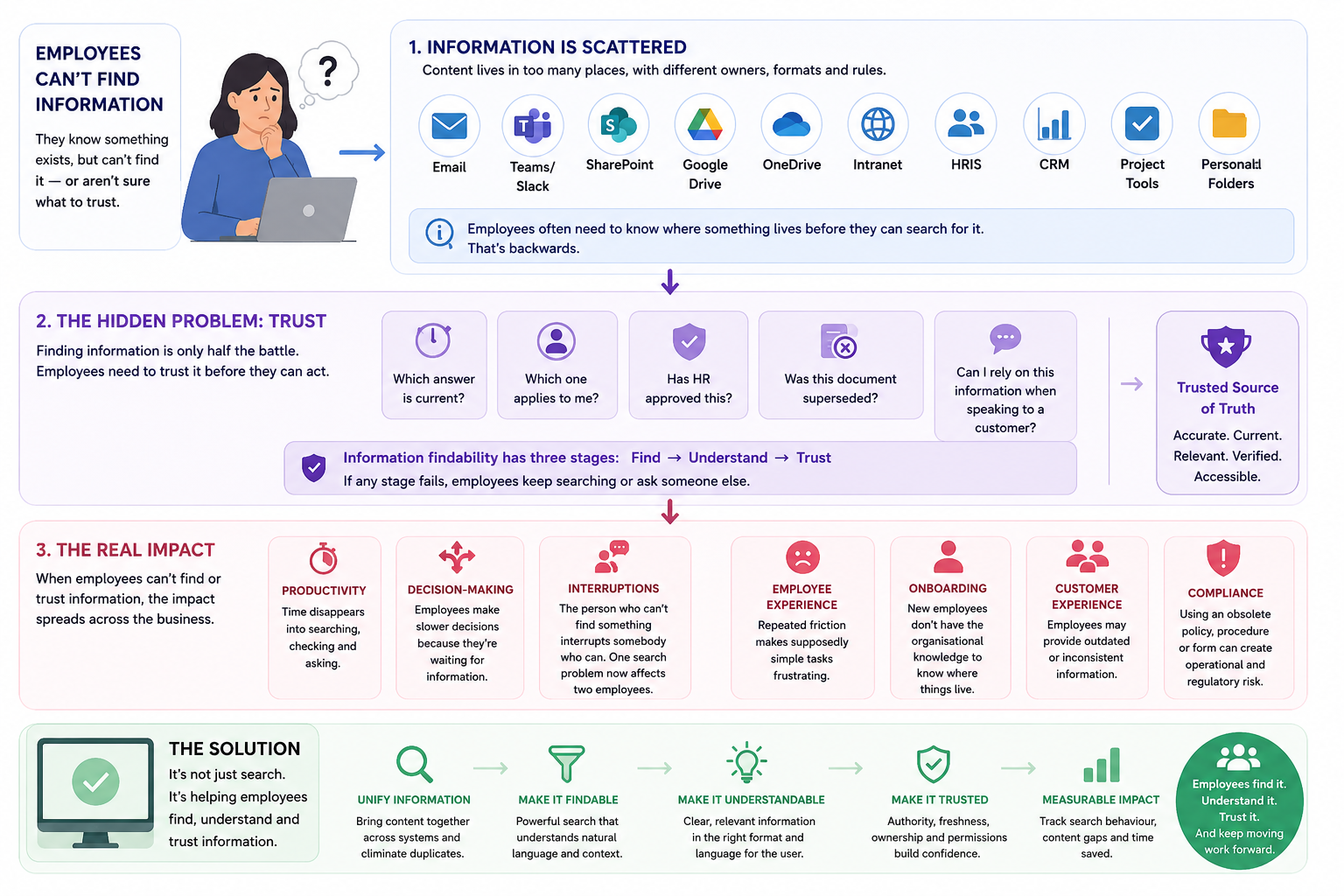
The real problem is that knowledge has become fragmented across emails, chat conversations, cloud drives, SharePoint sites, project tools, HR systems and people's heads.
25%
of their time
Atlassian's 2025 State of Teams research found that teams spend roughly 25% of their time searching for answers instead of focusing on the work that moves the business forward.
12,000
knowledge workers surveyed
200
executives surveyed
When workplace knowledge is scattered across documents, apps, messages and individual employees, finding an answer becomes a productivity problem rather than a simple search problem.
Source:
Atlassian — State of Teams 2025
Atlassian's 2025 State of Teams research, which surveyed 12,000 knowledge workers and 200 executives, found that teams spend roughly 25% of their time searching for answers.
That's time employees aren't spending serving customers, solving problems or completing meaningful work.
In this article, we'll explore why workplace information becomes difficult to find, how to diagnose the real cause and what organisations can do to make knowledge easier to discover, understand and trust.
Key Takeaways
- Employees can't find information when workplace knowledge is scattered across email, chat, shared drives, intranets, SharePoint, business apps, and individual employees.
- The real problem is often findability rather than a lack of information; employees need to find, understand, and trust the information they discover.
- Poor information findability wastes productive time, creates unnecessary interruptions, slows decisions, and makes onboarding more difficult.
- Better search alone won't fix outdated documents, duplicate content, unclear ownership, weak permissions, or poor knowledge governance.
- Organisations should create a trusted workplace knowledge environment where employees can discover authoritative information without knowing which system contains it.
Employees Can't Find Information — But Is Search Really the Problem?

Employees Can't Find Information — But Is Search Really the Problem
Most organisations don't have a shortage of workplace technology. If anything, they have more tools than ever.
Companies have invested heavily in cloud storage, Microsoft 365, SharePoint, collaboration apps, messaging platforms, project management tools, knowledge bases, intranets and, more recently, AI assistants.
Each was introduced with a sensible goal: make it easier for employees to create, share and access information.
So why do employees still struggle to find what they need?
The problem is that adding more places to store information doesn't automatically make that information easier to find.
Think about a simple request.
An employee needs the latest expenses policy.
SharePoint? OneDrive?
Was it emailed by HR?
Perhaps someone posted the updated version in Teams six months ago.
The employee may eventually find a document, but there's another question: is it actually the latest version?
The workplace doesn't have an information shortage. It has a findability problem.
That's the tension created by the modern digital workplace. The same tools that have made sharing knowledge incredibly easy have also created more places for that knowledge to hide.
Employees Can't Find Information — But Is Search Really the Problem
A project decision might live in a chat conversation, while the supporting document sits in SharePoint.
The process explaining what happens next could be buried in a knowledge base, and the one person who understands how everything fits together may be on holiday.
The benefit of digital workplace tools is clear: organisations can create, store and share enormous amounts of knowledge quickly.
The risk is fragmentation. Every new repository becomes another location employees may need to understand, remember and search. Over time, employees aren't simply searching for information; they're trying to work out where they should search in the first place.
That's why improving workplace information search isn't just about installing a bigger search box.
Organisations need to think about how information is discovered, how it's organised, who owns it, whether it's still current and how employees know they can trust what they've found.
The goal isn't simply to store more knowledge.
It's to make the right knowledge easy to find, understand and trust at the moment someone actually needs it.
Why Is Finding Information at Work So Difficult?
Information is scattered across too many places
One of the biggest reasons employees struggle to find information is simple: workplace knowledge is spread across too many systems.
A typical employee might need to search through email, Teams or Slack, SharePoint, Google Drive, OneDrive, the company intranet, HR systems, CRM software, project management tools and even personal folders.
Each tool may make sense on its own. The problem is that employees often have to remember which tool contains which type of information.
Was the policy emailed by HR?
Is the project update in Teams?
Did someone save the latest document in SharePoint?
Is the customer note in the CRM?
Or is the file sitting in someone's personal OneDrive folder?
That creates unnecessary friction.
In many organisations, employees effectively need to know where information lives before they can successfully search for it.
That's backwards.
A good workplace search experience should start with the employee's question, not the location of the answer.
If someone wants to know the latest travel policy, they shouldn't need to understand whether HR stores policies in SharePoint, the intranet or a document library. They should be able to search once and find the most relevant, current and trusted answer.
The more fragmented the workplace becomes, the more employees are forced to act like information detectives.
And every extra system adds another place where useful knowledge can become hidden, duplicated or forgotten.
Nobody knows which version is actually correct
Imagine an employee searching for the remote-working policy.
They find:
Remote_Working_Policy.pdf
Remote_Working_Policy_FINAL.pdf
Remote_Working_Policy_FINAL_v2.pdf
and an intranet page last updated eight months ago.
Finding something isn't enough.
They need to know whether they've found the right thing.
Without clear version control, employees may rely on outdated or incorrect information, even when the relevant document is technically available.
Workplace search often understands words, not intent
Someone searches:
"How many days can I work from home?"
But the document is called:
"Hybrid Working Framework 2026."
Literal keyword matching can miss the connection because the employee's question uses different words from the document title.
This is where semantic search and AI-powered enterprise search can help. Instead of matching only exact keywords, semantic search looks at the meaning behind a query and connects it with relevant information, even when the wording is different.
That makes it easier for employees to ask questions naturally and still find the right policy, document or answer.
Too much knowledge still lives inside people's heads
A significant amount of workplace knowledge is never formally documented. It exists as tribal knowledge: the practical information employees learn through experience and pass informally to one another.
Common examples include:
"Ask Sarah."
"John knows how that works."
"Finance normally handles that."
This creates organisational dependency. When a knowledgeable employee is unavailable or leaves the company, important processes, decisions and context can disappear with them.
Important answers disappear inside chat
Chat is excellent for conversations.
It's usually terrible as the permanent home for organisational knowledge.
A useful answer posted six months ago can become buried beneath thousands of later messages. Even if employees know the answer exists, finding it again may be difficult.
Chat messages are often created for immediate discussion rather than long-term reference. Unless important information is captured and organised elsewhere, valuable knowledge can quickly become invisible.
Nobody owns old information
A policy gets published.
Three years later:
Who owns it?
Who checks whether it's still accurate?
Who archives the old version?
Without content ownership, knowledge gradually becomes unreliable.
Information may remain available long after it has become outdated, while nobody is responsible for reviewing, updating or removing it. Over time, this reduces trust in workplace search and encourages employees to rely on informal sources instead.
The Hidden Problem Isn't Search. It's Trust.

The Hidden Problem Isn't Search. It's Trust.
Finding information is only half the battle. Employees also need to know whether they can actually trust what they've found.
Think about an employee looking for the company's latest expenses policy.
They search the intranet and find one version. SharePoint has another. An old email from Finance contains an attachment, and someone has shared a slightly different document in Teams.
Technically, the employee's search was successful. They found the information.
But now they have a different problem:
- Which answer is current?
- Which version applies to me?
- Has HR or Finance approved this?
- Was this document replaced by something newer?
- Can I rely on this information when making a decision or speaking to a customer?
An employee finding five different answers isn't necessarily better off than an employee finding none at all. In some cases, it's worse because they now have to decide which information is reliable.
This is where the idea of a trusted source of truth becomes important.
A trusted source of truth doesn't necessarily mean forcing every document, policy and piece of workplace knowledge into one system. It means employees can clearly identify which information is authoritative, current and approved, regardless of where it originally came from.
For example, a policy might show who owns it, when it was last reviewed, when it will be reviewed again and whether it has replaced an older version. That context gives the employee confidence to act on what they've found.
Good information findability therefore has three stages:
Find → Understand → Trust
First, can the employee find the information?
Second, can they understand what it means and whether it applies to their situation?
Third, can they trust that it's accurate, current and approved?
If any one of those stages fails, the search isn't really finished. The employee will keep looking, compare different documents or message a colleague for confirmation.
And that's why improving workplace search alone won't solve the problem. Organisations also need clear content ownership, version control, review dates and knowledge governance so employees don't just find information faster — they find information they can confidently use.
What Poor Information Findability Actually Costs a Business
When employees can't find information, it's tempting to measure the problem in minutes: five minutes looking for a policy here, ten minutes searching for a document there.
But the real business cost is much bigger.
Poor information findability affects productivity, decision-making, employee experience, onboarding and even the quality of information that reaches customers. It can also increase operational and compliance risk when employees act on outdated, incomplete or unapproved information.
5 Million
working hours a year
Atlassian's 2025 State of Teams research surveyed 12,000 knowledge workers and 200 executives and found that teams and leaders spend around 25% of their time searching for answers.
25%
of working time
can disappear into searching for answers instead of using information to complete work, solve problems and make decisions.
10,000
employees in Atlassian's example organisation
≈ 5M
working hours potentially spent searching each year
At scale, poor information findability isn't a minor inconvenience. Millions of working hours can be consumed tracking down answers that employees need to do their jobs.
Source:
Atlassian — State of Teams 2025
Atlassian's 2025 State of Teams research gives a sense of the scale.
After surveying 12,000 knowledge workers and 200 executives, Atlassian found that teams and leaders spend around 25% of their time simply searching for answers.
At a company with 10,000 employees, AgilityPortal estimates that this could represent around 5 million working hours a year spent tracking down information rather than using it.
And that's only the beginning.
Productivity: searching quietly eats into the working day
Every time an employee stops what they're doing to search through email, SharePoint, Teams, an intranet or a shared drive, productive work is interrupted.
Sometimes the answer appears quickly. Sometimes the employee opens five documents, checks several versions and eventually gives up.
Atlassian found that employees and leaders estimate they spend roughly a quarter of their working time searching for answers. Separate Atlassian research also found that half of surveyed software developers lose more than 10 hours each week searching for information.
Microsoft's workplace research paints a similar picture from another angle.
Its 2025 Work Trend Index found that 80% of the global workforce says they don't have enough time or energy to do their work, even while 53% of leaders say productivity needs to increase.
That's why information findability shouldn't be dismissed as a minor inconvenience.
When a business is already asking employees to achieve more, losing a meaningful chunk of the working day to finding basic information becomes a capacity problem.
Decision-making: people can't act confidently without the right information
Poor findability doesn't just slow down tasks. It slows down decisions.
Imagine a manager approving a customer refund, an HR leader responding to a policy question or an operations employee deciding how to handle an incident.
If the relevant information is difficult to locate, the employee has three choices:
- keep searching;
- ask someone else;
- make the decision using whatever information they can find.
None is ideal.
Atlassian reports that Fortune 1000 leaders spend more than 25% of their time searching for insights needed to make strategic decisions.
There's another important issue here: finding information doesn't guarantee that the information is good.
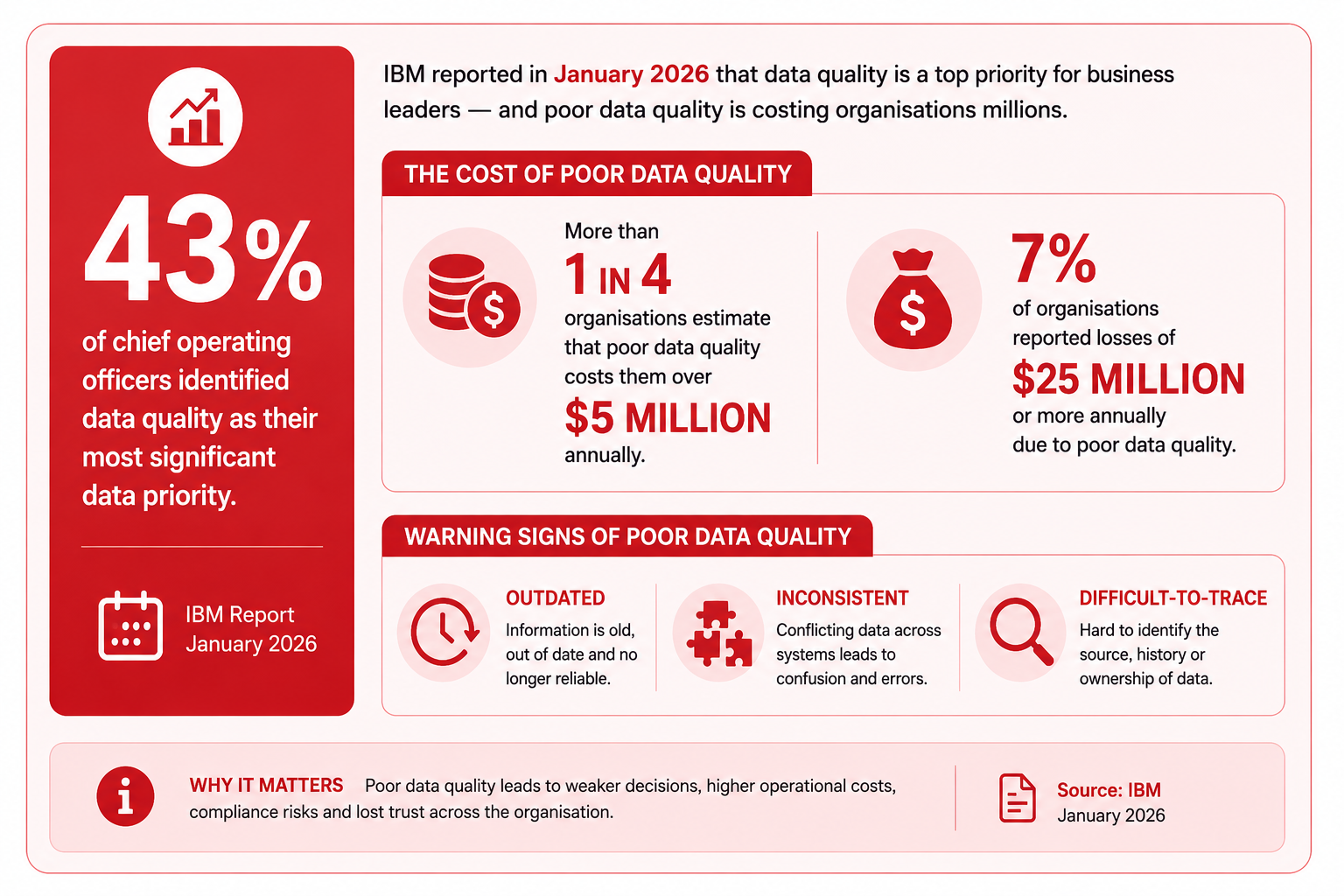
More than a quarter of organisations estimated that poor data quality costs them over $5 million annually, while 7% reported losses of $25 million or more. IBM specifically identifies outdated, inconsistent and difficult-to-trace information among the warning signs of poor data quality.
That research covers data quality more broadly than workplace search, but the lesson is directly relevant: decisions become more expensive when employees cannot quickly identify accurate, current and trustworthy information.
Decision-making: people can't act confidently without the right information
Interruptions: one failed search can disrupt two people
This is where the cost starts multiplying.
An employee can't find an answer, so they message a colleague:
"Do you know where the latest version is?"
The person searching has already lost time.
Now somebody else has to stop what they're doing, read the message, remember the answer, find the link and respond.
One information problem has disrupted two people.
Atlassian found that 56% of workers say they often have to ask another person or schedule a meeting simply to obtain the information they need.
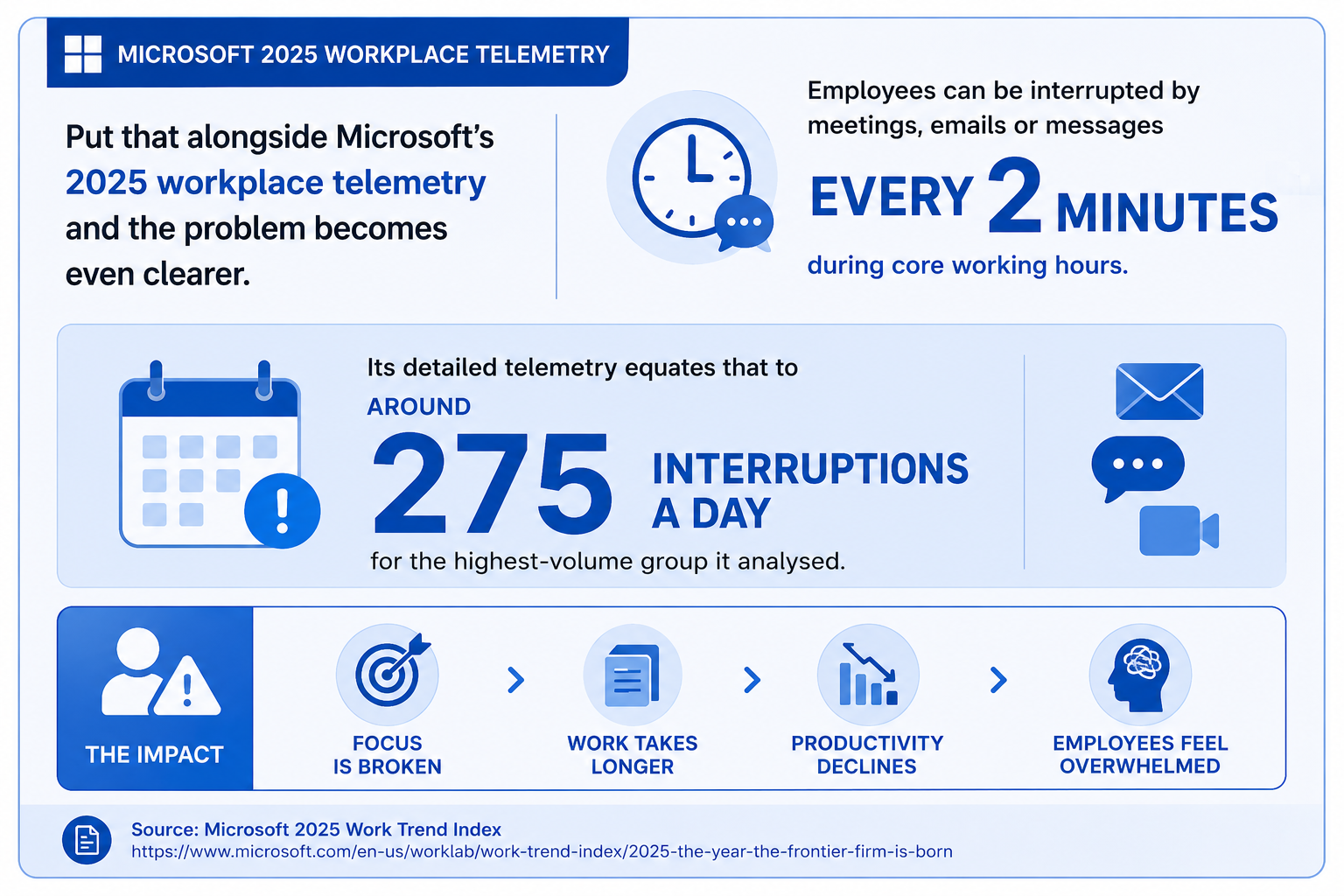
Put that alongside Microsoft's 2025 workplace telemetry and the problem becomes even clearer. Microsoft found employees can be interrupted by meetings, emails or messages roughly every two minutes during core working hours. Its detailed telemetry equates that to around 275 interruptions a day for the highest-volume group it analysed.
Microsoft also found that 48% of employees describe their work as chaotic and fragmented, rising to 52% among leaders.
Not every interruption comes from somebody looking for information, of course. But when employees can't answer routine questions through self-service, unnecessary messages and meetings add another layer of disruption to an already fragmented working day.
Interruptions: one failed search can disrupt two people
Employee experience: small frustrations become a daily workplace problem
Poor information findability rarely feels like a major workplace issue in isolation.
It's usually hundreds of small frustrations.
Where's the holiday policy?
Which expenses form should I use?
Who approves this?
Where's the latest presentation?
What happened with that customer issue?
Which process am I supposed to follow?
Employees shouldn't need detective skills to do routine parts of their job.
This matters against a difficult wider employee-experience backdrop. Gallup's 2026 State of the Global Workplace report found that global employee engagement fell to 20% during 2025, the lowest level since 2020. Gallup estimates that lost productivity associated with low engagement costs the global economy around $10 trillion.
Poor information findability isn't responsible for that engagement problem by itself. But workplace friction matters.
If employees regularly have to chase colleagues, switch between applications and question whether the information they've found can be trusted, the technology intended to help them work becomes part of the frustration.
Good employee experience isn't just about benefits, culture and recognition.
It's also about whether people can get basic work done without unnecessary friction.
Onboarding: new employees suffer most because they don't know where anything lives
Experienced employees often develop shortcuts.
They know Finance stores one set of documents in SharePoint.
They know HR publishes policies on the intranet.
They know which Teams channel contains project updates.
And they know who to ask when all else fails.
A new employee knows none of this.
That's why information architecture and knowledge accessibility matter so much during onboarding.
Gallup reports that only 23% of employees strongly agree that the onboarding process at their organisation was exceptional.
Older SHRM research also illustrates the gap between how quickly new employees feel settled and how quickly managers believe they're genuinely productive. In research involving hourly employees, workers reported feeling fully onboard after about three and a half weeks, while supervisors said it took closer to three months before those employees were fully functional.
Findability won't explain that entire gap, but access to organisational knowledge is a critical part of closing it.
A new starter shouldn't have to learn the company's unofficial map of folders, systems and "people who know things" before they can do their job.
The easier it is to discover procedures, policies, people, training and previous decisions, the faster employees can become independent.
Customer experience: bad internal information eventually reaches customers
Information problems don't remain inside the organisation.
If employees can't find the latest product information, pricing, customer procedure or service policy, that uncertainty can eventually reach the customer.
One employee gives one answer.
Another gives something slightly different.
A third puts the customer on hold while asking a colleague.
This is why workplace knowledge management and customer experience are more closely connected than they first appear.
The risk becomes particularly serious where information is outdated. IBM's 2026 analysis of poor data quality notes that inconsistent, incomplete and outdated information can propagate through business processes, weakening decision-making and producing downstream errors.
For customer-facing teams, the principle is simple:
employees can't deliver consistent answers if the organisation doesn't give them consistent information.
Making trusted knowledge easier to find helps employees respond faster and reduces the chance of different teams operating from different versions of the truth.
Compliance: the wrong document can cost more than lost time
This is where information findability moves from a productivity issue into risk management.
Imagine an employee follows an old data-retention procedure because it still appears in search.
A manager uses an outdated health and safety checklist.
Someone shares confidential information according to an obsolete policy.
Or an AI assistant retrieves a document employees should no longer be using.
The information existed.
The employee found it.
The problem was that they found the wrong information.
IBM's 2025 Cost of a Data Breach research found that human error accounted for 26% of data breaches, while IT failures accounted for another 23%. IBM also reported that the average global cost of a data breach reached $4.44 million.
Verizon's 2025 security research similarly reported that around 60% of confirmed breaches involved a human element.
These figures shouldn't be interpreted to mean poor workplace search directly causes data breaches. They show something broader and important: when people work with unclear processes, outdated information or weak controls, human decisions can carry serious consequences.
That's why organisations need more than searchable content.
Policies and procedures should have clear owners, review dates, version control, access permissions and obvious indicators showing employees which information is authoritative.
Because the cost of poor information findability isn't simply the time spent searching.
It's the delayed decision, the interrupted colleague, the frustrated new starter, the inconsistent customer answer and, in the worst cases, the employee confidently acting on information that should never have been used in the first place.
The "Ask Sarah" Problem Is More Expensive Than It Looks
Imagine 20 employees regularly rely on one experienced operations manager, Sarah, whenever they need an answer.
Each employee thinks:
"It's only a quick question."
But Sarah receives a steady stream of messages about:
- company policies
- business processes
- links to the latest documents
- decisions from old projects
- "where can I find..." requests
- who owns a particular task or approval
Over time, Sarah becomes a human search engine for the organisation.

The problem is that every question creates a double productivity cost:
the person searching loses time + the subject-matter expert loses time
An employee may spend five minutes writing a message and waiting for a response. Sarah may then spend another ten minutes finding the right document, checking whether it is current and explaining the answer.
One question has now interrupted two people.
Multiply that across 20 employees and several questions a day, and the hidden cost becomes significant. Sarah's time is diverted from higher-value operational work, while everyone else becomes dependent on her availability.
This is a common knowledge management problem. Information may technically exist somewhere in the intranet, shared drive, Microsoft Teams or document management system, but employees cannot find it confidently. So they ask the person they trust instead.
The organisational risk becomes even greater when Sarah:
- goes on holiday;
- changes role;
- moves to another department;
- leaves the company;
- becomes too busy to keep answering everyone.
When that happens, the organisation may discover that Sarah was carrying a large amount of undocumented knowledge.
Employees may no longer know where to find key policies, how a process works, why an old decision was made or which document is the approved version. New starters face an even steeper learning curve because the informal source of knowledge has disappeared.
This is where knowledge retention becomes part of the information findability problem.
A searchable knowledge base, clear information architecture and well-maintained internal documentation can reduce dependence on individual experts. Instead of asking Sarah the same question repeatedly, employees can find trusted answers through self-service search.
The goal is not to eliminate expert support. It is to make sure valuable organisational knowledge is captured, current and accessible before it becomes trapped in one person's inbox, memory or chat history.
Why Adding Another Knowledge Tool Usually Doesn't Fix It
Businesses frequently respond to information fragmentation by buying another system.
That can make the problem worse.
A new knowledge base, intranet or collaboration platform may give information another place to live, but it doesn't automatically make that information easier to find, understand or trust.
If the underlying problem is fragmented systems, unclear ownership and outdated content, adding another destination can create one more place for employees to search.
The important distinction is between four related but different capabilities:
Storage: Where information lives.
A document management system, intranet, shared drive or collaboration platform provides a place to store files, policies, messages and records. Storage is necessary, but it doesn't tell employees which information matters, whether it is current or how it connects to their work.
Knowledge management: How information is organised and maintained.
Knowledge management includes ownership, taxonomy, version control, review cycles, permissions and content governance. Without these practices, an organisation can have plenty of information but very little reliable knowledge.
Enterprise search: How information is discovered.
Enterprise search helps employees locate information across multiple systems. It can reduce the time spent opening folders, checking intranet pages and asking colleagues for links. But search results are only as useful as the content, metadata, permissions and ranking behind them.
Work intelligence: How information, context, people and workflows can be connected to help employees understand what they need.
Work intelligence goes beyond returning a list of documents. It can help connect a question to the relevant policy, project, person, decision, task or workflow. The goal is not simply to find information, but to help employees understand what it means and what they should do next.
This is why organisations should be cautious when evaluating the best work intelligence platform for their needs. The right question isn't just, "Where can we put more information?" or even, "Which tool has the best search?"
The better question is:
"How can we help employees reach the right information, understand its context and act on it confidently?"
A new tool may be part of the answer. But unless it improves the way information is organised, maintained, discovered and connected to everyday work, it may simply add another layer to the problem.
So, What Should Employees Be Able to Search?
A modern workplace search experience should be much broader than document retrieval.
Employees don't just search for files.
They search for the information, people and context they need to do their work.
That might include:
- Policies
- Procedures
- Documents
- Knowledge articles
- FAQs
- People
- Expertise
- Departments
- Announcements
- Previous decisions
- Training
- Projects
- Forms
- Conversations, where appropriate
- Company terminology
The important distinction is that employees often search for answers rather than files.
They don't necessarily want:
HR-POL-0047.pdf
They want:
"How much annual leave do I have?"
They don't necessarily want a project folder.
They want to know:
"Who approved the latest pricing change?"
They don't necessarily want a training document.
They want to understand:
"How do I submit an expense claim?"
This difference matters because traditional search is often designed around locating documents, while employees think in terms of tasks, questions and outcomes.
A useful workplace search experience should therefore connect a question to the most relevant answer, source, person or piece of context. It might return a policy, but it should also make clear what the policy means, who owns it, when it was last updated and where to go for help.
That distinction is especially important for AI search.
AI can help employees ask questions in natural language and receive a direct answer, but the answer still needs to be grounded in trusted organisational information. The system should be able to identify relevant sources, distinguish current information from outdated content and show employees where the answer came from.
In other words, workplace search should help employees discover knowledge, not simply locate files.
Enterprise Search vs AI Workplace Search — What's Changing?
Enterprise Search vs AI Workplace Search — What's Changing
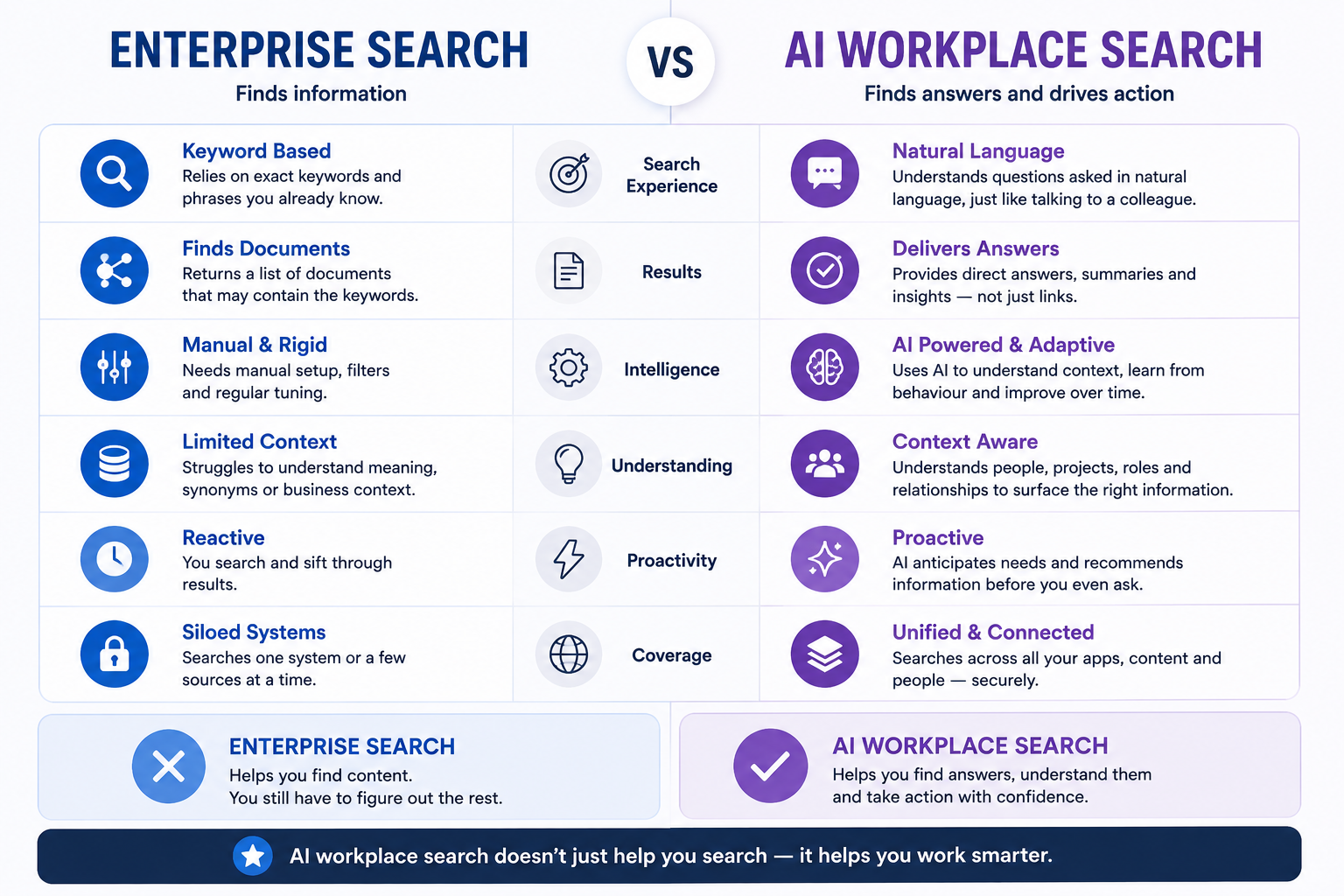
Traditional enterprise search relies on keywords.
An employee searches for the exact term they expect to find, and the system returns documents containing those words. This can work well when the employee knows the organisation's terminology, the document title and the location of the relevant information.
But it becomes less useful when employees describe a situation rather than a policy name.
For example, a traditional search might be:
"Parental leave"
The employee needs to know that this is the phrase used in the relevant policy. They may also need to try related terms such as paternity leave, maternity leave, adoption leave or family leave before finding the right document.
Semantic search improves this by looking at meaning rather than relying only on exact keyword matches.
It can recognise that different words and phrases may relate to the same subject. A search for "time off after having a baby" may therefore return information about parental leave, even if those exact words do not appear in the document title.
AI workplace search takes this further by allowing employees to ask questions in natural language and receive a direct answer based on relevant organisational information.
Instead of searching for:
"Parental leave"
An employee might ask:
"My partner is having a baby next month. What leave am I entitled to?"
The system can interpret the situation, identify relevant policies and summarise the answer. It may also point the employee to the source documents, explain any conditions and suggest who to contact if the situation requires a decision from HR.
This creates a significant opportunity for organisations.
Employees don't need to understand the company's filing structure, remember the exact name of a policy or learn which keywords produce the best results. They can describe what they are trying to do in the same way they would ask a colleague.
That can make workplace knowledge more accessible, reduce repetitive questions and help employees reach useful information faster.
It can also make search more valuable for complex work. An employee might ask:
"Which approval process applies if we want to use a new supplier for customer data?"
Or:
"What did we decide about the launch timeline, and which risks are still open?"
These questions require more than locating a document. They require the system to connect concepts, interpret context and present information in a useful form.
But the opportunity comes with a critical risk.
AI can make finding knowledge faster, but only when the underlying organisational knowledge is accurate and properly permissioned.
If policies are outdated, documents conflict with one another or access controls are poorly managed, AI search can make the problem worse rather than better.
Bad knowledge + excellent AI search = faster access to bad answers.
That is why AI workplace search should not be treated as a replacement for information governance. Organisations still need clear content ownership, review dates, version control, reliable permissions and obvious indicators of which information is authoritative.
The technology can improve how employees find and use knowledge.
It cannot make inaccurate, duplicated or unauthorised information trustworthy.
Who Actually Owns Workplace Information Findability?
Information findability is a shared organisational responsibility.
Different teams control different parts of the information environment, so improving search requires clear ownership across technology, content, governance and day-to-day operations.
| Role | Responsibility | Why It Matters |
| CIO / IT Director | Systems, integrations, permissions and search infrastructure | Search cannot work properly across disconnected or inaccessible systems |
| HR Director / CPO | Employee policies and people-related knowledge | HR information is among the most frequently needed workplace content |
| Internal Communications | Structure and visibility of organisational communications | Important information needs to remain discoverable after publication |
| Knowledge Manager | Taxonomy, lifecycle, standards and governance | Prevents knowledge becoming another uncontrolled archive |
| Department Managers | Accuracy of operational knowledge | Subject experts need ownership of departmental content |
| Information Security / DPO | Permissions, privacy and data governance | Better search must not expose information employees shouldn't access |
| Employees | Reporting outdated or missing information | Users often discover knowledge gaps first |
The central point is that information findability is cross-functional. Making it solely an "IT problem" is one reason organisations struggle to solve it.
IT can connect systems and improve search infrastructure, but it cannot decide whether a policy is current, whether a process is accurate or whether employees can understand the information they find.
Effective ownership therefore requires each function to manage the information within its control while working to shared standards for structure, access, review and accountability.
How to Fix Information Findability Without Rebuilding Everything
You don't need to replace every system or move all your content into one platform to improve information findability.
Start by making the information you already have easier to understand, trust and access.
1. Measure what employees can't find
Look for patterns in:
- failed searches
- repeated questions
- helpdesk requests
- employee surveys
- onboarding questions
This shows where employees are losing time and which information gaps matter most.
2. Identify your highest-value knowledge
Start with the information employees need repeatedly.
This might include policies, procedures, product information, customer guidance, technical documentation and onboarding materials.
3. Map where that information currently lives
Create a simple information inventory.
Record what exists, where it is stored, who uses it and whether it is current.
4. Remove duplicates
Don't make employees choose between seven versions of the same document.
Keep the authoritative version and archive or remove outdated copies.
5. Assign an owner
Important knowledge should have a named owner.
That person is responsible for keeping it accurate, relevant and easy to find.
6. Add review dates
Policies and procedures shouldn't remain available indefinitely without review.
Add review dates so outdated information is identified before it causes problems.
7. Create consistent naming and metadata
Use clear, understandable terminology rather than internal jargon.
Consistent titles, tags and categories make information easier to search and organise.
8. Build around employee questions
Document answers in the language employees actually use.
If employees search for "how do I claim expenses?", don't label the answer with an obscure internal term such as "employee reimbursement protocol".
9. Connect your repositories
Where possible, make information discoverable without forcing employees to search every application individually.
This doesn't always mean moving content. It may simply mean connecting systems or creating a shared search layer.
10. Improve permissions
Employees should see everything they're entitled to — and nothing they aren't.
Poor permissions can hide useful information, while excessive access can create security and compliance risks.
11. Introduce enterprise or federated search
Create one search experience across multiple information sources.
Employees should be able to search for an answer without first knowing which application contains it.
12. Evaluate semantic and AI search
Semantic and AI-powered search can be especially useful when employees search conversationally or don't know the exact words used in a document.
However, these tools still depend on accurate, well-managed source information.
13. Capture tribal knowledge
Prioritise subject-matter experts and business-critical processes.
Document the knowledge that currently exists only in people's heads before it is lost through absence, turnover or retirement.
14. Give employees somewhere to report bad information
Make it easy for employees to report outdated, incomplete or misleading content.
A simple feedback option can help knowledge owners identify problems quickly.
15. Measure findability continuously
Track:
- successful searches
- zero-result searches
- search refinement
- repeated queries
- knowledge article usefulness
- support ticket reduction
- time-to-answer
Improving information findability is an ongoing process.
The goal isn't to create a perfect information environment overnight. It's to steadily reduce the effort employees need to find accurate information and use it with confidence.
What Does Good Information Findability Actually Feel Like?
Good information findability should feel simple.
An employee should be able to:
Ask → Find → Verify → Act
without going through:
Search → Switch apps → Search again → Message colleague → Wait → Check version → Ask manager
They should be able to ask a question in natural language, find a relevant answer quickly, verify that it is current and trustworthy, and act with confidence.
That might mean finding the latest expenses policy without asking Finance.
It might mean locating the correct customer procedure during a live conversation.
It might mean checking an approved template, understanding who owns a process or finding the decision behind a project change.
The employee experience should not depend on knowing which system stores the information, which folder contains it or which colleague happens to remember where it lives.
Good findability removes the unnecessary work around the answer.
It gives employees a clear path from question to action, while making it obvious when information is outdated, incomplete or requires further approval.
That's the outcome businesses should optimise for.
Where a Modern Digital Workplace Fits In
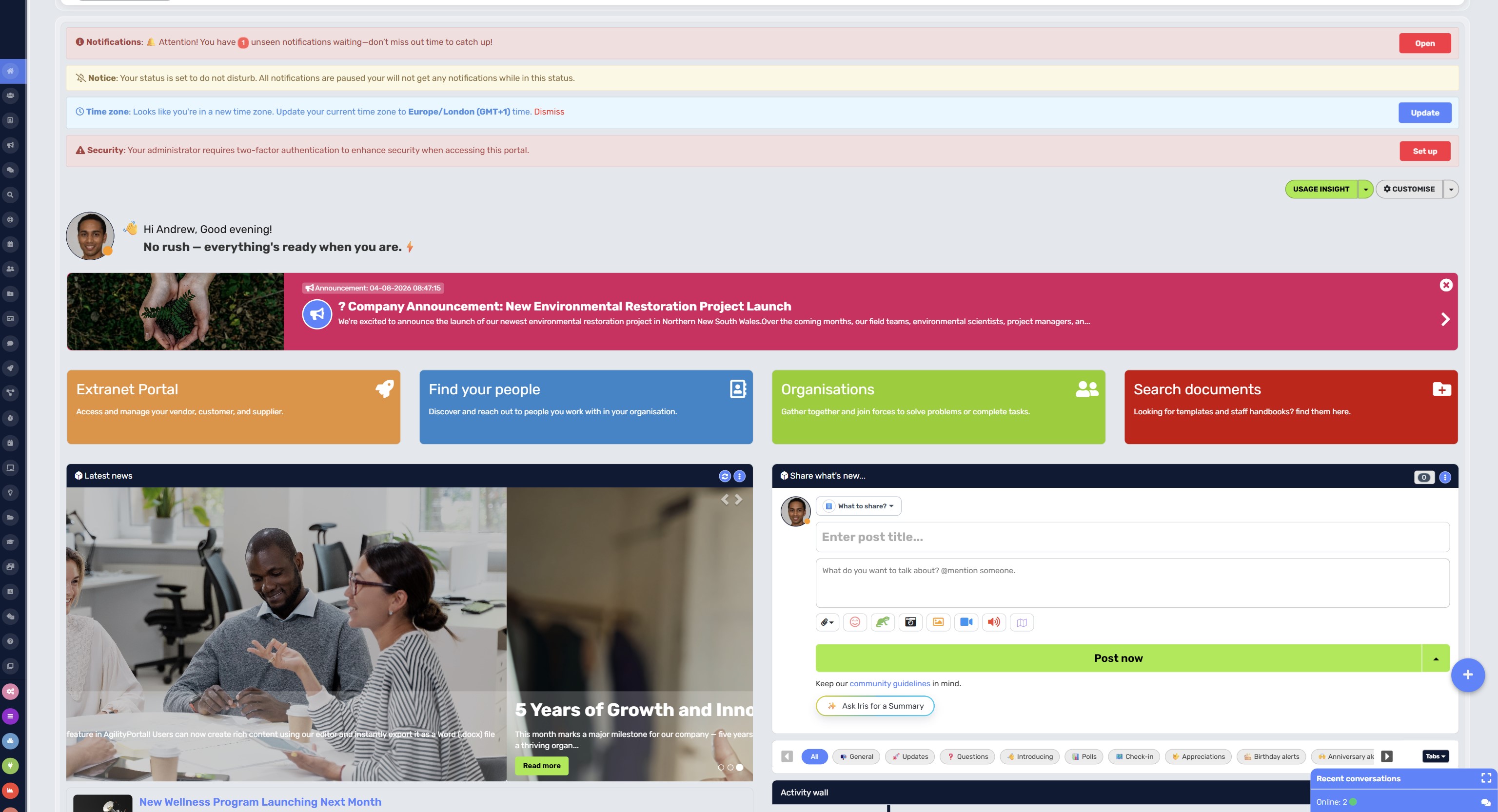
Where a Modern Digital Workplace Fits In
A digital workplace can provide a central employee entry point where communications, documents, knowledge, people and workplace resources become easier to discover.
That doesn't mean it magically solves every knowledge problem, or that every piece of information needs to be moved into one database.
Instead, it can give employees one trusted place from which workplace knowledge can be discovered, while allowing information to remain in the systems where it is created and managed.
AgilityPortal supports this approach through:
- centralised employee knowledge
- knowledge bases
- document access
- workplace search
- employee directories
- policies and procedures
- internal communications
- mobile access
- integrations
- employee training
- structured content
- permission-based access
The aim is to create a clearer route to the information employees need, without forcing an organisation to replace every existing system.
One front door doesn't necessarily mean one database.
It means giving employees a more consistent starting point for finding trusted information, understanding where to go next and accessing the workplace resources relevant to their role.
AgilityPortal
Give Employees One Trusted Place to Find the Information They Need
Employees struggle to find information when policies, documents, announcements, training and workplace knowledge are scattered across email, shared drives, chat conversations and disconnected business systems. AgilityPortal gives organisations a central digital workplace where employees can discover the information and resources they need without having to know where everything is stored.
Instead of relying on employees to search multiple systems or repeatedly ask colleagues for answers, organisations can centralise important knowledge, policies, procedures, documents, communications and training. This creates a more consistent employee experience and helps people identify information they can find, understand and trust.
Turn workplace knowledge into something employees can actually find
Give employees easier access to current policies, documents, people, announcements and organisational knowledge, helping reduce unnecessary searching, repeated questions and dependence on individual employees for answers.
AI Won't Fix Bad Knowledge — But It Will Change How Employees Find It
AI agents are moving quickly from experimentation into everyday knowledge work.
Microsoft's 2025 Work Trend Index found that 46% of leaders say their organisations are already using agents to fully automate workstreams or business processes.
Microsoft also reported that 82% of leaders see 2025 as a pivotal year for rethinking strategy and operations, while 81% expect agents to be moderately or extensively integrated into their organisation's AI strategy within the next 12 to 18 months. (microsoft.com)
46%
of leaders
Microsoft's 2025 Work Trend Index found that 46% of leaders say their organisations are already using AI agents to fully automate workstreams or business processes.
82%
see 2025 as a pivotal year for rethinking strategy and operations.
81%
expect agents to be moderately or extensively integrated into their AI strategy within 12–18 months.
Source:
Microsoft 2025 Work Trend Index
That shift will change how employees look for information.
Employees increasingly won't think:
"Where is that document?"
They'll ask:
"What is our policy on this?"
AI assistants can potentially retrieve, summarise and contextualise organisational knowledge. Instead of opening multiple documents and comparing versions, an employee may receive a direct answer based on the company's policies, procedures, project records and previous decisions.
But AI won't make poor knowledge management disappear.
It may make the consequences more difficult to see.
If an organisation's information is outdated, duplicated, incomplete or poorly governed, an AI assistant can retrieve the wrong source, combine conflicting information or produce a confident answer that employees cannot easily verify.
That makes knowledge governance even more important.
Businesses need to know:
- What information AI can access
- Which source is authoritative
- Who owns that information
- When it was last reviewed
- Who has permission to see it
- How employees can verify important answers
Access controls matter too.
An assistant should not expose confidential HR information, commercially sensitive material or customer data simply because it can find it. The system needs to respect existing permissions and make the boundaries of its knowledge clear.
The future isn't simply better search.
It's moving from searching for documents toward asking workplace knowledge systems questions.
That future will work best for organisations that treat knowledge as managed infrastructure: owned, reviewed, permissioned and designed to be trusted.
Before Buying Another Search or Knowledge Platform, Ask These Questions
When employees can't find information, buying a new search or knowledge platform can feel like the obvious solution.
Sometimes it is. But adding another tool to an already fragmented digital workplace can also make the problem worse.
Before comparing vendors, features or AI capabilities, organisations need to understand what they're actually trying to fix. Is the problem poor search technology, scattered information, outdated content, weak governance — or a mixture of all four?
Start with these questions.
1. What information are employees actually struggling to find?
Don't guess.
Look at common search queries, zero-result searches, support tickets, onboarding questions and the things employees repeatedly ask colleagues.
You might discover that the problem isn't "company knowledge" generally. It could be concentrated around HR policies, procedures, forms, customer information or technical documentation.
2. Where does that information currently live?
Map the systems containing important workplace knowledge.
That could include:
- SharePoint
- Microsoft 365
- OneDrive
- Google Drive
- Teams or Slack
- the company intranet
- HR systems
- CRM platforms
- project management tools
- knowledge bases
- local and personal folders
This exercise often exposes the real problem: information isn't missing; it's scattered.
3. How many duplicate repositories and documents exist?
If the same policy exists in SharePoint, an intranet, someone's OneDrive and three email attachments, better search could simply make all four versions easier to find.
That's not necessarily an improvement.
Before introducing more sophisticated search, identify duplicate content and establish which version should be considered authoritative.
4. Can employees search across systems?
Employees shouldn't need to perform the same search five times in five different applications.
Look at whether a platform provides enterprise or federated search capabilities that can connect information from different repositories while maintaining appropriate permissions.
The goal should be to reduce the amount of knowledge employees need about where information is stored.
5. Does search understand natural-language questions?
Employees don't always know the official title of the document they need.
Someone might ask:
"How many days can I work from home?"
The relevant document might be called:
"Hybrid Working Framework 2026."
Modern semantic and AI-powered search should be able to understand the intent behind a question rather than depending entirely on exact keyword matches.
6. Will existing permissions still be respected?
Making information easier to find must not make restricted information easier to access.
Search results should respect existing roles, groups and access permissions so employees only discover information they're authorised to see.
This becomes particularly important when AI search is introduced across multiple repositories.
7. Can employees tell which information is authoritative?
Finding something isn't the same as trusting it.
Employees should be able to identify:
- who owns the information
- when it was published
- when it was last reviewed
- whether it has been approved
- whether a newer version exists
- when it needs reviewing again
Without those signals, a search platform can return technically relevant information that employees still don't feel confident using.
8. Can content owners be assigned?
Every important policy, procedure or knowledge resource should have somebody responsible for it.
That doesn't necessarily mean IT.
HR might own employee policies, Finance might own expenses procedures, Operations might own operational processes, and individual departments might own their specialist knowledge.
Technology can support knowledge governance, but somebody still needs to be accountable for the content.
9. Can outdated information be flagged or archived?
Old information shouldn't remain indefinitely alongside current information without any indication that it has been superseded.
Look for ways to introduce review dates, expiration rules, version control, archiving and notifications to content owners.
Otherwise, better search can simply help employees find obsolete information faster.
10. Can you measure what employees are searching for?
Search analytics can reveal a huge amount about what employees need.
Useful measures include:
- popular searches
- zero-result searches
- repeated searches
- abandoned searches
- frequently accessed content
- search refinements
- unanswered questions
This turns workplace search into a source of employee insight.
If hundreds of employees search for the same question and can't find an answer, you've discovered a knowledge gap worth fixing.
11. Can frontline and mobile employees access the same knowledge?
Don't design workplace search only around employees sitting at laptops.
Frontline, field-based, deskless and remote employees may rely primarily on mobile devices.
Ask whether they can quickly search policies, procedures, training and workplace knowledge without needing a desktop computer, VPN or complicated sequence of applications.
12. Does the platform integrate with tools you already use?
The objective isn't necessarily to move everything into another repository.
A modern digital workplace can act as a central discovery layer while information continues to exist within specialist business systems.
Check how the platform connects with the tools your employees already use and whether those integrations genuinely reduce fragmentation.
13. Can AI answers show where the information came from?
This is becoming increasingly important.
If an AI assistant tells an employee:
"You can work remotely three days per week."
the employee should be able to see where that answer came from.
Was it based on the approved HR policy?
An old Teams conversation?
A superseded document?
A reliable AI workplace search experience should provide enough source context for employees to verify important answers rather than treating AI output as automatically authoritative.
14. How will sensitive information be protected?
Connecting more workplace knowledge creates greater responsibility around security and privacy.
Before implementation, involve the appropriate IT, security, HR, legal and data-protection stakeholders.
Consider:
- role-based access
- confidential HR information
- customer information
- personal data
- financial records
- commercially sensitive documents
- AI access to restricted information
- audit trails
The best workplace search experience isn't one that exposes everything.
It's one that makes everything an employee is authorised to know easier to discover.
15. Who owns knowledge governance after launch?
This might be the most important question on the list.
A new platform can be beautifully organised on launch day and become cluttered within a year if nobody owns what happens next.
Decide who will be responsible for:
- content standards
- information architecture
- ownership
- review schedules
- outdated content
- permissions
- search analytics
- AI governance
- employee feedback
- continuous improvement
IT might own the technology, but workplace knowledge itself usually needs shared responsibility across HR, Internal Communications, Operations, Compliance and individual departments.
Ultimately, don't start by asking, "What's the best search platform?"
Start with a better question:
Why can't our employees find the information they need today?
Once you understand that, you can decide whether the answer is better search, better knowledge management, stronger governance, improved integrations or a modern digital workplace that brings those pieces together.
Otherwise, there's a real risk of buying another system that employees eventually have to search as well.
Related Workplace Search & Knowledge Management Guides
If employees can't find information, the problem usually goes deeper than search. These related AgilityPortal guides explore information findability, knowledge silos, workplace search, knowledge management, single sources of truth and the systems organisations can use to make trusted information easier to find.
- Time Wasted Searching Information: Why It’s Killing Employees' Time
- Why Knowledge Management Fails in Most Companies — and How to Fix It
- The Hidden Cost of Poor Knowledge Management — You’re Losing More Than You Think
- Knowledge Management Framework: How Modern Businesses Organize, Share & Retain Knowledge
- 5 Founders Share What They’d Do Differently When Creating a Single Source of Truth
- Knowledge Base vs Intranet: What’s the Difference and Which Do You Need?
- 10 of the Best Knowledge Management Software Platforms Compared
- The Importance of Knowledge Accessibility for Employee Learning and Engagement
- Knowledge Database Software That Actually Works for Teams in 2026
- Reducing App Fatigue: Replace Too Many Apps With One Internal Comms Platform
Together, these guides build a stronger information findability and knowledge management topic cluster around workplace search, information silos, knowledge accessibility, employee self-service, trusted information and reducing the time employees spend searching for answers.
Final Thoughts - It Doesnt Have to Cost
The biggest mistake organisations make when employees can't find information is assuming they simply need better search software.
Search matters, but the real problem runs deeper.
Employees need information they can find, understand and trust. That means organisations need to think about where knowledge lives, who owns it, how long it remains valid, who can access it and whether employees can discover it without already knowing exactly where to look.
As workplace technology becomes more complicated and AI assistants become part of everyday work, this matters even more. AI can dramatically reduce the effort required to retrieve organisational knowledge, but it can't magically turn outdated, duplicated or poorly governed information into a reliable source of truth.
The organisations that get this right won't necessarily be those with the most information or the most software.
They'll be the ones where an employee can ask a simple question and get a reliable answer without hunting through five systems or messaging three colleagues.
Because workplace knowledge only creates value when people can actually find and use it.
FAQ on Why Employees Can't Find Information at Work
Why can't employees find information at work?
Information is often fragmented across email, shared drives, chat platforms, intranets and business applications.
Poor naming, duplicate documents, outdated content, weak search and knowledge stored inside employees' heads make the problem worse.
How much time do employees spend searching for information?
Recent Atlassian State of Teams research found teams spend roughly 25% of their time searching for answers. Older McKinsey research estimated interaction workers spent nearly 20% of their workweek looking for internal information or colleagues who could help.
What is information findability?
Information findability describes how easily someone can locate, understand and identify the correct information they need.
How can employees find information faster?
Start by centralising high-value knowledge, eliminating duplicate content, improving metadata, assigning content owners and providing search across workplace systems.
What is enterprise search?
Enterprise search allows employees to search information distributed across multiple organisational repositories and applications from a unified search experience.
Can AI help employees find workplace information?
Yes. Semantic search and AI assistants can understand conversational questions and retrieve relevant workplace knowledge.
Their reliability, however, depends heavily on the quality, permissions and governance of the underlying information.
What is a single source of truth?
A single source of truth is an authoritative location or system employees can trust for particular organisational information.
It doesn't necessarily mean every company document has to exist inside one application.
Who is responsible for workplace knowledge management?
Responsibility is usually shared between IT, HR, Internal Communications, knowledge managers, departmental leaders and information-security teams.
How do you reduce information silos?
Identify where important knowledge lives, connect repositories where appropriate, establish ownership and governance, and create shared ways for employees to discover information across departments.
What's the difference between a knowledge base and enterprise search?
A knowledge base stores structured organisational knowledge.
Enterprise search helps employees discover information across multiple repositories, potentially including knowledge bases, documents, people, intranets and other workplace systems.
AI Summary
- Employees can't find information when workplace knowledge is scattered across email, chat, SharePoint, cloud drives, intranets, business applications and individual employees.
- The problem is often not a lack of information but poor information findability. Employees need to be able to find, understand and trust workplace knowledge before they can confidently use it.
- Poor workplace information search affects more than productivity. It can slow decisions, create interruptions, frustrate employees, make onboarding harder and increase the risk of people using outdated information.
- Better search technology alone will not solve duplicate documents, unclear content ownership, outdated policies, inconsistent permissions or knowledge that remains trapped inside people's heads.
- Enterprise search, semantic search and AI-powered workplace search can make information easier to discover, but reliable results depend on accurate, current, well-governed and properly permissioned source information.
- A digital workplace such as AgilityPortal can centralise workplace knowledge, policies, documents, communications and employee resources, helping people find trusted information without needing to know which system contains it.
Most Popular Posts

Effective communication among team members is vital for the productivity and success of any organization. Surprisingly, 60% of companies lack a long-term internal communication strategy, which p...


Businesses thrive on communication for efficiency, productivity and accomplishment. When the right information is passed from the right designation in the organization, it promotes positivity an...

Categories
Blog
(3208)
Business Management
(395)
Employee Engagement
(235)
Digital Transformation
(218)
Growth
(150)
Intranets
(142)
Internal communications
(106)
Remote Work
(68)
Sales
(53)
Collaboration
(53)
Customer Experience
(33)
Culture
(30)
Knowledge Management
(29)
Project management
(29)
Leadership
(20)
Comparisons
(9)
News
(1)

Related Posts

The Amazon advertising agency landscape has changed dramatically over the past two years. With the introduction of AI-powered shopping experiences, Amazon Rufus, advanced attribution reporting, Sponsored Brands Video, and Amazon DSP enhancement...

Why do your remote staff still struggle to work together when they have the apps, laptops and access they need? Often, the problem is the small gaps between people and information. Someone can't open the latest document. An approval gets buried...

An AI coworker could help solve a problem most businesses know well: too much knowledge work and too little time. Employees spend their day searching for information, preparing updates and answering the same questions. Having a system tha...

When is the right time to upgrade to a self-hosted AI agent—and how do you know whether switching will solve your team's problems or create more work? Picture an employee asking your AI assistant where to find the latest leave policy. It cannot...

Could an AI coworker take some of the busywork off your team's plate? The best AI coworkers promise to help employees research topics, prepare documents, find information and handle recurring tasks. But choosing one means looking beyond an impressive...


Jill Romford
I am a digital nomad, lover of exploring new places and making friends.
I love to travel and I love the internet. I take pictures of my travels and share them on the internet using Instagram.
Traveler, entrepreneur, and community builder. I share my insights on digital marketing and social media while inspiring you to live your fullest life.
Ready to learn more? 👍
One platform to optimize, manage and track all of your teams. Your new digital workplace is a click away. 🚀
Free for 14 days, no credit card required.