
Insight Blog
Agility’s perspectives on transforming the employee's experience throughout remote transformation using connected enterprise tools.
45 minutes reading time
(9093 words)
10 of The Best Knowledge Management Software (Compared): Top Tools That Actually Work

10 of The Best Knowledge Management Software (Compared): Top Tools That Actually Work
Compare the best knowledge management software to centralise information, reduce wasted time, and improve team productivity.
10 of The Best Knowledge Management Software (Compared): Top Tools That Actually Work

What is it really costing a business when employees can't find the information they need?
It's a question most companies avoid—but the answer is uncomfortable.
Research from Panopto found that 60% of employees say it's difficult to find the information they need to do their jobs, largely because they don't have access to a centralised knowledge library.
60%
of employees
Research from Panopto found that 60% of employees struggle to find the information they need, largely because they don’t have access to a centralised knowledge library.
Source: Panopto Workplace Knowledge Report
That gap doesn't just slow people down—it leads to duplicated work, constant interruptions, and poor decision-making across teams.
For organisations trying to scale, this becomes a serious operational risk.
When knowledge lives in scattered documents, emails, or disconnected tools, employees are forced to rely on guesswork or repeatedly ask colleagues for answers.
This article explores the best knowledge management software, comparing the top tools available today, breaking down their strengths and limitations, and helping businesses choose a solution that actually centralises knowledge, improves access, and reduces wasted time.
Key Takeaways
- The best knowledge management software must centralise information and make it instantly accessible, not bury it across disconnected tools.
- Poor knowledge systems lead to wasted time, with employees spending up to 20–28% of their workweek searching for information.
- Different tools solve different problems—some focus on flexibility (Notion), others on structure (Confluence), while all-in-one platforms combine communication and knowledge.
- Key features like powerful search, permissions, integrations, and mobile access are essential for scaling knowledge across large organisations.
- Successful knowledge management depends on adoption, structure, and ease of use—not just features—otherwise even the best tools fail.
Who This Guide Is For
This guide is designed for decision-makers who are actively looking to fix how knowledge is managed, shared, and accessed across their organisation.
- Operations Managers who need to centralise company knowledge and eliminate inefficiencies caused by scattered information
- HR Teams responsible for building structured onboarding, training programmes, and internal knowledge libraries
- IT Leaders looking to replace outdated intranet systems like SharePoint with something more user-friendly and scalable
- Growing Companies that are struggling with information chaos, duplicate work, and employees constantly asking the same questions
If knowledge is slowing teams down instead of enabling them, this guide is aimed directly at solving that problem.
Why Most Knowledge Systems Quietly Break Down

Why Most Knowledge Systems Quietly Break Down
Fragmented knowledge systems in the workplace
In many organisations, knowledge doesn't live in one place—it's spread across tools like Slack, Google Drive, and email threads. On paper, it feels like everything is "somewhere," but in reality, nothing is truly accessible.
This fragmentation creates a hidden problem.
Employees waste time jumping between platforms, trying to piece together information that should already be structured and easy to find.
In a typical scenario, a marketing team might draft content in Google Docs, discuss edits in Slack, and finalise approvals via email—leaving no clear source of truth.
When someone revisits that work later, they're often forced to start from scratch or guess which version is correct.
It's not surprising that research from Asana shows employees spend up to 60% of their time on "work about work"—a significant portion of which comes down to chasing information instead of actually using it.
60%
of time
Research from Asana shows employees can spend up to 60% of their time on “work about work”—much of it chasing information instead of actually using it.
Source: Asana Work Index
Why employees struggle to find internal information
Even when organisations invest in documentation, poor search functionality quickly undermines its value.
If employees can't find what they need within seconds, they stop trusting the system altogether.
In practice, this means people default to asking colleagues instead of searching.
A support agent looking for a policy document might try a quick search, fail to get a relevant result, and immediately message a teammate.
That single interruption might seem small, but multiply it across an organisation and it becomes a constant drain on productivity.
According to Atlassian, 56% of employees rely on coworkers or meetings to access information they couldn't find themselves—a clear sign that search isn't doing its job.
56%
of employees
According to Atlassian, 56% of employees rely on coworkers or meetings to access information they couldn’t find themselves—clear evidence that search isn’t doing its job.
Source: Atlassian Workplace Study
Lack of knowledge ownership in organisations
Another issue that quietly erodes knowledge systems is the absence of clear ownership.
When no one is responsible for maintaining content, it quickly becomes outdated—and once employees lose trust in the accuracy of information, they stop using it entirely.
This often shows up in onboarding and HR processes.
A company might create detailed training materials, but without regular updates, those resources become irrelevant.
New hires end up following outdated steps, asking repetitive questions, or making avoidable mistakes.
Data from Bloomfire highlights the scale of the issue, with 74% of employees saying they miss out on important information due to poor knowledge sharing practices.
74%
of employees
Data from Bloomfire shows that 74% of employees miss out on important information due to poor knowledge sharing practices across their organisation.
Source: Bloomfire Knowledge Management Report
Why employees don't use knowledge management systems
Even when organisations implement dedicated platforms, adoption is far from guaranteed. If a system feels complicated, slow, or disconnected from daily workflows, employees simply ignore it.
A common pattern is companies rolling out a knowledge base that looks great in theory but is difficult to navigate in practice.
Instead of using it, teams revert back to familiar tools like Slack or email, creating parallel systems that defeat the entire purpose of centralising knowledge.
This challenge is reflected in findings from Gartner, which show that up to 70% of digital initiatives fail due to poor adoption and usability issues.
When these problems combine—fragmentation, poor search, lack of ownership, and low adoption—the result is the same: employees spend more time looking for information than using it.
Over time, that leads to slower decisions, duplicated work, and a growing reliance on guesswork instead of reliable knowledge.
70%
failure rate
Findings from Gartner show that up to 70% of digital initiatives fail due to poor adoption and usability issues—highlighting how critical user experience is to success.
Source: Gartner Research
6 Features To Look For in your next Knowledge Management Software
#1. Powerful Search & AI Retrieval (enterprise knowledge search tools)
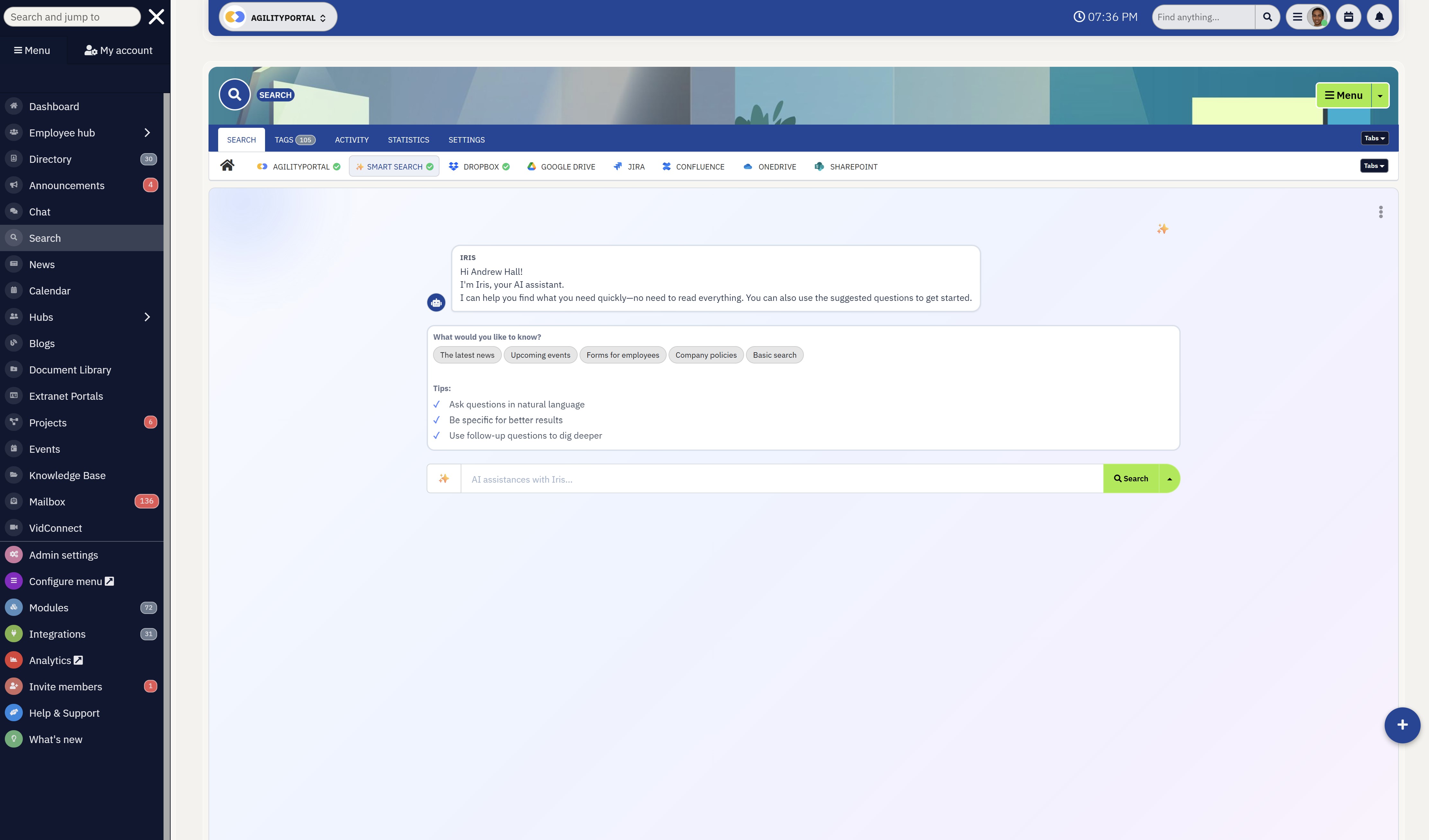
Powerful Search & AI Retrieval (enterprise knowledge search tools)
At its core, this feature determines whether a knowledge system is actually usable. Powerful search goes beyond basic keyword matching—it uses indexing, tagging, and sometimes AI-driven relevance to surface the right information instantly.
In large organisations, where thousands of documents exist across departments, this becomes critical. Employees shouldn't need to know where something is stored—they should just search and find it.
For example, instead of digging through folders, an employee can type "remote onboarding checklist" and instantly see the most relevant, up-to-date version. Advanced systems also allow filtering by department, content type, or date, making discovery even faster.
This is where tools like Confluence and Guru stand out—they focus heavily on making knowledge searchable and accessible in seconds.
For large organisations, this directly reduces time wasted searching, improves decision-making speed, and ensures employees rely on verified information instead of guesswork.
#2. Centralised Knowledge Hub (centralised knowledge base for enterprises)
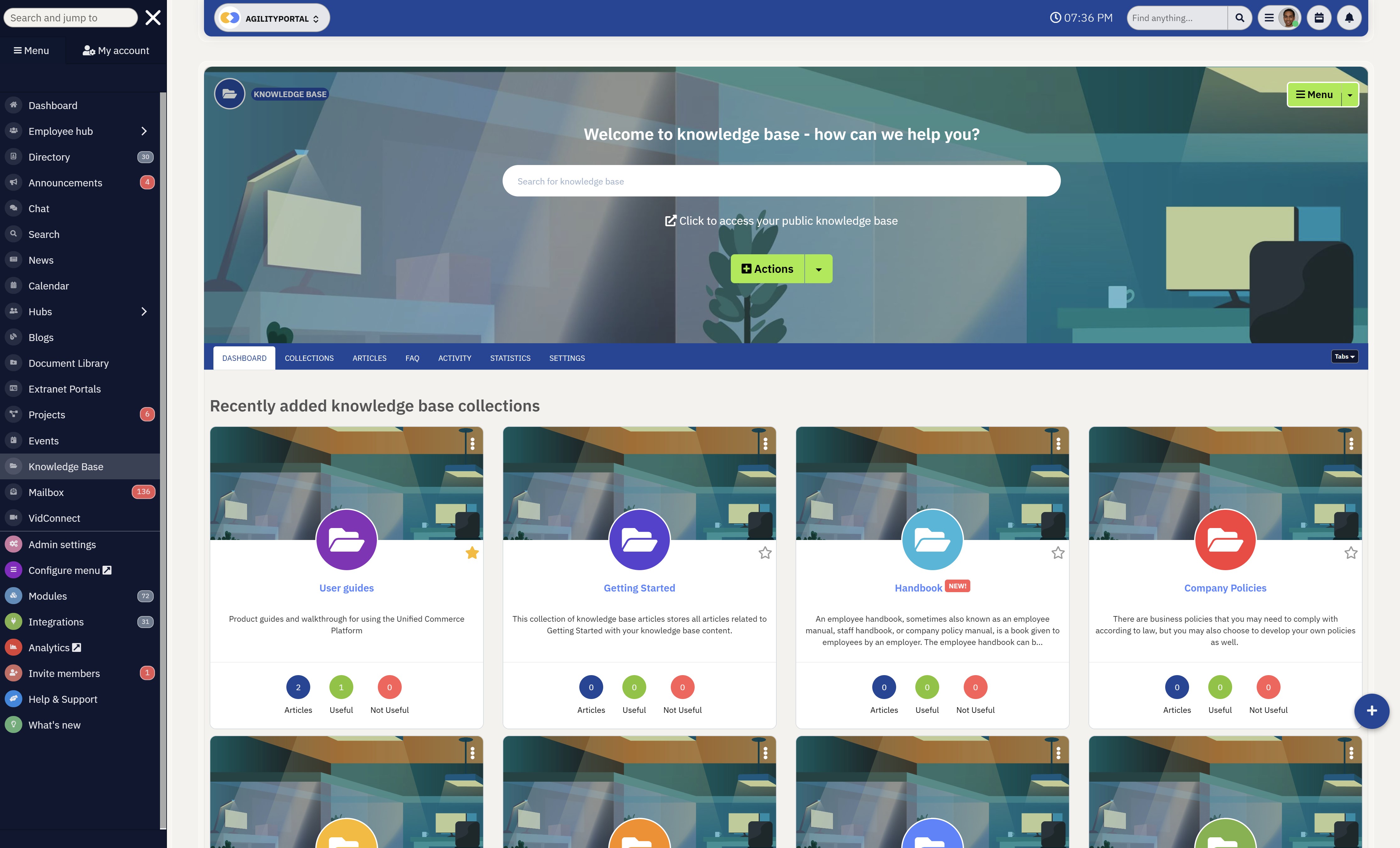
Centralised Knowledge Hub (centralised knowledge base for enterprises)
A centralised knowledge hub acts as the single source of truth for the entire organisation.
Instead of information being scattered across emails, shared drives, and chat tools, everything—from SOPs and policies to FAQs and training materials—is stored in one structured system.
This is especially important at scale. When teams across different regions or departments need access to consistent information, centralisation eliminates confusion and duplication.
Take a global company with offices in multiple countries. Without a central hub, each region might create its own version of policies or processes. With a unified platform, everyone works from the same playbook.
Platforms like SharePoint attempt this, but often struggle with usability, while modern tools like Notion and intranet platforms go further by combining structure with ease of use.
The result is simple: faster access, fewer errors, and a consistent flow of knowledge across the organisation.
#3. Easy Content Creation & Editing (scalable company wiki software)
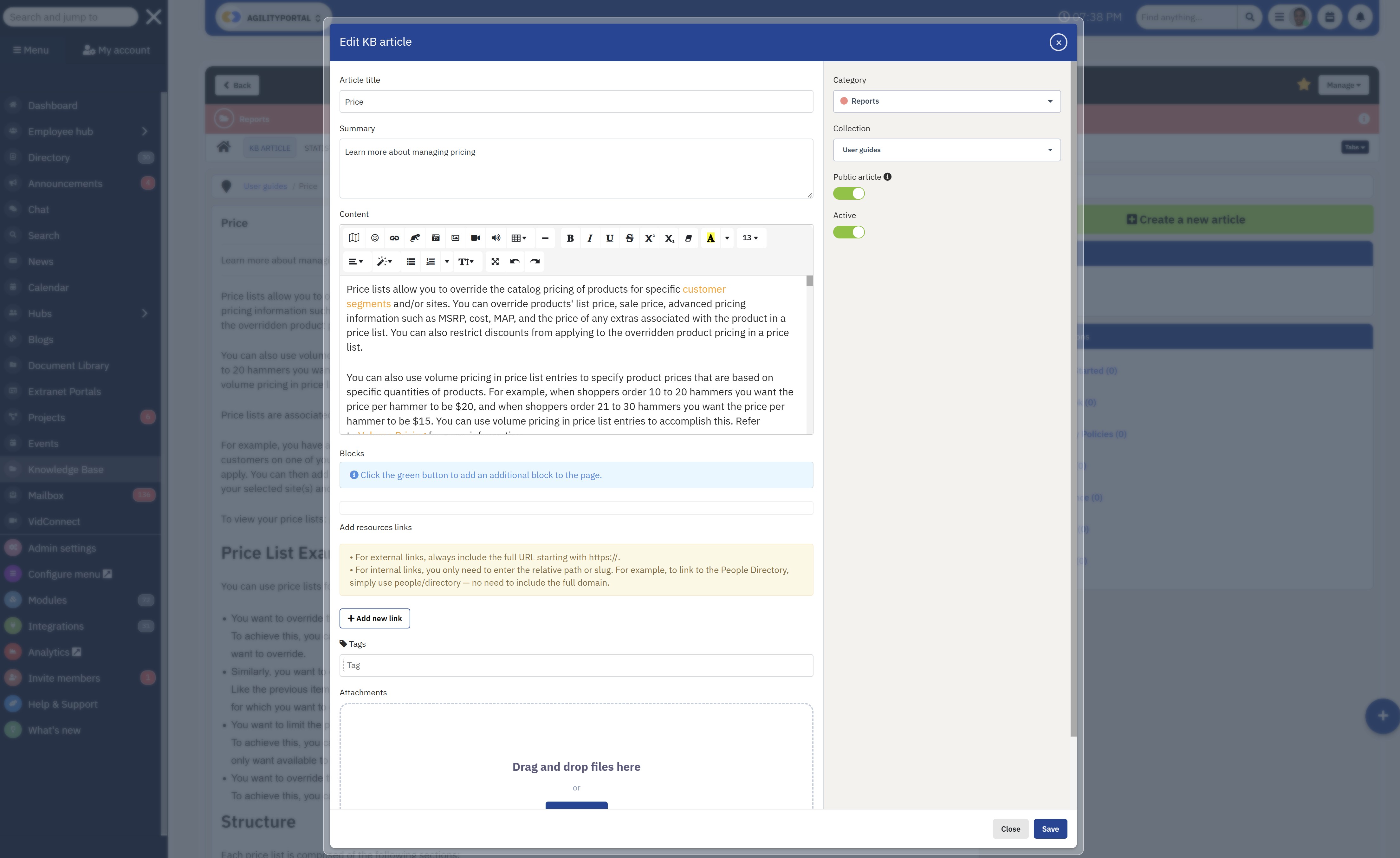
Easy Content Creation & Editing (scalable company wiki software)
A knowledge system is only as good as the content inside it. If creating or updating information is difficult, content quickly becomes outdated.
That's why modern platforms use wiki-style editing—allowing employees to create, edit, and organise content without needing technical skills. Features like templates, rich text editing, and embedded media make it easy to document processes clearly.
Version control is just as important. It ensures teams can track changes, revert to previous versions, and maintain accuracy over time.
In large organisations, this enables decentralised knowledge creation—teams can manage their own content while still contributing to a central system.
For example, an HR team can update policies while IT maintains technical documentation, all within the same platform—without bottlenecks or reliance on a single owner.
#4. Permissions & Access Control (secure enterprise knowledge sharing systems)
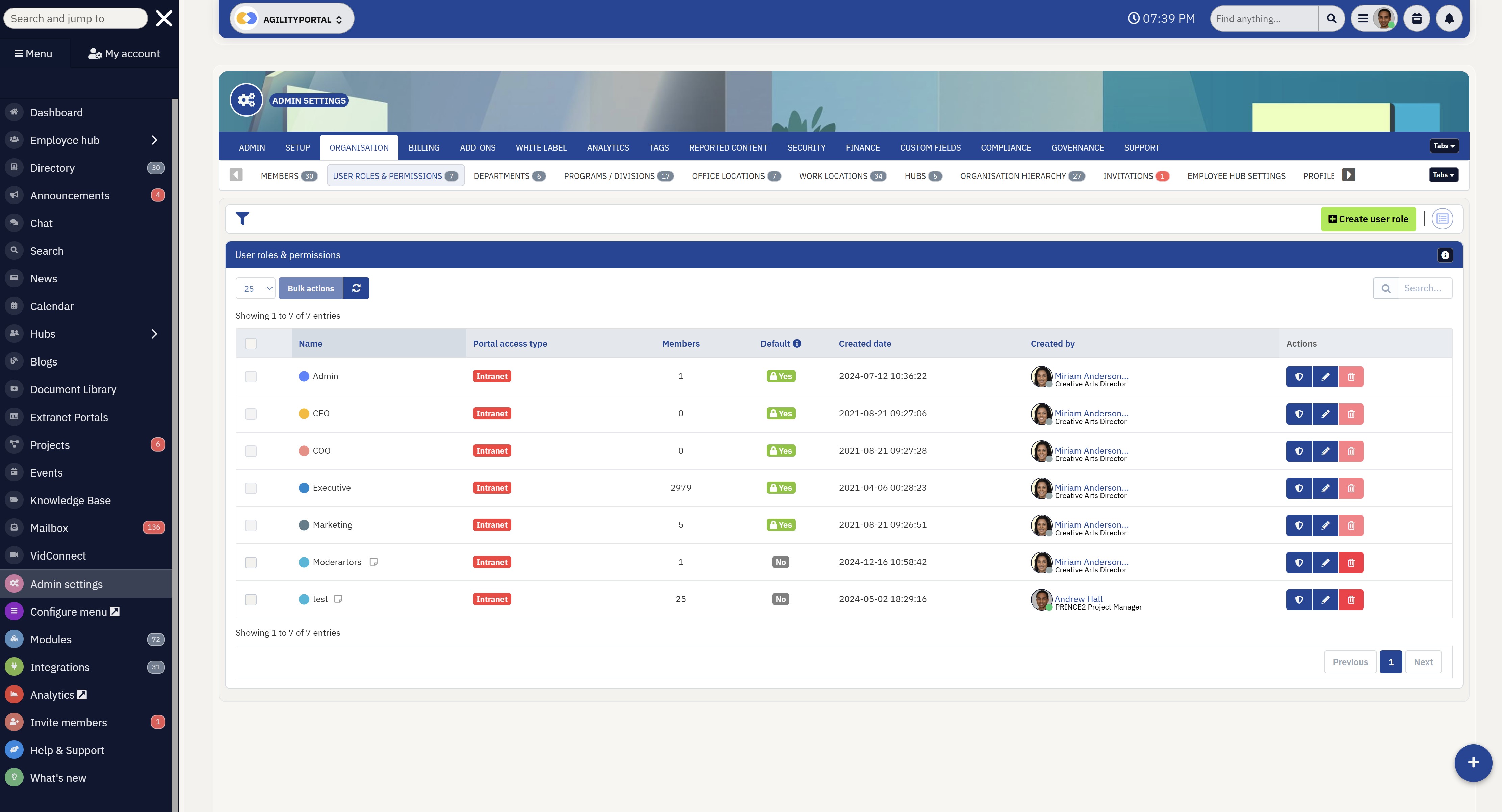
Permissions & Access Control (secure enterprise knowledge sharing systems)
Not all information should be accessible to everyone. Permissions and access control ensure that sensitive data is only available to the right people, while still keeping general knowledge widely accessible.
This is especially important in larger organisations with multiple departments, roles, and regions. Role-based access allows companies to control who can view, edit, or manage specific content.
For example, financial reports might only be accessible to leadership, while onboarding materials are available to all employees. At the same time, teams can collaborate securely without risking data exposure.
Enterprise-grade platforms prioritise this balance—making knowledge accessible while maintaining compliance and security standards.
#5. Integrations (knowledge management software with integrations)
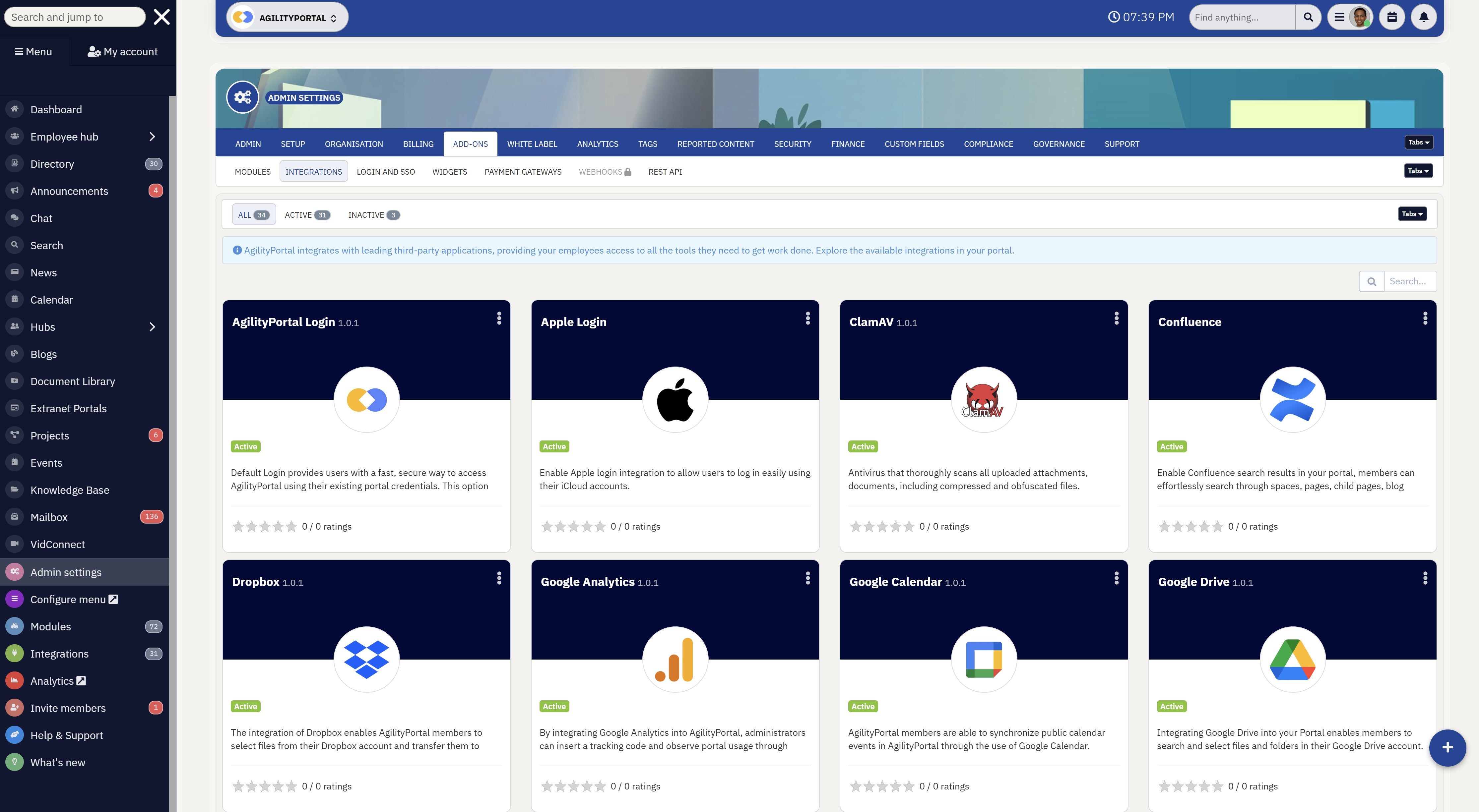
Integrations (knowledge management software with integrations)
No knowledge system exists in isolation. Integrations connect the platform with the tools employees already use, such as Microsoft Teams, Slack, and Google Workspace.
This is where knowledge management becomes part of the daily workflow instead of a separate destination.
For example, an employee can access knowledge directly within Slack without switching tabs, or sync documents from Google Drive into the knowledge base. This reduces friction and increases adoption.
In large organisations, integrations are essential for breaking down silos and ensuring knowledge flows seamlessly between systems.
#6. Mobile & Frontline Accessibility (knowledge management for frontline workers)
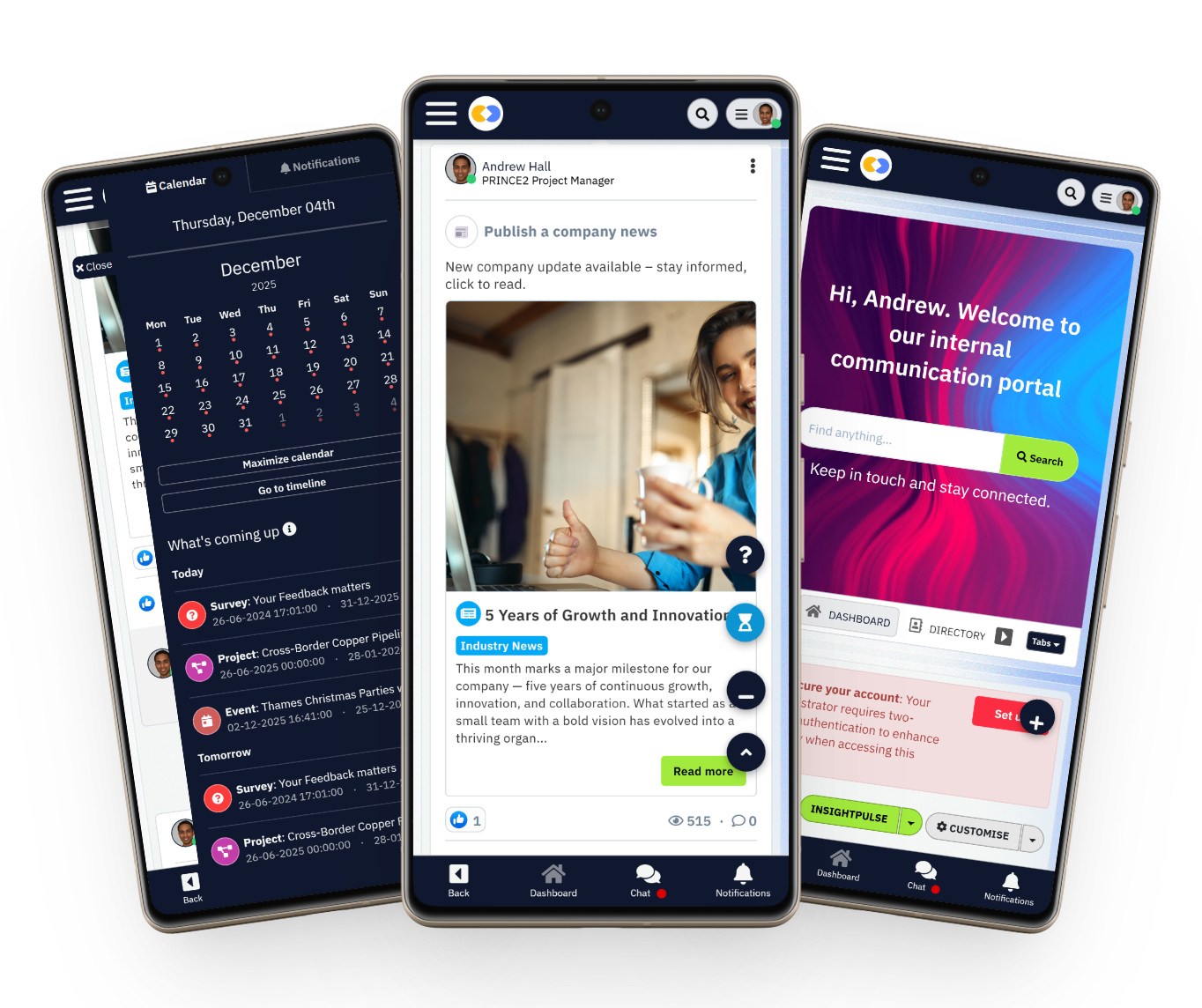
Many organisations overlook a critical group—frontline and non-desk employees. If knowledge systems are only accessible via desktop, a large portion of the workforce is excluded.
Mobile accessibility ensures that employees in roles like retail, healthcare, or field services can access information anytime, anywhere.
For example, a frontline worker can quickly check a procedure, safety guideline, or update on their phone without needing to return to a desk.
This not only improves productivity but also ensures consistency in how work is performed across locations.
Modern platforms are increasingly designed with mobile-first experiences, recognising that knowledge shouldn't be limited to office-based teams.
When these features come together—powerful search, centralisation, easy content creation, secure access, seamless integrations, and mobile accessibility—they create a system where knowledge is not just stored, but actively used.
And that's the real goal: making knowledge easy to find, easy to manage, and impossible to ignore.
Best Knowledge Management Software (Compared)
Book a demo of AgilityPortal and start a 14-day free trial — no credit card required.
Exactly as written. No variations.
Knowledge Management Software Comparison
This isn't just a feature checklist—this comparison focuses on how each platform actually performs when it comes to knowledge discovery, scalability, and real adoption in organisations.
| Tool | Best For | Strength | Limitation |
| AgilityPortal | All-in-one digital workplace | Combines knowledge, communication, and engagement in one place | Requires setup to structure properly |
| Notion | Startups & flexible teams | Highly customisable workspace and internal wiki | Becomes messy without governance |
| Confluence | Technical & product teams | Strong structured documentation and Jira integration | Complex for non-technical users |
| SharePoint | Microsoft-based enterprises | Powerful document management and compliance | Poor usability and low adoption |
| Guru | Support & sales teams | Real-time knowledge surfaced in workflows | Not a full knowledge hub |
| Slab | Small teams & simplicity | Clean UI and easy knowledge sharing | Limited scalability |
| Helpjuice | Customer-facing knowledge bases | Advanced search and analytics for support | Expensive and not all-in-one |
| HubSpot KB | CRM-driven support teams | Deep integration with CRM and support tools | Cost increases as you scale |
| Slite | Remote & async teams | Great for documenting and sharing team knowledge | Lacks enterprise depth |
| Tettra | Slack-based teams | Captures knowledge directly from conversations | Limited structure at scale |
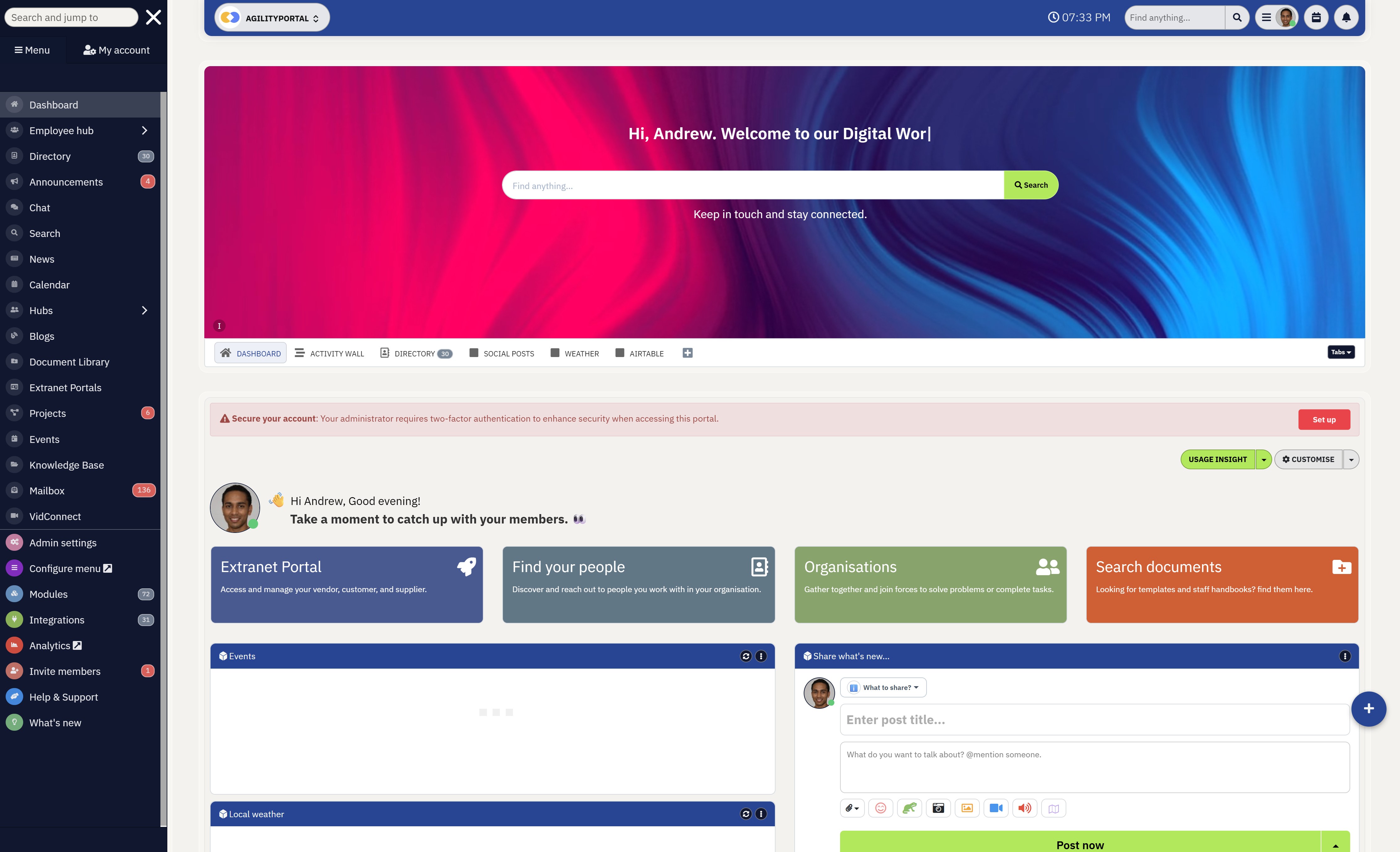
1. AgilityPortal — Best All-in-One Knowledge & Communication Platform
AgilityPortal — Best All-in-One Knowledge & Communication Platform
AgilityPortal acts as a company-wide knowledge hub, where teams can store SOPs, policies, onboarding materials, and internal documentation alongside communication tools like news feeds, chat, and announcements.
This makes it far more than a traditional wiki—it becomes the central place employees go to find information, stay updated, and collaborate.
What makes it particularly effective for large organisations is how it connects knowledge with daily workflows. Employees don't just store information—they interact with it.
For example, an HR team can publish onboarding guides, push updates through announcements, and track engagement—all within the same platform. This improves visibility and ensures knowledge is actually used, not ignored.
Unlike tools such as Slack or Microsoft Teams, which focus primarily on communication, AgilityPortal is built to structure and manage knowledge at scale.
At the same time, it avoids the complexity often associated with platforms like SharePoint by prioritising usability and adoption.
AgilityPortal also supports frontline and remote teams, offering mobile access, multi-language support, and features designed for employees who aren't desk-based.
This makes it a strong option for companies with distributed workforces that need consistent access to information.
Pricing (AgilityPortal)- Starts from ~$99 per 100 users/month
- 14-day free trial available (no credit card required)
- Custom enterprise pricing available
Key Features
- Centralised knowledge base and document management
- Built-in communication tools (news feeds, chat, announcements)
- Advanced search and structured content organisation
- Employee engagement features (recognition, surveys, updates)
- Mobile-first experience for frontline workers
- Integrations with Microsoft 365, Google Workspace, and more
Limitations to Consider
- Less brand recognition compared to larger competitors
- May include more features than smaller teams need
- Requires initial setup to structure content effectively
AgilityPortal
The All-in-One Digital Engagement Platform Built to Replace Tool Chaos
AgilityPortal is built for professional services firms that need more than another chat app or basic intranet. It brings internal communication, employee engagement, knowledge management, document sharing, and team collaboration into one secure digital workplace platform.
Instead of losing billable hours searching through emails, shared drives, and disconnected systems, teams get one central hub where people, knowledge, updates, and workflows stay connected.
Start your 14-day free trial — no credit card required. Built for teams that want less tool switching and more work done.2. Notion — Best for Flexible Knowledge Management & Team Collaboration
The biggest advantage of Notion is that it's not just a traditional knowledge management tool—it's an all-in-one workspace that combines note-taking, documentation, databases, and collaboration into a single platform.
This makes it especially appealing for teams looking for flexible knowledge management software rather than a rigid, structured system.
Notion allows teams to build everything from internal wikis and SOPs to project trackers and onboarding hubs.
Features like real-time collaboration, drag-and-drop page building, and custom databases make it easy to organise information in a way that fits the business, not the other way around. This flexibility is why Notion is often considered one of the best knowledge management tools for startups and growing teams.
Where Notion really stands out is its ability to act as a central workspace.
Teams can connect notes, documents, and workflows together, creating a lightweight but powerful internal knowledge base system. However, as organisations grow, this flexibility can become a downside—without clear structure, content can quickly become messy and harder to manage at scale.
For companies already using Notion for documentation or project management, its knowledge base capabilities feel like a natural extension, making it a strong choice for teams that want everything in one place without adding another tool.
Pricing (Notion)- Free plan available
- Plus: ~$8 per user/month
- Business: ~$15 per user/month
- Enterprise: Custom pricing
- Flexible page builder for creating wikis, docs, and databases
- Real-time collaboration and team editing
- Powerful templates for internal knowledge base setup
- Linked databases for organising structured information
- Cross-platform access (desktop, mobile, web)
- Can become disorganised without strict governance
- Search and navigation can slow down at scale
- Lacks advanced enterprise-level permissions compared to tools like SharePoint or Confluence
Notion
A Flexible Workspace for Wikis, Docs, Projects, and Team Knowledge
Notion is a flexible knowledge management software that helps teams create internal wikis, document processes, manage projects, and organise company information in one connected workspace. It is especially useful for startups and growing teams that want a customisable company wiki without the complexity of traditional enterprise systems.
See how Notion is rated for ease of use, flexibility, collaboration, and team knowledge management.3. Confluence — Best for Technical Teams & Structured Documentation
As part of the Atlassian ecosystem, Confluence integrates deeply with tools like Jira, allowing teams to connect documentation directly to development workflows.
This makes it one of the most effective knowledge management systems for software teams, where documentation, tickets, and collaboration need to stay tightly aligned.
Confluence works as a powerful enterprise wiki software, enabling teams to create structured spaces, organise content by projects or departments, and maintain clear hierarchies.
Features like version history, inline comments, and collaborative editing help ensure that knowledge stays accurate and continuously improved.
For example, a product team can document feature requirements, link them to Jira tickets, and keep all related discussions and updates in one place—reducing miscommunication and improving delivery speed.
That said, while Confluence excels in structure and scalability, it can feel complex for non-technical users.
Teams outside of engineering may find the interface less intuitive compared to more flexible platforms like Notion.
Pricing (Confluence)- Free plan available (up to 10 users)
- Standard: ~$5–6 per user/month
- Premium: ~$10–12 per user/month
- Enterprise: Custom pricing
- Structured spaces for organised knowledge management
- Deep integration with Jira and Atlassian tools
- Advanced version control and page history
- Collaborative editing with inline comments
- Powerful permissions and access controls
- Steeper learning curve for non-technical teams
- Interface can feel cluttered for new users
- Requires governance to maintain clean structure at scale
Confluence
A Structured Team Workspace for Documentation, Wikis, and Knowledge Sharing
Confluence is a powerful knowledge management software built for teams that need structured documentation, internal wikis, and scalable content organisation. As part of the Atlassian ecosystem, it connects seamlessly with tools like Jira, making it ideal for engineering and product teams that require a reliable enterprise knowledge base.
Explore how Confluence supports structured knowledge management, technical documentation, and team collaboration at scale.4. SharePoint — Best for Microsoft Ecosystem & Enterprise Document Management
SharePoint is particularly strong when it comes to handling large volumes of documents across departments.
Features like document libraries, version control, metadata tagging, and advanced permissions make it suitable for enterprises that need strict governance and compliance. This is why it's often positioned as a corporate knowledge base for large organisations where control and structure matter more than simplicity.
In practice, companies use SharePoint to centralise policies, store internal documentation, and manage workflows tied to Microsoft tools like Microsoft Teams and OneDrive.
For example, an organisation can store HR policies in SharePoint, collaborate on them in Teams, and control access based on employee roles—all within a single ecosystem.
However, where SharePoint struggles is usability. While it offers powerful features, the experience can feel complex and unintuitive, especially for non-technical users.
Many organisations find that despite having a robust system in place, employees still default to email or chat tools because SharePoint is harder to navigate.
This gap between capability and usability is why SharePoint is often compared to more modern knowledge management software that prioritises user experience and adoption alongside functionality.
Pricing (SharePoint)- Included with Microsoft 365 subscriptions
- Business Basic: ~£5–6 per user/month
- Business Standard: ~£10–12 per user/month
- Enterprise plans: Custom pricing depending on licensing
- Enterprise-grade document management and storage
- Deep integration with Microsoft 365 tools
- Advanced permissions and compliance controls
- Version history and document tracking
- Intranet and internal site creation
- Complex setup and configuration
- Low adoption due to usability challenges
- Requires training and ongoing management
- Search and navigation can feel unintuitive
SharePoint
An Enterprise Knowledge Management & Document Platform for Microsoft 365
SharePoint is a widely used enterprise knowledge management software that helps organisations manage documents, build intranets, and centralise internal knowledge within the Microsoft ecosystem. It is particularly suited for businesses already using Microsoft 365, offering deep integration with tools like Teams and OneDrive.
See how SharePoint performs for enterprise document management, intranet solutions, and internal knowledge sharing.5. Guru (Best for Browser-Based Knowledge)
This approach makes it one of the most practical knowledge sharing tools for fast-moving teams, especially in support, sales, and customer-facing roles where speed matters.
With Guru, employees don't need to search through folders or open separate systems—they can access verified knowledge instantly within tools like Slack, browsers, or CRM platforms.
A key feature that sets Guru apart is its knowledge verification workflow. Content is assigned to owners and regularly reviewed, ensuring that information stays accurate and trustworthy.
This is critical in larger organisations where outdated information can lead to costly mistakes or inconsistent customer experiences.
For example, a support agent handling a customer query can instantly pull up the latest approved answer without leaving their workflow.
This reduces response times, improves consistency, and removes the need to rely on memory or ask colleagues.
Guru is often considered one of the best internal knowledge base tools for customer support teams because it prioritises speed, accessibility, and trust in information.
Pricing (Guru)- Free plan available (limited features)
- Starter: ~$5 per user/month
- Builder: ~$10 per user/month
- Enterprise: Custom pricing
- Browser extension for instant knowledge access
- Real-time knowledge suggestions within workflows
- Verification system to keep content accurate
- Integrations with Slack, CRM, and other tools
- AI-powered search and recommendations
- Not a full intranet or centralised knowledge hub
Guru
A Browser-Based Knowledge Platform for Real-Time Team Access
Guru is a modern knowledge management software designed to deliver verified information directly within the tools teams already use. It works as a browser-based knowledge base, allowing employees to access answers instantly without switching between platforms, making it ideal for support, sales, and customer-facing teams.
See how Guru helps teams access verified knowledge instantly and improve response times across workflows.6. Slab (Best for Simplicity)
Slab is designed as a lightweight internal knowledge base software, with an intuitive interface that removes the usual barriers to adoption.
Teams can quickly document processes, create onboarding guides, and share internal knowledge without needing training or setup. Everything is structured into topics, making navigation straightforward even as content grows.
What makes Slab effective is its balance between simplicity and functionality. It integrates with tools like Slack and Google Drive, allowing teams to connect knowledge with their existing workflows. Its search functionality is also strong, helping employees quickly find relevant content without digging through multiple systems.
For example, a small operations team can use Slab to centralise SOPs, company policies, and internal documentation in one place—making it easy for new hires to get up to speed without constant hand-holding.
However, while Slab works well for smaller teams, it can struggle to scale in larger organisations.
It lacks some of the advanced features found in enterprise-grade knowledge management systems, such as deep permissions, complex workflows, and broader platform capabilities.
Pricing (Slab)- Free plan available (limited features)
- Startup: ~$6–8 per user/month
- Business: ~$12–15 per user/month
- Enterprise: Custom pricing
Key Features
- Clean and intuitive user interface
- Topic-based organisation for structured knowledge
- Fast and reliable search functionality
- Easy content creation and editing
- Integrations with Slack, Google Drive, and other tools
Limitations to Consider
- Limited scalability for large enterprises
- Fewer advanced features compared to competitors
- Basic permissions and workflow capabilities
Slab
A Simple, Clean Knowledge Base for Teams That Want Clarity
Slab is a lightweight knowledge management software designed for teams that want a clean, easy-to-use internal knowledge base without unnecessary complexity. It focuses on helping teams document processes, organise company knowledge, and improve knowledge sharing with minimal setup.
See how Slab helps teams simplify knowledge sharing, improve documentation, and maintain clarity across internal content.7. Helpjuice — Best for External Knowledge Bases & Customer-Facing Documentation
Helpjuice stands out with its emphasis on customisation, analytics, and search performance.
Teams can fully control the design of their knowledge base to match their brand, while built-in analytics provide deep insights into what users are searching for, where they get stuck, and which content needs improvement.
This makes it a strong choice for businesses looking for knowledge base software that improves customer support efficiency.
For example, a SaaS company can use Helpjuice to build a public help centre where customers find answers instantly, reducing support tickets and improving satisfaction. Internally, teams can also use it as a structured knowledge management system for documentation, ensuring support agents always have accurate and consistent information.
Another key strength is its advanced search capability.
Helpjuice is designed to return highly relevant results quickly, which is critical when users rely on self-service rather than contacting support.
However, while Helpjuice excels as a customer knowledge base platform, it's not designed to be a full digital workplace or intranet.
Companies looking for broader collaboration, communication, and knowledge sharing may need to combine it with other tools.
Pricing (Helpjuice)- No free plan
- Starter: ~$120/month (up to 4 users)
- Run-Up: ~$200/month
- Premium: ~$289/month
- Enterprise: Custom pricing
- Customisable knowledge base design and branding
- Advanced search with high relevance accuracy
- Detailed analytics and reporting on content performance
- Role-based permissions and access control
- SEO-friendly structure for public knowledge bases
- Higher starting cost compared to other tools
- Limited collaboration and internal communication features
Helpjuice
A Powerful Knowledge Base for Customer Support & Self-Service
Helpjuice is a specialised knowledge base software designed for companies that want to build professional, customer-facing help centres. It focuses on self-service support, documentation, and knowledge sharing, helping businesses reduce support tickets while improving customer experience through fast and accurate information access.
Discover how Helpjuice helps businesses scale customer support with powerful search, analytics, and self-service knowledge bases.8. HubSpot Knowledge Base — Best for CRM-Integrated Knowledge & Customer Support
HubSpot's knowledge base works seamlessly alongside features like help desk ticketing, omnichannel messaging, live chat, AI-powered customer agents, and SLA management.
This tight integration allows support teams to resolve issues faster, maintain consistent answers, and deliver a better overall experience.
In fact, HubSpot reports that teams using its Service Hub can achieve faster resolution times, more tickets closed per rep, and improved customer satisfaction.
For businesses already using HubSpot's CRM or marketing tools, the knowledge base becomes a natural extension.
Everything—from customer interactions to help articles—lives in one place, creating a unified system that acts as a central hub for knowledge sharing, customer support, and business operations.
For example, a support team can create help articles that are automatically suggested to customers during live chat, reducing the need for manual responses and enabling self-service at scale.
However, while HubSpot excels in customer-facing knowledge management, it's less focused on internal knowledge sharing compared to full-scale intranet or enterprise knowledge management platforms.
Pricing (HubSpot Service Hub)- Free plan available
- Starter: ~$20 per user/month
- Professional: ~$100 per user/month
- Enterprise: ~$150 per user/month
- Integrated knowledge base with CRM and customer data
- Help desk and ticketing system
- Omnichannel messaging (chat, email, forms)
- AI-powered customer support tools
- SLA management and automation workflows
- Built-in analytics and performance tracking
- Best suited for HubSpot ecosystem users
- Can become expensive as teams scale
- Not designed as a full internal knowledge management platform
HubSpot Knowledge Base
A CRM-Integrated Knowledge Base for Customer Support & Self-Service
HubSpot Knowledge Base is a powerful knowledge base software built into HubSpot’s Service Hub, allowing businesses to create help centres, reduce support tickets, and improve customer experience. It combines customer support tools, CRM data, and knowledge management into one unified platform.
Explore how HubSpot helps teams combine knowledge management with CRM, support automation, and customer experience tools.9. Slite — Best for Remote Teams & Async Knowledge Sharing
Slite is designed as a lightweight team knowledge base software, with an emphasis on clarity, collaboration, and ease of use.
Teams can create documents, organise them into channels, and keep everything accessible without overcomplicating the structure. This makes it a strong option for companies looking for a simple internal knowledge base for remote teams.
One of its standout features is how it encourages teams to document knowledge as part of their workflow.
With built-in collaboration tools, commenting, and version history, teams can keep information up to date without relying on meetings or constant follow-ups.
For example, a remote product team can use Slite to document meeting notes, decisions, and processes. Instead of repeating discussions, team members can refer back to documented knowledge, saving time and reducing miscommunication.
Slite also integrates with tools like Slack and Google Drive, helping teams connect their knowledge base with existing workflows.
However, while it performs well for smaller and mid-sized teams, it may lack the depth required for large enterprises needing advanced permissions, complex workflows, or full digital workplace capabilities.
Pricing (Slite)- Free plan available
- Standard: ~$8 per user/month
- Premium: ~$12–15 per user/month
- Enterprise: Custom pricing
- Clean and collaborative document editor
- Channel-based organisation for team knowledge
- Strong focus on async documentation and knowledge sharing
- Version history and commenting
- Integrations with Slack, Google Drive, and other tools
- Limited scalability for large enterprises
- Fewer advanced features compared to enterprise platforms
- Basic permissions and workflow controls
Slite
A Simple Knowledge Base for Remote Teams & Async Collaboration
Slite is a modern knowledge management software designed for remote teams that rely on asynchronous communication. It helps teams document processes, share knowledge, and reduce meetings by creating a clear and structured internal knowledge base.
Discover how Slite helps remote teams document knowledge, reduce meetings, and improve async collaboration.10. Tettra — Best for Slack-Based Knowledge Sharing & Team Q&A
A key feature is its Q&A workflow, where employees can ask questions in Slack and have answers automatically suggested or documented for future use.
This makes it particularly useful for onboarding, support, and internal processes where the same questions come up frequently.
For example, a new hire might ask how to submit expenses.
Instead of waiting for a reply every time, Tettra can surface an existing answer instantly—or store the response for future reference—helping teams scale knowledge without adding extra workload.
Tettra also includes basic permissions, content verification, and integrations with tools like Google Workspace, making it a solid choice for teams that want a simple knowledge base system without complexity.
However, while Tettra is effective for small to mid-sized teams, it lacks the depth and scalability of more advanced enterprise knowledge management systems.
It's best suited for organisations that prioritise speed and simplicity over complex structure.
Pricing (Tettra)- Free trial available
- Basic: ~$4–5 per user/month
- Scaling: ~$8–10 per user/month
- Enterprise: Custom pricing
Key Features
- Deep Slack integration for real-time knowledge access
- Q&A system to capture and reuse knowledge
- Simple and clean knowledge base interface
- Content verification and ownership features
- Integrations with Google Workspace and other tools
Limitations to Consider
- Limited scalability for large enterprises
- Basic structuring and organisation capabilities
- Heavily reliant on Slack for full functionality
Tettra
A Simple Knowledge Base Built for Slack-Based Teams
Tettra is a lightweight knowledge management software designed for teams that rely on Slack. It helps organisations turn everyday questions into a structured internal knowledge base, reducing repetitive queries and improving knowledge sharing across teams.
Learn how Tettra helps teams capture knowledge from conversations and build a searchable knowledge base inside Slack.How to Choose the Right Knowledge Management Software
Choosing the right platform isn't about picking the "best" tool—it's about picking the one that actually fits how your team works day to day.
Most companies get this wrong and end up with a system no one uses.
If simplicity matters most → Go with Notion or Slab
If the goal is to get up and running quickly without heavy setup, these tools are ideal.
They're easy to use, clean, and don't require much training.
This makes them a strong fit for startups or smaller teams that need a simple internal knowledge base without complexity.
The trade-off is structure. As content grows, things can become disorganised unless you put clear guidelines in place early.
If you're a technical or product-driven team → Go with Confluence
For engineering, product, or IT teams, structure matters more than simplicity.
Confluence is built for handling complex documentation, linking knowledge to development workflows, and managing content at scale.
It's one of the best options for technical knowledge management systems, but non-technical teams may find it harder to adopt.
If you're already invested in Microsoft → Go with SharePoint
If your organisation runs on Microsoft 365, SharePoint is the obvious choice.
It integrates deeply with tools like Teams, Outlook, and OneDrive, making it a natural fit for enterprise document management and knowledge sharing.
That said, ease of use can be a challenge.
Without proper setup and training, adoption often becomes the biggest issue.
If you want everything in one place → Go with AgilityPortal
If the real problem is tool fragmentation—documents in one place, communication in another, and knowledge scattered everywhere—then an all-in-one platform like AgilityPortal makes more sense.
It combines knowledge management, communication, and employee engagement into a single system, making it easier for teams to find, share, and actually use information.
Instead of switching between tools, everything lives in one central hub, which is exactly what larger or growing organisations need to stay efficient.
Most teams don't need more tools—they need fewer, better-connected systems.
The right knowledge management software should make it easier to find information, not harder.
ROI: What Good Knowledge Management Actually Looks Like
When knowledge management is done properly, the impact is immediate—and measurable.
It's not just about storing information; it's about making sure the right people can find and use it at the right time.
Faster onboarding
New employees don't need to rely on constant hand-holding when there's a structured knowledge base in place. Instead of asking colleagues for everything, they can access guides, processes, and training materials instantly.
Companies using structured systems alongside tools like Notion or Confluence often see onboarding times drop significantly because information is readily available and easy to follow.
What this looks like in practice:
- New hires become productive faster
- Less time spent answering repetitive questions
- Consistent onboarding experience across teams
- Reduced dependency on managers and colleagues
Reduced duplicate work
Without a central system, employees constantly recreate documents, processes, and reports simply because they can't find existing ones. A well-organised knowledge platform eliminates this by acting as a single source of truth.
For example, instead of rebuilding a proposal or rewriting documentation, teams can quickly find and reuse what already exists—saving hours every week.
What this looks like in practice:
- Reusable templates and documented processes
- Fewer duplicated files and conflicting versions
- Better consistency across projects and teams
- Significant time savings on repeat tasks
Better decision-making
When information is scattered or outdated, decisions are based on incomplete data. A strong knowledge management system ensures that employees are working with accurate, up-to-date information.
This becomes critical in larger organisations where decisions impact multiple departments.
What this looks like in practice:
- Access to reliable, up-to-date information
- Fewer mistakes caused by outdated documents
- Faster approvals and fewer delays
- More confident, data-driven decisions
Less time wasted searching
This is one of the biggest gains. Instead of digging through emails, chats, and folders, employees can find what they need in seconds.
Research from McKinsey & Company shows that employees can spend up to 20–28% of their workweek searching for information—time that can be reclaimed with the right system in place.
What this looks like in practice:
- Faster access to documents and knowledge
- Reduced interruptions between team members
- Less reliance on memory or guesswork
- More time focused on meaningful work
Higher employee productivity
When you combine faster onboarding, reduced duplication, better decisions, and less time searching, the result is simple—teams get more done.
Employees spend less time chasing information and more time focusing on meaningful work. Over time, this leads to improved performance, higher engagement, and better business outcomes.
What this looks like in practice:
- Increased output without increasing workload
- More engaged and self-sufficient employees
- Better collaboration across departments
- Stronger overall operational efficiency
The reality is this: good knowledge management doesn't just organise information—it removes friction across the entire organisation.
FAQs (Knowledge Management Software)
What is knowledge management software?
Knowledge management software is a platform that helps organisations capture, organise, store, and share internal knowledge in a structured way.
It acts as a central hub where employees can quickly find documents, processes, and information without relying on emails or colleagues.
What is the best knowledge management software?
There's no single "best" option—it depends on how your team works.
Tools like Notion offer flexibility, while Confluence provides structure. All-in-one platforms like AgilityPortal stand out by combining knowledge, communication, and collaboration in one place.
Is Notion a knowledge management tool?
Yes, Notion is widely used as a knowledge management tool.
It's great for creating internal wikis and documentation, but it can become difficult to manage at scale without strong structure and governance.
Why does knowledge management fail?
Most knowledge management systems fail due to poor adoption, lack of structure, and disconnected tools.
If employees can't easily find or trust the information, they stop using the system altogether—defeating its purpose.
AI Summary
- Knowledge management software helps organisations centralise information, improve knowledge discovery, and reduce time wasted searching across disconnected tools.
- Many companies struggle with fragmented systems, leading to duplicated work, outdated information, and employees relying on colleagues instead of structured knowledge.
- The best knowledge management tools combine document management, internal wikis, search functionality, permissions, and integrations into a single accessible platform.
- Different platforms serve different needs—flexible tools support small teams, while structured systems and all-in-one platforms are better suited for large organisations.
- Key features to prioritise include powerful search, content ownership, role-based access, mobile accessibility, and seamless integration with existing workflows.
- Successful knowledge management depends on adoption and usability—if employees don’t use the system, even the most advanced software will fail.
Most Popular Posts

Effective communication among team members is vital for the productivity and success of any organization. Surprisingly, 60% of companies lack a long-term internal communication strategy, which p...


Businesses thrive on communication for efficiency, productivity and accomplishment. When the right information is passed from the right designation in the organization, it promotes positivity an...

Categories
Blog
(3168)
Business Management
(392)
Employee Engagement
(234)
Digital Transformation
(212)
Growth
(149)
Intranets
(140)
Internal communications
(106)
Remote Work
(68)
Sales
(53)
Collaboration
(52)
Customer Experience
(32)
Culture
(30)
Knowledge Management
(29)
Project management
(29)
Leadership
(20)
Comparisons
(9)
News
(1)

Related Posts

Could your employees still find the policies, forms and information they rely on if your intranet moved to a new Microsoft 365 tenant tomorrow? An intranet migration can sound simple on a project plan: move sites, documents and user access from one M...

When Should You Hire IT Consulting Companies? 9 Costly Warning Signs Growing Businesses Can’t Ignore
Is Your Business Growing Faster Than Its IT Can Handle? Is your business growing faster than the systems, support and people behind it can keep up? It is an easy problem to miss at first. A few slow laptops, another spreadsheet workaround, or o...

Connected devices are useful, but every connection creates a responsibility. Have you ever stopped to think about how many everyday devices now collect data, communicate with other systems, or make decisions without someone actively watching the...

Hybrid work isn't going anywhere, and neither is the chaos that comes with managing who's in the office, who's remote, and which desks are actually available. Teams are tired of turning up to find no space, double-booked meeting rooms, or entir...

What Is an Authorization Letter and When Do You Need One? What happens when an important document needs to be collected, submitted or processed, but you cannot be there in person? For many people, this is a practical issue rather than an unusual one....


Jill Romford
I am a digital nomad, lover of exploring new places and making friends.
I love to travel and I love the internet. I take pictures of my travels and share them on the internet using Instagram.
Traveler, entrepreneur, and community builder. I share my insights on digital marketing and social media while inspiring you to live your fullest life.
Ready to learn more? 👍
One platform to optimize, manage and track all of your teams. Your new digital workplace is a click away. 🚀
Free for 14 days, no credit card required.