
Insight Blog
Agility’s perspectives on transforming the employee's experience throughout remote transformation using connected enterprise tools.
42 minutes reading time
(8473 words)
How to Use AI Assistants in Internal Comms to Reduce Noise, Not Add to It

How to Use AI Assistants in Internal Comms to Reduce Noise, Not Add to It
Learn how to use AI assistants in internal comms to reduce information overload, prioritise messages and help employees find what matters faster.
How to Use AI Assistants in Internal Comms to Reduce Noise, Not Add to It

AI assistants in internal comms can now draft announcements, summarise meetings, create newsletters, answer employee questions and turn a few notes into a polished campaign in seconds.
For busy internal communications teams, that sounds like a huge productivity win.
But there's a problem: employees aren't necessarily asking organisations to create more content.
They're already dealing with a lot of it.
Research from the 2026 Workplace Communication Survey found that 44% of workers feel overwhelmed by workplace messaging.
At the same time, AI adoption within internal communications is accelerating, with 57% of internal communicators saying workplace AI is a top area of focus for 2026.
57%
Top Area of Focus for 2026
AI adoption within internal communications is accelerating, with 57% of internal communicators saying workplace AI is a top area of focus for 2026, highlighting how quickly communication teams are exploring AI-powered tools and workflows.
Source: ContactMonkey, Global State of Internal Communications 2026
That creates an interesting challenge.
If organisations simply use AI to produce emails, posts, notifications and announcements faster, they could end up adding to the very communication overload they're trying to solve.
The bigger opportunity is to use AI differently: filtering information, summarising lengthy updates, prioritising what's important, retrieving trusted knowledge and personalising what each employee actually needs to see.
So, how can organisations use AI to make workplace communication quieter, clearer and more useful rather than simply faster? That's what we'll explore.
Key Takeaways
- AI assistants in internal comms are most valuable when they reduce communication noise rather than simply helping teams produce more emails, announcements, and workplace content.
- AI can help employees summarise lengthy updates, prioritise important messages, find trusted workplace knowledge, and get answers without searching across multiple systems.
- Organisations should connect AI assistants to approved, accurate, and regularly maintained information sources to reduce the risk of outdated or misleading answers.
- Human oversight remains essential for sensitive communications involving organisational change, redundancies, performance, legal matters, and employee relations.
- Success should be measured by whether employees find information faster, receive fewer irrelevant messages, understand important communications, and trust the answers they receive.
- An employee intranet or digital workplace can provide the trusted knowledge foundation AI needs, while the assistant acts as a conversational layer that makes information easier to find and understand.
What Are AI Assistants in Internal Comms?

What Are AI Assistants in Internal Comms
AI assistants in internal comms are tools that help employees and communication teams make sense of workplace information. Instead of simply generating another email or announcement, they can help find information, summarise lengthy content, answer questions and determine which updates are most relevant to different employees.
Think about how traditional internal communication normally works. The comms team creates a message, chooses a channel such as email, Teams or the company intranet, and broadcasts it to employees. From there, it's largely up to each employee to read it, remember it or search for it again when they need the information.
AI-assisted communication can work differently. Information already stored across the organisation can be interpreted, summarised and retrieved based on what an employee is actually trying to find.
For example, rather than HR sending another company-wide email explaining the annual leave policy, an employee could ask an AI assistant for business, "How much annual leave can I carry over?"
It can help teams draft clearer updates, summarise long documents, prepare manager notes, or organise knowledge without asking employees to dig through ten different places. The value is not in sounding clever. The value is in making work less confusing.
The assistant could retrieve the relevant information from an approved policy and provide a concise answer, rather than expecting the employee to search through old emails or documents.
The important distinction is that AI becomes a layer between workplace information and the employee, helping people get to the information that matters without necessarily creating another communication.
They're More Than AI Writing Tools
It's easy to associate workplace AI with writing.
Give it a prompt and it can produce an announcement, rewrite an email or suggest a headline. Those capabilities are useful, but they're only a small part of what AI assistants can potentially contribute to internal communications.
Five functions are particularly useful:
- Content summarisation: Turn long announcements, meeting transcripts, policies or leadership updates into shorter summaries and key actions.
- Knowledge retrieval: Help employees locate answers from approved workplace documents, policies, FAQs and knowledge bases without manually searching multiple systems.
- Message prioritisation: Identify which updates require action, which are relevant to a particular employee and which can wait.
- Personalisation: Tailor information according to factors such as department, role, location or language rather than sending everything to everyone.
- Employee Q&A: Allow employees to ask everyday workplace questions conversationally and receive answers based on trusted organisational information.
Imagine an employee returning from annual leave to dozens of emails, chat messages and intranet notifications. An AI assistant shouldn't simply generate another summary email to add to the pile.
A better experience would be allowing that employee to ask, "What did I miss while I was away, and is there anything I need to do?"
That's where AI assistants in internal comms become much more interesting. The goal isn't to help organisations communicate more. It's to help employees spend less time sorting through communication to understand what actually matters.
Why Has Internal Communication Become So Noisy?
Most organisations don't have an internal communication problem because they aren't communicating enough. The bigger problem is that employees are being asked to pay attention to too many things at once.
Think about a normal working day. An employee might start with email, move into Microsoft Teams or Slack, check the company intranet, receive an HR system notification, open a project management tool and then get another message from their manager. Add mobile app notifications, knowledge base updates, calendar reminders and company announcements, and important information quickly becomes mixed with everything else.
Each tool may serve a legitimate purpose. The problem appears when they all compete for the same limited resource: employee attention.
A policy update might appear on the intranet, get repeated by email, be shared again in Teams and then be mentioned by a manager because nobody is sure whether employees saw the first three messages. What was intended to improve visibility becomes communication duplication.
This is where an artificial intelligence assistant could eventually play a more useful role. Instead of adding another channel, AI could help employees filter, summarise and retrieve information already available across the digital workplace.

Why Has Internal Communication Become So Noisy
More Channels Don't Automatically Mean Better Communication
Adding communication channels can feel like progress. If employees aren't reading emails, create an intranet. If they aren't checking the intranet, send mobile notifications. If those aren't working, post the same update in Teams or Slack.
But every additional channel creates another place employees have to check.
It also creates fragmentation. Important information becomes scattered across systems, and employees have to remember not only what they're looking for but where somebody originally shared it.
You can see the problem with a simple workplace question:
"When does the new expenses policy take effect?"
The answer might be buried in an email from Finance, an intranet announcement from HR, a PDF in the knowledge base or a message posted in Teams three weeks ago.
An artificial intelligence virtual assistant could change that experience. Rather than asking employees to search each channel individually, assistant AI technology connected to approved workplace knowledge could potentially retrieve the relevant information and point employees towards the original source.
That doesn't eliminate the need for communication channels. It makes those channels easier to navigate.
The goal should be to move from:
More channels → more messages → more notifications
towards:
Better information → better discovery → fewer interruptions
AI Could Make This Problem Considerably Worse
There's another side to this conversation that businesses shouldn't ignore.
Generative AI has made content incredibly easy to produce. AI writing assistants can draft an employee email, create five versions of an announcement, summarise a report, generate a newsletter and produce social-style intranet posts in minutes.
That's useful when it saves an internal communicator several hours of repetitive work.
But what happens when HR, IT, Finance, Operations, Marketing and every department manager can do the same thing?
The organisation suddenly gains the ability to produce considerably more content without gaining any additional employee attention.
An HR team that previously had time to create two announcements might use AI to create ten. A manager can turn a few bullet points into a polished 700-word update. Another department can generate weekly newsletters because producing them now takes minutes rather than hours.
Technically, communication productivity has increased.
From the employee's perspective, however, the result could simply be more to read.
That's why organisations need to be careful about measuring the success of AI in internal communications purely by how much content it helps teams produce. Producing 50% more communications isn't necessarily an improvement if employees understand less of it.
The more valuable question is whether AI helps people receive less irrelevant information and find important information faster.
Used that way, an artificial intelligence assistant isn't another content machine competing for employee attention. It becomes a filter between employees and an increasingly noisy digital workplace.
And that distinction matters. The future of internal communications shouldn't be about using AI to say more. It should be about helping organisations decide what genuinely needs to be said in the first place.
So, How Can AI Assistants Actually Reduce Internal Communication Noise?
The real value of AI assistants in internal comms isn't how quickly they can generate another announcement.
It's how effectively they can reduce the amount of information employees have to process in the first place.
That means using AI as a filter between employees and the growing volume of workplace information. Instead of expecting people to read every update, search every system and decide what's relevant themselves, an AI assistant can help surface what matters at the moment it's needed.
Here are eight practical ways that could work.
#1. Summarise Long Updates Before Employees Read Them
Not every employee has time to watch a 40-minute town hall, read a six-page leadership update or work through the transcript of a company meeting.
AI can create a short summary containing the most important points, decisions and actions.
For example:
40-minute town hall → 5 key points → 2 actions → link to full recording
The employee can understand the essentials in a couple of minutes and then decide whether watching the full meeting is worthwhile.
This doesn't mean replacing the original communication. The full recording, transcript or announcement should remain available as the authoritative source. AI simply creates a quicker route into it.
#2. Answer Questions Instead of Sending Another Company-Wide Email
Organisations frequently send communications because a small group of employees needs a particular piece of information.
Imagine employees repeatedly asking HR:
"What's our parental leave policy?"
The traditional response might be another reminder email containing a link to the policy.
An AI assistant connected to approved company knowledge could instead answer the question when it's asked, explain the relevant section and direct the employee to the original policy.
This changes internal communication from broadcasting information just in case somebody needs it to providing information when somebody actually needs it.
For HR and internal communications teams, that could also reduce repetitive questions without leaving employees to find answers on their own.
#3. Personalise Information by Role, Department or Location
Not every company update is relevant to every employee.
Someone working in a warehouse may need safety updates, shift information and operational announcements. Someone in Finance may care more about reporting deadlines, expense procedures and regulatory changes.
Sending both employees everything creates unnecessary noise.
AI assistants can potentially use appropriate employee context, permissions and communication preferences to help determine which information is relevant.
That could include:
- Department
- Job role
- Location
- Team
- Language
- Working pattern
- Access permissions
Personalisation needs sensible privacy controls, but when implemented properly, it can move organisations away from the default habit of sending every message to everyone.
#4. Prioritise What's Actually Important
One reason workplace communication becomes overwhelming is that systems often treat messages with very different levels of importance in roughly the same way.
A new benefits policy requiring acknowledgement shouldn't compete equally with photos from Friday's company lunch.
AI could help classify workplace information into clearer levels such as:
Urgent → Action required → Useful → Optional
An employee opening their workplace assistant might therefore see:
Urgent: Office closed tomorrow because of severe weather.
Action required: Complete security training by Friday.
Useful: Updated expenses guidance is now available.
Optional: Photos from last week's charity event.
The employee can immediately understand where their attention should go.
Importantly, organisations should establish the rules behind these classifications rather than allowing an AI model to independently decide what constitutes an emergency or mandatory action.
#5. Create Intelligent Employee Digests
Notifications are useful until employees receive so many that they stop paying attention to them.
Instead of sending a notification every time something changes, AI can potentially combine lower-priority updates into personalised digests.
For example, 20 separate updates might become one daily summary containing:
- 2 actions requiring attention
- 3 relevant company announcements
- 1 policy change
- 2 updates from the employee's department
- 4 optional items to explore
Employees could receive these summaries daily or weekly depending on the urgency of the information.
Critical communications would still be delivered immediately, while less urgent information could wait.
The objective isn't simply to summarise more content. It's to reduce unnecessary interruptions throughout the working day.
#6. Make Workplace Knowledge Searchable Conversationally
Employees shouldn't need an encyclopaedic knowledge of their company's technology stack just to find a document.
Yet that's often what happens.
Was the expenses policy stored in SharePoint? Was the holiday information posted on the intranet? Did IT explain the password rules in Teams? Was the onboarding checklist emailed by HR?
An employee shouldn't have to know.
Instead, they could ask:
"How much can I claim for an overnight hotel when travelling for work?"
or:
"Where can I find the latest remote-working policy?"
An AI assistant connected to approved workplace knowledge could search relevant sources, provide the answer and ideally show where that information came from.
This is where AI, enterprise search and knowledge management start to overlap. The interface becomes the question rather than the folder structure.
#7. Translate and Simplify Communications
Communication noise isn't always about volume. Sometimes the information is technically available but difficult for employees to understand.
This becomes particularly important for global, distributed and frontline organisations where employees may speak different languages or have very different levels of familiarity with corporate terminology.
AI can help transform one approved communication into different accessible formats.
For example, it could:
- Translate an announcement into an employee's preferred language.
- Summarise a lengthy policy in plain language.
- Explain technical terminology.
- Extract the actions an employee needs to take.
- Turn a long announcement into a mobile-friendly summary.
The original communication should still remain available, particularly where legal, compliance or policy wording matters.
AI's job is to help employees understand the information, not quietly rewrite the organisation's official position.
#8. Spot Duplicate and Competing Communications
Some communication noise is created before employees ever see a message.
HR prepares an announcement about a new benefits programme. Internal Communications is already preparing a benefits newsletter. A regional manager plans to email their team about the same change, while somebody else has scheduled an intranet announcement.
Four well-intentioned communications can quickly become four versions of the same message.
AI could potentially identify similar existing or scheduled communications before another message is published.
It might flag:
"A similar announcement is scheduled by HR for Thursday. Would you like to link to it instead?"
That small intervention could prevent duplication before it reaches employees.
This is an important shift in thinking about AI in internal communications. Rather than asking "How much more content can AI help us create?", organisations can start asking "How much unnecessary communication can AI help us remove?"
That's a much better measure of success.
If an AI assistant can turn twenty notifications into one useful digest, a lengthy meeting into five meaningful points, or ten minutes of searching into one trusted answer, it isn't adding another layer of workplace technology.
It's removing friction from the layers employees already have.
A Simple Example — From Dozens of Notifications to One Useful Answer
It's easier to understand the value of an AI assistant when you look at what information overload actually feels like for an employee.
Imagine Sarah has just returned to work after three days of annual leave.
She opens her laptop on Monday morning and finds:
- 37 unread emails
- 18 Teams messages
- Six intranet notifications
- Two HR announcements
- Three policy updates
Some of those messages matter. Most don't require her immediate attention, and several probably contain overlapping information.
But Sarah doesn't know that yet.
The old model: Sarah has to sort through everything
In a traditional digital workplace, Sarah becomes the filter.
She scans email subject lines, works through Teams conversations, opens intranet notifications and tries to work out whether any of the policy updates affect her.
Perhaps she notices an important security training deadline buried halfway through an email. Maybe her department has changed an approval process. There could also be an HR announcement that requires no action at all.
The problem isn't that the information doesn't exist. It's that Sarah has to spend time separating the useful information from the noise.
And she's probably trying to do all of this while catching up with her actual work.
The AI-assistant model: Sarah asks one question
Now imagine Sarah opens her employee intranet or workplace assistant and simply asks:
"What changed while I was away that affects me?"
Instead of presenting another feed of unread messages, the AI assistant reviews information Sarah has permission to access and gives her something much more manageable:
3 things you need to know
- Your department's expense approval process changed on Friday.
- The company has announced next month's employee town hall.
- IT introduced a new process for reporting suspicious emails.
1 action required
- Complete the updated cybersecurity training by Thursday.
2 optional updates
- Photos from Friday's volunteering event are available.
- The latest employee wellbeing newsletter has been published.
Sarah can then ask follow-up questions.
"What changed about expenses?"
"How long does the security training take?"
"Show me the original HR announcement."
Rather than searching through dozens of messages, she can move directly from a question to the information she needs.
This Is Where AI Becomes an Attention-Management Layer
This example gets to the heart of why AI assistants could matter for internal communications.
The assistant hasn't created another communication channel. It hasn't generated another newsletter, notification or company-wide email.
It's helped Sarah navigate the channels that already exist.
That's an important distinction.
A useful AI assistant should be able to sit between employees and workplace information, helping them understand:
- What matters to me?
- What requires action?
- What has changed?
- What can wait?
- Where did this information come from?
The original content still matters. Employees should be able to open the source announcement, policy or document, particularly when accuracy and compliance are important.
But they shouldn't necessarily have to manually read everything just to discover what deserves their attention.
This also changes what internal communications teams should measure.
If AI helps a company generate twice as many announcements in half the time, that's a productivity metric for the communications team. It doesn't tell us whether communication improved for employees.
A better outcome might be much simpler: Sarah received dozens of updates, but only needed to process four things that actually affected her.
That's the bigger opportunity for AI in internal communications.
The workplace doesn't necessarily need another channel competing for attention. It needs a smarter layer that helps employees cut through the channels they already have.
Here's Where Things Get Complicated
So far, using AI to filter workplace information sounds like an obvious improvement.
Fewer irrelevant notifications, faster answers and easier access to company knowledge are all attractive outcomes.
But there's an important catch: AI shouldn't automatically decide everything employees see, believe or act on.
Internal communications often includes sensitive information about pay, benefits, organisational change, policies, security incidents and people's jobs. An incorrect answer about where the Christmas party is being held is inconvenient. An incorrect answer about redundancy, maternity leave or a mandatory compliance requirement could have much more serious consequences.
This is why AI assistants in internal comms need governance as well as good technology.
The Chartered Institute of Public Relations (CIPR) now specifically highlights transparency, accountability, bias, privacy and governance as important considerations when communications teams adopt AI.
Its 2026 AI and Digital Ethics for Communicators playbook also provides ethical checks and governance guidance for AI-assisted communications.
Hallucinations Can Turn a Helpful Answer Into the Wrong Answer
One of the biggest risks is surprisingly simple: AI can sound confident even when it's wrong.
Imagine an employee asks:
"How many days can I work abroad under our remote-working policy?"
The actual policy says 20 working days, but the AI assistant answers 30.
The response sounds convincing, so the employee books accommodation and flights based on it.
That's a very different problem from an AI writing assistant suggesting a slightly awkward sentence. The employee has acted on inaccurate company information.
Businesses therefore need to design workplace AI around trusted sources rather than treating a general-purpose AI model as the source of truth.
Where possible, answers should:
- Retrieve information from approved company sources.
- Reference the policy or document used.
- Show when that information was last updated.
- Allow employees to open the original source.
- Escalate questions when a reliable answer can't be found.
Sometimes the best answer an AI assistant can give is simply: "I don't have enough reliable information to answer that. Please contact HR."
That's far safer than inventing something.
Outdated Workplace Information Creates Another Problem
Even when AI retrieves information correctly, the information behind it might be wrong.
This is where AI governance quickly becomes a knowledge management problem.
Imagine your company has three versions of its expenses policy. One is sitting in SharePoint, another was attached to an old HR email and the latest version is available through the employee intranet.
Which one should the assistant trust?
If organisations connect AI to years of duplicated and outdated workplace content without first cleaning it up, they risk making old information easier to find.
Every important source therefore needs an owner.
HR might own employee policies. IT owns cybersecurity guidance. Finance owns expenses and purchasing procedures. Internal Communications owns corporate announcements.
Those teams need responsibility for keeping the underlying information accurate, not just publishing it once and forgetting about it.
Privacy and Confidential Employee Data Need Clear Boundaries
An AI assistant doesn't need access to everything simply because the technology can technically connect to everything.
Employee information can include salaries, performance records, absence information, disciplinary matters, personal contact details and other confidential data.
Access controls therefore matter enormously.
A manager asking, "What is our sickness policy?" is very different from asking, "Which people in my department have taken the most sick leave?"
Organisations need clear rules defining:
- What information the AI can access.
- Which employees can access particular sources.
- Whether conversations are stored.
- How employee prompts and responses are processed.
- Which data can be used by external AI providers.
- How sensitive questions are handled.
- When human approval or escalation is required.
The same permissions that protect documents and employee records should continue to apply when someone accesses that information through an AI interface.
AI shouldn't become a shortcut around existing security controls.
Over-Personalisation Can Create Information Filter Bubbles
Earlier, we discussed using AI to show employees information relevant to their role, department or location.
That's useful, but organisations can take personalisation too far.
If an algorithm continually decides what an employee is likely to care about, that person could gradually stop seeing wider organisational information.
A Finance employee still needs to understand major company changes. A frontline worker may still benefit from leadership updates. Someone in London might need to know what's happening across the organisation rather than seeing only UK-specific information.
There's a difference between filtering irrelevant noise and filtering someone's view of the organisation.
Businesses therefore need to decide which communications are:
Mandatory for everyone → Relevant to specific groups → Personalised → Optional
AI can help deliver those categories, but leadership and internal communications teams should establish the rules.
Sensitive Communication Still Needs a Human Voice
There are also moments when efficiency shouldn't be the main objective.
Imagine an organisation is announcing redundancies.
AI could help communications teams analyse employee questions, prepare FAQs, translate approved information or identify themes that need clarification.
But should an AI assistant announce to someone that their role is at risk?
Probably not.
The same principle applies to bereavements, disciplinary issues, major organisational changes, serious workplace incidents and other emotionally sensitive situations.
Employees don't only need information during those moments. They need empathy, context, reassurance and the ability to speak to another person.
AI can support the communication process, but it shouldn't automatically become the voice of leadership simply because it can produce the words faster.
A useful rule is:
Use AI to support human communication, not replace humans when the human part of the communication matters most.
Employees Should Know When They're Interacting With AI
Transparency is another part of trust.
If an employee asks a question and receives an answer, they should understand whether that response came directly from leadership, was written by HR, was generated by AI from approved company information or was summarised from another source.
Those aren't necessarily the same thing.
Organisations shouldn't create a situation where employees can't distinguish between an official leadership statement and an AI-generated interpretation of one.
Clear labels can help:
- Official company announcement
- AI-generated summary of an official announcement
- AI answer based on company knowledge
- Human review required
That small amount of transparency gives employees useful context when deciding how much weight to place on the information.
CIPR's current guidance makes the same broader point: responsible AI adoption in communications requires professional judgement and ethical decision-making alongside the technology.
Ultimately, the question isn't whether AI assistants should be used in internal communications. They're already becoming part of the workplace.
The more important question is where businesses draw the line.
AI can summarise, search, organise, translate and reduce information overload. But accuracy, privacy, sensitive decisions and employee trust still require human accountability.
That's the balance organisations need to get right.
What Should AI Handle — and What Should Humans Keep?
One of the easiest mistakes businesses can make with AI is assuming that if a task can be automated, it should be automated.
Internal communications doesn't work like that.
Some communication tasks are repetitive, information-heavy and relatively low risk. Others require judgement, empathy, context or accountability. The challenge is knowing where AI can genuinely remove work and where a human still needs to remain firmly in control.
A useful principle is simple: automate information handling, not human judgement.
| Communication task | AI's role | Human role |
| Summarising updates | High | Review important summaries |
| Knowledge retrieval | High | Maintain trusted sources |
| Translation | High | Quality-check important content |
| Employee FAQs | High | Handle exceptions and escalation |
| Message prioritisation | High | Define priority rules |
| Policy announcements | Assist | Review and approve |
| Organisational change | Assist | Lead the communication |
| Crisis communication | Assist | Make decisions and lead |
| Redundancies | Minimal | Lead with empathy and accountability |
| Performance issues | Minimal | Manager/HR leads |
Let AI Handle Repetitive Information Work
AI is particularly useful when the task involves processing large amounts of existing information.
For example, an internal communications team might have a 45-minute leadership meeting transcript that needs turning into five key points. HR might receive the same question about annual leave dozens of times each month. Employees may regularly need help locating policies buried within a large knowledge base.
These are situations where AI can remove friction.
It can summarise lengthy information, retrieve relevant documents, translate approved content, classify messages and answer straightforward questions based on trusted sources.
The important point is that the underlying information already exists. AI is helping employees access and understand it more efficiently rather than making an important organisational decision itself.
Humans Should Define the Rules AI Operates Within
Even relatively simple AI automation needs human oversight.
Take message prioritisation.
An AI assistant could potentially decide whether an announcement is urgent, requires action or can wait until an employee's weekly digest. But the organisation should define what those categories actually mean.
For example:
- A cybersecurity incident might always be treated as urgent.
- Mandatory training could be classified as action required.
- A new employee benefit might be important but not urgent.
- Social updates could normally be optional.
AI applies the framework. Humans create the framework.
The same principle should apply to knowledge retrieval. An AI assistant might be excellent at finding an expenses policy, but Finance needs to make sure that policy is accurate, current and clearly identified as the approved version.
Otherwise, businesses risk automating the distribution of bad information.
AI Can Assist With Important Communications Without Owning Them
There's a middle ground where AI can be extremely useful without becoming the final decision-maker.
Consider a major organisational restructure.
AI might help the internal communications team:
- Summarise background information.
- Analyse common employee questions.
- Draft FAQ suggestions.
- Prepare different versions for locations or departments.
- Translate approved communications.
- Identify confusing terminology.
- Summarise employee feedback after the announcement.
Those tasks can save considerable time.
But leadership and internal communications professionals should still decide what is communicated, when it's communicated and how the organisation explains the reasoning behind the change.
The difference is between AI supporting the communication and AI owning the communication.
Some Conversations Should Remain Human
There are also situations where businesses shouldn't be looking for maximum automation.
Redundancies are an obvious example.
An AI assistant could help HR prepare documentation or identify common questions, but telling someone their job is at risk requires empathy, context and the opportunity for a genuine conversation.
The same applies to performance management.
Imagine an employee asking an AI assistant:
"Am I going to be put on a performance improvement plan?"
That's not a question the system should attempt to answer by interpreting performance data, manager notes or previous conversations.
It should direct the employee towards their manager or HR.
Crisis communication requires similar judgement. AI may help teams gather information, monitor questions and prepare updates, but people still need to make decisions about what is accurate, appropriate and safe to communicate.
Human Oversight Doesn't Mean Checking Every AI Response
There's an important practical point here.
Human oversight shouldn't mean somebody in HR manually approves every question an employee asks an AI assistant. That would remove much of the benefit.
Instead, businesses should create different levels of autonomy.
- Low-risk tasks such as locating an office policy or summarising a published announcement can largely be automated.
- Medium-risk tasks such as interpreting policies or explaining compliance requirements may need stronger source attribution and clear escalation routes.
- High-risk tasks involving employment decisions, personal employee information, legal matters or sensitive organisational changes should involve a person.
That creates a much more realistic model than simply saying every AI-generated answer needs human approval.
The Goal Isn't to Remove People From Internal Communications
AI assistants can take away a surprising amount of repetitive work, and that's a good thing.
Internal communications professionals shouldn't have to spend their day answering "Where can I find this policy?" or manually summarising information that's already available elsewhere.
Freeing teams from that work gives them more time for the things AI isn't particularly good at: understanding employee sentiment, advising leaders, managing change, listening to employees and deciding how difficult information should be communicated.
So the dividing line shouldn't be AI versus humans.
It should be:
AI handles information. Humans provide judgement.
Get that balance right, and AI can make internal communication considerably more efficient without removing the human element employees still need.
Who Should Actually Own AI in Internal Communications?
AI governance shouldn't belong exclusively to IT.
Internal communication touches employee data, workplace culture, security, compliance and trust, so responsibility needs to be shared across the organisation.
The Head of Internal Communications should define messaging standards and make sure AI improves rather than damages the employee experience. The HR Director or Chief People Officer should consider workforce impact, employee trust and acceptable use.
From the technology side, the CIO or IT Director should manage approved AI tools, integrations and access, while the CISO oversees security risks and ensures AI doesn't provide unauthorised access to sensitive information.
The Data Protection Officer should assess how employee data is collected, processed and stored. Legal and Compliance teams should establish appropriate regulatory and policy boundaries, particularly where AI is used around employment-related information.
Finally, individual knowledge owners remain responsible for the information AI retrieves. HR owns HR policies, Finance owns financial procedures, IT owns technical guidance, and so on.
The important point is that AI governance is a shared responsibility. IT can secure the technology, but Internal Communications must also protect something just as valuable: whether employees understand and trust the information they're receiving.
Before Rolling Out an AI Assistant, Fix the Information Behind It
An AI assistant is only as useful as the workplace information it can access. If your knowledge base is messy, connecting AI to it won't magically fix the problem. In some cases, it could make things worse.
Imagine an organisation has three versions of its employee handbook, outdated HR policies, abandoned SharePoint folders, duplicate documents and no clear ownership of important information.
An employee asks the AI assistant about the expenses policy. The assistant finds an old document and confidently provides an outdated answer.
You've made information easier to find, but not more reliable.
Think of it as:
Garbage in → confident garbage out.
Before connecting AI to workplace knowledge, organisations should get the foundations right.
Audit → Clean → Assign Ownership → Set Permissions → Connect → Test → LaunchAudit: Identify where important workplace knowledge currently lives and which sources employees actually use.
Clean: Remove duplicate, outdated and conflicting information.
Assign ownership: Give HR, IT, Finance and other departments responsibility for keeping their information current.
Set permissions: Make sure employees can only retrieve information they're authorised to access.
Connect: Give the AI assistant access to approved sources rather than every document it can technically reach.
Test: Ask real employee questions and check the accuracy, source and relevance of the answers.
Launch: Start with controlled use cases before expanding access.
This is why AI assistants and knowledge management are closely connected. A well-structured employee intranet or digital workplace gives AI a trusted information layer to work from.
Get the knowledge architecture right first, and AI can make good information easier to find. Skip that work, and you risk making bad information easier to believe.
A Practical 10-Step Plan for Introducing AI Into Internal Comms
Introducing AI into internal communications shouldn't start with choosing a tool.
Start with the employee problem you're trying to solve. If employees already feel overwhelmed by information, adding another platform without a clear purpose could simply create another place they need to check.
Here's a practical way to approach it.
1. Identify the Communication Problem
Be specific about what needs improving. Are employees struggling to find policies? Are HR teams answering the same questions repeatedly? Are people receiving too many notifications?
Start with the problem, not the AI.
2. Audit Your Existing Communication Channels
Map where information currently lives, including your intranet, email, Teams or Slack, HR systems, document libraries and knowledge bases.
Look for duplicated messages and channels employees rarely use.
3. Identify Repetitive Employee Questions
Talk to HR, IT, managers and employees about the questions that come up repeatedly.
Questions such as "How do I book annual leave?" or "Where's the expenses policy?" are good candidates for AI-assisted answers.
4. Clean Up Workplace Knowledge
Remove outdated documents, duplicate policies and conflicting information before connecting AI to your knowledge.
Otherwise, the assistant may simply make incorrect information easier to find
5. Define Trusted Information Sources
Decide which systems and documents the assistant is allowed to treat as authoritative.
For example, HR policies might come exclusively from your employee intranet rather than old email attachments or personal folders.
6. Establish Access Permissions
AI shouldn't give employees access to information they couldn't normally see.
Existing permissions for departments, management information, confidential documents and employee data should continue to apply.
7. Decide What AI Can and Can't Answer
Create clear boundaries.
Routine questions about policies, benefits, IT support and company information may be suitable for automation. Sensitive questions involving performance, disciplinary matters, legal issues or redundancies should be escalated to a person.
8. Pilot With a Small Employee Group
Don't immediately release the assistant across the entire organisation.
Start with one department or a controlled group of employees. Look at the questions they're asking, where answers fail and which information sources need improving.
9. Measure Whether Communication Noise Actually Decreases
Don't make AI usage your main success metric.
Ten thousand AI queries might look impressive on a dashboard, but they don't prove communication has improved.
Instead, measure whether employees:
- Spend less time searching for information.
- Ask fewer repetitive questions.
- Find answers faster.
- Receive fewer irrelevant messages.
- Understand important communications.
- Trust the answers they're receiving.
If those indicators improve, the technology is solving a real workplace problem.
10. Review Answers, Feedback and Governance Regularly
AI isn't a set-and-forget project.
Policies change, employees move roles, new information is published and old knowledge becomes outdated. Review common questions, inaccurate answers, employee feedback and escalations regularly.
The goal isn't to introduce AI simply because everyone else is doing it. It's to create a quieter, more useful communication experience where employees can find trusted information without fighting through unnecessary workplace noise.
Where Does an Employee Intranet Fit Into This?
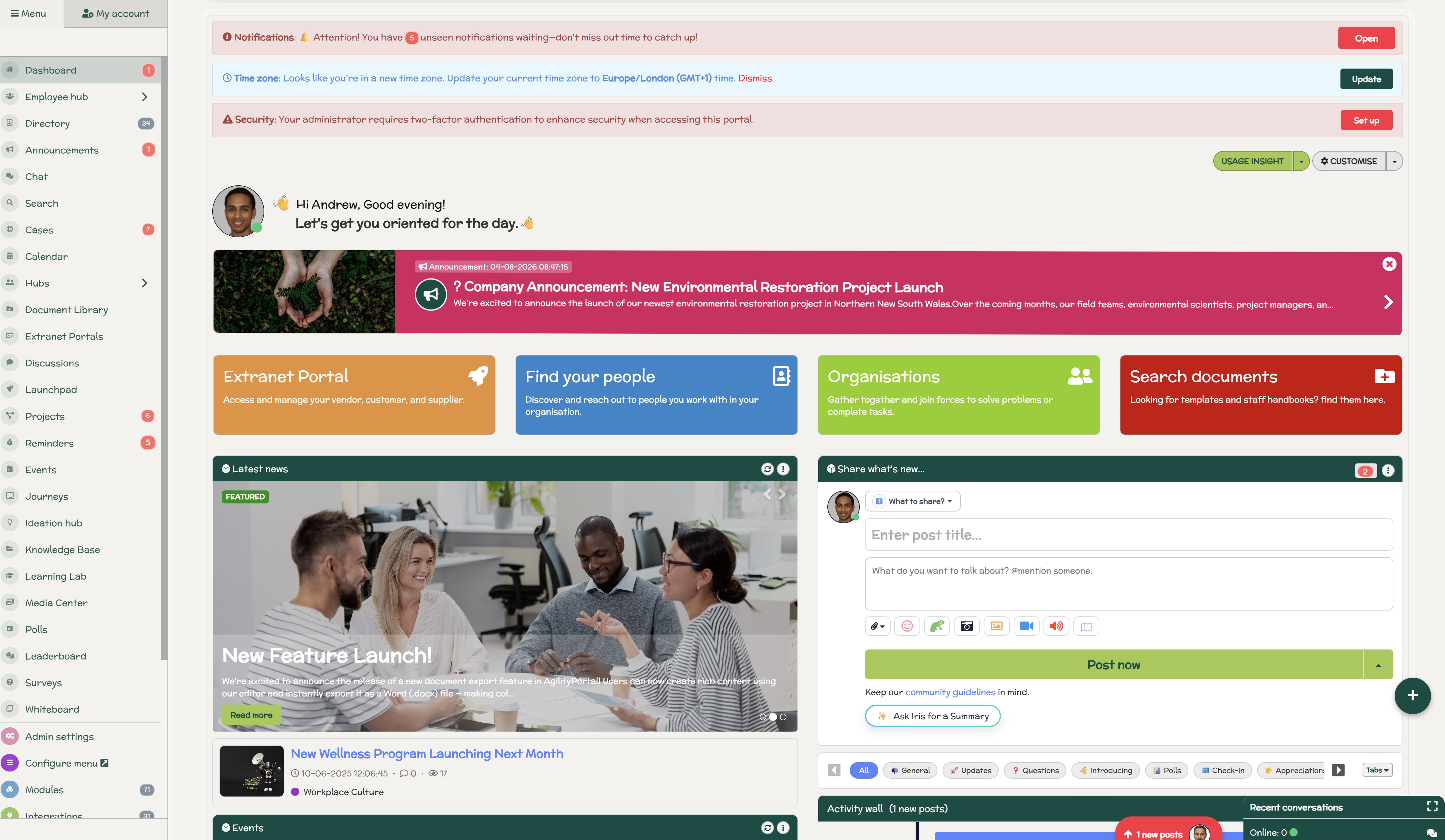
Where Does an Employee Intranet Fit Into This
AI assistants become much more useful when workplace information has a dependable home.
If policies are buried in email, training materials live in one system, company updates are scattered across chat channels and important documents sit in different folders, an AI assistant has a difficult job deciding which information employees should trust.
A modern employee intranet or digital workplace helps solve the problem by bringing key information together, including:
- Company communications and announcements
- HR policies and procedures
- Workplace knowledge
- Documents and resources
- Training and onboarding content
- Employee and departmental information
AI can then become the conversational layer sitting over that knowledge.
Instead of an employee asking:
"Where's the remote working policy?"
they can ask:
"What does our remote working policy say about working abroad?"
The difference might seem small, but the employee experience is completely different. Rather than navigating menus, searching folders or asking HR, employees can move directly from a question to a relevant answer while still having access to the original source.
This is where platforms such as AgilityPortal fit into the wider AI strategy. By centralising communication, knowledge, documents, training and employee resources within one digital workplace, organisations can create a more structured information foundation for AI-powered discovery.
The intranet remains the trusted home for workplace knowledge. AI simply makes that knowledge easier to find, understand and use.
Done properly, the goal isn't to replace the intranet with an AI assistant. It's to make the information inside the intranet considerably easier for employees to access.
AgilityPortal
Give AI a Better Workplace Knowledge Foundation
AI assistants become more useful when company communications, policies, documents, training and workplace knowledge are organised in one trusted place. AgilityPortal brings that information together in a central employee intranet and digital workplace, helping employees find reliable answers without searching across disconnected systems.
Instead of using AI simply to generate more emails and announcements, organisations can create a stronger information foundation where employees can access company news, policies, knowledge, documents, training and workplace resources from one central platform.
Help employees find answers without adding more noise
Centralising workplace knowledge makes it easier to support AI-powered search, employee Q&A, content discovery and personalised access to trusted information while keeping the original source available when employees need more detail.
The Future of Internal Comms May Be Less Communication
For years, internal communications teams have been measured partly by what they produce: newsletters, announcements, campaigns, leadership updates and intranet content.
AI could change that.
As AI takes over more repetitive communication work, internal communicators may gradually spend less time:
Writing → Formatting → Republishing → Distributing
and more time:
Curating → Governing → Listening → Advising → Measuring → Designing better information experiences
That's an important shift. The value of an internal communicator becomes less about producing every message manually and more about making sure employees receive the right information, from a trusted source, at the right time.
JPL's 2026 analysis of AI in internal communications makes a similar observation. It suggests communicators seeing meaningful value from AI are using it to produce less content more precisely, while freeing human teams to concentrate on strategic work requiring judgement, empathy and organisational understanding.
AI assistants could accelerate this shift further. Employees may increasingly ask questions when they need information rather than waiting for HR or Internal Communications to anticipate every possible question and broadcast an answer.
That doesn't make internal communications less important. It arguably makes the function more strategic.
The future may not be about communicating more effectively by producing more content. It may be about creating an environment where employees need fewer messages in the first place.
Conclusion — Use AI to Protect Attention, Not Compete for It
The biggest opportunity for AI assistants in internal comms isn't helping organisations produce more content. Most businesses already have more information than employees can realistically process.
The scarce resource is employee attention.
Used well, AI can help protect that attention by filtering irrelevant updates, summarising lengthy communications, prioritising actions and making trusted workplace knowledge easier to find.
Instead of asking employees to search across emails, chat messages, intranets and document libraries, AI can help them answer four much simpler questions:
- What matters?
- What affects me?
- What do I need to do?
- Where can I find the answer?
But technology alone won't create that experience. Organisations still need accurate knowledge, clear ownership, sensible permissions, human oversight and employees who trust the information they're receiving.
That's why the goal shouldn't be to automate internal communication for the sake of efficiency. It should be to remove friction between employees and the information they need.
The organisations that get this right won't necessarily communicate more. They'll communicate with greater clarity, helping employees spend less time sorting through workplace noise and more time acting on what genuinely matters.
AI Summary
- AI assistants in internal comms can reduce communication noise by helping employees summarise updates, find trusted information, prioritise actions and get answers without searching across multiple workplace systems.
- The biggest opportunity for workplace AI is not simply producing more emails, announcements and intranet content. It is helping employees filter existing information so they can understand what matters, what requires action and what can wait.
- AI assistants can support internal communications through content summarisation, knowledge retrieval, personalised employee digests, conversational workplace search, translation and message prioritisation.
- Organisations should connect AI assistants to approved and well-maintained information sources. Outdated policies, duplicate documents and unclear knowledge ownership can result in AI confidently returning incorrect or misleading workplace information.
- Human oversight remains important for sensitive communications involving organisational change, redundancies, performance, legal issues and employee relations. AI can support these processes, but human judgement and accountability should remain central.
- A modern employee intranet or digital workplace can provide the trusted knowledge foundation behind an AI assistant, helping employees move from asking where information is stored to asking direct questions and receiving relevant, source-based answers.
Most Popular Posts

Effective communication among team members is vital for the productivity and success of any organization. Surprisingly, 60% of companies lack a long-term internal communication strategy, which p...


Businesses thrive on communication for efficiency, productivity and accomplishment. When the right information is passed from the right designation in the organization, it promotes positivity an...

Categories
Blog
(3196)
Business Management
(395)
Employee Engagement
(235)
Digital Transformation
(218)
Growth
(150)
Intranets
(141)
Internal communications
(106)
Remote Work
(68)
Sales
(53)
Collaboration
(52)
Customer Experience
(32)
Culture
(30)
Knowledge Management
(29)
Project management
(29)
Leadership
(20)
Comparisons
(9)
News
(1)

Related Posts

Could AI produce your next workplace video faster—and still deliver a message your employees can trust? As more businesses use video for onboarding, training and leadership updates, one question keeps coming up: will AI replace video editors in...

Could the best machine learning systems help your employees spend less time sorting requests, updating spreadsheets and chasing information—and more time doing useful work? That's the opportunity, but finding the right system starts with knowin...

What would happen to your team's work and customer information if an employee's MacBook disappeared today? If you're wondering how to protect your Mac physically, the answer goes beyond buying a case. A MacBook used at home, on a train or in a ...

Welcome to AgilityPortal's guide to the best VPN for Remote teams. How do you give employees secure access to company systems when they work from home, the office and everywhere in between? It's a question more businesses need to answer: 28% of worki...

Have you ever left a meeting thinking everyone agreed on the next step, only to discover a week later that each person remembered something different? Open source meeting transcription can help teams keep a searchable record of the conversation...


Annet Herges
I am a digital nomad, lover of exploring new places and making friends.
I love to travel and I love the internet. I take pictures of my travels and share them on the internet using Instagram.
Traveler, entrepreneur, and community builder. I share my insights on digital marketing and social media while inspiring you to live your fullest life.
Ready to learn more? 👍
One platform to optimize, manage and track all of your teams. Your new digital workplace is a click away. 🚀
Free for 14 days, no credit card required.