
Insight Blog
Agility’s perspectives on transforming the employee's experience throughout remote transformation using connected enterprise tools.
1 hour and 2 minutes reading time
(12474 words)
Best ERP for Shopify for 2027: 11 Systems Compared for Growing Brands

Best ERP for Shopify for 2027: 11 Systems Compared for Growing Brands
Find the best ERP for Shopify in 2026. Compare 11 systems, integration options, costs and practical rollout steps to help your growing brand choose confidently.
Best ERP for Shopify for 2027: 11 Systems Compared for Growing Brands

Choosing the best ERP for Shopify often starts when the workarounds stop working.
Your store shows stock that the warehouse can't find. Wholesale orders live in spreadsheets.
Finance spends days reconciling payouts, while customer service chases colleagues for shipping updates.
Sales are growing, but so is the effort needed to keep everything moving.
Employees spend more time checking information and correcting mistakes than doing the work you hired them for.
63%:
of surveyed employers identified skills gaps as a major barrier to business transformation
The World Economic Forum’s 2025 Future of Jobs Report found that 63% of surveyed employers identified skills gaps as a major barrier to business transformation. For a Shopify ERP rollout, this supports planning role-specific training and involving daily users before launch. The finding concerns broader workforce transformation; it does not measure ERP implementation failures.
Source: World Economic Forum, Future of Jobs Report 2025: Workforce strategies
An ERP can connect purchasing, inventory, orders and financial processes.
But software alone won't fix unclear responsibilities or prepare employees for new workflows.
The World Economic Forum's 2025 research found that 63% of surveyed employers identified skills gaps as a major barrier to business transformation. While that isn't an ERP-specific finding, it reinforces why training deserves a place in your buying decision.
So, which system will support your growth without adding unnecessary complexity?
This guide compares 11 ERP and related operations systems for Shopify brands. We'll explain who each option suits, what to check before connecting it to your store, and how to assess the full cost.
You'll also get practical steps for a rollout that helps your team work with greater clarity and confidence.
Key Takeaways
- Choose the best ERP for Shopify around the problems your business needs to solve. Financial complexity, inventory, manufacturing and wholesale requirements matter more than revenue alone.
- Full ERP platforms and inventory-focused alternatives offer different capabilities. Confirm which functions are included and which require separate software or integrations.
- A Shopify connector does not guarantee every workflow will work. Test stock allocations, order changes, partial shipments, returns and failed updates before committing.
- Compare the full cost of ownership, including licences, connectors, implementation, migration, training and support. Check how adding users, stores and order volume affects the price.
- Assign owners for data, access permissions and incident recovery. Involve daily users, train employees by role and measure whether operational problems are actually improving.
- Keep rollout instructions and process changes easy to find. AgilityPortal can centralise employee guidance, learning materials, questions and announcements.
More connected data is useful. Unclear ownership isn't.
More connected data is useful. Unclear ownership isn't.
An ERP can give your teams a more consistent view of the business. It can also distribute the wrong information very efficiently. The difference often comes down to a simple question: who owns the data?
When Shopify and your ERP exchange orders, stock figures and fulfilment updates, employees have less information to enter manually. Customer service can check an order's progress, finance can follow the transaction, and warehouse teams can work from clearer instructions.
But those benefits depend on agreed rules.
If someone changes a stock quantity in Shopify while another employee updates it in the ERP, which figure should take priority?
If a customer changes an address after the warehouse starts packing, who makes sure the update reaches the right person?
Without clear ownership, connected systems can spread conflicting information across departments. Employees then spend their time investigating discrepancies and deciding which record to trust.
Before connecting the systems, agree on three things:
- Which system owns each record: Identify the authoritative source for product details, stock availability, fulfilment status and financial information.
- Who can make changes: Assign permissions and responsibilities for updating those records.
- Who handles exceptions: Give failed updates, mismatched quantities and order changes a named owner and an escalation route.
An ERP rollout changes how people work together. Those responsibilities need to be as clear as the technology connecting them.
What does an ERP actually do for a Shopify brand?
Enterprise resource planning, usually shortened to ERP, connects the processes that keep a business running.
For a Shopify brand, that can mean bringing purchasing, inventory, orders and financial records into a more coordinated system.
Shopify handles the selling experience. An ERP can help organise the work behind it: buying products, tracking stock, processing orders and recording the financial results.
Imagine a customer orders a lamp from your Shopify store. Depending on the integration, that order can move into the ERP, reserve available stock and enter the fulfilment workflow.
Shipping information can then return to Shopify, while the relevant transaction reaches your accounting records.
The exact flow depends on the software, its configuration and the connector. You still need to check which records move between systems, in which direction and how updates are handled.
Shopify, ERP, inventory software and warehouse systems do different jobs
Shopify, ERP, inventory software and warehouse systems do different jobs
| System | Main job | What that means for your team |
| Shopify | Storefront, checkout and commerce operations | Manage how customers browse, buy and interact with your store |
| ERP | Connected business processes, commonly including finance, purchasing and inventory | Coordinate operational records and financial activity |
| Inventory software | Stock, purchasing and related order workflows | Track availability, replenishment and stock movements |
| Warehouse management system (WMS) | Receiving, picking, packing and other warehouse tasks | Help warehouse employees execute fulfilment accurately |
| Material requirements planning (MRP) | Materials and production planning | Work out what you need to make products and when |
| Employee intranet | Guidance, communication and shared workplace knowledge | Give employees somewhere to find instructions, updates and answers |
A manufacturing brand might need detailed materials planning alongside accounting.
A retailer buying finished products might care more about stock allocation and warehouse coordination.
That's why options such as Cin7 Core and Katana deserve consideration for particular operational needs.
Their inventory or manufacturing focus may suit your immediate problem, but you should assess their financial scope separately before comparing them with a broader ERP platform.
Do you need a full ERP yet?
Look at where your current processes are breaking down.
A growing workload alone doesn't tell you which system to buy.
It may be time to evaluate an ERP if:
- Stock figures regularly conflict. Employees keep comparing spreadsheets, warehouse records and Shopify quantities to find the correct number.
- Sales channels compete for inventory. Wholesale commitments and direct-to-consumer orders aren't coordinated reliably.
- Warehouses need constant manual coordination. Staff chase updates between your own facilities and third-party logistics providers.
- Production has become harder to plan. Simple stock tracking no longer covers materials, components or manufacturing schedules.
- Financial reporting is increasingly difficult. Multiple entities or disconnected records create repeated reconciliation work.
- Integrations need frequent repairs. Employees repeatedly correct missing orders, duplicate entries or failed updates.
These are reasons to investigate, rather than automatic reasons to purchase.
If your operations are straightforward, improving your existing accounting software, inventory tools or integration settings may solve the problem with less disruption.
Start by identifying the process that needs fixing.
Then choose the level of system your business can justify—and your team can manage.
How we compared the systems—and what this guide can't tell you
An ERP can look impressive in a feature list and still be a poor fit for your business.
We've focused on the operational needs each system could serve, the Shopify connection it offers and the questions you should ask before committing.
Our research approach: This shortlist draws on official product documentation, Shopify integration listings and published workflow information. The recommendations reflect likely business fit. We haven't carried out hands-on testing of every platform.
We assessed the systems against eight practical considerations:
- Business and industry fit: Does the platform suit your products, sales channels and operational complexity?
- Financial requirements: Does its scope match your accounting, reconciliation and reporting needs?
- Inventory, purchasing and fulfilment: Can it support how you buy, allocate, store and ship products?
- Manufacturing and product variants: Does it accommodate materials, production or combinations such as style, colour and size?
- Shopify integration: Which records and workflows does the proposed connection support?
- Implementation and administration: What configuration, specialist support and ongoing maintenance will you need?
- Commercial transparency and total cost: What sits alongside the licence price, including connectors, migration, training and support?
- Employee usability and controls: How will people learn their tasks, find help and receive appropriate access?
The order of the list isn't a performance ranking.
Each option deserves consideration for a different set of requirements, and vendor descriptions are treated as claims to verify rather than proof of results.
Features can also vary by edition, region, software version and configuration. Where prices are included, check the currency, billing basis, inclusions and verification date before comparing them.
Use this guide to narrow your shortlist.
Then ask each vendor to demonstrate your actual workflows—including returns, order changes and failed updates.
A documented Shopify connection is a starting point; the buying decision depends on how well the proposed setup supports your business and the people running it.
Comparison disclaimer: This comparison is based on publicly available vendor documentation, Shopify integration listings and published product information. We haven't tested every platform hands-on, and list order does not represent a performance ranking. Recommendations reflect likely business fit, while vendor claims have not been independently verified. Features, pricing and integration capabilities can vary by edition, region and configuration. Confirm current details with each provider and test your required workflows before purchasing.
Best ERP for Shopify: 11 Systems Compared at a Glance
The best ERP for Shopify depends on what's becoming difficult to manage.
Some brands need connected finance, stock and logistics. Others mainly need better inventory control or a clearer way to manage orders across channels.
This table includes both full ERP platforms and more focused alternatives.
The recommendations reflect likely business fit, rather than a performance ranking.
| System | Main focus | Worth shortlisting for | Shopify connection or useful evidence |
| Prim.io | ERP covering CRM, sales, warehouse, logistics, finance and reporting | Growing brands adding sales channels, warehouses or international operations | Prim.io reports processing 3.1M+ orders monthly; this is a vendor-reported figure, not a tested capacity limit |
| Fulfil.io | Cloud ERP for ecommerce and wholesale | Shopify brands coordinating DTC, wholesale and complex fulfilment | 4.9/5 from 37 Shopify App Store reviews |
| GoodDay Software | Shopify-focused inventory, supply chain and retail operations | Inventory-carrying brands that want to work within the Shopify environment | GoodDay describes its platform as operating inside Shopify |
| Microsoft Dynamics 365 Business Central | General ERP for finance, sales and operations | Small and midsize businesses using the Microsoft ecosystem | Microsoft's own Shopify Connector for Business Central online |
| SAP Business One | Broad ERP with financial and operational management | Small and midsize companies needing accounting control alongside inventory and purchasing | Third-party Shopify integration options include i95Dev and APPSeCONNECT |
| Xentral | Ecommerce and B2B operational ERP | Multichannel sellers, particularly those evaluating DACH-region workflows | Documented Shopify connector and app options |
| Xorosoft — XoroERP | Cloud ERP with inventory and warehouse management | Ecommerce, retail and wholesale brands needing connected operations | 5.0/5 from 20 Shopify App Store reviews |
| Unleashed | Inventory, purchasing and order management | Manufacturers and wholesalers retaining Xero or QuickBooks Online for accounting | Shopify integration alongside documented Xero and QuickBooks Online connections |
| Zoho Inventory | Inventory and order management | Smaller sellers looking for a lower-cost starting point | Shopify integration; check order, user and warehouse allowances |
| Linnworks | Multichannel inventory and order management | Sellers coordinating Shopify with marketplaces and other channels | Shopify is included among its documented channel integrations |
| Fishbowl | Inventory, warehouse and manufacturing operations | QuickBooks users needing stronger stock and production workflows | Documented Shopify plugin connection; confirm the required Fishbowl edition and modules |
11 ERP and Operations Systems Worth Considering for Your Shopify Brand
The right shortlist starts with the work your team needs to improve.
Financial reporting, warehouse coordination and production planning can lead you towards very different systems.
The profiles below follow the comparison table's order. They explain where each platform deserves consideration, what to check and which questions to bring to a demonstration.
1. Prim.io — For Brands Bringing Sales, Stock and Finance Together
Prim.io — For Brands Bringing Sales, Stock and Finance Together
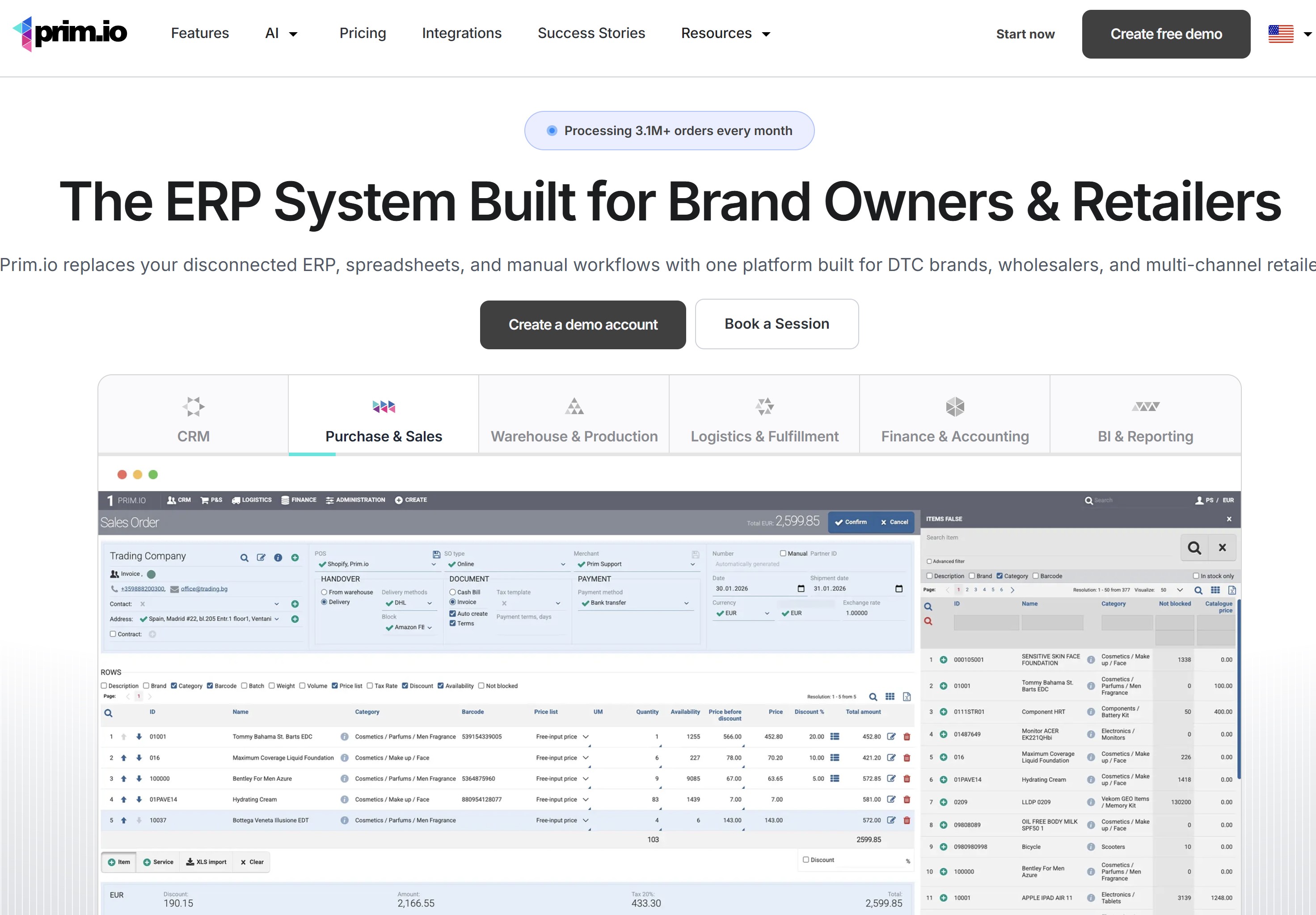
Prim.io all-in-one ERP is built for brand owners, DTC brands, wholesalers and multi-channel retailers.
It runs CRM, purchase and sales, warehouse and production, logistics and fulfillment, finance and accounting, and business intelligence on shared live data.
When your sales team, warehouse and finance department work from separate records, even a straightforward order can create unnecessary handovers. Prim.io brings CRM, purchasing, sales, warehouse operations, logistics and financial functions into one ERP.
It deserves consideration if your brand is adding channels or locations and wants to coordinate more of the operation within a shared platform.
Its published feature set also includes reporting, manufacturing and multi-company functions, although availability depends on the plan.
Worth shortlisting for:
- Brands coordinating ecommerce and wholesale.
- Operations teams managing multiple warehouses.
- Businesses evaluating connected sales, logistics and financial workflows.
What to check: Confirm which plan includes your Shopify connection, required integrations and multi-company capabilities. Also ask finance to assess whether its accounting functions meet your local reporting requirements.
Pricing: Prim Plus starts at €180/month, billed annually, with three users included and VAT excluded. More complex requirements may need a higher plan.
Ask during the demo:
"Show us a Shopify order moving through stock allocation, dispatch, invoicing and a partial refund. Which steps still need manual work?"
2. Fulfil.io — For Shopify Brands Combining DTC and Wholesale

Fulfil.io — For Shopify Brands Combining DTC and Wholesale
Selling directly to customers while supplying wholesale accounts creates competing demands on stock.
Fulfil is an ecommerce-focused cloud ERP that connects order management, inventory, purchasing, warehouse operations and financial processes.
Its Shopify listing describes support for DTC, B2B and POS workflows, alongside manufacturing and warehouse functions. That makes it worth investigating when your problem extends beyond keeping stock quantities aligned.
Worth shortlisting for:
- Brands running direct-to-consumer and wholesale channels.
- Teams coordinating warehouses and third-party logistics providers.
- Businesses needing connected operational and financial records.
What to check: Test your actual fulfilment arrangements. Split shipments, pre-orders, exchanges and wholesale allocations should all appear in the demonstration. Ask who monitors failed updates and supports each connected warehouse.
Pricing: Request a quote covering software, implementation and required integrations. The Shopify app is free to install, but the full Fulfil solution carries separate charges.
Ask during the demo:
"What happens when a wholesale order reserves stock that customers can also buy through Shopify?"
3. GoodDay Software — For Operations Teams Working Within Shopify
GoodDay Software — For Operations Teams Working Within Shopify
Moving between several systems can make everyday stock and purchasing decisions harder than they need to be.
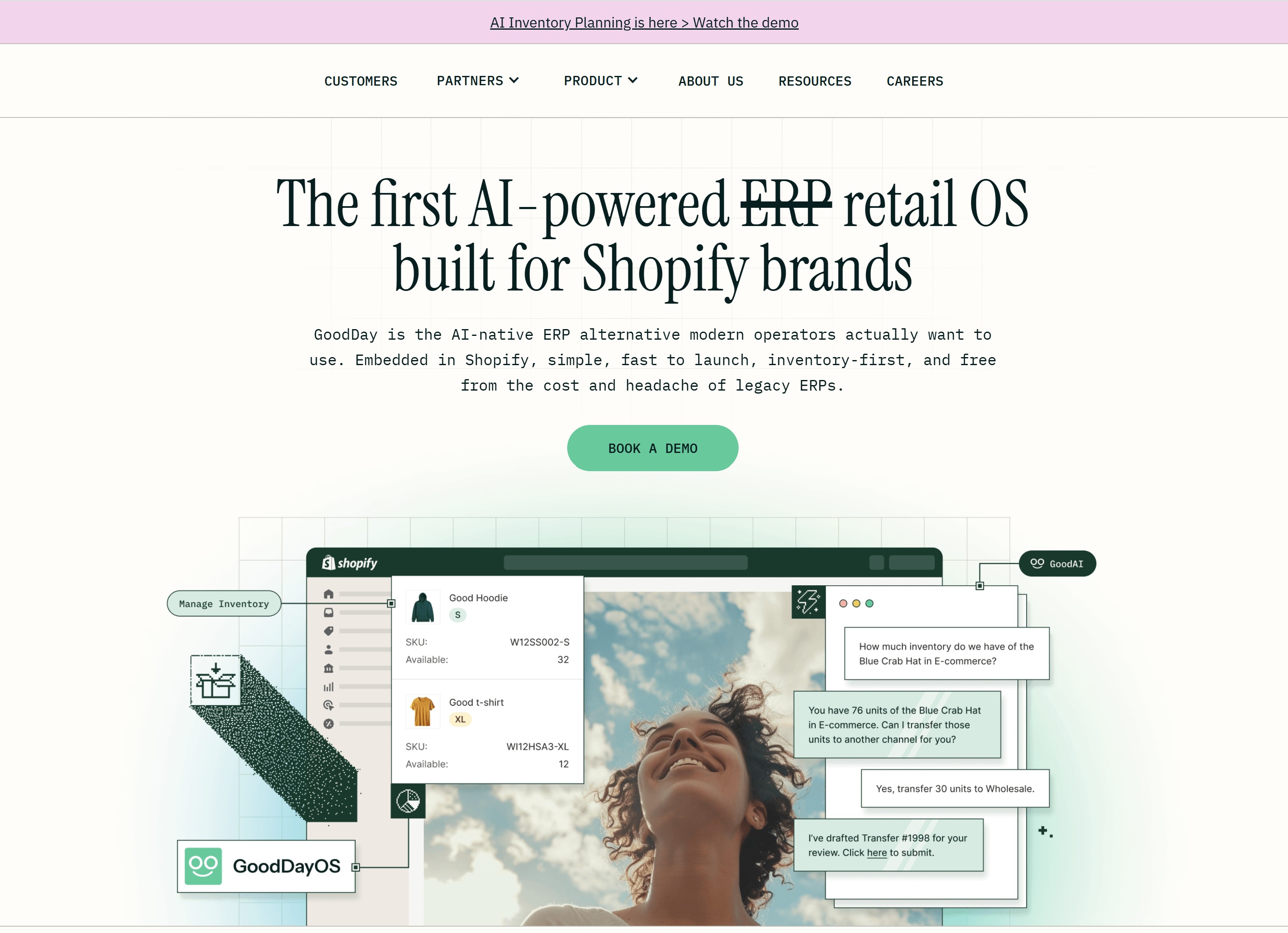
GoodDay positions its platform around Shopify-based operations, with inventory, supply chain and sales workflows in a retail operating system.
The company describes GoodDayOS as operating inside Shopify and as an alternative to a traditional ERP.
That distinction matters: assess its operational strengths alongside your separate accounting and financial requirements.
Worth shortlisting for:
- Inventory-carrying brands built around Shopify.
- Teams replacing fragmented spreadsheets and operational tools.
- Businesses that want employees to work within a familiar Shopify environment.
What to check: Ask which tasks take place inside Shopify and which require another interface or connected service. Confirm how your finance system, 3PL, returns platform and wholesale tools fit into the setup.
Pricing: Published pricing starts at US$1,000/month with unlimited users. The pricing page also identifies integration fees for connected systems, so request a complete breakdown.
Ask during the demo:
"Can our purchasing, warehouse and customer-service employees complete their main tasks without maintaining a second spreadsheet?"
4. Microsoft Dynamics 365 Business Central — For Businesses Using the Microsoft Ecosystem
Business Central is worth considering when your requirements include finance, purchasing, inventory and wider business management.
Microsoft also maintains its own Shopify Connector, with official documentation covering setup, synchronisation and troubleshooting.
For organisations already using Microsoft services, it offers an option for a shortlist. Familiarity with the Microsoft name, however, doesn't tell you how much configuration or employee training your proposed system will need.
Worth shortlisting for:
- Small and midsize businesses with connected financial and operational needs.
- Organisations evaluating ERP within a Microsoft environment.
- Teams that want a documented, Microsoft-maintained Shopify connection.
What to check: Confirm the online deployment, regional requirements and connector coverage. Ask your implementation partner to identify any extensions needed for bundles, returns or other specialised workflows.
Pricing: UK Essentials pricing is £61.50 per user/month, paid yearly, excluding VAT. Premium is £84.60 per user/month and adds service-management and manufacturing capabilities. Implementation and additional services require separate budgeting.
Ask during the demo:
"What happens when an order changes in Shopify after Business Central has already imported it?"
5. SAP Business One — For Businesses Needing Financial and Operational Control
SAP Business One belongs on the shortlist when the project is about wider business management, rather than Shopify stock synchronisation alone.
The integration decision deserves attention. Providers including i95Dev and APPSeCONNECT offer connections between Shopify and SAP Business One.
Your chosen connector, implementation partner and configuration will shape which workflows are supported.
Worth shortlisting for:
- Small and midsize companies evaluating a broader ERP.
- Businesses with significant accounting, purchasing and inventory requirements.
- Organisations already using SAP Business One and adding Shopify.
What to check: Separate responsibility for the ERP from responsibility for the Shopify integration. Find out who handles mapping errors, updates, monitoring and support when a transaction stops between systems.
Ask finance, operations and IT to review the same proposed architecture before agreeing to it.
Pricing: Request a combined breakdown of licences, deployment, connector subscriptions, implementation and ongoing support.
Ask during the demo:
"If a Shopify refund fails to reach SAP Business One, who receives the alert, and how do we resolve it without creating a duplicate entry?"
6. Xentral — For Ecommerce and B2B Sellers Coordinating Growing Operations
Xentral is an option when orders, inventory, shipping and related back-office tasks need better coordination.
Its documented Shopify connection covers workflows such as order imports, product information, stock updates and shipping status.
Businesses operating in or entering the DACH region—Germany, Austria and Switzerland—may want to investigate its regional operational and accounting connections.
The decision should still depend on the requirements of each country where you operate.
Worth shortlisting for:
- Ecommerce businesses adding sales channels.
- Sellers combining direct sales and B2B operations.
- Teams evaluating German-speaking market requirements.
What to check: Confirm the connector version, stock rules and accounting arrangements. Xentral documents a testing process before activating live data exchange; use it to check your products and order scenarios.
Pricing: The restricted Launch offer starts at €99/month plus €0.30 per order, with a 24-month term. Starter, positioned for growing companies, starts at €349/month. Check eligibility, allowances and service costs.
Ask during the demo:
"Which plan supports our forecast order volume, warehouse processes and required integrations?"
7. Xorosoft — For Brands Connecting ERP and Warehouse Operations
Xorosoft's XoroERP deserves consideration when ecommerce, retail and wholesale operations need to share inventory and financial information.
Its Shopify listing positions the platform as a cloud ERP for those channels.
The integration is intended to connect Shopify with the wider XoroERP environment, rather than function as a standalone stock app.
Worth shortlisting for:
- Consumer-product brands selling through several channels.
- Wholesale businesses expanding their ecommerce operation.
- Teams evaluating connected ERP and warehouse workflows.
What to check: Demonstrate warehouse tasks alongside financial processes. A clean order import doesn't show whether receiving, allocations, picking, returns and reconciliation will work for your team.
Apparel brands should also test their variant structure, size ranges, bundles and wholesale requirements rather than assuming a general product demonstration covers them.
Pricing: The Shopify app is free to install, but the listing directs buyers to discuss the full ERP and implementation cost. Request a written scope covering users, modules, integrations and support.
Ask during the demo:
"Can you show the same product moving through wholesale allocation, a Shopify sale, warehouse picking and a return?"
8. Unleashed — For Manufacturers and Wholesalers Keeping Their Accounting System
Sometimes the main problem is inventory, while the accounting system still meets the business's needs. Unleashed is worth considering in that situation.
Its integration catalogue includes Shopify, Xero and QuickBooks Online.
This makes it relevant to businesses evaluating stronger inventory and order processes alongside an existing accounting platform.
Worth shortlisting for:
- Manufacturers and wholesalers with stock-management complexity.
- Businesses retaining Xero or QuickBooks Online.
- Teams that need clearer coordination between inventory and accounting.
What to check: Identify which records belong in Unleashed and which belong in the accounting system. Test purchase orders, stock adjustments, sales, returns and financial transfers.
For manufacturing, demonstrate your actual materials and production process. The phrase "manufacturing support" can cover different requirements, from straightforward assemblies to more complex planning.
Pricing: Confirm current regional pricing, user allowances and the cost of the integrations your business needs.
Ask during the demo:
"How does a returned Shopify order affect stock availability and the records sent to our accounting system?"
9. Zoho Inventory — For Smaller Sellers Starting With Stock and Order Management
A smaller Shopify business may need better stock control without the scope of a full ERP project.
Zoho Inventory provides an inventory and order-management option with a free plan and paid tiers.
It belongs in this comparison as a focused alternative. Evaluate the inventory functions separately from any additional accounting, CRM or other Zoho applications you intend to use.
Worth shortlisting for:
- Smaller sellers improving basic operational control.
- Businesses with a limited initial software budget.
- Teams evaluating inventory management within the Zoho ecosystem.
What to check: Plan limits matter. Review orders, users, warehouses and Shopify connections against your current workload and near-term growth.
Also check the complete software setup. A low inventory subscription price doesn't include every connected application or service your business might require.
Pricing: The US pricing page offers a free plan, with paid plans starting at US$29 per organisation/month, billed annually. Regional prices and allowances should be checked before purchase.
Ask during the demo:
"Which plan covers our busiest month, and what happens if we exceed its order or warehouse allowances?"
10. Linnworks — For Sellers Managing Shopify Alongside Marketplaces
When Shopify is one of several sales channels, keeping stock and orders coordinated can become the main operational challenge.
Linnworks focuses on multichannel inventory and order management, with Shopify among its documented channel integrations.
It deserves consideration when your immediate need is managing channels and fulfilment. Assess separately whether your wider financial requirements call for an ERP or connected accounting system.
Worth shortlisting for:
- Sellers operating Shopify alongside marketplaces.
- Teams coordinating inventory across several channels.
- Businesses trying to reduce repeated order-processing work
What to check: Test stock allocation when two channels sell the same item.
Ask how delayed updates, cancellations, bundles and returns affect available quantities.
Make sure warehouse and customer-service employees can find exceptions and understand what action to take.
Pricing: Linnworks provides tailored pricing. Its published information says order volume affects pricing, so request costs for both normal trading and peak periods.
Ask during the demo:
"How do you prevent conflicting stock commitments across Shopify and our marketplaces, and how are exceptions surfaced?"
11. Fishbowl — For QuickBooks Users Needing Stronger Inventory and Manufacturing Workflows
Fishbowl is worth investigating when your accounting system remains useful but stock, warehouse or production tasks need more structure.
It documents connections with QuickBooks Online and Shopify, including a Shopify plugin.
Confirm the proposed Fishbowl edition and integration arrangement rather than assuming every deployment has identical capabilities.
Worth shortlisting for:
- QuickBooks users evaluating stronger inventory control.
- Businesses managing warehouse and production tasks.
- Teams whose requirements extend beyond basic Shopify stock tracking.
What to check: Demonstrate purchasing, receiving, production, picking and shipping using your own product examples. Then follow the resulting transactions into accounting.
Ask which plugins or modules are required, how updates are supported and who handles the connection when an order fails to transfer.
Pricing: Request a quote covering the software, deployment, required integrations, implementation and support.
Ask during the demo:
"Which Fishbowl edition and modules do we need, and can you demonstrate a Shopify order through production, shipment and QuickBooks posting?"
A Shopify connection isn't the same as a working business process
What "Integrates with Shopify" is a useful starting point. It doesn't tell you whether the connection supports how your business handles stock, order changes, refunds or warehouse handovers.
An order might transfer correctly when everything goes to plan.
The more useful question is what happens when a customer changes it, a product can't be matched or the connection stops working.
Before choosing a system, check the complete workflow and the people responsible for keeping it running.
Decide which system owns each record
When two systems can update the same information, you need rules about which record takes priority.
Otherwise, employees can make perfectly reasonable changes that overwrite each other.
Create a simple ownership map before configuring the integration:
| Record or process | Decision to make |
| SKU and product master data | Where are products created, and who can change identifiers or core attributes? |
| Merchandising descriptions and images | Does Shopify manage storefront content, or does another system publish it? |
| Available-to-sell stock | Which system calculates sellable quantities after reservations and allocations? |
| Orders and subsequent edits | Where can an order change, and how does that update reach other systems? |
| Fulfilment and tracking | Which system confirms shipment and sends tracking information? |
| Returns and refunds | Who authorises the refund, and what triggers inspection or restocking? |
| Customer information | Which fields are shared, and how are corrections handled? |
| Financial postings |
Ownership will depend on your setup.
A warehouse system might control physical stock movements, while the ERP handles financial records and Shopify manages product descriptions.
For each row, record the authoritative system, responsible person, update direction and exception procedure. Your team should know where to make a correction without guessing.
Test the awkward orders, not just the easy ones
A demonstration built around one product, one payment and one shipment won't reveal much about operational complexity.
Give each shortlisted vendor the same test scenarios:
- Partial fulfilment: One item ships now; another follows later.
- Cancellation after import: The customer cancels after the order reaches the ERP.
- Order edits: An address, quantity or product changes before dispatch.
- Bundles and kits: One sale requires stock from several components.
- Exchanges and partial refunds: The financial adjustment and stock movement differ.
- Wholesale allocations: Reserved wholesale stock must affect storefront availability correctly.
- Multiple currencies: Order values, refunds and accounting records need consistent treatment.
- Unmapped products: An order contains an item the receiving system doesn't recognise.
- Failed transactions and retries: Employees need to identify and recover an unsuccessful update.
- Temporary connector outage: Orders arrive while the connection is unavailable.
For each test, follow the result through Shopify, operations and accounting. Check what updates automatically, what requires approval and what employees see when something fails.
A useful question is: "Can you show us how we would discover and resolve this problem?"
Who answers when the connection breaks?
An integration needs an operational owner as well as technical support.
Before launch, agree:
- Who receives failure alerts?
- Who can pause the affected process?
- Who contacts the vendor or implementation partner?
- How are transactions retried without creating duplicates?
- How are employees told that information may be delayed?
- What fulfilment process should teams follow during an outage?
Imagine an order hasn't reached the warehouse, but customer service can still see it in Shopify. Without a clear procedure, one employee might recreate it manually while another waits for the connector to recover.
When the original finally arrives, the warehouse could receive two instructions.
A named owner, visible incident updates and a documented recovery process give both teams a consistent response.
Employees need to know whether the information is current, what action is safe and where to get help.
Choosing the Best ERP to Integrate with Shopify Starts With Your Workflows
The best ERP to integrate with Shopify should support what happens after an order arrives: stock allocation, picking, shipping, refunds and financial reconciliation.
A connector that transfers basic orders is useful, but it may leave gaps in the processes your employees manage every day.
Before choosing a Shopify ERP system, follow an order through its full journey.
- What happens when the customer changes the delivery address?
- Can the warehouse ship only part of it?
- Does a refund update the right financial records?
Those questions reveal more than a simple "integrates with Shopify" claim.
Decide which system owns each record
A reliable Shopify ERP integration starts with clear data ownership. If employees can change the same information in two places, you need rules about which update takes priority.
For example, a warehouse employee might adjust stock in the ERP while another colleague changes the quantity in Shopify.
Without agreed ownership and synchronisation rules, one correction could overwrite the other.
Create a simple map before configuring the connection:
| Record or process | What your team needs to agree |
| SKU and product master data | Where products are created and who can change their identifiers |
| Product descriptions and images | Which system controls the content customers see |
| Available-to-sell stock | Where sellable quantities are calculated after reservations and allocations |
| Orders and order edits | Where changes are permitted and how they reach other systems |
| Fulfilment and tracking | Which system confirms shipment and publishes tracking details |
| Returns and refunds | Who approves adjustments and what triggers restocking |
| Customer information | Which fields are shared and how corrections are handled |
| Financial postings | Which system creates accounting entries and checks reconciliation |
Your architecture determines the right arrangement.
Shopify might manage storefront content, a warehouse system might record physical stock movements, and the ERP might own financial records.
For each process, name the authoritative system, the responsible person and the procedure for resolving mismatches
Test the awkward orders, not just the easy ones
Whether you're evaluating Odoo Shopify connectivity, SAP Business One Shopify integration or another setup, ask vendors to demonstrate the same realistic scenarios.
The proposed version, connector and configuration matter as much as the product name.
Include these tests:
- Partial fulfilment: One item ships immediately while another remains outstanding.
- Cancellation after import: A customer cancels once the order has reached the ERP.
- Order changes: Products, quantities or delivery details change before dispatch.
- Bundles and kits: A single sale consumes several stock components.
- Exchanges and partial refunds: Stock movements and financial adjustments follow different paths.
- Wholesale allocations: Reserved stock affects the quantity available through Shopify.
- Multiple currencies: Sales, refunds and accounting records receive consistent treatment.
- Unmapped products: An order contains an item the receiving system cannot identify.
- Failed updates: Employees can find the error and retry the transaction safely.
- Connector downtime: Orders continue arriving while the connection is unavailable.
Follow each test through the storefront, warehouse and financial records. Ask what happens automatically, what requires human approval and what employees see when something goes wrong.
A successful demonstration should show how your team recovers from a problem, as well as how the system processes a straightforward sale.
Who takes responsibility when the connection breaks?
An ERP system connected to Shopify needs a named operational owner and a clear support arrangement. Otherwise, customer service, warehouse employees and IT may each assume someone else is investigating.
Before launch, agree:
- Who receives and checks failure alerts.
- Who can pause affected workflows.
- Who contacts the connector provider or implementation partner.
- How failed transactions are retried without duplication.
- How employees learn that information may be delayed.
- What fallback fulfilment procedure applies during an outage.
Imagine customer service can see an order in Shopify, but the warehouse hasn't received it. One employee recreates it manually. Later, the connection recovers and imports the original, leaving the warehouse with two orders.
The practical response is a controlled recovery process: check the transaction's status, authorise any manual action and reconcile records when service resumes.
The best ERP for Shopify should help employees work from dependable information. Clear ownership and tested recovery procedures are what make that connection useful when the working day gets complicated.
25%:
of UK businesses reported having a formal cyber incident response plan
The UK government’s Cyber Security Breaches Survey 2025/2026 found that 25% of businesses had a formal incident response plan. Alongside routine integration recovery procedures, define who responds to a suspected security incident, who contacts suppliers and how employees receive instructions. This statistic measures cyber incident preparedness; it does not measure Shopify connector outages or ERP recovery performance.
Source: UK government, Cyber Security Breaches Survey 2025/2026: Incident response
What Happens When Shopify Says "Available" and the Warehouse Says "Sold"?
Imagine a growing homeware brand selling through Shopify and wholesale accounts.
It has 40 lamps left in stock when a wholesale customer reserves 30. The warehouse records the allocation, but Shopify continues showing all 40 as available.
Over the weekend, online customers order another 20. The business has now committed to selling 50 lamps when it only has 40.
This hypothetical example shows why a Shopify ERP integration needs to exchange the right stock information. The number physically sitting on a shelf isn't always the number available to sell.
One stock discrepancy creates work across several teams
The warehouse discovers the shortage during picking.
Customer service then contacts customers about delays or cancellations, while finance handles refunds and checks the records.
Meanwhile, managers want to know what went wrong. Was stock counted incorrectly? Did someone miss an update? Has the integration stopped working?
Without a clear record of allocations and updates, employees can spend hours investigating—and still disagree about the cause.
The impact extends beyond those ten missing lamps:
- Customers receive promises the business can't meet.
- Warehouse employees repeat checks and interrupt other orders.
- Customer service manages complaints without reliable answers.
- Finance reconciles refunds and changed transactions.
- Employees lose confidence in the figures they're expected to use.
Agree what "available" means before connecting the systems
Your team needs a consistent rule for calculating sellable stock.
Depending on the business, that calculation may need to account for wholesale reservations, unfulfilled orders, damaged goods, safety buffers and returns awaiting inspection.
In this example, reserving 30 lamps should leave ten available for other sales, unless the business has deliberately approved another allocation rule.
Before launch:
- Define stock availability. Document which commitments and exclusions affect the sellable quantity.
- Choose the authoritative record. Identify where allocations are managed and quantities calculated.
- Test competing channels. Confirm that wholesale commitments affect Shopify availability as intended.
- Monitor delayed updates. Assign someone to investigate failed or outdated stock transfers.
- Create an escalation procedure. Explain what employees should do when figures disagree.
The best ERP for Shopify is only useful if the stock rules match how your business operates.
Investigate the process before blaming the employee
A warehouse employee can follow the instructions correctly and still receive an order that cannot be fulfilled. A customer-service colleague can quote the displayed availability and still give a customer the wrong answer.
Start by checking the allocation rules, update history and integration status. Give employees a way to report discrepancies and access current guidance while the issue is resolved.
People should be accountable for their decisions, but they also need dependable information. Fixing the process helps prevent the next shortage; blaming the person who discovers it doesn't.
What Will This Really Cost After the First Invoice?
The subscription price is only one part of an ERP budget. Connecting Shopify, moving your data, configuring workflows and training employees can all add to the cost.
A lower-priced system may need more custom work. A higher-priced option might include functions you would otherwise buy separately. To compare them fairly, ask vendors to price the same requirements.
Compare the full cost, not just the licence
When evaluating the best ERP for Shopify, request a written breakdown of these costs:
| Cost area | What to ask |
| Software subscription or licence | Which edition, users and functions does the price include? |
| Additional modules | Do manufacturing, warehouse management or financial features cost extra? |
| Shopify connector or middleware | Is there a separate subscription, transaction charge or maintenance fee? |
| Implementation | What configuration, testing and project support are included? |
| Data migration | Who cleans, imports and checks existing records? |
| Custom development | Which requirements need additional work, and who maintains it? |
| Employee training | Does the quote include training for each role and useful process guides? |
| Internal employee time | How much time will your team spend testing, learning and supporting the rollout? |
| Ongoing support | What support is included, and when are specialist services chargeable? |
| Growth and exit | What happens when you add capacity, change systems or export your data? |
Ask vendors to distinguish essential costs from optional services. A quote should make clear what your business must pay to reach a working setup.
Free installation of a Shopify app also needs careful interpretation.
It can mean there's no charge to install the connector, while the ERP subscription, configuration and implementation remain payable.
Build a three-year comparison
Looking beyond the first year helps you account for recurring charges and ongoing work.
Use this budgeting formula:
Three-year total cost = one-off setup and migration costs + recurring costs over 36 months + planned training, support and change costs.
Convert annual subscriptions into a comparable monthly figure, but keep the actual payment schedule visible. Separate one-off charges from recurring fees and check whether quotes include taxes.
For illustration, imagine two hypothetical proposals:
| Cost | System A | System B |
| Monthly recurring charges | £500 | £900 |
| One-off setup and migration | £20,000 | £8,000 |
| Planned training and support over three years | £6,000 | £3,000 |
| Illustrative three-year total | £44,000 | £43,400 |
These are invented budgeting examples, not vendor prices. They show how a lower monthly fee can produce a higher total cost once the full scope is included.
The figures still need to sit alongside business fit. Saving money on a system that cannot handle an essential workflow creates another problem to solve.
Ask vendors to price your next stage of growth
Your current requirements provide a starting point. Your plans help reveal what the contract could cost later.
Request a second scenario covering any expected changes, such as:
- More employees needing access.
- Additional Shopify stores or sales channels.
- Another warehouse or logistics provider.
- Higher order volumes during peak periods.
- New entities, currencies or countries.
- More complex manufacturing or wholesale workflows.
Ask which changes trigger a higher plan, additional fees or another implementation project.
Put a value on the work you want to improve
Before approving the budget, measure the effort your current setup requires. That might include time spent reconciling payouts, correcting stock discrepancies, re-entering orders or investigating failed updates.
Use those measurements to set realistic improvement targets. Time saved only becomes useful capacity if employees can redirect it towards other work.
A sound ERP investment should have a clear connection between its cost and the problems it helps your team solve.
That makes the decision easier to defend—and gives you something meaningful to review after launch.
Growing Globally? How to Manage International Shipping Without Losing Team Alignment
Selling in another country adds more than a new delivery destination.
Your team may need to coordinate different warehouses, carriers, currencies, dispatch times and returns arrangements.
An ERP can support parts of that work by connecting orders, inventory and financial records.
But employees still need clear instructions about how international orders should be handled—and who makes decisions when something changes.
Give every team the same operational information
Imagine your logistics team changes the shipping route for a particular country. The new service takes longer, but customer service continues quoting the old delivery estimate because its guidance hasn't been updated.
The order records might be accurate. The customer still receives a promise the business can't meet.
Before expanding into a market, agree where employees can find current information about:
- Warehouse responsibilities: Which location fulfils each type of order?
- Dispatch cut-off times: Which time zone applies, and what happens after the cut-off?
- Delivery estimates: What can customer service reasonably promise?
- Carrier and 3PL handovers: Who checks that an order has been accepted?
- Product information: Who maintains weights, dimensions and relevant customs data?
- Duties and taxes: Which approved arrangements should employees explain to customers?
- Returns: Where should goods go, and who authorises refunds or replacements?
Give the guidance a named owner, an effective date and a review schedule. When a process changes, update the instructions and notify the teams affected.
Check what the ERP handles—and what needs another service
A Shopify ERP system may help coordinate stock, route orders and record costs.
Shipping labels, customs documentation, tax calculations and other specialist requirements may involve separate tools or providers.
Ask vendors to demonstrate the complete proposed setup:
- Does the correct warehouse receive the order?
- Do product and address details reach the shipping service?
- Can employees see an unsuccessful handover?
- Does tracking return to Shopify?
- How are shipping costs and financial adjustments recorded?
- What happens when an international order is returned?
Software support alone doesn't establish customs or tax compliance.
Assign those requirements to the appropriate finance, logistics or specialist advisers, and confirm which controls belong in the workflow.
Make responsibility clear before an order gets stuck
Consider an order that reaches the warehouse but cannot be dispatched because required product information is missing.
Without an agreed procedure, warehouse employees might contact sales, sales might contact finance, and customer service might discover the delay only when the customer complains.
Define the response in advance:
| Situation | Responsible team | Expected action |
| Missing product or shipping information | Product-data owner and logistics | Correct the record and confirm that dispatch can proceed |
| Failed carrier or 3PL handover | Logistics or operations | Investigate, retry safely and update the order status |
| Delivery estimate changes | Logistics and customer service | Confirm the revised estimate and communicate it |
| Unexpected charge or cost discrepancy | Finance and logistics | Check the agreed arrangement and supporting records |
| International return | Customer service, warehouse and finance | Coordinate receipt, inspection and the approved adjustment |
Smaller businesses may assign several responsibilities to one person. What matters is that employees know who can resolve the issue.
Keep the shipping playbook easy to find
A shared employee knowledge hub can bring approved shipping guidance, escalation contacts and operational updates together.
AgilityPortal can support this with pages for market-specific instructions, announcements about process changes and spaces where employees can ask questions.
Keep sensitive customer and transaction details within the approved operational systems.
As your business expands, employees shouldn't have to reconstruct the shipping process from old emails. Give them current guidance and clear ownership so they can keep orders moving—and customers informed.
Who Should Own the Rollout—and Who Needs a Say?
An ERP rollout needs a named project owner, but no single department can define every requirement.
Finance understands the accounting controls. Operations understands fulfilment. IT understands the connections. Employees know where everyday tasks become difficult.
Bring those perspectives together before choosing the system. Otherwise, you could solve one department's problem while creating extra work for another.
Give each responsibility a clear owner
Assign responsibilities early and document who approves decisions, tests workflows and handles problems after launch.
| Role | Responsibility | Why it matters |
| Business owner or executive sponsor | Approve objectives, funding and major trade-offs | Prevents the project drifting away from the business problem |
| COO or operations manager | Own order, purchasing and fulfilment requirements | Keeps the system aligned with daily operations |
| CFO or finance director | Validate accounting, controls and reconciliation | Ensures operational records support financial reporting |
| CIO or IT director | Own architecture, integrations and support | Makes ongoing technical responsibility explicit |
| CISO or security lead | Review access, authentication and incident handling | Protects the connected environment |
| DPO or privacy lead, where applicable | Review personal-data flows, processors and retention | Identifies privacy requirements |
| HR director or L&D manager | Plan training and address changes to roles | Helps employees perform new workflows |
| Internal communications lead | Explain changes and maintain rollout updates | Reduces conflicting instructions |
| Department managers and employee representatives | Test real tasks and report practical problems | Brings frontline experience into decisions |
Smaller businesses may combine several roles. You still need someone accountable for each responsibility.
Let employees test the work they'll actually do
A manager may approve a demonstration without spotting the problems that a warehouse employee or customer-service colleague will encounter.
Ask daily users to complete realistic tasks:
- Receive stock and correct a discrepancy.
- Find an order and explain its status.
- Change an address before dispatch.
- Process a return or request a refund.
- Investigate a failed update.
- Locate the correct instructions and support contact.
Record where people get stuck. Those findings can reveal configuration problems, missing permissions or training needs before customers are affected.
Keep ownership in place after launch
Agree who owns the system once the implementation partner finishes its initial work.
Assign ongoing responsibility for data quality, connector monitoring, employee guidance and change requests.
The best ERP for Shopify will still need decisions as your business grows. A named owner helps keep those decisions coordinated instead of allowing each department to develop its own workaround.
Customer Data and Employee Access Need Clear Boundaries
Connecting Shopify to an ERP can make customer and order information available across more systems.
That helps employees fulfil orders and answer questions, but it also makes access decisions more important.
The UK government's 2025/2026 Cyber Security Breaches Survey found that 43% of businesses reported a cyber breach or attack in the previous 12 months.
This is general UK business evidence, rather than an ERP-specific incident rate, but it reinforces the need to review security when connecting business systems.
43%:
of UK businesses reported a cyber breach or attack in the previous 12 months
The UK government’s Cyber Security Breaches Survey 2025/2026 found that 43% of businesses reported a cyber breach or attack in the previous 12 months. Connecting Shopify and an ERP makes it important to review customer-data flows, employee permissions and integration credentials. This is general UK business evidence, not an ERP-specific breach rate or a measure of confirmed data loss.
Source: UK government, Cyber Security Breaches Survey 2025/2026
Give employees the access their work requires
A warehouse employee may need delivery details and picking instructions.
Finance may need payment and reconciliation records. Those needs don't automatically justify giving both teams unrestricted access.
Define permissions around actual responsibilities:
- Use individual accounts so actions can be traced.
- Apply role-based permissions where available.
- Require strong authentication, particularly for privileged access.
- Limit who can change bank details, stock rules or financial records.
- Introduce approval steps for sensitive actions.
- Review access when employees change roles.
- Remove access promptly when someone leaves.
- Check permissions for connectors and service accounts as well as people.
Imagine a temporary warehouse worker receives an administrator account because it's the quickest way to get them started. They can now change settings unrelated to their job, and their access may remain after the assignment ends.
A defined temporary role, an access owner and an end-date review provide a more controlled approach.
The ICO's guidance supports limiting access to people who reasonably need it and removing rights when they are no longer required.
Map what personal information moves between systems
Before activating the integration, identify which customer fields are transferred and why.
Delivery details may be needed for fulfilment; unrelated information may add exposure without helping the task.
Review:
- Data fields: What information does each system actually need?
- Supplier arrangements: Which providers and subprocessors handle it?
- Storage and international flows: Where is information processed?
- Retention: How long should records remain available?
- Deletion and correction: How are changes handled across connected systems?
- Exports: Who can download information, and for what purpose?
- Recovery: Who is responsible for backups and restoring access?
An ERP may also contain employee information, depending on its modules and configuration. Include that data in the review where relevant.
The ICO recommends security measures appropriate to the processing risks, supported by organisational policies, technical controls and regular testing. A product feature alone doesn't establish compliance.
Turn the rules into instructions people can follow
Keep these documents accessible and assign an owner to each:
- ERP access and account-management policy.
- Data ownership and correction procedure.
- Financial approval rules.
- Integration incident and escalation playbook.
- Customer-data handling guidance.
- System change-control procedure.
Explain the practical actions employees should take. For example: where to report a misdirected export, who approves an unusual refund and how to flag an account that has more access than necessary.
Clear boundaries help people work confidently with customer information—and make it easier to spot when something needs attention.
A Rollout Checklist Your Team Can Actually Use
Choosing the best ERP for Shopify is only part of the work.
Your team also needs a plan for moving data, testing processes and learning new ways of working.
Use this checklist to turn the buying decision into a controlled rollout. Give each step an owner and a clear completion requirement.
Start with the problem and the people affected
Compare systems against the same requirements
Prepare the data and prove the process
Measure whether everyday work is improving
Choose measures that connect directly to your original problems.
| Measure | What it helps you assess |
| Inventory discrepancies | Whether stock records are becoming more dependable |
| Orders requiring manual intervention | Where automation still leaves gaps |
| Failed transactions and resolution time | Whether problems are detected and recovered promptly |
| Reconciliation effort | Whether finance spends less time checking disconnected records |
| Refund-processing delays | Whether returns and financial adjustments are coordinated |
| Employee task completion in training | Whether people can perform their actual responsibilities |
| Recurring support questions | Where instructions, configuration or training need improvement |
Training attendance and login counts can help track participation.
They don't show whether someone can process a return, correct an error or find the right support contact.
Ask employees to demonstrate key tasks and explain what they would do when something goes wrong. That gives you a more useful view of readiness.
How AgilityPortal Can Help Employees Through an ERP Change
Your ERP may hold the business records, but employees still need somewhere to find instructions, ask questions and understand what's changing.
During a rollout, that information can quickly become scattered across emails, meeting notes and department folders. Someone follows an old process.
Another employee misses a launch update. A new starter asks a question the project team has already answered several times.
AgilityPortal can provide a shared home for rollout guidance, learning materials and employee questions, helping teams keep that information organised and accessible.
Give the rollout a central information page
Create a clear starting point containing:
- What is changing and why.
- Which teams and processes are affected.
- Key dates and preparation tasks.
- Named process owners and support contacts.
- Links to approved systems and guidance.
- Current issues and relevant updates.
Keep the page maintained throughout the rollout. Employees should be able to find the latest instructions without checking several email threads.
Organise guidance around the work employees do
Finance, warehouse and customer-service teams need different instructions. Use department-specific pages, knowledge resources and learning materials to help people find what applies to their role.
For example:
- Warehouse teams: Receiving stock, picking orders and reporting discrepancies.
- Customer service: Checking order status, requesting changes and handling returns.
- Finance: Reviewing transactions, reconciling payouts and approving adjustments.
- Managers: Monitoring exceptions and escalating unresolved problems.
Searchable FAQs and troubleshooting notes can capture repeated questions. Give each resource a named owner so answers stay accurate as processes change.
Make changes and questions visible
Use announcements to communicate launch dates, process updates and relevant outages. Explain what employees need to do, who is affected and where to get help.
Team spaces can provide somewhere to ask questions and share feedback. If several employees struggle with the same task, the project owner can investigate whether the issue comes from the configuration, permissions or instructions.
For example, repeated questions about partial refunds might reveal a missing guide—or a workflow that needs correcting.
Capturing those questions helps the team improve the rollout rather than repeatedly answering them in private.
AgilityPortal supports the communication, knowledge and learning around the change. Keep transaction processing and sensitive operational records in the approved business systems, with clear links to the guidance employees need.
See how AgilityPortal can help your team communicate changes and keep operational knowledge easier to find.
Automation Changes the Work. Training Needs to Change With It.
When an ERP reduces manual work, employees need to understand the processes that now run automatically—and recognise when something needs attention.
The World Economic Forum's 2025 Future of Jobs Report estimates that 39% of workers' existing skills will change or become outdated by 2030.
This reflects broad employer expectations, rather than the effects of Shopify ERP adoption specifically. It gives useful context for treating training as an ongoing responsibility as work changes.
39%:
of workers’ existing skills are expected to change or become outdated by 2030
The World Economic Forum’s 2025 Future of Jobs Report estimates that 39% of workers’ existing skills will change or become outdated between 2025 and 2030. As ERP automation changes everyday tasks, employees may need stronger skills in interpreting reports, diagnosing exceptions and following controlled processes. This is a broad employer-based forecast, not a prediction of job losses or the specific effects of Shopify ERP adoption.
Source: World Economic Forum, Future of Jobs Report 2025: Key findings
Prepare people for the decisions automation leaves behind
A connected Shopify ERP system can change where employees spend their time:
| Before | After automation |
| Re-entering orders between systems | Checking orders that failed to transfer |
| Gathering figures from spreadsheets | Interpreting reports and investigating discrepancies |
| Fixing problems through informal workarounds | Following approved procedures and requesting controlled changes |
| Memorising instructions | Finding and applying current guidance |
These shifts require more than a tour of the software.
Imagine a customer-service employee who previously copied order details into another system. The integration now handles that transfer, but occasionally flags an unmatched product.
Their new task is to recognise the exception, check the records and involve the right owner without creating a duplicate order.
Training should explain that decision process, including when to stop and ask for help.
Build skills around real responsibilities
Focus development on the skills employees need for their changed work:
- Data literacy: Understand what a figure represents and recognise when it looks inconsistent.
- Problem diagnosis: Follow an issue through connected systems without making uncontrolled changes.
- Process ownership: Know who can approve corrections and update the workflow.
- Security awareness: Handle information appropriately and protect accounts.
- Customer judgement: Explain delays, assess unusual requests and escalate situations that need a human decision.
Use realistic exercises involving refunds, missing updates and stock discrepancies.
Check whether employees can complete the task and explain their next step when something goes wrong.
Decide what the saved time is for
If automation reduces repeated entry, managers should agree how that capacity will be used.
Employees might spend more time resolving customer problems, improving stock records or investigating recurring exceptions.
Explain changes to responsibilities early, involve employees in redesigning their tasks and update training as the system evolves.
A useful ERP rollout gives people better information and clearer ways to act on it. Its value grows when employees have the skills and confidence to make good decisions with that information.
Choose an ERP Your Business Can Grow With—and Your Team Can Use
The best ERP for Shopify should make your business easier to run as it grows.
For your brand, that might mean dependable stock figures, clearer financial reporting, better production planning or fewer manual handovers.
Start with the processes causing problems. Build your shortlist around those needs and ask vendors to demonstrate realistic scenarios, including order changes, partial refunds and failed updates.
Compare the full cost of the proposed setup. Implementation, connector maintenance, employee training and ongoing support all affect the value you receive.
A low subscription price means little if your team spends hours correcting avoidable errors.
Bring employees into the decision early. Let them test their tasks, explain what's changing and give them current guidance they can find when they need it. Assign clear ownership so questions and exceptions reach someone who can resolve them.
As orders, channels and locations increase, your people will face more decisions.
Choose technology that gives them reliable information—and support them in using it.
Connected records matter. The real value comes when the people behind those records can work together with confidence.
FAQs About Shopify ERP Systems and Integration
What is the best ERP for Shopify?
The best ERP for Shopify depends on your operational needs.
Start with the problems you need to solve, such as financial reporting, inventory, manufacturing or wholesale fulfilment.
Compare suitable systems against those requirements, then ask vendors to demonstrate your actual workflows.
Does Shopify have its own ERP?
Shopify is a commerce platform rather than a complete ERP. Businesses connect it to separate systems through Shopify ERP apps, connectors, middleware or custom development.
Check whether an app provides business-management functions or simply connects Shopify to software you must purchase separately.
What is the Shopify Global ERP Program?
The Shopify Global ERP Program brings together selected ERP providers with Shopify integrations.
Often described as the Shopify ERP program, it includes providers such as Microsoft, Oracle NetSuite, Acumatica, Brightpearl and Infor. Participation helps identify integration options, but you still need to assess workflow coverage, costs and business fit.
When does a Shopify business need an ERP?
Consider an ERP when disconnected systems repeatedly cause stock errors, manual reconciliation or difficult coordination across channels and warehouses. Revenue alone isn't a reliable trigger. A simpler business may benefit more from improving its existing accounting and inventory setup.
What's the difference between ERP and inventory software?
Inventory software primarily manages stock, purchasing and related order processes. A full ERP typically connects a broader set of functions, including financial management. Product boundaries overlap, so assess the actual capabilities and connected systems rather than relying on the category label.
How does ERP integration with Shopify work?
ERP integration with Shopify exchanges selected records between your store and back-office systems. These may include products, inventory, orders, fulfilment updates and customer information. A Shopify ERP connector defines the supported flows, while configuration determines ownership, timing and error handling. Confirm those details before activating live synchronisation.
How much does a Shopify and ERP integration cost?
Shopify and ERP integration costs depend on the software, connector, implementation scope and support arrangements. Budget for licences, migration, configuration, testing, training and ongoing maintenance. Request a complete quote and compare several years of costs, including planned growth.
Can a Shopify Plus ERP setup support multiple stores?
Some ERP systems support multiple Shopify stores, but connection allowances, stock allocation and financial structures vary. For a Shopify Plus ERP project, confirm how the proposed setup handles each storefront, warehouse and legal entity. Test shared inventory and store-specific requirements before launch.
Is a native Shopify connector better than middleware?
A vendor-maintained connector may simplify support responsibility. Middleware can be useful when several systems need coordinated data flows. For either ERP Shopify integration approach, compare supported workflows, monitoring, safe retries and maintenance. "Native" doesn't guarantee that every requirement is covered.
What should I check before choosing a Shopify Odoo connector?
Confirm the Odoo version, hosting arrangement and exact module being proposed. Current Odoo documentation describes a Shopify connector, while third-party options also exist. Ask who maintains your chosen Shopify Odoo connector and test orders, inventory, returns and upgrades against the proposed configuration.
How does Shopify integration with SAP Business One work?
Shopify integration with SAP Business One can use third-party connectors, including options from i95Dev and APPSeCONNECT. For a SAP B1 Shopify integration, verify which records transfer, how changes are handled and who provides support. A Shopify SAP B1 integration quote should separate ERP, connector and implementation charges.
Is Shopify SAP ERP integration the same across all SAP products?
No single configuration should be assumed to cover every SAP product. When discussing Shopify SAP ERP integration, name the exact SAP system, version and deployment. A connection proposed for SAP Business One needs its own assessment; don't assume its connector or workflow coverage applies to another SAP environment.
What should I check for Shopify integration with Dynamics 365 or Navision?
Specify the Microsoft product first. Microsoft documents its own Shopify connector for Business Central, but "Shopify integration with Dynamics 365" is too broad to define a complete solution. For a Navision Shopify integration, confirm the existing version, deployment and proposed connection route before agreeing to scope or cost.
What should I compare in Acumatica Shopify and Xentral Shopify setups?
For an Acumatica Shopify connection, check the proposed edition, connector coverage and implementation requirements. For a Xentral Shopify setup, verify the connector configuration, plan allowances and accounting arrangements. In both cases, demonstrate stock allocation, order edits, returns and failed updates using your own scenarios.
What should I ask about Epicor Shopify integration or Shopify Sage X3 integration?
For an Epicor Shopify integration or Shopify Sage X3 integration, request a written proposal naming the ERP version, connector provider and supported workflows. Confirm compatibility, monitoring, upgrade maintenance and support ownership. Don't assume an integration supports your requirements simply because both product names appear in a listing.
Can I integrate Shopify with Xero instead of buying an ERP?
You can evaluate an accounting connection if your main problem is transferring and reconciling sales information. Before choosing how to integrate Shopify with Xero, check treatment of fees, taxes, refunds and payouts. An accounting connection alone may not resolve warehouse coordination, manufacturing or complex inventory allocation.
Can a Shopify ERP handle international shipping?
An ERP can support parts of international operations, including inventory, order routing and financial records. Shipping, customs and tax requirements may involve specialist tools or providers. Confirm the full workflow and assign responsibility for compliance, exceptions and customer communication.
Should HR be involved in an ERP rollout?
Yes, when the project changes employees' responsibilities, access or training needs. HR and learning teams can support role-specific training and employee consultation. Operations, finance and IT should retain ownership of their business processes and technical requirements.
How long does a Shopify ERP implementation take?
There's no universal timeline. Data quality, customisation, integration requirements and employee readiness all affect delivery. Request a milestone plan covering migration, testing, training and launch, with clear acceptance criteria and a fallback procedure if essential workflows fail.
AI Summary
- This guide compares 11 ERP and operations systems for Shopify brands: Prim.io, Fulfil.io, GoodDay Software, Microsoft Dynamics 365 Business Central, SAP Business One, Xentral, Xorosoft, Unleashed, Zoho Inventory, Linnworks and Fishbowl.
- The best ERP for Shopify depends on your financial, inventory, manufacturing, wholesale and fulfilment requirements. Full ERP platforms and focused inventory tools serve different needs, so build your shortlist around the processes causing problems.
- A Shopify connection does not guarantee support for every workflow. Define which system owns each record and test order changes, stock allocations, partial shipments, refunds, failed updates and recovery procedures.
- Compare total ownership costs, including software, connectors, implementation, migration, training, support and planned growth. Published starting prices may exclude services or features your business requires.
- A successful rollout needs clear responsibilities, appropriate access controls, clean migration data and role-specific training. Involve daily users and measure improvements in stock accuracy, manual intervention, reconciliation effort and problem resolution.
- AgilityPortal can provide a central place for ERP rollout guidance, learning materials, employee questions and change announcements, helping finance, warehouse and customer-service teams find current instructions.
Most Popular Posts

Effective communication among team members is vital for the productivity and success of any organization. Surprisingly, 60% of companies lack a long-term internal communication strategy, which p...


Businesses thrive on communication for efficiency, productivity and accomplishment. When the right information is passed from the right designation in the organization, it promotes positivity an...

Categories
Blog
(3214)
Business Management
(396)
Employee Engagement
(235)
Digital Transformation
(219)
Growth
(150)
Intranets
(142)
Internal communications
(107)
Remote Work
(68)
Sales
(53)
Collaboration
(53)
Customer Experience
(33)
Culture
(30)
Knowledge Management
(29)
Project management
(29)
Leadership
(20)
Comparisons
(9)
News
(1)

Related Posts

Choosing the best ERP for Shopify often starts when the workarounds stop working. Your store shows stock that the warehouse can't find. Wholesale orders live in spreadsheets. Finance spends days reconciling payouts, while customer service...

Could choosing the wrong proxy disrupt your team's work or increase costs without improving results? When comparing rotating proxies vs static proxies, the answer depends on what your business needs: a consistent IP address for an ongoing sessi...

What happens when a buyer asks Google for the best employee communication platform—and discovers competing brands before reaching your website? Choosing the best link building services can help a digital workplace business strengthen its broade...

Could gaps in digital accessibility be stopping your employees from completing the training they need to do their jobs? Imagine a new starter opening a mandatory course, only to discover they can't follow the audio, navigate the quiz with a keyboard ...

The Amazon advertising agency landscape has changed dramatically over the past two years. With the introduction of AI-powered shopping experiences, Amazon Rufus, advanced attribution reporting, Sponsored Brands Video, and Amazon DSP enhancement...


Annet Herges
I am a digital nomad, lover of exploring new places and making friends.
I love to travel and I love the internet. I take pictures of my travels and share them on the internet using Instagram.
Traveler, entrepreneur, and community builder. I share my insights on digital marketing and social media while inspiring you to live your fullest life.
Ready to learn more? 👍
One platform to optimize, manage and track all of your teams. Your new digital workplace is a click away. 🚀
Free for 14 days, no credit card required.