
Insight Blog
Agility’s perspectives on transforming the employee's experience throughout remote transformation using connected enterprise tools.
19 minutes reading time
(3881 words)
Digital Workplace Tools: Real Examples for Modern Teams (What Actually Works in 2026)

Digital Workplace Tools: Real Examples for Modern Teams (What Actually Works in 2026)
Real examples of digital workplace tools modern teams actually use to collaborate, communicate, and get work done—without chaos or tool overload.
Digital Workplace Tools: Real Examples for Modern Teams (What Actually Works in 2026)

Most teams don't struggle because they lack software.
They struggle because the tools they already have are disconnected, duplicated, or simply ignored. One app for chat, another for files, another for tasks—before long, work gets slower, not faster.
In fact, studies show employees lose up to 40% of productive time switching between apps, searching for information, or redoing work that already exists elsewhere.
That's not a people problem.
That's a systems problem.
Modern teams need setups that reduce friction, cut noise, and bring work into one clear flow.
That's where digital workplace tools earn their keep—not by adding more features, but by making everyday work easier to find, easier to share, and easier to finish.
This guide breaks down real-world examples of how today's teams actually use these platforms in practice, not just how they're pitched in demos.
Key Takeaways You’ll Get From This Guide
- Digital workplace tools only work when they solve real, everyday problems for employees — not when they add more complexity.
- The most effective setups combine communication, documents, and collaboration tools into a connected experience, not isolated apps.
- Tool overload is one of the biggest productivity killers; fewer, well-integrated tools consistently outperform large tool stacks.
- Frontline, hybrid, and remote teams need mobile-first tools that are easy to access and simple to use.
- Real-world examples matter more than feature lists when evaluating which tools will actually be adopted.
- Successful teams choose tools that fit into daily workflows instead of forcing employees to change how they work.
- Administration should be simple and no-code, allowing teams to adapt tools as needs change without technical barriers.
- Platforms like AgilityPortal stand out by bringing proven workplace tools into one place people actually return to each day.
If your teams are juggling too many apps and still struggling to stay aligned, these real-world examples show what actually works in 2026.
Up to 40% of Productive Time Is Lost to Digital Friction
Time lost switching tools, searching for information, and duplicating work.
Lost to digital friction
40%
Focused productive work
60%
Where the 40% time loss typically comes from:
Switching between apps
15%
Searching for information
15%
Duplicating work
10%
Visual representation for Digital Workplace impact. Ideal for landing pages, blog posts, and sales decks.
Read this article: : Top 6 AI-Powered Project Management Tools To Use In 2023
What We Mean by "Digital Workplace Tools" (A Quick Reality Check)
Let's clear something up first. Digital workplace tools are not just chat apps. And they're definitely not another place to dump files and forget they exist.
A real digital workplace is what happens when communication, knowledge, collaboration, and workflows all live together in a way that actually supports how people work day to day.
If employees still have to jump between five systems to finish one task, you don't have a digital workplace—you have digital clutter.
The goal isn't more software. The goal is less friction.
At their best, digital workplace tools give teams one reliable place to:
- Get updates without digging through email threads
- Find the right document without guessing which version is current
- Collaborate without endless meetings
- Get work done without context switching
When that happens, tools fade into the background—and work moves faster.

What We Mean by "Digital Workplace Tools
The Core Categories That Actually Matter
Communication & updates
Communication and updates are how organisations share news, decisions, and day-to-day direction.
When it works, people know what's happening and what's expected. When it doesn't, work slows down and trust erodes.
The problem usually isn't messaging—it's how messages are delivered and managed.
Where things go wrong (and how to fix them):
- Updates get buried in email or scattered across tools → Centralise all updates in one visible place
- Employees miss announcements due to timing or location → Make updates searchable and accessible anytime
- Frontline and remote teams are left out → Use mobile-first delivery
- Too many messages create noise → Target updates so only relevant people see them
- No clarity on what matters most → Prioritise and highlight critical communications
When communication is clear, centralised, and intentional, people stop chasing information and start acting on it. That's when alignment replaces confusion.
Document & Knowledge Management
Document and knowledge management is how organisations store, organise, and share information people actually need to do their jobs.
It's not just about saving files—it's about making sure the right information is easy to find, up to date, and trusted.
When this breaks down, teams waste time, repeat work, or make decisions based on outdated content.
Where things go wrong (and how businesses fix them):
- Files are scattered across drives, inboxes, and personal folders → Centralise documents in one structured system
- No one knows which version is correct → Use version control and clear ownership
- Employees can't find what they need quickly → Enable strong search and tagging
- Sensitive information is overexposed or locked down incorrectly → Apply role-based permissions
- Knowledge leaves when employees leave → Capture processes, guides, and policies in shared spaces
Companies invest in document and knowledge management because it cuts wasted time, reduces risk, and protects institutional knowledge.
When employees trust the system, they stop recreating documents, stop asking the same questions, and start working with confidence instead of guesswork.
Collaboration & project execution
From a business point of view, collaboration isn't about feel-good teamwork slogans or virtual high-fives.
It's about getting work finished on time, staying within budget, and avoiding costly rework.
When collaboration breaks down, execution slows, accountability fades, and leaders lose visibility into what's actually happening across the organisation.
In most businesses, the problem starts when work is discussed in meetings but never properly captured or tracked.
Decisions sound clear in the room, but once the meeting ends, ownership becomes fuzzy and deadlines quietly slip.
At the same time, tasks often live in one system, files in another, and conversations somewhere else entirely. This separation strips work of its context, increases mistakes, and forces employees to spend time reconnecting dots instead of moving forward.
Managers feel this pain quickly. Without a clear view of progress, they're forced to chase updates, sit in unnecessary status meetings, or micromanage just to stay informed.
Teams, meanwhile, unknowingly duplicate work because they can't see what's already been done or who is responsible for what.
The risk multiplies when projects depend on individual memory rather than shared systems—if someone leaves or changes roles, critical knowledge walks out with them.
This is why businesses invest in collaboration and project execution tools. Not to "encourage teamwork," but to protect delivery and reduce operational risk.
When tasks, conversations, and documents live together in one connected environment, leaders gain real visibility, teams execute with fewer handoffs, and work becomes predictable instead of reactive.
Better collaboration, from a business perspective, simply means better control, stronger outcomes, and lower costs.
Employee experience & engagement
This is where many digital workplace initiatives quietly fail.
Businesses roll out new platforms expecting instant adoption, but employees don't engage because the tools feel imposed, confusing, or disconnected from real work.
A digital workplace should help people feel informed, included, and supported—not watched, overwhelmed, or forced into yet another system. Adoption only sticks when employees clearly see how the platform makes their day easier, not harder.
When designed and used properly, a digital workplace improves the flow of work across the organisation, not just the number of features available.
From a business perspective, that flow directly impacts productivity, morale, retention, and execution.
What strong digital workplace tools consistently get right:
- They reduce friction by bringing work, communication, and information into one trusted place
- They give employees clarity instead of forcing them to hunt for answers
- They support inclusion by reaching desk, remote, and frontline workers equally
- They enable autonomy, letting people find what they need without asking
- They reinforce trust by being transparent, consistent, and predictable
- They fit naturally into daily work instead of demanding behaviour change
- They create momentum, where work moves forward instead of getting stuck
In short, digital workplace tools aren't about features or checklists.
They're about how smoothly work moves from idea to action across the organisation. If that flow is broken, no amount of apps, integrations, or dashboards will fix it.
Real Digital Workplace Tool Examples by Use Case
Team Communication & Alignment

Team Communication & Alignment
Deskless and remote workers are often overlooked when digital workplace tools are designed.
They don't spend their day at a desk, they rarely sit in front of email, and they don't have time to navigate complex systems during a shift. When tools are built mainly for office-based staff, these employees miss updates, lose context, and feel disconnected from the rest of the organisation.
Modern teams approach this differently by designing the digital workplace around how frontline and remote employees actually work.
Access starts with mobile-first platforms that act as a single entry point for updates, documents, schedules, and essential information.
Instead of expecting employees to log in and search, important messages are pushed to them in real time.
Offline access ensures policies and procedures are still available when connectivity drops, and simple interfaces make it possible to get what's needed in seconds, not minutes.
Language support and accessibility features also play a key role in making sure everyone can use the platform confidently.
When frontline and remote teams are properly enabled, information flows more consistently across locations, expectations are clearer, and people feel included rather than left out.
The digital workplace stops being something reserved for "head office" and becomes a shared space for the entire workforce.
The reality is simple: if a digital workplace doesn't work smoothly on mobile and in real-world conditions, it won't be used. For modern teams, frontline and remote access isn't an add-on—it's a basic requirement.
Read this article: : Top 6 AI-Powered Project Management Tools To Use In 2023
Document & Knowledge Sharing

Document & Knowledge Sharing
Document and knowledge sharing breaks down when files technically exist, but no one is confident they're looking at the right version.
Contracts sit in email threads, policies live in shared drives, and updated documents are saved with names like "final_v7_reallyfinal."
The business cost isn't just frustration—it's mistakes, rework, compliance risk, and slow decision-making.
To manage this, many teams rely on platforms like Google Workspace, which enables live collaboration and real-time editing, or SharePoint, which offers structured storage and governance.
These tools work best when they're set up intentionally, not dumped on teams without rules or ownership.
Modern teams expect document systems to do more than store files.
They expect search to work instantly, returning the right document without guessing where it's saved. They expect permissions to be logical, so sensitive information is protected without blocking day-to-day work.
Most importantly, they expect a single source of truth—one place they can trust for policies, templates, and shared knowledge.
From a business point of view, strong document and knowledge sharing reduces wasted time, limits risk, and preserves institutional knowledge.
When employees trust the system, they stop recreating documents, stop asking the same questions, and start making decisions faster and with more confidence.
All-in-One Digital Workplace Platforms
The biggest reason digital workplace initiatives fail is simple: too many tools lead to low adoption.
When employees are forced to juggle separate apps for chat, documents, tasks, announcements, and engagement, they don't feel empowered—they feel overloaded. Logins get forgotten, platforms get ignored, and work falls back to email and spreadsheets.
All-in-one digital workplace platforms exist to solve this exact problem. Instead of stitching together multiple systems and hoping employees adapt, these platforms bring core work experiences into a single, consistent environment.
Similarly, MangoApps takes a hybrid approach, blending intranet functionality with collaboration tools to reduce fragmentation.
From a practical standpoint, these platforms win because they simplify daily work.
Fewer logins mean fewer barriers to entry.
Higher adoption follows naturally when employees know there's one place they're expected to go. Onboarding also becomes easier, especially for non-desk and frontline teams, because there's less to learn and less to remember.
For businesses, the value isn't just convenience.
It's consistency. When work, communication, and knowledge live together, leaders get better visibility, employees stay aligned, and the digital workplace becomes part of how the organisation actually runs—rather than another tool people quietly avoid.
Frontline & Remote Team Enablement

Frontline & Remote Team Enablement
Frontline and remote workers are the most likely to be left out of traditional digital workplace setups.
They don't sit at desks, they don't live in email, and they don't have time to log into multiple systems just to find basic information.
When tools are built mainly for office staff, these employees miss updates, operate with gaps in knowledge, and feel disconnected from the organisation.
Modern digital workplace tools address this by meeting frontline and remote teams where they actually work—on mobile, on the move, and often with limited connectivity.
The focus shifts from "log in and search" to information that comes to the employee when it matters. This shift is also happening across operational infrastructure, including ev charging for businesses, where companies need smarter systems to manage distributed workplaces, employee access, and connected energy operations efficiently.
How organisations enable frontline and remote teams in practice:
- Mobile-first intranet apps that act as a single entry point for work information
- Push notifications to surface critical updates instantly, not hours later
- Offline access so policies, schedules, and procedures are available anywhere
- Simple, fast interfaces designed for short usage windows
- Consistent access to the same information as head office teams
The key takeaway is straightforward: if a digital workplace doesn't work seamlessly on mobile, it won't be adopted. For modern teams, frontline and remote enablement isn't optional—it's foundational.
How Modern Teams Actually Use These Tools (Not the Sales Demo)
Modern teams don't use digital workplace tools the way they look in polished sales demos.
In real life, teams use these tools to make work easier to understand, easier to find, and easier to finish.
The goal isn't fancy features.
The goal is to remove daily frustration.
Instead of sending the same update again and again through email, teams share updates once in a central space. Everyone knows where to look, and important messages don't get lost.
This saves time and avoids confusion, especially for people working remotely or on different schedules.
Documents are no longer passed around as attachments. Teams work on the same file at the same time. This means fewer mistakes, fewer wrong versions, and less time fixing errors. Whether collaborating on internal policies or using a Google Docs Estimate Template to prepare client quotations, working from a shared document ensures everyone stays on the latest version. People can see changes right away and move forward faster.
Tasks are connected to conversations so work doesn't lose context.
When someone asks a question or makes a decision, the task sits right there next to the discussion. This helps teams remember why something needs to be done, not just what needs to be done.
Meetings also change. Instead of talking and then forgetting, teams record actions, owners, and deadlines in the same system. This turns meetings into progress, not just talking.
New employees benefit the most. They learn everything in one place from day one, which helps them feel confident and productive faster.
How teams use these tools day to day:
- Share updates once in a clear, shared space
- Edit documents together instead of emailing files
- Link tasks directly to conversations
- Turn meetings into tracked actions
- Onboard new hires using one trusted platform
When tools are simple and connected, teams stop wasting time searching and start focusing on real work.
Common Mistakes Companies Make
Even well-intentioned digital workplace projects fail for predictable reasons.
The tools aren't usually the issue—the decisions around them are. Below are the most common mistakes companies make, explained clearly and bluntly.
Buying Tools Without a Usage Plan
Many businesses buy software first and figure out how to use it later.
There's no clear answer to simple questions like: Who uses this? For what? And when?
Without defined use cases, employees default back to email and old habits. A tool with no plan quickly becomes shelfware.
Letting Every Department Choose Their Own Platform
When each team picks its own tools, the organisation ends up with a patchwork of systems that don't talk to each other.
Information gets trapped in silos, collaboration breaks down, and IT loses control. What feels flexible at first turns into long-term chaos.
Assuming Adoption Will "Just Happen"
Adoption is not automatic.
Employees don't change how they work just because a new platform exists.
Without leadership involvement, training, and clear expectations, people ignore the tool—or use it incorrectly. Change needs direction, not hope.
Measuring Logins Instead of Outcomes
Many companies track success by counting logins or active users.
That's misleading. Logging in doesn't mean work is getting done. The real measures are things like faster decisions, fewer emails, less duplicated work, and clearer ownership.
Treating the Tool as the Strategy
A digital workplace is not a strategy—it's an enabler.
When companies expect software alone to fix communication, culture, or productivity, they're setting themselves up to fail. Tools support good processes; they don't replace them.
The pattern is clear: most failures come from lack of clarity, ownership, and intent, not from bad technology.
How to Choose the Right Digital Workplace Tools
Choosing the right digital workplace tools isn't about picking the platform with the longest feature list.
From a business point of view, it's about reducing complexity, improving adoption, and supporting how people actually work. The wrong choice adds friction and gets ignored.
The right choice becomes part of daily work.
Use this simple checklist to stay grounded:
- Does it replace tools instead of adding more? If the new platform still leaves you using the same number of apps, you're not solving the problem. The best tools consolidate chat, documents, updates, and workflows into fewer systems, not more.
- Can non-technical staff use it easily? If it needs long training sessions or constant IT support, adoption will fail. Employees should be able to log in and understand what to do within minutes, not weeks.
- Does it support hybrid and frontline teams? A tool that only works well for office staff creates gaps. Mobile access, simple navigation, and real-time updates are essential for remote and deskless workers.
- Can it grow without becoming a mess? What works for 50 users should still work for 500 or 5,000. Look for clear structure, permissions, and governance so the platform doesn't turn into digital clutter over time.
- Does it fit into daily work, not fight it? The best tools feel natural. Employees shouldn't have to change how they think just to use the system.
If a platform passes these checks, it's far more likely to be adopted, trusted, and used long-term—rather than quietly ignored after launch.
What the Best Digital Workplaces Have in Common
After looking at what actually works in real organisations, strong digital workplaces tend to follow the same patterns.
These companies don't win because they bought the most expensive tools. They win because they made clear choices and stuck to them.
The first common trait is fewer platforms with better integration. High-performing teams don't jump between endless apps to get work done. They reduce tool sprawl and make sure the systems they keep are well connected. This lowers confusion, cuts wasted time, and makes it easier for employees to know where work lives.
Another shared trait is clear ownership and governance. Someone is responsible for the platform. Rules exist for how it's used, how content is organised, and who maintains it.
Without ownership, even good tools turn into clutter. With it, the platform stays clean, useful, and trusted over time.
The best digital workplaces also create one place employees trust for information. People know where to go for policies, updates, documents, and decisions. They don't second-guess whether something is outdated or incomplete. This trust reduces repeated questions and helps teams move faster with confidence.
Finally, leadership actually uses the platform.
This matters more than most companies realise. When leaders post updates, comment, and use the system themselves, employees follow. When leaders ignore it, everyone else does too.
In short, the strongest digital workplaces succeed because they are:
- Focused instead of fragmented
- Owned instead of unmanaged
- Trusted instead of doubted
- Led from the top, not delegated away
That consistency is what turns tools into real business infrastructure.
A Smarter Way to Build a Digital Workplace
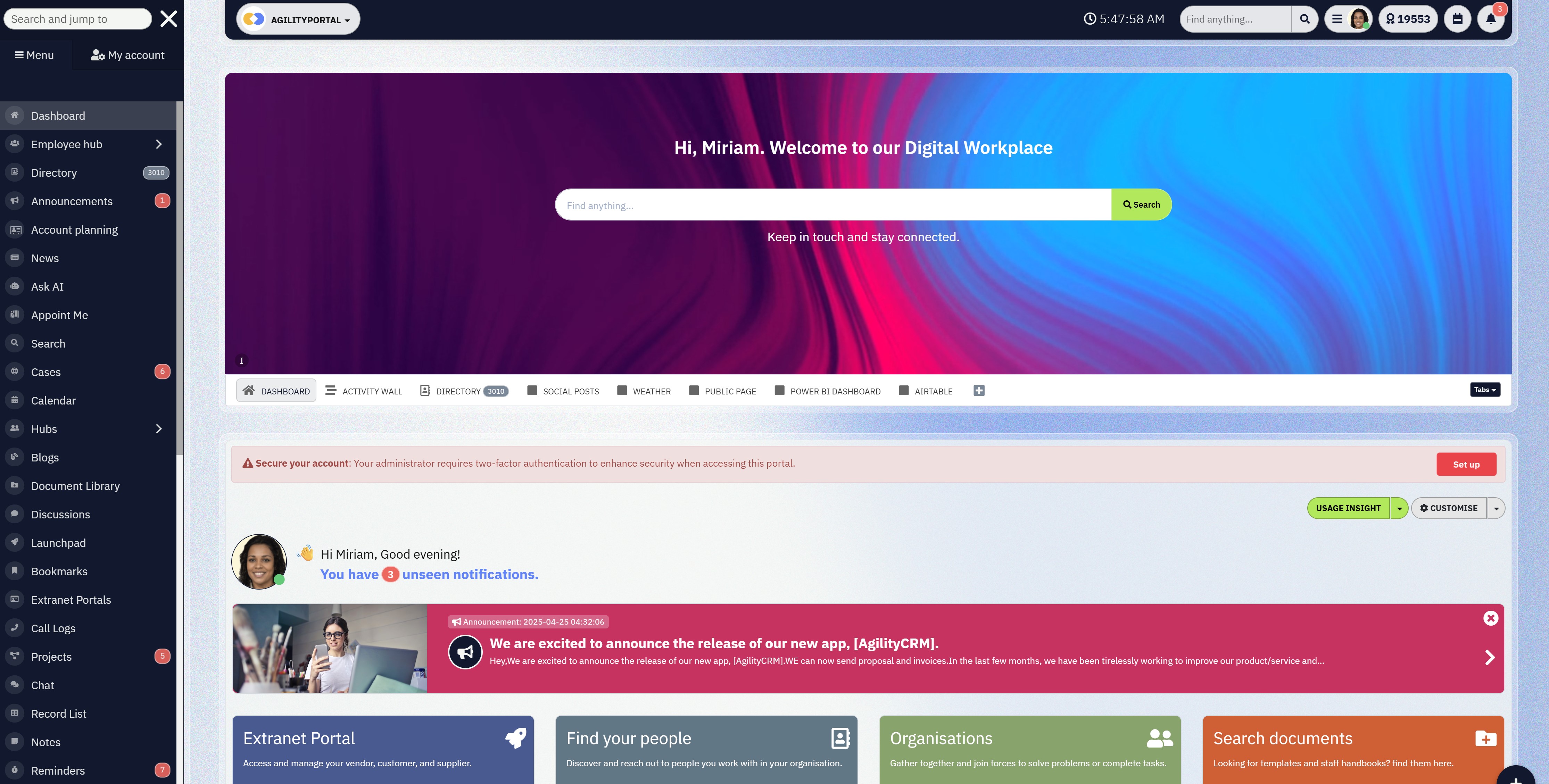
A Smarter Way to Build a Digital Workplace
By 2026, the organisations leading on productivity, engagement, and clarity are not adding more tools — they are simplifying. Fewer platforms. Better connections. Clearer work.
That is where AgilityPortal comes in.
AgilityPortal is a modern Digital Workplace platform that brings communication, documents, knowledge, collaboration, and employee experience into one clear, central hub.
Instead of juggling an intranet, chat apps, shared drives, and engagement tools, teams use a single platform that people actually adopt.
It is built for:
- Hybrid and remote teams
- Frontline and desk-based employees
- HR, Internal Communications, and Operations leaders who need insight, not noise
Most importantly, AgilityPortal puts adoption first. If people do not use the platform, features mean nothing. AgilityPortal is designed around how work actually happens — not how vendors think it should.
If you are planning to modernise your Digital Workplace in 2026, it is worth seeing what a unified platform can really deliver.
👉 Explore AgilityPortal or start a free trial to see how your Digital Workplace could actually work — all in one place.
Conclusion: Tools Don't Transform Teams—How You Use Them Does
Digital workplace tools don't magically fix broken ways of working. They only work when they're used with intention.
The best tools are almost invisible. They fade into the background and let people focus on doing their jobs instead of fighting systems, searching for files, or switching between apps all day.
When things are working well, employees stop thinking about where to work and start thinking about what to work on. Communication feels clear instead of noisy. Information is easy to find instead of hidden.
Work flows forward instead of getting stuck in emails, meetings, and duplicated effort.
On the other hand, when tools feel heavy, confusing, or ignored, that's a warning sign. It usually means the workplace is overloaded with platforms, poorly structured, or missing clear ownership. Adding yet another tool won't fix that. It will only make the problem worse.
Strong digital workplaces aren't built by chasing features or trends.
They're built by simplifying, connecting, and choosing tools that fit how teams actually work day to day. When that happens, adoption follows naturally—and productivity improves without forcing change.
If your team is juggling too many platforms, it might be time to rethink the workplace—not add another tool.
That shift in mindset is often the difference between a digital workplace that looks good on paper and one that actually works in real life.
Most Popular Posts

Effective communication among team members is vital for the productivity and success of any organization. Surprisingly, 60% of companies lack a long-term internal communication strategy, which p...


Businesses thrive on communication for efficiency, productivity and accomplishment. When the right information is passed from the right designation in the organization, it promotes positivity an...

Categories
Blog
(3208)
Business Management
(395)
Employee Engagement
(235)
Digital Transformation
(218)
Growth
(150)
Intranets
(142)
Internal communications
(106)
Remote Work
(68)
Sales
(53)
Collaboration
(53)
Customer Experience
(33)
Culture
(30)
Knowledge Management
(29)
Project management
(29)
Leadership
(20)
Comparisons
(9)
News
(1)

Related Posts

The Amazon advertising agency landscape has changed dramatically over the past two years. With the introduction of AI-powered shopping experiences, Amazon Rufus, advanced attribution reporting, Sponsored Brands Video, and Amazon DSP enhancement...

Why do your remote staff still struggle to work together when they have the apps, laptops and access they need? Often, the problem is the small gaps between people and information. Someone can't open the latest document. An approval gets buried...

An AI coworker could help solve a problem most businesses know well: too much knowledge work and too little time. Employees spend their day searching for information, preparing updates and answering the same questions. Having a system tha...

When is the right time to upgrade to a self-hosted AI agent—and how do you know whether switching will solve your team's problems or create more work? Picture an employee asking your AI assistant where to find the latest leave policy. It cannot...

Could an AI coworker take some of the busywork off your team's plate? The best AI coworkers promise to help employees research topics, prepare documents, find information and handle recurring tasks. But choosing one means looking beyond an impressive...


Jill Romford
I am a digital nomad, lover of exploring new places and making friends.
I love to travel and I love the internet. I take pictures of my travels and share them on the internet using Instagram.
Traveler, entrepreneur, and community builder. I share my insights on digital marketing and social media while inspiring you to live your fullest life.
Ready to learn more? 👍
One platform to optimize, manage and track all of your teams. Your new digital workplace is a click away. 🚀
Free for 14 days, no credit card required.