
Insight Blog
Agility’s perspectives on transforming the employee's experience throughout remote transformation using connected enterprise tools.
43 minutes reading time
(8557 words)
Edge AI in 2027 - 7 Trends Transforming Business Operations That You Need To Know About

Edge AI in 2027 - 7 Trends Transforming Business Operations That You Need To Know About
Explore 7 Edge AI trends changing business operations in 2027, including real-world uses, benefits, risks and practical steps for starting a business pilot.
Edge AI in 2027 - 7 Trends Transforming Business Operations That You Need To Know About

How is Edge AI changing business operations in 2026, and when does it make sense to process data near where it is created instead of sending it all to the cloud?
The investment forecasts point to growing interest: Capgemini Research Institute's 2026 report says global spending on Edge AI is expected to exceed $260 billion in 2025 and grow by 13.8% a year to $380 billion by 2028.
Those are forecasts, not a guarantee of results for any individual business.
13.8%:
annual growth forecast for global Edge AI spending through 2028
Capgemini Research Institute’s 2026 report says global spending on Edge AI is expected to exceed $260 billion in 2025 and grow by 13.8% a year to reach $380 billion by 2028. These figures are spending forecasts. They do not measure confirmed spending or the return an individual business will achieve from an Edge AI project.
Source: Capgemini Research Institute, The Multi-Year AI Advantage: Building the Enterprise of Tomorrow
The broader business shift is already visible in the UK: ONS data shows AI use among businesses with 10 or more employees rose from around 12% to 35% since late 2023.
Improving business operations is the most common use reported by larger businesses, though this data covers AI generally, not Edge AI specifically.
By bringing artificial intelligence to the edge, organisations can analyse data closer to devices, sensors and machines.
This guide explains how edge intelligence works, where AI on edge can complement cloud systems, the trends and industry use cases to know, and how to weigh the potential benefits against cost, security and deployment challenges.
Key Takeaways
- Edge AI processes data on or near the device that collects it, helping businesses respond locally without sending every task to the cloud.
- Common uses include real-time monitoring, video analytics, quality inspection, predictive maintenance, intelligent automation, and decision support.
- Many businesses combine edge and cloud systems: the edge handles local analysis while the cloud supports model updates, storage, device management, and cross-site reporting.
- Edge AI can suit tasks that need a quick response or must work with limited connectivity, but it still needs suitable hardware, security controls, and ongoing maintenance.
- A practical rollout starts with one measurable business problem, a limited pilot, clear success measures, and defined rules for when people need to review or approve an AI decision.
First of all, what is Edge AI?
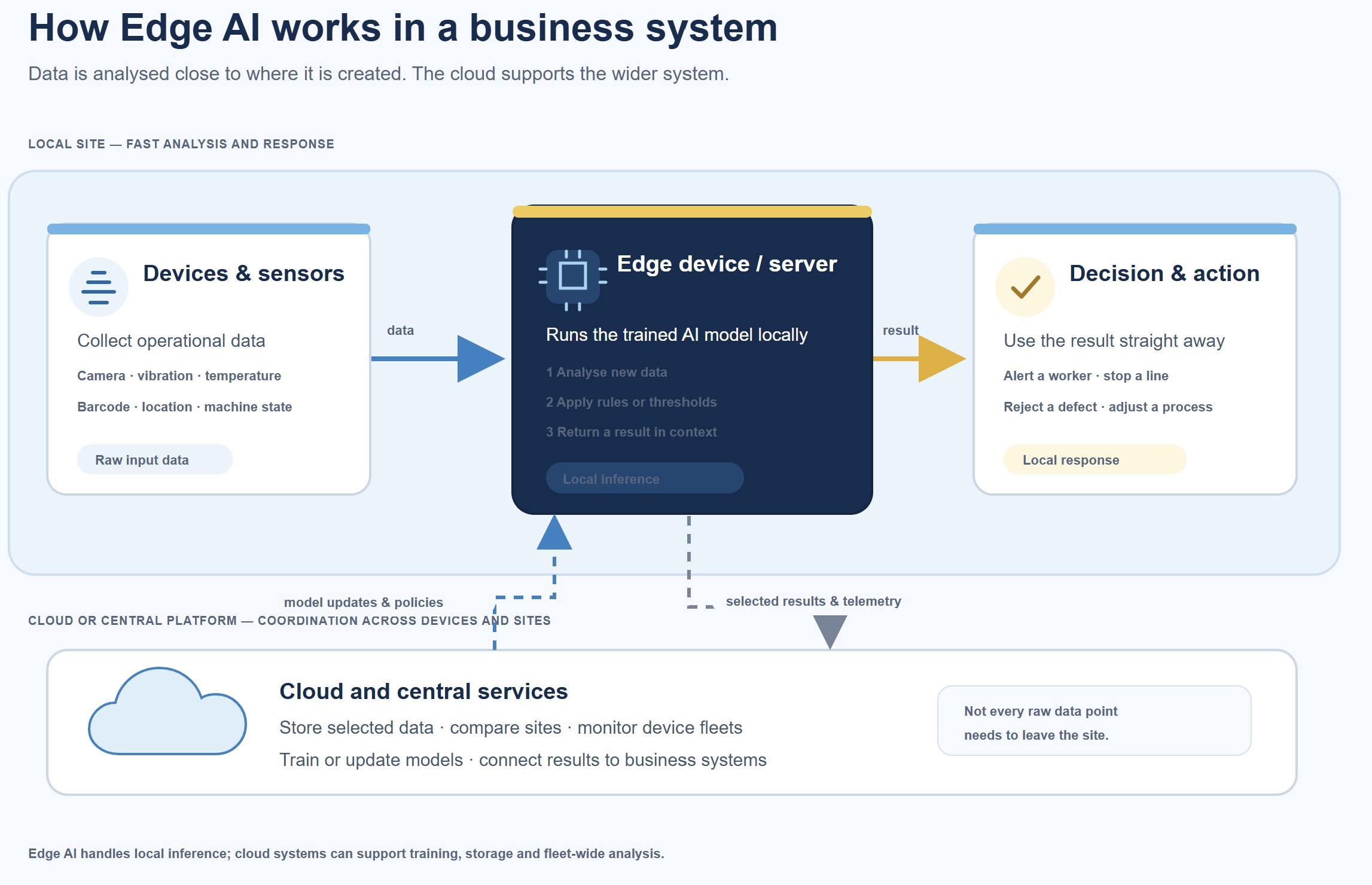
Put simply, Edge AI lets a device or nearby computer process data where it is collected.
That could be a camera checking products on a production line, a sensor monitoring a machine, or a local server analysing information from several devices. The system can respond locally instead of sending every piece of data to the cloud and waiting for a result.
You may also see it called artificial intelligence at the edge or AI on edge. "Edge" refers to the edge of a network: the devices and local systems closest to where data is created.
Edge intelligence is the ability to analyse that data and act on it locally.
First of all, what is Edge AI?
Businesses use Edge AI for:
- Real-time monitoring: spot changes in equipment or conditions as they happen.
- Video analytics: analyse camera footage locally to identify activity or potential issues.
- Quality inspection: flag product defects while items are still on the production line.
- Predictive maintenance: detect signs of wear or unusual machine behaviour before a breakdown.
- Intelligent automation: trigger routine actions automatically, with staff overseeing important decisions.
- Smarter decision-making: give teams timely information to help them respond.
Edge computing provides the local systems that process the data; Edge AI adds AI models.
On-device AI is a type of Edge AI that runs directly on a device.
To learn more about Edge check the wikipedia page but enter edge ai wikipedia in google search.
Cloud AI runs in remote data centres, and businesses can combine both approaches.
What does artificial intelligence at the edge mean for a business?
Think of a business collecting information from cameras, sensors or machines.
With Edge AI, some of that data can be analysed close to where it is created, so the system can respond quickly without sending every reading to a remote cloud service first.
A typical setup works like this:
- Devices and sensors collect data from equipment, products or the surrounding environment.
- An edge device or local server runs the AI model and can flag an issue or trigger a response.
- Cloud systems can support the wider operation by storing information, training models or analysing patterns across several sites.
For example, a camera on a production line might spot a defect immediately. The local system can alert a worker or pause the line, while summary data is sent to the cloud for longer-term analysis. Businesses often combine local and cloud processing, choosing where each task should run.
If a business needs outside expertise to design or build a system, it can research potential edge AI companies.
Compare providers on relevant industry experience, hardware and software capabilities, security, and support after launch.
Where does the edge of AI sit in a business technology stack?
The phrase "edge of AI" can sound like a measure of how advanced a company's AI is.
Here, it means something more practical: where AI runs in the technology stack.
With Edge AI, or artificial intelligence at the edge, data is analysed on or near the device that collects it, rather than sending every task to a central cloud service.
That can help a business respond faster, reduce the amount of data it sends elsewhere and keep some processes running when connectivity is unreliable. Edge intelligence is the ability to use that local analysis to provide an insight or trigger a response.
And every task needs to run at the edge, though; businesses choose between local, cloud or combined processing based on what each task requires.
Where does the edge of AI sit in a business technology stack
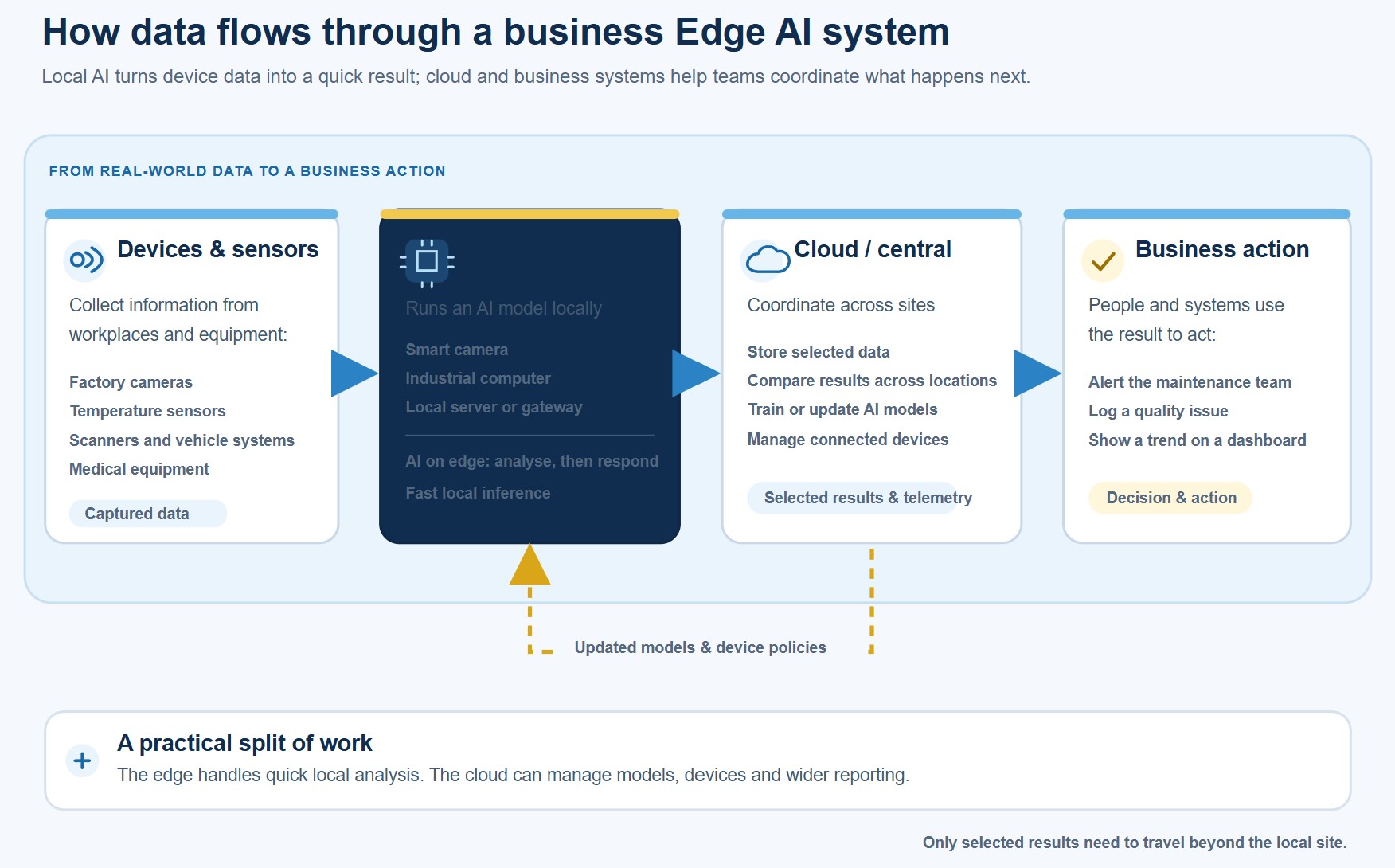
A typical Edge AI system has four parts:
- Devices and sensors collect information. These might include factory cameras, temperature sensors, scanners, vehicle systems or medical equipment.
- Edge hardware—such as a smart camera, industrial computer or local server—processes the data and runs an AI model. This is where AI on edge can make a quick decision.
- Cloud or central systems can store selected data, compare results across sites, train or update models, and manage devices.
- Business systems and people use the result. An alert might go to a maintenance team, a quality issue might be recorded in a production system, or a manager might review a trend in a dashboard.
For example, a manufacturer might train a model centrally using past production data, then deploy it to computers beside its production lines.
The model checks new data locally. It can send an alert or trigger an approved action immediately, while summary information goes to the cloud for wider analysis.
The cloud and edge have different jobs: the edge handles tasks that benefit from a local response; central systems support shared data, model management and analysis across the organisation.
Businesses use Edge AI in several ways:
- Real-time monitoring: Sensors on a production line detect an unusual rise in heat or vibration. An edge system alerts staff before the issue disrupts production.
- Intelligent automation: A warehouse camera identifies an item in the wrong location, and the local system prompts a worker or updates a connected workflow.
- Predictive maintenance: Equipment readings show a pattern associated with wear. The system flags the machine for inspection so maintenance can be planned before a likely breakdown.
- Quality inspection: A camera checks products as they pass along a line and flags visible defects for a worker to review.
- Video analytics: A system analyses footage locally to detect a safety zone being entered or a vehicle approaching a restricted area. Businesses should set clear limits for how footage is used and who can access it.
- Smart decision-making: A local system combines current readings with set rules to recommend an action, such as slowing equipment when operating conditions move outside safe limits.
Edge AI can reduce delays and the amount of raw data sent elsewhere, but it still needs suitable hardware, reliable models, security controls and ongoing maintenance.
Businesses should also decide which actions can happen automatically and which need a person to review them.
Where does the edge of AI sit in a business technology stack?
The "edge of AI" describes where AI runs in a technology system. It does not mean how advanced the AI is.
A company might test or train a model in a central cloud or data centre, then deploy it to a camera, machine or local server. Once there, the model can analyse new data near its source. This is called inference: using a trained model to produce a result.
For example, a manufacturer could develop a model using historical production data, then run it on a computer beside a production line. The system can flag a possible defect straight away.
It may send an alert to a worker and share selected results with central systems for reporting or further analysis. This moves AI from a trial environment into a day-to-day business process.
Artificial intelligence at the edge can run without sending every data point to the cloud, although the model and devices still need to be managed and updated.
What is edge intelligence, and how does it differ from cloud AI?
Edge intelligence means using AI to analyse data and support decisions on or near the device that collects it.
You may also see this described as AI on edge. Cloud AI processes data in remote data centres; Edge AI processes it on a device or nearby system.
A hybrid approach uses both.
| Approach | Where processing happens | Often suited to |
| Edge AI | On a device or nearby system | Fast local responses or work in places with unreliable connectivity |
| Cloud AI | In remote data centres | Large workloads, centralised analysis and coordination across systems |
| Hybrid AI | Across edge devices and cloud systems | Local responses combined with central management and analysis |
There is no single best option for every business.
A factory might use Edge AI to detect a fault quickly, then send results to the cloud to compare performance across sites.
The right setup depends on the task, response time, connectivity, data requirements and the cost of maintaining the system.
7 Edge AI trends changing business operations in 2027
7 Edge AI trends changing business operations in 2027
1. More AI decisions happen in real time
A defect is easier to deal with when it's caught before more products move down the line.
A camera paired with an AI model can inspect items as they're made and flag something that needs a closer look. NVIDIA describes an inspection system deployed at Sansera that detects and classifies defects in metal rods in real time.
In a separate industrial example, AWS describes an IBM visual-inspection system that gives weld operators near-real-time feedback on weld quality. Learn more from the NVIDIA Technical Blog.
The practical benefit is a shorter gap between spotting a possible problem and responding to it. Operators may be able to check a weld or adjust a process before the issue affects more products.
AWS reports that its welding solution reduced the time from defect detection to remediation and the number of defects on the line; those are results from that deployment, not a promise of the same outcome everywhere.
Local processing can also help when a system needs to respond without waiting for data to travel to a remote cloud service. But an alert is a signal to investigate, not proof that a defect exists.
Businesses need to test the system on their own equipment and materials, check for missed defects and false alarms, and decide when a person should review the result.
2. Predictive maintenance gets closer to the equipment
A machine often gives warning signs before it fails.
Sensors can pick up changes in vibration, temperature or operating status, and an AI model can flag an unusual pattern for investigation. The alert might prompt a technician to inspect a motor during a planned stop instead of discovering the fault after production has halted.
There are real manufacturing examples.
Procter & Gamble uses equipment data at the edge and runs near-real-time models on factory equipment to monitor quality and predict issues.
The company says operators can be prompted to inspect a line when the system spots an anomaly.
At one 3M plant, a model analysed data from equipment and products moving along the line to predict problems hours before they appeared.
These examples show how local analysis can help maintenance teams investigate earlier; they do not mean every fault can be predicted.
The benefit depends on what happens after the alert.
Microsoft's reference architecture combines live equipment data with asset details and maintenance history, so teams can put a signal in context and notify the right technician. Sensor accuracy, model performance and a clear response process all matter.
3. Computer vision takes on inspection and safety checks
On a factory floor, cameras can help spot visible product defects or detect activity in a restricted area.
Dow, for example, deployed edge-based video analytics to support safety and security monitoring at its facilities.
Microsoft describes potential extensions such as detecting personal protective equipment and monitoring entrance gates. The operational value is quicker visibility of a possible issue, so staff can check it and respond.
For quality inspection, computer vision can flag a product for review before it leaves a production line.
That may help teams find defects earlier and reduce the amount of material sent to rework or scrap, although the result depends on the product, camera setup and model. Microsoft lists AI-powered inspection as a way to detect defects earlier and support consistent quality checks.
Before putting a system into use, teams should agree on a few practical safeguards:
- Test how often it misses a real issue or raises a false alarm.
- Decide which results need a person to review them.
- Set rules for who can access footage that may identify workers, and how long it is retained.
Running analysis locally may reduce the need to send all footage elsewhere, but it does not remove privacy responsibilities.
4. Retail teams get more useful information at the point of service
A store could use local AI to check whether a shelf needs replenishing, identify an item at a checkout or flag equipment that needs attention.
Staff get information where they can act on it, while the system can send selected results to central tools for stock planning or reporting.
Coles provides a real example of retail edge infrastructure at scale.
Microsoft says the supermarket group expanded its Azure Stack HCI platform from two stores to more than 500, using it to manage computer vision applications.
Coles reported that it could roll out applications to stores six times faster with the platform.
That is a deployment result, not proof that every AI application will deliver the same speed or business benefit.
If cameras are used to analyse customer or staff activity, the retailer still needs clear rules about the purpose, notice, access and data retention. Local processing does not, by itself, answer those questions.
Six times:
faster application deployment to stores
Coles says its intelligent edge backbone increased the pace of application deployment to stores sixfold. The retailer expanded the infrastructure from two locations to more than 500 stores. This measures application rollout speed; it is not a claim that every AI task or store operation became six times faster.
5. Edge and cloud systems work together
For many businesses, the practical setup will use both.
A local system can handle a time-sensitive task—such as flagging an equipment anomaly—while cloud services help manage devices, update models and compare patterns across locations.
Procter & Gamble's manufacturing setup illustrates this split: it captures equipment data at the edge, runs models on factory equipment and sends data to its central Azure data lake for broader analysis and model improvement.
The local system supports timely checks on the line; central analysis can help teams find patterns across production sites.
There is also growing interest in this kind of architecture.
A 2026 Omdia study commissioned by Google Cloud and Intel projects a 190% increase in localised edge deployments over the next five years.
Treat that as a forecast, not a count of deployments already completed. The report examines strategies across manufacturing, retail, financial services and healthcare.
6. Smaller models make deployment on devices more practical
A camera or industrial computer has less memory and processing power than a large cloud server.
Quantisation can help: it stores a model's numerical values using fewer bits, which can reduce memory requirements and, on suitable hardware, speed up processing.
NVIDIA's Jetson benchmark write-up compares quantised and higher-precision model formats, showing differences in memory use and throughput on that specific device and workload.
The useful lesson is to test the model on the hardware where it will run. A smaller model may be more practical to deploy, but teams still need to check that its accuracy is good enough for the job.
For example, a compact model that reliably flags a particular type of product defect may be a better fit for a production-line camera than a larger model that cannot run within the device's limits.
The trade-off is task-specific; results from one benchmark do not guarantee performance elsewhere.
7. Device management and security become part of the job
Deploying a model on one device is manageable.
Deploying it across many sites creates a continuing operations task: teams need to know what is installed, keep software and models up to date, monitor results and respond if a device goes offline or starts behaving differently.
NIST identifies limited device resources, communication constraints, privacy requirements and additional security vulnerabilities as challenges for edge AI.
In practice, teams should plan for:
- An up-to-date inventory of devices and the models running on them.
- Controlled access and a tested process for software and model updates.
- Monitoring for device faults, unusual results and lost connectivity.
- A rollback plan if an update causes problems.
These controls help operations teams maintain consistent behaviour across sites and respond when a device or model needs attention.
Up to 90%:
less time to deploy a new model version
Procter & Gamble reports reducing the time needed to deploy a new model version by as much as 90%. P&G uses a hybrid setup to develop and orchestrate models in the cloud, then deploy them to edge equipment in its manufacturing facilities. This is a company-reported result from its deployment process, not a typical result guaranteed for other businesses.
How is AI on edge used across different industries?
AI on edge puts analysis close to the devices and systems that generate data.
The benefit varies by industry: a factory may need to spot a defect before an item leaves the line, while a vehicle or remote utility site may need to keep operating when its connection is unreliable.
Here are some practical examples.
Manufacturing: inspect products and monitor equipment
A production-line camera can flag a visible defect for an operator to review.
Sensors on a machine can also track changes in vibration or temperature and alert maintenance staff when readings look unusual.
In a 2026 demonstration with Siemens, Qualcomm showed an industrial PC running AI locally for quality inspection, diagnostics and worker assistance.
It also demonstrated an automated guided vehicle moving materials around a factory model. These are demonstrations of possible uses; they should not be read as measured results from a full production rollout.
Healthcare: process device data close to the patient
A wearable or bedside monitor could analyse vital-sign readings locally and flag a change for a clinician to assess.
Local processing may help reduce delays and limit how much raw patient data needs to move between systems.
It does not make a tool clinically safe or automatically satisfy privacy rules: healthcare teams still need to validate its performance, protect patient information and keep clinical decisions under appropriate professional oversight.
IBM describes edge computing for remote patient monitoring and medical imaging, including wearable devices that can alert care providers to changes in vital signs.
Retail: spot stock or queue issues in store
A store could use local camera or sensor data to identify an empty shelf, monitor queue length or check whether equipment is working.
Staff could receive a prompt to replenish a product or open another checkout, while central systems collect selected results for wider stock and staffing analysis.
Coles has expanded edge infrastructure across more than 500 stores and uses it to manage computer-vision applications.
Microsoft reports that the platform helped Coles roll out applications to stores six times faster. That describes application deployment speed, not a guaranteed improvement in queue times or sales.
Camera-based customer or staff monitoring also needs clear rules on purpose, access and retention.
Transport and logistics: respond when connectivity is patchy
A vehicle can process nearby sensor or camera information to flag a hazard, while a warehouse system can help a mobile robot navigate around people or obstacles.
If a connection drops, local processing may allow some functions to continue; more complex coordination can still depend on central systems and network availability.
Qualcomm's 2026 coverage describes a factory demonstration in which an automated guided vehicle moved materials over a private industrial 5G network.
That illustrates how local AI and connectivity can support coordinated operations, but it is a factory demonstration rather than evidence that every vehicle can operate safely without a network.
Energy and utilities: monitor assets across a wide area
Sensors on pumps, turbines, substations or renewable-energy equipment can provide readings such as temperature, vibration and operating status.
An edge system can flag an unusual pattern near the asset, helping an engineer investigate before it develops into a larger service problem. IBM describes utility monitoring that uses equipment data and sensor alerts to identify anomalies and inform maintenance.
Across these industries, the useful question is not simply whether AI can run locally.
Teams need to decide which decisions benefit from a nearby response, what happens when the system is uncertain, and which data should be sent to central systems for review or longer-term analysis.
What are the benefits and limits of Edge AI?
Edge AI can be useful when a business needs to analyse data near where it is created.
It is not automatically the right choice for every workload, but it can offer these eight benefits:
- Faster responses: A camera or sensor can send an alert to nearby equipment or staff without waiting for a round trip to a remote data centre. This can help when a delay affects a quality check, safety alert or service response.
- Less raw data sent over the network: A local system can analyse video or sensor readings and send only selected results, such as an alert or a summary. This can reduce data transfers, depending on how the system is designed.
- Lower bandwidth demand in some deployments: Filtering data locally can reduce the amount of network capacity needed for continuous streams from cameras, machines or other devices. The actual saving depends on how much data the system retains or forwards.
- Some functions can continue during a connection problem: If a device can make its decision locally, it may still perform that task when the connection to central systems is slow or unavailable. Cloud-based monitoring, updates or wider coordination may still be interrupted.
- More control over sensitive data: Processing information locally can limit how much raw footage, health data or operational information leaves a site. That can support data-control goals, but it does not replace access controls, retention rules or other privacy safeguards.
- Useful insights closer to the people who need them: A maintenance alert can go to a technician near the machine; a stock alert can reach staff in the relevant store. This can make the result easier to act on within existing operational workflows.
- Less reliance on a constant cloud connection: Local systems can handle suitable tasks on site, while the cloud remains available for central reporting, model updates and comparisons across locations. IBM describes this local-plus-central approach across use cases such as manufacturing and supply-chain operations.
- Potentially lower data-transfer and cloud-processing costs: Sending fewer raw video or sensor streams to cloud services may reduce some network and processing costs. However, edge hardware, installation, security and ongoing support also cost money, so businesses need to compare the full cost of each design.
Where the trade-offs come in
Edge devices often have less computing capacity than cloud servers, and they need to be secured and maintained across every site.
Models also need monitoring and updates; a weak model or poor-quality data can produce unreliable alerts wherever it runs. NIST identifies resource constraints, communication limits, privacy requirements and security vulnerabilities among the challenges of edge AI.
The strongest case for Edge AI is a task that benefits from a local response or has a clear reason to keep processing close to the data.
Teams should test accuracy, connectivity behaviour, security and total operating costs on the actual devices before expanding a deployment.
Is Edge AI more secure than cloud AI?
Not automatically.
Processing data locally can reduce how much raw information travels to a cloud service, which may help limit data exposure in transit.
But the edge device still collects, stores and processes information—and may be physically accessible to someone who wants to tamper with it. NIST also identifies security vulnerabilities, privacy requirements and communication constraints as challenges for edge AI.
Security depends on how the whole system is designed and managed. Before deployment, review:
- Physical access: Can someone open, reset or connect to the camera, sensor or edge computer?
- Credentials and permissions: Does every device have a unique identity, with access limited to the people and services that need it? Avoid shared or default passwords. NIST recommends securely onboarding IoT devices with unique network credentials.
- Updates: Can the operating system, applications and AI models be updated through a controlled, authenticated process? Teams also need to know which devices are overdue for updates.
- Encryption: Is sensitive data protected while stored on the device and when it moves between devices, local servers and the cloud?
- Model integrity: Can the team verify that a deployed model is approved and has not been altered? Keep a record of model versions and test updates before rolling them out widely.
- Incident response: Can a compromised device be isolated, investigated and restored without disrupting essential operations?
Edge AI and cloud AI have different security considerations.
Cloud services concentrate workloads in managed data centres; edge deployments spread devices and software across sites, which can increase the number of systems a business must protect.
NIST's IoT guidance treats devices as part of the wider system risk assessment, while CISA recommends that industrial organisations prepare and practise incident-response procedures.
Before rollout, bring IT, cybersecurity and operational technology teams together to review the devices, data flows, access, update process and recovery plan.
Local processing can reduce some data transfers, but security comes from protecting and managing the full system.
How should a business start an Edge AI project?
Treat an Edge AI project as an operational improvement project, not just a model deployment.
Start small and make sure you can measure whether it helps.
Step 1: Choose one specific problem
Pick a task that causes a clear cost, delay, quality issue or service problem.
For example, a manufacturer might investigate repeated defects on one production line, or a warehouse might look at delays caused by equipment faults.
Write down who is affected, how often the problem happens and what the current process is.
Avoid starting with a broad goal such as "use AI across the factory."
Step 2: Set a baseline and a target
Record how the process works today so you can compare it with the pilot.
Depending on the problem, useful measures might include:
- Time between detecting an issue and responding to it.
- Number of defects found, missed or sent for rework.
- Unplanned equipment downtime.
- False alarms and how much staff time they take to check.
- Network data transferred or cloud processing used.
Choose a target that matters to the operation, then agree how you will measure it. Microsoft's factory guidance includes measures such as throughput, equipment effectiveness and downtime.
Step 3: Check whether the task belongs at the edge
Ask what the system needs to do.
Does it need to respond quickly?
Must it keep working if the connection drops?
Is there a reason to avoid sending raw video or sensor data off site?
If none of these matter, cloud processing may be simpler. If local response is important but central reporting or model updates are also needed, a hybrid design may fit better.
Step 4: Map the data, devices and security needs
Identify where the data comes from, which devices will run the model, and which systems or people need the result.
Check that the data is reliable enough for the task and that the device has the required processing, memory, power and connectivity.
Involve IT, cybersecurity and operational technology (OT) teams before selecting equipment.
Review device identity and access, physical security, encryption, software and model updates, and what happens if a device fails.
NIST recommends assessing IoT products as part of the wider system's cybersecurity risk.
Step 5: Run a limited pilot with human review
Start with a small number of devices in one location or on one production line.
Keep a person responsible for checking alerts and recording whether each one was useful, incorrect or missed an issue.
Do not let the model make a high-impact decision on its own until the business has validated it for that purpose.
Set a clear pilot period and record exceptions, connection failures and staff feedback—not just successful predictions.
Step 6: Compare the results with the baseline
Use the same measures you recorded before the pilot.
Check whether the system improved the process enough to justify its equipment, integration, support and operating costs.
Include the time staff spend checking alerts and correcting errors.
Agree on a go/no-go decision with the people who own the process. If results are mixed, adjust the model, data or workflow and test again before expanding.
Step 7: Assign ownership before scaling
Name the teams responsible for device inventory, model approval, updates, monitoring, security incidents and support.
Decide how you will test changes, roll them out gradually and restore the previous version if an update causes problems.
For example, Microsoft's IoT Edge deployment guidance recommends validating changes in a test environment, expanding to a subset of production devices and using phased rollouts to reduce the risk of a fleet-wide failure.
Scale only when the pilot has shown a measurable operational benefit and the business has a workable plan to maintain the devices and models.
How do you measure whether an Edge AI pilot worked?
Start by measuring the current process.
Without a baseline, it is difficult to tell whether Edge AI improved the operation or whether results changed for another reason.
Choose measures that reflect the problem the pilot is meant to solve, then compare results under similar conditions.
Useful measures include:
- Response time: How long does it take from an event happening to an alert or action?
- Downtime: Did the pilot reduce unplanned stoppages or the time needed to diagnose a fault?
- Defect rate: Did it catch more defects before products moved to the next stage? Track missed defects as well as detections.
- False alerts: How often did the system flag something that was not a real issue, and how much time did staff spend checking?
- Bandwidth use: Did local processing reduce the amount of video or sensor data sent over the network?
- Staff time: Did employees spend less time on routine checks, or did reviewing alerts add work?
- Total operating cost: Include devices, installation, integration, connectivity, cloud services, maintenance, updates and staff time.
Model accuracy is useful, but it is not the business result. A model could perform well in a test and still create too many false alerts, miss costly problems or fail to fit the team's workflow. Keep people involved during the pilot and record how often they agree with the system's alerts.
Set the measurement period and success criteria before the pilot begins.
Compare the results with the baseline, note any changes in production or staffing, and decide whether the benefit justifies the full operating cost.
Microsoft's manufacturing guidance recommends tracking operational measures such as throughput, equipment effectiveness and downtime; its performance-testing guidance also recommends using baseline measurements to assess the impact of a change.
Related Guides You May Want to Read Next
Edge AI connects artificial intelligence with the devices, data and systems businesses rely on every day. These guides explore related topics, including manufacturing operations, IoT, AI adoption, infrastructure and connected-device security.
- The Future of Work Orders in Manufacturing: How Automation and AI Are Transforming Production
- Why Data Integration Is the Missing Link in Modern Manufacturing Communication
- How Can Businesses Use AI to Improve Supply Chain Resilience?
- The Role of AI in Transforming Business Operations: A Consulting Approach
- IoT Revolution: Building Scalable Solutions for Modern Challenges
- How Embedded Software Development Companies Build Secure Connected Embedded Systems
- Cloud vs Dedicated Server: Choosing the Right Setup for Performance, Security & Scale
Read these guides to explore how connected devices, AI and business infrastructure can support more responsive operations—and what teams should consider before scaling.
Challenges Businesses Must Address
Edge AI can bring analysis closer to where data is created, but running AI across devices and locations adds work that businesses need to plan for.
- Choosing suitable devices - Cameras, sensors and industrial computers have limits on processing power, memory, storage and energy. A model that works well in a cloud test may run too slowly—or not at all—on the intended device. Test it on the actual hardware and under real operating conditions before committing to a rollout.
- Working with reliable data - AI depends on the information it receives. Poorly placed sensors, inconsistent readings, lighting changes or incomplete equipment records can lead to missed issues or false alarms. Teams need to check data quality and confirm that the model has been tested against the range of conditions it will encounter.
- Managing devices and model updates - A pilot may involve a handful of devices; a full deployment could involve hundreds or thousands across different sites. Businesses need an accurate device inventory, a way to monitor health and model performance, and a controlled process for updates and rollback. Microsoft recommends testing changes first and expanding deployments in phases to reduce the risk of a faulty update affecting every device.
- Securing equipment in different locations - Edge devices may be installed in areas where physical access is harder to control. Weak credentials, unpatched software or unauthorised changes to a model can put the device and connected systems at risk. NIST identifies security vulnerabilities, resource limits, communication constraints and privacy requirements among the challenges associated with edge AI and IoT devices.
- Handling privacy and operational data - Local processing may reduce how much raw data is transferred, but it does not remove the need to decide what is collected, who can access it, how long it is kept and whether any information is sent to central systems. This matters particularly when cameras capture workers or customers, or when devices process health or other sensitive information.
- Planning for network and device failures - Local AI can support some tasks during a network interruption, but devices still need a plan for power loss, hardware faults, delayed updates and reconnection. Decide which functions must continue offline, what data should be stored temporarily and how staff should respond if the system is unavailable.
- Making the costs and skills add up - The full cost includes devices, installation, integration, connectivity, security, model updates and ongoing support—not just the AI model. Businesses also need people who understand the operational process as well as the technology. If no team owns maintenance and support after launch, a promising pilot can become difficult to run at scale.
Before expanding, assess these challenges with IT, security, data and operational teams. Edge AI is more likely to be sustainable when each device has a clear purpose, a named owner and a support plan.
Wrapping Up
Edge AI is bringing artificial intelligence closer to the devices and systems that run day-to-day operations.
In 2026, its value lies in practical tasks: flagging a possible defect, spotting unusual equipment behaviour or giving staff useful information while they can still act on it.
That does not mean every AI workload belongs at the edge. Local devices have limits, and businesses still need to manage data quality, security, updates and ongoing costs. Cloud systems remain useful for tasks such as training models and analysing results across locations.
If you're considering Edge AI, start with one operational problem.
Test whether local processing makes a measurable difference, keep people involved in reviewing results, and plan who will maintain the system after the pilot. Expand only when the evidence shows it works for your business.
FAQs about Edge AI
What is the difference between Edge AI and edge computing?
Edge computing means processing data near where it is collected.
Edge AI adds an AI model to that local processing so a device or nearby system can analyse information and produce an insight or response.
In short, edge computing and AI can work together, but edge computing does not always use AI. Machine learning edge computing is one way to apply AI models to data locally.
Does Edge AI work without an internet connection?
Some AI edge devices can continue running a model locally when internet access is unavailable.
They may still need a connection for tasks such as sending reports, receiving model updates or synchronising with central systems. Check which functions keep working offline before deployment.
Is Edge AI cheaper than cloud AI?
It depends on the workload. Local processing may reduce data transfers or cloud processing, but businesses also need to pay for devices, installation, security, maintenance and model updates.
Compare the full operating cost of edge, cloud and hybrid options.
What are common Edge AI examples?
Edge AI examples include a factory camera flagging a suspected product defect, a sensor identifying an unusual machine reading, a retail system checking stock locally, or a vehicle analysing nearby sensor data.
These examples show how AI and edge computing can support decisions close to where the data is produced.
How do companies secure Edge AI devices?
Keep an inventory of devices and models, use unique credentials and restricted access, encrypt data, verify software and model updates, monitor device health, and plan how to isolate or replace a compromised device.
Security needs to cover the hardware, software, data and the systems connected to them.
What hardware and software can run Edge AI?
A compact NVIDIA edge device can run AI workloads locally. NVIDIA Jetson Nano is one example of an embedded development platform; NVIDIA describes JetPack as the software suite for building and deploying AI applications on Jetson.
Businesses researching Jetson Nano edge computing should check that the specific device and software version meet their current performance and support needs.
NVIDIA Edge AI and Qualcomm Edge AI are examples of vendor platforms in this area, but the right choice depends on the model, workload, device requirements and support plan.
Edge AI software may include tools for deploying models, managing devices and monitoring performance.
Does "ChatGPT edge" mean ChatGPT runs on an edge device?
"ChatGPT edge" is not a precise technical term. It may be used to search for conversational AI that runs locally, but using an AI assistant through an app or browser does not, by itself, mean the model is running on an edge device.
Check where the specific model processes data before describing it as Edge AI.
What does "forward edge AI" mean?
"Forward edge AI" is not a widely used general term for edge computing and AI. It may refer to ForwardEdge-AI, a company. In this article, Edge AI means AI processing on or near the device or system that collects the data.
AI Summary
- Edge AI, also called artificial intelligence at the edge, processes data on or near the device that collects it. “Edge” describes where the AI runs in the technology architecture, not how advanced the AI is.
- Capgemini Research Institute’s 2026 report forecasts global Edge AI spending will grow by 13.8% a year, from more than $260 billion in 2025 to $380 billion by 2028. This is a spending forecast, not a measure of the return an individual business will achieve.
- Businesses can use Edge AI for real-time monitoring, video analytics, quality inspection, predictive maintenance, intelligent automation and decision support.
- Many deployments combine local processing with cloud services. Edge systems can analyse data and respond nearby, while central systems support model updates, storage, device management and analysis across sites.
- Local processing may help reduce response delays and the amount of data sent to the cloud, but it does not remove the need for security, suitable hardware, integration and ongoing maintenance.
- A practical pilot starts with a measurable business problem, a baseline for comparison, clear success measures and rules for when people should review or approve AI-driven actions.
Most Popular Posts

Effective communication among team members is vital for the productivity and success of any organization. Surprisingly, 60% of companies lack a long-term internal communication strategy, which p...


Businesses thrive on communication for efficiency, productivity and accomplishment. When the right information is passed from the right designation in the organization, it promotes positivity an...

Categories
Blog
(3216)
Business Management
(396)
Employee Engagement
(235)
Digital Transformation
(219)
Growth
(150)
Intranets
(142)
Internal communications
(107)
Remote Work
(68)
Sales
(53)
Collaboration
(53)
Customer Experience
(33)
Culture
(30)
Knowledge Management
(29)
Project management
(29)
Leadership
(20)
Comparisons
(9)
News
(1)

Related Posts

How is Edge AI changing business operations in 2026, and when does it make sense to process data near where it is created instead of sending it all to the cloud? The investment forecasts point to growing interest: Capgemini Research Institute's...

Choosing the best ERP for Shopify often starts when the workarounds stop working. Your store shows stock that the warehouse can't find. Wholesale orders live in spreadsheets. Finance spends days reconciling payouts, while customer service...

Could choosing the wrong proxy disrupt your team's work or increase costs without improving results? When comparing rotating proxies vs static proxies, the answer depends on what your business needs: a consistent IP address for an ongoing sessi...

What happens when a buyer asks Google for the best employee communication platform—and discovers competing brands before reaching your website? Choosing the best link building services can help a digital workplace business strengthen its broade...

Could gaps in digital accessibility be stopping your employees from completing the training they need to do their jobs? Imagine a new starter opening a mandatory course, only to discover they can't follow the audio, navigate the quiz with a keyboard ...


Annet Herges
I am a digital nomad, lover of exploring new places and making friends.
I love to travel and I love the internet. I take pictures of my travels and share them on the internet using Instagram.
Traveler, entrepreneur, and community builder. I share my insights on digital marketing and social media while inspiring you to live your fullest life.
Ready to learn more? 👍
One platform to optimize, manage and track all of your teams. Your new digital workplace is a click away. 🚀
Free for 14 days, no credit card required.