
Insight Blog
Agility’s perspectives on transforming the employee's experience throughout remote transformation using connected enterprise tools.
44 minutes reading time
(8843 words)
How Embedded Software Development Companies Build Secure Connected Embedded Systems

How Embedded Software Development Companies Build Secure Connected Embedded Systems
Learn how embedded software development companies build secure connected embedded systems with trusted firmware, encryption, testing, updates and long-term support.
How Embedded Software Development Companies Build Secure Connected Embedded Systems

Connected devices are useful, but every connection creates a responsibility.
Have you ever stopped to think about how many everyday devices now collect data, communicate with other systems, or make decisions without someone actively watching them?
From factory sensors and smart building controls to healthcare equipment and connected vehicles, embedded technology is doing far more than simply switching on and
off.
That scale is growing quickly. IoT Analytics estimated there were 16.6 billion active connected IoT devices worldwide in 2023—a figure that underlines just how many potential access points organisations now need to understand, manage and protect.
This is where embedded software development becomes an important thing to think about.
16.6B
active connected IoT devices
IoT Analytics estimated there were 16.6 billion active connected IoT devices worldwide in 2023. Every connected device can become a potential access point that organisations need to identify, manage, update and protect.
Source:
IoT Analytics
The code inside a connected device controls how it identifies users, handles data, receives updates and responds when something goes wrong.
If security is left until the final stages, a device may work exactly as intended while still creating a serious risk for the business and the people who rely on it.
Secure connected embedded systems are not about adding fear or complexity.
They are about designing products that can be trusted from day one, then maintained responsibly throughout their working life.
In this guide, you'll learn what makes a connected embedded system secure, where businesses commonly get caught out, and what to look for when choosing a development partner.
Key Takeaways
- Secure connected embedded systems need protection across the device, firmware, network, mobile app, cloud platform and user access—not only the physical hardware.
- Security by design helps teams identify risks early, reducing the cost and disruption of fixing vulnerabilities after launch.
- Strong device security relies on unique device identities, encryption, least-privilege access, secure boot and code-signed firmware.
- Regular testing, vulnerability management and a current Software Bill of Materials help businesses find and respond to security issues faster.
- Secure over-the-air updates and a clear support period are essential for protecting connected devices throughout their lifecycle.
- Security is a shared responsibility, with product, engineering, IT, security, operations and suppliers all needing clear ownership.
What counts as a secure connected embedded system?

Lemberg Solutions
Think of a connected device like a small team, rather than one standalone product.
The physical device might be what you can see—a smart thermostat, medical monitor, delivery tracker or factory sensor—but it usually relies on several other parts working together behind the scenes.
And here's the important bit: the system is only as secure as its weakest part. A well-built device can still create a problem if its mobile app, cloud account or software update process is poorly protected.
Here is a list of secure connected embedded system, and what it normally includes:
- The device itself: The physical hardware, such as sensors, processors, cameras, displays or control units. It should prevent unauthorised physical access where possible.
- Firmware: The software running directly on the device. This needs secure coding, signed updates and protection against someone replacing it with harmful code.
- Sensors and controls: These collect information or trigger real-world actions. Think temperature sensors, door locks, vehicle trackers or production-line controls. The data they send must be accurate and protected.
- The network connection: Whether it uses Wi-Fi, Bluetooth, mobile data or Ethernet, the connection should be encrypted and configured so that unknown users cannot simply join in.
- A mobile or web app: Many devices are controlled through an app. If the app has weak logins or poor permissions, it can become an easy way into the wider system.
- A gateway or hub: This acts like a translator between devices and the internet. It needs to be securely configured, monitored and regularly updated.
- Cloud services and data storage: Device data often ends up in the cloud. Businesses need clear controls over who can access it, how long it is kept and what happens if an account is compromised.
Put simply, secure connected embedded systems are not just about making the product work.
They are about making sure every part of the product works together safely, stays manageable over time and does not become an unnoticed doorway into the business.
Ask AI to Compare Embedded Software Development Partners
Use these AI tools to compare embedded software development companies, assess secure connected embedded systems, and evaluate secure firmware, device identity, testing, over-the-air updates, SBOM management, vulnerability handling and long-term support.


Why security can't be bolted on at the end
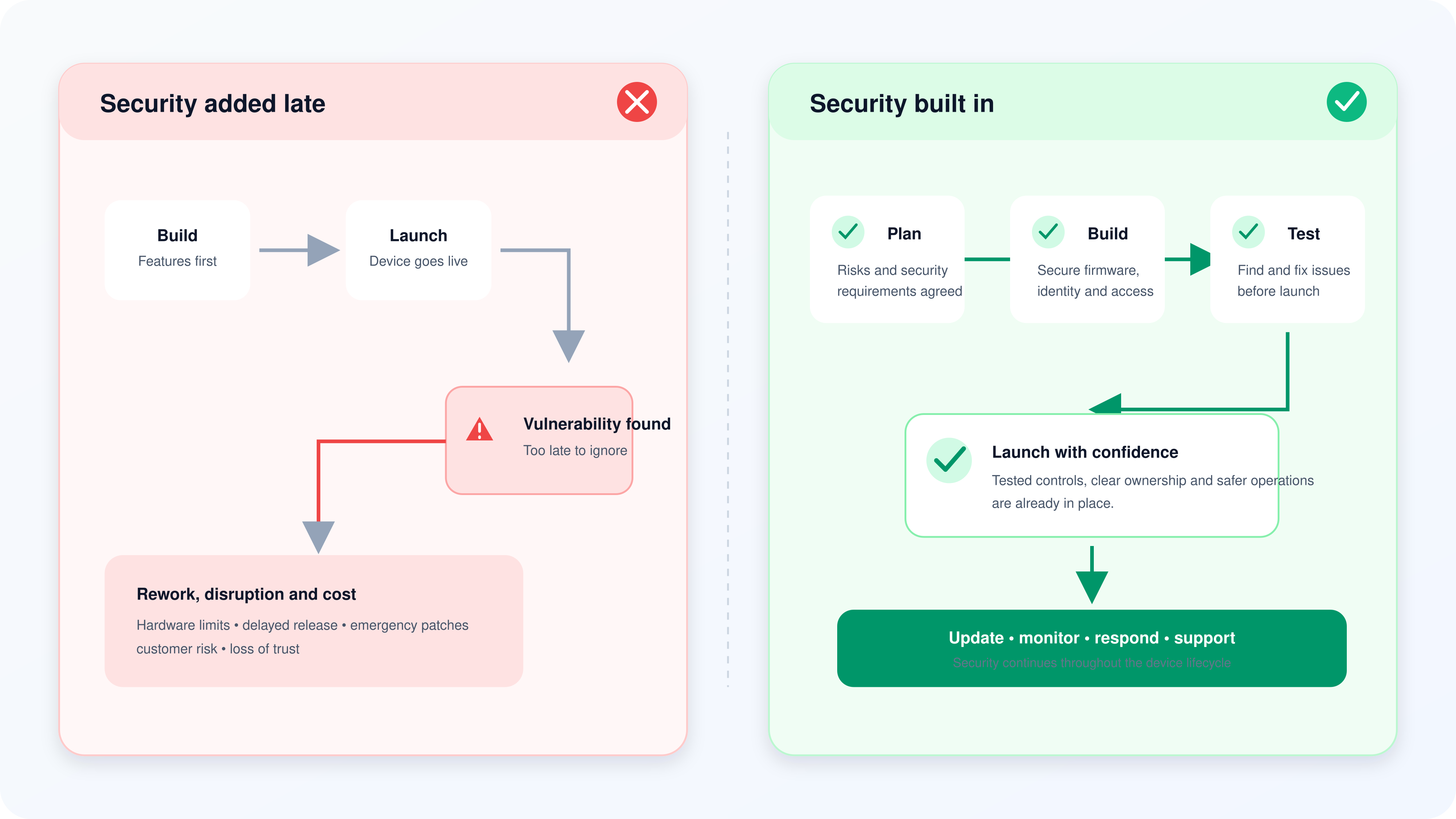
It is tempting to treat security as the final check before a connected product goes live.
Build the device, make sure it works, then add a password screen and call it secure. Unfortunately, that is rarely enough.
When security is considered too late, the team may discover that the hardware cannot support stronger protection, the mobile app gives too many people access, or the device cannot receive safe firmware updates.
Fixing those issues after launch is usually slower, more expensive and far more disruptive—especially if the device is already installed in homes, workplaces, vehicles or remote locations.
That is why embedded systems security needs to be part of the plan from the beginning.
A secure connected device is not just about protecting the physical product. It is about securing the device firmware, cloud platform, mobile app, network connection, user accounts and the data flowing between them.
A better approach is called security by design. In simple terms, it means asking "what could go wrong?" while the product is still being planned, not after a customer or attacker finds the answer.
Why security can't be bolted on at the end
Here is what this looks like in practice:
- Threat modelling: Before development starts, the team thinks through realistic risks. Could someone access the IoT device remotely? Could data be intercepted? What happens if a stolen device is connected to the system? Could a compromised sensor affect another part of the network?
- Strong authentication: The device, app and cloud service should be able to confirm who—or what—is trying to connect. This may include unique device identities, strong passwords, multi-factor authentication and certificate-based authentication. It helps prevent unknown users and unauthorised devices from gaining access.
- Encryption: Sensitive data should be encrypted when it moves between the embedded device, network and cloud platform, and when it is stored. That way, even if someone intercepts the information, they cannot easily read or misuse it.
- Least-privilege access: People and systems should only get the access they genuinely need. A warehouse manager may need to see device status, for example, but should not automatically be able to change security settings, alter firmware or download every customer record.
- Secure boot: A device should check that its software is legitimate before it starts. Secure boot helps stop altered or untrusted firmware from running on the hardware.
- Secure firmware development: Firmware is the software built directly into a device. It needs code reviews, security testing and protection against known vulnerabilities, just like a web application or mobile app does.
- Over-the-air updates: Connected products need a reliable way to receive software updates remotely. These updates should be signed, verified and tested before installation, so attackers cannot use an update process to install malicious code.
- Protected APIs: An API is the connection that allows the device, app and cloud service to exchange information. Poorly protected APIs are a common IoT security weakness, so they should use proper authentication, access limits and monitoring.
- Network segmentation: Connected devices should not have unrestricted access to every business system. Separating IoT devices from core systems can reduce the damage if one device is compromised.
- A software bill of materials: Often called an SBOM, this is simply a clear list of the software components used in a product. It helps teams quickly identify whether a newly discovered vulnerability affects their device.
- Clear ownership and vulnerability management: Someone must be responsible for monitoring security alerts, approving patches, managing the device lifecycle and responding when a vulnerability is found. If everyone assumes someone else owns it, important issues get missed.
The key point is simple: connected device security is not a feature you add at the end of an embedded software development project. It is an ongoing commitment that starts with product design and continues through testing, launch, updates and eventual end-of-life support.
The goal is not to make a product difficult to use. It is to make security part of how the product works from day one, so businesses can innovate with connected embedded systems without discovering that convenience came with a hidden risk.
Where connected devices are most likely to go wrong
Most connected devices are not made insecure because somebody set out to cut corners.
Problems usually appear when a product grows quickly, different teams own different parts of the system, or the focus stays on getting the device live rather than supporting it over time.
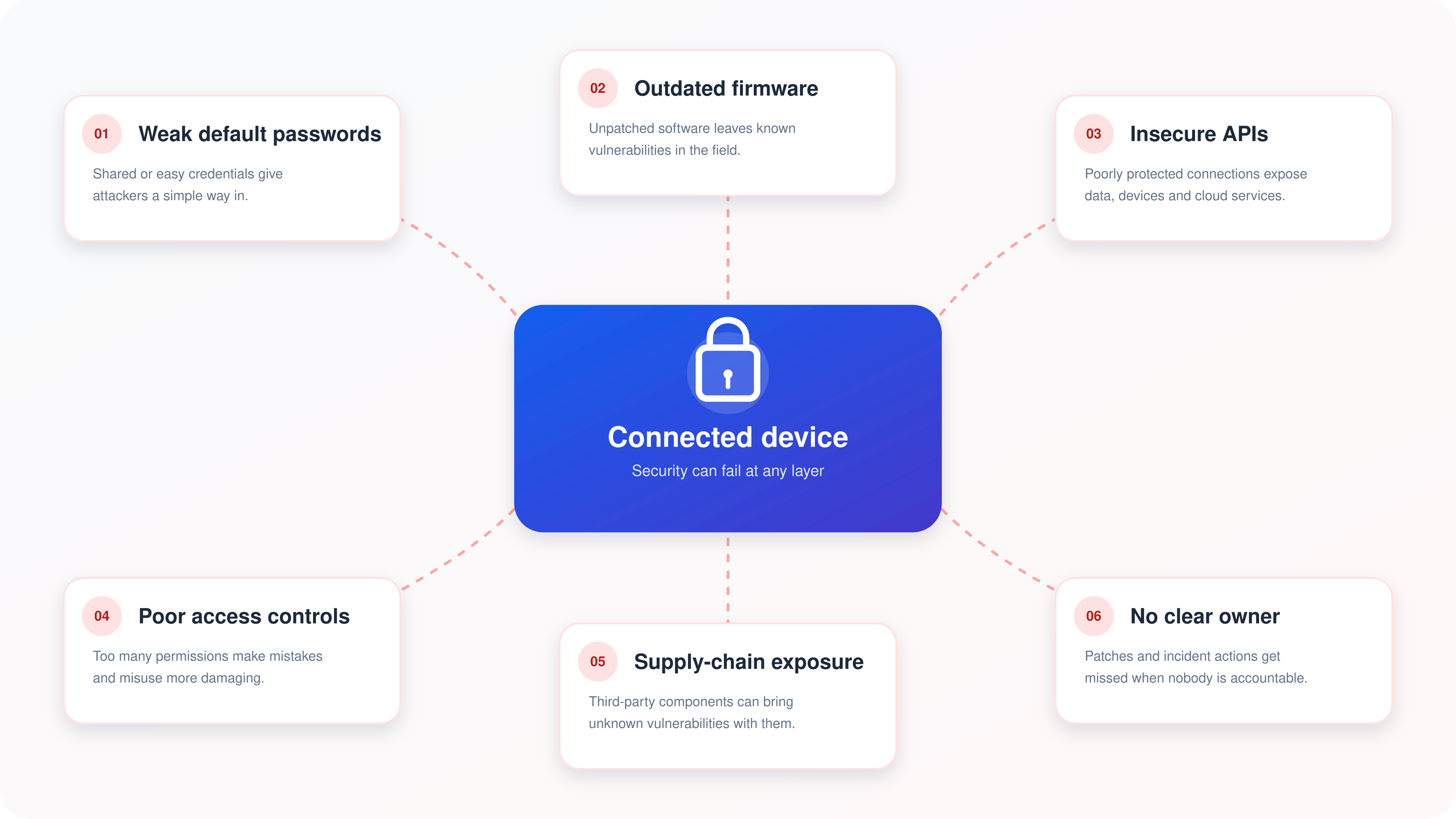
Here are the areas where embedded systems security most commonly breaks down.
Where connected devices are most likely to go wrong
Weak or shared default passwords
A device should never reach a customer with an easy-to-guess password, a shared admin login or credentials that cannot be changed.
This gives attackers a simple route into the device and, potentially, the wider network.
- Require users to create strong, unique credentials during setup.
- Do not reuse the same password across every device.
- Support multi-factor authentication for administrative accounts.
- Disable unused default accounts and remote-access services.
- Set sensible limits on failed login attempts.
Unsupported or outdated firmware
Firmware is not something a business can install once and forget about. Vulnerabilities are discovered over time, and an unpatched device can become a long-term security risk—even if it still appears to work perfectly.
- Provide secure firmware updates throughout the agreed support period.
- Clearly state how long updates will be available.
- Test updates before they are released to customers.
- Use signed updates so devices can verify they came from a trusted source.
- Have a clear end-of-life process for products that can no longer be supported.
Insecure APIs and cloud connections
Most connected devices rely on APIs to communicate with mobile apps, web dashboards and cloud services. If those connections are not properly protected, someone may be able to access data, impersonate a device or send unauthorised commands.
- Require authentication for every API request.
- Encrypt data in transit using current security standards.
- Check that users and devices can only access the information they are permitted to see.
- Limit how many requests can be made to reduce abuse.
- Monitor unusual activity, failed logins and unexpected device behaviour.
Poor access controls
Not everyone in a business needs the same level of access. When too many people can change device settings, export data or manage user accounts, a simple mistake can quickly turn into a serious incident.
- Use role-based access control for device, app and cloud administration.
- Give each person only the access they need to do their job.
- Review access regularly, particularly when employees change roles or leave.
- Keep an audit trail of important actions and configuration changes.
- Separate day-to-day user access from high-risk administrator access.
Supply-chain exposure
A connected embedded system may use third-party libraries, hardware components, cloud platforms and open-source software.
That is normal, but it means a vulnerability in one supplier's component can affect the final product.
- Maintain a software bill of materials, often called an SBOM.
- Check third-party software and libraries for known vulnerabilities.
- Assess suppliers' security practices before bringing them into the product.
- Keep records of component versions and where they are used.
- Have a process for responding quickly when a supplier reports a security issue.
Unclear ownership after launch
A product may be built by one team, sold by another and supported by someone else entirely.
If nobody has clear responsibility for device security, software updates and incident response, risks can sit unnoticed for far too long.
- Assign a named owner for connected device security.
- Define who approves firmware updates and emergency fixes.
- Give customers a clear route for reporting vulnerabilities.
- Create an incident response plan before an incident happens.
- Review security, support and compliance responsibilities regularly.
The pattern is clear: most connected device security issues are avoidable when security ownership, secure software development and long-term maintenance are treated as part of the product—not as an afterthought.
How an Embedded Software Development Company Builds Security Into the Product
A good embedded software development company does not wait until the device is finished to start thinking about security.
It treats security as part of the build from the first conversation through to software updates years after launch.
Think of it like building a house. You would not finish the walls, fit the furniture and then ask where the locks, alarm system and fire exits should go. Secure connected embedded systems need the same level of planning.
It starts with the real-world use case
efore writing code, the development team needs to understand what the device does, who will use it and what could happen if it is misused or compromised.
For example, a fitness tracker leaking data is a privacy problem. A connected device controlling refrigeration, medical equipment or factory machinery could become an operational or safety problem too.
At this stage, the team should:
- Identify the data the device collects, stores and shares.
- Map every connection between the device, mobile app, cloud platform and third parties.
- Decide who should be able to use, manage and update the product.
- Consider what happens if the device is stolen, disconnected or tampered with.
- Agree the security and compliance requirements before development begins.
The architecture is designed to limit damage
Next comes the technical blueprint. This is where the team decides how the device will communicate, where data will be stored and how access will be controlled.
The aim is not to assume that every user, connection or system is safe. It is to make sure one mistake does not give an attacker access to everything else.
A secure architecture should include:
- Separate environments for development, testing and live devices.
- Encrypted communication between the device, app and cloud service.
- Role-based access controls for customers, support teams and administrators.
- Network segmentation to stop a compromised device reaching sensitive business systems.
- Logging and monitoring so unusual activity can be spotted and investigated.
Secure coding protects the firmware at its core
Firmware is the software that runs directly on the device. It needs the same care as any other business-critical application, but often has tighter limits around memory, processing power and battery life.
A responsible embedded software development company should build security into the code by:
- Reviewing code before it is released.
- Checking third-party libraries and open-source components for known vulnerabilities.
- Avoiding hard-coded passwords, keys or sensitive data.
- Validating all information received from sensors, apps and APIs.
- Creating a software bill of materials, or SBOM, so the business knows what components are inside the product.
Every device needs a trusted identity
A connected device should be able to prove that it is a genuine, approved device before it can access a network or cloud service. Otherwise, an attacker may be able to copy its identity or use a fake device to gain access.
This usually involves:
- A unique identity for every device.
- Certificates or cryptographic keys stored securely.
- Strong authentication for users and administrators.
- Secure processes for replacing lost or compromised credentials.
- Access permissions that give each person or system only what they genuinely need.
Code signing and secure boot stop tampered software
wo terms worth remembering are code signing and secure boot.
Code signing proves that a software update came from a trusted source and has not been altered. Secure boot checks the software when the device starts, helping to prevent untrusted firmware from running.
Google uses Verified Boot in Android to cryptographically verify executable code as a device starts. It is a useful real-world example of why trust needs to begin before the device is fully running. Google Android Verified Boot
For connected embedded systems, this approach helps protect against:
- Unauthorised firmware changes.
- Malicious software being installed on a device.
- Fake updates pretending to come from the manufacturer.
- A compromised device being used as a route into a wider network.
Secure over-the-air updates keep devices protected after launch
Security does not end when a device leaves the factory. New vulnerabilities appear, software bugs are discovered and customer requirements change. That is why a safe over-the-air, or OTA, update process is essential.
Tesla is a familiar example of a company using over-the-air software updates to improve and maintain vehicle software without requiring every owner to visit a service centre. Tesla software updates The wider lesson is simple: the ability to update a connected product securely is part of the product, not an optional extra.
A secure OTA update process should:
- Verify that each update is signed by a trusted source.
- Test the update before wider release.
- Roll out gradually rather than changing every device at once.
- Allow the device to recover if an update fails.
- Keep a clear record of which devices received which version.
The benefit is obvious: businesses can fix security issues faster, reduce disruption and keep devices useful for longer.
Vulnerability handling shows whether security is taken seriously
Even well-designed products can have weaknesses. What matters is how quickly and responsibly the company deals with them.
Organisations such as Siemens run formal product cybersecurity response processes, which give security researchers and customers a route to report vulnerabilities and receive coordinated guidance. Siemens ProductCERT
A proper vulnerability-management process should include:
- A clear contact route for reporting security concerns.
- A process for assessing the severity of the issue.
- Defined responsibilities for engineering, product and customer-support teams.
- Fast, tested fixes for serious vulnerabilities.
- Clear customer communication when action is required.
- A published support and end-of-life policy.
Mini case-study takeaway: why this approach matters
Imagine a company launching connected temperature sensors for restaurants and food warehouses. The devices track refrigeration conditions and send alerts when temperatures go outside a safe range.
Why security was needed:
The sensors collect operational data, connect to company networks and trigger alerts that staff rely on. A compromised device could expose data, send false readings or stop genuine alerts from reaching the right person.
What the development company built in:
- Unique device identities instead of shared logins.
- Encrypted data between the sensor and cloud platform.
- Signed firmware updates and secure boot.
- Different permissions for site staff, managers and system administrators.
- Monitoring for unusual device behaviour.
- A defined process for issuing security updates.
The business benefit:
The customer gets a product that is easier to manage at scale, safer to connect to its network and more reliable over its full lifecycle. That protects food safety operations, reduces downtime and gives decision-makers greater confidence in the technology.
That is the real value of secure embedded software development: not simply a device that works on launch day, but a connected product that stays secure, supportable and trusted as the business grows.
| Development Stage | What Should Be Built In | Why It Matters to the Business |
| Requirements and planning | Risk assessment, data mapping and clear security requirements | Stops the team discovering major security gaps after the device is already built. |
| Device architecture | Encryption, network segmentation and role-based access | Limits who can access the system and reduces the damage if one device is compromised. |
| Firmware development | Secure coding, code reviews and third-party component checks | Helps prevent weaknesses in the embedded software that runs the device. |
| Device identity | Unique credentials, certificates and strong authentication | Ensures only approved users and genuine devices can connect. |
| Secure boot and code signing | Verification that trusted firmware is running | Helps stop tampered or malicious software from being installed on the device. |
| Security testing | Penetration testing, API testing and vulnerability scanning | Finds weaknesses before customers, attackers or regulators do. |
| Over-the-air updates | Signed, tested firmware updates with recovery options | Allows security issues to be fixed remotely without replacing every device. |
| Monitoring and vulnerability management | Activity logs, alerting and a clear reporting process | Helps teams spot suspicious behaviour and respond quickly when a problem is found. |
| Ongoing support and end of life | Patch policy, support period and secure device retirement process | Keeps the product secure throughout its lifecycle instead of abandoning it after launch. |
The workplace impact: security is not only an IT problem
When people hear "connected device security", they often picture an IT team working on passwords, networks and software updates. Those things matter, of course, but the impact of an insecure connected device can reach much further than the IT department.
Imagine a connected access-control system at an office, warehouse or care facility stops working after a security incident. Employees may be unable to enter the building, visitors may not be properly checked in, and managers may need to fall back on manual processes with little warning. In a manufacturing, logistics or healthcare setting, the impact can be even more serious if a device controls equipment, monitors conditions or sends safety alerts.
Operational continuity is one of the biggest risks. A compromised sensor, camera, tracking device or smart control system can interrupt routine work, create downtime and leave teams without the information they need to do their jobs safely. Even when the incident does not cause direct harm, it can lead to missed deliveries, delayed services, lost productivity and costly emergency fixes.
Customer trust is also on the line. If a connected product exposes customer information, records private activity or becomes unreliable, people will rightly question whether the business took security seriously. Trust is difficult to win and easy to lose, particularly when the product is used in someone's home, workplace or care environment.
Compliance cannot be ignored either. Connected devices may collect personal data, location information, operational records or employee activity data. Businesses need to understand what information is being collected, why it is needed, who can access it and how long it is kept. Poor data handling can create privacy and legal risks, especially where GDPR or sector-specific rules apply.
This is where HR has a useful role, but it should not be expected to own the technical security work. HR can help make sure employees understand how to use connected systems safely, know what information they should and should not share, and feel confident reporting something unusual. Clear policies, practical training and simple reporting routes can stop small mistakes from becoming bigger issues.
For example, an employee should know what to do if a device starts behaving strangely, a mobile app asks for unexpected permissions or an unfamiliar person requests access to a connected system. They should not need to be cybersecurity experts. They simply need a clear escalation route and reassurance that raising a concern is the right thing to do.
The strongest approach brings different teams together. IT and security teams manage the technical controls, product teams build security into the device, operations teams understand the real-world impact, and HR helps ensure that people have the guidance and confidence to use the technology responsibly.
7 Steps to Secure Connected Embedded Systems
The most reliable way to protect connected embedded systems is to build security in from the start, then keep checking it as the product develops.
Waiting until the device is almost ready to launch often means expensive rework, delayed releases and security gaps that could have been avoided.
A better mindset is simple: design securely, test continuously and plan for what happens after the product goes live.
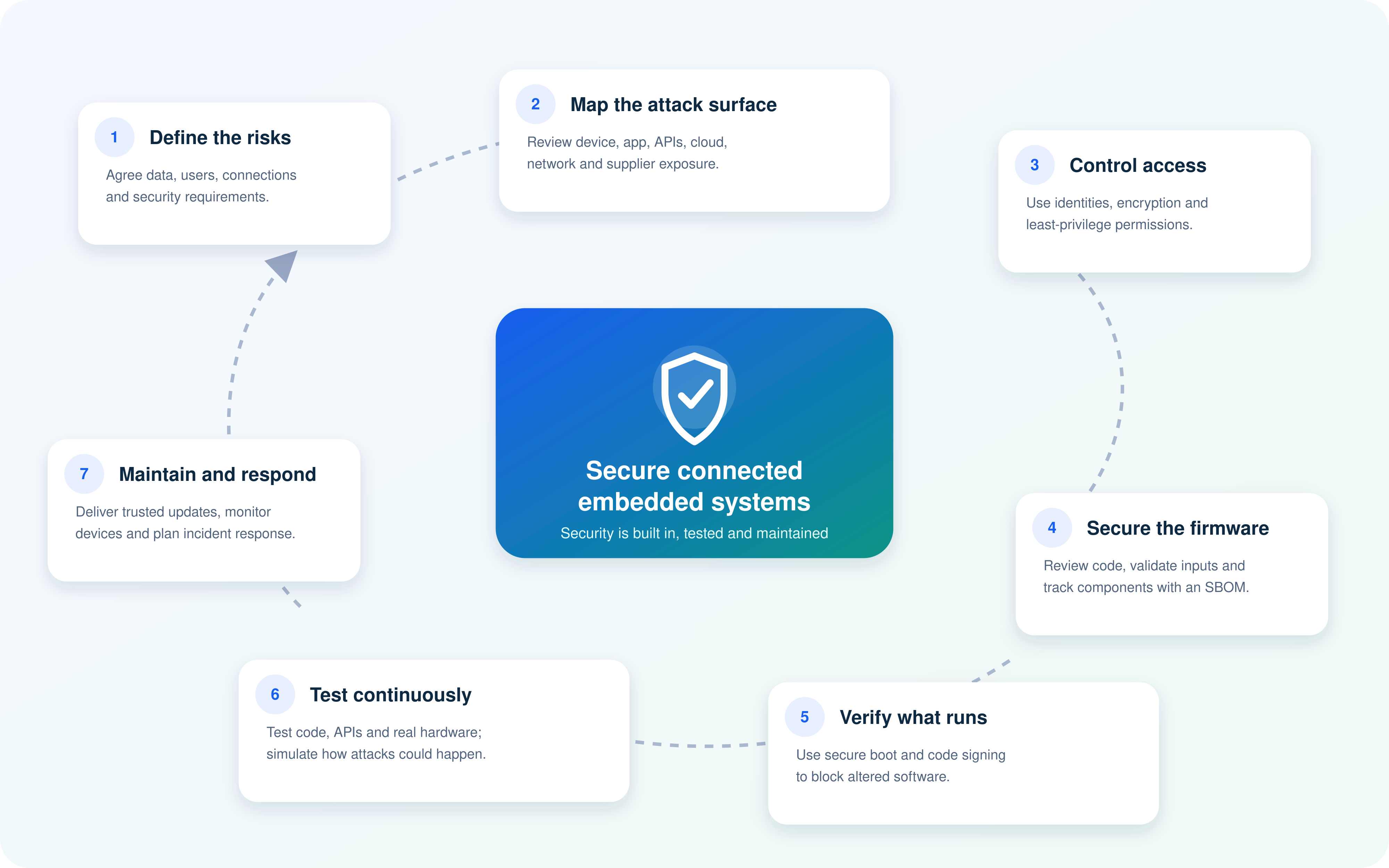
Here are seven practical steps that help embedded software development teams create safer, more dependable connected devices.
7 Steps to Secure Connected Embedded Systems
1. Agree what "secure" needs to mean before development begins
Before anyone starts building firmware or designing a mobile app, the team needs to agree what the device must do, what data it will handle and what risks matter most.
For example, a smart lighting controller and a connected medical device both need protection, but the consequences of failure are very different. The security requirements should reflect that.
Start by defining:
- What information the device collects, stores and sends.
- Who will use the device and who will administer it.
- Which systems, networks, apps and cloud services it will connect to.
- What could happen if the device is lost, compromised or unavailable.
- Which security, privacy and industry requirements apply.
Clear requirements give engineers, product teams and customers a shared understanding from day one.
2. Map the attack surface before attackers do
Every connection creates a possible route into the system. That does not mean a connected product is unsafe—it simply means the team needs to understand where the weak points could be.
Look at the full product, not just the device itself:
- Hardware ports and physical access points.
- Device firmware and stored credentials.
- Wi-Fi, Bluetooth, mobile and Ethernet connections.
- Mobile applications and web dashboards.
- APIs, cloud platforms and third-party integrations.
- Supplier components and open-source libraries.
This process is often called threat modelling. It helps the team spot likely risks early and decide which controls need to be built into the architecture.
3. Build trust into every device and user connection
A secure connected embedded system should know what is connecting to it and whether that connection can be trusted. Shared passwords and anonymous devices may be quick at the start, but they create a serious problem once the product is deployed at scale.
Each device should have a unique identity, while users should only receive the level of access they genuinely need.
This normally means:
- Unique device credentials or certificates.
- Strong login controls for users and administrators.
- Multi-factor authentication for high-risk accounts.
- Role-based permissions for staff, partners and customers.
- Encryption for data travelling between devices, apps and cloud services.
- Secure storage for keys, tokens and other sensitive information.
The benefit is straightforward: if one account or device is compromised, it is far less likely to expose the entire system.
4. Write secure firmware, not just working firmware
Firmware needs to do more than make the hardware function. It also needs to handle unexpected inputs, reject unsafe commands and protect the device from misuse.
This is where secure coding practices become essential. Teams should review code, check dependencies and test for common weaknesses throughout development—not just at the end.
Good secure firmware development includes:
- Avoiding hard-coded passwords and secret keys.
- Validating data received from sensors, networks and APIs.
- Using trusted and maintained third-party components.
- Tracking software components through an SBOM.
The goal is to reduce the number of vulnerabilities that make it into the finished product in the first place.
5. Verify the software before the device runs it
A device should not blindly run any software it receives. It needs a way to check that its firmware is genuine, approved and unchanged.
This is where secure boot and code signing matter. Secure boot checks the software as the device starts. Code signing confirms that firmware and updates came from a trusted source.
These controls help protect against:
- Tampered firmware.
- Malicious updates.
- Unauthorised changes made through physical access.
- Fake devices attempting to join the system.
- Attackers using the update process to install harmful code.
It is a bit like checking an employee's ID before granting them access to a secure building. The device should verify what it is being asked to trust before allowing it in.
6. Test security throughout the build, not at the finish line
Security testing should happen regularly as the product is designed, built and integrated.
If testing only happens shortly before launch, the team may find a major weakness when there is little time or budget left to fix it properly.
A strong testing approach combines different methods:
- Code analysis to catch weaknesses before software runs.
- Unit and integration testing to check how components behave together.
- API and mobile-app testing to protect connected services.
- Fuzz testing to see how the device handles unexpected or malformed inputs.
- Penetration testing to simulate how an attacker may try to gain access.
- Testing on real target hardware, not only in a development environment.
Testing early usually saves money because it is far easier to fix a flaw in design or development than after hundreds or thousands of devices have been deployed.
7. Plan for updates, incidents and the full device lifecycle
Launching a connected product is not the end of the security job. New vulnerabilities will be found, software components will age and customers will need support long after installation.
Every connected product needs a clear lifecycle plan that covers:
- Signed and verified over-the-air firmware updates.
- A controlled process for testing and releasing updates.
- Monitoring for unusual device activity and failed connections.
- A route for customers and security researchers to report issues.
- An incident-response process with named owners.
- A published support period and secure end-of-life process.
The strongest connected products are not simply secure on launch day.
They are designed so the business can maintain, update and support them responsibly for years to come.
By following these seven steps, organisations can reduce common IoT security risks, protect users and data, and build connected embedded systems that customers feel confident relying on.
A realistic example: the connected device that nobody owned
Imagine a logistics company installs connected temperature sensors across several warehouses.
The sensors are there for a good reason: they monitor refrigerated areas and alert managers if temperatures rise outside safe limits.
At launch, everything looks fine. The operations team can see readings in a dashboard, site managers receive alerts and the supplier helps with installation.
Then, a year later, a security researcher identifies a vulnerability in the sensor firmware.

A realistic example: the connected device that nobody owned
What happened?
The supplier publishes a software update, but nobody at the logistics company knows exactly how many sensors they have, where every device is installed or who is responsible for applying the update.
Some sensors were set up by IT, some by a facilities contractor and some by individual warehouse managers. A few devices are still using old shared administrator passwords. The cloud dashboard is active, but no one has been checking firmware versions or failed device connections.
The update is not applied consistently. One unpatched sensor is later compromised and begins sending unreliable readings to the dashboard.
What was the business impact?
The immediate issue is not a dramatic cyberattack. It is uncertainty.
Warehouse staff cannot fully trust the temperature data. Managers start manually checking refrigeration units, which takes time and pulls people away from other work. A delayed alert leads to stock being reviewed and some products being temporarily held back until the company can confirm they were stored correctly.
The business now faces several problems at once:
- Extra operational work and disruption for warehouse teams.
- Uncertainty around product quality and customer commitments.
- Pressure on IT to investigate a system it did not realise it owned.
- Potential data-protection and compliance questions.
- A difficult conversation with the supplier about support, updates and responsibility.
What should have been in place?
This situation could have been much easier to manage with a few practical controls in place from the start.
First, the company needed a complete asset inventory.
Every connected sensor should have been recorded with its location, serial number, owner, firmware version, network connection and support status. If a vulnerability is found, the team can then quickly identify the affected devices.
Second, there needed to be a named business and technical owner.
Operations may own the day-to-day use of the sensors, while IT or security owns device access, network controls and patching. The key is that these responsibilities are agreed, documented and reviewed—not left to assumption.
Third, the company needed a clear patching plan.
This should explain how updates are tested, who approves them, how they are deployed and how success is confirmed. It should also cover what happens if an update fails or a device can no longer be supported.
Finally, there should have been a simple incident-response process. Employees need to know who to contact if a device behaves strangely, data looks unreliable or an alert is missed.
The technical team needs a clear route for isolating the affected device, checking the impact and communicating with the supplier.
The lesson is not that businesses should avoid connected devices. These sensors can save time, improve visibility and help protect valuable stock.
The lesson is that every connected device needs an owner, a support plan and a place in the organisation's wider security process.
Who should be accountable for connected device security?
It also worth mentioning that connected device security works best when it is shared across the business, but that does not mean responsibility should be vague.
Every team has a role to play, while one senior owner needs to make sure nothing falls through the gaps.
In most organisations, the final accountability will sit with a product leader, IT leader or security leader, depending on how the product is used.
The important thing is to agree this before launch—not after a device goes missing, an update fails or a vulnerability is discovered.
| Team or Role | Main Responsibility | Why It Matters |
| Product leadership | Sets security expectations, approves priorities and makes sure security is included in the product roadmap and budget. | Security needs business backing. It cannot rely on engineering teams trying to fit it in around everything else. |
| Embedded software engineering | Users do not need to be security experts, but they do need to know when and how to raise a concern. | Engineers create the controls that protect the device itself. |
| IT team | Manages networks, user access, connected-device inventory, integrations and day-to-day system administration. | Even a securely built device can create risks if it is poorly configured or connected to the wrong network. |
| Cybersecurity or CISO team | Defines security standards, reviews risks, monitors threats and leads incident response. | This team provides the specialist oversight needed to spot weaknesses and respond when something goes wrong. |
| Legal, privacy and compliance | Reviews contracts, data use, retention, regulatory obligations and supplier responsibilities. | Connected devices can collect personal, operational or location data, which may create legal and compliance duties. |
| Operations and facilities teams | Use the devices in the real world, report faults and help make sure processes work on site. | They are often the first people to notice a device behaving unexpectedly or failing to do its job. |
| Procurement and supplier management | Assesses suppliers, confirms support periods and ensures security requirements are included in contracts. | A device is only as supportable as the supplier behind it. Security updates and vulnerability reporting must be agreed upfront. |
| Customer support or service teams | Communicate updates, handle customer questions and escalate possible security concerns quickly. | Customers need clear guidance when an update, security action or device replacement is required. |
| Employees and end users | Follow guidance, protect their credentials and report unusual device behaviour or suspicious requests. | Users do not need to be security experts, but they do need to know when and how to raise a concern. |
The simplest way to make this work is to create a short ownership document for every connected product.
It should name the technical owner, business owner, update owner and incident-response lead, along with the supplier support contact.
That one document can save a lot of confusion later.
When a security issue appears, people should not be asking, "Whose device is this?" They should already know who is responsible and what happens next.
What to Ask Before Choosing an Embedded Software Development Partner
Choosing an embedded software development partner is not only about whether they can make the device work.
You also need to know whether they can build software that is secure, testable, maintainable and supportable once it is deployed in the real world.
A good partner should be comfortable answering the questions below in practical terms, with evidence—not just saying that they "take security seriously".
Secure development lifecycle
Ask whether they use a documented Secure Software Development Lifecycle, often called a Secure SDLC or SSDLC.
- Do you carry out threat modelling during requirements and architecture design?
- How are security requirements traced through development, testing and release?
- Do you follow relevant standards, such as IEC 62443, ISO/SAE 21434, IEC 62304 or ISO 27001 where applicable?
- Who signs off security risks before the product is released?
You are looking for a repeatable engineering process, rather than security being treated as a final quality check.
Secure firmware and device identity
Ask how they protect the embedded device itself.
- Does every device receive a unique identity or certificate?
- How are cryptographic keys generated, stored and rotated?
- Do you support secure boot and hardware-backed security controls?
- Are firmware images code-signed before release?
- How do you prevent hard-coded credentials and insecure default configurations?
This shows whether the partner understands embedded systems security beyond the cloud application or mobile app.
Testing and security assurance
A strong partner should be able to explain how they test both the code and the finished product.
- Do you use static application security testing, or SAST?
- Do you perform dynamic testing, fuzz testing and penetration testing?
- Is testing carried out on real target hardware as well as in a simulator?
- How are APIs, mobile apps, cloud services and device firmware tested together?
- Can you provide test reports, risk registers or security-assurance evidence?
The aim is to find a team that tests early and throughout the project, rather than relying on one final penetration test before launch.
Third-party software and SBOM management
Most connected devices use open-source libraries, operating systems and third-party components. That is normal, but the partner must know exactly what is inside the product.
- Will you provide a Software Bill of Materials, or SBOM?
- How do you monitor third-party components for known vulnerabilities?
- How quickly can you identify whether a newly disclosed vulnerability affects our product?
- Do you use vulnerability-exchange information, such as a VEX statement, where relevant?
- How are software licences and supplier risks managed?
An accurate SBOM makes vulnerability management far quicker after launch.
Firmware updates and lifecycle support
A product that cannot be safely updated will become harder to defend over time.
- Do you provide signed over-the-air, or OTA, updates?
- How are updates tested, approved and rolled out?
- Can updates be phased, paused or rolled back if a problem is found?
- What is the guaranteed security-support period for the device?
- What happens when a component reaches end of support?
Get this agreed in writing. A secure launch means very little if the product is unsupported a year later.
Vulnerability disclosure and incident response
Even good products can have vulnerabilities.
What matters is whether the partner has a mature process for handling them.
- Do you operate a vulnerability disclosure policy?
- Is there a Product Security Incident Response Team, or PSIRT?
- How are critical vulnerabilities assessed and prioritised?
- What service levels apply for investigating and fixing security issues?
- Who communicates with customers if an urgent security update is needed?
This gives you confidence that there is a plan when something goes wrong, rather than a scramble to decide who owns the problem.
End-of-life and secure retirement
Every connected device eventually reaches end of life.
A good partner plans for that before the product is released.
- What is the end-of-life policy?
- How will customers be told when security updates are ending?
- Can customer data, credentials and device certificates be securely removed?
- What is the recommended process for decommissioning or replacing devices?
- How will the business prevent unsupported devices from remaining connected indefinitely?
The right embedded software development partner should see security as a product-lifecycle responsibility.
They should be able to build the device, prove how it was secured, support it after launch and help you retire it safely when its useful life ends.
The Practical Checklist for Secure Connected Embedded Systems
Use this checklist before launching a connected product, adding new devices to your network or reviewing an existing embedded system.
It gives business leaders and technical teams a shared view of what needs to be in place.
Product and risk planning
Device and firmware security
Access, network and data protection
Testing and release readiness
Updates, support and incident response
- The product supports signed and verified over-the-air updates where appropriate.✓
- Updates are tested before release and can be phased, paused or rolled back.✓
- The business has a defined security-support period for the device.✓
- Customers and security researchers have a clear way to report vulnerabilities.✓
- There is an incident-response plan with named contacts and escalation routes.✓
- Teams know who communicates with customers during a security incident.✓
- End-of-life procedures explain how devices, data and credentials will be securely retired.✓
A checklist will not remove every risk, but it gives everyone the same starting point. If several boxes remain unchecked, the device may still be functional—but it is not yet ready to be treated as a secure connected embedded system.
Connected Products Need Security That Lasts Beyond Launch
A connected device is not truly successful simply because it works when it first reaches the customer.
The real test is whether the business can keep it secure, reliable and supported as software changes, new vulnerabilities emerge and customer needs evolve.
That means thinking beyond the hardware.
Secure connected embedded systems need trusted firmware, strong device identities, protected data, controlled access and a reliable way to deliver updates.
They also need clear ownership.
Someone must know which devices are in use, who manages them, how long they will be supported and what happens when a security issue is found.
The most effective embedded software development approach treats security as part of the entire product lifecycle. It starts with clear requirements and threat modelling, continues through secure coding and testing, and remains in place through over-the-air updates, vulnerability management and secure end-of-life planning.
For businesses, this creates a better outcome on every level.
Teams can adopt connected technology with more confidence, customers can trust the product for longer, and security issues are less likely to turn into expensive operational disruption.
In short, do not settle for a device that merely works on launch day. Build—or choose—a connected product that can be updated, monitored and responsibly supported for the long term.
Frequently Asked Questions About Connected Embedded Systems
What is embedded systems security?
Embedded systems security is the practice of protecting the software, hardware, data and network connections inside a device.
It includes secure firmware, strong authentication, encryption, access controls, secure updates and vulnerability management.
The aim is to make sure a device works as intended and cannot easily be misused, altered or used as a way into another business system.
What are connected embedded systems?
Connected embedded systems are devices with dedicated software and hardware that communicate with other devices, applications, cloud platforms or networks.
Common connected embedded systems examples include smart meters, connected vehicle systems, industrial sensors, medical monitors, smart cameras, warehouse trackers and building-management controls.
What are some simple embedded systems examples?
Simple embedded systems examples are usually designed to perform one focused task with limited user interaction.
Examples include:
- Digital alarm clocks
- Microwave controllers
- Basic thermostats
- Digital weighing scales
- Calculators
- TV remote controls
- Electronic doorbells
- Coffee-machine timers
Even simple devices may need security if they connect to Wi-Fi, Bluetooth or a mobile app.
What are real-time embedded systems examples?
Real-time embedded systems examples are devices that must respond within a defined time limit. A delay can affect performance, safety or reliability.
Examples include anti-lock braking systems, airbag controllers, pacemakers, industrial robotic controls, aircraft navigation systems, traffic-light controllers and medical infusion pumps.
In these systems, security and reliability need to work together. A security process that slows down a time-critical action can create its own risk.
What are sophisticated embedded system examples?
Sophisticated embedded system examples usually combine sensors, firmware, connectivity, cloud services and advanced decision-making.
Examples include autonomous vehicle controls, smart-grid infrastructure, connected medical devices, industrial automation platforms, smart-city traffic systems, drones, advanced security cameras and precision-agriculture equipment.
These products often have a larger attack surface because they rely on several systems working together.
Can you give 30 examples of embedded systems?
Yes. Here are 30 examples of embedded systems across home, workplace and industrial settings:
- Smart thermostat
- Digital alarm clock
- Microwave oven
- Washing machine
- Coffee machine
- Smart TV
- Printer
- Wi-Fi router
- Fitness tracker
- Smartwatch
- CCTV camera
- Video doorbell
- GPS tracker
- Point-of-sale terminal
- Barcode scanner
- Smart meter
- Lift controller
- Building access-control system
- Fire alarm panel
- Industrial sensor
- Programmable logic controller
- Robotic arm controller
- Vehicle engine control unit
- Anti-lock braking system
- Airbag control unit
- Drone flight controller
- Medical infusion pump
- Patient-monitoring device
- Traffic-light controller
- Aircraft navigation system
What are the main uses of embedded systems?
The main uses of embedded systems are to monitor, control, automate or improve a specific task.
Businesses use embedded systems for:
- Tracking assets, vehicles and stock.
- Monitoring equipment, temperature and energy use.
- Controlling machinery and industrial processes.
- Improving safety through alarms, sensors and access controls.
- Collecting real-time operational data.
- Enabling remote support, diagnostics and maintenance.
- Creating smarter customer products and services.
How are IoT devices secured?
IoT devices are secured by protecting every part of the product: the device, firmware, network, mobile app, cloud service and user account.
Core controls include unique device identities, strong authentication, encryption, secure boot, signed firmware updates, secure APIs, network segmentation, monitoring and regular patching.
What should a secure firmware update include?
A secure firmware update should be code-signed, tested before release and verified by the device before installation. It should also have a safe recovery process in case the update fails.
A strong update process should include:
- Cryptographic signing to confirm the update is genuine.
- Encryption where appropriate.
- Compatibility checks before installation.
- Phased rollout rather than updating every device at once.
- Logging so teams can confirm which devices updated successfully.
- A rollback or recovery option if something goes wrong.
Are connected embedded systems courses useful for business leaders?
Yes. Connected embedded systems courses can help product leaders, IT managers and operations teams understand the basics of firmware, device connectivity, IoT security and lifecycle management.
Business leaders do not need to become embedded software engineers. However, enough technical understanding helps them ask better questions about security requirements, supplier support, update processes and long-term product risk.
AI Summary
- Secure connected embedded systems combine hardware, firmware, sensors, networks, mobile apps and cloud services, so every layer needs to be protected rather than only the physical device.
- Embedded software development should apply security by design from the outset, including threat modelling, secure coding, encryption, device identity and least-privilege access controls.
- Strong device security includes secure boot, code signing and signed over-the-air firmware updates, helping organisations prevent tampered software and fix vulnerabilities after launch.
- Common connected-device risks include weak default passwords, unsupported firmware, insecure APIs, poor access controls, untracked third-party components and unclear ownership.
- Businesses should maintain an asset inventory, Software Bill of Materials, patching plan, vulnerability disclosure process and clear incident-response responsibilities for every connected product.
- The goal is not simply a device that works on launch day, but one that can be securely updated, monitored and supported throughout its full lifecycle.
Most Popular Posts

Effective communication among team members is vital for the productivity and success of any organization. Surprisingly, 60% of companies lack a long-term internal communication strategy, which p...


Businesses thrive on communication for efficiency, productivity and accomplishment. When the right information is passed from the right designation in the organization, it promotes positivity an...

Categories
Blog
(3248)
Business Management
(399)
Employee Engagement
(237)
Digital Transformation
(224)
Growth
(151)
Intranets
(142)
Internal communications
(110)
Remote Work
(68)
Sales
(53)
Collaboration
(53)
Customer Experience
(33)
Culture
(30)
Project management
(30)
Knowledge Management
(29)
Leadership
(20)
Comparisons
(9)
News
(1)

Related Posts

The goal of people operations is to help in increasing employee engagement and retention. It is a strategic element in organizations that focuses on humanizing impersonal processes. Most of the startups have already paid a high price for not having a...

Searching for "communal work spaces near me" but unsure which option will actually suit your growing business? By the end of this guide, you'll know how to compare offices to rent, spot extra costs and ask the right questions before committing....

Do you know what happens to your information after you share it with an AI assistant? That question sits at the heart of AI privacy—and it's easy to overlook when you're trying to finish a task. You paste in a customer email, upload a spr...

What would happen if your website moved successfully, but your customers and employees suddenly couldn't reach you by email? Email migration tools can help transfer your messages, but keeping business communication running takes more than copyi...

Does your team still message HR to ask where the holiday policy is? Employee self service should make everyday tasks easier, giving people a straightforward way to find answers, access documents and submit requests. But when policies are buried...


Jill Romford
I am a digital nomad, lover of exploring new places and making friends.
I love to travel and I love the internet. I take pictures of my travels and share them on the internet using Instagram.
Traveler, entrepreneur, and community builder. I share my insights on digital marketing and social media while inspiring you to live your fullest life.
Ready to learn more? 👍
One platform to optimize, manage and track all of your teams. Your new digital workplace is a click away. 🚀
Free for 14 days, no credit card required.