
Insight Blog
Agility’s perspectives on transforming the employee's experience throughout remote transformation using connected enterprise tools.
56 minutes reading time
(11171 words)
Staff Communication App - How to Choose the Best Solution in 2026

Staff Communication App - How to Choose the Best Solution in 2026
Learn how to choose the best staff communication app in 2026. Compare features, pricing, mobile apps, AI tools, and the top solutions for every workplace.
Staff Communication App - How to Choose the Best Solution in 2026

In today's fast-paced world, organizations are recognizing the need to adapt and embrace a modern approach to productivity, communication, and employee engagement.
The advent of mobile technology has revolutionized the way we work, enabling organizations to attract and retain talented employees by providing them with the tools and flexibility they need to thrive, like a staff communication app.
Smartphones and tablets have become an integral part of our lives, offering a myriad of capabilities beyond mere communication devices.
As noted by Mike Brinker, the global Deloitte Digital leader at Deloitte Consulting LLP, smartphones have evolved into powerful supercomputers that empower and dominate our personal lives.
These devices connect us to our loved ones, friends, and businesses in ways that were unimaginable when smartphones first emerged.
The widespread adoption of mobile technology has transformed our daily routines.
We now rely on our smartphones for various tasks, such as sending emails, texting, online shopping, booking taxis, capturing moments with photos, streaming music, ordering food, watching videos, staying updated with the latest news, and connecting through social media platforms.
With over 5 billion people connected to mobile services worldwide, the impact of mobile technology extends beyond personal use and has revolutionized the workplace as well.
5B+
mobile users worldwide
With more than 5 billion people connected to mobile services worldwide, mobile technology has transformed how organizations communicate with employees. Mobile-first workplace communication now enables office, remote, and frontline teams to stay connected, informed, and productive from anywhere.
Why It Matters
Employees increasingly expect instant access to company news, messaging, documents, and collaboration tools directly from their smartphones—making mobile communication a business necessity rather than a convenience.
Employees increasingly expect instant access to company news, messaging, documents, and collaboration tools directly from their smartphones—making mobile communication a business necessity rather than a convenience.
Source: GSMA Mobile Economy
Consequently, prominent companies are embracing a mobile-centric approach by introducing employee communication apps or sometimes referred to staff communication app as a way to get access to staff members anytime and anywhere through a smartphone or tablet application.
The availability of employee communication app on a mobile app has revolutionized the employee experience, enhancing personalization, improving communication effectiveness, and simplifying information access.
This has led to heightened engagement levels and reduced administrative burdens.
We have listed below a comprehensive reasons elaborating on why your company should consider implementing an employee app:
Key Takeaways
- A staff communication app gives employees one place to access company news, instant messaging, documents, announcements, and workplace updates, reducing reliance on email and disconnected tools.
- The best staff communication apps improve collaboration between office, remote, and frontline workers through mobile access, real-time messaging, push notifications, and secure document sharing.
- Modern employee communication apps go beyond chat by combining team collaboration, employee engagement, knowledge management, surveys, forms, and AI-powered search in a single platform.
- When choosing a staff communication solution, compare mobile experience, ease of use, integrations, security, scalability, analytics, and employee adoption—not just pricing or messaging features.
- Implementing the right communication app helps organizations increase productivity, reduce information silos, strengthen company culture, and create a more connected digital workplace.
What Is Staff Communication Software?
Employee communication software is a digital platform that helps organizations communicate with employees more effectively by bringing conversations, company news, documents, and workplace information together in one centralized location.
Often referred to as apps to communicate with employees or a staff messaging app, these tools replace scattered emails, multiple chat apps, printed notices, or outdated intranets with a single, secure platform where employees can access everything they need.
Modern staff communication software goes far beyond instant messaging. It typically includes company announcements, team chat, employee directories, document management, knowledge bases, surveys, task management, calendars, and mobile apps, making it easier for employees to stay informed and connected wherever they work.
Many apps to communicate with employees also incorporate AI-powered search and workflow automation to help employees find information faster and reduce repetitive administrative tasks.
For organizations with office-based, remote, hybrid, or frontline employees, staff communication software creates a consistent communication experience across the entire workforce.
Managers can share targeted updates with specific departments or locations, while employees receive real-time notifications and have instant access to the latest company information through a centralized platform.
Ultimately, staff communication software helps eliminate communication silos, reduce email overload, improve collaboration, and strengthen employee engagement.
By providing a single source of truth for workplace communication, these apps to communicate with employees enable organizations to improve productivity, support faster decision-making, and create a more connected, informed, and engaged workforce.
Why is Staff communication software important for a company?

Why is Staff communication software important for a company?
Internal communication apps for business plays a vital role in modern businesses, serving as a crucial tool for effective internal communication. It encompasses various digital platforms, such as instant messaging apps, collaboration tools, project management software, and intranet systems.
These software solutions are designed to streamline communication within an organization and offer numerous benefits that contribute to the overall success of a company.
Staff communication software enhances productivity. It enables employees to connect and share information quickly, eliminating the need for time-consuming face-to-face meetings or lengthy email threads.
With real-time messaging and file-sharing capabilities, team members can collaborate seamlessly, leading to faster decision-making, problem-solving, and project completion.
It fosters transparency and inclusivity within the company. By providing a centralized platform, all employees have access to relevant information, announcements, and updates, regardless of their location or position within the organization.
This ensures that everyone is on the same page, fostering a sense of unity and alignment towards shared goals.
Effective communication software also promotes employee engagement and satisfaction. It allows for open and continuous dialogue between team members, encouraging idea-sharing, feedback, and recognition.
Employees feel valued when their opinions are heard and their contributions acknowledged, leading to increased job satisfaction, motivation, and ultimately, higher retention rates.
Another significant advantage is the ability to maintain a remote workforce. In today's digital age, remote work has become increasingly prevalent. Staff communication software provides remote employees with the means to stay connected and engaged with their colleagues, irrespective of physical distance.
It enables them to participate in team discussions, collaborate on projects, and access necessary information, creating a cohesive and productive virtual work environment.
Finally, staff communication software improves organizational efficiency and reduces costs. It minimizes the need for physical meetings, excessive paperwork, and manual coordination, saving both time and resources.
Moreover, it facilitates effective knowledge sharing and onboarding processes, ensuring new employees can quickly integrate into the company culture and workflows.
28%
of the workweek
According to McKinsey & Company, the average knowledge worker spends 1.8 hours every day (around 9.3 hours per week) searching for information. The research also found employees dedicate 28% of their workweek managing emails, while nearly 20% of their time is spent locating internal information or finding colleagues who can help complete tasks.
1.8h
Searching every day
9.3h
Lost each week
28%
Managing emails
20%
Searching internally
Source: McKinsey & Company
Why More Organizations Are Adopting Staff Communication Apps

Organizations Embracing Staff Communication Apps in 2023
Staff communication apps are widely used across various industries and by companies of different sizes.
The need for efficient internal communication is universal, and staff communication apps cater to that requirement.
Here are some examples of the types of companies that commonly use staff communication apps:
- Large corporations - Large corporations with numerous departments and teams often rely on staff communication apps to streamline communication across different branches, offices, and even countries. These apps help foster collaboration, disseminate information, and maintain connectivity within the organization.
- Small and medium-sized enterprises (SMEs) - SMEs can greatly benefit from staff communication apps to facilitate effective communication among their teams. Such apps enable seamless collaboration, efficient sharing of information, and quick decision-making, even with limited resources.
- Startups - Startups often have remote teams or distributed workforce, making staff communication apps invaluable for keeping everyone connected. These apps allow startups to communicate in real-time, irrespective of their team members' geographical locations, fostering efficient collaboration and knowledge sharing.
- Tech companies - The tech industry heavily relies on staff communication apps due to its fast-paced nature and reliance on virtual collaboration. These apps help software development teams, IT departments, and other tech-related functions coordinate their efforts, share code snippets, and resolve issues quickly.
- Retail and hospitality - In industries like retail and hospitality, staff communication apps are used to coordinate shifts, share updates on inventory or promotions, and ensure effective communication between front-line employees and management. Such apps help improve customer service and ensure smooth operations.
- Healthcare and hospitals - In the healthcare sector, staff communication apps are vital for quick and secure communication between medical professionals, nurses, and support staff. These apps allow healthcare providers to share patient information, coordinate care, and respond promptly in emergency situations.
- Education institutions - Schools, universities, and educational institutions utilize staff communication apps to enhance communication between teachers, administrative staff, and students. These apps can facilitate class discussions, assignment sharing, and provide a platform for administrative announcements.
- Non-profit organizations - Non-profit organizations often rely on staff communication apps to connect their team members, volunteers, and stakeholders. These apps help coordinate efforts, share updates on initiatives, and facilitate communication between different departments or teams.
In summary, staff communication apps are used by a wide range of companies and organizations across different industries.
Whether large or small, tech-oriented or service-based, these apps play a crucial role in fostering effective internal communication, collaboration, and connectivity within the workplace.
56%
new to remote work
Remote work is still relatively new for many employees. Survey results show that 56% of respondents have worked remotely for less than one year, highlighting why organizations need better digital communication and collaboration tools to support distributed teams.
Less than 1 year
56%
1–5 years
21%
5–10 years
14%
10+ years
7%
Source: Remote Workforce Survey
Why Every Frontline Worker Needs an Internal Communication App
An internal communication app is essential for frontline workers, who play a crucial role in organizations by directly engaging with customers, providing services, and representing the brand.
These workers often face unique challenges due to their physical presence on the front lines, making effective communication even more critical.
Here are the key reasons why an internal communication app is key for frontline workers:
- Real-time updates and information - Frontline workers need access to real-time updates, such as product changes, pricing updates, or service enhancements. An internal communication app enables instant dissemination of information, ensuring that frontline employees stay informed and can provide accurate and up-to-date information to customers. This minimizes confusion, enhances customer satisfaction, and maintains consistency in messaging across the organization.
- Collaboration and knowledge sharing - Frontline workers often need to collaborate with colleagues and seek assistance when faced with complex customer queries or challenging situations. An internal communication app facilitates seamless collaboration by enabling frontline employees to connect with colleagues, share experiences, seek advice, and learn from one another. This knowledge sharing enhances their ability to handle customer interactions effectively and provides a support network within the organization.
- Training and development - Internal communication apps can be used to deliver training materials, resources, and guidelines to frontline workers. Whether it's new product training, customer service techniques, or compliance procedures, these apps serve as a platform for ongoing learning and development. Frontline employees can access training modules, watch instructional videos, or participate in quizzes and assessments to enhance their skills and knowledge.
- Employee recognition and motivation -Recognizing the efforts and achievements of frontline workers is crucial for their motivation and engagement. An internal communication app allows managers and colleagues to publicly acknowledge and appreciate the exceptional work of frontline employees. This recognition not only boosts morale but also fosters a positive work culture and encourages continuous high-quality performance.
- Feedback and suggestions - Frontline workers are often the closest to customers and possess valuable insights and feedback about the customer experience, product/service improvements, and operational efficiency. An internal communication app provides a platform for frontline employees to share their feedback, suggestions, and ideas with management and relevant teams. Their input can contribute to organizational improvements and help shape strategies that better cater to customer needs.
- Employee well-being and support - Frontline workers may encounter challenging or stressful situations while interacting with customers. An internal communication app can serve as a platform for providing emotional support, sharing well-being resources, and connecting frontline employees with mental health support services. This demonstrates that the organization values their well-being and provides a support system to address any concerns they may have.
Related Guides You May Want to Read Next
This Employee Communication Apps guide is designed as the main pillar. The resources below explore tools, strategies, and real-world use cases that help organisations improve how employees communicate and collaborate.
- What Are Internal Communication Tools? Definition, Types, and Examples
- Best Staff Communication Apps for Modern Teams
- Internal Communication Tools: What Works and What Doesn’t
- Real-Time Messaging at Work: Benefits, Risks, and Best Practices
- Digital Applications That Focus on Workplace Communication
- Best Apps for Employees to Stay Connected and Productive
- Effective Internal Communication in Retail: A Practical Guide
- Hybrid Work Collaboration Tools That Actually Support Teams
- Employee Portals Explained: Purpose, Features, and Use Cases
- Why Email Still Leads Business Communication in the Digital Age
- 16 Best Apps for Internal Employee Communication
- 7 Best Practices for Choosing the Right Employee Communication App
- How to Improve Team Dynamics Using Employee Communication Tools
- How to Manage IT Overload Inside Your Organisation
- Communication Tools: Types, Use Cases, and Examples
- Communication Software for Businesses: What to Look For
- Why Employees Use Instant Messaging at Work
- What Is a Virtual Workspace? Definition and Examples
Together, these articles form a complete employee communication knowledge hub, supporting the pillar guide with deeper insights and practical examples.
What are the best internal communication software features to look for?
When selecting internal communication software for your company, it's essential to consider various features that can enhance collaboration, streamline communication, and improve overall efficiency.
Here are some key features to look for:
- Instant messaging and chat - Look for software that offers real-time messaging capabilities. This allows employees to have quick and seamless conversations, share information, and seek clarification without the need for lengthy email threads.
- File sharing and document collaboration - The software should enable easy sharing and collaboration on files, documents, and presentations. Features like version control, document commenting, and simultaneous editing ensure smooth collaboration on projects.
- Team channels and groups - Look for software that allows the creation of dedicated channels or groups for specific teams, departments, or projects. This ensures targeted communication and collaboration within relevant groups, avoiding information overload.
- Integration with other tools - Consider software that integrates well with other tools your company uses, such as project management software, calendar apps, and customer relationship management (CRM) systems. Seamless integration enhances productivity by reducing the need for switching between multiple platforms.
- Notifications and alerts - The software should provide customizable notification settings, allowing users to receive alerts for important messages, updates, or mentions. This ensures that crucial information doesn't get missed and keeps everyone informed in a timely manner.
- Mobile accessibility - In today's mobile-driven world, ensure that the software has a mobile app or a responsive web interface. This enables employees to access communication tools and stay connected even when they are away from their desks.
- Surveys and feedback features - Look for software that includes survey and feedback capabilities. This allows organizations to gather employee feedback, conduct polls, and measure employee satisfaction or engagement levels.
- Analytics and reporting - Consider software that provides analytics and reporting features. These tools can offer insights into communication patterns, user engagement, and usage metrics, helping companies identify areas for improvement and measure the effectiveness of their internal communication strategies.
- Security and data privacy - Ensure the software has robust security measures in place to protect sensitive company information. Look for features like end-to-end encryption, user access controls, and compliance with data protection regulations.
- Customization and scalability - Consider software that can be customized to fit your company's branding and specific needs. Additionally, it should have the scalability to accommodate your organization's growth and evolving communication requirements.
To begin, it is crucial to choose internal communication software that aligns with your company's objectives and enables efficient collaboration and communication among your employees.
It is equally important to focus on features that address current challenges, such as document management and a centralized repository for policies and important documents.
Lets get into the best app to communicate with employees.
Staff Communication App vs Email vs Microsoft Teams vs WhatsApp
Many organizations rely on a combination of email, Microsoft Teams, and WhatsApp to communicate with employees.
While each tool serves a purpose, none were designed to act as a complete internal communication solution.
As businesses grow, managing company-wide announcements, documents, employee engagement, and knowledge across multiple platforms becomes increasingly difficult.
A modern staff communication app brings everything together in one centralized platform, giving employees a single place to access company news, instant messaging, documents, policies, team spaces, and workplace resources.
This reduces information silos, improves collaboration, and ensures employees always know where to find the latest information.
The comparison below highlights the key differences.
| Feature | Staff Communication App | Microsoft Teams | ||
| Company-wide announcements | ✅ | ⚠️ Limited | ⚠️ Limited | ❌ |
| Staff instant messaging | ✅ | ❌ | ✅ | |
| Employee engagement tools | ✅ | ❌ | ⚠️ Basic | ❌ |
| Knowledge base | ✅ | ❌ | ⚠️ Limited | ❌ |
| Document management | ✅ | ⚠️ Attachments | ✅ | ⚠️ Basic |
| AI-powered search | ✅ | ❌ | ✅ | ❌ |
| Mobile employee app | ✅ | ✅ | ✅ | ✅ |
| Push notifications | ✅ | ⚠️ | ✅ | ✅ |
| Employee directory | ✅ | ❌ | ⚠️ | ❌ |
| Team collaboration | ✅ | ⚠️ | ✅ | ⚠️ |
| Workflow automation | ✅ | ❌ | ⚠️ | ❌ |
| Surveys & polls | ✅ | ❌ | ⚠️ | ❌ |
| Analytics & reporting | ✅ | ⚠️ | ⚠️ | ❌ |
| Role-based permissions | ✅ | ⚠️ | ✅ | ❌ |
| Enterprise governance | ✅ | ⚠️ | ✅ | ❌ |
Governance
A dedicated staff communication platform provides centralized administration, role-based permissions, approval workflows, audit logs, and content governance.
Email and WhatsApp offer very little control over how company information is distributed, while Microsoft Teams primarily governs collaboration rather than organization-wide communications.
Security
Security is essential when sharing confidential business information.
Staff communication platforms typically include enterprise-grade encryption, Single Sign-On (SSO), role-based access controls, audit trails, and compliance features such as GDPR and SOC 2 support.
Although Microsoft Teams offers strong security, WhatsApp is designed for consumer messaging rather than managing internal business communications at scale.
Mobile Experience
Today's workforce expects to stay connected wherever they work.
A modern staff communication app provides a consistent mobile experience with company news, push notifications, messaging, document access, forms, and knowledge sharing.
This is particularly valuable for frontline employees who may not have access to a desktop computer or company email.
Company Announcements
Email newsletters are easily overlooked, while chat conversations quickly disappear as new messages arrive.
A staff communication app gives organizations a dedicated place to publish company news, leadership updates, emergency alerts, and policy changes, ensuring important communications remain visible and easy to find.
Knowledge Management
Employees waste valuable time searching across emails, chats, and shared drives for information.
Staff communication platforms centralize policies, procedures, FAQs, training materials, and documents into a searchable knowledge hub, giving employees a single source of truth and reducing repetitive questions.
Employee Engagement
Unlike traditional communication tools, modern staff communication apps encourage two-way communication through employee recognition, surveys, polls, comments, reactions, communities, and social features.
This helps organizations build a stronger workplace culture while giving employees more opportunities to participate, provide feedback, and stay connected with leadership.
While email, Microsoft Teams, and WhatsApp all have their place, they each solve only part of the communication challenge.
A dedicated staff communication app combines communication, collaboration, knowledge management, employee engagement, and mobile access into a single platform, making it easier for organizations to keep every employee informed, connected, and productive.
How to Compare Communicate Apps for Employees
With so many apps to communicate with employees available, choosing the right solution can quickly become overwhelming.
While most vendors offer similar-looking feature lists, the real difference lies in how well the platform supports your workforce, integrates with your existing systems, and delivers long-term business value.
Instead of selecting software based on price or popularity alone, evaluate each solution against the criteria below.
This approach will help you identify a platform that not only meets your current communication needs but also supports future growth.
| Evaluation Criteria | What to Look For | Importance |
| Core Features | Announcements, messaging, document management, knowledge base, employee directory, surveys, and collaboration tools | ⭐⭐⭐⭐⭐ |
| Ease of Use | Simple interface, intuitive navigation, minimal employee training, and high user adoption | ⭐⭐⭐⭐⭐ |
| Mobile Experience | Native iOS and Android apps, push notifications, offline access, and support for frontline workers | ⭐⭐⭐⭐⭐ |
| Security & Compliance | Role-based permissions, Single Sign-On (SSO), encryption, audit logs, GDPR, SOC 2, and data protection | ⭐⭐⭐⭐⭐ |
| Integrations | Microsoft 365, Google Workspace, HR software, CRM platforms, payroll systems, APIs, and automation tools | ⭐⭐⭐⭐☆ |
| AI Capabilities | AI-powered search, intelligent assistants, content recommendations, automated summaries, and workflow automation | ⭐⭐⭐⭐☆ |
| Analytics & Reporting | Communication insights, employee engagement metrics, readership reports, and adoption tracking | ⭐⭐⭐⭐☆ |
| Customer Support | Onboarding assistance, training resources, implementation support, knowledge base, and responsive customer success | ⭐⭐⭐⭐☆ |
| Return on Investment (ROI) | Time saved, reduced email reliance, improved engagement, increased productivity, and lower software costs | ⭐⭐⭐⭐⭐ |
Questions Every Buyer Should Ask
Before making a decision, ask yourself the following questions:
- Will employees actually use the platform every day?
- Can it replace multiple communication and collaboration tools?
- Does it support office-based, remote, and frontline employees?
- Is the mobile experience as good as the desktop version?
- Will it integrate with the systems we already use?
- Does it provide AI features that improve productivity?
- Can it scale as our organization grows?
- Does it offer measurable improvements in employee communication and engagement?
Don't Just Compare Features
mplementations depend on much more than functionality.
The best apps to communicate with employees combine ease of use, strong security, mobile accessibility, AI-powered capabilities, and excellent customer support to create a communication experience employees genuinely enjoy using.
Ultimately, the right solution should help your organization reduce communication silos, improve collaboration, increase employee engagement, and provide a secure, centralized workplace where employees can easily find the information they need to do their jobs effectively.
Compare the Best Staff Communication Apps
With dozens of apps to communicate with employees on the market, finding the right solution can be challenging.
While most platforms offer messaging and announcements, the best staff communication apps provide much more—including employee engagement tools, mobile access, knowledge management, AI-powered search, document sharing, and collaboration features.
The comparison below highlights some of the leading staff communication platforms available today. Rather than focusing on feature lists alone, consider how each solution aligns with your organization's communication goals, workforce, budget, and long-term growth strategy.
Whether you're supporting office-based employees, remote teams, or frontline workers, use this comparison to identify the platform that best fits your business needs.
| Feature | AgilityPortal | Beekeeper | Staffbase | Blink | Workvivo | Crew | Yammer (Viva Engage) |
| Best For | SMB to Enterprise | Frontline Workforce | Enterprise Communications | Frontline Teams | Employee Engagement | Small Teams | Microsoft 365 Organizations |
| Mobile Apps | ✅ | ✅ | ✅ | ✅ | ✅ | ✅ | ✅ |
| Company Announcements | ✅ | ✅ | ✅ | ✅ | ✅ | ⚠️ | ✅ |
| Staff Messaging | ✅ | ✅ | ✅ | ✅ | ✅ | ✅ | ✅ |
| Employee Directory | ✅ | ✅ | ✅ | ✅ | ✅ | ⚠️ | ⚠️ |
| Team Spaces | ✅ | ⚠️ | ⚠️ | ⚠️ | ✅ | ❌ | ✅ |
| Knowledge Base / Wiki | ✅ | ⚠️ | ✅ | ⚠️ | ✅ | ❌ | ✅ |
| Document Management | ✅ | ✅ | ✅ | ⚠️ | ⚠️ | ❌ | ⚠️ |
| AI-Powered Search | ✅ | ⚠️ | ⚠️ | ⚠️ | ⚠️ | ❌ | ⚠️ |
| Employee Recognition | ✅ | ⚠️ | ⚠️ | ✅ | ✅ | ❌ | ✅ |
| Surveys & Polls | ✅ | ✅ | ✅ | ✅ | ✅ | ⚠️ | ✅ |
| Workflow Automation | ✅ | ⚠️ | ⚠️ | ⚠️ | ⚠️ | ❌ | ❌ |
| Forms & Approvals | ✅ | ⚠️ | ⚠️ | ⚠️ | ❌ | ❌ | ❌ |
| Analytics & Reporting | ✅ | ✅ | ✅ | ✅ | ✅ | ⚠️ | ✅ |
| Microsoft 365 Integration | ✅ | ✅ | ✅ | ✅ | ✅ | ❌ | ✅ |
| Google Workspace Integration | ✅ | ⚠️ | ✅ | ⚠️ | ✅ | ❌ | ❌ |
| API & Integrations | ✅ | ✅ | ✅ | ✅ | ✅ | ⚠️ | ✅ |
| Suitable for Frontline Workers | ✅ | ✅ | ✅ | ✅ | ⚠️ | ✅ | ⚠️ |
| Free Trial | ✅ | Demo | Demo | Demo | Demo | Limited | Microsoft 365 Trial |
| Starting Price* | From $199/month / Custom Quote | Custom Quote | Custom Quote | Custom Quote | Custom Quote | Custom Quote | Custom Quote |
Legend
- ✅ = Core feature
- ⚠️ = Available, limited, or dependent on plan/integration
- ❌ = Not a primary capability
*Pricing is based on publicly available information and may vary depending on the number of users, deployment requirements, support level, and enterprise agreements. Contact each vendor for the latest pricing.
Why AgilityPortal Stands Out:
Unlike many platforms that focus primarily on messaging or employee engagement, AgilityPortal combines employee communication, document management, AI-powered search, collaboration, knowledge management, workflow automation, forms, employee engagement, intranet capabilities, and mobile access into a single digital workplace.
This allows organizations to replace multiple disconnected applications with one centralized platform, reducing complexity while improving employee productivity and communication.
6 Best Internal Comms & Employee Communication Apps That You Can Intergate Today
There are several internal communication apps available that cater specifically to the needs of frontline workers.
We have selected a few team communication apps.
These are just a few examples of the many internal communication apps available for frontline workers.
Each app has its own unique features and functionalities, so it's important to consider the specific needs and requirements of your organization when selecting the most suitable one.
Find some staff communication apps free to test out.
#1. AgilityPortal
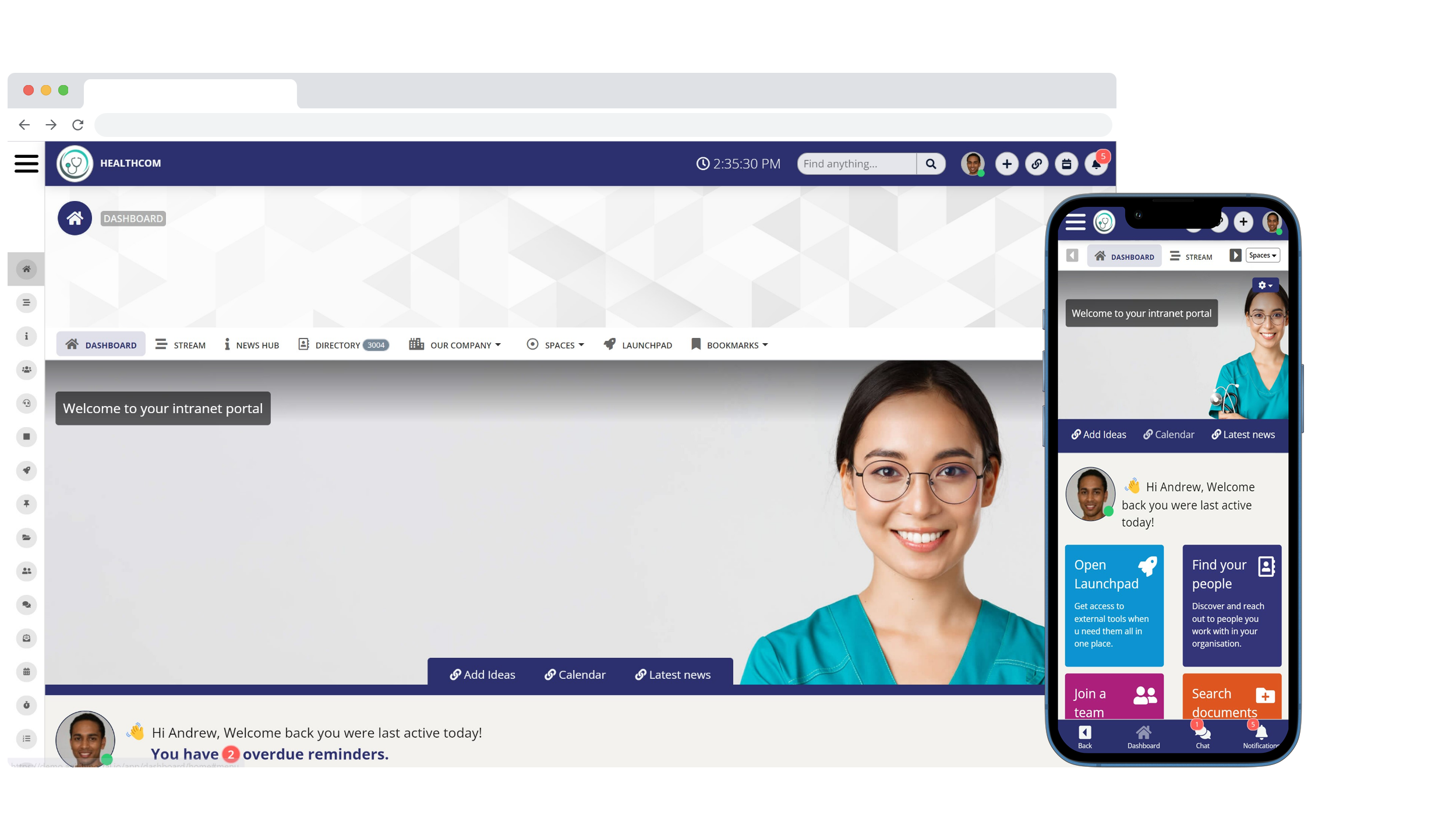
Employee Communication Apps
AgilityPortal earns the top spot because it combines everything businesses need to communicate, collaborate, and engage employees in a single platform.
Rather than forcing organizations to juggle email, chat applications, document repositories, and outdated intranets, AgilityPortal brings internal communications, employee engagement, knowledge management, workflow automation, and AI-powered search together into one connected digital workplace.
What stands out most is its ability to support every type of employee—from office staff and remote teams to frontline workers—through a modern web experience and dedicated mobile app.
Employees can instantly access company news, team spaces, documents, directories, forms, events, and real-time messaging, making it much easier to stay informed and productive wherever they work.
AgilityPortal's Best For- Organizations looking for an all-in-one employee communication platform
- Businesses replacing multiple workplace applications with one solution
- Hybrid, remote, and frontline workforces
- Companies wanting to improve employee engagement and internal communications
- HR, Operations, and Internal Communications teams seeking a centralized digital workplace
- Very small teams that only need a basic group messaging application
- Organizations looking exclusively for project management software without broader communication capabilities
- Unlike many competitors that focus primarily on messaging or employee engagement, AgilityPortal delivers a complete digital workplace. It combines company announcements, staff messaging, AI-powered enterprise search, document management, knowledge bases, employee directories, recognition, forms, workflow automation, events, and collaboration spaces within one secure platform. This reduces software sprawl while creating a single source of truth for employees.
- The platform also integrates with Microsoft 365, Google Workspace, HR systems, cloud storage providers, and business applications, allowing organizations to connect existing workflows without disrupting daily operations.
- Because AgilityPortal offers such a broad feature set, organizations may initially use only a fraction of its capabilities. However, this also means the platform can grow alongside the business without requiring additional software as communication and collaboration needs evolve.
Pros
- Complete employee communication and engagement platform
- AI-powered search and knowledge management
- Excellent support for remote, hybrid, and frontline employees
- Built-in intranet, document management, and collaboration tools
- Workflow automation and digital forms included
- Native mobile apps for iOS and Android
- Strong Microsoft 365 and Google Workspace integrations
- Highly scalable for growing businesses and enterprises
Cons
- More functionality than organizations needing only basic chat may require
- Advanced configuration options may require initial planning for larger deployments
Editor's Choice
AgilityPortal — The Complete Employee Communication & Digital Workplace Platform
AgilityPortal is an all-in-one employee communication platform that helps organizations replace disconnected workplace tools with one centralized digital workplace. Instead of managing emails, chat applications, document repositories, intranets, and multiple employee apps separately, AgilityPortal brings everything together into one secure platform.
Built for office-based, remote, hybrid, and frontline teams, AgilityPortal combines company announcements, staff messaging, employee engagement, AI-powered enterprise search, knowledge management, document management, workflow automation, employee directories, digital forms, task management, events, recognition, and collaboration spaces—all accessible from desktop and mobile devices.
Whether you're looking to improve internal communications, increase employee engagement, reduce email overload, or build a modern digital workplace, AgilityPortal provides the tools organizations need to keep every employee informed, connected, and productive from a single platform.
✓ AI-powered employee communication platform
✓ Company news, chat, knowledge base, and employee intranet
✓ Employee engagement, recognition, surveys, and communities
✓ Workflow automation, forms, approvals, and document management
✓ Native iOS and Android employee mobile apps
✓ Microsoft 365, Google Workspace, SharePoint, HRIS & SSO integrations
✓ Designed for SMBs, enterprises, remote, hybrid, and frontline teams
Trusted by organizations worldwide, AgilityPortal helps businesses centralize communication, improve employee engagement, streamline collaboration, and build a connected digital workplace from one secure platform.
✓ Company news, chat, knowledge base, and employee intranet
✓ Employee engagement, recognition, surveys, and communities
✓ Workflow automation, forms, approvals, and document management
✓ Native iOS and Android employee mobile apps
✓ Microsoft 365, Google Workspace, SharePoint, HRIS & SSO integrations
✓ Designed for SMBs, enterprises, remote, hybrid, and frontline teams
#2. Beekeeper
Beekeeper earns its place on this list because it's purpose-built for frontline and deskless employees.
Industries such as retail, manufacturing, hospitality, logistics, and healthcare often struggle to keep non-desk workers informed, and Beekeeper addresses this challenge with a mobile-first communication experience that makes it easy to deliver announcements, messaging, and operational updates directly to employees' smartphones.
What stands out most is its focus on reaching employees who don't spend their day behind a computer.
With mobile messaging, digital forms, surveys, task management, and company news, Beekeeper helps organizations replace paper notices, bulletin boards, and fragmented communication channels with a more modern approach.
Beekeeper's Best For
- Retail, hospitality, manufacturing, and logistics organizations
- Businesses with large frontline or deskless workforces
- Companies looking to replace printed communications and paper-based processes
- Organizations prioritizing mobile employee communication
Beekeeper's Not Great For
- Businesses looking for a complete intranet or knowledge management platform
- Organizations requiring advanced document management and enterprise content governance
- Companies seeking extensive workflow automation or AI-powered knowledge search
What Sets Beekeeper Apart
- Beekeeper differentiates itself through its mobile-first design. Employees can receive company announcements, exchange messages, complete digital forms, access schedules, and stay connected from anywhere without needing regular access to a desktop computer. This makes it particularly effective for organizations where the majority of employees work on the shop floor, in warehouses, hospitals, hotels, or out in the field.
- Its emphasis on frontline communication has made it a popular choice for organizations looking to improve operational communication while increasing employee engagement among deskless workers.
Tradeoffs with Beekeeper
- While Beekeeper excels at mobile communication and frontline engagement, organizations looking for a broader digital workplace may find themselves needing additional software for intranet capabilities, advanced knowledge management, enterprise document management, or more sophisticated collaboration features. Businesses with a large mix of office-based and frontline employees may prefer a platform that delivers a more comprehensive set of workplace tools.
Pros
- Excellent mobile experience for frontline employees
- Easy-to-use staff messaging and company announcements
- Strong support for deskless workforces
- Digital forms, surveys, and task management
- Good employee engagement features
- Designed specifically for operational communication
Cons
- Limited intranet and knowledge management capabilities compared to all-in-one platforms
- Advanced AI functionality is less comprehensive than some competitors
- Organizations may require additional software for enterprise collaboration and document management
Beekeeper
A Mobile-First Staff Communication App for Frontline Teams
Beekeeper is a staff communication app built for organizations with frontline and deskless employees. It helps businesses improve communication by bringing together company announcements, staff messaging, digital forms, surveys, schedules, and operational updates into one mobile-first platform.
Designed for industries such as retail, manufacturing, hospitality, healthcare, logistics, and construction, Beekeeper helps replace paper notices, disconnected messaging apps, and manual communication processes with a more centralized employee experience.
✓ Mobile-first communication platform
✓ Real-time messaging and company announcements
✓ Digital forms, checklists and operational workflows
✓ Designed specifically for frontline employees
Compare verified customer reviews, ratings, pricing, and feature feedback before deciding if Beekeeper is the right staff communication app for your business.
✓ Real-time messaging and company announcements
✓ Digital forms, checklists and operational workflows
✓ Designed specifically for frontline employees
#3. Staffbase
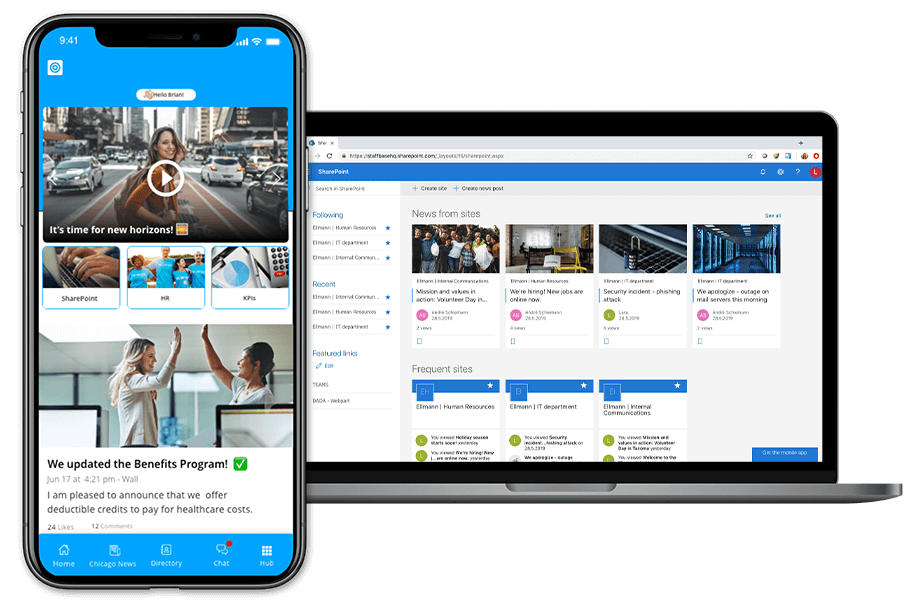
Staffbase
Staffbase earns its place among the leading staff communication platforms because it focuses on enterprise internal communications.
Designed for large organizations, it helps communication teams deliver company news, executive updates, campaigns, and employee communications across multiple channels while maintaining consistency and governance.
What I like most is how Staffbase simplifies company-wide communication for large enterprises.
It enables internal communications teams to publish announcements, manage content, send targeted messages, and measure engagement from a centralized platform.
For organizations with thousands of employees spread across multiple locations, this can significantly improve how information is distributed.
Staffbase's Best For
- Large enterprises with dedicated internal communications teams
- Organizations managing multiple office locations or global workforces
- Businesses focused on executive communications and company-wide announcements
- Companies looking to replace traditional intranets with a modern communication platform
Staffbase's Not Great For
- Small businesses looking for an affordable all-in-one solution
- Organizations requiring extensive workflow automation or business process management
- Teams needing advanced project collaboration alongside internal communications
What Sets Staffbase Apart
- Staffbase specializes in enterprise communication at scale. The platform combines employee news, mobile communication, company intranets, email newsletters, and analytics into one solution, allowing communication teams to deliver consistent messaging across multiple channels. Its targeting capabilities also make it easier to deliver relevant content to specific departments, regions, or employee groups without overwhelming the wider workforce.
- The platform is particularly strong in regulated industries where governance, message consistency, and executive communication are business priorities.
Tradeoffs with Staffbase
- Although Staffbase excels at internal communications, it focuses less on day-to-day collaboration than some competitors. Organizations looking for built-in knowledge management, workflow automation, digital forms, project collaboration, or AI-powered employee assistance may need additional applications to complement the platform. For businesses wanting one solution to manage communication, collaboration, and operational workflows, an all-in-one digital workplace may offer greater long-term value.
Pros
- Excellent enterprise internal communication capabilities
- Strong company news and announcement management
- Powerful audience targeting and content personalization
- Native mobile apps for frontline and remote employees
- Good analytics and communication reporting
- Supports large, multi-location organizations
Cons
- Better suited to enterprise organizations than smaller businesses
- Limited workflow automation compared to comprehensive digital workplace platforms
- Collaboration and knowledge management features are less extensive than some all-in-one solutions
Staffbase
Enterprise Internal Communications Across Every Employee Channel
Staffbase is an enterprise-focused staff communication platform designed to help internal communications, HR, and IT teams reach employees across offices, remote locations, and frontline environments.
The platform combines a branded employee app, modern intranet, email newsletters, SMS, digital signage, audience targeting, analytics, and Microsoft 365 integrations. This multichannel approach helps large organizations distribute consistent company news, leadership updates, campaigns, and essential workplace information from one centralized system.
✓ Publish targeted company news and leadership communications
✓ Reach office-based, remote, and frontline employees
✓ Manage employee app, intranet, email, SMS, and digital signage channels
✓ Measure readership, reach, adoption, and employee engagement
Compare verified customer reviews, ratings, usability feedback, and product features before deciding whether Staffbase fits your internal communication strategy.
✓ Reach office-based, remote, and frontline employees
✓ Manage employee app, intranet, email, SMS, and digital signage channels
✓ Measure readership, reach, adoption, and employee engagement
#4. Blink
Blink - Employee comms app
Blink earns its place on this list because it was built specifically for frontline workers who need fast, mobile-first communication without unnecessary complexity.
Instead of trying to replicate a traditional intranet, Blink focuses on helping employees receive company updates, chat with colleagues, access important documents, and complete everyday tasks from a smartphone.
What I like most about Blink is its clean, intuitive mobile experience.
Employees can quickly access announcements, messaging, company resources, and essential workplace information without navigating through multiple applications.
This makes it particularly appealing for organizations with large numbers of deskless employees who spend little or no time at a computer.
Blink's Best For- Retail, hospitality, healthcare, manufacturing, and logistics organizations
- Businesses with predominantly frontline or deskless employees
- Companies prioritizing mobile-first employee communication
- Organizations looking to replace paper notices and fragmented messaging tools
Blink's Not Great For
- Businesses requiring a fully featured intranet or enterprise knowledge management system
- Organizations needing advanced workflow automation and digital process management
- Companies looking for extensive document governance or complex collaboration workspaces
- Blink is designed around speed and simplicity. The platform combines staff messaging, company announcements, employee directories, digital forms, news feeds, and mobile access into a streamlined experience that's easy for employees to adopt. Its emphasis on usability helps organizations improve communication without requiring extensive training, making it well suited for industries with high staff turnover or large frontline teams.
- The platform also integrates with a variety of workplace systems, helping employees access information and complete common tasks without switching between multiple applications.
- While Blink excels at mobile communication and employee engagement, it isn't intended to be a complete digital workplace platform. Organizations that require advanced document management, AI-powered enterprise search, knowledge management, workflow automation, or sophisticated collaboration capabilities may need additional software alongside Blink. Businesses seeking a single platform to manage communication, collaboration, and business operations may find a broader all-in-one solution more suitable.
Pros
- Excellent mobile experience for frontline employees
- Easy-to-use interface with high user adoption
- Fast staff messaging and company announcements
- Strong employee engagement features
- Digital forms and employee directory included
- Integrates with popular business applications
Cons
- Limited knowledge management compared to comprehensive digital workplace platforms
- Workflow automation capabilities are relatively basic
- Better suited for communication than enterprise collaboration or document management
Blink
A Mobile-First Employee App Built for Frontline Teams
Blink is a staff communication app designed for organizations with frontline and deskless employees. It combines employee messaging, company news, digital forms, task management, employee surveys, and workplace resources into one simple mobile application.
The platform focuses on helping businesses improve frontline communication, reduce reliance on paper processes, and keep employees connected wherever they work. Its clean interface and mobile-first design make it particularly popular in retail, healthcare, hospitality, manufacturing, logistics, and construction.
✓ Mobile-first communication for frontline employees
✓ Company announcements and secure staff messaging
✓ Digital forms, surveys and operational checklists
✓ Simple user experience with fast employee adoption
Compare verified customer reviews, ratings, usability, pricing, and features before choosing Blink as your employee communication platform.
✓ Company announcements and secure staff messaging
✓ Digital forms, surveys and operational checklists
✓ Simple user experience with fast employee adoption
#5. Workvivo
Workvivo earns its place among the best staff communication apps because it's designed to strengthen employee engagement and company culture rather than simply delivering company announcements.
Acquired by Zoom, the platform combines internal communications with social networking features that encourage employees to interact, recognize one another, and stay connected regardless of where they work.
What I like most about Workvivo is how naturally it encourages participation.
Employees can share updates, celebrate milestones, recognize colleagues, join communities, and engage with leadership through a familiar social-media-style experience. Instead of communication flowing in one direction, Workvivo creates opportunities for meaningful conversations across the organization.
Workvivo's Best For- Organizations focused on improving employee engagement and workplace culture
- Companies replacing Workplace from Meta
- Businesses with hybrid and remote workforces
- HR and Internal Communications teams looking to increase employee participation
Workvivo's Not Great For
- Organizations needing advanced workflow automation
- Businesses requiring enterprise document management and knowledge governance
- Companies looking for an all-in-one digital workplace with built-in business processes
What Sets Workvivo Apart
- Workvivo's biggest strength is its ability to make workplace communication feel more personal. The platform combines company news, employee recognition, social communities, surveys, live streaming, and leadership communications into a single employee experience platform. Its close integration with Zoom also makes it an attractive option for organizations already using the Zoom ecosystem.
- Rather than acting as a traditional intranet, Workvivo focuses on building stronger relationships between employees, leadership, and the wider business. This makes it particularly effective for organizations prioritizing culture, engagement, and internal branding.
Tradeoffs with Workvivo
- While Workvivo excels at employee engagement and social communication, it isn't intended to replace a comprehensive digital workplace. Organizations requiring advanced document management, AI-powered enterprise search, workflow automation, forms, or knowledge management will often need additional software to cover those business functions. Businesses looking for a single platform to manage communication, collaboration, and operations may find a broader solution more suitable.
Pros
- Excellent employee engagement and recognition features
- Modern social-media-style interface
- Strong company news and internal communication capabilities
- Communities, surveys, and leadership communication tools
- Mobile apps for remote and frontline employees
- Seamless integration with Zoom
Cons
- Limited workflow automation compared to all-in-one workplace platforms
- Basic document management and knowledge management capabilities
- Organizations may require additional software for broader operational workflows
Workvivo
A Social-Style Employee Experience Platform Built Around Culture
Workvivo is an employee communication and engagement platform that helps organisations strengthen company culture through social feeds, recognition, communities, leadership updates, livestreams, and mobile communication.
Its familiar social-media-style experience encourages employees to share updates, celebrate achievements, join workplace communities, and interact with colleagues across the organisation. Workvivo also includes knowledge spaces, company news, surveys, and AI-powered tools that help employees find relevant information and stay connected. :contentReference[oaicite:0]{index=0}
✓ Social activity feeds, shout-outs, badges, and recognition
✓ Company announcements, leadership updates, and livestreams
✓ Employee communities and knowledge-sharing spaces
✓ Mobile-first access for office, remote, and frontline employees
Compare verified customer reviews, ratings, usability feedback, and product features before deciding whether Workvivo is the right fit for your employee engagement strategy.
✓ Company announcements, leadership updates, and livestreams
✓ Employee communities and knowledge-sharing spaces
✓ Mobile-first access for office, remote, and frontline employees
#6. Crew
Crew earned its popularity by providing a simple, mobile-first communication app for frontline employees.
Built primarily for industries such as retail, hospitality, healthcare, construction, and field services, Crew focuses on helping managers communicate quickly with employees through messaging, announcements, scheduling, and task coordination.
What I like most about Crew is its simplicity.
Employees can start using the platform with very little training, making it an attractive option for organizations that need a straightforward communication solution rather than a feature-heavy digital workplace.
Important: Crew is no longer available as a standalone product after being acquired by Square (now Block, Inc.). Organizations looking for a new staff communication app should evaluate actively developed alternatives that offer long-term product support and innovation.
Crew's Best For
- Small businesses with frontline or deskless employees
- Retail, hospitality, construction, and field service teams
- Organizations looking for simple team messaging and announcements
- Businesses that prioritize ease of use over advanced functionality
Crew's Not Great For
- Medium and large enterprises requiring enterprise governance
- Organizations needing document management and knowledge bases
- Businesses looking for AI-powered search, workflow automation, or advanced employee engagement features
- Companies seeking a future-proof communication platform
What Set Crew Apart
- Crew focused on making communication as easy as sending a text message. Managers could quickly send announcements, message employees individually or in groups, share schedules, assign tasks, and communicate with distributed teams through a mobile-first interface.
- Its lightweight approach helped many organizations replace text messages and phone calls with a more organized communication platform, especially for employees who rarely used desktop computers.
Tradeoffs with Crew
- Although Crew was easy to deploy and simple to use, it offered fewer enterprise capabilities than today's leading employee communication platforms. Features such as advanced analytics, AI-powered knowledge management, document governance, workflow automation, and comprehensive employee engagement tools were limited or unavailable.
- Since the platform is no longer offered as a standalone solution, organizations should consider modern alternatives that continue to receive product updates, security improvements, and feature enhancements.
Pros
- Extremely easy to learn and use
- Strong mobile-first experience
- Fast team messaging and company announcements
- Well suited for frontline and deskless employees
- Simple task coordination and scheduling
Cons
- No longer available as a standalone platform
- Limited enterprise communication capabilities
- Basic collaboration compared to modern digital workplace platforms
- Lacked advanced AI, knowledge management, and workflow automation
- Not suitable for organizations seeking a long-term communication strategy
Crew
Simple Mobile Communication and Coordination for Frontline Teams
Crew was a mobile-first staff communication app designed to help frontline and hourly employees stay connected through group messaging, announcements, scheduling, shift coverage, task management, and employee recognition.
The platform was particularly suited to retail, hospitality, construction, field service, and other businesses where employees rarely worked from a desk. Managers could quickly communicate operational updates, share schedules, coordinate shifts, and keep distributed teams informed from one straightforward mobile app.
Important: Crew is no longer available as a standalone employee communication product. Businesses researching Crew should use historical reviews to understand its capabilities before comparing currently supported alternatives.
✓ Group and direct messaging for frontline employees
✓ Company announcements and real-time operational updates
✓ Employee scheduling and shift coverage coordination
✓ Simple mobile experience requiring minimal training
Review previous customer feedback on Crew's usability, messaging, scheduling, and frontline workforce features, then compare these capabilities with actively supported staff communication apps.
✓ Company announcements and real-time operational updates
✓ Employee scheduling and shift coverage coordination
✓ Simple mobile experience requiring minimal training
#7. Yammer (Microsoft Viva Engage)
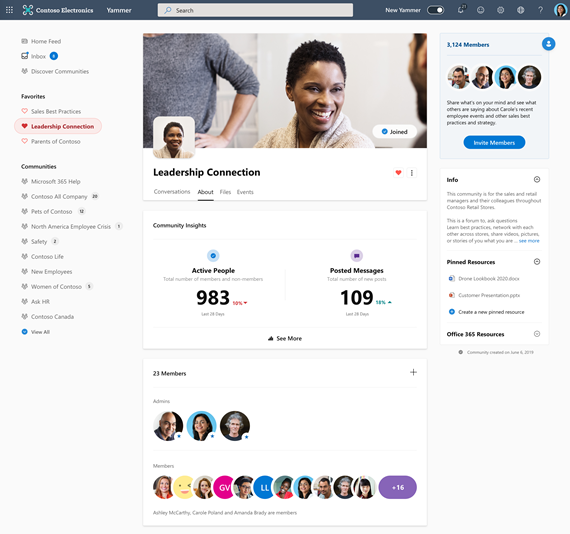
Yammer - Staff communication App
Yammer, now known as Microsoft Viva Engage, remains one of the most recognizable enterprise social networking platforms.
As part of the Microsoft 365 ecosystem, it helps organizations encourage conversations, knowledge sharing, and community building across departments through discussion groups, leadership communications, and company-wide communities.
What I like most about Viva Engage is how well it integrates with Microsoft 365.
Organizations already using Microsoft Teams, SharePoint, Outlook, and OneDrive can extend employee engagement without introducing an entirely new ecosystem. Employees can participate in discussions, ask questions, share knowledge, and connect with colleagues across the business.
Yammer's Best For- Organizations already invested in Microsoft 365
- Large enterprises looking to build internal communities
- Businesses focused on leadership communication and employee engagement
- Companies wanting to encourage cross-department collaboration
Yammer's Not Great For
- Businesses looking for a complete employee communication platform
- Organizations requiring advanced workflow automation or business process management
- Companies needing robust document management and AI-powered knowledge management in a single solution
- Businesses without a Microsoft 365 environment
What Sets Yammer Apart
- Unlike traditional messaging applications, Yammer focuses on organization-wide conversations rather than one-to-one communication. Employees can join communities based on departments, interests, or projects, helping to break down silos and encourage knowledge sharing across the organization.
- Its integration with the broader Microsoft Viva suite also allows businesses to combine employee engagement with learning, insights, and internal communications, making it a valuable addition for organizations already standardized on Microsoft technologies.
Tradeoffs with Yammer
- While Yammer is excellent for community discussions and employee engagement, it isn't designed to replace a comprehensive digital workplace. Organizations still rely on Microsoft Teams for chat and meetings, SharePoint for document management, and other Microsoft applications for broader collaboration. As a result, businesses looking for one platform that combines communication, collaboration, document management, AI search, workflow automation, and employee engagement may prefer an all-in-one solution.
Pros
- Deep integration with Microsoft 365
- Strong employee communities and knowledge sharing
- Excellent leadership communication features
- Enterprise-grade security and compliance
- Supports large global organizations
- Mobile apps for iOS and Android
Cons
- Best suited to organizations using Microsoft 365
- Requires multiple Microsoft products for a complete digital workplace experience
- Workflow automation and business processes rely on other Microsoft tools
- Can be more complex to manage than standalone employee communication platforms
Microsoft Viva Engage
Enterprise Communities and Employee Engagement for Microsoft 365
Microsoft Viva Engage, formerly known as Yammer, is Microsoft's enterprise social networking platform designed to strengthen employee engagement, leadership communication, and knowledge sharing across large organizations.
As part of the Microsoft Viva and Microsoft 365 ecosystem, Viva Engage enables employees to participate in communities, share ideas, ask questions, recognize colleagues, and engage with leadership through conversations, storylines, campaigns, and company-wide discussions. It's particularly well suited to organizations already using Microsoft Teams, SharePoint, Outlook, and OneDrive.
✓ Enterprise communities and organization-wide conversations
✓ Leadership announcements, campaigns, and employee engagement
✓ Deep integration with Microsoft Teams and Microsoft 365
✓ Knowledge sharing through communities and discussion spaces
Compare verified customer reviews, usability, integrations, and employee engagement features before choosing Microsoft Viva Engage for your organization.
✓ Leadership announcements, campaigns, and employee engagement
✓ Deep integration with Microsoft Teams and Microsoft 365
✓ Knowledge sharing through communities and discussion spaces
Staff Communication App Pricing Explained
One of the biggest mistakes businesses make when evaluating a staff communication app is comparing subscription prices alone.
While monthly or annual costs are important, the real investment is the Total Cost of Ownership (TCO)—the overall cost of implementing, maintaining, supporting, and using the platform over time.
Different employee communication software vendors use different pricing models, so it's important to understand what you're paying for before signing a contract.
Per User Pricing
Many employee communication platforms charge a monthly or annual fee for each active employee.
This model works well for smaller businesses because costs scale alongside workforce growth.
However, for organizations with hundreds or thousands of employees, per-user pricing can become expensive, especially if only a portion of employees actively use the platform.
Per Location Pricing
Some workforce communication platforms price their software based on office locations, stores, branches, or facilities instead of individual users.
This model is often attractive for retail, hospitality, healthcare, manufacturing, and logistics organizations where large numbers of frontline employees work at a single location.
Flat Monthly Pricing
Flat-rate pricing gives businesses predictable costs regardless of how many employees use the platform.
This approach is often preferred by growing companies because it makes budgeting easier while encouraging higher employee adoption without increasing software costs every time new users are added.
Enterprise Pricing
Large organizations typically receive custom enterprise pricing based on workforce size, required integrations, security requirements, implementation services, support levels, and compliance needs.
Enterprise agreements may also include dedicated account management, Single Sign-On (SSO), migration services, API access, onboarding, and advanced reporting capabilities.
Look Beyond the Subscription Price
The cheapest software isn't always the most cost-effective.
A lower subscription fee can quickly become expensive if employees need multiple applications for messaging, document management, intranet content, employee engagement, workflow automation, and knowledge sharing.
When comparing apps to communicate with employees, consider questions such as:
- Does the platform replace several workplace applications?
- Are implementation and onboarding included?
- Are mobile apps available at no extra cost?
- Does it include AI-powered search and knowledge management?
- Are integrations included or charged separately?
- What level of customer support is provided?
- How easy is it for employees to adopt?
Understanding Total Cost of Ownership (TCO)
Total Cost of Ownership (TCO) measures the complete financial impact of your investment—not just the monthly subscription.
It includes licensing, implementation, employee training, support, integrations, maintenance, upgrades, administration, and the productivity gains achieved after deployment.
A modern employee communication app that consolidates multiple disconnected tools into one platform often delivers a lower long-term TCO by reducing software licensing costs, simplifying IT management, improving employee productivity, and minimizing communication inefficiencies.
Instead of evaluating price alone, focus on the overall business value, employee adoption, scalability, and return on investment the platform can deliver over the coming years.
Staff Communication App Implementation Checklist
Successfully implementing a staff communication app requires more than simply deploying new software. Organizations that plan carefully, involve employees early, and measure adoption are far more likely to improve employee communication, increase engagement, and achieve a strong return on investment.
| Implementation Stage | What Needs to Be Done | Priority |
|---|---|---|
| 1. Planning | Define business objectives, identify communication challenges, assign project owners, and determine success criteria before selecting the platform. | High |
| 2. Migration | Import employee data, migrate documents, company news, knowledge base articles, and configure departments, locations, and user permissions. | High |
| 3. Training | Train administrators, managers, and employees using onboarding guides, videos, workshops, and internal champions to maximize adoption. | High |
| 4. Launch | Announce the platform, publish welcome content, encourage profile completion, and communicate how employees should use the new communication platform. | Medium |
| 5. Employee Adoption | Encourage daily usage through company news, recognition, surveys, mobile notifications, leadership updates, and regular employee engagement campaigns. | High |
| 6. Measure KPIs | Track employee adoption, active users, announcement readership, engagement, search activity, survey participation, and communication effectiveness. | High |
Best Practice: The most successful employee communication platforms aren't necessarily those with the most features—they're the ones employees actually use every day. Focus on adoption, simplicity, leadership participation, and continuous improvement.
Final Thoughts
Choosing the right staff communication app is no longer just an IT decision—it's a strategic investment in how your organization communicates, collaborates, and grows.
As businesses become increasingly distributed, relying on email alone or juggling multiple disconnected workplace tools creates unnecessary complexity, information silos, and missed opportunities to engage employees.
The best employee communication platforms do far more than enable messaging.
They centralize company news, documents, knowledge, employee engagement, collaboration, and workplace resources into a single digital experience that employees can access anytime, from anywhere.
For organizations with remote, hybrid, or frontline teams, mobile-first communication has become essential for keeping everyone informed, aligned, and productive.
When comparing solutions, don't focus solely on feature lists or subscription costs.
Consider how well the platform fits your business, how easily employees will adopt it, whether it integrates with your existing systems, and how it will support your organization as it grows. A scalable solution should simplify your technology stack—not add another disconnected application.
If you're looking for a platform that combines staff communication, employee engagement, AI-powered search, knowledge management, document management, workflow automation, company intranet, and team collaboration in one secure solution, AgilityPortal is well worth considering.
By bringing communication, collaboration, and employee experience together into a single digital workplace, AgilityPortal helps organizations reduce email overload, eliminate information silos, improve employee engagement, and create a more connected, productive workforce.
Whether you're a growing business or a large enterprise, investing in the right communication platform today will help your organization build a stronger workplace, improve operational efficiency, and stay competitive for years to come.
AI Summary
- A staff communication app helps organisations centralise company news, employee messaging, documents, announcements, schedules, and workplace resources in one accessible platform.
- Many businesses rely on email, WhatsApp, printed notices, and disconnected chat tools, creating communication gaps that leave remote, hybrid, and frontline employees poorly informed.
- The best apps to communicate with employees combine real-time messaging, push notifications, employee directories, knowledge sharing, surveys, recognition, digital forms, and mobile access.
- Mobile-first staff communication software helps organisations reach deskless employees quickly, improve message visibility, reduce information silos, and support faster workplace decision-making.
- When comparing solutions such as AgilityPortal, Beekeeper, Staffbase, Blink, Workvivo, Crew, and Microsoft Viva Engage, buyers should assess usability, security, integrations, analytics, scalability, and total cost.
- Successful implementation depends on employee adoption, clear communication governance, useful content, strong leadership support, and selecting a platform employees will use every day.
Most Popular Posts

Effective communication among team members is vital for the productivity and success of any organization. Surprisingly, 60% of companies lack a long-term internal communication strategy, which p...


Businesses thrive on communication for efficiency, productivity and accomplishment. When the right information is passed from the right designation in the organization, it promotes positivity an...

Categories
Blog
(3214)
Business Management
(396)
Employee Engagement
(235)
Digital Transformation
(219)
Growth
(150)
Intranets
(142)
Internal communications
(107)
Remote Work
(68)
Sales
(53)
Collaboration
(53)
Customer Experience
(33)
Culture
(30)
Knowledge Management
(29)
Project management
(29)
Leadership
(20)
Comparisons
(9)
News
(1)

Related Posts

Choosing the best ERP for Shopify often starts when the workarounds stop working. Your store shows stock that the warehouse can't find. Wholesale orders live in spreadsheets. Finance spends days reconciling payouts, while customer service...

Could choosing the wrong proxy disrupt your team's work or increase costs without improving results? When comparing rotating proxies vs static proxies, the answer depends on what your business needs: a consistent IP address for an ongoing sessi...

What happens when a buyer asks Google for the best employee communication platform—and discovers competing brands before reaching your website? Choosing the best link building services can help a digital workplace business strengthen its broade...

Could gaps in digital accessibility be stopping your employees from completing the training they need to do their jobs? Imagine a new starter opening a mandatory course, only to discover they can't follow the audio, navigate the quiz with a keyboard ...

The Amazon advertising agency landscape has changed dramatically over the past two years. With the introduction of AI-powered shopping experiences, Amazon Rufus, advanced attribution reporting, Sponsored Brands Video, and Amazon DSP enhancement...


Annet Herges
I am a digital nomad, lover of exploring new places and making friends.
I love to travel and I love the internet. I take pictures of my travels and share them on the internet using Instagram.
Traveler, entrepreneur, and community builder. I share my insights on digital marketing and social media while inspiring you to live your fullest life.
Ready to learn more? 👍
One platform to optimize, manage and track all of your teams. Your new digital workplace is a click away. 🚀
Free for 14 days, no credit card required.