
Insight Blog
Agility’s perspectives on transforming the employee's experience throughout remote transformation using connected enterprise tools.
1 hour and 24 minutes reading time
(16868 words)
11 Best Enterprise Instant Messaging Software Tools for Secure Team Communication

11 Best Enterprise Instant Messaging Software Tools for Secure Team Communication
Compare 11 enterprise instant messaging software tools for secure, fast and connected team communication. Review features, security, integrations and the best fit for your organisation.
11 Best Enterprise Instant Messaging Software Tools for Secure Team Communication

Are your employees still losing time switching between email, personal messaging apps and disconnected workplace tools just to get a quick answer?
The right enterprise instant messaging software gives growing and distributed organisations a secure, governed place to communicate, share knowledge and make faster decisions.
An instant messaging enterprise platform should deliver the speed people expect while giving IT teams the control they need over user access, data and message history.
20%
of working time
McKinsey has found that knowledge workers can spend around 20% of their working time searching for and gathering internal information—time that is easily lost when conversations, files and updates are spread across separate channels.
This matters because fragmented communication comes with a real productivity cost.
McKinsey has found that knowledge workers can spend around 20% of their working time searching for and gathering internal information—time that is easily lost when conversations, files and updates are spread across separate channels.
Email still has a place for formal communication, but it is often too slow for everyday questions, urgent decisions and live collaboration.
Consumer chat apps may feel convenient, yet they can expose businesses to weak governance, poor offboarding controls and limited visibility over company data.
In this article, you will learn what to look for in enterprise instant messaging software, the security and administration features that matter most, and the 11 platforms worth considering for your organisation in 2026.
Last reviewed: September 2026
Editorial disclosure: AgilityPortal is included in this comparison.
Its inclusion does not change the evaluation criteria applied to every platform.We review this guide at least every six months and update pricing, security claims and feature comparisons where needed.
Editorial disclosure: AgilityPortal is included in this comparison.
Its inclusion does not change the evaluation criteria applied to every platform.We review this guide at least every six months and update pricing, security claims and feature comparisons where needed.
Key Takeaways
- Enterprise instant messaging software gives employees a faster way to communicate while keeping business conversations secure, searchable and centrally managed.
- The best business messaging platforms combine direct messages, group chat, channels, file sharing and mobile access without forcing employees to rely on personal messaging apps.
- Security controls such as SSO, multi-factor authentication, role-based permissions, audit logs and retention policies are essential for enterprise communication.
- Mobile-first access and targeted notifications are vital for keeping remote, frontline and deskless employees informed and connected.
- The right platform depends on your existing technology stack, workforce needs and whether you need standalone chat or a complete digital workplace.
What Is Enterprise Instant Messaging Software?
What Is Enterprise Instant Messaging Software?
A business messaging app is a business-gradecollaboration and communication tool that lets employees send real-time messages securely across the organisation.
Unlike consumer chat apps, it is built for company-wide use, giving teams a faster way to ask questions, share updates, collaborate on work and keep conversations connected to the business.
At its core, an instant messaging enterprise platform supports one-to-one chats, group conversations and dedicated channels, spaces or team rooms. This makes it easier to keep discussions organised by department, project, location or topic, instead of losing important information in long email chains.
The strongest platforms also go beyond basic messaging.
Employees can share files, search previous conversations, find important updates and access message history when they need context. Many also bring together voice calls, video meetings, calendar links and screen-sharing tools, so a quick chat can move into a live conversation without switching between several different apps.
Mobile access is equally important.
Push notifications help remote and frontline employees stay informed when they are away from a desk, while still allowing organisations to manage how and when messages are delivered.
From an IT and compliance perspective, enterprise messaging software provides the controls that personal messaging apps often lack.
This can include central user provisioning and offboarding, role-based permissions, single sign-on (SSO), audit trails, message retention policies, encryption and compliance settings.
These controls help businesses protect company information, maintain visibility and give employees a secure place to communicate at scale.
Why Enterprises Need a Dedicated Messaging Platform
A dedicated enterprise messaging software platform gives employees a faster, safer and more organised way to communicate.
Rather than forcing people to move between email, personal chat apps and disconnected work tools, it keeps day-to-day conversations in one company-managed space.

Here are the practical reasons enterprises need one:
- Make decisions faster: Employees can get quick answers, resolve issues and keep projects moving without waiting for long email reply chains.
- Reduce unnecessary internal emails: Chat is better suited to short questions, quick updates and everyday collaboration, leaving email for formal communications and external correspondence.
- Reach remote, deskless and frontline employees: Mobile messaging and push notifications help keep people informed whether they are in an office, on the road, working from home or based at a customer site.
- Avoid unapproved personal messaging groups: When employees do not have a suitable work communication tool, they may turn to WhatsApp or other personal apps. A dedicated platform gives them a secure alternative that the business can manage.
- Keep knowledge available when people leave: Searchable message history means important answers, decisions and shared context do not disappear when an employee changes role or leaves the organisation.
- Share documents and sensitive information with more control: Permissions, secure file sharing, access management and retention policies make it easier to protect company information.
- Connect conversations to everyday work: The best platforms bring chat closer to knowledge, documents, tasks, announcements, spaces and company updates, so employees can take action without constantly switching between systems.
For enterprises, the goal is not simply to introduce another chat app. It is to create a dependable communication layer that helps employees work faster while giving the organisation the security, oversight and consistency it needs.
Related Enterprise Messaging and Team Communication Guides
Choosing enterprise instant messaging software is only part of creating a connected workplace. These AgilityPortal guides explore team chat, real-time communication, internal messaging, digital workplace technology and the practical ways organisations can keep employees and customer-facing teams informed, aligned and able to respond quickly.
- Google Chat vs. Slack: Which Google Chat Alternative Is Best for Your Team?
- Instant Messaging at Work: Why Do Employees Use Instant Messaging?
- Real-Time Messaging: Unlock Seamless Communication in 2026
- Social Media Software Management: How to Eliminate Customer Messaging Gaps Across Teams
- Why Your Digital Workplace Platform Needs Clear Website Messaging to Win More Customers
- Top Internal Communication Tools to Enhance Employee Engagement
- Staff Communication App: How to Choose the Best Solution
- Best Employee Communication Apps to Fix Poor Internal Communication
Together, these guides support a stronger topic cluster around enterprise instant messaging software, business messaging platforms, team chat, internal communication, digital workplace technology and connected employee experiences.
What to Look for in Enterprise Instant Messaging Software
Not every chat tool is suitable for organisation-wide communication.
A really good enterprise instant messaging software should be easy enough for every employee to use, while giving IT and leadership teams the security, control and flexibility needed as the business grows.
Use the checklist below when comparing business instant messaging software providers.

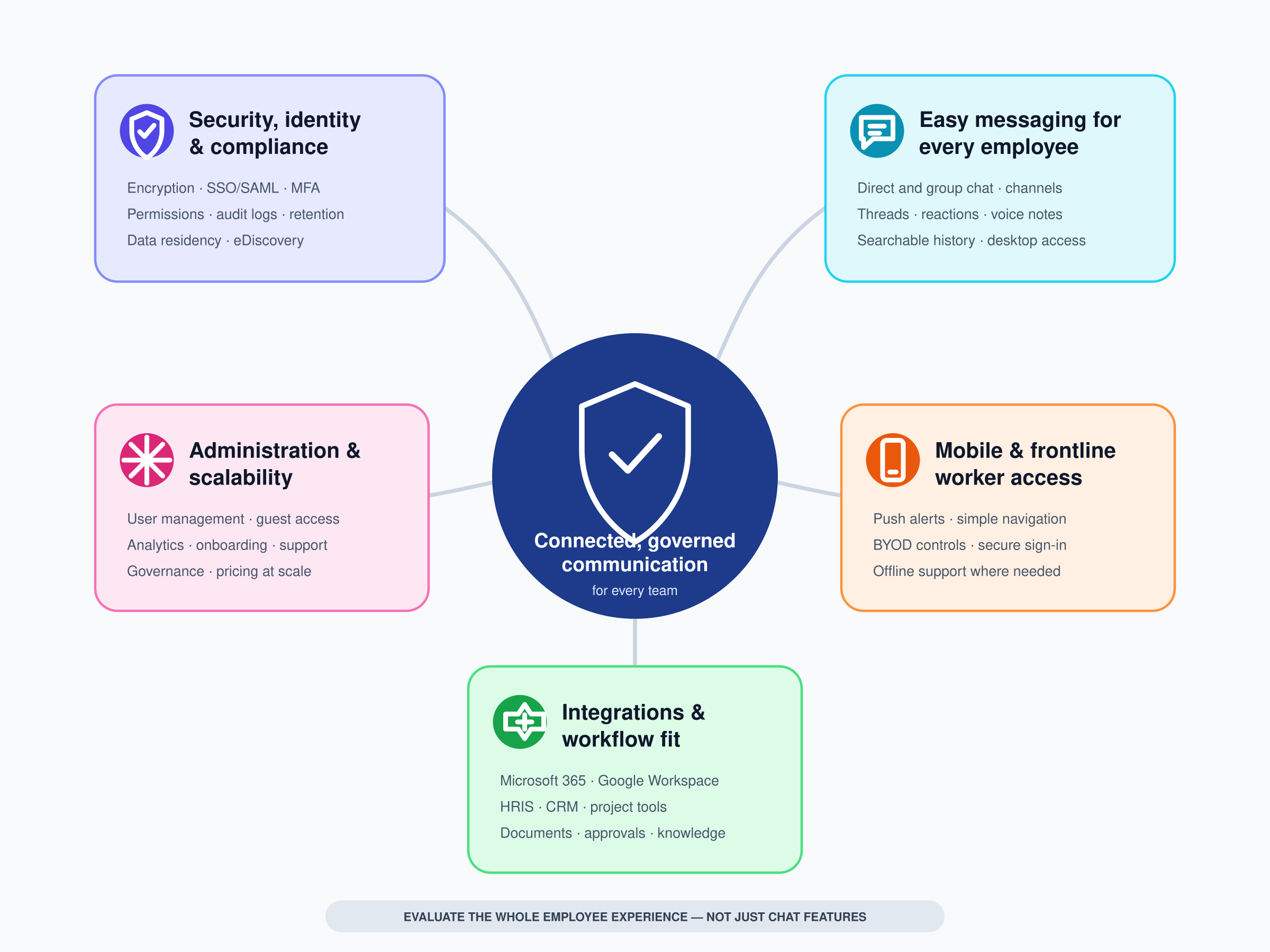
What to Look for in Enterprise Instant Messaging Software
Security, Identity and Compliance Controls
Business conversations can include customer details, HR information, project plans and confidential documents, so security must be more than an afterthought.
Look for encryption for data in transit and at rest, alongside single sign-on (SSO) or SAML support so employees can sign in through the company's existing identity provider.
Other important controls include multi-factor authentication (MFA), role-based permissions, audit logs and central user management. These help administrators see who has access, monitor activity and remove access quickly when someone leaves.
Depending on your industry or location, you may also need to review data residency options, retention policies, eDiscovery capabilities and remote wipe controls for lost or unmanaged devices.
Easy Messaging for Every Employee
A messaging platform only works if people actually want to use it.
Employees should be able to send direct messages, start group chats and join channels or spaces without needing extensive training.
Threads, reactions, voice notes and searchable message history also make conversations easier to follow and reduce repeated questions.
Look for a clear experience across both desktop and mobile. If the platform is cluttered or difficult to navigate, employees are more likely to fall back on email or unofficial personal messaging apps.
Mobile and Frontline-Worker Access
For deskless, remote and frontline teams, the mobile experience may be the main experience.
Employees need to be able to view updates, respond to messages and find essential information quickly from a phone, without working through a desktop-first interface.
Check for reliable push notifications, simple navigation, quick search and sensible controls over notification frequency.
It is also worth confirming how the platform handles offline access, personal devices and secure sign-in, especially where employees use their own phones for work.
Integrations and Workflow Fit
The strongest business instant messaging software fits into the tools your employees already use rather than creating another isolated communication channel.
Check whether it integrates with Microsoft 365, Google Workspace, SharePoint, HRIS platforms, CRM systems, project-management software and document-management tools.
Useful integrations can let employees share files, receive workflow notifications, access meeting links and act on updates without constantly copying information between systems.
This helps reduce app switching and keeps communication closer to the work being discussed.
Administration and Scalability
A platform that works for one department may become difficult to manage once hundreds or thousands of employees are added.
Review how easily administrators can provision users, manage teams, control guest access, apply permissions and support employee onboarding.
You should also look for analytics that show adoption and engagement, reliable customer support, transparent pricing and the ability to scale without unexpected costs.
The right enterprise messaging platform should support your organisation today while remaining manageable as your workforce, locations and communication needs expand.
How We Selected the Best Enterprise Instant Messaging Software
There is no single best enterprise instant messaging software platform for every organisation.
A tool that works well for a Microsoft-first corporate environment may not suit a frontline workforce, a security-sensitive business or a company that needs chat, employee communications and knowledge-sharing in one place.
To make this guide useful, we reviewed each platform against the areas that matter most when choosing business instant messaging software for an organisation:
- Security and compliance: We considered encryption, SSO/SAML, multi-factor authentication, permissions, audit logs, data retention, administrative controls and relevant compliance capabilities.
- Core messaging experience: We assessed direct messages, group chats, channels or spaces, threads, reactions, voice notes, searchable conversation history and file sharing.
- Ease of use: A platform must be simple enough for employees to adopt quickly across desktop and mobile, without creating another complicated tool to learn.
- Mobile and frontline access: We looked at how well each platform supports remote, deskless and frontline employees through mobile apps, push notifications and accessible navigation.
- Integrations: We considered compatibility with widely used workplace systems, including Microsoft 365, Google Workspace, SharePoint, HRIS, CRM, document management and project-management platforms.
- Administration and scalability: We reviewed how practical each tool is to manage as an organisation grows, including user provisioning, guest access, permissions, analytics, support and deployment options.
- Value for the intended use case: We assessed whether the platform's features, complexity and likely cost make sense for the type of organisation it is best suited to support.
The tools are not ranked solely by popularity or price. Instead, each platform is included because it offers a credible fit for a particular business need, such as Microsoft 365 collaboration, secure self-hosted messaging, frontline communication, integrated calling or an all-in-one digital workplace.
Overview: The 11 Best Enterprise Instant Messaging Software for Businesses in 2026
Before we look at each platform in detail, here is a quick comparison of the key features, pricing and ideal use case for the enterprise messaging software included in this guide.
| Platform | Best for | Key strength | Consider before choosing |
| AgilityPortal | Employee communication in one digital workplace | Chat alongside intranet, documents, spaces and employee communications | Best suited to organisations wanting more than standalone chat |
| Microsoft Teams | Microsoft 365 organisations | Deep Microsoft integration | Can feel complex without governance |
| Slack | Fast-moving, integration-heavy teams | Mature channels and app ecosystem | Costs and message-sprawl need managing |
| Google Chat | Google Workspace organisations | Native Workspace collaboration | Less suitable where advanced communication governance is needed |
| Zoom Team Chat | Zoom-centric organisations | Simple chat alongside meetings | May not replace a broader digital workplace |
| Cisco Webex | Larger organisations using Webex calling and meetings | Enterprise calling and collaboration ecosystem | Can be more than smaller teams require |
| Mattermost | Technical teams needing control | Self-hosting and developer-friendly workflows | Requires stronger in-house technical capability |
| Rocket.Chat | Organisations needing flexible deployment | Open-source and self-hosted options | Administration and implementation can be more involved |
| Pumble | Cost-conscious teams | Familiar channel-based messaging | Enterprise controls should be checked against requirements |
| Zoho Cliq | Organisations using Zoho | Strong fit within the Zoho ecosystem | Less compelling outside that stack |
| RingCentral | Teams combining business calling and chat | Unified communications approach | Best value when telephony is also needed |
AgilityPortal is an all-in-one Enterprise Instant Messaging Software and digital workplace platform
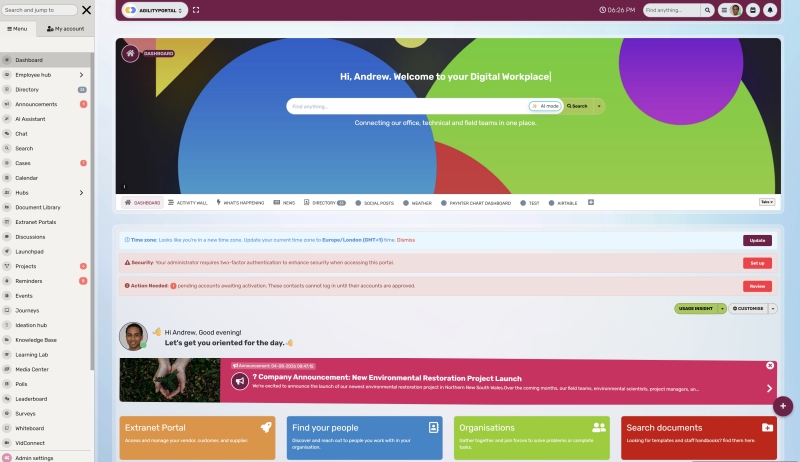
time messaging together with the tools employees need to stay informed, find information and get work done, including:
- Instant messaging and group chat,
- Company news and announcements,
- Document and knowledge sharing,
- Team spaces and collaboration tools,
- Forms, tasks and workflows, and more.
Unlike a standalone chat app, AgilityPortal helps organisations connect everyday conversations with the documents, updates, people and processes behind them.
This makes it a strong option for businesses that need secure enterprise instant messaging software alongside a broader internal communication platform for office-based, remote, frontline and deskless employees.
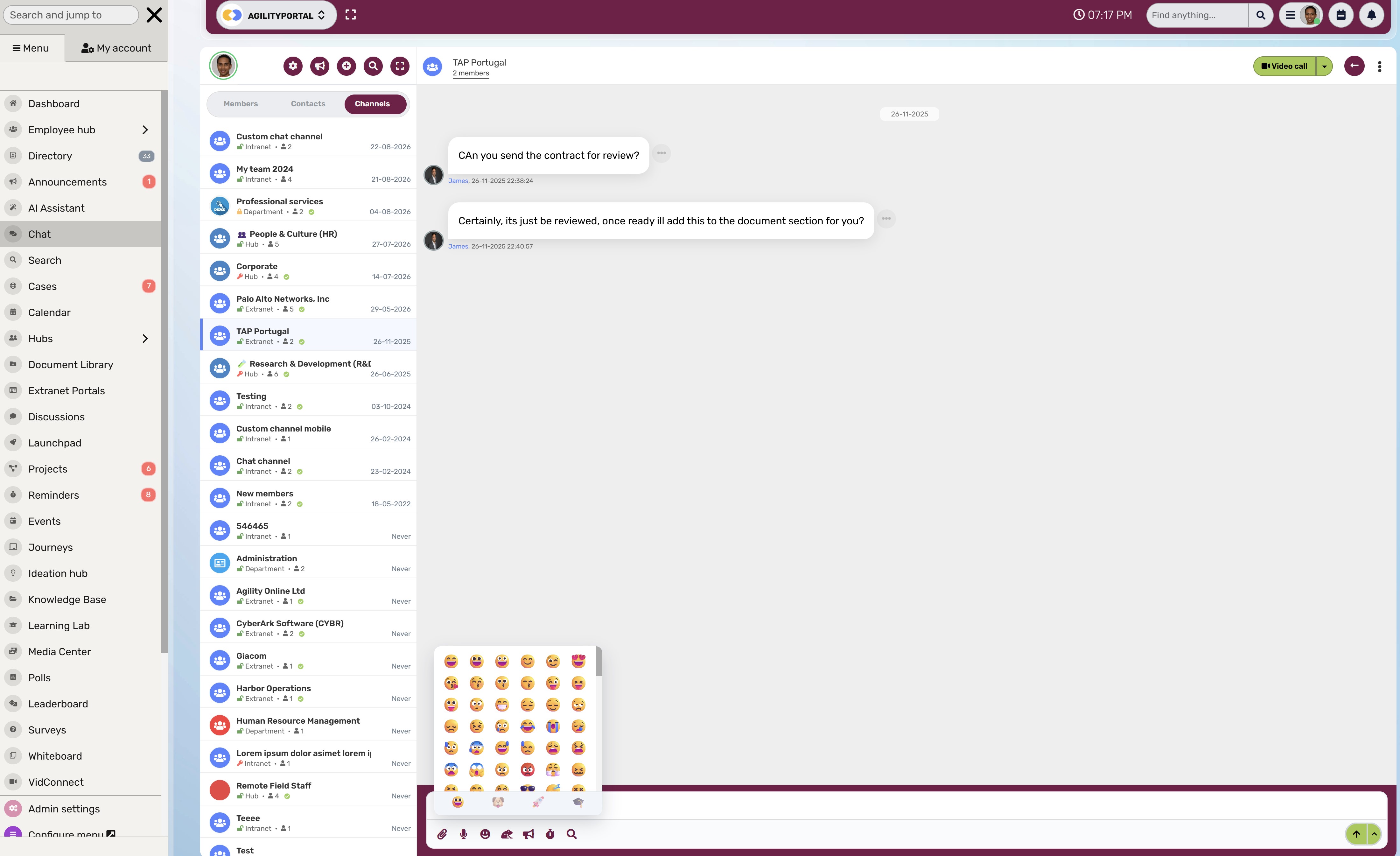
AgilityPortal is an all-in-one Enterprise Instant Messaging Software and digital workplace platform
Pros of using AgilityPortal as a business messaging app:
AgilityPortal is designed for organisations that want to reduce app switching and give employees one reliable place to communicate, collaborate and access essential company information.
Explore AgilityPortal's digital workplace platform
Besides using direct and group messaging for quick day-to-day communication, employees can access dedicated spaces for departments, projects and communities. This helps keep conversations organised and gives teams a clearer place to share updates, files, knowledge and feedback.
The platform also connects chat with company announcements, employee directories, documents, forms, tasks and searchable knowledge. Instead of leaving important decisions buried in a fast-moving conversation, organisations can direct employees to the approved policy, document or company update when needed.
Most importantly, AgilityPortal supports mobile communication for employees who are not always at a desk. Its mobile app helps frontline and remote teams receive updates, participate in conversations and access workplace information while on the move.
Cons of using AgilityPortal as a business messaging app:
AgilityPortal is not positioned as a lightweight chat-only tool. Organisations that only need basic direct messages and a small number of channels may find a standalone instant messaging application simpler.
Because the platform includes wider digital-workplace capabilities, businesses should take time to configure spaces, permissions, communications and employee onboarding properly. This helps ensure employees understand where to find information and how the platform should be used.
What's new in AgilityPortal: AgilityPortal continues to develop its employee communication and collaboration experience, including chat features, mobile improvements, team spaces, documents, announcements, forms, tasks and connected workplace tools. This makes it particularly useful for businesses looking to bring more of their internal communication into one governed platform.
Available for: Web, Android and iOS
Pricing: Paid plans are available; pricing depends on organisation size and required capabilities.
Our Verdict · #1
AgilityPortal
Best enterprise instant messaging software for secure employee communication and a complete digital workplace
#1
Our pick
Starting price
From $99/month for 25–99 employees, with a 14-day free trial.
Best feature
Secure team chat connected to company news, documents, knowledge, forms and team spaces.
Pricing, product features and plan availability can change. Confirm details
with AgilityPortal before purchasing.
Microsoft Teams — best for Microsoft 365 organisations
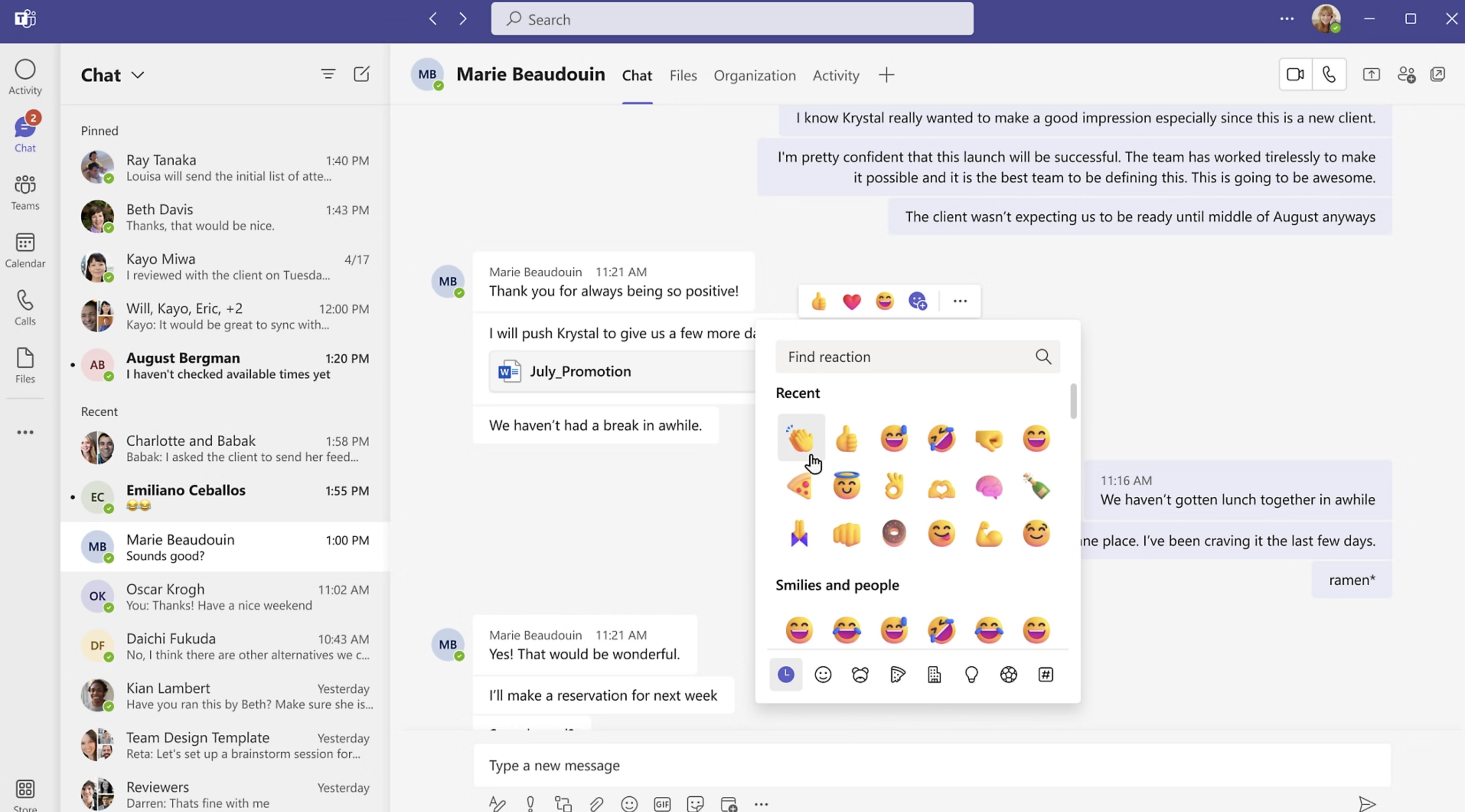
Microsoft Teams — best for Microsoft 365 organisations
Businesses that already use Microsoft 365 will find that Microsoft Teams is a powerful enterprise messaging and collaboration platform. It brings chat, meetings, calls, file collaboration and task-related tools into the wider Microsoft ecosystem.
For organisations using Outlook, OneDrive, SharePoint and Microsoft Entra ID, Teams can be a practical choice because employees can access communication and shared work without moving between completely separate platforms.
Pros of using Microsoft Teams as a business messaging app:
Microsoft Teams supports the core communication features most organisations expect from enterprise instant messaging software, including one-to-one chat, group messaging and team-based channels.
The left-side navigation gives employees access to key work areas, including:
- Chat,
- Teams and channels,
- Calendar and meetings,
- Calls
- Files and apps.
- Microsoft Teams Governance
Teams channels provide dedicated spaces for departments, projects, locations and shared initiatives. Employees can hold conversations, share files and keep relevant work together rather than relying on scattered email threads.
A major strength is the platform's connection with Microsoft 365. Employees can work on Word, Excel and PowerPoint files through Teams, store files in SharePoint or OneDrive, schedule meetings through Outlook and use Microsoft Entra ID for central identity management.
Microsoft Teams also supports voice and video meetings, screen sharing, recordings, captions and meeting chat. This makes it useful for organisations that want a single platform for both everyday messaging and live collaboration.
Cons of using Microsoft Teams as a business messaging app:
Teams can feel complex when it is introduced without clear governance. Employees may struggle to know whether to use a direct message, group chat, channel, email or SharePoint site, especially when several teams and channels cover similar topics.
The platform is at its strongest when the organisation already relies on Microsoft 365. Businesses using Google Workspace or a different document-management system may not get the same value from its Microsoft-first integrations.
Administrators also need to set clear rules around channel creation, permissions, external guests, file storage and retention. Without this, Teams can become cluttered and make information harder—not easier—to find.
What's new in Microsoft Teams: Microsoft continues to develop Teams with AI-supported capabilities through Microsoft 365 Copilot, including assistance with meeting recaps, chats, files and follow-up actions. Teams also continues to add improvements across meetings, calls, chat and collaborative workspaces.
Available for: Web, Windows, Mac, Linux, Android and iOS
Pricing: A free version of Microsoft Teams is available. Business capabilities and advanced enterprise controls are generally provided through paid Microsoft 365 plans.
Our Verdict · #2
Microsoft Teams
Best enterprise instant messaging software for Microsoft 365 organisations
#2
Top pick
Starting price
Free version available; business features are available through eligible Microsoft 365 plans.
Best feature
Deep integration with Microsoft 365, including Outlook, SharePoint, OneDrive and Entra ID.
Features, availability and Microsoft 365 plan inclusions can change. Review
current plan details and independent user feedback before purchasing.
Slack — best for integration-heavy knowledge-worker teams
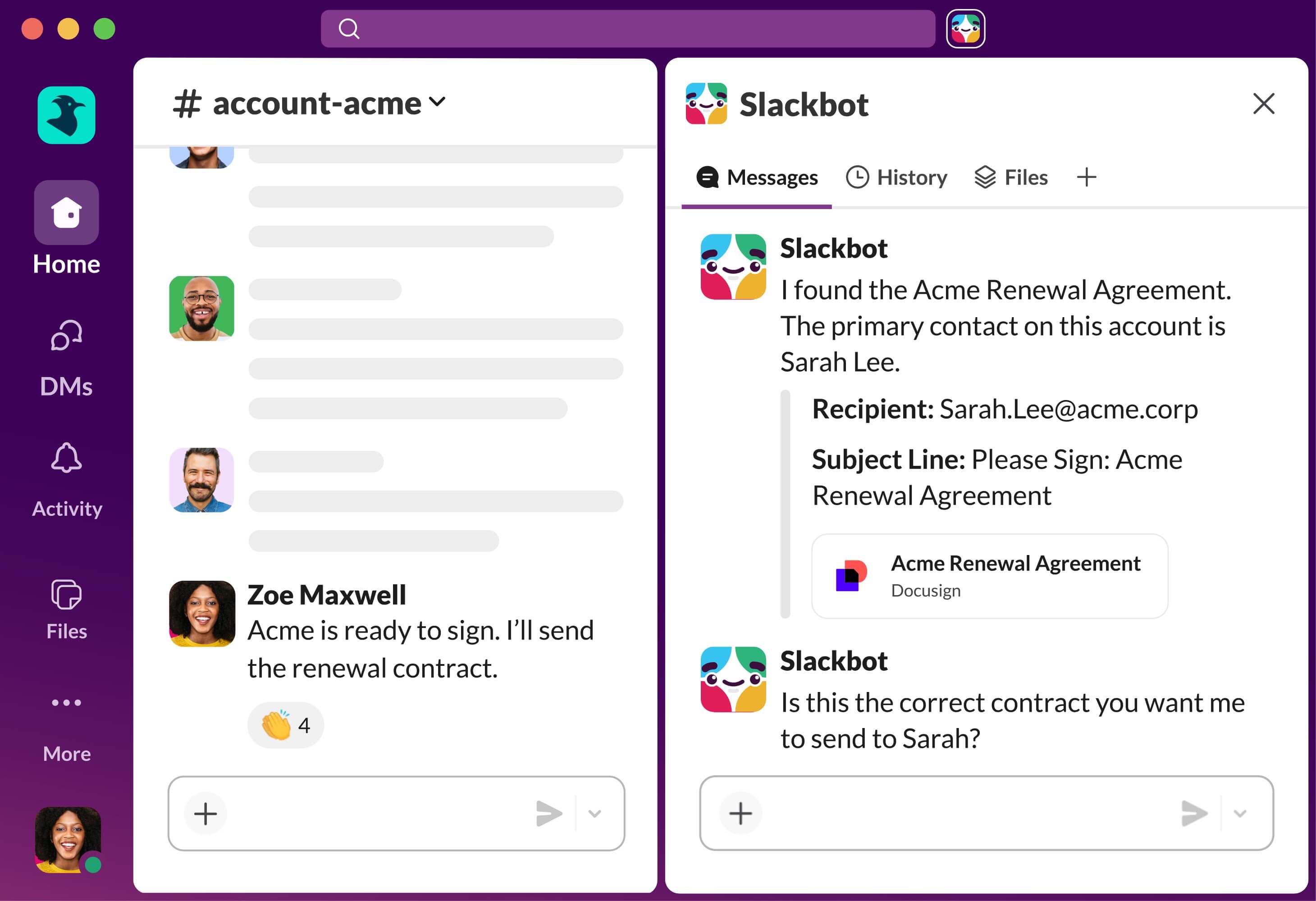
Slack — best for integration-heavy knowledge-worker teams
Teams that need fast, channel-based communication and a broad choice of integrations will find that Slack is a mature business messaging platform. It is widely used by knowledge-worker teams that want to organise conversations by project, department, customer or topic.
Slack is particularly strong for businesses that use several specialist tools and want chat to become a central place for notifications, quick decisions and day-to-day collaboration.
Pros of using Slack as a business messaging app:
Slack provides the core features expected from enterprise instant messaging software, including direct messages, group chats, public and private channels, threads, searchable history and file sharing.
The workspace navigation gives employees quick access to:
- Channels,
- Direct messages,
- Threads and activity,
- Huddles, and
- Apps and workflows.
Channels help teams separate different conversations, so employees can join the discussions most relevant to their role. Threads are especially helpful for keeping replies connected to the original message, without making a busy channel difficult to follow.
Slack also has a large integration ecosystem.
Businesses can connect tools such as Google Drive, Microsoft 365, Jira, Salesforce and project-management software, allowing employees to receive updates and take action without constantly switching apps.
For quick live collaboration, Slack Huddles let employees start audio or video conversations and share their screens directly from a channel or direct message. Paid plans also offer unlimited searchable message history and broader support for external collaboration through Slack Connect. Learn more about Slack plans and features.
Cons of using Slack as a business messaging app:
Slack can become noisy if organisations do not set clear rules for channel creation, notification settings and message etiquette. Without governance, employees may face too many channels, duplicate conversations and a constant stream of alerts.
The free plan has important limitations. It provides access to only 90 days of message history and restricts certain collaboration and integration features, which can make it less suitable for businesses that need long-term searchability and enterprise governance. Click here to learn about the different Slack free versus paid plans.
Slack is also primarily a collaboration and messaging tool. Organisations that need company news, intranet content, employee directories, structured knowledge, frontline communications and business workflows in the same platform may need a wider digital workplace solution.
What's new in Slack: Slack has expanded its AI capabilities with conversation summaries, channel recaps, AI search, daily recaps and file summaries. It also continues to develop workflow automation, external collaboration and enterprise security features.
Available for: Web, Windows, Mac, Linux, Android and iOS
Pricing: A free plan is available. Slack Pro starts at $7.25 per active user per month when billed annually, with higher-tier plans available for more advanced security, administration and AI features.
Our Verdict · #3
Slack
Best enterprise instant messaging software for integration-heavy knowledge-worker teams
#3
Top pick
Starting price
Free plan available; paid plans start from $7.25 per active user per month when billed annually.
Best feature
Channels, integrations and searchable conversation history that connect day-to-day communication with work.
Pricing, product features and plan availability can change. Review current
plan details and independent user feedback before purchasing.
Google Chat — best for Google Workspace users
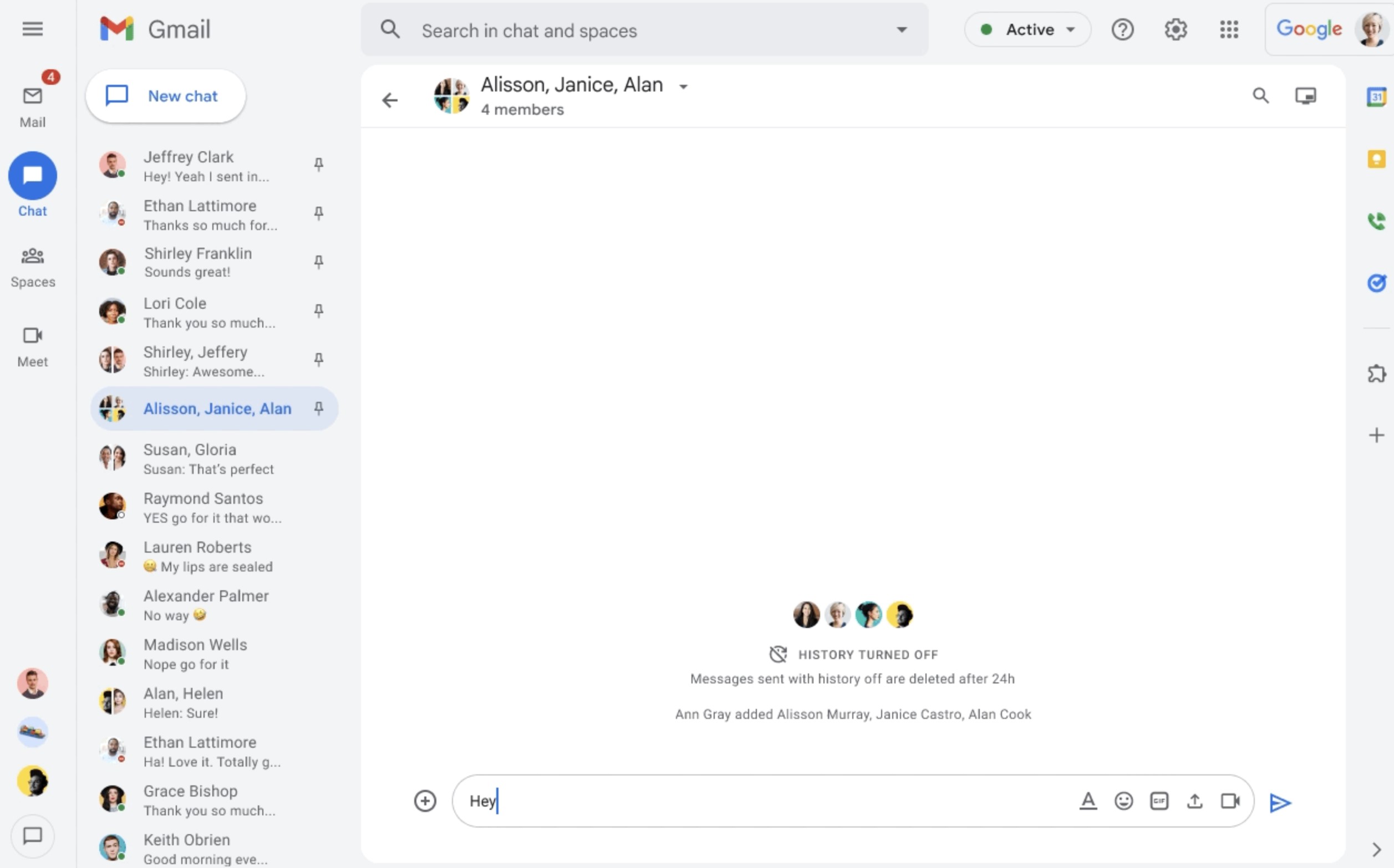
Google Chat — best for Google Workspace users
Google Chat is a straightforward business messaging app for organisations already using Google Workspace. It brings direct messages, group chat and Spaces into the same ecosystem as Gmail, Google Drive, Meet and Calendar.
Pros of using Google Chat as a business messaging app:
Google Chat covers the essentials for everyday team communication, including:
- One-to-one and group messaging,
- Spaces for teams and projects,
- Threaded conversations,
- File sharing through Google Drive, and
- Google Meet and Calendar integration.
Spaces work like channels, helping teams organise conversations around a department, project or subject. Employees can share Drive files, collaborate in context and start a Google Meet call when a written conversation needs to become a live discussion.
For organisations already paying for Google Workspace, Chat is included within their existing subscription, avoiding the cost and complexity of adding another standalone messaging platform.
Cons of using Google Chat as a business messaging app:
Google Chat is best for Google-first organisations. Businesses that rely mainly on Microsoft 365, SharePoint or a large range of specialist integrations may find a platform such as Microsoft Teams or Slack more suitable.
It is also less comprehensive than a complete digital workplace. Organisations that need company news, frontline communication, employee directories, formal knowledge management and workflow tools may need additional software alongside Chat.
What's new in Google Chat: Google has added Gemini-powered features, including conversation summaries, message recaps and writing assistance, helping employees catch up on busy discussions more quickly.
Available for: Web, Windows, Mac, Android and iOS
Pricing: Google Chat is available with Google Workspace plans. A limited free version is also available for personal Google accounts.
Our Verdict · #4
Google Chat
Best enterprise instant messaging software for Google Workspace organisations
#4
Top pick
Starting price
Available with Google Workspace plans; a limited free version is available for personal Google accounts.
Best feature
Simple team chat that connects directly with Gmail, Google Drive, Google Meet, Calendar and Workspace files.
Features, availability and Google Workspace plan inclusions can change.
Review current plan details and independent user feedback before purchasing.
Zoom Team Chat — best for Zoom-centric teams
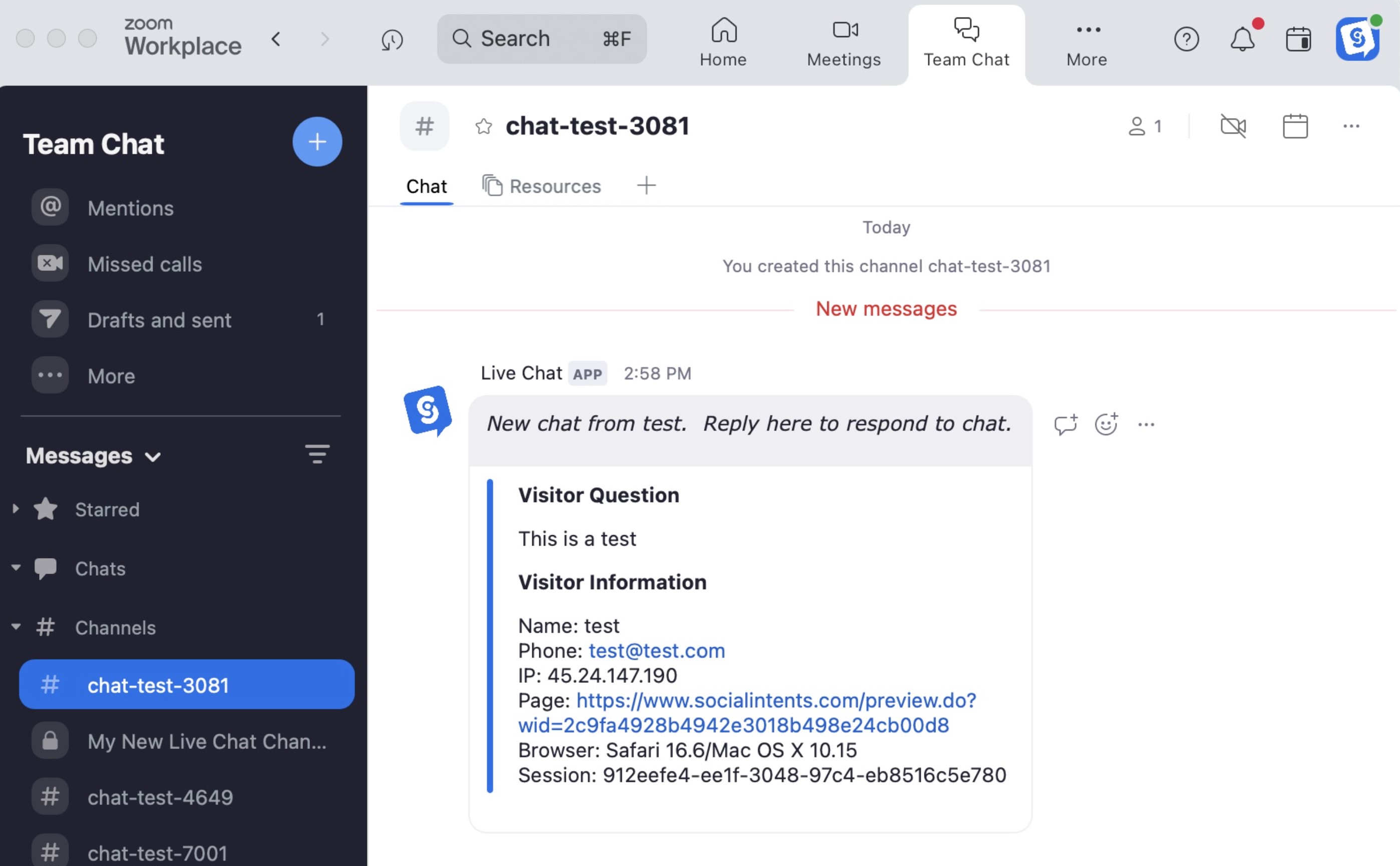
Zoom Team Chat — best for Zoom-centric teams
Zoom Team Chat is an instant messaging app built into Zoom Workplace. It suits organisations that already rely on Zoom for meetings and want chat, video calls, files and collaboration tools in one familiar platform.
Pros of using Zoom Team Chat as a business messaging app:
Zoom Team Chat supports core workplace messaging features, including:
- Direct messages and group chat,
- Channels for teams and projects,
- File sharing and message history,
- Smart notifications and starred messages, and
- Fast access to Zoom meetings and whiteboards.
Its main advantage is convenience. Employees can turn a chat into a video meeting, share a document or collaborate on a whiteboard without switching to a separate application.
Zoom also supports external contacts, allowing users to message approved people outside their organisation.
Cons of using Zoom Team Chat as a business messaging app:
Zoom Team Chat is most compelling for businesses already invested in Zoom Workplace. Organisations that need deep Microsoft 365 integration, a large app ecosystem or a full employee intranet may find Microsoft Teams, Slack or a digital workplace platform better suited.
It is also more collaboration-focused than communication-hub focused, so businesses may still need a separate place for formal company news, policies and structured employee knowledge.
What's new in Zoom Team Chat: Zoom has added AI-supported capabilities, including help drafting content and catching up on unread chat messages. It also continues to connect Team Chat more closely with Zoom Docs, Meetings, Phone and Whiteboard.
Available for: Web, Windows, Mac, Linux, Android and iOS
Pricing: Zoom Team Chat is included with Zoom Workplace plans, including the free Zoom Workplace Basic plan.
Our Verdict · #5
Zoom Team Chat
Best enterprise instant messaging software for Zoom Workplace users
#5
Top pick
Starting price
Included with Zoom Workplace plans, including the free Zoom Workplace Basic plan.
Best feature
Move quickly from chat to Zoom meetings, whiteboards, files and collaborative work without switching apps.
Features, availability and Zoom Workplace plan inclusions can change.
Review current plan details and independent user feedback before purchasing.
Cisco Webex — best for enterprise calling and global collaboration
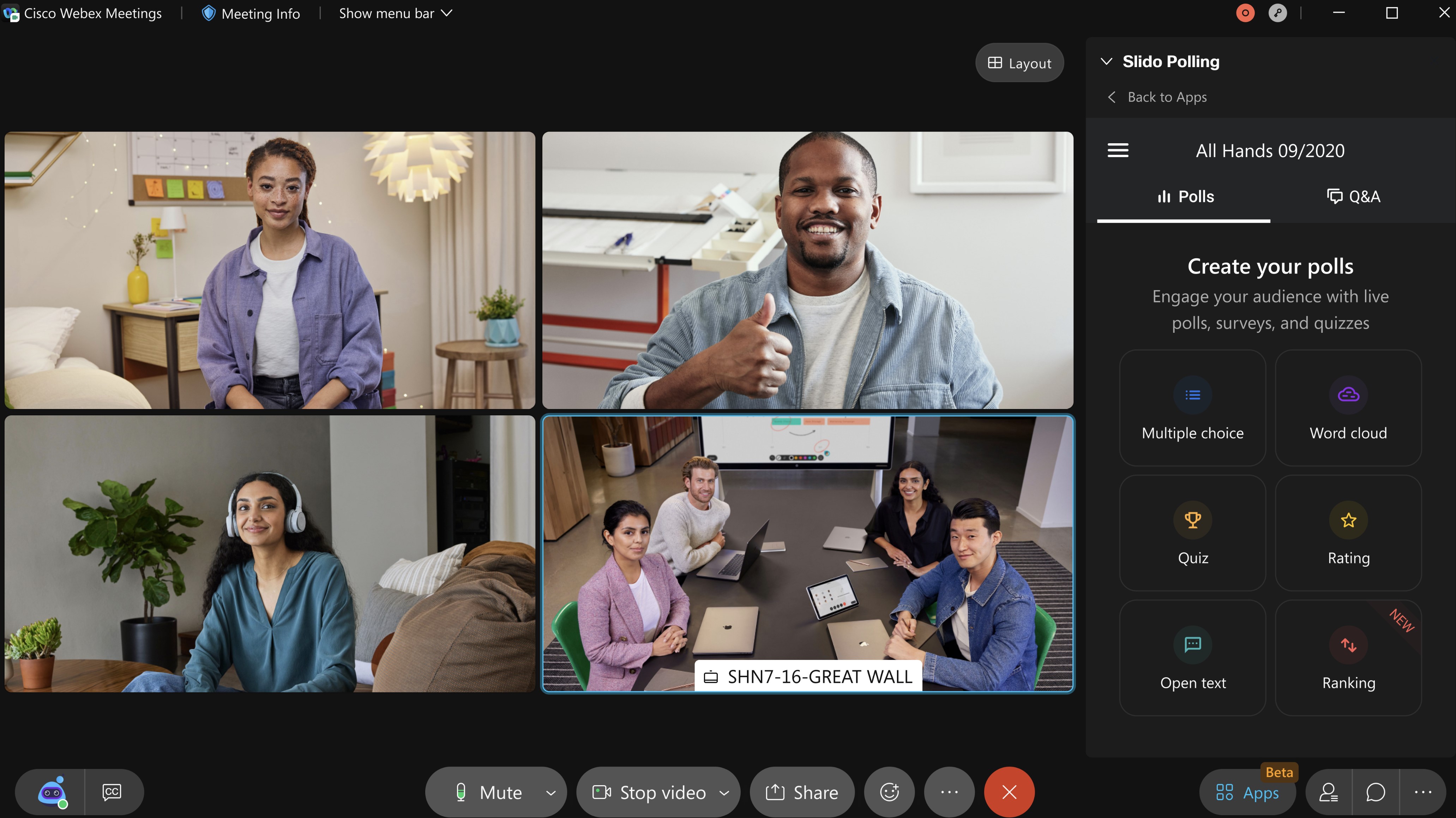
Cisco Webex — best for enterprise calling and global collaboration
Cisco Webex is a unified communication platform that combines business messaging, video meetings, calling and file sharing.
It is a strong option for larger organisations that already use Cisco collaboration tools or need messaging closely connected to enterprise telephony and meetings.
Pros of using Cisco Webex as a business messaging app:
Webex provides core messaging and collaboration capabilities, including:
- One-to-one and group messaging,
- Spaces for teams and projects,
- File sharing and document collaboration,
- Video meetings and screen sharing, and
- Business calling through Webex Calling.
Spaces give employees a structured place to hold conversations, share documents and move quickly into a video call when required.
Cisco also positions Webex around security, reliability and enterprise-scale communication, which can appeal to organisations with global teams or complex calling requirements.
Cons of using Cisco Webex as a business messaging app:
Webex can be more comprehensive and complex than businesses need if their main requirement is lightweight team chat. It is generally a better fit for organisations that also need meetings, calling, meeting-room hardware or Cisco's wider collaboration ecosystem.
Businesses looking for a broader employee communication platform—including intranet content, company news, knowledge and frontline engagement—may still need additional software.
What's new in Cisco Webex: Webex continues to develop AI-supported collaboration, workflow automation and integrations through the Webex App Hub.
Available for: Web, Windows, Mac, Linux, Android and iOS
Pricing: A free Webex plan is available. Paid business and enterprise pricing varies by required meetings, calling, security and support capabilities.
Our Verdict · #6
Cisco Webex
Best enterprise instant messaging software for global calling and collaboration
#6
Top pick
Starting price
Free plan available; paid pricing depends on required meetings, calling, security and support features.
Best feature
Enterprise messaging, meetings and calling in one communications platform built for large organisations.
Pricing, product features and plan availability can change. Review current
plan details and independent user feedback before purchasing.
Mattermost — best for secure, self-hosted technical teams
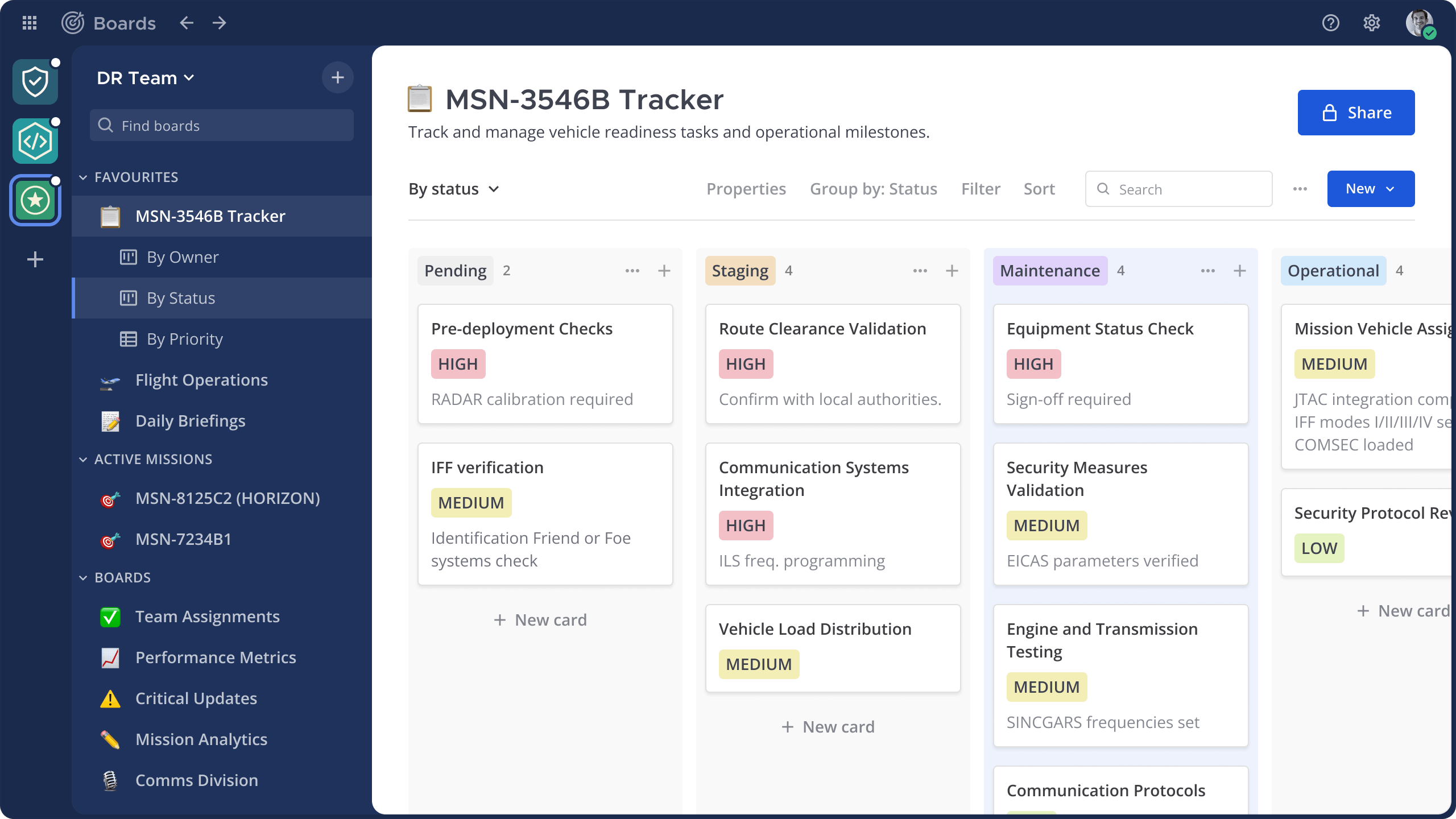
Mattermost — best for secure, self-hosted technical teams
Mattermost is an open-source collaboration platform built for organisations that need greater control over where their communication data is hosted and how it is managed. It is particularly suited to technical, security, DevOps and mission-critical teams.
Pros of using Mattermost as a business messaging app:
Mattermost combines secure messaging with workflow-focused tools, including:
- Direct messages and channels,
- Self-hosted, private-cloud and on-premises deployment,
- Playbooks for incident response,
- Integrations with technical tools, and
- Audio calls and file sharing.
Its biggest advantage is deployment flexibility. Organisations can host Mattermost on their own infrastructure, private cloud or secure environment, including air-gapped deployments where needed. This makes it a credible option for businesses with strict data-control, sovereignty or compliance requirements.
Cons of using Mattermost as a business messaging app:
Mattermost usually requires more technical resource to implement and maintain than a cloud-first chat platform such as Slack or Microsoft Teams. It is therefore less suitable for businesses that want a simple, ready-to-use messaging app with minimal administration.
It is also designed primarily for operational and technical collaboration, rather than company-wide employee communication, intranet content or frontline engagement.
What's new in Mattermost: Mattermost continues to develop mission-critical collaboration features, including secure workflow automation, playbooks, integrations and self-sovereign Mattermost deployment options.
Available for: Web, Windows, Mac, Linux, Android and iOS
Pricing: Mattermost provides a free Entry edition for evaluation and limited use. Paid Professional and Enterprise plans add advanced support, security and administration capabilities.
Our Verdict · #7
Mattermost
Best enterprise instant messaging software for secure self-hosted technical teams
#7
Top pick
Starting price
Free Entry edition available; paid plans add enterprise support, security and administration capabilities.
Best feature
Self-hosted and private-cloud deployment options for organisations that need stronger data control.
Pricing, product features and deployment options can change. Review current
plan details and independent user feedback before purchasing.
Rocket.Chat — best for flexible, self-hosted messaging
Rocket.Chat is an open-source enterprise messaging platform for organisations that want more control over deployment, data and integrations. It can be used as a cloud service or hosted in a private environment.
Pros of using Rocket.Chat as a business messaging app:
Rocket.Chat offers business messaging features including:
- Direct messages and group chat,
- Public and private channels,
- File sharing and searchable history,
- Self-hosted and cloud deployment options,
- Integrations and workflow customisation.
Its flexibility is the main appeal.
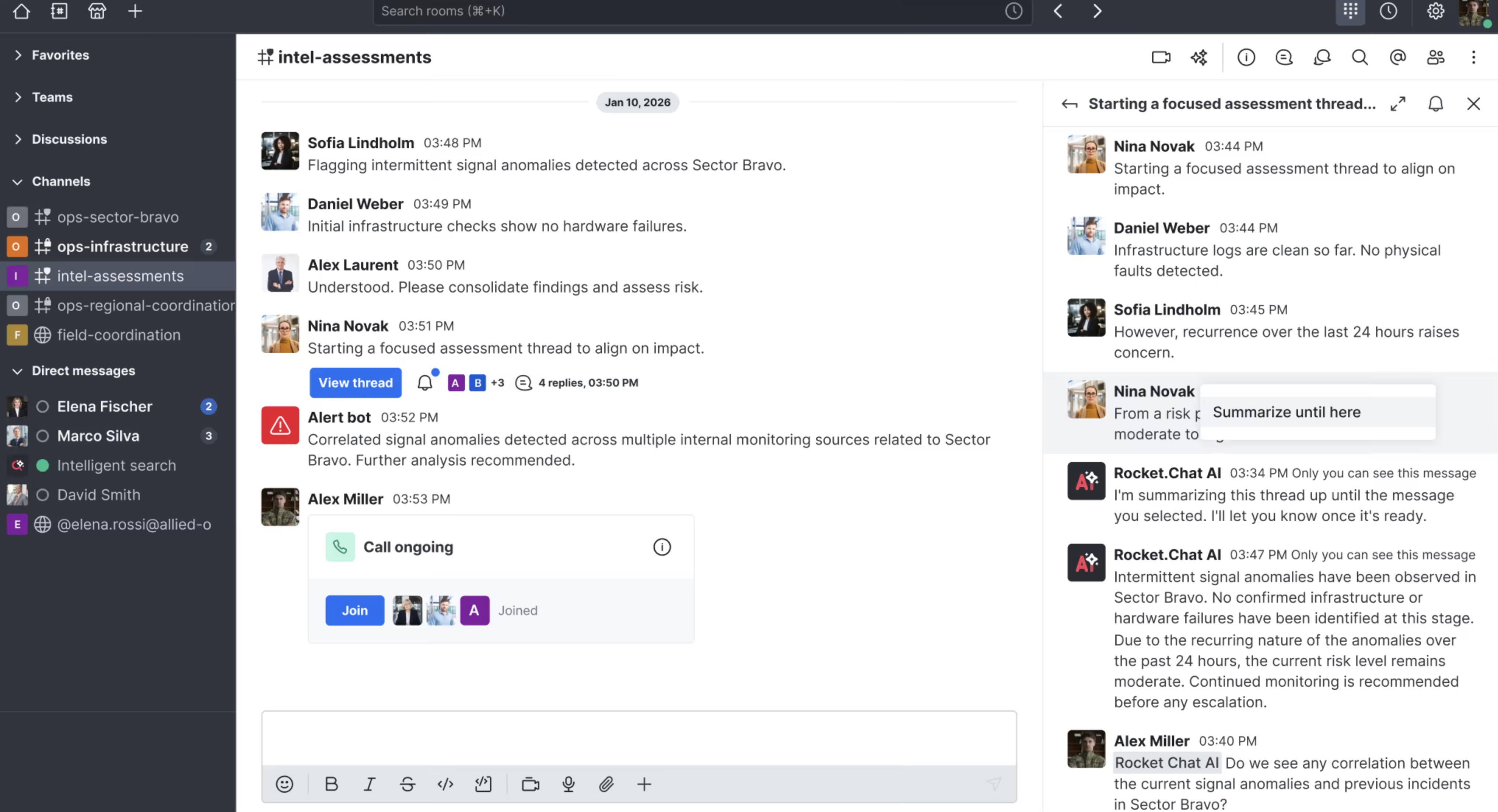
Rocket.Chat — best for flexible, self-hosted messaging
Organisations can configure the platform around their own security policies, workflows and hosting preferences, making it useful for businesses with strict data-residency or compliance requirements.
Cons of using Rocket.Chat as a business messaging app:
Self-hosting Rocket.Chat requires technical expertise for setup, maintenance, upgrades, security and backups. It is not the simplest option for organisations that want a ready-to-use cloud messaging platform.
Like Mattermost, Rocket.Chat is mainly focused on messaging and operational collaboration. Businesses that also require company news, intranet content, employee knowledge and frontline communications may need a broader platform alongside it.
What's new in Rocket.Chat: Rocket.Chat continues to focus on secure communications, self-managed deployments, integrations and AI-supported business workflows.
Available for: Web, Windows, Mac, Linux, Android and iOS
Pricing: A free community edition is available, while paid plans provide additional enterprise features, support and deployment options.
Our Verdict · #8
Rocket.Chat
Best enterprise instant messaging software for flexible, self-hosted deployment
#8
Top pick
Starting price
Free plan available; paid plans add support, governance and advanced enterprise capabilities.
Best feature
Flexible cloud and self-managed deployment options for greater control over communications and data.
Pricing, product features and deployment options can change. Review current
plan details and independent user feedback before purchasing.
Pumble — best for free, searchable team messaging
Pumble is a business messaging and collaboration tool that offers direct messages, channels, file sharing and video communication.
It is a practical choice for teams that want a familiar chat experience without paying per user for basic message history.
Pros of using Pumble as a business messaging app:
Pumble includes the core tools teams need for everyday communication:
- Direct messages and group chat,
- Public and private channels,
- Threaded conversations,
- File sharing,
- Audio, video and screen sharing.
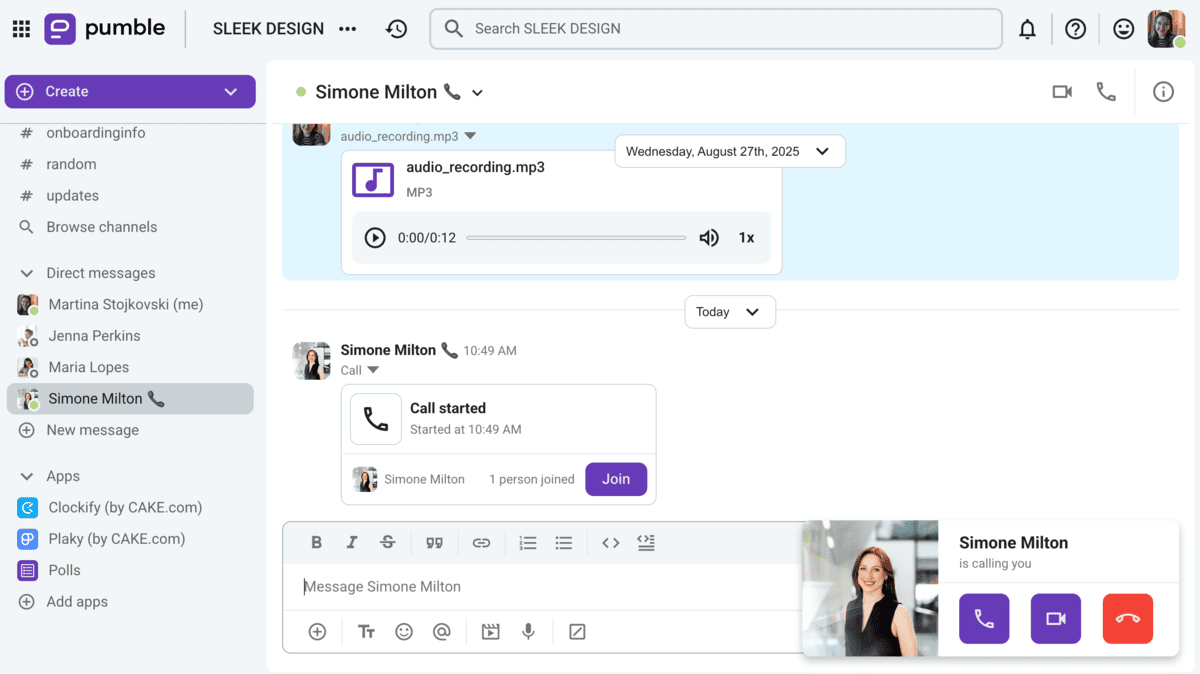
Pumble — best for free, searchable team messaging
Its main advantage is the free plan, which includes unlimited users and searchable message history. This can make Pumble appealing to growing teams that need to retain conversations and shared links without immediately moving to a paid plan.
Cons of using Pumble as a business messaging app:
Pumble is a simpler collaboration tool than enterprise-focused platforms such as Microsoft Teams or Slack. Organisations with complex compliance, advanced security, large-scale administration or extensive integration requirements should check whether it meets their needs before committing.
Businesses that need company news, employee knowledge, formal documents and frontline communication in the same place may also require a wider digital workplace platform.
What's new in Pumble: Pumble has introduced an analytics dashboard to help administrators understand engagement, communication patterns and adoption.
Available for: Web, Windows, Mac, Linux, Android and iOS
Pricing: A free plan with unlimited users and message history is available. Paid plans add advanced features and administration options.
Our Verdict · #9
Pumble
Best enterprise instant messaging software free option for searchable team chat
#9
Top pick
Starting price
Free plan available with unlimited users and searchable message history; paid plans add advanced features.
Best feature
Unlimited message history on the free plan, helping teams keep conversations, files and shared links searchable.
Pricing, product features and plan availability can change. Review current
plan details and independent user feedback before purchasing.
Zoho Cliq — best for Zoho-first businesses
Zoho Cliq is a business messaging platform that works closely with Zoho's wider suite of CRM, HR, productivity and project-management tools. It is a good fit for organisations that already rely on Zoho and want chat integrated into their existing workflows.
Pros of using Zoho Cliq as a business messaging app:
Zoho Cliq includes the communication essentials, including:
- Direct and group chat,
- Channels and threaded conversations,
- Voice and video meetings,
- File sharing and searchable messages,
- Integrations with Zoho apps and third-party tools.
The platform supports custom bots, automations and extensions, allowing teams to receive CRM updates, manage tasks and act on workflow notifications from within chat.
It also offers stronger controls on higher plans, including roles, permissions, audit history, eDiscovery and data-loss prevention.
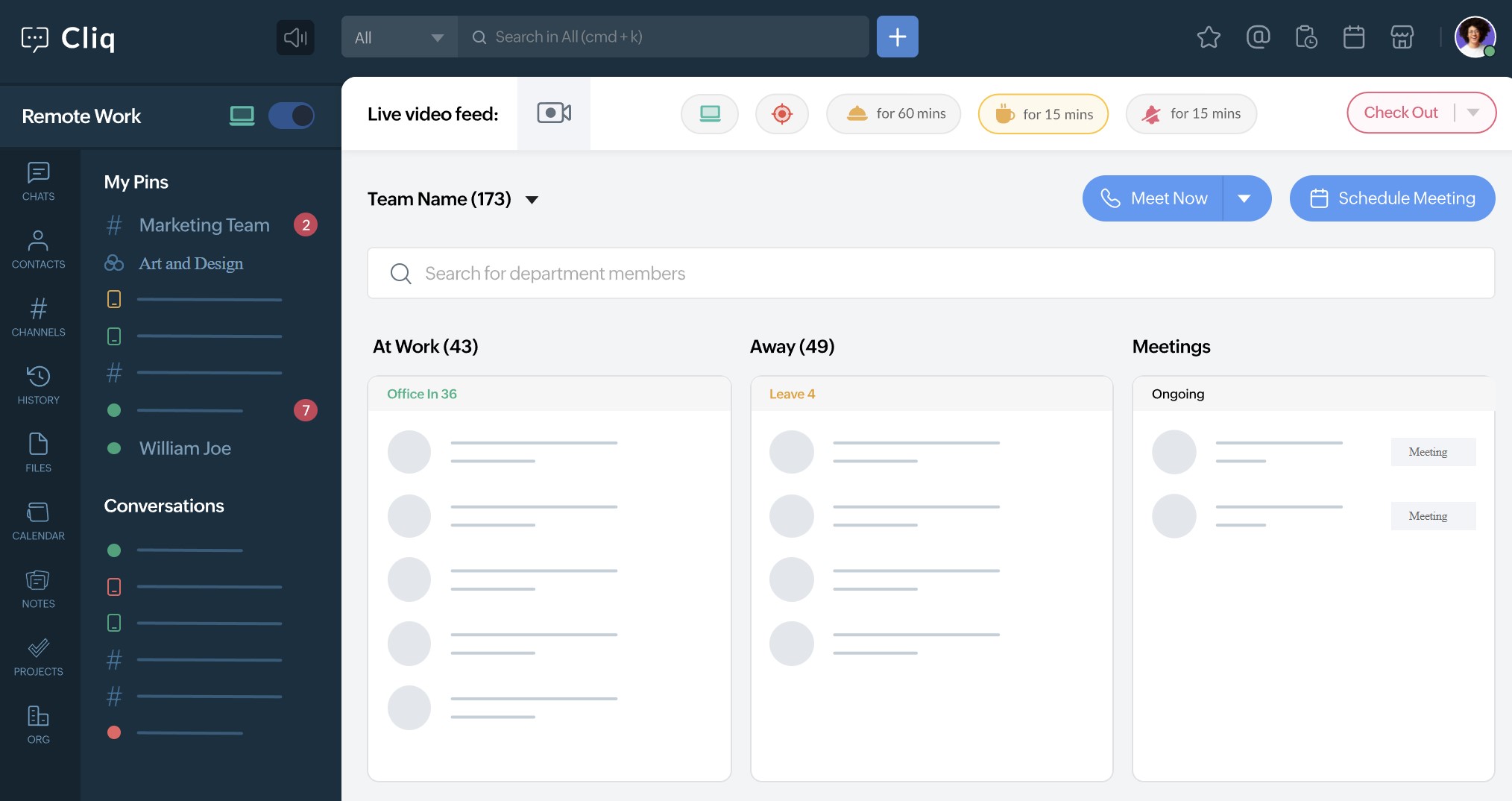
Zoho Cliq — best for Zoho-first businesses
Cons of using Zoho Cliq as a business messaging app:
Zoho Cliq delivers the most value when an organisation already uses Zoho products. Businesses using Microsoft 365, Google Workspace or other core systems may find its integrations less compelling.
Some advanced enterprise features, such as detailed audit history, eDiscovery and DLP, are limited to higher subscription tiers.
What's new in Zoho Cliq: Recent additions include on-demand chat summaries, stronger mobile permissions, IP restrictions and improved controls for team management and external collaboration.
Available for: Web, Windows, Mac, Linux, Android and iOS
Pricing: A free plan is available. Paid plans add external channels, advanced administration, security and compliance features.
Our Verdict · #10
Zoho Cliq
Best enterprise instant messaging software for Zoho-first businesses
#10
Top pick
Starting price
Free plan available; paid plans add advanced administration, security, external channels and compliance features.
Best feature
Connect chat with Zoho CRM, Projects, People, Calendar and other Zoho business applications.
Pricing, product features and plan availability can change. Review current
plan details and independent user feedback before purchasing.
RingCentral — best for business calling, messaging and meetings
RingCentral — best for business calling, messaging and meetings
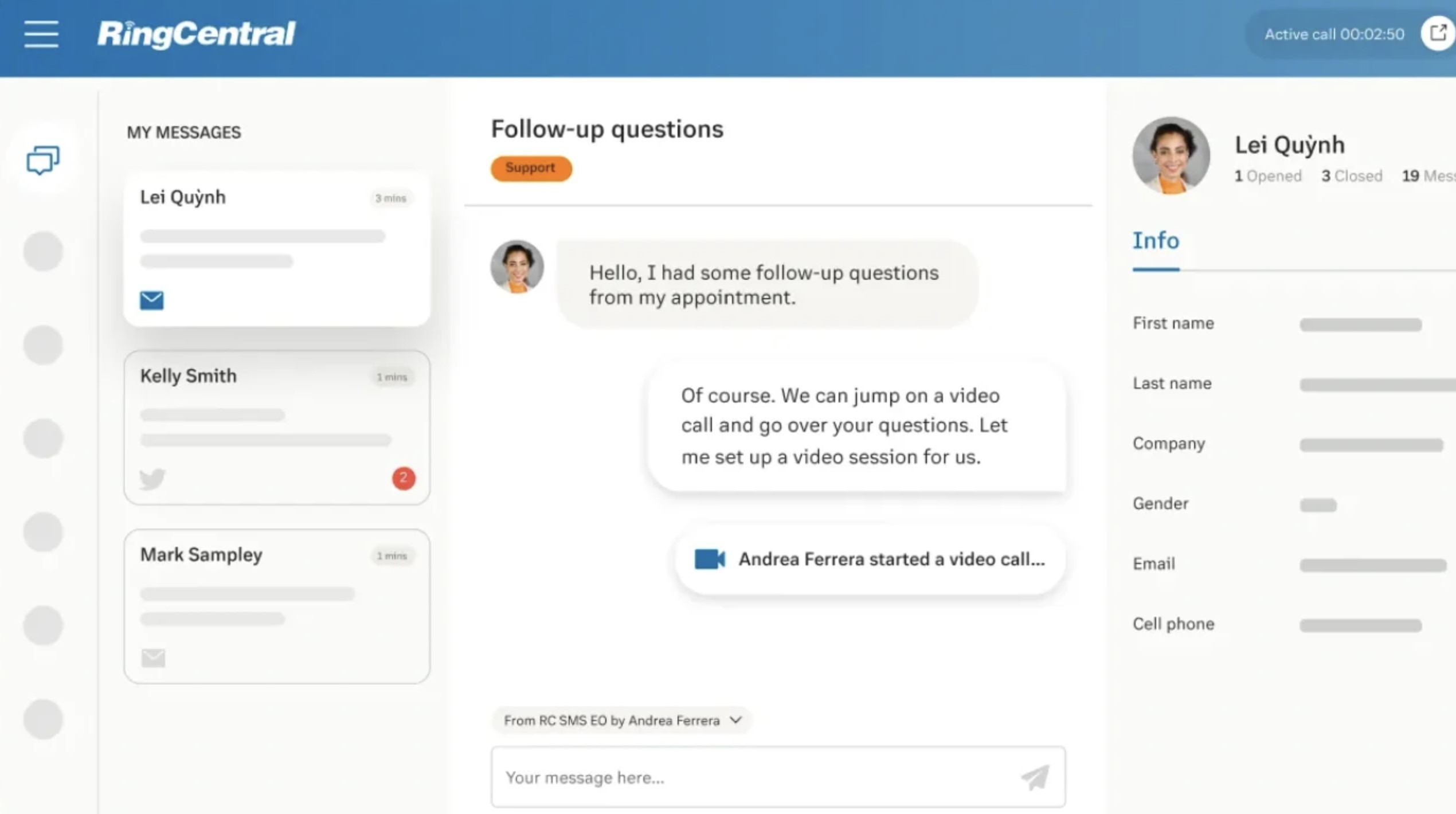
RingCentral is a unified communications platform that brings team chat, business phone, SMS and video meetings together. It is best suited to organisations that want messaging closely connected to their wider calling and customer communication setup.
Pros of using RingCentral as a business messaging app:
RingCentral provides core communication tools, including:
- Team chat and direct messaging,
- Business phone and SMS,
- Video meetings,
- File sharing,
- AI-supported call and meeting features.
Its main strength is consolidation. Employees can message colleagues, make and receive business calls, send SMS messages and join video meetings from one communications platform, reducing the need to manage separate vendors.
Cons of using RingCentral as a business messaging app:
RingCentral is generally a better fit for organisations that need a business phone system as well as chat. If the main requirement is internal messaging and collaboration, a dedicated platform such as Slack, Microsoft Teams or AgilityPortal may be simpler.
It is also less suited to businesses looking for a complete employee communication hub with intranet content, company announcements, knowledge and frontline engagement features.
What's new in RingCentral: RingCentral is continuing to expand AI-powered calling, messaging, meetings and its AI Receptionist capabilities. RingCentral plans and pricing
Available for: Web, Windows, Mac, Android and iOS
Pricing: Paid RingEX plans combine calling, messaging and video. Pricing varies by user numbers, billing term and required communication features.
Our Verdict · #11
RingCentral
Best enterprise instant messaging software for business calling, messaging and meetings
#11
Top pick
Starting price
Paid RingEX plans combine business calling, team messaging and video; pricing varies by users and required features.
Best feature
Bring business phone, SMS, team chat and video meetings together in one unified communications platform.
Pricing, product features and plan availability can change. Review current
plan details and independent user feedback before purchasing.
How to Choose the Right Enterprise Instant Messaging Platform
Choosing a new messaging software is not about selecting the platform with the longest feature list.
It is about finding a secure, practical tool that fits the way your employees communicate, the systems your business already uses and the level of control your organisation requires.
Instant messaging allows people to exchange messages in real time, but an enterprise platform must also provide the governance, security and administration that business communication demands.
You can read more about the wider concept of instant messaging on Wikipedia, but the selection process below focuses on what matters when communication involves company data, employees and operational workflows.
1. Map How Employees Communicate Today
Start by understanding where conversations currently happen. Speak to employees across departments, locations and job roles, including frontline workers, remote staff and managers.
Look for:
- Email chains being used for quick questions and urgent decisions
- Unofficial WhatsApp, SMS or personal messaging groups
- Important updates being missed by deskless employees
- Documents and answers being repeatedly requested because they are hard to find
- Teams switching between several communication tools to complete one task
- Departments using different platforms with little visibility across the business
This step helps you identify whether you need a standalone chat tool or a broader employee communication platform.
2. Define Your Security and Compliance Requirements
Your messaging platform may contain employee data, customer information, internal documents and commercially sensitive discussions. Before comparing providers, agree the minimum controls your business cannot compromise on.
Your checklist should include:
- Single sign-on (SSO) or SAML integration
- Multi-factor authentication
- Encryption for business communications
- Role-based permissions and restricted access
- Central user provisioning and offboarding
- Audit trails and administrative activity logs
- Data retention and deletion controls
- Data residency requirements
- eDiscovery, legal hold or archiving capabilities where needed
- Mobile-device security and remote wipe options
The UK National Cyber Security Centre's guidance on selecting enterprise instant messaging recommends assessing security features such as end-to-end encryption, enterprise SSO, data-loss prevention and independent security assessments.
Businesses handling personal data should also apply a data-protection-by-design-and-default approach, as set out by the Information Commissioner's Office.
3. Decide Whether You Need Chat Only or a Connected Digital Workplace
Some organisations only need fast, secure chat.
Others need communication to sit alongside company news, documents, tasks, employee directories, knowledge, approvals and project spaces.
Ask these questions:
- Do employees need a simple messaging tool, or one place to communicate and find information?
- Are announcements and policy updates currently separate from daily conversations?
- Do employees regularly need to share or locate documents during chats?
- Would linking chat to tasks, knowledge and team spaces reduce app switching?
- Do you need an employee platform that supports communication beyond messaging alone?
If employees are repeatedly searching across several systems, a connected digital workplace may offer more value than adding another standalone chat application.
4. Test the Mobile Experience With Real Employees
Administrators often test software from a desktop computer, but that does not show how well it works for employees who are travelling, on-site, in a warehouse, serving customers or working shifts.
During a trial, ask frontline and deskless employees to test:
- Receiving and responding to push notifications
- Finding important updates quickly
- Starting a group conversation
- Sharing a photo or document
- Searching previous messages
- Accessing the platform on a personal or company-managed device
- Managing notifications outside working hours
- Signing in securely without unnecessary steps
If the mobile experience is slow, cluttered or difficult to understand, adoption will suffer regardless of how strong the desktop version may be.
5. Check Integrations With Your Existing Systems
The best business instant messaging software should work with the tools employees already rely on. Otherwise, it can become another disconnected channel that creates more switching and duplicate work.
Prioritise integrations with:
- Microsoft 365, Microsoft Teams and SharePoint
- Google Workspace, Google Drive and Google Meet
- HRIS and employee-directory systems
- CRM software
- Project-management tools
- Document-management platforms
- Identity providers such as Microsoft Entra ID, Okta or Google
- Calendar and video-meeting tools
Test the integrations rather than relying only on a vendor's feature page. Confirm what information can be shared, whether permissions transfer correctly and whether the integration works for the employee roles that will use it.
6. Run a Pilot Before a Full Rollout
A controlled pilot will expose usability, adoption and governance issues before they affect the entire organisation. Include a mix of departments, seniority levels and working environments rather than testing only with IT or office-based teams.
Measure:
- Weekly active users
- Message and channel adoption
- Mobile usage
- Employee feedback on ease of use
- Reduction in unofficial communication groups
- Time spent finding answers or documents
- Support requests and training needs
- Whether important updates are being seen and acknowledged
Use the results to refine permissions, channel structures, notification settings and onboarding guidance before wider deployment.
7. Confirm the Full Cost of Ownership
Do not compare subscription prices alone.
Enterprise messaging costs can rise through premium security features, additional storage, external guest access, implementation support, integrations and administration time.
Before making a final decision, confirm:
- Per-user or active-user pricing
- Minimum contract length and renewal terms
- Costs for SSO, advanced security and compliance features
- Storage, archiving and retention costs
- Mobile-device management requirements
- Setup, migration and training costs
- Integration or API costs
- Ongoing support and admin resource needed
- Pricing at your expected headcount in one, two and three years
The right platform should be affordable to run, easy to govern and capable of growing with your organisation—not just attractive at the point of purchase.
Enterprise Instant Messaging Software Comparison by Use Case
The best enterprise instant messaging software depends on the systems your teams already use, the level of control IT requires and whether you need chat alone or a broader employee communication platform.
| If your priority is… | Consider |
| A full employee communication and intranet platform | AgilityPortal |
| Microsoft 365 integration | Microsoft Teams |
| Broad third-party integrations | Slack |
| Google Workspace collaboration | Google Chat |
| Meetings-first communication | Zoom Team Chat |
| Calling plus messaging | Cisco Webex or RingCentral |
| Self-hosting and technical control | Mattermost or Rocket.Chat |
| Lower-cost persistent team chat | Pumble |
| A Zoho-first workflow | Zoho Cliq |
Common Enterprise Messaging Mistakes to Avoid
Choosing enterprise instant messaging software is only the first step.
The value comes from how well the platform is governed, introduced and connected to the rest of the employee experience.
Avoiding the mistakes below will help your business messaging platform improve communication rather than create another disconnected tool.
Choosing a Familiar Tool Without Checking Governance
Employees may already know how to use WhatsApp, Slack or Microsoft Teams, but familiarity alone does not mean a platform meets the needs of your organisation.
A consumer messaging app or poorly configured team chat software can create avoidable security and compliance risks.
- Check whether the platform supports SSO, multi-factor authentication and central user management.
- Confirm that administrators can remove access immediately when someone leaves the business.
- Review audit logs, message retention and data-export controls before rollout.
- Make sure permissions can be applied by role, department, location or team.
- Avoid allowing employees to use personal accounts for confidential work conversations.
- Assess whether the provider meets your industry, data-residency and compliance requirements.
Using Chat as a Replacement for Structured Company Communication
Instant messaging is excellent for quick questions, everyday teamwork and fast decisions.
It should not replace well-planned company announcements, policies, leadership updates or information that employees need to find again later.
- Use announcements or a company news feed for formal, organisation-wide updates.
- Keep policies, procedures and employee resources in a searchable knowledge base or document library.
- Create clear guidelines for what belongs in chat, email, spaces and formal communications.
- Avoid posting critical business updates in a fast-moving group chat where employees can easily miss them.
- Link employees from chat to the approved source of information instead of sharing multiple outdated copies.
- Use message acknowledgements or read receipts when important updates must be seen.
Ignoring Mobile and Frontline Employee Adoption
A business instant messaging app that works well on a desktop may still fail if it is difficult to use on a phone.
This is particularly important for frontline workers, field teams, retail employees, healthcare staff and people who do not have regular desk access.
- Test the mobile app with real frontline employees before selecting a platform.
- Check whether push notifications are reliable, relevant and easy to manage.
- Make sure employees can quickly find messages, files, announcements and team conversations from a mobile device.
- Keep navigation simple so users do not need extensive training to complete basic actions.
- Consider how secure access will work on personal devices and company-managed devices.
- Set reasonable notification expectations to protect employee wellbeing outside working hours.
Allowing Channels and Group Chats to Grow Without Control
Without clear ownership, enterprise chat can quickly become noisy, difficult to search and full of duplicate conversations.
Employees then struggle to know where to ask questions or find reliable answers.
- Create a consistent naming convention for channels, spaces and team groups.
- Give each channel a clear purpose, owner and short description.
- Archive inactive channels and remove outdated groups regularly.
- Limit who can create organisation-wide channels where appropriate.
- Avoid creating several chats for the same project, department or topic.
- Provide simple guidance on when to use direct messages, group chats and public channels.
Failing to Set Retention, Permissions and Ownership Rules
An enterprise messaging platform needs clear rules before it is widely adopted.
Without them, sensitive information can be shared too widely, conversations can disappear too soon or old content can remain accessible for longer than necessary.
- Set retention policies that match your legal, compliance and operational requirements.
- Define who can access sensitive team conversations, documents and private spaces.
- Assign owners for important channels, project groups and employee communities.
- Review guest access and external collaboration settings on a regular basis.
- Establish a process for offboarding employees and transferring ownership of their workspaces.
- Train managers and employees on what information should not be shared in workplace messaging software.
Buying Standalone Chat When Employees Need a Connected Workplace
A standalone enterprise chat app may solve one communication problem while leaving employees to search across separate systems for documents, company news, tasks, training and internal knowledge.
This can increase app switching instead of reducing it.
- Identify whether employees need chat only or a broader employee communication platform.
- Consider how messaging will connect to documents, knowledge, tasks, projects and announcements.
- Look for strong search so employees can find both conversations and approved company information.
- Check whether the platform supports team spaces for projects, departments and communities.
- Avoid duplicating the same files and updates across several disconnected collaboration tools.
- Choose a digital workplace solution when your goal is to centralise communication, information and everyday employee workflows.
Key Features to Look for in Enterprise Instant Messaging Software
The best enterprise instant messaging software does more than give employees another place to send messages. It gives your organisation a secure, searchable and manageable way to communicate in real time, while keeping important conversations, files and decisions connected.
When comparing business instant messaging software, focus on the features your employees will genuinely use every day—whether they work in an office, remotely, on shifts or in the field.
Real-Time Messaging and Organised Conversations
A strong enterprise messaging platform should make everyday communication fast without turning into a confusing stream of disconnected messages.
- One-to-one messaging for quick questions and private conversations.
- Group chats for teams, projects, departments or locations.
- Channels, spaces or team rooms to keep conversations organised by topic.
- Threaded replies that keep discussions and decisions easy to follow.
- Mentions, reactions and message pinning to highlight important information.
- Voice notes and rich media where employees need to communicate quickly on mobile.
- Searchable message history so employees can find past answers instead of repeatedly asking the same questions.
Secure File Sharing and Information Access
Employees often need to share documents, policies, images and updates while they are discussing work. The platform should make this simple without leaving sensitive information exposed or difficult to find later.
- Secure file sharing within direct messages, group chats and channels.
- Permission controls to restrict access to confidential documents and conversations.
- Links to approved documents rather than multiple unmanaged file copies.
- Version control or integrations with document-management systems.
- Search that covers messages, files and shared links.
- Clear file ownership so employees know which resource is current and approved.
Voice, Video and Meeting Integrations
Not every conversation should stay in chat. The best team messaging software makes it easy to move from a written discussion into a call or meeting when faster clarification is needed.
- One-click voice or video calling from a conversation.
- Meeting links that can be shared directly in team chats.
- Calendar integrations for scheduling and joining meetings.
- Screen sharing for troubleshooting, training and collaborative work.
- Meeting recordings, captions or summaries where these are needed.
- The ability to return to the related chat afterwards, keeping decisions and follow-up actions in context.
Mobile Access for Remote and Frontline Employees
For many employees, the mobile app will be their main connection to the organisation. If the experience is difficult on a phone, adoption will quickly suffer.
- Reliable mobile apps for iOS and Android.
- Push notifications for urgent messages and important updates.
- Simple navigation that does not require desktop-level training.
- Fast access to chats, files, announcements and shared resources.
- Secure sign-in on company-managed or personal devices.
- Notification controls that reduce unnecessary alerts outside working hours.
Security, Identity and Compliance Controls
Enterprise chat software should give IT teams control over who can access company conversations, what happens to data and how users are managed throughout their employment.
- Single sign-on (SSO) or SAML support.
- Multi-factor authentication for stronger account security.
- Role-based permissions for employees, managers, administrators and guests.
- User provisioning and quick offboarding when people join, move roles or leave.
- Audit trails that support visibility and accountability.
- Data retention, archiving and eDiscovery capabilities where required.
- Encryption and data-residency options that align with your compliance obligations.
Integrations That Fit Everyday Workflows
instead of becoming another isolated tool.
- Microsoft 365, Microsoft Teams and SharePoint integrations.
- Google Workspace, Google Drive and Google Meet connections.
- HRIS and employee-directory integrations.
- Project-management, task-management and workflow tools.
- CRM and customer-support platforms where relevant.
- Document-management systems for secure file access.
- APIs and automation options for business-specific processes.
Administration, Analytics and Scalability
A messaging tool may be easy to launch for one team, but it must remain manageable as the organisation grows.
Administrators need visibility and control without making day-to-day communication difficult for employees.
- Central management of users, groups, channels and permissions.
- Controls for guest access and external collaboration.
- Usage analytics to track adoption and engagement.
- Channel ownership, archiving and governance settings.
- Support for different departments, locations and employee types.
- Onboarding tools and guidance for new users.
- Transparent pricing that remains practical as headcount grows.
The right platform will not necessarily include every feature listed above.
What matters is choosing enterprise instant messaging software that removes communication friction, supports how employees actually work and gives the business one dependable, secure place for conversations and information that matter.
5 Benefits of Enterprise Instant Messaging Software
The right enterprise instant messaging software makes it easier for employees to communicate, share updates and find the information they need without moving between long email threads, personal messaging apps, disconnected chat channels and shared drives.
It is particularly valuable for organisations with a mix of office-based, remote, frontline and deskless employees, where people may work different shifts, use different devices or need access to information away from a desk.
Here are five practical benefits.
- Faster day-to-day collaboration. Business instant messaging software gives employees a quicker way to ask questions, share updates, exchange ideas and solve problems together. Instead of waiting for long email replies or arranging a meeting for every small issue, teams can use direct messages, group chats, channels and shared spaces to keep work moving. This is especially useful when employees work across different locations, shifts or time zones. A colleague can leave an update, document or answer that others can review when they start work, helping teams collaborate without everyone needing to be online at the same time.
- Less time wasted searching for answers. When important updates, documents and decisions are spread across inboxes, chat threads and shared folders, employees can lose valuable time trying to find the right information. An enterprise messaging platform creates a clearer home for team conversations, shared files, decisions and day-to-day updates. Searchable message history also reduces repetitive questions. Instead of asking a manager where to find a document, policy or previous answer, employees can search the conversation and get back to work faster.
- Clearer communication and fewer misunderstandings. Important workplace messages can easily be missed when they are sent through informal WhatsApp groups, passed on verbally or buried in an email chain. Enterprise chat software helps organisations create clearer spaces for urgent updates, team discussions, project conversations and shared information. This gives employees a more reliable source of truth. They can check the original message, review any supporting files and ask questions when something is unclear, rather than relying on second-hand explanations or workplace rumours.
- More secure and controlled business communication. A dedicated instant messaging enterprise platform gives businesses greater control over company conversations than personal messaging apps. Features such as single sign-on, permissions, audit trails, message retention and central user management help IT teams protect sensitive information and manage access properly. When an employee changes roles or leaves the business, administrators can remove access quickly while retaining important communication history where required. This provides much stronger oversight than allowing work conversations to happen across unapproved personal accounts.
- More flexibility and inclusion for every employee. Mobile access allows remote, frontline and field-based employees to receive messages, share updates and stay connected without needing to be at a desk. This is particularly important for employees working in retail, hospitality, construction, healthcare, manufacturing and customer-facing roles. A good enterprise instant messaging platform helps level the playing field. Employees should not need a company laptop, corporate email address or a personal connection to the right manager to communicate with colleagues and understand what is happening in the business.
Investing in enterprise instant messaging software is not simply about sending messages faster.
It is about creating a more connected, secure workplace where employees can find answers, share knowledge, make decisions and stay aligned—regardless of where or how they work.
Signs Your Organisation Needs Enterprise Instant Messaging Software
Most organisations do not realise they have a communication problem until employees start missing updates, managers repeat themselves and important information becomes difficult to find.
If any of the situations below sound familiar, enterprise instant messaging software could help create a faster, more reliable way for employees to communicate.
- Employees regularly say they did not see an important update. Policy changes, company news or operational instructions may be shared by email or informal chat, but not everyone has the same working hours, device access or chance to see the message in time.
- Frontline and deskless workers feel left out of business communication. Employees working shifts, travelling between locations or serving customers may hear updates late, second-hand or only when a manager has time to explain them. A mobile business instant messaging app can give them a direct connection to their team and the wider organisation.
- Managers are answering the same questions repeatedly. When previous decisions, files and messages are difficult to find, employees naturally ask colleagues or managers instead of searching for a trusted answer. Searchable enterprise chat software helps preserve useful conversations and reduce repeated requests.
- Work conversations are happening in personal messaging apps. If employees rely on WhatsApp, SMS or personal accounts to coordinate work, the organisation has limited control over access, message history and sensitive company information. A dedicated instant messaging enterprise platform gives employees a more secure, company-managed alternative.
- Important information is spread across too many tools. If staff need to check email, Teams, WhatsApp, shared drives, noticeboards and several separate apps to stay informed, communication is already too fragmented. This makes it harder to know where the latest update or approved document lives.
- Different teams are working from different versions of the truth. Outdated files, verbal handovers and disconnected chat conversations can lead to inconsistent processes, missed deadlines and unnecessary mistakes. Central team messaging, clear channels and secure file sharing help keep the right people aligned.
- Remote, hybrid or multi-site working has made communication harder. What worked when everyone was in one office may no longer work when employees are spread across locations, time zones and shift patterns. Real-time messaging gives teams a dependable way to ask questions, share updates and maintain visibility wherever they work.
- You cannot manage access or protect business conversations properly. If you cannot easily provision users, remove access when people leave, set permissions or retain important messages, your current approach may not be suitable for enterprise communication. Enterprise instant messaging software gives IT teams stronger administration and governance controls.
- Employee onboarding takes too long because knowledge is scattered. New starters should not have to rely entirely on asking colleagues where to find systems, policies, training and everyday guidance. Searchable conversation history and connected knowledge resources help new employees become productive sooner.
Enterprise instant messaging software will not fix unclear leadership or poor management on its own.
But it can give your organisation the structure, security and shared communication space needed to work more consistently—and make sure every employee has a dependable way to stay connected.
Final Thoughts on Choosing the Best Workplace Operations Platform
So basically an enterprise instant messaging software does more than make conversations faster. It gives your organisation a secure, searchable and manageable communication layer that helps office-based, remote and frontline employees stay connected wherever they work.
The right choice will depend on the systems you already use, the security and compliance controls you need, and whether your business only requires a standalone messaging app or a more complete employee communication platform.
Some organisations may benefit from a familiar tool that fits closely with Microsoft 365 or Google Workspace, while others may need chat to sit alongside company news, documents, knowledge, tasks and employee spaces.
Start with the needs of your workforce, not simply the most popular brand or the longest feature list.
Review how employees communicate today, identify where important information gets lost and confirm the governance requirements your organisation cannot compromise on.
From there, choose a platform that fits naturally into daily work, is simple enough for people to adopt and gives your business the control it needs as it grows.
Frequently Asked Questions About Enterprise Instant Messaging Software
What is enterprise instant messaging software?
Enterprise instant messaging software is a business-grade platform that enables employees to communicate in real time through direct messages, group chats, channels or team spaces.
Unlike consumer chat apps, it gives organisations central control over users, permissions, data, security and communication history.
It is designed to support day-to-day collaboration while helping IT teams manage access, retain important messages and protect company information.
What is an enterprise messaging platform?
An enterprise messaging platform is a communication system built for use across an organisation, rather than by individuals or small groups.
It typically combines instant messaging with features such as file sharing, searchable history, mobile access, user management, security controls and integrations with other workplace systems.
The best platforms can also connect chat with company news, employee directories, documents, tasks, knowledge and team spaces.
What is the difference between enterprise messaging and consumer messaging apps?
Consumer messaging apps are mainly designed for personal communication.
Enterprise chat software is designed for business use, where employers need stronger security, governance and administration.
Enterprise platforms commonly provide:
- Central user provisioning and offboarding
- Single sign-on and multi-factor authentication
- Role-based permissions and controlled guest access
- Searchable communication history and retention policies
- Audit logs, reporting and compliance features
- Integrations with Microsoft 365, Google Workspace, HRIS and business systems
Is Slack enterprise instant messaging software?
Yes. Slack is one of the best-known examples of enterprise instant messaging software. It supports direct messages, group chats, channels, file sharing, huddles and integrations with a large range of business applications.
For larger or regulated organisations, Slack also offers security and governance capabilities including data encryption, retention policies, legal holds, audit logs and eDiscovery support. Slack security documentation
What is the best software for instant communication?
The best software for instant communication depends on how your organisation works.
There is no one platform that is right for every business.
- AgilityPortal is a strong fit for organisations that want chat alongside employee communications, intranet content, documents, spaces and knowledge.
- Microsoft Teams is a natural choice for companies already using Microsoft 365.
- Slack suits knowledge-worker teams that need flexible channels and extensive integrations.
- Google Chat works well for Google Workspace organisations.
- Mattermost and Rocket.Chat can suit businesses that need more deployment control or self-hosted messaging.
- Zoom Team Chat and RingCentral are worth considering for teams that want messaging closely linked to meetings or business calling.
Are there enterprise instant messaging software free options?
Yes, some providers offer an enterprise instant messaging software free plan or a free trial.
However, free plans often have limits on message history, storage, administration, security controls, integrations or the number of users.
For example, Slack's free plan limits message and file retention, while its paid plans provide broader retention and administration options. Slack retention guidance Always check whether a free option supports your requirements for SSO, compliance, data retention and user management before relying on it for company-wide use.
What are the best free messaging apps for business?
Popular free messaging apps for business include Slack, Microsoft Teams, Google Chat, Pumble, Zoho Cliq and Rocket.Chat. The right choice depends on your current technology stack, security needs and workforce size.
Free business messaging tools can be useful for small teams or early-stage pilots, but larger organisations should check for restrictions around:
- Searchable message history
- Storage limits
- External users and guest access
- SSO and advanced security controls
- Compliance, audit logs and retention policies
- Customer support
- Scalability as employee numbers grow
What are examples of instant messaging?
Common instant messaging examples include sending a direct message to a colleague, discussing a project in a group chat, sharing a document in a team channel, responding with a reaction or moving a chat into a voice or video call.
In business, instant messaging examples can include:
- A manager sharing a shift update with frontline employees
- A project team resolving an issue in a dedicated channel
- An employee asking HR where to find a policy
- IT notifying employees about planned system maintenance
- A sales team sharing a customer update with relevant colleagues
- A remote employee joining a quick video call from a group conversation
What should be included in an instant messaging apps list?
A useful instant messaging apps list should include options for different business needs, not just the most popular consumer apps.
For an enterprise comparison, consider AgilityPortal, Microsoft Teams, Slack, Google Chat, Zoom Team Chat, Cisco Webex, Mattermost, Rocket.Chat, Pumble, Zoho Cliq and RingCentral.
When reviewing each instant messaging application, compare security, mobile usability, integrations, administration, search, deployment options and the wider communication needs it supports.
What is an instant messaging application?
An instant messaging application is software that enables people to exchange messages in real time using the internet or an internal network. Modern applications can also support group chat, file transfers, voice notes, video calls, presence status and searchable conversation history.
In an enterprise setting, the application should also allow the business to manage users, access rights, data retention and security centrally.
Does ICQ Messenger still exist?
No. ICQ Messenger no longer operates. The service was shut down on 26 June 2024 after nearly three decades as one of the earliest widely used instant messaging services. ICQ closure coverage
What is the most popular instant messaging app?
Globally, WhatsApp is generally regarded as the most popular instant messaging app by user numbers. It is used by more than two billion people in over 180 countries, according to its Google Play listing. WhatsApp on Google Play
However, popularity does not automatically make WhatsApp the best choice for business communication.
Enterprises should consider whether a platform provides the user management, permissions, audit trails, company-controlled data and integrations required for secure workplace communication.
Which instant messaging platforms for business are best for frontline teams?
The best instant messaging platforms for business support a simple mobile experience, reliable push notifications, easy access to essential information and secure sign-in on different devices.
This is vital for employees working in retail, healthcare, manufacturing, construction, hospitality, logistics or field-based roles.
When comparing platforms for frontline use, check whether employees can quickly access messages, company updates, files and team spaces from a mobile device without needing a desktop computer or extensive training.
AI Summary
- Enterprise instant messaging software gives organisations a secure, company-managed way for employees to communicate in real time through direct messages, group chats, channels and team spaces.
- The best business instant messaging software combines simple day-to-day messaging with searchable history, file sharing, mobile access and integrations that reduce unnecessary email and app switching.
- Enterprise buyers should prioritise security controls such as single sign-on, multi-factor authentication, role-based permissions, audit logs, user provisioning and message-retention settings.
- Mobile usability is essential for remote, frontline and deskless employees who need to receive updates, ask questions and access key information without relying on a desktop computer.
- Slack, Microsoft Teams, Google Chat, Zoom Team Chat, Cisco Webex, Mattermost, Rocket.Chat, Pumble, Zoho Cliq and RingCentral each suit different business needs, technology stacks and deployment requirements.
- AgilityPortal helps organisations combine secure employee chat with company news, documents, knowledge, team spaces, forms, tasks and mobile access in one connected digital workplace.
Most Popular Posts

Effective communication among team members is vital for the productivity and success of any organization. Surprisingly, 60% of companies lack a long-term internal communication strategy, which p...


Businesses thrive on communication for efficiency, productivity and accomplishment. When the right information is passed from the right designation in the organization, it promotes positivity an...

Categories
Blog
(3248)
Business Management
(399)
Employee Engagement
(237)
Digital Transformation
(224)
Growth
(151)
Intranets
(142)
Internal communications
(110)
Remote Work
(68)
Sales
(53)
Collaboration
(53)
Customer Experience
(33)
Culture
(30)
Project management
(30)
Knowledge Management
(29)
Leadership
(20)
Comparisons
(9)
News
(1)

Related Posts

Searching for "communal work spaces near me" but unsure which option will actually suit your growing business? By the end of this guide, you'll know how to compare offices to rent, spot extra costs and ask the right questions before committing....

Do you know what happens to your information after you share it with an AI assistant? That question sits at the heart of AI privacy—and it's easy to overlook when you're trying to finish a task. You paste in a customer email, upload a spr...

What would happen if your website moved successfully, but your customers and employees suddenly couldn't reach you by email? Email migration tools can help transfer your messages, but keeping business communication running takes more than copyi...

Does your team still message HR to ask where the holiday policy is? Employee self service should make everyday tasks easier, giving people a straightforward way to find answers, access documents and submit requests. But when policies are buried...

How quickly can a new partner go from signing an agreement to confidently working with your business? If the answer involves chasing documents, forwarding training links and answering the same questions repeatedly, your onboarding process may n...


Jill Romford
I am a digital nomad, lover of exploring new places and making friends.
I love to travel and I love the internet. I take pictures of my travels and share them on the internet using Instagram.
Traveler, entrepreneur, and community builder. I share my insights on digital marketing and social media while inspiring you to live your fullest life.
Ready to learn more? 👍
One platform to optimize, manage and track all of your teams. Your new digital workplace is a click away. 🚀
Free for 14 days, no credit card required.