
Insight Blog
Agility’s perspectives on transforming the employee's experience throughout remote transformation using connected enterprise tools.
43 minutes reading time
(8640 words)
Employee Self Service - 7 Hidden Problems Caused by Hard-to-Find HR Documents

Employee Self Service - 7 Hidden Problems Caused by Hard-to-Find HR Documents
Discover seven employee self service problems caused by hard-to-find HR documents, plus practical fixes for search, access and outdated policies.
Employee Self Service - 7 Hidden Problems Caused by Hard-to-Find HR Documents

Does your team still message HR to ask where the holiday policy is?
Employee self service should make everyday tasks easier, giving people a straightforward way to find answers, access documents and submit requests.
But when policies are buried in folders, scattered across legacy systems or saved as PDFs that search cannot read, employees can end up asking HR anyway.
The wider problem is significant.
62%:
of survey respondents said they struggled with spending too
much time searching for information during their workday
Finding information should not become another task. Give employees a clear starting point for current HR policies, forms and guidance. Microsoft’s 2023 finding covers workplace information generally, rather than HR documents or employee self service specifically.
Study context: Microsoft’s 2023 Work Trend Index surveyed 31,000 full-time employed or self-employed workers across 31 markets between 1 February and 14 March 2023.
Source: Microsoft — 2023 Work Trend Index: Will AI Fix Work?
Although that finding covers workplace information generally, it highlights why making HR guidance easy to find matters.
A portal full of documents is only useful if employees can locate the right information and trust that it's current.
Otherwise, routine questions keep coming back, outdated policies cause confusion and simple requests take longer than necessary.
In this article, you'll discover seven hidden employee self service problems caused by hard-to-find HR documents, how to spot them and practical ways to fix them.
You'll also learn what to look for in a portal and how to measure whether your improvements are helping employees get things done.
Key Takeaways
- Employee self service helps employees find HR information and complete routine tasks independently, with access to HR support when needed.
- Hard-to-find documents, outdated policies and disconnected forms can create repeated questions, delays and inconsistent guidance.
- Maintain one approved policy version, assign an accountable owner and connect clear guidance to the relevant forms and next steps.
- Test your ESS portal with real employee tasks on desktop and mobile. Check document search coverage and ensure results respect access permissions.
- AgilityPortal brings documents, knowledge base articles, forms and onboarding guidance into a digital workplace. Payroll-specific functions depend on the relevant systems and integrations.
- Measure task completion, answer accuracy and employee feedback against a baseline. Fewer HR enquiries alone do not show whether employees are getting the help they need.
What Is Employee Self Service?

What Is Employee Self Service
Employee self service is a way for employees to access HR information and complete everyday tasks themselves through a secure portal or app.
Rather than contacting HR for every routine request, they can find a policy, update their details or request time off when they need to.
Depending on the system, employees can use it to:
- Find HR documents: Access company policies, forms and employee handbooks.
- Update personal information: Change contact details or emergency contacts.
- Request leave: Submit holiday requests and check available balances.
- Access pay and benefits information: View payslips or benefits details where supported.
- Complete onboarding tasks: Find joining instructions, read essential policies and complete required forms.
ADP and AgilityPortal describe employee self service as giving employees direct access to information and routine HR tasks. The functions available depend on your platform, permissions and connected HR or payroll systems.
But access is only part of the picture. If someone logs in to find the sickness policy and faces five poorly named documents, they may still ask HR for help.
Effective employee self service makes the right information easy to find, understand and act on.
How Does Employee Self Service Work?
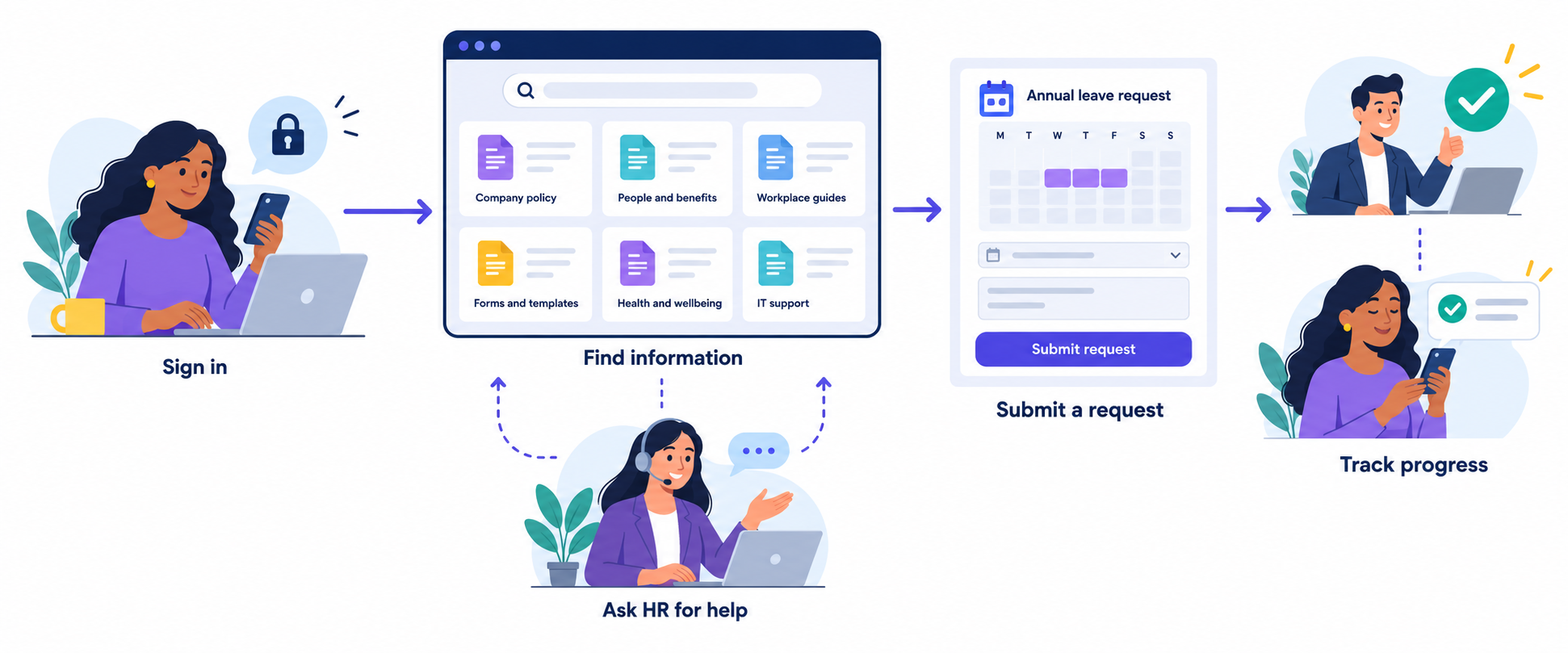
Employee self service works through a secure company intranet, portal or app where employees can find HR information and complete routine tasks.
They sign in to access relevant policies, search for guidance, update their details or submit requests, depending on their permissions and the platform's features.
For example, an employee planning a holiday could check the leave policy, view their remaining allowance and submit a request for approval. Automated workflows can then send the request to the appropriate manager.
Some platforms also include Q&A spaces or discussion tools where colleagues can share advice.
When a question involves sensitive information or needs an official answer, employees should have a clear route to contact HR privately.

How Does Employee Self Service Work
Why Use Employee Self Service?
Employee self service gives employees a straightforward way to find HR information and handle routine tasks without waiting for a reply. Whether they need to update their contact details, check a policy or request leave, they can take action when it suits them.
For HR teams, this can mean fewer repetitive questions and less manual administration, freeing up time for more complex employee needs.
Employees also gain better visibility of their information and the ability to update certain details, subject to permissions.
When information is accurate, easy to find and backed by clear support options, employee self service can make everyday HR processes smoother and improve the overall employee experience.
Why Searchable HR Documents Matter for Employee Self Service
Uploading your HR policies to a portal doesn't automatically make them useful.
Employee self service works best when people can find the right answer, in the current approved document, when they need it.
The problem often starts with information scattered across legacy systems, shared drives, email attachments and separate HR platforms. Employees don't know where to look, while HR teams struggle to keep track of which documents are current, who owns them and when they need reviewing.
That fragmentation can also make compliance management harder, particularly when outdated guidance remains available alongside approved policies
Expert insight · Employee self service
The number one issue we see clients facing is having too many legacy systems, with HR policies and documents scattered across different places. Employees struggle to find the latest approved version, and HR teams struggle to keep everything current and manage compliance.
Even when employees know where to search, several barriers can get in the way:
- Scanned PDFs without searchable text: Unless the system uses optical character recognition (OCR), the words inside a scanned document may not appear in search results.
- Unclear filenames and policy terminology: Someone searching for "holiday allowance" might struggle to locate a document titled "Annual Leave Entitlement Framework."
- Duplicate or outdated versions: Several copies of the same policy can leave employees unsure which guidance to follow.
- Documents spread across multiple systems: Employees may have to search several places before finding an answer—or give up and contact HR.
- Incorrect permissions: Employees may be unable to access guidance they need, while overly broad access can expose confidential information.
There's also a difference between finding a document and finding an answer inside it. A search result pointing to a 70-page handbook still leaves the employee with work to do.
Clear headings, searchable text and concise guidance linked to the approved policy can make that next step easier.
For effective employee self service, the goal is more than document storage: it's helping employees reach information they can understand, trust and act on.
7 Hidden Employee Self Service Problems—and How to Fix Them
An employee self service portal should help people find answers and complete routine HR tasks with less effort.
But when documents are difficult to search, outdated or disconnected from the next step, the portal can become another place employees have to check.
These seven problems show how document organisation can affect human resources self service, along with practical fixes.
The examples below are illustrative scenarios, rather than measured customer outcomes.

7 Hidden Employee Self Service Problems—and How to Fix Them
1. Routine Questions Keep Coming Back to HR
"Where's the holiday policy?" "How do I update my address?" "Which expenses form should I use?"
If employees cannot find a clear answer through HR self service, contacting HR becomes the easiest option. Uploading more documents won't necessarily help if the titles, search results and navigation remain confusing.
An employee searches for "holiday allowance," but the relevant document is called "Annual Leave Entitlement Framework." They cannot find it, so they email HR.
How to fix it:
- Use familiar language in document titles and headings.
- Turn recurring questions into short, searchable knowledge base articles.
- Include common alternative terms, such as "holiday" and "annual leave."
- Link each answer to the current approved policy.
- Provide a clear contact route when the guidance doesn't resolve the question.
Start with the questions HR answers repeatedly. They give you a practical starting point for improving your content.
2. Employees Follow Outdated Policies
Finding a document isn't enough.
Employees also need to know whether it's the version they should use.
When several copies appear in an ESS portal, shared drive and old email thread, people may follow different instructions without realising it. This can create inconsistent processes and make policy management harder.
An employee submits an expense claim using an old form downloaded from a team folder. Finance returns it because the required information has changed.
How to fix it:
- Maintain one clearly identified, approved version.
- Display the policy owner, effective date and next review date.
- Archive superseded copies and remove them from ordinary search results where supported.
- Link to the approved document rather than uploading additional copies.
- Check frequently used pages for links to outdated forms.
Keep historical versions where required by your retention rules, with access and labelling that prevent confusion.
3. Simple Requests Take Longer to Complete
An employee may find the right policy but still have no idea what to do next.
This happens when guidance, forms and approval processes sit in different places. Human resources self service becomes less useful when employees must ask someone how to complete a task after reading the instructions.
The parental leave policy explains eligibility but doesn't link to the request form or identify who handles questions.
How to fix it:
- Put a clear next step alongside each relevant policy.
- Link directly to the current form or request workflow.
- Explain what information or supporting documents are needed.
- Identify who reviews the request and how employees can check its progress.
- Provide a contact for exceptions or sensitive questions.
A useful policy page should answer three questions: What applies to me? What do I need to do? Where do I go next?
4. New Starters Miss Essential Information
New employees don't yet know your terminology, folder structure or internal processes. Expecting them to navigate a large document library without guidance adds unnecessary difficulty.
An employee handbook can provide useful detail, but it shouldn't be the only way someone discovers important first-week tasks.
A new starter receives a handbook and several welcome emails but misses the instructions for reporting sickness because they're buried in an unrelated folder.
How to fix it:
- Create an onboarding pathway organised by stage, such as before joining, day one and the first week.
- Give each task a short explanation and a direct link.
- Highlight essential policies and explain when employees will need them.
- Use acknowledgements where appropriate, while recognising that acknowledgement alone doesn't demonstrate understanding.
- Give new starters a named contact for questions.
Your ESS portal should help new starters understand what matters now, with access to more detailed guidance when they need it.
5. Managers Give Inconsistent Answers
When policies are difficult to locate or interpret, managers may rely on memory, old downloads or advice passed between colleagues.
That can leave employees receiving different answers to the same question.
Some differences may be legitimate—for example, because contracts or locations vary—but employees need guidance that makes those distinctions clear.
Two managers give different instructions about requesting flexible working because one refers to an outdated policy.
How to fix it:
- Give managers access to the same approved source.
- Clearly label policies that apply to particular locations or employee groups.
- Add manager guidance for common process questions.
- Explain which decisions require HR input.
- Link to current guidance rather than circulating downloaded copies.
Effective HR self service supports consistent answers while keeping a route to HR for questions that require individual judgement.
6. Frontline and Mobile Employees Struggle to Get Answers
A portal that works well on an office computer may be frustrating on a phone.
Small text, large downloads, awkward navigation and sign-in barriers can make basic tasks difficult for employees working across shops, venues, warehouses or other locations.
A frontline employee needs the sickness reporting procedure before a shift but can only find a large PDF that is difficult to read on their phone.
How to fix it:
- Publish concise, mobile-friendly guidance alongside detailed documents.
- Test search, sign-in and common tasks on smaller screens.
- Check access using representative employee accounts.
- Avoid assuming everyone has a company email address or desktop access.
- Provide an appropriate support route when employees cannot sign in.
Test the complete task, not just whether the page opens.
Can the employee find the guidance, understand it and take the required action?
7. Employees Stop Trusting the Portal
If searches repeatedly return irrelevant documents, broken links or conflicting instructions, employees may stop checking the portal altogether.
Emailing HR or asking a colleague can then become the default. Low usage may reflect problems with the information or experience, rather than a lack of employee interest.
An employee searches for three different policies over several weeks and finds outdated guidance each time. The next time they need help, they go straight to their manager.
How to fix it:
- Review unsuccessful searches and recurring support questions, where that information is available.
- Give employees a simple way to report missing or unhelpful content.
- Assign owners to investigate and correct reported problems.
- Fix broken links and outdated guidance promptly.
- Tell employees when a commonly reported issue has been resolved.
Building trust in employee self service takes more than encouraging people to log in. Employees need repeated experiences of finding useful, current information—and getting help when the portal cannot answer their question.
What Are the Benefits of Employee Self Service?
Employee self service gives people a convenient way to find HR information and complete routine tasks, while freeing HR teams to focus on work that needs their expertise.
For this to work, employees need clear guidance, current documents and a straightforward route to support.
Here are the main benefits, depending on your platform and its connected systems.
Less Repetitive Administration
Answering the same policy questions, sharing forms and processing basic updates takes time.
HR self service can reduce some of that manual work by helping employees find answers and submit information independently.
This can free up HR capacity for employee support, workforce planning and more complex cases. Any cost savings depend on adoption, implementation costs and how effectively the system supports your processes.
Simpler Time-Off Requests
Where leave management is supported, employees can check their allowance, read the relevant policy and submit requests through one place.
Requests can then follow a defined approval process, giving managers visibility of planned absences.
Linking the policy directly to the request form also helps employees understand the rules before applying.
Clearer Expense Processes
An ESS portal can make expense guidance and claim forms easier to find.
Employees can check what they're allowed to claim, which evidence they need and where to submit it.
If the platform includes or integrates with expense management, it may also support receipt uploads, approvals and reimbursement tracking.
Easier Access to Benefits Information
Employees can use a portal to find benefits guidance, eligibility criteria and enrolment instructions without searching through old emails.
Depending on the connected benefits system, they may also be able to review their selections or make changes.
Clear explanations should sit alongside any detailed policy documents.
Greater Employee Independence
Human resources self service gives employees more control over everyday tasks, such as updating contact details or finding the procedure for requesting leave.
That convenience matters, especially for people working outside office hours.
Employees should still be able to contact HR when their circumstances are sensitive, unusual or unclear.
Stronger Support for Compliance Processes
A well-managed portal can help employees access approved policies and help HR maintain document ownership, review dates and version history.
Where supported, acknowledgements and audit records can help document how policies were distributed or accessed.
The platform supports compliance processes; it does not guarantee legal compliance. Accurate content, appropriate permissions and regular reviews remain essential.
Clearer Access to Current HR Documents
A central starting point gives employees somewhere familiar to look for policies, forms and guidance—even when some information lives in connected systems.
Searchable text, descriptive titles and clearly labelled versions help employees identify the right document and find the answer inside it.
This is particularly valuable when replacing scattered folders and legacy systems.
Better Evidence for Improvements
Where analytics are available, HR teams can review search terms, unsuccessful searches, content feedback and request patterns to identify gaps.
For example, repeated searches for "sick pay" may suggest that the relevant guidance is difficult to locate or understand.
Combine those signals with employee feedback and task testing: page views alone don't show whether someone found a useful answer.
How to Make HR Documents Easier to Find and Use

How to Make HR Documents Easier to Find and Use
Improving employee self service starts with helping people find a clear, current answer—not simply giving them another folder to search.
Use this checklist to organise your HR documents and connect guidance to the tasks employees need to complete.
- Start with the questions employees ask most often. Review recurring HR enquiries, onboarding questions and employee feedback. Prioritise everyday needs such as holiday allowances, sickness reporting, expenses and changes to personal details.
- Audit the documents that answer those questions. Check where each document lives, whether it is accurate and which employees it applies to. Record gaps, broken links and conflicting instructions.
- Remove duplicates and archive outdated versions. Identify one approved source for each policy. Retain historical copies according to your retention requirements, but label and separate them so employees don't mistake them for current guidance.
- Assign an accountable owner to each policy. Make someone responsible for checking accuracy, approving updates and reviewing the document. Display the owner, effective date and next review date where useful.
- Use titles employees recognise. Choose "Holiday Policy" over an unclear filename such as "HR_POL_004_Final_v3." Include familiar alternatives naturally, such as "annual leave," to support different search habits.
- Check what your search can actually read. Test whether it searches document contents or only filenames. Scanned documents may need optical character recognition (OCR) to make their text searchable. Check the converted text for errors, particularly in dates, figures and policy conditions. canned HR documents need particular attention. A PDF may look readable on screen while containing only an image of the page, leaving its contents invisible to text search. OCR adds a machine-readable text layer, which can make the document searchable if your portal indexes PDF contents.Apryse's comparison of traditional and AI-driven OCR technology explains the distinction between recognising characters and understanding page layout—a useful consideration for HR forms containing boxes, columns and tables. Handwriting recognition may require additional capabilities. Before publishing, check the extracted text, particularly names, dates and policy conditions, and test whether employees can find the document through your portal.
- Create short guidance linked to the approved policy. Answer the immediate question in plain language, then link to the full document and relevant form. Keep summaries aligned with the policy whenever it changes.
- Test permissions with representative accounts. Check what employees, managers and HR staff can find and open. Keep general policies separate from confidential employee records, and ensure search results—including titles and snippets—respect access permissions.
- Test real tasks on desktop and mobile. Ask representative employees to find a policy, locate a form and complete a request. Note confusing results, unreadable documents and unnecessary steps.
- Make contacting HR straightforward. Provide a visible support link or contact beside the guidance. Explain where employees should take sensitive questions or situations the published information doesn't cover.
Start with a small set of frequently used policies, fix the problems you uncover, then apply the same process across the wider document collection.
Download the Employee Self Service Evaluation Checklist
Can employees find the right HR policy, access the correct form and complete a request without getting stuck? Use this free, three-page checklist to review document accuracy, search, permissions, mobile access and workflows.
It includes practical testing steps and space to record issues, assign owners and decide what needs fixing before rollout.
Employee-Self-Service-Evaluation-Checklis_20261022-172900_1
109 kb
What Should You Look for in an Employee Self Service Portal?
An employee self service portal should make everyday HR tasks easier to complete.
A long feature list won't tell you whether an employee can find the current sickness policy or submit a leave request without help. Testing those tasks will.
Use this table when evaluating a new platform or reviewing your existing portal.
| Capability | What to look for | How to test it |
| Search across content and documents | Search that covers the pages, articles and file formats you use, with clear limits on scanned documents. | Search for a phrase inside a policy rather than its filename. Check whether the approved document appears. |
| Clear navigation and mobile access | Readable pages, straightforward menus and forms that work on smaller screens. | Ask a frontline employee to find the current sickness reporting procedure on their phone. |
| Role-based permissions | Access that reflects an employee's role and responsibilities, while protecting confidential information. | Use representative employee and manager accounts. Check both search results and direct document links for inappropriate access. |
| Document ownership and version controls | Clear ownership, review dates and a way to distinguish current guidance from historical copies. | Update a test policy and check whether employees can identify the approved version. |
| Links between guidance and tasks | Policies connected to the relevant forms, requests and next steps. | Start at the leave policy and follow the process through to submitting a test request. |
| Feedback and human support | An easy way to report missing information and contact HR privately. | Try reporting an unclear answer and check who receives the feedback. Confirm that the support route works. |
| Relevant HR system integrations | Connections that support your actual workflows, with clearly defined data ownership and update behaviour. | Test an authorised change and verify where it appears, how long it takes and what happens if the connection fails. |
Include employees from different teams, locations and working patterns in your tests. Someone who helped configure the portal will usually find it easier to navigate than someone using it for the first time.
Ask vendors to demonstrate your real tasks using representative content.
This gives you better evidence than a polished demonstration using perfectly organised sample documents.
What Are the Top Features of Effective Employee Self Service Systems?
The most useful employee self service systems connect information, tasks and support in a way that makes sense to employees.
Someone looking up a policy should be able to understand what applies to them, find the next step and ask for help if their situation needs individual attention.
Features vary between platforms. Some focus on HR transactions, while others bring together documents, communications and employee support.
Use the capabilities below to decide what your organisation needs, then check whether each function is included, requires an integration or costs extra.
Targeted Content Publishing and Delivery
Employees need relevant updates without having to sort through every announcement published across the organisation. Content publishing tools can help HR teams share policy changes, reminders and guidance with the right groups.
Depending on the platform, content can be scheduled and distributed through portal announcements, email or mobile notifications. Targeting by department, location or role can help employees receive information that applies to their work.
For example, a change to a location-specific holiday policy should reach the affected employees and link directly to the approved guidance.
Look for a publishing process that keeps announcements connected to the current source document, rather than creating more copies to maintain.
Clear Employee Tasks and Responsibilities
A task list should help employees understand what they need to do, when it is due and what counts as completion.
This is particularly useful during onboarding, policy updates and other processes involving several steps.
Each task should include clear instructions, relevant documents and a link to the required action. Where supported, employees should also be able to see deadlines, progress and any steps waiting on someone else.
For example, "Complete your onboarding" is vague.
A more useful task would explain which form to submit, what information is required and who to contact with questions. Check that reminders reflect the task's status so employees aren't repeatedly chased for work they have already completed.
Employee Requests and Status Tracking
Submitting a request is only the beginning. Employees also need to know whether it was received, who is handling it and whether they need to provide more information.
An effective ESS portal gives employees a clear view of their current and previous requests, subject to appropriate access and retention rules. This might cover leave applications, document requests or changes to personal information, depending on the system.
Useful status updates explain what happens next.
"Waiting for manager approval" tells an employee more than "Pending." Check whether the platform supports follow-up questions, relevant attachments and private handling of sensitive requests.
A Searchable HR Knowledge Base
A knowledge base turns recurring questions into accessible guidance. It should help employees find answers using everyday language, without needing to know the official policy title or internal department responsible.
Useful articles explain the answer clearly, identify any conditions and link to the approved policy or relevant form.
For example, an article answering "How do I report sickness?" should explain the reporting steps and where to get help with an unusual situation.
Search quality matters as much as the number of articles available. Check whether the system searches page text, supported document contents and common alternative terms.
Clear ownership and regular reviews are essential: an easy-to-find answer can still cause problems if it is outdated.
Employee Directories and Organisational Information
Sometimes the missing information is who to contact. An employee directory and organisational chart can help people understand team structures, reporting lines and responsibilities.
This is especially useful for new starters and employees working across several locations. A directory can help someone identify their HR contact, find a department lead or understand which team owns a process.
Look for profiles that contain useful work information and remain current as people join, move roles or leave. Access should reflect your organisation's privacy requirements, and personal contact details should not be exposed simply because they are available in a connected HR system.
Private Access to HR Support
Some questions need a conversation, particularly when they involve personal circumstances or unclear policy conditions.
A visible support route helps employees move from published guidance to individual assistance without starting their search again.
Depending on the platform, this could be live chat, a private enquiry form or a support request. If chat is available, check whether employees are speaking to a person or an automated assistant, what hours support operates and how unresolved questions reach HR.
Avoid promising immediate help unless someone is available to provide it. Employees should know when to expect a response and which route to use for urgent concerns.
Sensitive conversations also need appropriate access controls and handling procedures.
Employee Forums and Peer Discussions
Discussion spaces can help employees share practical advice, ask general questions and learn from colleagues.
They can be particularly useful for onboarding tips, finding internal resources and exchanging knowledge between locations.
However, peer advice should be clearly distinguishable from approved HR guidance. A colleague's experience may not apply to someone with a different contract, location or personal circumstances.
Provide moderation, community guidelines and links to authoritative information where needed. Employees should also understand which questions belong in a private HR channel. Forums work best when they complement formal support and make useful knowledge easier to discover.
Feedback and Reporting That Support Improvement
A useful system should help you identify where employees get stuck. Depending on its capabilities, it may provide search reports, request trends, article feedback or task completion information.
These signals can reveal practical problems. Repeated searches for "maternity leave" with no results may indicate missing terminology, while frequent questions about the same form may suggest unclear instructions.
Combine reporting with direct employee feedback before drawing conclusions.
High page views don't necessarily mean an article is helpful, and fewer requests don't automatically mean employees have resolved their questions. Focus on whether people can find accurate information and successfully complete the task.
Where AgilityPortal Fits into Employee Self Service
Where AgilityPortal Fits into Employee Self Service
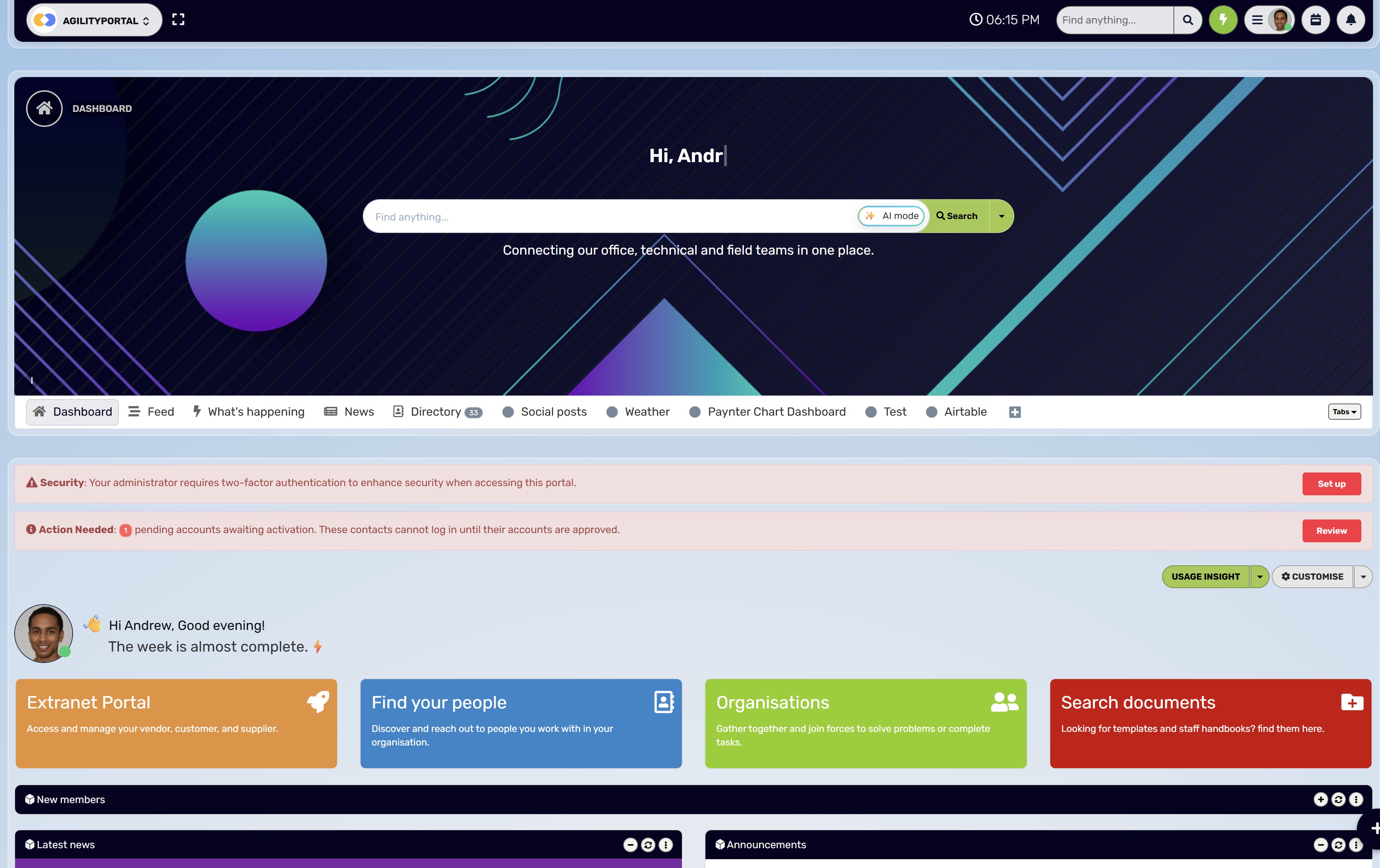
AgilityPortal brings HR policies, documents, employee guidance and internal communication into one digital workplace.
Its document library, knowledge base and pages give organisations a central place to publish information, while forms and onboarding pathways help connect that guidance to everyday tasks.
Together, these tools support employee self service by giving people a clearer starting point for finding information and requesting help.
For example, an organisation could create a leave guidance page that explains the process, links to the approved policy in its document library and directs employees to the relevant request form. HR teams should identify which system holds the authoritative policy and maintain links to that source, helping employees avoid conflicting copies.
Beyond HR information, AgilityPortal offers announcements, team spaces, chat and Q&A to support communication and knowledge sharing. Its mobile apps give distributed and frontline teams another way to access their workplace resources.
Organisations should test document search, permissions and common tasks against their own content and configuration before rollout.
AgilityPortal can also serve as a starting point for accessing connected business tools. Payroll-specific functions, such as payslips, benefit balances or payroll data changes, depend on the relevant system and any configured integration.
See how AgilityPortal can bring HR policies, documents and employee guidance into one place.
AgilityPortal · Employee Self Service
Give Employees a Clear Starting Point for HR Information
Bring HR policies, documents and employee guidance together with AgilityPortal. Use document libraries, knowledge base articles and pages to organise information, then connect employees to relevant forms and onboarding tasks—alongside the communication tools they use to stay informed.
Put it into practice:
Create a leave guidance page with a plain-language explanation,
a link to the current approved policy and a clear route to the
relevant request form.
Document Library
Knowledge Base
HR Guidance Pages
Forms & Approvals
Onboarding Pathways
Mobile Apps
Explore AgilityPortal
Connect HR information with everyday employee tasks.
Payroll functions and access to data in external HR systems depend on the relevant platform and configured integrations. Check search coverage, permissions and workflows against your requirements.
How Do You Know Employee Self Service Is Working?
Start by measuring how employees complete common tasks today. Then repeat the same checks after improving your documents, search or workflows.
Choose a manageable set of tasks, such as finding the holiday policy, locating an expenses form and submitting a leave request. Record whether employees succeed, how long they take and where they need help.
Use comparable tasks and employee groups when testing again.
| Measure | What it helps you assess | How to track it |
| Successful completion of common tasks | Whether employees can get something done independently. | Observe task tests and record completed, abandoned and assisted attempts separately. |
| Time taken to find an approved answer | Whether current information is easy to locate. | Time employees from the start of a search until they identify the correct answer. Check accuracy alongside speed. |
| Searches returning no results | Gaps in content, terminology or indexing. | Review unsuccessful queries where search analytics are available, then investigate the recurring terms. |
| Repeated routine HR questions | Guidance or processes that still need improvement. | Group enquiries by topic and compare patterns over time, allowing for seasonal changes and workforce size. |
| Documents past their review date | Whether policy ownership and maintenance are working. | Check your document register regularly and follow up with the accountable owners. |
| Employee feedback | Whether answers are understandable and useful. | Collect brief feedback on guidance and ask what prevented employees from completing a task. |
Set improvement targets from your own baseline rather than choosing an arbitrary benchmark.
A complex benefits question will naturally take longer to resolve than finding a standard form.
Fewer HR requests alone do not prove success.
Employees might be finding answers independently, but they could also be giving up or asking colleagues instead. Read enquiry volumes alongside task completion, answer accuracy and employee feedback to understand what is actually improving.
What Are the Challenges of Getting an Employee Self Service?
Introducing employee self service involves more than choosing software and uploading HR documents.
Employees need to trust the information, understand how to use the system and access it during their normal working day.
HR teams also need clear responsibilities for maintaining content and handling questions the portal cannot resolve.
Here are the main challenges to plan for.
Bringing Scattered Information Together
Policies, forms and employee guidance may sit across shared drives, email attachments and legacy systems.
Moving everything into a new portal without reviewing it can carry the same confusion into a different interface.
What helps: Audit content before migration. Identify the approved version, assign an owner and decide what to update, archive or leave in its existing system. Where information stays elsewhere, provide a clear link to the authoritative source.
Encouraging Employees to Change Their Habits
Employees who are used to contacting HR directly may continue doing so, especially if previous portals were difficult to use.
A launch announcement alone is unlikely to change that behaviour.
What helps: Demonstrate a few useful tasks, such as finding the holiday policy or submitting a request. Ask managers to link employees to relevant guidance, while keeping personal support available. Use feedback to fix frustrating steps rather than treating every difficulty as a training problem.
Connecting Existing HR and Payroll Systems
An ESS portal may need to exchange information with payroll, leave management or other HR tools. Differences in data formats, access controls and update schedules can make those connections more complicated than expected.
What helps: Define which system owns each type of information, what data moves between systems and who can change it. Test normal updates, failed transfers and corrections before rollout. Confirm integration costs and limitations early.
Protecting Confidential Employee Information
General policies and private employee records require different access controls. Incorrect settings could prevent employees from finding essential guidance or expose information they should not see.
What helps: Separate shared content from confidential records and apply permissions according to role and need. Test search results, document previews and direct links using representative accounts.
Include changes of role and employee departures in your access-management process.
Supporting Frontline Employees and Different Access Needs
Not everyone has a company laptop, work email address or reliable access during a shift.
Unreadable documents, complicated sign-in steps and inaccessible forms can exclude the employees who need the portal.
What helps: Test complete tasks on the devices employees actually use. Check accessibility, language needs and the suitability of your sign-in options. Provide an alternative support route for people who cannot access or use the system.
Keeping Content Accurate After Launch
Even a well-organised portal becomes less reliable when policies change but summaries, forms and links remain untouched.
Without ownership, maintenance can fall between HR, IT and communications teams.
What helps: Assign content owners, set review dates and establish an approval process. When a policy changes, check every related page, form and task. Give employees a simple way to flag outdated or conflicting information.
Managing Scope, Costs and Internal Workload
Trying to introduce every feature at once can stretch the project team and make testing harder.
Costs may also include migration, integrations, training and ongoing administration alongside the software subscription.
What helps: Start with a manageable set of high-value tasks and document the resources needed to support them. Expand once employees can complete those tasks reliably and the team can maintain the service.
Knowing Whether the Rollout Has Succeeded
Logins and page views show activity, but they do not reveal whether employees found the right answer.
A fall in HR enquiries could also mean people are abandoning tasks or asking colleagues instead.
What helps: Establish a baseline before launch, then compare task completion, answer accuracy, search difficulties and employee feedback after rollout. Use that evidence to guide improvements rather than relying on adoption figures alone.
Final Thoughts
Employee self service works when people can find a current, trustworthy answer and understand what to do next.
A portal full of policies won't achieve that on its own. Clear guidance, well-managed documents, appropriate permissions and an accessible route to HR all play a part.
Start with a simple test: ask several employees to find answers to three common HR questions, such as how to report sickness, request holiday or submit an expense claim. Include people from different teams and ask some to use their phones.
Watch where they get stuck without guiding them through the process.
Use what you learn to prioritise fixes. An unclear title, outdated policy or missing form link may be a better starting point than adding more content.
Repeat the test after making changes to check whether employees can find the right answers and complete their tasks more easily.
Frequently Asked Questions
What Is Employee Self Service?
Employee self service (ESS) lets employees access HR information and complete routine tasks through a secure portal or app.
Depending on the system, this can include finding policies, updating personal details and requesting leave.
Searches such as "ESS employee service" or "ESS self" may refer to these tools, although the correct platform depends on your employer.
What Can Employees Do Through an Employee Self Service Portal?
Employees can find HR documents, complete forms, follow onboarding tasks and submit requests. Where payroll functionality is available, ESS payroll tools may also provide access to payslips and pay information.
Searches for "ESS pay" often relate to these features, but availability depends on the platform, integrations and employee permissions.
Is Employer Self Service the Same as Employee Self Service?
Not necessarily. Although people sometimes search for "ESS employer self service" when looking for their employee portal, employer self service can describe tools for administrators or businesses. Check whether the login page is intended for employees, managers or payroll administrators before entering your details.
Why Do Employees Still Contact HR When a Self Service Portal Exists?
Employees may struggle with outdated documents, unclear instructions, unsuccessful searches or access problems.
Others need advice about circumstances that general guidance cannot cover. Improve the information and workflows, but keep a clear route to HR for sensitive or complex questions.
Can Employee Self Service Search Inside PDF Documents?
Some systems can search text inside PDFs, while others search only filenames or document descriptions. Results depend on the file format, search indexing and access permissions.
Scanned PDFs usually need optical character recognition (OCR) to make their text searchable, and the extracted text should be checked for errors.
How Do You Keep HR Policies Up to Date?
Assign an accountable owner to each policy, record its effective date and schedule reviews.
Maintain one approved version, archive superseded copies appropriately and update related guidance and forms whenever the policy changes. Give employees a straightforward way to report conflicting or outdated information.
How Can Frontline Employees Access HR Documents?
Frontline employees can access documents through a mobile-friendly portal or app, provided they have suitable credentials and permissions. Test sign-in, search and document readability on the devices they use.
Organisations should also provide an alternative support route for employees who cannot access the platform.
What Is the Difference Between Employee Self Service and an HR Knowledge Base?
An HR knowledge base provides searchable answers, policies and guidance.
Employee self service has a broader scope and may also include forms, requests, personal information updates and approval workflows.
A knowledge base can sit within an ESS portal, connecting information to the action an employee needs to take.
How Do I Find My Employer's ESS Login?
Use the link supplied by your HR team, onboarding materials or official company intranet.
Searches such as "Reading employee self service," "TUI employee self service," "mybaplc com employee self service" and "Oracle self service log in" relate to particular organisations or systems.
Your employer should confirm the correct address; a generic ESS page cannot identify your account.
When Should an Employee Contact HR Directly?
Contact HR when guidance is missing, contradictory or does not address your circumstances.
Private support is particularly useful for pay discrepancies, sensitive personal matters, workplace concerns and access problems. A portal should make routine tasks easier while keeping individual assistance available when needed.
AI Summary
- Employee self service gives employees access to HR information and routine tasks through a secure portal or app. Available functions depend on the platform, permissions and integrations.
- Hard-to-find HR documents can contribute to repeated questions, outdated guidance, slower requests, missed onboarding information, inconsistent manager answers, mobile access difficulties and reduced trust in the portal.
- Improve HR self service by maintaining approved policy versions, assigning document owners, using familiar language and connecting guidance to the relevant forms and next steps.
- Test whether your ESS portal searches document contents. Scanned PDFs may require optical character recognition (OCR). Search results, previews and document access must respect employee permissions.
- AgilityPortal brings documents, knowledge base articles, pages, forms and onboarding guidance into a digital workplace. Payroll-specific functions depend on the relevant system and any configured integrations.
- Measure successful task completion, answer accuracy, search difficulties and employee feedback against a baseline. Fewer HR enquiries alone do not prove success. Keep a clear route to HR for sensitive or unresolved questions.
Most Popular Posts

Effective communication among team members is vital for the productivity and success of any organization. Surprisingly, 60% of companies lack a long-term internal communication strategy, which p...


Businesses thrive on communication for efficiency, productivity and accomplishment. When the right information is passed from the right designation in the organization, it promotes positivity an...

Categories
Blog
(3242)
Business Management
(398)
Employee Engagement
(236)
Digital Transformation
(223)
Growth
(151)
Intranets
(142)
Internal communications
(110)
Remote Work
(68)
Sales
(53)
Collaboration
(53)
Customer Experience
(33)
Culture
(30)
Project management
(30)
Knowledge Management
(29)
Leadership
(20)
Comparisons
(9)
News
(1)

Related Posts

Does your team still message HR to ask where the holiday policy is? Employee self service should make everyday tasks easier, giving people a straightforward way to find answers, access documents and submit requests. But when policies are buried...

How quickly can a new partner go from signing an agreement to confidently working with your business? If the answer involves chasing documents, forwarding training links and answering the same questions repeatedly, your onboarding process may n...

Looking for the best GraphQL CMS because keeping several brands organised is becoming a headache? You update a product description for one website, then realise two other brands are still showing the old version. Meanwhile, your frontend ...

Are you weighing up an employer of record vs local entity to hire overseas—and wondering which option will help you grow without creating expensive compliance problems? If you're a business owner, HR director or people operations leader struggling to...

Why does your internet connection seem fast until everyone joins a video call or starts uploading files? Understanding the factors to consider when choosing an internet service provider can help you avoid a package that looks good on paper but ...


Jill Romford
I am a digital nomad, lover of exploring new places and making friends.
I love to travel and I love the internet. I take pictures of my travels and share them on the internet using Instagram.
Traveler, entrepreneur, and community builder. I share my insights on digital marketing and social media while inspiring you to live your fullest life.
Ready to learn more? 👍
One platform to optimize, manage and track all of your teams. Your new digital workplace is a click away. 🚀
Free for 14 days, no credit card required.