
Insight Blog
Agility’s perspectives on transforming the employee's experience throughout remote transformation using connected enterprise tools.
37 minutes reading time
(7324 words)
Factors to consider when choosing an internet service provider: A complete guide

Factors to consider when choosing an internet service provider | A complete guide
Discover the crucial factors to consider when choosing an internet service provider to ensure you get the best deal and experience. Learn more now.
Factors to consider when choosing an internet service provider | A complete guide

Why does your internet connection seem fast until everyone joins a video call or starts uploading files?
Understanding the factors to consider when choosing an internet service provider can help you avoid a package that looks good on paper but struggles during your working day.
Connection problems are common.
A 2025 Which? survey of nearly 4,500 UK broadband customers found that 85% had experienced at least one connection issue in the previous year, including slow speeds, dropouts and router problems.
The research covers household broadband customers, rather than business connections, but it shows why speed, reliability and equipment all deserve attention.
85%:
of surveyed UK broadband customers experienced at least
one connection issue in the year to January 2025
A 2025 Which? survey of nearly 4,500 UK broadband customers found that 85% had experienced at least one connection issue in the previous year. Reported problems included slow speeds, connection dropouts and router issues. The findings concern household broadband, rather than business connections, and do not establish that every issue was caused by the ISP’s network.
For your team, the question is practical: can colleagues join meetings, share documents and access workplace applications when they need them?
A low monthly price becomes less attractive when people spend their time reconnecting or waiting for help.
In this guide, you'll learn which ISP features matter, what to ask providers and how to compare the full costs using a straightforward checklist.
You'll also discover how to check whether your current problems come from the internet connection or your Wi-Fi, so you can make a better-informed decision before signing a contract.
Key Takeaways
- Confirm availability at your exact address and choose a connection that supports your busiest working periods, including simultaneous calls, file uploads and cloud applications.
- Compare upload and download capacity alongside latency, jitter and packet loss. Advertised download speed alone does not describe the quality of your connection.
- Check written service commitments, support hours, fault-response and restoration targets. Plan and test backup connectivity for essential business activities.
- Investigate Wi-Fi, devices and internal network equipment before assuming you need a faster internet package. Clarify who manages equipment, updates and security.
- Compare the full contract cost, usage restrictions, renewal terms and cancellation charges. Test essential systems on the new connection before withdrawing the old service where practical.
What should you check before choosing an internet service provider?
Before comparing packages, think about what your internet connection needs to handle on a normal working day—and during your busiest hour.
Does your team mainly use email and shared documents?
Or are several people joining video meetings while others upload files, run backups and help customers? Those activities place different demands on the same connection.
Start with your requirements, then compare providers against them. A package with the biggest advertised download speed won't necessarily give you the right upload capacity, support or contract flexibility.
Here's a quick checklist to guide your shortlist:
| Factor | What to check | Why it matters |
| Availability | Confirm service at your exact premises | Coverage in your area doesn't guarantee installation at your building |
| Connection type | Understand how the service reaches you | Installation requirements and service characteristics vary |
| Download and upload capacity | Assess both directions during busy periods | Uploading files and sending video need sufficient upload capacity |
| Connection quality | Ask about latency, jitter and packet loss | Delays and unstable delivery can affect live conversations |
| Reliability | Read written service commitments and exclusions | You need to understand what the provider promises |
| Customer support | Check support hours, escalation and restoration targets | Help needs to be available when your business operates |
| Backup connectivity | Establish how essential activities continue during an outage | A second connection needs a workable, tested switching process |
| Security and compatibility | Clarify equipment management and technical requirements | Your connection must work with your systems and security arrangements |
| Usage policies | Review allowances, restrictions and excess charges | Heavy usage may affect performance or cost, depending on the service |
| Total contract cost | Include setup, equipment, add-ons and price changes | The advertised monthly rate may exclude important charges |
| Flexibility | Check upgrade, relocation, renewal and cancellation terms | Your needs could change before the contract ends |
Write down what your team actually needs
You don't need a complicated technical specification to get started.
A short requirements list will make conversations with providers much more useful.
Record:
- Who uses the connection: Include employees, visitors and connected equipment.
- What happens simultaneously: Note overlapping meetings, uploads, backups and other demanding activities.
- Which services are essential: Identify the applications your team cannot work without.
- When support is needed: Include evenings or weekends if those are part of your operating hours.
- What happens during an outage: Decide which activities must continue and which can wait.
For example, a small office handling large design files may need particular attention to upload performance. A hospitality venue might prioritise reliable operational systems and keeping guest traffic separate from staff activity.
Give every shortlisted provider the same requirements.
That way, you can compare their answers fairly and ask for evidence where a promise matters. Next, let's work through the 11 factors in more detail so you know exactly what to ask before signing.
11 factors to consider when choosing an internet service provider
Once you know what your team needs, you can compare providers more confidently.
Work through these factors with each shortlisted ISP, and ask for important commitments in writing.

Important factors to consider when choosing an internet service provider
1. Availability at your exact business address
Before getting attached to a package, check whether the provider can actually deliver it to your premises. A service advertised in your town may still be unavailable at your building or require installation work.
Give the provider your full address, including the unit or suite number. If you rent your premises, establish whether new cabling or equipment needs approval from your landlord.
Ask these questions before accepting a quotation:
- Is availability confirmed? Check whether the offer follows an address check or still depends on a site survey.
- What installation work is required? Ask about cabling, equipment and access to shared building areas.
- When can the service go live? Separate an estimated installation date from a confirmed commitment.
- Could additional charges apply? Request details of any survey or construction costs before authorising work.
For UK premises, the Ofcom broadband coverage checker provides a useful starting point. Confirm the final service options and installation requirements with the provider, as predicted availability and speeds are subject to checks.
For example: If your business is moving offices, don't assume the package available at your current address can move with you. Check the new premises early enough to arrange installation and temporary connectivity if needed.
2. Connection type and installation requirements
It is important to weigh both the speed and bandwidth of the ISP. How quickly you can download and upload data depends on your internet connection speed, while how much data can be delivered simultaneously depends on your bandwidth.
Streaming video, playing online games and downloading large files greatly benefit from a speedy connection. Work from home or join a video conference? You'll need a reliable internet connection for both.
Another factor to consider is bandwidth, which is especially crucial when sharing an internet connection with numerous people. This can also matter for services such as Bixberry, which use participants' internet resources to route AI requests through their connections. If more data can be delivered simultaneously, more people can use the internet without affecting anyone else's speed.If you're shopping around for an ISP, it's vital that you find one that can accommodate your specific requirements in terms of both download and upload speeds. Remember that you may need to test the connection to check its performance and that the advertised speed may not always match the speed you receive.
As a result, the quality and dependability of your internet connection are directly tied to the speed and bandwidth of your ISP.
| Connection option | What to investigate | Question to ask the provider |
| Full fibre broadband | Upload and download capacity, installation and service commitments | "What performance and fault support does this package include?" |
| Cable broadband | Availability, upload capacity and expected performance | "Will the upload capacity support our busiest working periods?" |
| Fixed wireless or mobile broadband | Signal, equipment placement, usage policies and performance | "Can we test the service at our premises before committing?" |
| Satellite broadband | Installation position, latency, equipment and usage conditions | "How will our calls and other essential applications perform?" |
| Dedicated connection or leased line | Committed capacity, installation lead time, SLA and total cost | "Which performance and restoration commitments appear in the contract?" |
Compare the package, not just the connection label. Two services described as "business fibre" may have different upload capacity, support arrangements and contractual commitments.
Before choosing, ask your IT contact to confirm that the proposed service will work with your router, remote-access arrangements and essential applications.
That gives you a clearer picture of any equipment changes or setup costs before installation begins.
3. Download and upload capacity for your workload
It's tempting to compare internet packages by the biggest speed on the page. But before paying for more capacity, check what your team needs to do—and how many people will be doing it at once.
Download speed affects how quickly you receive data, such as downloading documents or watching training videos. Upload speed affects how quickly you send data, including sharing large files, sending your camera feed during a meeting and backing up information online.
Both matter. A connection with a strong download speed can still struggle if its upload capacity becomes saturated.
| Workplace activity | What to consider | What to ask the provider |
| Video meetings | How many colleagues join calls simultaneously | "Will the expected upload and download capacity support our busiest meeting periods?" |
| Large file transfers | File sizes, transfer frequency and deadlines | "What upload performance should we expect at this address?" |
| Cloud applications | Which systems employees use throughout the day | "How should we assess performance with our essential applications?" |
| Online backups | Whether backups overlap with working hours | "Can the supplied equipment help manage competing traffic?" |
| Staff and guest access | How many devices share the connection | "What equipment and capacity would suit our usage?" |
For example, imagine several colleagues joining customer calls while someone uploads a large video file. They're sharing the available upload capacity. If that capacity becomes the bottleneck, a higher advertised download speed alone may not solve the problem.
Before requesting a recommendation, record:
- The number of people likely to use the connection simultaneously.
- Activities that overlap during busy periods.
- Typical file sizes and backup schedules.
- Expected changes in employees, devices or applications.
Avoid choosing a package using employee headcount alone. A small creative team uploading large files may have different requirements from a larger team mainly using email. Give providers your actual workload and ask them to explain their recommendations.
4. Latency, jitter and packet loss
It's crucial that you can count on a constant internet speed. Streaming video, playing online games, and downloading large files are all made much easier with a reliable and constant connection speed.
Buffering, delayed loading times, and disruptions in online activities are all possible outcomes of connection instability. Productivity may suffer as a result of this.
Service dependability should be a top priority when deciding on an ISP. A dependable service won't slow down your connection when traffic levels are high. The uptime and SLA of the supplier and feedback from existing customers are two ways to ascertain this.
The ISP's technology, such as fiber-optic or cable, should also be taken into account because it can affect the stability and consistency of your connection.
In conclusion, a constant download speed is an absolute must for your internet service provider. You can utilize the internet more efficiently and effectively if your connection is reliable and constant.
| Measurement | What it means | What you might notice |
| Latency | The time data takes to travel between points; many tests report the round-trip delay | A pause between speaking and hearing a response |
| Jitter | Variation in the time data takes to arrive | Uneven audio or difficulty maintaining a smooth conversation |
| Packet loss | Some transmitted data fails to arrive | Missing audio, degraded video or interruptions |
These measurements help explain why connection quality matters alongside speed.
Cloudflare's guide to internet quality explains how latency, jitter and packet loss can affect the experience even on a connection with higher throughput.
When comparing providers, ask:
- Do you offer performance commitments? Confirm whether relevant measures appear in the contract or are simply indicative.
- Where are measurements taken? Performance to a provider's network is different from performance to every application your team uses.
- How are problems investigated? Ask what test results support will need and how you should report recurring issues.
- What happens when the connection is busy? Test calls while representative uploads and other work are happening.
You can use a tool such as Cloudflare Speed Test to gather measurements, then compare them with the behaviour of your actual workplace applications. Record whether you tested over Ethernet or Wi-Fi and repeat checks at different times.
Treat results as evidence to investigate, rather than an automatic verdict against your ISP. Your device, internal network, application and the route between services can all influence the experience
5. Reliability and written service commitments
A provider describing its connection as "reliable" sounds reassuring. But what happens if the service goes down during your busiest working day?
That's where the written terms matter. Ask whether the package includes a service-level agreement (SLA), then check exactly what it covers. Don't assume that every business internet package includes the same commitments.
An SLA may describe availability targets, fault handling and compensation. The important details are how those commitments are measured and which conditions apply.

Service interruption and downtime
| Item to check | Question to ask | Why it matters |
| Availability commitment | "What availability level does the contract specify, and how is it calculated?" | Establishes what the provider actually promises |
| Measurement boundary | "Does this cover the connection to our premises, your network or something else?" | Helps you understand which problems fall within the commitment |
| Maintenance exclusions | "Does planned maintenance count towards downtime?" | Exclusions can change how availability is calculated |
| Fault reporting | "When does the downtime clock start?" | The provider may require you to report the fault before a target applies |
| Compensation | "What credits apply, and how do we claim them?" | Compensation may require evidence and a claim within a specified period |
| Customer responsibilities | "What equipment or access must we provide?" | Your own configuration or inability to provide access may affect the terms |
Service disruptions and outages can be very frustrating when deciding on an ISP. Work, leisure, and communication rely heavily on constant access to the internet, making it all the more frustrating when the service is interrupted.
The track record of service interruptions and downtime is important when selecting an ISP. This data is accessible via the service provider's service level agreement and uptime assurances, as well as through user evaluations and feedback.
The provider's procedures for handling service interruptions and the accessibility of their support staff should also be taken into account. Any disruptions or unavailability in service can have less of an effect if the provider can respond quickly and effectively to any issues that arise.
Further, the provider's network's reliability and redundancy are crucial factors to think about for minimizing the likelihood of service outages.
For this reason, it's crucial to think about the ISP's dependability, problem-solving procedures, and network stability before committing to them.
6. Support hours, escalation and restoration targets
When deciding on an ISP, it's crucial to weigh the quality and accessibility of their customer care. If you experience any difficulties with your internet connection, having access to efficient and helpful customer care can considerably assist in getting the problem fixed as soon as possible.
When deciding on an ISP, it's crucial to think about how easily you'll be able to get in touch with its staff if you have any questions or problems. If you experience any problems with your internet service, having a provider available at all hours and providing prompt service will help mitigate the situation.
The quality of customer service, including support workers' technical knowledge and ability to efficiently fix difficulties, should also be considered. Feedback from current and former clients can shed light on a service provider's quality of customer service.
Self-help options, such as online tutorials and FAQs, can help you swiftly fix common issues without requiring direct contact, which is also something to consider.
Therefore, the availability and quality of customer assistance are vital features to consider when selecting an ISP. If you experience any problems with your internet connection, having access to prompt and professional customer care is essential for fixing any issues as soon as possible and returning online.
When the internet stops working, you want a clear route to someone who can help. You don't want to spend the first hour finding your account number, working out which team owns the fault or discovering that technical support has closed.
Start by matching support availability to your operating hours. A hospitality venue working late into the evening may need different arrangements from an office that closes at five.
Then separate two easily confused promises: response time and restoration time. A quick acknowledgement is useful, but it doesn't mean the connection will be working again within that period.
| Support detail | What to confirm |
| Support hours | When you can report faults and when technical staff investigate them |
| Contact methods | Whether urgent faults need a phone call, portal ticket or another route |
| Response target | How quickly the provider aims or commits to acknowledging and investigating a fault |
| Restoration target | What target applies to restoring service, including conditions and exclusions |
| Escalation process | Who takes ownership when a fault remains unresolved |
| On-site assistance | Whether engineer visits are included and when charges could apply |
| Progress updates | How often you receive updates and who receives them |
Ask the provider to explain a realistic scenario:
"If our connection fails at 7 pm on a Saturday, how do we report it, who investigates it, and what happens next?"
That question often gives you a clearer answer than asking whether they provide "excellent customer service".
Before signing, also agree who inside your organisation will:
- Report faults and provide basic diagnostic information.
- Authorise access to equipment or premises.
- Receive updates and escalate unresolved issues.
- Tell employees which temporary working arrangements to follow.
Good support needs clear ownership on both sides. Keep the provider's contact details, account reference and escalation instructions somewhere authorised staff can access even when the main internet connection is unavailable.
7. Backup connectivity and failover
What would your team do if the main internet connection stopped working for several hours? It's worth answering that before an outage forces everyone to improvise.
Start by identifying the activities that must continue. You might need customer calls, payment systems or access to essential workplace applications. Downloads and guest Wi-Fi may be able to wait.
Backup connectivity provides an alternative route online. Failover is the process of switching to that connection, either automatically through suitable equipment or manually using an agreed procedure.
However, buying a second service doesn't automatically give you an independent backup. Ask whether both connections depend on the same underlying network, cabling or equipment.
| Backup consideration | What to check | Why it matters |
| Network independence | Whether the main and backup services share infrastructure | A shared fault could affect both connections |
| Mobile coverage | Signal and performance where the backup equipment will operate | Coverage maps alone won't confirm indoor performance |
| Available capacity | Whether the backup supports essential activities | It may not accommodate your normal workload |
| Usage allowance | Data limits, restrictions and excess charges | An extended outage could increase usage significantly |
| Switching process | Whether failover is automatic or requires someone to act | Staff need to know what to do when the connection fails |
| Power requirements | Which routers and other devices need backup power | An alternative connection still depends on working equipment |
| Recovery | How systems return to the main connection | Switching back also needs testing |
For example, a venue could use a mobile backup to keep selected operational systems connected while temporarily restricting guest access and large downloads. Whether that works depends on coverage, equipment and application requirements.
Before relying on the arrangement:
- Test an outage under controlled conditions with your IT provider.
- Confirm that essential applications work over the backup.
- Check whether active calls or sessions disconnect during switching.
- Record how to identify which connection is running.
- Assign someone to review the setup after equipment or service changes.
A backup earns its value through testing. Don't wait until a busy working day to discover that the signal is weak or a required application won't connect.
8. Security responsibilities and technical compatibility
When an ISP advertises security features, ask what those features actually cover—and who manages them.
The provider may supply a router, offer a managed firewall or include optional filtering. Your organisation still needs clear ownership of employee devices, accounts, software updates and access to business applications.
An ISP package also shouldn't be treated as a guarantee that every connection or application is encrypted. Ask your IT contact how your systems protect information in transit and which controls remain your responsibility.
| Area | Question to ask | What to establish |
| Router and firewall | "Who configures, updates and replaces this equipment?" | A named owner and clear service boundaries |
| Included security services | "Which protections are included in our quoted plan?" | The actual features, exclusions and additional charges |
| Remote access | "Will our approved VPN or remote-access system work?" | Compatibility with essential working arrangements |
| IP addressing | "Do our applications require a static public IP address?" | Whether special addressing is necessary and available |
| Guest access | "Who separates guest devices from business systems?" | Responsibility for internal network configuration |
| Administrator access | "Who can change network settings, and how is access protected?" | Appropriate control over configuration |
| Incident support | "Who investigates a suspected security problem?" | An agreed reporting and escalation route |
You may also encounter CGNAT, where customers share a public IP address, or requirements involving IPv6 and bridge mode. You don't need to request every technical feature. Give your IT provider the proposed service details and ask which ones your systems require.
For broader guidance, the NCSC's small organisations guide to cyber security covers protecting devices and accounts, backups and recognising scams.
These responsibilities extend beyond choosing an internet package
Before signing, arrange a compatibility check covering your essential applications, existing equipment and remote access. Confirming responsibilities early helps prevent a familiar problem: the ISP assumes your IT team manages something, while your IT team assumes the ISP does.
9. Data allowances and traffic-management policies
An "unlimited" package sounds straightforward, but check the conditions before assuming it covers everything your business needs.
Ask whether the service has data allowances, fair-use conditions or traffic-management rules. Pay particular attention to mobile and backup connections, which may have different terms from your main service.
Think about how your team uses data. Routine email is one thing; regular video uploads, cloud backups and guest access can create a different workload.
| Policy detail | What to ask | Why it matters |
| Data allowance | "How much data does this package include?" | Helps you assess whether the service fits normal and peak usage |
| Excess usage | "What happens if we exceed the allowance?" | You could face charges, reduced speeds or other restrictions |
| Fair-use conditions | "Which conditions apply to unlimited usage?" | Establishes whether your intended activities are permitted |
| Traffic management | "Do you manage particular traffic types or busy periods?" | Helps you understand potential effects on essential applications |
| Usage monitoring | "Can we see usage and receive alerts?" | Gives you an opportunity to act before reaching a limit |
| Backup terms | "Does the backup connection have separate restrictions?" | An extended outage could consume its allowance quickly |
For example, a backup plan might comfortably support occasional email and essential transactions. If everyone continues video meetings and large downloads during an outage, the allowance could disappear much faster.
Request the policy that applies to your quoted package. Keep it with the contract, and agree who will monitor usage where limits apply.
10. Total cost, contract terms and renewal
A low monthly price can catch your attention, but it won't necessarily tell you what the connection will cost over the whole agreement.
Before comparing quotes, choose the same comparison period and ask each provider to itemise its charges. Include any price changes that are already specified, and flag costs that remain uncertain.
Use this framework:
Total cost over the comparison period = service charges + installation + equipment + required add-ons + backup connectivity + applicable taxes.
Avoid counting equipment or other services twice if they are already included in the subscription.
| Cost or contract item | What to confirm |
| Introductory price | How long it lasts and what you pay afterwards |
| Price changes | Whether the contract specifies increases or allows other changes |
| Installation and activation | Which charges apply and whether additional work could cost more |
| Equipment | Whether you buy, rent or return the router and other supplied devices |
| Required extras | Charges for addressing, management, support or other necessary features |
| Minimum term | How long you are committing to the service |
| Renewal | What happens when the initial term ends |
| Cancellation | Notice requirements and how early termination charges are calculated |
Here's a simple illustration of why the introductory price needs context:
| Illustrative quote | Calculation | Service charges over 24 months |
| Package A | £40 per month for 6 months, then £70 for 18 months | £1,500 |
| Package B | £60 per month for 24 months | £1,440 |
These are fictional examples, excluding installation, equipment, add-ons and taxes, with no other price changes assumed.
Package A starts cheaper, but Package B has lower service charges over the full period. You would still need to compare performance and support before choosing.
Check that every quote uses the same tax basis and includes the services you actually require. Record possible cancellation charges separately, as these depend on when and why you leave.
11. Flexibility as your workforce or locations change
Your internet requirements might look different a year from now. You could recruit more employees, introduce new cloud applications or move to another building.
That doesn't mean buying the largest package today. It means understanding how easily you can change the service later.
Ask the provider:
- Can we upgrade during the contract? Confirm the charges, installation requirements and likely lead time.
- Does an upgrade start a new minimum term? Check whether changing the package extends your commitment.
- Can we downgrade? Find out whether that is possible and what conditions apply.
- What happens if we relocate? Confirm availability checks, transfer costs and notice requirements.
- What if you cannot serve our new address? Ask how the existing contract would be handled.
- Can we add another location? Establish whether this needs a separate agreement or can sit within an existing arrangement.
A growing office may need more capacity. A new venue could need different equipment or backup connectivity. A move might require an entirely different connection because the existing service isn't available there.
Record the changes you reasonably expect and ask providers to explain how they would accommodate them.
The aim is a connection that meets today's needs with understandable options for tomorrow. Once you've checked those options, you can compare the shortlisted providers without relying on assumptions about what they will allow later.
Is your ISP the problem—or your Wi-Fi?
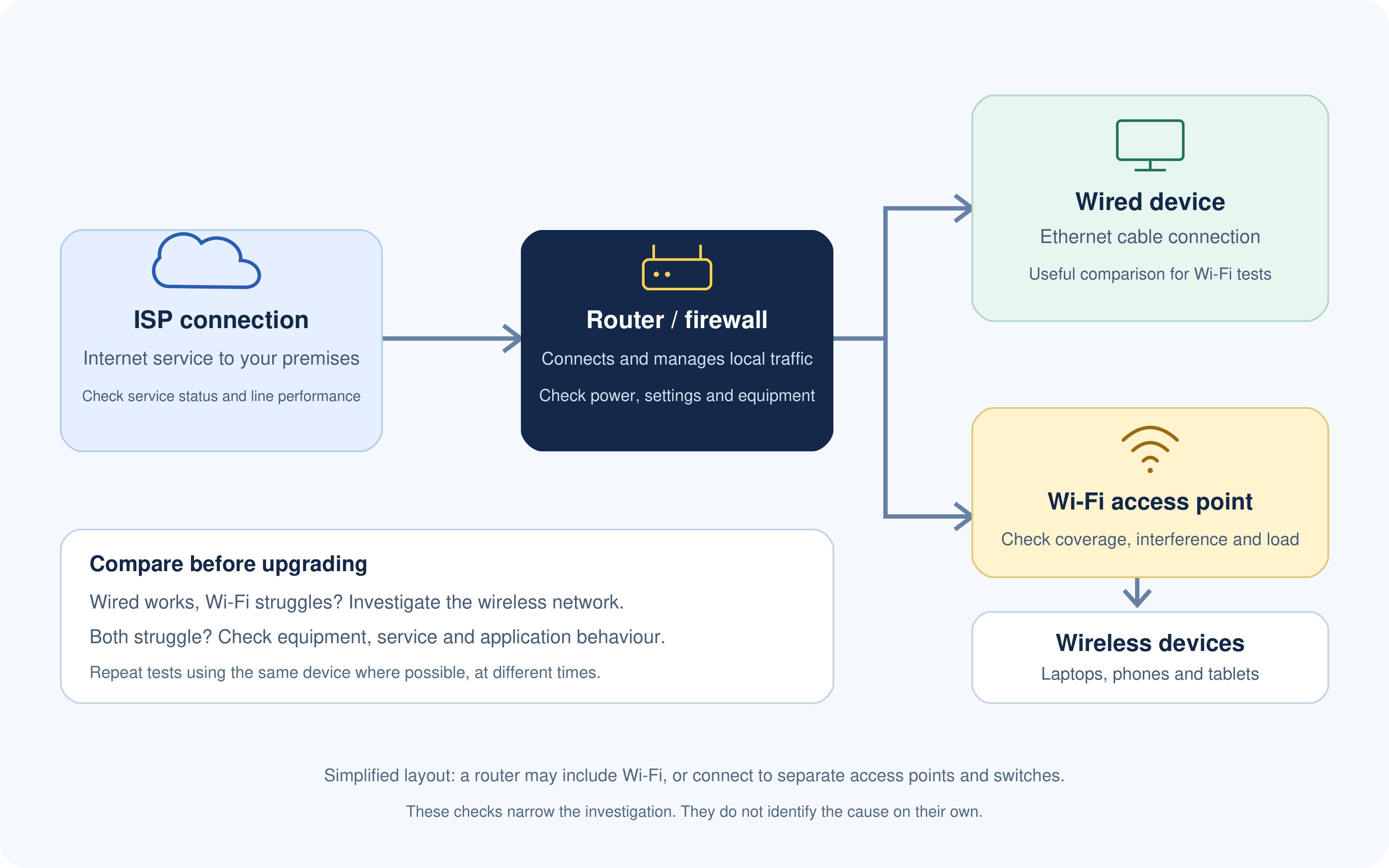
Is your ISP the problem—or your Wi-Fi?
Before paying for a faster internet package, check where the problem actually starts. If calls keep freezing in one meeting room but work perfectly elsewhere, upgrading your broadband might leave you with the same frustration and a bigger bill.
Your ISP supplies the connection to your premises.
Your router, network cables and Wi-Fi equipment then help devices use it. Problems along that path can produce similar symptoms, including slow loading, interrupted calls and dropped connections.
Start by comparing wired and wireless performance.
Where possible, connect a suitable computer to your router using Ethernet, switch off that computer's Wi-Fi and repeat the same activities. Ofcom recommends a wired connection when checking broadband speed because Wi-Fi can affect the results.
Use the symptoms to guide your checks
The table below gives you starting points for investigation. It won't diagnose the cause on its own.
| What you notice | What to investigate | Useful next step |
| Wired access works well, but Wi-Fi struggles | Wireless coverage, interference or access-point capacity | Compare results near the access point and in the affected area |
| Only one device has problems | Device settings, software, network adapter or background activity | Test another device in the same location |
| Calls deteriorate during uploads | Upload congestion and router traffic handling | Compare call quality with and without the upload running |
| Several devices disconnect together | Router, power, internal network or external connection | Record the time and check equipment and provider status |
| Only one application is slow | The application, its service status or the network route | Compare other applications and check for a reported incident |
| Problems appear mainly during busy periods | Shared demand, equipment limits or service congestion | Repeat tests at quieter and busier times |
Record enough information to get useful support
"Internet keeps dropping" tells support there's a problem, but a few extra details make it easier to investigate.
Record:
- When it happened: Include the date, time and approximate duration.
- Who was affected: One person, one room or the whole site.
- How devices connected: Ethernet, Wi-Fi or both.
- What stopped working: A particular application or internet access generally.
- What else was happening: Large transfers, backups or unusually heavy usage.
- What you tested: Note results and any steps that changed the behaviour.
Keep comparisons consistent where possible. Use the same device and test service, and note whether other traffic was running. Avoid restarting shared equipment during working hours without checking the impact with your IT contact.
A practical example: frozen calls in a busy office
Imagine a team whose afternoon video calls regularly break up. Their first thought is to buy a faster package.
Their IT contact checks the problem and finds that it coincides with large uploads. They compare wired and wireless calls, review upload usage and test the router's handling of competing traffic.
Those checks help them decide whether to change the connection, adjust equipment or move transfers to another time.
The goal is to identify the bottleneck before choosing the fix. Better evidence also helps you explain your requirements to a new provider if switching turns out to be the right option.
How do you compare ISP quotes fairly?
Once you've shortlisted providers, give each one the same requirements and ask for a written quotation.
Otherwise, you could end up comparing a basic connection with a package that includes managed equipment, backup connectivity and extended support.
Start with the requirements your business cannot compromise on. If a provider cannot supply your address, support an essential application or meet your operating needs, establish that before spending time comparing prices.
Then use this table to organise the details.
| Comparison item | Provider A | Provider B | Provider C |
| Service confirmed at our exact address | — | — | — |
| Connection type | — | — | — |
| Expected download and upload speeds | — | — | — |
| Minimum or committed performance, where applicable | — | — | — |
| SLA coverage and main exclusions | — | — | — |
| Technical support hours | — | — | — |
| Fault-response and restoration targets | — | — | — |
| Installation date and dependencies | — | — | — |
| Equipment supplied and who manages it | — | — | — |
| Required addressing or remote-access features | — | — | — |
| Backup connectivity and its limitations | |||
| Data allowances and usage restrictions | |||
| Total cost over the same comparison period | |||
| Minimum contract term | |||
| Renewal, cancellation and relocation terms |
Separate confirmed commitments from sales assurances
As you complete the table, record where each answer comes from. A statement in a sales conversation may need clarification before you can rely on it.
For example, "priority support" leaves several questions unanswered. Does it mean a shorter telephone queue, a response target or a restoration commitment? Ask the provider to explain the term and identify the relevant contract provision.
Use these checks to close any gaps:
- Request missing details: Mark unanswered questions as "not confirmed" rather than making assumptions.
- Check the quoted plan: Make sure the advertised feature applies to the package you would purchase.
- Compare the same period: Include introductory pricing, specified increases and required extras.
- Record exclusions: Note anything that could limit a performance or support commitment.
- Keep the evidence: Save the quotation and applicable terms together.
Choose according to your priorities
The lowest-priced option may suit a business with modest requirements and a workable alternative during outages. Another organisation may place greater weight on restoration support, upload capacity or installation timing.
Agree on those priorities before choosing. For example, a venue operating evenings and weekends should examine support availability carefully, while a team regularly sending large files should scrutinise upload performance.
Choose the provider that meets your essential requirements at an acceptable total cost. If an important answer remains unclear, resolve it before signing rather than discovering the limitation after installation.
What should you test before switching internet providers?
Choosing a provider is only part of the job. Before your team depends on the new connection, check that it supports the applications and activities you use every day.
Where practical, keep the existing service running until you've completed these checks. Confirm notice periods and costs first so that a short overlap doesn't create an unexpected commitment.
| Check | What to test |
| Installation readiness | Confirm equipment, building access and any required permissions |
| Wired performance | Compare results with the service expectations agreed in writing |
| Everyday applications | Open essential systems and complete representative tasks |
| Calls and meetings | Test audio, video and screen sharing during normal working activity |
| Remote access | Confirm approved VPNs and other required connections work |
| Wi-Fi coverage | Test the rooms and areas employees actually use |
| Backup connectivity | Check switching, essential application access and recovery |
| Support arrangements | Confirm fault-reporting details, account references and escalation contacts |
Give someone responsibility for recording results and resolving problems. A successful speed test is useful, but employees also need to complete their work reliably.
Agree when the connection is ready before cancelling the old service. That decision should reflect your acceptance checks and any unresolved issues.
Choose an internet connection that supports your working day
The right internet service provider is one that meets your team's needs at a cost and commitment your organisation can manage.
Start with your busiest working periods, compare upload and download performance, and understand what support applies when things go wrong. Check your internal network too, so you spend money on the problem you actually have.
Before signing, put the shortlisted quotes side by side, resolve missing answers and plan the switch. Clear requirements and practical testing give you a stronger basis for choosing than advertised speed alone.
Wrapping up
You should consider all your options carefully when choosing an internet service provider.
The quality, price, and consistency of your Internet connection are all factors that can be greatly affected by your choice of internet service provider.
When deciding on an internet service provider, it's important to take into account several different criteria, such as the service's availability in your area, its speed and bandwidth, its reliability, its customer support, its data caps, and usage policies, its data privacy and security policies, its protection against cyber threats, its contract length, and its fees.
You will be in trouble if you do not consider all of these factors before making the purchase.
AI Summary
- The factors to consider when choosing an internet service provider include address availability, connection type, performance, reliability, support, security responsibilities and the full contract cost.
- Assess your busiest working periods, including simultaneous video calls, file uploads and cloud applications. Compare upload and download capacity alongside latency, jitter and packet loss.
- Read the provider’s written service commitments. Clarify support hours, fault-response and restoration targets, exclusions and compensation terms rather than relying on general reliability claims.
- Investigate Wi-Fi coverage, individual devices and internal network equipment before assuming the ISP connection needs upgrading. Compare wired and wireless results under representative working conditions.
- Compare installation, equipment, add-ons, price changes and renewal terms across the same contract period. Confirm usage restrictions, cancellation charges and options for upgrading or relocating.
- Plan backup connectivity around essential activities and test failover. Before switching, verify important applications, remote access and support arrangements, keeping the existing connection until acceptance checks are complete where practical.
Most Popular Posts

Effective communication among team members is vital for the productivity and success of any organization. Surprisingly, 60% of companies lack a long-term internal communication strategy, which p...


Businesses thrive on communication for efficiency, productivity and accomplishment. When the right information is passed from the right designation in the organization, it promotes positivity an...

Categories
Blog
(3248)
Business Management
(399)
Employee Engagement
(237)
Digital Transformation
(224)
Growth
(151)
Intranets
(142)
Internal communications
(110)
Remote Work
(68)
Sales
(53)
Collaboration
(53)
Customer Experience
(33)
Culture
(30)
Project management
(30)
Knowledge Management
(29)
Leadership
(20)
Comparisons
(9)
News
(1)

Related Posts

Searching for "communal work spaces near me" but unsure which option will actually suit your growing business? By the end of this guide, you'll know how to compare offices to rent, spot extra costs and ask the right questions before committing....

Do you know what happens to your information after you share it with an AI assistant? That question sits at the heart of AI privacy—and it's easy to overlook when you're trying to finish a task. You paste in a customer email, upload a spr...

What would happen if your website moved successfully, but your customers and employees suddenly couldn't reach you by email? Email migration tools can help transfer your messages, but keeping business communication running takes more than copyi...

Does your team still message HR to ask where the holiday policy is? Employee self service should make everyday tasks easier, giving people a straightforward way to find answers, access documents and submit requests. But when policies are buried...

How quickly can a new partner go from signing an agreement to confidently working with your business? If the answer involves chasing documents, forwarding training links and answering the same questions repeatedly, your onboarding process may n...


Jill Romford
I am a digital nomad, lover of exploring new places and making friends.
I love to travel and I love the internet. I take pictures of my travels and share them on the internet using Instagram.
Traveler, entrepreneur, and community builder. I share my insights on digital marketing and social media while inspiring you to live your fullest life.
Ready to learn more? 👍
One platform to optimize, manage and track all of your teams. Your new digital workplace is a click away. 🚀
Free for 14 days, no credit card required.