
Insight Blog
Agility’s perspectives on transforming the employee's experience throughout remote transformation using connected enterprise tools.
28 minutes reading time
(5642 words)
Best GraphQL CMS: Which One Keeps Multiple Brands From Becoming a Content Mess?

Best GraphQL CMS: Which One Keeps Multiple Brands From Becoming a Content Mess?
Looking for the best GraphQL CMS? Compare platforms for managing multiple brands, sharing content, controlling access and supporting frontend teams.
Best GraphQL CMS: Which One Keeps Multiple Brands From Becoming a Content Mess?

Looking for the best GraphQL CMS because keeping several brands organised is becoming a headache?
You update a product description for one website, then realise two other brands are still showing the old version.
Meanwhile, your frontend developers are juggling content requests when they should be building better experiences.
Add different languages, approval processes and launch dates, and a simple update can turn into a surprisingly big job.
91%:
of respondents said their organisation’s content was siloed
Scattered content makes shared updates harder. When comparing the best GraphQL CMS options, test content reuse across two brands. This vendor-sponsored survey measures reported silos, not GraphQL performance.
Source: Hygraph — Future of Content, survey conducted July–August 2023 . Research commissioned by Hygraph and conducted by Coleman Parkes among 400 technology professionals.
There's research behind that frustration.
91% of respondents reported dealing with siloed content in Hygraph's Future of Content research, commissioned from Coleman Parkes and conducted in July–August 2023.
It's vendor-sponsored research rather than a finding about GraphQL specifically, but it highlights a problem worth checking in your own team: how much content is scattered across systems that don't work well together?
A GraphQL API can help your frontends request the content they need, but it won't automatically organise your brands.
You still need clear ownership, sensible permissions and a way to reuse shared content without making every brand look and sound the same.
In this guide, we'll compare the best GraphQL CMS options for teams managing multiple brands, explain their practical trade-offs, and show you what to test before committing.
You'll leave with a clearer shortlist and a checklist for choosing a CMS that works for both your developers and the people publishing your content.
Key Takeaways
- The best GraphQL CMS for multiple brands supports both reliable content delivery and practical editorial workflows, including permissions, approvals and clear ownership.
- GraphQL-native platforms, built-in GraphQL APIs and GraphQL plugins take different approaches. Compare their actual capabilities against your development requirements.
- Reuse shared product facts while keeping brand-specific messaging, imagery and regional offers separately manageable to reduce duplication without losing brand identity.
- Choose a shared, separate or hybrid project structure based on content reuse, access boundaries, ownership and release schedules.
- Before committing, test two brands, restricted editor access, translations and a shared content update across both frontends. Confirm the cost of the features you need.
What Is a GraphQL CMS—and Does It Need to Be GraphQL-Native?
A GraphQL CMS is a content management system that lets your website or app request content through a GraphQL API.
Your editors manage the content in the CMS, while your frontend—the website or app people actually use—decides how to display it.
Think of it like ordering from a menu. Instead of asking for everything in the kitchen, your frontend requests the specific ingredients it needs.
For example, one brand's website might request a product's name, description and image. Another brand's mobile app might need only the name and image. Both can request content from the same CMS, provided your content structure and access settings support that setup.
That's useful when you're looking for the best GraphQL CMS for multiple brands: you want to reuse shared information while giving each brand control over its own presentation and content.
How Does a GraphQL CMS Work?
The diagram below shows a simplified setup.
Editors manage shared and brand-specific content, and each frontend requests the fields it needs through the GraphQL API.
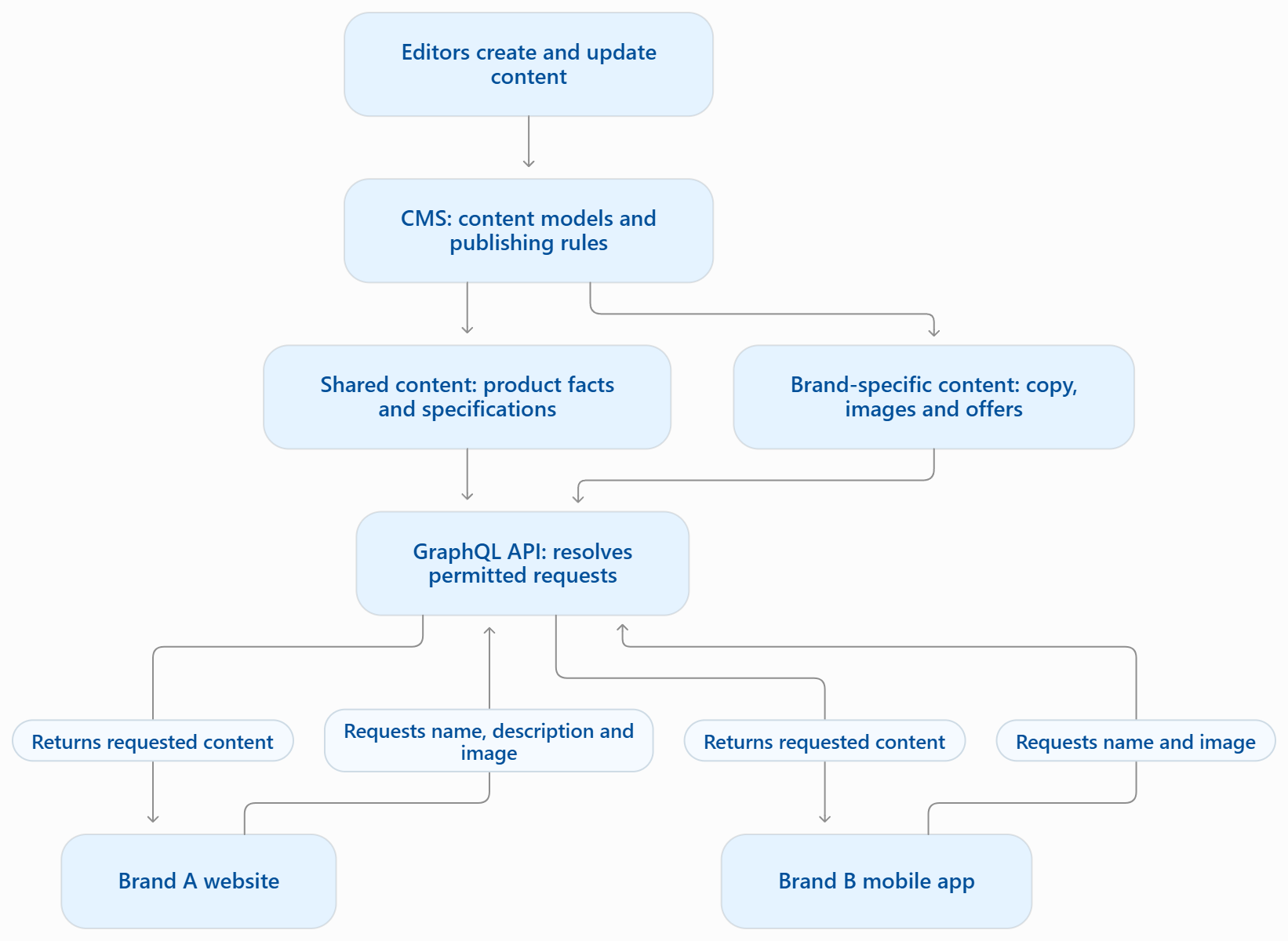
The key point: GraphQL handles content requests.
Your CMS configuration and application logic determine which brand's content is returned and who can access it.
GraphQL-Native vs GraphQL Support: What's the Difference?
These terms sound similar, but they describe different approaches.
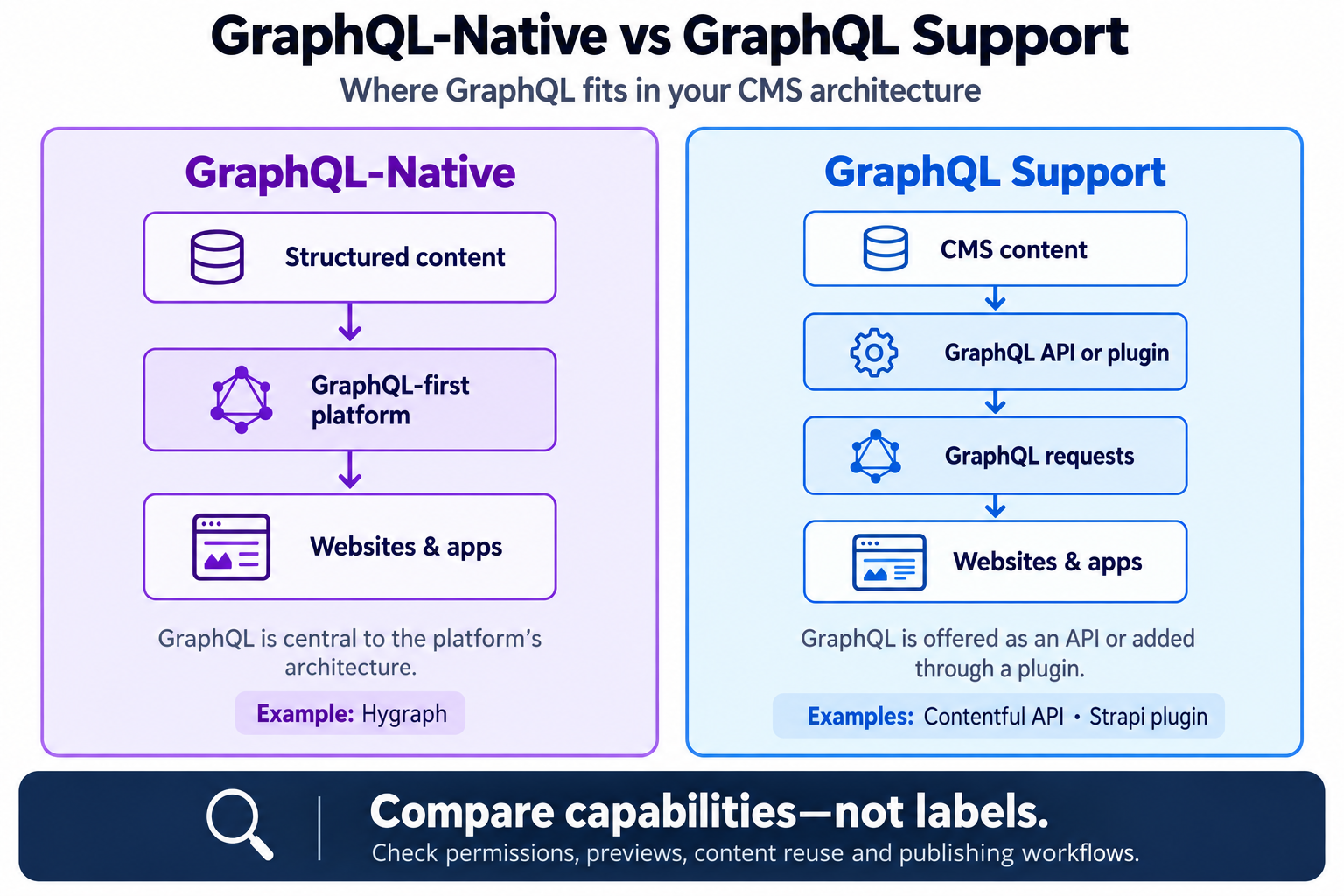
GraphQL-Native vs GraphQL Support: What's the Difference?
| Approach | What it means | Example |
| GraphQL-native | GraphQL is central to the platform's architecture and content APIs. | Hygraph describes itself as GraphQL-native. |
| GraphQL API support | The CMS offers a GraphQL API alongside its other interfaces. | Contentful provides a GraphQL Content API. |
| GraphQL through a plugin | Installing a plugin adds GraphQL capabilities to the CMS. | Strapi provides a GraphQL plugin. |
The platforms' official documentation highlights some practical differences.
In our conversation with Hygraph, the team explained that its platform is GraphQL-native. By comparison, Contentful offers a read-only GraphQL Content API, while Strapi's GraphQL plugin supports both queries and mutations.
These differences matter because they affect how your developers retrieve and manage content.
But does that mean you need a GraphQL-native platform to find the best GraphQL CMS for your team?
No—the label alone doesn't tell you whether a CMS fits your team.
Check whether its actual GraphQL capabilities support your content models, previews, integrations and publishing requirements.
GraphQL Won't Organise Your Brands for You
A GraphQL endpoint doesn't automatically stop Brand A's editor from changing Brand B's content.
It also doesn't establish approval processes or decide which product details should be shared.
Those controls depend on the platform's features and how you configure them.
When comparing the best GraphQL CMS options, check brand separation, permissions and editorial workflows alongside the API.
Your developers need reliable content delivery, and your editors need to publish confidently without stepping on another team's work.
Why Does Multi-Brand Content Become Such a Mess?
Managing one brand is usually straightforward: you know who owns the content, where it belongs and who approves it.
Add a few more brands, and those decisions become harder to track.
The trouble often starts with a shortcut. Someone copies a product page for another brand, makes a few changes and publishes it.
That works until the product details change—and nobody remembers how many copies need updating.
When comparing the best GraphQL CMS options, look for how each platform helps you handle these five problems.
#1. Copied Content Slowly Becomes Inconsistent
64%:
of respondents found content reuse within their CMS difficult
Content reuse deserves a practical test. Check whether shared facts can be updated without overwriting brand-specific copy. This vendor-sponsored finding concerns existing CMS experiences, not a comparison of GraphQL platforms.
Source: Hygraph — Future of Content, survey conducted July–August 2023 . Research commissioned by Hygraph and conducted by Coleman Parkes among 400 technology professionals.
Copying a product page into another brand's website feels like a quick win.
The problem comes later, when the price, specification or availability changes. Someone updates the original, but the copied versions stay untouched.
Before long, your websites, apps and regional pages are telling customers different things. In multi-brand content management, every unnecessary copy creates another version someone has to maintain.
The impact on your team and customers:
- Conflicting information: Customers see different product details depending on which brand or channel they visit.
- Extra editing work: A single change becomes a series of manual updates.
- Slower campaigns: Teams spend time checking copies before they can launch.
- More support queries: Customer service has to explain discrepancies that should have been caught before publishing.
How to improve it:
- Create reusable records for shared facts, such as materials, dimensions and care instructions.
- Keep brand-specific headlines, photography and promotional copy in separately managed fields or records.
- Use content references to connect pages to shared information instead of copying it.
- Assign an owner to shared records and make it clear which brands use them.
- Check where shared content appears before approving a change.
When evaluating a headless CMS for multiple brands, test whether updating one shared record reaches the intended websites without overwriting their individual messaging.
#2. Shared Templates Leave Too Little Room for Each Brand
Sharing a content model makes sense when brands have similar requirements. But forcing every brand into exactly the same structure can create just as much work as maintaining separate systems.
For example, a technical brand might need specification tables and downloadable manuals.
A lifestyle brand might need campaign photography, short stories and seasonal collections. A rigid template can leave both teams making compromises.
The impact on your brand experience:
- Weaker brand identity: Websites start to feel interchangeable.
- Editorial workarounds: Editors squeeze information into unsuitable fields or request custom fixes.
- Developer dependency: Small content changes require engineering support.
- Harder maintenance: One-off exceptions accumulate until nobody is confident about changing the model.
How to improve it:
- Define a shared foundation for content that genuinely follows the same structure.
- Allow brand-specific modules where the requirements differ.
- Use structured options for common elements, such as product features, testimonials and promotional banners.
- Document which fields are shared, optional or exclusive to a particular brand.
- Test proposed model changes against several real pages before rolling them out.
The best GraphQL CMS for your team should support your required modelling approach.
Double check this as your developers will still need to build frontend components that display those content structures correctly.
#3. Editors Can Access the Wrong Brand's Content
Putting several brands in one CMS can make collaboration easier. It can also make mistakes easier if everyone has access to everything.
An editor might replace an image without realising that another brand uses it. Someone else might publish an unfinished campaign because the interface doesn't clearly identify which website they are editing.
This is why multi-brand content management needs clear boundaries around content ownership, access and publishing.
The impact on publishing and governance:
- Accidental changes: An update intended for one brand affects another.
- Premature publishing: Draft offers or announcements become public before approval.
- Unclear accountability: Teams struggle to establish who approved a change.
- More checking: Editors lose confidence and ask administrators to review routine work.
How to improve it:
- Map role-based access control to actual responsibilities: author, reviewer, publisher and administrator.
- Restrict brand access where the platform supports it.
- Separate permission to edit content from permission to publish it.
- Give shared assets and records clear names, ownership and usage guidance.
- Test access through ordinary editor accounts, including attempts to view or modify another brand's content.
- Check whether approval workflows, audit history and granular permissions require a higher subscription tier.
When comparing the best GraphQL CMS options, use this practical test: can an editor complete their work while being prevented from changing content outside their responsibility?
#4. Frontend Teams Keep Solving Similar Problems
When each brand builds its own content integration from scratch, developers can end up maintaining several versions of almost the same thing.
One team writes product queries, another creates a preview integration, and a third builds its own approach to caching. Each solution might work perfectly well on its own. The headache starts when a shared content change needs updating across all three.
This is where better knowledge sharing between teams matters.
Developers need an easy way to find existing integration patterns, understand previous decisions and reuse work that already solves their problem.
The impact on development and delivery:
- Repeated engineering work: Teams rebuild capabilities that already exist elsewhere, leaving less time for brand-specific features.
- Inconsistent behaviour: Preview, localisation and error handling work differently across websites.
- Riskier updates: A shared content model change can affect frontends that rely on the old structure.
- Slower onboarding: New developers have to learn several integration patterns and track down the people who understand them.
- More maintenance: Similar fixes must be implemented and checked in multiple codebases.
How to improve it:
- Agree on shared conventions: Document how teams name GraphQL operations, organise queries and handle errors.
- Reuse common query structures: GraphQL fragments let developers define reusable selections of fields, helping keep overlapping content requests consistent.
- Generate types where appropriate: Tools such as GraphQL Code Generator can generate typed operations from schemas and queries, helping developers identify mismatches during development.
- Review schema changes before release: Identify which frontends depend on a field before renaming, removing or changing it.
- Keep integration guidance accessible: Use a shared knowledge management framework to organise setup instructions, technical decisions and ownership.
- Document delivery behaviour: Explain how previews, caching and content refreshes work for each frontend.
- Maintain appropriate access boundaries: Reuse integration code where useful while keeping credentials and content access appropriate to each brand.
When comparing the best GraphQL CMS options, test a shared content model change across two frontends. Check how easily developers can identify affected queries, update their integrations and verify the results.
A GraphQL content API gives teams a common way to request content.
Shared documentation, reusable code and clear ownership help turn that common interface into less duplicated work.
#5. Nobody Is Sure Who Owns the Next Update
A CMS can hold thousands of pages, but that doesn't mean someone is actively looking after each one.
Once several brands, languages and regional teams are involved, responsibility can become surprisingly difficult to follow.
A global product owner approves the original description, but who checks the French translation after the specifications change? Who removes last month's offer? And who takes over an important page when its author leaves?
Without clear ownership, everyone can assume someone else has it covered.
A practical knowledge management framework helps teams document those responsibilities and keep the process accessible.
The impact on content operations:
- Approval delays: Content sits in a queue because nobody knows who makes the next decision.
- Outdated pages: Expired offers, old product details and superseded guidance remain published.
- Inconsistent localisation: Regional pages fall behind changes to the approved source content.
- Last-minute pressure: Missing reviews surface just before a campaign launch.
- Lost context: When employees leave, their colleagues inherit content without knowing its history or purpose.
How to improve it:
- Assign an accountable owner: Give each content type or collection a named owner responsible for keeping it accurate.
- Identify the right reviewers: Specify who checks brand messaging, product facts, regional requirements and translations.
- Set review dates: Schedule checks for time-sensitive content, with reminders or reports where your CMS supports them.
- Name a backup approver: Keep publishing moving when the usual reviewer is on leave or unavailable.
- Define translation follow-up: Decide how source changes are flagged to localisation teams and who confirms that updates are complete.
- Keep working guidance accessible: A shared knowledge base can hold publishing instructions, ownership records and escalation contacts.
- Include ownership in handovers: Review an employee's content responsibilities when they change roles or leave, then assign them to someone else.
For example, a brand manager updates a shared product description.
Your process should identify which translations need checking, notify the responsible reviewers and make their progress visible. Whether this happens automatically or through a documented checklist depends on the CMS and its configuration.
When comparing the best GraphQL CMS options, ask the vendor to demonstrate that complete workflow using a realistic example. Check which steps are supported directly, which require integrations and which depend on manual follow-up.
A useful editorial workflow makes three things clear: what needs attention, who owns the next step and what must happen before publishing.
Should Every Brand Share One CMS Project?
It's tempting to put every brand into one CMS project and call it organised.
But sharing a platform doesn't necessarily mean sharing everything inside it.
Your brands might use the same product information while needing different editors, approval processes and launch schedules. When choosing the best GraphQL CMS, consider how those relationships should work before deciding on the project structure.
Also, check the terminology.
Vendors use words such as project, space, environment and dataset differently.
They aren't interchangeable, and each can have different implications for access, billing and content delivery.
61%:
of teams used two or more CMS platforms to manage their brands,
according to Storyblok’s 2025 report
Multiple brands do not automatically need separate CMS platforms. Compare shared, separate and hybrid project structures against your permissions, content reuse and release schedules. This vendor-sponsored research describes platform usage; it does not establish which architecture is best for your team.
Source: Storyblok — The State of CMS 2025 announcement, 6 May 2025 . The report surveyed 1,300 CMS users. Multiple CMS platforms are different from multiple projects within one platform.
Option 1: One Shared Project
A shared project brings several brands' content into one structure. It can work well when the brands share information, editorial responsibilities and similar publishing processes.
For example, two brands could reference the same product specifications while maintaining separate descriptions and campaign images.
Hygraph's guide to CMS multi-tenancy provides useful background on organising content for multiple teams or properties within a CMS.
Potential benefits:
- Shared information can be maintained in fewer places.
- Editors can work within a common content structure.
- Developers can reuse models and integration patterns.
What to check, well a shared model or asset change may affect several brands. Confirm that permissions, previews and publishing controls provide the separation you need.
Option 2: Separate Projects for Each Brand
Separate projects are worth considering when brands have different owners, operating requirements or release schedules.
Each team gets its own content structure and configuration. However, the strength of that separation depends on the platform; separate projects don't automatically guarantee separate hosting or infrastructure.
Potential benefits:
- Teams can evolve their content models independently.
- Access and publishing responsibilities can be easier to distinguish.
- Changes can be introduced brand by brand.
So what to watch out for, shared information may need synchronising, and developers may have more integrations to maintain. Check whether cross-project references are supported or require additional work.
For example, Contentful's GraphQL documentation explains how requests are scoped to spaces and environments—details your developers should understand before planning delivery across brands.
Option 3: A Hybrid Structure
A hybrid approach combines shared content foundations with separately managed brand content.
Imagine a central product catalogue containing approved specifications.
Individual brand teams manage their own messaging, imagery and regional campaigns, with their frontends bringing the appropriate content together.
Potential benefits:
- Common facts can remain centrally controlled.
- Brand teams retain flexibility over their own content.
- Shared and brand-specific responsibilities can be defined separately.
Connecting the layers introduces complexity. Your team needs to plan references, permissions, previews, caching and what happens when shared content changes. Cross-project delivery may require multiple API requests or an integration layer.
Using a multi-brand CMS overview offers one vendor's perspective on combining shared content foundations with individual brand requirements.
Treat it as an approach to evaluate against your own workflow.
Which Structure Fits Your Team?
| Consideration | Shared project | Separate projects | Hybrid structure |
| Content reuse | Useful when overlap is high | Shared content may need synchronising | Centralises selected shared content |
| Ownership | Suits closely connected teams | Suits independently managed brands | Divides central and brand responsibilities |
| Model changes | Require coordination across brands | Can be managed independently | Require coordination at shared boundaries |
| Release cycles | Check support for independent publishing | Easier to organise separately | Depends on shared content dependencies |
| Maintenance | Fewer project configurations | More configurations to maintain | Additional connections to manage |
Before committing, test two brands with different permissions and publishing dates.
Update one shared record, make one brand-specific change and check both frontends.
The best GraphQL CMS for multiple brands should support the structure your organisation needs today, with a manageable path for adding another brand later.
Final Thoughts on Which GraphQL CMS Will Keep Your Brands Organised?
The best GraphQL CMS is the one that makes everyday work easier for both your developers and your content teams.
A flexible API matters, but so does knowing who owns a page, which brands share its content and who can approve the next update.
Start with the problems you need to fix.
Are teams copying the same information across websites? Do editors struggle with permissions? Are developers maintaining several versions of the same integration? Use those answers to build your shortlist.
Then ask each vendor to demonstrate your actual workflow. Update a shared product record, change one brand's messaging, check a translation and publish to two frontends.
Include the people who will use the system every day, and check the cost of the features your setup requires.
You should come away knowing what stays shared, what each brand controls and how changes reach the right channels. That's a stronger basis for choosing a CMS than a feature list alone—and a practical way to stop more brands from creating more content chaos.
FAQ
What Is the Best GraphQL Headless CMS for Multiple Brands?
The best GraphQL headless CMS depends on how your brands share content, manage permissions and publish updates.
Hygraph is worth evaluating for a GraphQL-native approach, while Contentful, Strapi and Sanity offer different GraphQL implementations.
Compare each platform against the same practical workflow before choosing; there is no universal winner for every multi-brand team.
What Is the Difference Between a GraphQL-Native CMS and a Headless CMS With GraphQL Support?
A GraphQL-native CMS puts GraphQL at the centre of its architecture. A headless CMS with GraphQL support offers a GraphQL interface alongside other APIs or through a plugin.
For example, Hygraph describes itself as GraphQL-native, while Strapi adds GraphQL through a plugin. The distinction matters, but the capabilities your team needs matter more than the label.
Can Multiple Brand Websites Use the Same Headless GraphQL CMS?
Yes. A headless GraphQL CMS can deliver content to several brand websites and apps.
You could share product specifications while maintaining separate descriptions, imagery and regional offers. However, you must configure the content structure, queries and access controls appropriately.
GraphQL itself does not automatically separate brands or prevent one team from changing another team's content.
How Do You Keep Brand Content and Permissions Separate in a GraphQL CMS?
In a GraphQL CMS, start by defining which content is shared and which belongs to individual brands.
Then configure editor permissions, publishing responsibilities and API access using the platform's available controls. Depending on your requirements, use one shared project, separate projects or a hybrid structure.
Test restricted accounts and API credentials before relying on those boundaries.
How Does Contentful GraphQL Work for Multiple Brands?
Contentful GraphQL lets developers request content through a schema generated from their content models.
Its GraphQL Content API is read-only, so creating and updating content programmatically requires a separate management interface. For multiple brands, plan how spaces, environments and content references will support your ownership and delivery requirements.
Check the available features and limits for your intended plan.
Does Storyblok GraphQL Support Headless Content Delivery?
Yes. Storyblok GraphQL provides an API for requesting content for websites and other channels. Its documentation describes strongly typed responses and automatically generated API documentation.
When evaluating Storyblok for multiple brands, test your content models, localisation, previews and access requirements alongside its GraphQL delivery capabilities.
Is Hygraph Self-Hosted?
If you're searching for "Hygraph self hosted," Hygraph is offered as a managed, cloud-hosted CMS rather than a downloadable self-hosted edition. Its FAQ describes its hosted infrastructure.
If running the CMS on your own infrastructure is essential, consider a self-hostable alternative such as Strapi and account for the maintenance responsibilities involved.
Is There a GraphQL CMS Open-Source Option?
Yes. If you're looking for a GraphQL CMS open-source option, Strapi's Community edition is one example.
You can self-host it and install its GraphQL plugin to support queries and mutations. Open-source software still brings costs for hosting, security updates, backups and development.
Also check whether advanced editorial and governance features require a paid edition.
Can a Headless CMS With GraphQL Work With Next.js?
Yes. A headless CMS with GraphQL can supply content to a Next.js application through API requests.
Your developers need to configure fetching, caching, previews and content refreshes for the chosen setup. Keep privileged credentials on the server, and make sure each brand's requests select the correct content, language and region.
What Costs Increase When You Add Brands to a GraphQL Headless CMS?
A GraphQL headless CMS may become more expensive as you add projects, editor accounts, environments, content records, assets or API usage.
Your implementation and maintenance costs can also increase as brand requirements diverge. Ask vendors to price your expected setup, including permissions, approvals, localisation and support, rather than comparing entry-level subscriptions alone.
AI Summary
- The best GraphQL CMS for teams managing multiple brands combines suitable API capabilities with clear content ownership, brand permissions and practical publishing workflows.
- GraphQL-native platforms, built-in GraphQL APIs and GraphQL plugins use different approaches. Hygraph describes itself as GraphQL-native, Contentful offers a read-only GraphQL Content API, and Strapi provides queries and mutations through its GraphQL plugin.
- Reduce content duplication by reusing shared product facts while keeping brand-specific messaging, imagery and regional offers separately manageable. GraphQL alone does not establish these content structures or access controls.
- Choose a shared project, separate projects or a hybrid structure according to content reuse, ownership, permissions and release schedules. Verify how each vendor defines projects, spaces, environments and datasets.
- Help frontend teams reuse integration patterns and document queries, previews, caching and schema changes. Assign owners and reviewers so shared updates and translations reach the right people.
- Before committing, test two brands, restricted editor access, translations and a shared content update across both frontends. Compare total costs, including required governance features, usage limits, implementation and ongoing maintenance.
Most Popular Posts

Effective communication among team members is vital for the productivity and success of any organization. Surprisingly, 60% of companies lack a long-term internal communication strategy, which p...


Businesses thrive on communication for efficiency, productivity and accomplishment. When the right information is passed from the right designation in the organization, it promotes positivity an...

Categories
Blog
(3238)
Business Management
(397)
Employee Engagement
(235)
Digital Transformation
(223)
Growth
(151)
Intranets
(142)
Internal communications
(110)
Remote Work
(68)
Sales
(53)
Collaboration
(53)
Customer Experience
(33)
Culture
(30)
Project management
(30)
Knowledge Management
(29)
Leadership
(20)
Comparisons
(9)
News
(1)

Related Posts

Looking for the best GraphQL CMS because keeping several brands organised is becoming a headache? You update a product description for one website, then realise two other brands are still showing the old version. Meanwhile, your frontend ...

Are you weighing up an employer of record vs local entity to hire overseas—and wondering which option will help you grow without creating expensive compliance problems? If you're a business owner, HR director or people operations leader struggling to...

Why does your internet connection seem fast until everyone joins a video call or starts uploading files? Understanding the factors to consider when choosing an internet service provider can help you avoid a package that looks good on paper but ...

Is your vendor invoice management process keeping client projects moving, or leaving your team chasing approvals and questioning what's ready to pay? When several suppliers work on the same project, small gaps can quickly become expensive problems.&n...

What is virtual office software, and could it help your remote team feel more connected? Working from home has its perks, but having plenty of calls and messages doesn't always mean feeling part of a team. Gallup's 2026 State of the Global Work...


Jill Romford
I am a digital nomad, lover of exploring new places and making friends.
I love to travel and I love the internet. I take pictures of my travels and share them on the internet using Instagram.
Traveler, entrepreneur, and community builder. I share my insights on digital marketing and social media while inspiring you to live your fullest life.
Ready to learn more? 👍
One platform to optimize, manage and track all of your teams. Your new digital workplace is a click away. 🚀
Free for 14 days, no credit card required.