
Insight Blog
Agility’s perspectives on transforming the employee's experience throughout remote transformation using connected enterprise tools.
34 minutes reading time
(6779 words)
Vendor Invoice Management for Client Projects: Avoid Costly Errors and Set Up Milestone Payments

Vendor Invoice Management for Client Projects: Avoid Costly Errors and Set Up Milestone Payments
Learn how vendor invoice management helps teams handle client projects, approve milestone payments, reduce billing errors and keep suppliers paid on time.
Vendor Invoice Management for Client Projects: Avoid Costly Errors and Set Up Milestone Payments

Is your vendor invoice management process keeping client projects moving, or leaving your team chasing approvals and questioning what's ready to pay?
When several suppliers work on the same project, small gaps can quickly become expensive problems.
A contractor invoices before a milestone is accepted, a revised bill gets mistaken for a new charge, or finance waits for confirmation buried in someone's inbox.
22%:
of surveyed businesses spent staff time chasing late payments
The 2025 UK research highlights the administrative burden of overdue payments. Clear approval owners and payment updates give employees and suppliers a practical way to follow up.
Source: Small Business Commissioner — Late Payments Research, July 2025
The wider payment problem is significant.
Research published by the UK's Small Business Commissioner in July 2025 found that 22% of surveyed businesses spent staff time chasing late payments, averaging 86 hours annually per affected business.
Meanwhile, 15% said they had avoided particular customers because of their payment behaviour. Payment delays can consume working time and damage business relationships.
A clearer process starts before the first invoice arrives, with agreed deliverables, named approvers and documented payment terms.
In this article, you'll learn how to connect supplier invoices to client projects, set up milestone payments, prevent common billing errors and handle approval delays—giving your team a practical workflow and suppliers clearer expectations.
Key Takeaways
- Connect each supplier invoice to the correct project, contract and budget so employees can check what is being charged and who should approve it.
- Agree milestone deliverables, acceptance evidence and payment terms before work starts. Record advance payments separately from payments for accepted work.
- Use one submission route, check for duplicates and name approval deputies. Give disputed charges and missing information a clear owner and next action.
- Keep supplier payments separate from customer project invoicing. Approved billable hours can support customer charges, while external payment links and connected payment notifications can help staff track outstanding and paid invoices.
- Verify bank-detail changes independently, keep procedures accessible and measure approval times, overdue invoices and rework to identify where the process needs improving.
In 2026, faster invoice processing still needs clear accountability
The argument for improving vendor invoice management is straightforward: suppliers want predictable payments, finance needs reliable records, and project teams need less administrative work.
But speeding up the process only helps when everyone understands what they're approving.
For businesses reviewing their workflows in 2026, the central issue is the gap between an invoice arriving and someone confirming that payment is justified.
Software can capture an amount and route a document, but your organisation still needs to establish whether the milestone was completed, the work met the agreed standard and any additional charges were authorised.
Imagine a contractor submits an invoice for a finished project stage.
The project manager considers it incomplete, finance sees an approaching payment deadline, and the supplier believes approval has already been given. Without documented acceptance criteria, each party is working from a different version of events.
The practical response is to connect every invoice to clear evidence, a named decision-maker and an agreed escalation route.
That gives employees the confidence to approve legitimate payments promptly and resolve questions before they become disputes.
What does vendor invoice management actually mean?
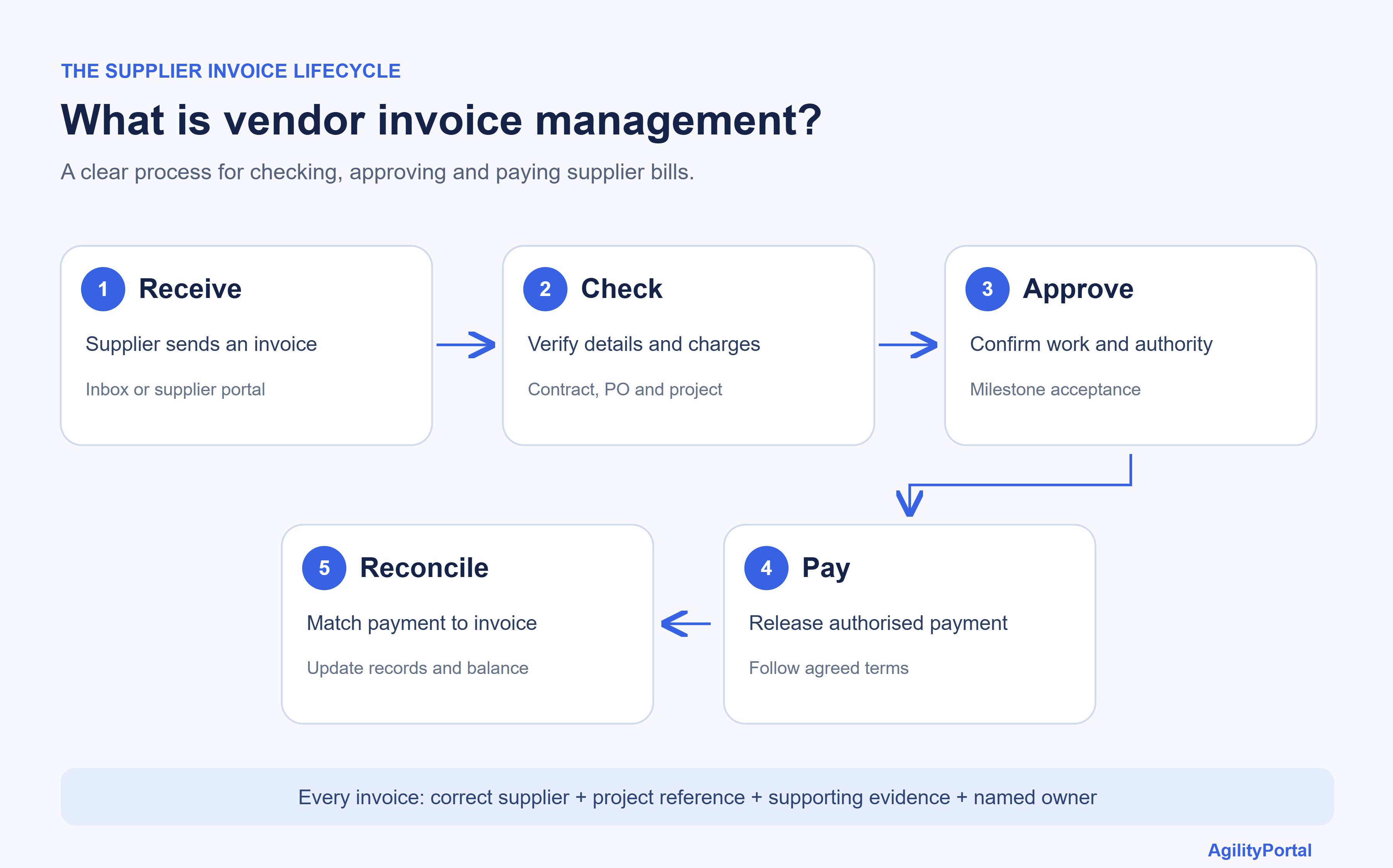
What does vendor invoice management actually mean
Vendor invoice management is the process your business follows to receive, check, approve and pay invoices from suppliers.
It helps your team establish what's owed, which project the charge belongs to and whether the payment is ready to go ahead.
For client projects, that means connecting each supplier invoice to the work your organisation commissioned.
Before releasing payment, your team should:
- Check the supplier's details, invoice number, dates and amounts.
- Match charges against the purchase order, contract or agreed scope.
- Confirm that the goods arrived or the relevant services were accepted.
- Route the invoice to the appropriate approvers.
- Schedule payment under the agreed terms, then reconcile it against financial records.
It's also worth separating three documents or decisions that can easily get confused. An invoice requests payment. An approval authorises it.
Proof of payment records that money was sent. Receiving an invoice doesn't automatically establish that the work is complete or that payment has been made.
| Term | What it means | Simple example |
| Vendor invoice | A supplier bills your organisation | A contractor invoices your business for design work |
| Client invoice | Your organisation bills its customer | Your business invoices the client for a completed project stage |
| Milestone payment | Payment is linked to a contractually agreed project stage | A supplier becomes entitled to invoice after a design is accepted |
The distinction becomes clearer when you look at who's billing whom:
Project invoicing commonly refers to billing clients for project work, while vendor invoice management concerns the supplier bills your business receives.
Those payment schedules won't necessarily line up. Your supplier might be due payment before your client pays you, creating a cash-flow gap that needs planning.
Using project management software to track tasks, deadlines and supporting project information can help teams review progress alongside the agreed milestones. Finance still needs the relevant acceptance evidence and financial approvals before releasing payment.
Is this the same as SAP Vendor Invoice Management?This article uses "vendor invoice management" to describe the general business process. OpenText also offers Vendor Invoice Management for SAP Solutions, a specific software product designed for SAP environments.
Here, the focus is on establishing a practical supplier invoice workflow, regardless of which accounting or project tools your organisation uses.
Faster approvals help—but only when the checks are clear
Nobody wants a supplier invoice sitting in an inbox for days.
Quicker approvals can reduce chasing, help suppliers plan their cash flow and give employees more time to focus on project work. But speed depends on having clear checks along the way.
A useful vendor invoice management process makes it easy to see who should review an invoice, what they need to check and when an issue needs escalation.
| Benefit | What can go wrong | Practical response |
| Quicker routing | An invoice reaches someone without the authority or knowledge to approve it | Assign approvers by project responsibility and spending authority |
| Automated capture | An amount, currency or invoice reference is captured incorrectly | Validate extracted information against the original document |
| Milestone payments | The supplier and project team disagree about what "complete" means | Agree acceptance criteria and supporting evidence before work starts |
| Shared visibility | Banking details or other sensitive information become accessible too widely | Restrict access according to each person's responsibilities |
For employees, these controls should make everyday work easier.
A project manager shouldn't have to search through weeks of messages to understand a charge. Finance shouldn't need to contact several colleagues to find the approver. A supplier shouldn't receive conflicting answers about payment status.
Clear ownership, accessible evidence and approval cover for absent colleagues can reduce those interruptions.
Measure the results through approval times, rework and payment enquiries rather than assuming a particular improvement
Agree the milestones before the first invoice arrives
Milestone payments work best when the supplier and your team agree on the payment triggers before work begins.
Waiting until an invoice arrives to decide whether something is finished creates uncertainty at exactly the wrong moment.
Keep supplier payment commitments visible alongside your project invoicing schedule.
The two schedules may differ, so your business needs to understand when money is due to leave and when client payments are expected.
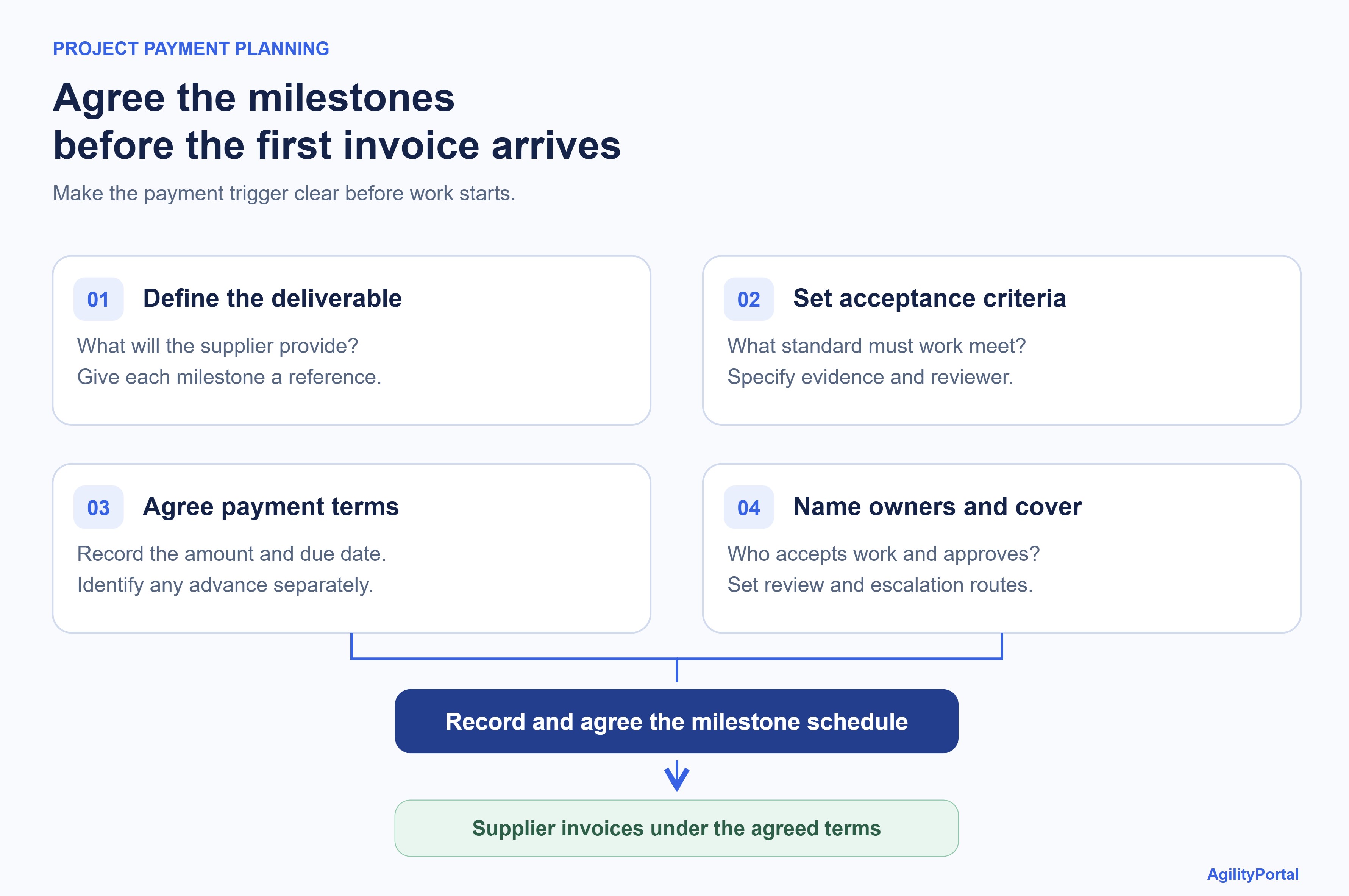
Agree the milestones before the first invoice arrives
Define what "finished" actually looks like
"Design complete" might sound clear during a planning meeting.
Later, the supplier may interpret it as submitting the first version, while your team expects approved designs and editable files.
Replace broad descriptions with specific, observable requirements.
For each milestone, document:
- Deliverable and identifier: Give the stage a clear name and reference that can appear on the invoice.
- Acceptance criteria: Describe the standard the work must meet.
- Responsible people: Name the supplier contact and internal reviewer.
- Required evidence: Specify the documents, test results, delivery records or written acceptance needed.
- Payment amount: Record the agreed fixed amount or percentage.
- Payment terms: Explain when the supplier can invoice and when payment becomes due under the contract.
- Exception process: Set out how changes, rejected work and resubmissions will be handled, including review times and escalation contacts.
Also distinguish an advance payment from a payment for accepted work.
An advance supports agreed activities before delivery; it should have its own authorisation and contractual conditions.
A completed-work milestone depends on the acceptance requirements being met.
Put the payment schedule into writing
A written schedule gives suppliers, project managers and finance a shared reference.
Keep it with the contract and update it through an agreed change process when the scope or payment arrangements change.
The following hypothetical example shows how a £20,000 supplier contract could be structured:
| Payment stage | Trigger | Amount | Supporting record |
| Mobilisation advance | Contract agreed and advance authorised | £4,000 | Signed agreement and advance approval |
| Design milestone | Design accepted against agreed criteria | £6,000 | Recorded acceptance |
| Delivery milestone | Agreed deliverables accepted | £6,000 | Delivery and acceptance evidence |
| Handover | Final documentation accepted | £4,000 | Handover checklist |
| Total | £20,000 |
Amounts exclude applicable tax for simplicity.
This is an illustration, not a recommended payment split for every project.
The right arrangement depends on the work, supplier requirements, commercial risks and agreed contract.
For each stage, record the payment deadline separately from the delivery or acceptance date.
That distinction helps everyone understand when a milestone has been achieved, when an invoice can be submitted and when payment is due.
Build a workflow people can follow without chasing five colleagues
A practical vendor invoice management workflow gives every invoice a clear route from receipt to payment.
Each step should identify what needs checking, who owns the decision and what happens when something doesn't match.
Use this checklist to connect supplier invoice processing with project delivery and financial approval.
1. Set up and verify the supplier record
Create one approved record containing the supplier's business details, contact information and payment details.
Verify new or changed bank details through a trusted contact using an independently established communication channel.
The FBI's business email compromise guidance explains why account changes need additional verification.
Reduces the risk of payments going to an impersonator or an outdated account. A consistent supplier record also makes duplicate checks more reliable.
2. Assign a project reference
Give each invoice a project code and link it to the relevant contract, purchase order, budget and milestone. Ask suppliers to include that reference when submitting invoices.
Helps finance allocate costs correctly and find the person responsible for reviewing the work. It also makes supplier spending easier to compare with the project budget.
3. Use one invoice submission route
Publish one approved accounts payable inbox or supplier portal.
Explain which documents suppliers must provide, how receipt is acknowledged and where they can ask about payment status.
Reduces invoices getting lost in individual inboxes and suppliers sending repeated copies to different employees. Staff have a clear starting point for tracking each submission.
4. Record the invoice details consistently
Capture the supplier, invoice number, invoice and supply dates, currency, amounts, applicable tax, payment terms and project reference.
Check captured data against the original document, including information extracted automatically. For UK invoices, use GOV.UK's invoice requirements as a jurisdiction-specific reference.
Gives approvers usable information and reduces rework caused by missing references, incorrect amounts or currency errors.
5. Check for duplicates before approval
Compare the supplier record, invoice number, amount and date against existing entries.
Flag close matches for review. Link corrected invoices and credit notes to the original transaction instead of treating every resubmission as a new bill.
Helps prevent duplicate payments while allowing legitimate recurring charges to proceed after review.
6. Match the invoice to supporting evidence
Where applicable, compare the invoice with the purchase order and goods receipt—a three-way match.
For services, compare it with the contract, agreed rates, authorised changes and acceptance evidence.
Identifies unsupported charges, price differences and missing deliveries before payment.
Matching the evidence to the purchase type avoids holding up service invoices because a goods receipt doesn't exist.
7. Confirm the milestone was accepted
Ask the project owner to record whether the deliverable meets the agreed acceptance criteria.
Include the decision date, supporting evidence and any unresolved issues. Keep this confirmation linked to the invoice.
Gives finance a documented basis for processing the milestone payment and reduces disagreements about whether work was completed.
8. Route the invoice for financial approval
Apply approval rules based on invoice value, budget ownership and spending authority. Separate delivery confirmation, spending approval and payment release where practical. Name a deputy for absent approvers.
Reduces bottlenecks and limits the chance of someone authorising a payment outside their authority.
Microsoft's project-manager approval documentation illustrates the separation between delivery confirmation and payment processing; the documented feature is marked as preview.
9. Give exceptions an owner and a next action
Record a specific reason for each blocked invoice, such as a price mismatch, missing acceptance or unapproved scope change.
Assign an owner, set a review deadline and tell the supplier what needs resolving.
Stops invoices sitting indefinitely in an unexplained "pending" status. Employees can act on the issue, and suppliers receive a consistent explanation.
10. Schedule payment against the agreed terms
Once the required checks are complete, schedule payment using the contractual due date and approved payment method. Distinguish "approved," "scheduled" and "paid" in your invoice tracking.
Helps finance plan outgoing cash and gives employees accurate answers to supplier enquiries.
Approval alone won't be mistaken for completed payment.
11. Reconcile the payment and retain the records
Match the payment transaction to the invoice, record partial payments or credits, and retain the supporting approvals.
Apply your organisation's access and retention rules to the complete record.
Makes outstanding balances easier to explain and provides an audit trail without requiring employees to reconstruct decisions from messages.
12. Review where the workflow slows down
Track receipt-to-approval time, overdue invoices, exceptions, missing evidence and supplier payment enquiries. Separate internal processing delays from disputed work so the figures show what needs fixing.
Helps you target the actual problem—whether that's unclear submission instructions, unavailable approvers or weak milestone definitions—and measure whether changes improve the process.
The result should be straightforward: employees know their next action, finance can trace each decision, and suppliers know where their invoice stands.
Download your vendor invoice management checklist
Keep milestone agreements, invoice checks, approvals and payment records on track with this practical three-page checklist.
Vendor-Invoice-Management-Checklis_20261021-141403_1
109 kb
Here's where project invoices usually get stuck
If payment remains overdue after reminders and attempts to resolve the issue, a supplier may consider sending a demand for payment letter. ConsumerShield, an online legal information platform, describes this as a formal, final request for money owed.
You've agreed the work, the supplier has sent an invoice, and everyone expects payment to move along. Then something doesn't quite match.
These are the situations where a clear answer and a named owner can save everyone a lot of chasing.
15%:
of surveyed businesses avoided specific customers because of payment behaviour
Payment behaviour can influence whether businesses choose to work together. Give suppliers clear payment expectations and timely explanations when an invoice needs review.
Source: Small Business Commissioner — Late Payments Research, July 2025
The invoice arrives before the milestone is accepted
A supplier sends a bill saying the work is complete, but your project manager hasn't signed it off yet. Finance doesn't know whether to process it, and the supplier starts asking about payment.
Check the agreed payment trigger first. If acceptance is required, ask the project owner to review the work and record their decision within the agreed review period.
Tell the supplier what's being checked and when they can expect an update.
To keep things moving:
- Check the milestone requirements: Identify which deliverables and acceptance criteria apply to this invoice.
- Find the missing evidence: Ask for any outstanding files, delivery records or test results.
- Name the reviewer: Make one person responsible for confirming acceptance or explaining what remains incomplete.
- Set a review deadline: Follow the agreed timeframe and arrange cover if the reviewer is unavailable.
- Record the outcome: Keep the acceptance decision or specific reasons for rejection linked to the invoice.
- Update the supplier: Explain the next action and expected review date without promising an unapproved payment date.
There's an extra charge nobody agreed to
The invoice includes additional work. The supplier says someone requested it during a call, but there's no recorded approval.
Now your team has to establish what was requested, who authorised it and whether the charge matches the agreement.
Give the contract owner responsibility for resolving that question. Record the outcome and update the scope and budget if the change is accepted.
For future changes, make the approval route clear before extra work starts.
The approver is on leave
To prevent an absent approver from holding up payment:
- Name a deputy: Assign someone with the appropriate spending authority before leave begins.
- Route pending invoices: Move outstanding approvals to the deputy through your approved workflow.
- Provide supporting records: Make the contract, invoice and milestone acceptance evidence accessible.
- Keep approval limits clear: Escalate invoices above the deputy's authority to the budget owner.
- Record the decision: Log who approved the invoice, when and on whose behalf.
- Update the supplier: Explain any delay and give an expected review date.
A corrected invoice looks like a duplicate
The supplier fixes an error and resends the invoice. One employee thinks it's a new bill; another thinks it should be rejected as a duplicate.
Link the revised document to the original record and confirm which version is valid. Where a credit note or replacement invoice is needed, ask the supplier to provide it.
That keeps the correction traceable and helps prevent both versions reaching payment.
Only part of the work is disputed
Most of the delivery is fine, but one item doesn't meet the agreed requirements. The whole invoice ends up waiting while people debate what to do.
Record exactly what's disputed and why.
Ask the contract owner and finance team whether the agreement allows the undisputed amount to be processed separately.
Give the remaining issue an owner and a review date, then explain the position to the supplier.
An urgent email asks you to change bank details
An invoice is ready for payment when an email arrives asking finance to use a different bank account. The message looks familiar, and the sender insists it needs sorting today.
That urgency is a reason to check carefully. If the request is fraudulent, updating the supplier record could send this payment—and future payments—to the wrong account.
Before making the change:
- Pause the update: Keep the new details unverified until the checks are complete.
- Avoid the message's contact details: Don't verify the request through its links, attachments or newly supplied phone number.
- Get a second approval: Have an authorised colleague review the verified change before it's applied.
- Record the checks: Log who confirmed the details, how they were contacted and who approved the update.
- Review scheduled payments: Make sure pending transactions use the verified account before release.
A familiar email address alone doesn't establish that a bank-detail change is legitimate.
Give employees a clear verification route so they can check the request without being pressured into rushing.
Imagine this: the training happened, but the handover didn't
Your business hires an external supplier to deliver employee training.
The sessions take place, and the supplier submits its invoice. But the agreement also includes training materials and a handover guide, neither of which has arrived.
HR assumes the project manager approved everything. The project manager thinks HR is checking the materials. Finance sees an invoice with no clear acceptance record.
Meanwhile, the supplier has no idea why payment is delayed.
Start by checking whether those materials form part of the payment milestone. Record what's missing, appoint one person to coordinate the response and follow the contract's review or dispute process. Tell the supplier what they need to provide and when you'll review it.
An invoice marked "pending" tells nobody what to do. A clear explanation, an owner and a next step give everyone something they can act on.
Example: Keeping employees informed from invoice creation to payment
Imagine your team has completed a client milestone and needs to send the bill.
An authorised employee can build an invoice online through the back end, add the customer's details and project reference, then share a unique external payment link.
The customer gets a convenient way to pay, while staff can track the invoice internally.
For example, an AgilityPortal workflow configured with a payment provider can follow these steps:
- Create the invoice: An authorised employee enters the agreed charges, payment terms and project details.
- Share a unique payment link: Send the customer a link associated with that specific invoice.
- Receive payment confirmation: The payment provider sends a webhook—a notification to the connected system—when payment succeeds.
- Update the invoice status: The system verifies the notification, matches it to the correct invoice and marks it as paid once the required amount has been received.
- Track outstanding balances: Employees can check which invoices are outstanding, overdue, partially paid or paid without repeatedly asking finance.
The connection should verify webhook authenticity and handle repeat notifications without recording the same payment twice. Opening a payment link alone should never mark an invoice as paid.
This example covers collecting customer payments. In vendor invoice management, suppliers normally invoice your organisation, and your team pays them. If a vendor is purchasing something from your business, they can receive a customer payment link for that separate transaction.
With the payment integration configured, staff can stay on top of outstanding invoices and follow up using the latest recorded payment status.
Give employees one place to find the rules
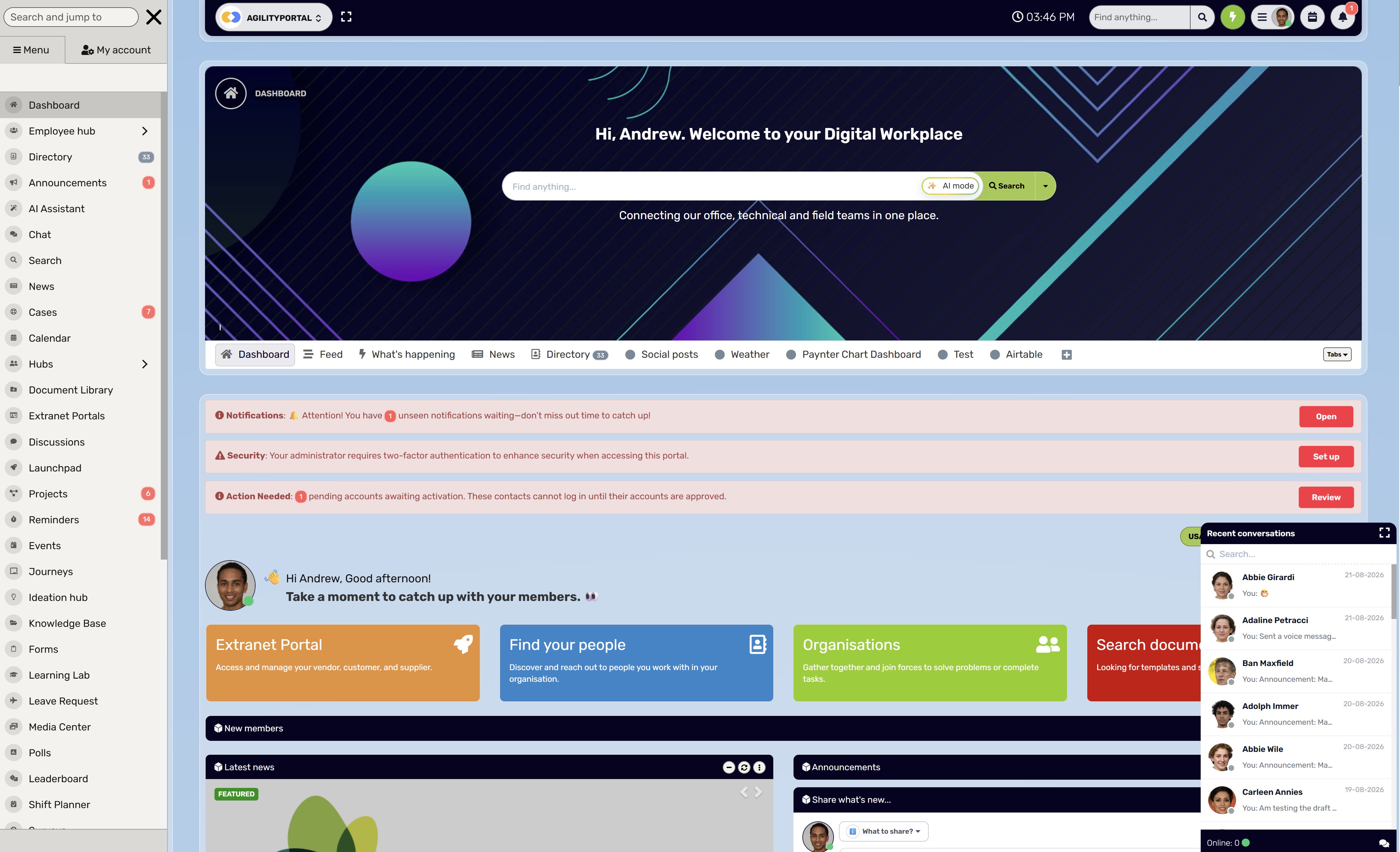
Give employees one place to find the rules
Even a well-designed invoice process becomes difficult to follow when instructions are scattered across emails and shared folders.
Employees need somewhere to check who approves a charge, what evidence is required and who can help when something gets stuck.
AgilityPortal can bring that guidance together, including:
- Supplier submission instructions: Where invoices go and which supporting documents to include.
- Approval responsibilities: Who reviews each project and who provides cover during leave.
- Milestone acceptance templates: A consistent way to document completed work.
- Finance policies and training: Practical guidance on payment terms, invoice checks and handling exceptions.
- Escalation contacts: Named people responsible for resolving questions and communicating changes.
Teams can also use AgilityPortal's project management module to manage projects and issue customer invoices based on recorded time spent on project work, using the agreed billing rates.
This connects project activity with the charges employees need to prepare and review.
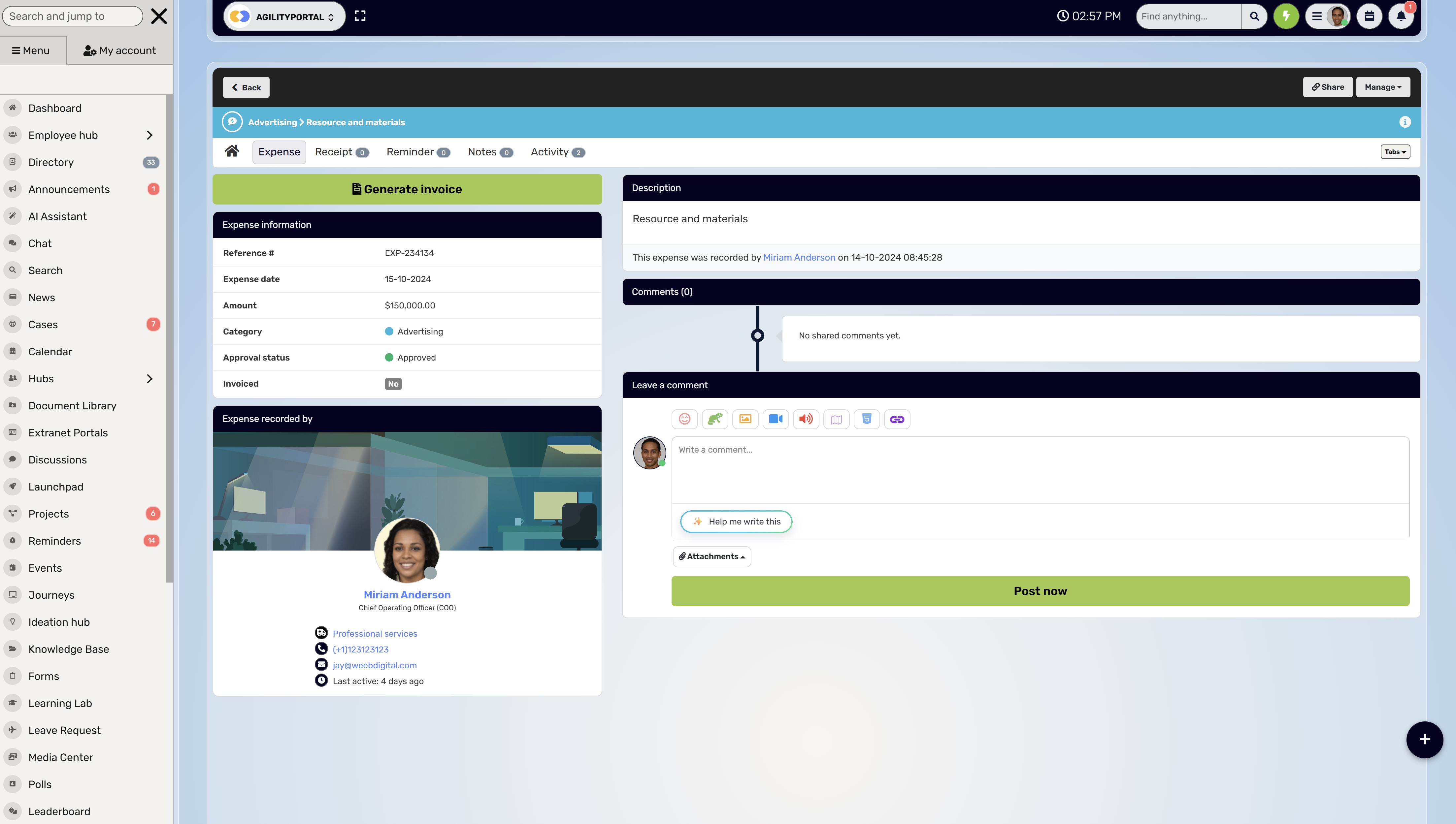
For example, if a team records 20 billable hours at an agreed rate of £75 per hour, the invoice would total £1,500 before applicable taxes or adjustments. An authorised employee can review the charges and share a unique external payment link with the customer.
With a connected payment provider and webhook integration configured, confirmed payments can update the invoice status automatically.
Staff can then see which invoices remain outstanding and which have been paid, helping them follow up without repeatedly checking with finance.
Keep the distinction clear: customer invoicing collects money for your project work, while supplier invoice procedures govern payments your organisation makes. Both benefit from accessible guidance and clearly assigned responsibilities.
AGILITYPORTAL · CONNECT PROJECT WORK WITH CUSTOMER BILLING
Keep projects, billable time and outstanding invoices in view
Give employees a clearer way to manage project work and prepare customer invoices. AgilityPortal’s project management module helps teams connect recorded time with agreed billing rates, issue invoices and share unique external payment links. Keep supplier invoice procedures and approval guidance accessible alongside the information your team uses every day.
- Manage project tasks, milestones and recorded working time.
- Prepare customer invoices from billable time using agreed rates.
- Share unique external links so customers can conveniently pay.
- With a payment provider and webhook integration configured, update invoice status from verified payment confirmations.
- Help staff track outstanding and paid invoices while keeping approval responsibilities and finance guidance easy to find.
Customer billing and supplier payments follow separate workflows. Confirm the payment integrations and accounting arrangements needed for your organisation during your demo.
Automate the repetitive work, then measure what improves
If your team keeps copying invoice details, forwarding approval emails and chasing missing references, those are useful places to consider automation.
Start with tasks that follow clear rules and give employees a way to review mistakes.
For vendor invoice management, evaluate whether your tools can:
- Capture invoice information: Extract supplier names, invoice numbers, dates and amounts, with checks for accuracy.
- Route approvals: Send invoices to the appropriate reviewer based on project, value and spending authority.
- Send reminders: Notify approvers when action is due and escalate overdue reviews to a named deputy.
- Flag possible duplicates: Highlight matching references or amounts for investigation before payment.
- Identify missing information: Show which project codes, purchase orders or acceptance records still need to be supplied.
Employees still need to handle the situations that require judgement.
A duplicate warning might be a legitimate recurring charge. A milestone might be partly complete.
A supplier might need someone to explain why an invoice is being reviewed.
Train staff to check evidence, resolve exceptions and communicate decisions clearly. Give them a straightforward way to correct captured information and escalate anything outside their authority.
Check whether the process is actually getting better
Record how your current workflow performs before introducing changes.
Then compare equivalent periods, accounting for differences in invoice volume, complexity and payment terms.
| Measure | What it helps you understand |
| Median time from receipt to approval | Whether typical invoices move through review faster |
| Percentage paid within agreed terms | Whether payments meet supplier commitments |
| Invoices waiting for milestone evidence | Whether delivery confirmation is causing a backlog |
| Exception rate | What proportion of invoices require additional investigation |
| Rework caused by missing information | Whether submission instructions and data capture need improving |
| Supplier payment-status enquiries | Whether suppliers have enough visibility into what happens next |
Define each measure consistently.
For example, count receipt-to-approval time from the first recorded arrival, and track incomplete submissions separately so delays remain visible.
Review speed alongside accuracy and payment reliability.
If approvals become quicker but corrections and supplier disputes increase, investigate what the new workflow is missing. Use the results to improve specific steps and give employees better support.
Final Thoughts on Make every invoice easier to explain and act on
Good vendor invoice management helps your team answer three questions: what was agreed, has the work been accepted, and what needs to happen before payment?
Start with one project. Define the milestones, name the approvers and give suppliers clear submission instructions.
Then check how the process handles an absent manager, a disputed charge or a corrected invoice. If employees know what to do in those situations, you have a useful foundation to build on.
Technology can reduce repetitive work and make outstanding invoices easier to track.
Its value depends on accurate records, clear responsibilities and people who understand when to investigate an issue. Give employees accessible guidance and a reliable route for asking questions.
Keep suppliers informed, too. When an invoice needs review, explain the reason, identify the next action and provide a realistic update date.
Review approval times, payment reliability and recurring problems as you go.
A dependable process gives employees more time for their work and suppliers greater confidence in your business. Clear decisions and consistent communication are what make that trust possible.
Frequently asked questions
What is vendor invoice management?
Vendor invoice management covers receiving, checking, approving, paying and reconciling supplier invoices.
For client projects, it also means connecting each charge to the correct contract, budget and accepted deliverable.
How is vendor invoice management different from project invoicing?
Vendor invoice management handles supplier bills your organisation receives. Project invoicing covers charges your organisation sends to clients.
Time tracking and invoicing connects recorded working hours with customer charges when the agreement uses hourly billing.
How do milestone payments work?
Milestone payments link agreed amounts to specific project stages or deliverables. The contract should define each payment trigger, acceptance criteria, supporting evidence and payment terms. Any advance payment should be identified separately.
Who should approve a supplier's milestone invoice?
The project owner should confirm whether the work meets the acceptance criteria.
An authorised budget or finance approver then reviews the spending under your organisation's rules. Payment release may require a separate approval.
What if a supplier invoices before the work is accepted?
Check the agreed payment trigger, assign someone to review the deliverable and explain any missing requirements to the supplier.
Record the decision and provide a clear next step within the agreed review period.
How does time tracking and invoicing for freelancers work?
Freelancers record time against clients, projects or tasks, then apply their agreed rates to approved billable hours.
For example, 12 billable hours at £50 per hour produces a £600 charge before applicable taxes or adjustments. Fixed-fee and milestone agreements use their own billing rules.
What should time tracking and invoicing software for freelancers include?
Look for billable and non-billable time tracking, project-specific rates, editable time entries, invoice creation and payment-status tracking.
Check whether you can export records and correct mistakes without losing the history of changes.
What is the best time tracking and invoicing software?
The best option depends on how you charge and who reviews your work.
Test whether a tool can turn your actual time records into accurate invoices, handle your payment arrangements and export the information your accountant needs.
Compare total costs, including user charges and payment-processing fees.
Is free time tracking and invoicing suitable for freelancers?
Free time tracking and invoicing for freelancers can suit a simple workload if the plan covers the required clients, projects and invoices.
Check limits on exports, reminders, payment integrations and historical records.
A free subscription may still involve transaction fees.
What should an invoice for subcontractor work include?
Include clear supplier and customer details, a unique invoice number, relevant dates, descriptions, amounts and agreed payment terms.
Add the project reference, work period, milestone and supporting records where required. Check local tax and industry requirements separately.
How does construction billing differ from other project invoicing?
Construction billing may involve progress claims, measured work, approved variations and retention where the contract provides for them.
Invoice reviewers need to connect charges with site records and agreed valuation or acceptance procedures.
What should billing software for a construction company include?
Look for project cost codes, subcontractor records, progress billing, variation tracking, approval controls and an audit trail.
Where needed, check support for retention, local tax requirements and accounting integrations.
The best invoicing software for construction should handle your contracts and billing process accurately.
Can project management software combine time tracking and billing?
Yes, where those features are supported.
Connecting project management software, time tracking and billing can help teams turn approved hours into customer invoices and compare charges with project activity.
Check which functions are native and which require an external payment or accounting integration.
How can businesses reduce duplicate supplier payments?
Compare supplier records, invoice numbers, dates and amounts before payment.
Link corrected invoices and credit notes to the original transaction, and investigate possible matches rather than automatically rejecting them.
Is vendor invoice management the same as OpenText VIM?
The phrase describes a general supplier invoice process. OpenText also uses the name for its SAP-related software product.
A guide to the general process does not necessarily explain that product's configuration or features.
Can an intranet replace an accounting system?
An intranet can centralise procedures, contacts and supporting project information. Some platforms also support connected invoicing workflows.
Check their accounting capabilities separately: creating invoices and tracking payments does not establish support for reconciliation, tax reporting or a complete financial ledger.
AI Summary
- Vendor invoice management covers receiving, checking, approving, paying and reconciling supplier invoices. For client projects, connect each charge to the correct contract, project budget and deliverable.
- Agree milestone payment triggers, acceptance criteria, amounts and payment terms before work begins. Identify advance payments separately from payments for accepted work.
- Use one invoice submission route, check for duplicates and assign clear approval responsibilities. Give missing evidence, disputed charges and absent approvers a named owner and a next action.
- Supplier invoice processing manages money your organisation owes. Customer project invoicing collects money for your work, including charges based on approved billable hours recorded through time tracking.
- Online invoice creation and external payment links can simplify customer billing. With a payment integration configured, verified payment notifications can update invoice status and help employees track outstanding balances.
- Automate routine capture, routing and reminders while keeping people responsible for exceptions and evidence checks. Verify bank-detail changes independently and measure approval times, payment reliability and rework.
Most Popular Posts

Effective communication among team members is vital for the productivity and success of any organization. Surprisingly, 60% of companies lack a long-term internal communication strategy, which p...


Businesses thrive on communication for efficiency, productivity and accomplishment. When the right information is passed from the right designation in the organization, it promotes positivity an...

Categories
Blog
(3234)
Business Management
(396)
Employee Engagement
(235)
Digital Transformation
(222)
Growth
(151)
Intranets
(142)
Internal communications
(110)
Remote Work
(68)
Sales
(53)
Collaboration
(53)
Customer Experience
(33)
Culture
(30)
Project management
(30)
Knowledge Management
(29)
Leadership
(20)
Comparisons
(9)
News
(1)

Related Posts

Is your vendor invoice management process keeping client projects moving, or leaving your team chasing approvals and questioning what's ready to pay? When several suppliers work on the same project, small gaps can quickly become expensive problems.&n...

What is virtual office software, and could it help your remote team feel more connected? Working from home has its perks, but having plenty of calls and messages doesn't always mean feeling part of a team. Gallup's 2026 State of the Global Work...

In today's competitive talent landscape, learning and development (L&D) has become a non-negotiable priority for enterprises. Organizations that invest in employee growth not only boost engagement and retention but also build agile, future-ready ...

Employee engagement is increasingly crucial in the fast-paced work world of today. Remote work is becoming the norm, hence companies have to use creative ideas to keep good morale and promote a friendly workplace. Feedback, sentiment analysis, ...

The best weather APIs can do more than put a temperature icon on your company homepage. Used thoughtfully, they can help employees check conditions at their workplace, give managers more context when planning outdoor work, and bring useful weat...


Annet Herges
I am a digital nomad, lover of exploring new places and making friends.
I love to travel and I love the internet. I take pictures of my travels and share them on the internet using Instagram.
Traveler, entrepreneur, and community builder. I share my insights on digital marketing and social media while inspiring you to live your fullest life.
Ready to learn more? 👍
One platform to optimize, manage and track all of your teams. Your new digital workplace is a click away. 🚀
Free for 14 days, no credit card required.