
Insight Blog
Agility’s perspectives on transforming the employee's experience throughout remote transformation using connected enterprise tools.
36 minutes reading time
(7109 words)
Can You Trust AI With Your Data? 7 AI Privacy Risks and How to Reduce Them

Can You Trust AI With Your Data? 7 AI Privacy Risks and How to Reduce Them
Explore seven AI privacy risks, from sensitive prompts to connected apps, and learn practical ways to protect employee and business information.
Can You Trust AI With Your Data? 7 AI Privacy Risks and How to Reduce Them

Do you know what happens to your information after you share it with an AI assistant?
That question sits at the heart of AI privacy—and it's easy to overlook when you're trying to finish a task.
You paste in a customer email, upload a spreadsheet or ask AI to tidy up an employee's performance review.
It feels like getting a little help. But have you checked what happens to those details afterwards?
The scale of workplace adoption makes this worth paying attention to.
Microsoft and LinkedIn's 2024 Work Trend Index found that 78% of surveyed AI users were bringing their own AI tools to work.
That doesn't mean they were all exposing sensitive information, but it shows why employers need to understand which tools people use and what they share.
72%:
of U.S. adults surveyed were concerned that AI chatbots could use
conversation data to target them with ads
People want clarity about how AI uses their conversations. Before sharing personal or workplace information, check the service’s privacy terms, data-use settings and applicable account arrangements. Understand whether information may be retained, shared or used for purposes beyond answering your question.
Survey context: The Harris Poll conducted an online survey on behalf of eyeo from 19–21 May 2026 among 2,066 U.S. adults aged 18 and over. This figure measures concern, not the proportion of chatbots using conversations for advertising or the frequency of privacy incidents.
Source: Adblock Plus AI Block-O-Meter — Harris Poll findings
AI can be incredibly useful.
The privacy questions depend on the particular tool, its settings and the information involved.
Can the provider retain your conversation?
Who can access an uploaded document?
Could a connected assistant retrieve employee records that were never meant to be widely available?
You don't need to become a technical expert to ask better questions before clicking "upload."
In this guide, we'll explain what AI privacy means, explore seven risks affecting employees and businesses, and walk through practical ways to reduce them—so you can make informed decisions about what to share, which tools to trust and when to pause.
Key Takeaways
- AI privacy covers how personal information is collected, processed, stored and shared. Check what happens to prompts, files, recordings and generated answers before sharing sensitive data.
- Processing, retention, memory, human access and model training are separate issues. “Not used for training” does not automatically mean “not stored.” Review the exact product, account, settings and contract.
- Share only the information needed for the task. Keep credentials and sensitive records out of unapproved tools, check attachments and remember that removing names may not make information anonymous.
- Review permissions before connecting AI to workplace systems. Limit access, test with ordinary employee accounts and require approval before sensitive information is sent externally.
- Assess suppliers, retention, deletion and incident procedures. Recheck AI privacy arrangements when features, integrations or purposes change, and report accidental disclosures promptly.
- Give employees an approved-tools list, practical training and clear reporting instructions. AgilityPortal can centralise policies and updates, supported by technical controls and accountable owners.
What Is AI Privacy?
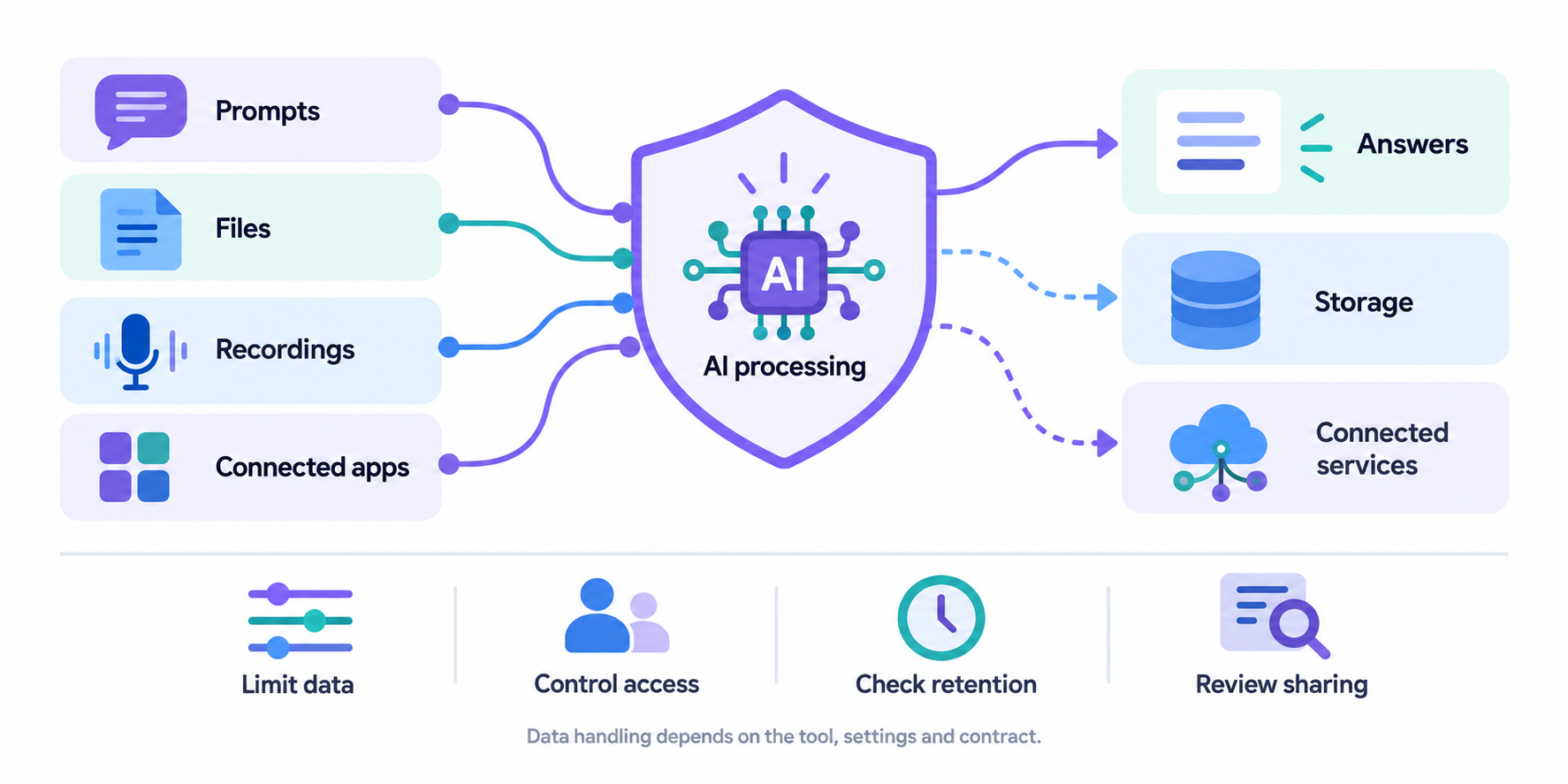
What Is AI Privacy
AI privacy is the protection and appropriate use of personal information collected, processed, inferred or generated by artificial intelligence systems.
In everyday terms, it means understanding what AI knows about you, how it gets that information and what happens to it afterwards.
Think about asking an AI assistant to summarise a meeting.
The recording might include people's names, opinions, customer details or a private conversation about someone's health.
AI privacy involves deciding whether that information should be processed in the first place, who can access it and how long it should be kept.
It covers more than the words you type into a chatbot:
- Information you provide: Prompts, uploaded documents, photos, spreadsheets and voice recordings.
- Information AI accesses: Emails, calendars and files available through connected apps or workplace systems.
- Information AI infers: Conclusions about someone's interests, behaviour or potentially sensitive characteristics—even when those conclusions are wrong.
- Information AI generates: Personal details included in answers, summaries or recommendations.
78%:
of AI users surveyed were bringing their own AI tools to work,
according to Microsoft and LinkedIn’s 2024 Work Trend Index
Employees need clear guidance on workplace AI use. Publish an approved-tools list, explain which information employees can share and provide a simple route to request approval. Personal AI accounts and independently chosen tools need assessment before they handle sensitive workplace information.
Survey context: This finding comes from the 2024 Work Trend Index and refers to surveyed AI users, not all employees. Bringing a personally chosen tool to work does not, by itself, prove that sensitive information was exposed or that the tool was unapproved. This is not a 2026 adoption estimate.
Concerns about these uses are already showing up in research.
Findings published through the AI Block-O-Meter showed that 72% of U.S. adults surveyed were concerned that AI chatbots could use conversation data to target them with ads.
The Harris Poll conducted the survey on behalf of eyeo from 19–21 May 2026, involving 2,066 U.S. adults aged 18 and over.
This measures people's concerns; it does not establish that every chatbot uses conversations for advertising.
What Happens to Your Private Data When You Use AI?
You upload a document, ask a question and receive an answer within seconds.
But what happens to the information behind the scenes?
AI privacy involves more than generating a response.
Depending on the service, your information may also be stored, remembered, reviewed or passed to connected providers. These are separate activities, and the rules depend on the product, account type, settings and contract.
Imagine asking an assistant to summarise a customer complaint.
Here's how that information could move through the system.
- Your information is processed to create an answer. The assistant uses your prompt, uploaded files and potentially information from connected services to generate a response. Cloud-based tools generally send that information to the provider's infrastructure. Processing information for an answer does not automatically mean using it to train a model.
- Conversations, files and logs may be stored. The service may retain chat history, attachments and operational records for different periods. Deleting a conversation from your history may not immediately remove every associated copy.
- Authorised people may have access. Depending on the service's arrangements, provider staff or contractors may access information for support, security investigations or quality review. Check when this is permitted and which safeguards apply.
- Memory features may preserve details. Some assistants save information for future conversations. Memory, chat history and model training are separate features, so check their controls and deletion options individually.
- Information may be used to improve models. This depends on the product, account type, settings and contract. Check the exact terms, including any exceptions for feedback or optional features. A paid subscription alone does not establish how your information is used.
- Connected services may receive information. Asking an assistant to send an email or save a document can transfer information to another application. Check what is sent, who receives it and whether approval is required.
- Generated answers can create additional copies. Summaries may contain personal or confidential details from the original material. Copying them into emails, documents or team chats creates more places where that information needs protection. Check accuracy and recipients before sharing.
- AI privacy needs attention throughout the process. Follow what goes in, how it is handled, where it goes next and what remains afterwards. The NIST AI Risk Management Framework supports considering privacy throughout an AI system's lifecycle.
- Sharing information with AI does not automatically make it public. However, a private-looking chat window does not establish how your information is handled. Check the service's actual arrangements before uploading sensitive employee, customer or business information.
How Is AI Privacy Different From Security and Confidentiality?
These terms overlap, but each asks a different question:
| Concept | Main question | Workplace example |
| AI privacy | Is information about people being used appropriately? | Should employee meeting transcripts be used to create individual performance profiles? |
| AI security | Is the system protected against unauthorised access and misuse? | Can an attacker manipulate an assistant into exposing restricted information? |
| Business confidentiality | Are commercial secrets and restricted documents protected? | Could an unpublished pricing strategy be disclosed outside the company? |
Here's the important distinction: a system can be secure and still create privacy problems.
Strong passwords and encryption may protect a meeting transcript from outsiders, but they don't settle whether it is appropriate to reuse that transcript to assess employees.
Before sharing information with AI, ask two questions: "Is it protected?" and "Is this an appropriate use of it?"
You need a satisfactory answer to both.
Why Is AI Privacy Becoming More Complicated?
An AI assistant might start as a tool for rewriting emails.
Connect it to your calendar, shared documents and meeting recordings, and the privacy questions quickly get bigger. You now need to understand what it can access, what it remembers and what it can do with that information.
AI privacy becomes more complicated as assistants gain access to more of your working life.
Depending on the product and its settings, that can include:
- Searching workplace information. Connected assistants can retrieve emails, documents and calendar entries. Existing permission mistakes could make sensitive information easier to discover.
- Processing meeting conversations. Recording and transcription tools may capture customer details, employee concerns or personal information mentioned during a call.
- Remembering earlier interactions. Memory and personalisation features can preserve details between conversations, making it important to understand what is saved and how to remove it.
- Taking actions across services. AI agents may be able to send messages, update records or share files. Their permissions and approval steps need careful consideration.
- Operating outside company oversight. Employees may use personal AI accounts or browser extensions without IT knowing which information is being processed.
Imagine approving an assistant to summarise public reports. A few months later, someone connects it to a shared drive containing employee records. The software may have the same name, but its access—and the potential impact on people's privacy—has changed.
The NIST AI Risk Management Framework treats privacy as a consideration throughout an AI system's lifecycle, alongside other characteristics of trustworthy AI. That's a useful way to look at workplace assistants because the privacy decision doesn't end when IT approves the software. Organisations need to reassess how it is used as its capabilities, connections and purposes change.
Regulators are examining these developments too. On 8 October 2026, the UK Information Commissioner's Office opened a call for evidence on agentic AI, covering security, transparency, accountability and automated decision-making, among other issues. It remains an ongoing consultation as of this article's October 2026 review, rather than final guidance.
For employers, the practical lesson is straightforward: review AI privacy whenever a tool gains access to new information or starts performing a new task. Approval for drafting a newsletter should never be treated as automatic approval for analysing confidential employee conversations.
7 AI Privacy Risks—and How to Reduce Them
Most AI privacy problems begin with ordinary decisions: uploading a file, connecting a shared drive or recording a meeting.
The risk depends on what information is involved, how the tool handles it and which safeguards are in place.
The examples below are illustrative workplace scenarios. They show where problems can arise and the practical checks that can help prevent them.
1. Sharing More Personal Information Than the Task Requires
You need help rewriting a paragraph, so you upload the whole document. It's convenient, but you may be sharing far more information than the assistant needs.
Let's take a look at this example, a manager uploads an employee's complete performance review to improve the wording of one section. The document also includes salary details, sickness absence and comments about a workplace dispute.
The same problem can affect customer spreadsheets, CVs and recruitment notes. Attachments may contain information you don't immediately see, including comments, tracked changes, hidden tabs and document metadata.
Removing someone's name isn't always enough. Their job title, location and the circumstances described could still identify them.
How to reduce the risk:
- Share only the extract needed for the task.
- Use fictional examples or placeholders where practical.
- Remove unnecessary personal details before uploading.
- Check comments, tracked changes, hidden tabs and metadata.
- Consider whether someone could identify the person from the remaining context.
The ICO's guide to checking whether anonymisation is effective explains why both direct and indirect identifiers matter. Use it when deciding whether your edited document still reveals someone's identity.
2. Assuming Your Prompts Cannot Be Stored or Reused
A privacy setting can sound reassuring without answering every question about your information.
A great example is, an employee turns off a model-training option and assumes their conversations are no longer stored. They then start uploading identifiable customer complaints without checking the retention terms.
Four separate issues need attention:
| Issue | What to check |
| Processing | How is information used to produce the answer? |
| Retention | Are conversations, files or logs kept, and for how long? |
| Human access | Can authorised staff or contractors review information, and under what circumstances? |
| Training | Can inputs or outputs be used to improve models? |
"Not used for training" does not automatically mean "not stored." Answers may differ between consumer accounts, business subscriptions and API services.
How to reduce the risk:
- Check the exact product, account type and applicable contract.
- Review retention, deletion, training and human-access terms separately.
- Record the settings your organisation has approved.
- Recheck those arrangements when features or terms change.
For a structured review, use the ICO's AI and data protection risk toolkit. It helps organisations assess risks to people across their AI use; combine it with the provider's current documentation for product-specific answers.
3. Connecting AI to Too Much Workplace Information
Connecting an assistant to your workplace systems makes it more useful.
It also makes the quality of your existing permissions much more important.
Another example, a assistant searches a shared drive where an HR folder was accidentally made accessible to all employees. A routine question brings sensitive information into an answer.
AI can make information easier to find, including information that was previously difficult to locate. That means an old sharing mistake may become a more immediate privacy problem.
How to reduce the risk:
- Review source permissions before enabling a connection.
- Restrict access to the folders and services the task requires.
- Test with ordinary employee accounts as well as administrator accounts.
- Remove unused connections and review access when employees change roles.
The NCSC's secure AI design guidance recommends least privilege: giving systems only the access and functionality they need. Your IT team can use that principle when assessing connectors.
Also, keep retrieval and training separate. An assistant searching a document to answer a question does not, by itself, mean that document is being used to train its underlying model.
4. Exposing Information Through AI Outputs or Manipulated Instructions
Sensitive information can appear in an answer through a system failure, excessive access or an attempt to manipulate the assistant.
One technique is prompt injection: instructions inside a webpage, email or document try to redirect the AI away from its intended task.
Take a assistant, he or she reads a malicious document that tells it to retrieve confidential records and send them to an external address. Whether that attempt succeeds depends on the system's permissions and safeguards.
OWASP recognises both prompt injection and sensitive information disclosure as risks in LLM applications. These are possible failure modes, rather than behaviour shared by every AI product.
How to reduce the risk:
- Restrict which tools and information the assistant can access.
- Enforce permissions in the underlying systems.
- Require approval before sensitive information is sent externally.
- Check outputs before sharing them.
- Treat instructions found in external content as untrusted.
For technical teams, the OWASP Prompt Injection Prevention Cheat Sheet provides practical guidance for building layered safeguards. A prompt telling the assistant to "keep everything confidential" is not a substitute for access controls.
5. Recording and Profiling People Without Clear Expectations
A meeting assistant can save time, but recording a conversation creates a record that needs careful handling.
For example: A routine team meeting turns into a discussion about an employee's health or grievance. The assistant captures it, and the transcript is later used to assess that person's attitude or performance.
The privacy questions extend beyond recording. Who receives the summary?
Can the transcript be searched later? Are conclusions about individuals accurate, appropriate and open to challenge?
How to reduce the risk:
- Explain recording, transcription and intended uses clearly beforehand.
- Provide a practical way to pause recording for sensitive discussions.
- Limit access and retention.
- Assess the relevant lawful basis and any additional conditions for sensitive personal data.
- Review consequential conclusions and provide a route to challenge them.
The ICO's guidance on monitoring workers helps employers assess these questions. It explains that consent is usually inappropriate in employment because the power imbalance can prevent a genuinely free choice. Clicking "agree" does not settle every privacy issue.
6. Losing Track of Data Across Vendors and Integrations
The app your employees use may rely on other organisations to process information.
For example: A meeting tool sends audio to a transcription provider and text to a separate AI service. The employer reviews the main app's privacy notice but never checks those additional arrangements.
That makes it harder to understand who handles information, where processing happens and who is responsible when something goes wrong.
How to reduce the risk:
- Identify relevant providers and subprocessors.
- Check processing locations and any international transfer arrangements.
- Review contractual safeguards, retention and deletion commitments.
- Establish incident-reporting responsibilities.
- Monitor changes to the supplier chain.
The ICO's controller–processor contract checklist gives procurement and privacy teams questions to work through when a supplier acts as a processor. Check the page's update notice when applying it, as the guidance is under review.
A business subscription or preferred hosting region can be relevant, but neither replaces a review of the actual processing arrangements.
7. Struggling to Correct or Delete Information Once It Spreads
Deleting a conversation may be straightforward. Understanding every associated copy can be much harder.
For example: A customer asks for their information to be deleted after employees have uploaded it to several AI tools. The business discovers transcripts, summaries and searchable copies across different services.
Depending on the system, information may exist in:
- Conversation history and uploaded files.
- Operational logs and backups.
- Search indexes and embeddings—numerical representations used for retrieval.
- Training datasets or, potentially, information learned by a model.
These are different forms of storage and processing. Correcting a source document does not necessarily update every derived copy or answer.
How to reduce the risk:
- Maintain an inventory of tools and connected information sources.
- Minimise unnecessary uploads and duplicate copies.
- Set retention periods and assign deletion responsibilities.
- Test correction and deletion procedures before handling sensitive information.
- Ask providers what deletion covers, what exceptions apply and when it takes effect.
The EDPB's opinion on AI models and personal data explains why models trained on personal information cannot automatically be assumed anonymous. Anonymity requires a case-by-case assessment, so ask for evidence behind a provider's claim.
AI Privacy Risk Checklist: Who Should Take Action?
Use this as a starting point, with one named person accountable for each control.
| AI privacy risk | Main control | Suggested lead |
| Sharing unnecessary information | Minimise and check inputs | Employee and data owner |
| Misunderstanding storage or reuse | Review settings, terms and retention | IT and privacy lead |
| Connecting excessive information | Restrict and test permissions | IT and system owner |
| Manipulated instructions or revealing outputs | Limit actions and enforce approvals | Security and application owner |
| Unexpected recording or profiling | Define purposes and assess impact | HR and privacy lead |
| Unclear vendor arrangements | Review suppliers and contracts | Procurement and privacy lead |
| Incomplete correction or deletion | Map copies and test procedures | System owner and records lead |
What Information Should Employees Avoid Putting Into Unapproved AI Tools?
Before uploading a document or pasting a message into an AI assistant, ask: "Am I authorised to share this information with this service?" Being able to access a file at work doesn't automatically mean you can send it to an external tool.
An unapproved AI tool is one your organisation hasn't assessed and authorised for the intended use.
It could be a personal chatbot account, a browser extension or a meeting assistant someone has started using independently.
For better AI privacy, give employees clear examples of what to keep out of these tools—and what to do instead.
| Information | Why it needs care | Safer approach |
| Passwords, API keys and access tokens | These credentials could give someone access to accounts, applications or company systems. | Keep them out of prompts and attachments. Store and share them through approved credential-management systems. |
| Health, grievance and disciplinary records | These records contain sensitive personal information that could seriously affect an employee if mishandled. | Use only a specifically assessed and approved workflow, with restricted access and appropriate privacy safeguards. |
| Customer lists and identifiable support records | Names, contact details, account information and conversation histories can expose customers' personal information. | Remove unnecessary details and use approved processing arrangements. Share only what the task requires. |
| Contracts and commercially sensitive plans | Agreements may contain confidentiality obligations, personal details, pricing or unpublished business decisions. | Check the contract, document classification and approved-tool rules before sharing any extract. |
| Publicly available information | Combining public details can reveal someone's identity, circumstances or information they would not reasonably expect you to infer. | Check the purpose and context before collecting, combining or uploading it. Public availability does not automatically make every use appropriate. |
Public information can still be personal data.
A name, job title and workplace listed online may identify someone, even without private contact details. Removing a name may also leave enough context to identify the person indirectly.
Make these rules easy to find when employees need them.
You can keep your AI acceptable-use policy, approved-tools list and practical examples together using AgilityPortal's document management system, giving staff a central reference point before they share workplace information.
If someone is unsure, the next step should be simple: pause the upload and ask the designated IT, security or privacy contact.
A clear answer upfront is much easier to manage than trying to retrieve sensitive information afterwards.
How Can You Tell Whether an AI Tool Is Suitable for Your Data?
A polished website and a "privacy first" badge won't tell you whether an AI tool is suitable for employee records or customer information.
You need to check what happens to your data in the specific account, settings and workflow you plan to use.
Think about these everyday situations. Each one calls for a different level of scrutiny.
Imagine your team starts using an AI assistant to turn published blog articles into LinkedIn posts. It saves time, the content is already public, and someone checks each draft before publishing. Your organisation reviews the tool and approves it for that purpose. So far, so good.
A few weeks later, a colleague sees how useful it is and suggests uploading customer emails to make the posts more relatable. Then HR asks whether it could summarise employee feedback. Someone else wants to connect it to the company's document library.
The tool hasn't necessarily changed, but the information you're trusting it with has. That's where AI privacy needs another look.
Take the employee feedback.
Removing names might feel like enough, until you read a comment mentioning "the only night-shift supervisor at our Bristol branch." Colleagues could still recognise that person. Before uploading anything, HR needs to consider whether the task requires individual responses, whether identifiable details can be removed, and who will be able to access the results.
Connecting the document library introduces another question. Could the assistant retrieve salary records or confidential meeting notes because an old folder has overly broad permissions?
A useful check is to create harmless test documents with different access restrictions, then see what ordinary employee accounts can retrieve.
A good sign is a supplier that can explain its controls and help you verify them. You should be able to establish how information is stored, whether it can be used for training, which third parties receive it and what happens when you request deletion. Vague assurances such as "your privacy matters" leave those questions unanswered.
The same thinking applies when someone adds a meeting assistant. Before letting it join calls, check who receives the recordings, whether sensitive meetings can be excluded and whether recording can be stopped easily. A tool that works well for a public webinar may need different safeguards for a confidential HR conversation.
The NCSC's secure AI design guidance offers a practical principle: give a system only the access and functionality it needs. That gives your team a useful starting point when deciding which connections and permissions to enable.
Judge an AI tool against the actual job you want it to do. Approval to draft social posts is a starting point. Before moving into customer records, employee feedback or connected workplace systems, review the new use, test the controls and document the decision.
What Do Data Protection Rules Mean for AI Use?
Using AI doesn't remove your responsibility for the personal information you share.
If an employee uploads customer records or asks an assistant to analyse staff feedback, your organisation still needs to understand why that processing is appropriate and how people are protected.
For UK organisations, the ICO's guidance on AI and data protection is a useful starting point.
It covers areas including lawfulness, transparency, data minimisation and individual rights. The ICO currently marks this guidance as under review following the Data (Use and Access) Act, so check its latest updates when making compliance decisions.
In practice, an AI privacy assessment should help you answer these questions:
| Question | What it means at work |
| What is our lawful basis? | Identify the appropriate basis for processing personal data and any additional conditions required for sensitive information. |
| Have we explained the use clearly? | Tell affected people how and why their information is being processed. |
| Is the purpose appropriate? | Assess whether a new use, such as analysing meeting transcripts for performance, is compatible with the original purpose. |
| Do we need all this information? | Share the minimum necessary to complete the task. |
| How long will it be kept? | Define retention periods and understand the provider's deletion arrangements. |
| Can people exercise their rights? | Establish how relevant access, correction, objection and deletion requests will be handled. |
| Is a DPIA required? | Assess whether the processing is likely to create a high risk to people and requires a data protection impact assessment. |
Imagine introducing AI to summarise employee survey responses.
Before uploading them, you would need to consider whether individuals could be identified, what employees were told, who receives the summary and whether the provider's arrangements meet your requirements.
UK, EU and US requirements are not interchangeable.
Check which rules apply to your organisation, the people involved and the processing activity. US requirements can vary by state and sector; EU operations require assessment under the applicable EU framework.
This article provides general information about AI privacy and data protection, rather than legal advice.
What Should You Do If Sensitive Information Has Already Been Shared With AI?
You've pasted a document into an assistant, clicked send and then noticed it contains employee details.
Take a breath. Act promptly and report what happened so the right people can assess it.
Follow this sequence:
- Stop further sharing. Pause uploads, automated workflows or connected activity that could expose more information.
- Report the incident internally. Contact your designated IT, security or privacy lead through the organisation's incident process.
- Record the essential facts. Note the tool, account, time, information involved and any sharing settings. Preserve relevant evidence without circulating extra copies of the sensitive material.
- Contain the exposure. Restrict shared links, revoke unnecessary connections and request deletion where available. Coordinate with the incident lead so useful evidence is preserved.
- Revoke or rotate exposed credentials immediately. Passwords, API keys and access tokens need urgent attention because they may enable further access.
- Have the appropriate lead assess notification obligations. They should determine the likely consequences, applicable deadlines and whether regulators or affected people need to be informed.
Deleting a chat does not, by itself, prove that every associated copy has been removed. The assessment may need to cover uploaded files, logs, connected services and the provider's retention arrangements.
Use the incident to identify the control that failed.
Was the approved-tools list unclear?
Did a connector have excessive permissions?
AgilityPortal's guide to intranet security best practices provides related reading for reviewing the wider workplace environment.
How Can Employers Make Safer AI Use Part of Everyday Work?
A policy is useful only when employees can understand it and find it at the moment they need it.
Picture a new starter trying to summarise a customer complaint.
They should be able to quickly find the approved tool, see an example of what must be removed and know who to ask if they're unsure.
Making that route straightforward helps employees make better decisions under pressure.
Build safer AI use at work into everyday routines:
- Publish an approved-tools list. Specify the account types, permitted tasks and information each approval covers.
- Show realistic examples. Explain why rewriting a public announcement differs from uploading an employee's grievance.
- Provide a simple approval route. Let employees request a new tool or use case without guessing who owns the decision.
- Tailor training to the role. HR, managers and customer-facing teams handle different information and need relevant examples.
- Make reporting instructions easy to find. Employees should know how to raise concerns promptly.
- Review meaningful changes. New integrations, permissions, features and contractual terms may change the risk.
For practical communication examples, explore how to use AI in internal communications without losing employee trust.
An employee intranet such as AgilityPortal can give AI policies, training materials and updates a central home.
Pair that communication with appropriate technical controls, supplier checks and clear accountability to support employee data privacy.
Can You Trust AI With Your Data?
Trust should depend on evidence.
What information does the assistant need? How is it processed? Who can access it? Which protections can you actually verify?
A tool may be suitable for drafting public content while needing a separate assessment before handling customer records or employee information.
Its suitability can also change when you enable memory, add integrations or give it permission to take actions.
Start with a task involving little sensitive information, share only what is necessary and test the controls before expanding access.
If you're considering assistants that act across workplace systems, these agentic AI workplace examples and best practices offer a useful next step.
Good AI privacy practice means making informed decisions each time the information, purpose or access changes. That's how you get useful assistance while keeping responsibility for the people behind the data.
| What to check | Good sign | Warning sign |
| What information does it collect? | Documentation identifies prompts, files, metadata and connected information. | Collection is vaguely described or permissions appear excessive. |
| Can information be used for training? | Terms explain the rules for your exact account and any exceptions. | A general marketing statement is the only assurance. |
| How long is information retained? | Retention periods distinguish conversations, files and logs. | "We value your privacy" replaces a clear retention explanation. |
| Who can access it? | User, administrator and provider access are explained. | Human access or review arrangements are unclear. |
| Which third parties receive it? | Relevant subprocessors and their roles are documented. | The supplier cannot explain which other providers process information. |
| Are source permissions enforced? | Tests confirm that restricted information stays restricted. | Connecting a service makes previously restricted material available. |
| Can information be corrected, exported and deleted? | Procedures, timescales and limitations are explained. | Deleting a chat is presented as proof that every associated copy disappears. |
| What administrative controls exist? | Controls match your needs for access, sharing, connections and audit records. | Staff can enable sensitive features without appropriate oversight. |
| What happens after an incident? | Reporting routes and responsibilities are documented. | There is no clear incident contact or response process. |
| What happens when something changes? | Plan, feature and integration changes trigger a review. | Approval is assumed to cover every future use. |
For a more structured assessment, use the ICO's AI and data protection risk toolkit alongside the supplier's current documentation.
A good sign is evidence you can check: a documented commitment, an enforceable setting or a successful permissions test.
Suitability depends on the tool, its configuration, the task and the sensitivity of the information. An assistant approved for drafting public social posts may need a separate assessment before it handles employee records.
Final Thoughts: Can You Trust AI With Your Data?
AI can make everyday work easier, but a helpful answer doesn't tell you whether your information has been handled appropriately.
AI privacy depends on what you share, how the tool processes it and which protections you can verify.
Before uploading a document or connecting a workplace system, pause and ask: does this task need personal information? Is the tool approved for this use?
Do we understand who can access the data and how long it stays there?
For employers, those decisions become easier when employees have clear guidance, relevant training and someone to contact when they're unsure. Start with tasks that involve little sensitive information, check permissions and reassess whenever the tool's access or purpose changes.
The next step is simple: review one AI tool your team already uses. Check its settings, the information going into it and whether its current use matches what you originally approved.
That's a practical place to start protecting employee and business information.
AI Summary
- AI privacy concerns how artificial intelligence collects, processes, stores, infers and shares personal information. It covers prompts, uploaded files, recordings, connected systems and generated answers.
- Sharing information with AI does not automatically make it public or mean it is used for training. Processing, storage, human access, memory and model training are separate issues; check the exact product, account, settings and contract.
- Seven risks need attention: unnecessary data sharing, misunderstood retention or reuse, excessive connected access, revealing outputs or prompt injection, unexpected recording or profiling, unclear vendor arrangements and incomplete correction or deletion.
- Keep credentials and sensitive records out of unapproved AI tools. Share only necessary information, check attachments and permissions, and remember that removing names does not always make data anonymous.
- Assess each tool against its intended task and the sensitivity of the information. Verify access controls, retention, subprocessors, deletion procedures and incident arrangements, and reassess when features, integrations or purposes change.
- Employers should provide approved-tool guidance, practical training and clear reporting routes. AgilityPortal can centralise policies and updates. If sensitive information is exposed, stop further sharing, report promptly, contain access and revoke exposed credentials.
Most Popular Posts

Effective communication among team members is vital for the productivity and success of any organization. Surprisingly, 60% of companies lack a long-term internal communication strategy, which p...


Businesses thrive on communication for efficiency, productivity and accomplishment. When the right information is passed from the right designation in the organization, it promotes positivity an...

Categories
Blog
(3248)
Business Management
(399)
Employee Engagement
(237)
Digital Transformation
(224)
Growth
(151)
Intranets
(142)
Internal communications
(110)
Remote Work
(68)
Sales
(53)
Collaboration
(53)
Customer Experience
(33)
Culture
(30)
Project management
(30)
Knowledge Management
(29)
Leadership
(20)
Comparisons
(9)
News
(1)

Related Posts

Searching for "communal work spaces near me" but unsure which option will actually suit your growing business? By the end of this guide, you'll know how to compare offices to rent, spot extra costs and ask the right questions before committing....

Do you know what happens to your information after you share it with an AI assistant? That question sits at the heart of AI privacy—and it's easy to overlook when you're trying to finish a task. You paste in a customer email, upload a spr...

What would happen if your website moved successfully, but your customers and employees suddenly couldn't reach you by email? Email migration tools can help transfer your messages, but keeping business communication running takes more than copyi...

Does your team still message HR to ask where the holiday policy is? Employee self service should make everyday tasks easier, giving people a straightforward way to find answers, access documents and submit requests. But when policies are buried...

How quickly can a new partner go from signing an agreement to confidently working with your business? If the answer involves chasing documents, forwarding training links and answering the same questions repeatedly, your onboarding process may n...


Jill Romford
I am a digital nomad, lover of exploring new places and making friends.
I love to travel and I love the internet. I take pictures of my travels and share them on the internet using Instagram.
Traveler, entrepreneur, and community builder. I share my insights on digital marketing and social media while inspiring you to live your fullest life.
Ready to learn more? 👍
One platform to optimize, manage and track all of your teams. Your new digital workplace is a click away. 🚀
Free for 14 days, no credit card required.