
Insight Blog
Agility’s perspectives on transforming the employee's experience throughout remote transformation using connected enterprise tools.
37 minutes reading time
(7439 words)
Social Media Software Management: How to Eliminate Customer Messaging Gaps Across Teams

Social Media Software Management: How to Eliminate Customer Messaging Gaps Across Teams
Discover how social media software management helps businesses eliminate customer messaging gaps, improve collaboration, and deliver faster, more consistent responses.
Social Media Software Management: How to Eliminate Customer Messaging Gaps Across Teams

Have you ever wondered how many customer messages your business is missing simply because nobody knows who's supposed to reply?
If your team is juggling Facebook, Instagram, LinkedIn, X, and other social channels, you're not alone.
Social Media Software Management has become essential for businesses that want to keep customer conversations organized instead of letting them fall through the cracks.
It's common for marketing, customer service, and sales teams to share responsibility for social media, but without a clear process, important messages can be overlooked, answered twice, or left sitting unanswered.
These are just a few customer messaging gaps examples that can damage customer trust without anyone realizing it's happening.
The good news is that this problem is completely fixable.
According to research by HubSpot, 90% of customers expect an immediate response when they have a customer service question, making fast, coordinated communication more important than ever.
90%
expect an immediate response
According to HubSpot, 90% of customers expect an immediate response when they have a customer service question, making fast, coordinated communication more important than ever.
Source: HubSpot Customer Service Research
Rather than relying on scattered inboxes or hoping someone has already replied, businesses are increasingly using social media management software and social media management AI to centralize conversations, assign ownership, and respond more efficiently.
In this guide, you'll learn why these communication gaps happen, the social media advantages and disadvantages every business should understand, and the practical steps you can take to create a smoother, more consistent customer experience across every social platform.
Key Takeaways
- Social media software management helps businesses centralize customer conversations, improve team collaboration, and prevent important messages from being missed across multiple platforms.
- The biggest communication challenges include unclear message ownership, slow response times, disconnected teams, inconsistent brand messaging, and fragmented customer journeys.
- Modern social media management software goes beyond scheduling by offering unified social inboxes, workflow automation, AI-powered assistance, social listening, and real-time analytics.
- Businesses should prioritize features such as omnichannel messaging, message assignment, collaboration tools, customer engagement tracking, and role-based permissions when selecting a platform.
- Combining social media management tools with strong internal collaboration platforms like AgilityPortal helps teams deliver faster responses, improve customer experiences, and scale communication more effectively.
What Is Social Media Software Management?
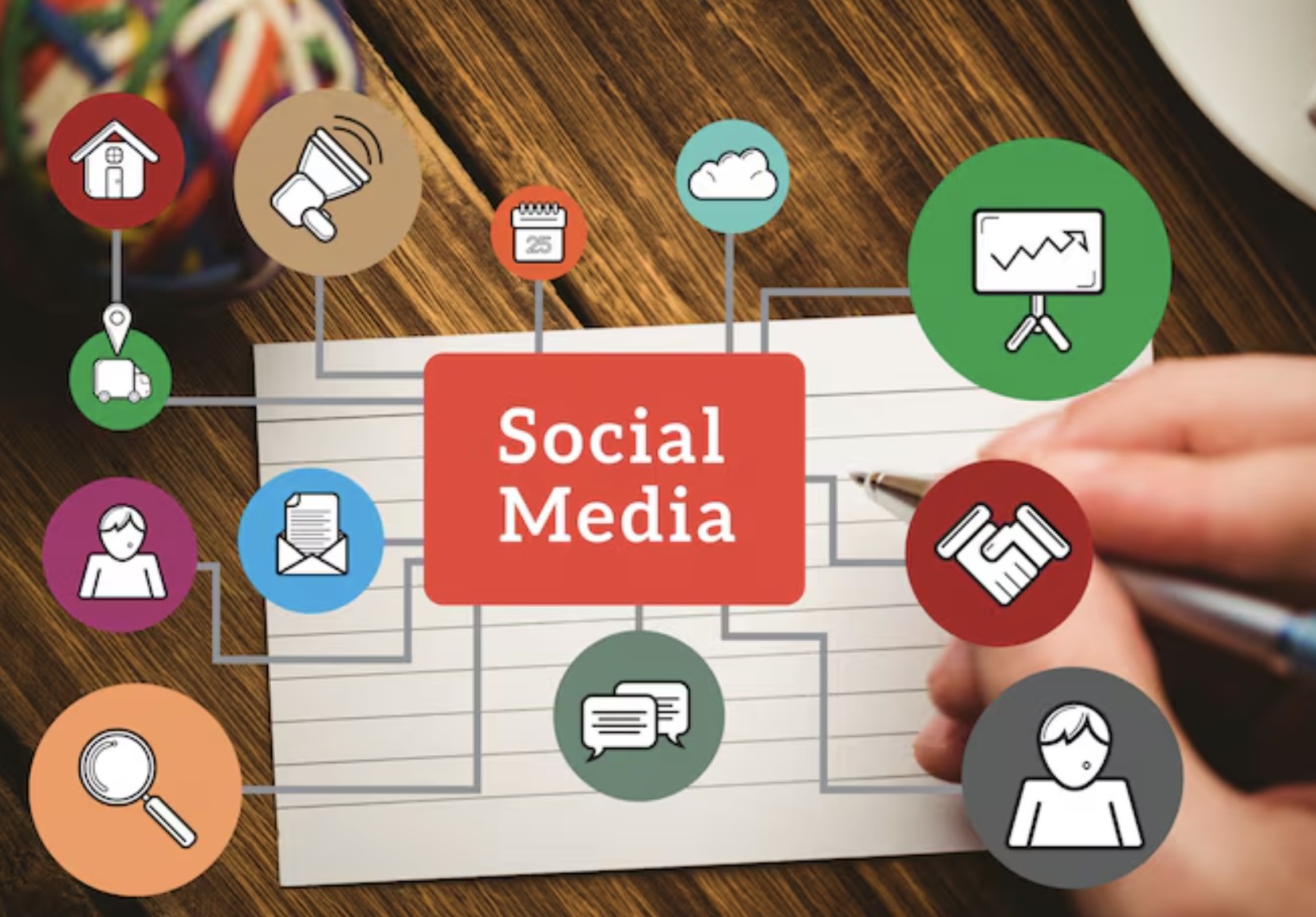
Social media software management is the process of planning, publishing, monitoring, and managing everything related to your business's social media presence from one central place.
Instead of treating social media as a collection of separate platforms, it brings your content, customer conversations, team collaboration, and performance reporting together into a single workflow.
The goal isn't just to publish content consistently—it's to make sure every customer interaction is seen, assigned to the right person, and responded to quickly.
As businesses grow and manage multiple social channels, having a structured approach becomes essential for maintaining a consistent brand voice and delivering a better customer experience.
What Is Social Media Software Management
What Is a Social Media Management Tool?
A social media management tool is a software solution that helps businesses, marketers, and agencies streamline, automate, and optimise their social media activities from a single dashboard.
Rather than logging into Facebook, LinkedIn, Instagram, X, TikTok, and other platforms individually, teams can manage everything in one place, saving time while reducing the risk of missed customer interactions.
Most social media management software includes features such as:
- Scheduling and publishing posts across multiple social platforms.
- Monitoring mentions, comments, and direct messages in real time.
- Tracking engagement with detailed analytics and performance reports.
- Managing customer conversations from a unified inbox.
- Assigning messages and tasks to specific team members.
- Collaborating on content before it goes live through approval workflows.
- Using AI-powered features to suggest captions, optimise posting times, and assist with customer responses.
How Is This Different From Simply Scheduling Posts?
Many people think social media management is only about scheduling posts in advance.
Dedicated social media scheduling tools like PostEverywhere cover the publishing side by queuing and cross-posting content to every platform from one dashboard, but the bigger job is what happens next.Today's businesses need to monitor conversations as they happen, respond to customers quickly, collaborate across departments, and understand what's working through real-time reporting.
A post might only take a few minutes to publish, but managing the conversations that follow often requires marketing, customer support, and sales teams to work together.
In other words, publishing content is only one part of the job. Managing customer engagement is where the real value lies.
How Social Media Management Tools Have Evolved in 2026
Social media management tools have changed dramatically over the past few years.
What started as simple scheduling platforms has evolved into intelligent collaboration and customer engagement solutions.
In 2026, businesses expect much more than automated publishing.
Modern platforms now allow teams to:
- Monitor customer conversations across multiple channels in real time.
- Prioritise messages based on urgency, keywords, or sentiment.
- Assign conversations to the right employee to prevent duplicate or missed replies.
- Collaborate internally without leaving the platform.
- Use AI to draft responses, summarise conversations, and recommend the best time to publish content.
- Measure customer engagement, response times, and campaign performance through detailed analytics.
These capabilities help businesses move beyond simply posting content to actively managing relationships with their audience at the moments that matter most.
How Does a Social Media Management Tool Work?
A social media management tool acts as a central hub for everything related to your social media strategy.
After connecting your social accounts, the platform pulls your content calendar, comments, direct messages, mentions, and performance data into a single dashboard.
Instead of switching between multiple apps, your team can publish content, respond to customers, assign conversations, review analytics, and collaborate from one place.
This centralised approach improves visibility, reduces communication gaps, and ensures customer messages don't fall through the cracks. As a result, businesses can respond faster, maintain a consistent brand voice, and deliver a better customer experience across every social media channel.
Related Guides You May Want to Read Next
This Social Media Software Management guide explains how businesses can close customer messaging gaps, improve customer communication, and keep teams aligned. The related resources below expand on customer experience, internal collaboration, digital workplace tools, and communication processes that support better customer conversations.
- How To Create A Killer Client Communication Strategy
- Customer Experience vs. User Experience: The Difference Explained
- Digital Workplace Platform: The Complete Guide
- Communication Framework for Remote and Distributed Teams
- Enterprise Collaboration Software for Secure, Scalable Teams
- Why Cross Functional Collaboration Is Important for Breaking Down Silos
- Internal Social Media Platforms for Businesses
- Unified Communications Benefits for Modern Teams
- Remote Team Management Software: Best App for Team Collaboration
- Digital Workplace Tools: Real Examples for Modern Teams
- How to Improve Internal Communication Within an Organization
- How Customer Service Training Software Reduces Employee Churn
Together, these articles support the wider topic cluster around customer communication management, team collaboration, digital workplace collaboration, and customer experience improvement.
Why Customer Messages Fall Through the Cracks
Why Customer Messages Fall Through the Cracks
Every customer message represents an opportunity to answer a question, solve a problem, or make a sale.
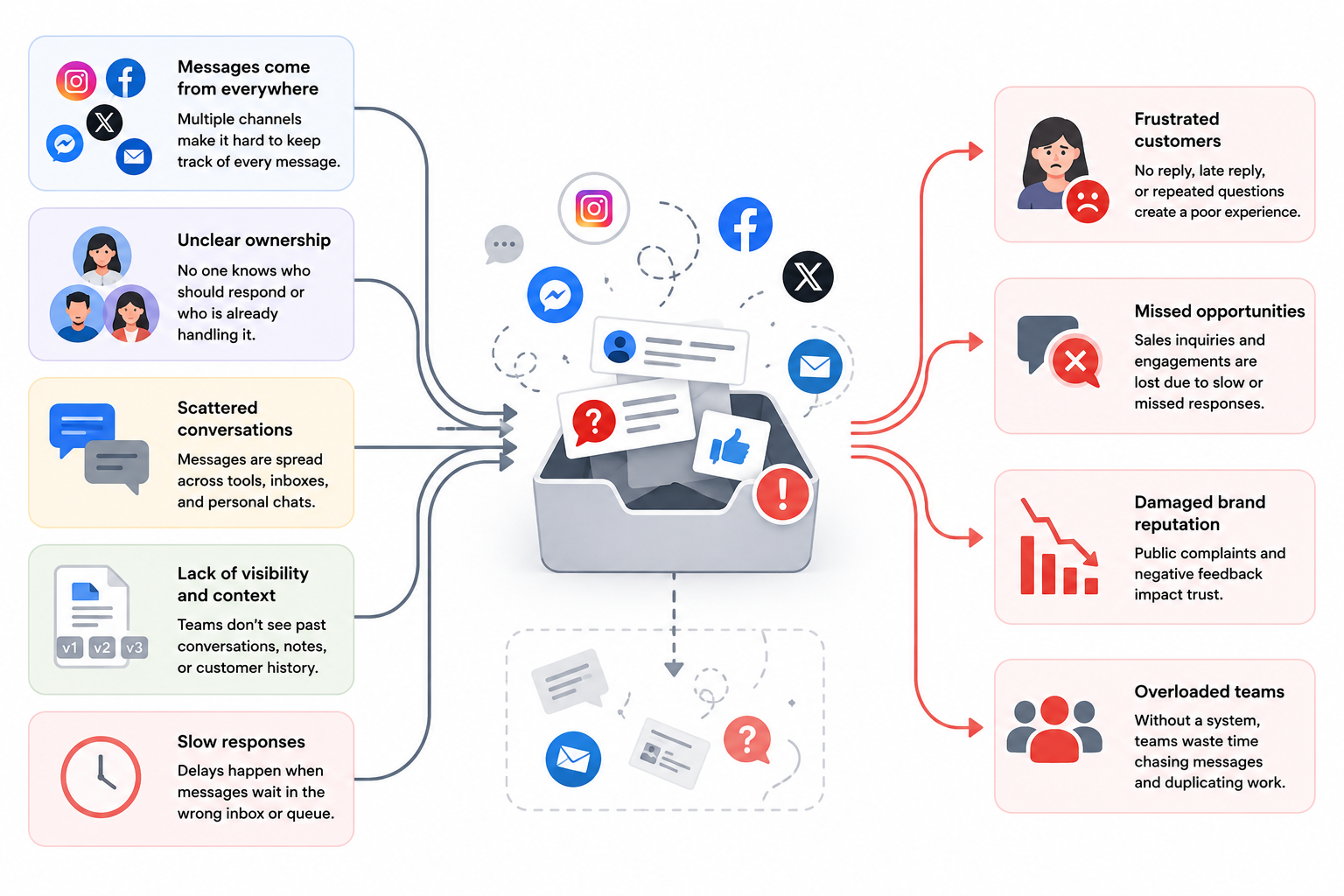
Yet as businesses expand across Facebook, Instagram, LinkedIn, X, TikTok, WhatsApp, and other platforms, keeping track of every conversation becomes increasingly difficult.
The problem usually isn't that employees ignore customers—it's that nobody has complete visibility of every interaction.
Different teams, disconnected tools, and unclear ownership create communication gaps that leave customers waiting for answers.
70%
expect full customer context
According to Zendesk, 70% of customers expect every employee they interact with to have full context about previous conversations, regardless of which department they contact. When that context is missing, customers become frustrated, repeat themselves, and are less likely to remain loyal.
Source: Zendesk Customer Experience Trends Report
Research from Zendesk found that 70% of customers expect every employee they interact with to have full context about their previous conversations, regardless of which department they contact. When that context doesn't exist, customer frustration increases and loyalty suffers.
Here are the biggest reasons customer messages get missed.
Multiple People Managing Different Accounts
As businesses grow, social media responsibilities are often divided between marketing, customer support, sales, and even external agencies.
For example:
- Marketing publishes content.
- Customer service responds to complaints.
- Sales answers product enquiries.
- An agency manages paid campaigns.
Without a shared workspace, each team only sees part of the customer journey.
Imagine a customer sends a product question on Instagram, follows up on Facebook Messenger, and later comments on a LinkedIn post. If each platform is managed by a different person, nobody sees the full conversation.
Business Impact:Instead of receiving one seamless experience, customers receive inconsistent answers, repeat themselves multiple times, or never receive a reply at all.
According to Zendesk, 64% of customers are willing to spend more with businesses that resolve issues within the same channel where the conversation started, highlighting the importance of connected customer communications
64%
will spend more
According to Zendesk, 64% of customers are willing to spend more with businesses that resolve issues within the same communication channel where the conversation started. This highlights the importance of connected customer communications and delivering a seamless omnichannel experience.
Source: Zendesk Customer Experience Trends Report
No Clear Ownership
One of the biggest causes of missed customer messages is assuming someone else has already replied.
Without message ownership:
- two employees reply to the same customer,
- everyone assumes someone else will answer,
- or the message simply gets forgotten.
This is particularly common in shared inboxes or when several employees have access to the same social media account.
Example:A customer sends a complaint via Facebook Messenger.
Marketing sees it.
Customer support sees it.
Neither team replies because each believes the other is handling it.
Three days later, the customer posts publicly complaining about poor service.
Business Impact:Poor ownership doesn't just delay responses—it damages trust and creates a poor public perception of your brand.
Platform Switching Creates Blind Spots
Today's customers don't stay on one platform.
A single customer journey might look like this:
- discovers your business on Instagram,
- asks a question on Facebook,
- visits your website,
- sends an email,
- then follows up on WhatsApp.
Most businesses still manage each of these channels separately.
That means employees constantly switch between dashboards, notifications, and apps just to understand one customer conversation.
Business Impact:Context gets lost.
Employees waste time searching for information.
Customers feel like they're starting from scratch every time they reach out.
According to Salesforce, 82% of service professionals say customer expectations are higher than ever, making fragmented communication even more difficult to manage effectively.
Lack of Visibility Across Teams
Many businesses still operate in silos.
Marketing doesn't know what customer support has promised.
Sales doesn't know an issue is already open.
Customer success isn't aware that a complaint has gone viral on social media.
Without a shared view of customer interactions, teams make decisions using incomplete information.
Business ImpactThis leads to:
- conflicting answers,
- inconsistent customer experiences,
- duplicated work,
- slower issue resolution.
Research from Zendesk shows that 72% of business leaders believe bringing customer-facing teams together improves operational efficiency, demonstrating the value of shared visibility.
Slow Response Times
Customers expect businesses to respond almost immediately, especially on social media.
Waiting several hours—or even days—for a reply is no longer considered acceptable.
As mentioned above according to HubSpot, 90% of customers say receiving an immediate response is important, while many define "immediate" as 10 minutes or less.
Unfortunately, many businesses struggle to meet these expectations because employees manually monitor multiple platforms.
Business Impact
Slow responses can lead to:
- lost sales opportunities,
- lower customer satisfaction,
- negative public reviews,
- customers choosing competitors instead.
Duplicate or Conflicting Replies
When multiple employees have access to the same social accounts without coordination, it's common for several people to reply to the same customer—or worse, provide completely different answers.
Example:
A customer asks about your refund policy.
Marketing replies that refunds take seven days.
Customer support says fourteen days.
Sales promises an exception.
The customer now trusts none of the responses.
Business Impact:
Inconsistent communication damages brand credibility and creates unnecessary work as teams try to correct mistakes after they've already happened.
As organisations continue adding more communication channels, solving these challenges is no longer just about responding faster.
It's about creating a single source of truth where every team member can see conversation history, understand customer context, and know exactly who owns the next response.
That's why modern social media management platforms have evolved beyond content scheduling into collaboration and customer engagement hubs.
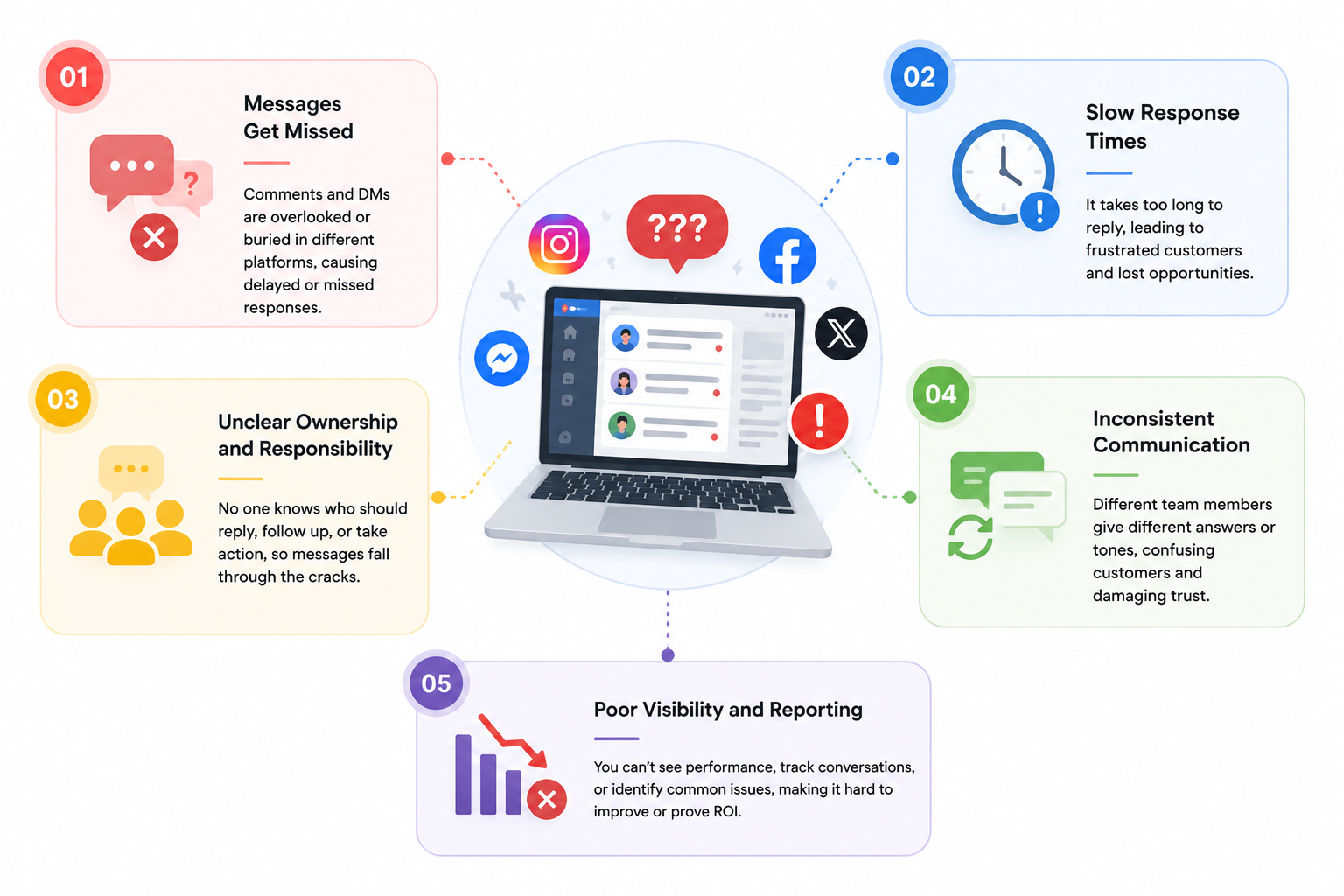
5 Signs Your Business Has a Social Media Management Problem
5 Signs Your Business Has a Social Media Management Problem
| Warning Sign | What It Looks Like | Business Impact |
| Repeated customer questions across channels | Customers ask the same question on Facebook, Instagram, LinkedIn, or email because previous conversations aren't visible. | Frustrated customers, longer resolution times, and lower customer satisfaction. |
| Missed messages and notifications | Direct messages, comments, or mentions go unanswered because teams monitor different platforms separately. | Lost sales opportunities, poor customer experience, and damaged brand reputation. |
| Inconsistent brand voice | Marketing, sales, and customer support provide different answers to the same customer enquiry. | Reduced trust, inconsistent customer experience, and confusion about your products or services. |
| Slow response times | Customers wait hours or even days for a reply because enquiries aren't prioritised or assigned automatically. | Lower engagement, reduced customer loyalty, and increased risk of customers choosing competitors. |
| No ownership of customer conversations | Employees assume someone else has responded, resulting in duplicate replies or no reply at all. | Missed opportunities, public complaints, and poor internal accountability. |
| Teams work in silos | Marketing, customer support, and sales each use different tools with little visibility into customer interactions. | Poor collaboration, duplicated work, and fragmented customer journeys. |
| Manual processes and spreadsheets | Staff rely on spreadsheets, shared inboxes, or sticky notes to track customer conversations. | Lower productivity, higher error rates, and limited ability to scale operations. |
| Limited reporting and analytics | There's no clear visibility into response times, engagement, or team performance across channels. | Poor decision-making and difficulty measuring ROI from social media activities. |
| Growing number of social channels | Your business manages Facebook, Instagram, LinkedIn, X, TikTok, WhatsApp, and more without a central dashboard. | Increased operational complexity and a higher risk of communication gaps. |
| No AI or workflow automation | Every message is handled manually, with no intelligent routing, prioritisation, or suggested responses. | Slower customer service, increased workload, and reduced operational efficiency. |
1. Repeated Customer Questions Across Channels
Many businesses don't realise they have a social media management problem until customer complaints begin to increase or engagement starts to decline.
On the surface, everything may appear to be running smoothly—posts are being published regularly, comments are receiving replies, and followers continue to grow.
However, behind the scenes, poor communication processes can create small issues that gradually turn into bigger business problems.
Without the right social media management software, it's easy for conversations to become disorganised and for valuable customer interactions to slip through the cracks.
One of the clearest warning signs is when customers repeatedly ask the same questions across different channels.
For example, someone may send a direct message on Instagram, leave a comment on Facebook a day later, and eventually email your support team because they still haven't received a response.
These customer messaging gaps examples usually indicate that conversations aren't being tracked in one central location, forcing customers to repeat themselves and creating unnecessary frustration.
2. Missed Messages and Notifications
Another common sign is missed direct messages or social media notifications.
As businesses expand their presence across platforms like Facebook, LinkedIn, Instagram, X, TikTok, and WhatsApp, manually checking every inbox becomes increasingly difficult.
According to Sprout Social, consumers expect brands to respond quickly on social media, and delayed responses can significantly reduce customer satisfaction and brand loyalty.
Missing even a single enquiry could mean losing a potential customer to a competitor.
3. Inconsistent Brand Voice
An inconsistent brand voice is another symptom that often goes unnoticed.
When different departments or team members manage separate social media accounts without shared guidelines, customers may receive completely different answers depending on who responds.
Marketing may promise one thing, customer service another, while sales provides different information altogether.
This inconsistency weakens trust and makes your business appear disorganised, highlighting one of the biggest social media advantages and disadvantages—while social platforms create more opportunities to engage with customers, they also require much stronger coordination across teams.
4. Slow Response Times
Slow response times are another indicator that your current processes aren't working efficiently. Customers increasingly expect near real-time replies, particularly when contacting businesses through social media.
Research from HubSpot found that 90% of customers expect an immediate response when they have a customer service question.
Without automation, shared inboxes, or social media management AI to help prioritise conversations and route enquiries to the right employee, businesses often struggle to meet these expectations.
5. Reliance on Manual Processes
Finally, if your team is still relying on spreadsheets, shared email inboxes, sticky notes, or manual processes to keep track of customer conversations, it's probably time to rethink your approach.
These methods may work for a small business with only a handful of enquiries, but they quickly become inefficient as your audience grows.
Modern businesses need a centralised platform where content scheduling, customer engagement, analytics, collaboration, and reporting work together seamlessly.
Investing in the right social media management solution not only improves efficiency but also helps create a consistent customer experience that builds trust and strengthens long-term relationships.
How Social Media Software Management Solves These Challenges
The good news is that most customer communication problems aren't caused by your employees—they're caused by disconnected systems and unclear processes.
Modern social media software management brings everything together into one platform, giving your team complete visibility over customer conversations, content, and performance.
Whether you're a small business looking for a simple social media manager app or a growing organisation comparing the best social media management tools, today's platforms offer far more than content scheduling.
They help teams collaborate, automate repetitive tasks, and ensure every customer interaction is handled quickly and consistently.
A Centralised Inbox Brings All Customer Conversations Into One Place
One of the biggest advantages of modern social media management software is a unified inbox. Instead of logging into Facebook, Instagram,
LinkedIn, X, TikTok, and other platforms separately, every comment, direct message, mention, and enquiry is brought together into one dashboard.
This not only saves time but also ensures that no customer conversation is overlooked.
Teams can view complete conversation histories, reducing the need for customers to repeat themselves and creating a smoother customer experience.
Intelligent Message Assignment Ensures Every Enquiry Reaches the Right Team
When multiple people manage the same social accounts, it's easy for enquiries to be missed or answered twice.
The best social media management tools solve this by automatically assigning messages to the right employee or department.
For example, product enquiries can be routed to sales, complaints to customer support, and partnership requests to marketing. Clear ownership improves accountability while reducing response times and eliminating duplicate replies.
Better Team Collaboration Helps Departments Work Together Seamlessly
Customer communication rarely involves just one department. Marketing creates content, sales answers product questions, and customer support resolves issues after purchase.
Modern social media platforms allow everyone to work together in one shared workspace.
Team members can leave internal notes, tag colleagues, approve responses, and collaborate without switching between multiple applications or forwarding emails.
This creates a consistent customer experience while improving productivity across the organisation.
Shared Customer Context Gives Teams Full Visibility Into Past Interactions
Customers expect businesses to remember previous conversations, regardless of which platform they use.
Instead of treating every interaction as a new conversation, modern platforms build a complete history of customer activity.
Employees can see previous messages, comments, interactions, and assigned cases before replying.
This shared context allows teams to deliver faster, more personalised support while reducing customer frustration.
Ask the Right Questions When Comparing Social Media Software
If you're comparing different social media management platforms, don't focus solely on scheduling posts or the number of supported social networks. The real value comes from how well the software helps your team communicate, collaborate, and make better decisions.
Ask practical questions such as:
- Can team members assign customer conversations to the right person?
- Can managers see the complete history of a conversation before replying?
- Can multiple departments collaborate without duplicating responses?
- Can a multi-location business route local enquiries to individual branches while maintaining a central view of customer interactions?
- Does the platform provide enough context for employees to make informed decisions quickly?
The best social media software doesn't just help you publish content—it gives your team the visibility, accountability, and information they need to respond confidently.
As customer expectations continue to rise, choosing a platform that supports collaboration and smarter decision-making can have a significant impact on customer satisfaction, operational efficiency, and long-term business growth.
Automated Workflows and AI Reduce Manual Tasks and Improve Efficiency
Automation has become one of the biggest differentiators in today's social media management platforms.
Using workflow automation and social media management AI, businesses can automatically:
- Route messages to the correct department.
- Prioritise urgent conversations.
- Detect keywords and customer sentiment.
- Suggest AI-generated responses.
- Schedule content at optimal times.
- Create alerts for unanswered enquiries.
These intelligent workflows reduce manual work, improve consistency, and allow employees to focus on more valuable customer interactions.
Social Monitoring and Brand Listening Help You Stay Ahead of Customer Conversations
The most effective social monitoring tools do much more than track comments on your own posts.
They continuously monitor mentions of your brand, products, competitors, hashtags, and industry keywords across multiple social media platforms.
This helps businesses identify customer feedback, respond to emerging issues before they escalate, discover sales opportunities, and understand how people perceive their brand.
Rather than reacting after problems occur, organisations can proactively engage with customers and protect their online reputation.
Reporting and Performance Analytics Provide Clear Insights Into What's Working
Managing social media without analytics is like driving without a dashboard—you never know what's working or where improvements are needed.
Comprehensive reporting allows businesses to measure key performance indicators such as:
- Audience growth
- Engagement rates
- Response times
- Customer satisfaction
- Campaign performance
- Team productivity
- Content reach and impressions
These insights help marketing teams optimise future campaigns while giving managers clear visibility into customer service performance and operational efficiency.
Choosing the Right Solution
The right platform depends on the size of your business, the number of social channels you manage, and how your teams collaborate.
While some businesses simply need a lightweight social media manager app for scheduling content, Small Business Social Media Management platforms can provide the essential publishing, scheduling, and collaboration features they need before scaling to more advanced enterprise solutions. Larger organisations often require the best social media management tools with advanced collaboration, workflow automation, analytics, CRM integrations, and powerful social monitoring tools.
Choosing a solution that scales with your business will help you improve customer engagement, streamline internal communication, and build stronger relationships across every social channel.
Best Practices for Managing Customer Conversations Across Teams
Managing customer conversations effectively isn't just about responding quickly—it's about creating a process that ensures every customer receives a consistent experience, regardless of which employee or department they speak to.
As businesses grow, customer enquiries become more complex and are often spread across multiple social media platforms, making it essential to have clear workflows in place.
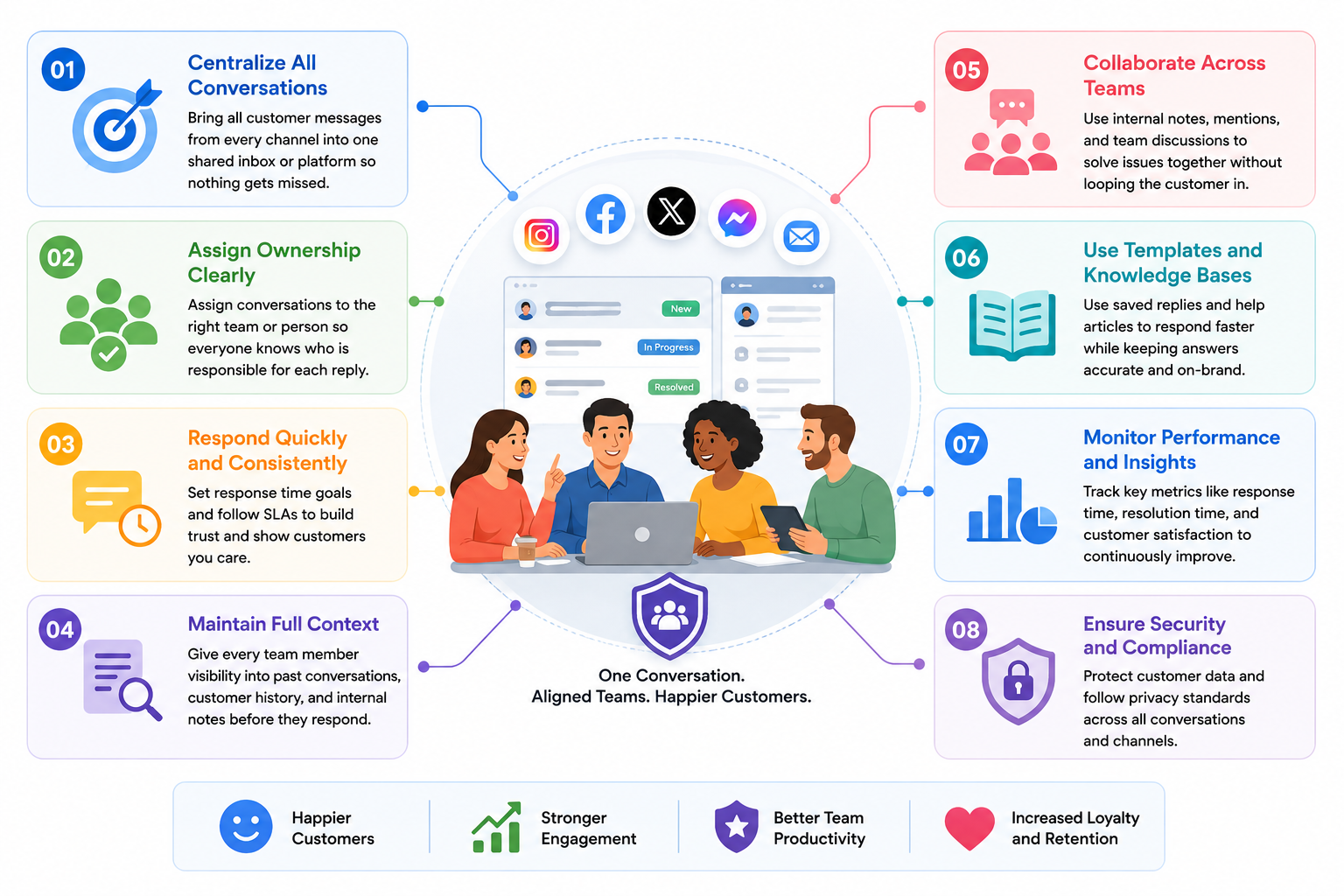
The following best practices can help your team improve collaboration, reduce communication gaps, and deliver faster, more reliable customer support.
Best Practices for Managing Customer Conversations Across Teams
Define Clear Ownership for Every Customer Conversation
One of the most common reasons customer messages go unanswered is a lack of ownership.
When multiple employees have access to the same social media accounts, it's easy for everyone to assume someone else has already responded.
Assigning every conversation to a specific person or team creates accountability and ensures no enquiry is overlooked.
Whether it's sales handling product questions or customer support managing service issues, everyone should understand their responsibilities.
Most of the best social media management tools include message assignment features that make ownership visible across the entire team.
Create Response Guidelines to Maintain Brand Consistency
Customers expect consistent answers regardless of whether they contact your business through Facebook, LinkedIn, Instagram, or another platform.
Creating response guidelines helps employees communicate with the same tone, follow approved messaging, and provide accurate information. These guidelines should cover common customer questions, escalation procedures, response times, and brand voice.
Consistent communication not only improves the customer experience but also strengthens trust in your business.
Use Approval Workflows for Sensitive Communications
Not every social media response should be published immediately. Some enquiries involve complaints, legal matters, pricing, or sensitive customer information that requires additional review.
Approval workflows allow managers or senior team members to review responses before they are published.
This reduces the risk of inaccurate information, protects your brand reputation, and ensures customer communications remain professional across every channel.
Monitor Response Times and Customer Expectations
Today's customers expect businesses to reply quickly, particularly on social media. Tracking response times helps identify bottlenecks before they become customer complaints.
Modern social media management software provides dashboards that measure average response times, first-response rates, unresolved conversations, and team performance.
Reviewing these metrics regularly helps managers improve service levels while ensuring customer enquiries don't remain unanswered.
Build a Shared Knowledge Base
Employees shouldn't have to ask colleagues the same questions every day. A shared knowledge base gives everyone access to approved answers, company policies, product information, and troubleshooting guides.
This is especially valuable for larger organisations where marketing, customer service, and sales all interact with customers. Combined with social media management AI, knowledge bases can also help generate suggested responses, reducing response times while maintaining consistency.
Review Performance and Continuously Improve
Customer expectations continue to evolve, which means your communication processes should evolve too.
Regularly reviewing analytics allows businesses to identify trends, measure team performance, and uncover opportunities for improvement.
Track key performance indicators such as customer satisfaction, engagement rates, response times, message resolution, and recurring customer issues. Use this data to refine workflows, update response guidelines, and improve collaboration across teams.
The most successful organisations treat customer communication as an ongoing process rather than a one-time task.
By reviewing performance regularly and making small improvements over time, businesses can build stronger customer relationships, improve operational efficiency, and deliver a consistently positive experience across every social media channel.
Best Practices at a Glance
| Best Practice | Why It Matters | Business Benefit |
| Define message ownership | Ensures every customer enquiry has a clear owner. | Reduces missed messages and improves accountability. |
| Create response guidelines | Keeps communication accurate and consistent across teams. | Builds customer trust and strengthens brand reputation. |
| Implement approval workflows | Reviews sensitive responses before they are published. | Minimises risk and protects brand credibility. |
| Monitor response times | Measures how quickly teams respond to customer enquiries. | Improves customer satisfaction and service quality. |
| Build a shared knowledge base | Gives employees access to consistent information and approved answers. | Faster responses and better collaboration across departments. |
| Review analytics regularly | Identifies trends, bottlenecks, and opportunities for improvement. | Better decision-making and continuous optimisation of customer communications. |
Features to Look for in Social Media Software Management
Not all social media management platforms offer the same capabilities.
While some are designed for individuals or small businesses that simply need to publish content, others provide enterprise-level collaboration, customer engagement, and workflow management.
Choosing the right solution means looking beyond scheduling features and focusing on the tools that will improve productivity, strengthen collaboration, and deliver a better customer experience.
- Multi-Channel Support - Modern businesses rarely rely on a single social network. Customers interact with brands across Facebook, Instagram, LinkedIn, X, TikTok, YouTube, WhatsApp, and other digital channels. A platform with true multi-channel support allows your team to manage every conversation, campaign, and customer interaction from one social media dashboard, eliminating the need to constantly switch between applications.
- Unified Social Inbox - A unified social inbox is one of the most valuable features in any customer engagement platform. Instead of monitoring comments, mentions, and direct messages separately, every conversation is collected into one central location.This makes it much easier to prioritise enquiries, track ongoing conversations, and ensure every customer receives a timely response. For growing businesses, social inbox management significantly reduces the risk of missed opportunities while improving operational efficiency.
- Collaboration Tools for Distributed Teams - Social media is no longer managed by a single employee. Marketing teams, customer service representatives, sales professionals, and external agencies often need to collaborate before responding to customers or publishing content. Built-in social media collaboration tools allow employees to assign conversations, leave internal notes, tag colleagues, and review responses without relying on email chains or third-party messaging platforms. This creates a smoother workflow and helps maintain consistent communication across the business.
- AI-Powered Content and Response Assistance - Artificial intelligence is rapidly changing how organisations manage customer engagement. Rather than replacing employees, AI helps teams work more efficiently by drafting replies, summarising conversations, suggesting hashtags, recommending publishing times, and identifying customer sentiment. These intelligent features reduce repetitive work while allowing employees to focus on more complex customer interactions and relationship building.
- CRM and Customer Data Integration - Customer conversations become far more valuable when they're connected to your existing business systems. Platforms with built-in social CRM capabilities or integrations with popular CRM solutions allow employees to view customer history, previous purchases, support tickets, and ongoing cases without leaving the platform. This creates a more personalised experience while helping teams resolve enquiries much faster.
- Advanced Analytics and Engagement Tracking - Posting content without measuring performance makes it difficult to understand what's driving results. Comprehensive social media analytics tools provide detailed insights into audience growth, content performance, engagement rates, click-throughs, campaign reach, and customer behaviour. These reports help businesses make data-driven decisions while continuously improving their social media strategy.
- Mobile Access for Remote Teams - Customer conversations don't stop when employees leave the office. Mobile access allows teams to monitor activity, approve content, respond to urgent enquiries, and receive notifications from anywhere. This flexibility is particularly valuable for organisations with remote employees, field teams, or businesses operating across multiple time zones.
- Role-Based Permissions and Content Governance - As more employees gain access to social accounts, protecting your brand becomes increasingly important. Role-based permissions allow administrators to control who can publish content, approve campaigns, respond to customers, or access sensitive reports. Combined with a structured content approval workflow, businesses can reduce publishing mistakes while maintaining compliance and brand consistency.
- Workflow Automation and Business Process Integration - The best platforms don't just help you publish content—they automate repetitive business processes. Workflow automation can assign conversations automatically, escalate priority enquiries, trigger internal notifications, schedule recurring posts, and integrate with helpdesk, CRM, and project management systems. These capabilities reduce manual administration while improving both team productivity and the overall digital customer experience.
- Social Listening and Brand Monitoring - Understanding what customers say when they aren't directly tagging your business is just as important as responding to incoming messages. A dedicated social listening platform monitors brand mentions, competitor activity, trending topics, industry conversations, and customer sentiment across multiple channels. This allows businesses to identify opportunities, respond to emerging issues early, and make more informed marketing and customer service decisions.
What Features Matter Most?
The ideal solution depends on your business size, customer engagement strategy, and internal workflows.
Smaller businesses may prioritise simple publishing and scheduling, while larger organisations often require enterprise social media management capabilities such as collaboration, governance, workflow automation, omnichannel communication, advanced reporting, and customer relationship management.
Investing in a platform with these features doesn't just improve your social media operations—it helps create a connected, efficient, and customer-focused organisation that is better equipped to build long-term relationships and scale successfully.
How AgilityPortal Helps Teams Stay Aligned
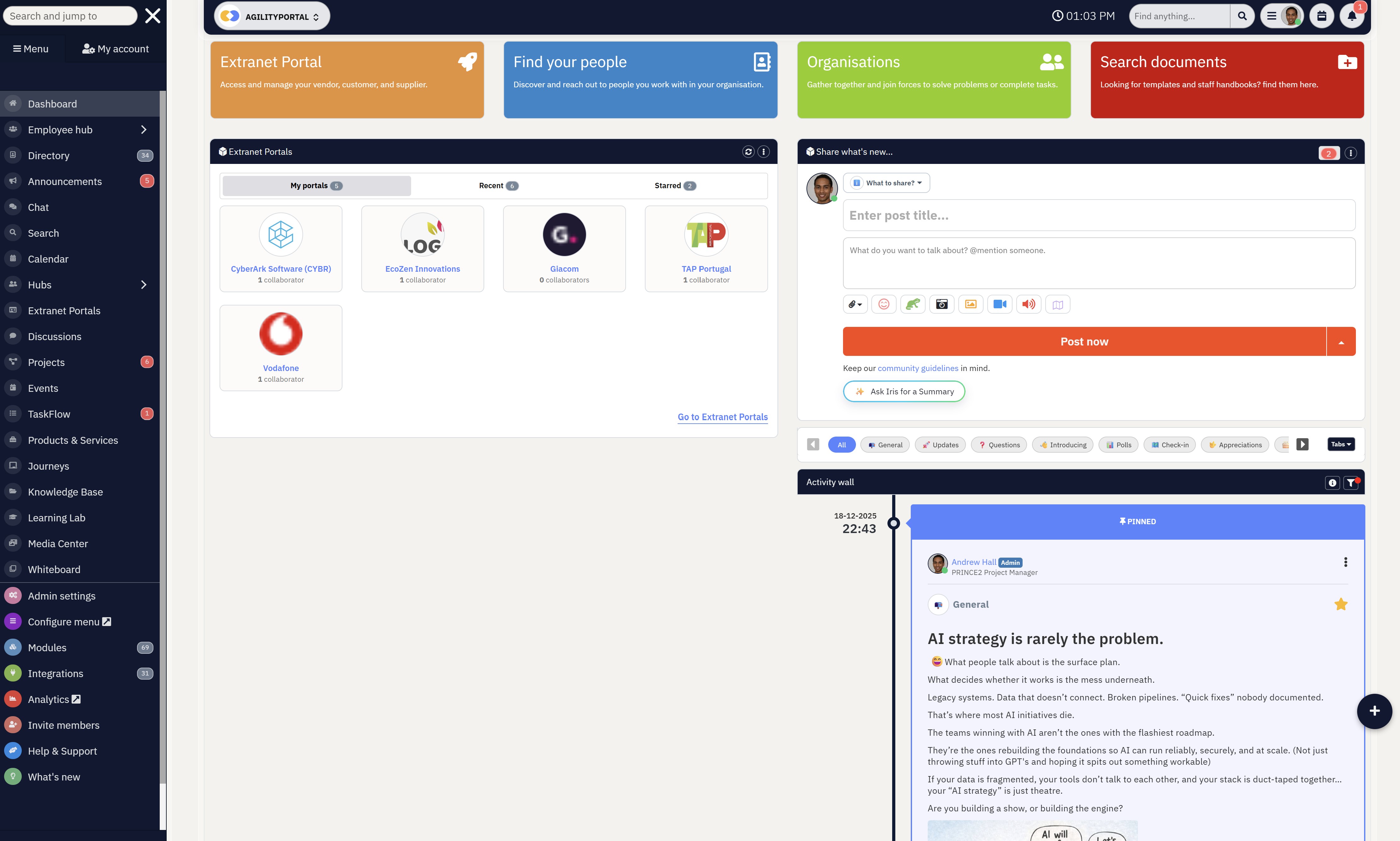
How AgilityPortal Helps Teams Stay Aligned
Effective customer communication starts with effective internal communication.
Even the best social media strategy can break down when marketing, customer service, and operations work in separate systems with little visibility into what's happening across the business.
AgilityPortal helps solve this challenge by giving teams a single digital workspace where they can collaborate, share knowledge, and stay informed.
Instead of relying on disconnected emails, chat apps, or spreadsheets, employees can access company updates, documentation, conversations, and workflows from one central platform.
While AgilityPortal isn't a dedicated social media management tool, it complements your existing marketing and customer engagement platforms by improving the internal processes behind every customer interaction.
Teams can share campaign updates, document response procedures, manage tasks, collaborate on projects, and ensure everyone has access to the latest information before responding to customers.
By reducing information silos and improving cross-department collaboration, AgilityPortal helps marketing, sales, customer support, and operations work as one connected team.
The result is faster decision-making, more consistent customer communication, and a better overall customer experience.
Team Alignment Layer
A Digital Workplace Platform That Helps Teams Stay Aligned Behind Every Customer Conversation
AgilityPortal helps businesses improve the internal teamwork behind effective social media software management. While your social media management software handles publishing, monitoring, and customer messages, AgilityPortal gives marketing, sales, customer support, and operations teams one secure place to share updates, document response processes, manage tasks, and keep everyone working from the same information.
This is especially useful when teams need better customer communication management, clearer ownership, stronger brand consistency, and faster decisions across departments. Instead of relying on scattered emails, chat threads, and spreadsheets, teams can use AgilityPortal to improve collaboration before, during, and after every customer interaction.
Use AgilityPortal alongside your social media tools to reduce internal silos, improve response coordination, and keep teams aligned around every customer conversation.Final Thoughts
Customer conversations should never depend on luck, individual employees, or someone remembering to check another social media inbox.
As your business grows, managing conversations across multiple platforms becomes more complex, making it essential to have clear processes, defined ownership, and the right technology in place.
Effective social media software management helps bring structure to customer communications by centralising conversations, improving collaboration, reducing missed messages, and ensuring every enquiry reaches the right person.
he result is faster response times, greater accountability, and a more consistent customer experience that builds trust and strengthens your brand.
If your team is still switching between multiple social platforms, relying on shared inboxes, or struggling to keep track of customer conversations, now is a good time to evaluate your current approach.
The right combination of people, processes, and technology can help your business improve operational efficiency, enhance customer engagement, and scale confidently as communication demands continue to grow.
Frequently Asked Questions (FAQ)
What is social media management software?
Social media management software is a platform that helps businesses manage content publishing, customer conversations, analytics, and collaboration from one central dashboard.
Instead of switching between multiple social networks, teams can schedule posts, monitor engagement, and improve customer communication management while keeping every interaction organised.
Why is a unified social inbox important?
A unified social inbox brings comments, direct messages, mentions, and enquiries from multiple social platforms into one place.
This makes social media response management much easier by reducing missed messages, preventing duplicate replies, and giving teams complete visibility into every customer conversation.
How does social media management software improve customer service?
Modern platforms improve social media customer service by helping businesses respond faster, assign enquiries to the right employee, and track conversations across multiple channels.
Combined with customer engagement software, they help organisations deliver a more consistent and personalised customer experience.
Can multiple team members manage the same social media accounts?
Yes. Most enterprise platforms include message assignment software, role-based permissions, and team collaboration software that allow marketing, sales, and customer support teams to work together without creating duplicate responses.
This improves social media collaboration, strengthens brand consistency, and ensures clear ownership of every customer interaction.
What features should businesses look for in social media management software?
The best solutions include content scheduling, social media analytics, social media workflow automation, approval workflows, AI-powered assistance, CRM integrations, social listening, and omnichannel messaging capabilities.
These features help businesses scale customer communications while improving operational efficiency.
How does omnichannel messaging improve the customer experience?
Omnichannel messaging connects customer conversations across social media, email, live chat, and other communication channels, allowing employees to view the complete customer journey.
This improves customer experience management by ensuring customers receive consistent support regardless of how they choose to contact your business.
Why is social media collaboration important for growing businesses?
As organisations expand, multiple departments often contribute to customer communications.
Effective social media collaboration supported by digital workplace collaboration tools helps marketing, sales, and customer support share information, coordinate responses, and work more efficiently from a single source of truth.
AI Summary
- Social media software management helps businesses centralize publishing, customer conversations, analytics, and team collaboration, making it easier to manage multiple social media platforms from a single dashboard.
- The biggest causes of missed customer messages include unclear ownership, disconnected communication channels, slow response times, inconsistent brand messaging, and teams working in silos.
- Modern social media management software goes beyond content scheduling by offering unified social inboxes, social listening, AI-powered automation, workflow management, and real-time collaboration features.
- Businesses can improve customer communication management by assigning message ownership, using approval workflows, monitoring response times, building shared knowledge, and leveraging social media analytics to measure performance.
- Choosing the right platform depends on your business size, collaboration needs, reporting requirements, integrations, and ability to support omnichannel messaging and customer engagement across every social network.
- AgilityPortal complements social media management platforms by improving internal communication, digital workplace collaboration, knowledge sharing, and cross-functional teamwork, ensuring employees stay aligned behind every customer interaction.
Most Popular Posts

Effective communication among team members is vital for the productivity and success of any organization. Surprisingly, 60% of companies lack a long-term internal communication strategy, which p...


Businesses thrive on communication for efficiency, productivity and accomplishment. When the right information is passed from the right designation in the organization, it promotes positivity an...

Categories
Blog
(3192)
Business Management
(394)
Employee Engagement
(235)
Digital Transformation
(218)
Growth
(150)
Intranets
(141)
Internal communications
(106)
Remote Work
(68)
Sales
(53)
Collaboration
(52)
Customer Experience
(32)
Culture
(30)
Knowledge Management
(29)
Project management
(29)
Leadership
(20)
Comparisons
(9)
News
(1)

Related Posts

What would happen to your team's work and customer information if an employee's MacBook disappeared today? If you're wondering how to protect your Mac physically, the answer goes beyond buying a case. A MacBook used at home, on a train or in a ...

Welcome to AgilityPortal's guide to the best VPN for Remote teams. How do you give employees secure access to company systems when they work from home, the office and everywhere in between? It's a question more businesses need to answer: 28% of worki...

Have you ever left a meeting thinking everyone agreed on the next step, only to discover a week later that each person remembered something different? Open source meeting transcription can help teams keep a searchable record of the conversation...

The best ai image editors can save a team hours of repetitive work. A marketing manager can remove a distracting background, an HR team can improve a staff event photo, and an online shop can turn a basic product shot into something ready to pu...

Ever opened a PDF just before a meeting and realised you need to edit a page, pull figures from a scanned report, or gather everyone's comments? What should be a quick task can turn into a frustrating search for the right tool. That lost time a...


Jill Romford
I am a digital nomad, lover of exploring new places and making friends.
I love to travel and I love the internet. I take pictures of my travels and share them on the internet using Instagram.
Traveler, entrepreneur, and community builder. I share my insights on digital marketing and social media while inspiring you to live your fullest life.
Ready to learn more? 👍
One platform to optimize, manage and track all of your teams. Your new digital workplace is a click away. 🚀
Free for 14 days, no credit card required.