
Insight Blog
Agility’s perspectives on transforming the employee's experience throughout remote transformation using connected enterprise tools.
41 minutes reading time
(8200 words)
6 Best Immutable Backup Solutions for Intranets to Protect Against Ransomware in 2026

6 Best Immutable Backup Solutions for Intranets to Protect Against Ransomware in 2026
Compare 6 of the best immutable backup solutions for intranets in 2026, including on-premises and cloud options for protecting data against ransomware.
6 Best Immutable Backup Solutions for Intranets to Protect Against Ransomware in 2026

Modern intranets are no longer just internal websites — they are the operational backbone of many organisations.
They store employee records, company policies, internal documents, knowledge bases, training materials and critical day-to-day workflows. But while most businesses assume that "having backups" is enough, that assumption breaks the moment ransomware enters the picture.
The reality is that attackers don't just target live systems anymore — they actively seek out and destroy backup data to eliminate any chance of recovery.
This is where immutable backup solutions become essential, ensuring that once data is written, it cannot be altered, encrypted or deleted for a defined retention period.
According to Enterprise Strategy Group research published by Object First, 96% of organisations that experienced ransomware reported that their backup data had been targeted at least once. This highlights a critical shift in attacker behaviour: backups are now a primary target, not a secondary one.
96%
had backup data targeted
According to Enterprise Strategy Group research published by Object First, 96% of organisations that experienced ransomware reported that their backup data had been targeted at least once. This highlights a critical shift in attacker behaviour: backups are now a primary target, not a secondary one.
Source: Enterprise Strategy Group (ESG) research, published by Object First
The modern recovery equation is simple but unforgiving:
Production data compromised → backups targeted → only immutable recovery copies survive → organisation can recover.
In this guide, we compare both on-premises and cloud-based immutable backup solutions, because there is no single architecture that fits every intranet environment or security strategy.
Key Takeaways
- Immutable backup solutions protect recovery data by preventing backup copies from being modified, encrypted, or deleted during a defined retention period.
- Ransomware can target backup infrastructure as well as production systems, so simply having a backup does not guarantee that an organisation will be able to recover.
- On-premises and cloud immutable backups serve different needs. Local infrastructure can support greater control and faster recovery, while cloud storage provides scalable off-site protection.
- A resilient backup strategy should combine immutability, administrative separation, off-site copies, encryption, and regularly tested restores rather than relying on one security control.
- The 3-2-1-1-0 backup strategy provides a practical framework: three copies of data, two storage types, one off-site copy, one immutable or offline copy, and zero unverified backup errors.
- The right solution depends on your existing infrastructure, backup software, recovery objectives, data volumes, compliance requirements, and whether you prefer on-premises, cloud, or hybrid storage.
What Is an Immutable Backup, and Why Does Your Intranet Need One?
In modern cloud environments, this concept is widely implemented across platforms such as immutable backup AWS services, where features like S3 Object Lock allow organisations to enforce write-once-read-many (WORM) policies on backup data.
Similarly, many vendors now offer an immutable backup solution as part of broader ransomware recovery strategies, ensuring that even privileged users or attackers cannot modify protected recovery points.
Use a simple workplace example:
Imagine ransomware compromises an administrator account and encrypts the organisation's intranet database and shared documents. The attacker then tries to delete the backups.
A normal accessible backup repository could potentially be compromised too.
A properly configured immutable recovery copy should remain protected until its retention lock expires.
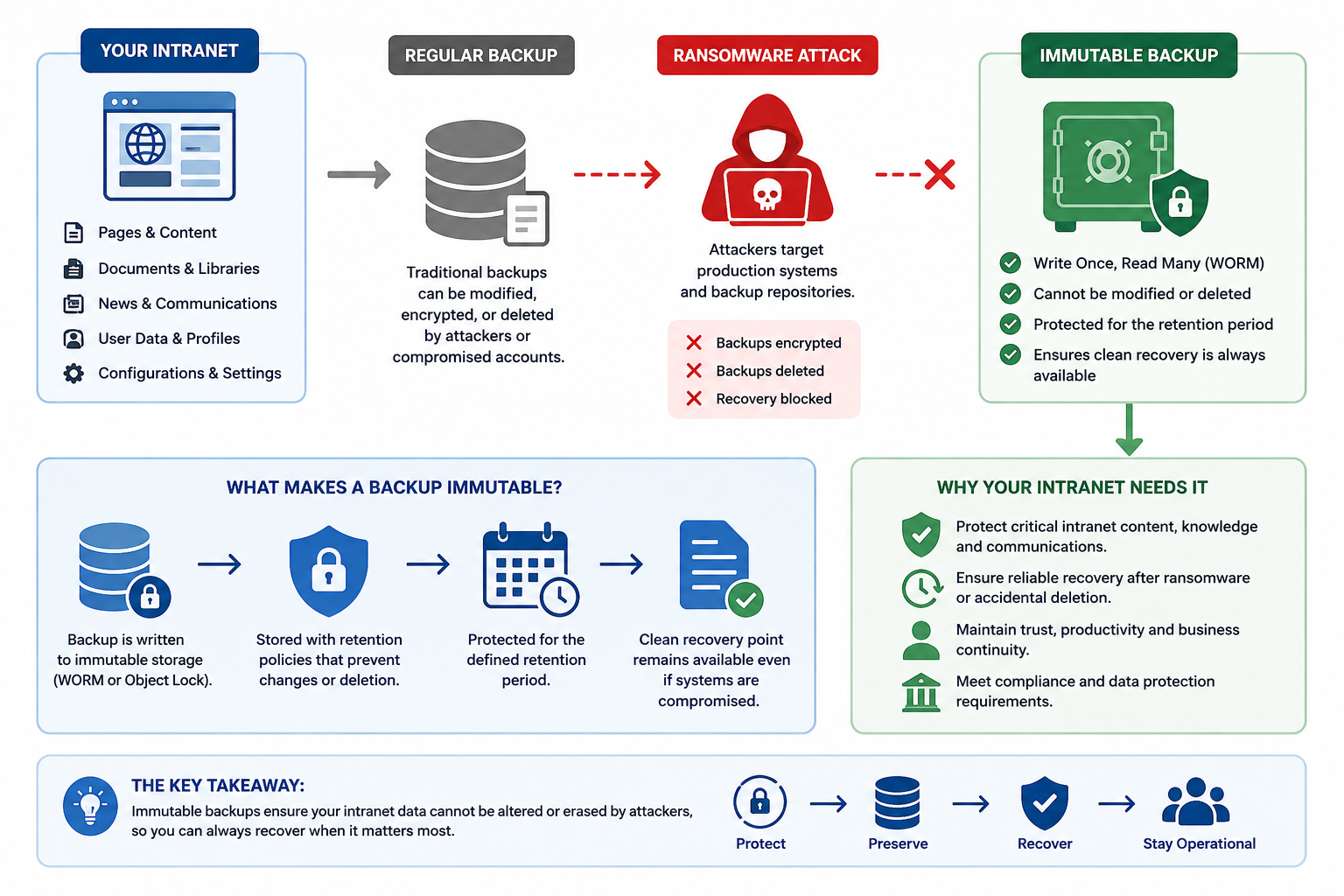
What Is an Immutable Backup, and Why Does Your Intranet Need One
The difference between immutable backup and other backups
- Standard backups – Traditional backups that can be modified or deleted by users or attackers with sufficient permissions.
- Immutable backups – Backup copies that are locked for a defined period and cannot be changed, encrypted, or deleted, even by administrators.
- Air-gapped backups – Backups stored in a physically or logically isolated environment with no direct network access.
- Object Lock – A feature (commonly used in cloud storage like AWS S3) that enforces immutability by preventing changes or deletion for a set retention period.
- WORM storage – "Write Once, Read Many" storage that ensures data is written once and cannot be altered afterward.
- Offline backups – Backups stored completely disconnected from networks or systems, often on physical media.
This combination of approaches is often used together in a layered defence strategy, where organisations may combine immutable backup AWS configurations, on-premises systems, and cloud-based immutable backup solutions to ensure ransomware recovery is still possible even if production systems are fully compromised.
Why Ransomware-Resistant Backups Matter More in 2026
89% of IT leaders are more concerned about organisational data because of AI-powered cyberattacks
Object First's March 2026 survey also reported that only 58% of respondents were using immutable backup storage across all their data.
Pills:- Ransomware
- Backup Security
- Cyber Resilience
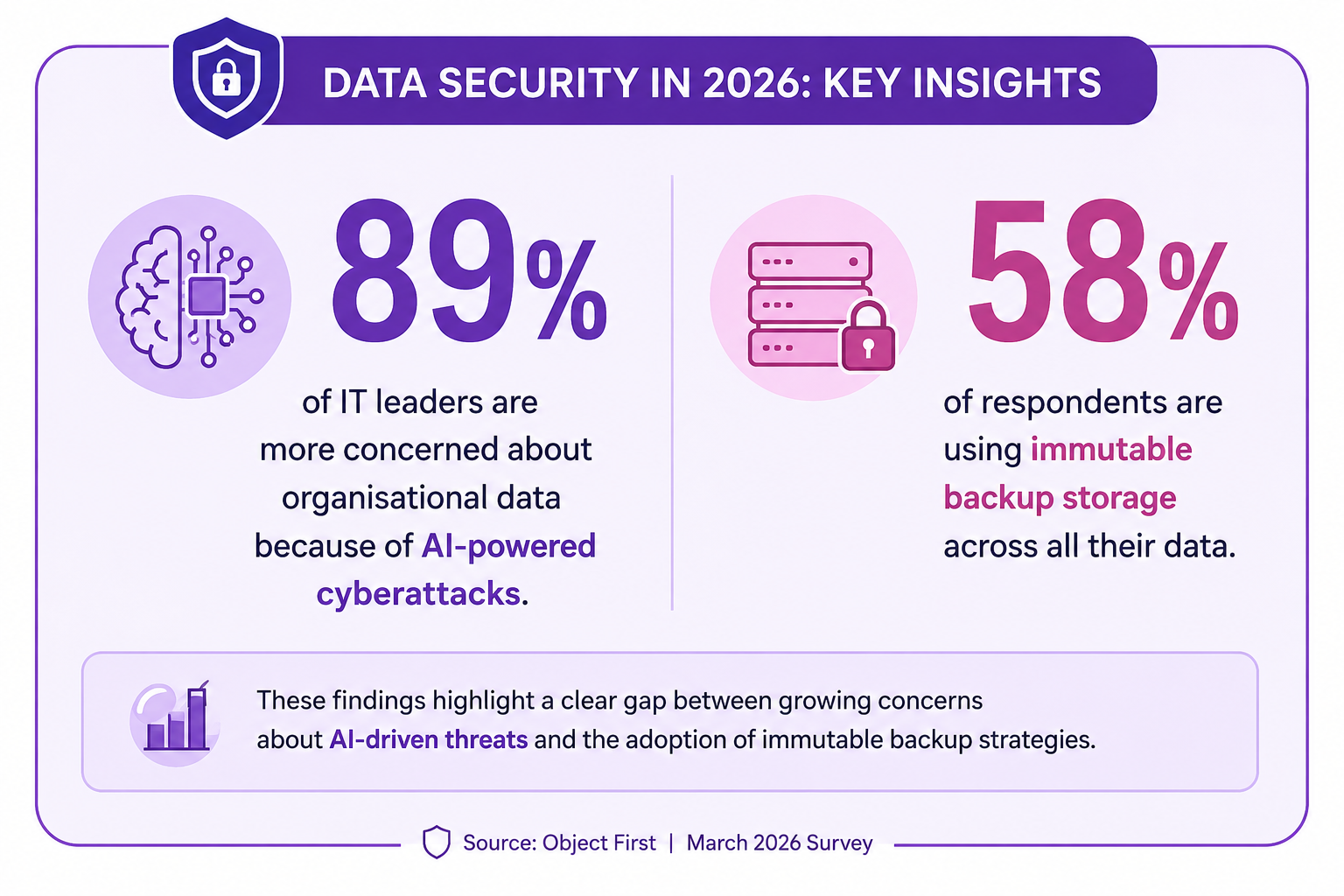
Why Ransomware-Resistant Backups Matter More in 2026
As ransomware tactics continue to evolve, the focus is shifting from preventing every attack to ensuring organisations can still recover when an attack succeeds.
AI-assisted threats are accelerating both the speed and sophistication of attacks, which means backup environments are now being actively targeted rather than treated as a passive safety net.
This is where ransomware-resistant and immutable backup strategies become critical. They are no longer just a "best practice" for large enterprises — they are becoming a baseline requirement for operational resilience in 2026.
An intranet isn't simply a homepage. Depending on the platform and architecture, it can contain years of organisational knowledge, policies, employee communications, documents and operational information.
So, What Should You Look for in an Immutable Backup Solution?
Each solution in this guide is assessed against the following criteria:
- Immutability model
- On-premises vs cloud deployment approach
- Object Lock / WORM (Write Once, Read Many) capabilities
- Ransomware resilience and recovery assurance
- Backup software compatibility (e.g., Veeam, Commvault, native integrations)
- Administrative separation and access control design
- Encryption standards (in transit and at rest)
- Scalability for growing intranet and enterprise data
- Recovery options and restore flexibility
- Ease of deployment and operational overhead
- Retention controls and policy granularity
- Pricing transparency and cost predictability
- Best-fit organisation type and use case
It's also critical to understand a key misconception: immutable does not automatically mean invulnerable.
While immutability protects backup data from being altered or deleted during its retention period, it does not eliminate all risk.
The overall resilience of a backup strategy still depends heavily on system architecture, credential security, configuration quality, retention policy design, and—most importantly—how often recovery processes are tested in real-world conditions.
Microsoft, for example, recommends combining immutable recovery points with strong administrative isolation, role separation, multi-user authorisation, and regular recovery testing when designing ransomware-resilient backup architectures.
Our 6 Best Immutable Backup Solutions for Intranets in 2026
We didn't build this list by simply looking for the biggest names in backup storage.
We focused on solutions that provide a credible approach to backup immutability and ransomware recovery, while also representing the different ways organisations actually protect business-critical intranet data today.
That means our six picks include purpose-built backup appliances, enterprise object storage platforms and cloud-based immutable storage.
This gives a more useful comparison for organisations deciding between on-premises, hybrid and cloud backup strategies, rather than treating every product as though it solves the problem in exactly the same way.
For each solution, we looked at the areas that matter most when ransomware recovery is the priority:
- Immutability controls: Whether protected backup data can be locked against modification or deletion using technologies such as S3 Object Lock, WORM retention or vendor-specific immutable architectures.
- Ransomware resilience: How the platform helps protect recovery data if production systems or privileged administrator accounts are compromised.
- Deployment model: Whether the solution is on-premises, cloud-based or suitable for a hybrid backup strategy.
- Backup compatibility: Support for established backup platforms, S3-compatible integrations and existing enterprise backup environments.
- Access separation: How effectively backup storage can be separated from production systems and everyday administrative credentials.
- Recovery capability: Whether the architecture supports practical restoration of large volumes of business-critical data when an incident occurs.
- Scalability: How easily storage can grow as intranet documents, databases, media, employee records and other organisational data increase.
- Retention controls: The flexibility available for defining how long immutable recovery points remain protected.
- Operational complexity: The expertise, hardware and ongoing administration required to deploy and manage the platform.
- Overall fit: Whether the solution makes more sense for SMEs, Microsoft-centric environments, Veeam users, larger enterprises or organisations looking primarily for off-site cloud protection.
We also avoided declaring a single product the universal "best."
An organisation running Veeam on-premises may have very different requirements from a company operating primarily in Azure, while another business may simply need a cost-effective immutable copy stored away from its main infrastructure.
Our rankings therefore focus on where each immutable backup solution fits best, rather than forcing six very different storage architectures into a like-for-like comparison.
One final point matters: immutability alone isn't enough. A strong ransomware recovery strategy should also include isolated administrative access, multiple backup copies, appropriate retention policies and regularly tested restores.
The best solution is ultimately the one that leaves your organisation with a clean, accessible recovery point when everything else has gone wrong.
| Solution | Deployment | Standout Capability | Best For |
| {DELETED} | On-premises | Purpose-built immutable backup appliance | Veeam environments |
| Scality ARTESCA | On-premises / hybrid | Enterprise S3 object storage and cyber resilience | Larger organisations |
| ExaGrid | On-premises | Tiered backup storage with ransomware protection | Backup-heavy enterprises |
| Backblaze B2 Cloud Storage | Cloud | Object Lock with broad backup integrations | Cost-conscious cloud backup |
| Azure Blob Immutable Storage | Cloud | Policy-based WORM immutable storage | Microsoft/Azure environments |
| Wasabi Hot Cloud Storage | Cloud | Cloud object storage with immutability capabilities | Predictable cloud storage |
While all six solutions provide some form of immutability, they differ significantly in architecture, integration depth, scalability, and operational responsibility.
On-premises options like Scality ARTESCA, and ExaGrid are typically chosen by organisations that want tighter control over infrastructure, lower latency recovery, or existing investment in local backup systems.
In contrast, cloud-native solutions such as Backblaze B2, Azure Blob Immutable Storage, and Wasabi are often preferred for their scalability, off-site resilience, and reduced hardware management overhead.
Below, we break down each solution in more detail to help you understand how they differ in real-world intranet backup and ransomware recovery scenarios.
On-Premises Immutable Backup Storage:
On-premises immutable backup means recovery data lives on hardware inside your own facility or colocation space.
The core advantages are network independence during recovery (no bandwidth ceiling, no cloud egress cost), predictable ingest performance, and the ability to physically or logically air-gap the device from the production network when policy or regulation requires it.
#1. {DELETED} — Purpose-Built Immutable Backup Appliance for Veeam
A purpose-built immutable backup appliance designed specifically for Veeam environments. It is a 2U hardware unit — racked, networked, and ingesting backup data within 15 minutes, with no Linux knowledge or storage configuration required.
What distinguishes Ootbi from software-defined alternatives is its Absolute Immutability model. Protection is enforced not only at the S3 Object Lock (compliance mode) layer, but also across the storage application layer, the operating system (where root access is fully blocked), and even the hardware/BIOS level, where firmware changes require physical presence and vendor authorisation.
This layered design has been independently validated through third-party penetration testing, ensuring that even a fully compromised domain administrator cannot modify or delete retention-locked backup data.
Ootbi is also certified against Veeam's Zero Trust Data Resilience (ZTDR) framework, which requires strict separation between backup software and backup storage.
It holds Veeam Ready certification across Object, Repository, SOSAPI, and IAM/STS integrations, making it a native fit for Veeam-centric environments. Performance scales from 18 TB to 1.7 PB across a four-node cluster, with ingest speeds of up to 1 GB/s per node.
Because it is delivered as a preconfigured appliance, deployment is significantly simpler than traditional storage systems — there is no Linux administration, no manual storage tuning, and no complex hardening process required.
- Immutability model: S3 Object Lock (compliance mode) + OS-level root block + hardware/BIOS firmware lock
- Backup software: Veeam (native, Veeam Ready certified); Commvault, Veritas via S3-compatible API
- Capacity: 18 TB to 1.7 PB (4-node cluster)
- Setup: ~15 minutes, no Linux expertise required
- Best for: Organisations already using Veeam that want a dedicated on-premises immutable backup target.
#2. Scality ARTESCA — Best for Enterprise-Scale Immutable Object Storage
Scality Artesca is Scality's dedicated S3 cyber vault — available as a software appliance, hardware appliance, or an all-in-one bundle with Veeam pre-integrated. Its immutability mechanism is S3 Object Lock, embedded within Scality's CORE5 cyber resilience framework: five interlocking protection layers covering immutability, encryption, access controls, monitoring, and recoverability. Scality backs the platform with a $100,000 guarantee against data loss or ransomware impact.
Artesca integrates with Veeam, Commvault, Rubrik, Veritas, HYCU, and Zerto. A built-in deployment assistant reduces the Linux expertise that standard software-defined storage requires, though some administrative overhead remains.
Capacity scales from 20 TB to petabytes. For organizations that need multi-vendor backup integration and a lower operational barrier than a full-scale software-defined platform, Artesca is the strongest on-premises alternative to a purpose-built appliance.
- Immutability model: S3 Object Lock within CORE5 five-layer framework
- Backup software: Veeam, Commvault, Rubrik, Veritas, HYCU, Zerto
- Capacity: 20 TB to petabytes
- Admin complexity: Medium (guided deployment assistant)
Our Verdict
Scality ARTESCA
Best for enterprise-scale immutable object storage
4.6
/5
Price
Custom quote; subscription and eligible PAYG options
Best feature
CORE5 cyber resilience with S3 Object Lock
#3. ExaGrid — Tiered Backup Storage with Built-In Ransomware Protection
ExaGrid uses a tiered backup storage architecture for ransomware protection. Recent backup data lands in a network-accessible zone optimized for fast ingest and immediate restores.
Longer-term retention moves to a separate repository tier protected by ExaGrid's AI-powered Retention Time-Lock, which makes the repository tier architecturally unreachable over the network during the lock period — even for accounts with full network access to the appliance.
ExaGrid's tiered design also delivers byte-level deduplication up to 50:1, making it cost-effective for environments with large, repetitive backup datasets.
It supports over 25 backup platforms including Veeam, Commvault, Veritas, Rubrik, IBM, and Oracle RMAN — the broadest multi-platform coverage on this list.
- Immutability model: AI-powered Retention Time-Lock; network-isolated repository tier
- Backup software: Veeam, Commvault, Veritas, Rubrik, IBM, Oracle, 25+ total
- Deduplication: Up to 50:1
- Admin complexity: Low
Our Verdict
ExaGrid
Best for high-performance backup and ransomware recovery
4.6
/5
Price
Custom quote based on backup capacity and configuration
Best feature
Retention Time-Lock with a non-network-facing Repository Tier
Cloud Immutable Backup Storage:
Cloud-based immutable backup means the secondary copy is held in a provider's managed infrastructure.
The primary advantages are geographic distribution without capital expenditure, elastic capacity, and no hardware refresh cycle.
The trade-offs include recovery bandwidth dependency, cloud egress costs on large restores, and a trust model that relies on the provider's SLA and policy enforcement rather than hardware in your own facility.
#4. Backblaze B2 Cloud Storage — Cost-Effective Immutable Cloud Backup
Backblaze B2 is an S3-compatible cloud object storage service with native S3 Object Lock in both governance and compliance modes.
It carries Veeam Ready certification and integrates directly with Veeam Backup & Replication as an immutable object storage repository.
Pricing is flat per-GB with no egress fees to Cloudflare and a growing list of bandwidth alliance partners — a meaningful cost advantage over AWS S3 for organizations that run regular restore tests.
B2 is storage infrastructure only: it does not include compute, restore orchestration, or monitoring.
Organizations using B2 as their sole cloud immutable target carry full responsibility for retention policy management, Object Lock configuration, and recovery testing cadence.
For Veeam environments that want a straightforward, low-cost cloud backup tier with verifiable compliance-mode locking, B2 is the most accessible entry point.
- Immutability model: S3 Object Lock (governance and compliance modes)
- Backup software: Veeam (Veeam Ready certified), any S3-compatible platform
- Egress: Free to Cloudflare and bandwidth alliance partners
- Admin complexity: Low — storage-only, no embedded hardening
Our Verdict
Backblaze B2 Cloud Storage
Best for cost-effective immutable cloud backup
4.6
/5
Price
From $6.95/TB/month; first 10GB free
Best feature
S3-compatible Object Lock for immutable cloud backups
#5. Azure Blob Immutable Storage — Policy-Based WORM for Microsoft Ecosystems
Microsoft Azure Blob Storage offers time-based retention policies and legal holds enforced at the container level.
In compliance mode, the immutability policy is locked: it cannot be removed or shortened before expiry by any account, including Microsoft Support. In governance mode, users with specific IAM roles can modify or delete the policy.
This distinction is not always visible in procurement conversations, and it matters considerably when credential compromise is in the threat model.
For organizations already operating in Microsoft environments — Active Directory, Microsoft 365, Azure-hosted workloads — Azure Blob's immutability integrates with existing IAM structures and compliance audit tooling.
Veeam, Commvault, and Veritas all support Azure Blob as an immutable backup target. ENISA's 2024 cloud risk report identified misconfigured cloud IAM as the leading cause of cloud backup exposure; compliance-mode lock removes one of the most common misconfiguration vectors.
- Immutability model: Time-based retention + legal hold; compliance mode cannot be overridden by any account
- Backup software: Veeam, Commvault, Veritas
- Integration: Native Azure ecosystem; Active Directory IAM
- Admin complexity: Medium — governance vs. compliance mode selection requires careful configuration
Our Verdict
Azure Blob Immutable Storage
Best for Microsoft-centric and compliance-focused environments
4.6
/5
Price
Usage-based Azure Blob Storage pricing
Best feature
WORM retention with time-based policies and legal holds
#6. Wasabi Hot Cloud Storage — Predictable, Immutable Cloud Storage at Scale
Wasabi offers S3-compatible hot cloud object storage with S3 Object Lock in both governance and compliance modes at a flat monthly per-TB rate and no egress fees.
It carries Veeam Ready certification and is widely deployed as a cloud backup tier for Veeam environments seeking a lower-cost alternative to AWS S3. Wasabi guarantees 11 nines of data durability across geographically redundant infrastructure.
The no-egress model is particularly valuable for organizations running frequent restore tests as part of their DR program — recovery testing under production data volumes is where hidden egress costs typically accumulate on other platforms.
Like B2, Wasabi is storage-only: backup software, retention policy management, and restore orchestration remain the operator's responsibility.
- Immutability model: S3 Object Lock (governance and compliance modes)
- Backup software: Veeam (Veeam Ready certified), any S3-compatible platform
- Egress: No egress fees
- Admin complexity: Low — storage-only
Our Verdict
Wasabi Hot Cloud Storage
Best for predictable immutable cloud backup costs
4.6
/5
Price
From $7.99/TB/month; 1TB Pay-Go minimum
Best feature
S3 Object Lock with no additional immutability fee
On-Premises vs Cloud Immutable Backup: Which Is Better for Your Intranet?
Neither approach is universally better, and the right choice depends heavily on how your organisation operates, the sensitivity of your intranet data, and how quickly you need to recover in the event of an incident.
On-premises immutable backup solutions often appeal to organisations that want maximum control over their infrastructure and data.
They can offer very fast local recovery times and allow teams to keep backup systems physically separate from production networks.
However, they also require investment in hardware, ongoing maintenance, and careful planning to ensure that backups are truly isolated and protected from the same threats that affect primary systems.
Cloud immutable backup, on the other hand, removes much of the physical management burden and provides built-in off-site protection by default.
It can scale quickly as data grows and is often easier to deploy across distributed teams or hybrid environments.
The trade-off is that recovery performance and accessibility can depend on internet connectivity and the chosen architecture, and organisations must place trust in the provider's regional availability and compliance controls.
In practice, many organisations find that a hybrid strategy delivers the best balance.
Keeping a local immutable backup can support fast internal recovery, while a cloud-based immutable copy provides resilience against site-wide failures, ransomware events, or physical disasters.
Rather than treating cloud and on-premises as competing options, they are increasingly used together as complementary layers in a broader ransomware recovery strategy.
What Happens When Ransomware Actually Hits?
Organisation A — Conventional backups
The organisation initially believes it is protected because it has a scheduled backup system in place. However, the same administrative credentials used to manage production systems also have access to the backup environment.
The attacker moves laterally into the backup infrastructure, locates recent recovery points, and either deletes them or encrypts them alongside production data. In some cases, retention policies are altered or backup jobs are disabled before anyone notices.
When IT teams attempt recovery, they discover that the most recent usable backups are either missing, corrupted or too old to restore business operations effectively. The organisation is forced into prolonged downtime, partial data reconstruction, or in the worst cases, ransom negotiation.
Organisation B — Immutable recovery architecture
In this scenario, the production environment is still compromised, but the backup architecture is designed so that recovery data is stored in an immutable state with strict separation from production credentials and systems.
Even though attackers have administrator-level access to production, they cannot modify or delete the immutable backup copies due to enforced retention locks and isolated access controls.
The IT team responds by isolating affected systems, revoking compromised credentials, and validating which recovery points remain clean and unaffected. Because the immutable backups have not been altered, they can confidently select a known-good restore point.
Services are then rebuilt and restored from the protected backup set, allowing the organisation to resume operations without relying on attacker demands or incomplete data reconstruction.
The point isn't that immutable storage prevents ransomware.
It helps preserve your ability to recover after ransomware succeeds.
Who Should Be Responsible for an Immutable Backup Strategy?
An immutable backup strategy shouldn't sit with one person or department.
While IT typically owns the technical backup environment, ransomware recovery crosses cybersecurity, infrastructure, compliance and business continuity.
For an intranet, the platform owner also needs a seat at the table because IT can't protect critical information effectively if it doesn't know which data and services the business needs restored first.
Clear ownership becomes particularly important during a ransomware incident. That's not the time to discover that nobody knows who can authorise a restore, which recovery point should be trusted, or whether a particular dataset must be retained for regulatory reasons.
A practical division of responsibilities looks like this:
| Role | Responsibility | Why It Matters |
| CIO / IT Director | Own the overall backup, resilience and disaster recovery strategy. | Ensures backup decisions support wider business continuity requirements and recovery objectives. |
| CISO | Align immutable backups with ransomware defence, Zero Trust and incident response. | Makes sure backup infrastructure is treated as a security asset rather than simply storage. |
| Infrastructure Manager | Design and maintain storage, backup architecture and infrastructure separation. | Reduces the risk of a production compromise spreading directly into recovery systems. |
| Backup Administrator | Configure backup jobs, immutable retention policies, monitoring and restore testing. | Ensures protected recovery points are actually being created and can be restored when required. |
| Security Team | Monitor suspicious activity, protect privileged credentials and investigate attempted access to backup systems. | Compromised administrative accounts are a major threat to recovery infrastructure. |
| Compliance / DPO | Review retention periods, data protection requirements and regulatory obligations. | Prevents immutability policies from conflicting with legal, privacy or data-retention requirements. |
| Intranet Owner | Identify business-critical intranet systems, content and recovery priorities. | Helps IT understand what needs restoring first to get employees and business operations functioning again. |
Who Ultimately Owns the Strategy?
In most organisations, overall accountability should sit with the CIO or IT Director, with the CISO responsible for ensuring the architecture supports the organisation's wider cyber-resilience and ransomware strategy.
Day-to-day responsibility can then sit with infrastructure and backup teams, but governance shouldn't stop once the backups are configured. The organisation should define recovery point objectives (RPOs), recovery time objectives (RTOs), retention periods, access controls and restore-testing schedules, with clear owners for each.
The intranet owner also plays an important role here. They may not configure an immutable repository, but they should be able to tell IT which parts of the intranet are genuinely business-critical.
For example, restoring the intranet homepage while leaving the employee knowledge base, policies, document repository or essential operational content unavailable isn't necessarily a successful recovery.
The goal is therefore bigger than simply asking, "Did the backup complete?"
A better question is: "If ransomware took these systems offline tomorrow, does everyone know what needs to be recovered, who is responsible, and how quickly we can get employees working again?"
Practical Checklist: How to Protect Your Intranet With Immutable Backups
Putting immutable backups in place is not just a storage decision.
It requires a clear understanding of what your intranet depends on, where that data lives, who can access it, and how quickly the organisation needs to recover if ransomware takes key systems offline.
The most effective approach is to work through the backup environment systematically rather than assuming that existing backup jobs are enough.
- Identify all business-critical intranet data. Start by listing the systems, libraries, document stores, databases, knowledge bases, configuration files, employee records, and operational content the business cannot function without. This helps you prioritise what must be protected and restored first.
- Map where that data is currently stored. Document whether the information lives in SharePoint, local databases, file servers, cloud storage, third-party SaaS platforms, or other connected repositories. This is important because a single intranet can depend on several different storage locations.
- Review your existing backup architecture. Confirm exactly what is being backed up, how frequently backups are created, where copies are stored, and whether all critical intranet components are included. Gaps often appear when applications evolve but backup policies do not.
- Determine whether backups can currently be modified or deleted. Check whether administrators, backup operators, or compromised accounts can alter or remove recovery points. If they can, the backup environment may still be vulnerable during a ransomware attack.
- Separate production and backup credentials. Use dedicated accounts for backup infrastructure and avoid sharing credentials between production systems and recovery environments. This helps reduce the chance that one compromised account can reach both.
- Introduce immutable retention. Enable WORM, Object Lock, or other immutable retention controls so protected backups cannot be changed or deleted during the defined retention period. Make sure the configuration is enforced rather than relying only on policy.
- Maintain an off-site recovery copy. Keep at least one backup in a separate physical location, cloud platform, or geographic region. This provides another recovery path if local infrastructure is compromised, damaged, or unavailable.
- Consider the 3-2-1-1-0 backup strategy. Maintain three copies of your data, use two different storage media, keep one copy off-site, retain one immutable or offline copy, and aim for zero unverified backup errors through regular testing.
- Encrypt backup data. Ensure backups are encrypted both in transit and at rest. Immutability protects data from alteration, while encryption helps protect sensitive information from exposure.
- Restrict privileged administrative access. Limit access to backup consoles, retention policies, storage settings, and recovery systems. Apply least-privilege access and avoid giving more users administrative permissions than necessary.
- Define retention periods. Set clear rules for how long recovery points should remain protected. Retention should reflect operational needs, legal obligations, compliance requirements, and the amount of historical data the organisation may need to recover.
- Document RPO and RTO targets. Define the Recovery Point Objective, or how much data loss the business can tolerate, and the Recovery Time Objective, or how quickly systems need to be restored. These targets should guide backup frequency and recovery design.
- Test restores regularly. Do not assume that a successful backup job guarantees a successful recovery. Run scheduled restore tests to confirm that recovery points are usable, complete, and capable of restoring critical intranet services.
- Monitor backup failures and unusual activity. Set up alerts for failed backup jobs, missing recovery points, unexpected retention changes, unusual deletion attempts, or other behaviour that may indicate a problem or active attack.
- Review the architecture after major infrastructure changes. Reassess backup coverage whenever new systems, storage platforms, applications, integrations, or cloud services are introduced. Backup strategies should evolve alongside the intranet environment.
The key point is simple: an immutable backup strategy only works when the organisation knows exactly what needs protecting, keeps recovery systems separated from production, and regularly proves that restoration actually works.
A backup that has never been tested is still an assumption. A tested immutable recovery path is a genuine part of your ransomware resilience strategy.
Where Does AgilityPortal Fit Into This?
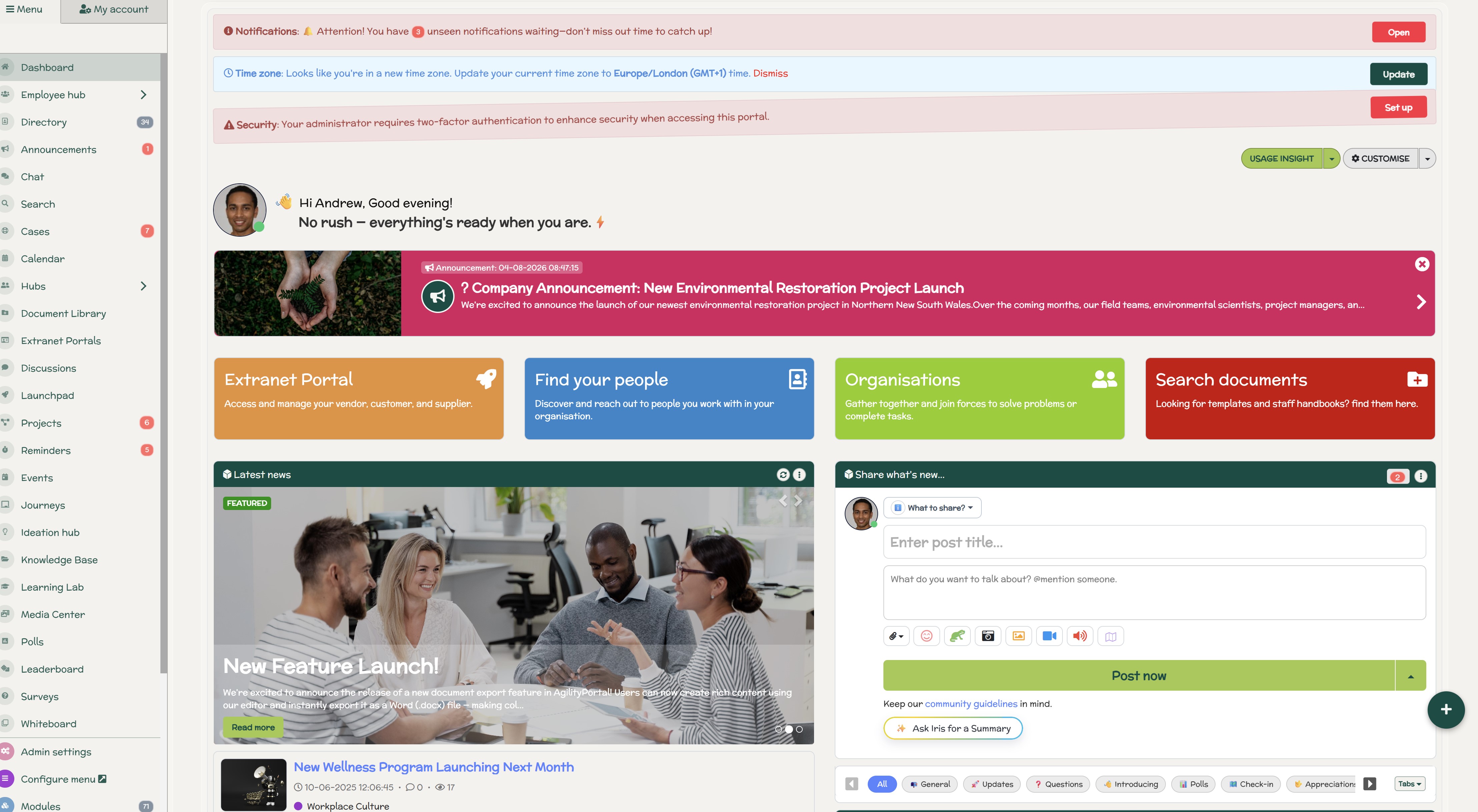
Where Does AgilityPortal Fit Into This?
AgilityPortal isn't an immutable backup vendor, but the conversation around backup resilience matters because an employee intranet has become a critical business system for many organisations.
Platforms like AgilityPortal bring together company policies, employee communications, documents, knowledge, training resources and other operational information that employees rely on every day.
If access to that information is disrupted by ransomware, infrastructure failure or another major incident, the impact can quickly extend beyond IT and affect the wider workforce.
That's why intranet resilience should form part of the organisation's broader business continuity and disaster recovery planning.
Whether you manage backups in-house or use a SaaS intranet where backup, infrastructure and recovery are handled as part of a managed cloud service, the principle remains the same: understand how your data is protected, where recovery copies exist, and how services would be restored following a serious incident.
For IT teams, the broader lesson is straightforward:
Protect the platform → protect its data → protect the recovery path.
Your intranet shouldn't be treated as just another website. If employees depend on it to work, communicate and find critical information, its availability and recoverability need to be treated accordingly.
AgilityPortal
Treat Your Employee Intranet as a Critical Business System
Modern organisations rely on their intranet for much more than company news. Policies, documents, knowledge, training, employee communications and operational resources may all sit inside one central employee intranet and digital workplace. That means intranet availability and recoverability should form part of wider business continuity planning.
AgilityPortal provides organisations with a managed cloud-based employee intranet where teams can centralise communication, knowledge and workplace resources without having to build and maintain their own intranet infrastructure. For IT teams, the important question remains the same: understand how critical workplace data is protected and how services would be recovered following a serious disruption.
Protect the platform. Protect the data. Protect the recovery path.
Whether you manage backup infrastructure internally or use a managed SaaS environment, your intranet should be included in business continuity and disaster recovery planning alongside other systems employees depend on every day.
Conclusion — Backups Only Matter If You Can Still Restore Them
The real value of a backup isn't that it exists. It's whether you can actually use it when your organisation is under pressure.
Businesses increasingly depend on employee intranets and digital workplace platforms for policies, documents, knowledge, communications, training and everyday operations.
As ransomware attacks increasingly target recovery infrastructure alongside production systems, simply confirming that your intranet is "backed up" doesn't go far enough.
The more important question is: Could we still recover that backup if our administrator accounts and production environment were compromised?
That's where immutable backup solutions become valuable. But immutability shouldn't be treated as a silver bullet or another technology organisations simply need to buy.
Strong ransomware resilience comes from combining immutable recovery points, separated administrative access, multiple backup copies, off-site protection and regularly tested restores.
Whether those backups sit on-premises, in the cloud or across a hybrid architecture matters less than knowing you have a clean recovery path when it's needed.
Ultimately, a successful backup strategy isn't measured by how many copies you have. It's measured by whether you can confidently restore the systems and information your employees need when everything else has gone wrong.
FAQ
What is an immutable backup?
An immutable backup is a type of data backup that cannot be altered, deleted, or overwritten for a defined retention period.
It is commonly used in ransomware protection, data protection strategies, and enterprise backup solutions to ensure a clean recovery point is always available.
How does immutable backup protect against ransomware?
Immutable backups protect against ransomware by preventing attackers from encrypting or modifying backup data.
Even if production systems are compromised, immutable storage, backup immutability policies, and write-once-read-many (WORM) storage ensure recovery data remains intact.
Can ransomware infect immutable backups?
In most cases, ransomware cannot modify or encrypt properly configured immutable backups.
However, protection depends on correct setup, including access control, separate backup credentials, and secure cloud or offsite storage. Misconfigured systems may still be at risk.
What is the difference between immutable and air-gapped backups?
Immutable backups are protected through software or storage policies that prevent changes, while air-gapped backups are physically or logically isolated from networks.
Both are used in disaster recovery, but air-gapped systems provide stronger isolation, whereas immutable backups offer faster accessibility.
What is the best immutable backup solution?
The best immutable backup solution depends on your environment, but leading options include cloud backup platforms (AWS, Azure, Google Cloud), enterprise tools like Veeam, and object storage with immutability features.
The ideal solution supports ransomware recovery, versioning, and secure retention policies.
Is cloud storage immutable?
Cloud storage can be immutable if it supports features like object lock, versioning, and retention policies. Many cloud backup services now offer immutability settings to protect against accidental deletion and ransomware attacks.
What is the 3-2-1-1-0 backup rule?
The 3-2-1-1-0 backup rule is a modern data protection strategy:
- 3 copies of data
- 2 different storage types
- 1 offsite copy
- 1 immutable or air-gapped copy
- 0 backup errors after verification
It is widely used in backup strategy planning and cyber resilience frameworks.
Should intranet data have an immutable backup?
Yes, intranet data should have an immutable backup because it often contains critical business information such as policies, documents, knowledge bases, and internal communications. Protecting it with immutable backup storage ensures continuity during ransomware attacks or system failures.
AI Summary
- Immutable backup solutions protect recovery data by preventing protected backup copies from being modified, encrypted or deleted during a defined retention period, helping organisations preserve clean recovery points after a ransomware attack.
- Ransomware resilience requires more than standard backups. Attackers increasingly target backup infrastructure and privileged accounts, making immutability, administrative separation, off-site copies and tested recovery important parts of a modern backup strategy.
- On-premises and cloud immutable backups solve different problems. On-premises platforms can provide greater infrastructure control and fast local recovery, while cloud object storage provides scalable off-site protection without additional physical storage hardware.
- The 3-2-1-1-0 backup strategy provides a practical framework: maintain three copies of data, use two storage types, keep one copy off-site, maintain one immutable or offline copy, and aim for zero unverified backup errors through recovery testing.
- The best immutable backup solution depends on your existing environment. , Scality ARTESCA, ExaGrid, Backblaze B2, Azure Blob Immutable Storage and Wasabi Hot Cloud Storage take different approaches to immutability, deployment, integrations, scalability and recovery.
- Intranet resilience should be part of business continuity planning. Whether backups are managed internally or through a managed SaaS environment, organisations need to understand how critical intranet data is protected and how services would be restored after a serious incident.
Most Popular Posts

Effective communication among team members is vital for the productivity and success of any organization. Surprisingly, 60% of companies lack a long-term internal communication strategy, which p...


Businesses thrive on communication for efficiency, productivity and accomplishment. When the right information is passed from the right designation in the organization, it promotes positivity an...

Categories
Blog
(3192)
Business Management
(394)
Employee Engagement
(235)
Digital Transformation
(218)
Growth
(150)
Intranets
(141)
Internal communications
(106)
Remote Work
(68)
Sales
(53)
Collaboration
(52)
Customer Experience
(32)
Culture
(30)
Knowledge Management
(29)
Project management
(29)
Leadership
(20)
Comparisons
(9)
News
(1)

Related Posts

What would happen to your team's work and customer information if an employee's MacBook disappeared today? If you're wondering how to protect your Mac physically, the answer goes beyond buying a case. A MacBook used at home, on a train or in a ...

Welcome to AgilityPortal's guide to the best VPN for Remote teams. How do you give employees secure access to company systems when they work from home, the office and everywhere in between? It's a question more businesses need to answer: 28% of worki...

Have you ever left a meeting thinking everyone agreed on the next step, only to discover a week later that each person remembered something different? Open source meeting transcription can help teams keep a searchable record of the conversation...

The best ai image editors can save a team hours of repetitive work. A marketing manager can remove a distracting background, an HR team can improve a staff event photo, and an online shop can turn a basic product shot into something ready to pu...

Ever opened a PDF just before a meeting and realised you need to edit a page, pull figures from a scanned report, or gather everyone's comments? What should be a quick task can turn into a frustrating search for the right tool. That lost time a...


Jill Romford
I am a digital nomad, lover of exploring new places and making friends.
I love to travel and I love the internet. I take pictures of my travels and share them on the internet using Instagram.
Traveler, entrepreneur, and community builder. I share my insights on digital marketing and social media while inspiring you to live your fullest life.
Ready to learn more? 👍
One platform to optimize, manage and track all of your teams. Your new digital workplace is a click away. 🚀
Free for 14 days, no credit card required.