
Insight Blog
Agility’s perspectives on transforming the employee's experience throughout remote transformation using connected enterprise tools.
59 minutes reading time
(11807 words)
Why Your Intranet Rollout Isn’t Finished Until It Works Everywhere: A Practical Intranet Rollout Strategy

Why Your Intranet Rollout Isn’t Finished Until It Works Everywhere: A Practical Intranet Rollout Strategy
Build an intranet rollout strategy that works everywhere. Learn how to test performance, adoption, access and employee experience across global teams.
Why Your Intranet Rollout Isn’t Finished Until It Works Everywhere: A Practical Intranet Rollout Strategy

Your new intranet launches at 9 a.m. in London.
The leadership team logs in, pages load instantly, the announcement goes out, and everyone considers the project a success. But eight hours later, an employee in Manila opens the same homepage on their phone and waits.
Then waits a little longer.
This is where a good intranet rollout strategy becomes more important than simply hitting a go-live date.
And employees don't give an intranet much time to prove its value.
SWOOP Analytics' 2025 benchmarking study analysed 238,000 intranet visitors across 28 organisations and found that employees spent an average of just 5.85 minutes per working day on their intranet.
That makes speed, navigation and easy access to information critical parts of any intranet implementation and adoption strategy.
5.85
minutes per working day
SWOOP Analytics' 2025 benchmarking study analysed 238,000 intranet visitors across 28 organisations and found that employees spent an average of just 5.85 minutes per working day on their intranet. That makes speed, navigation and easy access to information critical parts of any successful intranet implementation and adoption strategy.
Source: SWOOP Analytics, 2025 Intranet Benchmarking Study
A successful global intranet rollout isn't complete when IT confirms the platform is online.
It's complete when employees can reliably access, understand and use it wherever they work.
Geography, network quality, mobile access, SSO and authentication, device type, accessibility, language, time zones and locally relevant content can all change the employee experience.
That's why modern intranet implementation needs to move beyond launch day.
For distributed, remote and frontline teams, the real test is simple: does your employee intranet work just as well for the person in Manila as it does for the team sitting at headquarters?
Key Takeaways
- A successful intranet rollout strategy doesn't end at go-live; it should prove that employees can reliably access and use the intranet wherever they work.
- A global intranet rollout should be tested across different locations, networks, devices and employee groups rather than relying solely on the experience at headquarters.
- Performance, mobile access, SSO, search, permissions and local content can all affect the employee experience, even when the intranet is technically online and functioning.
- Representative pilot groups from locations such as London, Manila, New York and São Paulo can uncover regional problems before they're scaled across the wider workforce.
- Intranet adoption should be measured beyond launch-day logins, using returning users, search behaviour, mobile usage, regional engagement and employee feedback.
- A modern employee intranet needs ongoing governance, measurement and improvement after launch to remain useful as the organisation and workforce change.
What Does an Intranet Rollout Strategy Actually Cover?
An intranet rollout strategy is the plan for taking a new employee intranet from an internal project to something people actually use as part of their working day.
That sounds straightforward, but there's a big difference between making an intranet technically available and making it useful across an organisation.
A proper strategy should cover the technology, content, employee communication, training, governance, testing and intranet adoption that surround the launch. For organisations with distributed teams, it also needs to consider different locations, devices, languages, network conditions and ways of working.
In other words, announcing a launch date is only a small part of the job.
If your organisation has 3,000 employees across London, Manila, New York and São Paulo, the goal isn't simply to give all 3,000 people login credentials.
You need to know whether they can sign in, find relevant information, understand how the platform fits into their work and have a reason to come back tomorrow.
A more realistic intranet rollout process looks like this:
Discovery → Build → Pilot → Launch → Validate → Adopt → Optimise
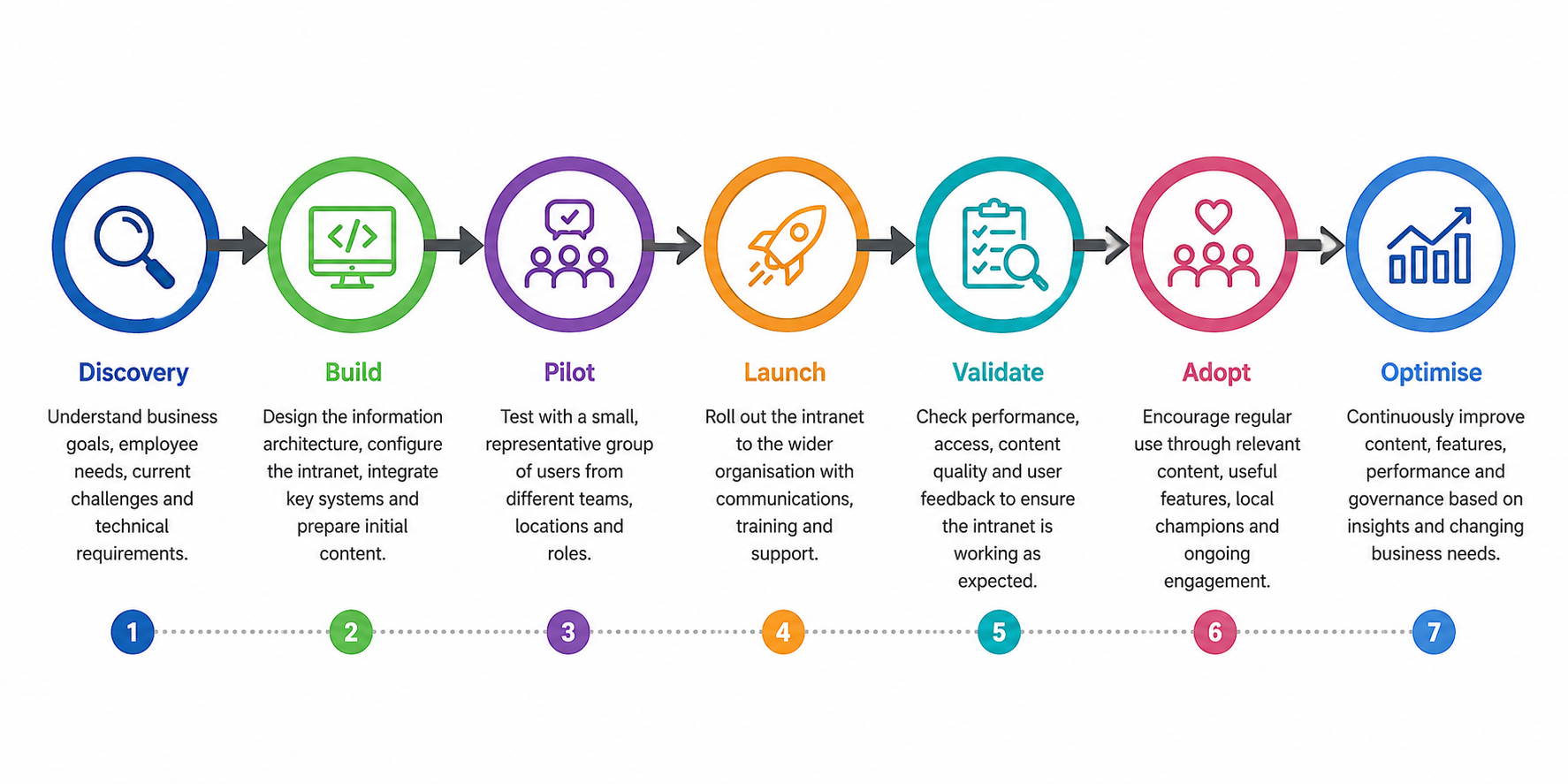
What Does an Intranet Rollout Strategy Actually Cover
Each stage answers a different question:
- Discovery: What problems are employees and the business trying to solve?
- Build: How should the intranet, content, integrations and permissions be configured?
- Pilot: Can a representative group of employees use it successfully?
- Launch: Are we ready to introduce it to the wider organisation?
- Validate: Does it actually work across locations, devices, roles and network conditions?
- Adopt: Are employees using it repeatedly for meaningful workplace tasks?
- Optimise: What do analytics, search behaviour and employee feedback tell us to improve?
Your Intranet Works at HQ. But Does It Work Everywhere Else?
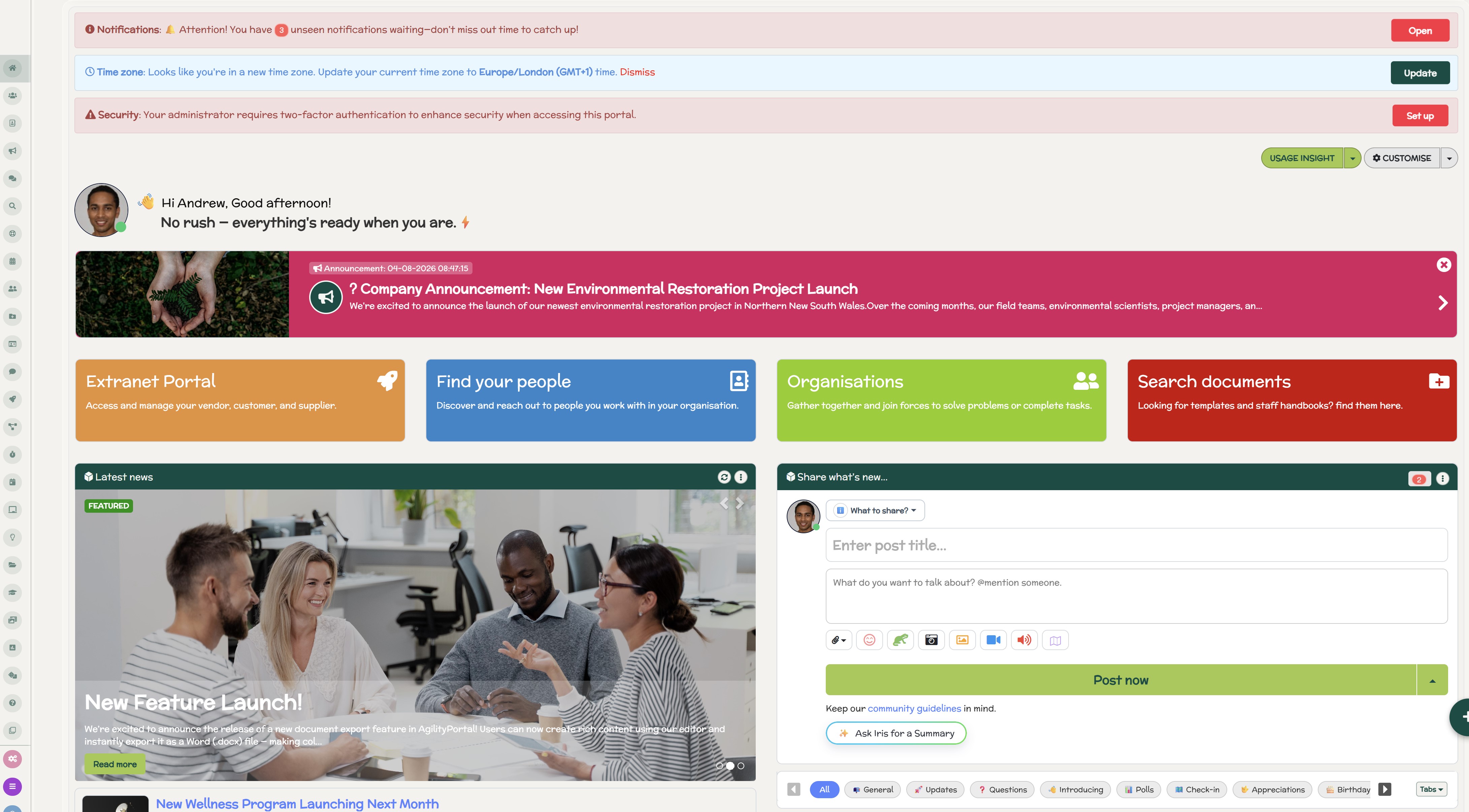
Your Intranet Works at HQ. But Does It Work Everywhere Else?
Your intranet might feel lightning-fast when the project team tests it from headquarters in London, but that doesn't mean employees are getting the same experience everywhere else.
A successful intranet rollout strategy has to account for what happens when people access the platform from different countries, networks, devices and working environments.
Think about the conditions surrounding a typical London-based implementation team.
They may have fast corporate broadband, modern laptops, direct access to IT support, familiar authentication processes and a desktop-first working environment.
Now compare that with an employee accessing the same employee intranet from a call centre in Manila, a regional office in São Paulo, a warehouse in Johannesburg, or a mobile connection while working remotely in India.
It's technically the same intranet, but it may not feel like the same intranet at all.
Related Intranet Guides You May Want to Read Next
This intranet rollout strategy guide focuses on planning, testing, adoption and global deployment. The resources below go deeper into intranet content, governance, communication strategy, employee engagement and the practical steps needed to build an intranet employees actually use.
- 2026 Intranet Best Practices: Tips, Strategy and Practical Guidance
- Building an Intranet Content Strategy: From Objectives to Success
- Internal Communication Strategy: Benefits, Best Practices and How to Do It
- Internal Communication Plan and Strategy Template: A Complete Guide
- Best Practices to Make Your Internal Communication Strategy a Success
- How to Build a Successful Internal Business Communications Strategy
- Employee Engagement Strategy: Best Practices and Examples
- Retail Communication Strategy: A Complete Guide for Distributed Teams
Together, these guides create a stronger intranet and internal communications topic cluster around rollout, adoption, governance, content strategy and employee engagement.
Geography changes the employee experience
Physical distance still matters.
When employees are thousands of miles from the infrastructure serving your global intranet, latency, network routing, content delivery and local internet conditions can affect how quickly pages, images, documents and applications respond.
That means testing an intranet from London and assuming it'll behave identically in Manila isn't enough.
Before sign-off, for example, a QA team can route a controlled test session through a Floppydata premium proxy to open the intranet as if the tester were sitting in a Manila call centre or a São Paulo back office. This can help expose regional load-time or routing differences that a headquarters-only test may never reveal.
Proxy testing shouldn't replace testing with real employees and devices in those locations, though. It's one additional layer of quality assurance.
A proper global intranet rollout should combine simulated geographic testing with real-world testing involving employees in the regions you're actually supporting.
For example, your test matrix might include:
- London headquarters using corporate broadband.
- Manila call centre using the local office network.
- São Paulo back office accessing large documents and media.
- Johannesburg warehouse employees using shared or mobile devices.
- New York remote employees connecting from home networks.
- Field employees accessing the intranet through 4G or 5G.
- Employees travelling internationally and accessing the platform outside the corporate network.
The goal isn't to guarantee identical connection speeds everywhere. It's to identify whether location creates enough friction to prevent employees from doing what they came to the intranet to do.
Slow loading isn't the only problem
Round-trip time can explain why an employee intranet feels slower in one region than another, but it doesn't explain everything. During a global intranet rollout, regional network behaviour can sometimes cause individual features to break even when the rest of the platform appears to be working normally.
For example, a telecom-heavy branch in the Gulf might encounter response headers being rewritten by an upstream proxy. Another regional carrier could interfere with websocket traffic, leaving real-time notifications unable to update.
In another market, access to a particular CDN range could fail while the rest of the intranet continues loading—resulting in something as specific as employee avatar images disappearing.
These are exactly the kinds of regional differences that headquarters testing can miss.
A QA pass using a proxy extension for Google Chrome can let testers switch between country exit nodes within the same browser and compare how the same intranet component behaves from different locations. That can make it much quicker to determine whether a broken widget, image or real-time feature is associated with a particular geographic route.
4 quick checks:
- Compare individual assets, not just overall page-loading speed.
- Test websocket connections used by chat, notifications and live features.
- Check CDN-hosted images, files and scripts from your major employee regions.
- Compare browser network logs between locations when a feature works in one country but fails in another.
The mobile experience matters more than you think
A desktop-first intranet implementation can also create a false sense of success.
Someone at headquarters might open the intranet on a 27-inch monitor connected to a fast office network. A frontline employee could be opening the same announcement on a five-inch phone between jobs.
Navigation, search, documents, forms, notifications and authentication all need to work under those conditions.
Don't just check whether the homepage technically opens on mobile. Ask employees to complete actual tasks: find a policy, search for a colleague, read an announcement, open a document or submit a form.
If those everyday actions become frustrating on mobile, your intranet adoption strategy has a problem before the wider rollout has even begun.
Authentication can become the hidden rollout killer
Performance isn't always the culprit. Sometimes the intranet loads perfectly well, but employees can't get through the front door.
SSO, multi-factor authentication, forgotten passwords, session timeouts and identity-provider configurations can behave differently when employees are using personal devices, mobile networks or connecting from another country.
This is particularly important for organisations with distributed and frontline workforces.
Your testing should therefore include the complete employee journey:
Open intranet → authenticate → reach homepage → search → open content → complete task.
A five-second homepage isn't much use if an employee spends five minutes trying to log in.
Don't forget employees outside the corporate network
One of the easiest mistakes during an intranet rollout is testing almost everything inside the same controlled corporate environment.
Your employees probably don't work that way.
They may connect from home broadband, airport Wi-Fi, customer locations, construction sites, factories, warehouses, hotels or mobile networks. Some will use company laptops; others may rely primarily on smartphones or shared devices.
That's why a practical intranet rollout strategy needs to test the employee experience under realistic conditions, not just ideal ones.
The question before sign-off shouldn't simply be, "Is the intranet online?"
It should be:
"Can an employee in London, Manila, São Paulo or Johannesburg log in, find what they need and get on with their job without the intranet getting in their way?"
If the answer is no in any major employee location, the rollout isn't finished.
The Global Intranet Test: What Should You Actually Test?
Once the basic intranet implementation is working, testing needs to move beyond asking whether pages open without producing an error.
A proper intranet rollout strategy should test the everyday journeys employees will actually complete once the platform goes live.
Think about an employee starting their shift in Manila. They might open the intranet on their phone, authenticate through SSO, search for a procedure, download a PDF and check an announcement—all within a few minutes. If any one of those steps is unnecessarily slow or difficult, their overall impression of the intranet suffers.
That's why global testing needs to look at the entire employee experience rather than one technical metric.
Microsoft's intranet planning guidance specifically recommends considering performance and scalability during implementation and using pilot programmes to validate important scenarios before wider deployment.
It also recommends gathering feedback and monitoring usage after launch rather than treating deployment as the end of the project.
For a global intranet rollout, we recommend building a testing matrix around the most common employee journeys and then repeating those tests across representative locations, devices and employee groups.
| Test Area | What to Check | Why It Matters |
| Page speed | Homepage, news feeds and frequently visited pages | Slow-loading pages create friction and can discourage repeat usage |
| Mobile | Android and iOS phones and tablets | Frontline and deskless employees may primarily access the intranet from mobile |
| Login | SSO, MFA, password recovery and session handling | Authentication problems can prevent employees from accessing the platform at all |
| Search | Common employee questions, policies, people and documents | Employees need to find useful information quickly rather than browse endlessly |
| Documents | Opening, previewing and downloading common file types | Policies, procedures and workplace documents need to remain accessible across locations |
| Video and media | Playback, loading and behaviour on slower connections | Large media files can perform very differently depending on available bandwidth |
| Notifications | Email, push and in-app notifications | Important communications aren't useful if employees never receive or notice them |
| Permissions | Access by department, role, group and location | Incorrect permissions can either expose restricted information or block legitimate access |
| Languages | Localised navigation, pages and important content | Global employees need information they can understand and use confidently |
| Accessibility | Keyboard navigation, screen readers, contrast, text resizing and other accessibility requirements | An intranet should be usable by employees with different accessibility needs |
The table shouldn't become a simple box-ticking exercise.
Each test should have a real employee scenario behind it.
For example, instead of recording "Search: Passed", ask an employee in São Paulo to find the company's parental leave policy without being told where it's stored.
Ask a warehouse supervisor in Johannesburg to open a safety procedure from a shared tablet. Ask a frontline worker to authenticate and read an urgent announcement from an Android phone. Ask someone working remotely in Manila to search for a colleague and download a document over their normal connection.
This tells you much more than checking whether individual features technically work.
Test the same journey from different locations
The other important point is consistency.
If a London employee can find and open a policy in 15 seconds but someone completing exactly the same task in Manila regularly needs 60 seconds, you've discovered something worth investigating before sign-off.
That doesn't automatically mean the intranet platform itself is responsible. The cause could be network latency, authentication, oversized images, third-party integrations, document hosting, regional infrastructure or local connectivity.
The purpose of testing is to find the difference first and diagnose it second.
Create several repeatable journeys, such as:
- Login → Homepage → Search → Open policy
- Login → News → Open announcement → Watch video
- Mobile app → Notification → Open post → Comment
- Homepage → Employee directory → Find colleague → View profile
Run those journeys across your major employee locations and device types.
Don't only test under perfect conditions
Corporate testing environments are often too clean.
The project team has fast broadband, modern hardware and immediate access to IT. Real employees may be using older phones, shared devices, home Wi-Fi or mobile data.
Your intranet rollout testing should therefore include realistic conditions where possible.
You aren't trying to make every employee's internet connection identical. You're trying to identify whether normal differences in location, device or connectivity make important workplace tasks unreasonably difficult.
And that's ultimately what this global intranet test is designed to answer.
Can employees access the platform, authenticate, find information and complete the tasks they need to perform—regardless of whether they're working from London, Manila, São Paulo, Johannesburg or somewhere in between?
If you haven't tested that, you know the intranet works in your test environment. You don't yet know whether your intranet rollout strategy works for your workforce.
So, Who Should Test the Intranet Before a Global Rollout?
One of the biggest mistakes in an intranet rollout strategy is leaving testing almost entirely to IT.
IT absolutely needs to know whether the platform is secure, stable and technically ready, but a successful global intranet rollout involves far more than checking servers, integrations and login screens.
The people testing the intranet should represent the people who will actually use and manage it.
Microsoft's guidance on intranet planning reflects this shared-responsibility approach. It identifies roles including intranet owners, IT professionals, business owners, site owners and content authors, with different responsibilities for strategy, technology, content and ongoing management.
For most organisations, that means bringing together IT, Internal Communications, HR, business managers and local employee champions before the wider launch.
IT owns reliability and infrastructure
IT's job is to make sure the foundations of the employee intranet work properly.
That includes performance, security, integrations, identity management, permissions, SSO, MFA, mobile access and scalability.
For an international organisation, IT should also test whether those systems behave as expected from different regions and networks.
For example, the platform might perform perfectly when tested from the London office but encounter slower authentication or content-loading times for employees in Manila or São Paulo.
IT should therefore be looking at questions such as:
- Are pages and applications performing acceptably across our main locations?
- Does SSO work consistently inside and outside the corporate network?
- Are integrations introducing noticeable delays?
- Are permissions being applied correctly?
- Can the infrastructure handle expected peak usage?
- Does the mobile experience perform reliably?
- Are security controls protecting information without creating unnecessary employee friction?
Technical readiness matters, but IT shouldn't be expected to decide whether employees can understand the navigation or whether HR policies are easy to find. That's where other teams come in.
Internal Communications owns clarity
Internal Communications should test the intranet from an entirely different perspective.
Their concern isn't whether a page technically loads. It's whether employees understand what they're looking at when it does.
News, navigation, homepage structure, publishing standards, notifications and the overall communication experience should all be tested before the intranet rollout reaches the wider workforce.
Imagine an urgent company announcement being published globally. Can an employee in New York understand immediately why it matters? Is the same announcement relevant to a warehouse worker in Johannesburg?
Does a Manila employee receive it at a sensible time, or is important communication disappearing among notifications sent during their night?
Internal Communications should test whether:
- Important news is easy to spot.
- Navigation labels make sense to ordinary employees.
- Global and local communications are clearly separated.
- Employees aren't overwhelmed with irrelevant notifications.
- Content has a clear owner.
- Local teams can publish information where appropriate.
- Critical information can be found again after it disappears from the homepage.
A technically perfect intranet filled with confusing or irrelevant content will still struggle with intranet adoption.
HR owns the employee experience
HR brings another essential perspective: can employees actually use the intranet to navigate everyday working life?
Policies, onboarding information, benefits, training, employee directories, workplace procedures and people-related resources often make up some of the most frequently needed intranet content.
HR should therefore test real employee journeys rather than simply reviewing pages.
Ask a new starter to find the parental leave policy. Ask an employee to locate mandatory training. Ask someone to find the correct HR contact for their region. Ask a manager to locate an onboarding checklist without being given the URL.
If employees can't complete those tasks easily, the intranet implementation may be technically complete, but the employee experience isn't.
HR should also pay particular attention to accessibility and differences between employee groups. A desk-based employee with a company laptop may interact with the intranet very differently from a frontline worker accessing it through a smartphone or shared device.
Local champions tell you what's really happening
This is where global organisations can learn the most.
Employees in Manila, Sydney, New York, São Paulo or Johannesburg shouldn't simply receive the finished intranet.
They should help test it.
Local champions give the project team something that headquarters can't easily reproduce: real-world context.
A test from London can tell you that a page loads.
An employee in Manila can tell you whether it loads quickly enough on their normal office connection, whether the terminology makes sense locally, whether an important document is relevant to their region and whether employees there would realistically use the feature.
Choose champions from different:
| Area | Why it matters for intranet testing |
| Countries and offices | Ensures global performance and relevance across regions |
| Departments | Validates different workflows and content needs |
| Job roles | Checks usability for both desk and frontline workers |
| Levels of seniority | Captures needs from new starters to leadership |
| Languages | Identifies translation and clarity issues |
| Devices | Tests desktop, mobile and shared-device experiences |
| Working environments | Ensures usability in office, remote and field settings |
| Technical confidence levels | Reveals usability issues for non-technical users |
And don't select only enthusiastic digital users.
You need feedback from the person who struggles with new systems just as much as the employee who volunteers to test every new feature.
Give these champions practical tasks:
- "Find the expenses policy."
- "Locate someone in Finance."
- "Open the latest company announcement from your phone."
- "Find the onboarding information for a new employee."
Then watch what happens.
Where do they hesitate? What do they search for? Which navigation labels confuse them? What takes too long? What do they expect to happen next?
Those observations are often more valuable than asking whether they "like" the new intranet.
Global rollout needs shared ownership
Ultimately, no single department can validate an entire intranet rollout strategy.
IT can tell you whether it's reliable.
Internal Communications can tell you whether it's understandable.
HR can tell you whether it supports the employee experience.
Business managers can tell you whether it supports everyday work.
And local champions can tell you whether all of those assumptions still hold true when the intranet leaves headquarters and reaches the real workforce.
That's the level of testing a global rollout needs.
Because the final sign-off shouldn't come from someone sitting in a project meeting saying, "Everything looks good from here."
It should come from evidence that employees across the organisation can actually use it from where they are.
Why a Pilot Group Can Save Your Intranet Rollout
Launching a new intranet to 5,000 employees at once might feel efficient, but it also means 5,000 people can discover the same problem at the same time.
A broken SSO configuration, confusing navigation, incorrect permissions or painfully slow page could quickly turn launch day into a stream of support tickets.
Worse, those first experiences can influence how employees perceive the platform before your intranet adoption strategy has really had a chance to work.
A pilot gives you room to find those problems while they're still manageable.
Microsoft recommends identifying a key intranet scenario to prototype and pilot, involving representative users and using their feedback before expanding the rollout. Its broader SharePoint rollout guidance also recommends starting with a small pilot and increasing the scope as feedback is reviewed and improvements are made.
For a practical intranet rollout strategy, that might mean introducing the new platform to 50–100 representative employees first, learning from their experience, fixing the obvious friction and only then moving to the next phase.
The point isn't to delay your launch. It's to avoid scaling problems you could have discovered much earlier.
Don't build a pilot entirely from head-office employees
This is particularly important for a global intranet rollout.
Imagine a company headquartered in London with employees in Manila, New York, São Paulo and Johannesburg.
If the entire pilot consists of 30 people sitting in the London office, you've tested the intranet—but you've also tested it under remarkably similar conditions.
Microsoft's intranet guidance recommends understanding different user personas and talking to people who represent them, including knowledge workers, field workers, managers and content authors.
It also warns that the perspective of site owners isn't necessarily the same as the experience of the people consuming the content.
A better pilot deliberately introduces variation:
| Pilot Group | What You're Trying to Learn |
| Countries and offices | Whether performance, content and access remain consistent across regions |
| Departments | Whether HR, Finance, Operations, Sales and other teams can complete their normal tasks |
| Job types | Whether the intranet works for desk-based, frontline and field employees |
| Seniority levels | Whether the experience works for new starters, managers and senior leaders |
| Devices | Whether desktop, tablet and mobile experiences are genuinely usable |
| Network conditions | Whether employees can work effectively outside fast headquarters networks |
| Working environments | Whether office, remote, frontline and mobile workers can access what they need |
You don't need hundreds of people representing every possible combination.
You need enough diversity to expose assumptions made during the intranet implementation.
For example, a London knowledge worker might say everything looks great on their laptop. A Manila call-centre employee might discover that an important page takes too long to load.
A Johannesburg warehouse supervisor might find a form difficult to complete on a shared tablet. A remote employee in New York might encounter an MFA problem that nobody saw from inside the corporate network.
Those are exactly the problems you want to discover during a pilot—not the morning of the company-wide launch.
Give testers real tasks
There's another common problem with intranet pilots: asking the wrong questions.
"Do you like the new intranet?"
You'll probably get answers about colours, layouts and personal preferences.
That's useful to a point, but it doesn't tell you whether the employee intranet is actually helping people work.
Instead, give pilot users realistic tasks without telling them where to click.
Ask them to:
- Find the annual leave policy.
- Locate a colleague in another department.
- Read the latest company announcement.
- Find information about their payslip.
- Download an important document.
- Search for a workplace procedure.
- Complete and submit a form.
- Find mandatory training.
- Locate the correct HR contact.
- Access the intranet from their mobile phone.
Then observe what happens.
If an employee searches for "holiday" but the organisation has labelled everything "annual leave", does search still help them?
If someone in Manila opens an important HR document, does it load quickly?
Can a frontline employee complete a form comfortably from a phone?
Can a new starter find the right person in Finance without already knowing their name?
These are much stronger tests because they measure task success, not simply employee opinion.
Microsoft uses a similar scenario-based approach in its intranet planning guidance, encouraging organisations to define what users need to accomplish and how they'll know when a solution is successful.
Measure what happens during the pilot
A pilot shouldn't end with a meeting where everyone agrees that things "seemed fine."
Collect evidence.
Depending on your platform and intranet implementation strategy, useful measures could include:
- Task completion rate.
- Time needed to complete common tasks.
- Failed searches.
- Login or authentication failures.
- Page-loading issues.
- Mobile usability problems.
- Support requests.
- Content employees couldn't find.
- Features employees didn't understand.
- Qualitative feedback from different locations.
Pay particular attention to patterns.
One employee struggling to find a policy could simply be unfamiliar with the platform. Twenty employees searching for the same policy and failing to find it suggests a navigation, search or content problem.
That's the real value of piloting: it turns assumptions into evidence.
Fix, retest, then expand
Once you've collected the feedback, don't immediately move to the full launch.
Fix the significant problems and ask the pilot group to repeat the affected journeys.
A sensible phased rollout might look something like:
Prototype → 50-user pilot → Fix → Retest → 500-user rollout → Measure → Improve → Wider rollout
The exact numbers will depend on the size and structure of your organisation. The principle is more important than the numbers.
Each phase should give you enough evidence to decide whether you're ready for the next one.
Microsoft's current intranet guidance makes a similar point: organisations shouldn't assume they need a single "big bang" launch, and success metrics should continue to be monitored as more users engage with the intranet.
That's why a pilot group isn't just a technical safety net.
It's your opportunity to see your intranet rollout strategy through the eyes of the employees it was built for—while you still have time to change things without affecting the entire workforce.
Here's Where Intranet Rollouts Usually Start Going Wrong
Most intranet rollout problems aren't dramatic system failures. The platform is online, employees can technically log in, and the project team has delivered what was promised.
The problems usually appear in the smaller points of friction employees experience once they start using the intranet for real work.
That's why a strong intranet rollout strategy needs to look beyond technical availability.
Performance, search, mobile usability, local relevance, employee awareness, content ownership and measurement all influence whether an intranet becomes part of everyday work or gradually turns into another system employees avoid.
Here are some of the areas where otherwise well-planned rollouts can start to come unstuck.
The platform is technically live but painfully slow
An intranet can be available 99.9% of the time and still provide a poor employee experience.
Imagine the homepage loads quickly at headquarters in London, but employees in Manila regularly wait for large banners, videos or integrated applications to appear.
The platform isn't technically down, so traditional uptime monitoring might show nothing unusual. From the employee's perspective, however, the intranet feels slow.
That distinction matters because employees aren't interested in whether the infrastructure passes a technical health check. They care about how quickly they can get what they need and move on with their work.
What should you look for?- Compare page-loading performance across your main employee locations.
- Check whether oversized images, videos or homepage components are slowing pages down.
- Test third-party integrations and embedded applications separately.
- Compare corporate networks with home broadband and mobile connections.
- Monitor authentication time as well as the time taken to load the page itself.
The practical response is to establish realistic performance expectations before the global intranet rollout, test against them from representative locations and investigate significant regional differences before employees start reporting them.
Employees can't find what they need
This is one of the quickest ways to undermine intranet adoption.
Employees don't usually open an intranet because they want to admire its homepage.
They have a reason for being there. They might need an expenses form, maternity policy, colleague's contact details, safety procedure or information about an upcoming company event.
If finding that information requires clicking through six menus, knowing which department owns it or guessing the exact terminology used by the content author, the intranet isn't making work easier.
What should you look for?- Review the most common and unsuccessful employee searches.
- Test searches using everyday language rather than internal terminology.
- Check whether important information appears prominently in search results.
- Ask employees to find content without giving them navigation instructions.
- Remove duplicate, obsolete or competing versions of important documents.
- Use clear navigation labels that make sense outside the project team.
Search testing should therefore be part of the intranet implementation strategy, not something you start looking at months after launch. If employees repeatedly search for something and can't find it, that's useful evidence about what needs fixing.
Mobile feels like an afterthought
For a desk-based project team, mobile can easily become something that's checked near the end of implementation: open the homepage on a phone, make sure nothing obviously breaks, and mark mobile testing as complete.
That's nowhere near enough for organisations employing frontline, field or deskless workers.
For some employees, mobile isn't a secondary way of accessing the employee intranet. It's the main way—or the only practical way.
What should you look for?- Test complete employee journeys on both Android and iOS devices.
- Check menus, search, forms and documents on smaller screens.
- Make sure buttons and navigation controls are easy to use by touch.
- Test notifications and links that open directly from emails or push alerts.
- Check performance over 4G/5G rather than relying entirely on office Wi-Fi.
- Include actual frontline employees in mobile testing.
If someone can read an announcement on mobile but can't comfortably search for a policy or complete a form, you don't really have a mobile-ready intranet.
Content makes sense at headquarters but not locally
A global intranet can't simply be a headquarters intranet made available internationally.
Policies, terminology, benefits, holidays, HR contacts, compliance requirements and even company announcements can differ between countries and regions. Employees shouldn't have to work out whether the information they're reading actually applies to them.
For example, a Manila employee searching for HR information shouldn't repeatedly land on UK-specific policies simply because the London team published them first.
What should you look for?- Identify content that differs by country, region or business unit.
- Clearly label global content versus locally applicable information.
- Assign local content owners where regional knowledge is required.
- Review translations and terminology with employees from those locations.
- Target communications when information only applies to part of the workforce.
- Give employees a clear route to their relevant local HR or operational information.
The practical response isn't to create a completely separate intranet for every country. It's to design the information architecture and governance so global consistency and local relevance can coexist.
Employees don't know why they should use it
You can build an excellent intranet and still struggle with adoption if employees don't understand what problem it's solving.
A launch email saying "Our new intranet is now live" explains what happened. It doesn't necessarily give someone a reason to change their behaviour.
Employees need to understand what becomes easier because the intranet exists. Can they find policies faster? Contact colleagues more easily? Stop searching through old emails? Access company news from mobile? Complete common workplace processes in one place?
What should you look for?- Explain the employee benefit rather than simply announcing the technology.
- Demonstrate practical tasks employees can complete on the new intranet.
- Give managers simple messages they can reinforce with their teams.
- Use local champions to introduce the platform in context.
- Include intranet training in onboarding for new employees.
- Keep communicating useful features after the initial launch campaign ends.
This is where change management and intranet adoption strategy become part of the rollout. Employees don't need to know every feature on day one. They need a clear reason to start using the platform.
Nobody owns outdated information
An intranet can look excellent at launch because the project forces everyone to review their content.
Six months later, things can look very different.
People change roles. Policies are updated. Projects finish. Forms are replaced. Department pages are forgotten. Without clear content governance, yesterday's useful intranet gradually becomes tomorrow's archive of questionable information.
Once employees discover that information is outdated, trust can disappear quickly.
What should you look for?
- Give important pages and documents a named content owner.
- Set review dates for policies and business-critical information.
- Identify content that hasn't been updated within an agreed period.
- Archive or remove duplicate and obsolete information.
- Establish who approves important content changes.
- Create an escalation process for content without an active owner.
This is why intranet governance needs to survive the implementation project. Content ownership isn't a one-time migration task; it's an ongoing operational responsibility.
The company stops measuring after launch week
Launch week usually gets plenty of attention.
Project teams watch login numbers, Internal Communications monitors announcements, executives ask how many people have visited, and support teams keep an eye on tickets.
Then everyone moves on.
That's a problem because the first week tells you whether employees visited the intranet. It doesn't necessarily tell you whether they found it valuable enough to keep coming back.
Microsoft's intranet guidance recommends measuring usage, maintaining content and continuing user education after implementation. In other words, post-launch measurement should be part of the intranet rollout strategy, not an optional analytics exercise once the project has finished.
What should you look for?
- Track active and returning users rather than launch-day logins alone.
- Compare adoption across countries, departments and employee groups.
- Monitor failed searches and commonly searched topics.
- Measure engagement with important communications and resources.
- Review employee feedback and support requests for recurring problems.
- Compare usage trends over months rather than isolated launch-week numbers.
And be careful with company-wide averages.
Imagine your dashboard reports 74% intranet adoption. That sounds encouraging.
But if London is at 91%, New York at 82%, Manila at 44% and frontline employees at 29%, the overall figure is hiding the part of the rollout that needs attention.
That's why the best global intranet rollout strategies follow a simple pattern:
Launch → Measure → Listen → Fix → Retest → Improve
A rollout hasn't failed because you discover problems after launch. That's normal. The bigger mistake is assuming launch day means there's nothing left to discover.
74%
Overall Intranet Adoption
Imagine your dashboard reports 74% intranet adoption. That sounds encouraging, but the company-wide average can hide significant differences between locations and employee groups.
London
91%
New York
82%
Manila
44%
Frontline Employees
29%
The real story is underneath the average.
Lower adoption in Manila or among frontline employees could point to
problems with performance, mobile access, communication, localisation,
training or the overall employee experience.
Illustrative example — figures are used to demonstrate why adoption should be segmented by location and employee group.
Adoption Is the Real Test of Your Intranet Rollout Strategy
A successful intranet rollout strategy isn't measured by how many employees have an account. It's measured by whether people actually use the intranet to get things done.
There's an important distinction:
Availability ≠ accessibility ≠ adoption.
Your intranet might be available to every employee, but that doesn't mean everyone can access it easily—or sees enough value to return regularly. That's why intranet adoption needs to be measured beyond launch-day logins.
What should you measure after launch?Look at a combination of usage, performance and employee experience, including:
- Activated and monthly active users.
- Returning users and mobile usage.
- Search success and failed searches.
- Content and communication engagement.
- Login failures and page performance.
- Adoption by region and department.
- Direct employee feedback.
Company-wide averages can make a global intranet rollout appear healthier than it really is.
Imagine your dashboard shows 74% overall adoption. Sounds positive.
But look underneath:
- UK: 91%
- US: 82%
- Philippines: 43%
- Field workers: 31%
Now you have something actionable.
The Philippines figure could indicate performance, localisation or communication problems, while low field-worker adoption might point towards mobile usability or access issues.
The goal isn't simply to prove your employee intranet was launched successfully. It's to identify where employees are struggling and continuously improve their experience.
A Practical Intranet Rollout Strategy You Can Follow
A good intranet rollout strategy doesn't need to be complicated, but it does need to be deliberate.
Rather than treating implementation as one large launch, break it into stages that let you test assumptions, fix problems and learn from employees before expanding to the wider organisation.
The exact approach will depend on your company size and structure, but these 15 steps provide a practical framework for a local or global intranet rollout.
Step 1 — Define what success actually means
Start with the business problem, not the technology. Decide what should improve because the intranet exists. That could mean faster access to information, fewer internal emails, stronger employee communication or better access for frontline workers.
Set measurable goals before implementation so you have something meaningful to compare after launch.
Step 2 — Map your employee audiences
Don't treat employees as one audience. Identify the different groups that will use the employee intranet, including office staff, remote workers, frontline employees, managers, new starters and contractors.
Understand what each group needs to find, read and accomplish.
Step 3 — Identify locations, devices and access conditions
Map where employees actually work and how they'll connect.
A London office employee using corporate broadband shouldn't be your only test case. Consider employees in Manila, São Paulo or Johannesburg, people working from home, field teams and anyone primarily accessing the intranet through mobile devices.
Step 4 — Establish governance and ownership
Decide who owns what before launch.
IT might own infrastructure and security, Internal Communications publishing standards, and HR employee policies. Individual departments should also have named owners responsible for keeping their information accurate.
Without ownership, outdated content quickly becomes somebody else's problem.
Step 5 — Audit and prepare your content
Don't automatically migrate everything from the old intranet.
Review existing pages and documents and decide what should be kept, rewritten, consolidated, archived or deleted. Use consistent naming and metadata so employees can find information through navigation and search.
A new intranet filled with old content is still an old intranet.
Step 6 — Configure security, SSO and integrations
Configure permissions, role-based access, SSO, MFA and important integrations before the wider intranet implementation.
Then test the complete login journey from different devices and networks. Security controls need to protect company information without making legitimate employee access unnecessarily difficult.
Step 7 — Create a geographically diverse pilot
Build a pilot group that reflects your real workforce.
Include employees from different countries, departments, roles, devices and levels of technical confidence. If you have major teams in London and Manila, both should be represented rather than relying entirely on headquarters.
Step 8 — Test real employee journeys
Give pilot users actual workplace tasks instead of simply asking whether they like the intranet.
Ask them to find a policy, search for a colleague, open an announcement, download a document or complete a form. Record where employees hesitate, fail or need assistance.
Step 9 — Measure performance from different locations
Test page loading, search, authentication, documents, media and integrations from your important employee locations.
Compare experiences between regions. Significant differences between London, Manila and São Paulo, for example, could reveal latency, routing, content-delivery or integration problems that headquarters testing won't expose.
Step 10 — Fix friction before the global launch
Don't ignore small problems because the platform technically works.
Confusing navigation, failed searches, slow pages and difficult mobile forms become much bigger problems when multiplied across thousands of employees.
Fix significant issues and ask pilot users to retest them.
Step 11 — Train managers and local champions
Managers and local champions can make the intranet adoption strategy much more relevant to employees.
Show them how the platform supports everyday work and give them practical examples they can demonstrate to their teams. Local champions should also have a clear route for reporting recurring problems and feedback.
Step 12 — Roll out in controlled phases
A company-wide big-bang launch isn't always necessary.
Depending on your organisation, you could roll out by country, department, business unit or employee group.
For example:
Pilot → Region 1 → Review → Region 2 → Review → Global rollout
Each stage gives you another opportunity to learn before expanding further.
Step 13 — Measure adoption by location and audience
Don't stop at overall login numbers.
Compare active users, returning users, mobile adoption, searches and engagement across regions, departments and employee types.
An overall adoption rate of 75% can hide a location where adoption is only 35%.
Step 14 — Collect employee feedback
Analytics tell you what employees are doing. Feedback can help explain why.
Use short surveys, local champions, support tickets, search behaviour and direct employee conversations to identify recurring friction.
Importantly, tell employees when their feedback results in a change. That shows the intranet is being developed with them rather than simply delivered to them.
Step 15 — Keep improving after go-live
Your intranet rollout strategy shouldn't have an artificial finish line.
Continue reviewing search behaviour, performance, adoption, outdated content, employee feedback and regional differences after launch. Microsoft similarly recommends ongoing measurement, feedback, education and management rather than treating implementation as the end of the intranet journey.
A practical rollout therefore becomes a continuous cycle:
Plan → Pilot → Test → Launch → Measure → Listen → Improve → Repeat
That's ultimately what separates an intranet that's simply been deployed from one that's actually working.
If the platform works beautifully in London but employees in Manila still struggle to log in, find information or load important pages, the project isn't finished just because the launch date has passed.
What Does a Successful Global Intranet Rollout Look Like?
A successful global intranet rollout doesn't mean every location has an identical experience on day one.
It means you've created a process for finding differences, understanding why they exist and fixing problems before they damage intranet adoption.
Consider a company with teams in London, New York and Manila. Its new employee intranet has passed technical testing, content has been migrated, SSO is configured and the London pilot group reports very few problems.
From headquarters, everything looks ready for launch.
Then the Manila pilot begins.
Imagine the London pilot looks perfect
The London employees are using company laptops connected to fast corporate broadband.
Pages load quickly, SSO works smoothly, search returns the expected results and employees can access documents without noticeable delays.
Based solely on those results, the project team could reasonably assume its intranet rollout strategy is working.
Instead of immediately launching globally, however, the company expands the pilot to Manila and New York.
That's when the picture changes.
Manila exposes a problem headquarters couldn't see
Employees in Manila begin reporting that the mobile experience feels slower. Some users experience longer authentication times, while a content-heavy homepage takes noticeably longer to become usable.
The intranet isn't technically unavailable.
That's important.
Monitoring might show the platform as operational, yet the employee experience tells a different story. Employees are waiting longer to log in and reach the information they need.
The project team now has a problem it probably wouldn't have discovered through London-only testing.
IT investigates and fixes the friction
Rather than accepting the regional difference, IT investigates the complete employee journey.
The team reviews authentication, page performance, large media assets, integrations and regional network behaviour. It identifies the areas creating unnecessary delays and makes targeted improvements.
The objective isn't necessarily to make Manila and London produce identical speed-test numbers. It's to make sure employees in both locations can complete important workplace tasks without unreasonable friction.
Local champions retest the experience
This is where local champions become particularly valuable.
Instead of IT making the changes in London and declaring the problem solved, employees in Manila repeat the original tests under their normal working conditions.
They:
- Log in through the usual authentication process.
- Open the homepage from desktop and mobile.
- Search for common policies and procedures.
- Download frequently used documents.
- Open company announcements and media.
- Complete typical forms and employee tasks.
Only when those journeys work satisfactorily does the intranet rollout move forward.
The company expands the rollout in phases
With the initial problems resolved, the organisation can expand gradually rather than moving directly from a London pilot to a company-wide launch.
For example:
London pilot → Manila and New York pilot → Fix → Retest → Regional rollout → Measure → Wider rollout
Each stage produces more evidence about how the intranet behaves with different employees, devices, locations and working conditions.
Analytics show what happens next
The work doesn't stop once everyone has access.
After launch, the organisation compares intranet adoption between London, New York and Manila rather than relying solely on one global percentage.
It looks at active users, returning visitors, mobile usage, search behaviour, failed searches, content engagement and employee feedback.
If Manila adoption remains significantly below London, the team knows there's still something to investigate. It could be performance, content relevance, training, communication or simply that employees haven't been given a compelling reason to use the platform.
That's what a mature intranet rollout strategy looks like in practice.
- What happened: The intranet passed its headquarters pilot.
- What was discovered: Employees in another region experienced problems the London tests didn't expose.
- What changed: IT investigated, improvements were made and local employees retested the experience.
- Business impact: The organisation avoided scaling known friction across an entire workforce and gained a much clearer picture of regional adoption.
That's the bigger lesson. A successful rollout isn't one where nobody finds problems. It's one where problems are discovered early enough to do something about them.
If your intranet works perfectly in London but struggles in Manila, the Manila team hasn't failed your rollout—the rollout has failed to account for Manila.
Your Intranet Needs a Life After Launch
A strong intranet rollout strategy doesn't end when every employee receives access. In many ways, that's when the most useful work begins because you finally have real employees generating real data about how the intranet performs.
Launch day should be the point where you start learning how employees use the intranet—not the point where the project team stops looking at it.
Analytics can show which pages employees visit, what they search for, where adoption is weak and which features are being ignored. Combine that data with employee feedback and input from local champions in locations such as London, Manila and New York, and you'll have a much clearer picture of where improvements are needed.
Content governance matters too. Policies become outdated, people change roles and information loses relevance. Regular content audits, named content owners and review dates help prevent your employee intranet from becoming a digital dumping ground.
The same continuous approach should cover search optimisation, performance monitoring, mobile experience, new employee onboarding, training and feature adoption.
Most importantly, keep measuring different employee groups separately. A healthy global average can easily hide poor adoption in one region.
A successful global intranet rollout therefore becomes a cycle:
Measure → Listen → Improve → Retest → Repeat.
The intranet shouldn't stand still because your workforce doesn't stand still.
Where Does a Digital Workplace Platform Fit Into the Rollout?
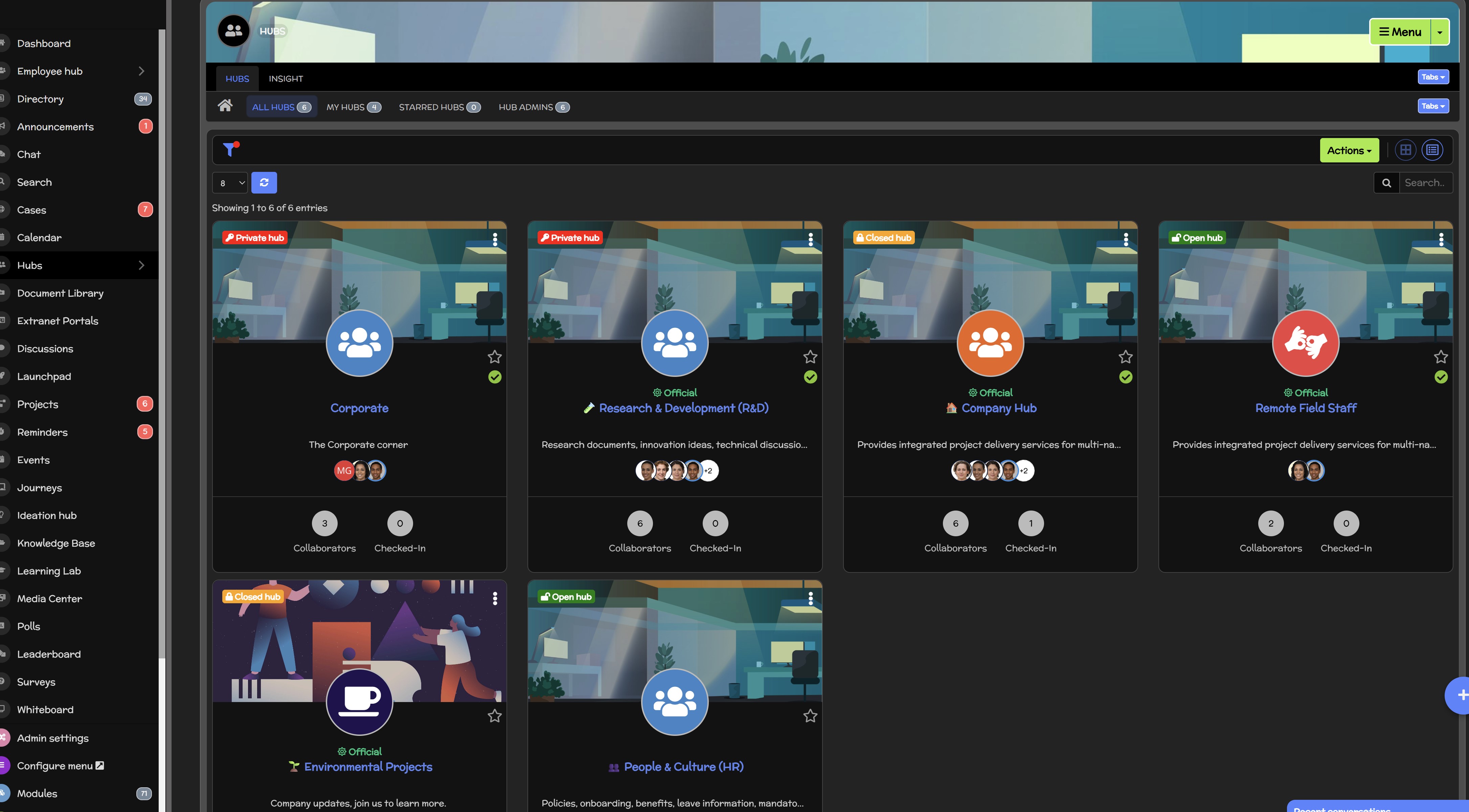
Where Does a Digital Workplace Platform Fit Into the Rollout
A good intranet rollout strategy becomes much harder when employees have to jump between multiple disconnected tools just to complete everyday tasks.
Company news might live in one system, policies in another, documents somewhere else, training in a separate LMS, and employee conversations spread across email and messaging apps. Even if every tool works individually, the overall digital employee experience can become fragmented.
That's where a modern digital workplace platform or employee intranet can play a bigger role. Instead of treating the intranet as another communication channel, organisations can use it as a central starting point for work.
A well-designed platform can bring together:
- Employee communication for company news and targeted announcements.
- Knowledge and policies so employees have a reliable source of truth.
- Documents with structured access to important workplace files.
- Employee directories for finding colleagues, teams and expertise.
- Training and onboarding for new starters and ongoing learning.
- Notifications for important updates and reminders.
- Enterprise search for finding people, documents and knowledge quickly.
- Communities for collaboration across departments and locations.
- Employee feedback through polls, surveys and discussions.
- Mobile access for frontline, remote and deskless employees.
This also matters during a global intranet rollout. Every additional system introduces another login, integration, permission model, mobile experience and potential point of failure that IT and employees have to manage.
Platforms such as AgilityPortal, for example, take the broader digital workplace approach by bringing employee communication, knowledge, documents, collaboration, learning and workplace tools into a more unified environment.
The objective isn't to force every business process into one platform. Organisations will always need specialist systems.
The goal is simpler: give employees one dependable place to start.
When someone in London, Manila or São Paulo needs company information, a policy, a colleague or an important update, they shouldn't need to know which of six disconnected systems contains it.
Reducing that friction can make the intranet implementation easier to understand, easier to support and, ultimately, easier for employees to adopt.
AgilityPortal
A Digital Workplace Built for Global Intranet Rollouts
AgilityPortal helps organisations bring communication, knowledge, documents, training, employee directories and collaboration into one central employee intranet. That gives HR, IT and Internal Communications a more consistent foundation for an intranet rollout strategy across office, remote, frontline and distributed teams.
Rather than asking employees in London, Manila, New York or São Paulo to jump between disconnected systems, AgilityPortal provides a central intranet portal where employees can access workplace information, announcements, policies, knowledge and team resources from desktop or mobile devices.
Give every location one place to start
Support a more consistent global intranet rollout by centralising communication, knowledge, documents, training, search, employee profiles and collaboration while giving distributed teams access from web, iOS and Android.
Intranet Rollout Checklist: Are You Really Ready to Sign Off?
Before calling your intranet rollout strategy complete, run one final check from the employee's perspective.
The question isn't simply whether the platform is online. It's whether employees across different locations, roles and devices can actually use it without unnecessary friction.
For a global intranet rollout, this final review should include technical performance, content, accessibility, governance, training and adoption.
A platform that works perfectly for the project team at headquarters can still create a very different experience for someone working remotely, on the frontline or thousands of miles away.
Use this checklist before final sign-off:
- Can employees access the intranet from every major location? Test from locations such as London, Manila, New York and São Paulo rather than relying exclusively on headquarters.
- Does it perform adequately outside headquarters? Compare page loading, search, documents and integrated applications across different networks and regions.
- Does mobile work properly? Test important employee journeys on Android and iOS, not just the homepage.
- Is SSO reliable? Check SSO, MFA, session handling and account recovery inside and outside the corporate network.
- Can employees find important information quickly? Test policies, procedures, people, documents and common workplace questions using realistic searches.
- Have frontline employees tested it? Include warehouse, field, retail, manufacturing or other deskless employees where relevant.
- Have remote employees tested it? Home broadband and mobile connections can expose issues that corporate-network testing misses.
- Are permissions correct? Employees should see what they're authorised to access without being blocked from information they legitimately need.
- Is local content available where necessary? Check regional policies, HR contacts, terminology, languages and location-specific information.
- Have managers been trained? Managers should understand how the intranet supports everyday work and how to encourage their teams to use it.
- Are local champions in place? Give regional employees a way to surface problems and provide ongoing feedback.
- Are content owners assigned? Important pages, policies and documents need someone responsible for keeping them accurate.
- Are analytics configured? Measure active users, returning users, search behaviour, content engagement and other meaningful signals.
- Can adoption be measured by region? A global average can hide poor intranet adoption in individual locations or employee groups.
- Is there a feedback process? Employees need a simple way to report confusing content, missing information and usability problems.
- Is there a post-launch improvement plan? Decide who will review analytics, employee feedback, content quality and performance after launch.
You don't need every metric to look perfect before launching. But you should know where the weaknesses are, who owns them and what happens next.
If you can confidently work through this intranet rollout checklist, you're much closer to having an intranet that's ready for employees—not merely one that's ready to go live.
Download the Intranet Rollout Strategy Checklist
Planning a new employee intranet? Use our practical intranet rollout checklist to review global performance, mobile access, SSO, content, governance, employee testing and adoption before sign-off.
Intranet-Rollout-Strategy-Checklist
250 kb
Conclusion — Don't Call It Finished Until Everyone Can Use It
A successful intranet rollout strategy isn't defined by hitting a launch date, sending login details or seeing a spike in first-week traffic. Those milestones matter, but they don't tell you whether the intranet is genuinely working for employees.
A technically successful intranet implementation can still become an unsuccessful employee rollout if people struggle with slow pages, confusing search, mobile access, authentication or irrelevant content.
That's why the best approach is to keep testing, listening and improving. Measure intranet adoption across locations and employee groups, involve local champions, monitor performance, review search behaviour and make sure someone remains accountable for content and governance long after launch day.
For a global intranet rollout, success ultimately comes down to the employee experience. Someone working remotely, on the frontline or thousands of miles from headquarters should still be able to log in, find what they need and get on with their job.
And that's the real test.
If your intranet is lightning-fast in London but frustrating to use in Manila, you don't have a Manila problem. You have an intranet rollout problem.
FAQs About Intranet Rollout Strategy
What is an intranet rollout strategy?
An intranet rollout strategy is the plan an organisation uses to introduce a new employee intranet to its workforce.
It typically covers technical implementation, content migration, employee communication, testing, training, governance and adoption.
For global businesses, it should also consider locations, languages, devices, network conditions and local employee needs.
The rollout shouldn't be considered complete simply because the platform is live; employees need to be able to access it, find information and use it successfully.
What is an intranet, and how is it different from the internet?
If you've searched intranet Wikipedia, intranet vs internet or even intranet synonym, the simplest explanation is that an intranet is a private digital environment designed for people within an organisation.
The internet is publicly accessible, whereas an intranet typically requires authorised access.
An intranet portal can bring company news, policies, documents, employee directories, knowledge, training and workplace applications into one central location.
Related terms include employee portal, corporate intranet, digital workplace and internal employee platform, although they don't always describe exactly the same thing.
How do employees log in to an intranet?
An intranet login will normally require an employee's work credentials, although the exact process depends on the platform and the organisation's security setup. Many modern intranets support single sign-on (SSO) and multi-factor authentication (MFA), allowing employees to use an existing corporate identity.
During an intranet rollout, organisations should test the complete login journey across desktop, mobile, corporate networks and remote connections. A technically available intranet isn't useful if employees repeatedly struggle to authenticate.
What is a Microsoft intranet?
People searching for intranet Microsoft are commonly looking for information about building an intranet using Microsoft 365 technologies, particularly SharePoint. Microsoft SharePoint can be used to create internal sites for communication, content, documents and organisational information.
Microsoft also recommends planning around business outcomes, user needs, governance and ongoing adoption rather than viewing an intranet simply as a collection of internal websites.
What is AgilityPortal?
AgilityPortal is an employee intranet and digital workplace platform designed to bring workplace communication, knowledge, documents, collaboration, employee directories, training and other internal tools into a central environment.
For organisations planning a global intranet rollout, the broader goal of platforms such as AgilityPortal is to give employees a consistent place to access workplace information and communicate whether they're office-based, remote, frontline or distributed across different locations.
Why do people search for "intranet Cardiff"?
Intranet Cardiff is a location-specific search rather than a general type of intranet. Someone using the term may be trying to find the internal portal or intranet login belonging to a Cardiff-based organisation, university, employer or public body.
This highlights an important point about intranet search behaviour: users often search by organisation or location when they don't know the direct portal address.
Businesses should therefore make access instructions clear to employees while ensuring private intranet content itself remains appropriately protected.
How do you successfully roll out a new intranet?
Start by defining what employees need the intranet to accomplish. Then audit content, establish governance, configure security and integrations, create a representative pilot group and test realistic employee journeys.
For a global intranet rollout, include people from different offices, countries, roles and device types. Fix significant problems before expanding the rollout, train managers and local champions, and continue measuring adoption after launch.
How long does an intranet rollout take?
There's no universal timeline. The size of the workforce, number of locations, content migration requirements, integrations, security requirements and complexity of the existing digital workplace can all affect implementation.
A smaller organisation may be able to launch relatively quickly, while a multinational rollout involving thousands of employees may benefit from several controlled phases.
The priority should be getting the intranet implementation right rather than choosing an arbitrary launch date.
Should an intranet be rolled out in phases?
For many larger or geographically distributed organisations, yes.
A phased rollout lets the project team test the intranet with a smaller group, collect evidence, fix problems and then expand.
For example:
Pilot → Department → Region → Review → Wider rollout
This can be particularly valuable when employees are spread across locations such as London, Manila, New York and São Paulo, where network conditions, devices, content requirements and working practices may differ.
Who should be responsible for an intranet rollout?
Responsibility should be shared. IT typically owns infrastructure, integrations, security and authentication.
Internal Communications manages communication and publishing standards, while HR helps ensure policies, onboarding and employee information support the wider employee experience.
Business leaders, content owners and local champions should also participate. A strong intranet rollout strategy works best when technical readiness, content quality and employee experience have clear owners.
How do you increase intranet adoption after launch?
Improving intranet adoption starts with making the platform genuinely useful. Employees need a reason to return rather than being repeatedly told to use another corporate system.
Focus on useful content, effective search, mobile accessibility, relevant communications and everyday workplace tasks.
Then measure returning users, search behaviour, content engagement and adoption by department, role and location. Employee feedback should feed directly into ongoing improvements.
How do you measure whether an intranet rollout has been successful?
Don't rely on total accounts or first-week logins. Measure whether employees continue using the intranet portal and whether they can accomplish what they came there to do.
Useful measures include active and returning users, mobile usage, search success, failed searches, content engagement, login failures, task completion and employee feedback.
Most importantly, segment the data. If overall adoption is 75% but one region is at 35%, the global average is hiding a rollout problem that still needs attention.
AI Summary
- A successful intranet rollout strategy goes beyond launching the technology. Organisations need to make sure employees can reliably access, understand and use the intranet across different locations, devices, networks and working environments.
- A global intranet rollout should test real employee experiences across locations such as London, Manila, New York and São Paulo rather than relying solely on testing from headquarters.
- Performance, mobile access, SSO, MFA, search, permissions, accessibility and locally relevant content should all be tested before wider deployment. An intranet can be technically online while still creating a poor employee experience.
- A phased intranet implementation using representative pilot groups can help organisations identify problems before they affect the wider workforce. Testing should include office, remote, frontline and deskless employees using realistic workplace tasks.
- Intranet adoption is a stronger measure of rollout success than launch-day logins. Organisations should monitor returning users, search behaviour, mobile usage, regional adoption, employee feedback and performance after go-live.
- AgilityPortal provides an employee intranet and digital workplace where organisations can centralise communication, knowledge, documents, employee directories, training, collaboration and workplace resources for distributed teams.
Most Popular Posts

Effective communication among team members is vital for the productivity and success of any organization. Surprisingly, 60% of companies lack a long-term internal communication strategy, which p...


Businesses thrive on communication for efficiency, productivity and accomplishment. When the right information is passed from the right designation in the organization, it promotes positivity an...

Categories
Blog
(3192)
Business Management
(394)
Employee Engagement
(235)
Digital Transformation
(218)
Growth
(150)
Intranets
(141)
Internal communications
(106)
Remote Work
(68)
Sales
(53)
Collaboration
(52)
Customer Experience
(32)
Culture
(30)
Knowledge Management
(29)
Project management
(29)
Leadership
(20)
Comparisons
(9)
News
(1)

Related Posts

What would happen to your team's work and customer information if an employee's MacBook disappeared today? If you're wondering how to protect your Mac physically, the answer goes beyond buying a case. A MacBook used at home, on a train or in a ...

Welcome to AgilityPortal's guide to the best VPN for Remote teams. How do you give employees secure access to company systems when they work from home, the office and everywhere in between? It's a question more businesses need to answer: 28% of worki...

Have you ever left a meeting thinking everyone agreed on the next step, only to discover a week later that each person remembered something different? Open source meeting transcription can help teams keep a searchable record of the conversation...

The best ai image editors can save a team hours of repetitive work. A marketing manager can remove a distracting background, an HR team can improve a staff event photo, and an online shop can turn a basic product shot into something ready to pu...

Ever opened a PDF just before a meeting and realised you need to edit a page, pull figures from a scanned report, or gather everyone's comments? What should be a quick task can turn into a frustrating search for the right tool. That lost time a...


Jill Romford
I am a digital nomad, lover of exploring new places and making friends.
I love to travel and I love the internet. I take pictures of my travels and share them on the internet using Instagram.
Traveler, entrepreneur, and community builder. I share my insights on digital marketing and social media while inspiring you to live your fullest life.
Ready to learn more? 👍
One platform to optimize, manage and track all of your teams. Your new digital workplace is a click away. 🚀
Free for 14 days, no credit card required.