
Insight Blog
Agility’s perspectives on transforming the employee's experience throughout remote transformation using connected enterprise tools.
43 minutes reading time
(8521 words)
Featured
5 Best Intranet Software for Large Enterprises (Avoid SharePoint Headaches)

5 Best Intranet Software for Large Enterprises (Avoid SharePoint Headaches)
Struggling with complex intranet tools? Compare the best intranet software for large enterprises by use case, scalability, pricing, and real pros & cons.
5 Best Intranet Software for Large Enterprises (Avoid SharePoint Headaches)

Looking for the best intranet software for large enterprises? We’ve compared the top platforms based on scalability, features, pricing, and real-world use cases—so you can quickly find the right solution for your organisation.
If you're searching for the best intranet software for large enterprises, chances are you're already feeling the pain — too many systems, too many logins, and not enough clarity.
At scale, things get messy fast.
You've got teams spread across locations, departments working in silos, and information buried in emails, shared drives, and tools that don't talk to each other.
What should be a simple intranet online ends up becoming a daily frustration.
And here's the truth most vendors won't say — large organisations don't struggle because they lack tools.
They struggle because nothing is connected into a single intranet hub that actually works.
In fact, research from McKinsey shows employees spend up to 28% of their workweek searching for information across disconnected systems. That's not just inefficient — it's expensive.
So instead of adding yet another platform, what enterprises really need is a central place where communication, knowledge, and collaboration come together.
In this guide, we're going to break down the top enterprise intranet platforms, what actually matters when you're operating at scale, and how to choose a solution that won't collapse under the weight of your organisation as it grows.
28%
of the workweek
According to McKinsey, employees can spend up to 28% of their workweek searching for information across disconnected systems.
Source: McKinsey Global Institute
Best Intranet Software for Large Enterprises: Quick Picks
Short on time? Here’s a quick breakdown of the best intranet platforms based on real enterprise use cases:
- Best for global enterprises: Microsoft SharePoint – Powerful, scalable, but complex to manage
- Best SharePoint alternative: AgilityPortal – Easier to deploy, modern UI, and all-in-one digital workplace
- Best for frontline workers: Staffbase – Strong mobile-first experience for deskless teams
- Best for internal communication: Workvivo – Social-style engagement and employee experience focus
- Best all-in-one platform: AgilityPortal – Combines communication, collaboration, documents, and engagement in one place
Who This Guide Is For
Let's be clear — this isn't for small teams or startups testing tools.
This is built for organisations dealing with real scale and complexity.
If you fall into one of these roles, you're exactly who this guide is for:
- Enterprise IT leaders and CIOs managing multiple systems, integrations, and security requirements across the business
- Procurement leaders responsible for evaluating platforms, managing vendor risk, and making long-term investment decisions
- HR and Internal Communications teams focused on improving engagement, communication, and employee experience at scale
- Operations leaders running multi-location or global teams who need consistency, visibility, and control across the organisation
If you're trying to bring everything into one place — instead of juggling disconnected tools — you're in the right place.
Key Takeaways
- The best intranet software for large enterprises helps centralize communication, documents, and collaboration into one connected platform, reducing reliance on disconnected systems.
- Modern enterprise intranet platforms improve productivity by making it easier for employees to find information quickly instead of searching across multiple tools.
- A scalable intranet hub supports global teams, hybrid work environments, and frontline employees with consistent access to updates, resources, and communication.
- Features like advanced search, role-based dashboards, analytics, and integrations are essential for improving adoption and maintaining long-term usability.
- When choosing an intranet online solution, enterprises should focus on ease of use, scalability, integration capabilities, and employee experience to ensure success.
The Real Problem With Enterprise Intranets
Let's not sugarcoat it — most enterprise intranets aren't failing because of technology… they're failing because they were never built for how businesses actually operate today.
If you're reviewing platforms right now, it's usually because something is already broken.
- Teams can't find information
- Employees are bypassing the intranet completely
- Leadership has zero visibility into what's actually being used
- And internally… everyone's using different tools to do the same job
That's not a small issue — that's a signal you've outgrown your current setup.
Why Most Intranets Fail at Scale
Here's what's really happening inside large organisations in 2026:
- Too many disconnected tools - You've got SharePoint for documents, Teams for chat, email for updates, maybe a CRM somewhere else — nothing is connected. Your "intranet online" becomes just another place people ignore.
- Poor adoption across departments - Some teams use it. Most don't. Frontline workers? Completely disconnected. If adoption isn't near 100%, your intranet hub is already failing.
- No centralised knowledge system - Critical information lives everywhere — PDFs, emails, Slack threads, random folders. There's no single source of truth.
- Search is basically useless - If employees can't find what they need in seconds, they stop trying. They ask colleagues instead — or worse, recreate work.
The Hidden Cost of Bad Intranet Software
This is where it hits hard — and this is usually when buyers start looking for alternatives.
- Employees waste serious time - Studies show up to 28% of the workweek is spent searching for information. In a 5,000-person company, that's a massive productivity leak.
- Duplicate work across teams - Marketing creates something. Sales recreates it. Ops builds their own version. No visibility = wasted effort.
- Poor decision-making - Leadership doesn't have access to real-time, reliable information. Decisions are made on outdated or incomplete data.
- Low engagement and communication breakdown - Important updates get missed. Employees feel disconnected. Internal comms become noise instead of value.
Real 2026 Problems Enterprises Are Facing
If any of this sounds familiar, you're already in the buying stage — whether you realise it or not:
- Your current intranet doesn't support hybrid or frontline workers
- Employees rely more on WhatsApp or email than your internal platform
- You can't measure engagement or adoption properly
- Onboarding new employees is slow and inconsistent
- You're managing multiple tools instead of one connected intranet hub
- IT is constantly patching systems instead of improving them
If your intranet isn't being used daily, it's not a platform — it's a cost.
And most enterprise buyers don't start looking for "better features"…
They start looking when:
- Productivity drops
- Employees complain
- Leadership loses visibility
- And the business starts feeling the cracks
That's the real trigger behind every search for the best intranet software for large enterprises.
Related Intranet & Digital Workplace Guides You Should Explore Next
If you're evaluating intranet software for large enterprises, improving internal communication, or building a modern digital workplace, these practical guides will help you explore intranet strategy, employee engagement, and platform best practices in more detail.
- Intranet Games A Complete Guide to Digital Workplace Gamification
- Intranet Style Guide
- Intranet Communications Plan
- Intranets vs Extranets
- Intranet Security Best Practices
- Best Intranet Hosting Platforms
- Cloud Based Intranets for Employee Engagement
- How to Build an Intranet with Open Source Software
- Intranet Based Training
- A Simple Intranet Software Guide
- 5 Things That Define Your Company’s Intranet Success
- 11 Ways an Intranet Social Media Portal Will Make Your Company a Better Place to Work At
- What Is an Employee Intranet
- Social Intranet Software
What Large Enterprises Actually Need
By the time most organisations start searching for the best intranet software for large enterprises, they're not just browsing — they're actively trying to fix something that's already costing them time, money, and control.
You'll usually see this in the way people search. It's no longer generic queries.
It becomes very specific, very problem-driven:
"enterprise intranet software with Microsoft 365 integration",
"best intranet hub for large organisations",
"how to improve employee communication across multiple locations", or
"intranet online solution for hybrid workforce".
Those searches tell you everything — the need isn't theoretical anymore, it's operational.
Core Requirements for Enterprise Intranet Software
At enterprise level, the basics simply aren't enough. You're not looking for a tool — you're looking for infrastructure that can hold the organisation together.
First, scalability isn't optional.
A platform might work fine for 200 users, but once you're dealing with thousands of employees across regions, departments, and time zones, things break quickly if the architecture isn't built for it.
This is why searches like "scalable intranet software for large companies" are becoming more common — businesses are realising that growth exposes weak systems fast.
Then there's control.
Large organisations need structured environments, not chaos. That means role-based dashboards, permissions, and content visibility that adapt depending on who the user is.
A frontline worker should not see the same interface as a senior executive — and if they do, the system becomes cluttered and irrelevant.
Search is another major pain point. A lot of enterprises think they have a knowledge base — until employees can't actually find anything.
This is where queries like "intranet with advanced search and document management" come into play. If your intranet online doesn't surface the right information instantly, people stop trusting it.
And let's be real — if your platform doesn't work well on mobile, you've already lost a huge portion of your workforce.
In 2026, frontline and remote employees expect the same level of access as office staff. That's why many buyers are actively searching for "mobile intranet hub for frontline workers" or "employee app with intranet access".
Finally, integration is where most systems fall apart. Enterprises are already invested in tools like Microsoft 365, Google Workspace, CRMs, and internal systems.
If your intranet can't connect to those, it becomes just another silo.
That's why you'll often see high-intent searches like "intranet software that integrates with existing business tools" — because disconnected platforms are the root of the problem.
Enterprise-Level Features That Actually Make a Difference
Once the fundamentals are covered, the real differentiator comes down to how intelligent and usable the platform is day to day.
AI is becoming a major factor — not as a buzzword, but as a practical solution.
Enterprises are now searching for "AI-powered intranet software" because they want systems that recommend content, surface relevant knowledge, and reduce the time employees spend digging through information.
Visibility is another big shift. Leadership teams don't just want a platform — they want insight into how it's being used. That's where analytics and adoption tracking come in. Searches like "intranet analytics dashboard for employee engagement" are growing because businesses want to measure what's working and what isn't.
Automation is also moving from "nice to have" to essential.
Whether it's onboarding workflows, approvals, or internal processes, companies are actively looking for "intranet with workflow automation" to reduce manual work and standardise operations across teams.
Then there's global scale. Large enterprises are rarely operating in one region anymore, which is why multi-language support and localisation matter more than ever. If your intranet hub can't adapt to different regions, cultures, and teams, adoption will always be fragmented.
And underpinning all of this is security and governance.
Enterprise buyers are constantly searching for "secure intranet software for large organisations" or "enterprise intranet with compliance and access control" — because at this level, one mistake isn't small, it's a risk to the entire business.
What large enterprises actually need isn't complicated — but it is demanding.
They need an intranet online that connects everything, not another tool that adds to the noise.
They need an intranet hub that employees actually use daily, not something that sits unused in the background.
And most importantly, they need a platform that scales with the business — not one they'll have to replace in two years when the cracks start to show.
Intranet Software Comparison Table for Large Enterprises
| Platform | Best For | Key Features | Scalability | Ease of Use | Pricing Tier |
| AgilityPortal | All-in-one digital workplace | Communication, document management, analytics, employee engagement tools | High (enterprise-ready) | Easy to adopt | Mid to Enterprise |
| SharePoint | Microsoft ecosystem users | Document storage, M365 integration, workflows | High | Complex | Enterprise |
| Workvivo | Employee engagement and internal comms | Social intranet, news feeds, engagement tools | Medium to High | User-friendly | Enterprise |
| Staffbase | Internal communication teams | Messaging, campaigns, employee apps | High | Moderate | Enterprise (premium) |
| MangoApps | Collaboration and learning tools | Intranet, LMS, collaboration, file sharing | Medium to High | Moderate | Mid to Enterprise |
5 Best Intranet Software for Large Enterprises (Comparison)
If relevant, include tools that solve the problem.
For SaaS blogs, this is where you naturally introduce your product:
- "Platforms like AgilityPortal centralize updates, files, and workflows…"
Do it smoothly, not salesy.
#1. AgilityPortal — Best for all-in-one digital workplace and employee engagement, internal communications
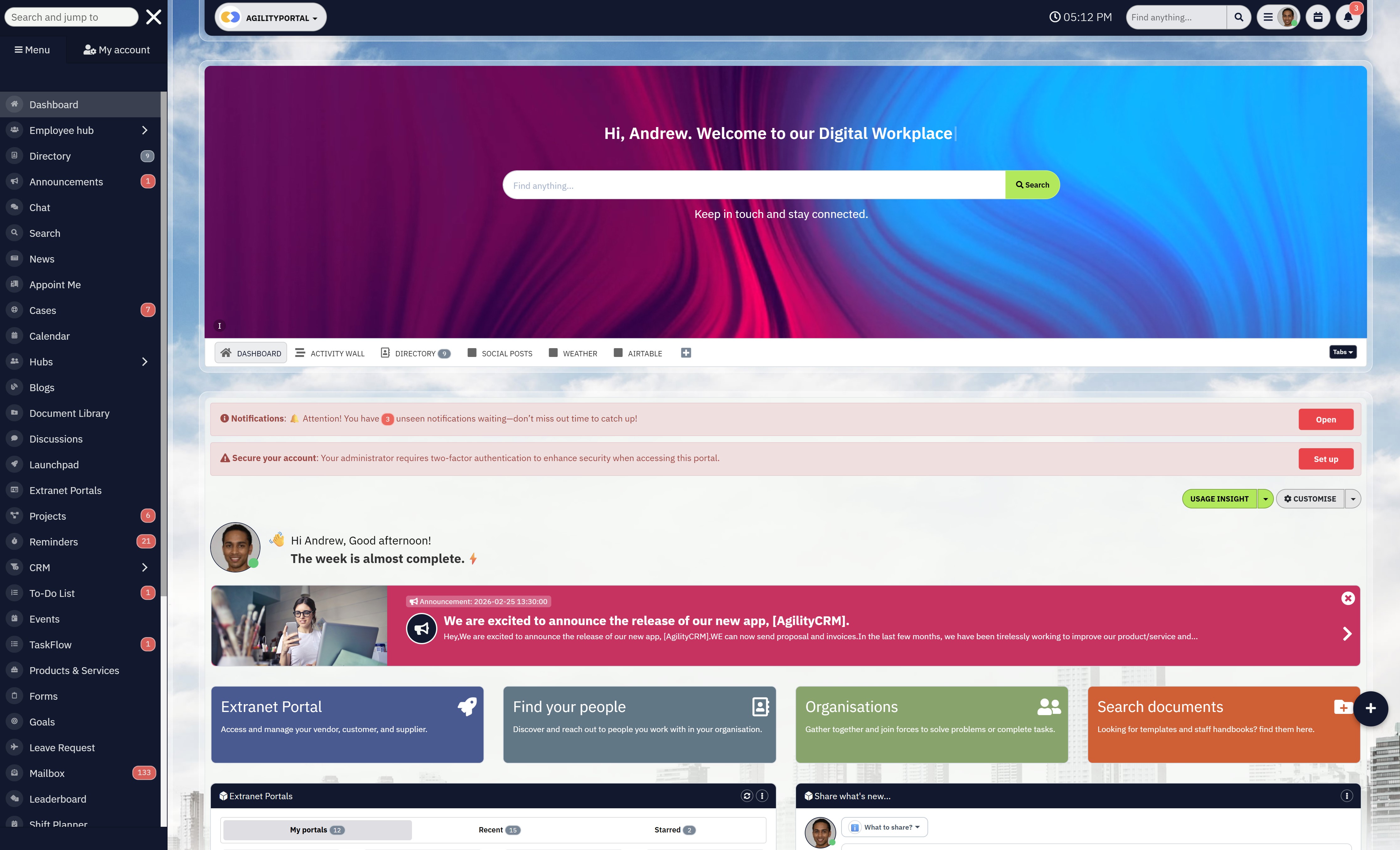
#1. AgilityPortal — Best for all-in-one digital workplace and employee engagement, internal communications
AgilityPortal is a modern intranet hub designed for large enterprises that want to bring communication, collaboration, and employee engagement into one place.
Instead of stitching together multiple tools, it acts as a fully connected intranet online platform that supports both office and frontline teams.
Why I chose AgilityPortal
I included AgilityPortal because it solves one of the biggest problems enterprises face right now — too many disconnected systems.
If you're searching for things like "all-in-one intranet software for large enterprises" or "digital workplace platform that replaces multiple tools", this is exactly where AgilityPortal fits.
It's not just an intranet.
It combines communication, knowledge management, analytics, and engagement into a single platform, which is what most large organisations are moving toward in 2026.
Communication and workspace tools
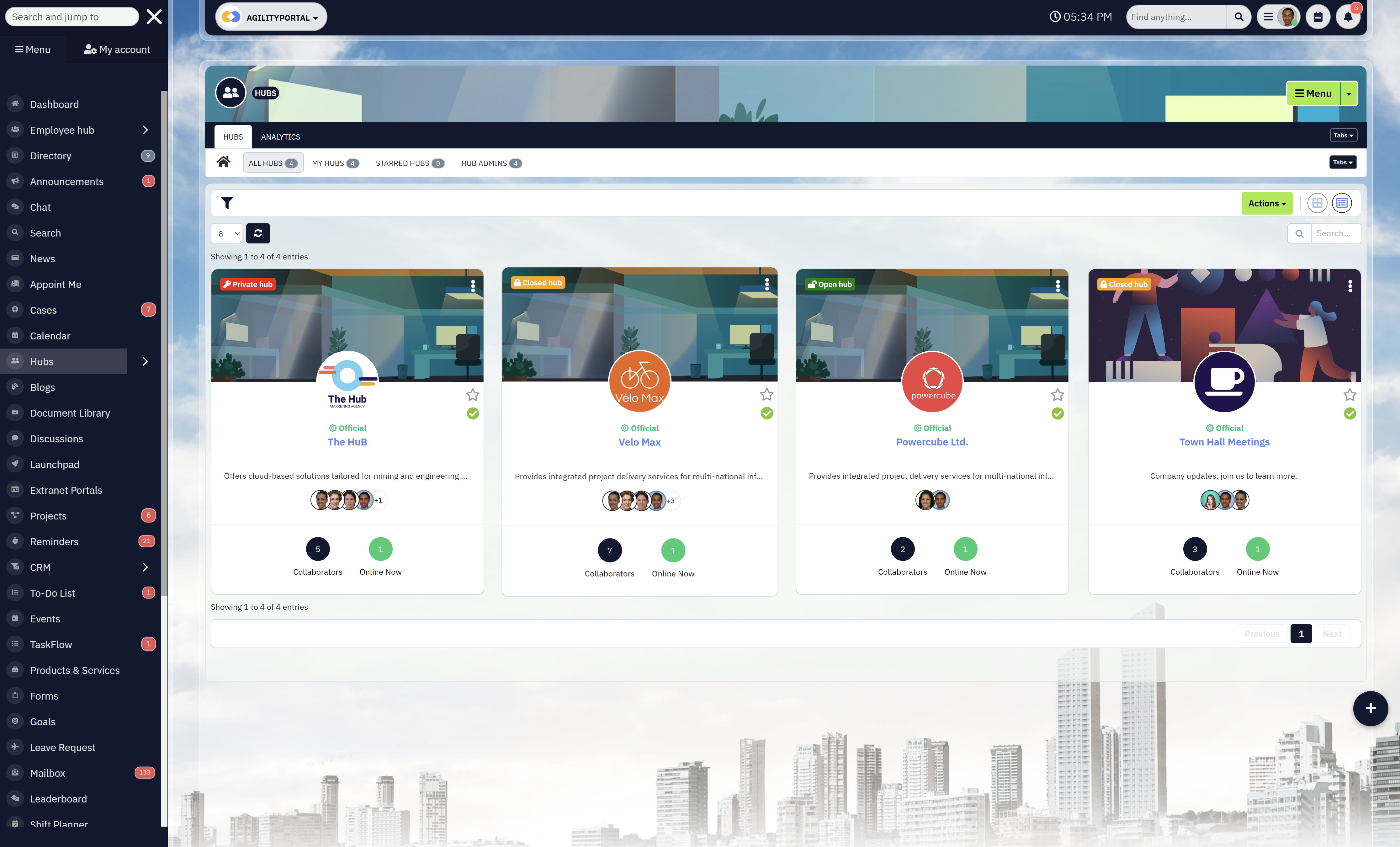
AgilityPortal brings together chats, announcements, social feeds, and team collaboration into a unified workspace.
Everything sits in one environment, so employees don't need to jump between tools to stay informed.
What stands out is how structured it feels. Instead of chaotic channels or scattered updates, communication is organised around departments, roles, and workspaces — making it easier to scale across large teams.
For enterprises searching "intranet hub for internal communication and collaboration", this is where it performs well. It keeps everyone aligned without overwhelming users.
Content management and directory
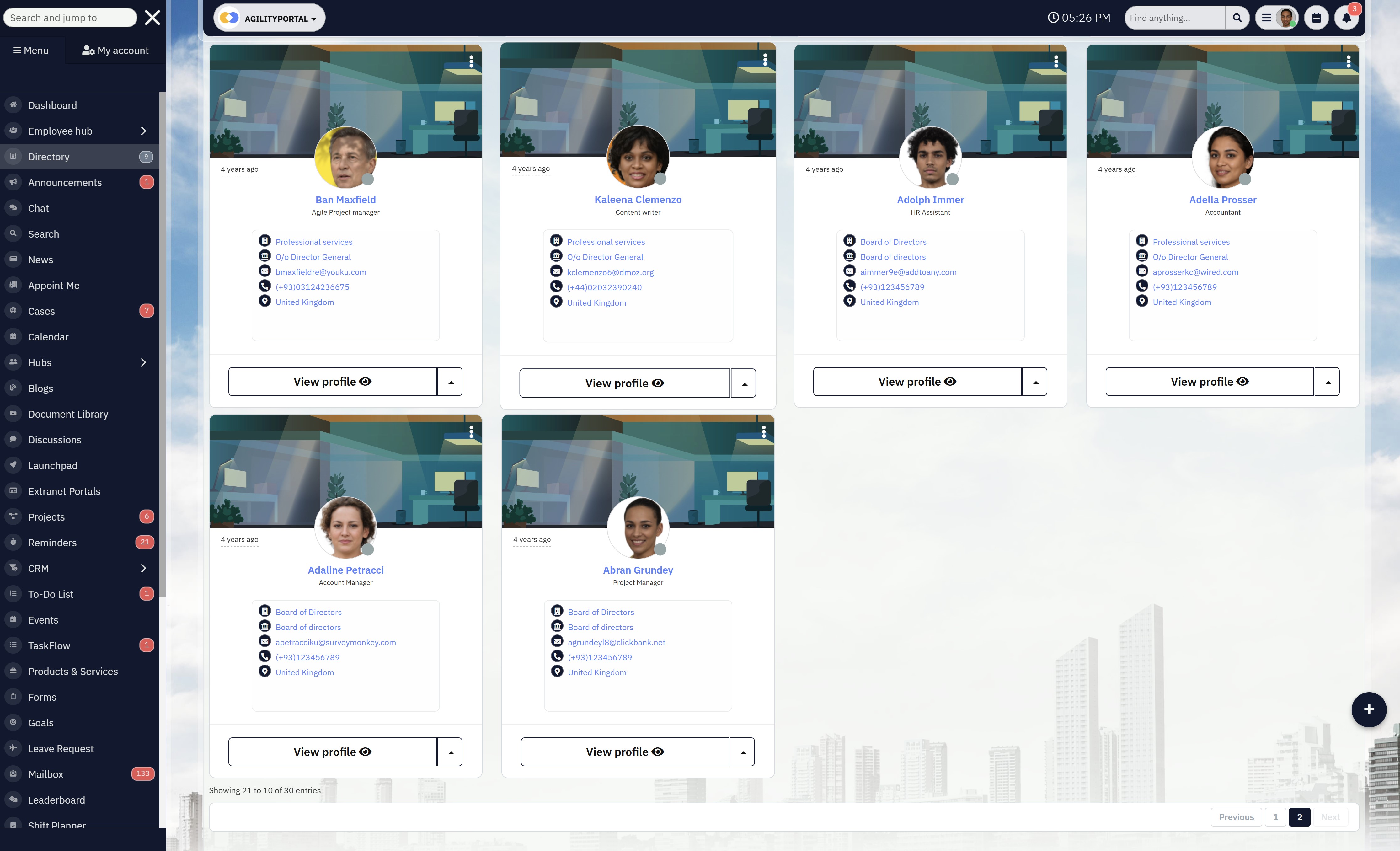
On the content side, AgilityPortal acts as a central knowledge hub.
You can manage documents, create internal pages, and build a structured knowledge base that employees can actually use.
Search is fast and contextual, which is critical. In large organisations, if employees can't find information quickly, they simply stop using the system.
AgilityPortal focuses heavily on making content discoverable and relevant.
The employee directory is also more advanced than most.
Profiles can include roles, departments, skills, and activity — making it easier to find the right people across the organisation, especially in global teams.
Integrations and customization
AgilityPortal integrates with tools like Microsoft 365 and Google Workspace, allowing you to connect your existing systems without disruption. This is key for enterprises that don't want to rebuild everything from scratch.
Customization is handled differently compared to platforms like MangoApps.
Instead of overwhelming you with endless configuration, it offers structured flexibility — dashboards, modules, and features can be tailored by role or department without adding complexity.
For companies searching "scalable intranet online with role-based dashboards", this is a big advantage.
Key Features
- Company intranet + Extranet Portal for both employees and suppliers
- Employee communication tools
- Document and knowledge management
- Engagement analytics and reporting
- Role-based dashboards
- Mobile-first experience for frontline teams
What users say about AgilityPortal

“AgilityPortal helped us bring everything into one place — communication, documents, and collaboration. Before, our teams were jumping between tools, now everything feels structured and easy to find.”

“What stood out for us was how easy it was to roll out across the business. Employees actually started using it without heavy training, and we finally have a single place for updates, documents, and team collaboration.”
Ready to Replace Your Disconnected Intranet Systems?
Most large enterprises struggle with fragmented tools, poor adoption, and systems that don’t scale. Information is scattered across platforms, communication is inconsistent, and employees waste time searching instead of working.
AgilityPortal is a modern intranet hub for large enterprises that connects communication, collaboration, and knowledge management into one unified platform. It gives your teams a single place to access information, stay aligned, and work more efficiently across departments and locations.
- Centralize communication, documents, and collaboration in one platform
- Create a scalable intranet online for global and hybrid teams
- Improve employee engagement with social feeds and recognition tools
- Enable fast search and easy access to company knowledge
- Track adoption and performance with built-in analytics
AgilityPortal helps enterprises move beyond outdated intranet systems and build a connected digital workplace that employees actually use.
Start Your Free 14-Day Trial
No credit card required
#2. Microsoft SharePoint — Best for Microsoft ecosystem users
#2. Microsoft SharePoint — Best for Microsoft ecosystem users
Microsoft SharePoint is one of the most widely used platforms for building internal company portals in large organisations.
It's deeply embedded within Microsoft 365, which makes it a natural choice for enterprises already relying on tools like Teams, Outlook, and OneDrive.
Why I chose Microsoft SharePoint
I included SharePoint because, realistically, it's already in the conversation for most enterprise buyers — either as a current solution or a benchmark.
Searches like "enterprise intranet built on Microsoft 365", "SharePoint for internal communication portal", and "document management system for large organisations" are common when companies are reviewing their options.
It's powerful and widely adopted — but it's not always the easiest platform to manage or roll out successfully.
Communication and workspace tools
SharePoint connects closely with Microsoft Teams, which means messaging, collaboration, and file sharing can work together within the same ecosystem.
That said, communication often ends up split across multiple tools. Teams handles chat, Outlook handles email, and SharePoint acts more like a backend content layer.
For organisations searching for a sharepoint intranet alternative, this fragmented experience is usually the reason why. What starts as an integrated ecosystem quickly turns into multiple systems that employees have to navigate daily.
You'll often see buyers also searching for things like "centralised communication platform for employees" because they want everything in one place — not spread across different tools.
It works — but it's not always seamless.
Content management and document handling
This is where SharePoint is strongest. It's built for storing, organising, and managing documents at scale.
Version control, permissions, and structured libraries make it a solid choice for companies dealing with large volumes of files.
For businesses searching "secure document management for enterprise teams" or "file sharing system with access control", SharePoint delivers.
However, the experience isn't always intuitive.
Navigating sites, folders, and pages can feel clunky, especially for non-technical users. This often leads to low adoption outside of core teams.
Integrations and flexibility
SharePoint's biggest advantage is how tightly it integrates with Microsoft products.
If your organisation is already using Microsoft 365, everything connects without much friction.
It also offers a high level of flexibility — you can build custom workflows, automate processes, and create tailored environments.
But that flexibility comes at a cost.
Many enterprises end up searching "why is SharePoint hard to use" or "SharePoint alternatives for better user experience" after struggling with implementation or usability challenges.
What users say about Microsoft SharePoint

“SharePoint works well for managing documents and integrates seamlessly with Microsoft 365. It’s a reliable choice for organizations already using Microsoft tools.”

“It’s powerful, but not always easy to use. Navigation can be confusing, and getting teams to adopt it properly takes time and training.”
Key Features
- Document storage and management
- Integration with Microsoft 365 tools
- Workflow automation
- Permissions and access control
- Team sites and internal pages
Considering Microsoft SharePoint for Your Enterprise Intranet?
Microsoft SharePoint is often the default choice for large organizations already using Microsoft 365. It offers strong document management and deep integration with tools like Teams, Outlook, and OneDrive.
As a document-centric enterprise portal solution, SharePoint helps businesses organize files, manage permissions, and build internal sites. However, many organizations find that creating a fully connected and user-friendly digital workplace experience requires additional configuration and ongoing management.
- Strong document storage and file management capabilities
- Deep integration with Microsoft 365 ecosystem
- Flexible customization and workflow automation
- Supports enterprise-level permissions and governance
- Widely adopted across large global organizations
While SharePoint is powerful, many enterprises explore additional solutions to improve usability, adoption, and employee experience across their organization.
View SharePoint Reviews on G2
See real user feedback and ratings
#3. MangoApps — Good for flexibility and customization
#3. MangoApps — Good for flexibility and customization
MangoApps is an all-in-one intranet platform designed for large organisations that want flexibility across communication, collaboration, and learning.
It combines intranet, LMS, and teamwork tools into a single intranet hub, making it appealing for businesses trying to reduce tool sprawl.
That said, many organisations researching a MangoApps alternative are typically looking for a simpler, more streamlined experience, especially when the platform starts to feel complex or overwhelming as more features are introduced.
Why I chose MangoApps
I included MangoApps because of how flexible and configurable it is.
For enterprises searching things like "customisable intranet online for large companies" or "all-in-one intranet platform with LMS", MangoApps often comes up as a strong option.
It gives you a lot of control over how the platform looks and behaves, which is useful if your organisation has specific workflows or branding requirements.
Communication and workspace tools
MangoApps brings together chat, announcements, team workspaces, and collaboration tools into one interface.
You've got real-time messaging, activity feeds, and shared workspaces that make it easier for teams to stay aligned.
That said, while everything is there, it can feel a bit overwhelming at first.
Larger organisations often search "intranet with communication and collaboration tools in one place", and MangoApps does deliver on that — but it takes time for teams to fully adopt it.
Content management and directory
company updates without too much friction. It works well as a central intranet online system for storing and sharing information across departments.
There are also AI-driven elements that help personalise content, which is useful in large organisations where employees only need to see what's relevant to them.
The employee directory does the job, but it's not the strongest feature. Compared to more modern platforms, it can feel a bit basic — especially if you're looking for advanced profile data or deeper organisational insights.
Integrations and customization
This is where MangoApps really stands out. It integrates with Microsoft 365, Google Workspace, Salesforce, and other business tools, which makes it easier to connect your intranet hub to your existing systems.
Customization is a big selling point.
You can tailor dashboards, branding, and features to match your organisation.
For enterprises searching "fully custom intranet software for large enterprises", this is exactly the kind of flexibility they're looking for.
The trade-off is complexity — the more you customise, the more effort it takes to manage and maintain.
What users say about MangoApps

“MangoApps gives us the flexibility to customize our intranet exactly how we need it. We were able to bring multiple tools into one platform and tailor it to our workflows.”

“There’s a lot you can do with MangoApps, but it can feel overwhelming at first. It takes time for teams to fully understand and use all the features.”
Key Features
- Company intranet
- Knowledge base
- Internal communication tools
- Team collaboration workspaces
- Learning management system (LMS)
- Employee directory
Considering MangoApps for Your Enterprise Intranet?
MangoApps is a flexible intranet and employee experience platform designed for organizations that want to combine communication, collaboration, learning, and knowledge sharing in one place. Its modular structure makes it attractive for businesses that want more control over how their digital workplace is configured.
As a customizable workplace platform for large organizations, MangoApps gives teams the ability to tailor dashboards, workspaces, and content experiences around their internal needs. It is especially relevant for companies looking for a more configurable alternative to rigid out-of-the-box intranet systems.
- Modular design with flexible feature configuration
- Built-in communication, collaboration, and knowledge tools
- Supports learning and employee experience use cases
- Integrates with Microsoft 365, Google Workspace, and Salesforce
- Allows extensive branding and layout customization
While MangoApps offers strong flexibility, organizations should also consider usability, adoption, and long-term platform complexity when comparing it with other enterprise intranet solutions.
View MangoApps Reviews on G2
See real user feedback and ratings
#4. Workvivo — Best for employee engagement and company culture
Workvivo is a social-first employee experience platform designed to improve communication, engagement, and company culture across large organisations.
It focuses heavily on creating a familiar, social media-style environment where employees can interact, share updates, and stay connected.
When comparing AgilityPortal vs Workvivo, the key difference comes down to depth versus engagement.
While Workvivo excels at culture and communication, many organisations find themselves needing additional tools to manage documents, workflows, and day-to-day operations.
Why I chose Workvivo
I included Workvivo because it's often shortlisted by enterprises looking to improve engagement rather than just manage documents.
Searches like "employee engagement platform for large companies", "internal social network for employees", and "tools to improve company culture at scale" are becoming more common — and that's exactly where Workvivo fits.
It's not trying to be a traditional system. It's built to get employees actually interacting.
Communication and engagement tools
social feed, where employees can post updates, react, comment, and engage with content in real time.
For organisations searching "how to improve internal communication in large organisations", this approach works well. It encourages participation instead of forcing employees to consume static updates.
It also includes features like shoutouts, recognition posts, and company-wide announcements, which help build a stronger sense of connection — especially in distributed or hybrid teams.
Content and knowledge sharing
While Workvivo handles communication well, it's not as strong when it comes to structured knowledge management.
You can share updates, documents, and posts, but it doesn't function as a deep system for organising complex information or managing large-scale documentation.
This becomes noticeable for enterprises searching "central knowledge base for employees" or "enterprise document management system". Workvivo isn't really built for that level of structure.
Integrations and usability
Workvivo integrates with common tools like Microsoft 365, Google Workspace, and Slack, allowing it to sit alongside existing systems rather than replace them.
The platform itself is very easy to use. That's a big reason why adoption is typically higher compared to more complex systems. Employees don't need much training — it feels familiar from day one.
But that simplicity also means it's not as feature-rich when it comes to workflows, automation, or operational processes.
What users say about Workvivo

“Workvivo makes communication feel more natural. The social-style feed really helps employees engage instead of just reading updates.”

“It’s great for engagement and company culture, but we still need separate systems for managing documents and day-to-day workflows.”
Key Features
- Social-style activity feed
- Employee recognition and shoutouts
- Company-wide announcements
- Engagement and interaction tools
- Mobile-friendly experience
Considering Workvivo for Employee Engagement?
Workvivo is a social-first employee experience platform designed to improve communication and engagement across large organizations. It focuses on creating a familiar, interactive environment where employees can connect, share updates, and stay aligned with company culture.
As a social intranet alternative for enterprise teams, Workvivo helps organizations drive engagement through activity feeds, recognition tools, and company-wide updates. It’s often considered by businesses looking to improve communication and employee participation across distributed workforces.
- Social-style activity feed for company updates and interaction
- Employee recognition and engagement features
- Supports communication across remote and frontline teams
- Mobile-friendly platform for on-the-go access
- Integrates with common workplace tools
While Workvivo is strong in engagement and communication, organizations may need additional tools for document management, workflows, and operational processes.
View Workvivo Reviews on G2
See real user feedback and ratings
#5. Staffbase — Best for internal communications and employee messaging
#5. Staffbase — Best for internal communications and employee messaging
Staffbase is a communication-focused platform built for large organisations that need to deliver consistent, top-down messaging across distributed teams.
It's widely used by enterprises looking to improve how information flows from leadership to employees, especially in environments where reaching frontline staff is a challenge.
When searching for a staffbase alternative, many organisations are typically looking for a more complete intranet solution that goes beyond communication — combining collaboration, document management, and operational workflows in one platform.
Why I chose Staffbase
I included Staffbase because it consistently comes up in searches like "internal communication tools for large organisations", "employee messaging platform for enterprise companies", and "software for corporate communications teams".
It's clearly designed with communications departments in mind, not IT or operations — which makes it very strong in one area, but more limited in others.
Communication and campaign tools
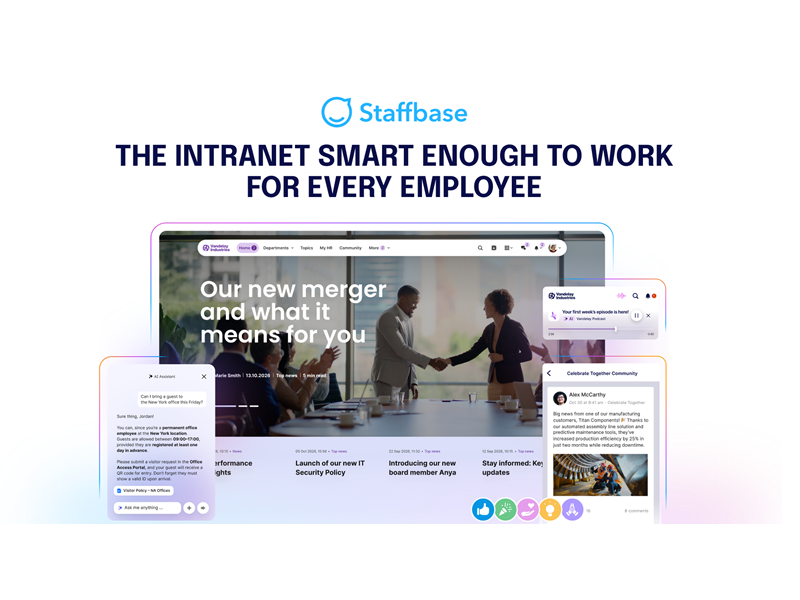
This is where Staffbase performs best. It allows organisations to create, manage, and distribute company-wide messages, campaigns, and updates with a high level of control.
You can segment audiences, personalise content, and track how messages are performing. For companies searching "how to manage internal communications at scale" or "employee communication platform with analytics", this is exactly the type of functionality they're looking for.
It also supports mobile delivery well, which is critical for reaching employees who aren't desk-based.
Content and employee experience
Staffbase includes intranet-style pages where organisations can publish updates, news, and resources. It works well for structured communication, especially when content is driven by leadership or internal comms teams.
However, it's not designed to be a full operational workspace. If you're searching for "all-in-one workplace platform for collaboration and knowledge sharing", this is where Staffbase starts to fall short.
It's more about broadcasting information than enabling teams to work together.
Integrations and usability
Staffbase integrates with tools like Microsoft 365 and other enterprise systems, allowing it to sit alongside your existing tech stack.
The platform itself is relatively easy to use, especially for communications teams managing campaigns and content.
But for broader organisational use — like workflows, document management, or collaboration — it doesn't offer the same depth as more complete platforms.
What users say about Staffbase

“Staffbase makes it easy to reach employees at scale. We can send targeted communications and actually measure engagement.”

“It’s great for messaging, but we still rely on other tools for collaboration and day-to-day work.”
Key Features
- Employee messaging and announcements
- Campaign management tools
- Audience targeting and segmentation
- Communication analytics and reporting
- Mobile app for frontline employees
Considering Staffbase for Internal Communications?
Staffbase is a communication-focused platform built for large organizations that need to deliver structured, top-down messaging across distributed teams. It is widely used by internal communications departments to manage campaigns, announcements, and employee messaging at scale.
As a corporate communications platform for enterprise teams, Staffbase helps organizations plan, target, and measure internal messaging across different audiences. It is particularly useful for companies looking to improve message delivery, visibility, and engagement across large or frontline workforces.
- Centralized employee messaging and company announcements
- Campaign planning and internal communication tools
- Audience targeting and content personalization
- Analytics and reporting for communication performance
- Mobile app for reaching frontline and remote employees
While Staffbase excels at communication, organizations often require additional platforms for collaboration, document management, and operational workflows.
View Staffbase Reviews on G2
See real user feedback and ratings
How to Choose the Right Intranet Software
Choosing the right intranet isn't really about features — it's about fixing what's already slowing your business down.
Most enterprise buyers don't wake up thinking "we need intranet software."
They get there because something breaks.
A global company like PwC, for example, isn't evaluating platforms for fun.
They're dealing with thousands of employees, multiple regions, and information scattered across systems. When that happens, communication becomes inconsistent, knowledge gets lost, and productivity drops fast.
In fact, research from McKinsey shows employees spend up to 28% of their workweek searching for information across disconnected tools. That's not just inefficiency — that's a serious operational cost.
So when you're choosing an intranet, here's how to think about it properly.
Step 1: Start With the Real Problem You're Trying to Solve
This is where most companies get it wrong.
They jump straight into demos without being clear on what they actually need. But not all intranets solve the same problem.
Some are built for communication — company updates, announcements, leadership messaging.
Others focus on collaboration — helping teams work together across departments.
And some are designed as knowledge hubs — where employees can quickly find documents, policies, and resources.
Take Unilever as an example. With teams operating globally, their challenge isn't just communication — it's making sure employees can access consistent information regardless of location.
If you don't define your core use case early, you'll end up with a platform that does a bit of everything… but nothing well.
Step 2: If People Don't Use It, It's Already Failed
This is the harsh reality.
You can buy the most powerful platform on the market — but if employees don't use it daily, it becomes shelfware.
This is exactly what happens in many enterprises using legacy systems. Platforms get rolled out, but adoption never takes off. Employees fall back to email, WhatsApp, or whatever's easiest.
A company like HSBC doesn't have the luxury of low adoption. When communication fails at that scale, it creates real business risk.
The best intranet software isn't the one with the most features — it's the one your employees actually log into without being forced.
Step 3: Make Sure It Connects to Your Existing Stack
Here's another common mistake — adding another tool without fixing the existing mess.
Most enterprises already have:
- Microsoft 365
- Google Workspace
- CRM systems
- HR platforms
If your intranet doesn't integrate properly, you're just adding another layer of complexity.
That's why buyers are increasingly searching for things like "intranet that integrates with Microsoft Teams" or "central platform for business tools."
Look at companies like Siemens — they operate across multiple systems and regions. Without proper integration, their internal workflows would fall apart.
Your intranet should connect everything — not compete with it.
Step 4: Think About Scale From Day One
What works for 500 employees won't work for 10,000.
And what works for 10,000 won't necessarily work for 50,000.
This is where many platforms start to break — performance drops, navigation becomes messy, and managing content across departments becomes a nightmare.
A company like Amazon operates at massive scale. Their internal systems need to handle constant updates, high traffic, and global usage without slowing down.
If your intranet can't scale with your organisation, you're not solving a long-term problem — you're delaying it.
Step 5: Look Beyond the Price Tag
This is where procurement teams need to think carefully.
The cost of intranet software isn't just the subscription.
You also need to factor in:
- Implementation time
- Training and onboarding
- Ongoing maintenance
- Internal resources required to manage it
A cheaper platform that requires months of setup and constant admin support can easily become more expensive than a higher-priced solution that just works out of the box.
This is why many enterprise buyers shift their thinking from "what does it cost?" to "what does it actually save us?"
The Bottom Line
Choosing the right intranet software isn't about ticking feature boxes.
It's about solving real problems:
- Reducing time wasted searching for information
- Improving communication across teams
- Giving employees a system they actually use
- And creating a platform that scales with your business
Get that right, and your intranet becomes a core part of how your organisation runs.
Get it wrong, and it becomes just another tool your teams ignore.
Common Mistakes Enterprise Buyers Make
Here's the part most vendors won't tell you — intranet projects don't usually fail because of the software.
They fail because of the decisions made before the software is even chosen.
And at enterprise level, those mistakes are expensive.
One of the biggest traps is choosing based on brand alone. It happens all the time.
A company is already using Microsoft, so they default to SharePoint without properly evaluating alternatives. On paper, it makes sense. In reality, it often leads to low adoption and a system that employees struggle to use. Just because a platform is familiar doesn't mean it's the right fit for how your teams actually work.
Another common mistake is ignoring the employee experience entirely.
Leadership focuses on features, integrations, and security — all important — but forgets the one thing that determines success: whether employees will actually use it. If the interface is clunky or the system feels like extra work, people will avoid it. And once that happens, your intranet becomes irrelevant almost overnight.
Then there's overcomplicating the implementation. Enterprise teams love to customise everything — workflows, dashboards, permissions, layouts.
But the more complex the setup, the harder it becomes to manage, maintain, and roll out. What starts as a powerful solution quickly turns into something that requires constant admin support just to keep running.
And finally, one of the most overlooked issues: no real plan for adoption and onboarding.
Companies invest heavily in the platform itself, but very little in getting people to use it. No training, no internal promotion, no clear use cases. So employees stick to what they already know — email, chat apps, shared drives — and the intranet never becomes the central hub it was supposed to be.
The reality is simple.
It's not the platform that makes or breaks your intranet — it's how well it fits your people, your processes, and how quickly your teams actually adopt it.
Why Modern Enterprises Are Moving Beyond Traditional Intranets
There's a clear shift happening right now — and it's not subtle.
Large organisations are moving away from traditional intranets because they simply don't match how businesses operate anymore.
What worked 10 years ago doesn't hold up in a world of hybrid work, global teams, and real-time decision-making.
Here's what's driving that change.
Traditional Intranets Were Built for a Different Era
Most legacy intranets were designed as static information portals.
Upload documents. Share announcements. That's it.
But today's enterprise doesn't work like that.
Employees aren't sitting in one office, working 9–5, checking a homepage once a day. They're distributed, mobile, and constantly switching between tools.
That's why traditional intranets feel outdated — they were never built to support how modern teams actually operate.
Shift Toward Digital Workplace Platforms
Instead of standalone systems, enterprises are now looking for connected environments.
The focus has moved from "having an intranet" to building a digital workplace — a platform where communication, collaboration, and knowledge all live together.
Companies like Deloitte and Accenture are investing heavily in integrated platforms because disconnected tools slow everything down.
It's no longer about storing information — it's about making it usable.
The Need for Real-Time Collaboration
Speed matters more than ever.
Decisions can't wait for email threads or outdated documents. Teams need to collaborate in real time, across locations and time zones.
A company like Tesla can't afford delays caused by poor communication. When teams aren't aligned instantly, it impacts execution.
Modern platforms are built around real-time interaction — not static updates.
Demand for Analytics and Visibility
This is a big one — and often overlooked.
Traditional intranets don't tell you what's actually happening.
You don't know:
- What content is being used
- What teams are engaging
- Where communication is breaking down
Modern enterprises want visibility.
They want dashboards, insights, and data that show how the organisation is operating internally.
That's why searches like "employee engagement analytics tools" and "intranet usage tracking software" are growing — because leadership wants measurable outcomes, not guesswork.
Focus on Employee Engagement and Retention
Here's the reality — engagement is no longer a "nice to have."
When employees feel disconnected, productivity drops.
When communication is poor, turnover increases.
Companies like Salesforce have shown that investing in employee experience directly impacts performance and retention.
Modern intranet platforms are evolving into engagement tools — with social feeds, recognition systems, and communication features designed to keep employees connected.
Traditional intranets were built to store information.
Modern enterprises need platforms that help people work better.
That's why the shift is happening.
It's not about replacing an intranet —
it's about upgrading how the entire organisation operates.
🚀 Stop Managing Disconnected Tools, Try AgilityPortal Free For 14 Days
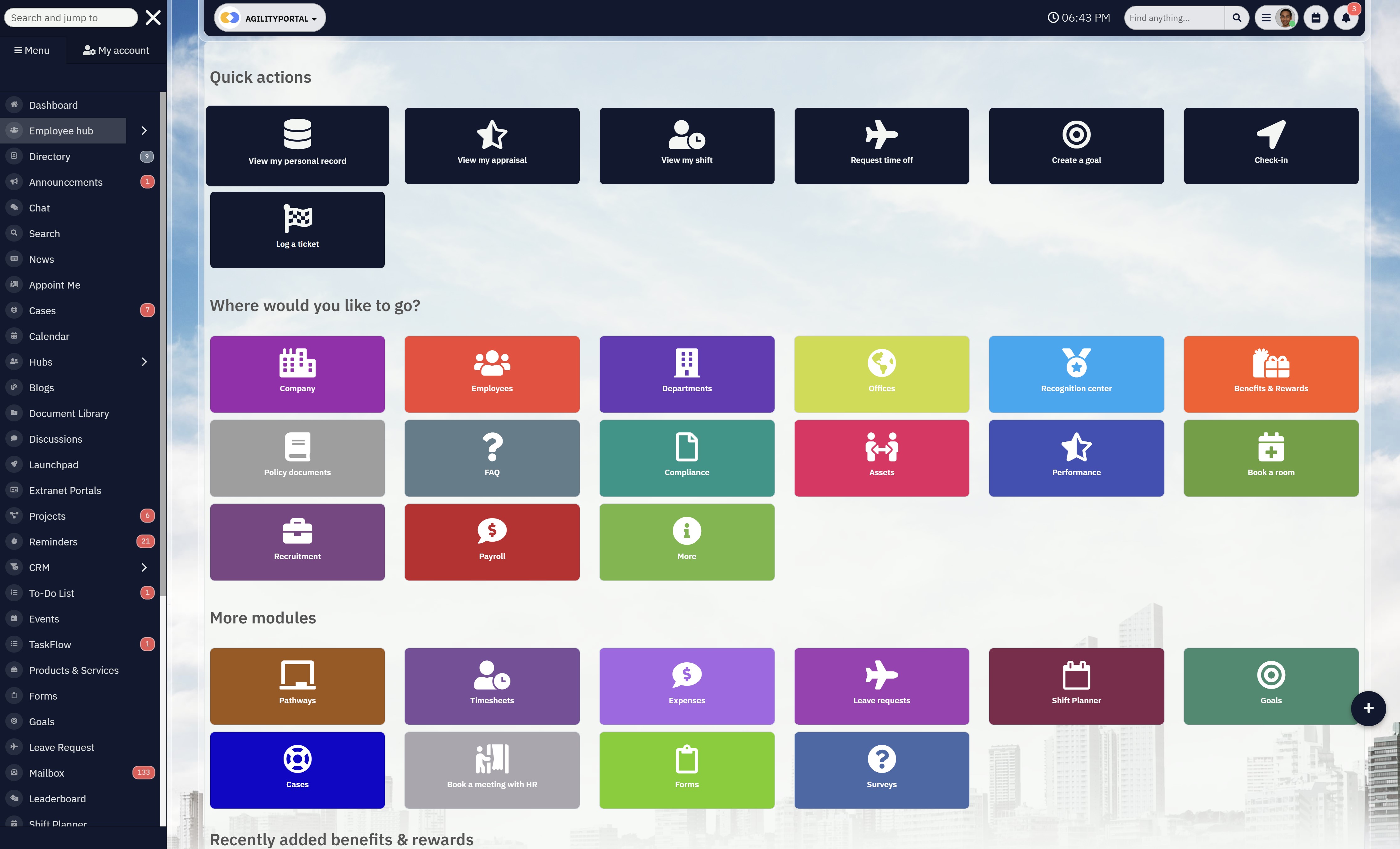
🚀 Stop Managing Disconnected Tools, Try AgilityPortal Free For 14 Days
If you're searching for the best intranet software, chances are you're already dealing with the same problem most large enterprises face — too many tools, not enough clarity.
Teams are jumping between emails, shared drives, chat apps, and outdated systems just to get basic work done. Information gets lost, communication breaks down, and productivity takes a hit.
AgilityPortal changes that.
It brings your communication, collaboration, and knowledge into one connected platform designed specifically for large organisations that need structure without complexity.
Instead of managing multiple systems, you get a single intranet hub where everything just works together.
With AgilityPortal, you can:
Improve employee engagement by keeping everyone connected in one place
Reduce time wasted searching for information across disconnected tools
Scale seamlessly across departments, locations, and global teams without adding complexity
FAQs
What is the best intranet software for large enterprises?
The best intranet software for large enterprises depends on your goals, but most organisations are now looking beyond basic tools toward a full digital workplace platform.
Solutions like AgilityPortal, SharePoint, and Staffbase are commonly used, but the real focus should be on finding a platform that combines communication, collaboration, and knowledge into one system rather than relying on disconnected tools.
How much does enterprise intranet software cost?
The cost of enterprise intranet software varies depending on scale, features, and deployment. Some providers offer per-user pricing, while others provide custom enterprise packages.
When evaluating intranet solutions for large companies, it's important to look beyond the subscription cost and consider implementation, onboarding, and long-term maintenance.
What features should enterprise intranet software include?
Modern enterprise collaboration software should go far beyond document storage.
The best platforms include internal communication tools, document management, integrations with existing systems, analytics dashboards, and role-based access controls.
Many organisations now prioritise an employee communication platform enterprise-wide to ensure teams stay connected across locations and departments.
Why do intranet projects fail?
Most intranet projects fail because they focus too much on technology and not enough on people.
Poor adoption, lack of clear use cases, and disconnected systems are the biggest issues.
When comparing intranet platforms comparison options, businesses often overlook usability, which leads employees to fall back on email and chat tools instead of using the intranet.
What is the difference between corporate intranet tools and a digital workplace platform?
Traditional corporate intranet tools are mainly used for storing information and sharing updates.
A digital workplace platform, on the other hand, connects communication, collaboration, and workflows into one unified system.
This shift is why many organisations are replacing legacy systems with modern internal communication software for large organisations that supports real-time work and engagement.
AI Summary
- The best intranet software for large enterprises helps organizations centralize communication, documents, and collaboration into a single connected platform instead of relying on disconnected tools.
- Modern intranet platforms act as a digital workplace, giving employees one place to access company information, updates, and resources across departments and locations.
- Large organizations often face challenges such as poor adoption, fragmented systems, and difficulty finding information, which leads to lost productivity and inefficiencies.
- Enterprise intranet solutions improve visibility and alignment by providing role-based dashboards, advanced search capabilities, and structured knowledge management.
- Key features to evaluate include scalability, integrations with existing business systems, mobile access for frontline workers, analytics, and ease of use to ensure high adoption.
- When choosing intranet software for large enterprises, businesses should prioritize platforms that simplify workflows, improve employee experience, and scale as the organization grows.
Most Popular Posts

Effective communication among team members is vital for the productivity and success of any organization. Surprisingly, 60% of companies lack a long-term internal communication strategy, which p...


Businesses thrive on communication for efficiency, productivity and accomplishment. When the right information is passed from the right designation in the organization, it promotes positivity an...

Categories
Blog
(3162)
Business Management
(392)
Employee Engagement
(233)
Digital Transformation
(211)
Growth
(149)
Intranets
(139)
Internal communications
(106)
Remote Work
(68)
Sales
(53)
Collaboration
(52)
Customer Experience
(32)
Culture
(30)
Knowledge Management
(29)
Project management
(29)
Leadership
(20)
Comparisons
(9)
News
(1)

Related Posts

Frontline communication used to mean putting an update on a noticeboard and hoping people saw it. But that just doesn't work anymore. If you manage retail staff, care teams, warehouse workers, hospitality employees or people working out in the field,...

Remote work gives businesses access to wider talent and more flexibility, including people working in remote administrative jobs. However, it can also create a familiar problem: employees spend too much time chasing updates, sitting through mee...

How many meetings have started late because someone could not find the link, could not connect to the meeting-room system, or simply could not hear the people sitting around the table? It happens more often than most businesses would like to ad...

If you'd asked me a few years ago what AI could actually do, I'd probably have said, "Answer questions and write a few paragraphs." That was impressive at the time, but it didn't take long before everything changed. Then AI stopped being just a...

Work chat apps have become the everyday communication layer for modern organisations. Teams use them to ask quick questions, share files, coordinate shifts, solve customer issues and keep projects moving without filling everyone's inbox. ...


Jill Romford
I am a digital nomad, lover of exploring new places and making friends.
I love to travel and I love the internet. I take pictures of my travels and share them on the internet using Instagram.
Traveler, entrepreneur, and community builder. I share my insights on digital marketing and social media while inspiring you to live your fullest life.
Ready to learn more? 👍
One platform to optimize, manage and track all of your teams. Your new digital workplace is a click away. 🚀
Free for 14 days, no credit card required.