
Insight Blog
Agility’s perspectives on transforming the employee's experience throughout remote transformation using connected enterprise tools.
39 minutes reading time
(7705 words)
Featured
AgilityPortal vs SharePoint: Why SharePoint Is Failing Modern Teams (And What to Use Instead)

Looking for a SharePoint alternative? Compare AgilityPortal vs SharePoint, explore key differences, pricing, features, and why modern teams are switching.
Looking for a SharePoint alternative? Compare AgilityPortal vs SharePoint, explore key differences, pricing, features, and why modern teams are switching.
Looking for a SharePoint alternative? Compare AgilityPortal vs SharePoint, explore key differences, pricing, features, and why modern teams are switching.

If you're searching for a SharePoint alternative, let's be honest — something's already not working.
Maybe adoption is low.
Maybe your team avoids it.
Or maybe everything just feels… harder than it should be.
You're not alone.
In fact, research shows employees spend up to 20–30% of their workweek searching for information across disconnected systems.
That's not a small issue — that's a productivity killer.
And when your intranet is part of that problem instead of the solution, it starts costing you time, money, and engagement.
30%
of the workweek
Research shows employees spend 20–30% of their workweek searching for information across disconnected systems. That’s a major productivity drain — and when your intranet contributes to the problem, it impacts time, cost, and employee engagement.
Source: McKinsey Global Institute
Here's the reality most companies don't admit upfront: SharePoint was never built for how modern teams work today.
It's great at storing documents.
But it struggles with communication.
It doesn't drive engagement.
And it often ends up being just one piece of a much bigger, fragmented puzzle.
That's why more organisations are now actively looking for sharepoint alternatives, tools similar to SharePoint, and better digital workplace platforms that actually bring everything together.
In this guide, we're going to break it down properly.
No fluff. No generic comparisons.
Just a clear look at AgilityPortal vs SharePoint, where SharePoint falls short, and what a modern intranet should really deliver if you want your teams to actually use it.
What Is SharePoint (And Why Companies Still Use It)
Before we get into comparisons, it's worth understanding what SharePoint actually is — because on paper, it sounds like exactly what most companies need.
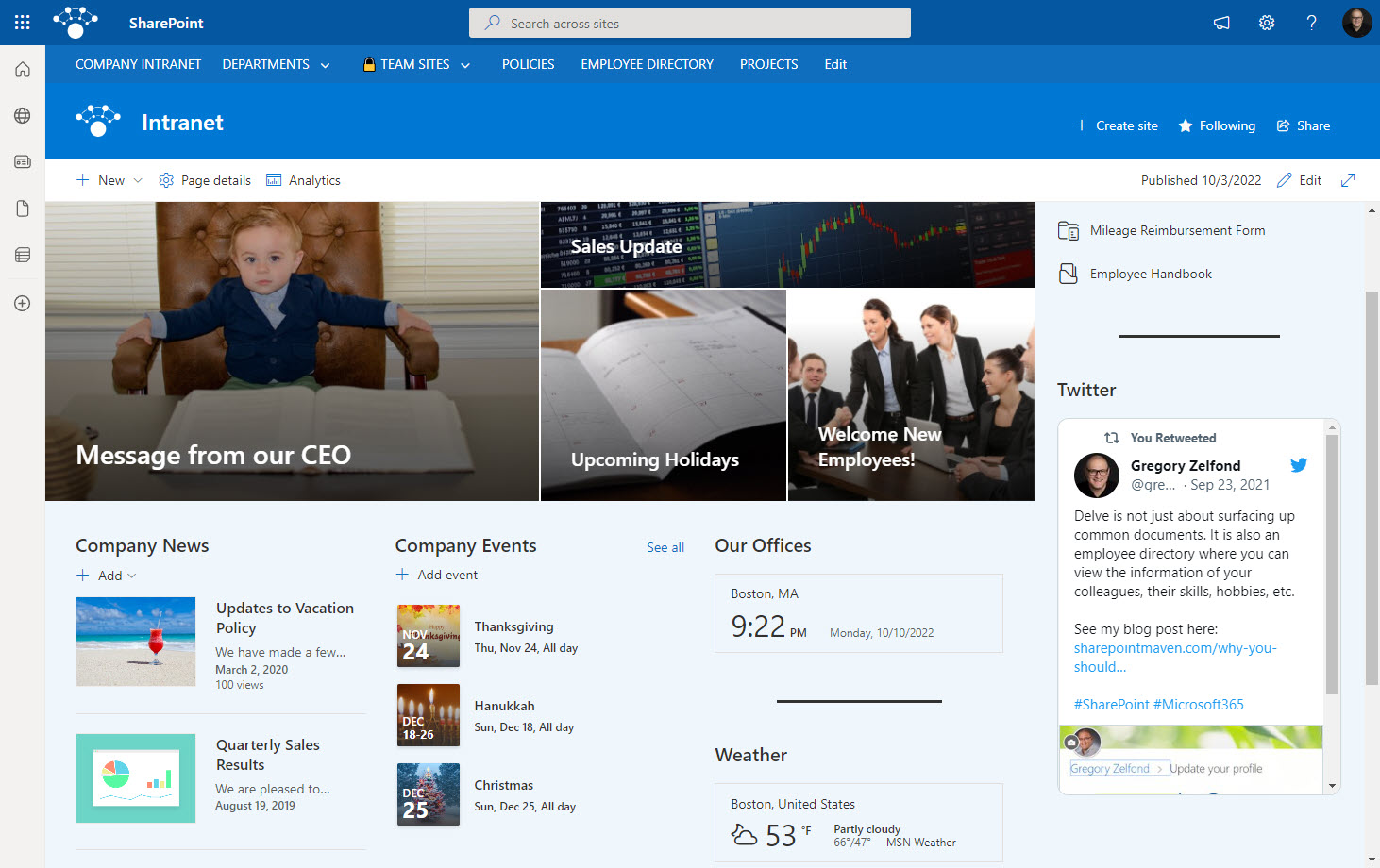
At its core, SharePoint is a web-based platform from Microsoft designed for document management, internal sites, and basic collaboration.
It allows teams to store files, create intranet pages, and share information across the organisation.
For a long time, it became the default choice for enterprises — especially those already using Microsoft tools.
Why Enterprises Adopted SharePoint
If you look back, SharePoint made a lot of sense.
Large organisations needed a way to:
- Store documents centrally
- Replace shared drives
- Control access and permissions
- Build internal portals
And SharePoint delivered on that.
It was structured, secure, and backed by Microsoft — which, for enterprise buyers, is a big deal. IT teams liked it because it gave them control, and leadership liked it because it ticked the "intranet" box.
For years, it became the go-to solution for companies trying to organise internal content.
The Microsoft Ecosystem Advantage
One of the biggest reasons SharePoint is still widely used today comes down to one thing — it's part of Microsoft 365.
That means it connects directly with tools companies are already using, like:
- Microsoft Teams
- Outlook
- OneDrive
- Word, Excel, and PowerPoint
From a procurement point of view, it's easy:
"We already pay for Microsoft, so let's use SharePoint."
And that logic still holds for a lot of organisations.
But here's the thing…
Just because it's widely used doesn't mean it's the best fit for how modern teams actually work today.
And that's where things start to break down — which we'll get into next.
Key Takeaways
- Many organizations searching for sharepoint alternatives are driven by low adoption, fragmented tools, and poor employee engagement.
- SharePoint works well for document storage, but struggles to deliver a connected digital workplace experience for modern teams.
- Modern sharepoint intranet alternatives combine communication, collaboration, and engagement into one unified platform.
- Hidden costs, complexity, and IT dependency often make SharePoint more expensive over time than expected.
- The best tools similar to SharePoint focus on usability, mobile access, and real employee interaction to drive adoption.
The Real Problem with SharePoint (Why Teams Are Moving Away)
On the surface, SharePoint looks like it should solve everything.
It's already included in Microsoft 365.
It handles documents.
It lets you build internal pages.
So why are so many companies actively searching for a SharePoint alternative?
Because once it's rolled out across a real organisation, the cracks start to show — and they show fast.
Low Employee Adoption (The Biggest Issue)
This is the one nobody talks about enough.
SharePoint might be "live"… but that doesn't mean people are actually using it.
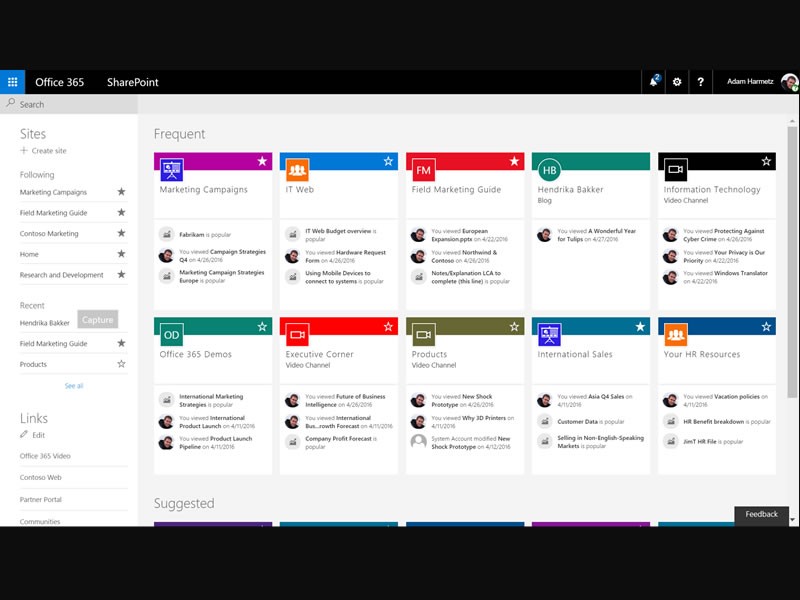
Most employees don't see it as a place to go daily. It feels more like a document repository than a real digital workplace platform. There's no natural engagement, no real interaction — just static pages and files.
And if you've got frontline or deskless workers?
It gets even worse.
- Poor mobile experience
- Hard to access on the go
- No real reason for employees to log in
So what happens?
People go back to email, WhatsApp, or Teams — and your "intranet" becomes irrelevant.
Verified Review (G2)
Real user feedback on Microsoft SharePoint
“Difficult to navigate, bad layout, expensive to administer.”
What works: Integration within the Microsoft ecosystem and basic list functionality for simple data tracking.
What doesn’t:
- Navigation is unintuitive and difficult to use
- Layout feels like a “spiderweb” of pages rather than a clear structure
- Permissions are confusing and can lead to accidental data exposure
- Requires highly skilled admins, making it expensive to maintain
- Slow performance and limited visibility when browsing files
- Lacks clarity on whether it’s a file system, intranet, or collaboration tool
Internal Communication Falls Apart
This is where things really break.
A lot of companies expect SharePoint to power internal comms — announcements, updates, company news.
But in reality, it struggles.
It's not built for:
- Real-time communication
- Engagement (comments, reactions, conversations)
- Targeted messaging
Internal comms teams often end up fighting the platform instead of using it.
And here's the kicker — something that looks "cheap" upfront becomes expensive when it doesn't actually deliver results.
Search Is a Nightmare (And Kills Productivity)
Let's be honest — finding anything in SharePoint can feel painful.
It was built as a content management system, not a smart knowledge engine.
So when your organisation starts storing hundreds (or thousands) of documents, things get messy.
Employees end up:
- Digging through folders
- Opening multiple files
- Guessing where information might be
It's slow, frustrating, and inefficient.
And this isn't just a SharePoint problem — but it gets amplified here:
Employees spend 20–30% of their workweek searching for information.
That's a massive productivity drain.
Verified Review Theme (G2)
Search Is a Nightmare (And Kills Productivity)
“Sometimes the files may be difficult to locate if you have several directories.”
Search is one of the most common friction points teams run into with SharePoint. When sites, folders, and document structures become too complex, employees waste time hunting for files instead of getting work done.
What this means in practice:
- Documents become harder to locate as directories and sites grow
- Users spend more time searching instead of completing tasks
- Complex structure creates confusion around where information actually lives
- Poor findability directly impacts productivity and day-to-day adoption
Too Complex to Manage (IT Becomes the Bottleneck)
SharePoint isn't something you just "set and forget."
To make it work properly, you often need:
- Developers
- Ongoing customisation
- Constant maintenance
Even small changes can require technical input.
So instead of empowering teams, it creates dependency on IT — which slows everything down.
The Hidden Costs Add Up Fast
This is where most companies get caught out.
At first glance, sharepoint online feels like a cost-effective choice because it's part of Microsoft 365.
But the reality looks more like this:
- Custom development to make it usable
- Time spent configuring and maintaining it
- Training employees who struggle to adopt it
- Fixing issues when things break
All of that adds up.
And suddenly, what looked like a "cheap" solution becomes a long-term investment with questionable return.
Fragmented Experience (Too Many Tools, Not One Platform)
This is the big one.
Microsoft sharepoint doesn't exist on its own — it sits inside a stack:
- SharePoint for documents
- Teams for chat
- Outlook for communication
- OneDrive for storage
Instead of one clean experience, employees are jumping between tools all day.
That fragmentation leads to:
- Confusion
- Missed information
- Lower productivity
SharePoint isn't failing because it's broken.
It's failing because it was built for a different era — one focused on document storage, not employee experience.
Modern teams need:
- Engagement
- Simplicity
- Real communication
- One connected platform
And that's exactly where SharePoint starts to fall short — and why companies are actively looking for something better.
Related Guides You May Want to Read Next
If you're exploring SharePoint alternatives, intranet platforms, and migration strategies, these guides will help you understand how to improve internal communication, governance, and employee experience.
- Best SharePoint Alternatives for Modern Teams
- What Are the Best Alternatives to Microsoft SharePoint?
- Why Consider AgilityPortal Instead of SharePoint
- Confluence vs SharePoint: Which Is Better?
- SharePoint Intranet in a Box: Complete Guide
- SharePoint Governance Plan Framework Explained
- SharePoint Migration Plan Template & Checklist
- Best SharePoint Migration Tools
- How to Audit SharePoint Effectively
- SharePoint Analytics: What You Need to Know
- Intranet Pricing: What to Expect
What Modern Teams Actually Need Today

What Modern Teams Actually Need Today
This is where the shift is happening — and why searches for sharepoint alternatives, sharepoint intranet alternatives, and even tools similar to SharePoint are growing fast.
Because the way people work today is completely different from when SharePoint was first designed.
Teams are remote.
Work is fast.
Employees expect tools to just… work.
And most importantly — they expect everything in one place.
One Platform (Not 5 Different Tools)
Modern teams don't want to jump between:
- SharePoint for documents
- Teams for chat
- Outlook for updates
- Another tool for engagement
That's not efficient — it's exhausting.
This is why companies are actively looking for sharepoint competitors that bring everything together into a single platform.
The expectation now is simple:
One login. One experience. Everything connected.
Mobile-First (Because Not Everyone Sits at a Desk)
Here's something SharePoint never really solved well — mobile.
And that's a problem.
Because a huge part of today's workforce:
- Isn't at a desk
- Doesn't sit in front of a laptop all day
- Needs access on the go
Modern sharepoint alternatives are built with mobile in mind from day one — not as an afterthought.
That means:
- Easy access to updates
- Quick communication
- Simple navigation
- No friction
If your platform doesn't work on mobile, it doesn't work. Simple as that.
Real Engagement (Not Just Static Pages)
Paint the after-picture:
- Faster communication
- Higher engagement
- Less wasted time
- Better alignment
This is where motivation peaks.
Built-In Communication (Not Bolted-On)
Communication shouldn't live in a separate tool.
It should be part of the experience.
Modern platforms combine:
- Announcements
- Chat
- Updates
- Notifications
All in one place.
That's why companies searching for sharepoint intranet alternatives are prioritising communication-first platforms — not document-first systems.
Open & Flexible Integrations (Not Locked Ecosystems)
This is becoming a big deal — especially for enterprise buyers.
Companies don't want to be locked into one ecosystem anymore.
They want flexibility:
- Microsoft 365 (yes)
- Workday
- Custom internal systems
- APIs
Even searches like AWS SharePoint alternative are starting to grow — because organisations want cloud-agnostic, flexible solutions.
Modern teams don't need a document system.
They need a connected digital workplace.
That's why more businesses are moving toward:
- SharePoint alternatives
- More flexible sharepoint competitors
- Platforms that are actually designed for how people work today
Because the goal isn't just to store information anymore.
It's to make sure people actually use it.
AgilityPortal vs SharePoint (Side-by-Side Comparison)
This is where things become clear.
On paper, SharePoint looks capable. In reality, most companies end up stitching together multiple tools just to make it usable.
That's the gap modern sharepoint alternatives are solving — not by adding more features, but by simplifying the entire experience.
If you're comparing sharepoint competitors or looking for tools similar to SharePoint, the real question isn't "what has more features?" — it's:
👉 Which one actually solves your day-to-day problems without adding complexity?
Side-by-Side Comparison
| Feature | SharePoint | AgilityPortal |
| Ease of use | Complex, requires training | Simple, intuitive UI |
| Employee engagement | Limited (static pages) | Built-in feeds, reactions, surveys |
| Mobile experience | Weak, not designed for frontline | Fully mobile-first platform |
| Integrations | Microsoft ecosystem focused | Open APIs, MS 365, Workday, custom systems |
| Setup time | Long, often months | Fast deployment (weeks) |
| User adoption | Low without heavy push | High due to usability |
| Internal communication | Disconnected (Teams + Outlook) | Centralised communication hub |
| Search & knowledge access | Basic, often frustratingBasic, often frustrating | Unified, structured, easier discovery |
| Customisation | Requires dev resources | Configurable without heavy dev work |
| Total cost | Hidden costs (dev, maintenance) | Predictable, scalable pricing |
Where SharePoint Falls Short (And How AgilityPortal Solves It)
Let's break this down properly — because this is what actually matters when you're choosing a platform.
Where SharePoint Falls Short (And How AgilityPortal Solves It)
1. Complexity vs Simplicity
One of the biggest complaints with SharePoint is how much effort it takes just to get it working properly.
You don't just launch it — you configure it, customise it, integrate it… and then train people on how to use it.
That's why so many companies start searching for sharepoint intranet alternatives.
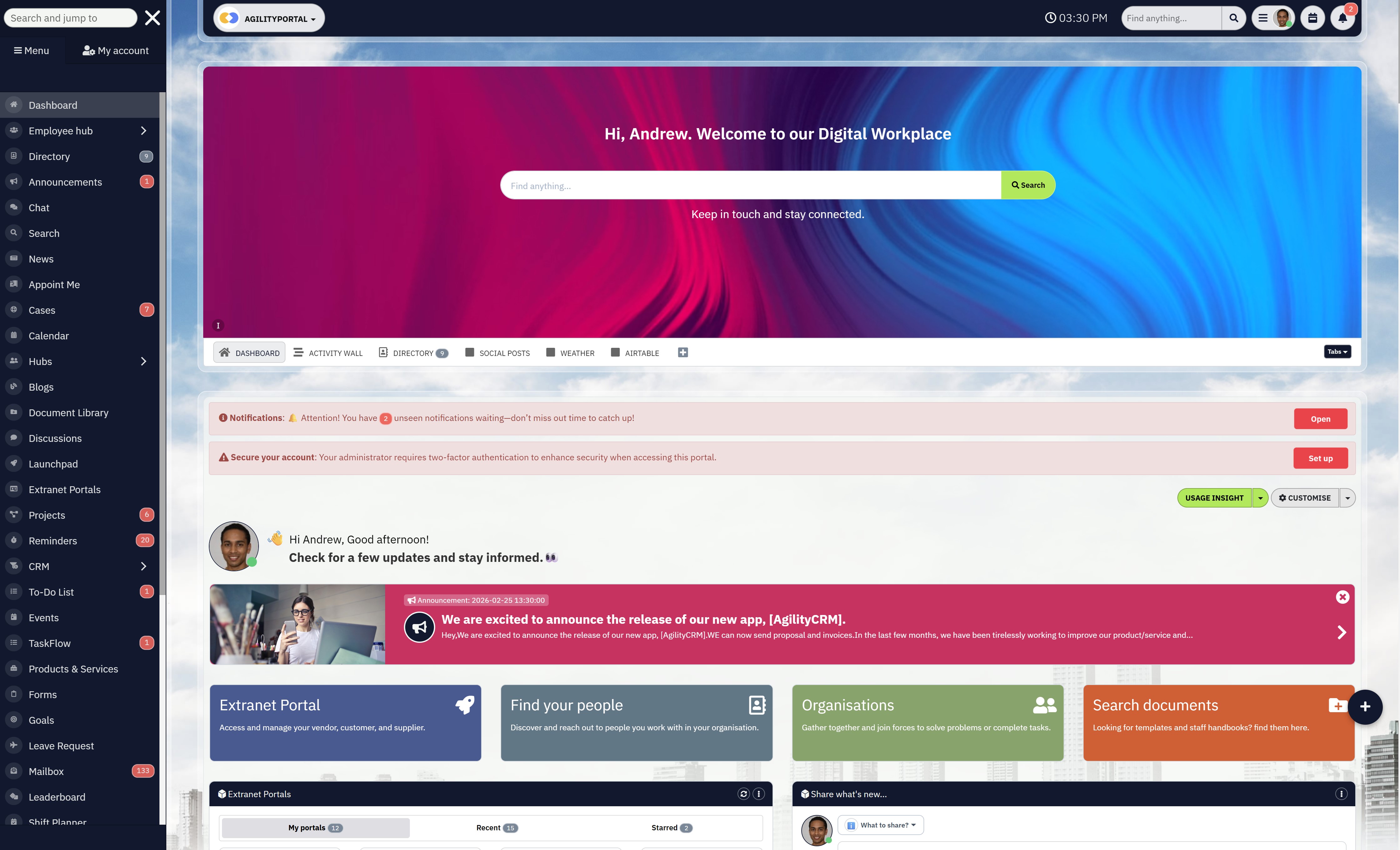
AgilityPortal flips this completely.
Instead of needing technical teams to build the experience, it's already structured:
- Ready-to-use workspaces
- Built-in communication tools
- Clear navigation
👉 Result: Less setup, faster adoption.
2. Engagement vs "Just Another Portal"
SharePoint is great at storing documents.
But it struggles with engagement.
There's no natural reason for employees to come back daily. No interaction. No real communication layer.
That's a huge gap.
AgilityPortal is designed differently:
- Activity feeds (like a social platform)
- Comments, reactions, discussions
- Pulse surveys and feedback tools
👉 Result: Employees actually use it — not ignore it.
Verified Review (G2)
Powerful Search When Structured Properly
“Once everything is organised correctly, SharePoint makes it easy to find and manage documents across teams.”
While some users struggle with complexity, others highlight that when SharePoint is set up properly, its search and document management capabilities can be highly effective.
What works well:
- Centralised document storage across teams and departments
- Search improves significantly with well-structured folders and metadata
- Strong integration with Microsoft 365 ecosystem
- Version control and collaboration features enhance document visibility
- Scales well for organisations managing large volumes of content
3. Mobile Experience (Critical for Modern Teams)
This is where SharePoint really falls behind.
It wasn't built for:
- Frontline workers
- Remote teams
- On-the-go access
And today, that's a problem.
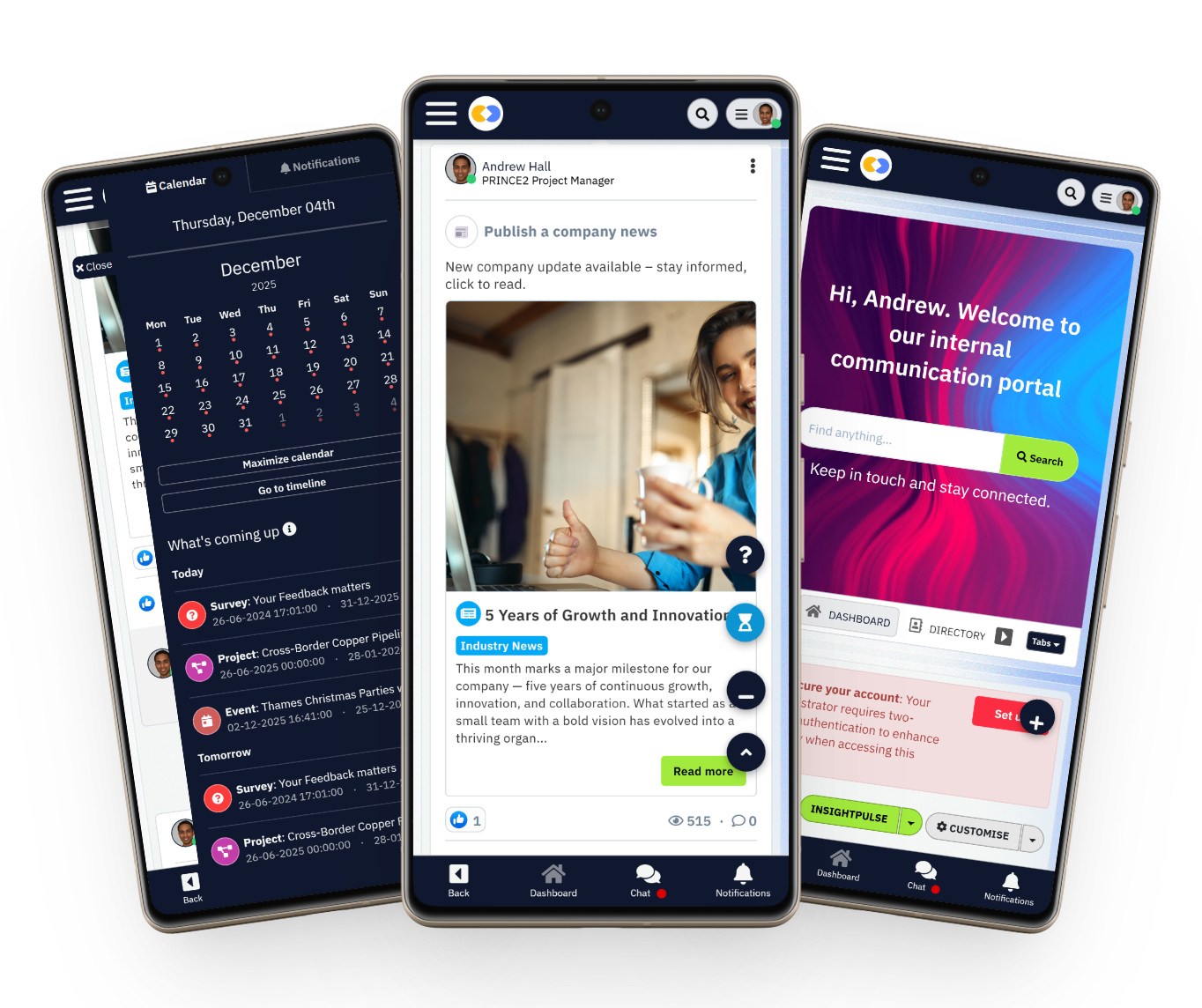
Modern sharepoint alternatives are mobile-first — not desktop-first.
With AgilityPortal:
- Full mobile access
- Notifications that actually reach users
- Easy navigation without training
👉 Result: Better reach across your entire workforce.
4. Fragmented vs Unified Experience
SharePoint doesn't work alone.
You end up relying on:
- Teams
- Outlook
- OneDrive
- Other tools
Which creates a fragmented experience.
Employees don't know where to go.
AgilityPortal brings everything together:
- Communication
- Documents
- Collaboration
- Engagement
👉 Result: One platform instead of five.
Verified Review (G2)
Strong Collaboration Across Microsoft Tools
“SharePoint works really well with the Microsoft ecosystem and makes collaboration across teams seamless.”
One of SharePoint’s biggest strengths is how tightly it integrates with Microsoft 365, making it easier for teams already using tools like Teams, Outlook, and OneDrive to collaborate.
What users value most:
- Seamless integration with Teams, Outlook, and OneDrive
- Easy document sharing and real-time collaboration
- Central hub for files, communication, and team resources
- Version history and co-authoring improve team workflows
- Familiar Microsoft environment reduces onboarding friction
5. Integration Flexibility (Enterprise Requirement)
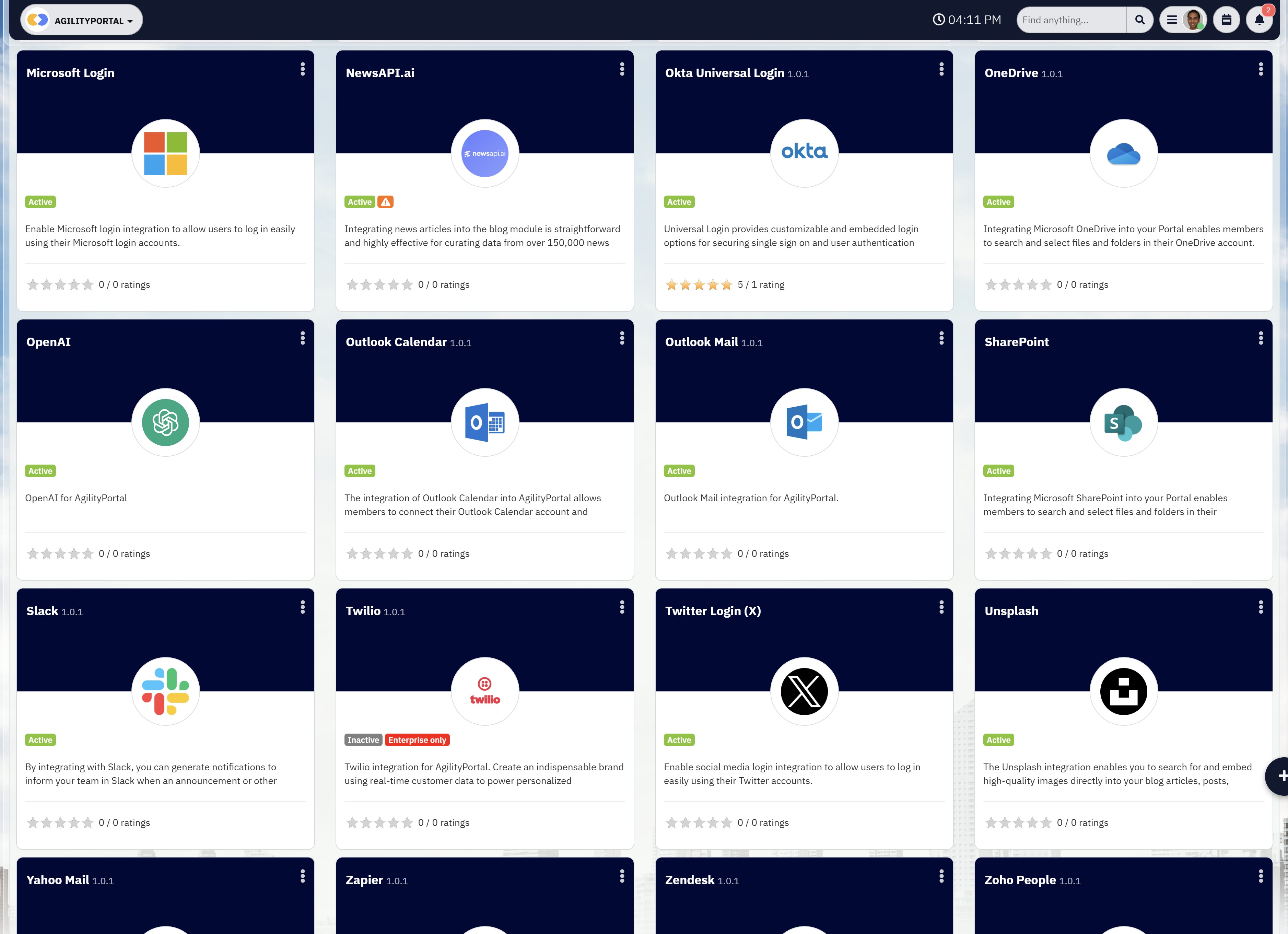
Integration Flexibility (Enterprise Requirement)
A big concern for enterprise buyers is integration.
SharePoint works well inside Microsoft — but outside of that, flexibility becomes limited.
That's why searches like aws sharepoint alternative and open-platform solutions are increasing.
AgilityPortal supports:
- Microsoft 365 (deep integration)
- Workday
- Custom APIs
- External systems
👉 Result: You're not locked into one ecosystem.
6. Cost vs Value (The Hidden Reality)
This is where most companies get caught out.
SharePoint looks affordable upfront.
But then:
- You need developers
- You need ongoing maintenance
- You need training
- You need additional tools
And suddenly the cost grows.
AgilityPortal is designed to reduce that:
- Faster rollout
- Less reliance on dev teams
- Everything in one platform
👉 Result: Lower total cost of ownership over time
If you strip it back, here's what you're comparing:
- SharePoint = document management system
- AgilityPortal = complete digital workplace platform
That's why more companies are actively searching for:
- Sharepoint alternatives
- Better sharepoint competitors
- Platforms truly similar to SharePoint — but built for today
Why AgilityPortal Is a Better SharePoint Alternative
By now, you've probably realised the issue isn't just SharePoint — it's what it doesn't solve.
This is exactly why companies start looking for sharepoint alternatives or comparing different sharepoint competitors.
They're not trying to replace a tool for the sake of it — they're trying to fix real problems that are slowing their teams down.
And this is where AgilityPortal comes in.
Everything in One Place (Not Scattered Across Tools)
With SharePoint, you don't just use SharePoint.
You end up using:
- Teams for communication
- Outlook for updates
- OneDrive for storage
- SharePoint for documents
It works… but it's fragmented.
AgilityPortal takes a different approach.
It brings everything together into one platform:
- Chat and messaging
- Document management
- Internal communication
- Employee engagement tools
So instead of switching between tools all day, your team has one place to go.
Built for People, Not Just IT
One of the biggest differences is how the platform is designed.
SharePoint is very IT-driven. It's structured, controlled, and often built around how systems work — not how people work.
That's why adoption becomes a problem.
AgilityPortal is designed around actual usage:
- Simple interface
- Clear navigation
- Minimal training required
People don't need to "learn" it — they just use it.
And that's a big deal when you're rolling something out to hundreds or thousands of employees.
Faster to Deploy (And Easier to Manage)
Let's be honest — SharePoint projects can drag on.
Between setup, configuration, and customisation, it can take months before anything meaningful is live.
And even then, it's still evolving.
AgilityPortal is built for speed.
Most organisations can:
- Launch faster
- Roll out in phases
- Avoid heavy development work
That means you start seeing value much sooner — instead of waiting for a long implementation cycle.
Designed for Frontline and Remote Teams
This is where most sharepoint intranet alternatives really stand out.
SharePoint struggles with:
- Frontline workers
- Deskless employees
- Mobile-first teams
AgilityPortal is built with these users in mind.
It offers:
- Strong mobile experience
- Easy access from anywhere
- Real-time updates and notifications
So you're not just connecting office staff — you're connecting your entire workforce.
Flexible Integrations (Without Lock-In)
Another reason companies explore tools similar to SharePoint is flexibility.
SharePoint works best inside the Microsoft ecosystem — but modern businesses don't operate in one system anymore.
AgilityPortal supports:
- Microsoft 365
- Workday
- Custom-built systems
- API integrations
So instead of replacing everything, it connects what you already have.
If SharePoint is a system you have to manage…
AgilityPortal is a platform your employees actually use.
That's the difference.
And it's why more organisations searching for sharepoint alternatives are moving toward platforms that prioritise usability, engagement, and simplicity — not just document storage.
Real Use Cases (Where SharePoint Falls Short)
This is where things stop being theoretical and start becoming real.
Because most companies don't switch platforms because of "features" — they switch because something isn't working in day-to-day operations.
Let's break down where SharePoint starts to struggle, using real-world scenarios you'll probably recognise.
Internal Communication (Messages Don't Reach People)
One of the biggest expectations from any intranet is simple:
👉 "Can we communicate effectively with our employees?"
With SharePoint, this often falls apart.
Announcements get buried.
Updates go unnoticed.
Employees don't log in unless they have to.
There's no natural engagement layer — no comments, no reactions, no real-time interaction. So communication becomes one-way… and eventually ignored.
As one Internal Communications Director put it:
"We were publishing updates, but no one was actually reading them. It felt like shouting into a void."
That's the problem.
Modern sharepoint alternatives solve this by making communication feel more like a social experience — something people actually want to engage with.
Employee Onboarding (Too Many Gaps, Not Enough Guidance)
Onboarding is another area where SharePoint struggles.
In theory, you can upload documents, guides, and resources.
But in reality?
- Information is scattered
- There's no structured journey
- New hires don't know where to start
It becomes overwhelming.
Instead of a smooth onboarding experience, employees are left figuring things out themselves.
A HR leader described it perfectly:
"We had everything documented, but new hires still felt lost. The system didn't guide them — it just stored information."
That's the difference between a content system and a real onboarding experience.
Company-Wide Updates (Low Visibility, Low Engagement)
When leadership wants to communicate at scale, visibility matters.
With SharePoint:
- Updates sit on pages
- Employees have to go looking for them
- There's no guarantee anyone sees them
And if your workforce is remote or frontline-based, it gets even worse.
A Communications Manager shared:
"We'd publish important company updates, then realise days later that half the workforce hadn't even seen them."
That's a serious risk — especially for large organisations.
Modern platforms fix this with:
- Notifications
- Mobile alerts
- Targeted communication
So updates actually reach the right people.
Knowledge Sharing (Everything Exists… But No One Can Find It)
This is one of the most frustrating issues.
Yes, SharePoint stores information well.
But finding that information?
That's where it breaks down.
Employees often:
- Search multiple times
- Open different versions of the same file
- Ask colleagues instead of using the system
It becomes faster to ask someone than to search the intranet — which defeats the whole point.
And this is backed by data:
Employees spend up to 28% of their workweek searching for information
Real-World Insight
Why companies start looking beyond SharePoint
“We had the knowledge — we just didn't have a way to surface it efficiently.”
One IT manager summed up the core issue perfectly. Across all these use cases, the pattern stays the same:
- SharePoint stores information
- But it doesn't drive usage
- And it doesn't create engagement
That is why more companies start searching for SharePoint intranet alternatives, better SharePoint competitors, and tools that feel similar to SharePoint but are actually built for real adoption and day-to-day use.
One IT manager summed it up like this:
"We had the knowledge — we just didn't have a way to surface it efficiently."
Across all these use cases, the pattern is the same:
- SharePoint stores information
- But it doesn't drive usage
- And it doesn't create engagement
That's why companies start looking at:
- Sharepoint intranet alternatives
- Better sharepoint competitors
- Tools that are actually similar to SharePoint — but built for real usage
Because at the end of the day, it's not about having a system.
It's about having a system people actually use.
Integration with Microsoft 365 (Important for Enterprise)
Let's be clear — most organisations aren't trying to replace Microsoft 365.
They're heavily invested in it.
So when companies search for sharepoint alternatives or compare different sharepoint competitors, the real question isn't:
👉 "Can this replace Microsoft?"
👉 It's: "Can this work alongside Microsoft without breaking everything?"
And that's exactly how AgilityPortal is designed.
Works Alongside Microsoft (Not Against It)
AgilityPortal doesn't try to rip out your existing setup.
It sits on top of it — acting as the experience layer that connects everything together.
So instead of forcing employees to jump between:
- SharePoint
- Teams
- Outlook
- OneDrive
You give them one place where everything is accessible.
As one IT leader put it:
"We didn't want to replace Microsoft — we just needed something that made it usable for employees."
That's the shift.
Not a Replacement — An Enhancement
This is where a lot of tools similar to SharePoint get it wrong — they position themselves as full replacements.
But in reality, most enterprises don't want that risk.
AgilityPortal enhances your existing Microsoft stack by:
- Improving communication
- Increasing visibility
- Driving engagement
- Simplifying access to information
So instead of rebuilding your ecosystem, you're improving how people interact with it.
Seamless Document & File Integration
You don't lose your documents — they stay where they are.
AgilityPortal connects directly with:
- SharePoint document libraries
- OneDrive
- Microsoft files (Word, Excel, PowerPoint)
Employees can:
- View documents
- Access files
- Collaborate
All without needing to jump into separate systems.
👉 Result: Less friction, faster workflows.
User Sync & Identity Management
For enterprise environments, identity management is critical.
AgilityPortal supports:
- Azure AD (Microsoft Entra ID)
- Single Sign-On (SSO)
- Automated user provisioning
That means:
- Employees log in once
- Permissions stay aligned
- No duplicate user management
As one enterprise architect explained:
"If it doesn't integrate with Azure AD, it's not even considered. That's table stakes."
Workflow & Notification Integration
This is where things get interesting.
Instead of relying purely on Microsoft tools, you can extend workflows across platforms.
For example:
- Send notifications into Microsoft Teams
- Trigger updates based on user activity
- Surface important alerts inside a central dashboard
So communication isn't scattered — it's connected.
The Real Value
At enterprise level, the goal isn't to replace systems.
It's to reduce complexity.
That's why more organisations searching for:
- Sharepoint intranet alternatives
- Flexible sharepoint competitors
- Even an aws sharepoint alternative
Are choosing platforms that integrate — not isolate.
Microsoft 365 is powerful.
But on its own, it's not a complete employee experience.
AgilityPortal fills that gap — turning a collection of tools into a connected digital workplace that actually works for your people.
Pricing Comparison (What to Expect)
At first glance, SharePoint looks like the cheaper option — mainly because it's bundled with Microsoft 365. But that's only part of the story.
Once companies start building a real intranet on top of it, costs begin to stack up.
SharePoint vs AgilityPortal (Pricing Reality)
| Cost Area | SharePoint | AgilityPortal |
| Initial Cost | Included in Microsoft 365 | Clear per-user / tiered pricing |
| Setup Effort | High (custom builds needed) | Low (ready-to-use platform) |
| IT Dependency | Heavy (ongoing support required) | Minimal (easy to manage) |
| Extra Tools Needed | Yes (comms, engagement, analytics) | No (all-in-one) |
| Extra Tools Needed | Yes (comms, engagement, analytics) | Low (intuitive UI) |
| Time to Launch | Months depending on he number of users | Weeks |
| Ongoing Costs | Increase over time | Predictable |
| Ongoing Costs | Often Low | Typically High |
| Total Cost OVer Time | High (Hidden layers) | Lower (faster ROI) |
SharePoint: Looks Cheap, Gets Expensive
What you don't see upfront:
- Custom builds to make it usable
- Ongoing IT support
- Extra tools for comms and engagement
- Time spent training employees
It's not one cost — it's layers.
"We thought we already had the solution. Turns out, we had to build one."
AgilityPortal: Clear and Straightforward
AgilityPortal is built as an all-in-one platform, so you're not adding tools later.
You get:
- Communication + intranet + engagement in one
- Faster setup
- Less reliance on IT
👉 No patchwork setup. No surprises.
What This Means
Most companies don't switch because of price.
They switch because:
- The system isn't being used
- It's too complex
- It takes too long to manage
That's why searches for sharepoint alternatives, sharepoint competitors, and tools similar to SharePoint keep growing.
Cheap upfront doesn't mean cheap long-term.
What matters is:
👉 Does it actually work for your team?
Who Should Switch from SharePoint?
Not every company needs to move away from SharePoint.
But if you're starting to feel friction — slow adoption, scattered tools, poor engagement — then it's probably time to look at tools similar to SharePoint that are actually built for how teams work today.
Let's break down who this really applies to.
Large Organisations Struggling with Adoption
If you've rolled out SharePoint across hundreds or thousands of employees and usage is low, that's a red flag.
Most large organisations don't fail because they lack tools — they fail because employees don't use them.
That's where products similar to SharePoint but focused on usability and engagement come in. Modern platforms are designed to drive daily usage, not just act as a document hub.
If your intranet feels invisible, it's time to rethink it.
Remote and Hybrid Teams
Remote work changes everything.
Teams need:
- Clear communication
- Easy access to updates
- One place to stay connected
SharePoint wasn't built for this kind of environment. It lacks the real-time engagement layer that remote teams rely on.
That's why companies are moving toward tools like SharePoint — but with built-in communication, activity feeds, and mobile-first access.
Frontline and Deskless Workforces
This is one of the biggest gaps.
If your workforce includes:
- Field staff
- Retail teams
- Healthcare workers
- Manufacturing employees
Then SharePoint is likely missing the mark.
It's not designed for quick, mobile-first interaction. And if employees can't easily access it, they simply won't use it.
Modern sharepoint alternatives are built specifically for these types of users — simple, fast, and accessible from anywhere.
Companies Dealing with Too Many Tools
If your current setup looks like this:
- SharePoint for documents
- Teams for chat
- Email for updates
- Another tool for engagement
You've got a fragmentation problem.
Employees don't know where to go, and information gets lost.
This is where switching to tools similar to SharePoint — but designed as an all-in-one platform — makes a huge difference.
Businesses That Need Better Internal Communication
If your internal comms feel like:
- Messages not being seen
- Low engagement
- No feedback from employees
Then the platform is part of the problem.
SharePoint wasn't built for communication-first experiences.
Modern products similar to SharePoint like AgilityPortal solve this by combining:
- Announcements
- Conversations
- Feedback loops
All in one place.
You don't switch because SharePoint is "bad."
You switch because your business has outgrown it.
If you need:
- Better engagement
- Simpler tools
- One connected platform
Then it's worth seriously looking at tools like SharePoint — but built for modern teams.
When SharePoint Still Makes Sense
Despite its limitations, SharePoint isn't completely out of place — and for some organisations, it still does the job just fine.
If your main goal is simple document storage and basic file management, SharePoint can work well, especially if you're already embedded in the Microsoft ecosystem.
It's reliable for managing files, controlling permissions, and keeping everything structured in one place.
It also makes sense for companies that are heavily dependent on Microsoft 365 and don't want to introduce additional platforms.
In these cases, sticking with SharePoint can feel like the easiest and lowest-risk option, particularly when there's already internal expertise to manage it.
For smaller teams or businesses with straightforward needs — where advanced communication, engagement, or mobile access isn't a priority — SharePoint can still be a practical solution.
The problems tend to show up when organisations try to push it beyond those basic use cases into something it wasn't really designed to handle.
Final Verdict: SharePoint vs AgilityPortal
If you've made it this far, you're probably not just browsing — you're actively looking for a solution.
Most people who land here have already searched terms like sharepoint alternatives, sharepoint intranet alternatives, tools similar to sharepoint, sharepoint competitors, best intranet software, or sharepoint replacement.
And that usually points to one thing: something in your current setup isn't working the way it should.
Let's keep it straight.
SharePoint still has its place. It works well for document storage, file management, and organisations that are deeply tied into Microsoft workflows.
If your needs are simple and mostly revolve around managing content, it can do the job.
But that's also where its limitations start to show. It wasn't designed for modern employee engagement, real-time communication, or mobile-first teams.
It doesn't naturally create a connected experience — it relies on multiple tools working together, which often leads to fragmentation.
AgilityPortal takes a different approach. It's built as a complete digital workplace platform, not just a document system.
It brings communication, collaboration, documents, and engagement into one place, so employees don't have to jump between tools or figure out where things live.
The focus isn't just on functionality — it's on usability and adoption.
The real difference comes down to this. SharePoint is a system you manage. AgilityPortal is a platform people actually use.
At that point, the decision becomes pretty clear.
Are you looking for a place to store information, or a platform that helps your organisation communicate, connect, and perform better?
If you're already searching for sharepoint alternatives, chances are you already know which direction you're heading.
Ready to Replace SharePoint?
If you've made it this far, you're not just exploring — you're looking for something that actually works.
Most teams don't start searching for sharepoint alternatives unless they've already hit the same issues: low adoption, too much complexity, and tools that just don't connect properly.
AgilityPortal is built to fix that.
Instead of stitching together multiple systems, you get a single platform that brings your communication, collaboration, and employee experience into one place.
It's faster to roll out, easier for teams to use, and designed to actually drive engagement — not just store information.
The difference isn't just in features, it's in how quickly your team starts seeing value. Less setup, less reliance on IT, and a much smoother experience for everyone involved.
🚀 See It in Action
Ready to Replace SharePoint?
Ready to see how it would work for your organisation?
👉 Book a personalised demo and explore how AgilityPortal can replace SharePoint with a modern, connected workplace experience.
You'll get a walkthrough tailored to your setup, your challenges, and your goals — no generic sales pitch, just a clear view of what's possible.
Ready to Replace SharePoint with a Modern Intranet Platform?
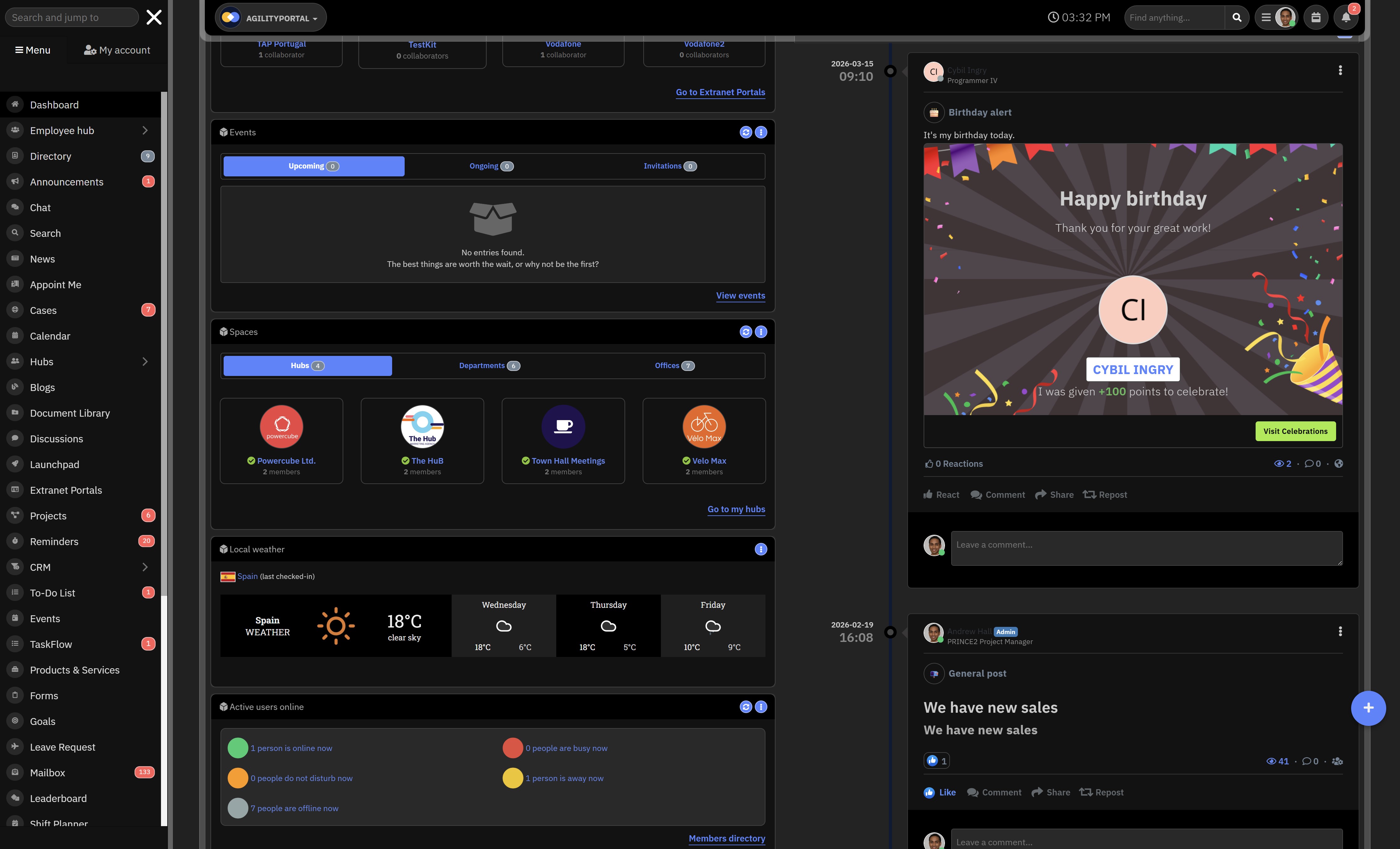
Many organizations start looking for SharePoint alternatives when adoption drops, communication becomes fragmented, and employees struggle to find the information they need. What begins as a simple intranet setup often turns into a patchwork of disconnected tools, hidden costs, and poor employee experience.
AgilityPortal provides a modern digital workplace platform that combines internal communication, employee engagement, collaboration, and document access in one connected experience. Instead of forcing teams to switch between systems, it helps organizations create a simpler, more engaging, and easier-to-manage intranet for modern teams.
- Replace fragmented SharePoint experiences with one unified intranet platform
- Improve internal communication with news feeds, announcements, and updates
- Boost employee engagement with comments, reactions, surveys, and recognition tools
- Support remote, hybrid, and frontline workers with mobile access
- Integrate with Microsoft 365, Workday, and custom internal systems
AgilityPortal helps organizations move beyond document storage and build a modern employee experience platform that people actually use.
Start Your Free 14-Day Trial
No credit card required
AI Summary
- Organizations searching for sharepoint alternatives are typically facing low adoption, fragmented tools, and poor employee engagement across their intranet.
- SharePoint remains useful for document management but struggles to deliver a modern, connected digital workplace experience.
- Modern sharepoint intranet alternatives combine communication, collaboration, and employee engagement into one unified platform.
- Hidden costs, IT dependency, and ongoing maintenance often make SharePoint more expensive over time than expected.
- Employees spend up to 20–30% of their time searching for information, highlighting the need for better knowledge access and search capabilities.
- The best tools similar to SharePoint focus on usability, mobile-first access, and real-time interaction to improve adoption and productivity.
Most Popular Posts

Effective communication among team members is vital for the productivity and success of any organization. Surprisingly, 60% of companies lack a long-term internal communication strategy, which p...


Businesses thrive on communication for efficiency, productivity and accomplishment. When the right information is passed from the right designation in the organization, it promotes positivity an...

Categories
Blog
(3162)
Business Management
(392)
Employee Engagement
(233)
Digital Transformation
(211)
Growth
(149)
Intranets
(139)
Internal communications
(106)
Remote Work
(68)
Sales
(53)
Collaboration
(52)
Customer Experience
(32)
Culture
(30)
Knowledge Management
(29)
Project management
(29)
Leadership
(20)
Comparisons
(9)
News
(1)

Related Posts

Frontline communication used to mean putting an update on a noticeboard and hoping people saw it. But that just doesn't work anymore. If you manage retail staff, care teams, warehouse workers, hospitality employees or people working out in the field,...

Remote work gives businesses access to wider talent and more flexibility, including people working in remote administrative jobs. However, it can also create a familiar problem: employees spend too much time chasing updates, sitting through mee...

How many meetings have started late because someone could not find the link, could not connect to the meeting-room system, or simply could not hear the people sitting around the table? It happens more often than most businesses would like to ad...

If you'd asked me a few years ago what AI could actually do, I'd probably have said, "Answer questions and write a few paragraphs." That was impressive at the time, but it didn't take long before everything changed. Then AI stopped being just a...

Work chat apps have become the everyday communication layer for modern organisations. Teams use them to ask quick questions, share files, coordinate shifts, solve customer issues and keep projects moving without filling everyone's inbox. ...


Jill Romford
I am a digital nomad, lover of exploring new places and making friends.
I love to travel and I love the internet. I take pictures of my travels and share them on the internet using Instagram.
Traveler, entrepreneur, and community builder. I share my insights on digital marketing and social media while inspiring you to live your fullest life.
Ready to learn more? 👍
One platform to optimize, manage and track all of your teams. Your new digital workplace is a click away. 🚀
Free for 14 days, no credit card required.