
Insight Blog
Agility’s perspectives on transforming the employee's experience throughout remote transformation using connected enterprise tools.
36 minutes reading time
(7180 words)
How Workflow Automation Improves Employee Experience Without Adding More Software

How Workflow Automation Improves Employee Experience Without Adding More Software
Discover how workflow automation improves employee experience, reduces manual work, eliminates workplace friction, and increases productivity without introducing additional software tools.
How Workflow Automation Improves Employee Experience Without Adding More Software

Walk into almost any workplace today and you'll find employees juggling a growing number of tools.
One platform for chat, another for project management, a separate HR system, multiple document repositories, and countless email chains just to get simple tasks approved.
Technology was supposed to make work easier, but for many employees, it has created a maze of systems that slows them down rather than helping them move faster.
In fact, research from McKinsey found that employees spend up to 28% of their workweek searching for information or tracking down colleagues across disconnected systems.
That's more than a full day each week lost to unnecessary friction instead of meaningful work.
28%
of the workweek
According to McKinsey, employees can spend up to 28% of their workweek searching for information across disconnected systems.
Source: McKinsey Global Institute
This is where workflow automation changes the game.
Rather than introducing yet another piece of software, workflow automation helps connect the tools employees already use.
It can automatically route approvals, assign tasks, send reminders, distribute documents, and trigger notifications without requiring employees to jump between multiple applications.
Think of it like having a personal assistant working behind the scenes.
Instead of chasing managers for approvals, manually updating spreadsheets, or wondering where a request is stuck, employees can focus on the work that actually matters.
The result is a smoother, less frustrating workday that improves productivity, reduces stress, and creates a better overall employee experience.
In this guide, we'll look at how workflow automation helps organizations remove workplace friction, streamline everyday processes, and improve employee experience without adding more software to an already crowded technology stack.
Key Takeaways
- Workflow automation improves employee experience by removing repetitive tasks, reducing manual processes, and allowing employees to focus on higher-value work.
- Automated workflows accelerate approvals, onboarding, document management, and internal requests, helping organizations operate more efficiently.
- Organizations can improve productivity and employee satisfaction without adding more software by connecting and optimizing existing business systems.
- Modern workflow automation platforms provide better visibility, accountability, and transparency across everyday workplace processes.
- The most successful automation initiatives focus on reducing workplace friction, simplifying work, and creating a more connected digital employee experience.
What Is Workflow Automation?
If you've ever found yourself chasing someone for approval, manually updating spreadsheets, forwarding emails between departments, or repeatedly entering the same information into multiple systems, you've experienced the kind of inefficiencies workflow automation is designed to eliminate.
At its core, workflow automation is the process of using technology to automate repetitive tasks, approvals, notifications, and business processes that would otherwise require manual effort.
Instead of relying on employees to remember every step in a process, automation ensures tasks are completed consistently and efficiently.
For example, when an employee submits a vacation request, the system can automatically notify their manager, collect approval, update the company calendar, and inform HR without anyone needing to send a single email.

What Is Workflow Automation
Defining Workflow Automation
Workflow automation helps organizations streamline everyday processes by reducing manual work and minimizing delays.
Rather than having employees spend valuable time on administrative tasks, automation handles routine actions behind the scenes.
Some common examples include:
- Automatically routing expense claims to the correct approver
- Sending onboarding tasks to new employees
- Assigning training courses based on job roles
- Triggering reminders for overdue tasks
- Managing document reviews and approvals
- Escalating unresolved support requests
It's important to understand that workflow automation is not the same as artificial intelligence (AI). While both technologies can improve efficiency, they serve different purposes.
Workflow automation follows predefined rules and processes.
For example, if an employee submits a form, the system knows exactly who should receive it next.
AI, on the other hand, is designed to analyze data, learn patterns, and make predictions or recommendations. In many modern workplaces, the two technologies work together, but workflow automation remains the foundation for creating efficient and repeatable business processes.
Common Workplace Processes That Can Be Automated
One of the biggest misconceptions about workflow automation is that it's only useful for large enterprises.
In reality, organizations of all sizes can automate routine processes that consume time and create unnecessary friction.
- Employee Onboarding - Starting a new job can be overwhelming. Automation helps ensure every new employee receives the right documents, training materials, introductions, and system access without HR having to manage every step manually.
- Leave Requests - Instead of relying on emails and spreadsheets, employees can submit leave requests through a digital form. The request is automatically routed to the appropriate manager, tracked, and recorded once approved.
- Expense Approvals - Employees can upload receipts and submit expenses through a workflow that automatically sends requests to managers or finance teams for approval, reducing delays and paperwork.
- Document Approvals - Policies, contracts, procedures, and other important documents often require multiple approvals. Workflow automation keeps documents moving through the review process while maintaining a clear audit trail.
- Training Assignments - Organizations can automatically assign training based on an employee's role, department, or location, ensuring compliance requirements are met without manual intervention.
- Employee Surveys - Surveys can be automatically distributed, collected, and analyzed, making it easier for organizations to gather feedback and identify areas for improvement.
- IT Service Requests - Whether employees need software access, password resets, or new equipment, automated workflows help route requests to the right team and keep employees informed throughout the process.
The goal isn't to replace employees.
It's to remove repetitive administrative work that slows people down. When routine processes happen automatically, employees can spend more time focusing on meaningful work, collaboration, and delivering value to customers.
Why Employee Experience Is Becoming a Business Priority
Not long ago, employee experience was often viewed as an HR initiative focused on perks, workplace culture, and annual engagement surveys. Today, business leaders see it very differently.
Employee experience has become a strategic priority because it directly impacts productivity, retention, customer service, and overall business performance.
The reality is simple: when employees have the tools, information, and support they need to do their jobs effectively, they perform better. When they constantly battle inefficient processes, disconnected systems, and unnecessary administrative work, frustration grows and productivity suffers.
As organizations continue to embrace digital transformation, many are realizing that improving the digital employee experience is just as important as improving the customer experience.
Employees want workplace technology that makes their jobs easier—not more complicated.
The Link Between Employee Experience and Business Performance
A positive employee experience doesn't just make employees happier—it creates measurable business outcomes.
- Higher Employee Retention - Replacing employees is expensive and time-consuming. When employees feel supported, valued, and equipped to do their jobs efficiently, they are more likely to remain with the organization. Companies that invest in improving the employee experience journey often see lower turnover rates and reduced recruitment costs.
- Stronger Employee Engagement - Employees are more engaged when they can focus on meaningful work rather than repetitive administrative tasks. Automation helps remove common workplace frustrations, allowing employees to spend more time collaborating, innovating, and contributing to business goals.
- Increased Productivity - One of the biggest drivers of productivity loss is process inefficiency. Employees who spend less time chasing approvals, searching for documents, or manually updating systems can dedicate more time to high-value work. This is where workflow automation for employee productivity can have a significant impact.
- Better Customer Satisfaction - Happy employees often deliver better customer experiences. When internal processes run smoothly, employees can respond faster, solve problems more effectively, and provide a higher level of service to customers.
- The Hidden Cost of Workplace Friction - Many organizations underestimate how much workplace friction affects performance. Small inefficiencies may seem harmless individually, but together they can create significant productivity losses across the business.
- Delays That Slow Down Work - Waiting for approvals, tracking down information, or following up on requests can create bottlenecks that delay projects and frustrate employees. Automated workflows help eliminate these unnecessary delays by ensuring tasks move automatically to the right people at the right time.
- Manual Handoffs Between Teams - Many processes still rely on employees manually forwarding emails, updating spreadsheets, or notifying colleagues when work is ready. These manual handoffs create opportunities for mistakes, missed deadlines, and communication breakdowns.
- Lost Information Across Multiple Systems - Employees often waste valuable time searching for information spread across emails, shared drives, chat applications, and multiple business systems. Improving the digital workplace employee experience requires reducing these information silos and creating more connected workflows.
- Repetitive Administrative Work - Nobody enjoys spending hours on routine administrative tasks. Yet many employees still dedicate a significant portion of their day to data entry, approvals, document management, and status updates. Automating these repetitive processes not only improves efficiency but also contributes to a better overall employee experience.
Why Organizations Are Investing in Employee Experience
The business case for improving employee experience continues to grow.
According to Gallup, highly engaged teams can achieve 23% higher profitability compared to teams with low engagement levels.
This demonstrates that creating a better employee experience is no longer simply about employee satisfaction—it's a critical driver of business success.
Organizations that focus on reducing workplace friction, improving communication, and implementing workflow automation are often better positioned to attract talent, retain employees, and maintain a productive workforce in an increasingly competitive environment.
The Problem with Adding More Workplace Tools
he first reaction is often to purchase another software solution.
Need better collaboration? Add another app. Need project visibility? Buy another platform. Need employee feedback? Introduce another system.
The problem is that every new tool adds another place employees need to check, learn, manage, and remember. Over time, what starts as an effort to improve efficiency can create a disconnected digital workplace that actually makes work harder. For teams trying to reduce app switching and organize priorities more clearly, a centralized time management tool like Akiflow can bring tasks, calendars, and daily planning into one place.
Many employees don't struggle because they lack technology.
They struggle because they're forced to navigate too many systems that don't work well together.
Digital Workplace Complexity Is Growing
Modern employees spend much of their day moving between applications, communication channels, and business systems.
While each tool may solve a specific problem, collectively they can create unnecessary complexity.
Constant Interruptions Reduce Focus
Every notification, alert, message, and reminder competes for an employee's attention.
Instead of focusing on meaningful work, employees are constantly pulled into different platforms throughout the day.
Research from the University of California Irvine found that it can take more than 23 minutes to fully regain focus after an interruption. When interruptions occur dozens of times daily, productivity suffers significantly.
Workplace Productivity Insight
23
Minutes
Time Needed to Regain Focus After an Interruption
Research from the University of California Irvine found that it can take more than 23 minutes for employees to fully regain focus after being interrupted. In modern workplaces where notifications, emails, meetings, and messages arrive constantly, these interruptions can accumulate throughout the day and significantly reduce productivity.
Business Impact: Frequent interruptions increase task completion times,
reduce work quality, create mental fatigue, and make it harder for employees to focus on meaningful work.
Source: University of California Irvine Workplace Productivity Research
Information Becomes Scattered
Important company knowledge often ends up spread across emails, chat platforms, shared drives, project management tools, and internal portals.
Employees waste time trying to determine where information is stored rather than acting on it.
This lack of centralized knowledge management can slow decision-making and create confusion across departments.
Employees Spend More Time Managing Systems
Many workers feel like they're managing software instead of completing their actual responsibilities.
Logging into multiple applications, switching between dashboards, and updating information across several systems creates unnecessary administrative overhead.
Why More Applications Don't Always Improve Efficiency
Adding new workplace software isn't automatically a bad thing.
However, when technology isn't integrated into existing workflows, it can create new challenges instead of solving old ones.
Longer Learning Curves
Every new platform requires onboarding, training, and ongoing support.
Employees must learn new interfaces, processes, and workflows, which can temporarily reduce productivity while adoption takes place.
Lower User Adoption Rates
One of the biggest challenges organizations face is software adoption.
Employees are more likely to embrace technology that simplifies their work, but they often resist tools that add complexity without delivering clear value.
Rising Technology Costs
Software subscriptions, implementation costs, training expenses, and ongoing administration can quickly add up. Many organizations discover they're paying for overlapping functionality across multiple platforms.
Data Silos and Inconsistencies
When systems don't communicate effectively, duplicate records and conflicting information become common.
Employees may need to update the same information multiple times across different applications, increasing the risk of errors.
Warning Signs Your Workplace Technology Stack Is Too Complex
If any of the following situations sound familiar, your organization may be experiencing software sprawl.
✔ Employees frequently ask where documents or information are stored.
✔ Teams use different systems to complete similar tasks.
✔ Managers spend excessive time chasing updates and approvals.
✔ Important conversations happen across multiple disconnected channels.
✔ Employees manually transfer information between systems.
✔ New hires feel overwhelmed by the number of platforms they need to learn.
✔ Staff complain about logging into too many applications each day.
✔ Information is duplicated across emails, spreadsheets, and business systems.
The goal isn't necessarily to eliminate technology. It's to create a more connected and streamlined digital workplace where employees can work efficiently without constantly switching between tools.
This is where workflow automation becomes valuable—helping organizations connect processes, reduce complexity, and improve operational efficiency without adding another application to the mix.
7 Ways Workflow Automation Improves Employee Experience
Many organizations invest in new technology hoping to improve productivity, but the biggest gains often come from improving the processes employees use every day.
Workflow automation helps remove repetitive work, streamline approvals, and create a smoother employee experience without forcing staff to learn another complicated system.
Whether you're researching workflow automation tools, evaluating automated workflow software, exploring how to automate workflows with AI, or looking at emerging solutions such as copilot workflow automation, the goal remains the same: make work easier, faster, and less frustrating.
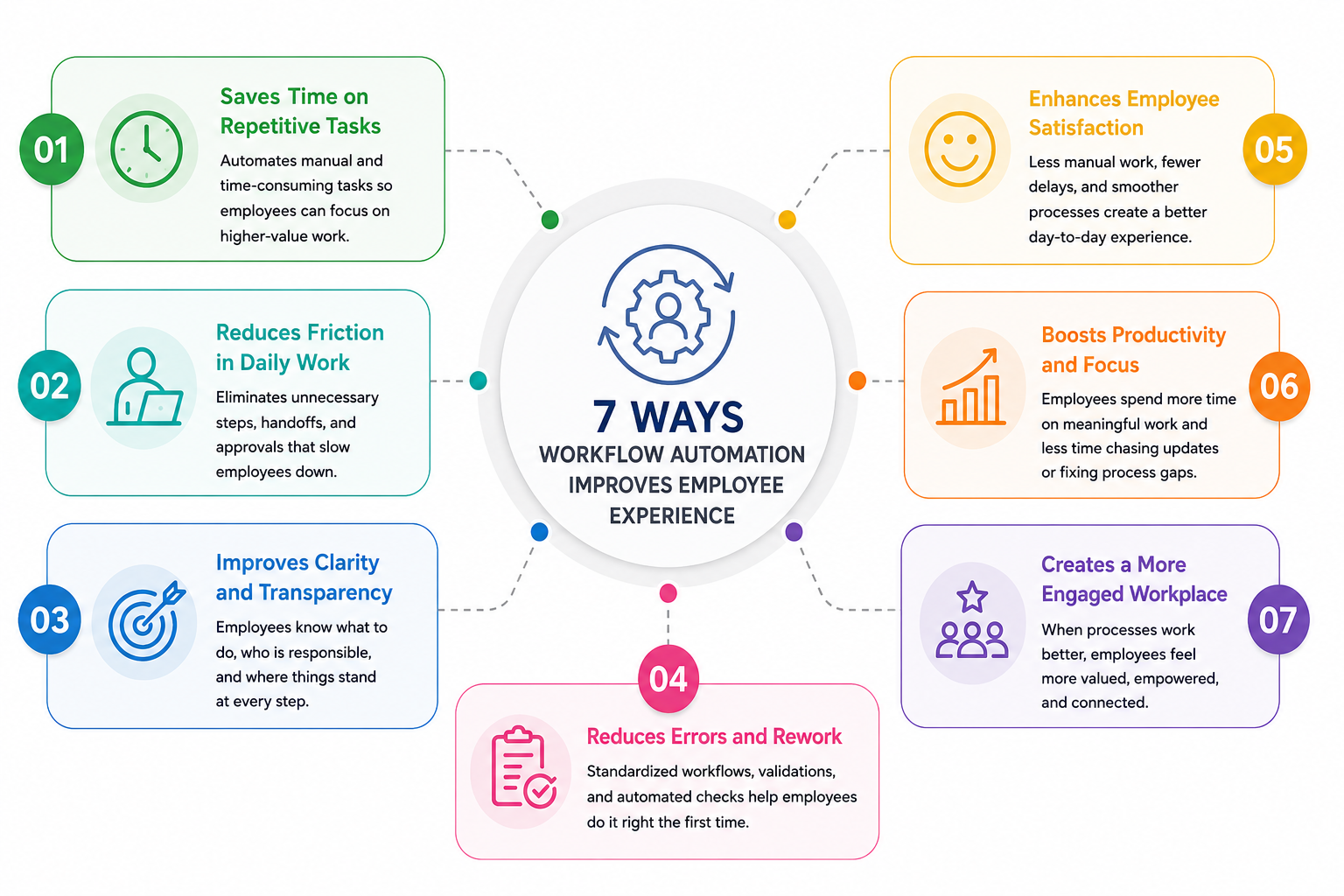
7 Ways Workflow Automation Improves Employee Experience
Quick Overview
| Employee Challenge | Automated Solution | Employee Benefit |
| Manual data entry | Automated workflows | Less repetitive work |
| Slow approvals | Approval routing | Faster decisions |
| Inconsistent onboarding | Automated reminders | Better employee experience |
| Missed tasks | Workflow tracking | Improved accountability |
| Lack of visibility | Project operations | Greater transparency |
| Information scattered across systems | Automated document management | Faster access to knowledge |
| Hybrid work complexity | Digital workflows | Consistent experience anywhere |
Many businesses looking for how to automate workflow examples often start with simple processes such as onboarding, leave requests, approvals, and document reviews before expanding automation across the organization.
1. Eliminates Repetitive Administrative Tasks
One of the quickest ways to improve employee experience is by removing low-value administrative work. Nobody enjoys spending hours copying data between systems, chasing signatures, or manually sending reminders.
Workflow automation can handle:
- Form submissions
- Approval routing
- Data synchronization
- Meeting reminders
- Task creation
- Status updates
Employees can spend more time solving problems, collaborating with colleagues, and serving customers instead of completing repetitive tasks.
Organizations researching how to automate workflow PDF resources often discover that administrative processes are among the easiest and highest-impact workflows to automate.
If you're still figuring out how to automate workflow in a practical way, this is the part I'd spend the most time on. The tool matters, but the process clarity matters more in the first 30 minutes.
2. Speeds Up Approvals and Decision-Making
Waiting for approvals is one of the most common workplace frustrations. A simple expense claim or policy acknowledgment can sit in someone's inbox for days.
Automated workflows instantly route requests to the correct approvers, send reminders when action is required, and escalate overdue items when necessary.
Examples include:
- Expense approvals
- Purchase requests
- Procurement workflows
- Contract reviews
- Policy acknowledgments
The result is faster turnaround times and significantly less frustration for employees waiting for decisions.
3. Creates a More Consistent Employee Journey
Consistency matters, especially when it comes to onboarding, training, and employee development.
Without automation, experiences can vary depending on who manages the process. Some employees receive all the information they need, while others may miss critical steps.
Automated workflows help standardize:
- New hire onboarding
- Compliance training
- Employee development programs
- Performance reviews
- Internal certifications
This creates a more professional and predictable experience across the organization.
4. Reduces Workplace Friction
Workplace friction often comes from unclear ownership, delayed communication, and manual handoffs between teams.
Workflow automation removes many of these obstacles by automatically assigning tasks, notifying stakeholders, and ensuring work progresses through predefined stages.
Examples include:
- Task assignment automation
- Approval escalation rules
- Service request routing
- Department handoffs
- Project status updates
When employees know exactly what happens next, work moves more smoothly and bottlenecks become less common.
5. Improves Communication and Transparency
Employees become frustrated when they don't know the status of a request, project, or approval.
Workflow automation provides visibility throughout the process by automatically updating participants as work progresses.
Benefits include:
- Real-time notifications
- Workflow tracking
- Automated status updates
- Clear audit trails
- Better accountability
Solutions powered by workflows copilot technology can further improve visibility by providing intelligent recommendations and progress summaries directly within employee workflows.
Enter your custom HTML codes in this section ...
6. Helps Employees Find Information Faster
Information is often spread across emails, documents, chat platforms, and multiple business applications.
Workflow automation helps ensure the right information reaches the right people at the right time.
Examples include:
- Automated document routing
- Knowledge base distribution
- Policy acknowledgments
- Smart content recommendations
- Centralized document access
This reduces the time employees spend searching for information and increases overall workplace efficiency.
7. Supports Remote and Hybrid Workforces
Remote and hybrid work models require digital-first processes that function regardless of location.
Workflow automation ensures employees can complete tasks from anywhere while maintaining the same level of consistency and accountability.
Common use cases include:
- Digital approvals
- Remote onboarding
- Employee self-service requests
- Online training assignments
- Cross-department collaboration
Organizations exploring copilot workflows agent capabilities are increasingly combining automation with AI-powered assistants to help employees complete tasks, access information, and manage workflows more efficiently.
The Future of Employee Experience Is AutomatedAs automation technology continues to evolve, businesses are combining traditional workflow automation with AI-powered solutions to create smarter employee experiences.
Modern platforms can now automate routine processes, recommend next actions, summarize work activity, and help employees complete tasks faster than ever before.
The organizations seeing the greatest success are not necessarily adding more software. They're connecting existing systems, eliminating repetitive work, and using workflow automation to create a workplace that employees actually enjoy using.
4 Real-World Examples of Workflow Automation That Employees Actually Appreciate
When people hear the word automation, they often think about complicated systems or robots replacing jobs.
In reality, the most successful workplace automations are often the simplest ones—the ones that remove everyday frustrations and make employees' lives easier.
The best workflow automations aren't the ones employees notice. They're the ones that quietly eliminate delays, reduce manual work, and help people get things done faster.
Here are four real-world examples that employees genuinely appreciate.
Example 1: Automated Employee Onboarding
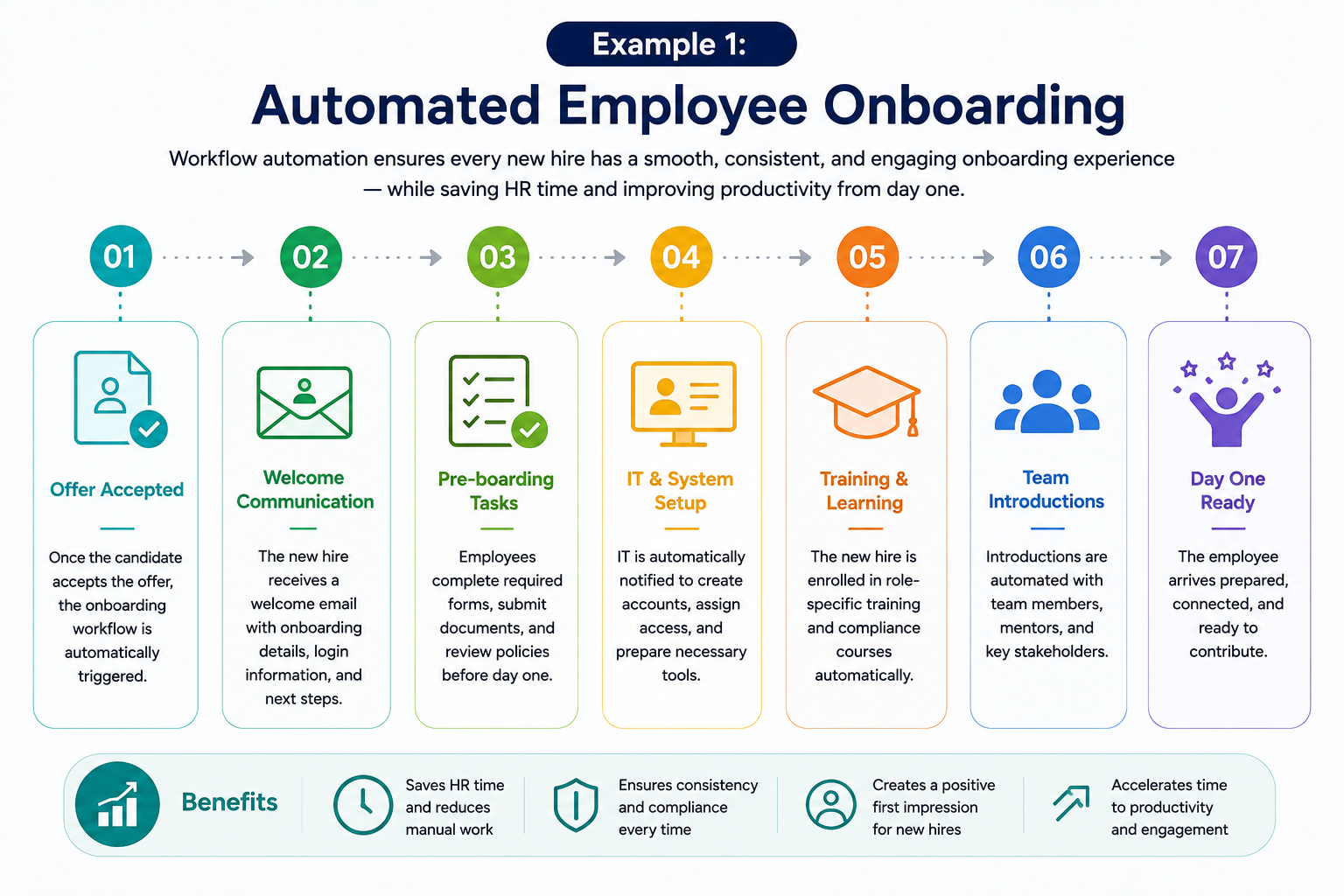
Automated Employee Onboarding
Starting a new job should be exciting, but many organizations still rely on manual onboarding processes involving endless emails, spreadsheets, and paperwork.
Before Automation- HR manually sends welcome emails
- Managers assign tasks individually
- New hires wait for account access
- Training materials are shared inconsistently
- Important documents are sometimes missed
- Welcome emails are triggered automatically
- Training courses are assigned instantly
- IT receives setup requests automatically
- Managers receive onboarding checklists
- Progress is tracked through a centralized dashboard
| Before Automation | After Automation |
| Multiple manual emails | Automated onboarding journey |
| Delayed account setup | Instant task assignment |
| Inconsistent employee experience | Standardized onboarding process |
| Difficult progress tracking | Real-time onboarding visibility |
Benefits
- Faster time-to-productivity
- Improved first impressions
- Reduced HR administration
- Consistent onboarding experiences
- Better employee engagement from day one
Example 2: Automated Leave Requests
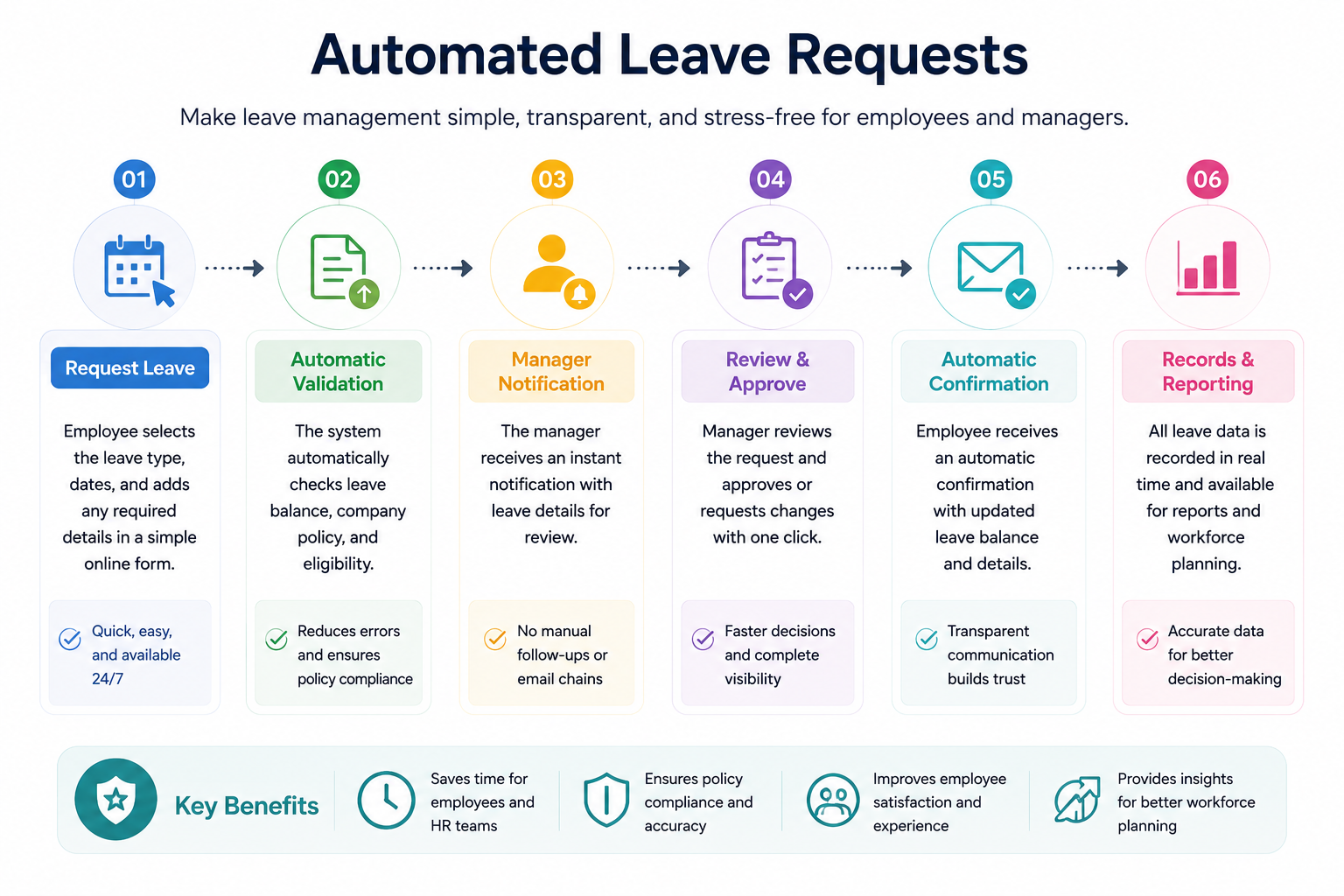
Automated Leave Requests
Before Automation
Employees submit leave requests through email or paper forms. Managers approve requests manually, HR updates records, and employees often have no visibility into the status of their request.
After Automation
Employees submit requests through a self-service portal. The workflow automatically routes the request to the correct manager, updates calendars, records leave balances, and notifies the employee once approved.
| Manual Leave Process | Automated Leave Workflow |
| Email-based requests | Digital self-service form |
| Manual approval tracking | Automatic approval routing |
| Delayed responses | Faster decisions |
| Manual calendar updates | Automatic scheduling updates |
Benefits
- Faster approval times
- Improved employee satisfaction
- Reduced HR workload
- Greater transparency
- Fewer scheduling conflicts
Example 3: Automated IT Support Requests
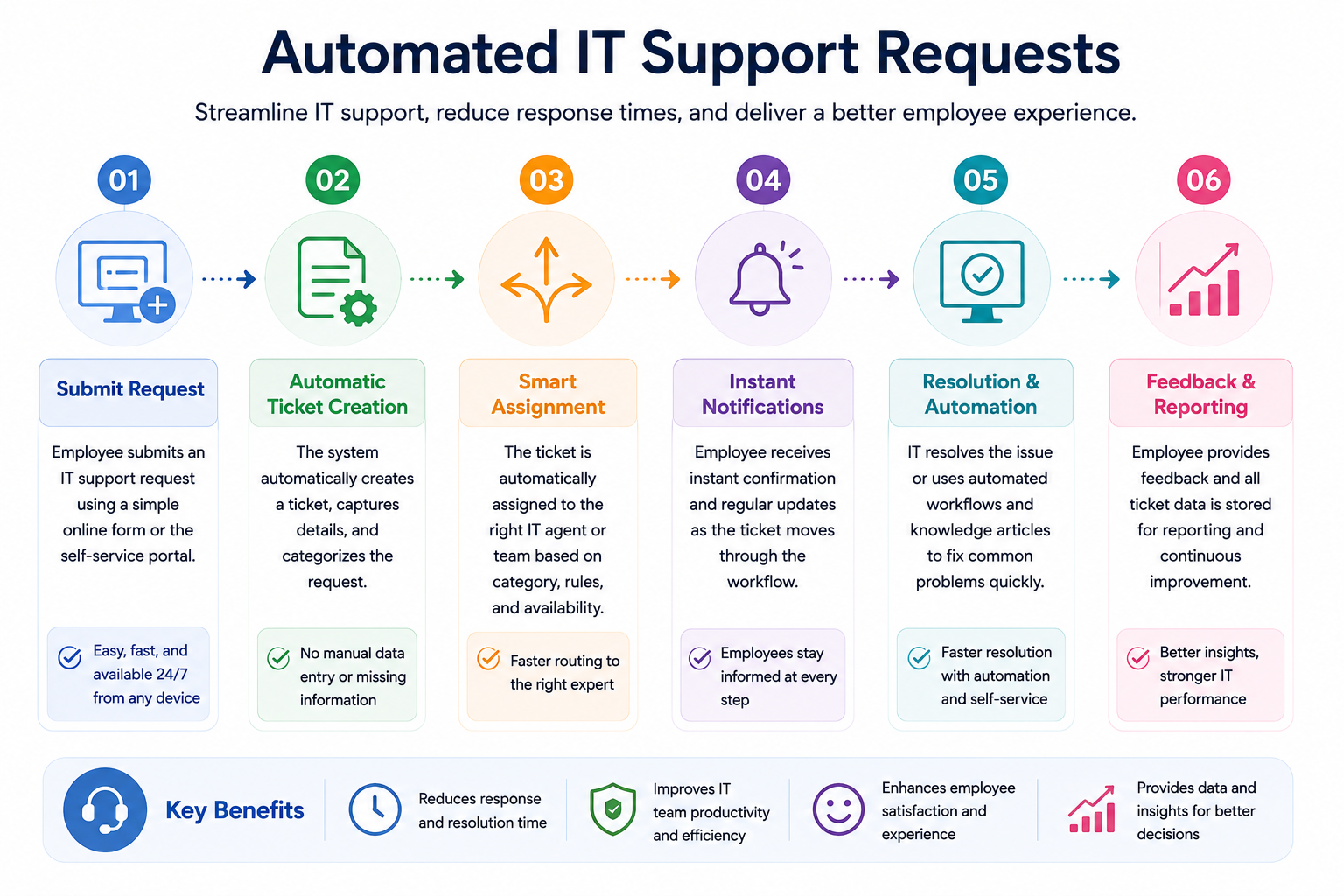
Example 3: Automated IT Support Requests
Few things frustrate employees more than waiting days for simple IT support because requests get buried in email inboxes.
Before Automation
Employees send emails to IT and hope someone responds. Requests can be missed, duplicated, or delayed because there is no structured process.
After Automation
Support tickets are automatically created, categorized, prioritized, and assigned to the appropriate technician. Employees can track progress without sending follow-up emails.
| Traditional IT Support | Automated IT Workflow |
| Email-based requests | Structured ticketing system |
| Unclear ownership | Automatic technician assignment |
| Limited visibility | Real-time tracking |
| Long response times | Faster issue resolution |
Benefits
- Reduced waiting times
- Better employee experience
- Fewer email chains
- Improved accountability
- Higher IT team efficiency
Example 4: Automated Policy Acknowledgements
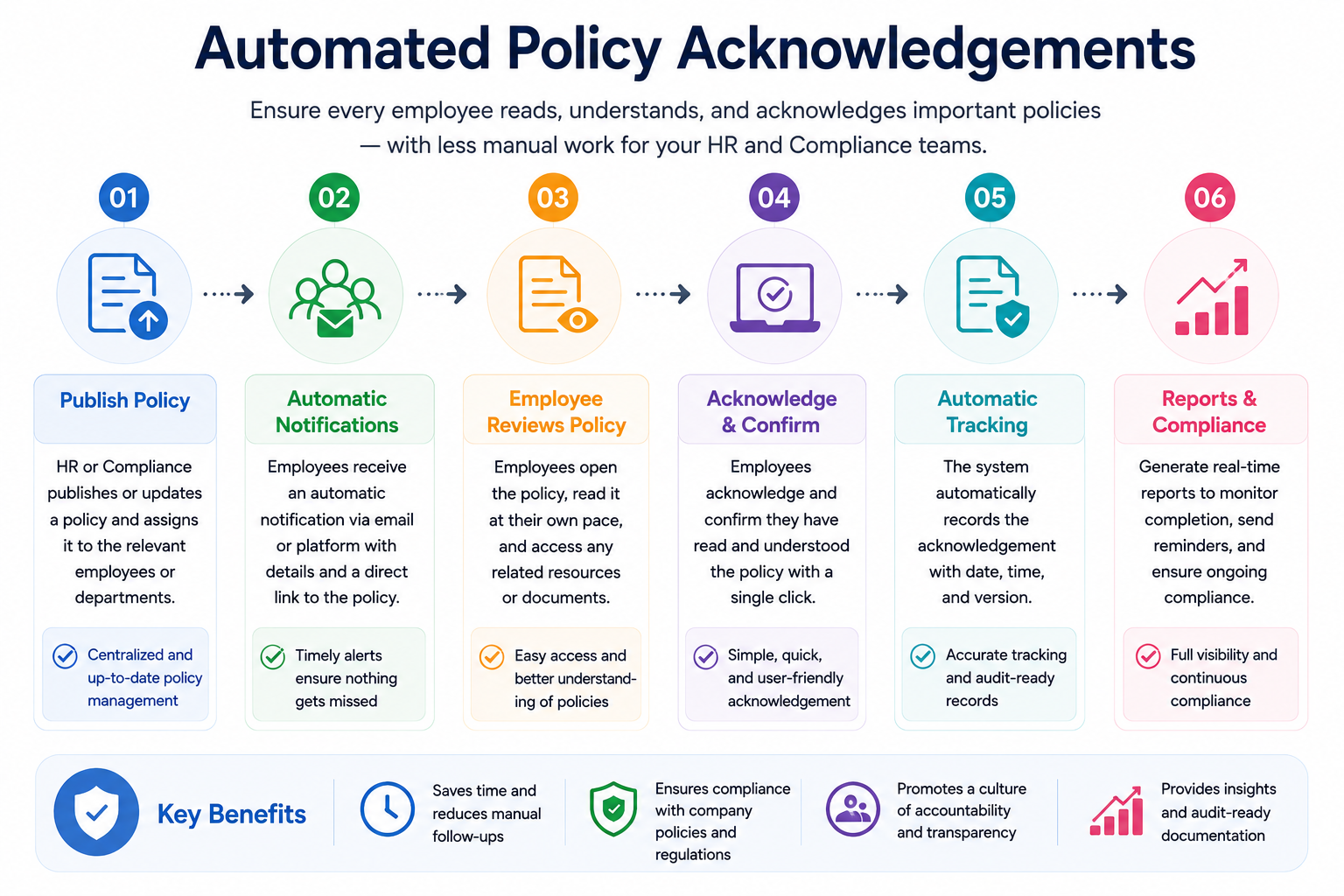
Automated Policy Acknowledgements
Keeping employees informed about new policies is important, but tracking acknowledgements manually can become a compliance nightmare.
Before AutomationHR distributes policy documents via email and manually tracks who has read and acknowledged them. Follow-up reminders often require significant effort.
After AutomationPolicies are automatically distributed to relevant employees. Reminders are triggered for non-responders, acknowledgements are recorded automatically, and audit trails are maintained.
| Manual Compliance Tracking | Automated Policy Workflow |
| Email distribution | Automatic policy delivery |
| Manual follow-ups | Automated reminders |
| Spreadsheet tracking | Real-time compliance reporting |
| Difficult audits | Complete audit trail |
Benefits
- Improved compliance rates
- Reduced administrative effort
- Better policy visibility
- Simplified audits
- Lower regulatory risk
The common theme across all these examples is simple: they remove friction. Employees don't wake up excited about submitting forms, chasing approvals, or tracking documents. They want processes that work smoothly and allow them to focus on their actual responsibilities.
When workflow automation removes repetitive tasks and unnecessary delays, employees spend less time navigating processes and more time doing meaningful work.
That's why organizations investing in workflow automation often see improvements not only in efficiency but also in employee satisfaction, engagement, and retention.
Measuring the Business Impact of Process Automation
Implementing workflow automation is only half the battle.
The real question is whether those automated processes are actually making a difference.
Many organizations launch automation initiatives but fail to measure the outcomes, making it difficult to justify future investments or identify opportunities for improvement.
The good news is that modern organizations have access to more workplace analytics than ever before. By tracking the right performance indicators, leaders can clearly see how process automation contributes to workforce efficiency, employee adoption, operational performance, and business growth.
According to research from Deloitte, organizations that successfully implement digital transformation initiatives are significantly more likely to improve operational performance and workforce productivity compared to organizations that rely heavily on manual processes.
What Should You Measure?
Instead of focusing solely on how many workflows have been automated, it's more valuable to measure how automation affects everyday work, employee productivity, and business outcomes.
| Metric | What It Measures | Business Benefit |
| Process Completion Rate | Percentage of tasks completed successfully | Improved operational consistency |
| Request Resolution Time | Speed of handling requests and inquiries | Faster service delivery |
| Workflow Adoption Rate | Employee usage of automated processes | Higher return on investment |
| First-Time Accuracy Rate | Tasks completed without rework or errors | Reduced operational costs |
| Digital Process Utilization | Usage of automated vs manual processes | Increased efficiency |
| Employee Self-Service Usage | Adoption of self-service tools | Reduced administrative workload |
| Knowledge Access Speed | Time taken to locate information | Better decision-making |
| Internal Service Satisfaction | Employee feedback on internal processes | Improved workplace experience |
Process Completion Rate
One of the clearest indicators of automation success is how efficiently work moves through a process.
For example, if onboarding tasks, purchase requests, or support tickets are completed consistently and on time, it's a strong sign that automated workflows are removing bottlenecks and keeping work moving.
Benefits- Improved operational visibility
- Fewer stalled requests
- Better process accountability
- More predictable outcomes
Request Resolution Time
Employees expect fast responses when requesting support, submitting forms, or seeking approvals. Measuring resolution time helps organizations identify whether automation is improving responsiveness.
Organizations often see significant reductions in response times after introducing process automation because requests are automatically routed to the correct person without manual intervention.
Benefits- Faster employee support
- Reduced waiting times
- Improved service delivery
- Better employee confidence
Workflow Adoption Rate
Even the best automation solution delivers little value if employees don't use it. Measuring workflow adoption helps determine whether staff members are embracing new processes.
High adoption rates often indicate that automated workflows are simple, useful, and solving real workplace problems.
Benefits- Higher technology ROI
- Improved user engagement
- Greater process standardization
- Better change management outcomes
First-Time Accuracy Rate
Manual processes often result in errors, duplicate work, and incomplete submissions. Automation can significantly improve accuracy by ensuring information is collected correctly from the start.
Tracking how often tasks are completed correctly the first time provides valuable insight into process quality.
Benefits- Reduced rework
- Lower operational costs
- Improved compliance
- Better customer and employee outcomes
Employee Self-Service Usage
Modern organizations increasingly rely on self-service capabilities for leave requests, policy acknowledgements, onboarding activities, and support requests.
A growing self-service adoption rate often indicates that employees find processes easier to complete independently.
Benefits
- Reduced administrative burden
- Improved employee autonomy
- Faster task completion
- Increased scalability
Knowledge Access Speed
Employees cannot be productive if they spend excessive time searching for information.
Tracking how quickly employees locate documents, policies, procedures, and company knowledge can reveal whether automation and knowledge management initiatives are delivering value.
Research from McKinsey found that employees can spend up to 28% of their workweek searching for information across disconnected systems, highlighting the importance of improving information accessibility.
Benefits- Faster decision-making
- Increased productivity
- Better collaboration
- Reduced frustration
Signs Your Automation Strategy Is Working
Successful automation initiatives typically produce improvements in several areas simultaneously:
- Shorter processing times
- Higher employee participation rates
- Increased use of self-service tools
- Lower support volumes
- Improved process consistency
- Faster access to business information
- Higher workplace satisfaction scores
- Reduced manual administration
Ultimately, the most successful automation programs aren't measured by the number of workflows created. They're measured by how much easier they make work for employees and how effectively they help the organization achieve its goals.
Best Practices for Implementing Workflow Automation Successfully
Implementing workflow automation can deliver significant benefits, but success doesn't come from automating everything at once.
One of the biggest mistakes organizations make is focusing on technology before understanding the processes and people involved.
The most successful automation projects start small, solve real business challenges, and gradually expand as employees become comfortable with new ways of working.
Whether you're deploying a workflow management platform, business process automation solution, or AI-powered process orchestration tool, following a structured approach will dramatically improve your chances of success.
Best Practices at a Glance
| Best Practice | Why It Matters | Key Benefit |
| Start with process bottlenecks | Delivers quick wins | Faster ROI |
| Prioritize user experience | Improves adoption | Higher employee satisfaction |
| Connect existing applications | Reduces complexity | Better workflow continuity |
| Simplify process design | Easier maintenance | Higher efficiency |
| Monitor workflow performance | Supports optimization | Continuous improvement |
Start with Process Bottlenecks
Not every business process needs automation immediately. The best place to start is by identifying repetitive, time-consuming activities that create delays or frustration.
Look for processes that involve:
- Frequent approvals
- Manual data entry
- Multiple handoffs between departments
- Repetitive administrative tasks
- High volumes of employee requests
For example, employee onboarding, leave management, purchase approvals, and IT service requests are often ideal candidates for automation because they occur frequently and involve predictable workflows.
Benefits- Quick operational improvements
- Faster implementation
- Easier employee adoption
- Immediate productivity gains
- Stronger return on investment
Prioritize User Experience
Automation should make work easier, not more complicated. Employees are far more likely to embrace new systems when they simplify daily tasks and eliminate frustrations.
Before automating a process, ask:
- Does this reduce manual effort?
- Will it save employees time?
- Is the process easy to understand?
- Does it improve visibility and communication?
Organizations that focus on the user experience often achieve higher adoption rates and better long-term results than those focused solely on technology.
Benefits- Improved workforce engagement
- Higher software adoption rates
- Better employee satisfaction
- Reduced resistance to change
- Enhanced digital workplace experience
Connect Existing Applications
One of the main goals of automation should be creating a connected work environment. Employees already use multiple systems, so introducing additional standalone tools can increase complexity rather than reduce it.
Instead, focus on integrating existing platforms such as:
- HR systems
- Communication platforms
- Document management solutions
- CRM software
- Project management tools
- Learning management systems
A connected ecosystem allows information to flow automatically between systems, reducing duplicate work and improving data accuracy.
Benefits- Reduced software sprawl
- Better data consistency
- Improved cross-department collaboration
- Fewer manual updates
- Greater operational visibility
Simplify Process Design
A common mistake is creating overly complicated workflows with too many steps, approvals, and exceptions.
The most effective automated processes are often the simplest.
Before building a workflow:
- Remove unnecessary steps
- Eliminate duplicate approvals
- Standardize decision points
- Clearly define ownership
- Focus on essential actions
Simple workflows are easier to maintain, easier to troubleshoot, and far easier for employees to understand.
Benefits- Faster execution
- Lower maintenance requirements
- Reduced process confusion
- Improved scalability
- Better overall efficiency
Monitor Performance and Continuously Improve
Automation is not a one-time project. Business needs evolve, employee expectations change, and processes must adapt over time.
Organizations should regularly review:
- Workflow completion rates
- Approval cycle times
- Employee feedback
- Process adoption metrics
- Error rates
- Productivity improvements
Continuous monitoring helps identify opportunities for refinement and ensures workflows continue delivering value as the organization grows.
According to industry research, organizations that regularly review and optimize their digital processes are significantly more likely to achieve successful transformation outcomes than those that adopt a "set it and forget it" approach.
Benefits
- Ongoing process optimization
- Better decision-making
- Higher employee satisfaction
- Increased operational agility
- Long-term automation success
The Most Important Rule: Solve Problems, Don't Just Automate Them
Automation works best when it removes friction from existing processes. If a process is broken, inefficient, or confusing, automating it will often make those problems happen faster.
Take time to understand the process first, simplify it where possible, and then introduce automation. This approach creates smoother workflows, better employee experiences, and stronger business outcomes.
How AgilityPortal Simplifies Workflow Automation in One Digital Workplace
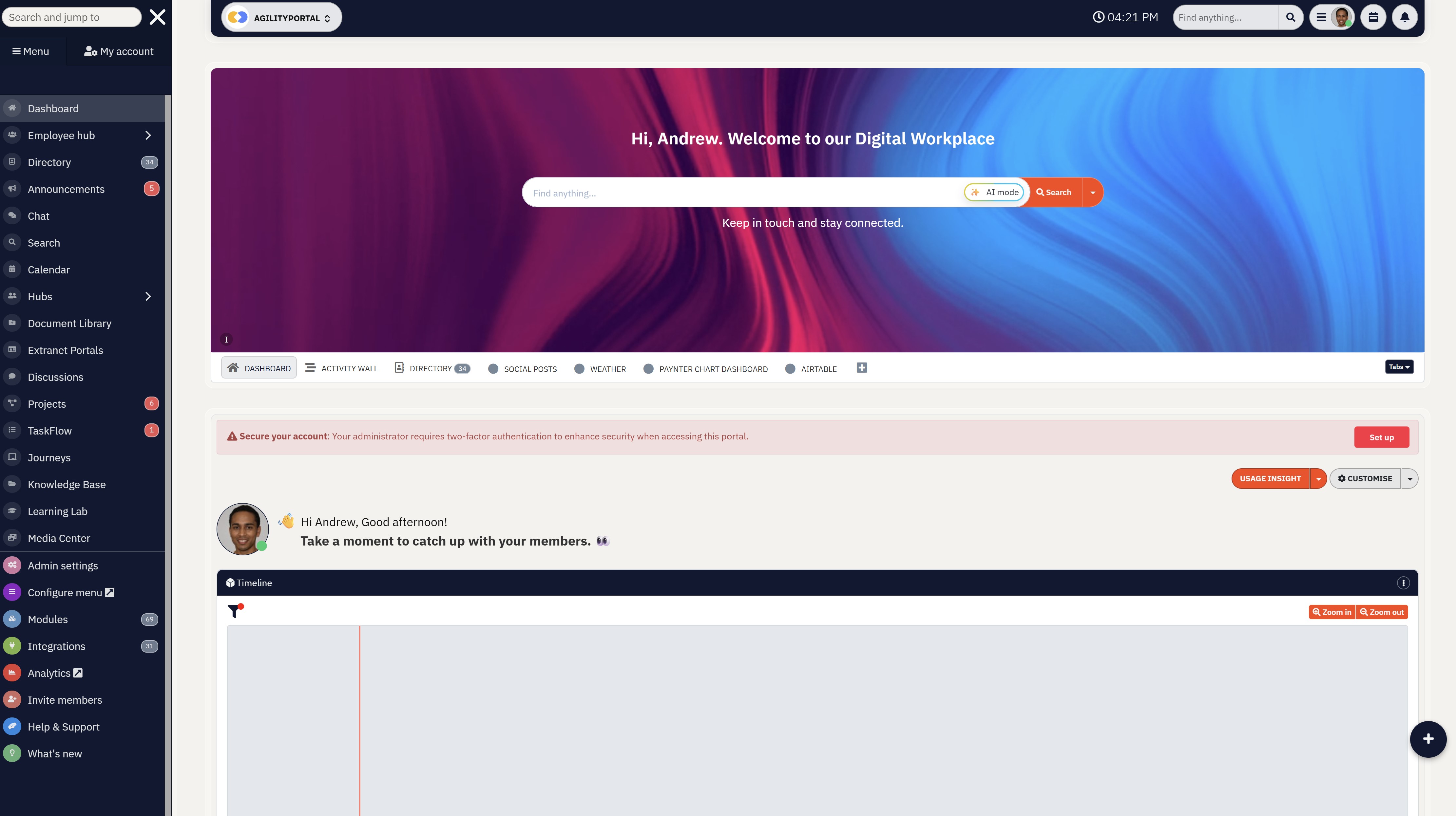
How AgilityPortal Simplifies Workflow Automation in One Digital Workplace
One of the biggest challenges organizations face today isn't a lack of technology—it's having too much of it.
Employees often jump between separate platforms for communication, document management, approvals, onboarding, task tracking, knowledge sharing, and employee engagement.
This creates confusion, increases training requirements, and reduces productivity.
AgilityPortal takes a different approach by bringing these essential workplace functions together in a single digital workplace platform.
Instead of purchasing and managing multiple disconnected applications, organizations can automate everyday processes from one central location.
For example, a new employee can be onboarded through structured learning pathways, receive automated tasks, gain access to important documents, complete required forms, and connect with colleagues without HR having to manually coordinate every step.
Similarly, approval requests, policy acknowledgements, internal communications, and document workflows can all be managed through automated processes that keep work moving efficiently.
Beyond workflow automation, AgilityPortal combines employee communications, document management, knowledge bases, forms, surveys, task management, recognition programs, and collaboration tools into a unified experience.
This reduces the need for multiple software subscriptions while making it easier for employees to find information and complete their work.
The result is a more connected workplace where teams spend less time switching between systems and more time focusing on meaningful work.
Organizations benefit from improved operational efficiency, stronger collaboration, higher employee engagement, and a better overall digital employee experience—all without adding another tool to an already crowded technology stack.
Workflow Automation & Employee Experience Platform
Automate Repetitive Work and Create a Better Employee Experience
Workflow automation helps organizations eliminate manual processes, accelerate approvals, streamline onboarding, and reduce workplace friction. AgilityPortal combines workflow automation, employee communications, document management, knowledge sharing, forms, tasks, and engagement tools in one connected digital workplace, helping teams work more efficiently without adding more software.
A modern digital workplace platform designed to help organizations automate workflows, improve employee engagement, streamline business processes, manage knowledge, and enhance collaboration from a single platform.
Conclusion
Workflow automation is not about replacing people or adding more software.
It's about removing friction, simplifying work, and creating an environment where employees can focus on meaningful tasks rather than repetitive administration.
Organizations that leverage workflow automation effectively can improve employee satisfaction, increase productivity, and create a more connected digital workplace without overwhelming employees with additional tools.
FAQ
What is workflow automation?
Workflow automation is the use of technology to automate repetitive tasks, approvals, notifications, and business processes that would otherwise require manual effort.
Instead of employees manually moving information between systems or chasing approvals, automated workflows ensure tasks are completed consistently and efficiently based on predefined rules.
How does workflow automation improve employee experience?
Workflow automation improves employee experience by removing administrative burdens, reducing delays, and simplifying everyday work.
Employees spend less time filling out forms, tracking approvals, searching for information, or following up on requests. This creates a smoother work environment where people can focus on meaningful and productive activities.
Can workflow automation reduce employee burnout?
Yes. One of the leading causes of workplace frustration is repetitive administrative work and inefficient processes.
By automating routine tasks, organizations can reduce employee stress, eliminate unnecessary manual work, and free employees to focus on higher-value responsibilities.
This often leads to greater job satisfaction and lower burnout levels.
What processes should organizations automate first?
Organizations should start with processes that are repetitive, time-consuming, and prone to delays or errors. Common examples include:
- Employee onboarding
- Leave requests
- Expense approvals
- Document approvals
- Employee surveys
- IT service requests
- Training assignments
- Policy acknowledgements
These processes typically deliver quick wins and measurable productivity improvements.
Does workflow automation replace employees?
No. Workflow automation is designed to support employees, not replace them. The goal is to automate repetitive and low-value tasks so employees can spend more time solving problems, collaborating with colleagues, serving customers, and contributing to business growth. Most organizations use automation to enhance productivity rather than reduce headcount.
How does workflow automation support remote teams?
Workflow automation helps remote and hybrid teams stay productive by ensuring processes continue to operate regardless of location. Automated approvals, digital forms, task assignments, onboarding workflows, and notifications allow employees to complete work efficiently without relying on face-to-face interactions or manual processes.
What is the difference between workflow automation and business process automation?
Workflow automation focuses on automating specific tasks and workflows, such as approvals, requests, or onboarding activities. Business process automation (BPA) is broader and typically involves automating entire business operations across multiple departments and systems. Workflow automation is often one component of a larger business process automation strategy.
How can companies measure the success of workflow automation?
Organizations can measure workflow automation success by tracking metrics such as:
- Approval cycle times
- Process completion rates
- Employee satisfaction scores
- Task completion speed
- Error reduction rates
- Employee adoption rates
- Support ticket resolution times
- Productivity improvements
The most successful automation initiatives not only improve efficiency but also create a better employee experience by making work simpler, faster, and less frustrating.
AI Summary
- Workflow automation helps organizations reduce manual work, streamline approvals, and improve employee experience without adding more software to an already crowded technology stack.
- By automating routine processes such as onboarding, leave requests, document approvals, training assignments, and internal service requests, employees spend less time on administration and more time on meaningful work.
- Organizations benefit from faster decision-making, improved process consistency, better compliance tracking, reduced operational bottlenecks, and increased workplace productivity.
- Employees gain greater visibility into tasks, approvals, and requests through automated notifications, workflow tracking, and self-service capabilities that simplify day-to-day work.
- Modern workflow automation tools can connect existing business systems, reducing software sprawl while creating a more efficient and connected digital workplace environment.
- The most successful automation initiatives focus on removing workplace friction, improving collaboration, enhancing employee satisfaction, and helping teams work smarter rather than harder.
Most Popular Posts

Effective communication among team members is vital for the productivity and success of any organization. Surprisingly, 60% of companies lack a long-term internal communication strategy, which p...


Businesses thrive on communication for efficiency, productivity and accomplishment. When the right information is passed from the right designation in the organization, it promotes positivity an...

Categories
Blog
(3174)
Business Management
(392)
Employee Engagement
(234)
Digital Transformation
(214)
Growth
(149)
Intranets
(141)
Internal communications
(106)
Remote Work
(68)
Sales
(53)
Collaboration
(52)
Customer Experience
(32)
Culture
(30)
Knowledge Management
(29)
Project management
(29)
Leadership
(20)
Comparisons
(9)
News
(1)

Related Posts

Are you still relying on spreadsheets to manage your customer data? If so, you're not alone—but you might be holding your business back. A study by Forrester found that 68% of sales professionals waste time switching between tools to find customer in...

Cyber Essentials is often described as a technical certification, but it is really a practical test of whether a business has the basics under control. That matters because cyber incidents rarely stay inside the IT department. They can interrupt payr...

Outsourced IT support becomes worth considering when technology problems stop being minor inconveniences and begin affecting how the business operates. A slow laptop or one-off password reset is manageable. But recurring downtime, unresolved support ...

An intranet network example in business could be as simple as a central employee hub where people find company policies, announcements, forms, training, documents and team updates. In practice, managing it well takes more than putting files beh...

Could your employees still find the policies, forms and information they rely on if your intranet moved to a new Microsoft 365 tenant tomorrow? An intranet migration can sound simple on a project plan: move sites, documents and user access from one M...


Jill Romford
I am a digital nomad, lover of exploring new places and making friends.
I love to travel and I love the internet. I take pictures of my travels and share them on the internet using Instagram.
Traveler, entrepreneur, and community builder. I share my insights on digital marketing and social media while inspiring you to live your fullest life.
Ready to learn more? 👍
One platform to optimize, manage and track all of your teams. Your new digital workplace is a click away. 🚀
Free for 14 days, no credit card required.