
Insight Blog
Agility’s perspectives on transforming the employee's experience throughout remote transformation using connected enterprise tools.
53 minutes reading time
(10549 words)
Shadow AI in the Workplace: The Hidden Employee Behaviour HR Can No Longer Ignore

Shadow AI in the Workplace: The Hidden Employee Behaviour HR Can No Longer Ignore
Discover what shadow AI in the workplace means, why employees use unapproved AI tools, the risks involved, and how HR and IT can manage it safely.
Shadow AI in the Workplace: The Hidden Employee Behaviour HR Can No Longer Ignore

Shadow AI in the workplace is already here, and it's likely happening in your organisation right now.
Think about everyday work.
Someone pastes a draft email into ChatGPT to improve the tone. A manager asks Claude to summarise meeting notes. Marketing uses Gemini for campaign ideas, while another employee uploads a spreadsheet to an AI tool for quick analysis.
Most of the time, they're not breaking rules—they're just trying to work faster.
That's what makes shadow AI so hard to control.
Employees can start using unapproved AI tools in seconds, often without considering whether they're sharing customer data, internal documents, financial information, or intellectual property.
And the behaviour is widespread.
According to PagerDuty's 2026 research, 66% of employees admitted using AI tools even when they believed it wasn't allowed, and 88% had shared work-related information with public AI tools, including sensitive company data.
66%
used AI despite restrictions
According to PagerDuty's 2026 research, 66% of employees admitted using AI tools even when they believed it wasn't allowed, while 88% had shared work-related information with public AI tools, including sensitive company data.
88%
shared work-related information with public AI tools
Source: PagerDuty, 2026 Shadow AI Research
This is why AI governance in the workplace is no longer just an IT issue—it's a company-wide challenge involving HR, IT, security, and managers.
The goal isn't simply to stop employee AI use. That's unrealistic. Instead, organisations need to make responsible AI use easier than risky use.
In this guide, we'll explore what shadow AI looks like, why employees use unapproved tools, the key risks involved, and how to build a practical AI policy for employees that protects data without blocking productivity.
Key Takeaways
- Shadow AI in the workplace happens when employees use AI tools, personal accounts or AI-powered features without formal organisational approval or oversight.
- Employees usually turn to unapproved AI tools to work faster, making Shadow AI as much a productivity and employee experience issue as a security problem.
- Key Shadow AI risks include confidential data exposure, privacy breaches, intellectual property loss, AI hallucinations, compliance concerns and decisions based on inaccurate AI outputs.
- Bring Your Own AI (BYOAI) is accelerating the problem as employees bring personal AI accounts, tools and established AI habits into their everyday work.
- Effective AI governance should focus on approved tools, clear employee AI policies, AI literacy, human review and making responsible AI use easier than risky AI use.
What Is Shadow AI in the Workplace?
Shadow AI is the use of artificial intelligence tools, applications or features for work without the organisation formally approving, managing or sometimes even knowing about them.
Put simply, it's when employees find their own way of using AI to get work done.
And that doesn't necessarily mean someone has deliberately downloaded a suspicious piece of software. Shadow AI can be as simple as opening a personal ChatGPT account and pasting in meeting notes, using an AI browser extension to rewrite an email, or uploading a document to a free AI summarisation tool.
The important distinction is between approved AI and unapproved AI.
Approved AI tools have normally been reviewed by the organisation. IT, security, legal or HR may have assessed how the tool handles company data, who can access it, what information employees are allowed to enter and whether it meets the organisation's security and compliance requirements.
With unapproved AI tools, those checks may never have happened.
That's where things get complicated.
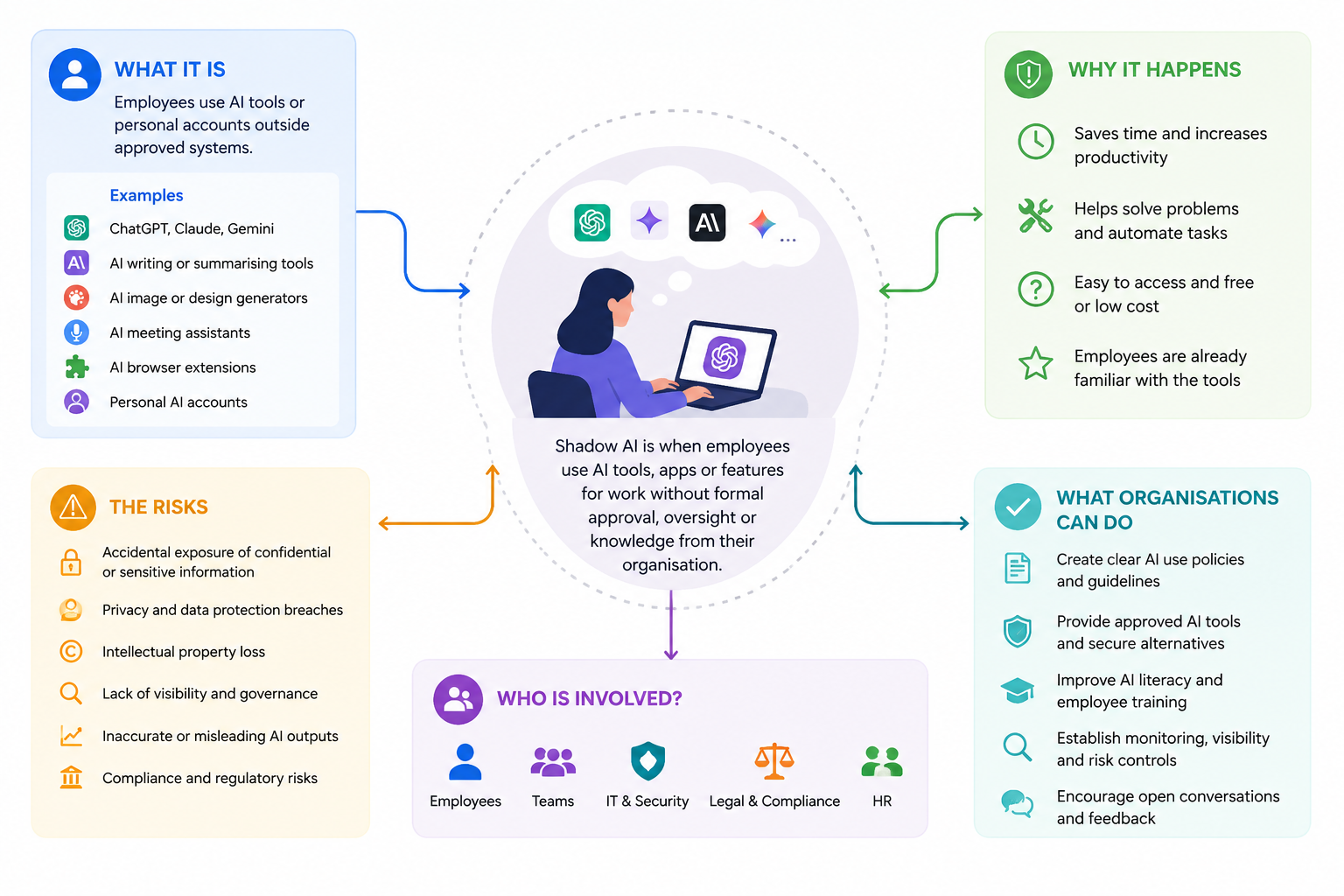
What Is Shadow AI in the Workplace
Personal AI Accounts Are Blurring the Line
Imagine you've been using ChatGPT or another AI assistant at home for months. You know how it works, you trust it, and it saves you time.
Then Monday morning comes around and you're staring at a 20-page report that needs summarising.
What are you likely to do?
For many employees, the natural reaction is to use the same AI tool they already know.
This is one of the reasons personal AI tools at work are so difficult to govern. There's almost no barrier between personal and professional use.
Employees don't need IT to install complicated software or issue them an account. They can simply open a browser and start working.
Shadow AI Isn't Limited to ChatGPT
This is another important point.
When people hear "AI use in the workplace", they often immediately think about ChatGPT, Claude or Gemini. But AI is increasingly being built into the everyday tools employees already use.
Shadow AI could include:
- AI browser extensions that read or rewrite webpage content
- Meeting assistants that record, transcribe or summarise conversations
- AI writing and grammar tools
- Free document and PDF summarisation services
- AI image and presentation generators
- Coding assistants
- AI search tools
- Plugins connected to workplace applications
Some employees may not even realise they're using an AI-powered feature.
That makes shadow AI governance much broader than creating a list of prohibited chatbots.
Free AI Accounts and Enterprise AI Aren't the Same Thing
This distinction matters as well.
An organisation may approve an enterprise version of an AI platform because it provides stronger administrative controls, contractual protections, security settings and clearer rules around how business data is handled.
That doesn't automatically mean employees should use the free or personal version of the same product for company work.
To an employee, they might look almost identical.
From a governance and data-protection perspective, they may be very different.
Shadow AI Doesn't Automatically Mean Bad Intent
This is probably the most important thing for HR and business leaders to understand.
Shadow AI isn't necessarily malicious behaviour.
Most employees aren't sitting at their desks thinking, "How can I bypass our security policy today?"
They're thinking:
"I've got three hours of work and 45 minutes to do it."
So they find a tool that helps.
For example, imagine an HR manager receives hundreds of comments from an employee engagement survey. Instead of spending several hours manually grouping the responses, they upload the spreadsheet to a public AI tool and ask it to identify the main themes.
The intention is perfectly reasonable: save time and understand employee feedback faster.
The problem is that the spreadsheet could contain employee names, personal information or confidential comments.
That's shadow AI in the workplace in a nutshell: useful technology, genuine productivity benefits and potentially sensitive company information meeting before the organisation has established clear rules about how they should work together.
And that's why simply telling employees "don't use AI" misses the real problem. Organisations first need to understand why employees are using unapproved AI tools in the first place.
Why Employees Are Turning to Unapproved AI Tools
It's easy to look at shadow AI in the workplace and assume employees are deliberately ignoring the rules.
In reality, the reason is usually much simpler: they have a job to do, they're under pressure, and they've found an AI tool that helps them do it faster.
That's an important distinction.
If organisations treat every use of unapproved AI tools as an employee behaviour problem, they risk missing what employees are actually telling them: the tools we've been given aren't always meeting the way we work today.
Understanding that gap is where effective AI governance in the workplace should start.

Why Employees Are Turning to Unapproved AI Tools
Approved Workplace Tools Aren't Keeping Up
Think about the difference between some traditional workplace software and the AI tools employees use outside work.
At home, someone can open an AI assistant and ask:
"Can you summarise this and give me the five things I need to know?"
Seconds later, they have an answer.
At work, achieving the same result might mean searching through several systems, downloading documents, reading lengthy reports or waiting for someone else to provide the information.
That gap creates temptation.
When employees discover that consumer AI can solve a problem faster than approved workplace technology, some will naturally find their own workaround.
This is nothing new. Shadow IT developed for much the same reason. Employees adopted personal cloud storage, messaging apps and productivity tools when corporate systems didn't meet their needs.
Shadow AI is essentially the next stage of that behaviour, except AI can interact with considerably more information.
Employees Want to Save Time
Most people aren't experimenting with AI at work because they want another piece of software to manage.
They want time back.
An employee might use generative AI to summarise a report, draft a proposal, analyse spreadsheet data, prepare meeting questions or turn rough notes into something presentable.
A task that previously took an hour might suddenly take 15 minutes.
Once someone experiences that productivity gain, asking them to return to the slower process can be a difficult sell.
This is why organisations need to be careful about approaching employee AI use purely from the perspective of restriction.
Employees are showing businesses where AI provides genuine value. The smarter question is: How can we provide that value safely?
Consumer AI Is Almost Too Easy to Access
You don't necessarily need approval from IT to start using AI.
You don't need a company licence.
You might not even need to install anything.
An employee can open a browser, create an account and be using an AI tool within minutes. Some services don't even require an account for basic functionality.
That's very different from traditional workplace software, where IT departments could largely control what was installed on company devices.
And AI is becoming even less visible as it appears inside browsers, search engines, productivity software and mobile applications.
This makes simply blocking a handful of well-known AI websites an increasingly weak shadow AI governance strategy.
Employees Don't Always Understand Where Their Data Goes
Here's where the human side becomes particularly important.
Someone pasting information into an AI assistant might not think of themselves as "sharing company data".
They're simply asking a question.
They might paste customer feedback because they want it summarised. They might upload meeting minutes to extract action points or enter part of a contract because they don't understand a clause.
The employee sees a useful assistant.
The organisation may see confidential information leaving a controlled environment.
That disconnect matters.
Employees need to understand what information can and cannot be shared with AI systems, particularly personal data, customer information, financial records, intellectual property, passwords, commercially sensitive documents and confidential employee information.
Telling people to "use AI responsibly" isn't enough if nobody has explained what responsible use actually looks like.
Company AI Policies Are Unclear — or Don't Exist
Sometimes the biggest problem isn't that employees ignore the AI policy.
It's that they don't know whether one exists.
A policy buried inside a document library isn't particularly useful when someone is about to paste information into an AI tool and needs an answer right now.
Employees need simple guidance:
Which AI tools can I use? What can I use them for? What information can't I share? Do I need to check AI-generated work? Who do I ask if I'm unsure?
If employees can't answer those questions, organisations shouldn't be surprised when people make their own decisions.
And that's the bigger lesson here.
Shadow AI risks aren't created by technology alone. They're often created by a gap between how employees actually want to work and the guidance, tools and training their organisation provides.
Closing that gap means HR and IT need to understand the risks without losing sight of why employees started using AI in the first place.
Related Guides You May Want to Read Next
Shadow AI is only one part of the wider challenge organisations face as artificial intelligence moves into everyday work. The guides below explore AI governance, employee AI use, data privacy, security, workplace technology and how businesses can introduce AI without creating new risks.
- AI Detection in the Workplace: The Hidden HR Risk Most Companies Aren't Ready For
- AI Privacy and Security in Collaboration Tools: What's Really Happening to Your Data?
- Data Loss Prevention for HR and Intranets: How to Reduce Data Leakage Risk
- AI-Powered Workplace Management: How AI Is Changing the Modern Workplace
- Best AI Tool for Business: How to Choose the Right One in 2026
- AI/ML Consulting Services: What Your AI Initiative Should Deliver Before Intranet Deployment
- The Digital Workplace Strategy Playbook Every HR and IT Leader Needs
- Low-Code Platforms, Shadow IT and the Digital Workplace
- What Is Shadow AI and Why Is It a Growing Risk for Businesses?
Together, these articles create a wider workplace AI knowledge hub covering responsible AI adoption, employee behaviour, data protection, AI governance and the technology organisations need to manage artificial intelligence safely.
The Real Risks of Shadow AI for Organisations
The biggest concern with shadow AI in the workplace isn't simply that employees are using ChatGPT, Claude, Gemini or other generative AI tools without telling IT.
It's what happens to company information once those tools become part of everyday work.
An employee might be trying to save 20 minutes by summarising a document, improving an email or analysing some data. But if nobody has explained what can safely be entered into an AI system, that small shortcut can create a much bigger AI data security problem.
This is why organisations need to understand the risks without making employees afraid to use AI at all.
Confidential Company Information Can Leave Controlled Systems
Let's say you're preparing for an important customer meeting.
You have a six-page internal briefing document and want the important points quickly, so you upload it to a public AI assistant and ask for a summary.
Easy.
But what was inside that document?
Maybe pricing information, financial forecasts, product plans, customer names or details about an upcoming acquisition.
Once confidential information is entered into an unapproved AI tool, the organisation may have limited visibility over how that information is processed, retained or accessed.
This is one of the central shadow AI security risks because traditional security controls were designed around company-managed applications. Personal AI accounts can sit completely outside that environment.
Personal and Customer Data Can Be Exposed
The risk becomes more serious when employees work with personal information.
HR teams handle employee records, performance information, salaries, absence records and recruitment data. Sales teams have customer details. Support teams have conversations and case histories.
Imagine an HR manager uploading employee survey responses to a public AI service because they want to quickly identify common themes.
It sounds harmless.
But if those responses contain names, email addresses or information that could identify an employee, personal data may have been transferred to another service without the employee understanding the implications.
That's why AI governance and data privacy need to work together.
Employees don't need a 40-page legal document every time they use AI. They need clear instructions about what information should never be entered into an unapproved system.
Intellectual Property Can Walk Out the Door Too
Company information doesn't need to contain personal data to be valuable.
Developers might paste proprietary code into an AI coding assistant. Marketing could upload an unreleased campaign. Product teams might ask AI to analyse specifications for something that hasn't launched yet.
Someone could even paste part of a customer contract into an AI assistant and ask:
"Can you explain what this clause means?"
Again, the employee isn't necessarily doing anything malicious. They're trying to solve a problem.
But from the organisation's perspective, valuable intellectual property and confidential business information may now have entered a system that hasn't been approved for that purpose.
AI Can Be Wrong While Sounding Completely Confident
Data leakage gets much of the attention around generative AI risks in the workplace, but there's another problem that's easier to miss.
AI can simply give you the wrong answer.
And it can present that answer beautifully.
An AI assistant might invent a statistic, misunderstand a company policy, create a nonexistent source or confidently explain something that isn't true.
This is often described as an AI hallucination.
The problem isn't necessarily the hallucination itself. It's what happens when an employee trusts the answer without checking it.
Imagine someone asks an AI assistant about your parental leave policy and then sends the answer to an employee.
Or a manager uses AI-generated financial analysis in a presentation without checking the underlying figures.
Now the AI output has moved from being a helpful draft to influencing a real workplace decision.
That's why responsible AI use should always include appropriate human review.
AI-Generated Communication Can Lose the Human Voice
There's another risk that isn't necessarily about cybersecurity or compliance.
It's communication quality.
When organisations start producing large amounts of AI-generated workplace content, announcements can quickly begin sounding the same: polished, technically correct and completely forgettable.
Employees notice.
That's especially important for internal communications because people respond to communication that feels like it came from another person.
Teams that produce high volumes of communication increasingly formalize that last step; some route drafts through the UndetectedGPT platform to restore the natural variation machine drafts lack, then do a final human pass for substance and tone. Used that way, the tooling is not about disguise.
It is about making sure the writing that carries your culture, announcements, onboarding, recognition, the intranet post everyone actually reads, sounds like it came from people rather than from a template engine.
Whatever tools are used, that final human review matters. An AI assistant can help create a first draft, but the person publishing it should still ask: Does this sound like us? Is it accurate? Would I actually say this to another employee?
That's an important part of human-centred AI in the workplace.
Compliance Problems Don't Disappear Because AI Was Involved
Organisations are still responsible for how workplace information is handled.
Data protection requirements, confidentiality agreements, sector regulations and internal information-security policies don't suddenly stop applying because someone pasted the information into an AI prompt.
That's why an effective AI acceptable use policy needs to connect AI behaviour with the rules employees already follow.
Instead of simply saying "Don't share sensitive information with AI", give employees real examples.
Don't upload an employment contract.
Don't paste customer account details.
Don't share passwords.
Don't upload confidential board documents.
Don't enter identifiable employee information.
Clear examples are far easier to follow than vague warnings.
Employees Can Start Making Decisions Based on AI Answers
AI becomes particularly risky when it moves from helping someone work to deciding what they should do.
Imagine a manager asking an AI tool:
"Which of these candidates looks strongest?"
Or:
"Which employees appear most likely to leave?"
Or even:
"Based on these performance reviews, who should be promoted?"
Now you're moving into a completely different area of AI risk management involving fairness, bias, transparency and accountability.
AI can help organise information, but organisations need clear boundaries around where automated assistance ends and human decision-making begins.
This is particularly important for HR decisions that could materially affect someone's employment.
Shadow AI Can Also Create a Knowledge Problem
There's one final risk that's easy to overlook.
When employees use personal AI accounts to summarise documents, develop processes, solve problems or generate useful information, where does that knowledge go?
Often, nowhere.
It stays inside someone's personal AI conversation.
That means useful organisational knowledge can become fragmented across dozens or hundreds of individual AI accounts.
If that employee leaves, much of that context could disappear with them.
A stronger AI governance strategy therefore isn't only about controlling information going out. It's also about making sure valuable knowledge comes back into the organisation's approved knowledge base, intranet or digital workplace.
Shadow AI Risks at a Glance
| Risk | Workplace example | Potential business impact |
| Confidential data exposure | Employee uploads an internal strategy document | Commercial or security exposure |
| Personal data | HR uploads employee information | Privacy and data-protection risk |
| Intellectual property | Developer pastes proprietary code into AI | Loss or exposure of valuable IP |
| AI hallucinations | AI invents a policy or statistic | Employees receive incorrect information |
| Poor AI-generated communication | Internal communications become generic | Lower trust and employee engagement |
| Compliance | Regulated information enters an unapproved tool | Legal or regulatory consequences |
| AI-assisted decisions | Manager relies on AI for employment decisions | Bias, fairness and accountability concerns |
| Knowledge fragmentation | Useful work remains in personal AI accounts | Organisational knowledge is lost |
The point isn't that AI tools in the workplace are inherently dangerous.
They're not.
The real risk appears when employees are using powerful tools without clear boundaries, approved alternatives, training or somewhere reliable to check what they're supposed to do.
And that's exactly why shadow AI isn't only an IT problem anymore. It's becoming an HR problem too.
Shadow AI Isn't Just an IT Problem — It's an HR Problem
When organisations first discover shadow AI in the workplace, the natural reaction is often to send the problem straight to IT.
Block the tools. Tighten security. Monitor access. Create an approved list.
Those things have their place, but they only deal with part of the problem.
Because the moment an employee uses AI to write an email, summarise a performance review, prepare onboarding material, analyse employee feedback or help make a workplace decision, AI stops being purely a technology issue.
It becomes a people issue.
And that puts HR right in the middle of AI governance in the workplace.
HR Needs to Set Clear Employee AI Policies
Employees shouldn't have to guess whether they're allowed to use AI.
A practical AI policy for employees should explain which tools are approved, what employees can use them for, what information must never be entered and when AI-generated work requires human review.
Keep it understandable.
If someone needs to ask legal what paragraph 7.4 of the AI policy means before using ChatGPT, the policy isn't doing its job.
Give people everyday examples instead.
Can I use AI to improve an email? Probably, depending on your policy.
Can I paste a confidential customer contract into my personal AI account? Probably not.
Can I ask AI to summarise publicly available research? Potentially.
Can I upload employee performance reviews and ask AI who should be promoted? That's a very different conversation.
Good acceptable-use guidance for AI removes that uncertainty before employees have to make the decision themselves.
AI Literacy Needs to Become Part of Employee Training
Giving employees access to AI without teaching them how it works is a bit like handing someone a powerful new piece of equipment without explaining the controls.
People need basic AI literacy training.
That doesn't mean everyone needs to understand machine-learning models. Employees need practical knowledge they can actually use.
They should understand that AI can hallucinate, that outputs can contain bias, that confidential information needs protection and that an answer sounding convincing doesn't automatically make it correct.
They also need to understand the limitations of AI detection tools.
For example, AI checkers keep flagging human writing, which creates a real workplace concern if managers start treating an AI detector score as proof that an employee used generative AI.
Imagine receiving an email like:
"Your report has been flagged as 78% AI-generated. Please explain why you used AI."
Now imagine you wrote the report yourself.
That's no longer just an AI accuracy problem. It's an employee trust problem.
HR therefore needs to make sure managers understand that AI detection results shouldn't automatically become evidence of misconduct. Context, conversation and human review still matter.
AI Guidance Should Start During Onboarding
Don't wait until something goes wrong before explaining the rules.
Responsible AI use should increasingly form part of employee onboarding, just like cybersecurity, data protection and acceptable technology use.
A new employee should quickly understand:
- Which AI tools the company has approved
- Which AI tools shouldn't be used for company work
- What company information must remain protected
- Whether AI-generated content needs to be disclosed
- When human verification is required
- Where the organisation's latest AI policy can be found
- Who to contact when they're unsure
This is particularly important because many employees already have established AI habits before joining an organisation.
They may arrive on day one with personal ChatGPT, Claude, Gemini or other AI accounts they've been using for months.
You're not introducing them to AI.
You're introducing them to your organisation's rules for using AI responsibly.
HR Has to Think About Workplace Behaviour Too
This is where things become more complicated.
What happens when an employee ignores the company's AI policy?
Suppose someone uploads confidential information to an unapproved AI platform.
Was it deliberate?
Did they understand the policy?
Had they received training?
Was an approved alternative available?
Did their manager encourage the team to use AI without explaining the boundaries?
These questions matter before organisations jump straight to disciplinary action.
There's a big difference between someone deliberately bypassing security controls and an employee using an AI tool because they genuinely didn't understand that uploading a document created a risk.
That doesn't mean organisations should ignore serious breaches. It means employee AI policies need to be supported by education, communication and proportionate enforcement.
Don't Let AI Governance Destroy Employee Trust
There's a danger that organisations respond to Shadow AI with excessive monitoring.
Employees suddenly feel that every email, document or message is being analysed to determine whether AI helped create it.
That can quickly damage trust.
And false positives make the problem worse.
Picture another email arriving:
"Our monitoring system has identified your recent communication as potentially AI-generated."
The employee's immediate reaction probably isn't going to be, I'm glad our organisation has such strong AI governance.
It's more likely to be, Why is my employer analysing everything I write?
HR needs to consider that human reaction.
AI governance shouldn't become AI surveillance.
Employees should understand what is being monitored, why it is being monitored, what happens when something is flagged and how they can challenge a decision they believe is wrong.
HR, IT, Security and Legal Need to Work Together
No single department can manage AI risks in the workplace effectively on its own.
IT understands systems and access.
Security understands data risks.
Legal and compliance understand regulatory obligations.
HR understands employees, policies, training and workplace behaviour.
Communications teams understand how guidance actually reaches people.
Bring those perspectives together and you have the beginnings of meaningful AI governance.
Keep them separate and you can end up with policies that look good on paper but don't reflect how employees actually work.
Authoritative frameworks can help here too. Guidance from organisations such as the UK's Information Commissioner's Office, CIPD and the US National Institute of Standards and Technology can provide a stronger foundation for decisions around privacy, responsible AI, risk management and employee governance.
The Goal Should Be Responsible AI Adoption
The aim shouldn't be to catch employees using AI.
It should be to help them use it well.
That's a subtle difference, but it's probably the most important one.
Employees are going to use AI to draft emails, research ideas, summarise information, create content and automate repetitive work.
Trying to eliminate all employee AI use would mean throwing away many of the productivity benefits organisations actually want.
HR's job is to help create the guardrails.
Give employees approved tools. Explain the risks. Build AI literacy. Make policies easy to find. Train managers. Establish a fair process when things go wrong. And keep updating the guidance as the technology changes.
Do that well and Shadow AI becomes less about catching employees doing something wrong and more about helping people use AI safely, confidently and responsibly.
Bring Your Own AI (BYOAI) Is the Next BYOD
Remember when Bring Your Own Device (BYOD) became a workplace headache?
Employees wanted to use their own phones, tablets and laptops because they already knew them, liked them and often found them easier than company-issued technology.
Businesses eventually realised that simply telling people "don't do that" wasn't enough. They needed policies, security controls and clear boundaries.
We're starting to see something very similar with AI.
It's being called Bring Your Own AI, or BYOAI.
Put simply, Bring Your Own AI (BYOAI) is when employees use personal AI tools, accounts or assistants to perform work-related tasks, often outside the organisation's approved technology environment.
An employee might already have a personal ChatGPT subscription. Another might prefer Claude. Someone in marketing could use Gemini, while a developer has an AI coding assistant they've configured around the way they work.
When those people arrive at work, their AI habits don't suddenly disappear.
Employees Are Bringing Their AI Habits to Work
This is what makes personal AI tools at work different from many previous technology changes.
Employees don't necessarily need their employer to introduce them to AI.
They've already been using it.
Someone who regularly asks an AI assistant to plan a holiday, compare products or explain complicated information at home quickly realises the same technology can help them write reports, prepare presentations, summarise meetings or analyse information at work.
That behaviour can happen almost naturally.
You might start with:
"Can you make this email sound a little friendlier?"
Then:
"Can you summarise these meeting notes?"
Then:
"Can you analyse this spreadsheet and tell me what's important?"
Before long, an employee's personal AI assistant has quietly become part of their everyday workflow.
That's where BYOAI and shadow AI start overlapping.
BYOAI Isn't Exactly the Same as Shadow AI
The two terms are closely related, but there is a useful distinction.
BYOAI describes employees bringing their preferred personal AI tools, accounts and AI working habits into their jobs.
Shadow AI is broader. It covers AI technology being used inside an organisation without appropriate approval, visibility or governance.
So an employee using their personal ChatGPT account to complete company work could be an example of both.
But Shadow AI could also include an unapproved AI browser extension, meeting transcription bot or AI feature embedded inside another application.
Understanding that difference matters because organisations aren't dealing with one rogue chatbot.
They're dealing with an entire ecosystem of employee AI tools.
Why BYOAI Is Attractive to Employees
From an employee's point of view, BYOAI makes complete sense.
Imagine you've spent a year learning how to get great results from your favourite AI assistant. You've built prompts, developed workflows and know exactly how to ask it for what you need.
Then your employer introduces a different approved AI platform and expects you to start again.
You can see why someone might think:
"I'll just keep using the one I already know."
Personal AI tools can also feel faster and less restrictive. There's no approval process, no waiting for IT and often no additional training required.
For an employee trying to meet a deadline, convenience usually wins.
That's why organisations need to understand that unapproved AI use isn't always a rejection of company policy. Sometimes it's a signal that the approved alternative isn't good enough, isn't available or hasn't been explained properly.
But BYOAI Creates a Bigger Data Problem Than BYOD
There's an important difference between BYOD and BYOAI.
With BYOD, the concern was largely about the device accessing company information.
With BYOAI, employees may actively give company information to an external system.
That's a much bigger distinction.
An employee could enter:
- Customer information
- Internal emails
- Meeting transcripts
- Employee records
- Financial figures
- Company strategy
- Proprietary code
- Contracts
- Product plans
- Intellectual property
And because the AI tool may be connected through a personal account, the organisation might have very little visibility into what's happening.
That's why BYOAI security risks, data protection and AI governance need to become part of the same conversation.
Blocking Every Personal AI Tool Isn't a Realistic Strategy
You could try blocking ChatGPT.
Then Claude.
Then Gemini.
Then every new AI writing tool, browser extension, meeting assistant, search engine and mobile application that appears next month.
You can probably see where this is going.
AI is increasingly being built into the software people already use, which means maintaining a giant blacklist isn't going to solve the underlying problem.
More importantly, employees are using these tools because they find them useful.
A better Bring Your Own AI policy starts by asking why.
What tasks are employees trying to complete? Which AI tools are they already using? Where are the productivity gains? What information are they entering? And could the organisation provide an approved way of achieving the same result?
Those answers give HR and IT something much more useful than another blocked-domain list.
From BYOAI to Approved AI
The lesson organisations learned from BYOD wasn't that personal technology had to disappear.
It was that unmanaged technology needed governance.
The same thinking can apply to Bring Your Own AI in the workplace.
Organisations can establish approved AI platforms, define what data employees can share, provide AI literacy training, create acceptable-use policies and explain where employees should go when they're unsure.
And employees need to be able to find that guidance easily.
If your AI policy is hidden three folders deep inside a document management system, don't be surprised when someone doesn't check it before pasting something into ChatGPT.
The goal should be simple: make the safe way of using AI the easiest way of using AI.
Because BYOAI isn't really about employees bringing another piece of technology into the office. It's about employees bringing an entirely new way of working with them.
Organisations that recognise that early can move from trying to control personal AI tools at work to creating an environment where employees can use AI productively without putting company data, customers or colleagues at unnecessary risk.
How to Manage Shadow AI Without Killing Productivity
The easiest response to shadow AI in the workplace is to start blocking things.
Block ChatGPT. Block personal AI accounts. Restrict browser extensions. Send everyone another security email telling them not to use unapproved tools.
It might feel like you're solving the problem.
But if employees are using AI because it saves them hours of repetitive work, simply taking those tools away doesn't remove the need. It often pushes the behaviour further underground.
A better approach is governance over prohibition.
You want employees to understand where AI can genuinely help, where the boundaries are, and which approved AI tools they can use without putting company information at risk.
Here's how to start.
1. Find Out How Employees Are Actually Using AI
Before creating rules, understand the behaviour you're trying to manage.
Talk to employees.
Ask which AI tools they're using, what they're using them for and which tasks AI makes easier.
You might discover marketing teams using AI for content ideas, HR summarising employee feedback, sales teams researching prospects and managers drafting emails or reports.
Don't turn the exercise into an interrogation.
If employees think admitting they use ChatGPT will get them into trouble, they'll simply tell you they don't use it.
A short anonymous survey can sometimes give you a much more realistic picture of employee AI use.
The goal is to identify where AI is already creating value and where shadow AI risks are emerging.
2. Define What's Allowed and What's Not
Employees need boundaries they can understand without calling IT every time they open an AI assistant.
A simple approach is to separate AI activities into three categories:
| AI use | Example | Approach |
| Approved | Brainstorming ideas using non-confidential information | Allow |
| Controlled | Summarising internal documents using an approved enterprise AI tool | Allow with safeguards |
| Prohibited | Uploading customer records to a personal public AI account | Don't allow |
Make the examples relevant to your organisation.
An HR employee needs different guidance from a developer, salesperson or customer support agent.
The clearer the examples are, the easier responsible AI use becomes.
3. Create an Employee AI Policy People Can Actually Understand
Your employee AI policy shouldn't read like it was written exclusively for lawyers.
Employees need quick answers to practical questions:
Which AI tools can I use?
What information can I put into them?
Can I use AI to write emails or reports?
Do I need to tell someone when I've used AI?
Who checks AI-generated work?
What should I do if I accidentally share confidential information?
Those answers should form the backbone of your AI acceptable use policy.
You can still have detailed legal and security documentation behind it, but employees need a version they can understand and apply during an ordinary working day.
4. Give Employees Approved AI Tools
You can't realistically tell employees that AI improves productivity and then give them no safe way to use it.
If people have a legitimate reason for using generative AI, provide an approved alternative.
That could mean enterprise AI platforms, organisation-controlled AI assistants or AI capabilities integrated into existing workplace applications.
This is one of the most effective ways to reduce unapproved AI tools at work.
Think about it from the employee's perspective.
If the approved option takes five minutes to access and the unapproved option takes five seconds, which one do you think people will choose when they're under pressure?
Make the safe option the easy option.
5. Be Very Clear About Confidential Information
"Don't share sensitive information with AI" sounds sensible.
The problem is that employees may have completely different ideas about what "sensitive" means.
Spell it out.
Customer records, passwords, employee information, contracts, financial data, unreleased product information, proprietary code, board papers and confidential internal communications may all require restrictions depending on the AI system being used.
Give employees real examples.
"Can I paste this customer complaint into my personal AI account?"
"Can I upload our salary spreadsheet?"
"Can I ask AI to analyse this confidential contract?"
Those scenarios make AI data security much easier to understand than another paragraph of policy language.
And make sure employees know what to do if something is accidentally shared. Hiding a mistake because someone is frightened of getting into trouble can turn a small incident into a much bigger one.
6. Train Employees to Use AI Responsibly
AI training shouldn't only teach people how to write better prompts.
Employees also need to understand the limitations.
AI can hallucinate.
It can misunderstand context.
It can reproduce bias.
It can generate convincing information that simply isn't true.
And different AI services handle information differently.
Practical AI literacy training should therefore cover data protection, verification, bias, intellectual property, approved tools and when human review is required.
Give employees scenarios rather than theory.
For example:
"AI has produced a great summary of a customer report. What should you check before sending it?"
That teaches responsible behaviour far better than telling employees to "exercise caution when using artificial intelligence."
7. Create an AI Governance Group
Don't make one person responsible for every AI decision.
AI governance in the workplace crosses too many areas.
HR understands employees and workplace policies.
IT understands systems and access.
Security understands information risks.
Legal and compliance understand regulatory obligations.
Internal communications understands how to explain all of this without making employees switch off halfway through the first paragraph.
Bring those people together.
An AI governance group can review new tools, establish acceptable uses, investigate emerging risks and decide when company policies need updating.
It also gives employees and managers somewhere to take questions rather than making their own judgement every time something new appears.
8. Keep Reviewing the Rules
This might be the most important step.
Don't write an AI policy in 2026 and assume the job is finished.
The technology is moving too quickly.
New models appear. Existing workplace applications gain AI capabilities. Employees discover new tools. Regulations develop. Yesterday's low-risk use case can become tomorrow's security problem.
Set a regular review cycle for your AI governance framework.
That might mean reviewing approved tools quarterly, updating employee guidance when significant new AI capabilities appear and using employee feedback to understand where the policy isn't working.
Your policy should evolve alongside the technology.
Make Safe AI Use Easier Than Shadow AI
Managing Shadow AI shouldn't become a battle between employees who want productivity and IT teams that want security.
Both sides have a point.
Employees want tools that help them get through their workload. Organisations need to protect their customers, people, intellectual property and data.
Good Shadow AI governance connects those two needs.
Discover how people are already using AI. Give them approved alternatives. Set understandable boundaries. Provide practical training. Keep the guidance somewhere employees can actually find it. And review everything regularly.
Because the organisations that handle AI use in the workplace successfully probably won't be the ones with the longest list of blocked tools.
They'll be the ones where employees don't need to go looking for Shadow AI in the first place.
Why Employees Are Turning to Unapproved AI Tools
It's easy to look at shadow AI in the workplace and assume employees are deliberately ignoring the rules.
In reality, the reason is usually much simpler: they have a job to do, they're under pressure, and they've found an AI tool that helps them do it faster.
That's an important distinction.
If organisations treat every use of unapproved AI tools as an employee behaviour problem, they risk missing what employees are actually telling them: the tools we've been given aren't always meeting the way we work today.
Understanding that gap is where effective AI governance in the workplace should start.
Approved Workplace Tools Aren't Keeping Up
Think about the difference between some traditional workplace software and the AI tools employees use outside work.
At home, someone can open an AI assistant and ask:
"Can you summarise this and give me the five things I need to know?"
Seconds later, they have an answer.
At work, achieving the same result might mean searching through several systems, downloading documents, reading lengthy reports or waiting for someone else to provide the information.
That gap creates temptation.
When employees discover that consumer AI can solve a problem faster than approved workplace technology, some will naturally find their own workaround.
This is nothing new. Shadow IT developed for much the same reason. Employees adopted personal cloud storage, messaging apps and productivity tools when corporate systems didn't meet their needs. Shadow AI is essentially the next stage of that behaviour, except AI can interact with considerably more information.
Employees Want to Save Time
Most people aren't experimenting with AI at work because they want another piece of software to manage.
They want time back.
An employee might use generative AI to summarise a report, draft a proposal, analyse spreadsheet data, prepare meeting questions or turn rough notes into something presentable.
A task that previously took an hour might suddenly take 15 minutes.
Once someone experiences that productivity gain, asking them to return to the slower process can be a difficult sell.
This is why organisations need to be careful about approaching employee AI use purely from the perspective of restriction.
Employees are showing businesses where AI provides genuine value. The smarter question is: How can we provide that value safely?
Consumer AI Is Almost Too Easy to Access
You don't necessarily need approval from IT to start using AI.
You don't need a company licence.
You might not even need to install anything.
An employee can open a browser, create an account and be using an AI tool within minutes. Some services don't even require an account for basic functionality.
That's very different from traditional workplace software, where IT departments could largely control what was installed on company devices.
And AI is becoming even less visible as it appears inside browsers, search engines, productivity software and mobile applications.
This makes simply blocking a handful of well-known AI websites an increasingly weak shadow AI governance strategy.
Employees Don't Always Understand Where Their Data Goes
Here's where the human side becomes particularly important.
Someone pasting information into an AI assistant might not think of themselves as "sharing company data".
They're simply asking a question.
They might paste customer feedback because they want it summarised. They might upload meeting minutes to extract action points or enter part of a contract because they don't understand a clause.
The employee sees a useful assistant.
The organisation may see confidential information leaving a controlled environment.
That disconnect matters.
Employees need to understand what information can and cannot be shared with AI systems, particularly personal data, customer information, financial records, intellectual property, passwords, commercially sensitive documents and confidential employee information.
Telling people to "use AI responsibly" isn't enough if nobody has explained what responsible use actually looks like.
Company AI Policies Are Unclear — or Don't Exist
Sometimes the biggest problem isn't that employees ignore the AI policy.
It's that they don't know whether one exists.
A policy buried inside a document library isn't particularly useful when someone is about to paste information into an AI tool and needs an answer right now.
Employees need simple guidance:
Which AI tools can I use? What can I use them for? What information can't I share? Do I need to check AI-generated work? Who do I ask if I'm unsure?
If employees can't answer those questions, organisations shouldn't be surprised when people make their own decisions.
And that's the bigger lesson here.
Shadow AI risks aren't created by technology alone. They're often created by a gap between how employees actually want to work and the guidance, tools and training their organisation provides.
Closing that gap means HR and IT need to understand the risks without losing sight of why employees started using AI in the first place.
What Should a Workplace AI Policy Include?
A good workplace AI policy shouldn't make employees nervous about using AI. It should make it obvious what they can do, what they shouldn't do and where to go when they're unsure.
That's the real test.
Imagine you're about to paste a document into an AI assistant. You shouldn't need to read a 30-page policy or email IT and wait two days for an answer. You need to know: Can I use this tool, and can I share this information with it?
Your AI policy for employees should answer those questions quickly while protecting company data, employees, customers and intellectual property.
Here's what we recommend including.
Approved AI Tools
Start by telling employees which AI tools in the workplace are actually approved.
Don't make people guess.
Your policy could maintain a simple list covering:
- Approved generative AI assistants
- Enterprise AI accounts
- AI writing tools
- Coding assistants
- Meeting transcription tools
- AI browser extensions
- Image and video generators
- AI features built into existing company software
You should also explain whether employees can use personal AI accounts for work.
For example, your organisation might approve an enterprise version of an AI platform while prohibiting employees from uploading company information through personal accounts.
That distinction needs to be crystal clear.
Prohibited and Sensitive Data
This is probably one of the most important parts of any generative AI workplace policy.
Don't simply write:
"Employees must not enter sensitive information into unauthorised AI systems."
Tell people what that actually means.
Depending on your organisation, prohibited information could include:
- Employee personal information
- Customer or client records
- Passwords and authentication credentials
- Financial information
- Confidential contracts
- Health information
- Proprietary source code
- Intellectual property
- Board papers
- Commercially sensitive information
- Unreleased product information
- Internal investigations
Employees need examples because what seems sensitive to a security professional may look like an ordinary spreadsheet or email to someone else.
Acceptable AI Use
Next, explain what employees can use AI for.
This is where organisations sometimes get it wrong. They spend pages describing everything employees shouldn't do and almost nothing explaining how AI can be used productively.
Give people positive examples.
An employee might be allowed to use an approved AI tool to brainstorm ideas, improve the structure of a presentation, summarise non-sensitive information, generate questions, create a first draft or help organise research.
You can also define different rules for different teams.
Marketing, HR, finance, development and customer support won't necessarily have the same AI use cases or risks.
The goal of an AI acceptable use policy should be responsible adoption, not simply restriction.
Human Review of AI-Generated Work
Make one thing very clear:
AI output shouldn't automatically be treated as fact.
Employees remain responsible for checking the work they produce with AI.
That means verifying statistics, checking sources, reviewing calculations and making sure the final output accurately reflects what the employee intends to communicate.
This becomes even more important when AI-generated information could affect customers, employees, financial decisions or company policy.
AI can help someone reach an answer faster.
It shouldn't remove human judgement from decisions that require it.
Disclosure of AI Use
Employees should also know when they need to disclose that AI helped produce something.
Not every corrected sentence needs a giant "THIS WAS CREATED USING AI" warning.
Your policy should instead define situations where disclosure actually matters.
For example, disclosure may be appropriate when AI substantially generates external content, contributes to research, produces analysis used for important decisions or materially influences work delivered to a customer.
You might have stricter requirements in regulated industries or for particular job roles.
Whatever your approach, employees shouldn't have to guess.
Accountability
This point is easy to overlook.
Who is responsible when AI produces something wrong?
The AI?
The employee?
Their manager?
The company?
Your responsible AI policy should establish clear accountability.
In most everyday workplace situations, employees should understand that using AI doesn't remove their responsibility for the final work.
If you ask AI to draft an email and it includes an incorrect claim, you still need to catch it before pressing send.
If AI summarises a report incorrectly, someone needs to verify that summary before it influences a decision.
Think of AI as an assistant, not the person ultimately responsible for the outcome.
Privacy and Data Protection
Your policy should explain how existing privacy and data-protection responsibilities apply to AI.
Employees need to understand that entering information into an AI system can involve processing or transferring data to another service.
That matters particularly when dealing with personal information.
Organisations should therefore explain which AI platforms have been approved for different types of data and what employees should do when they're unsure whether information can safely be processed.
For organisations operating in the UK or Europe, this should sit alongside existing GDPR and data-protection procedures rather than becoming an entirely separate world of policy.
Intellectual Property
AI introduces some uncomfortable questions around intellectual property and copyright.
Can employees upload company-owned material?
Can developers paste proprietary source code into an AI coding assistant?
Can marketing use AI-generated images commercially?
Who owns AI-generated content?
Can confidential client material be used inside a prompt?
There isn't one answer that fits every organisation or every AI service.
That's precisely why your policy needs to establish boundaries.
Employees shouldn't be making intellectual-property decisions on the fly because they need to finish something before lunch.
Incident Reporting
People will make mistakes.
Someone may accidentally paste confidential information into the wrong AI system. An employee might discover that a browser extension has been processing information it shouldn't. A team could realise they've been using an unapproved platform for months.
Your AI governance framework needs to tell employees what happens next.
Make the reporting process simple.
Employees should know:
Who do I contact? What information should I provide? How quickly should I report it?
And avoid creating a culture where people are frightened to report mistakes.
You'd rather know about an accidental AI data exposure immediately than discover it six months later because everyone was afraid of getting into trouble.
Workplace AI Policy Checklist
Before publishing your policy, check that an employee can quickly find answers to these questions:
- Which AI tools are approved for work?
- Can employees use personal AI accounts?
- What information must never be entered into an AI tool?
- What are acceptable workplace uses of AI?
- When must AI-generated information be checked by a human?
- When should employees disclose AI use?
- Who is accountable for AI-generated work?
- How should personal and customer data be handled?
- What are the rules around intellectual property and copyright?
- Are there additional rules for HR or employment decisions?
- What should employees do if AI produces inaccurate or harmful information?
- How should an AI-related security or data incident be reported?
- Who can employees contact when they're unsure?
- How often will the AI policy be reviewed?
Most importantly, don't create the policy and forget about it.
AI governance in the workplace is moving too quickly for a document that gets reviewed once every three years.
Treat your workplace AI policy as a living resource. Update it when approved tools change, new risks appear, regulations develop or employees find new ways of using AI.
If employees can easily understand the rules, find the latest guidance and get an answer when they're uncertain, you've already removed one of the biggest reasons shadow AI develops in the first place.
Frequently Asked Questions About Shadow AI
What is Shadow AI?
Shadow AI is the use of artificial intelligence tools for work without an organisation's formal approval, oversight or knowledge.
Examples include employees using personal AI accounts, browser extensions, AI writing tools or meeting assistants to process workplace information.
Is using ChatGPT at work considered Shadow AI?
It can be. Using ChatGPT at work becomes Shadow AI when employees use it outside their organisation's approved AI policies or systems.
If the company has formally approved ChatGPT for particular tasks, its use wouldn't necessarily be considered Shadow AI.
Why is Shadow AI a security risk?
Shadow AI risks include employees accidentally sharing confidential information, personal data, customer records or intellectual property with unapproved AI platforms.
Organisations may also have limited visibility into how these external services process or retain company information.
Can employers stop employees using AI?
Employers can restrict access to certain AI tools and establish rules around their use, but completely preventing employee AI use is increasingly difficult.
A more practical approach combines approved tools, clear policies, security controls and AI literacy training.
What is BYOAI?
BYOAI means Bring Your Own AI. It describes employees bringing personal AI tools, accounts and existing AI habits into the workplace.
For example, someone might use their personal ChatGPT or Claude account to help complete company work.
How can HR manage employee AI use?
HR can help manage AI use in the workplace by creating clear acceptable-use policies, providing AI training, communicating approved tools, establishing rules around sensitive information and working with IT, security and legal teams on wider AI governance.
What should an employee AI policy contain?
An employee AI policy should explain approved AI tools, acceptable uses, prohibited information, data privacy requirements, human-review expectations, disclosure requirements, intellectual property rules and how employees should report AI-related incidents.
What's the difference between Shadow AI and Shadow IT?
Shadow IT refers broadly to technology employees use without organisational approval, such as personal cloud storage or messaging applications.
Shadow AI specifically involves unapproved artificial intelligence tools and features. Shadow AI can therefore be considered a newer subset of the wider Shadow IT problem.
Conclusion: Shadow AI Isn't Going Away
Shadow AI in the workplace isn't something organisations can solve by blocking a few websites and sending another policy email.
Employees are using AI because it helps them work faster, solve problems and remove repetitive tasks. That's not going to disappear. The challenge is making sure that productivity doesn't come at the expense of company data, employee privacy, intellectual property or trust.
For HR and IT, the answer is practical AI governance: understand how employees are already using AI, provide approved tools, create a clear AI policy for employees, invest in AI literacy and make guidance easy to find.
Most importantly, talk to employees rather than treating them as the problem.
If people understand why certain information shouldn't be shared, know which tools they can safely use and have approved alternatives that actually help them work, they're far less likely to rely on unapproved AI tools.
The organisations that handle this well won't be the ones that eliminate AI from the workplace. They'll be the ones that turn Shadow AI into responsible, governed AI use while still giving employees the freedom to benefit from it.
AI Summary
- Shadow AI in the workplace happens when employees use artificial intelligence tools, personal AI accounts or AI-powered features for work without formal approval, oversight or governance from their organisation.
- Employees usually turn to unapproved AI tools because they help them work faster, summarise information, draft content, analyse data and automate repetitive tasks. Shadow AI is therefore often a productivity and employee experience issue, not simply deliberate rule-breaking.
- Key shadow AI risks include confidential data exposure, privacy breaches, intellectual property loss, inaccurate AI-generated information, regulatory concerns, knowledge fragmentation and employees relying on AI for decisions that still require human judgement.
- Bring Your Own AI (BYOAI) is closely connected to Shadow AI, with employees increasingly bringing personal AI accounts, tools and habits into the workplace in much the same way that BYOD changed workplace technology.
- HR has an important role in AI governance. Organisations need clear employee AI policies, approved tools, AI literacy training, human review requirements and practical guidance explaining what information employees should never share with unapproved AI systems.
- The goal should not be to eliminate employee AI use. Effective AI governance makes responsible AI use easier than Shadow AI by combining useful approved tools, clear boundaries, employee education and accessible workplace guidance.
Most Popular Posts

Effective communication among team members is vital for the productivity and success of any organization. Surprisingly, 60% of companies lack a long-term internal communication strategy, which p...


Businesses thrive on communication for efficiency, productivity and accomplishment. When the right information is passed from the right designation in the organization, it promotes positivity an...

Categories
Blog
(3200)
Business Management
(395)
Employee Engagement
(235)
Digital Transformation
(218)
Growth
(150)
Intranets
(142)
Internal communications
(106)
Remote Work
(68)
Sales
(53)
Collaboration
(52)
Customer Experience
(33)
Culture
(30)
Knowledge Management
(29)
Project management
(29)
Leadership
(20)
Comparisons
(9)
News
(1)

Related Posts

Are your company updates reaching everyone—or just the employees who have time to check their inbox? Intranet and digital signage can help you connect with people who rarely sit at a desk, work different shifts or miss announcements buried betw...

How many customers could your business lose while your team is too busy to answer—and could a customer service AI agent help close that gap? Missed calls and unanswered messages can mean lost bookings, frustrated customers and more pressure on employ...

Could AI produce your next workplace video faster—and still deliver a message your employees can trust? As more businesses use video for onboarding, training and leadership updates, one question keeps coming up: will AI replace video editors in...

Could the best machine learning systems help your employees spend less time sorting requests, updating spreadsheets and chasing information—and more time doing useful work? That's the opportunity, but finding the right system starts with knowin...

What would happen to your team's work and customer information if an employee's MacBook disappeared today? If you're wondering how to protect your Mac physically, the answer goes beyond buying a case. A MacBook used at home, on a train or in a ...


Jill Romford
I am a digital nomad, lover of exploring new places and making friends.
I love to travel and I love the internet. I take pictures of my travels and share them on the internet using Instagram.
Traveler, entrepreneur, and community builder. I share my insights on digital marketing and social media while inspiring you to live your fullest life.
Ready to learn more? 👍
One platform to optimize, manage and track all of your teams. Your new digital workplace is a click away. 🚀
Free for 14 days, no credit card required.