
Insight Blog
Agility’s perspectives on transforming the employee's experience throughout remote transformation using connected enterprise tools.
52 minutes reading time
(10467 words)
Tenant-to-Tenant Intranet Migration - For a Stress-Free Move

Tenant-to-Tenant Intranet Migration - For a Stress-Free Move
Plan an intranet migration between Microsoft 365 tenants with a practical guide to content, permissions, security, testing and employee adoption.
Tenant-to-Tenant Intranet Migration - For a Stress-Free Move

Could your employees still find the policies, forms and information they rely on if your intranet moved to a new Microsoft 365 tenant tomorrow?
An intranet migration can sound simple on a project plan: move sites, documents and user access from one Microsoft 365 tenant to another.
In reality, it can affect how employees check company news, access HR forms, find policies, contact colleagues and get answers when they need them. That is why a tenant-to-tenant move needs far more than a file-transfer checklist.
This is often necessary after a merger, acquisition, divestment, rebrand or wider Microsoft 365 consolidation.
Done well, it is a chance to remove outdated content, simplify navigation and give employees a more useful digital workplace.
Done badly, it can leave people facing broken links, missing documents and incorrect access to sensitive information.
43%
of businesses
The UK Government reports that 43% of businesses identified a cyber breach or attack in the previous 12 months. During an intranet migration, this makes permission reviews, access controls and careful data handling essential.
The security stakes are real too.
The UK Government reports that 43% of businesses identified a cyber breach or attack in the previous 12 months, making permission reviews, access controls and careful data handling essential during any migration.
Microsoft's own cross-tenant SharePoint migration process includes establishing trust between tenants, preparing users and groups, mapping identities and completing post-migration checks—proof that the work involves much more than copying files.
In this guide, you will learn how to plan, govern, test and launch a tenant-to-tenant intranet migration, protect employee access and turn the move into a genuine improvement rather than simply transferring old problems into a new system.
Key Takeaways
- An intranet migration is not simply a content transfer; it affects how employees find policies, company news, documents, forms and everyday support.
- A tenant-to-tenant move should begin with a content audit, clear destination structure and user-permission plan before any pages or files are migrated.
- Moving every old page without review can carry duplicate documents, broken links, outdated policies and confusing navigation into the new intranet.
- IT, HR, internal communications, security teams and content owners should share responsibility for protecting access, maintaining accurate content and supporting employees through the change.
- Testing real employee journeys, communicating early and gathering feedback after launch helps create a more useful, secure and trusted digital workplace.
A Tenant Move Can Improve Your Intranet—Or Create New Problems
Moving to a single Microsoft 365 tenant can make administration simpler, reduce duplicated systems and give your organisation the chance to create a cleaner, more useful intranet.
It is an opportunity to remove outdated pages, improve search, clarify who owns content and make everyday information easier for employees to find.
But the move can quickly become frustrating if it is treated as a technical exercise only.
Content may arrive without the right permissions, employee identities may not map correctly, important links can break and teams may not know where to find the information they used every day. Even when the migration is technically complete, employees can lose confidence in the intranet if it becomes harder to use.
The practical answer is to run the migration as a business-change programme, not simply a data transfer.
IT should lead the technical work, while internal communications, HR, security teams and content owners help shape the employee experience.
Together, they can decide what should move, what should be improved or retired, who needs access and how employees will be supported before, during and after launch.
What Is a Tenant-to-Tenant Intranet Migration, Exactly?
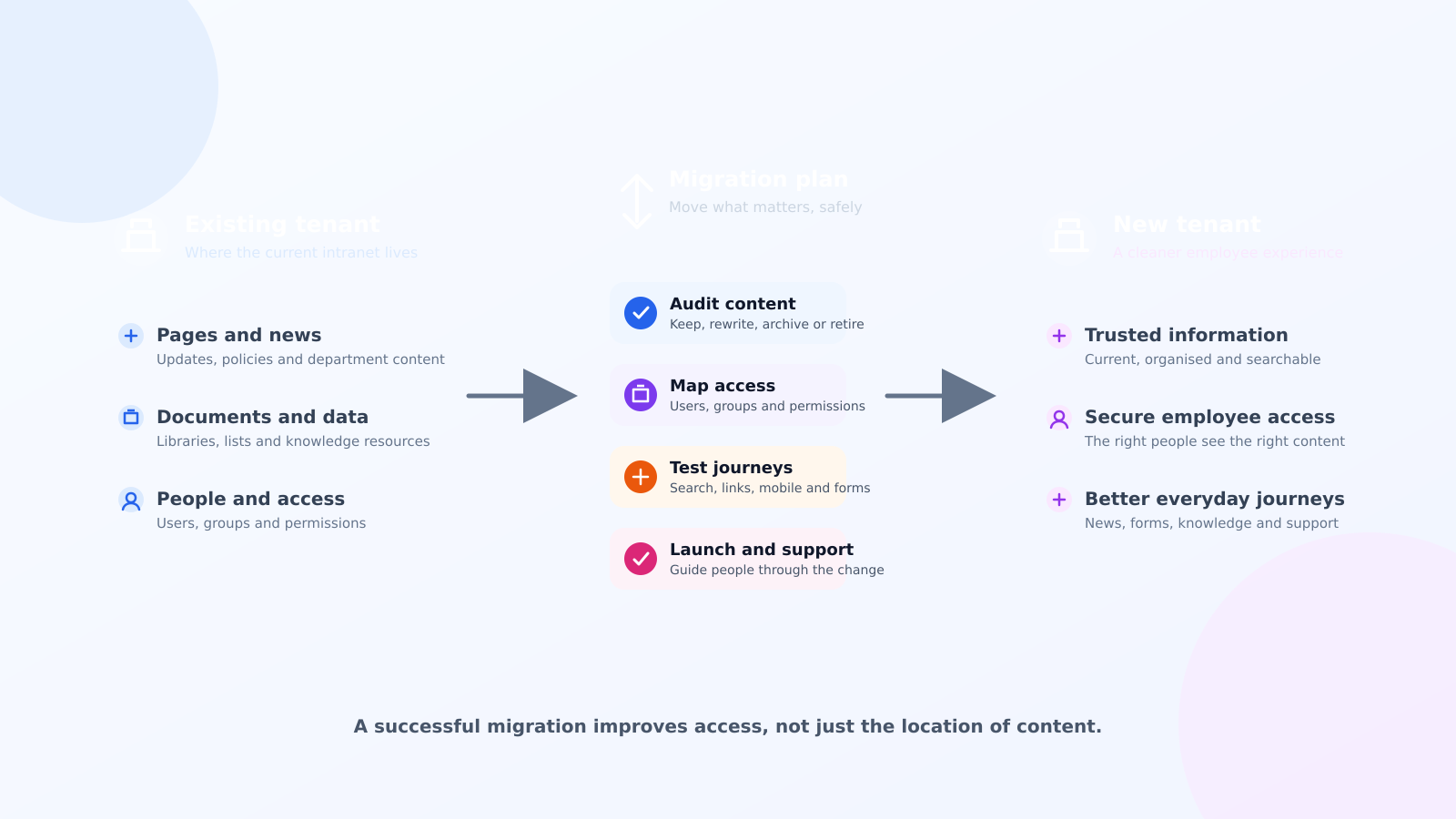
A tenant-to-tenant intranet migration is the process of moving your intranet from one Microsoft 365 environment to another.
It is commonly needed when a business is acquired, merges with another organisation, separates from a parent company or consolidates several Microsoft 365 tenants into one.
The important point is that this is not the same as moving a few folders or copying documents between SharePoint sites.
A proper intranet migration can involve your SharePoint sites, news, policies, document libraries, navigation, employee permissions, branding, forms and links. In some cases, it also means rebuilding parts of the intranet so they work properly in the new environment.
For most clients, we would advise against automatically moving everything exactly as it is. A migration is a useful opportunity to remove outdated policies, archive old documents, fix confusing navigation and give employees a simpler place to find information. If the old intranet is difficult to use, copying every problem into a new tenant is a missed opportunity.
When you migrate an intranet to SharePoint Online, the goal should be more than getting content from A to B.
The real goal is to make sure employees can still find the information, tools and updates they need without disruption.
What Is a Tenant-to-Tenant Intranet Migration, Exactly?
What Usually Moves—and What Usually Needs Rebuilding?
Most projects include moving SharePoint sites, pages, document libraries, lists and news posts.
You may also need to move navigation, hub relationships, branding, user and group permissions, metadata, content types, retention labels and sensitivity controls.
However, some areas need closer attention rather than a straight copy.
Embedded forms, approval workflows, third-party integrations, custom web parts and internal links may need to be rebuilt, reconnected or tested in the destination tenant.
The same applies to permissions. A group structure that made sense in the old organisation may no longer be appropriate after a merger, rebrand or business restructure.
This is where specialist tenant to tenant migration tools can help. AvePoint Confidence Platform, for example, supports tenant-to-tenant migration projects and can help teams assess, move and manage SharePoint and Microsoft 365 content.
Even with the right tool, though, someone in the business still needs to decide what content is current, who should access it and what the new intranet experience should look like.
A sensible approach is to divide content into four groups:
- Move: Current, accurate and actively used content that still serves a clear purpose.
- Rewrite: Important content that is outdated, hard to understand or no longer matches the new organisation.
- Archive: Information that must be retained for legal, historical or operational reasons but does not need to sit in the live intranet.
- Retire: Duplicate, expired or ownerless content that no longer provides value.
Why Businesses End Up Moving Between Tenants
Most organisations do not plan a tenant-to-tenant intranet migration for the sake of it. It is usually driven by a bigger business change.
A merger or acquisition may mean two organisations need to bring their employee communications, policies and systems together.
A divestment can require one part of a business to establish its own Microsoft 365 tenant and separate its information securely.
Other businesses are simplifying years of technology growth by consolidating multiple tenants into one managed environment.
Regional separation, tenant restructuring, a major rebrand or updated security and governance requirements can also trigger a move. Whatever the reason, the intranet should be treated as a key employee service.
It is often where people go first for company news, HR guidance, forms, documents and everyday support, so it needs the same level of planning as the technical migration itself.
Why an Intranet Migration Is a People Project as Much as an IT Project
The technology makes an intranet migration possible, but employees decide whether it succeeds.
If people cannot find a policy, access an important document or understand where everyday information has moved, they will quickly fall back on email, shared drives and asking colleagues for help.
That is why the best migration projects do not focus only on moving content safely.
They also consider how employees search for information, which tasks they need to complete, what they access on mobile and where confusion is most likely to happen.

Why an Intranet Migration Is a People Project as Much as an IT Project
The Upside Is a Cleaner, More Useful Digital Workplace
A move to a new tenant gives you a rare chance to reset the intranet properly.
Rather than carrying every old page, document and workaround into the new environment, you can make deliberate improvements that benefit employees from day one.
This can include removing stale content that no longer reflects the business, making HR policies and key documents easier to find, and setting consistent standards for how teams publish information.
It is also a good time to improve mobile access for frontline, remote and deskless employees who may not sit at a computer all day.
You can also clarify who owns each part of the intranet. When every policy, department page and document library has a named owner, content is more likely to stay accurate after launch.
At the same time, confusing menus can be replaced with task-based journeys that help employees get straight to what they need, whether that is booking leave, finding a form, checking a company update or reading a policy.
Why Should You Migrate Your Existing Intranet?
Before beginning an intranet migration, you need to be clear about why the move is worth the time, effort and investment. A new tenant alone will not solve old intranet problems.
However, if the existing intranet is holding people back, migration can be the right moment to fix the foundations rather than keep patching around them.
You may recognise some of these common signs:
- Information is difficult to find: Documents may follow different naming conventions, sit in multiple locations or be uploaded without a clear structure. Employees waste time searching or ask colleagues for files that should be easy to retrieve.
- Too many copies of the same document exist: When teams are unsure where the official version lives, they save copies "just in case." This leads to duplicated files, conflicting information and uncertainty about what is current.
- Metadata and version control are inconsistent: Files may be uploaded without the right labels, owners or review dates. Over time, search becomes less useful and staff may rely on manual updates or outdated versions.
- The intranet no longer supports how people work: Older platforms may lack useful search, targeted communications, employee engagement tools, modern collaboration features or easy mobile access.
- Simple tasks take too long: If the interface is clunky, navigation is unclear or key actions require too many clicks, employees will avoid using the intranet altogether.
These issues are not just frustrating; they affect productivity, compliance and employee confidence.
If teams are spending too much time looking for information, duplicating work or using unofficial channels, the intranet is no longer doing its job.
Here's Where Things Get Complicated
The challenge is that an old intranet often contains years of hidden problems.
There may be undocumented workarounds, pages with no obvious owner, copied policies, outdated links, inconsistent permissions and content that nobody feels responsible for maintaining.
That is why organisations should not simply lift and shift everything when they migrate an intranet to SharePoint Online.
Doing so may move the content, but it also moves the clutter, confusion and risk that made the old intranet difficult to use in the first place.
A stronger approach is to identify what employees genuinely rely on, clean up what no longer adds value and design the destination around clear journeys, trusted information and secure access.
Related Intranet Migration and Digital Workplace Guides
A successful intranet migration is only one part of creating a connected workplace. These AgilityPortal guides explore employee communication, digital workplace technology, employee portals, collaboration and the practical ways businesses can make trusted information easier to find.
- 10 Best Employee Communication Platforms: Buyer’s Guide to Choosing the Best One
- Best Team Communication App for 2026: Features for Frontline Communication
- What Are Internal Communication Tools? The Power of Internal Comms Tools for Business Success
- Top Internal Communication Tools to Enhance Employee Engagement
- Best Staff Communication App for Modern Teams
- Real-Time Messaging: Benefits, Risks and Best Practices
- What Are the Digital Applications That Focus on Workplace Communications?
- Best Apps for Employees: A Complete Guide
- Best Hybrid Work Collaboration Tools and Software for Effective Team Communication
- What Is an Employee Portal or Self-Service Portal?
The Risks That Can Turn a Smooth Move Into an Employee Headache
A tenant-to-tenant intranet migration can be technically successful and still create problems for the people who rely on it every day.
If employees cannot find the latest policy, access a form or trust that a document is current, they will soon return to email attachments, saved copies and unofficial channels.
The impact is bigger than a few frustrated support tickets.
Poorly managed migrations can slow down routine work, create compliance concerns, expose sensitive information and reduce confidence in the intranet as a reliable source of truth.

The Risks That Can Turn a Smooth Move Into an Employee Headache
| Workplace situation | Business and employee impact | Recommended approach |
| An HR policy is moved without permission validation | Staff may access confidential information, while the people who need an essential policy may be locked out. This can create privacy, compliance and employee-relations issues. | Review access groups, apply least-privilege access and test with representative employee accounts before launch. |
| Old intranet links are not redirected | Employees land on error pages while trying to complete a task, such as reporting absence, accessing a health and safety procedure or finding a form. Productivity drops and support requests increase. | Create a redirect register for priority pages and test key employee journeys before launch. |
| Every old page is copied into the new intranet | Outdated and duplicate information remains searchable, making it harder for employees to know what is accurate. The new intranet inherits the same clutter as the old one. | Apply clear move, rewrite, archive and retire rules before migration. |
| Employees only hear about the move on launch day | People do not know where information has gone, what has changed or how to get help. Managers receive repeated questions and employees may miss important updates. | Communicate early, explain the benefits in plain language and provide simple launch guidance and support. |
| Content has no named owner | Pages and documents become outdated again soon after launch. Employees lose trust in what they read and may act on incorrect information. | Assign a business owner and review date to each important content area. |
| Search and navigation are not tested | Employees waste time hunting for basic information, particularly new starters, frontline workers and people using mobile devices. | Test the most common employee tasks, search queries and mobile journeys with real users. |
| Forms, workflows or integrations are assumed to work | Requests, approvals or employee processes can fail quietly, delaying work and forcing teams back into manual processes. | Document every integration, test it in the target tenant and provide a fallback process for launch. |
The key lesson is simple: the impact of a migration is felt by employees long after the technical transfer is complete.
Planning for access, content quality, communications and support protects both the business and the employee experience.
Broken Links Are Annoying; Broken Employee Journeys Are Worse
A broken link may seem like a small migration issue, but it becomes far more serious when it stops an employee completing an important task.
For example, a team member may need the parental-leave policy before speaking with their manager, an employee may be trying to submit an expense claim before a deadline, or a frontline worker may need health-and-safety guidance during a shift.
If those links lead to an error page, an old tenant or a document they no longer have permission to view, the employee does not see a "minor technical problem."
They see an intranet they cannot rely on.
The same applies to practical everyday journeys, such as finding a manager's contact details, reporting an absence, completing mandatory training or locating the latest company announcement.
Before launch, test these journeys from the employee's point of view, including on mobile devices. Focus first on the tasks people complete most often and the information they need when timing matters.
Permissions Are Where Security and Employee Trust Meet
Permissions are one of the most important parts of any tenant-to-tenant intranet migration.
Employees need access to the information that helps them do their jobs, but they should not automatically be able to see confidential HR, legal, payroll or business-sensitive material.
A sensible approach is to apply the principle of least-privilege access: give people access only to the content and tools they genuinely need. This protects sensitive information while making access easier to manage and review.
It is also important not to assume that every old permission should be copied exactly into the new tenant. Old groups may include people who have changed roles, left the business or no longer need access.
Some permissions may have been created as temporary workarounds and never reviewed.
Before migration, map existing groups, identify their purpose and confirm who should be included in the destination tenant.
Review external sharing carefully, especially where documents have been shared with suppliers, consultants or former group-company users. Keep clear records of approvals, access decisions and permission testing so there is an audit trail if a question arises later.
Getting permissions right protects the organisation, but it also builds employee confidence. People are more likely to trust the new intranet when they can reliably access what they need and know that sensitive information is properly protected.
Things to Prepare Before Your Intranet Migration
A successful intranet migration is decided well before launch day.
Moving content without a clear plan can create unnecessary disruption, but preparing the right foundations gives employees a much smoother transition.
Before you switch to the new intranet, make sure these five areas are in place.
- Understand your current intranet and how people use it: Start by reviewing where content lives, who owns it, how employees access it and which pages, documents or tools they rely on most. The goal is not to duplicate every old folder and page. It is to protect essential employee journeys while improving the experience where needed.
- Build a clear migration workflow: Document every stage of the project, from content audit and permission mapping through to testing, launch and post-migration support. Everyone involved should understand what is moving, who is responsible, when decisions are needed and what happens if an issue is found.
- Communicate with stakeholders early: Employees, managers, content owners and business leaders should know that the migration is happening well in advance. Explain why the business is making the move, what will improve for users, what they need to do and where they can ask questions. Nobody should discover on launch day that their usual intranet has changed.
- Prepare training and support: Give administrators and content owners the training they need before launch. Employees should have simple self-service support, such as quick-start guides, short videos, FAQs and a clear route to get help. This reduces uncertainty and helps people use the new intranet with confidence from day one.
- Protect data and plan for problems: Treat backups, security and recovery as essential parts of the migration plan. Secure sensitive HR, legal and business information, verify that data is backed up, confirm compliance requirements and agree a rollback or incident-response process.
- A realistic plan assumes something may go wrong and makes sure the team knows how to respond quickly.
How to Manage the Intranet Migration Process
Once the planning is complete, the focus shifts to moving the intranet in a controlled way while keeping disruption to employees as low as possible.
The best approach is phased, well-tested and centred on what employees need to do—not just what content needs to be transferred.
- Choose a platform that fits the business: Select a platform based on genuine business needs, not just its appearance. Review integrations, mobile access, security controls, search, communications, onboarding, employee recognition, knowledge management and deployment options. The platform should support the way your employees actually work today and give you room to grow.
- Create a clear information architecture: Organise the new intranet so employees can quickly understand where to go for news, policies, people information, forms, documents and support. Do not simply copy the old structure. Keep familiar journeys where they work, but improve navigation, labels and search where employees have struggled.
- Set content standards and ownership: Every important area should have a named content owner responsible for accuracy and review. Create simple publishing rules for page titles, document names, formatting, metadata, review dates and approvals. This prevents the new intranet becoming cluttered and unreliable over time.
- Map permissions and protect sensitive information: Review access carefully before content is moved. Employees should have the access they need for their role, while confidential HR, legal, payroll and leadership information remains protected. Confirm group membership, external sharing settings and approval processes, then test them with real user scenarios.
- Review integrations and workflows early: List every form, approval process, notification, embedded tool and third-party integration connected to the current intranet. Decide whether each one can be migrated, needs to be rebuilt or should be replaced with a standard feature in the new platform. Always test critical workflows before launch.
- Migrate in phases rather than one big switch: Start with a pilot group that includes power users, content owners, managers and different employee types. Move a controlled set of content first, gather feedback and fix problems before expanding the migration. Phased delivery is safer than discovering issues after the entire organisation has moved.
- Use metadata to make content easier to find: Apply useful tags, categories, owners and review dates to important documents and pages. Good metadata improves search, supports governance and makes it easier for employees to find the right version of the information they need.
- Keep employees informed throughout the move: Use internal announcements, manager briefings, newsletters, webinars and intranet updates to explain what is happening. Be clear about the timing, the benefits, what employees need to do and where they can get help. Communication should continue after launch, especially when new features or changes are introduced.
- Train users, administrators and content owners: Provide role-specific support rather than giving everyone the same information. Employees may need a quick-start guide, while content owners need publishing training and administrators need support with permissions, governance and reporting.
- Collect feedback and keep improving: Ask employees what is working, what is difficult to find and where they still need help. Use feedback, search data and support requests to improve navigation, content and training. Migration is the launch of a better intranet—not the end of the work.
Migration Tools That Can Help Move Content Faster
The right migration tool depends on where your current intranet lives and what you need to preserve.
Some tools are designed for SharePoint and Microsoft 365 tenant moves, while others help extract content from older intranets, shared drives or collaboration platforms.
The important thing to understand is that a migration tool does not automatically create a well-organised AgilityPortal intranet.
It can help extract, map and validate content, but the business still needs to decide what should move, where it belongs, who owns it and who should have access.
| Tool | Best suited for | How it can support an AgilityPortal migration |
| AvePoint Confidence Platform | SharePoint and Microsoft 365 migrations | Useful for assessing SharePoint content, permissions and structure before extracting or preparing material for migration. Particularly relevant where the existing intranet is hosted in SharePoint Online. |
| Microsoft SharePoint Migration Tool | File shares and supported content sources moving into SharePoint | Helpful where an organisation first needs to consolidate files or SharePoint content before restructuring it for a new intranet. |
| Microsoft Migration Manager | File-share and cloud-storage migration projects | Can support discovery and staged movement of business content from approved sources into Microsoft 365 as part of a wider consolidation project. |
| AvePoint Fly | Large Microsoft 365 migrations across varied sources | Supports enterprise migration programmes involving SharePoint, Teams, files and conversations, with migration planning and progress reporting. |
| Quest On Demand Migration | Project Microsoft 365 tenant-to-tenant projects | An option for moving users, content and collaboration workloads during mergers, acquisitions or tenant consolidation. |
| BitTitan MigrationWiz | Mailbox and supported cloud-data migrations | An option for moving email and documents as part of a broader Microsoft 365 migration programme. Compare its supported sources, migration workflow and reporting with AvePoint Confidence Platform for your specific project. |
| Cloudiway | Migrations between Microsoft 365, Google Workspace and other cloud platforms | An option for projects that need to move mail, files or collaboration data between platforms, particularly where users must continue working across both environments during a phased migration. Compare the exact source, destination and workload support with AvePoint Confidence Platform for your project. |
| Custom API, CSV or bulk-import process | Moving selected content into AgilityPortal | Best for clean, approved content such as employee records, directory data, documents, knowledge-base articles, pages or structured lists where the destination format has been agreed in advance. |
Moving From SharePoint, Google Sites or an Older Intranet to AgilityPortal
If you are moving from SharePoint, Google Sites, Confluence, a legacy intranet or shared drives, begin with an audit—not an export.
Identify the content employees use most, such as policies, news, department pages, forms, onboarding resources and documents.
From there, map each item to the right place in AgilityPortal.
For example:
- Company news and leadership updates can move into Announcements.
- Department information and communities can move into Spaces.
- Policies, guides and evergreen information can become Pages, Wiki content or Knowledge Base articles.
- Documents can move into the Document Library with clear owners and categories.
- Training materials can be organised in the LMS.
- Employee requests and business processes can be rebuilt as Forms, Approvals, Tasks or Cases.
This approach avoids turning AgilityPortal into a copy of an old, cluttered intranet. Instead, it gives the business a chance to bring across the information that matters, improve the employee experience and retire content that no longer serves a purpose.
Build the Migration Plan Before Moving a Single Page
The biggest mistake we see is choosing a migration tool before deciding what the new intranet needs to achieve.
A tool can move content, but it cannot decide what employees need to find, which information should be trusted or how the new experience should work.
Before moving a single page, create a plan that connects the migration to real business outcomes.
This gives the project team a clear way to make decisions when they find outdated documents, duplicate content, unclear permissions or pages that nobody owns.
Start With the Business Outcome, Not the Migration Tool
A successful intranet migration should make work easier for employees, not simply place the same information in a different system.
Agree on what success looks like before selecting tools, setting timelines or starting a content export.
For many organisations, the desired outcomes include:
- Fewer places for employees to search for policies, documents and company updates.
- A simple, mobile-friendly homepage that works for both frontline and office-based teams.
- Clear ownership of HR policies, department pages and company communications.
- Stronger governance and permission controls for sensitive content.
- Better employee onboarding, self-service and access to everyday information.
- Easier access to searchable knowledge, forms, training and business updates.
- Less reliance on email attachments, shared-drive links and unofficial document copies.
This is particularly important when you migrate an intranet to SharePoint Online or move from SharePoint, Google Sites, Confluence or a legacy employee portal to a modern employee intranet platform.
The move should solve existing problems with information discovery, content management and employee communication—not recreate them.
Create a Content Inventory That Helps You Make Decisions
A content inventory gives you one clear record of what exists, why it matters and what should happen to it.
It also stops the team from making rushed decisions during the migration itself.
Do not treat the inventory as a basic file list. Use it to identify duplicate content, pages with no owner, out-of-date policies, sensitive documents and information that employees rely on most.
| Content item | Owner | Action | Destination |
| Employee handbook | HR Director | Rewrite and review annually | Knowledge Base |
| Health and safety procedures | Operations Manager | Keep and review every six months | Document Library |
| Leadership updates | Internal Communications | Keep current updates only | Announcements |
| Department process guide | Department Manager | Rewrite and review quarterly | Department Space |
| Old project documents | Project Sponsor | Archive or delete under retention rules | Secure archive |
As you complete the inventory, ask practical questions: Is this still accurate?
Does anyone use it?
Who is responsible for it?
Is the right audience able to access it?
Could employees find it through search?
If the answer is unclear, do not automatically move it.
Design the Destination Intranet Around Real Employee Tasks
The new intranet should reflect how people actually work, rather than how the old system happened to be organised.
Start with simple user research: ask employees what they search for most, what takes too long to find and which tasks regularly send them back to email or shared folders.
Common employee tasks may include:
- Finding a company policy or employee handbook.
- Checking company news and leadership updates.
- Requesting leave, submitting an expense claim or completing a form.
- Finding a colleague, manager or department contact.
- Accessing training, onboarding resources or mandatory documents.
- Locating health and safety guidance.
- Getting support or raising a workplace request.
Use these tasks to shape the information architecture, navigation and homepage design. Important content should be easy to reach from search, clear menus and relevant shortcuts—not hidden several clicks deep.
Also consider audience targeting.
A frontline employee may need mobile access to shift information, safety guidance and announcements, while a manager may need people policies, reports and approval tools.
The experience should be accessible, easy to understand and consistent across desktop and mobile devices.
The 15-Step Tenant-to-Tenant Intranet Migration Checklist
A successful tenant-to-tenant intranet migration needs a clear process.
Use this checklist to keep the project focused on employee access, content quality, security and a smoother launch.
- Set a clear business case and success measures - Define why the migration is happening and what success looks like, such as better search, fewer duplicate documents, improved mobile access or stronger content governance.
- Create a cross-functional project team - Include IT, internal communications, HR, security, legal or data-protection specialists, department managers and key content owners.
- Audit your existing intranet - Review sites, pages, documents, permissions, integrations, forms, workflows and important internal links.
- Clean up content before moving it - Identify material that should be deleted, archived, merged, rewritten or retained for legal and compliance reasons.
- Define the destination intranet structure - Agree the information architecture, navigation, homepage layout, search categories and key employee journeys before migration begins.
- Map users, groups and access requirements - Review employee identities, Microsoft 365 groups, department access and external-sharing settings so the right people retain the right access.
- Confirm privacy, retention and security requirements - Check how sensitive HR, legal, payroll and business information will be handled, retained, protected and audited.
- Decide what will move, be rebuilt or be replaced - Some content can be migrated directly, while forms, workflows, custom features and integrations may need rebuilding or replacing.
- Choose the right migration approach and tools - Confirm the tool supports your source system, destination platform, content types, permissions and volume of data. Also check licensing, technical limitations and reporting options.
- Set up content-owner approvals - Ask named owners to confirm that important content is accurate, current and ready to move before it appears in the new intranet.
- Run a pilot migration first - Start with a manageable group of departments, content owners and employee types. Use the pilot to identify issues before moving the entire organisation.
- Test the employee experience thoroughly - Check permissions, search, mobile access, links, forms and priority journeys, such as finding a policy, submitting a request or locating a manager's contact details.
- Communicate the change clearly - Tell employees what is changing, when the new intranet will be available, what they need to do and where they can get help.
- Complete the phased migration and cutover - Move content in planned stages, validate each stage and keep a clear rollback or contingency process in case a critical issue appears.
- Measure and improve after launch - Monitor adoption, support requests, unsuccessful searches, broken links, content-owner activity and employee feedback. Use this insight to improve the new intranet over time.
Do not move every page or document simply because it exists in the old tenant.
The aim is to create a more useful, secure and well-governed intranet that employees can trust—not to transfer old clutter into a new environment.
Expert Tips To Consider for a Successful Intranet Migration
A migration checklist is useful, but the most successful projects usually come down to a few practical habits: understand the systems involved, involve the right people early and communicate clearly throughout the move.
The advice below is based on the issues that commonly cause intranet migration projects to lose time, create confusion or fall short of employee expectations.
- Understand both the old and new systems properly: Do not focus only on what content exists. Review how employees currently use the intranet, which features they depend on, how workflows operate and where information connects to other systems. This helps you avoid moving content without preserving the process around it.
- Check how data and content will align in the new platform: The new intranet may organise people, documents, permissions and communications differently from the old one. Use this as a chance to align content with better practices, rather than trying to reproduce every historic workaround.
- Document the new way of working: Create clear guidance for content owners, administrators, managers and employees. Documenting publishing standards, approval steps, permissions and everyday processes makes training far more effective and helps maintain consistency after launch.
- Secure an active senior sponsor: A migration needs visible support from a senior leader who can remove blockers, make decisions and reinforce why the change matters. This is especially important where departments need to clean up content or change established habits.
- Involve stakeholders before final decisions are made: Show draft navigation, wireframes, page designs and sample employee journeys to content owners and representative users. People are more likely to support the new intranet when they can see how it will work and contribute before launch.
- Communicate regularly, not only when there is a problem: Give employees and managers consistent updates on progress, timings, benefits and next steps. Frequent, simple communication is more effective than one large announcement just before launch.
- Make the content audit a shared responsibility: Content owners know which pages, policies and documents are essential. Involve them in ranking content, identifying duplicates and deciding what should be moved, rewritten, archived or retired.
- Do not launch everything at once if you do not need to: A phased approach allows you to validate key areas, learn from feedback and fix issues before the full rollout. You can also keep useful improvements or new features for later releases, giving employees a reason to return and explore the intranet after launch.
- Provide support after launch, not just before it: Migration day is the beginning of adoption, not the end of the project. Keep a clear support route, review search behaviour and answer recurring questions quickly. The first few weeks are when employees decide whether the new intranet is genuinely easier to use.
Expert insight from AgilityPortal
“Our priority is to make every intranet migration as straightforward as possible for the people using it. Moving platforms should not mean employees lose access to the information, tools and support they rely on each day. We work closely with customers to help them protect what matters, simplify what does not and create a stronger, more connected workplace from day one.”
JJ
Jessica Jones
Director of Client Services, AgilityPortal
Who Should Own Each Part of the Move?
A tenant-to-tenant intranet migration should not sit entirely with IT.
IT may manage the technical work, but the intranet affects communication, HR, employee experience, security and daily operations across the whole business.
The strongest projects have clear ownership from the start.
Everyone does not need to attend every meeting, but each area needs someone accountable for decisions, approvals and follow-up actions.
| Role | Main responsibility | Why it matters |
| CIO or IT Director | Owns technical strategy, tenant readiness, migration approach, platform decisions and supplier oversight. | Keeps the migration secure, achievable and aligned with the wider Microsoft 365 environment. |
| Intranet or Digital Workplace Lead | Leads employee journeys, intranet structure, search, navigation, content standards and adoption. | Stops the new intranet from becoming a technical repository that employees struggle to use. |
| Internal Communications Lead | Owns the change narrative, launch communications, manager briefings, publishing support and employee feedback. | Helps employees understand what is changing, why it matters and where to get help. |
| HR Director | Reviews people policies, onboarding content, employee communications and the impact on staff. | Ensures essential HR information remains accurate, accessible and appropriately protected. |
| CISO or Security Lead | Reviews access controls, external sharing, risk, audit requirements and security sign-off. | Protects confidential employee, customer and business information throughout the move. |
| Data Protection Officer or Legal Lead | Advises on GDPR, retention, privacy, lawful data handling and contractual obligations. | Reduces privacy and compliance risk, particularly where sensitive data is involved. |
| Department Content Owners | Confirm content accuracy, decide what should be kept or retired and maintain material after launch. | Gives every important area a clear owner, preventing outdated content from returning. |
| Department Managers | Share local updates, support teams through the change and escalate access or training issues. | Helps the migration work in everyday practice, not only at project level. |
The key is to agree ownership before the migration starts. If nobody owns a decision, content area or employee communication, it is likely to become a problem later.
How to Handle Privacy, Security and Compliance Without Slowing Everything Down
Privacy, security and compliance should be built into your intranet migration plan from the start.
Leaving them until the final weeks creates delays, last-minute access problems and unnecessary risk—particularly when the intranet contains employee records, HR policies, payroll information, legal documents or confidential business content.
The aim is not to make the project harder. It is to make sensible decisions early, document them clearly and move only the information that has a genuine business purpose.
Only Move Content That Still Has a Purpose
Start with data minimisation.
If a document, page or employee record is out of date, duplicated, ownerless or no longer needed, do not automatically move it into the new intranet.
This reduces clutter, lowers security risk and makes it easier for employees to find trusted information. It also gives content owners an opportunity to confirm what should be retained, archived or securely deleted.
Review Employee Information Carefully
Employee information needs extra care during a migration.
Under UK GDPR and GDPR, organisations should have a clear lawful basis for processing personal data and ensure that it is handled securely and only for an appropriate purpose.
For example, HR documents, employee contact details, absence information, disciplinary records and payroll-related content should not be placed in general document libraries or made available to wider groups by default.
Confirm who needs access, why they need it and how that access will be managed in the new platform.
Legal and regulatory requirements vary by organisation, location and sector, so involve your Data Protection Officer, legal adviser or compliance lead where sensitive or regulated information is involved.
Confirm Retention Rules and Legal Holds
Not every old document should remain visible in the live intranet, but some information may need to be retained for a set period because of legal, contractual, financial or regulatory requirements.
Review retention schedules before migration. Identify content that must be preserved, content that can be archived and content that can be securely removed.
If a legal hold applies to particular information, make sure it remains protected and cannot be deleted or changed unintentionally during the move.
Apply the Right Sensitivity Labels and Access Controls
Use sensitivity labels, permission settings and access controls to protect content based on its level of confidentiality.
Public company news may be suitable for all employees, while leadership papers, HR templates, legal advice and customer information may require restricted access.
Follow the principle of least privilege: employees should have access to the information they need for their role, but no more than is necessary. Review user groups, inherited permissions and role changes carefully, especially after a merger, acquisition or restructure.
Check External Sharing Before Launch
External sharing can easily be overlooked during a tenant-to-tenant migration.
Old intranet content may have been shared with suppliers, consultants, agency staff, former employees or users from another group company.
Review these links and permissions before the move.
Decide which external users still need access, remove sharing that is no longer appropriate and make sure any approved external access is secure, documented and regularly reviewed.
Keep an Audit Trail of Important Decisions
Record key decisions throughout the project, including content approvals, permission changes, data-retention choices, security reviews and migration testing results.
A clear audit trail helps the business demonstrate accountability and makes it easier to investigate an issue if something goes wrong.
It also prevents the project team from relying on informal conversations or unclear assumptions when decisions need to be revisited later.
Archive or Dispose of Redundant Content Securely
Content that does not belong in the new live intranet may still need careful handling.
Archive information that must be retained but is no longer actively used, and securely dispose of material that has reached the end of its retention period.
Do not leave outdated documents in accessible shared folders "just in case." That creates confusion for employees and can leave sensitive information exposed longer than necessary.
Prepare for Recovery Before You Need It
Even well-planned migrations can encounter problems.
Confirm that backups are available, test how content can be restored and document a rollback plan for critical issues.
The project team should also agree an incident-escalation process, including who must be informed if confidential data is exposed, permissions fail or essential employee content becomes unavailable.
A secure migration is not about expecting failure. It is about being prepared to respond quickly, protect employees and keep the business running if an issue occurs.
Testing Should Reflect the Way Employees Actually Work
Testing is where a migration plan becomes real. It is not enough for an administrator to confirm that pages have moved and files open correctly.
mployees have different devices, access levels and everyday tasks, so the new intranet needs to be tested from their point of view.
A technically successful migration can still fail employees if search does not return the right result, an important form does not work on mobile or a user cannot access the policy they need.
Testing should therefore focus on practical employee journeys before launch.
Use Employee Personas, Not Only Administrator Accounts
Administrators usually have broad permissions and understand where everything sits.
Most employees do not. Test the intranet with representative user profiles to identify problems that an admin account may not reveal.
Include people such as:
- A frontline employee using a mobile phone: Can they quickly see announcements, find safety guidance, access policies and complete simple tasks without a desktop computer?
- A manager looking for people information: Can they find absence guidance, performance resources, team policies and relevant forms without asking HR for help?
- A new starter: Can they locate onboarding information, company values, key contacts, training and first-week guidance?
- A content publisher: Can they create, edit, submit and publish content using the agreed process without accidentally making information available to the wrong audience?
- An HR administrator: Can they access restricted HR material, publish employee policies and manage confidential information safely?
- An employee with limited access: Can they see the content they need while being correctly prevented from opening restricted information?
- A remote employee: Can they access the intranet, documents and support resources from outside the main office network using their normal device and connection?
What Should Be Checked Before Launch?
reate a clear test plan and prioritise the employee tasks that matter most.
A useful target is to test the top 20 to 30 journeys employees complete regularly, especially those linked to HR, health and safety, onboarding, forms and business-critical information.
Before launch, check:
- Search relevance: Search for common phrases employees will use and confirm that the most useful, current results appear first.
- Links and redirects: Test links within pages, documents, menus, emails and old intranet bookmarks. Important old URLs should lead employees to the right new destination where possible.
- Permissions and audience targeting: Confirm that each employee group can access the right content and cannot view confidential material they should not see.
- Mobile usability: Check pages, documents, forms, menus and key actions on mobile devices, particularly for frontline and deskless employees.
- Page load performance: Ensure important pages and documents load quickly enough on typical office, home and mobile connections.
- Accessibility: Test keyboard navigation, colour contrast, readable headings, image descriptions and screen-reader compatibility so the intranet is usable by everyone.
- Forms, workflows and embedded applications: Confirm that approvals, requests, embedded calendars, training, third-party tools and notifications work correctly in the destination environment.
- Help content and escalation routes: Make sure employees can find launch guidance, FAQs and a clear support contact if they get stuck.
Do not wait until after launch to discover whether employees can complete these tasks. A representative pilot group, clear test scenarios and fast fixes before cutover will give the new intranet a far stronger start.
How to Communicate the Change Without Overwhelming Employees
A technically successful intranet migration can still feel like a failure if employees are left wondering where their information has gone.
Clear, timely communication helps people understand the change, feel prepared and get support before small issues become major frustrations.
The key is to focus on what changes for employees, not the technical work happening behind the scenes.
Tell People What Changes for Them—Not What Happens in the Backend
Most employees do not need to know about tenant configuration, data mapping or migration tools.
They need to know whether they can still find policies, forms, documents, company news and the people they work with.
A simple communication plan can include:
- An early announcement: Explain why the intranet is changing, when the move is expected to happen and what employees can expect to improve, such as simpler navigation, better search or easier mobile access.
- A countdown reminder: Send a short reminder one or two weeks before launch. Highlight anything employees need to do, such as saving important bookmarks, completing a short training guide or checking they can sign in.
- A "What's changing?" page: Create one clear page that explains the new homepage, navigation, key links and common questions. Screenshots or a short video tour can make the change easier to understand.
- A manager briefing: Give managers a short, practical briefing they can share with their teams. They should know the launch date, what is changing and how to direct employees to support.
- A launch-day message: Confirm that the new intranet is live, explain where employees can access it and provide a direct link to help content. Be honest if a small number of areas are still being completed.
- A simple support route: Give employees one obvious way to report a problem or ask a question. For a larger rollout, online office hours or short drop-in sessions can help resolve common issues quickly.
- A follow-up survey: After launch, ask employees whether they can find what they need, what has improved and where they are still struggling. Keep it short and use the feedback to prioritise improvements.
Make the New Intranet the Obvious Source of Truth
The new intranet should become the place employees naturally go for reliable information.
Use it to publish migration updates, launch guidance, policies, training materials, FAQs and support information in one consistent location.
A modern employee communication platform such as AgilityPortal can make this easier by supporting targeted announcements, searchable policies and documents, task reminders, training resources and employee acknowledgements.
This means the right people can receive the right update without relying on long email chains or scattered shared folders.
It can also give employees a clear way to ask questions, flag missing information and share feedback during the transition.
When internal communications, HR and managers can see where people need more guidance, they can respond quickly and keep the new intranet useful long after the migration is complete.
What Changes Next as Employee Intranets Become More Connected?
An intranet migration is not simply a project to complete and forget. It is the start of a more connected way of working, where employees expect one trusted place to find company news, policies, documents, forms, training and everyday support.
AI-assisted search will make content quality even more important. AI can help employees find answers faster, but it can only be useful when the underlying information is current, clearly owned and protected by the right permissions. If outdated documents, duplicate policies and unclear access rules remain in the system, AI may make it easier to find the wrong information just as quickly.
This means content governance is becoming an ongoing operational responsibility. Teams will need to review important pages, maintain metadata, confirm ownership and remove content that no longer serves a purpose. Good governance makes search more accurate today and reduces disruption when the business changes systems again in the future.
Employees will also expect the intranet to work wherever they are. Hybrid, remote and frontline teams need mobile-friendly access to targeted announcements, documents, tasks and support without relying on a desk, company email or a complicated VPN connection.
A well-planned migration creates the foundation for this. Clean content, clear ownership, secure permissions and simple navigation give organisations a more adaptable digital workplace—one that can evolve as employee needs and technology continue to change.
Intranet Migration Case Studies
TAP Air Portugal Completes a Complex Data Migration
TAP Air Portugal completed a complex data migration project with specialist aviation technology partner CrossConsense. The work focused on moving engineering and logistics data within the airline's AMOS environment, which supports important operational processes.
For an airline, migration work needs careful planning because the data involved supports teams working across different locations, systems and schedules. The project required a defined timeline, experienced migration support and a clear understanding of how the existing data was used before it could be transferred safely.
While this was not an employee intranet migration, the lesson is directly relevant for organisations moving their intranet or digital workplace. A successful move depends on more than transferring information. Teams need to understand the source system, map how information will work in the destination platform, protect access to important content and validate the result before relying on it in day-to-day operations.
TAP Air Portugal's project is a useful reminder that complex migrations work best when the business treats planning, data quality and specialist support as essential parts of the process—not as tasks to address after the move has started.
Case Study
“AgilityPortal gave us a clearer, more structured way to bring our employee communications, documents and everyday resources together. The migration process helped us focus on what our people actually needed, while giving our teams confidence that important information would remain easy to find.”
AM
Alex Morgan
Director of Employee Experience, Harborline Aviation Group
Planning an Intranet Migration? Make the New Experience Count
Planning an Intranet Migration? Make the New Experience Count
An intranet migration is the ideal time to give employees more than a new location for old content.
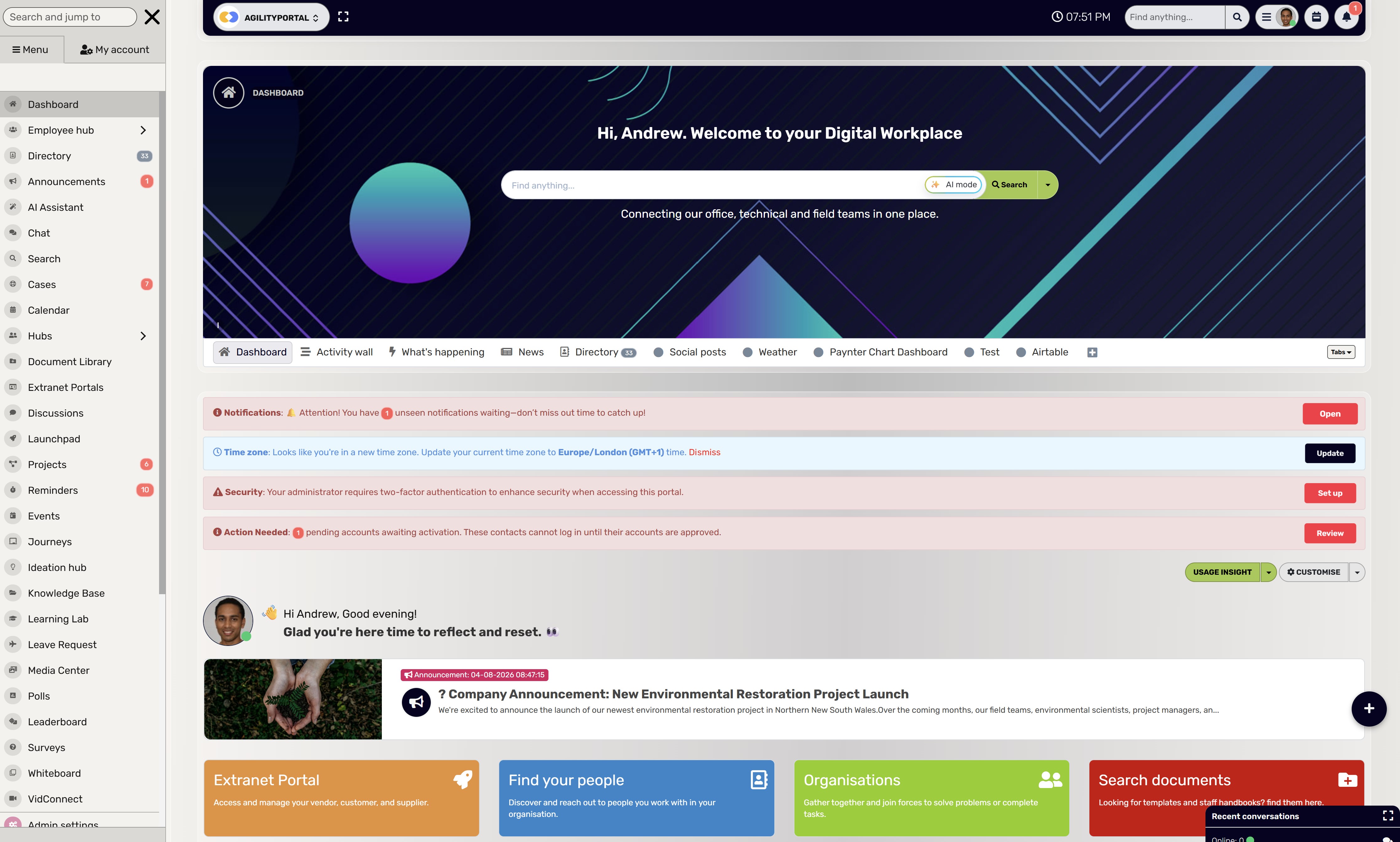
With AgilityPortal, organisations can bring company communications, searchable knowledge, policies, documents, forms, employee directories, training and everyday collaboration into one secure digital workplace.
Rather than moving clutter from one tenant to another, you can create a clearer experience that helps people find what they need, wherever they work.
AgilityPortal supports targeted announcements, Spaces for departments and communities, document management, knowledge-base content, employee onboarding, forms and approvals, tasks, learning and mobile access.
It also gives HR, internal communications and IT teams better control over content ownership, permissions and employee engagement—without making the intranet difficult to manage.
Ready to create a cleaner, more connected employee intranet?
Start your free AgilityPortal trial or book a personalised demo.
Our Verdict · #1
AgilityPortal
Best for organisations replacing a legacy, fragmented or SharePoint-based intranet with a secure, all-in-one employee digital workplace.
#1
Our pick
Starting price
From $99/month for 25–99 employees, with a 14-day free trial.
Best feature
Bring announcements, policies, documents, knowledge, forms, training and employee tools into one searchable workplace.
AgilityPortal is a strong choice for organisations that want an intranet migration to improve the employee experience, not simply move old content into a new location. It gives teams one central place for company updates, knowledge, documents, employee communication and everyday workplace tools.
What clients like
- Announcements, chat, documents, knowledge and employee tools sit in one platform.
- Pages, Spaces and knowledge areas can be organised around departments, locations and employee needs.
- Mobile access helps keep frontline, hybrid and office-based employees connected.
- Forms, tasks, learning and acknowledgements support everyday employee journeys.
What to consider
- A content audit is still needed before moving pages and documents from the old intranet.
- Teams should map user access, ownership and content structure before launch.
- A phased rollout helps employees understand which features to use first.
- Migration tools may still be required to extract or prepare content from the source platform.
Pricing, product features and plan availability can change. Confirm current details with AgilityPortal before purchasing.
Final Thoughts
A tenant-to-tenant intranet migration is not just about moving pages, documents and permissions into a new Microsoft 365 environment. It is an opportunity to create a simpler, more secure and more useful place for employees to work.
The most successful projects begin with a clear business outcome, not a migration tool.
They audit content before moving it, remove what no longer adds value and design the new intranet around the information and tasks employees rely on every day.
They also bring IT, HR, internal communications, security teams and content owners together, because each group plays a role in protecting access and making the change work in practice.
There will always be technical details to manage, from user mapping and permissions to links, workflows and testing. But the real measure of success is much more straightforward: can employees find trusted information, complete important tasks and feel confident using the new intranet from day one?
Plan carefully, communicate early and keep improving after launch.
Done properly, an intranet migration does more than change where content lives—it gives your people a clearer, more connected digital workplace they can genuinely rely on.
FAQ
What is a tenant-to-tenant intranet migration?
A tenant-to-tenant intranet migration moves an organisation's intranet content, structure and access from one Microsoft 365 tenant to another. It can include SharePoint sites, pages, documents, permissions, navigation and related integrations.
Can you migrate an intranet from one Microsoft 365 tenant to another?
Yes, but the approach depends on the intranet's platform, content types, permissions, integrations and compliance requirements. A proper assessment should happen before selecting a migration method.
How do I migrate an intranet to SharePoint Online?
Start with a content and permissions audit, design the target SharePoint information architecture, map identities and access, migrate a pilot group, test employee journeys, then complete phased cutover and post-launch validation.
What should not be migrated to a new intranet?
Outdated pages, duplicate documents, unused forms, unsupported integrations, expired policies and content with no owner should be reviewed before migration. Some material may need archiving rather than moving.
Will SharePoint permissions transfer during a tenant-to-tenant migration?
Permissions need careful planning and testing.
User identities, Microsoft 365 groups and access models may differ between tenants, so teams should validate access rather than assume it will reproduce perfectly.
How long does an intranet migration take?
It varies significantly based on the number of sites, content quality, integrations, permissions, compliance requirements and whether the intranet is being redesigned at the same time.
The assessment and clean-up stages are often as important as the data move.
Who should lead an intranet migration project?
IT should lead the technical work, but the project should also include internal communications, HR, security, legal or data-protection specialists, department managers and named content owners.
How do you avoid broken links after an intranet migration?
Create a register of important URLs, identify the highest-volume employee journeys, configure redirects where possible and test links before and after launch.
Provide a visible help page for links that have changed.
What is the biggest risk in an intranet migration?
The biggest practical risk is treating the project as a simple data move.
That can leave employees unable to find trusted information, with poor search, incorrect access or confusing navigation in the new environment.
How can AgilityPortal support an intranet migration?
AgilityPortal can provide a central place to publish migration updates, organise policy and knowledge content, target communications, collect acknowledgements, support employee feedback and keep essential workplace information easy to find.
AI Summary
- A tenant-to-tenant intranet migration moves employee content, permissions, structure and access from one Microsoft 365 environment to another.
- Businesses commonly migrate an intranet after a merger, acquisition, divestment, rebrand, security review or wider Microsoft 365 tenant consolidation.
- A successful move involves more than transferring files: teams need to review content, map user access, test employee journeys and decide what should be moved, rewritten, archived or retired.
- Broken links, incorrect permissions, outdated policies and unclear content ownership can quickly reduce employee trust in the new intranet, even when the technical migration is complete.
- IT, HR, internal communications, security teams and department content owners should work together to protect sensitive information and support employees throughout the change.
- The best intranet migration creates a cleaner, more searchable and better-governed digital workplace instead of simply transferring old content problems into a new platform.
Most Popular Posts

Effective communication among team members is vital for the productivity and success of any organization. Surprisingly, 60% of companies lack a long-term internal communication strategy, which p...


Businesses thrive on communication for efficiency, productivity and accomplishment. When the right information is passed from the right designation in the organization, it promotes positivity an...

Categories
Blog
(3252)
Business Management
(399)
Employee Engagement
(237)
Digital Transformation
(226)
Growth
(151)
Intranets
(142)
Internal communications
(110)
Remote Work
(68)
Sales
(53)
Collaboration
(53)
Customer Experience
(33)
Culture
(30)
Project management
(30)
Knowledge Management
(29)
Leadership
(20)
Comparisons
(9)
News
(1)

Related Posts

Which provider gives you better value in the VPSServer vs Hostinger VPS comparison? If you're searching for cheap VPS hosting, it's tempting to focus on the lowest monthly price. But reliability matters too: Hostinger advertises a 99.9% uptime ...

Which mobile EEG system will fit your experiments—and give you usable data beyond a promising specification sheet? With different electrode types, channel configurations and recording modes to compare, choosing a wireless EEG setup can quickly become...

The goal of people operations is to help in increasing employee engagement and retention. It is a strategic element in organizations that focuses on humanizing impersonal processes. Most of the startups have already paid a high price for not having a...

Searching for "communal work spaces near me" but unsure which option will actually suit your growing business? By the end of this guide, you'll know how to compare offices to rent, spot extra costs and ask the right questions before committing....

Do you know what happens to your information after you share it with an AI assistant? That question sits at the heart of AI privacy—and it's easy to overlook when you're trying to finish a task. You paste in a customer email, upload a spr...


Jill Romford
I am a digital nomad, lover of exploring new places and making friends.
I love to travel and I love the internet. I take pictures of my travels and share them on the internet using Instagram.
Traveler, entrepreneur, and community builder. I share my insights on digital marketing and social media while inspiring you to live your fullest life.
Ready to learn more? 👍
One platform to optimize, manage and track all of your teams. Your new digital workplace is a click away. 🚀
Free for 14 days, no credit card required.