
Insight Blog
Agility’s perspectives on transforming the employee's experience throughout remote transformation using connected enterprise tools.
27 minutes reading time
(5413 words)
VPSServer vs Hostinger VPS: Which Is Best for Cheap VPS Hosting?

VPSServer vs Hostinger VPS: Which Is Best for Cheap VPS Hosting?
Compare VPSServer vs Hostinger VPS on pricing, renewal costs, performance, support and features to find the right cheap VPS hosting for your needs.
VPSServer vs Hostinger VPS: Which Is Best for Cheap VPS Hosting?

Which provider gives you better value in the VPSServer vs Hostinger VPS comparison?
If you're searching for cheap VPS hosting, it's tempting to focus on the lowest monthly price.
But reliability matters too: Hostinger advertises a 99.9% uptime guarantee—a percentage that mathematically equates to around 43 minutes of downtime over a 30-day month, rather than uninterrupted availability.
99.9%:
the uptime guarantee advertised by Hostinger—not a promise
of uninterrupted availability
Small percentage differences can mean meaningful downtime. Over a 30-day month, 99.9% availability mathematically equates to 43.2 minutes of downtime. When comparing VPSServer vs Hostinger VPS, Source: Hostinger — Explaining its 99.9% uptime guaranteeeview the applicable service-level agreement, exclusions and compensation terms alongside the headline figure.
Calculation context: 30 days × 24 hours × 60 minutes × 0.001 = 43.2 minutes. This illustrates 99.9% availability over a hypothetical 30-day period. It is not measured Hostinger downtime, a forecast or a statement of which incidents qualify under its guarantee. Check the terms applicable to your chosen VPS plan.
Source: Hostinger — Explaining its 99.9% uptime guarantee
Renewal costs, backups and server management can also affect what you actually pay.
A plan that looks affordable at checkout may become less attractive once you factor in paid extras and the time needed to maintain your server.
Your choice should also reflect what you're running, whether that's a business website, an online store or a development project.
In this article, we'll compare both providers on pricing, server resources, ease of use and support, so you can choose the VPS that fits your budget, technical skills and project.
What Is VPS Hosting?
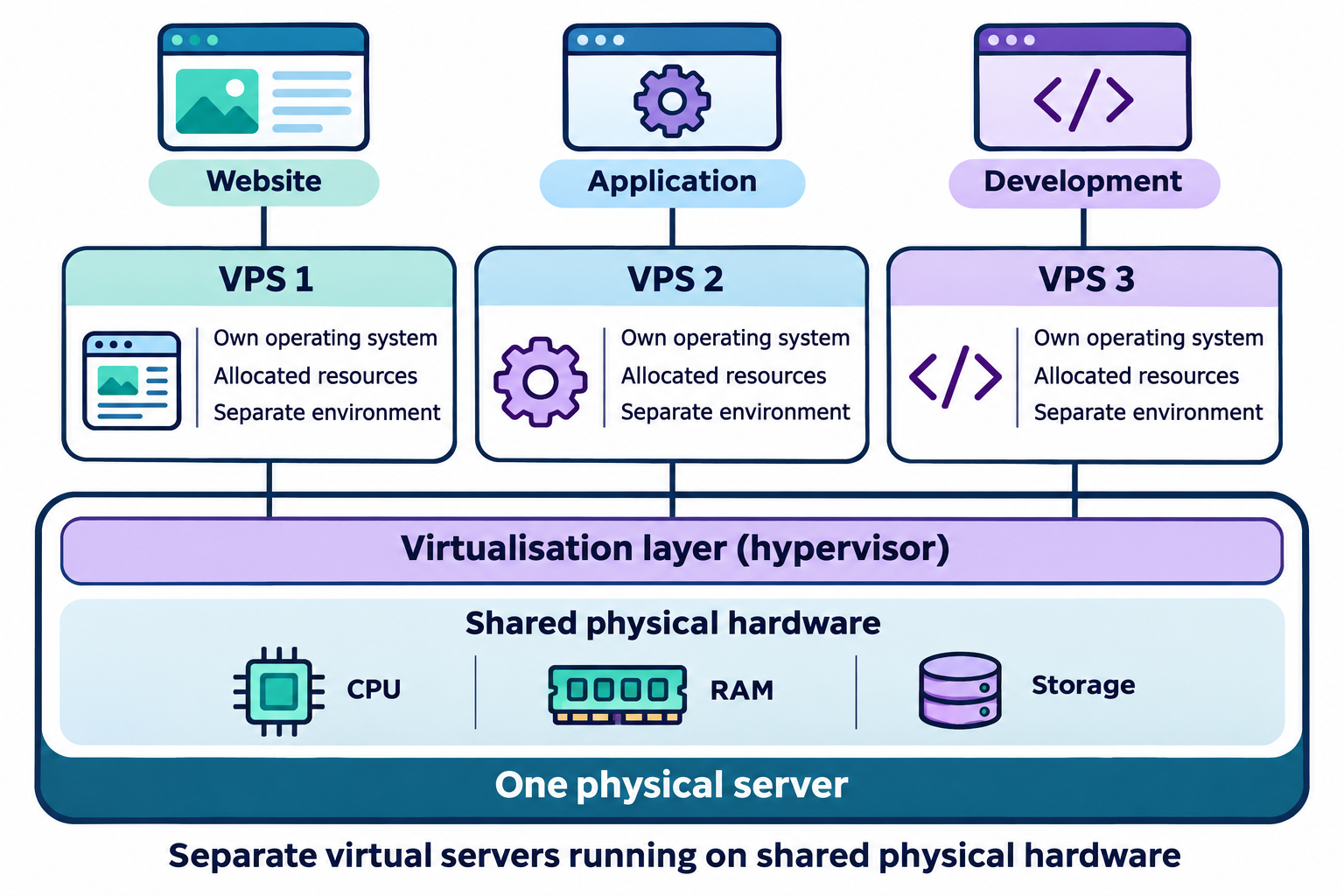
What Is VPS Hosting?
VPS hosting, short for Virtual Private Server hosting, gives you an isolated server environment on a physical machine shared with other customers.
Think of it like having your own apartment in a shared building: you control your space while sharing the underlying infrastructure.
Compared with shared hosting, a VPS gives you more control over software, settings and server resources. You can use it to host websites, run applications or test development projects without paying for an entire dedicated server.
In this VPSServer vs Hostinger VPS comparison, the key is finding a plan that balances cost, resources and the amount of server management you're comfortable handling.
Key Takeaways
- Choose VPS hosting around your workload, budget and technical skills. Compare equivalent server configurations before deciding which provider offers better value.
- VPSServer is worth considering for flexible monthly or hourly billing, configurable resources and broader operating system choices, including Linux and Windows.
- Hostinger VPS offers predefined Linux packages with more RAM and storage in its advertised entry-level configuration. Check the upfront payment and renewal rate before committing.
- Include backup protection in your budget. Hostinger includes weekly backups, while VPSServer offers automated daily backups for an additional fee. Confirm retention and restoration terms.
- Security tools and technical support do not automatically include ongoing server administration. Confirm who handles updates, application maintenance, access controls and recovery.
- This comparison uses published specifications and terms rather than hands-on performance testing. Verify current prices and test a representative workload before choosing a provider.
What Are the Benefits of VPS Hosting?
If shared hosting feels restrictive, but a dedicated server costs more than you can justify, VPS hosting offers a useful middle ground.
It gives you greater control and room to grow, although the benefits depend on your plan and how well you manage the server.
Here are the main benefits:
- More resources for your website or application: VPS plans allocate RAM, CPU capacity and storage to your server environment, helping you support workloads that have outgrown shared hosting. CPU capacity may still be shared, so check the allocation.
- Greater control over your server: Root or administrator access lets you install compatible software, adjust settings and configure your environment for custom applications or development projects.
- Room to grow: Many providers let you upgrade resources as demand increases. You can start small and expand when needed, although some upgrades may require downtime.
- Better isolation from other customers: Your server environment is separated from neighbouring accounts more clearly than with typical shared hosting. You still need to manage updates, security settings and backups.
- Lower costs than a dedicated server: Sharing physical hardware with other virtual servers typically makes VPS hosting more affordable than renting an entire dedicated machine.
When comparing VPSServer vs Hostinger VPS, check which benefits each plan includes, what costs extra and how much server management you'll need to handle yourself.
VPSServer vs Hostinger VPS: A Quick Comparison
VPSServer looks better suited to users who prioritise flexible billing and a low starting cost, while Hostinger VPS offers more RAM and storage in its entry-level package for buyers comfortable paying upfront.
That is our assessment of their published plans, rather than a verdict based on hands-on performance testing.
The biggest difference is what you get for the advertised price.
VPSServer starts at $4 per month, whereas Hostinger's KVM 1 offer works out at $6.49 per month with a 24-month upfront payment.
Those entry-level plans have different resource allocations, so price alone does not tell you which offers better value.
What Is VPSServer?

VPSServer, found at vpsserver.com, is a hosting provider focused on virtual servers and cloud infrastructure.
Its services include Linux and Windows VPS options, configurable server resources, and monthly or hourly billing.
You can choose resources around your project rather than relying only on fixed packages. That makes it worth considering for developers, testing environments and businesses that want flexibility over server configuration and spending.
To avoid confusion, VPSServer is the company name, while "VPS server" is a general term for a virtual private server.
What Is Hostinger?
Hostinger is a hosting company with a broader product range, including web hosting, WordPress hosting, cloud hosting, domains and VPS hosting. Its VPS service uses KVM virtualisation and offers predefined packages with Linux-based operating system templates.
Its VPS tools include application templates, an AI web terminal and Docker management features.
These can simplify setup and administration, although customers remain responsible for managing their virtual servers.
In this VPSServer vs Hostinger VPS comparison, we're reviewing their VPS services specifically. Hostinger's shared hosting and managed WordPress packages are separate products with different features and responsibilities.
| Comparison point | VPSServer | Hostinger VPS |
| Entry-level price | From $4/month | KVM 1 from $6.49/month on the advertised 24-month offer |
| Billing terms | Monthly or hourly options; no minimum contract period | Advertised offer requires $155.76 upfront for 24 months |
| Renewal cost | No separate introductory-to-renewal rate stated for the advertised $4 configuration | KVM 1 renews at $11.99/month for the same term |
| CPU and RAM | 1 CPU core and 1 GB RAM | 1 vCPU core and 4 GB RAM |
| Storage and transfer | 20 GB NVMe storage and 5 TB transfer | 50 GB NVMe storage and 4 TB bandwidth |
| Backups | Automated daily backups available for an additional monthly fee, with 14-day retention | Automatic weekly backups included |
| Management | Root access and configurable server environment; confirm any managed-service scope separately | Root access, application templates and AI management tools; customers remain responsible for their VPS |
| Support | Advertises 24/7 technical support; phone and email contact options | Advertises 24/7 support alongside AI troubleshooting assistance |
| Best fit — our assessment | Small projects, testing environments and users prioritising billing flexibility | Linux projects needing more entry-level memory and storage, with a longer purchasing commitment |
Sources: official provider pricing, product pages and FAQs, checked on 2 November 2026. Prices are in USD. Hostinger lists prices excluding VAT; confirm applicable taxes and optional charges at checkout for both providers.
For a lightweight project, VPSServer's lower starting price may be enough.
If your application needs more memory, Hostinger's entry-level allocation deserves a closer look—but calculate the renewal cost before committing.
Compare plans against your actual workload, rather than assuming the cheapest VPS host will be the best long-term choice.
VPSServer vs Hostinger VPS: How Do Their Features Compare?
Price gets your attention, but the features determine whether a VPS can handle your project.
In this VPSServer vs Hostinger VPS comparison, the main differences involve configuration flexibility, operating systems, management tools and backups.
Security and Protection
Both providers advertise DDoS protection and firewall tools to help protect your VPS.
VPSserver also lists infrastructure monitoring, while Hostinger provides firewall management through its dashboard and a malware scanner.
These features support server security, but they do not replace maintaining your operating system and applications.
- VPSServer: Offers DDoS protection, cloud monitoring and configurable firewall options.
- Hostinger VPS: Includes DDoS filtering, firewall management and malware scanning.
- Your responsibility: Keep software updated, restrict administrator access and maintain recoverable backups.
Server Resources and Configuration
VPSServer lets you configure CPU, RAM and storage around your requirements.
Hostinger offers predefined KVM packages, making it straightforward to compare resource levels and choose a starting point.
Both provide NVMe storage and options to increase resources as your needs grow.
- VPSServer: Worth considering if you want more control over individual resource allocations.
- Hostinger VPS: Worth considering if you prefer choosing from clearly defined packages.
Operating Systems and Software
VPSServer supports Linux distributions, Windows options and custom operating system images.
Hostinger focuses on Linux-based templates, with preconfigured applications and control panels available to simplify deployment.
Your software requirements should guide this choice.
Check operating system compatibility and any additional licence costs before ordering.
Root Access and Management Tools
Both providers offer full root access, allowing you to install software and customise your server environment.
VPSServer provides a cloud console for deployment, monitoring and resource adjustments.
Hostinger includes an AI web terminal, Docker management tools and an API for automation.
These tools can make administration easier, but root access also brings responsibility. You still need a plan for maintaining your operating system and applications.
Backups and Recovery
Backup frequency matters if your data changes regularly.
Here's how the two providers compare:
- Hostinger VPS: Includes automatic weekly backups.
- VPSServer: Offers automated daily backups for an additional monthly fee, with 14-day retention.
- What to check: Backup retention, restoration options and any recovery charges before choosing a plan.
For an online store or active application, consider how much data you could afford to lose between backups and whether you need additional protection.
Server Locations
VPSServer advertises more than 20 locations worldwide, while Hostinger lists 10 VPS data centres across four continents.
A location close to your audience can help reduce network latency, although application performance also depends on your configuration and workload.
Which Provider Offers Better Value for Money?
If you're choosing between VPSServer vs Hostinger VPS, my advice is simple: look beyond the headline price.
A cheap VPS host only offers good value if the plan has enough resources for your project and the payment terms suit your budget.
Based on their published packages, VPSServer has the lower starting price and more flexible billing.
Hostinger gives you more RAM and storage in its entry-level plan, but its advertised discount requires a longer upfront commitment.
Starting Prices, Billing Commitments and Renewal Costs
VPSServer starts at $4 per month for 1 CPU core, 1 GB RAM and 20 GB NVMe storage.
Hostinger's KVM 1 starts at $6.49 per month for 1 vCPU, 4 GB RAM and 50 GB NVMe storage—but you pay $155.76 upfront for 24 months. That Hostinger offer renews at $11.99 per month for the same term.
Here's how I'd weigh that up:
- For a lightweight project: VPSServer's smaller starting configuration could help keep spending down.
- For an application that needs more memory: Hostinger's entry-level package gives you more room, provided you're comfortable paying upfront.
- For short-term use: VPSServer's monthly and hourly options are worth considering because you don't need a long contract.
The important bit?
These are different-sized plans. Comparing them purely on price would overlook the extra resources included with Hostinger.
Extra Costs That Can Change Your Budget
This is where cheap VPS hosting can become more expensive than you expected.
Before ordering, check what your chosen setup actually needs.
- Backups: Hostinger includes weekly backups. VPSServer's automated daily backup service costs extra and has 14-day retention.
- Control panel licences: Check whether your preferred panel requires a separate subscription.
- Additional IP addresses: Confirm the price if your application needs more than the standard allocation.
- Bandwidth overages: Check transfer allowances and what happens if you exceed them.
- Taxes: Hostinger lists prices excluding VAT, so check your final checkout total.
- Server management: Include the cost of technical help if you won't handle maintenance yourself.
A 12-Month Cost Example: Why Upfront Spending Matters
Let's say you need a small Linux server for a year.
Using the advertised entry-level plans, here's the budget picture:
| Cost consideration | VPSServer entry configuration | Hostinger KVM 1 offer |
| Advertised monthly rate | $4.00 | $6.49 |
| Base cost for 12 months at that rate | $48.00 | $77.88 equivalent |
| Payment commitment | Monthly billing available | $155.76 upfront for 24 months |
| RAM | 1 GB | 4 GB |
| NVMe storage | 20 GB | 50 GB |
Calculations use published prices checked on 2 November 2026, before applicable taxes and optional extras. These configurations are not equivalent; this example compares spending commitments, rather than performance or like-for-like value.
Our take: Choose the smallest configuration that comfortably meets your needs, then compare its full cost over your intended hosting period. VPSServer deserves a look if flexibility matters most.
Hostinger deserves a look if you need its larger starting allocation and expect to use the server long enough to justify the upfront payment.
How Do Performance and Server Resources Compare?
When comparing VPSServer vs Hostinger VPS, don't assume the plan with the bigger numbers will automatically make your website faster. CPU, RAM, storage and network capacity all matter, but their impact depends on what you're running.
Based on published entry-level specifications, Hostinger includes more memory and storage, while VPSServer includes a higher transfer allowance.
We haven't benchmarked these servers, so this is a specification comparison—not a measured speed test.
CPU and RAM: Match the Resources to Your Workload
VPSServer's advertised $4 configuration includes 1 CPU core and 1 GB RAM. Hostinger's KVM 1 includes 1 vCPU core and 4 GB RAM.
That gives Hostinger four times the advertised memory at this starting level, although the packages have different prices and billing commitments.
Here's what that means for your project:
- Small business website: A lightweight site may need relatively few resources, while a database-driven site with several plugins can require more memory.
- Application hosting: Your database, background tasks and simultaneous users all contribute to CPU and RAM demand.
- Development environment: A small test project may fit comfortably on a modest VPS, but running several containers or services can quickly increase memory requirements.
Also, one CPU core from each provider does not establish equal processing performance. Hardware, CPU allocation policies and workload behaviour need to be considered.
NVMe Storage: Capacity Is Only Part of the Picture
Both providers advertise NVMe storage. VPSServer's entry configuration includes 20 GB, compared with 50 GB on Hostinger KVM 1.
If you're hosting a simple website, either capacity might meet your needs.
But application files, databases, logs and locally stored backups can add up. Leave enough headroom for growth rather than choosing a plan that barely fits on day one.
The NVMe label alone doesn't prove which VPS hosting service delivers faster database queries or page loads. That requires testing under comparable conditions.
Bandwidth: Separate Transfer Allowance From Speed
PSServer advertises 5 TB of transfer on its entry configuration, while Hostinger KVM 1 lists 4 TB of bandwidth. These figures describe data allowances, rather than the speed visitors will experience.
A website serving large downloads or lots of images may use more transfer than a small internal application.
Check how your provider measures usage and handles overages before choosing a cheap VPS host.
Server Locations: Choose Somewhere Near Your Users
VPSServer lists more than 20 locations worldwide, while Hostinger advertises 10 VPS data centres across four continents.
More locations give you more deployment choices, but the useful question is whether a provider offers a suitable location near your audience.
If most customers are in the UK, compare relevant nearby locations rather than choosing solely on the size of the global network.
Our take: Hostinger's entry-level package offers more memory and storage on paper. VPSServer gives you a smaller starting configuration and flexible resource choices. For either provider, choose around your application's requirements—and use a representative workload test before making performance claims or committing an important project.
How Do Backups, Security and Support Compare?
When something goes wrong with your server, you need to know three things: can you restore your data, what protection is in place, and who will help?
In this VPSServer vs Hostinger VPS comparison, those details deserve as much attention as the monthly price.
Backups: Check How Much Data You Could Lose
Hostinger includes automatic weekly backups, while VPSServer offers automated daily backups for an additional monthly fee, with 14-day retention.
VPSServer also says its support team can restore a full server or recover specific files.
Weekly backups may suit a project that rarely changes. For an active website or online store, you'll need to consider whether losing several days of updates would be acceptable.
Before choosing either provider, check:
- Backup frequency: Does it match how often your data changes?
- Retention: How far back can you recover?
- Restoration: Can you restore the server yourself, or do you need support?
- Recovery charges: Are restores included, or could they cost extra?
My advice is to test a restoration before you need one. A backup is only useful if you can recover the data your project depends on.
Security: Provider Protection Is Only Part of the Job
Both providers advertise DDoS protection and firewall tools. VPSServer also lists cloud monitoring, while Hostinger includes firewall management and a malware scanner.
These are published features; we haven't independently tested their effectiveness.
You still need to secure the environment you control:
- Keep your operating system and applications updated.
- Restrict administrator access and use SSH keys where appropriate.
- Open only the network ports your application needs.
- Protect your hosting account with a unique password and enable two-factor authentication where available.
- Keep recovery credentials and independent backups somewhere secure.
A cheap VPS host can provide useful protection, but your server configuration still matters.
Support: Know Who Handles the Actual Maintenance
VPSServer advertises 24/7 technical support and lists phone and email contact options.
Hostinger advertises 24/7 support alongside AI tools for setup and troubleshooting. These descriptions establish availability and tools, rather than independently verified response times or service quality.
Help with a hosting issue does not automatically mean someone will maintain your applications, patch your software or troubleshoot every custom configuration.
Ask each provider what is included before buying. Hostinger explicitly states that customers remain responsible for their virtual servers; with VPSServer, confirm the scope of any managed service separately.
Which Should You Choose for Your Website or Project?
The best VPS hosting choice depends on your workload, payment preferences and technical experience.
Based on the published plans, here's how I'd narrow it down.
When VPSServer Is the Better Fit
I'd shortlist VPSServer if you want to start small and keep your options open.
- You need flexible billing: Monthly and hourly options suit temporary environments, testing and projects with an uncertain lifespan.
- You want configurable resources: You can select CPU, RAM and storage around your requirements.
- You need operating system flexibility: VPSServer lists Linux, Windows and custom image options. Check any applicable licensing costs.
That makes it a reasonable candidate for developers and users who value configuration choices over committing to a predefined long-term package.
When Hostinger VPS Is the Better Fit
I'd shortlist Hostinger if its Linux packages match your requirements and you're comfortable with the payment commitment.
- You need more entry-level memory and storage: KVM 1 lists 4 GB RAM and 50 GB NVMe storage, compared with VPSServer's advertised 1 GB RAM and 20 GB starting configuration.
- You prefer deployment and administration tools in one place: Hostinger offers application templates, an AI web terminal and Docker management tools.
- You want weekly backups included: You won't need to add that particular feature separately, although you may still need more frequent backups.
Just calculate the full upfront payment and renewal cost before deciding that the promotional rate fits your budget.
When Managed Hosting May Suit You Better
If you don't want to handle updates, security configuration and server troubleshooting, managed hosting may be a better match.
Spending less on the server can be a false saving if you then need regular paid help to maintain it.
Check the management agreement carefully. Look for clear responsibility for patching, monitoring, backups and recovery—and confirm whether support covers your applications as well as the underlying server.
My recommendation: Choose VPSServer for flexible billing, configurable resources and broader operating system choice. Choose Hostinger VPS when its Linux packages, included weekly backups and management tools fit your project. Choose a managed service when you want someone else to take responsibility for clearly defined maintenance tasks. These recommendations are based on published features and terms, rather than hands-on performance testing.
What Are the Limitations of VPSServer and Hostinger VPS?
Every VPS hosting provider comes with trade-offs.
The question is which ones you can comfortably work around. Here are the main limitations to consider in this VPSServer vs Hostinger VPS comparison.
VPSServer: A Smaller Starting Plan and Extra Backup Costs
VPSServer's flexible configuration options are useful, but its lowest advertised price buys a relatively modest server.
Check what your project needs before building your budget around that entry-level rate.
- Limited starting resources: The $4 configuration includes 1 GB RAM and 20 GB NVMe storage. Applications running several services may need a larger configuration.
- Daily backups cost extra: Automated daily backups are an additional monthly service, so include them in your total hosting budget.
- More configuration decisions: Choosing resources individually offers flexibility, but requires a clearer understanding of your workload.
- Management scope needs checking: Don't assume the standard server price includes ongoing operating system updates or application maintenance. Confirm any managed-service responsibilities separately.
My take: VPSServer's low starting price is attractive for smaller projects, but calculate the cost of the configuration and protection you'll actually use.
Hostinger VPS: Upfront Commitment and Higher Renewal Rates
Hostinger's entry-level package includes more memory and storage, but its advertised promotional rate comes with a purchasing commitment.
That matters if you're testing an idea or unsure how long you'll need the server.
- Upfront payment for the advertised deal: The $6.49 monthly offer requires $155.76 upfront for 24 months.
- Higher renewal pricing: That KVM 1 offer renews at $11.99 per month for the same term, increasing your ongoing budget.
- Linux-focused templates: The published VPS offering centres on Linux, which may not suit projects requiring Windows.
- Weekly backup frequency: Included weekly backups may leave too large a recovery gap for frequently changing data.
- Server maintenance remains your responsibility: Templates and AI tools can help, but they don't replace ongoing administration.
My take: Hostinger deserves consideration if its resources match your project and you're comfortable paying upfront. For short-term use, Windows requirements or more frequent backups, look carefully at whether the package fits.
Final Thoughts on Which Low-Cost VPS Provider Should You Choose?
The VPSServer vs Hostinger VPS decision comes down to what you need from your server—and how you prefer to pay for it.
VPSServer is worth considering if you want flexible billing, configurable resources and broader operating system choices.
Hostinger VPS makes sense if you prefer predefined Linux packages, more entry-level memory and storage, and included weekly backups. Just factor in its upfront payment and renewal pricing before committing.
My advice?
Choose the plan that fits your workload, rather than chasing the lowest advertised price.
Add up hosting, backups, licences and any technical help you'll need. That gives you a much clearer picture of which cheap VPS host offers better value for your project.
These recommendations reflect published specifications and terms, rather than hands-on performance testing.
Before buying, confirm the current checkout price and make sure you understand who handles updates, security and recovery.
Frequently Asked Questions
Is VPSServer the Same as a VPS Server?
No. VPSServer is the name of a hosting provider at vpsserver.com.
A VPS server is a general term for a virtual private server. In this VPSServer vs Hostinger VPS comparison, we're comparing two specific providers, rather than comparing VPS hosting with another type of hosting.
Is Hostinger VPS Cheaper Than VPSServer?
VPSServer has the lower advertised starting price at $4 per month. Hostinger KVM 1 starts at $6.49 per month with a 24-month upfront payment, but includes more RAM and storage.
Compare equivalent resources, renewal costs and optional extras before deciding which offers better value. Prices checked November 2026.
What Should You Look for in a Cheap VPS Host?
Look beyond the introductory price.
Check CPU allocation, RAM, storage, transfer allowances, server locations and backup options. Then review billing commitments, renewal rates and support scope.
The best cheap VPS host for your project should provide enough resources at a total cost you can comfortably maintain.
Do You Need Technical Knowledge to Use VPS Hosting?
Usually, yes—particularly with an unmanaged VPS.
You'll need to handle software installation, updates, access controls and troubleshooting, although dashboards and application templates can simplify some tasks.
If you're uncomfortable maintaining a server, consider a managed service with clearly defined responsibilities for security, backups and ongoing administration.
Can You Move an Existing Website to Either Provider?
Yes, provided your website's software and technical requirements are compatible
with the destination server. Migration typically involves transferring files and databases, configuring the environment and updating DNS. VPSServer advertises migration assistance; confirm eligibility and scope.
With either provider, check available help, back up your website and test before switching.
AI Summary
- This VPSServer vs Hostinger VPS comparison reviews published provider documentation on pricing, resources, features, security, backups and support. Recommendations are based on specifications and terms, rather than hands-on performance testing.
- VPSServer offers configurable resources, monthly or hourly billing, and operating system choices including Linux and Windows. Consider it for projects where billing flexibility and configuration control are priorities.
- Hostinger VPS offers predefined Linux packages, application templates and integrated management tools. Its advertised entry-level package includes more RAM and storage than VPSServer's starting configuration, but the plans have different prices and payment terms.
- Compare the full hosting cost, including upfront commitments, renewal rates, backups, software licences, additional IP addresses and taxes. The lowest advertised monthly price does not automatically offer the best value for your workload.
- Hostinger includes automatic weekly backups. VPSServer offers automated daily backups for an additional fee, with 14-day retention. Both advertise security tools, but customers must confirm their responsibilities for updates, access controls and recovery.
- Choose around your application's resource requirements, audience location and technical skills. Confirm support scope and current checkout terms, and consider managed hosting if you need ongoing server administration.
Most Popular Posts

Effective communication among team members is vital for the productivity and success of any organization. Surprisingly, 60% of companies lack a long-term internal communication strategy, which p...


Businesses thrive on communication for efficiency, productivity and accomplishment. When the right information is passed from the right designation in the organization, it promotes positivity an...

Categories
Blog
(3252)
Business Management
(399)
Employee Engagement
(237)
Digital Transformation
(226)
Growth
(151)
Intranets
(142)
Internal communications
(110)
Remote Work
(68)
Sales
(53)
Collaboration
(53)
Customer Experience
(33)
Culture
(30)
Project management
(30)
Knowledge Management
(29)
Leadership
(20)
Comparisons
(9)
News
(1)

Related Posts

Which provider gives you better value in the VPSServer vs Hostinger VPS comparison? If you're searching for cheap VPS hosting, it's tempting to focus on the lowest monthly price. But reliability matters too: Hostinger advertises a 99.9% uptime ...

Which mobile EEG system will fit your experiments—and give you usable data beyond a promising specification sheet? With different electrode types, channel configurations and recording modes to compare, choosing a wireless EEG setup can quickly become...

The goal of people operations is to help in increasing employee engagement and retention. It is a strategic element in organizations that focuses on humanizing impersonal processes. Most of the startups have already paid a high price for not having a...

Searching for "communal work spaces near me" but unsure which option will actually suit your growing business? By the end of this guide, you'll know how to compare offices to rent, spot extra costs and ask the right questions before committing....

Do you know what happens to your information after you share it with an AI assistant? That question sits at the heart of AI privacy—and it's easy to overlook when you're trying to finish a task. You paste in a customer email, upload a spr...


Jill Romford
I am a digital nomad, lover of exploring new places and making friends.
I love to travel and I love the internet. I take pictures of my travels and share them on the internet using Instagram.
Traveler, entrepreneur, and community builder. I share my insights on digital marketing and social media while inspiring you to live your fullest life.
Ready to learn more? 👍
One platform to optimize, manage and track all of your teams. Your new digital workplace is a click away. 🚀
Free for 14 days, no credit card required.