
Insight Blog
Agility’s perspectives on transforming the employee's experience throughout remote transformation using connected enterprise tools.
34 minutes reading time
(6729 words)
Intranet for SharePoint: Switch to AgilityPortal for Better Employee Engagement

Intranet for SharePoint: Switch to AgilityPortal for Better Employee Engagement
Looking for an intranet for SharePoint? See why companies are choosing AgilityPortal to improve internal communication, collaboration, and employee engagement.
Intranet for SharePoint: Switch to AgilityPortal for Better Employee Engagement

If you're looking into an intranet for SharePoint, chances are you're trying to fix a bigger issue inside your organization — things like scattered documents, poor communication, or employees struggling to find the information they need.
Many companies start exploring SharePoint for Teams because it's already part of the Microsoft ecosystem, so it feels like the obvious place to build an intranet.
And to be fair, SharePoint has been the default choice for corporate intranets for years.
But here's the problem many teams run into: turning SharePoint into a modern employee intranet platform often takes a lot more work than expected.
It usually involves customization, ongoing IT management, and additional tools just to deliver the kind of experience employees expect today.
There's also a bigger productivity issue at play.
Research from McKinsey shows employees can spend up to 28% of their workweek searching for information across disconnected systems — something that happens frequently when intranet platforms aren't designed with usability and communication in mind.
28%
of the workweek
According to McKinsey, employees can spend up to 28% of their workweek searching for information across disconnected systems.
Source: McKinsey Global Institute
That's why many organizations are starting to look beyond traditional setups like SharePoint for Teams and explore modern digital workplace platforms instead.
Platforms like AgilityPortal bring together internal communication, collaboration tools, and knowledge management into one unified environment that's designed for how teams actually work today.
In this guide, we'll walk through why businesses are rethinking the traditional intranet for SharePoint approach — and why more teams are choosing AgilityPortal as a modern alternative.
Key Takeaways
- An intranet for SharePoint can support document storage and internal resources, but building a modern employee experience often requires customization and ongoing IT management.
- Many organizations start with SharePoint because it is included in Microsoft 365, but adoption challenges often arise as content grows across multiple sites and libraries.
- Research from McKinsey shows employees can spend up to 28% of their workweek searching for information across disconnected systems, highlighting the importance of a well-designed intranet platform.
- Modern digital workplace platforms combine communication, collaboration, and knowledge sharing into one unified environment instead of relying on multiple disconnected tools.
- Organizations looking to improve employee engagement, communication, and collaboration are increasingly exploring modern intranet platforms like AgilityPortal as an alternative.
What Is an Intranet for SharePoint?
An intranet for SharePoint is essentially a company's internal hub built using Microsoft's SharePoint platform.
Think of it as a centralized space where employees can access company updates, find documents, collaborate with colleagues, and share information across teams.
For many organizations already using Microsoft 365, building an intranet on SharePoint feels like the natural next step.
Since tools like Outlook, Teams, and OneDrive are already part of daily workflows, SharePoint often becomes the foundation for managing content and internal communication.
But to really understand why SharePoint became the go-to option for corporate intranets, it helps to look at how businesses started using it in the first place.
How SharePoint Became the Default Intranet Platform
Over the years, Microsoft positioned SharePoint as the backbone of its workplace collaboration ecosystem.
As companies adopted Microsoft 365, SharePoint became deeply embedded in everyday business operations.
For example, many organizations use SharePoint for document management, storing policies, reports, training materials, and internal resources in structured document libraries.
This allows teams to maintain version control, apply permissions, and keep company knowledge organized in one place.
It's also commonly used as a collaboration workspace.
Many teams rely on SharePoint for project management, where project documentation, timelines, and shared resources are stored alongside tasks and updates.
When integrated with Microsoft collaboration tools, companies often connect SharePoint for Teams, allowing employees to access files and resources directly within Microsoft Teams channels.
This integration helps teams collaborate without constantly switching between platforms.
Another major use case is SharePoint for file sharing, enabling employees to upload, share, and collaborate on documents with colleagues across departments or locations.
Because of these capabilities, SharePoint naturally evolved into a core component of many corporate intranets.
Expert Insight
“Every intranet should be unique to the organization it serves, but some things are fundamental.”
— Sam Marshall, Owner, ClearBox Consulting
A strong reminder that while every company has different needs, the best intranet platforms still need to solve the basics well — communication, search, usability, and relevance.
Source: CMSWire
Typical Features of a SharePoint Intranet
A typical SharePoint-based intranet usually includes several features designed to support internal collaboration and information sharing across an organization.
Common capabilities include:
- Document libraries where teams store and organize files. Many companies rely on SharePoint for document management to keep policies, reports, training materials, and internal knowledge in one central place.
- Company news and announcements that can be published through SharePoint communication sites, allowing leadership to share updates, company achievements, and important internal messages.
- Team sites that provide dedicated spaces for departments or projects. Organizations often use SharePoint for project management, storing project files, documentation, and collaboration resources in one workspace.
- Microsoft 365 integrations that connect SharePoint with tools like Outlook, OneDrive, and SharePoint for Teams, making it easier for employees to access files and collaborate directly within their existing workflows.
- File storage and collaboration tools that enable teams to upload, manage, and share documents. Many organizations rely on SharePoint for file sharing across departments and remote teams.
- Permissions and governance controls that allow administrators to manage who can access, edit, or manage content across the intranet environment.
Why Businesses Still Consider SharePoint for Intranets
Even with newer digital workplace platforms available today, many organizations still consider SharePoint when building an intranet.
One of the biggest reasons is that SharePoint is already included in the Microsoft ecosystem.
Companies using Microsoft 365 often see it as a cost-effective starting point because they already have access to the platform.
Another reason is familiarity. Many employees have used SharePoint in some form before, whether for document storage, collaboration, or file sharing.
Finally, SharePoint offers strong enterprise security and compliance capabilities, which makes it attractive for organizations operating in regulated industries or large enterprise environments.
That said, while SharePoint can serve as a foundation for an intranet, many companies eventually discover that turning it into a modern digital workplace requires significant customization and ongoing administration.
This is one of the reasons organizations increasingly explore alternative platforms designed specifically for employee engagement and internal communication.
Learn more: The Best SharePoint Intranet Alternative for Modern Organisations — AgilityPortal
Related SharePoint & Intranet Guides You Should Explore Next
If you're researching SharePoint intranets, migration strategies, or modern alternatives, these guides will help you understand governance, analytics, migration planning, and how modern digital workplace platforms compare to traditional SharePoint deployments.
- Best SharePoint Alternative Platforms
- What Are the Best Alternatives to Microsoft SharePoint?
- Why SharePoint Is Failing Modern Intranets
- SharePoint Intranet in a Box Guide
- SharePoint Governance Plan Framework
- SharePoint Managed Metadata Guide
- How to Audit SharePoint Environments
- SharePoint Migration Plan Template & Checklist
- Best SharePoint Migration Tools
- SharePoint Analytics Guide
- SharePoint Copilot Explained
- Best SharePoint Online Site Templates
- Confluence vs SharePoint Comparison
- Intranet Pricing Guide
- Why Businesses Choose AgilityPortal Instead of SharePoint
5 Reasons Admins Hate SharePoint (According to Sysadmins)
1. SharePoint Is Clunky and Overly Complex
One of the most common complaints from system administrators is that SharePoint feels unnecessarily complicated compared to traditional file systems.
Many admins say the platform tries to do too many things at once — document storage, intranet, collaboration, and workflow automation — which results in a confusing user experience.
One sysadmin summarized the sentiment bluntly:
"I'm an admin and I hate SharePoint."
Reddit user
Another experienced IT professional added that the platform has always felt difficult to work with compared to simpler tools:
"Been in IT since the 90s and it's always been clunky and cumbersome vs basic Windows tools."
Reddit user
For admins who are used to straightforward file servers, SharePoint often feels like an unnecessarily complicated replacement.
2. It Requires Constant Administration and Expertise
Another major issue raised by admins is that SharePoint often requires a dedicated specialist to manage it properly.
The platform is powerful, but that power comes with complexity.
Many sysadmins say organizations deploy SharePoint expecting a simple file-sharing solution — only to realize it requires significant planning, governance, and ongoing maintenance.
As one sysadmin explained:
"SharePoint is a massive beast that basically requires someone full-time managing it."
Reddit user
This means smaller IT teams often struggle to maintain a SharePoint intranet without outside consultants or specialized administrators.
3. Users Struggle to Navigate and Find Information
Admins also report that employees frequently complain about the usability of SharePoint.
Instead of a simple folder structure like traditional network drives, SharePoint often spreads content across multiple sites, libraries, and pages.
That complexity makes it harder for employees to locate documents quickly.
One user described the experience like this:
"It's like constantly trying to jam a square peg into a round hole."
Reddit user
For administrators, this creates a constant support burden because employees struggle with navigation and search.
4. Collaboration and File Sync Can Be Frustrating
Although SharePoint is supposed to improve collaboration, admins often report problems with syncing files, saving changes, and working on shared documents.
One sysadmin explained their frustration with shared files:
"Every time more than 3 people are in it, I just don't even mess with it… sometimes I make changes only to open it later and find nothing was saved."
Reddit user
When collaboration tools fail to work reliably, admins end up spending time troubleshooting issues that employees expect to "just work."
5. Even Admins Who Manage It Often Don't Like It
Perhaps the most telling insight from the thread is that many admins openly admit they don't enjoy working with SharePoint.
In fact, several commenters noted that finding a sysadmin who actually likes SharePoint is rare.
One comment captured that sentiment perfectly:
"I've yet to meet an admin who likes SharePoint."
Reddit user
This highlights a broader issue: while SharePoint is widely used because it's bundled with Microsoft 365, that doesn't necessarily mean IT teams enjoy managing it.
Free Intranet Guide
How To Get Your Intranet Off The Ground
Launching an intranet can feel overwhelming. Many organizations struggle with adoption, planning, and choosing the right platform. This practical ebook explains how to launch a successful intranet project and build a digital workplace employees actually use.
- Step-by-step intranet launch strategy
- Common intranet adoption mistakes to avoid
- How to improve internal communication and engagement
- Build a digital workplace that employees actually use
Download the Free Ebook
Instant access • No credit card required
The Hidden Challenges of SharePoint Intranets
Many companies start building an intranet in SharePoint or on SharePoint because it's already included in their Microsoft environment. On the surface, it seems like a logical choice — especially for organizations already using Microsoft 365.
But once teams begin expanding their intranet, they often discover that running a modern digital workplace for SharePoint Online can be more complicated than expected.
What starts as a simple document hub can quickly turn into a complex system that requires ongoing IT support, customization, and additional tools.
Here are some of the most common challenges organizations face.
Learn more: What are the best alternatives to Microsoft SharePoint?
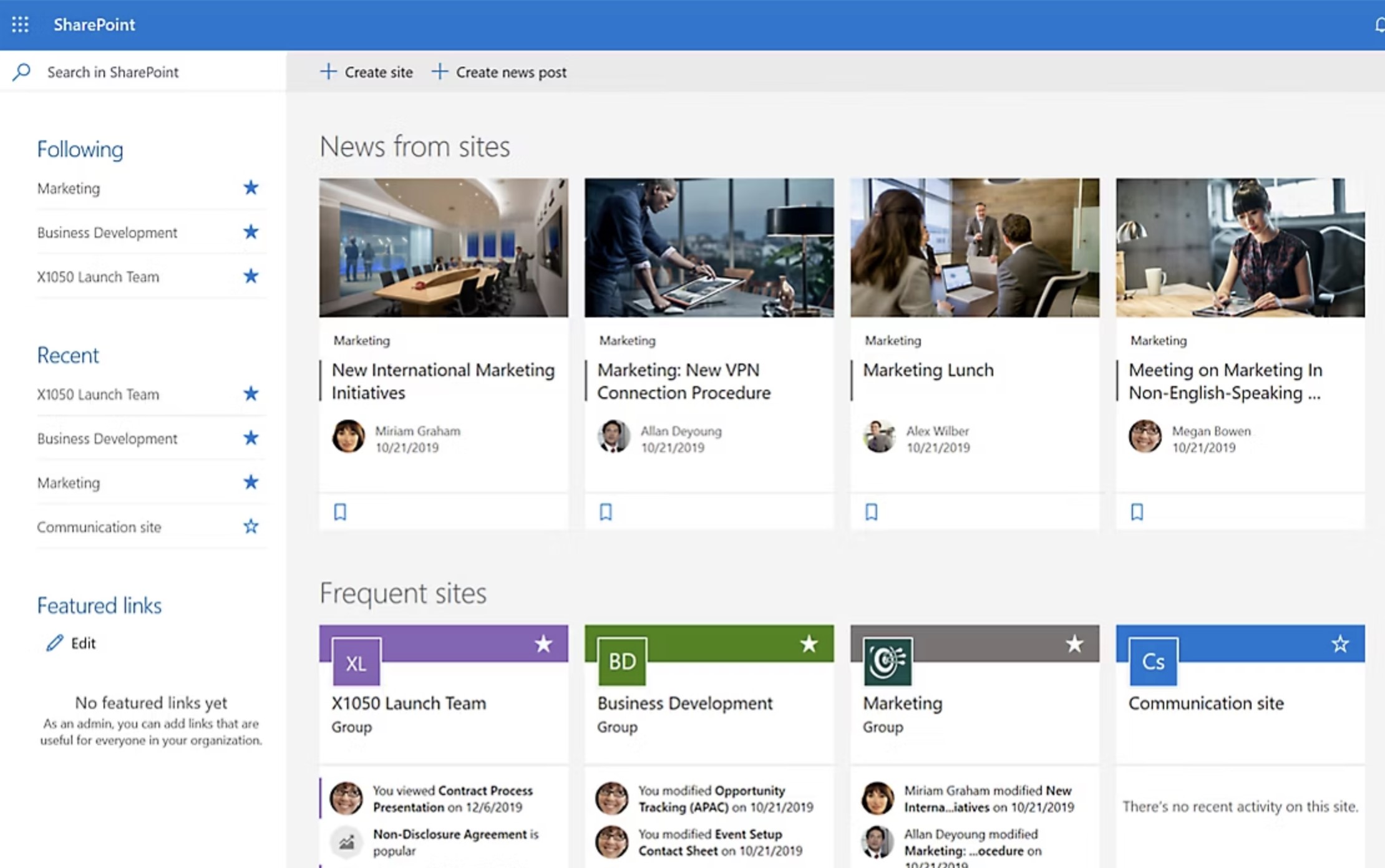
The Hidden Challenges of SharePoint Intranets
Complex Setup and IT Dependency
One of the biggest hurdles with SharePoint intranets is the amount of technical work required to build and maintain them.
While SharePoint offers powerful capabilities, creating a modern intranet experience often requires developers, consultants, or dedicated IT administrators to configure and manage it properly.
Common challenges include:
- Many organizations rely on SharePoint for document management, but organizing files, permissions, and libraries can quickly become complicated as the system grows.
- Building a user-friendly intranet often requires custom development or third-party add-ons.
- Governance rules, site structures, and permissions can become difficult to manage across departments.
- IT teams often spend significant time maintaining the environment instead of improving employee experience.
For smaller IT teams, maintaining a large intranet for SharePoint Online can become a long-term administrative burden.
Poor Employee Adoption
Another common issue is employee adoption. Even when organizations invest heavily in SharePoint, employees sometimes struggle to use it effectively.
This often happens because navigation and structure can become confusing as the platform expands.
Typical complaints from employees include:
- Difficult navigation between multiple sites and pages
- Employees not knowing whether files are stored in SharePoint or on SharePoint sites across departments
- Limited search accuracy when trying to locate documents or resources
- Too many disconnected workspaces created over time
When employees cannot easily find information, the intranet stops being a helpful resource and becomes another system employees try to avoid.
Limited Built-In Engagement Features
Another limitation is that SharePoint was originally designed as a content and document management system rather than an employee engagement platform.
While it works well as SharePoint for business in terms of document storage and collaboration, it often lacks built-in tools that modern workplaces expect.
Features that are often missing or limited include:
- Social engagement tools that encourage employee interaction
- Built-in recognition and reward systems
- Employee sentiment tracking or engagement analytics
- Community spaces for departments or interest groups
Because of these gaps, companies often add additional tools or applications just to create a more engaging workplace experience.
Fragmented Digital Workplace Experience
Perhaps the biggest issue organizations encounter is fragmentation.
Instead of one unified system, companies frequently end up managing multiple tools alongside their SharePoint intranet.
A typical setup might include:
- Microsoft Teams for messaging and chat
- SharePoint for document management and file storage
- Viva or third-party platforms for engagement and employee experience
- Additional tools for announcements, surveys, or internal communication
While each tool serves a purpose, employees often feel like they're jumping between too many platforms just to complete simple tasks.
The result is a fragmented digital workplace where information, communication, and collaboration are spread across multiple systems — making it harder for teams to stay connected and productive.
What Modern Teams Expect From an Intranet Platform
The workplace has changed a lot over the past decade.
Teams are now distributed, hybrid work is common, and employees expect the same kind of intuitive digital experience they get from consumer apps.
Because of this shift, many organizations are starting to rethink how their intranet should actually work.
Traditional systems built in SharePoint or on SharePoint were originally designed around document storage and structured sites.
While that worked well years ago, modern organizations now expect intranet platforms to support communication, collaboration, and employee engagement in a much more seamless way.
In fact, research from McKinsey shows employees can spend up to 28% of their workweek searching for information across disconnected systems.
That statistic highlights why businesses are re-evaluating their approach to intranet technology and looking for platforms that make information easier to access and share.
28%
of the workweek
Research from McKinsey shows employees can spend up to 28% of their workweek searching for information across disconnected systems. This highlights why many organizations are re-evaluating their intranet technology and investing in platforms that make information easier to access and share.
Source: McKinsey Global Institute
Today, modern teams expect an intranet platform to deliver far more than basic file storage or simple company pages.
Common expectations include:
- Mobile-first employee intranet platforms that allow frontline and remote workers to access company information from anywhere, not just from a desktop.
- Social-style communication feeds where employees can see updates, announcements, and discussions in a familiar feed-style interface instead of navigating multiple static pages.
- Advanced enterprise search that helps employees quickly locate documents, people, or resources without guessing where information is stored.
- Integrated collaboration tools that combine messaging, file sharing, tasks, and communication within one connected environment.
- Real-time engagement analytics that allow leadership and HR teams to measure employee participation, communication reach, and overall engagement.
- Role-based dashboards that personalize the intranet experience, showing employees relevant content, updates, and resources based on their department or job role.
- Simple content publishing tools that allow HR, communications, and department leaders to share updates without relying heavily on IT support.
For many organizations using SharePoint for business, these expectations reveal a gap between what traditional intranet systems provide and what employees actually need to stay productive.
As a result, companies are increasingly exploring modern digital workplace platforms that combine communication, collaboration, and knowledge sharing into a single, easy-to-use environment.
Considering Microsoft SharePoint for Your Intranet?
Microsoft SharePoint is one of the most widely used enterprise platforms for document management and internal collaboration. Many organizations evaluate it when searching for intranet software, especially if they already use Microsoft 365 tools such as Teams, Outlook, and OneDrive.
As part of the Microsoft ecosystem, SharePoint allows businesses to create internal sites, store documents, and manage content across departments. However, building a fully functional intranet often requires customization, governance planning, and additional configuration.
- Enterprise document management and file sharing
- Integration with Microsoft 365 tools like Teams and Outlook
- Team collaboration sites and departmental workspaces
- Workflow automation using Microsoft Power Automate
- Permission-based document access and governance controls
- Extensive customization through Microsoft ecosystem tools
If you're researching intranet platforms, reading independent user reviews can provide valuable insights into how SharePoint performs in real organizations.
Read SharePoint Reviews on G2
See real user feedback
Why Are Businesses Switching From SharePoint to AgilityPortal
If you started this guide looking for an intranet for SharePoint, chances are you're trying to solve real problems inside your organization — things like scattered documents, poor internal communication, low employee engagement, or teams struggling to find information.
This is exactly why many businesses are now moving toward modern intranet software and digital workplace platforms that bring everything together in one place.
Instead of building and maintaining a complex system in SharePoint or on SharePoint, organizations are choosing solutions like AgilityPortal that are designed specifically to support internal communication, collaboration, and employee experience from day one.
AgilityPortal combines the capabilities companies typically try to build with multiple Microsoft tools into a single, unified platform.
A Unified Digital Workplace Platform
AgilityPortal is built as a complete digital workplace platform and employee intranet software that connects the tools teams use every day.
Instead of managing separate systems for messaging, files, and communication, organizations can centralize everything in one environment.
With AgilityPortal, companies can manage:
- Internal communication and company announcements
- Document libraries and knowledge management
- Team collaboration and project workspaces
- Employee engagement and recognition
- Department hubs and intranet pages
This means businesses no longer need to rely solely on SharePoint for document management while using separate tools for communication or collaboration.
Everything employees need lives in one connected workplace platform.
Built for Modern Employee Communication
One of the biggest limitations organizations face with traditional intranets is communication.
AgilityPortal is designed to function as a powerful internal communication platform that keeps employees informed and engaged.
Key communication features include:
- Dynamic company news feeds similar to social media timelines
- Targeted announcements that reach specific teams or departments
- Interactive posts where employees can react, comment, and engage
- Employee recognition tools that highlight achievements and milestones
- Notifications that ensure important updates are seen
Instead of employees missing critical updates buried inside static pages on SharePoint, AgilityPortal delivers information in a way employees actually interact with.
Collaboration Tools That Replace Multiple Systems
Many organizations using SharePoint end up combining several tools just to support everyday teamwork.
For example, companies may use SharePoint for file sharing, Microsoft Teams for chat, and additional platforms for project collaboration.
AgilityPortal simplifies this by bringing collaboration into one platform.
Teams can:
- Send instant messages and chat with colleagues
- Manage shared calendars and schedules
- Collaborate on projects and tasks
- Share and edit documents together
- Create team spaces for departments and initiatives
This approach reduces tool fragmentation and gives employees a single place to communicate, collaborate, and manage their work.
Mobile Experience Designed for Frontline Workers
Many traditional intranet systems were designed primarily for office workers.
AgilityPortal was built with modern workforces in mind — including deskless employees and frontline teams.
The platform provides a mobile-first intranet experience that ensures every employee can stay connected.
Key mobile capabilities include:
- Easy mobile access from anywhere
- QR-code login for faster authentication
- Offline access to important resources
- Automatic multi-language translation for global teams
This makes AgilityPortal especially valuable for organizations with distributed teams, remote workers, or field employees.
Powerful Analytics and Engagement Insights
Another reason companies are switching from traditional SharePoint for business intranets is the lack of visibility into employee engagement.
AgilityPortal includes built-in analytics that help leadership understand how employees interact with the platform.
Organizations can track:
- Engagement heatmaps showing content performance
- Employee sentiment through pulse surveys and feedback tools
- Platform adoption and usage trends
- Communication reach and interaction levels
These insights help HR and leadership teams improve communication strategies and ensure employees remain connected to the organization.
If you're currently evaluating intranet platforms, it's worth seeing how a modern digital workplace solution compares to traditional systems built for SharePoint Online.
AgilityPortal was designed to simplify internal communication, improve collaboration, and create an engaging employee experience without the complexity of building an intranet from scratch.
👉 Book a demo today to see how AgilityPortal can replace fragmented tools and transform your digital workplace.
In just a few minutes, you'll see how organizations are replacing outdated intranet systems with a platform that employees actually enjoy using.
Looking for an Intranet That Employees Actually Use?
Many organizations invest in intranet software expecting better communication and collaboration, but end up with platforms employees rarely visit. Poor search, scattered tools, and outdated interfaces often make intranets more frustrating than helpful.
AgilityPortal is a modern digital workplace and intranet platform designed to centralize communication, documents, and employee collaboration in one place. Instead of managing multiple disconnected systems, your teams get a single platform where they can find information, stay aligned, and get work done faster.
- Modern intranet hub for communication, knowledge, and collaboration
- Powerful search that helps employees find documents and information quickly
- Employee engagement tools including news feeds, recognition, and spaces
- Integrations with Microsoft 365, Google Workspace, and business systems
- Mobile-first intranet experience for remote and frontline workers
- Analytics and dashboards to track engagement and platform adoption
If you're evaluating intranet platforms in this guide, AgilityPortal gives you a modern solution that improves communication, simplifies knowledge sharing, and connects employees across your organization.
Try AgilityPortal Free for 14 Days
No credit card required
SharePoint vs AgilityPortal: Key Differences
If you're researching an intranet for SharePoint, it's helpful to compare how a traditional SharePoint setup stacks up against a modern digital workplace platform like AgilityPortal.
Many organizations start by using SharePoint for document management or SharePoint for file sharing, but eventually realize they need additional tools to support communication, engagement, and collaboration.
The table below highlights the key differences teams typically encounter when comparing SharePoint for business intranets with an all-in-one employee platform.
| Feature | SharePoint Intranet | AgilityPortal Intranet |
| Setup & Deployment | Requires configuration, site structure planning, and ongoing IT management when building an intranet in SharePoint or on SharePoint | Ready-to-deploy employee intranet platform designed for quick setup |
| Document Management | Commonly used as SharePoint for document management with structured libraries and permissions | Centralized document hub with integrated collaboration and knowledge sharing |
| File Sharing | Teams often rely on SharePoint for file sharing across departments and projects | Secure file sharing built directly into the platform with team spaces |
| Internal Communications | Basic news posts and communication sites | Advanced internal communication software with targeted announcements and social feeds |
| Collaboration | Often requires combining tools like Teams, OneDrive, and SharePoint | All-in-one collaboration with messaging, projects, documents, and spaces |
| Project Workspaces | Many companies attempt to use SharePoint for project management with document libraries and lists | Built-in collaboration hubs for teams and project work |
| Employee Engagement | Limited engagement features without third-party tools | Built-in engagement tools including recognition, surveys, and social interaction |
| Mobile Experience | Functional but not designed primarily for frontline employees | Mobile-first platform designed for hybrid and frontline workforces |
| Analytics & Insights | Basic usage and activity reporting | Engagement analytics, adoption metrics, and communication insights |
This comparison highlights why many organizations that originally built their intranet for SharePoint Online eventually begin exploring modern intranet software and digital workplace platforms that provide these capabilities out of the box.
When SharePoint Might Still Be the Right Choice

Even though many organizations are exploring newer intranet solutions, there are still situations where SharePoint can be the right fit. A SharePoint intranet platform can work well for companies that are already deeply invested in Microsoft technologies and primarily need a structured environment for storing and organizing information.
For example, businesses that rely heavily on Microsoft 365 tools often choose SharePoint because it integrates closely with services like Outlook, OneDrive, and Microsoft Teams. In these environments, SharePoint can act as a corporate intranet system where employees access documents, policies, and internal resources alongside other Microsoft tools.
Another reason organizations continue to use SharePoint is for enterprise content management. Companies that mainly need a platform to manage files, maintain version control, and enforce strict access permissions may find that SharePoint provides the governance and compliance features they require.
SharePoint can also make sense for organizations that already have experienced IT teams.
Building and maintaining a custom SharePoint intranet solution often requires technical expertise, including managing site structures, permissions, integrations, and workflows. For companies with dedicated administrators or SharePoint specialists, maintaining this environment may be manageable.
In addition, some organizations have already made significant investments in customizing their SharePoint environment. If a company has spent years developing a tailored enterprise collaboration environment using SharePoint sites, workflows, and automation tools, replacing that system might not make immediate financial sense.
In short, SharePoint can still be a viable option for businesses that:
- Are heavily invested in the Microsoft ecosystem
- Primarily need a content management intranet rather than a full employee engagement platform
- Have internal IT teams capable of managing complex configurations
- Have already built a customized SharePoint environment that meets their operational needs
However, for organizations looking to improve communication, employee engagement, and collaboration across distributed teams, many are now evaluating modern intranet platforms designed specifically for today's digital workplace.
When AgilityPortal Is the Better Alternative

When AgilityPortal Is the Better Alternative
While SharePoint can work for certain organizations, many businesses eventually realize they need more than a document storage system or a collection of connected Microsoft tools.
If your goal is to create a truly engaging workplace where employees can communicate, collaborate, and stay informed easily, a modern platform like AgilityPortal often becomes the better choice.
AgilityPortal was designed specifically as a modern intranet solution that brings communication, collaboration, and knowledge sharing together in one place.
Instead of relying on multiple systems or building complex structures, companies can launch a fully functional workplace intranet software environment much faster and with far less technical overhead.
AgilityPortal becomes the stronger option when organizations want to improve how employees interact with information and with each other.
Many companies discover that traditional platforms focus heavily on content storage, while modern teams need tools that actively support engagement and productivity.
Organizations often choose AgilityPortal when they need:
- A complete employee experience platform that connects communication, collaboration, and company culture
- Modern internal communication software that makes it easy to share announcements, updates, and company news
- Built-in engagement and collaboration tools that encourage employees to participate and stay connected
- A true digital workplace platform that replaces disconnected tools and systems
- A solution that requires minimal IT maintenance, allowing HR, operations, and communications teams to manage content without technical expertise
Another major reason companies move toward platforms like AgilityPortal is simplicity.
Instead of managing multiple systems for messaging, documents, collaboration, and employee engagement, organizations can run everything through one unified enterprise intranet solution.
For businesses looking to improve adoption, reduce complexity, and give employees a better digital workplace experience, platforms built specifically for internal communication and collaboration often deliver far greater value than traditional intranet setups.
How to Choose the Right Intranet Platform for Your Business
Choosing the right intranet platform can have a huge impact on how your teams communicate, collaborate, and access information.
Many companies start with tools that seem convenient at first, but later discover they don't scale well or fail to support the way employees actually work.
If you're evaluating intranet software, it helps to focus on a few key factors that determine whether a platform will succeed long term.
Below are the most important criteria businesses should consider before selecting an intranet solution.
Ease of Use
One of the biggest reasons intranet platforms fail is poor usability. If employees struggle to navigate the platform or find information, they will simply stop using it.
A modern intranet should offer:
- Simple navigation and clear content structure
- Easy document access and search capabilities
- Intuitive interfaces similar to consumer apps
- Minimal training required for new users
The easier the platform is to use, the more likely employees are to adopt it across the organization.
Employee Adoption Potential
Even the most powerful intranet software won't deliver value if employees don't actively use it.
When evaluating platforms, consider whether the system encourages engagement and participation.
Successful intranets usually include:
- Interactive news feeds and announcements
- Social engagement features such as comments and reactions
- Employee recognition and communication tools
- Personalised dashboards and updates
Platforms that focus on employee experience tend to see much higher adoption rates across departments.
Integration Capabilities
Most organizations already rely on several workplace tools, so the intranet platform should integrate easily with existing systems.
Look for solutions that support integrations with:
- Email and calendar platforms
- Document storage tools
- HR or employee management systems
- project management and collaboration tools
Strong integration capabilities help create a unified digital workplace ecosystem instead of forcing employees to switch between disconnected platforms.
Mobile Accessibility
Today's workforce is no longer limited to office desks. Remote employees, field workers, and frontline staff all need access to company resources.
A good intranet platform should provide:
- Mobile-friendly interfaces
- Dedicated mobile apps or responsive design
- Notifications for updates and announcements
- Access to documents and communication tools from any device
Mobile accessibility ensures every employee can stay connected regardless of location.
Communication Tools
One of the main goals of an intranet is improving internal communication across the organization.
Look for platforms that include built-in internal communication tools, such as:
- Company announcements and updates
- Department communication channels
- discussion spaces and team collaboration areas
- event notifications and company-wide messaging
Strong communication capabilities help organizations keep employees informed and aligned.
Analytics and Reporting
Modern intranet platforms should provide insights into how employees interact with content and communication.
Analytics tools help organizations understand:
- Which announcements employees are reading
- What documents are most frequently accessed
- How teams engage with internal communication
- Overall adoption and usage trends
These insights allow leadership teams to continuously improve their communication strategy.
Scalability
Finally, the intranet platform should grow with your business.
As organizations expand, their intranet needs often become more complex.
A scalable platform should support:
- Multiple departments and teams
- role-based access and permissions
- increasing numbers of users
- expanding content libraries and collaboration spaces
Choosing a platform that scales easily ensures your intranet continues to support the business as it evolves.
When businesses evaluate intranet platforms using these criteria, it becomes much easier to identify solutions that truly support communication, collaboration, and employee engagement across the organization.
Final Thoughts
If you're researching an intranet for SharePoint, it's worth pausing for a moment and asking a simple question: do you want to build an intranet, or do you want to deploy one that already works?
Many organizations initially start with SharePoint because it's part of the Microsoft ecosystem.
But over time, teams often realize that building a complete workplace experience on top of SharePoint can require significant customization, ongoing IT involvement, and multiple additional tools just to support everyday communication and collaboration.
Modern organizations are now looking for intranet software for employees that is easier to manage and actually encourages people to use it.
Instead of navigating complex site structures or disconnected systems, employees expect a centralized workplace hub where they can quickly find information, collaborate with colleagues, and stay updated with company news.
This is where modern business intranet platforms like AgilityPortal come in.
Rather than stitching together multiple tools, these platforms provide a complete environment for communication, knowledge sharing, and collaboration in one place.
For companies that want to improve employee adoption, simplify internal communication, and create a more connected workplace, choosing a platform built specifically for the digital workplace experience can make a huge difference.
If your goal is to move beyond a basic intranet and build a platform employees actually enjoy using, exploring modern intranet solutions like AgilityPortal is a logical next step.
AI Summary
- This guide explains what an intranet for SharePoint is, how companies typically use it, and why many organizations begin their digital workplace journey using SharePoint.
- Many businesses rely on SharePoint for document management, file sharing, and collaboration through Microsoft Teams, but these setups can become complex as organizations grow.
- Research from McKinsey shows employees can spend up to 28% of their workweek searching for information across disconnected systems, highlighting the importance of a well-designed intranet platform.
- Modern teams expect intranet platforms to deliver more than document storage, including internal communication tools, collaboration features, employee engagement, and mobile accessibility.
- Organizations often discover that building and maintaining an intranet on SharePoint requires customization, governance planning, and ongoing IT support.
- Digital workplace platforms like AgilityPortal provide a unified environment for communication, knowledge sharing, collaboration, and employee engagement without relying on multiple disconnected systems.
- Companies evaluating SharePoint intranets should consider usability, employee adoption, integrations, analytics, and long-term scalability when choosing a modern intranet solution.
Most Popular Posts

Effective communication among team members is vital for the productivity and success of any organization. Surprisingly, 60% of companies lack a long-term internal communication strategy, which p...


Businesses thrive on communication for efficiency, productivity and accomplishment. When the right information is passed from the right designation in the organization, it promotes positivity an...
Categories
Blog
(2918)
Business Management
(363)
Employee Engagement
(221)
Digital Transformation
(189)
Growth
(139)
Intranets
(133)
Remote Work
(63)
Sales
(52)
Collaboration
(46)
Customer Experience
(29)
Culture
(29)
Knowledge Management
(28)
Project management
(28)
Leadership
(20)
Comparisons
(9)
News
(1)

Related Posts

What Is Portal Software? Have you ever wondered why so many businesses struggle with disconnected systems, scattered documents, outdated intranets, and poor communication between teams? Most organisations today rely on dozens of different tools...

What happens when your systems suddenly stop working in the middle of a busy workday? For growing businesses, downtime is no longer just a technical problem — it is a direct threat to productivity, customer trust, revenue, and daily operations. ...

Despite organisations investing heavily in collaboration platforms, employee apps, and hybrid work technology, many businesses still struggle with disconnected communication, low employee engagement, and poor workforce visibility. According to ...

The communication champion role is a valuable addition to any business. In a large organization, communication champions should be numerous, forming a communication network. They keep track of information and assist others in better collaborating, wo...

Featured
In today's fast-paced hybrid work environment, staying connected isn't just nice—it's necessary. With more than 80% of employees now working remotely at least part of the time, the demand for intuitive, powerful collaboration tools has never be...


Jill Romford
I am a digital nomad, lover of exploring new places and making friends.
I love to travel and I love the internet. I take pictures of my travels and share them on the internet using Instagram.
Traveler, entrepreneur, and community builder. I share my insights on digital marketing and social media while inspiring you to live your fullest life.
Ready to learn more? 👍
One platform to optimize, manage and track all of your teams. Your new digital workplace is a click away. 🚀
Free for 14 days, no credit card required.