
Insight Blog
Agility’s perspectives on transforming the employee's experience throughout remote transformation using connected enterprise tools.
1 hour and 4 minutes reading time
(12781 words)
Best 15 Virtual Collaboration Tools for Modern Global Teams - UPDATE 2026

Best 15 Virtual Collaboration Tools for Modern Global Teams - UPDATE 2026
Discover the best virtual collaboration tools for modern global teams. Compare features, pricing, pros, and platforms built for remote and hybrid work.
Best 15 Virtual Collaboration Tools for Modern Global Teams - UPDATE 2026

Why are so many companies still struggling with collaboration even though they're using more workplace apps than ever before?
The shift toward remote and hybrid work has completely changed how teams communicate. 0
According to research from Owl Labs, over 62% of employees now work remotely at least part of the time, while many global organisations operate with distributed teams across different countries and time zones.
On paper, that sounds flexible and productive — but in reality, it has introduced a new set of collaboration challenges for businesses everywhere.
Instead of working from one office using a single system, employees are now jumping between messaging apps, video conferencing platforms, project management software, shared drives, emails, and internal documents throughout the day.
What was supposed to improve productivity has often created the opposite effect: scattered communication, duplicated work, endless notifications, and employees struggling to stay aligned.
62%
work remotely
According to Owl Labs, over 62% of employees now work remotely at least part of the time, while many global organisations operate with distributed teams across countries and time zones.
Source: Owl Labs
This is where virtual collaboration tools have become essential for modern businesses.
Companies are no longer just looking for chat apps — they need tools for virtual collaboration that bring communication, meetings, project management, document sharing, and teamwork into one connected experience.
Without the right platform, remote employees can quickly feel disconnected, projects lose visibility, and important knowledge gets buried across too many systems.
The challenge becomes even bigger for global teams working across multiple time zones, departments, and locations.
Delayed responses, meeting overload, and fragmented workflows can slow decision-making and make collaboration frustrating for employees trying to stay productive from home.
In this article, we'll explore the best virtual collaboration tools for modern global teams, compare their key features, highlight their pros and cons, and help you find the right solution for improving communication and collaboration in remote and hybrid workplaces. Lets get right into this.
Key Takeaways
- Virtual collaboration tools help remote and hybrid teams centralise communication, meetings, project collaboration, and knowledge sharing into one connected digital workplace.
- Businesses using too many disconnected workplace apps often experience communication silos, productivity loss, notification overload, and poor collaboration across global teams.
- The best virtual collaboration tools combine messaging, document sharing, video conferencing, workflow management, and employee engagement features in one platform.
- Online whiteboard tools and virtual whiteboard collaboration platforms help teams brainstorm ideas, run workshops, and collaborate visually during remote meetings.
- Successful collaboration software depends on employee adoption, mobile accessibility, workflow simplicity, and the ability to support remote and distributed workforces effectively.
What Are Virtual Collaboration Tools?
Lets break it down adn explain what are virtual collabo tools, well these platforms are designed to help employees communicate, share information, manage projects, and work together from different locations.
These tools have become essential for businesses with remote, hybrid, and global teams that need to stay connected without being in the same office.
They bring conversations, files, tasks, meetings, and company knowledge into a shared digital workspace where employees can collaborate in real time from anywhere in the world.
For example, a marketing team in London may need to collaborate with designers in New York and developers in India on the same project.
Instead of using endless email chains, they can use tools for virtual collaboration to hold video meetings, share files, assign tasks, leave comments, and track progress in one place.
Teams now require a central hub where employees can communicate, access documents, manage workflows, and stay aligned across departments.
Modern virtual collaboration tools examples:
- Instant messaging for quick communication
- Video meetings for remote discussions
- File sharing and document collaboration
- Shared calendars and scheduling
- Project and task management
- Knowledge bases and internal wikis
- Employee engagement features
- Mobile apps for remote and frontline workers
- Search tools for finding conversations and documents quickly

For instance, a HR department may use this type tools to onboard remote employees, share company policies, collect employee feedback, and publish internal announcements.
At the same time, an IT team could use the same platform to manage support requests, share technical documentation, and coordinate projects across multiple offices.
These platforms are especially important for hybrid workplaces where some employees work from home while others remain office-based. Without the right collaboration systems in place, communication can quickly become fragmented, leading to missed updates, duplicated work, and poor visibility across teams.
Global organisations also depend heavily on tools for virtual collaboration because employees often work across different time zones.
Instead of waiting for meetings, teams can collaborate asynchronously by sharing updates, comments, documents, and project changes inside a central workspace that everyone can access when needed.
Rather than switching between disconnected apps all day, businesses can centralise communication, teamwork, and knowledge sharing into a single digital workplace experience.
Benefits of Using Virtual Collaboration Tools
Modern businesses rely heavily on virtual collaboration tools to keep employees connected, productive, and aligned across multiple locations.
As remote and hybrid work continue to grow, companies need smarter ways to improve communication, reduce workflow fragmentation, and help teams collaborate more effectively from anywhere.
Virtual collaboration tools help employees communicate faster and more effectively.
One of the biggest advantages of using tools for virtual collaboration is the ability for employees to instantly connect through messaging, video calls, shared workspaces, and project discussions.
Instead of relying on long email chains, teams can collaborate in real time and solve problems much faster.
For example, a remote customer support team can instantly communicate with developers and IT staff during urgent issues without waiting for delayed responses.
Key communication benefits include:
- Faster team messaging
- Real-time collaboration
- Easier file sharing
- Fewer communication delays
- Better visibility across projects
The best virtual collaboration tools reduce wasted time and improve productivity.
Employees often waste hours every week switching between disconnected workplace apps searching for files, updates, tasks, and conversations.
The best virtual collaboration tools centralise everything into one platform, helping employees stay organised and focused.
This is especially valuable for businesses managing hybrid teams across different offices and time zones.
Some productivity improvements include:
- Reduced app switching
- Faster access to documents
- Improved task visibility
- Better workflow organisation
- Less duplicated work
- Centralised communication channels
- Quicker project updates
Allows remote and hybrid work easier to manage.
As more employees work from home, businesses need systems that allow teams to stay connected without relying on physical offices. Virtual collaboration tools make it possible for employees to communicate, attend meetings, and collaborate on projects from anywhere.
For example, a global sales team can coordinate client activities across several countries using one shared platform.
Major remote work advantages include:
- Flexible working environments
- Easier remote onboarding
- Improved hybrid communication
- Better employee accessibility
Can create a central place for company knowledge and files.
Many businesses struggle with important information being spread across emails, chat apps, shared drives, and local folders. Tools for virtual collaboration help solve this problem by creating one shared workspace for documents, policies, discussions, and project resources.
This makes it much easier for employees to find information quickly without constantly asking colleagues for help.
Common knowledge-sharing benefits include:
- Centralised file storage
- Easier document management
- Improved search functionality
- Better version control
- Shared company knowledge
- Reduced information silos
Can help reduce unnecessary meetings.
Many companies suffer from meeting overload because employees lack organised communication channels. Tools for virtual collaboration allow employees to leave updates, comments, feedback, and task progress asynchronously without requiring another video call.
This helps employees spend more time completing work instead of sitting in back-to-back meetings.
Some meeting-related benefits include:
- Fewer unnecessary meetings
- Better async communication
- Faster project updates
- Reduced calendar overload
Simplify the digital workplace experience.
Virtual collaboration tools can replace several disconnected systems with one central platform for communication, meetings, project management, file sharing, and teamwork.
This creates a much simpler and more organised digital workplace for employees.
Digital workplace improvements include:
- Fewer disconnected tools
- Simplified employee experience
- Better system adoption
- Improved workplace organisation
- Centralised communication
- Reduced operational complexity
- Easier platform management
Types of Virtual Collaboration Tools Examples
Not all virtual collaboration tools are designed for the same purpose.
Some focus on communication, while others are built for project management, document sharing, employee engagement, or video conferencing.
Modern businesses often use a combination of tools for virtual collaboration to help employees stay connected and productive across remote and hybrid workplaces.
Below are some virtual collaboration tools examples of the most common types of collaboration platforms used by modern teams today.
- Communication and Messaging Tools - These tools are designed for real-time conversations, team messaging, and quick communication between employees. They help reduce email overload and improve day-to-day collaboration.
- Video Conferencing Tools - Video collaboration platforms help remote teams hold virtual meetings, webinars, presentations, and online discussions from anywhere
- Project Management and Task Collaboration Tools - These platforms help teams organise projects, assign tasks, track deadlines, and manage workflows more effectively.
- Knowledge Management and Document Collaboration Tools - These tools allow employees to create, share, organise, and collaborate on company knowledge, files, and documentation.
- Digital Workplace and Employee Collaboration Platforms - These are more advanced virtual collaboration tools that combine communication, file sharing, employee engagement, intranet features, knowledge management, and workplace collaboration into one central platform.
- Visual Collaboration and Brainstorming Tools - These tools help teams collaborate visually through whiteboards, diagrams, brainstorming sessions, and planning workshops.
Why Most Teams Struggle With Collaboration Today
Despite investing heavily in workplace technology, many organisations still struggle with communication, teamwork, and productivity.
The problem usually is not a lack of software — it is having too many disconnected systems that fail to work together effectively.
As remote and hybrid work continue to grow, businesses are finding it harder to keep employees aligned across multiple tools, departments, and time zones.
This is exactly why many companies are now searching for better virtual collaboration tools that can centralise communication and reduce workflow chaos.
Too many disconnected apps are creating communication chaos.
Most modern workplaces rely on several separate tools for virtual collaboration, with each platform serving a different purpose.
While these systems may solve individual problems, they often create larger collaboration issues when combined together.
The result is often a fragmented workplace experience where employees constantly switch between apps trying to locate conversations, documents, tasks, and updates.
Remote employees often feel disconnected from the wider organisation.
Remote and hybrid work have made flexibility easier for employees, but they have also introduced new communication challenges. Without strong collaboration systems in place, employees can quickly feel isolated from their teams and disconnected from company culture.
This becomes even more difficult for global businesses managing employees across multiple countries and time zones.
Some of the most common remote collaboration challenges include:
- Communication silos between departments
- Poor visibility into projects and priorities
- Delayed responses from remote teams
- Employees feeling excluded from discussions
- Lack of employee recognition
- Difficulty collaborating across time zones
- Reduced sense of workplace connection
For example, remote employees may miss important company updates simply because information is scattered across emails, chat apps, meetings, and project tools.
The best virtual collaboration tools help solve this problem by creating a shared digital workspace where employees can communicate, collaborate, and stay informed regardless of location.
Meetings are starting to replace real collaboration.
Many organisations have fallen into the habit of solving every problem with another meeting.
As remote work increased, video calls became the default way to communicate, but this approach often creates more inefficiency instead of improving teamwork.
Employees now spend large portions of their workday attending meetings while struggling to find time for focused work.
Research from Microsoft found that meeting time for many employees has increased dramatically since remote work became more common, contributing to burnout and reduced productivity.
Modern virtual collaboration tools are helping businesses move away from excessive meetings by supporting asynchronous collaboration through shared workspaces, project updates, task tracking, internal knowledge bases, and real-time messaging.
This allows employees to collaborate more efficiently without needing another scheduled call for every conversation.
Best 15 Virtual Collaboration Tools for Modern Global Teams fro 2026
Choosing the right virtual collaboration tools can have a huge impact on how effectively your teams communicate, share knowledge, manage projects, and stay productive across remote and hybrid work environments.
The challenge for many businesses is that there are now hundreds of platforms available, all claiming to improve collaboration while solving different workplace problems.
Some tools focus heavily on messaging and video meetings, while others are designed for project management, document collaboration, employee engagement, or creating a complete digital workplace experience.
The best virtual collaboration tools are the ones that reduce communication silos, simplify workflows, and help employees work together without constantly switching between disconnected apps.
Below, we compare the top tools for virtual collaboration used by modern businesses today, including platforms designed for remote teams, global enterprises, hybrid workplaces, and frontline employees.
Comparison Table of the Best Virtual Collaboration Tools
| Tool | Best For | Key Features | Ideal Team Size |
| AgilityPortal | Digital workplace & employee engagement | Intranet, chat, knowledge base, employee apps, collaboration | SMBs to Enterprise |
| Slack | Team messaging | Channels, integrations, messaging, huddles | SMBs to Enterprise |
| Microsoft Teams | Enterprise collaboration | Video meetings, chat, Microsoft 365 integration | Medium to Enterprise |
| Zoom Workplace | Video communication | Video meetings, webinars, team chat | SMBs to Enterprise |
| Notion | Documentation & wikis | Notes, databases, collaborative docs | Small to Medium Teams |
| Asana | Project collaboration | Tasks, workflows, project tracking | SMBs to Enterprise |
| Trello | Simple task management | Kanban boards, task tracking | Small Teams |
| Monday.com | Workflow management | Dashboards, automation, project workflows | Medium to Enterprise |
| ClickUp | All-in-one productivity | Tasks, docs, collaboration, goals | SMBs |
| Google Workspace | Document collaboration | Docs, Drive, Meet, Gmail | SMBs to Enterprise |
| Miro | Visual collaboration | Whiteboards, brainstorming, workshops | Creative & Product Teams |
| Confluence | Knowledge sharing | Wikis, documentation, team spaces | Medium to Enterprise |
| Workvivo | Employee engagement | Social feed, recognition, communication | Medium to Enterprise |
| Basecamp | Simple team collaboration | Messaging, tasks, scheduling | Small Businesses |
| Bitrix24 | CRM & collaboration | CRM, chat, tasks, contact centre | SMBs |
#1. AgilityPortal: Best for all-in-one employee collaboration and digital workplace management
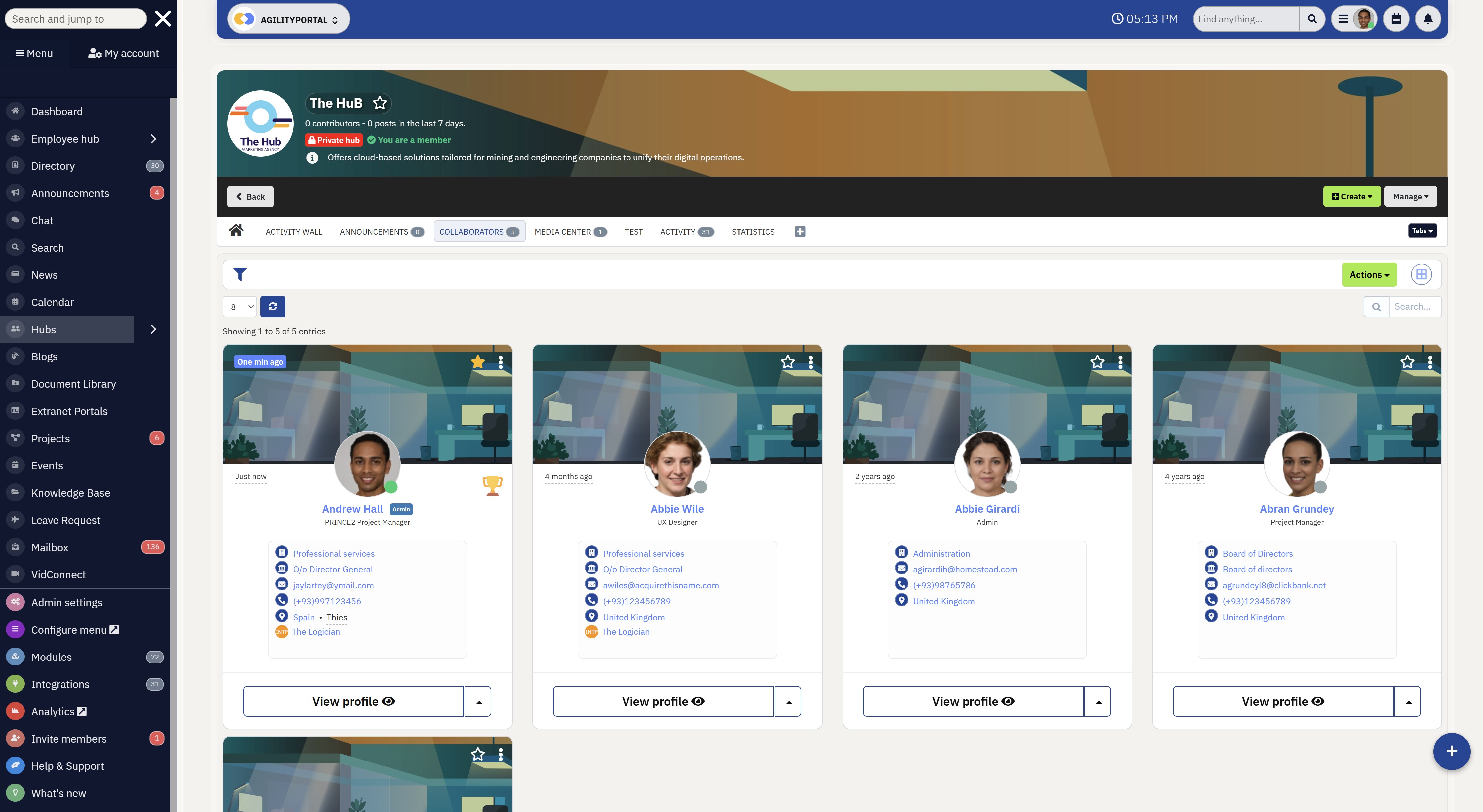
#1. AgilityPortal: Best for all-in-one employee collaboration and digital workplace management
AgilityPortal is a modern digital workplace platform designed to help businesses centralise communication, collaboration, knowledge sharing, and employee engagement in one connected environment.
Unlike many virtual collaboration tools that focus only on messaging or meetings, AgilityPortal combines employee communication, intranet functionality, document management, project collaboration, and social engagement into a single platform built for remote, hybrid, and global teams.
The platform is designed to reduce app overload by giving employees one place to access company updates, chat, documents, workflows, team spaces, and collaboration tools without constantly switching between disconnected systems.
With built-in mobile accessibility, employee directories, shared workspaces, and integrations with platforms like Microsoft 365, Google Workspace, Slack, and Salesforce, AgilityPortal helps organisations create a more connected and productive workplace experience.
- Key features: Employee communication, intranet software, document management, team collaboration spaces, employee engagement tools, mobile employee app, knowledge base, task management, AI-powered search, shared calendars, workflow automation
- Best for: Hybrid workplaces, global teams, frontline employees, remote collaboration, internal communication, digital workplace transformation
- Pros: Centralised workplace platform, strong employee engagement features, mobile-first collaboration experience, reduces tool fragmentation, built-in knowledge sharing, excellent for remote and frontline teams
- Cons: More feature-rich than simple chat-based collaboration tools, may require onboarding for organisations moving from basic messaging apps
AgilityPortal
An All-in-One Virtual Collaboration Platform for Modern Teams
AgilityPortal is a modern virtual collaboration tool built for remote, hybrid, and global teams that need one place for employee communication, knowledge sharing, document management, team collaboration, and internal updates. It helps organisations reduce app overload by bringing conversations, files, workflows, and company knowledge into one secure digital workplace platform.
See how AgilityPortal helps modern teams communicate, collaborate, share knowledge, and stay connected from one secure workplace hub.#2. Slack: Best for team messaging and workplace communication
Slack is one of the most recognised virtual collaboration tools for businesses looking to improve real-time communication across remote and hybrid teams.
Originally built as a workplace messaging platform, Slack has evolved into a collaboration hub that helps employees communicate through channels, direct messaging, file sharing, integrations, and lightweight collaboration workflows.
The platform is especially popular among fast-moving teams that rely on quick conversations and instant updates instead of traditional email communication.
Slack is widely used by startups, technology companies, marketing teams, and distributed organisations that need flexible communication tools for virtual collaboration without the complexity of larger enterprise systems.
- Key features: Team messaging, collaboration channels, Slack Huddles, file sharing, workflow automation, app integrations, voice and video calls, searchable conversations, AI search, shared communication spaces
- Best for: Remote teams, workplace messaging, hybrid communication, fast-moving teams, startup collaboration, internal communication workflows
- Pros: Excellent user experience, powerful integrations, strong mobile app, easy real-time communication, highly scalable collaboration platform, reduces email dependency
- Cons: Can become noisy with too many channels, limited built-in project management, information can get buried in conversations, may require additional collaboration software for document management and employee engagement
Slack
A Popular Team Messaging Platform for Fast-Paced Workplace Communication
Slack is a widely used virtual collaboration tool designed to help remote and hybrid teams communicate through channels, direct messaging, file sharing, and real-time workplace conversations. It helps businesses reduce internal email clutter while improving team communication and collaboration across distributed workforces.
Discover how Slack helps remote teams improve communication, reduce email dependency, and collaborate faster across channels and projects.#3. Microsoft Teams: Best for enterprise collaboration and Microsoft 365 integration
Microsoft Teams is one of the best virtual collaboration tools for enterprises already using the Microsoft ecosystem.
Built as part of Microsoft 365, the platform combines workplace messaging, video conferencing, file sharing, team collaboration, and document management into one integrated communication solution for remote and hybrid teams.
Because of its strong security and compliance capabilities, Microsoft Teams is particularly popular within enterprise environments, education, healthcare, finance, and government organisations managing large distributed workforces.
- Key features: Video meetings, workplace chat, Microsoft 365 integration, shared channels, live document collaboration, webinar hosting, screen sharing, enterprise security, calendar integration, file management
- Best for: Enterprise collaboration, Microsoft-based businesses, hybrid workplaces, remote meetings, secure communication, large organisations
- Pros: Deep Microsoft integration, excellent video conferencing, enterprise-level security, strong document collaboration, scalable communication platform, built-in productivity tools
- Cons: Can feel complex for smaller teams, interface may feel overwhelming for new users, performance can slow with large organisations, some advanced features require higher-tier Microsoft licensing
Microsoft Teams
An Enterprise Collaboration Platform Built for Hybrid & Remote Work
Microsoft Teams is a leading virtual collaboration tool designed to help businesses centralise communication, meetings, file sharing, and teamwork inside the Microsoft 365 ecosystem. It enables remote and hybrid teams to collaborate through workplace chat, video conferencing, document collaboration, and shared workspaces from one secure platform.
Learn how Microsoft Teams helps organisations improve communication, virtual meetings, and collaboration across enterprise and remote teams.#4. Zoom Workplace: Best for virtual meetings and video collaboration
Zoom Workplace has become one of the most widely used virtual collaboration tools for businesses that rely heavily on video communication and remote meetings.
Originally known for video conferencing, Zoom has expanded into a broader workplace collaboration platform that now includes team chat, webinars, phone systems, whiteboards, scheduling, and AI-powered meeting features.
Zoom makes it easy for employees to host virtual meetings, collaborate with clients, share presentations, and communicate face-to-face without being physically present in the same office.
Businesses often use Zoom alongside other tools for virtual collaboration to support project discussions, company-wide meetings, customer calls, remote training sessions, and webinars.
- Key features: Video conferencing, Zoom Chat, webinar hosting, AI meeting summaries, screen sharing, virtual whiteboards, breakout rooms, scheduling tools, cloud phone system, meeting recordings
- Best for: Remote meetings, hybrid workplaces, virtual communication, online training, webinars, distributed teams, customer collaboration
- Pros: High-quality video meetings, easy to use, strong webinar functionality, reliable remote communication, scalable for large organisations, excellent mobile experience
- Cons: Limited built-in project management, collaboration features less advanced than full digital workplace platforms, can require integrations for workflow management and document collaboration
Zoom Workplace
A Video-First Collaboration Platform for Remote & Hybrid Teams
Zoom Workplace is a popular virtual collaboration tool designed to help businesses improve remote communication, virtual meetings, and team collaboration across distributed workforces. Beyond video conferencing, Zoom Workplace also includes workplace chat, online collaboration features, whiteboarding, webinars, and meeting productivity tools for modern hybrid teams.
Discover how Zoom Workplace helps businesses improve remote meetings, online collaboration, and communication for hybrid and global teams.#5. Notion: Best for knowledge management and collaborative workspaces
Notion is one of the best virtual collaboration tools for teams that need a flexible workspace for documentation, project organisation, knowledge sharing, and team collaboration.
The platform combines note-taking, databases, wikis, task management, and collaborative documents into one highly customisable workspace designed for modern remote and hybrid teams.
Unlike traditional communication-focused tools for virtual collaboration, Notion is built around organising information and helping teams work together through shared content and structured knowledge management.
Businesses use Notion to create internal wikis, manage projects, document processes, organise company resources, and collaborate on team planning.
The platform is especially popular among startups, creative teams, product departments, and fast-growing companies looking for a lightweight alternative to traditional document management systems.
- Key features: Collaborative documents, internal wikis, task management, databases, shared workspaces, project planning, AI writing assistance, templates, team notes, knowledge management
- Best for: Knowledge sharing, project documentation, remote collaboration, startup teams, workflow organisation, internal wikis, collaborative planning
- Pros: Extremely flexible workspace, clean user experience, strong document collaboration, excellent knowledge management capabilities, highly customisable, great for async collaboration
- Cons: Limited built-in video communication, can become disorganised without structure, advanced setups require planning, not ideal as a standalone employee communication platform
Notion
A Flexible Workspace for Knowledge Sharing & Team Collaboration
Notion is a modern virtual collaboration tool designed for teams that need a flexible workspace for documentation, project collaboration, knowledge sharing, and workflow organisation. It combines notes, internal wikis, task management, databases, and collaborative documents into one connected platform for remote and hybrid teams.
Learn how Notion helps teams centralise knowledge, collaborate on projects, and organise workflows in one flexible digital workspace.#6. Asana: Best for project collaboration and workflow management
Asana is one of the most popular virtual collaboration tools for businesses that need to manage projects, coordinate tasks, and improve team productivity across remote and hybrid workplaces.
The platform is designed to help teams organise work, track deadlines, assign responsibilities, and collaborate on projects from one central workspace.
Unlike communication-first tools for virtual collaboration, Asana focuses heavily on workflow visibility and project execution. Teams can create structured task boards, automate repetitive processes, monitor project timelines, and keep employees aligned across departments and locations.
The platform is widely used by marketing teams, operations departments, product teams, and growing businesses that need stronger project coordination and clearer accountability across distributed workforces.
- Key features: Task management, workflow automation, project timelines, Kanban boards, workload management, team collaboration, goal tracking, reporting dashboards, calendar views, third-party integrations
- Best for: Project collaboration, workflow management, remote teams, task organisation, cross-functional collaboration, productivity tracking
- Pros: Excellent project visibility, user-friendly interface, strong workflow automation, flexible project views, improves team accountability, scalable for growing organisations
- Cons: Limited built-in communication compared to full collaboration platforms, can become overwhelming for complex projects, advanced reporting features require higher-tier plans, often works best alongside messaging tools like Slack or Microsoft Teams
Asana
A Project Collaboration Platform Built for Workflow & Team Productivity
Asana is a powerful virtual collaboration tool designed to help teams manage projects, organise workflows, track tasks, and improve team productivity across remote and hybrid workplaces. It provides businesses with a structured collaboration platform for project planning, cross-functional teamwork, workflow automation, and task visibility.
Explore how Asana helps remote teams improve project collaboration, workflow organisation, and workplace productivity.#7. Trello: Best for simple task management and visual collaboration
Trello is a lightweight virtual collaboration tool designed to help teams organise tasks, projects, and workflows using simple visual boards.
Built around a Kanban-style interface, Trello allows employees to create cards, assign tasks, track progress, and collaborate visually across projects without the complexity of larger project management platforms.
The platform is especially popular among small businesses, startups, creative teams, and departments looking for an easy-to-use collaboration solution that requires minimal onboarding.
Trello helps teams manage workflows visually while keeping project communication and task updates organised in one place.
Many businesses use Trello alongside other tools for virtual collaboration such as Slack, Google Workspace, and Zoom to support remote teamwork and project coordination.
- Key features: Kanban boards, task tracking, project collaboration, workflow automation, due dates, file attachments, shared boards, team comments, templates, mobile accessibility
- Best for: Small teams, visual project management, workflow organisation, remote collaboration, startup teams, task tracking, simple team coordination
- Pros: Very easy to use, clean visual interface, quick onboarding, flexible workflows, excellent for small teams, strong third-party integrations
- Cons: Limited advanced project management features, not ideal for complex enterprise workflows, fewer built-in communication tools, reporting capabilities are more limited than competitors like Asana or Monday.com
Trello
A Simple Visual Collaboration Tool for Tasks, Projects & Team Workflows
Trello is a user-friendly virtual collaboration tool built around visual Kanban boards that help teams organise tasks, manage projects, and collaborate more efficiently across remote and hybrid workplaces. It provides teams with a simple way to track workflows, assign tasks, share updates, and improve project visibility in one collaborative workspace.
See how Trello helps remote teams organise workflows, track projects, and collaborate visually through simple Kanban boards.#8. Monday.com: Best for workflow automation and team collaboration
Monday.com is a flexible virtual collaboration tool designed to help businesses manage workflows, projects, team communication, and operational processes from one central platform.
The software combines project management, automation, dashboards, task tracking, and collaboration features to help teams stay organised across remote and hybrid work environments.
The platform is widely used by operations teams, marketing departments, HR teams, IT departments, and growing businesses that need more visibility into projects and workplace processes.
Monday.com allows employees to customise workflows, automate repetitive tasks, track project progress, and collaborate in real time across multiple departments.
Unlike basic task management tools for virtual collaboration, Monday.com focuses heavily on workflow customisation and operational efficiency, making it popular among businesses managing complex processes and cross-functional collaboration.
- Key features: Workflow automation, project management dashboards, task tracking, collaboration boards, timeline views, reporting tools, integrations, resource management, custom workflows, team communication
- Best for: Workflow management, operational collaboration, remote teams, cross-functional projects, productivity tracking, process automation, business operations
- Pros: Highly customisable workflows, strong automation capabilities, excellent project visibility, scalable for growing businesses, user-friendly dashboards, strong integration ecosystem
- Cons: Can become expensive at scale, advanced features require setup time, interface may feel overwhelming for smaller teams, communication tools are less advanced than dedicated messaging platforms
Monday.com
A Flexible Work Management Platform for Team Collaboration & Workflow Automation
Monday.com is a powerful virtual collaboration tool designed to help businesses manage workflows, projects, tasks, and team collaboration from one centralised workspace. Built for remote and hybrid teams, the platform combines workflow automation, project visibility, dashboards, and collaboration tools to improve productivity and operational efficiency.
Discover how Monday.com helps teams automate workflows, manage projects, and improve collaboration across remote and hybrid workplaces.#9. ClickUp: Best for all-in-one productivity and task collaboration
ClickUp is an all-in-one virtual collaboration tool built to help businesses manage tasks, documents, communication, goals, and workflows from a single productivity platform.
The software combines project management, task tracking, team collaboration, note-taking, dashboards, and automation features designed to reduce the need for multiple disconnected workplace apps.
The platform is especially popular among growing businesses, startups, agencies, and remote teams looking for flexible tools for virtual collaboration that support both operational workflows and team productivity.
ClickUp allows teams to customise workspaces, manage complex projects, collaborate on documents, and centralise daily work activities into one system.
Unlike traditional project management platforms, ClickUp positions itself as a complete workplace productivity solution with built-in collaboration tools that support remote and hybrid teams.
- Key features: Task management, project collaboration, document sharing, workflow automation, goal tracking, dashboards, team chat, time tracking, collaborative docs, AI productivity tools
- Best for: Productivity management, remote collaboration, growing businesses, workflow organisation, startup teams, task tracking, cross-functional collaboration
- Pros: Extremely feature-rich platform, highly customisable workflows, combines multiple workplace tools into one system, strong automation features, scalable for growing teams, good value for businesses consolidating software
- Cons: Can feel overwhelming for new users, interface may become cluttered with advanced setups, learning curve for complex workflows, performance can slow with large workspaces or heavy customisation
ClickUp
An All-in-One Productivity Platform for Team Collaboration & Workflow Management
ClickUp is a feature-rich virtual collaboration tool designed to help businesses centralise tasks, projects, documents, communication, and workflow management into one connected workspace. Built for remote and hybrid teams, ClickUp combines productivity tools, collaboration features, dashboards, and automation to reduce app overload and improve team efficiency.
Explore how ClickUp helps remote teams manage workflows, improve collaboration, and centralise productivity tools into one workspace.#10. Google Workspace: Best for document collaboration and cloud productivity
Google Workspace is one of the most widely used virtual collaboration tools for businesses that need cloud-based communication, document sharing, and real-time collaboration across remote and hybrid teams.
The platform combines Gmail, Google Docs, Sheets, Drive, Meet, Calendar, and Chat into one connected productivity suite designed for modern workplaces.
The software is especially popular among startups, small businesses, education providers, and distributed teams that rely heavily on collaborative documents and cloud accessibility.
Employees can work together on files in real time, join video meetings, share calendars, and communicate from virtually any device or location.
Google Workspace is often considered one of the best virtual collaboration tools for teams that want a simple, accessible, and highly collaborative cloud environment without the complexity of larger enterprise systems.
- Key features: Google Docs collaboration, Google Meet video conferencing, cloud file storage, shared calendars, team messaging, real-time editing, document sharing, Gmail integration, mobile accessibility, AI-powered productivity tools
- Best for: Document collaboration, remote teams, cloud productivity, hybrid workplaces, startup collaboration, distributed workforces, online teamwork
- Pros: Excellent real-time collaboration, easy to use, cloud-based accessibility, strong integration across Google products, reliable mobile experience, ideal for distributed teams
- Cons: Less advanced project management functionality, limited enterprise workflow customisation, communication features less robust than dedicated collaboration platforms, storage limitations on lower-tier plans
Google Workspace
A Cloud-Based Collaboration Suite for Remote & Hybrid Work
Google Workspace is a leading virtual collaboration tool that combines email, document collaboration, cloud storage, video meetings, shared calendars, and team communication into one connected platform. Designed for remote and hybrid teams, Google Workspace helps businesses collaborate in real time while improving productivity and accessibility across distributed workforces.
Learn how Google Workspace helps businesses improve document collaboration, cloud productivity, and remote teamwork from anywhere.#11. Miro: Best for visual collaboration and online brainstorming
Miro is a visual virtual collaboration tool designed to help teams brainstorm, plan, design, and collaborate through interactive online whiteboards.
The platform allows remote and hybrid teams to work together visually using diagrams, sticky notes, flowcharts, wireframes, mind maps, and collaborative planning boards in real time.
The software is especially popular among product teams, UX designers, agile teams, consultants, and creative departments that need more interactive tools for virtual collaboration beyond standard messaging and video meetings.
Miro helps distributed teams run workshops, strategy sessions, sprint planning, retrospectives, and brainstorming activities from anywhere in the world.
- Key features: Online whiteboards, brainstorming tools, flowcharts, diagram creation, agile planning boards, workshop templates, sticky notes, real-time collaboration, presentation tools, third-party integrations
- Best for: Visual collaboration, remote workshops, agile teams, brainstorming sessions, product development, creative collaboration, strategic planning
- Pros: Excellent visual collaboration experience, highly interactive interface, ideal for remote workshops, strong template library, easy real-time teamwork, integrates well with project management tools
- Cons: Limited built-in task management, can become cluttered on large boards, less suitable for traditional communication workflows, advanced collaboration features may require premium plans
Miro
A Collaborative Online Whiteboard for Brainstorming & Visual Teamwork
Miro is a leading virtual collaboration tool and online whiteboard platform designed to help remote and hybrid teams brainstorm ideas, run workshops, collaborate visually, and manage planning sessions in real time. The platform provides businesses with a collaborative online whiteboard experience that supports sticky notes, diagrams, agile workflows, mind maps, and virtual brainstorming sessions.
Discover how Miro helps distributed teams collaborate visually, run remote workshops, and improve brainstorming sessions through online whiteboards.#12. Confluence: Best for team knowledge sharing and internal documentation
Confluence is a knowledge management and virtual collaboration tool designed to help teams create, organise, and share company information in one central workspace.
Developed by Atlassian, the platform is widely used by businesses that need structured internal documentation, collaborative workspaces, project knowledge bases, and team wikis for remote and hybrid teams.
Confluence integrates closely with other Atlassian products such as Jira, making it a strong collaboration solution for agile development teams and technical organisations managing complex workflows.
- Key features: Team wikis, collaborative documentation, internal knowledge base, project workspaces, meeting notes, page permissions, document organisation, Jira integration, templates, enterprise search
- Best for: Knowledge management, technical documentation, internal wikis, enterprise collaboration, remote teams, software development teams, project documentation
- Pros: Excellent knowledge-sharing capabilities, strong document organisation, scalable for enterprise environments, seamless Jira integration, good collaboration workflows, ideal for structured documentation
- Cons: Interface can feel complex for non-technical users, collaboration features focus more on documentation than communication, setup and organisation require planning, search experience can become difficult in large workspaces
Confluence
A Team Wiki & Knowledge Collaboration Platform for Modern Workplaces
Confluence is a powerful virtual collaboration tool designed to help businesses centralise documentation, internal knowledge, project planning, and team collaboration into one connected workspace. Widely used by remote and hybrid teams, Confluence enables organisations to create team wikis, share company knowledge, manage project documentation, and improve collaboration across departments.
Learn how Confluence helps teams improve knowledge sharing, project documentation, and collaboration across remote workplaces.#13. Workvivo: Best for employee engagement and internal communication
Workvivo is an employee experience and virtual collaboration tool designed to improve internal communication, employee engagement, and workplace culture across remote and hybrid organisations.
The platform combines social communication features, company updates, employee recognition, and collaboration tools into one employee-focused digital workplace experience.
The platform is particularly popular among enterprises and distributed organisations looking to increase employee engagement while keeping remote teams informed and connected.
- Key features: Employee communication, social feeds, employee recognition, company news, internal communities, surveys, mobile employee app, engagement analytics, team collaboration, leadership communication
- Best for: Employee engagement, internal communication, remote culture building, hybrid workplaces, distributed teams, employee experience management
- Pros: Strong employee engagement features, excellent mobile experience, improves workplace culture, social-style communication interface, good for company-wide communication, strong employee recognition capabilities
- Cons: Limited project management functionality, less focused on workflow collaboration, may require integrations with productivity tools, communication features are more engagement-focused than operationally focused
Workvivo
An Employee Communication Platform for Engagement & Workplace Culture
Workvivo is a modern virtual collaboration tool focused on employee communication, workplace engagement, and company culture for remote and hybrid teams. The platform combines social-style communication, company updates, employee recognition, and collaboration features to help distributed teams stay connected and informed.
Discover how Workvivo helps businesses improve employee engagement, internal communication, and workplace culture across distributed teams.#14. Basecamp: Best for simple team collaboration and project communication
Basecamp is a straightforward virtual collaboration tool designed to help teams manage projects, communicate, share files, and stay organised without the complexity of larger workplace platforms.
The software combines messaging, task management, scheduling, document sharing, and team discussions into one simplified workspace built for small businesses and remote teams.
Unlike more feature-heavy collaboration platforms, Basecamp prioritises simplicity and team organisation over deep customisation or complex automation.
- Key features: Team messaging, task lists, project collaboration, shared calendars, file sharing, team discussions, scheduling tools, automatic check-ins, document storage, client collaboration
- Best for: Small business collaboration, remote team communication, simple project management, agency workflows, startup teams, lightweight collaboration
- Pros: Very easy to use, clean interface, quick onboarding, excellent for simple collaboration workflows, reduces workplace complexity, good client collaboration features
- Cons: Limited advanced workflow automation, fewer enterprise-level features, reporting capabilities are basic, less scalable for highly complex organisations or large operational teams
Workvivo
An Employee Communication Platform for Engagement & Workplace Culture
Workvivo is a modern virtual collaboration tool focused on employee communication, workplace engagement, and company culture for remote and hybrid teams. The platform combines social-style communication, company updates, employee recognition, and collaboration features to help distributed teams stay connected and informed.
Discover how Workvivo helps businesses improve employee engagement, internal communication, and workplace culture across distributed teams.#15. Bitrix24: Best for CRM collaboration and business communication
Bitrix24 is an all-in-one virtual collaboration tool that combines team communication, project management, CRM functionality, task tracking, and business operations into one unified platform.
The software is designed for businesses that want to manage collaboration, customer relationships, workflows, and internal communication without relying on multiple disconnected systems.
Bitrix24 stands out from many other collaboration platforms because it combines workplace communication with business process management and customer relationship tools in one system.
- Key features: Team chat, video conferencing, CRM management, task tracking, workflow automation, project collaboration, contact centre tools, shared calendars, document management, employee collaboration
- Best for: Business collaboration, CRM communication, operational workflows, remote teams, small businesses, sales collaboration, all-in-one workplace management
- Pros: Combines collaboration and CRM features, strong workflow automation, good value for businesses replacing multiple systems, broad feature set, supports remote and hybrid work, scalable for growing businesses
- Cons: Interface can feel outdated compared to newer collaboration platforms, setup can become complex, overwhelming number of features for smaller teams, user experience may require training for full adoption
Bitrix24
An All-in-One Collaboration Platform for Communication, CRM & Team Workflows
Bitrix24 is a feature-rich virtual collaboration tool that combines team communication, project management, CRM, workflow automation, and document collaboration into one connected platform. Designed for remote and hybrid teams, Bitrix24 helps businesses centralise workplace collaboration, customer communication, and operational workflows from a single workspace.
Explore how Bitrix24 helps businesses centralise collaboration, CRM workflows, communication, and project management into one platform.How to Choose the Right Virtual Collaboration Tool
Choosing the right virtual collaboration tools is not just about finding the most popular app on the market.
The best solution depends on how your teams work, the communication challenges your business faces, and whether your employees are remote, hybrid, office-based, or frontline workers.
Many businesses make the mistake of choosing collaboration software based purely on brand recognition or pricing without considering how employees actually communicate and collaborate day to day.
The result is often poor adoption, fragmented workflows, and teams switching between too many disconnected systems.
Below are some of the most important factors to consider when evaluating tools for virtual collaboration for your organisation.
Define your biggest communication and collaboration problems first.
Before comparing the best virtual collaboration tools, businesses should identify the specific workplace challenges they are trying to solve.
Different platforms are designed for different use cases, so understanding your internal pain points will help narrow down the right solution much faster.
For example, some businesses struggle with communication overload, while others suffer from poor document management or weak employee engagement.
Common collaboration challenges include:
- Too many meetings slowing productivity
- Poor communication between remote teams
- Employees struggling to find documents
- Information scattered across multiple apps
- Weak employee engagement in hybrid workplaces
- Knowledge silos between departments
- Poor visibility into projects and workflows
- Remote employees feeling disconnected
For instance, a company dealing with excessive meetings may benefit more from asynchronous collaboration tools, while a business struggling with file management may need stronger knowledge-sharing capabilities.
Businesses should think beyond basic chat and messaging features.
Many companies assume that chat apps alone are enough to support workplace collaboration, but real collaboration requires much more than messaging.
While messaging platforms are useful for quick communication, they often fail to support document management, project coordination, employee engagement, and knowledge sharing effectively.
The best virtual collaboration tools combine multiple workplace functions into one connected experience.
Modern collaboration platforms should ideally include:
- Team messaging and communication
- File sharing and document collaboration
- Task and workflow management
- Internal knowledge bases
- Video conferencing
- Employee engagement features
- Search functionality
- Shared calendars and workspaces
- Mobile accessibility
- Workflow automation
Businesses that rely only on chat apps often end up adding more disconnected systems later, creating app overload and reducing productivity across teams.
Companies should consider frontline and mobile employees carefully.
One major mistake many organisations make is choosing collaboration software designed only for office employees.
In reality, many businesses have frontline workers, mobile employees, field staff, warehouse teams, retail employees, or deskless workers who also need access to workplace communication and collaboration tools.
This is where mobile-first virtual collaboration tools become extremely important.
Features that matter for frontline collaboration include:
- Mobile employee apps
- Push notifications
- Easy access to announcements
- Shift communication tools
- Multi-device accessibility
- Simple user experience
- Employee directories
- Real-time communication
For example, healthcare, retail, logistics, construction, and hospitality businesses often require collaboration platforms that work effectively outside traditional office environments.
Employee adoption is often more important than advanced features.
One of the biggest reasons collaboration platforms fail is because employees simply do not use them consistently.
Businesses often choose overly complex systems packed with features that employees neither understand nor adopt properly.
The best virtual collaboration tools are usually the ones employees actually enjoy using because they simplify communication instead of making work more complicated.
Important adoption factors include:
- Simple and intuitive interface
- Strong mobile experience
- Fast search functionality
- Clear notification management
- Easy onboarding process
- Minimal learning curve
- Reliable performance
- Easy document access
Even the most advanced collaboration software will fail if employees continue relying on email, spreadsheets, or unofficial messaging apps because the platform feels too difficult to use.
Ultimately, businesses should focus on choosing tools for virtual collaboration that improve communication naturally while reducing complexity, app fatigue, and workflow fragmentation across the organisation.
Common Mistakes Companies Make When Choosing Collaboration Software
Many organisations invest in virtual collaboration tools hoping to improve communication, productivity, and teamwork, but the wrong approach can often create even more workplace complexity.
Instead of simplifying collaboration, businesses sometimes end up with fragmented systems, poor employee adoption, and disconnected workflows that slow teams down.
Below are some of the most common mistakes businesses make when choosing tools for virtual collaboration.
Businesses often rely on too many disconnected workplace apps.
One of the biggest collaboration mistakes companies make is using too many separate systems for communication, meetings, projects, document sharing, and employee engagement.
While each platform may solve an individual problem, the overall result is usually app overload and fragmented workflows.
A typical workplace may use:
- Messaging apps for communication
- Separate meeting platforms
- Different project management tools
- Multiple cloud storage systems
- Email for approvals and updates
This creates several challenges:
- Employees waste time switching platforms
- Information becomes difficult to find
- Conversations get fragmented
- Teams duplicate work unknowingly
- Productivity decreases across departments
The best virtual collaboration tools help reduce complexity by centralising communication and collaboration into one connected workplace experience.
Companies frequently ignore frontline and mobile employees.
Many businesses choose collaboration software designed primarily for office workers while forgetting that frontline employees, field workers, and deskless staff also need access to communication and workplace information.
Without mobile-friendly collaboration tools, frontline employees can quickly become disconnected from important company updates and team communication.
Common problems include:
- Limited mobile accessibility
- Poor communication with remote workers
- Employees missing announcements
- Inconsistent communication across locations
- Low employee engagement
This is especially important for industries such as healthcare, retail, logistics, hospitality, and construction where employees are rarely sitting at desks.
Poor onboarding often leads to low employee adoption.
Even the best virtual collaboration tools will fail if employees are not properly trained on how to use them.
Many businesses launch collaboration platforms without clear onboarding processes, communication guidelines, or user education.
As a result, employees often return to older habits such as:
- Using email excessively
- Sharing files through unofficial apps
- Avoiding collaboration platforms
- Creating duplicate workflows
- Ignoring workplace updates
Successful collaboration software adoption requires clear communication, employee training, and leadership support from the start.
Businesses sometimes choose software based only on pricing.
Cost is important, but selecting tools for virtual collaboration purely because they are cheaper can create long-term problems.
Some lower-cost platforms lack essential features such as workflow automation, integrations, enterprise search, employee engagement tools, or mobile support.
This often leads to businesses purchasing additional software later, creating more operational complexity instead of reducing it.
Key areas businesses should evaluate include:
- Scalability
- Ease of use
- Mobile accessibility
- Workflow management
- Employee communication features
- Integration capabilities
- Security and compliance
The cheapest collaboration tool is not always the most cost-effective solution in the long run.
Many organisations overlook integrations and workflow connectivity.
Modern workplaces rely on multiple systems such as HR software, CRM platforms, cloud storage, project management tools, and productivity suites.
Collaboration software that does not integrate properly with existing business systems often creates disconnected workflows and duplicated work.
Poor integration can result in:
- Employees manually transferring information
- Repeated data entry
- Disconnected communication
- Reduced workflow visibility
- Operational inefficiencies
The best virtual collaboration tools integrate smoothly with existing workplace technology to create a more connected digital workplace ecosystem.
Weak search functionality creates productivity problems.
As organisations grow, employees generate large amounts of documents, conversations, meeting notes, and project updates.
Without strong search functionality, workers can waste significant amounts of time searching for information across emails, folders, chat apps, and shared drives.
This creates problems such as:
- Lost productivity
- Employees asking repetitive questions
- Difficulty finding documents
- Poor knowledge sharing
- Delayed decision-making
Strong enterprise search and centralised knowledge management are essential features in modern collaboration platforms.
Companies often underestimate the importance of employee experience.
Many collaboration platforms fail because they prioritise features over usability. If software feels too complex, cluttered, or difficult to navigate, employees simply stop using it consistently.
The best virtual collaboration tools improve the employee experience by making communication, collaboration, and information sharing feel simple and intuitive.
Important employee experience factors include:
- Clean user interface
- Easy mobile access
- Simple navigation
- Fast performance
- Clear notifications
- Reliable communication tools
Ultimately, collaboration software should reduce workplace friction — not add more complexity to employees' daily work.
How AgilityPortal supports seamless team collaboration
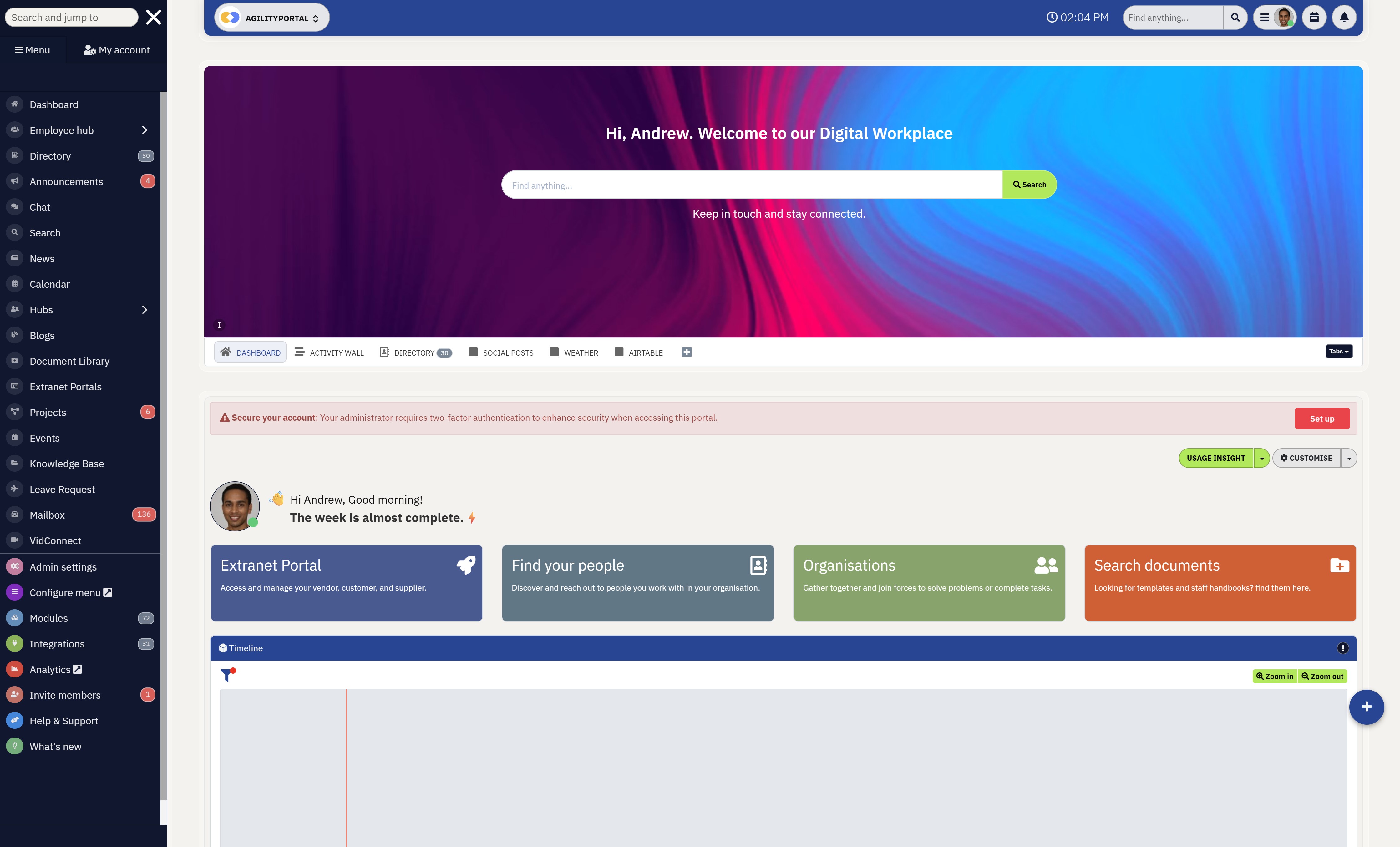
How AgilityPortal supports seamless team collaboration
AgilityPortal is more than just a communication platform; it is a complete digital workplace designed to help remote, hybrid, and global teams collaborate more effectively from one centralised environment.
Built to reduce workplace fragmentation, AgilityPortal combines employee communication, collaboration, knowledge sharing, and engagement tools into a single platform that keeps employees connected no matter where they work.
With AgilityPortal, businesses can centralise workplace communication through team chat, company news feeds, shared workspaces, document management, employee directories, and collaboration hubs.
Instead of relying on multiple disconnected apps, employees can access everything they need — including announcements, files, projects, calendars, and team discussions — from one secure workplace platform.
The platform also integrates with popular business tools such as Microsoft 365, Google Workspace, Slack, Salesforce, and Zoom, allowing organisations to connect existing workflows while improving communication visibility across departments and regions.
For remote and global teams, AgilityPortal helps simplify collaboration by supporting mobile accessibility, real-time communication, AI-powered search, knowledge management, and employee engagement features that keep distributed employees aligned and informed.
AgilityPortal
The All-in-One Virtual Collaboration Platform Built for Modern Remote & Hybrid Teams
AgilityPortal is designed for businesses that need more than basic messaging apps or disconnected workplace tools. It combines virtual collaboration tools, employee communication, knowledge management, document sharing, and team collaboration into one secure digital workplace platform built for remote and global teams.
Instead of employees switching between multiple workplace apps all day, AgilityPortal creates one connected hub where conversations, projects, company knowledge, documents, and workflows stay organised and accessible from anywhere. This helps businesses reduce communication silos, improve productivity, and simplify collaboration across distributed teams.
Start your 14-day free trial — no credit card required. Built for businesses that want fewer apps, better communication, and stronger collaboration.Final Thoughts
Remote and hybrid work have made virtual collaboration tools essential for modern businesses.
Teams can no longer rely on disconnected apps, endless emails, and scattered workflows if they want employees to stay productive and aligned across different locations.
The best virtual collaboration tools help businesses centralise communication, project collaboration, knowledge sharing, document management, and employee engagement into one connected digital workplace experience.
As more organisations support remote and global teams, choosing the right tools for virtual collaboration can improve productivity, reduce app overload, strengthen communication, and create a more connected employee experience.
If your business is struggling with fragmented systems and poor collaboration, now may be the right time to simplify your workplace technology and build a more connected digital workplace for your teams.
Frequently Asked Questions About Virtual Collaboration Tools
What are virtual collaboration tools?
Virtual collaboration tools are software platforms designed to help remote, hybrid, and global teams communicate, share files, manage projects, and collaborate online from different locations.
These platforms often include messaging, video conferencing, document sharing, project management, and virtual whiteboard tools for brainstorming and teamwork.
Many businesses now use virtual collaboration platforms such as Slack, Microsoft Teams, Zoom, Miro, and AgilityPortal to improve communication and reduce disconnected workflows across remote teams.
What are the best virtual collaboration tools for remote teams?
The best virtual collaboration tools depend on how your teams work and what type of collaboration your business needs.
Some platforms focus on messaging and meetings, while others provide project management, knowledge sharing, and virtual collaborative workspace features.
Many businesses also use whiteboard for online collaboration tools like Miro for brainstorming, workshops, and remote planning sessions.
What is a virtual whiteboard and how is it used?
A virtual whiteboard is a digital collaboration space where teams can brainstorm ideas, create diagrams, add notes, and collaborate visually in real time.
These tools are especially popular for remote meetings, workshops, training sessions, and agile planning.
A typical online shared whiteboard may include:
- Sticky notes
- Drawing tools
- Flowcharts
- Mind maps
- Team comments
- Collaborative editing
Modern teams often use a virtual whiteboard with sticky notes during brainstorming sessions and remote workshops to improve visual collaboration.
What are the best online whiteboard tools for collaboration?
Some of the most popular online whiteboard collaboration software platforms include:
- Miro
- Mural
- FigJam
- Microsoft Whiteboard
These platforms are widely considered some of the best online whiteboards for visual collaboration, remote workshops, and online brainstorming sessions.
Businesses often use these virtual whiteboard tools alongside video conferencing platforms such as Microsoft Teams and Zoom.
Are there any free online whiteboards available?
Yes, many providers offer free online whiteboards with basic collaboration features.
Several platforms support:
Popular options include Miro, Microsoft Whiteboard, and FigJam, all of which offer some form of online whiteboard tool free access for smaller teams or personal use.
- Free online sticky notes collaboration
- Shared brainstorming boards
- Visual planning
- Team drawing tools
- Collaborative whiteboard access
Popular options include Miro, Microsoft Whiteboard, and FigJam, all of which offer some form of online whiteboard tool free access for smaller teams or personal use.
What is the best online whiteboard for collaboration and brainstorming?
The best online whiteboard for collaboration depends on your workflow and team size. Many businesses prefer Miro because of its advanced templates, brainstorming tools, and strong remote collaboration experience.
For example, Miro virtual whiteboard features include:
- Real-time team editing
- Sticky note collaboration
- Agile sprint planning
- Brainstorming templates
- Workshop facilitation
- Interactive diagrams
This makes it one of the most popular tools for online brainstorming sticky notes, remote planning sessions, and team workshops.
Can I use an online whiteboard with sticky notes during meetings?
Yes, many virtual whiteboarding software platforms include sticky note functionality designed for workshops, planning sessions, and remote meetings.
A modern online whiteboard sticky notes setup allows teams to:
- Brainstorm ideas visually
- Prioritise tasks
- Group concepts together
- Run agile retrospectives
- Collaborate in real time
These features are especially useful for remote teams using online meeting collaboration tools such as Zoom, Microsoft Teams, and Webex.
Which tools work best for virtual collaboration teams and hybrid workplaces?
Hybrid and global businesses typically need more than basic messaging apps.
The best virtual team collaboration software combines communication, meetings, file sharing, project management, and collaboration spaces into one connected platform.
Important features include:
- Mobile accessibility
- Team messaging
- Video conferencing
- Shared workspaces
- Document collaboration
- Virtual collaborative whiteboard tools
- Workflow automation
- Employee engagement features
Businesses with distributed teams often combine online meeting and collaboration software with online whiteboard for teams platforms to improve remote communication and project planning.
Are virtual collaboration tools secure for businesses?
Most enterprise-grade virtual collaboration software platforms include advanced security features such as:
- Single sign-on (SSO)
- Role-based permissions
- Encrypted communication
- Access management
- Multi-factor authentication
- Secure file sharing
Platforms such as Microsoft Teams, Zoom, Google Workspace, and AgilityPortal provide enterprise-level security designed for remote and global collaboration.
What are the best tools for virtual brainstorming sessions?
The best tools for virtual brainstorming usually include visual collaboration features such as sticky notes, diagrams, whiteboards, and shared planning spaces.
Popular brainstorming virtual tools include:
- Miro
- Mural
- FigJam
- Microsoft Whiteboard
These tools help teams collaborate visually through:
- Online collaboration boards
- Virtual sticky notes collaboration
- Real-time whiteboarding
- Shared planning sessions
- Workshop facilitation
They are commonly used for agile planning, product development, remote workshops, and strategy sessions.
Can students and educators use virtual collaboration tools?
Yes, many schools, universities, and training providers use virtual collaboration tools for students and remote learning environments.
Popular educational use cases include:
- Online classroom whiteboard
- Group brainstorming
- Shared lesson planning
- Team assignments
- Collaborative sticky notes
- Remote teaching workshops
Many educators also use teaching whiteboard online platforms with Google Meet, Zoom, and Microsoft Teams to support remote learning and student collaboration.
What is the difference between a messaging app and a full collaboration platform?
Messaging apps focus mainly on chat and communication, while full virtual collaboration platforms combine multiple workplace tools into one connected experience.
A complete collaboration platform may include:
- Messaging
- Video meetings
- Document management
- Team collaboration
- Knowledge sharing
- Workflow automation
- Collaborative online whiteboard
- Employee engagement tools
The best virtual collaboration platforms help businesses reduce app overload while improving communication and productivity across remote teams.
AI Summary
- Virtual collaboration tools help remote and hybrid teams centralise communication, meetings, file sharing, project collaboration, and workplace knowledge into one connected digital workspace.
- Many organisations struggle with fragmented systems, app overload, and disconnected workflows that reduce productivity and make collaboration harder across global teams.
- The best virtual collaboration tools combine messaging, video conferencing, document collaboration, workflow management, and employee engagement features into a single platform.
- Online whiteboard tools and virtual whiteboard collaboration platforms help teams brainstorm ideas, run workshops, and collaborate visually during remote meetings and planning sessions.
- Businesses should prioritise features such as mobile accessibility, strong search functionality, integrations, workflow automation, and real-time collaboration when choosing collaboration software.
- Successful collaboration depends heavily on employee adoption, usability, and reducing workplace complexity rather than simply adding more disconnected workplace apps.
Most Popular Posts

Effective communication among team members is vital for the productivity and success of any organization. Surprisingly, 60% of companies lack a long-term internal communication strategy, which p...


Businesses thrive on communication for efficiency, productivity and accomplishment. When the right information is passed from the right designation in the organization, it promotes positivity an...
Categories
Blog
(2918)
Business Management
(363)
Employee Engagement
(221)
Digital Transformation
(189)
Growth
(139)
Intranets
(133)
Remote Work
(63)
Sales
(52)
Collaboration
(46)
Customer Experience
(29)
Culture
(29)
Knowledge Management
(28)
Project management
(28)
Leadership
(20)
Comparisons
(9)
News
(1)

Related Posts

What Is Portal Software? Have you ever wondered why so many businesses struggle with disconnected systems, scattered documents, outdated intranets, and poor communication between teams? Most organisations today rely on dozens of different tools...

What happens when your systems suddenly stop working in the middle of a busy workday? For growing businesses, downtime is no longer just a technical problem — it is a direct threat to productivity, customer trust, revenue, and daily operations. ...

Despite organisations investing heavily in collaboration platforms, employee apps, and hybrid work technology, many businesses still struggle with disconnected communication, low employee engagement, and poor workforce visibility. According to ...

The communication champion role is a valuable addition to any business. In a large organization, communication champions should be numerous, forming a communication network. They keep track of information and assist others in better collaborating, wo...

Featured
In today's fast-paced hybrid work environment, staying connected isn't just nice—it's necessary. With more than 80% of employees now working remotely at least part of the time, the demand for intuitive, powerful collaboration tools has never be...


Jill Romford
I am a digital nomad, lover of exploring new places and making friends.
I love to travel and I love the internet. I take pictures of my travels and share them on the internet using Instagram.
Traveler, entrepreneur, and community builder. I share my insights on digital marketing and social media while inspiring you to live your fullest life.
Ready to learn more? 👍
One platform to optimize, manage and track all of your teams. Your new digital workplace is a click away. 🚀
Free for 14 days, no credit card required.