
Insight Blog
Agility’s perspectives on transforming the employee's experience throughout remote transformation using connected enterprise tools.
23 minutes reading time
(4629 words)
What Is a People Hub and How It Improves Employee Engagement

What Is a People Hub and How It Improves Employee Engagement
What is a people hub and why are teams replacing intranets with it? Learn how a modern staff hub improves engagement in a virtual workplace.
What Is a People Hub and How It Improves Employee Engagement

If you're wondering what a people hub actually is and why you might be hearing this phase, you're not alone.
Most companies didn't plan to end up with messy intranets, half-used internal websites, and a dozen tools employees bounce between all day — it just happened.
The problem is that this setup is quietly killing engagement.
Gallup reports that only 23% of employees are engaged at work, and poor communication is one of the main reasons.Add to that Microsoft's finding that the average employee now uses 10+ apps daily,, and it's easy to see why work feels harder than it should.
This is where a people hub or staff hub starts to make sense. Instead of forcing employees to hunt for updates, documents, or people, everything lives in one place designed for how teams actually work today — especially in a virtual workplace.
Companies that make this shift early usually see better adoption, clearer communication, and fewer "why didn't anyone tell me?" moments.
Those that don't often realise too late that disengagement doesn't happen overnight — it builds quietly in the background.
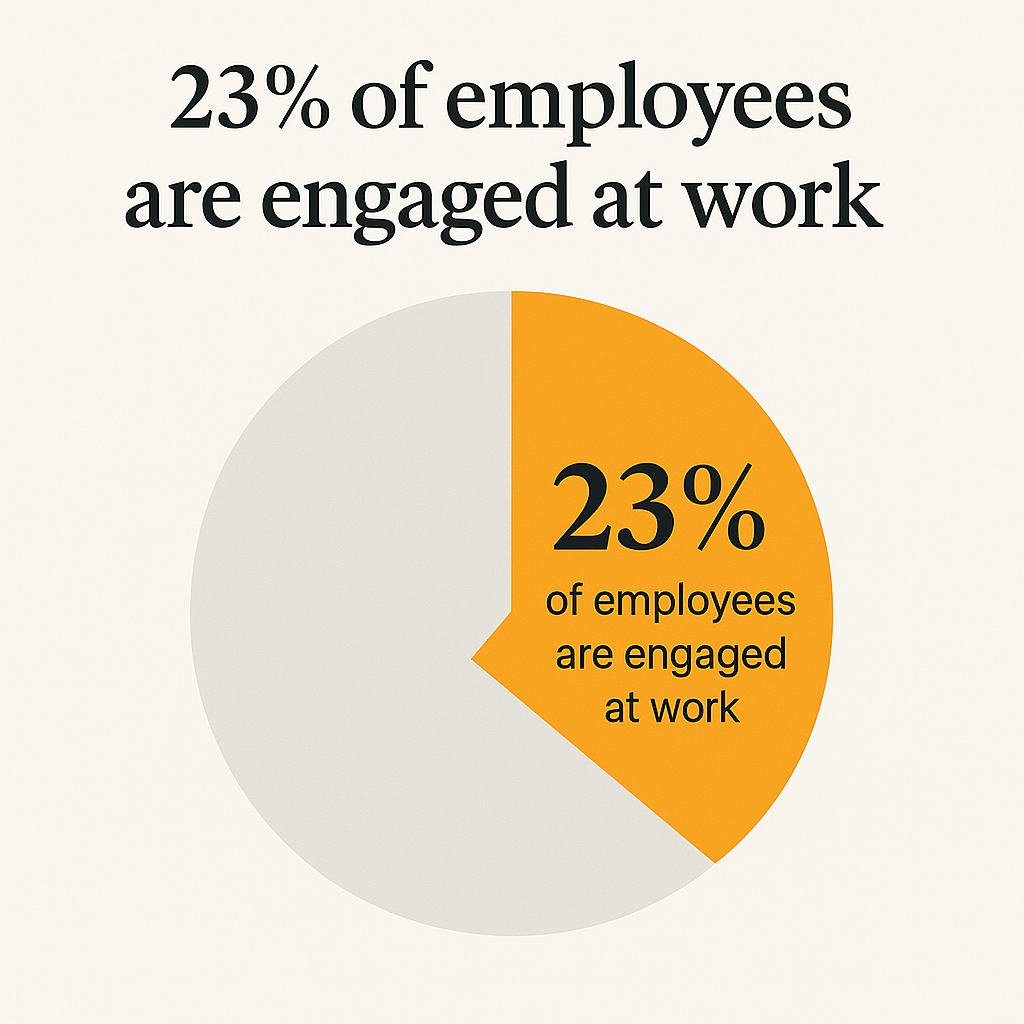
23% of employees are engaged at work
Read this article: : Top 6 AI-Powered Project Management Tools To Use In 2023
So, What Is a People Hub?
A people hub is a central digital space where employees go to connect, communicate, and get work done without jumping between endless tools.
You'll also hear it referred to as a staff hub, an internal website, or even a virtual workplace — but the idea is the same. It's one place that brings people, updates, documents, and collaboration together so work feels simpler, not scattered.
Think of a people hub as the place employees actually start their day.
Instead of digging through emails, chat threads, or outdated intranet pages, they can quickly see company news, find the right documents, check who's responsible for what, and collaborate with their team.
It's designed around how people work in real life, not how systems were built ten years ago.
The key difference between a people hub and a basic internal website is intent. An internal website usually exists to store information.
A people hub exists to be used.
It's dynamic, searchable, mobile-friendly, and built to support engagement — especially in modern, distributed, and hybrid teams.
When done right, it stops being "another tool" and starts feeling like the digital home for your workforce.
Why Companies Are Moving Away From Traditional Internal Websites

Why Companies Are Moving Away From Traditional Internal Websites
Let's be honest — the internal website most companies rely on today just isn't working anymore. It looks fine on paper, but employees don't actually use it.
Gartner estimates that over 60% of intranet and internal website projects fail to meet adoption goals, mainly because they're hard to navigate and don't fit how people work day to day. If a tool only gets opened when someone is forced to, it's already failed.
The biggest issue is that traditional internal websites are static. They're built to publish information, not to engage people.
Content gets uploaded, forgotten, and slowly becomes outdated. Meanwhile, employees expect real-time updates, notifications, and easy access — the same experience they get from consumer apps.
Microsoft research backs this up, showing that employees now expect instant access to information, yet spend up to 20% of their workweek searching for it across disconnected systems.
The problem gets worse for remote and frontline staff. An internal website is often desktop-first, slow on mobile, and clunky outside the office network.
According to McKinsey, companies with poor digital communication tools see up to 25% lower productivity, especially in distributed teams.
When frontline workers can't quickly access updates or documents, they disengage — not because they don't care, but because the tools don't respect their time.
This is why many organizations are replacing the traditional internal website with a people hub or staff hub.
They're done investing in systems that store information but fail to connect people. And once employees experience a platform that actually works the way they do, there's usually no going back.
People Hub vs Staff Hub vs Intranet What's the Difference
This is where a lot of teams get confused, so let's clear it up properly.
On the surface, a people hub, staff hub, and intranet can look similar. They all promise a central place for employees. The difference is in how they're actually used — and whether employees come back after the first week.
A traditional intranet is usually document-heavy. It's built to store policies, PDFs, and announcements. That worked years ago, but today it often turns into a digital filing cabinet.
According to Nielsen Norman Group, intranet users fail to find the information they need over 50% of the time, which explains why adoption drops fast after launch.
A staff hub is a step forward. It focuses more on day-to-day employee needs like updates, quick links, and basic communication.
It's lighter, easier to use, and better than a static internal website — but it can still fall short when teams grow or work becomes more distributed.
A people hub is the evolution of both.
It combines communication, culture, collaboration, and knowledge into one experience.
Instead of asking employees to adapt to the system, it adapts to how people already work — especially in a modern virtual workplace.
Quick Comparison Table
| Feature | Intranet Website | Staff Hub | People Hub |
| Primary Purpose | Store documents | Share updates and resources | Connect people, work, and culture |
| Employee Adoption | Low to moderate | Moderate | High |
| Content Type | Static pages and files | Updates, links, basic content | Dynamic feeds, collaboration, knowledge |
| Mobile Experience | Often poor | Basic | Mobile-first |
| Supports Virtual Workplace | Limited | Partial | Fully designed for it |
| Focus on Engagement | Low | Medium | High |
| Scales With Growth | Weak | Limited | Strong |
The key takeaway is this:
If your goal is simply to store information, an intranet might be enough.
If you want employees to stay informed, a staff hub helps.
But if you want people to feel connected, aligned, and engaged — especially across remote and hybrid teams — a people hub is the model companies are moving toward.
And once teams experience a platform that actually supports how they work, going back to a document-only intranet usually isn't an option anymore.
How a People Hub Supports the Modern Virtual Workplace
This is where the idea of a virtual workplace really starts to click. Remote and hybrid work isn't a trend anymore — it's the default.
Gartner reports that over 70% of knowledge workers now work remotely at least part of the time, yet many companies are still trying to support this reality with tools designed for office-first teams. That mismatch is where frustration and disengagement creep in.
A people hub gives your virtual workplace a clear centre. Instead of employees juggling email, chat apps, shared drives, and random internal pages, everything lives in one place.
Updates, documents, conversations, and team spaces are connected, so people don't waste time figuring out where something lives before they can actually do their job.
According to McKinsey, reducing tool fragmentation can improve productivity by up to 25%, simply by cutting down on context switching.
It also respects how people work across time zones and schedules. In a virtual workplace, not everyone is online at the same time, and that's fine.
A people hub supports asynchronous communication by design — updates don't disappear in chat threads, knowledge is searchable, and decisions are visible even if you weren't online when they happened. That's a big reason why distributed teams feel more aligned when everything runs through a single hub.
Mobile access matters too.
Deskless workers, frontline staff, and remote employees aren't sitting at a laptop all day.
A people hub that works properly on mobile keeps them informed and included without forcing them into office-style workflows.
When people can access what they need quickly, wherever they are, the virtual workplace stops feeling fragmented and starts feeling intentional.
Why Traditional Intranets Are Failing Employees
Traditional intranets were originally built to store information and standardise communication, and for a long time they did that job well.
The challenge today isn't that intranets are "bad" — it's that the way people work has changed faster than most intranet designs.
As teams become more hybrid, mobile, and distributed, employees expect their intranet to do more than host documents.
They want it to feel current, easy to use, and relevant to their day-to-day work.
Research from Nielsen Norman Group shows that intranets with fresh, frequently updated content see significantly higher adoption and trust, while those that remain static naturally see engagement decline over time.
This is where the concept of a people hub comes in.
A people hub doesn't replace the intranet — it builds on it. It keeps the structure, governance, and reliability organizations need, while adding the features employees expect today, such as real-time updates, social-style feeds, fast search, and mobile access for frontline and remote workers.
In platforms like AgilityPortal, the intranet becomes the foundation of a broader employee experience. Documents stay organised and controlled, but communication becomes more visible, collaboration more natural, and information easier to find. Instead of employees being told to "check the intranet," they return because it genuinely helps them do their job.
When an intranet evolves into a people hub, it stops being a place people visit only when they have to — and starts becoming part of everyday work.
Core Features That Make a People Hub Actually Work
A people hub only delivers value if employees want to use it.
Fancy feature lists don't matter if the experience feels slow, confusing, or irrelevant.
The platforms that succeed all have a few core features in common — and they're built around ease of use, daily relevance, and natural adoption.
Central Communication Feed
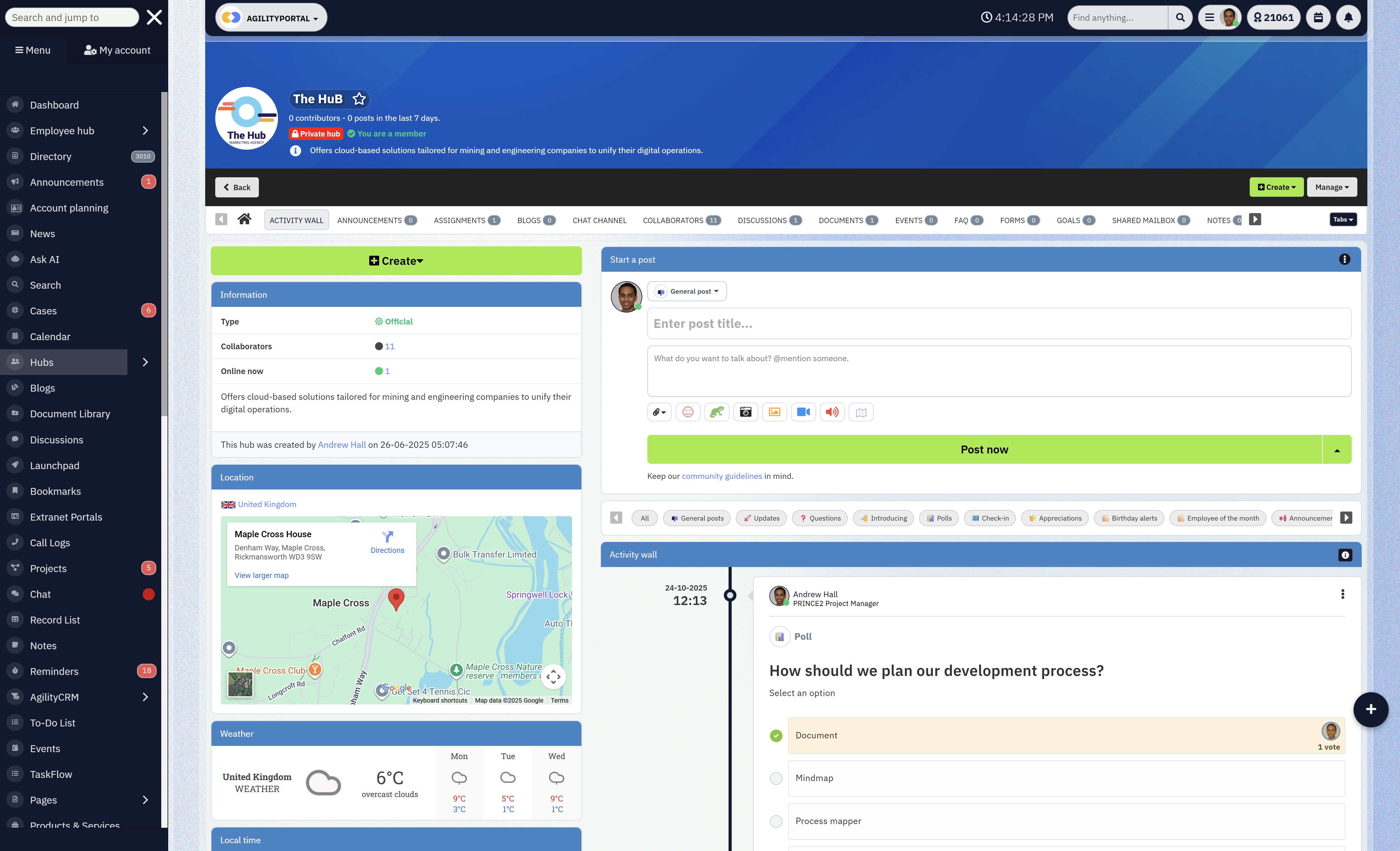
Central Communication Feed
This is the heartbeat of a people hub.
Instead of important updates getting buried in emails or lost in chat threads, a central feed puts company news, announcements, and team updates in one visible place.
Employees know exactly where to look, and leaders know messages are actually being seen.
When communication is clear and consistent, people stop missing updates and start engaging with them.
Employee Profiles and Org Visibility
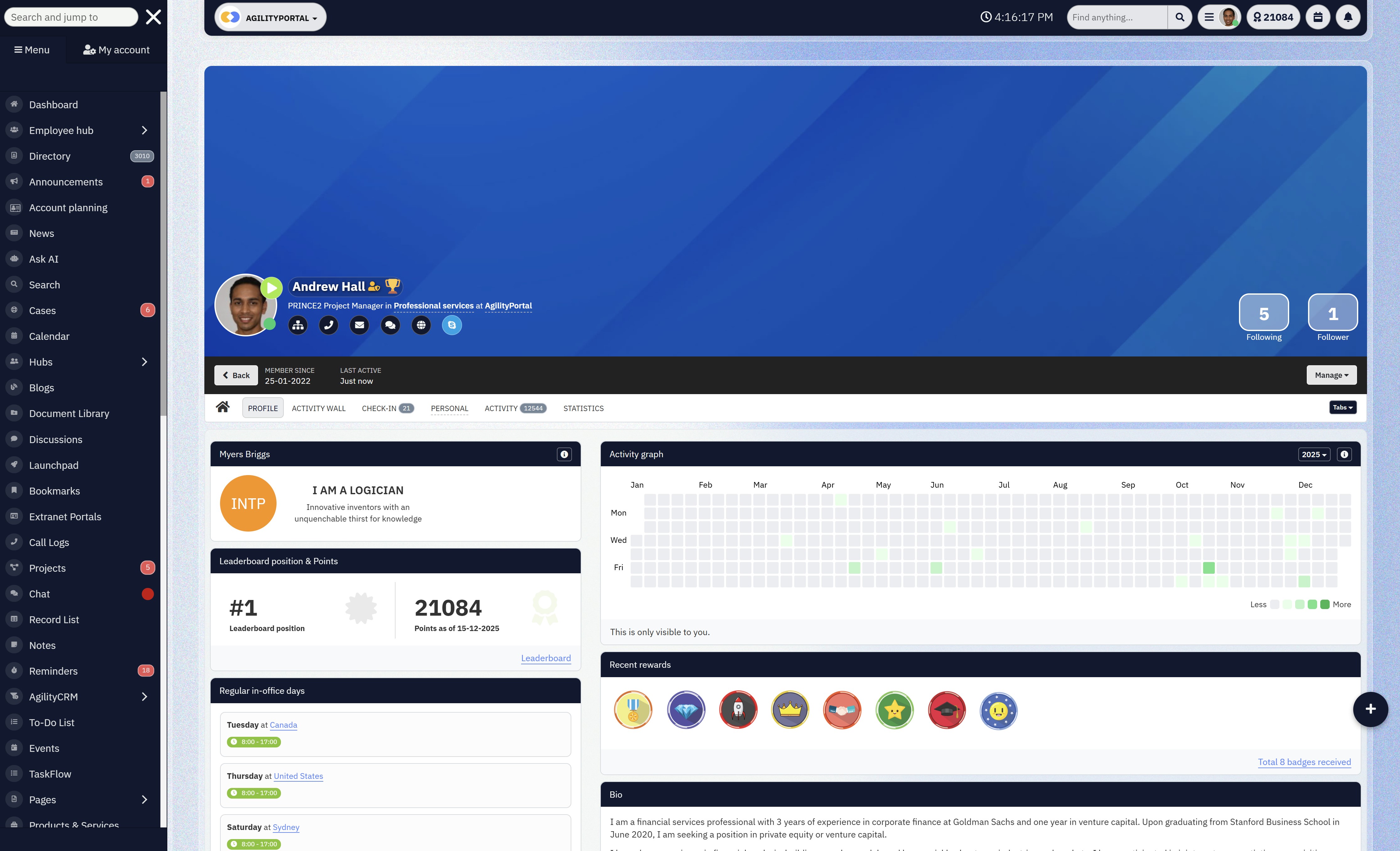
Employee Profiles and Org Visibility
Strong employee profiles turn a people hub into a living directory, not just a content platform.
People can quickly see who does what, which teams they're part of, and how to contact them.
This matters more than most companies realise.
When employees can easily find the right person, work moves faster and collaboration feels natural — especially in larger or distributed organisations.
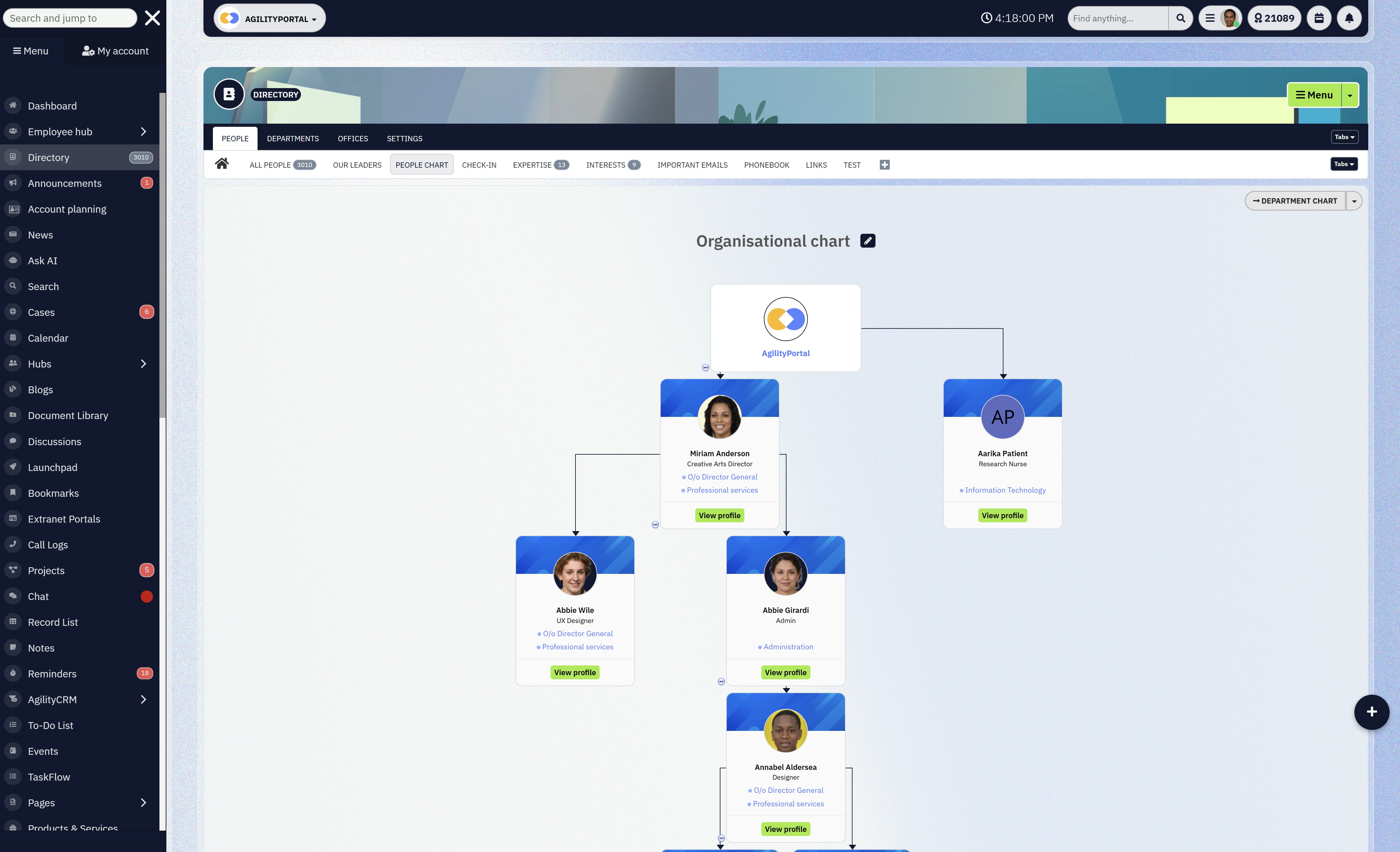
Org Visibility
Knowledge and Document Management
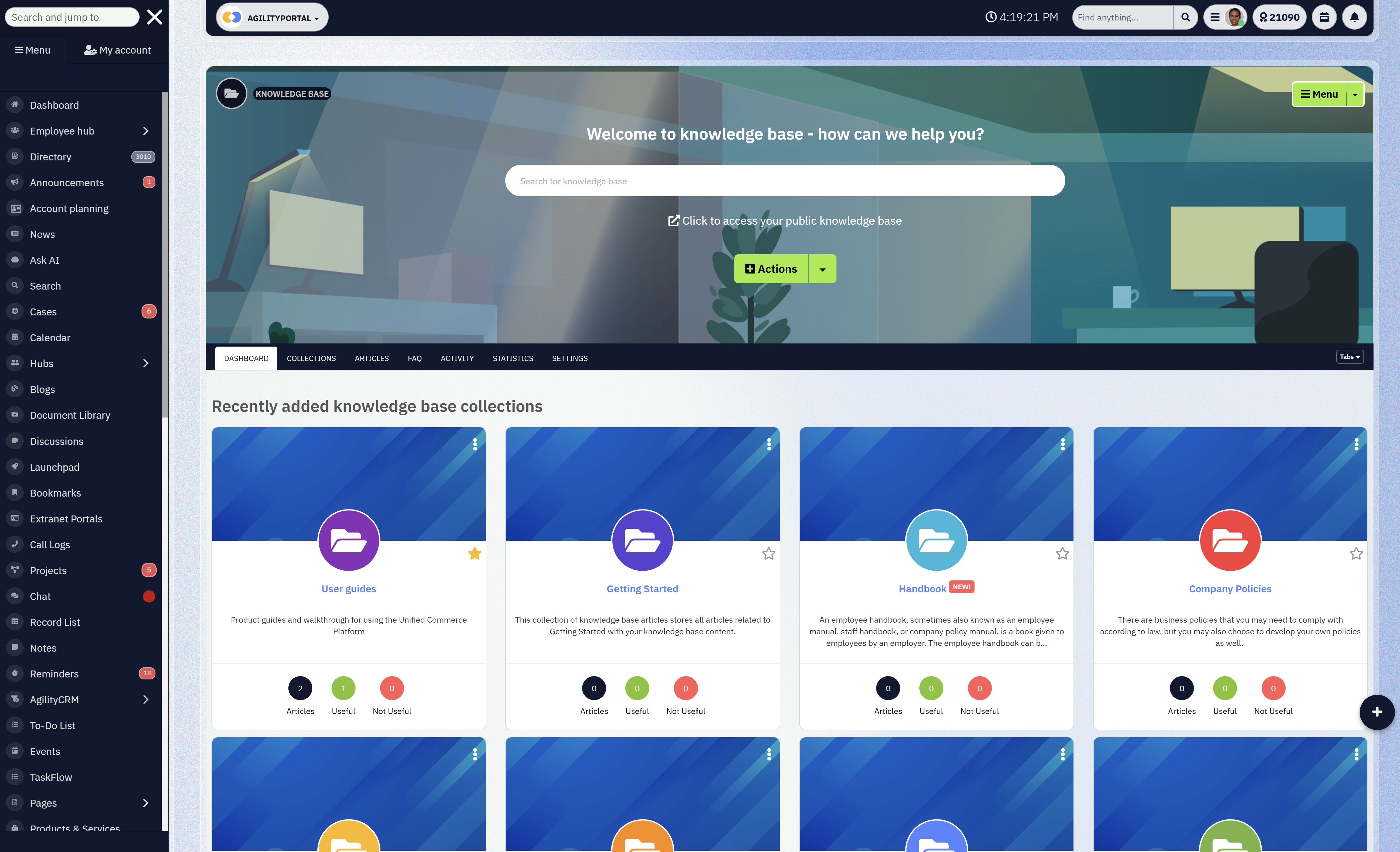
Knowledge
A people hub works when it becomes the default place to find answers.
Policies, guides, onboarding materials, and shared documents should be searchable, well-organised, and always up to date.
Employees shouldn't have to guess whether a file is current or dig through folders to find it.
When knowledge is easy to access, fewer questions get asked and productivity improves without adding pressure.
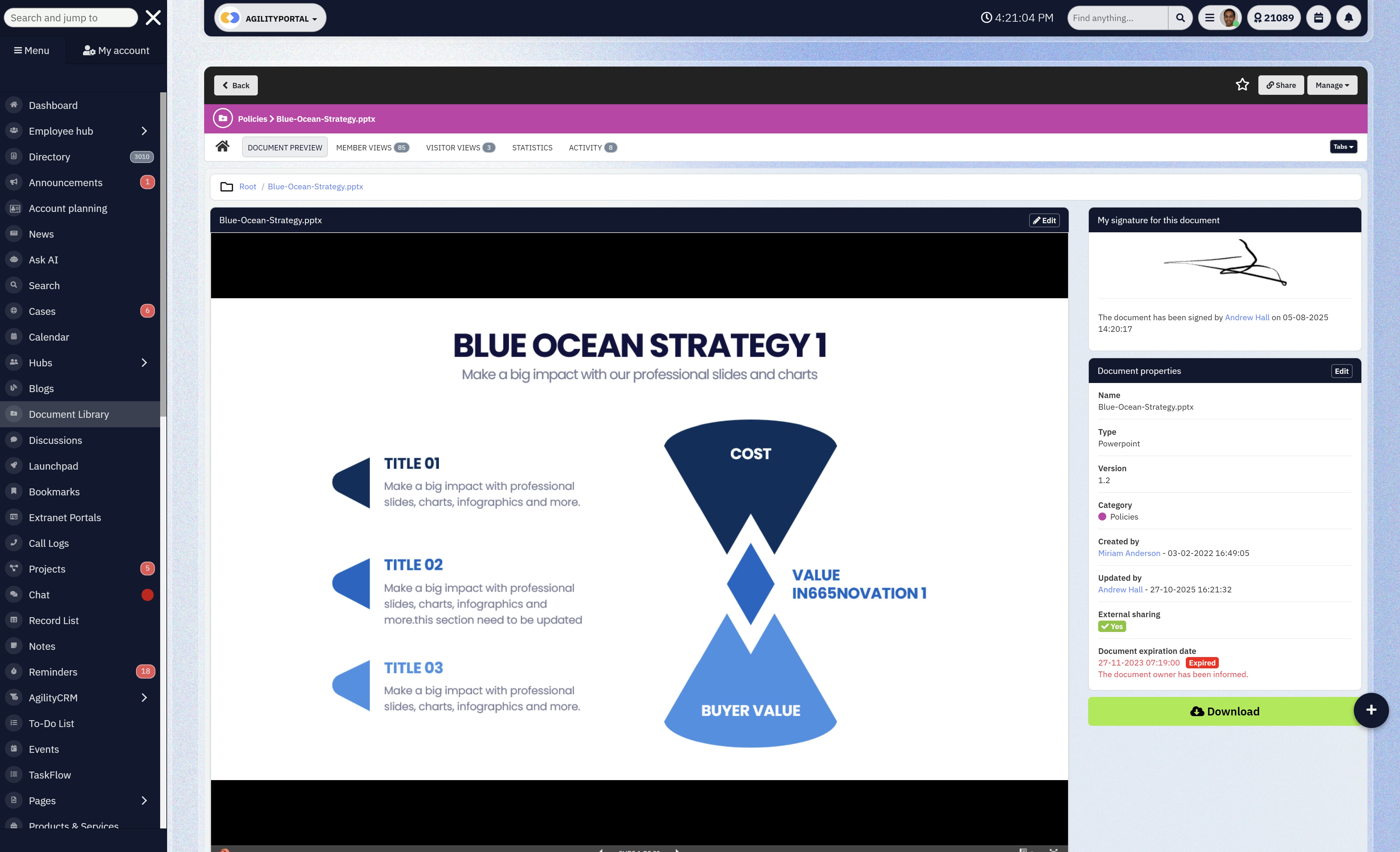
Document Management
Collaboration Spaces and Team Areas
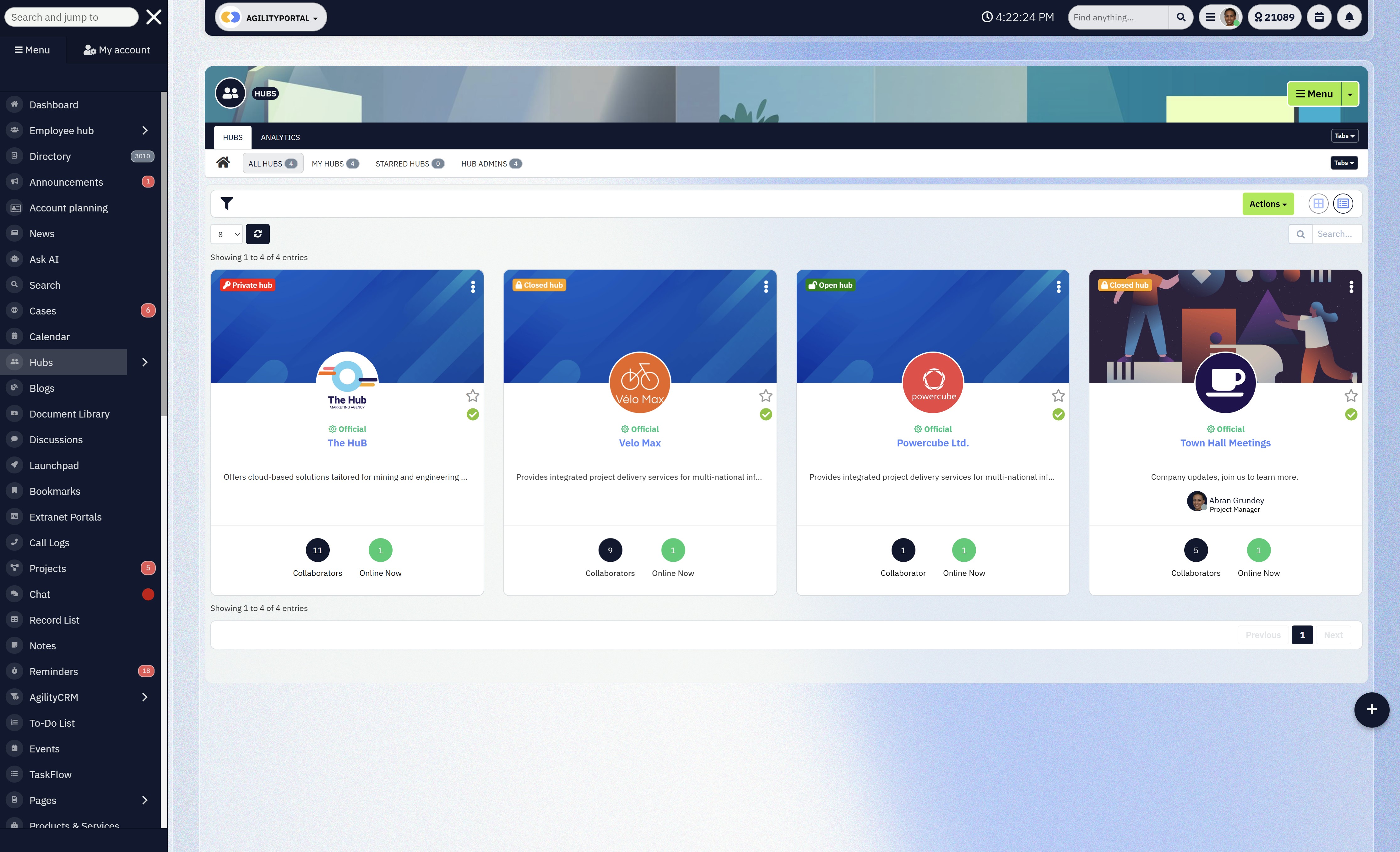
Collaboration Spaces and Team Areas
Team and project spaces give employees a clear home for collaboration.
Instead of scattered conversations across multiple tools, discussions, files, and updates live together in context.
This makes it easier to follow decisions, onboard new team members, and keep work moving — even when people aren't online at the same time.
A people hub that supports real collaboration reduces noise and increases focus.
Mobile Access for Deskless Teams
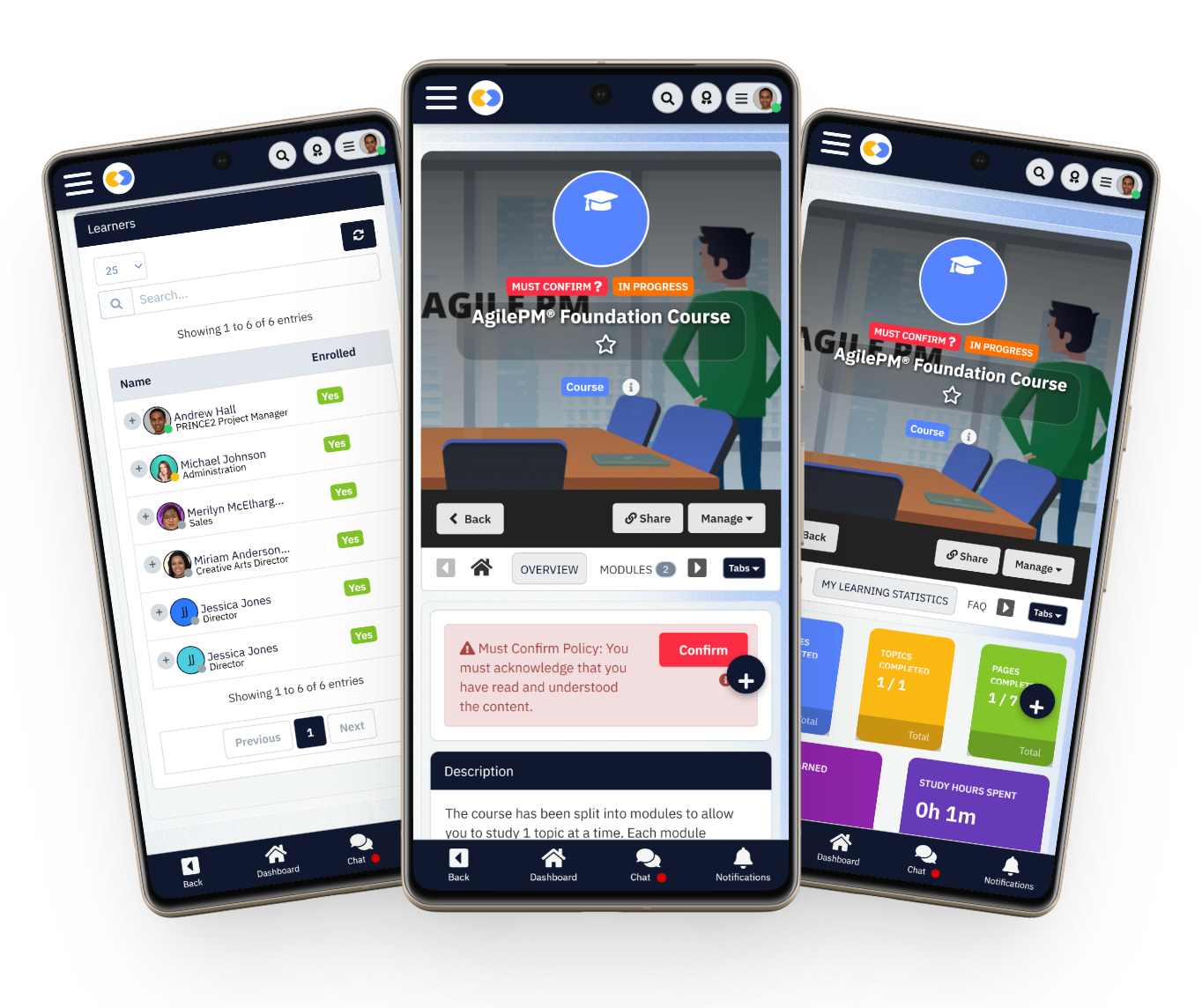
Mobile Access for Deskless Teams
If a people hub doesn't work well on mobile, it fails a huge part of the workforce.
Deskless and frontline teams need quick access to updates, schedules, documents, and messages without being tied to a desk.
Mobile-first access keeps everyone informed and included, which directly impacts adoption.
When employees can use the platform wherever they are, it stops feeling optional and starts feeling essential.
When these features work together, a people hub stops being "another system" and becomes part of everyday work.
That's the difference between a platform people tolerate and one they actually rely on.
Read this article: : Top 6 AI-Powered Project Management Tools To Use In 2023
How a People Hub Improves Employee Engagement
This is where a people hub earns its keep.
Engagement doesn't drop because employees suddenly stop caring — it drops because work becomes noisy, confusing, and disconnected. A people hub fixes that by giving people clarity and consistency in how they experience work.
First, employees know exactly where to go.
There's no guessing which tool has the latest update or where a document lives.
When people have a single, reliable place for communication and information, friction disappears. That alone removes a surprising amount of daily frustration, especially in busy teams.
Second, there's less noise and more clarity.
Instead of announcements buried in emails or lost in chat threads, important updates live in a visible, shared space.
Employees don't feel out of the loop, and leaders don't have to repeat themselves. When communication is clear, trust improves — and trust is a huge driver of engagement.
A people hub also creates space for recognition, updates, and shared culture. Wins get seen. Contributions get acknowledged.
Company values stop being posters on a wall and start showing up in real conversations.
According to Gallup, employees who feel recognised are up to four times more likely to be engaged, and a people hub makes recognition part of everyday work instead of a once-a-year initiative.
Most importantly, it helps people feel connected, even when they're not in the same office — or even the same country.
In distributed and hybrid teams, connection doesn't happen by accident.
A people hub gives everyone visibility into what's happening, who's involved, and where they fit. That sense of belonging matters more than most organisations realise.
And here's the uncomfortable truth:
Teams that feel connected don't quietly disengage or start job hunting.
The ones that don't feel connected usually do — long before anyone notices the warning signs.
That's why improving engagement isn't about adding more tools.
It's about creating a better everyday experience, and that's exactly what a people hub is designed to do.
Who a People Hub Is Best For
A people hub (also known as a staff hub) is ideal for organizations that want their intranet to actively support how people work, not just exist in the background.
It's especially useful for:
Growing companies
Hybrid or remote-first organizations
Frontline-heavy industries
Teams struggling with engagement or tool sprawl
- Too many tools lead to missed messages and frustration
- Employees spend time switching systems instead of doing real work
- A people hub simplifies the experience with one reliable place to work and communicate
A people hub works best for organizations that want their intranet to do more than store information — they want it to genuinely support everyday work.
People Hub Use Cases by Team
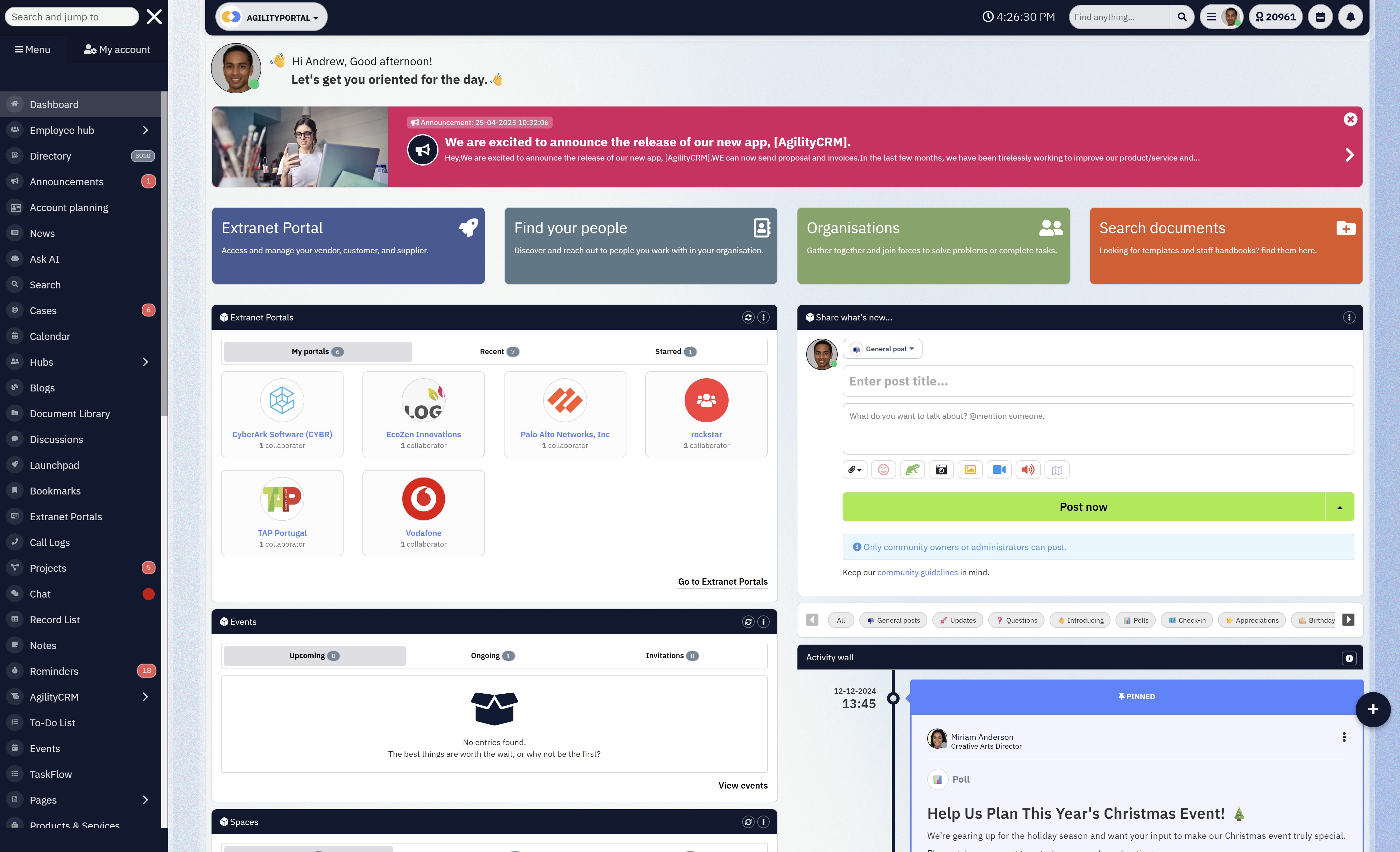
People Hub Use Cases by Team
A people hub becomes far more powerful when it's used across teams, not siloed in one department.
Below are the most common and high-impact ways different teams use a people hub in day-to-day work.
HR and People Ops
For HR and People Ops, a people hub acts as the central source of truth for the employee experience.
- Onboarding materials, policies, and handbooks live in one place
- New hires know exactly where to find answers without emailing HR
- Company updates, benefits information, and learning resources stay current
- Employee profiles and org visibility support transparency and connection
This reduces repetitive questions, speeds up onboarding, and helps HR focus on people instead of admin.
Internal Communications
Internal Comms teams use a people hub to make sure messages are actually seen and understood.
- Company announcements are published in a central feed instead of buried in inboxes
- Updates reach all employees, including remote and frontline workers
- Engagement metrics show what content is being read and what's ignored
- Messaging stays consistent across departments and locations
When communication lives in one place, it's clearer, more visible, and easier to manage.
Operations and Frontline Teams
Operations and frontline teams benefit most from a people hub that works well on mobile.
- Quick access to procedures, schedules, and operational updates
- Fewer missed messages during shift changes or busy periods
- Less reliance on noticeboards, printed documents, or WhatsApp groups
- One staff hub that works across locations and roles
This improves consistency, reduces errors, and keeps frontline teams informed without slowing them down.
Leadership and Management
For leaders and managers, a people hub provides visibility and alignment without micromanagement.
- Leaders can share updates and direction directly with the workforce
- Teams understand priorities, goals, and decisions more clearly
- Managers reduce time spent repeating information or chasing updates
- Transparency builds trust across the organisation
When leadership communication is open and visible, teams feel more connected and confident in where the organisation is heading.
Used across these teams, a people hub stops being just an intranet tool and becomes a shared workspace that supports the entire organisation.
What to Look for When Choosing a People Hub
Choosing a people hub isn't about ticking boxes on a feature list.
It's about whether employees will actually use it without being chased, reminded, or forced.
A good people hub or staff hub should feel obvious from day one.
Here's what to focus on.
Ease of adoption
If employees need training just to figure out where things are, adoption will stall fast.
The interface should be intuitive, familiar, and simple enough that people can jump in and start using it immediately.
Navigation, search, and daily actions should feel natural, especially for non-technical users and frontline staff.
The faster people "get it," the more likely it becomes part of everyday work.
Permissions and governance
As useful as openness is, control still matters.
A people hub needs clear permission settings so the right people see the right content.
This is where it improves on a basic internal website.
You should be able to manage access by role, team, department, or location without creating complexity.
Strong governance keeps information secure while still easy to share.
Integrations with existing tools
No platform lives in isolation.
A people hub should connect smoothly with the tools your teams already use, such as email, calendars, document editors, and identity providers.
The goal isn't to replace everything overnight, but to bring key tools together into one experience.
The fewer systems employees have to jump between, the better.
Analytics and engagement tracking
You can't improve what you can't see.
Built-in analytics help you understand what content is being read, which updates get engagement, and where adoption drops off.
This is especially important in a virtual workplace where visibility is harder to maintain. Good data lets you refine communication instead of guessing.
Here's the simplest rule to remember:
If employees don't use it naturally, it's not a real people hub.
The right platform shouldn't need constant promotion.
When a people hub is chosen well, it becomes the place people go first — not because they have to, but because it genuinely makes work easier.
Why AgilityPortal is The Best People Hub
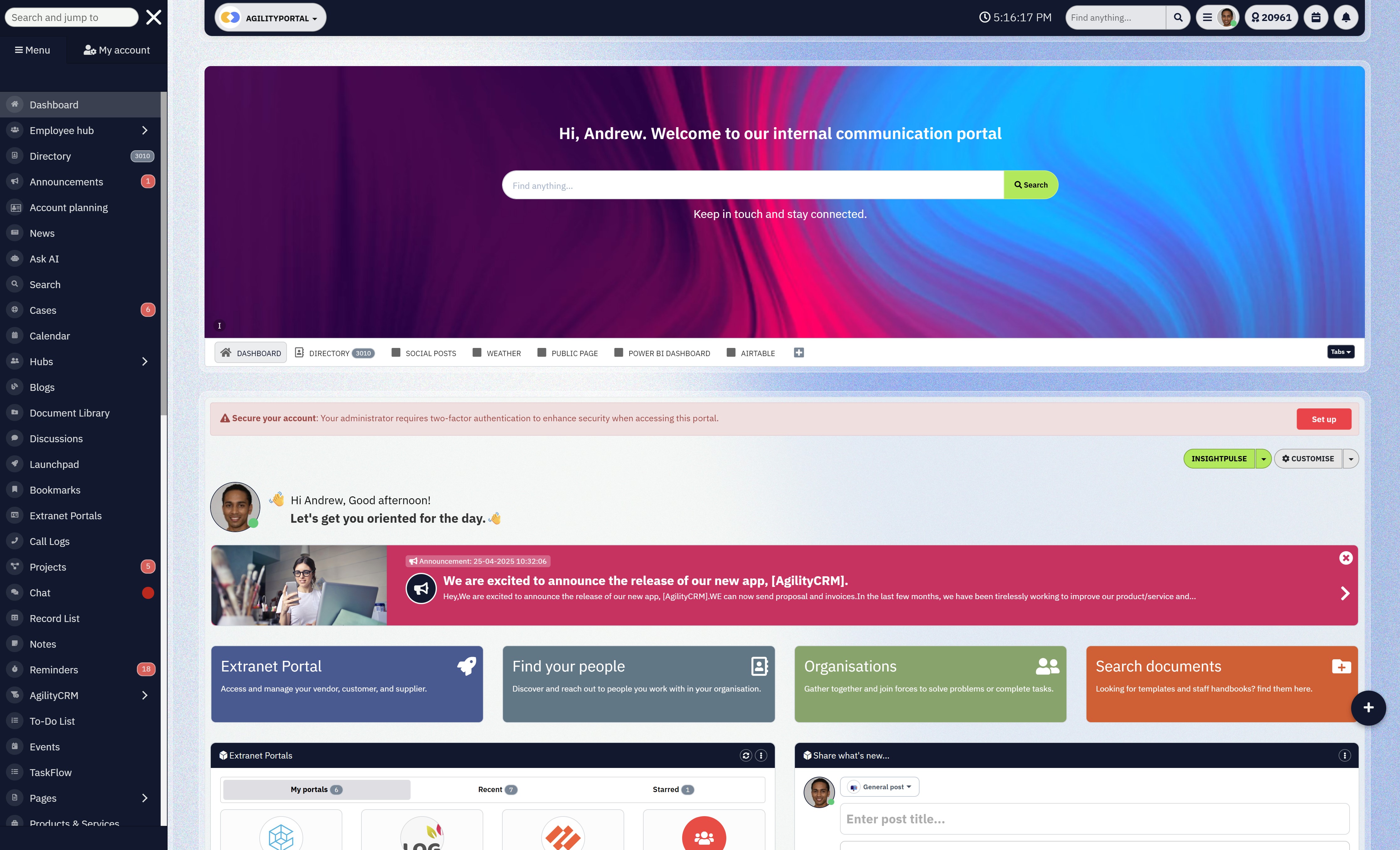
Why AgilityPortal is The Best People Hub
AgilityPortal is a modern intranet and people hub designed for organisations with hybrid, remote, and frontline teams.
It provides a single, centralized employee portal for internal communication, knowledge sharing, collaboration, and engagement — helping teams stay aligned without relying on disconnected tools or outdated internal websites.
Unlike traditional intranets that focus primarily on document storage, AgilityPortal combines enterprise-grade governance with a people-first experience.
Teams use it as a digital workplace hub to share updates, manage documents, collaborate across departments, and support everyday work — whether employees are desk-based, remote, or on the frontline.
What Users Like Best
- Clean, intuitive interface that's easy to adopt
- Strong permissions and governance without complexity
- Mobile-first experience for frontline and deskless workers
- Centralized communication that reduces email noise
- Fast setup and quick time-to-value
Key Capabilities
- People Hub & Staff Hub
Central space for employees, teams, and company updates - Internal Communication Platform
Company news, announcements, and targeted messaging - Digital Workplace Hub
One place for tools, documents, and collaboration - Employee Experience Platform
Supports engagement through clarity, visibility, and connection - Workforce Collaboration Tools
Team spaces, shared documents, and searchable knowledge - Modern Intranet Alternative
Structured, secure, and far easier to use than legacy intranets
Best For
- Mid-to-large organisations with hybrid or remote teams
- Frontline-heavy industries needing mobile access
- Companies replacing a static internal website or legacy intranet
- Teams looking to reduce tool sprawl and improve engagement
Why Choose AgilityPortal
AgilityPortal delivers the structure organisations expect from an enterprise intranet, without the heavy configuration or slow rollout.
Customers value how quickly teams adopt the platform and how naturally it fits into daily work.
By balancing governance, usability, and flexibility, AgilityPortal helps organisations improve communication and engagement — without adding unnecessary complexity.
Modern People Hub
Built to Connect Employees, Teams, Departments & Workplace Communities
AgilityPortal’s People Hub gives businesses a central place to manage employee profiles, team directories, departments, skills, roles, and workplace connections. Instead of employees wasting time searching across disconnected systems, they can quickly find the right person, understand who does what, and connect with colleagues across hybrid, remote, and frontline teams.
Modern organizations use AgilityPortal People Hub to improve employee visibility, strengthen internal communication, support onboarding, and make collaboration easier across departments and locations. With searchable profiles, team structures, employee information, and mobile-first access, AgilityPortal helps create a more connected and human-centered digital workplace experience.
See how AgilityPortal helps employees find people, understand teams, and build stronger workplace connections.Wrapping up
A people hub matters now because the way people work has changed — and it's not changing back.
Hybrid teams, remote work, frontline mobility, and constant information flow have turned clarity into a competitive advantage.
When employees know where to go, what matters, and how they fit in, engagement stops being something you chase and starts becoming something that happens naturally.
At its best, a people hub brings together what teams need most: clear communication, easy access to knowledge, and a shared sense of connection — even in a virtual workplace.
It gives structure without friction and visibility without overload. Whether you call it a people hub, staff hub, or modern intranet, the goal is the same: make work easier to navigate and more human to experience.
The reality is that organizations that delay this shift don't usually feel the impact overnight.
It shows up gradually — in missed updates, slower onboarding, disengaged employees, and teams that feel out of sync.
The companies that move earlier don't just keep things tidy; they create workplaces people actually want to be part of.
And in today's world of work, that difference matters more than ever.
Frequently Asked Questions About People Hubs
What is a people hub in simple terms
A people hub is a central digital space where employees communicate, find information, and collaborate.
It combines elements of an intranet, staff hub, and employee communication hub into one experience that's easier to use and more relevant to daily work.
Is a people hub the same as an employee engagement platform
Not exactly, but there's overlap.
A people hub often acts as an employee engagement platform because it improves visibility, connection, and communication.
Engagement tools focus on outcomes like participation and sentiment, while a people hub focuses on the everyday experience that drives those outcomes.
How is a people hub different from a traditional intranet
A traditional intranet is usually document-focused and static.
A people hub is more dynamic and people-first.
Many organizations now treat the people hub as a modern intranet alternative, keeping the governance of an intranet while adding better communication, collaboration, and mobile access.
Can a people hub replace multiple workplace tools
Yes, in many cases.
A people hub reduces tool sprawl by acting as a centralized staff portal where employees access updates, documents, team spaces, and integrated tools.
It doesn't always replace everything, but it significantly reduces switching between systems.
Is a people hub suitable for remote and hybrid teams
Absolutely.
A people hub is designed for the digital workplace platform model, where teams aren't always in the same place or online at the same time.
It supports asynchronous communication, clear updates, and shared visibility, which are essential for remote and hybrid work.
How does a people hub support collaboration
A people hub brings conversations, documents, and updates into shared spaces, making it easier to collaborate without losing context.
This is why it's often seen as a form of workplace collaboration software, especially for cross-functional and distributed teams.
Who typically owns and manages a people hub
Ownership usually sits with HR, Internal Communications, or Operations, depending on the organization.
Because a people hub supports culture, communication, and knowledge sharing, it often becomes part of a broader employee experience software strategy rather than a purely IT-owned system.
What should we look for when choosing a people hub
Focus on ease of use, strong permissions, mobile access, integrations, and clear analytics.
If employees adopt it naturally and use it daily, it's doing its job.
If it needs constant reminders, it's not the right people hub.
Most Popular Posts

Effective communication among team members is vital for the productivity and success of any organization. Surprisingly, 60% of companies lack a long-term internal communication strategy, which p...


Businesses thrive on communication for efficiency, productivity and accomplishment. When the right information is passed from the right designation in the organization, it promotes positivity an...

Categories
Blog
(3190)
Business Management
(394)
Employee Engagement
(235)
Digital Transformation
(217)
Growth
(150)
Intranets
(141)
Internal communications
(106)
Remote Work
(68)
Sales
(53)
Collaboration
(52)
Customer Experience
(32)
Culture
(30)
Knowledge Management
(29)
Project management
(29)
Leadership
(20)
Comparisons
(9)
News
(1)

Related Posts

Welcome to AgilityPortal's guide to the best VPN for Remote teams. How do you give employees secure access to company systems when they work from home, the office and everywhere in between? It's a question more businesses need to answer: 28% of worki...

Have you ever left a meeting thinking everyone agreed on the next step, only to discover a week later that each person remembered something different? Open source meeting transcription can help teams keep a searchable record of the conversation...

The best ai image editors can save a team hours of repetitive work. A marketing manager can remove a distracting background, an HR team can improve a staff event photo, and an online shop can turn a basic product shot into something ready to pu...

Ever opened a PDF just before a meeting and realised you need to edit a page, pull figures from a scanned report, or gather everyone's comments? What should be a quick task can turn into a frustrating search for the right tool. That lost time a...

Looking for a New Job Remotely can feel like a simple next step: update your CV, turn on job alerts and start applying. In reality, the strongest remote job searches start much earlier. You need to be clear about the work you want, the kind of ...


Jill Romford
I am a digital nomad, lover of exploring new places and making friends.
I love to travel and I love the internet. I take pictures of my travels and share them on the internet using Instagram.
Traveler, entrepreneur, and community builder. I share my insights on digital marketing and social media while inspiring you to live your fullest life.
Ready to learn more? 👍
One platform to optimize, manage and track all of your teams. Your new digital workplace is a click away. 🚀
Free for 14 days, no credit card required.