
Insight Blog
Agility’s perspectives on transforming the employee's experience throughout remote transformation using connected enterprise tools.
26 minutes reading time
(5161 words)
Secure Collaboration Platform for Businesses That Care About Data Privacy

Secure Collaboration Platform for Businesses That Care About Data Privacy
A practical guide to choosing a secure collaboration platform that protects data privacy, AI usage, file sharing, and ownership control.
Secure Collaboration Platform for Businesses That Care About Data Privacy

Most data breaches don't start with a hacker in a hoodie.
They start on a normal Tuesday.
- Someone shares a document link "just for convenience."
- An AI assistant quietly scans files to "improve suggestions."
- A contractor downloads something they were never meant to keep.
No alarms. No warnings. Just business as usual—until it isn't.
And the numbers back this up. Over 80% of data breaches now involve data stored or shared through collaboration platforms, not core systems.
At the same time, studies show that nearly 60% of organisations don't fully understand how their collaboration tools use AI on their data. That gap—between trust and reality—is where most damage happens.
Collaboration Platforms Are Now the #1 Breach Hotspot
Over 80% of data breaches involve data stored or shared through collaboration platforms.
Note: Visual is illustrative to highlight the 80%+ benchmark.
This is the uncomfortable truth:
Businesses aren't careless with data. They're operating inside tools that were never designed for today's reality—where AI, file sharing, document collaboration, and external access all sit in the same place.
AI is now baked into search, content suggestions, file indexing, and analytics.
That's powerful—but it also means artificial intelligence poses real data privacy challenges, especially when ownership, consent, and control aren't clearly defined.
Once sensitive data enters the system, teams often lose visibility over who can access it, how it's used, and whether it's feeding someone else's model.
For regulated industries, nonprofits, healthcare organisations, and growing businesses handling confidential information, this isn't theoretical risk.
The average cost of a data breach has climbed past $4 million, and reputational damage lasts far longer than the incident itself.
Real-World Risk
A Data Breach Isn’t Just an IT Problem — It’s a Business Risk
For regulated industries, nonprofits, healthcare organisations, and growing businesses handling confidential information, this risk is very real.
Average cost of a data breach
$4M+
Direct financial impact continues to rise year over year
Reputational damage
Long-term
Loss of trust often lasts far beyond the incident itself
This article exists for leaders who don't want to learn these lessons the hard way.
We'll break down what a secure collaboration platform actually means in an AI-driven world, why data ownership and control matter more than features, and how businesses can enable modern collaboration without sacrificing privacy, trust, or compliance.
Because productivity is meaningless if it comes at the cost of control—and security can't be an afterthought anymore.
Key Takeaways
- Security isn’t a feature — a secure collaboration platform must enforce access control, audit trails, and clear internal vs external boundaries.
- AI raises privacy risk — AI privacy and security requires transparency, opt-in controls, and strict data handling rules.
- Data ownership matters — you should own both your files and the metadata created around them (logs, usage, sharing history).
- External sharing needs guardrails — isolate partners/clients in separate portals and apply time-bound access by default.
- DLP reduces human error — Data Loss Prevention can alert or block when confidential data is shared improperly.
- Breaches are expensive — the average breach cost is $4M+ and reputational damage often lasts far longer than the incident.
Read this article: : Top 6 AI-Powered Project Management Tools To Use In 2023
What Secure Collaboration Really Means

What Secure Collaboration Really Means
Secure collaboration is about enabling teams to work together—across offices, time zones, and devices—without putting sensitive information at risk.
It's the ability to share documents, exchange messages, and collaborate in real time while maintaining strict control over who can access data, how it's used, and where it goes.
Whether teams are remote, onsite, or hybrid, secure collaboration ensures work moves forward without exposing confidential information or creating hidden security gaps.
Why Secure Collaboration Matters for Businesses
For organisations handling sensitive data, secure collaboration tools aren't optional—they're essential.
Here's why:
- Safe file sharing without compromise - Teams can share critical documents and project files knowing intellectual property and proprietary information remain protected. Access is controlled, visibility is intentional, and data doesn't leak through loose links or unsecured downloads.
- Better productivity and communication - Endless email threads slow work down and create confusion. Secure collaboration tools replace that chaos with a shared workspace where conversations, files, and decisions live in one place—no meetings just to "get aligned."
- Faster decision-making across locations - Work doesn't stop because teams are spread out. Secure collaboration enables instant communication, quick feedback loops, and real-time updates, so actions happen immediately—not days later.
- Clear organisation and accountability - Files, tasks, and updates don't disappear into inboxes. Secure collaboration tools make it easy to track progress, see who did what, and maintain a clear record of activity without manual follow-ups.
Why Data Privacy Is Now a Collaboration Problem
Why Data Privacy Is Now a Collaboration Problem
A few years ago, data privacy was mostly an IT or legal concern.
Today, it's a collaboration problem—and that shift is catching a lot of businesses off guard.
Modern collaboration platforms sit right at the centre of your data flow.
Every document uploaded, every message sent, every comment added, and every file shared passes through the same system.
That means your most sensitive information—contracts, employee records, financial data, client communications—now lives where people collaborate, not where security teams traditionally focus.
The problem is scale.
Documents, chats, shared folders, and embedded AI tools all touch sensitive data at once.
A single platform might handle internal discussions, external partner access, file storage, real-time editing, and AI-powered search. Each interaction creates another point where data privacy can break down if controls aren't clear and enforced.
AI has amplified this risk.
Many collaboration tools now rely on third-party AI models to power features like content suggestions, summaries, search, or analytics.
While these features promise productivity gains, they also introduce serious internet privacy concerns. Data often leaves the platform boundary, visibility drops, and businesses lose clarity over how information is processed, stored, or reused.
Reality Check
AI Creates Data Privacy Risk Because It’s Opaque
This is where reality hits: artificial intelligence poses data privacy challenges not because it’s malicious, but because it’s opaque. When teams don’t know what data is being accessed, learned from, or retained, privacy stops being a policy and becomes a guessing game.
Fix: Require transparency, opt-in AI, audit logs, and clear retention rules.
As collaboration becomes more central to how work gets done, data privacy can no longer be treated as a background setting.
It has to be designed into the platform itself—because once collaboration breaks privacy, trust breaks with it.
Protecting Privacy in an AI-Driven World
This is where trust is either earned—or quietly lost.
AI is now embedded into collaboration platforms by default. Search, recommendations, summaries, content suggestions, analytics—it all sounds helpful.
And it can be. But without clear guardrails, AI turns from a productivity boost into a privacy liability.
Protecting privacy in an AI-driven world starts with governance and transparency. Businesses need to know exactly what AI is doing, what data it can access, and what happens to that data after it's processed.
Vague statements like "AI-powered features" or "we respect your privacy" aren't enough. If leaders can't explain how AI interacts with their data, they don't truly control it.
One of the biggest red flags is always-on AI. In many platforms, AI is enabled by default, scanning documents, conversations, and files automatically. Users don't opt in—it just happens in the background.
That approach prioritises convenience over consent and creates unnecessary risk, especially for organisations handling sensitive or regulated information.
Privacy-first platforms take a different stance: AI should be opt-in, scoped, and reversible.
Teams choose when AI is used, which data it can access, and for what purpose. Nothing is silently analysed. Nothing is reused without permission. Control stays with the business, not the model.
Retaining control also means separating assistance from ownership. AI can help surface information or speed up workflows without learning from proprietary data or exporting it to third-party systems.
When collaboration tools blur that line, businesses lose leverage—and often don't realise it until there's a compliance issue or a trust breakdown.
In an AI-driven world, privacy isn't about rejecting innovation.
It's about designing AI to serve the organisation, not siphon value from it. The platforms that get this right don't treat privacy as a checkbox—they treat it as the foundation of trust, adoption, and long-term resilience.
Data Ownership Principles Every Business Should Demand
Hard truth: if you don't own your data, you don't control your business.
Most collaboration platforms talk a lot about security but stay conveniently vague about ownership.
And that's where problems start. Once files, messages, and documents are uploaded, many businesses assume they still have full control. In reality, that's not always true.
Strong data ownership principles begin with clarity around what happens the moment data enters a platform. Who owns the uploaded files? Who controls access to documents once they're shared internally or externally?
And just as importantly, who owns the metadata—the activity logs, usage patterns, search data, and behavioural insights generated around that content?
In many tools, metadata is treated as a free resource for the vendor. It's analysed, retained, and sometimes monetised, even if the core files technically "belong" to the customer. That's a quiet erosion of ownership most teams never see coming.
AI makes this issue sharper. When platforms use customer data to "improve AI models" or "enhance intelligent features," ownership and control can slip fast.
Even if files aren't sold or shared outright, they may still be processed, learned from, or retained in ways the business never explicitly agreed to. Once data feeds AI training pipelines, reversing that decision is often impossible.
This is why the promise "we don't sell your data" isn't enough. Selling data is only one risk. Reusing it, learning from it, exporting insights from it, or storing it indefinitely can be just as damaging—especially for organisations handling sensitive, regulated, or proprietary information.
Real data ownership and control means:
- Your organisation retains full ownership of all content and associated metadata
- AI does not train on your data without clear, explicit consent
- You can restrict, export, or delete data without barriers
- Ownership terms are transparent, not buried in legal language
If a collaboration platform can't explain these points clearly and confidently, that's a red flag. Data ownership shouldn't be assumed—it should be guaranteed.
Secure Collaboration Platform — What "Secure" Actually Means
"Secure" gets thrown around a lot in collaboration software. Encryption badges, trust logos, vague claims about compliance.
But when you strip the marketing away, a secure collaboration platform comes down to a few practical, non-negotiable controls that protect data where it's actually used—by people.
If those controls aren't clear, security is mostly theatre.
Here's what secure really means in practice.
Access Control & Role-Based Permissions
Security starts with who can see what—and who absolutely cannot.
A proper secure collaboration platform enforces role-based access by default.
That means employees, managers, contractors, and external partners don't just share the same space with different labels.
They operate under clearly defined permission rules that limit access to only what's necessary.
This matters because most data exposure isn't malicious—it's accidental.
Over-permissioned users, inherited access, and "just give them access for now" decisions are how sensitive information leaks.
Strong access control prevents that drift and keeps data privacy collaboration intentional instead of informal.
Encryption at Rest and in Transit
Encryption isn't a feature—it's baseline hygiene.
Data should be encrypted in transit, so it can't be intercepted while moving between users, devices, or servers.
It should also be encrypted at rest, so even if infrastructure is compromised, the data itself isn't immediately readable.
Where platforms differ is transparency.
Secure systems make it clear what is encrypted, when, and who holds the keys. If those answers are vague, you're relying on trust instead of control—and that's not security.
Audit Logs & Activity Tracking
If you can't see what's happening to your data, you don't control it.
A secure collaboration platform provides detailed audit logs showing who accessed a file, edited a document, shared content externally, or changed permissions. This isn't about surveillance—it's about accountability.
Audit trails are essential for incident response, compliance, and internal trust.
When something goes wrong, guessing isn't an option. You need evidence. Platforms without proper activity tracking leave businesses blind at the exact moment clarity matters most.
Internal vs External Collaboration Boundaries
Internal collaboration and external collaboration carry very different risks—and treating them the same is a mistake.
Secure platforms enforce clear boundaries between employees and outsiders. Partners, suppliers, clients, or volunteers should never have the same visibility or access paths as internal teams, even if they're collaborating on the same project.
This separation protects internal data from accidental exposure while still allowing productive collaboration. When those boundaries are blurred, data privacy stops being enforceable and starts depending on user behaviour—which always fails at scale.
A secure collaboration platform isn't defined by how many security claims it makes—it's defined by how clearly it enforces control, visibility, and boundaries in everyday work.
When security is built into access, encryption, auditing, and collaboration structure, data privacy collaboration becomes sustainable, not fragile. Anything less is just hoping nothing goes wrong.
Read this article: : Top 6 AI-Powered Project Management Tools To Use In 2023
File Sharing Without Losing Control - This is where most breaches happen—and it's rarely intentional
File Sharing Without Losing Control - This is where most breaches happen—and it's rarely intentional.
File sharing is the quiet weak spot in most organisations. Not because teams are careless, but because many tools make it far too easy to trade control for convenience.
A link gets created, forwarded, saved, reshared—and suddenly sensitive information is floating well beyond its original audience.
This is why traditional file sharing platforms so often fail security audits. They were built for speed, not accountability. Once a file leaves the system via an open link, visibility drops. There's no reliable way to know who accessed it, where it ended up, or how long it's being kept.
The biggest risk usually comes down to external links versus authenticated access.
Open links feel efficient, but they bypass identity checks entirely. Anyone with the URL can view, download, or forward the file—sometimes indefinitely. Authenticated access flips that model. Files are tied to real users, permissions are enforced, and access can be revoked instantly when roles change or projects end.
Control doesn't stop at access. A secure document sharing platform must also handle versioning and permissions properly.
Without version control, teams end up working on outdated files, duplicating sensitive documents, or downloading copies that escape governance altogether. Clear permissions—view, comment, edit—ensure users only interact with files in ways that match their role, not their curiosity.
Expiry rules are another critical safeguard.
Files shared externally should not live forever by default. Time-limited access reduces long-term exposure and forces intentional sharing decisions instead of permanent exceptions that everyone forgets about.
A modern online file sharing platform should make the secure option the easiest option. That means authenticated users, traceable activity, controlled permissions, and automatic expiration—all built into everyday workflows.
Because file sharing isn't just about moving documents. It's about deciding who keeps control after the file is sent.
Internal vs External Collaboration — Different Risks, Same Platform
On paper, collaboration looks simple: employees, partners, and clients all need access to information to get work done.
In reality, they represent very different risk profiles, and treating them the same is one of the fastest ways to create a data privacy incident.
Internal users—employees and contractors—operate under company policies, onboarding, security training, and device controls. External users—partners, suppliers, clients, volunteers—do not.
They sit outside your security perimeter, use unmanaged devices, and often change roles or organisations entirely. Yet in many collaboration tools, they're dropped into the same environment with slightly fewer permissions and a lot of assumptions.
That's where things break.
According to industry breach reports, over 60% of data leaks involve third parties, not internal staff.
Even more telling, external users are involved in nearly half of collaboration-related security incidents, usually through over-shared files, inherited permissions, or long-forgotten access that was never revoked.
These aren't sophisticated attacks—they're structural failures.
The biggest mistake is mixing internal and external collaboration without isolation. When partners and clients share the same spaces, folders, or document libraries as employees, risk compounds fast.
A permission change meant for an internal team can expose external users.
A shared folder intended for one project becomes visible across others. Sensitive internal discussions sit one click away from people who were never meant to see them.
This is how collaboration convenience quietly overrides collaboration security.
A secure collaboration platform solves this by enforcing logical separation without adding friction.
Internal collaboration happens in protected environments designed for employees—full visibility, richer permissions, internal search, and broader access where appropriate.
External collaboration happens in isolated spaces—partner hubs, client portals, or project-specific workspaces—where access is tightly scoped, auditable, and time-bound.

Critically, separation doesn't mean slowdown.
Modern secure platforms allow teams to collaborate across boundaries without copying files, emailing attachments, or creating shadow systems. Employees work as normal.
External users see only what they've been explicitly invited to see—nothing more, nothing less. When a relationship ends, access is revoked instantly, without chasing links or cleaning up shared drives.
From a data privacy perspective, this separation is non-negotiable. Regulations, contractual obligations, and basic trust all depend on knowing exactly where data lives and who can touch it.
From a business perspective, it reduces risk without reducing speed—which is the balance most organisations are trying to achieve but rarely do.
Internal and external collaboration can live on the same platform—but they should never live in the same risk model.
When environments are clearly separated by design, collaboration stays productive, and privacy stays intact.
How to Evaluate a Secure Collaboration Platform

How to Evaluate a Secure Collaboration Platform
1. Data Ownership & Control
Start here. Everything else depends on this.
Ask:
- Who legally owns the data once it's uploaded to the platform?
- Does ownership cover both files and associated metadata (logs, activity data, AI-derived insights)?
- Is your data excluded from AI training or secondary use by default?
- Can you export all data in usable formats without fees, delays, or vendor lock-in?
- Can you delete data permanently (including backups and replicas) on demand?
- Are these rights explicitly stated in the contract, not buried in marketing language or FAQs?
If any of these answers are vague, conditional, or undocumented, you don't truly control your data—you're borrowing access to it.
2. AI Usage: Optional, Transparent, Accountable
AI should assist your teams—not quietly consume your data.
Check whether:
- AI features are opt-in, not forced
- It's clear what data AI can access
- Your data is excluded from AI training by default
If AI runs in the background without clear controls, that's a risk—not a feature.
3. Granular Permissions at File Level
Security fails when access is too broad.
Look for:
- File- and folder-level permissions
- Clear separation between view, comment, and edit access
- No "everyone can see this" defaults
Good platforms make least-privilege access the norm, not an admin burden.
4. External Access Isolation
Partners and clients should never share the same risk space as employees.
Partners and clients should never share the same risk space as employees—and this is where many collaboration platforms quietly fail.
Internal users operate inside your security perimeter.
They're trained, governed by policy, and tied to managed devices and identities. External users aren't. They change organisations, use unmanaged devices, and often only need access for a short window of time. Treating both groups the same dramatically increases exposure.
Best practice is isolation by design.
External users should be placed in separate workspaces or dedicated portals, not dropped into internal folders with trimmed permissions.
Access must be scoped to specific files or projects, time-bound by default, and revocable instantly when a contract ends or a role changes.
Industry data consistently shows that over 60% of data breaches involve third parties, often through over-permissioned access or forgotten shared links.
These aren't sophisticated attacks—they're structural mistakes.
If internal and external users blur together, so does your security boundary. Clear separation isn't friction—it's protection.
Confirm:
- External users are placed in isolated workspaces or portals
- Access is scoped, time-bound, and revocable
- External activity can't expose internal data by accident
If internal and external users blur together, so does your security boundary.
5. Visibility Through Audit Logs
If you can't see activity, you can't secure it.
Make sure:
- Audit logs are available without upgrades
- You can track access, edits, shares, and permission changes
- Logs are searchable and exportable
Audit trails aren't about blame—they're about proof and accountability.
A secure collaboration platform doesn't rely on trust or good behaviour.
It enforces ownership, visibility, and boundaries by design.
If a platform can't pass this checklist cleanly, it's not secure—it's just convenient.
6. Multi-factor authentication (MFA)
Passwords on their own no longer provide meaningful protection.
Multi-factor authentication (MFA) adds a critical second layer of verification that dramatically reduces the risk of account compromise.
Whether through app-based codes, hardware tokens, or biometric checks, MFA ensures that even if credentials are exposed, unauthorised access is stopped—making it a baseline requirement for secure collaboration.
7. Data Loss Prevention (DLP)
Data Loss Prevention (DLP) technology stops sensitive information from leaving the organisation unintentionally.
It automatically detects confidential data and can alert teams or block actions when files contain protected information or when sharing attempts violate security policies—keeping data controlled even when users make mistakes.
8. End-to-end encryption
Protecting shared content isn't optional. End-to-end encryption ensures messages and files can only be read by the intended sender and recipient.
This prevents interception by hackers, blocks unauthorised monitoring, and keeps sensitive data inaccessible—even to the platform itself.
Introducing AgilityPortal — a scalable, secure collaboration platform designed to bring everything your teams need into one place.
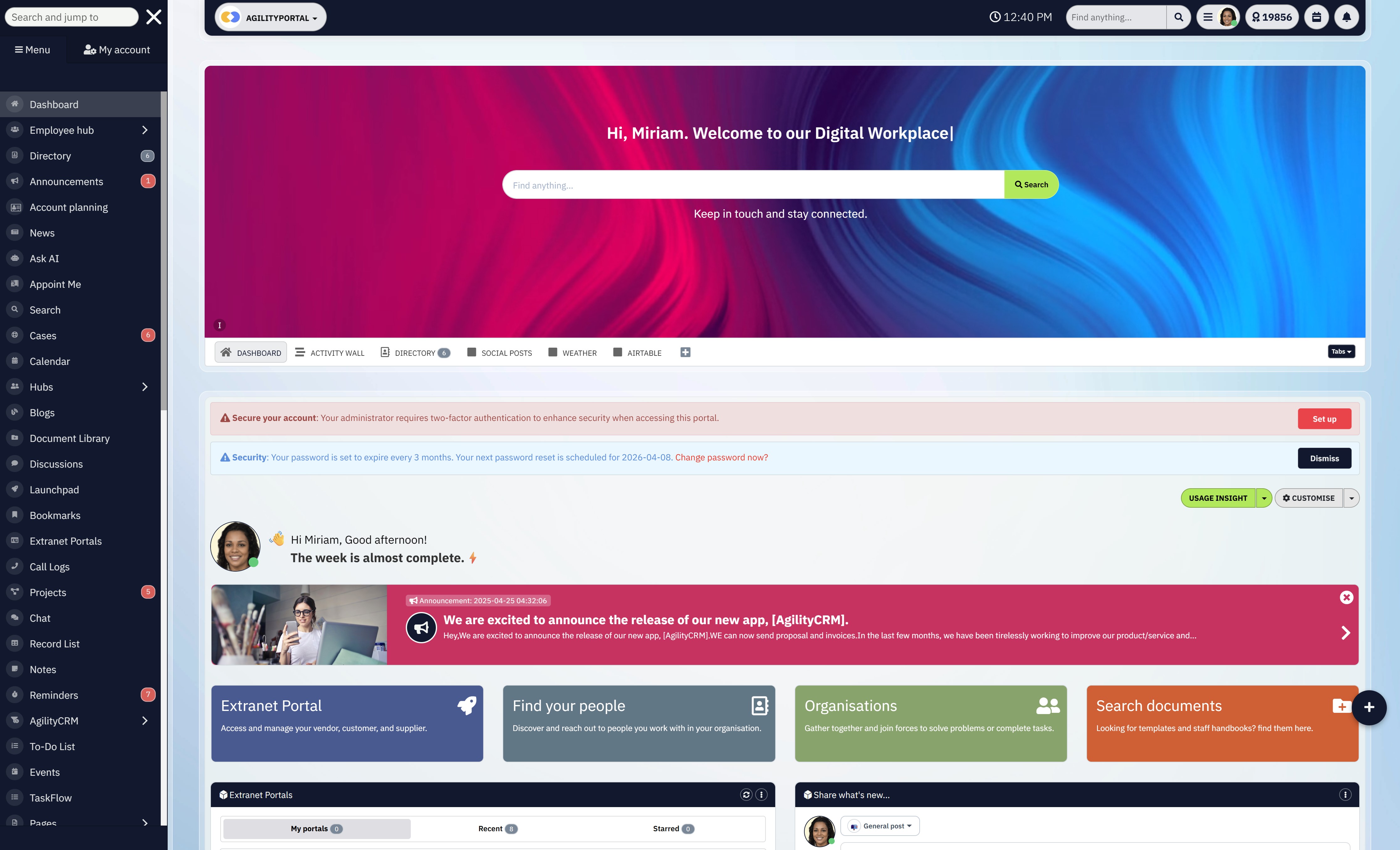
Introducing AgilityPortal — a scalable, secure collaboration platform designed to bring everything your teams need into one place.
AgilityPortal is designed primarily for corporate environments.
It supports real-time communication and collaboration for teams working on shared projects or business initiatives, and it benefits from AgilityPortal's long-standing experience in enterprise security and compliance.
Key Features
- Video conferencing for online meetings
- Persistent chat with colleagues and external contacts
- Built-in project collaboration within a single workspace
- Meeting recording with automatic transcripts
- Live captions available in over 30 languages
- Collaboration with suppliers and contractors
- Online document editing with real-time co-authoring
- Ability to eSign documents and share them securely
Try a free 14 days trial
Security Isn't a Feature — It's the Foundation
Collaboration without privacy isn't modern—it's a liability.
When sensitive information moves faster than the controls protecting it, risk becomes baked into everyday work.
Files get overshared, access lingers too long, and trust quietly erodes.
AI raises the stakes even further.
Without clear guardrails, AI turns into a risk multiplier, amplifying every weakness in data handling, ownership, and visibility. Used responsibly, AI can support teams. Used carelessly, it exposes data in ways most organisations never intended—or even noticed.
That's why the right secure collaboration platform doesn't rely on policies, training documents, or after-the-fact controls.
It protects data privacy by design—through enforced ownership, clear boundaries, auditable activity, and responsible AI use built into the system itself.
Security isn't something you add later. It's the foundation everything else stands on.
When platforms get that right, collaboration scales safely, AI stays accountable, and trust becomes a competitive advantage—not a constant concern.
Frequently Asked Questions
What is a secure collaboration platform?
A secure collaboration platform enables teams to share documents, files, and messages while maintaining strict control over access, visibility, and usage.
It's built to support real-world data privacy collaboration, ensuring sensitive information stays protected during everyday work—not just when it's stored.
Why is AI privacy and security a concern in collaboration tools?
AI privacy and security become a concern when collaboration tools use artificial intelligence without transparency.
AI features may scan, analyse, or retain content in the background, creating privacy and security issues in AI if organisations don't clearly understand how their data is being processed.
How does artificial intelligence pose data privacy challenges?
Artificial intelligence poses data privacy challenges because it's often opaque.
When teams don't know what data AI can access, learn from, or retain, AI data privacy issues emerge—and privacy shifts from enforceable policy to educated guesswork.
What does protecting privacy in an AI-driven world actually require?
Protecting privacy in an AI-driven world requires opt-in AI usage, clear data boundaries, auditability, and strong governance.
Secure systems ensure AI supports productivity without compromising secure privacy AI standards or using proprietary data for training by default.
Who owns the data in a collaboration platform?
Businesses should retain full data ownership and control over their files, documents, metadata, and activity logs.
Clear data ownership principles ensure organisations can export, restrict, or permanently delete data without relying on vendor goodwill or vague terms.
How do secure file sharing platforms reduce breach risk?
Secure file sharing platforms reduce breach risk by enforcing authenticated access, granular permissions, version control, and time-limited sharing.
Unlike basic online file sharing platforms, they prevent uncontrolled links and accidental exposure of sensitive data.
What's the difference between a document sharing platform and consumer file-sharing tools?
A business-grade document sharing platform includes access controls, audit trails, and compliance safeguards designed for professional use.
Consumer tools prioritise convenience, often at the expense of data privacy and long-term control.
Why is third-party access such a major data privacy risk?
Third parties operate outside internal security controls. Without isolation, external users can unintentionally expose internal data.
Secure collaboration platforms separate internal teams from partners and clients to protect internet privacy and reduce third-party breach risk.
How does a privacy-first collaboration platform support compliance?
A privacy-first collaboration platform enforces least-privilege access, maintains audit trails, and upholds clear data ownership rules.
This makes compliance easier while reducing long-term operational and reputational risk tied to poor data handling.
Can businesses use AI securely in collaboration tools?
Yes. When AI is transparent, optional, and governed, organisations can benefit from automation while maintaining strong AI privacy and security, protecting sensitive data, and preserving trust.
Most Popular Posts

Effective communication among team members is vital for the productivity and success of any organization. Surprisingly, 60% of companies lack a long-term internal communication strategy, which p...


Businesses thrive on communication for efficiency, productivity and accomplishment. When the right information is passed from the right designation in the organization, it promotes positivity an...

Categories
Blog
(3228)
Business Management
(396)
Employee Engagement
(235)
Digital Transformation
(220)
Growth
(151)
Intranets
(142)
Internal communications
(110)
Remote Work
(68)
Sales
(53)
Collaboration
(53)
Customer Experience
(33)
Culture
(30)
Knowledge Management
(29)
Project management
(29)
Leadership
(20)
Comparisons
(9)
News
(1)

Related Posts

Have you ever welcomed a new employee, shared a mountain of information, and wondered how much they'll remember by tomorrow? A clear presentation can make the first day easier by showing new starters who to contact, where to find key informatio...

What would your leadership team do if a serious allegation about your business started spreading online before anyone knew whether it was true? That's where crisis communication and management really matter. An employee spots the post, screensh...

AI for personal injury law firms is becoming part of everyday casework. These tools can help teams sort through medical records, build timelines, draft demand packages and find details buried in a big case file. That could free up attorneys and...

Ever left an online meeting unsure what was decided—and wondered how to run an effective meeting without wasting everyone's time? A call can bring a distributed team together quickly, but when it starts late, includes people who don't know why ...

Where can I send a fax from in my area when a document needs to go out today? The answer might be a nearby print or shipping shop, a library or an online fax service, but what's available depends on your location. The UPS Store lists a ne...


Jill Romford
I am a digital nomad, lover of exploring new places and making friends.
I love to travel and I love the internet. I take pictures of my travels and share them on the internet using Instagram.
Traveler, entrepreneur, and community builder. I share my insights on digital marketing and social media while inspiring you to live your fullest life.
Ready to learn more? 👍
One platform to optimize, manage and track all of your teams. Your new digital workplace is a click away. 🚀
Free for 14 days, no credit card required.