
Insight Blog
Agility’s perspectives on transforming the employee's experience throughout remote transformation using connected enterprise tools.
31 minutes reading time
(6130 words)
LarkSuite Alternatives for Businesses That Need More Than Chat + Documents

LarkSuite Alternatives for Businesses That Need More Than Chat
Looking for LarkSuite alternatives? Compare Lark replacements built for businesses that need more than chat, video calls, and basic collaboration tools.
LarkSuite Alternatives for Businesses That Need More Than Chat

LarkSuite works fine if all you need is basic chat, meetings, and a lightweight video chat app.
That's essentially what the Lark app was built for. As Lark software, it does messaging and calls reasonably well for internal teams.
But the moment a business grows — more departments, external clients, compliance pressure — that model starts to crack.
Here's the uncomfortable reality:
According to multiple workplace studies, over 60% of collaboration tool rollouts fail to deliver long-term productivity gains, largely because conversations, files, and decisions live in disconnected chat threads instead of structured systems.
⚠️ Critical Collaboration Insight
Over 60% of collaboration tool rollouts fail to deliver long-term productivity gains because conversations, files, and decisions are scattered across chat, meetings, and disconnected tools instead of structured systems.
That's exactly where Lark falls short.
Most businesses don't fail because they lack chat.
They fail because:
- conversations aren't connected to real work
- files are scattered across chats and personal drives
- clients and partners sit outside the system
- video chat creates meetings, not outcomes
This is why companies actively searching for Lark alternatives or a Lark enterprise alternative end up moving to platforms like AgilityPortal — where chat, portals, files, workflows, and collaboration live in one controlled environment.
This article breaks down real Lark replacements for businesses that need structured collaboration, true client portals, and operational control — not just another chat tool dressed up as a workspace.
Key Takeaways: Choosing the Right LarkSuite Alternative
- Lark is a chat-first platform. It works for messaging and video calls, but breaks down when collaboration needs structure.
- Chat and free video chat don’t scale. Livechat and video meetings create activity, not long-term clarity or accountability.
- Client portals are the tipping point. Lark software does not provide a true client portal, making external collaboration risky.
- Most Lark replacements fail by staying chat-centric. Better chat is rarely the solution.
- There is no one-size-fits-all alternative. The right choice depends on whether you prioritise docs, projects, workflows, or portals.
- This guide compares 7 proven Lark alternatives: AgilityPortal, Coda, Slite, Monday.com, Asana, ClickUp, and Notion.
- AgilityPortal stands out for businesses that need more than chat. It combines structured collaboration, governance, and built-in client portals.
Read this article: : Top 6 AI-Powered Project Management Tools To Use In 2023
What LarkSuite Gets Right
What LarkSuite Gets Right
Let's be fair before we get critical.
LarkSuite isn't a bad product. In fact, for a very specific type of team, it does a few things genuinely well.
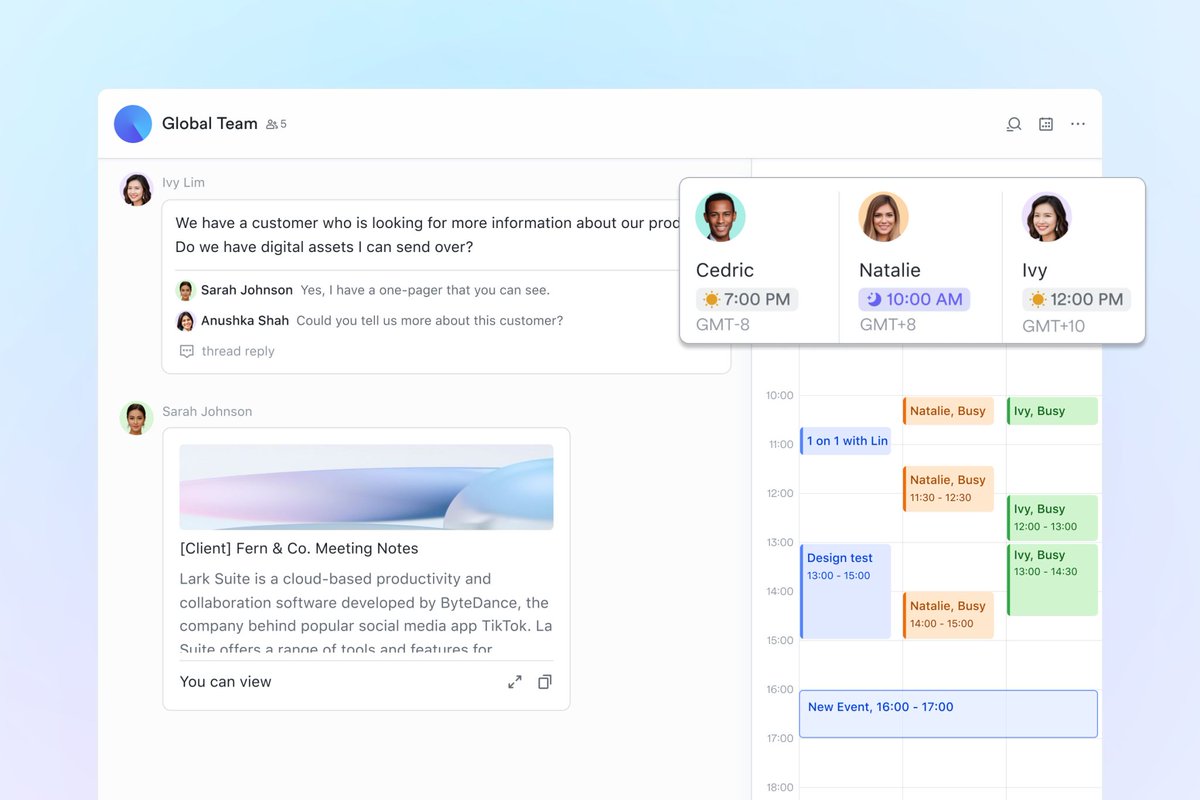
First, chat and livechat are simple and fast. There's very little setup, and new users can start messaging almost immediately. For teams that just need quick conversations without friction, that matters.
Second, it comes with built-in video chat. No extra tools, no integrations to manage. You can jump into calls quickly, which makes the Lark app appealing for teams that rely heavily on meetings or daily stand-ups.
Third, as Lark software, it offers decent entry-level collaboration. Shared docs, basic task coordination, and lightweight team spaces are fine when workflows are simple and everyone works internally.
That's why Lark is often attractive to small, internal teams that:
- don't work with external clients
- don't need structured processes
- don't operate in regulated environments
- don't care about long-term knowledge retention
And that's the key point.
That's the ceiling — and it's a low one for serious businesses.
Once collaboration needs structure, accountability, or client access, Lark stops being a solution and starts becoming a limitation.
Where LarkSuite Starts to Fall Apart
This is the point where most decision-stage buyers stop skimming and start paying attention — because this is where LarkSuite's limits show up in real operations, not marketing demos.
Chat ≠ work management
LarkSuite is built around conversation streams. That's fine for quick messages, but conversations don't equal progress. Once real work starts, things fall apart fast.
What Lark handles well:
- Real-time chat and livechat
- Quick internal updates
- Ad-hoc conversations
Where it breaks down for real work:
- Tasks aren't tightly linked to conversations
- Files get buried in chat threads with no structure
- Decisions aren't tracked or documented properly
- Ownership is unclear once conversations move on
- No reliable way to audit who did what, and when
The result? Teams end up scrolling, searching, and chasing instead of executing.
This is exactly why growing businesses move toward platforms like AgilityPortal, where communication is attached to workspaces, tasks, documents, and portals — not lost in an endless message feed.
Chat supports work. It doesn't manage it.
Video chat ≠ collaboration history
On the surface, built-in video chat feels like a win. You can jump on calls quickly, share screens, and keep meetings inside the same tool. The Lark app does this well enough.
But meetings are momentary — and business isn't.
What video chat is good at:
- Fast discussions and check-ins
- Daily stand-ups or quick clarifications
- Remote face-to-face communication
What it fails to preserve:
- Decisions made during the call
- Action items and follow-ups
- Files discussed but never formally stored
- Context for people who weren't there
- A searchable record for future reference
Once the call ends, the knowledge disappears with it. New hires, stakeholders, or auditors are left guessing what happened — or worse, repeating the same meetings again.
That's the core limitation of relying on a video chat app as a collaboration system. Calls create motion, not momentum.
This is why teams move away from chat-and-meeting-centric tools like LarkSuite and adopt platforms such as AgilityPortal, where conversations, files, decisions, and outcomes live together in persistent workspaces.
If collaboration doesn't leave a trail, it doesn't scale.
No true client portal experience
This is where LarkSuite quietly loses serious buyers.
Lark was never designed with external collaboration in mind. There's no real client portal concept — just internal spaces that outsiders are awkwardly invited into, or excluded from altogether.
What happens in practice:
- Clients see internal conversations they shouldn't
- Teams hesitate to share files "just in case"
- Permissions become a guessing game
- Sensitive data relies on trust instead of structure
- Clients feel like guests, not stakeholders
For businesses that work with customers, partners, suppliers, or regulators, this isn't a minor inconvenience — it's operational risk.
Industries like professional services, healthcare, nonprofits, and education need clear separation between internal work and external access. Lark doesn't offer that natively.
That's why companies looking for a serious Lark enterprise alternative end up choosing platforms like AgilityPortal, where client portals are built-in from day one — with controlled access, dedicated spaces, and clear accountability.
If external collaboration matters, chat-first tools stop being "simple" and start being dangerous.
Weak governance and scaling limitations
Lark works best when everyone knows each other and nothing critical is at stake.
The moment a company grows, governance stops being "nice to have" and becomes non-negotiable — and this is where LarkSuite starts to struggle.
Where the cracks show:
- Limited permission granularity as teams expand
- Access control that feels flat instead of role-based
- Poor separation between sensitive and non-sensitive content
- Knowledge scattered across chats with no lifecycle management
- No clear ownership or audit trail as users come and go
As a result, admins end up filling the gaps manually — creating naming rules, policing behavior, cleaning up spaces, and hoping people follow process. That approach might work at 20 users. It collapses at 200.
If your platform depends on people "doing the right thing," it's not ready to scale.
Internal-first design (external users are an afterthought)
From the ground up, LarkSuite is built for employees talking to employees. Everything about the platform assumes communication stays inside the company walls.
That works — until it doesn't.
What this design choice creates:
- Clients and partners dropped into internal spaces they don't understand
- Teams holding back information to avoid oversharing
- Confusing conversations mixed with internal chatter
- No clear boundary between "internal work" and "external collaboration"
- A poor experience for anyone who isn't on payroll
In real businesses, collaboration rarely stops at employees. Clients need updates. Partners need documents. Suppliers need access — but only to their information.
Lark wasn't built with that reality in mind.
If your business works with people outside your company, your platform should too — by design, not by workaround.
Read this article: : Top 6 AI-Powered Project Management Tools To Use In 2023
What Businesses Actually Need Beyond Chat

What Businesses Actually Need Beyond Chat
Most teams don't need more chat. They already have plenty of it.
What they lack is a system that prevents work from vanishing the moment a conversation ends.
Chat tools are great at creating activity. They're terrible at preserving outcomes.
As teams grow, projects overlap, clients get involved, and staff turnover increases, businesses start asking harder questions:
- Where does work actually live?
- How do we keep decisions visible after the discussion ends?
- How do we collaborate with clients without exposing internal chaos?
- How do new hires catch up without re-asking everything?
This is where chat-first platforms hit their ceiling.
Here's what serious businesses start looking for once chat tools stop scaling.
- Persistent workspaces, not message streams - In chat tools, everything flows downward and disappears. Important updates are quickly buried under new messages. Businesses need structured workspaces where projects, documents, decisions, and updates live together — and stay visible over time. Work shouldn't depend on who happens to be online or scrolling at the right moment.
- A real portal for clients, partners, or suppliers - External collaboration is no longer optional. Clients expect transparency. Partners need shared access. Suppliers need controlled visibility. That requires proper portals — not guest access to internal chat rooms. A real portal separates internal discussions from external collaboration while keeping everything connected.
- Contextual communication - Messages without context create confusion. Businesses need communication that is directly attached to work: comments on documents, discussions linked to tasks, updates tied to projects. When chat supports work instead of interrupting it, teams spend less time explaining and more time executing.
- Searchable history that survives employee turnover - People leave. Knowledge shouldn't. Chat-based history is fragile — scattered across threads, private messages, and forgotten channels. Businesses need searchable records of decisions, files, and discussions that remain accessible months or years later, regardless of who's still on the team.
- Video chat as a feature — not the product - Calls are useful, but they're not collaboration on their own. Meetings should feed into documented outcomes: notes, decisions, tasks, and shared files. When video chat stands alone, teams end up repeating the same conversations instead of building on past work.
This is the gap chat-first tools consistently fail to close — and why growing organizations move toward platforms like AgilityPortal, where communication, portals, documents, and collaboration all live in one structured system.
Chat keeps people talking.
Workspaces keep businesses moving.
How to Evaluate a True LarkSuite Alternative
This is where most buyers get stuck — not because there aren't options, but because many tools look similar on the surface. Chat, meetings, file sharing… everyone claims to do it all.
They don't.
If you're evaluating a real alternative to LarkSuite, this is the filter that separates chat tools from platforms that can actually run a business.
Use this checklist to cut through the noise.
- Does chat connect to work — or interrupt it? In weaker tools, chat is the product. Messages fly, context gets lost, and work becomes reactive. Strong platforms tie chat directly to tasks, documents, projects, or updates, so conversations move work forward instead of derailing it.
- Is there a built-in client portal, not a workaround? Inviting clients into internal chat spaces is not a portal — it's a risk. A true alternative offers dedicated client or partner portals with clear boundaries, controlled access, and a professional experience by default.
- Can teams collaborate without endless meetings? If progress only happens on calls, something's wrong. Look for platforms that support async collaboration: comments on work, shared visibility, documented decisions, and clear ownership — so meetings become optional, not constant.
- Is video chat optional or mandatory? Video chat should support collaboration, not replace it. If the platform relies on meetings to function, it won't scale. The best tools treat video chat as one feature among many, not the backbone of the system.
- Can the platform scale past 100–500 users without chaos? Many tools work fine for small teams and fall apart as complexity grows. Check for role-based permissions, governance controls, structured spaces, and long-term knowledge management — not just user count on a pricing page.
If a platform still feels like "just chat with extras," it's not a real Lark replacement.
A true alternative should reduce noise, protect context, and get more reliable as your business grows — not harder to manage.
Best LarkSuite Alternatives
At this stage, buyers don't want another feature list — they want clarity.
Not all LarkSuite alternatives compete in the same lane, and that's where most comparisons go wrong.
Instead of dumping tools into one list, it's more useful to group them by what they're actually designed to do.
1. Chat-First Tools (Lark-Like Replacements)
These tools are closest to LarkSuite in philosophy.
Best for:
- Internal messaging
- Quick updates
- Meetings-first cultures
Limitations:
- Weak structure
- Poor long-term knowledge retention
- No real client portal model
- Chat becomes the system (and that doesn't scale)
If all you want is messaging plus meetings, these can work. If you're running real operations, they hit a wall fast.
2. Digital Workplace Platforms (Lark Enterprise Alternatives)
This is where serious businesses usually land.
These platforms treat chat and video as features, not the foundation. Work lives in structured spaces, and communication supports execution instead of interrupting it.
Best for:
- Growing or regulated businesses
- Cross-department collaboration
- Long-term knowledge management
- Internal + external collaboration
A strong example here is AgilityPortal, which combines chat, video, document collaboration, workflows, analytics, and built-in portals in one system designed to scale.
3. Client & Partner Portal Platforms
These focus less on internal chat and more on external collaboration.
Best for:
- Agencies
- Professional services
- Healthcare, education, nonprofits
- Supplier or partner collaboration
They prioritise controlled access, shared files, and accountability — but often lack strong internal communication unless paired with another tool.
Side-by-Side Comparison
| Capability / Focus | LarkSuite | Chat-First Tools | Digital Workplace Platforms | Client / Partner Portals |
| Internal chat & livechat | Strong | Strong | Strong | Limited |
| Video chat | Built-in | Built-in | Built-in | Limited |
| Structured workspaces | Weak | Weak | Strong | Medium |
| Client / partner portals | No | No | Yes | Yes |
| Governance & permissions | Limited | Limited | Advanced | Advanced |
| Knowledge retention | Low | Low | High | Medium |
| Scales beyond chat | No | No | Yes | Partial |
| Best fit | Small internal teams | Messaging-only teams | Growing businesses | External collaboration |
How to Read This Table
- If chat and meetings are your workflow, Lark-style tools are fine.
- If chat supports your workflow, you need a digital workplace.
- If clients or partners matter, portals are non-negotiable.
This is why businesses searching for a Lark enterprise alternative often skip sideways moves and step up to platforms like AgilityPortal, where chat, portals, and real work live together — without duct tape or compromises.
Replacing Lark with "better chat" rarely fixes the problem.
Replacing chat-centric thinking does.
When a Client Portal Matters More Than Chat
This is the pivot point where many businesses realise the problem isn't Lark specifically — it's the idea that chat can carry the weight of external collaboration.
Chat works when everyone is internal, informal, and aligned.
The moment clients, partners, or external stakeholders enter the picture, chat-first tools start creating friction instead of speed.
Here's what that looks like in the real world.
- Agencies working with external clients - Clients don't want to dig through chat threads to find the latest file or decision. They want a clear place to log in, see progress, access documents, and understand what's happening without being exposed to internal chatter.
- Professional services sharing documents - Legal, consulting, finance, and advisory teams need controlled document sharing, version history, and accountability. Chat is fine for discussion — it's a liability for client-facing records.
- Healthcare, nonprofit, education, and regulated industries - These sectors deal with sensitive information, audits, and compliance. Inviting external users into internal chat spaces is risky and often unacceptable. A proper portal creates separation, control, and trust.
- Distributed teams with external stakeholders - When teams span time zones and organisations, async access matters more than real-time messages. Stakeholders need visibility without needing to "be online" at the same time.
This is why businesses outgrow chat-centric tools and move toward platforms like AgilityPortal, where client portals are built-in, not bolted on — giving external users their own secure spaces while keeping internal collaboration intact.
If clients matter, chat alone isn't enough.
You don't need louder conversations — you need clearer collaboration.
Free Video Chat vs Real Collaboration
Free Video Chat vs Real Collaboration
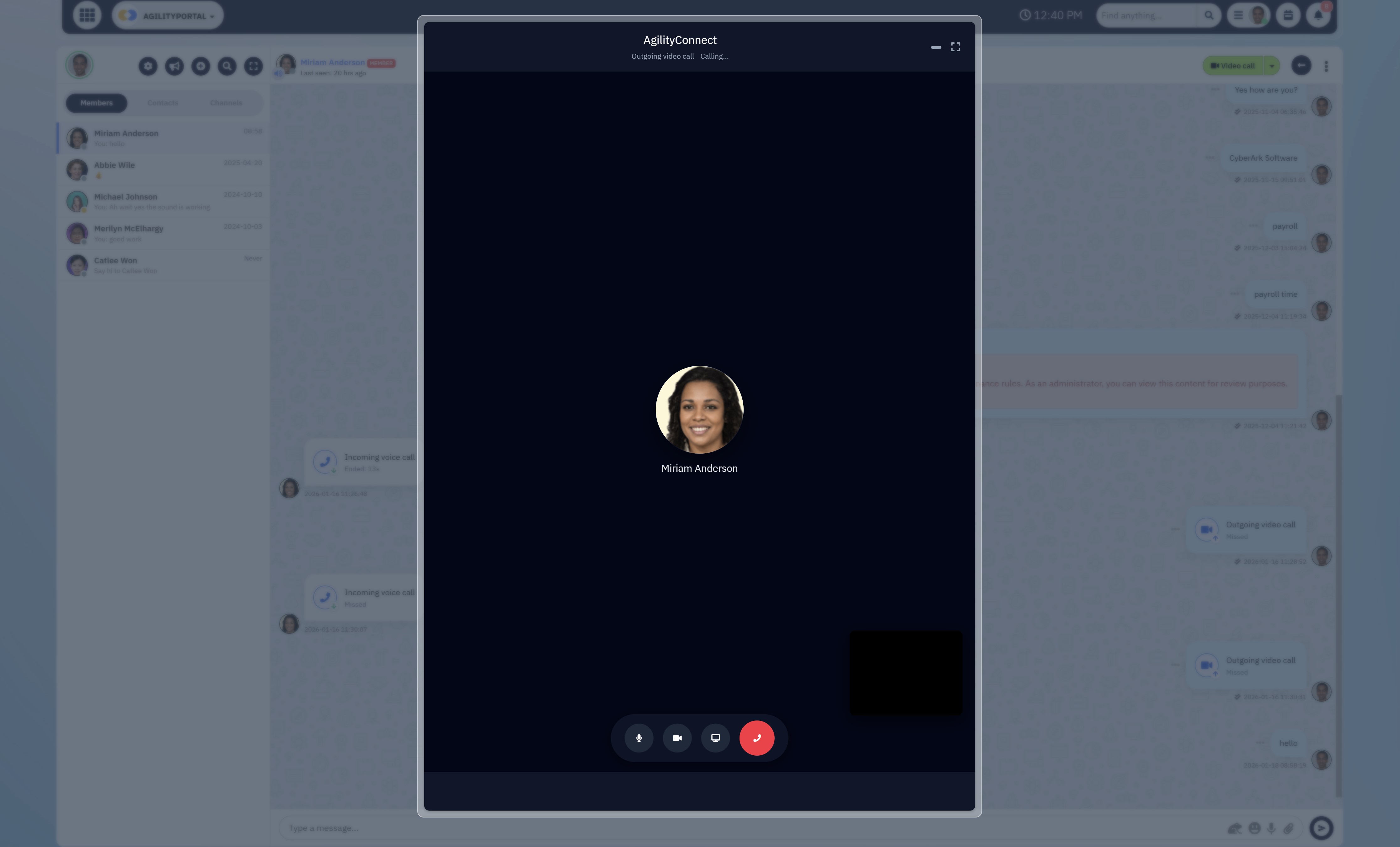
Free tools are tempting — especially when budgets are tight and teams just want to "get started." A free video chat tool promises instant face-to-face communication with zero setup, zero cost, and very little friction.
On the surface, it feels like collaboration is solved.
It isn't.
Free video chat works well for:
- quick check-ins
- one-off discussions
- replacing in-person meetings
But meetings create activity, not progress.
When collaboration relies too heavily on calls, a few things happen fast:
- decisions live in people's memories instead of systems
- action items get lost once the call ends
- the same topics are discussed again and again
- anyone who misses the meeting is instantly behind
In other words, work keeps moving — but nothing sticks.
Real collaboration looks different. It leaves a trail.
That means:
- decisions are recorded, not just discussed
- files live in shared workspaces, not personal inboxes
- conversations are tied to projects, tasks, or documents
- clients and partners can access outcomes without joining calls
- teams can move forward asynchronously, across time zones
This is where chat- and meeting-first tools like LarkSuite hit their limit. Video calls are built in, but there's no strong system for turning those conversations into durable, shared knowledge.
Platforms like AgilityPortal take a different approach. Video chat exists — but it feeds into structured workspaces, documented decisions, and secure portals, so collaboration continues long after the call ends.
Free video chat lowers the barrier to talking.
Real collaboration lowers the cost of getting work done — over and over again.
Choosing the Right Lark Replacement (Quick Decision Guide)
At decision stage, this doesn't need to be complicated. The right choice depends on how your business actually works today — and where it's heading next.
Use this simple guide to avoid picking the wrong tool twice.
Use Lark-Style Tools → Internal Chat Only
Chat-first platforms like LarkSuite are designed around one core assumption:
work happens through real-time conversations between internal employees.
When that assumption is true, these tools can feel fast, lightweight, and easy to adopt. There's very little structure to learn, onboarding is quick, and teams can start messaging and jumping on calls immediately.
This model works best in very specific conditions.
Typically, these tools suit organisations where:
- teams are small and closely aligned
- most decisions are made live, not documented
- work is informal and changes quickly
- there are few or no external stakeholders
- compliance, audit trails, and long-term records aren't critical
In these environments, messaging is the workflow. People ask, answer, decide, and move on — often in the same conversation.
The problem is what happens next.
As soon as teams grow, roles diversify, or work becomes more complex, chat-only collaboration starts to show serious cracks. Conversations scroll away.
Decisions live in memory instead of systems. New hires struggle to catch up. External users don't fit cleanly. Admins lose visibility and control.
That's the trade-off with Lark-style tools:
they optimise for speed today at the cost of structure tomorrow.
Use Chat + Docs Tools → Early-Stage Teams
Chat-plus-docs tools usually feel like the logical upgrade after pure messaging starts to creak.
At this stage, teams realise chat alone isn't enough, so they add shared documents, basic file storage, and lightweight collaboration features on top of messaging.
Tools in this category still look and feel familiar, which makes adoption easy — especially for growing teams that don't want to slow down.
This setup works for a while.
It's most effective when:
- teams are growing but still relatively small
- work is mostly internal
- projects are short-lived
- documentation is helpful but not mission-critical
- decisions don't need strict governance or audit trails
In other words, chat is no longer the only tool — but it's still the glue holding everything together.
The problem is that conversations are still doing too much of the heavy lifting.
Use a Full Digital Workplace + Portal → Growing or Regulated Businesses
This is the stage where chat tools — even "chat plus extras" — stop being helpful and start becoming a liability.
Once a business reaches a certain level of maturity, collaboration is no longer just about speed. It's about clarity, continuity, and control. Clients expect visibility. Regulators expect traceability.
Leadership expects consistency. And teams expect tools that don't fall apart every time someone leaves or a project spans multiple departments.
A full digital workplace is built for that reality.
Instead of centering everything around conversations, it treats work as the core unit:
- projects have defined spaces
- documents live where they're used
- discussions are attached to outcomes
- permissions reflect real roles
- external users are handled intentionally, not awkwardly
This model becomes essential when:
- clients or partners need ongoing access to information
- teams are distributed across regions or time zones
- work must be auditable, reviewable, or compliant
- knowledge needs to survive staff turnover
- multiple departments collaborate on shared initiatives
In regulated or high-trust environments — healthcare, nonprofits, education, professional services, finance — chat-first tools simply don't offer enough structure. Informal conversations, flat permissions, and disappearing context create risk, not agility.
This is where platforms like AgilityPortal are designed to operate.
Rather than bolting features onto chat, a digital workplace approach brings everything together:
- communication happens inside workspaces, not beside them
- documents are versioned, searchable, and permissioned
- client and partner portals are first-class features, not hacks
- governance and access control scale with the organisation
- collaboration continues even when people change roles or leave
The result is less noise, fewer repeated conversations, and far more alignment — especially as the business grows.
Comparison Table: Best Lark Alternatives
| Platform | Chat Depth | Collaboration | Knowledge | Best Fit |
| AgilityPortal | Medium | Very Strong | ⭐ Very High | Digital workplace + client portals |
| Coda | Medium | Very Strong | High | Custom workflows |
| Slite | Medium | Medium | Medium | Documentation-first teams |
| Monday.com | Medium | Low | High | Project-heavy teams |
| Asana | Low | Low | High | Structured project management |
| ClickUp | Medium | Strong | High | All-in-one work suite |
| Notion | Medium | Very Strong | Medium–High | Wikis, docs, internal knowledge |
#1. AgilityPortal - Excellent for Digital workplace + client portals
AgilityPortal - Excellent for Digital workplace + client portals
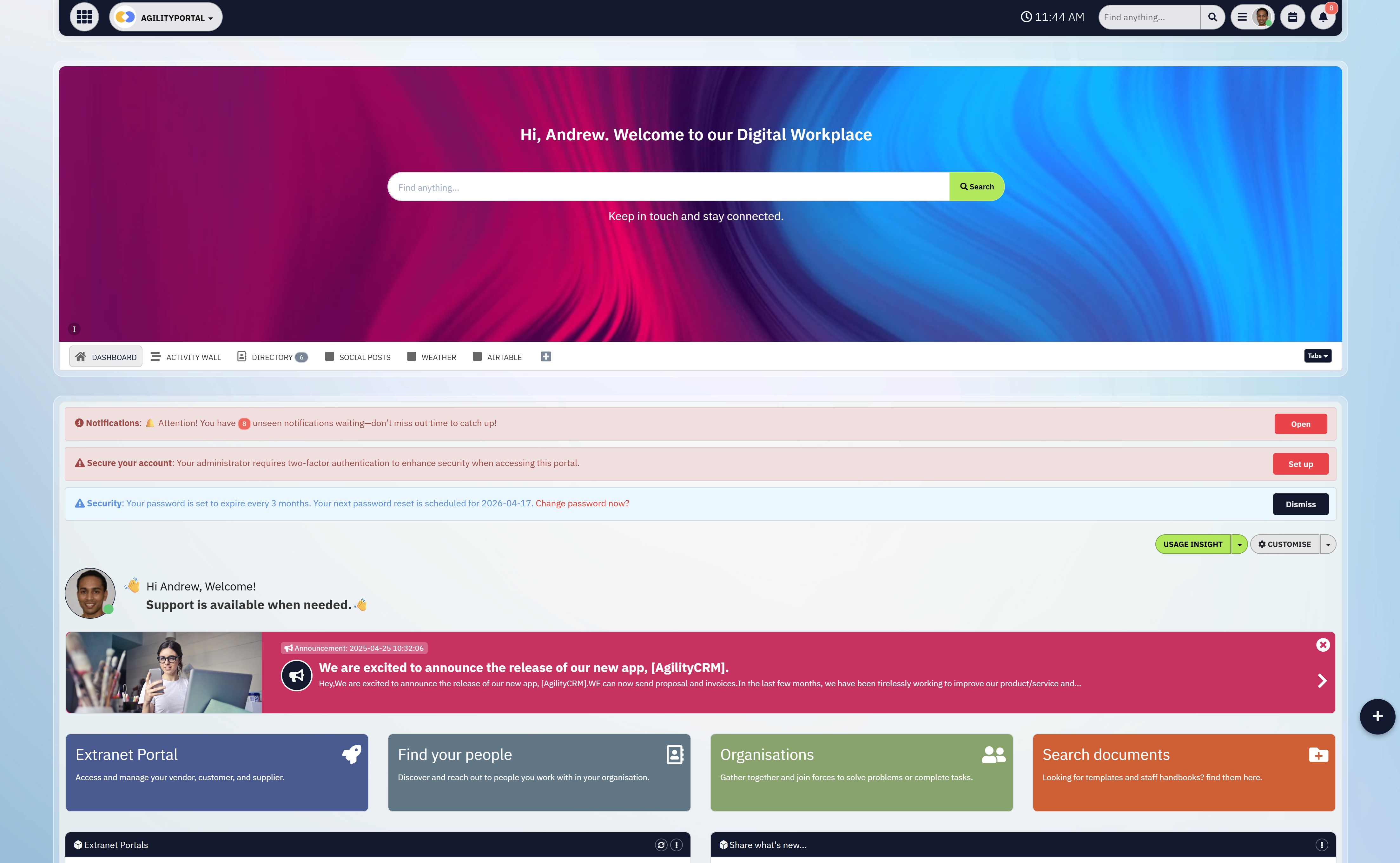
AgilityPortal is a full digital workplace platform designed for organisations that need more than chat. It combines structured workspaces, document collaboration, internal communication, and built-in client and partner portals into a single system that scales beyond small, internal teams.
Unlike chat-first tools, AgilityPortal treats communication as a support layer — not the system of record — making it suitable for growing and regulated businesses.
Key features
- Structured workspaces for teams, projects, departments, and initiatives
- Built-in internal chat and video communication tied to workspaces
- Native client, partner, and supplier portals with role-based access
- Centralised document management with permissions and version control
- Engagement, usage, and activity analytics for admins and leaders
- Integrations with Microsoft 365, Google Workspace, calendars, and more
What I liked
- Designed for real business collaboration, not just messaging
- Client and partner portals are first-class features, not add-ons
- Strong balance between communication, structure, and governance
- Scales well across teams, departments, and external stakeholders
What I disliked
- More structured than chat tools, so setup takes slightly more planning
- Overkill for very small teams that only need basic messaging
- Best value is realised when teams use workspaces and portals properly
Pricing
- Free trial available
- Paid plans typically start in the mid-range ($) depending on users and modules
Suitable for
- Growing organisations that have outgrown chat-first tools
- Businesses working with clients, partners, or suppliers
- Regulated or compliance-aware industries (healthcare, nonprofit, education, professional services)
- Teams that need long-term knowledge retention and clear accountability
How to start
- Visit the AgilityPortal website
- Request a demo or start a free trial
#2. Coda - Great for Custom workflows
#2. Coda - Great for Custom workflows
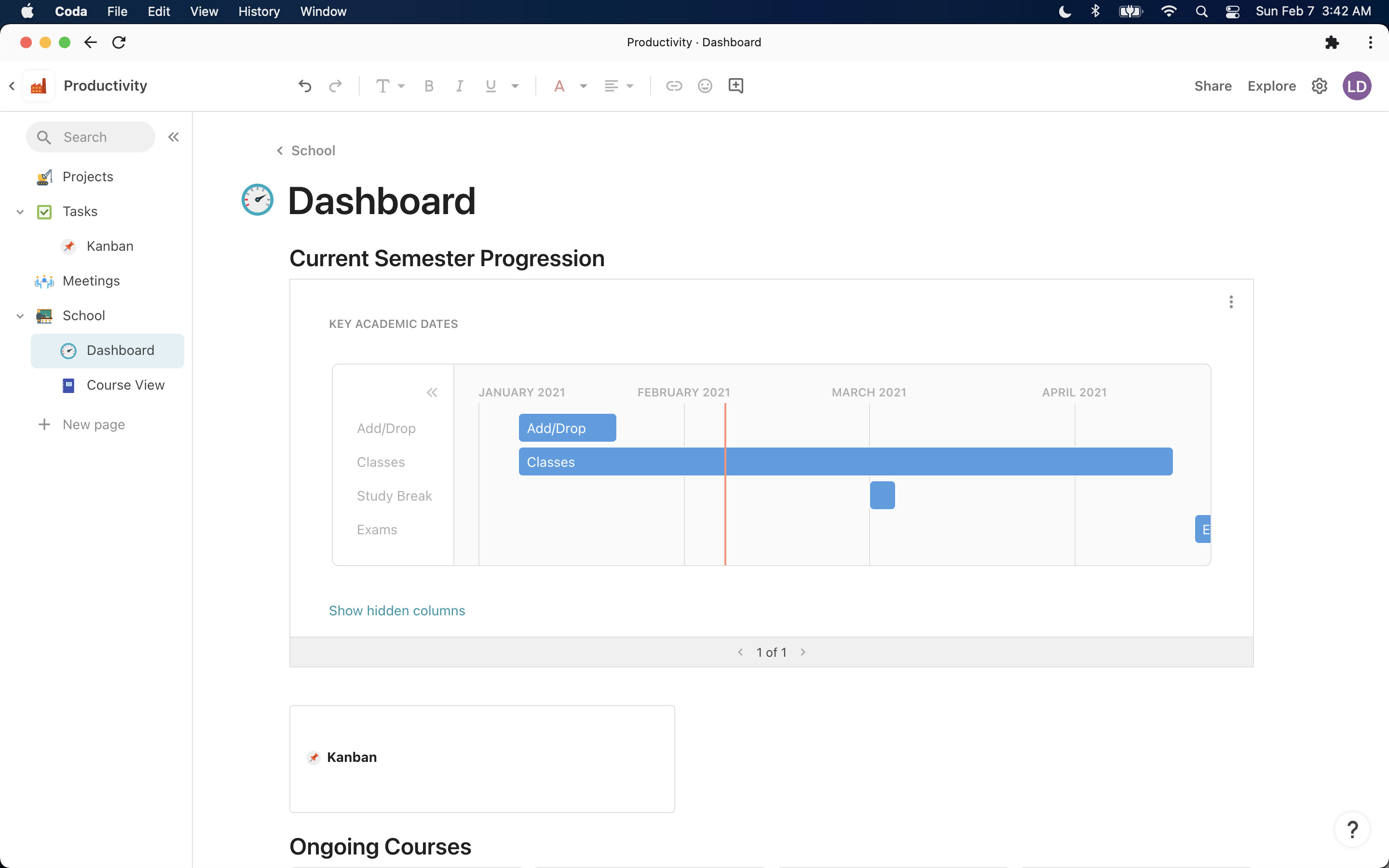
Coda is a highly adaptable all-in-one workspace that combines documents, tables, databases, and lightweight apps into a single working surface. It's often used by teams that want to consolidate scattered tools — replacing separate docs, spreadsheets, and simple project systems with one customizable environment.
Key features
- A single document that behaves like a doc, spreadsheet, and mini-app
- Relational tables and formulas for building structured workflows
- Extensive template library for roadmaps, meeting notes, CRMs, and team spaces
- "Packs" that connect external tools such as calendars, email, and project trackers
What I liked
- Very flexible — you can design trackers, CRMs, dashboards, or internal tools without switching platforms
- Templates speed up setup and reduce the effort needed to build systems from scratch
What I disliked
- Not a full communication platform — no native chat or video calling
- Some learning curve, especially around formulas and relational data
- Free plan has limits on automations and advanced integrations
Pricing
- Free plan available
- Paid plans start from $12 per user / month
Suitable for
- Teams that want a customizable workspace for documents, data, and internal workflows
- Organisations looking to replace multiple tools like spreadsheets, basic project boards, or wikis
How to start
- Visit the Coda website
- Sign up for a free account
#3. Slite - Good for Documentation-first teams
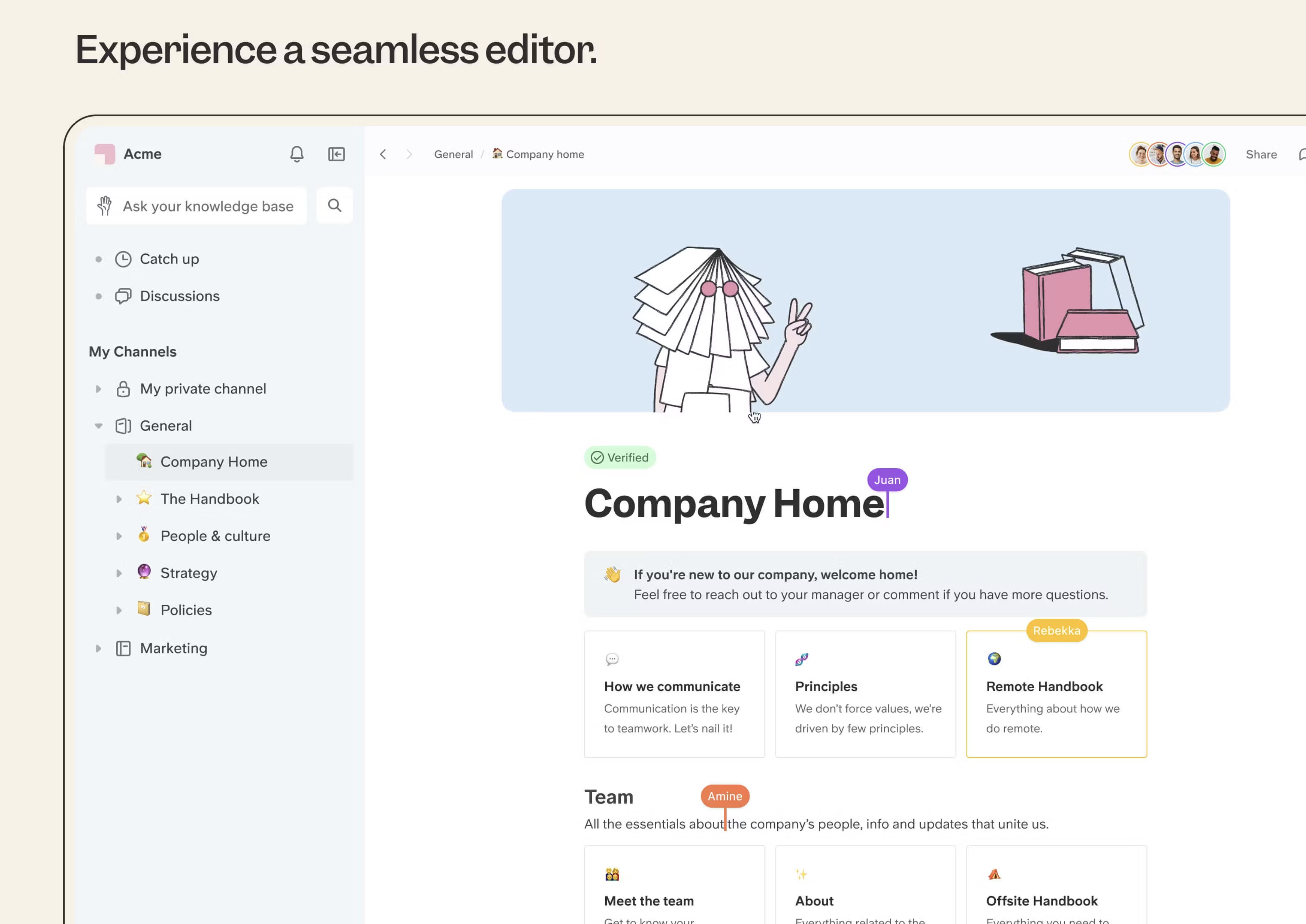
#3. Slite - Good for Documentation-first teams
Slite is a documentation-focused workspace built to help teams create, organise, and share internal knowledge. It's commonly used as a central hub for company docs, onboarding materials, and long-term reference content rather than day-to-day collaboration.
Slite isn't trying to replace chat or project tools — it's designed to make written knowledge easy to create and maintain.
Key features
- Clean, distraction-free editor for internal documentation
- Structured spaces for teams, handbooks, and knowledge bases
- Version history and collaboration on documents
- Searchable content designed for long-term reference
- Integrations with common workplace tools
What I liked
- Excellent for clear, readable documentation
- Simple interface that encourages teams to write things down
- Strong search makes it easy to find past decisions and policies
What I disliked
- Not a communication platform — no native chat or video calls
- Limited workflow or project management capabilities
- External collaboration and client access are minimal
- Requires another tool alongside it for execution and messaging
Pricing
- Free plan available
- Paid plans start from $8–$10 per user / month (approx., depending on plan)
Suitable for
- Teams focused on documentation, handbooks, and internal knowledge
- Companies wanting to reduce repeated questions and lost context
- Organisations that already use chat and project tools elsewhere
How to start
- Visit the Slite website
- Create a free account or start a trial
#4. Monday.com - Project-heavy teams
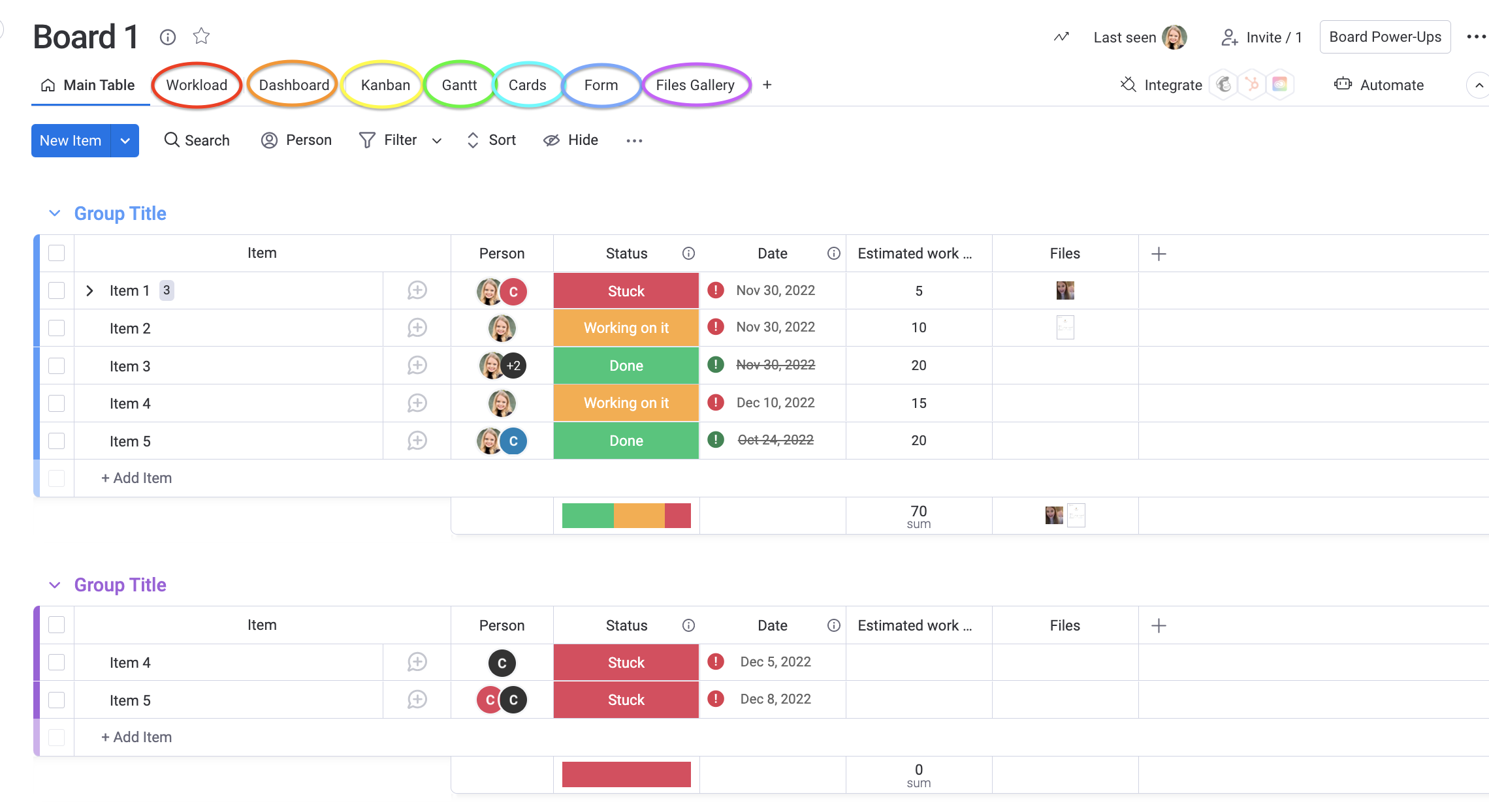
#4. Monday.com - Project-heavy teams
Monday.com is a work and project management platform built around structured boards, timelines, and automation. It's designed to help teams plan, track, and execute work with a strong focus on processes, dependencies, and reporting.
Monday.com excels at organising complex projects — but it's not a communication-first or portal-driven platform.
Key features
- Customisable boards for projects, tasks, and workflows
- Automation rules to reduce manual updates and handoffs
- Timelines, Gantt views, dashboards, and workload tracking
- Integrations with popular tools like Slack, email, calendars, and CRMs
- Reporting and visibility across teams and portfolios
What I liked
- Very strong for project tracking and operational oversight
- Highly customisable workflows for different teams
- Good visual reporting for managers and leadership
- Scales well for complex, multi-project environments
What I disliked
- Chat and communication are secondary, not central
- No real client portal experience without heavy configuration
- Can feel rigid for teams that work informally
- Costs rise quickly as automation and advanced features are added
Pricing
- Free plan for very small teams
- Paid plans typically range from $ to $$ depending on users and features
Suitable for
- Project-heavy teams with defined workflows
- Operations, PMOs, and delivery-focused organisations
- Companies prioritising execution tracking over collaboration
- Teams that already use separate tools for chat and client communication
How to start
- Visit the Monday.com website
- Sign up for a free plan or request a trial
#5. Asana - Structured project management
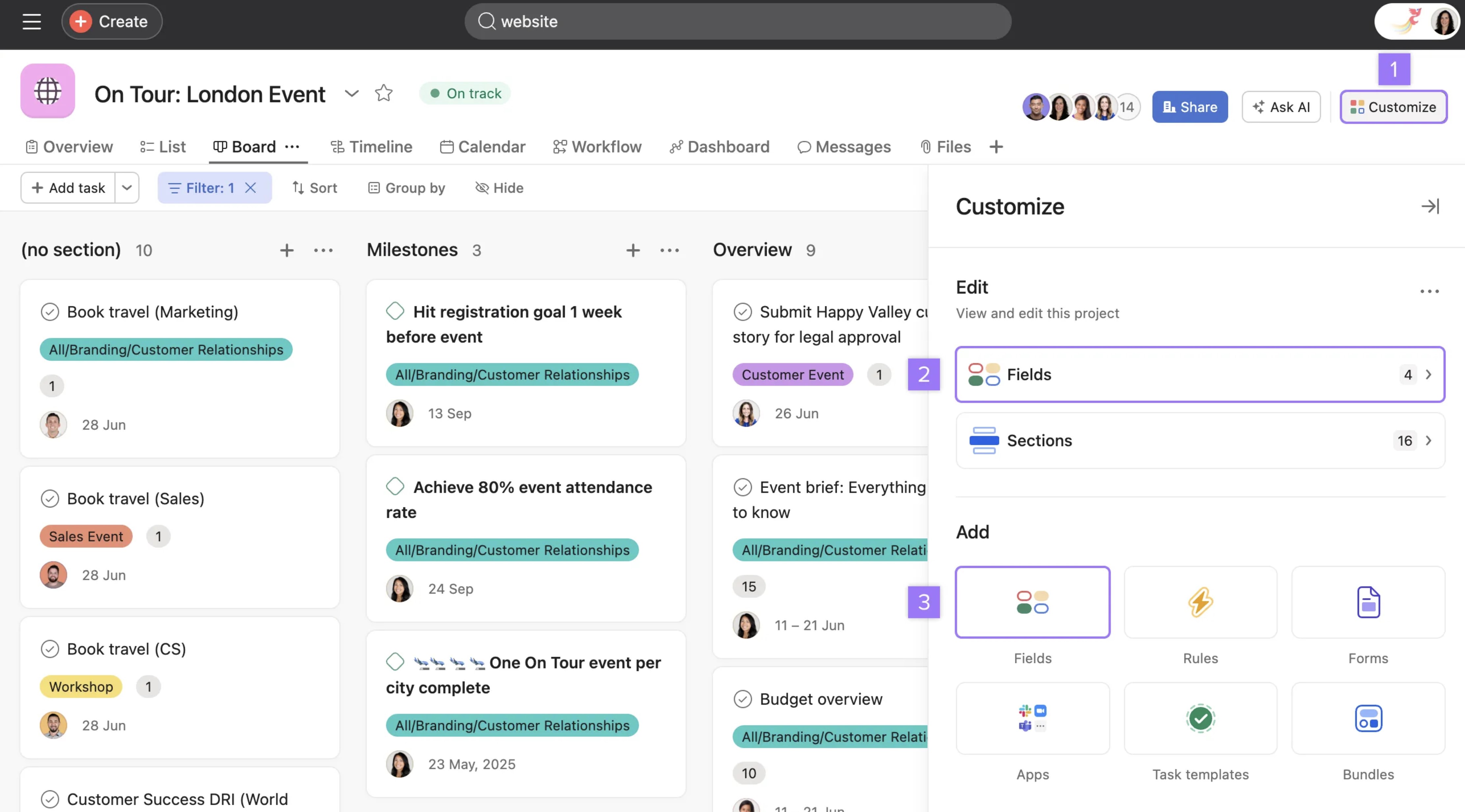
#5. Asana - Structured project management
Asana is a structured project management platform built to help teams plan, track, and deliver work with clear ownership and deadlines. It's widely used for task coordination, cross-team initiatives, and long-term project visibility.
Asana is designed around execution and accountability — not conversation or real-time collaboration.
Key features
- Task and project tracking with owners, due dates, and dependencies
- Timeline (Gantt-style) views for planning and forecasting
- Rules and automations to reduce manual updates
- Project templates for common workflows
- Reporting and workload visibility for managers
What I liked
- Very strong at enforcing structure and accountability
- Clear task ownership reduces ambiguity
- Scales well for large, cross-functional projects
- Reliable for long-running initiatives and roadmaps
What I disliked
- Minimal built-in communication — chat is not a core feature
- No native video calling or livechat
- External collaboration and client access are limited
- Can feel rigid for teams that work more fluidly
Pricing
- Free plan available for small teams
- Paid plans typically range from $ to $$ depending on features and scale
Suitable for
- Teams that need disciplined project execution
- Organisations running complex or long-term initiatives
- PMOs and operations-led teams
- Companies that already use separate tools for chat, meetings, and client collaboration
How to start
- Visit the Asana website
- Create a free account or start a trial
#6. Clickup - All-in-one work suite
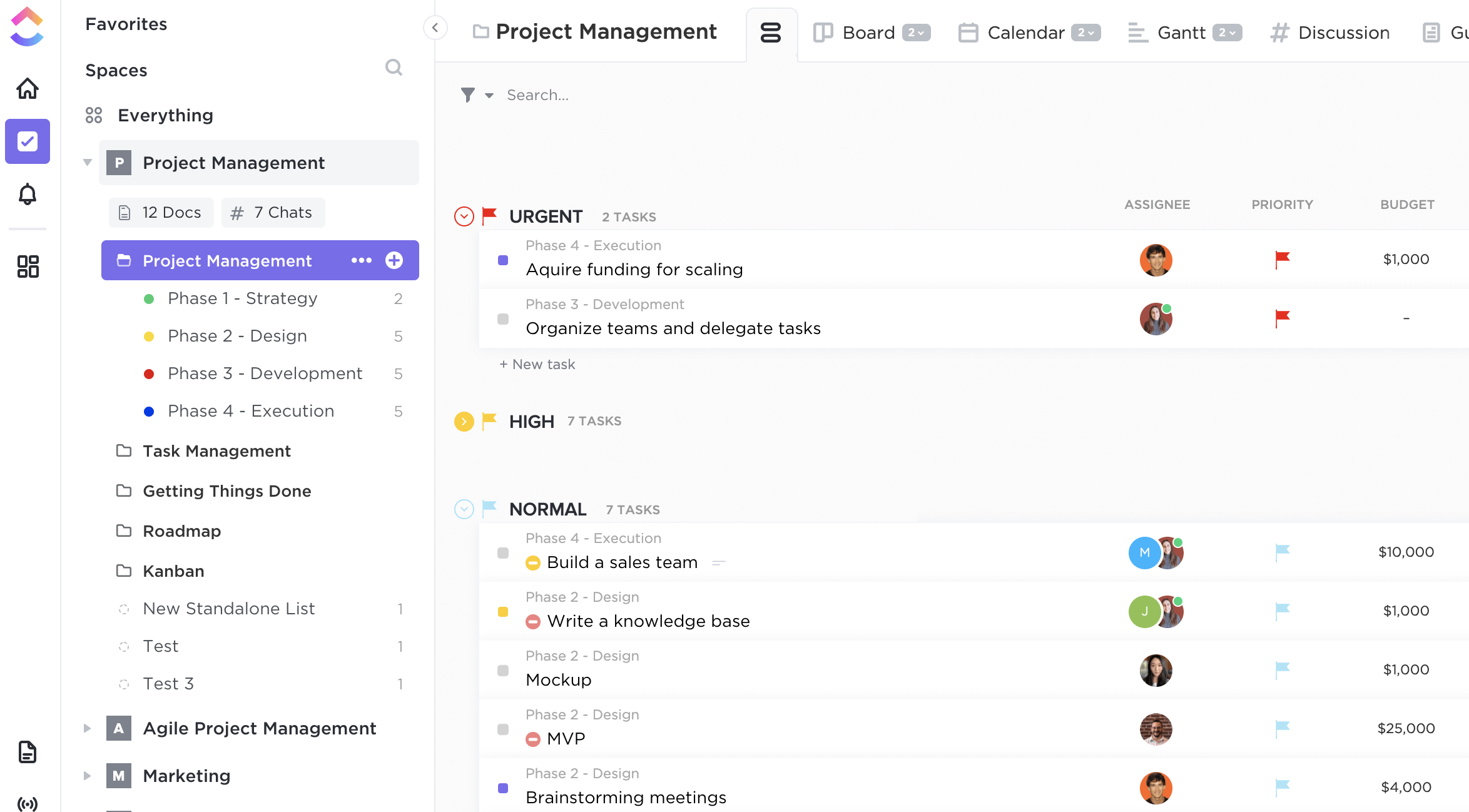
#6. Clickup - All-in-one work suite
ClickUp is an all-in-one productivity and project management platform that aims to replace multiple tools with a single, highly configurable system. It combines tasks, docs, goals, dashboards, and basic communication features under one roof.
ClickUp is built for teams that want flexibility and control — but that flexibility comes with complexity.
Key features
- Task and project management with custom statuses, fields, and views
- Multiple views including List, Board, Timeline, Gantt, and Calendar
- Built-in docs and wikis linked directly to tasks
- Automations and rules for workflows and updates
- Dashboards for reporting, goals, and performance tracking
What I liked
- Extremely feature-rich — can replace several tools if configured well
- Highly customisable for different teams and workflows
- Strong balance between tasks, docs, and reporting
- Competitive pricing for the amount of functionality offered
What I disliked
- Can feel overwhelming due to the sheer number of features
- Steeper learning curve than simpler tools
- Communication features exist but aren't as natural as chat-first platforms
- Client or external collaboration requires careful setup to avoid confusion
Pricing
- Free plan available with limited features
- Paid plans generally start at $ and scale up with advanced features
Suitable for
- Teams that want an all-in-one work management tool
- Organisations replacing multiple project, doc, and tracking tools
- Product, operations, and delivery teams
- Businesses comfortable investing time in setup and configuration
How to start
- Visit the ClickUp website
- Create a free account or start a trial
#7. Notion - Wikis, docs, internal knowledge
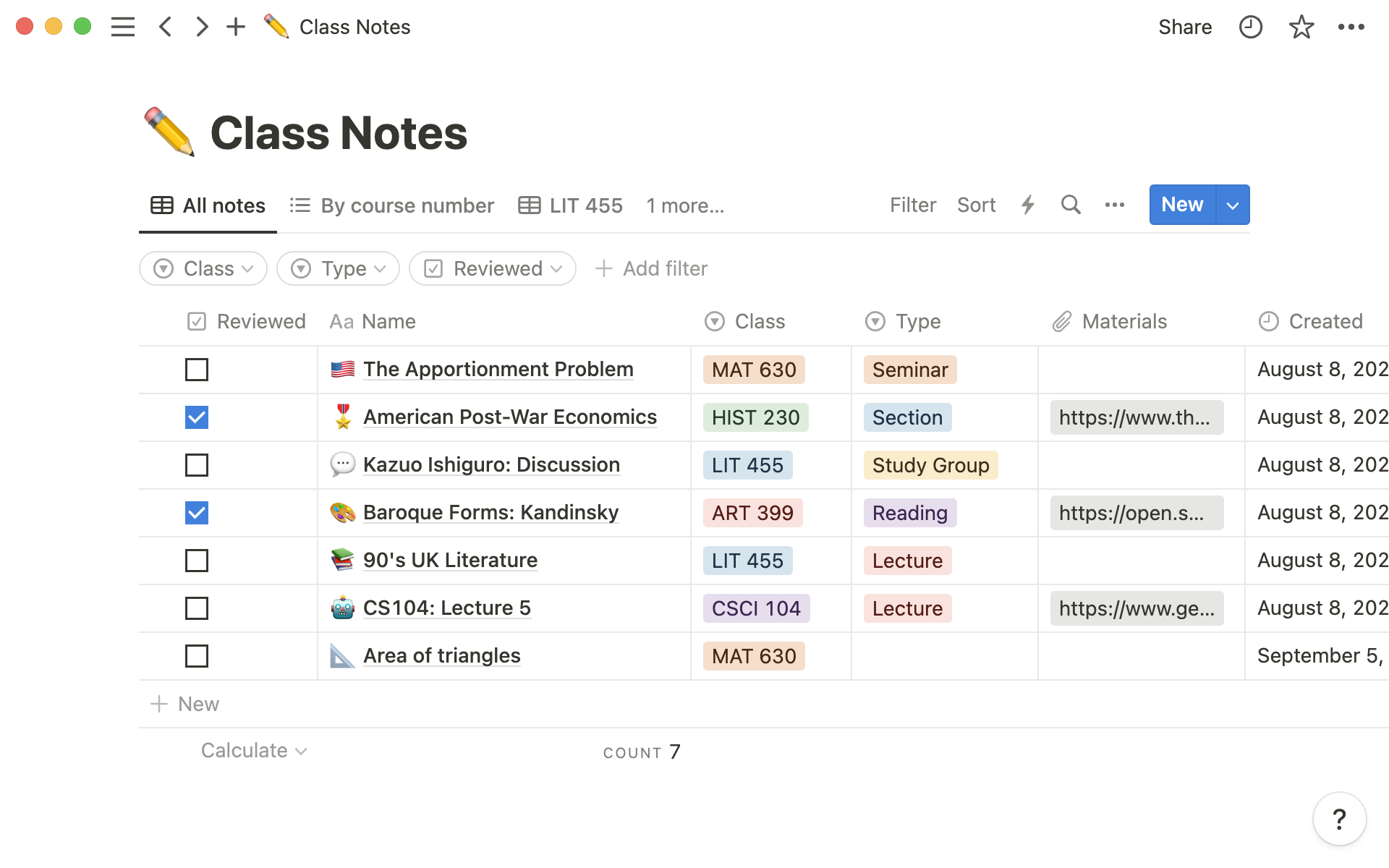
#7. Notion - Wikis, docs, internal knowledge
Notion is a flexible workspace built around pages, databases, and templates. Teams use it to organise documentation, internal knowledge, light project tracking, and wikis — all inside a highly customisable environment.
Notion shines as a knowledge and organisation tool, but it's not designed to be a communication-first or portal-driven platform.
Key features
- Pages and databases that can be combined to create wikis, trackers, and dashboards
- Powerful templates for docs, roadmaps, meeting notes, and internal hubs
- Relational databases for linking projects, tasks, and content
- Real-time collaboration on pages and comments
- Integrations with common workplace tools
What I liked
- Extremely flexible for organising knowledge and documentation
- Clean, minimal interface that adapts to many use cases
- Strong ecosystem of templates speeds up setup
- Works well as a single source of truth for written information
What I disliked
- Not a full communication platform — chat and video are not native strengths
- External collaboration and client access require careful permission setup
- Can become messy without strong internal conventions
- Limited governance for complex or regulated environments
Pricing
- Free plan available
- Paid plans start at $ and scale with advanced features
Suitable for
- Teams building internal wikis and documentation
- Startups and small teams organising knowledge and light workflows
- Companies that already use separate chat and meeting tools
- Organisations prioritising flexibility over structure
How to start
- Visit the Notion website
- Create a free account or start a trial
Wrapping up
LarkSuite isn't a bad product — it does exactly what it was designed to do — but it's fundamentally limited. It works when chat is the work, teams are small and internal, and decisions don't need to survive beyond the conversation.
The moment a business needs structured collaboration, clear accountability, client visibility without internal noise, and knowledge that doesn't vanish when people leave, chat stops being helpful and starts becoming a bottleneck.
At that point, chasing a "better chat tool" misses the problem entirely.
What businesses actually need is a platform where work has a home, communication supports execution, clients and partners operate inside proper portals, and decisions don't disappear when the call ends — which is why growing teams move toward digital workplace platforms like AgilityPortal.
The blunt truth: if chat is carrying your business today, it will slow it down tomorrow — the answer isn't better chat, it's more than chat.
FAQS
What is the best LarkSuite alternative for businesses?
The best option depends on whether you need more than chat and meetings.
Many teams start searching for Lark alternatives when they realise that messaging, livechat, and a basic video chat app don't support structured collaboration, client access, or long-term knowledge.
For businesses that need workspaces, governance, and portals — not just conversations — a full digital workplace like AgilityPortal is often a stronger Lark replacement than switching to another chat-first tool.
Is there a true Lark enterprise alternative?
Yes. A true Lark enterprise alternative goes beyond messaging and calls.
While Lark software is built primarily for internal communication, enterprise-grade platforms focus on structured workspaces, permissions, compliance, analytics, and external collaboration.
These tools treat chat and video chat as features, not the foundation, making them better suited for growing or regulated organisations.
Can LarkSuite be used as a client portal?
Not effectively. The Lark app does not offer a dedicated client portal model. External users are typically invited into internal spaces, which creates confusion, access risks, and a poor experience.
Businesses that need proper portals usually move to platforms with built-in client and partner portals designed specifically for external collaboration — not workarounds.
What's the difference between chat tools and digital workplace platforms?
Chat tools are built for speed: messages, livechat, and video chat. Digital workplace platforms are built for continuity: workspaces, documents, portals, governance, and searchable history.
Chat tools generate activity; digital workplaces preserve outcomes. That's why teams outgrow chat-centric Lark alternatives as collaboration becomes business-critical.
Is free video chat enough for remote teams?
Free video chat is useful for meetings, but it's not enough to run a business.
Calls end, context disappears, and decisions live in people's heads. A video chat app without structured follow-up leads to repeated meetings and lost knowledge.
Remote teams need collaboration systems where conversations, files, and decisions are captured in shared workspaces — especially when clients or partners are involved.
Most Popular Posts

Effective communication among team members is vital for the productivity and success of any organization. Surprisingly, 60% of companies lack a long-term internal communication strategy, which p...


Businesses thrive on communication for efficiency, productivity and accomplishment. When the right information is passed from the right designation in the organization, it promotes positivity an...

Categories
Blog
(3228)
Business Management
(396)
Employee Engagement
(235)
Digital Transformation
(220)
Growth
(151)
Intranets
(142)
Internal communications
(110)
Remote Work
(68)
Sales
(53)
Collaboration
(53)
Customer Experience
(33)
Culture
(30)
Knowledge Management
(29)
Project management
(29)
Leadership
(20)
Comparisons
(9)
News
(1)

Related Posts

Have you ever welcomed a new employee, shared a mountain of information, and wondered how much they'll remember by tomorrow? A clear presentation can make the first day easier by showing new starters who to contact, where to find key informatio...

What would your leadership team do if a serious allegation about your business started spreading online before anyone knew whether it was true? That's where crisis communication and management really matter. An employee spots the post, screensh...

AI for personal injury law firms is becoming part of everyday casework. These tools can help teams sort through medical records, build timelines, draft demand packages and find details buried in a big case file. That could free up attorneys and...

Ever left an online meeting unsure what was decided—and wondered how to run an effective meeting without wasting everyone's time? A call can bring a distributed team together quickly, but when it starts late, includes people who don't know why ...

Where can I send a fax from in my area when a document needs to go out today? The answer might be a nearby print or shipping shop, a library or an online fax service, but what's available depends on your location. The UPS Store lists a ne...


Jill Romford
I am a digital nomad, lover of exploring new places and making friends.
I love to travel and I love the internet. I take pictures of my travels and share them on the internet using Instagram.
Traveler, entrepreneur, and community builder. I share my insights on digital marketing and social media while inspiring you to live your fullest life.
Ready to learn more? 👍
One platform to optimize, manage and track all of your teams. Your new digital workplace is a click away. 🚀
Free for 14 days, no credit card required.