
Insight Blog
Agility’s perspectives on transforming the employee's experience throughout remote transformation using connected enterprise tools.
40 minutes reading time
(7938 words)
What Is a Work Intelligence Platform? Benefits, Use Cases and Why Businesses Are Paying Attention

What Is a Work Intelligence Platform? Benefits, Use Cases and Why Businesses Are Paying Attention
Discover what a work intelligence platform is, how it uses AI and workplace data, its key benefits, use cases, risks and what businesses should look for.
What Is a Work Intelligence Platform? Benefits, Use Cases and Why Businesses Are Paying Attention

Your business already has the data. The problem is making sense of it.
Think about how much information flows through a business every day. Employees are jumping between emails, chat messages, documents, meetings, HR systems, project tools, intranets and, increasingly, AI assistants.
The information is there, but it's often scattered across so many places that understanding what's actually happening at work becomes surprisingly difficult.
That's the problem a work intelligence platform is designed to solve. Put simply, it brings together workplace data, organisational knowledge, people, workflows and AI to create a clearer picture of how work gets done — and help employees find information, make decisions and get things done faster.
And the timing matters. Microsoft's 2025 Work Trend Index, based on a survey of 31,000 workers across 31 countries alongside Microsoft 365 productivity signals, found that 80% of the global workforce said they lacked the time or energy to do their work, while 53% of leaders said productivity needed to increase. Employees were also being interrupted by a meeting, email or notification roughly every two minutes.
That's a pretty uncomfortable combination: businesses want more productivity, while employees already feel stretched.
AI is adding another layer. The same Microsoft research found that 82% of leaders expected to use digital labour to expand workforce capacity within the following 12 to 18 months. Meanwhile, Gallup's latest global workplace data shows that just 20% of employees worldwide are engaged at work.
82%
of leaders expect to expand workforce capacity with digital labour
Microsoft research found that 82% of leaders expected to use digital labour to expand workforce capacity within the following 12 to 18 months. At the same time, Gallup reports that just 20% of employees worldwide are engaged at work, highlighting the growing need to balance workplace AI adoption with employee experience.
Sources: Microsoft Work Trend Index & Gallup State of the Global Workplace
So simply throwing another AI tool into the workplace probably isn't the answer.
The bigger opportunity is helping technology understand the context behind the work: who knows what, where trusted information lives, how teams work together, which processes employees follow, what they're allowed to access and what needs to happen next.
This is where work intelligence, workplace intelligence, enterprise knowledge and AI-powered workflows start coming together.
But there's an important tension here.
A good AI work intelligence platform could reduce repetitive work, improve knowledge discovery, automate routine processes and give employees faster access to the information they need.
Done badly, it could create another layer of disconnected technology — or raise uncomfortable questions around employee monitoring, privacy, data security and how much visibility an organisation should really have into the way people work.
That's what we're going to unpack in this guide.
We'll explain what a work intelligence platform is, how the technology actually works, where businesses are using it, the benefits and risks, how it differs from workforce analytics and employee monitoring, and what to look for when choosing the best work intelligence platform for your organisation.
We'll also look at the bigger question: as AI agents become part of everyday work, how do businesses become more intelligent without losing the human trust that makes work actually work?
Key Takeaways
- A work intelligence platform connects people, organisational knowledge, workplace data, business systems, workflows, and AI to help employees work more efficiently.
- Work intelligence can reduce information silos by improving enterprise search, knowledge discovery, employee self-service, and access to trusted company information.
- AI agents, intelligent automation, and contextual search can help employees complete repetitive tasks, find answers faster, and move work between connected business systems.
- Work intelligence should not become employee monitoring. Businesses need clear controls around employee privacy, workplace analytics, AI governance, permissions, and sensitive data.
- The best work intelligence platform should combine secure enterprise search, knowledge management, workflow automation, business integrations, and permission-aware AI without making everyday work more complicated.
What is a work intelligence platform, exactly?
A work intelligence platform is software that connects an organisation's people, knowledge, workplace data, systems and workflows, then uses AI to understand that information and help employees work more effectively.
That sounds like a lot, but the basic idea is actually pretty simple.
Most businesses already have plenty of information. The problem is that it's spread everywhere.
HR information might sit inside an HR system. Policies are stored on the intranet. Documents live in SharePoint, Google Drive or Dropbox. Conversations happen through email and chat. Customer information sits in a CRM. Projects have their own tools, and individual departments often have completely different ways of organising their work.
An employee doesn't really care about any of that.
They just want to ask:
- "Where's the latest expenses policy?"
- "Who manages our London sales team?"
- "What happened with the Acme account?"
- "What do I need to complete before my probation review?"
- "Who in the company knows about information security?"
And increasingly:
- "Can you just do this for me?"
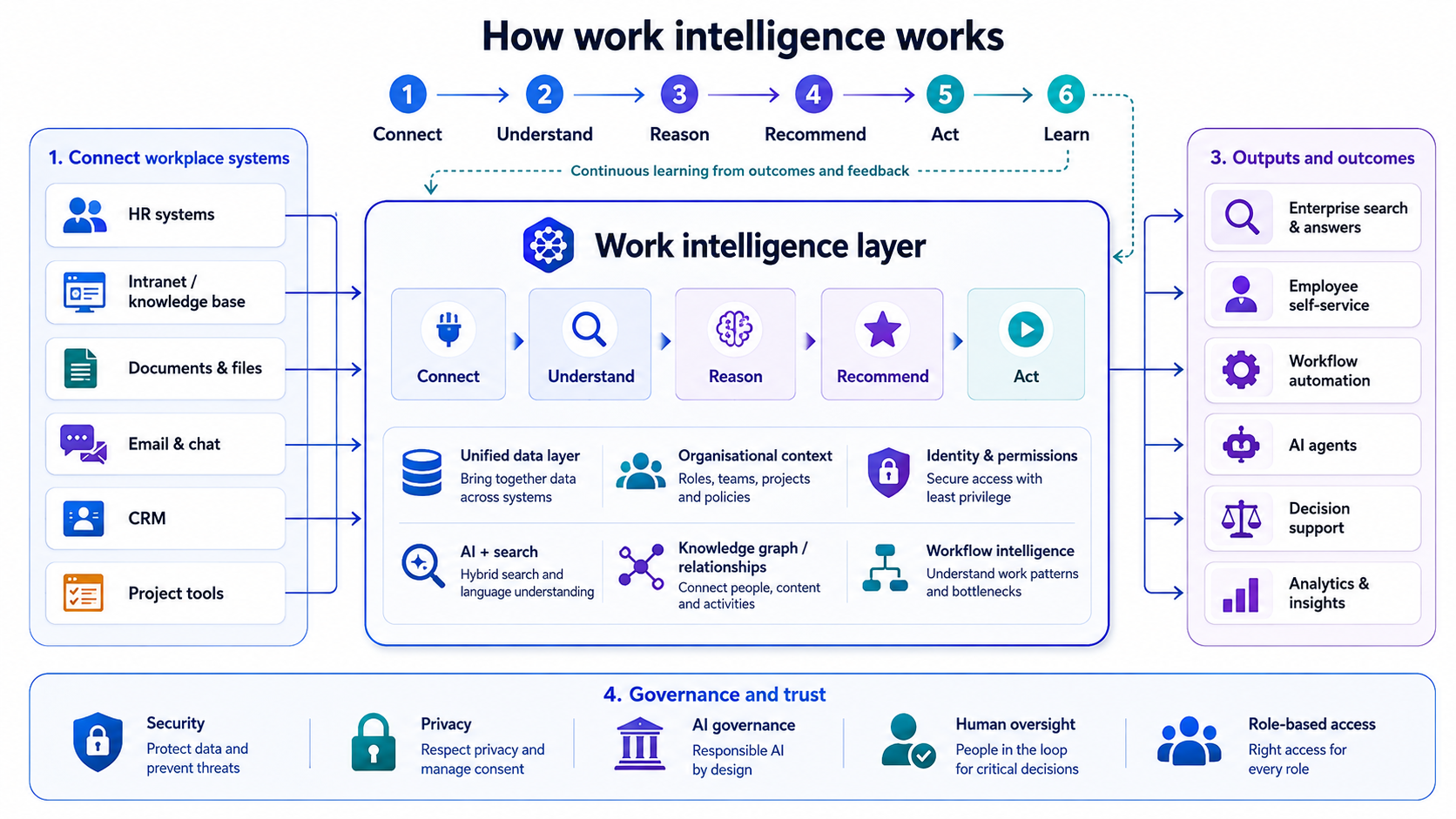
That's where work intelligence starts becoming interesting.
That's where work intelligence starts becoming interesting.
Instead of treating every application as a separate island, a work intelligence platform attempts to understand the relationships between people, information, conversations, permissions, processes and actions.
You can think about it like this:
People + Knowledge + Data + Context + Workflows + AI = Work Intelligence
The important word there is context.
A normal search engine might find 20 documents containing the words "annual leave". A more intelligent workplace system should understand that you're an employee in the UK, identify the current policy you're actually allowed to access, recognise which version is authoritative and surface the information that's relevant to you.
Take that one step further and AI could potentially help you complete the next part of the process rather than simply showing you a document.
That's a significant difference.
It's more than another workplace search tool
Enterprise search is certainly part of the picture, but a modern work intelligence platform can go further.
Depending on the platform and the systems connected to it, work intelligence can help organisations understand things such as:
- where important knowledge is stored;
- how employees find and use information;
- who has expertise in particular subjects;
- how people and teams are connected;
- which workflows are repetitive or inefficient;
- what information an employee is permitted to access;
- which tasks could potentially be automated;
- and what action should happen next.
This is also why work intelligence, workforce intelligence and workplace intelligence shouldn't automatically be treated as interchangeable terms.
Workforce intelligence has traditionally leaned more towards analysing the workforce itself — headcount, skills, performance, retention, workforce planning and other people-related data.
Workplace analytics might look at how employees use offices, applications or collaboration tools.
Work intelligence is potentially broader because it's concerned with understanding the actual environment in which work happens: the people, knowledge, systems, relationships and processes that allow someone to get a job done.
AI is what makes this much more interesting
This concept becomes particularly important as businesses move beyond basic generative AI towards AI assistants and AI agents.
An AI tool that can write an email is useful.
An AI system that understands your organisation is potentially much more useful.
Imagine asking an AI assistant:
- "Prepare everything I need for tomorrow's meeting with Acme."
To answer that properly, the system may need to understand who Acme is, which employees work with them, your previous meetings, relevant emails, CRM records, current projects, documents, outstanding tasks and — critically — which of that information you're authorised to see.
That's not simply generative AI anymore. It requires organisational context.
Microsoft is already moving heavily in this direction. Its Work IQ technology is designed to provide Microsoft 365 Copilot and AI agents with intelligence about an organisation's work, including people, relationships and organisational knowledge. The idea is that AI becomes more useful when it understands the context in which an employee actually works.
And that's really the bigger idea behind a work intelligence platform.
It's not about collecting as much employee data as possible or watching every move people make.
It's about turning the information and knowledge a business already has into something employees — and increasingly AI systems — can actually understand and use.
The potential is huge.
But there's also an obvious question we need to answer next: if businesses have had workplace software, intranets, analytics and knowledge management systems for years, why is work intelligence suddenly becoming such a big deal now?
Why is everyone suddenly talking about work intelligence?

Why is everyone suddenly talking about work intelligence?
Work intelligence isn't appearing out of nowhere.
It's really the result of two workplace trends colliding: businesses have accumulated huge amounts of digital information, and AI has suddenly become capable of doing much more with it.
The problem is that most organisations still have their knowledge scattered across emails, documents, intranets, HR systems, project tools, chat platforms and countless other applications.
Employees spend time searching for information, switching between systems and trying to work out which version of something they can actually trust.
82%
of leaders expect to expand workforce capacity with digital labour
Microsoft's 2025 Work Trend Index found that 82% of leaders expected to use digital labour to expand workforce capacity within 12–18 months, while 46% said their organisations were already using AI agents to fully automate workflows or business processes.
46%
already using AI agents to automate workflows or processes
Source: Microsoft 2025 Work Trend Index
At the same time, AI adoption is accelerating.
Microsoft's 2025 Work Trend Index found that 82% of leaders expected to use digital labour to expand workforce capacity within 12–18 months, while 46% said their organisations were already using AI agents to fully automate workflows or processes.
This creates an important challenge.
AI can generate an answer, but to give the right answer at work it needs context. It needs to understand your company's knowledge, people, permissions, relationships and processes.
That's why work intelligence platforms are becoming more relevant. They provide a layer that can connect workplace information with AI, enterprise search, knowledge management and workflow automation.
And this is where the real opportunity sits.
The future probably isn't about giving employees even more workplace apps. It's about making the systems they already use work together more intelligently — helping people find what they need, understand what matters and take the next action without wasting half their day looking for it.
Expert Perspective“Work IQ represents the next phase of the agentic workplace of the future—and it’s here.”
Source: Microsoft Inside Track, 2026
So, how does a work intelligence platform actually work?
A work intelligence platform works by connecting the information your business already has and using AI to turn it into useful context, answers and actions.
A simple way to think about it is:
Connect → Understand → Reason → Recommend → Act → Learn
Connect your workplace systems
First, the platform connects with tools such as your intranet, HR system, document storage, CRM, email, project tools and other business applications. This creates a unified layer across systems that would otherwise sit in silos.
Typical integrations include:
- HR systems (e.g. employee data, roles, org structure)
- Document storage (e.g. policies, files, knowledge bases)
- Communication tools (e.g. email, chat, collaboration platforms)
- CRM and customer systems
- Project and task management tools
- Internal intranets and portals
Understand the context
It then builds connections between people, documents, conversations, departments, projects and workflows. Importantly, identity and permissions help ensure employees only see information they're authorised to access.
This contextual layer helps the system understand:
- Who is involved in a task or conversation
- What information is related or relevant
- How teams and departments interact
- What permissions apply to each user
- How work flows across systems and teams
Reason and recommend
AI can use this context to answer questions, surface relevant knowledge and recommend what someone should do next.
Instead of searching through folders for a policy, for example, an employee could simply ask a question and receive the most relevant information.
It can also:
- Summarise key documents or threads
- Suggest next steps based on similar past actions
- Highlight experts or relevant teams
- Provide proactive answers before users even search
Act through workflows and AI agents
More advanced platforms can go beyond finding information.
Workflow automation and AI agents can help complete routine tasks, trigger processes or move work to the next stage.
For example, they can:
- Auto-fill forms or update records
- Route requests to the right approver
- Trigger onboarding or offboarding workflows
- Draft responses or documents
- Execute multi-step tasks across systems
Learn from workplace activity
Finally, analytics can reveal where employees struggle to find information, where processes slow down and where automation could save time.
This can help identify:
- Frequently searched but hard-to-find information
- Bottlenecks in workflows or approvals
- Repetitive manual tasks suitable for automation
- Gaps in documentation or knowledge sharing
That's what makes work intelligence different from simply adding another search box or AI chatbot — the goal is to understand the wider context of work and use that intelligence to help people get things done.
Work intelligence isn't the same as employee monitoring
This is an important distinction because work intelligence can easily sound like another way of watching employees. It shouldn't be.
Traditional employee monitoring software tends to focus on individual activity — things like login times, application usage, websites visited, keystrokes or how long someone appears to be active.
A workplace intelligence platform should have a very different purpose. Rather than asking "Is this employee working?", it should help businesses understand "How can we make this work easier?"
That might mean using workplace analytics to identify a slow approval process, using workforce intelligence to find people with the right expertise, or using workplace AI to help employees quickly find information buried across different systems.
There's still a line businesses need to be careful not to cross.
More visibility into organisational workflows can improve productivity, knowledge sharing and the overall employee experience. But excessive tracking can quickly feel invasive and damage employee trust.
The goal of organisational intelligence shouldn't be to watch everything employees do. It should be to understand how work happens well enough to remove friction, improve decisions and give people better tools to do their jobs.
What can businesses actually use work intelligence for?

What can businesses actually use work intelligence for
This is where work intelligence becomes much easier to understand. The real value isn't the technology sitting behind the platform — it's what employees can actually do with it.
A modern work intelligence platform can connect knowledge, people, workplace data and business processes so employees spend less time searching, switching between apps and chasing colleagues for answers.
Some of the most useful work intelligence use cases include:
- Knowledge discovery and enterprise search: Employees can search across documents, policies, intranet content and other connected systems from one place, making important organisational knowledge easier to find.
- Employee onboarding: New starters can quickly find policies, training, department information, key contacts and answers to common questions without constantly relying on HR or their manager.
- Internal communications: An AI-powered workplace can help organisations deliver more relevant announcements, updates and information based on an employee's role, team or location.
- HR support: Employees can get faster answers about annual leave, benefits, expenses, workplace policies and other everyday HR questions.
- Finding internal experts: Workforce intelligence can help identify people with particular skills, experience or knowledge, making collaboration across departments easier.
- Meeting and decision intelligence: AI can summarise discussions, surface related information and highlight actions, giving managers better context when making decisions.
- Workflow automation: Repetitive processes such as approvals, onboarding tasks, information requests and document routing can be automated instead of manually passed between employees.
- AI assistants and AI agents: Workplace AI assistants can answer questions, while more advanced AI agents for business can potentially take actions across connected systems and complete multi-step tasks.
- Skills intelligence: Organisations can better understand where expertise exists, where skills gaps are developing and where additional employee training may be needed.
- Operational intelligence: Workplace analytics can help identify bottlenecks, repetitive tasks and processes that are slowing teams down.
- Customer support: Employees can find product information, previous conversations, policies and customer records faster, helping them respond with better context.
- Compliance and policy discovery: Staff can find current policies and procedures more easily rather than relying on outdated documents saved somewhere on a shared drive.
The common thread across all of these examples is context.
A good workplace intelligence platform doesn't simply give employees more data. It helps connect the right person with the right information, at the right moment, and increasingly helps them take the next action too.
That's why the conversation around enterprise search, knowledge management, workforce intelligence, workflow automation and AI agents is starting to overlap. Businesses don't necessarily need another standalone tool for every problem — they need their existing workplace technology to become much better at understanding how everything fits together.
Where employees could see the biggest benefits
For employees, the biggest benefit isn't having access to more technology. Most people already have enough apps. The real improvement comes from making everyday work simpler.
Think about a normal working day. Someone needs a policy, can't remember where it lives, searches several folders, messages a colleague and eventually asks HR. That's a small problem, but repeat it across hundreds of employees and you start to see how information overload affects workplace productivity.
A more connected approach can improve the digital employee experience by helping people:
- Find trusted information without searching multiple systems.
- Get faster answers to everyday workplace questions.
- Reduce repetitive administrative tasks.
- Access company knowledge before asking another employee for help.
- Use employee self-service for common HR and operational requests.
- Discover colleagues with relevant expertise.
- Move between fewer disconnected workplace applications.
- Spend more time on meaningful work instead of chasing information.
Better knowledge sharing also matters when experienced employees leave. Important information shouldn't disappear simply because it was sitting in someone's inbox or head.
Ultimately, improving employee productivity isn't about squeezing more work out of people. It's about removing unnecessary friction.
When connected workplace technology makes information easier to discover and routine tasks easier to complete, employees can spend less time navigating the organisation and more time actually doing their jobs.
Why businesses are interested in work intelligence
From a business perspective, the attraction is pretty straightforward: companies have invested heavily in software, data and digital tools, but employees still waste time searching for information, repeating manual tasks and moving between disconnected systems.
Work intelligence aims to make those existing resources more useful.
One of the biggest opportunities is business productivity. When employees can find reliable information faster and routine processes require fewer manual steps, teams can spend more time on work that actually creates value.
There are several other potential benefits:
- Knowledge retention: Capture valuable institutional knowledge so expertise doesn't disappear when experienced employees leave.
- Faster decision-making: Give managers better context through decision intelligence, rather than forcing them to piece information together from several systems.
- Process optimisation: Identify repetitive tasks, slow approvals and other areas suitable for intelligent automation.
- Less information fragmentation: Connect content and business data that would otherwise remain trapped in separate applications.
- Enterprise AI adoption: Give AI assistants and agents better organisational context so they can provide more relevant responses.
- Organisational visibility: Help leaders understand how information, people and processes connect across the business.
There's also an employee experience benefit. Removing unnecessary friction can make everyday work considerably easier.
And that's really the business case: not simply collecting more data, but turning the knowledge and technology a company already has into something people can actually use.
Imagine an employee needs an answer right now...
Imagine you're an employee trying to answer a pretty simple question:
"What's our parental leave policy, and what do I need to submit?"
In a traditional workplace, that simple question can turn into a small investigation.
You search the company intranet. Nothing obvious appears. You check SharePoint and find three documents with similar names. You're not sure which one is current, so you message your manager. They tell you to contact HR. A few hours later, someone sends you a PDF that was updated six months ago.
Sound familiar?
Now imagine the same situation in a more connected digital workplace.
The employee asks the question through the company's AI assistant or employee portal. The system recognises who they are, checks their access permissions and searches the organisation's centralised knowledge base for the approved information.
Within seconds, it could:
- Find the latest parental leave policy.
- Provide a simple explanation of what the employee is entitled to.
- Surface the correct forms and supporting documents.
- Show who to contact if they need help.
- Direct them to the appropriate HR process.
- Recommend the next steps they need to complete.
This is where intelligent knowledge management and employee self-service technology become genuinely useful.
The employee isn't expected to understand where information is stored or which business system owns the process. They simply ask a question and receive a relevant, permission-aware answer.
That's the difference between having lots of workplace information and actually making that information useful.
Here's where work intelligence gets complicated
The benefits of work intelligence are easy to see, but connecting AI to company knowledge, employee information and business systems also creates risks that shouldn't be ignored.
This becomes particularly important as organisations give AI access to more sensitive data and allow AI agents to take actions rather than simply answer questions.
IBM's 2025 Cost of a Data Breach research found that 63% of organisations lacked AI governance policies, while organisations with high levels of unapproved "shadow AI" experienced breach costs that were, on average, $670,000 higher.
So what could actually go wrong?
- Employee monitoring: Imagine workplace analytics being used to measure how often someone sends messages, attends meetings or appears active. Employees may start feeling watched rather than supported, damaging trust and encouraging people to optimise for activity instead of results.
- Privacy and sensitive HR data: A workplace AI system might connect employee profiles, salaries, performance reviews, absence records or disciplinary information. Poor access controls could expose information to people who should never see it.
- Incorrect AI answers: Imagine an employee asking about maternity leave and receiving an outdated or inaccurate policy. If employees begin trusting AI-generated answers automatically, a simple hallucination can quickly become an HR or compliance problem.
- Outdated organisational knowledge: AI is only as useful as the information behind it. Connecting an intelligent search system to five versions of the same policy doesn't magically tell employees which one is correct.
- Security and permissions: Work intelligence often becomes more useful as more systems are connected, but that also increases the importance of identity management and role-based access control. IBM reports that 97% of organisations experiencing an AI-related security incident lacked proper AI access controls.
- Algorithmic bias: If AI recommendations are based on incomplete or biased workplace data, those problems can influence decisions involving recruitment, performance, skills or career opportunities.
- Over-automation: Not every workplace decision should be automated. Performance management, disciplinary action, redundancy decisions and other sensitive situations still require human judgement and context.
- AI agent permissions: This could become one of the biggest issues. An AI assistant that only reads information presents one level of risk; an autonomous agent that can update records, send communications or trigger workflows presents another. Gartner predicts 40% of enterprises will demote or decommission autonomous AI agents by 2027 because of governance gaps discovered after production incidents.
The scale could become enormous. Gartner predicts that an average global Fortune 500 company could have more than 150,000 AI agents by 2028, compared with fewer than 15 in 2025. Yet only 13% of organisations surveyed believed they had the right AI agent governance in place.
That's the real challenge with responsible AI in the workplace.
Businesses need to balance employee data privacy, AI governance, information security, human oversight and workplace transparency with the productivity benefits these systems can provide.
The aim shouldn't be to connect everything simply because you can. It should be to give people and AI access to the right information, for the right reason, with clear boundaries around what happens next.
Who should actually be responsible for work intelligence?
One mistake businesses could easily make is treating work intelligence as purely an IT project.
IT obviously has an important role, but a system connecting employee data, company knowledge, AI, workflows and business applications affects far more than technology. It touches HR governance, data privacy, cybersecurity, internal communications, compliance and employee experience.
That means responsibility needs to be shared.
| Job role | Main responsibility | Why it matters |
| CIO / IT Director | Technology architecture, integrations and system reliability | Ensures connected workplace systems work securely together |
| HR Director / Chief People Officer | Employee impact, workplace policies and acceptable use | Protects employee experience and ensures technology supports people |
| CISO | Cybersecurity, identity and access controls | Prevents sensitive company and employee information being exposed |
| Data Protection Officer | Privacy, data processing and retention | Helps ensure employee data is handled appropriately |
| Legal / Compliance | Regulatory requirements and AI governance | Identifies legal and compliance risks before deployment |
| Internal Communications | Employee awareness and change communication | Helps employees understand what the technology does and why it's being introduced |
| Knowledge Manager | Content quality and information governance | Ensures AI is working from accurate, current and trusted information |
| Department Managers | Workflows and practical business requirements | Identifies where automation and process improvement will actually help |
| Employees | Responsible use, feedback and reporting problems | Employees often spot inaccurate information or poor processes first |
The key point is that AI governance in the workplace needs shared ownership.
IT can connect the systems, but HR needs to understand the employee impact. Security teams need to control access, knowledge owners need to maintain accurate information, and department managers need to decide where intelligent workflow automation genuinely makes sense.
And employees need a voice too.
If people don't understand what workplace data is being collected, how enterprise AI is using it or which decisions remain under human control, trust can disappear quickly.
The best approach is therefore cross-functional: use technology to make work smarter, while keeping security, transparency, employee trust and human accountability at the centre of it.
What should businesses do before introducing a work intelligence platform?
Buying the technology is probably the easiest part. The harder question is whether your organisation is actually ready for it.
A work intelligence platform can connect a lot of information very quickly, but connecting messy data, outdated policies and poorly controlled permissions to AI won't magically fix those problems. In some cases, it could make them worse.
Before rolling anything out, businesses should work through these steps.
1. Start with the business problem
Don't begin with "We need AI." Identify what you're actually trying to improve.
Is it difficult for employees to find information? Are HR teams answering the same questions repeatedly? Are approvals too slow? Is knowledge disappearing when employees leave?
Clear problems give you something meaningful to solve and measure.
2. Map where your information lives
Identify the systems containing important enterprise knowledge, including:
- Intranet content and knowledge bases
- HR systems
- SharePoint or Google Drive
- CRM platforms
- Email and collaboration tools
- Policies and procedures
- Project management systems
- Learning and training content
You need to understand what information could become accessible before connecting it to AI.
3. Clean up your knowledge
Outdated information is a major problem.
If five versions of the same employee handbook exist, an AI-powered enterprise search system could surface the wrong one. Establish content owners, archive outdated documents and identify authoritative sources.
4. Review permissions before connecting systems
Ask a simple question:
Who should be allowed to see what?
Review role-based permissions, sensitive HR information, confidential documents and departmental access before giving AI access to connected systems.
5. Carry out a privacy and security assessment
Work with your security, legal and data protection teams to understand what employee and business data will be processed, where it's stored and how it's protected.
6. Define acceptable AI use
Employees need clear guidance covering what they can put into workplace AI, which tools are approved and what information should never be shared with unapproved systems.
This can also help reduce shadow AI.
7. Decide where humans stay in control
Not every decision belongs to an algorithm.
Sensitive areas such as recruitment, performance management, disciplinary action and major HR decisions should have clearly defined human oversight and escalation routes.
8. Involve employees early
Explain what the technology does, what workplace information it uses and — equally importantly — what it doesn't do.
Employee consultation can help identify concerns around workplace surveillance, privacy and AI transparency before they become trust problems.
9. Start with a controlled use case
Don't connect the entire organisation on day one.
Start with something useful but relatively low-risk, such as internal knowledge discovery, employee FAQs, policy search or onboarding support.
10. Establish AI governance
Assign clear ownership for security, data quality, privacy, AI behaviour and business outcomes.
Someone needs to be accountable when the system produces an incorrect answer or an automated process goes wrong.
11. Train employees and managers
People need to understand how to use enterprise AI tools properly, recognise unreliable outputs and know when human judgement is required.
12. Provide feedback and escalation routes
Give employees a simple way to report inaccurate information, inappropriate recommendations, security concerns or automation mistakes.
13. Measure outcomes that actually matter
Avoid measuring success by how many AI queries employees make.
Instead, look at practical outcomes such as:
- Time spent finding information
- Employee self-service rates
- Support requests reduced
- Workflow completion times
- Search success rates
- Knowledge gaps identified
- Employee satisfaction
- Hours saved through automation
14. Review the system regularly
Workplace knowledge, employees, regulations and AI capabilities constantly change.
Permissions, integrations, policies, automated workflows and AI governance frameworks therefore need regular review.
The businesses that get the most from work intelligence probably won't be the ones that connect the most data or automate the most tasks.
They'll be the ones that know what should be connected, what should be automated and where humans still need to make the final call.
What should you look for in the best work intelligence platform?
Choosing the best work intelligence platform isn't really about finding the product with the longest feature list. It's about finding a platform that can connect your people, knowledge and business systems while making everyday work noticeably easier.
The right solution should also fit into your existing digital workplace technology rather than becoming yet another disconnected application.
When comparing work intelligence software, look closely at these capabilities:
- Enterprise search: Employees should be able to find relevant information across connected workplace systems quickly.
- Knowledge management: Company policies, documents, procedures and expertise should be organised, searchable and easy to maintain.
- AI-powered assistance: Look for natural-language search, summaries, recommendations and contextual answers.
- AI agents: More advanced platforms may use intelligent agents to perform tasks or support multi-step business processes.
- Workflow automation: Routine approvals, requests and repetitive administrative work should be easier to automate.
- Business integrations: Check compatibility with your HRIS, CRM, document storage, collaboration and other core business applications.
- Permission-aware search: Results should respect existing roles, identities and access permissions.
- Employee communication: Announcements, updates and important information should reach the right employees.
- Workplace analytics: Reporting should help identify knowledge gaps, engagement patterns and inefficient processes.
- AI governance and security: Look for strong access controls, data protection, administrative oversight and clear governance options.
- Mobile accessibility: Frontline, remote and deskless employees should be able to access important information wherever they work.
- Ease of use: If employees need extensive training just to find basic information, adoption will become difficult.
Platforms such as AgilityPortal can fit into this broader picture by combining employee communications, knowledge management, documents, people, workflows, enterprise search and AI-powered workplace tools within a central digital workplace.
Ultimately, the best platform isn't necessarily the one promising the most AI. It's the one that helps employees find information, share knowledge, communicate and complete work with less friction.
Work intelligence vs digital workplace vs intranet vs workforce analytics
It's easy to confuse work intelligence with a digital workplace, employee intranet or workforce analytics platform because there's plenty of overlap. The main difference is what each technology is actually designed to do.
A traditional company intranet focuses on giving employees a central place for company news, policies, documents and internal resources. A digital workplace platform goes further by bringing communication, collaboration, knowledge sharing and business processes together. Workforce analytics software, meanwhile, is primarily concerned with analysing employee and HR data.
Work intelligence adds another layer: using artificial intelligence, organisational context and connected workplace data to understand how information, people and processes relate to each other.
| Technology | Primary purpose | Typical capabilities |
| Employee intranet | Centralise company information | News, policies, directories, documents and internal communications |
| Digital workplace platform | Connect employees and everyday work | Collaboration, knowledge sharing, employee engagement, workflows and communication |
| Workforce analytics | Understand workforce trends | Headcount, retention, performance, skills and people analytics |
| Work intelligence platform | Understand and improve how work happens | AI-powered search, contextual knowledge, process intelligence, recommendations and intelligent automation |
There are also related technologies that increasingly form part of this ecosystem:
- Enterprise knowledge management helps capture, organise and share organisational knowledge.
- People analytics helps HR teams understand workforce behaviour and trends.
- Process intelligence identifies bottlenecks and opportunities to improve business processes.
- Enterprise search software helps employees discover information across multiple repositories.
- AI-powered intranet software brings intelligent search, content discovery and employee self-service into the digital workplace.
- Intelligent automation uses AI and workflows to reduce repetitive manual work.
- Employee experience platforms focus on making communication, information and workplace services easier for employees to access.
These technologies aren't necessarily competitors. In many organisations, they'll increasingly work together.
A modern digital workplace could provide the central employee experience, while work intelligence provides the contextual layer that helps AI understand the people, knowledge and processes behind the work.
That's an important distinction because businesses don't necessarily need to replace their intranet or existing workplace technology. The bigger opportunity may be making those systems considerably more intelligent.
Where does AgilityPortal fit into work intelligence?
This is where a digital workplace platform becomes an important part of the work intelligence picture.
Before AI can give employees useful answers or automate workplace processes, it needs access to organised, trustworthy information. If policies are buried in shared drives, company knowledge sits in people's inboxes and employee communications are spread across multiple applications, even sophisticated AI will struggle to understand the organisation properly.
AgilityPortal helps provide that foundation by bringing key parts of the employee experience into one connected workplace:
Centralised knowledge → Employee communications → Documents → Policies → People → Workflows → Search → AI → Governed employee access
Rather than treating each area as a separate tool, organisations can use AgilityPortal to create a more connected employee intranet and knowledge management environment where information is easier to organise, discover and manage.
That can include:
- Centralising company knowledge, policies and procedures.
- Publishing targeted internal communications and important updates.
- Creating searchable employee directories and organisational information.
- Managing documents and workplace resources.
- Supporting employee onboarding and training.
- Building forms, approvals and automated workflows.
- Providing AI-powered enterprise search and knowledge discovery.
- Giving employees self-service access to workplace information.
- Controlling access through roles and permissions.
- Connecting external business systems and information sources.
This matters because useful enterprise AI needs more than access to data. It needs reliable knowledge, clear permissions and enough organisational context to understand what information is relevant to each employee.
For businesses exploring work intelligence, the starting point therefore doesn't always need to be another standalone AI product. Building a well-organised digital workplace, employee communication platform and central knowledge hub can provide the foundation that makes intelligent search, automation and workplace AI considerably more useful later.
What happens when AI agents become part of the workforce?
The next stage of work intelligence isn't simply employees asking AI questions. It's AI agents becoming active participants in everyday business processes.
Instead of only summarising a document, an AI agent could find the relevant information, update a record, trigger a workflow, prepare a report or coordinate tasks across several business systems. Microsoft is already moving in this direction, positioning Work IQ as contextual intelligence that helps Copilot and agents understand an organisation's people, relationships and knowledge.
But this doesn't automatically mean replacing employees.
The bigger opportunity is human-AI collaboration, where technology handles repetitive work while people remain responsible for judgement, relationships and important decisions.
This could mean:
- Employees spending less time on routine administration.
- Managers receiving better information before making decisions.
- AI agents completing repetitive multi-step workflows.
- Employees developing stronger AI literacy and digital skills.
- Businesses introducing clearer AI governance and human oversight.
The future of work may therefore be less about humans versus AI and more about how effectively the two can work together.
Conclusion — Smarter AI starts with understanding how people actually work
A work intelligence platform isn't valuable simply because it uses AI. Its real value comes from helping organisations understand how their people, knowledge, systems and processes connect — and then using that context to make everyday work easier.
That's an important distinction.
Businesses don't necessarily need more AI tools. They need technology that can help employees find trusted information, reduce repetitive work, improve knowledge sharing and make better decisions without creating another layer of complexity.
As enterprise AI, intelligent automation and AI agents become more common, governance will matter just as much as capability. Organisations need clear permissions, reliable knowledge, strong data security and human oversight over decisions that shouldn't be left entirely to machines.
The best work intelligence platform should ultimately make work better for the people using it.
Because the future of work won't be determined by how much AI a company deploys. It will be determined by how intelligently that technology supports people — without sacrificing the trust that holds an organisation together.
FAQs about work intelligence platforms
What is a work intelligence platform?
A work intelligence platform connects workplace knowledge, people, data, applications and workflows so employees can find information and complete tasks more efficiently.
Modern platforms increasingly use AI, enterprise search and automation to understand organisational context and provide more relevant answers and recommendations.
How does a work intelligence platform work?
Work intelligence software connects information from systems such as an intranet, HRIS, CRM, document storage and collaboration tools.
AI can then analyse relationships between people, knowledge and processes to support intelligent search, employee self-service, workflow automation and decision-making.
What is work intelligence?
Work intelligence is the ability to understand how people, information, technology and business processes come together to get work done. It can include organisational knowledge, workplace data, process intelligence, enterprise AI and contextual information about employees and teams.
What is the difference between work intelligence and workforce analytics?
Workforce analytics primarily analyses employee-related data such as headcount, retention, skills and performance. Work intelligence has a broader focus, connecting people data with enterprise knowledge, workflows, workplace technology and AI to understand how work happens across an organisation.
Is work intelligence the same as employee monitoring?
No. Employee monitoring software generally tracks individual activity, while work intelligence should focus on improving how information, processes and workplace systems function. However, organisations still need clear privacy policies and governance to prevent workplace analytics from becoming excessive employee surveillance.
How does AI use workplace intelligence?
AI uses workplace intelligence to gain organisational context. This can help an AI assistant understand which documents are relevant, who an employee works with, what information they're permitted to access and which business process should happen next. This context is particularly important for enterprise AI assistants and AI agents.
What are examples of work intelligence?
Common work intelligence use cases include enterprise search, knowledge discovery, employee onboarding, HR self-service, finding internal experts, meeting summaries, skills intelligence, process optimisation, workflow automation and AI-powered employee support.
What should I look for in the best work intelligence platform?
The best work intelligence platform should offer strong knowledge management, AI-powered search, business integrations, permission-aware results, workflow automation, analytics, security and AI governance. It should also be easy for employees to use across desktop and mobile devices.
Are work intelligence platforms secure?
They can be, but security depends heavily on how the platform is configured and governed. Organisations should look for strong identity management, role-based access control, data protection, encryption, audit capabilities and permission-aware AI. Businesses should also review which information AI systems and AI agents can access before connecting sensitive workplace data.
AI Summary
- A work intelligence platform connects people, organisational knowledge, workplace data, business systems, workflows, and AI to help employees find information and get work done more efficiently.
- Work intelligence can reduce information silos by bringing enterprise search, knowledge management, employee data, and connected workplace tools into a more intelligent digital environment.
- Common work intelligence use cases include employee self-service, AI-powered search, workflow automation, knowledge discovery, skills intelligence, decision support, and AI agents that operate across business systems.
- Work intelligence is different from employee monitoring. Organisations should establish clear boundaries around workplace analytics, employee privacy, sensitive data, permissions, and automated decision-making.
- HR should work alongside IT, cybersecurity, legal, compliance, data protection, and knowledge management teams to establish clear AI governance, information ownership, access controls, and human oversight.
- The best work intelligence platform should make everyday work simpler by combining trusted organisational knowledge, secure enterprise search, intelligent automation, strong integrations, and permission-aware AI.
Most Popular Posts

Effective communication among team members is vital for the productivity and success of any organization. Surprisingly, 60% of companies lack a long-term internal communication strategy, which p...


Businesses thrive on communication for efficiency, productivity and accomplishment. When the right information is passed from the right designation in the organization, it promotes positivity an...

Categories
Blog
(3264)
Business Management
(399)
Employee Engagement
(239)
Digital Transformation
(226)
Growth
(153)
Intranets
(142)
Internal communications
(111)
Remote Work
(68)
Sales
(53)
Collaboration
(53)
Customer Experience
(34)
Culture
(30)
Project management
(30)
Knowledge Management
(29)
Leadership
(20)
Comparisons
(9)
News
(1)

Related Posts

Could your next marketing hire cost you more than the results they deliver? If you're weighing up in-house marketing vs agency support—or considering a dedicated remote marketer—the hardest part is knowing what your money will actually buy. You need ...

If employee satisfaction dropped on your team tomorrow, how soon would you know? If your next chance to ask is the annual survey, you could spend months missing the small frustrations that make work harder every day. In a 2024 Pew Research Center sur...

Ever cancelled a meeting to give your team more focus time, only to watch that time disappear into Slack pings, email alerts and "quick questions"? That's how context switching at work can eat into the time you thought you'd got back. In a rece...

How much time does your team spend turning a simple company update into something employees will actually read? AI for internal communications can help you move from rough notes to a clear announcement, newsletter or leadership message, with mo...

What is a case management system, and could it save your team from chasing emails, missing updates, and wondering who's handling what? Imagine a customer complaint or employee enquiry lands in your inbox. Before you can sort it out, you're alre...


Jill Romford
I am a digital nomad, lover of exploring new places and making friends.
I love to travel and I love the internet. I take pictures of my travels and share them on the internet using Instagram.
Traveler, entrepreneur, and community builder. I share my insights on digital marketing and social media while inspiring you to live your fullest life.
Ready to learn more? 👍
One platform to optimize, manage and track all of your teams. Your new digital workplace is a click away. 🚀
Free for 14 days, no credit card required.