Insight Blog
Agility’s perspectives on transforming the employee's experience throughout remote transformation using connected enterprise tools.
38 minutes reading time
(7557 words)
The Cost of Context Switching - How Notifications Steal Focus From Distributed Teams

The Cost of Context Switching - How Notifications Steal Focus From Distributed Teams
See how context switching drains focus in distributed teams and how to cut notification overload while keeping urgent messages visible.
The Cost of Context Switching - How Notifications Steal Focus From Distributed Teams

Ever cancelled a meeting to give your team more focus time, only to watch that time disappear into Slack pings, email alerts and "quick questions"?
That's how context switching at work can eat into the time you thought you'd got back.
In a recent microsoft's 2025 Work Trend Index analysis we looked at, said 20% of Microsoft 365 users who received the most pings got a meeting invite, email or chat message every two minutes on average during an eight-hour workday.
Two minutes:
the average time between meeting invites, emails or chats during
an eight-hour workday for the Microsoft 365 users who received
the most pings
A free slot on the calendar can still be full of interruptions. When planning focus time, give routine updates a predictable place to land and route genuinely urgent issues to someone who can act.
Research context. Microsoft measured the top 20% of users by incoming ping volume. The figure measures how often pings arrived. Whether someone checked a ping or switched tasks was outside that measure.
Source · Microsoft WorkLab, Breaking Down the Infinite Workday (2025)
For distributed teams, those tools help work move across time zones.
But when the same update lands in three places and every message feels like it needs a reply, staying in the loop can turn into communication overload.
Think about the last time you stopped halfway through a proposal to answer a quick question.
The reply took seconds, but when you got back to the draft, you had to reread the last two paragraphs to remember where you were going. That's the hidden cost of context switching.
In this guide, you'll learn how to spot the interruptions that break your team's focus, decide which alerts deserve an immediate response and set simple rules for batching routine updates.
You'll also get a one-week test to see whether those changes give your team more uninterrupted time without slowing down urgent replies.
Key Takeaways
- Look beyond the time it takes to answer a message. The cost of context switching also includes the time it takes to pick up where you left off.
- Batch routine updates in a digest or shared Space to reduce notification overload. Give requests that need action a named owner, a deadline and a time zone.
- Give urgent issues one escalation route and assign someone to cover it during each working window.
- Set your status to Do Not Disturb during focus blocks so colleagues know routine questions can wait. If you have to step away, leave a short note with your next action.
- Compare a baseline week with a trial week. Track interrupted focus blocks, time spent getting back on task and whether urgent requests were acknowledged on time.
How Communication Overload Drives Context Switching at Work and Hurts Productivity
Ever opened Slack to check one update and come away with three new things to do?
You were about to finish a budget review. Now you're answering a question about next week's launch, checking whether the deadline changed and looking for the email where someone confirmed it.
That's how communication overload can lead to context switching at work.
If your team gets the same update in chat, email and a project tool, choose one place for the original and link back to it when needed. Our guide to reducing app fatigue in internal communications explains how to give each tool a clearer role.
When updates come through chat, email and project tools, you have to work out what's new, what needs a reply and what can wait.
Every time you stop to check, you interrupt the task you were already doing. By the time you return to that budget review, you might have to go back over the figures just to remember where you left off.
Here's how that can affect your team's day:
- A quick review takes all morning. You have time blocked out, but it comes in short stretches between messages. You keep picking up the same work without getting to the end of it.
- People spend time chasing decisions. One teammate saw the decision in chat, another is working from an older email, and someone has to check which version everyone should follow.
- Urgent requests get buried. A message that needs action before a deadline looks just like the routine reminders around it, so the person who needs to see it may spot it too late.
48%:
of surveyed employees said their work felt chaotic and fragmented
Find out where the workday breaks up. Ask your team which tasks they repeatedly have to stop and restart. If the same type of update keeps coming up, test moving it into a shared Space or digest people can check during their own working hours.
Research context. This is a self-reported finding from Microsoft’s global Work Trend Index survey. It describes how employees experienced their work overall. The figure covers more than notifications and applies to a broader group than distributed teams.
Source · Microsoft WorkLab, Breaking Down the Infinite Workday (2025)
And if you've ever muted your inbox only to keep opening it to see what you missed, you'll recognise what Microsoft researchers found. Some people focused better with email alerts off, while others checked their inboxes more often.
If your team works across time zones, start by agreeing on two things. Where should someone go when an issue genuinely needs a quick response? And when can everyone catch up on routine updates?
Clear answers give people a reason to stay with the work in front of them when the next ping comes in.
What Is Context Switching at Work?
Context switching at work happens when you shift your attention from one task to another. Each time you switch, you have to set aside what you were thinking about and get up to speed on whatever needs your attention next.
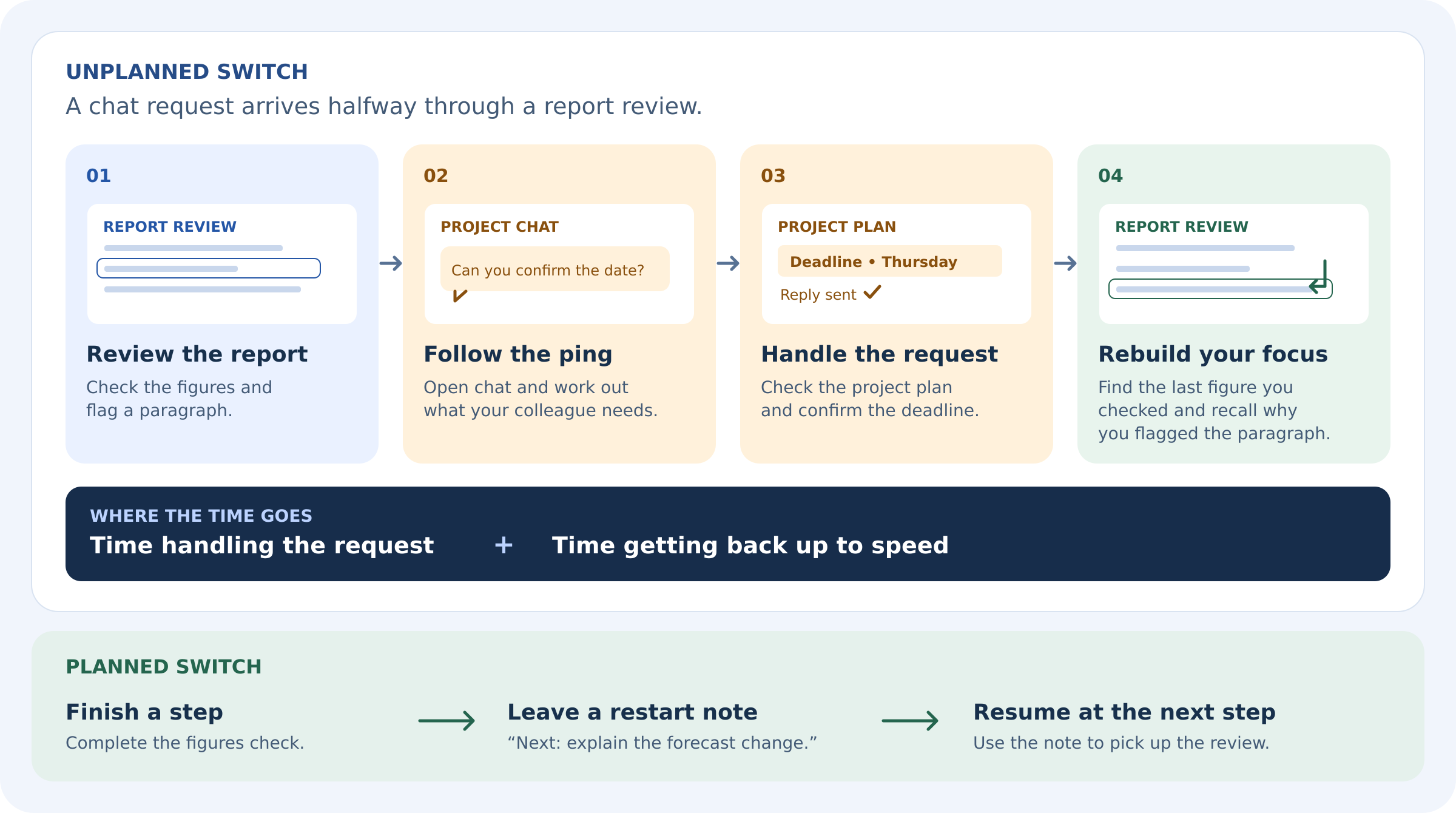
Say you're halfway through writing a proposal when a colleague asks for a figure in chat.
You open a spreadsheet, check the number and send it over.
What Is Context Switching at Work?
The reply takes less than a minute.
Then you're back in the proposal thinking, "Where was I going with this?" You reread the last two paragraphs before you can write the next sentence. That time spent finding your place again is part of the cost of context switching.
Here's what it can look like on a normal workday:
- A chat message interrupts your writing. You stop drafting a report to answer a question about another project, then reread your notes to pick up your argument.
- An email pulls you into a different decision. You pause a budget review to approve a supplier request. When you return, you have to check which figures you'd already reviewed.
- A project alert breaks your train of thought. You're debugging an issue when a ticket notification arrives. After checking it, you retrace your steps to remember which fix you were testing.
- A scheduled meeting marks a planned switch. You finish a section of the proposal, jot down what to write next and join a team call. When you come back, you know exactly where to start.
The difference is timing.
A planned switch gives you a chance to finish a step or leave yourself a note. An unplanned switch can pull you away in the middle of a decision.
When that happens several times in a focus block, more of the time you set aside for the work goes into getting back up to speed.
5 Signs Context Switching Is Disrupting Your Workday
Ever get to lunchtime feeling like you've been busy all morning, yet the one thing you wanted to finish is still open on your screen?
Think back to how many times you stopped and restarted it.
That's often where you'll notice the signs of context switching at work.
| What you notice | What it looks like at work | What to check |
| You keep rereading the same material | You come back from answering a message and reread two paragraphs to remember what you were about to write. | Which messages tend to interrupt you mid-task? |
| You start more tasks than you finish | A quick reply turns into a new request, and you start it while your original task is still open. | Which requests actually needed your attention right away? |
| You check messages between small steps | You finish one slide, open chat out of habit and end up working on something else. | Are alerts pulling you away, or are you checking out of habit? |
| Work spills past the time you set aside | You block out an hour for a review but have to pick it up again after lunch. | How many times did you leave the review during that hour? |
| You repeat checks you've already done | After a few interruptions, you can't remember whether you verified a figure, so you check it again. | Where do you tend to lose your place when you come back? |
Pick one task you've had to restart today and jot down what pulled you away each time. If the same channel, alert or type of request keeps coming up, start there.
How Context Switching Affects Productivity

How Context Switching Affects Productivity
Say you've set aside an hour to review a report before it goes to a client. Twenty minutes in, a teammate asks you to confirm a deadline. You check the project plan, reply and return to the report.
Now you have to remember which figures you've already verified and why you flagged a particular paragraph. The time you spent answering the message is easy to see. The time you spend rebuilding your train of thought is the part that tends to go uncounted.
That's where context switching affects productivity. A review can run over because you spend part of each return working out what you already did.
A decision can slip into the afternoon because nobody has had a long enough stretch to compare the options. And if someone else needs that decision before they can start, the delay carries over into their day too.
When you're trying to understand the impact of context switching, look at three things.
| Where the time goes | What it looks like in practice |
| Handling the interruption | You read the message, look up an answer and reply. A simple question can turn into a conversation if the sender needs more detail. |
| Getting back up to speed | You reopen the right files, reread your notes and work out which checks you've already completed. |
| Rearranging the rest of the day | The review now runs into your next meeting, so you push it to the afternoon. The teammate waiting for your feedback has to move their work too. |
The task matters. If you're ticking items off a checklist, you can usually see where to pick up.
If you're weighing conflicting evidence or deciding how to explain a change to a client, you may need to reconstruct the reasoning that got you there.
When you're looking for the biggest productivity cost, start with the work your team repeatedly has to pause, reconstruct or hand over late.
What Research Says About Context Switching and Productivity
Ever muted your inbox and then opened it anyway to see what you'd missed?
Researchers saw both responses when they disabled email alerts. Some participants were better able to focus, while others checked their inboxes more often on their own. You can read the findings in Microsoft Research's workplace field study on email notifications.
Think about what that looks like on your team. If a client escalation and a routine project update arrive in the same inbox, you still have a reason to check during a focus block.
Give people three rules they can use to decide what to do with a message.
- Routine update? Put it in the team's updates channel or digest. People can catch up at their next planned check-in.
- Need a decision today? Name the person who needs to act and give them a deadline. "Can you approve this by 3 pm UK time?" gives them something to plan around.
- Need someone to act now? Use the agreed urgent channel and make it clear who's covering it in each time zone.
Context Switching in Software Development
Here is another one, imagine you're debugging a sign-in issue when someone asks you to check another ticket.
When you return, the code is still open, but you have to remember which test account you used, what you'd already ruled out and whether you were about to test an expired code or a newly issued one.
That detective work shows up in research on how developers resume interrupted programming tasks. In an analysis of 10,000 programming sessions from 85 programmers, only 7% of sessions involved no navigation to other locations before an edit. A separate study on cues for resuming interrupted programming tasks found that developers commonly relied on notes to help them pick up where they left off.
If you have a moment before you switch away, leave yourself three details.
7%:
of recorded programming sessions reached the first edit without
the developer navigating elsewhere first
Leave a restart note before stepping away. Write down what you’ve confirmed, where to look and which test to run next. Keep the note with the ticket so it can also help the teammate who picks up the work after a handover.
Research context. The 2009 exploratory study analysed 10,000 recorded programming sessions from 85 programmers. This figure measures navigation before an edit. The time lost per interruption and the effect of restart notes are separate questions.
- What you found. The sign-in error appeared after requesting a second verification code.
- What you already checked. The first code worked before requesting a resend.
- What to do next. Check whether the app submits the old code or the new one after the resend.
You can use the same habit outside engineering. If you're pausing a report review, try "Checked the figures in sections one and two. Next, compare the forecast in section three with the latest spreadsheet."
When you come back, you can go straight to the next check.
5 Ways Distributed Teams Can Reduce Context Switching
Start with the way work reaches people.
If a client escalation, a project update and an automated reminder all arrive in the same place, the recipient has to stop and judge each one.
Clear rules for urgency, response times and focus blocks make that decision easier. These five changes give distributed teams a practical way to reduce context switching across time zones.
1. Give urgent issues one route
Define urgency by what happens if the issue waits.
A live service outage, a blocked customer launch or an approval that expires before the next working window may need immediate attention. A request that can wait until the next scheduled check belongs in the usual workflow.
Put three details in the team's communication guide:
- Where to raise it. Use one designated channel or escalation queue for urgent issues. Avoid duplicating the same alert across several group chats.
- Who picks it up. Assign a person or role to cover each working window, with a named backup and a clear handover between time zones.
- What to include. State what happened, who's affected, what action is needed and when. If there's a ticket or incident record, link to it so the next person can pick up the work.
An urgent message could read "Checkout is failing for UK customers. Support has confirmed five reports. The engineer on duty should investigate now. Incident details are in INC-142."
The message gives the person on duty enough context to act without making everyone else stop what they're doing.
2. Batch routine updates in one place
Move progress reports, reminders and general FYIs into a designated updates space or a scheduled digest.
For a team spread across time zones, a shared updates space gives people one place to catch up during their own working hours. A digest can pull together what changed since their last check.
- Keep one source for each update. Record the final decision in the project page or shared workspace. Link back to it from the digest so people can find the full details later.
- Separate FYIs from requests. Label an update For awareness, Feedback requested or Action required. If action is needed, include an owner and deadline.
- Set a publishing rhythm. A daily digest may suit an active launch. A weekly roundup may be enough for routine department news. Match the frequency to how soon people need the information.
For example, collect the week's rollout updates in the project space and use the digest to flag the two changes that affect other teams. If one of those changes needs approval today, assign it directly to the approver with a deadline.
3. Agree on response windows across time zones
Give each type of message an expected response window.
A team might agree to review routine updates by the end of its next local working day, handle approvals by the deadline in the request and route live incidents to whoever is on duty. Set windows around actual coverage and customer commitments.
For requests that need action, include the owner, the decision needed and the deadline with a time zone.
"Sam, please approve the revised launch copy by 3 pm UK time on Thursday so Design can publish it before handover" gives the recipient a clear next step. "Can someone look at this ASAP?" leaves the whole group guessing.
If a deadline falls outside the recipient's working hours, route the request to the person covering that window or agree on a handover before they sign off.
That keeps time-sensitive work moving while giving the rest of the team a predictable time to check messages.
4. Protect focus blocks and deal with the distractions that remain
Set aside time for work that needs sustained attention, such as writing, analysis, design or debugging. Add the block to the calendar, pause routine notifications and make sure someone is covering the agreed urgent route.
Schedule team discussions during overlap hours where possible so people can protect longer stretches of work in their own time zones.
Even with those rules in place, someone may still open their inbox or chat out of habit. For that remaining distraction, tools that enforce a defined focus window on an individual machine can help people set the boundary in advance.
They can decide which sites or apps to limit during the block, saving themselves from making that choice each time they reach for another tab.
Put team rules for urgency, ownership and response times in place first. A personal focus tool can then support the block, with the individual choosing when to use it and what to limit.
Employer-imposed activity monitoring is a separate category with different implications for employee privacy and trust.
5. Make interrupted work easier to resume
Some interruptions need a response. Before stepping away from complex work, leave a short restart note in the draft, ticket or project record. Capture what's done, what's still open and the next action.
Keep it with the work so it's there when you return or hand it over.
Draft complete through section two. The forecast in section three still uses the old figures. Next, check it against the latest finance spreadsheet before sending the draft for review.
The note takes the guesswork out of restarting. It also helps a colleague in another time zone carry the work forward without waiting for you to explain where you left off.
| Situation | Where it goes | What to include |
| Urgent incident | Designated escalation channel or on-call queue | What happened, who's affected, what action is needed now and who's covering it. |
| Decision needed today | Assigned task or direct request to the decision owner | The decision needed, relevant context, the deadline and time zone, and what's waiting on the answer. |
| Routine FYI | Team updates space or scheduled digest | What changed, who it affects and whether anyone needs to act. |
| Update people will need to find later | Shared knowledge base, project page or decision log | The final decision or guidance, when it takes effect, who owns it and any related documents. |
Mobile access for frontline and remote employees
Once the rules are in place, compare a typical week with a trial week.
Track how often focus blocks get interrupted, what people switch away for and whether urgent requests reach the right person on time.
That gives you a way to spot which rules are helping and where requests still get stuck.
How to Tell if Your Team Is Getting Focus Time Back
Run a two-week trial to see whether your notification rules reduce context switching while keeping urgent work moving. Use the first week as a baseline, then trial the new rules in week two.
Keep the team and the types of work as similar as possible. If one week includes a major launch, an outage or unusually low staffing, note it when comparing the results.
Track three things in both weeks
Ask teammates to keep a quick tally during their planned focus blocks. A tick and a short note are enough. Record the same information both weeks so you can compare what changed.
|
|
|
|||
| Interrupted focus blocks | All-in-one workplace operations | Communication + operations | |||
| Time spent getting back on task | Microsoft ecosystem | Enterprise integrations | |||
| Urgent requests that reached someone late | Workflow management | Visual workflows |
Context Switching Checklist for Team Leaders
Use this three-page checklist to identify what interrupts your team, agree which messages need an immediate response and run a two-week trial to see whether your team gets more uninterrupted focus time.
Open or download the checklist (PDF)
If the preview is blank on your device, use the PDF link above.
Use the results to decide what to keep
Compare the share of focus blocks interrupted as well as the raw count.
If 12 out of 20 blocks were interrupted in week one and 7 out of 20 in week two, that's a drop from 60% to 35%. If urgent requests still reached the right person on time, keep the new rules for another week and see whether the improvement holds.
If the same alert still interrupts people, fix the rule that lets it through. For example, if routine status updates are still appearing in chat, move them to the digest and ask project leads to post there first.
If an urgent request went unanswered during a time-zone handover, clarify who covers that window and retest.
If no urgent requests came in during the trial, run a clearly labelled test escalation to check that it reaches the person on duty.
An illustrative AgilityPortal workflow
A distributed operations team could use targeted announcements or department Spaces for routine updates, a scheduled digest for FYIs and one designated chat channel for urgent issues.
The team would pin the escalation rules in that channel and name who covers each working window.
At the end of the trial, it could check whether fewer routine updates broke up focus blocks and whether urgent messages still reached the person on duty within the agreed window.
A UK–US Launch Handover Before and After
Illustrative example. A US project lead starts their day while the UK team is already working through its afternoon.
The lead has a routine launch update to share, a deadline change that needs approval and a live issue that needs someone to act.
Here's how the same three messages can land before and after the team agrees where each one belongs.
| Situation | Before | After |
| Routine launch update | The US lead posts in group chat and tags the UK team. People pause what they're doing to see whether the update affects them. |
The lead adds the update to the shared project page. The UK team reads it at its next planned check-in. |
| Deadline change that needs approval | The proposed change appears in a reply to the launch update. The approver has to read through the thread to find out what needs a decision. | The lead sends the request directly to the named approver, explains what's waiting on the decision and gives a clear deadline, such as 4 pm UK time. |
| Live issue affecting customers | Someone reports the issue in the same launch thread and waits for a teammate to see it. | The issue goes to the agreed escalation channel. The person covering that working window acknowledges it and takes ownership. |
The team still gets the same information.
Routine updates wait for a planned check-in, approval requests reach the person who can act, and urgent issues reach whoever is on duty. That gives everyone else a chance to finish the work in front of them.
Keep Distributed Teams Informed Without Interrupting Everyone With AgilityPortal
Keep Distributed Teams Informed Without Interrupting Everyone With AgilityPortal
If you lead internal communications, HR or operations, you've probably seen a routine update turn into three messages across chat, email and a project tool.
Every duplicate gives employees another reason to stop what they're doing.
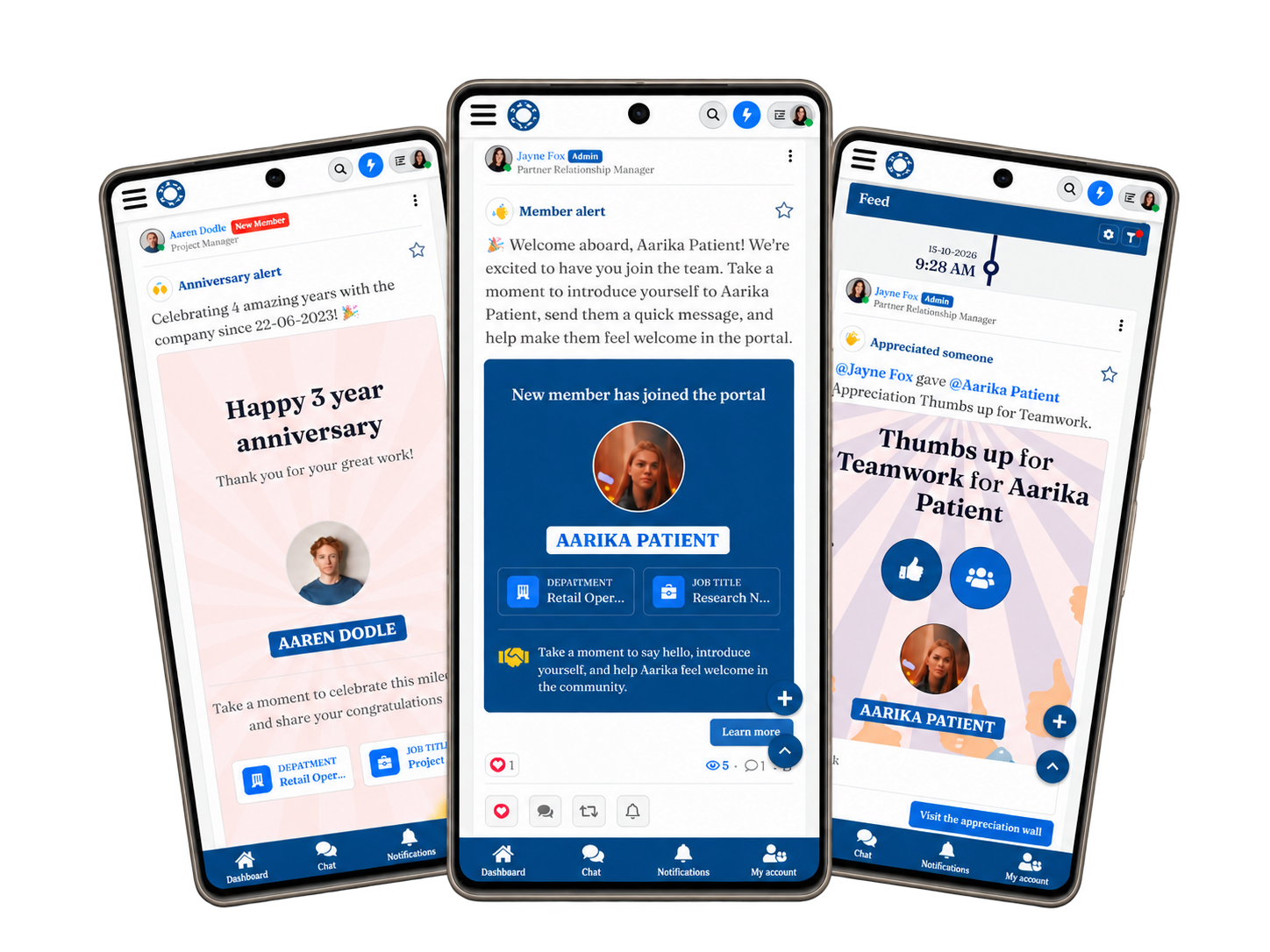
AgilityPortal helps distributed teams reduce information overload.
Use targeted announcements to reach the right people, organise ongoing updates in team or location Spaces, and collect routine news in a digest so employees can catch up when it suits their workday.
Employees can also set their status to Do Not Disturb when they need time to write, review or finish a task. It signals to colleagues that routine questions can wait, helping reduce unnecessary context switching.
Give genuinely urgent issues a designated chat channel and assign someone to cover it during each working window.
Book an AgilityPortal demo to see how targeted updates, employee statuses and a clear escalation route can work across your teams, locations and time zones.
Employee Communication & Focus Time
Help Distributed Teams Stay Informed and Protect Focus Time
If you lead internal communications, HR or operations, give employees one place to catch up on updates across locations and time zones. With AgilityPortal, you can send targeted announcements, organise updates in team and location Spaces, and collect routine news in a digest. Employees can catch up during a planned check-in, with fewer reasons to switch away from the work in front of them.
Protect focus time with Do Not Disturb.
Employees can change their status to Do Not Disturb
while writing, reviewing or finishing a task. The status signals to
colleagues that routine questions can wait. Give urgent issues a
designated chat channel and assign someone to cover it during each
working window.
- Do Not Disturb Status
- Targeted Announcements
- Team & Location Spaces
- Employee Digests
- Chat Channels
- Desktop & Mobile Access
Bring an example of a routine update your team sends across several channels. In the demo, see where that update could live, how employees can signal that they’re focusing, and where urgent requests could go.
Final Thoughts, Give Your Team More Time to Focus
Cancelling a meeting frees up time on the calendar. Keeping that time useful depends on what happens next.
If routine updates, approval requests and urgent issues all arrive through the same channels, people still have to stop and work out what needs their attention. That's where context switching quietly eats into the time they set aside for focused work.
Start with the interruption your team runs into most often. If routine updates keep breaking up the morning, move them into a digest.
If people keep checking chat because they might miss an urgent request, give escalations one clear route and assign someone to cover it. Agree when routine replies are expected, especially across time zones.
Try the change for a week.
Compare how many focus blocks were interrupted and whether urgent requests still reached the right person on time.
If your team gets more uninterrupted time and urgent work keeps moving, you've found a rule worth keeping.
Related Guides You May Want to Read Next
Ready to put your employee updates content kit into practice? These guides explore communication planning, AI-assisted content creation, audience relevance and ways to measure whether your messages achieved their purpose.
- 7 Practical AI Use Cases to Save Time Without Losing Employee Trust
- Plan Employee Updates with an Internal Communications Calendar
- Measuring Communication Effectiveness: Metrics and KPIs to Track
- Communication Solutions for Distributed Teams Beyond Email
- Workplace Communication Strategy Examples for Operations and IT Leaders
- 7 Signs Your Employee Communication Campaigns Need More Attention
- Employee Communication for Crisis Management: Strategies and Best Practices
- Common Barriers to Improving Workplace Communication
Use these resources alongside your briefs, prompts and review checklist to build a more consistent approach to planning, publishing and evaluating employee updates.
Frequently Asked Questions About Context Switching
What is an example of context switching at work?
You're reviewing a budget when a chat message asks you to approve a change on another project.
You open the project plan, make the decision and return to the budget. Now you have to remember which figures you've already checked. That's context switching at work.
When workplace interruptions keep breaking up the same task, you can spend part of your focus time finding your place again.
What is the difference between context switching and multitasking?
Context switching is the shift from one task to another.
Multitasking is trying to handle more than one task in the same period. If you alternate between writing a report and answering chat messages, you're multitasking by switching back and forth.
Each switch can leave some of your attention on the previous task, especially if it's unfinished. Researchers call this attention residue.
What is the cost of task switching, and how does it affect productivity?
The cost of task switching includes the time you spend on the interruption and the effort it takes to pick up where you left off. That second part is called task resumption.
A quick reply might take 30 seconds, but getting back into a complex review can mean reopening a spreadsheet, checking your notes and retracing a decision.
That's where the context switching cost adds up. To understand the impact of context switching on productivity, track how often work gets interrupted and how long it takes to resume.
What does research say about context switching and productivity?
Research on task switching and productivity suggests that some of your attention can stay with an unfinished task after you move on.
A separate workplace study found mixed results when email alerts were switched off. Some people focused better, while others checked their inboxes more often.
For teams dealing with notification overload, that's a reason to pair quieter alerts with clear expectations about when people need to check messages.
What does context switching look like in software development?
A developer pauses halfway through debugging a sign-in error to review an unrelated ticket.
When they return, they have to remember which test account they used, what they've already ruled out and which test comes next.
A short restart note can save them from retracing the whole investigation. Research on interrupted programming tasks found that developers commonly use notes to help them resume work.
How can distributed teams reduce context switching without missing urgent messages?
Give urgent issues one channel and assign someone to cover it during each working window. Use asynchronous communication for routine updates, such as a shared project page or a daily digest people can check during their local working hours. For requests that need a reply, name the owner and include a deadline with a time zone.
This gives teammates a way to protect focus time and reduces the stream of low-priority alerts that can contribute to notification fatigue.
AI Summary
- Context switching at work happens when you shift your attention from one task to another. The cost includes the time spent handling the interruption and the effort it takes to pick up where you left off.
- Notification overload breaks up focus time. Duplicate updates across chat, email and project tools make it harder to tell what needs action. Repeated switches can leave you rereading work, repeating checks and finishing tasks later than planned.
- Give urgent issues one route. Agree on what counts as urgent, where to raise it and who covers each working window. Batch routine updates in a digest or shared space. Give requests that need action a named owner and a deadline with a time zone.
- Protect focus blocks and make work easier to resume. Set your status to Do Not Disturb during planned focus time so colleagues know routine questions can wait. Before stepping away from complex work, leave a short note with what is done, what is still open and what to do next.
- Test the rules over two weeks. Compare a normal week with a week using the new notification rules. Track the share of focus blocks interrupted, how long people take to get back on task and whether urgent requests reach the right person on time.
Most Popular Posts

Effective communication among team members is vital for the productivity and success of any organization. Surprisingly, 60% of companies lack a long-term internal communication strategy, which p...


Businesses thrive on communication for efficiency, productivity and accomplishment. When the right information is passed from the right designation in the organization, it promotes positivity an...

Categories
Blog
(3260)
Business Management
(399)
Employee Engagement
(238)
Digital Transformation
(226)
Growth
(152)
Intranets
(142)
Internal communications
(111)
Remote Work
(68)
Sales
(53)
Collaboration
(53)
Customer Experience
(34)
Culture
(30)
Project management
(30)
Knowledge Management
(29)
Leadership
(20)
Comparisons
(9)
News
(1)

Related Posts

Ever cancelled a meeting to give your team more focus time, only to watch that time disappear into Slack pings, email alerts and "quick questions"? That's how context switching at work can eat into the time you thought you'd got back. In a rece...

How much time does your team spend turning a simple company update into something employees will actually read? AI for internal communications can help you move from rough notes to a clear announcement, newsletter or leadership message, with mo...

What is a case management system, and could it save your team from chasing emails, missing updates, and wondering who's handling what? Imagine a customer complaint or employee enquiry lands in your inbox. Before you can sort it out, you're alre...

AI-assisted software development is rapidly changing how modern businesses build software, and it's happening much faster than many companies expected. From AI coding tools that generate code suggestions in seconds to intelligent testing automation a...

In-house marketing vs agency—where should you put your budget to give your business the best chance of growth? Hiring your own marketer can bring valuable brand knowledge into the business. Working with an agency can give you access to specialist ski...

Annet Herges
I am a digital nomad, lover of exploring new places and making friends.
I love to travel and I love the internet. I take pictures of my travels and share them on the internet using Instagram.
Traveler, entrepreneur, and community builder. I share my insights on digital marketing and social media while inspiring you to live your fullest life.
Ready to learn more? 👍
One platform to optimize, manage and track all of your teams. Your new digital workplace is a click away. 🚀
Free for 14 days, no credit card required.