Insight Blog
Agility’s perspectives on transforming the employee's experience throughout remote transformation using connected enterprise tools.
45 minutes reading time
(9068 words)
AI for Internal Communications: Create Better Employee Updates Faster with AgilityPortal

AI for Internal Communications: Create Better Employee Updates Faster with AgilityPortal
Learn how to use AI for internal communications to draft employee updates, create visuals and share reviewed content through AgilityPortal.
AI for Internal Communications: Create Better Employee Updates Faster with AgilityPortal

How much time does your team spend turning a simple company update into something employees will actually read?
AI for internal communications can help you move from rough notes to a clear announcement, newsletter or leadership message, with more time left to check the details and make the content useful.
There's evidence of that potential.
In Microsoft and LinkedIn's 2024 Work Trend Index, 90% of surveyed AI users said it helped them save time.
That finding covers knowledge workers broadly, rather than communications teams specifically, but it highlights why AI-assisted workflows deserve a closer look.
90%:
of surveyed AI users said it helped them save time,
according to Microsoft and LinkedIn’s 2024 Work Trend Index
Give the time saved a useful purpose. Use an approved AI assistant to organise notes or prepare a first draft, then spend time checking facts, sharpening the required action and answering employee questions. Faster content creation is most useful when it supports clearer workplace messages.
Research context: This is a self-reported finding among AI users in a broader knowledge-worker study. It does not measure hours saved, isolate communications teams or establish results from using AgilityPortal.
Choosing the best AI for internal communications starts with understanding the job you need it to do.
An assistant such as Claude AI could support your drafting workflow, while AgilityPortal gives your team a place to publish reviewed updates, reach relevant employee groups and track engagement.
Getting AI and communications working together also takes clear briefs, factual checks and a human voice employees recognise.
This guide explores practical AI for communications professionals, alongside the skills that AI training for communications professionals should develop.
You'll learn how to:
- Turn approved information into clear employee announcements, newsletters and leadership updates.
- Choose AI tools that fit your content tasks and information policies.
- Write useful prompts and check drafts for accuracy, tone and clarity.
- Prepare supporting visuals while keeping essential information accessible.
- Use AgilityPortal to share reviewed updates, gather feedback and assess engagement.
Key Takeaways
- Use AI-assisted writing to organise approved facts, draft employee announcements and adapt messages for different audiences. Keep a named person responsible for the final content.
- Choose tools around your communication tasks, information policies and review process. Test the same brief across shortlisted assistants and compare accuracy, tone and editing effort.
- Build a reusable content kit with announcement briefs, tone-of-voice guidance, prompts, visual requirements and a pre-publication checklist. Train colleagues to spot missing details and unsupported claims.
- Publish reviewed updates through AgilityPortal, choosing the relevant audience and linking to supporting resources. Keep essential instructions in the message text and check the mobile presentation.
- Measure whether communication achieved its purpose. Review available engagement reporting alongside outcomes such as bookings, acknowledgements or completed actions, then improve the next update.
What Is AI for Internal Communications?
AI for internal communications means using artificial intelligence to help plan, draft, edit, summarise and adapt messages for employees.
It supports the content creation process, while a communications professional remains responsible for checking and approving the final message.
Think about the updates your team prepares every week.
A company announcement needs a clear headline, a leadership message needs the right tone, and a policy reminder needs to explain what employees should do.
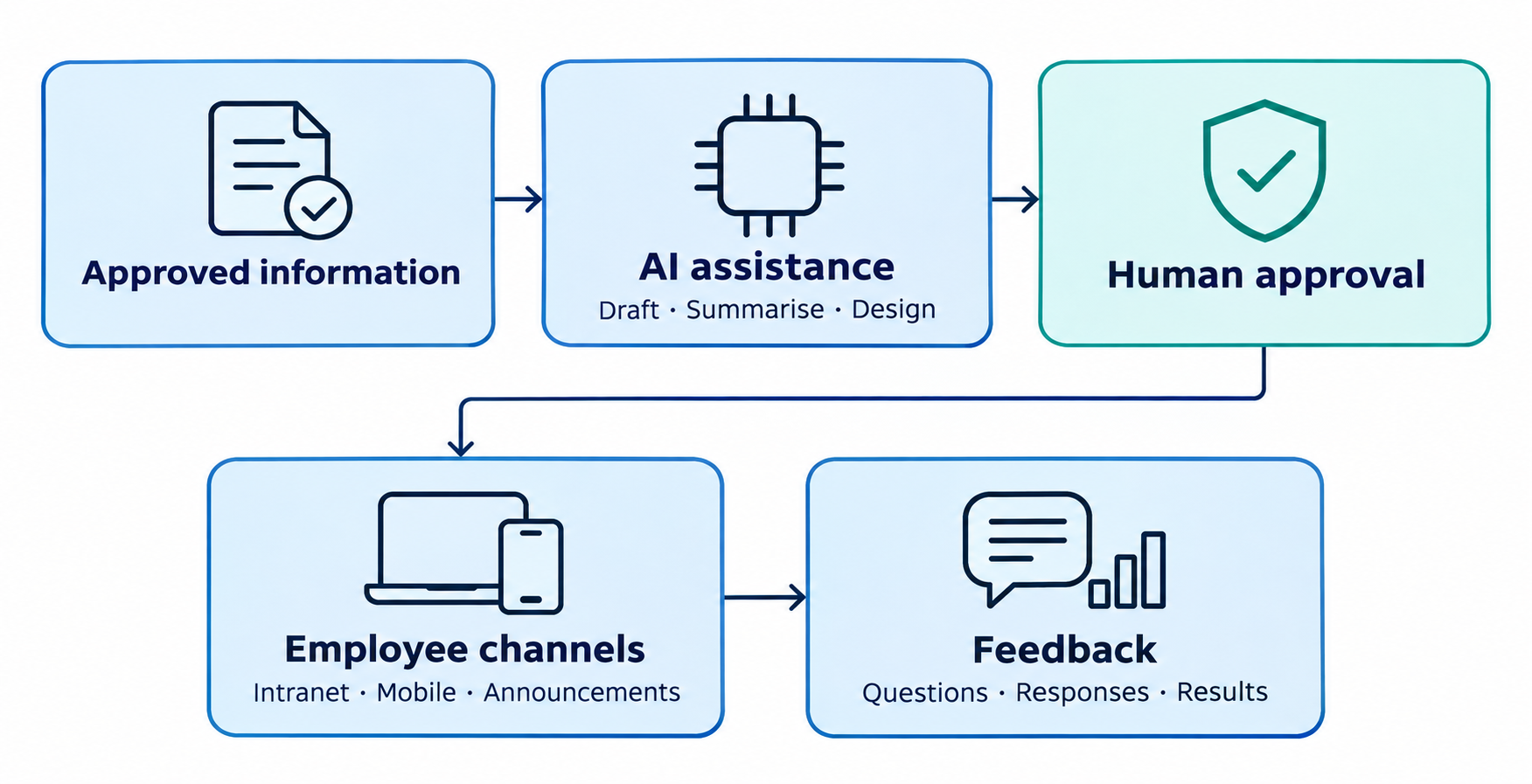
AI can help turn approved information into a first draft or reshape an existing message for a different audience.
What Is AI for Internal Communications?
Common uses include:
- Company announcements: Turn approved notes into an update explaining what is happening, who is affected and what happens next.
- Leadership updates: Organise talking points into a readable message that retains the leader's voice.
- Onboarding messages: Adapt welcome content for different roles, departments or locations.
- Policy summaries: Produce a plain-language overview that links employees to the full, approved policy.
- Channel adaptations: Shorten a detailed article into a brief introduction or reminder without changing its meaning.
- Supporting visuals: Prepare announcement banners, event graphics and newsletter images using an external tool such as ImagineArt's AI Image Editor. Review each visual for brand consistency, readability and suitable dimensions before uploading it to AgilityPortal. Keep essential instructions in the accompanying text so employees can access the information without relying on the image.
For example, you could ask an AI assistant to turn an approved office relocation brief into an employee announcement. Your team would then check the address, dates, arrangements and contact details before publishing. Missing information should become a question for the author, rather than something the tool fills in.
This is where content creation connects with your wider internal communications solutions. A well-written update still needs to reach the right people through a channel they can access.
AgilityPortal's internal communications software supports that publishing stage with company announcements, engagement insights and mobile access.
Your team can prepare and review an AI-assisted draft, then share the approved update through the employee intranet. Employees get a central place to access workplace information, while communicators can assess its reach and engagement.
The practical aim is simple: spend less effort getting the first draft onto the page and give more attention to accuracy, relevance and the action employees need to take.
AI and Communications: Where It Helps—and Where Human Judgment Matters
When deadlines pile up, producing updates faster feels like the obvious answer.
AI assistants can help organise notes, suggest headlines, shorten drafts and offer alternative wording. But AI for internal communications works best when it helps your team make messages clearer and more relevant.
Gartner research reported by HBR in 2023 found 38% of employees considered their organisation's communication volume excessive.
Making content easier to produce could add to that burden unless your team also decides what deserves to be published, who needs it and which messages can be combined.
Before drafting another announcement, ask: Does this help employees understand something, make a decision or take action? If the purpose is unclear, a more polished version will not fix it.
38%:
of managers reported feeling overwhelmed by excessive communication,
according to Gartner’s January 2025 article
Make every update earn its place. Before drafting another message, identify who needs it and what they should do. Combine related reminders, remove repeated information and give managers a concise briefing they can explain to their teams.
Research context: This figure concerns managers and is reported in a Gartner article published in January 2025. It is not a measure of all employees, does not establish when the underlying responses were collected and does not attribute overload to AI.
Source: Gartner — 4 Strategies to Reduce Information Overload in Your Organization
You Can Use AI to Improve Clarity and Focus
Practical uses of AI for communications professionals include turning meeting notes into an outline, identifying the main action in a lengthy announcement and removing repetitive wording.
You can also request several headline options or ask which parts of a draft might confuse a new employee.
Keep the approved source material beside the output.
A confident, readable sentence can still contain an invented deadline, an incorrect explanation or a promise nobody authorised. Treat the draft as something to review, rather than evidence that the facts are correct.
Helps With Keeping Sensitive Messages Under Human Control
Restructuring announcements, employee relations issues and personal messages need particular care.
Small changes in wording can affect how people interpret a decision, their responsibilities or the support available to them.
Before publishing, check:
- Names and dates: Confirm people, job titles, locations and deadlines.
- Policy wording: Check the draft against the approved policy, including exceptions and eligibility rules.
- Links and actions: Make sure links work and employees know exactly what to do.
- Tone and implications: Remove insensitive language, unsupported reassurance and unintended commitments.
- Information handling: Follow your organisation's rules before entering confidential business details or employee information into an AI tool.
These checks should form part of AI training for communications professionals, with a named person accountable for approving each message.
Publish Reviewed Updates to the Right Audience
Once the content is approved, use AgilityPortal's internal communications software to share it with the relevant audience.
Department, team or location Spaces can give an update an appropriate home, supported by the access settings your organisation has configured.
For example, a reminder affecting one office can be published in that location's Space, while a company-wide announcement can reach the wider workforce.
This connects AI and communications to a practical publishing decision: who actually needs this information?
Use the time saved on drafting to improve targeting, answer employee questions and check whether the message achieved its purpose.
What Is the Best AI for Internal Communications?
The best AI for internal communications depends on the task, the information you are allowed to use and how your team publishes updates.
A tool that produces a convincing first draft still needs to fit your approval process, security requirements and everyday workflow.
Start with a recurring task, such as a monthly newsletter or policy reminder.
Test tools against the same approved brief, then compare factual accuracy, editing effort and how well each draft explains what employees need to do.

What Is the Best AI for Internal Communications
| Task | What to assess |
| Drafting announcements | Accuracy, tone control, clear instructions and ease of editing |
| Summarising documents | Faithfulness to the source, retention of important exceptions and handling of longer documents |
| Creating supporting visuals | Brand consistency, readable text, accessibility and usage rights |
| Handling sensitive information | Approved account settings, access controls, data terms and organisational policies |
| Publishing employee updates | Audience targeting, mobile access, feedback options and engagement reporting |
Claude AI for Preparing and Refining Content
Claude AI is an option to evaluate for document-based work. Its document upload guidance explains the supported formats and relevant limitations.
You could test it with an approved briefing document and ask for an announcement draft, a shorter version and a list of missing information. Check each output against the original before using it.
For a useful comparison, judge whether the draft preserves your meaning and reduces editing work. Smooth wording alone does not demonstrate accuracy.
Microsoft Copilot for Teams Working in Microsoft 365
If your communications team already prepares content in Word, Copilot is another option to assess.
Microsoft documents support for drafting, editing and summarising documents.
Availability depends on the relevant account, licence and settings, so check what your organisation provides before planning the workflow.
An existing Microsoft workflow may make it convenient, but use the same review criteria: does the draft retain essential details, sound appropriate and make the required action clear?
AgilityPortal for Publishing and Employee Engagement
AI-assisted writing is one stage of the process.
Your team also needs somewhere employees can access the approved message, ask questions and find supporting information.
Explore AgilityPortal's news, announcements and employee engagement features to see how the publishing stage fits together. The platform brings employee news, announcements, chat and analytics into a shared workplace experience, with news available on mobile and desktop.
For updates that refer to policies or guidance, consider how your central knowledge-sharing hub will support the announcement. Linking to an authoritative document gives employees somewhere to check the full details.
A practical workflow is to prepare a draft in your approved AI assistant, review it with the responsible person, then publish the finished content in AgilityPortal.
Treat external AI tools as separate services unless a specific integration has been confirmed.
Always Use Official Resources Before Choosing
Include a review of the provider's documentation in your selection process.
Anthropic's prompting best practices and Microsoft's Copilot content drafting guidance are useful starting points for developing repeatable instructions.
Choose the combination that helps your team create accurate content, manage approvals and reach employees effectively.
That is a stronger basis for selecting AI for communications professionals than choosing whichever tool generates the longest draft.
How to Use Claude AI to Draft an Employee Update
A useful employee announcement starts with reliable information.
When using Claude AI as part of your AI for internal communications workflow, give it an approved brief, explain who will read the message and specify what employees need to do.
Here's a practical example using a fictional office maintenance announcement.

How to Use Claude AI to Draft an Employee Update
1. Prepare an Approved Factual Brief
Gather the details that the person responsible for the update has confirmed. Follow your organisation's information policies before entering them into an external AI tool.
For this example, the approved facts are:
- What is happening: The Bristol office will close temporarily for planned maintenance.
- When: Friday, 20 November 2026, reopening Monday, 23 November 2026.
- Who is affected: Employees based at the Bristol office.
- Working arrangements: Affected employees should work remotely on the closure date.
- Required action: Employees who cannot work remotely should contact their manager by Wednesday, 18 November.
- Questions: Employees should contact their line manager.
Keep uncertain details out of the brief until they are confirmed. If an important fact is missing, ask Claude to flag the gap.
2. Explain the Audience, Tone and Format
Tell Claude who the announcement is for and where it will appear.
An intranet announcement needs enough context to stand alone, while a short reminder may simply direct employees to the full update.
For this example, request a friendly, professional announcement for Bristol employees, with a headline, short paragraphs and a clearly labelled action.
3. Use a Prompt That Sets Clear Boundaries
Copy this prompt and replace the example facts with your approved information:
Using only the approved facts below, draft an employee announcement of no more than 150 words for our company intranet.
Audience: Employees based at our Bristol office.
Tone: Clear, friendly and professional.
Format: A descriptive headline, short paragraphs and a clearly labelled action.
Explain what is happening, who is affected, the closure and reopening dates, and what employees need to do. Do not invent details or add commitments. List any missing information or questions separately from the announcement.
Approved facts:
The Bristol office will close for planned maintenance on Friday, 20 November 2026, and reopen on Monday, 23 November 2026. Bristol-based employees should work remotely on the closure date. Anyone unable to work remotely should contact their manager by Wednesday, 18 November.
Employees should direct questions to their line manager.
4. Check and Edit the Draft
An acceptable final version might look like this:
Bristol Office Closure: Friday, 20 November
Our Bristol office will be closed for planned maintenance on Friday, 20 November 2026. It will reopen on Monday, 23 November 2026.
Bristol-based employees should work remotely on Friday.
Action required: If you cannot work remotely, please contact your manager by Wednesday, 18 November.
If you have any questions about these arrangements, please speak to your line manager.
Compare the draft with the brief line by line. Check dates, locations, working arrangements and the action deadline. Remove any unsupported details, such as claims that equipment will be provided or that building access will remain available.
A prompt asking Claude to use only supplied facts is a useful instruction, but it does not replace human review.
5. Publish the Approved Update in AgilityPortal
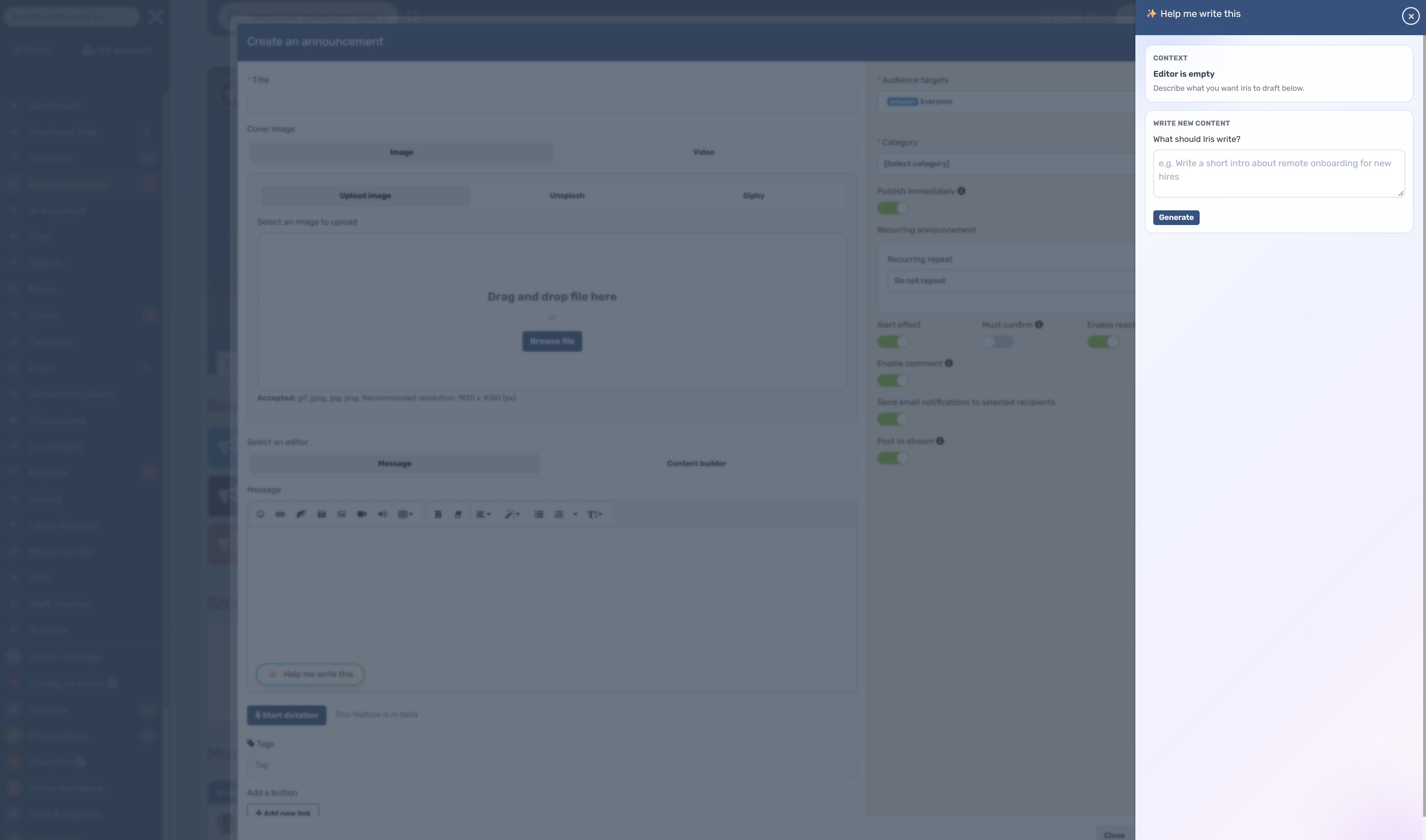
Once the responsible person has approved the wording, manually copy the headline and body into an AgilityPortal announcement.
Choose the relevant audience or location Space, check access settings and preview the formatting before publishing.
Use AgilityPortal's employee news and announcement features to give the reviewed message a clear home. For this example, confirm that Bristol employees can access the update and that the required action is easy to find on mobile.
If you add a supporting banner, keep the closure date and instructions in the announcement text too. Employees should be able to understand the update without relying on the image.
This workflow gives Claude AI a defined drafting task and keeps your team accountable for the message employees receive.
A Practical Workflow: AI for Communications Professionals
The most useful approach to AI for internal communications is a repeatable process your team can follow when deadlines get tight.
Start with a clear purpose, use AI to help prepare the content, then bring the reviewed update into AgilityPortal so employees can find it and respond.
Here's how that works in practice.
Start with the Audience and the Action
Before opening an AI assistant, finish this sentence: "After reading this, employees should…"
That might mean booking training, checking a revised policy or understanding a change to their working arrangements. If you cannot name the outcome, the announcement probably needs a clearer brief.
Then ask:
- Who needs this information?
- Why does it matter to them?
- What should they do, and by when?
- Where can they ask questions?
A reminder for store managers may belong in their team Space. A change affecting everyone needs a wider audience. Make that decision before drafting.
Turn Approved Facts into a First Draft
Give your approved AI assistant the source information, audience and required action. Ask for a specific format, such as a short announcement with a descriptive headline and a clearly labelled deadline.
Keep the factual brief beside the draft while you edit. If the tool introduces a new explanation, promise or date, check it against the source. Ask it to flag missing details rather than fill them in.
For recurring updates, save a reusable prompt. Your team can change the facts each time while keeping the structure consistent.
Prepare the Supporting Visual
A relevant banner can help employees recognise an event or spot an important update in the feed. Give it a clear job: introduce the topic, support the message or make a recurring series recognisable.
For example, a training announcement might use a simple illustration with a short event title. The booking instructions should stay in the announcement text, where employees can read and access them easily.
Before uploading the image to AgilityPortal:
- Check that the dimensions suit the intended placement.
- Preview the crop on mobile so important details remain visible.
- Use readable text and sufficient colour contrast.
- Add useful alt text where the publishing interface supports it.
- Check AI-generated visuals for errors, misleading details and inappropriate imagery.
You do not need a new graphic for every reminder. Reusing an approved template can keep updates consistent and reduce preparation time.
Review the Message Before Publishing
Read the announcement as an employee seeing it for the first time. Is the main point obvious? Can you find the required action without reading it twice?
Then confirm the facts, links, tone and accessibility. Check that the named contact knows they will receive questions and that the responsible person has approved the final wording.
For policy, employment or operational changes, involve the relevant owner. A polished draft still needs someone accountable for what it says.
Publish Through AgilityPortal
Once the content is approved, move it into AgilityPortal and choose the appropriate publishing route.
Use the options available in your organisation's configuration to match the message to its audience and importance.
| Communication need | AgilityPortal option | Publishing check |
| Share a company update | Announcements | Make the headline and required action easy to find |
| Reach a department, team or location | Spaces | Confirm membership and access settings |
| Reach employees away from a desk | Mobile access | Preview the content, images and links on a phone |
| Request confirmation of an important update | Must-read or acknowledgement options, where available | Explain what employees are being asked to acknowledge |
| Invite questions or feedback | Comments, discussions or polls | Assign someone to monitor and respond |
For example, publish a branch-specific process change in the relevant location Space and link to the approved guidance.
For an organisation-wide policy update, use an announcement and, where appropriate, request acknowledgement.
Explore AgilityPortal's intranet publishing and collaboration features when planning this stage. AI can help prepare the wording; your team still chooses the audience, access and publishing settings.
Review Engagement and Improve the Next Update
After publishing, check the reporting available for that content in AgilityPortal. Look at reach, views, responses or acknowledgements where those measures are provided.
Treat each measure as a clue.
A view suggests someone opened the update; it does not establish that they understood it. A reaction can show a response without confirming that the required task was completed.
Connect your review to the original purpose:
- Low reach? Check audience settings, placement and whether employees use that channel.
- Repeated questions? Clarify the wording or add a short FAQ.
- Views without action? Check that the deadline, instructions and destination link are clear.
- Need to check understanding? Use a focused question, poll or manager follow-up.
Feed what you learn into the next brief. Over time, this gives AI for communications professionals a practical role in improving updates—from the first draft through to the employee response.
AI Training for Communications Professionals: What Your Team Should Learn
Knowing how to ask an AI tool for a draft is a useful starting point.
Getting that draft ready for employees takes more judgment. AI training for communications professionals should cover the whole process: preparing reliable information, refining the message, checking the details and evaluating what happens after publication.
Start with the updates your team already creates.
A monthly newsletter, onboarding message or training reminder gives people something familiar to practise with.
39%:
of workplace AI users had received AI training from their company,
according to Microsoft and LinkedIn’s 2024 research
Give your team a repeatable way to work. Build practical training around writing briefs, refining prompts, checking source facts and handling information responsibly. Use a fictional announcement to practise the complete process, including review and preparation for publication in AgilityPortal.
Research context: This 2024 finding concerns people using AI at work across the broader study, rather than communications professionals specifically. It measures reported access to company training, not training quality or employee competence.
Source: Microsoft — 2024 Work Trend Index research announcement
Write a Brief That Gives AI Enough Context
Before writing a prompt, make sure the team can explain the communication task.
Even a detailed instruction will struggle to produce a useful announcement if the underlying information is incomplete.
A practical brief should answer:
- Audience: Who needs this update?
- Purpose: Why does it matter to them?
- Facts: What information has been confirmed?
- Action: What should employees do, and by when?
- Contact: Where can they ask questions?
Keep this brief alongside the draft. It becomes the reference your team uses to check whether the message still says what it should.
Refine the Draft Without Changing Its Meaning
Useful AI for communications professionals involves giving specific feedback.
"Make this better" leaves plenty of room for interpretation. "Put the booking deadline in the first paragraph and remove repeated information" gives the tool a clearer task.
Practise requesting one change at a time. Ask for shorter sentences, a more welcoming opening or a clearer explanation of the required action. Then check what changed.
Pay particular attention to words such as "must", "should" and "may". Swapping them can change an employee's understanding of their responsibilities.
Check Accuracy Against the Approved Source
Give team members a draft containing a few deliberate errors and ask them to find each one using the original brief. This makes accuracy checking a practical skill rather than a vague instruction to "review carefully".
Include errors that could realistically slip through:
- A deadline moved by one day.
- An eligibility condition left out.
- An unsupported promise added.
- A contact name or location changed.
For AI for internal communications, a readable draft is only useful when employees can rely on its details.
Know What Information Can Go into Each Tool
Your team should know which AI tools and accounts the organisation approves, what information they may enter and who to ask when they are unsure.
Use fictional examples during training. There is no need to upload genuine employee records or confidential plans to practise writing a policy reminder.
Make the guidance easy to find and specific enough to use during a busy working day. People should be able to check the rules before submitting a prompt.
Practise Publishing and Evaluating in AgilityPortal
Finish the exercise where the communication will be used.
Have team members prepare their reviewed announcement for an agreed training Space in AgilityPortal, with access restricted to the participants.
Ask them to check the headline, paragraph length, links and mobile presentation. They should also explain why they chose that audience and how they would assess the update's effectiveness.
A useful exercise is to give everyone the same fictional brief: employees need to book a training session by a stated deadline. Compare the finished announcements using four questions:
| Review area | Question to ask |
| Accuracy | Does the announcement preserve every essential fact? |
| Clarity | Can an employee quickly understand what is happening? |
| Tone | Does the message sound appropriate for the organisation? |
| Required action | Is it obvious what to do and by when? |
Then discuss what you would measure after a real launch.
Views could help assess visibility, while completed bookings would show whether employees took the intended action.
The aim is to give your team a repeatable way to create clear, accurate updates—and the confidence to challenge an AI draft when something does not look right.
| Build an AI-Assisted Internal Communications Content Kit |
Starting from a blank page every time makes routine updates harder than they need to be.
An internal communications content kit gives your team approved briefs, reusable prompts and review checks they can adapt for the next announcement.
For AI for internal communications, this also creates a consistent starting point. Your team knows which facts to provide, what the finished message should sound like and what needs checking before it reaches employees.
Start with an Employee Announcement Brief
Create a short template that captures the information needed to write the update:
- What is happening? Explain the change, event or decision.
- Who needs to know? Identify the relevant employees, teams or locations.
- Why does it matter? Describe the practical effect on their work.
- What action is required? Include the deadline, where applicable.
- Which facts are approved? Record confirmed details and supporting sources.
- Who owns the message? Name the approver and contact for questions.
Complete the brief before asking an AI assistant to draft anything. If a detail is missing, flag it for the message owner.
Add a Short Tone-of-Voice Guide
Give your team a page of clear writing guidance, supported by a few approved examples.
Explain how your organisation addresses employees, how formal the language should be and which phrases to avoid.
For example, your guide might say: "Use everyday language, explain unfamiliar terms and put the required action near the beginning."
Include guidance for sensitive messages too—a social event invitation and an operational disruption need different treatment.
When using examples in an external AI tool, check that they are approved for that use.
Save Prompts for Recurring Updates
Build a small prompt library around the content your team produces regularly. Each prompt should specify the audience, source facts, format and review requirements.
Use these as starting points:
- Announcement: "Using only the approved brief below, draft a short employee announcement. Include what is happening, who is affected and the required action. List missing information separately."
- Newsletter: "Turn these approved updates into a newsletter draft with descriptive headings and short summaries. Preserve dates and actions. Do not invent links or additional news."
- Leadership update: "Organise these approved talking points into a leadership message using the supplied tone examples. Do not add promises, decisions or personal experiences."
Refine the prompts after testing them. Keep the versions that produce accurate, useful drafts with manageable editing.
| Content type | AI can help with | Human review should confirm |
| Company announcement | Structure and concise wording | Facts, audience and required action |
| Leadership update | Organising approved talking points | Authentic voice and authorised commitments |
| Policy reminder | Preparing a plain-language draft | Consistency with the approved policy, including exceptions |
| Event promotion | Headlines and short descriptions | Date, time, location and booking link |
| Employee recognition | Drafting from approved details | Accuracy, consent and appropriate tone |
Include a Visual Brief
Record the image dimensions needed for your organisation's announcement banners, newsletter graphics and other placements.
Use dimensions checked against the actual publishing layout so colleagues can prepare the right asset.
For each visual, specify its purpose, approved colours, image source and any wording it needs to contain.
Add a few practical checks:
- Does the image crop correctly on desktop and mobile?
- Is any text readable, with sufficient contrast?
- Is the essential information also available in the accompanying message?
- Has the team prepared suitable alt text where supported?
- Are permissions and usage rights clear?
An approved, reusable layout may be all a routine update needs.
Keep a Pre-Publication Checklist Beside the Draft
Make the final check easy to follow.
Confirm the facts, dates, links, audience settings, required action and approval owner.
Check that summaries preserve important conditions and that visuals support the message.
When preparing the update in AgilityPortal, preview the formatting and confirm the intended audience can access any linked documents. Assign someone to monitor questions after publication.
Decide How You Will Measure the Result
Add a simple measurement plan to each brief: the intended outcome, the evidence you will check, who will review it and when.
For a training announcement, that might mean reviewing bookings before the deadline.
For a policy update, it could involve checking acknowledgements where available and following up on recurring questions. Use the reporting available in AgilityPortal alongside evidence of the action you requested.
Keep the kit in a shared, maintained location in AgilityPortal so communicators can find the current templates. Give it an owner and update it when your publishing process changes.
Over time, it becomes a practical resource for AI training for communications professionals, helping new colleagues learn how your team prepares, reviews and publishes employee updates.
Free Employee Updates Content Kit
Preview or download reusable announcement briefs, AI prompts, tone-of-voice guidance, visual checks and a publishing checklist to help your team prepare clearer employee updates.
Preview unavailable? Use the buttons above to open or download the PDF. Some mobile browsers open PDFs separately.
Common Mistakes When Using AI for Internal Communications
AI for internal communications needs a clear brief and a careful review.
Before your next update goes live, watch for these common mistakes:
- Publishing the first draft without checking it. Compare the output with your approved brief. Confirm names, dates, links and instructions, and remove any details the tool has invented.
- Sharing confidential information without approval. Check your organisation's rules before entering employee information or sensitive business details into an AI assistant.
- Losing policy details when simplifying the wording. Shorter copy can leave out eligibility rules, exceptions or responsibilities. Check the summary against the approved policy and link to the full document.
- Sending more updates simply because drafting is easier. Ask whether each message helps its audience understand something or take action. Combine related reminders where that makes them easier to follow.
- Using language that could come from any company. Replace vague phrases with specific, useful information. Read the draft aloud to check whether it sounds like your organisation.
- Putting essential instructions only inside an image. Keep deadlines, actions and contact details in the accompanying text. Check that employees can understand the update without seeing the graphic.
- Treating views as proof of success. An opened announcement does not confirm understanding or action. Review the reporting available in AgilityPortal alongside the outcome you wanted, such as bookings, acknowledgements or completed tasks.
A useful final check is: Can employees quickly tell what matters, what they need to do and where to get help?
10 Practical Ways AI Can Support Employee Communications
Drafting announcements is only one part of a communicator's workload. There are also audience decisions, feedback to review, documents to organise and campaigns to keep moving.
AI-assisted content creation can support several of these tasks.
Start with a specific problem, use approved information and check the output before acting on it. Here are ten practical applications to consider.
1. Adapt Updates for Different Employee Groups
A store manager and a head-office employee may need different details about the same business change. Use an approved AI assistant to prepare audience-specific versions from one factual brief.
For example, ask it to create:
- A manager briefing explaining responsibilities.
- A short frontline update highlighting the immediate action.
- A longer intranet article providing background.
Review each version against the same source.
The wording can change, but the facts and commitments should stay consistent. Publish the reviewed content in the relevant AgilityPortal Space, checking membership and access settings.
2. Check Message Clarity Before Publishing
Ask an AI assistant to read your draft from an employee's perspective: "What is unclear? Which questions remain unanswered? Is the required action easy to find?"
This can help identify unexplained terminology or a deadline buried near the end. It cannot reliably tell you how employees will respond.
For an important announcement, test the wording with a small, representative group and use their feedback to improve it.
3. Organise Employee Feedback into Themes
Reviewing dozens of comments or survey responses takes time.
Where your organisation permits it, AI can help group appropriately anonymised feedback into themes such as training needs, workload concerns or questions about a new process.
Check the proposed categories against the original responses. Sarcasm, cultural differences and workplace context can make automated sentiment analysis unreliable.
Use the summary to guide further listening. Avoid treating it as a diagnosis of how individual employees feel.
4. Make Workplace Knowledge Easier to Find
Useful information becomes harder to discover when documents have vague titles, inconsistent terminology or outdated summaries.
AI can help content owners prepare clearer document descriptions, suggest relevant search terms and identify questions a resource should answer. Your team can then improve the approved content held in AgilityPortal.
For AI-powered enterprise search, assess the specific service separately. Check its connected sources, permission handling and links back to authoritative documents before relying on its answers.
5. Turn Recurring Questions into Useful FAQs
If employees repeatedly ask the same question, your published guidance may need attention.
Give an approved AI assistant a non-sensitive list of common questions and the relevant source material. Ask it to draft an FAQ, flag unanswered questions and identify where the guidance needs clarification.
Have the responsible HR, IT or operational owner approve the answers before adding them to your knowledge resources. Include a contact route for cases the FAQ cannot resolve.
6. Simplify Editorial Planning and Approval
An AI assistant can turn a campaign brief into a proposed content calendar, reviewer checklist or list of dependencies. That gives your team a starting point for coordinating the work.
For each update, record:
- The content owner and intended audience.
- The factual source and required approvers.
- The planned publication date.
- Any follow-up or supporting materials.
Use the scheduling and approval functions available in your publishing setup to manage execution. Automated routing and reminders depend on the tools you have configured; a generated plan alone does not run the workflow.
7. Find Patterns in Communication Results
A reporting summary can help your team decide where to investigate.
Using approved, suitably aggregated data, ask an AI assistant to compare updates by topic, format or audience and highlight differences worth reviewing.
Perhaps event announcements attract views but few bookings. That could point to unclear instructions, an inconvenient time or a difficult booking process.
Check the underlying figures and consider other explanations. Lower engagement does not automatically mean employees are uninterested, and a pattern does not establish its cause.
8. Prepare Drafts for Urgent Updates
During a disruption, a pre-approved structure helps communicators cover the essentials without starting from scratch.
AI can help organise confirmed information into an initial notice, manager briefing or follow-up FAQ.
An urgent update should make clear:
- What has been confirmed.
- Who is affected.
- What employees should do now.
- Where and when the next update will appear.
Keep unverified details out of the draft and have the designated response owner approve it. Use AgilityPortal as part of your agreed communication plan, alongside any emergency channels your organisation requires.
9. Connect Communication Activity to Practical Outcomes
Employee engagement reporting becomes more useful when you connect it to the purpose of the message.
For a learning campaign, compare communication activity with course registrations or completion.
For a process change, review adoption and recurring support questions. AI can help organise these measures into a report and suggest questions for further analysis.
Be careful with claims about return on investment. A rise in completion rates after an announcement does not prove the announcement caused it. Record other influences and distinguish measured results from estimates.
10. Improve Campaign Content While It Is Running
You do not have to wait until a campaign ends to address confusing wording or missing information.
Review employee questions and the reporting available in AgilityPortal during the campaign. Then use your approved assistant to help draft a clearer reminder, expand an FAQ or adapt a manager briefing.
Keep a record of what changed and why.
That makes the final review more useful and gives your team evidence to inform the next employee communication campaign.
Put Your Employee Updates to Work with AgilityPortal
AI can help your team prepare a clearer first draft, adapt a leadership message or create a supporting visual.
The next step is turning that content into workplace communication employees can find, understand and respond to.
That takes a connected process: approved information, AI-assisted drafting, human review, targeted publishing and employee feedback.
For teams spread across offices, stores and remote locations, the publishing environment matters just as much as the message.
Put Your Employee Updates to Work with AgilityPortal
How AgilityPortal Can Help
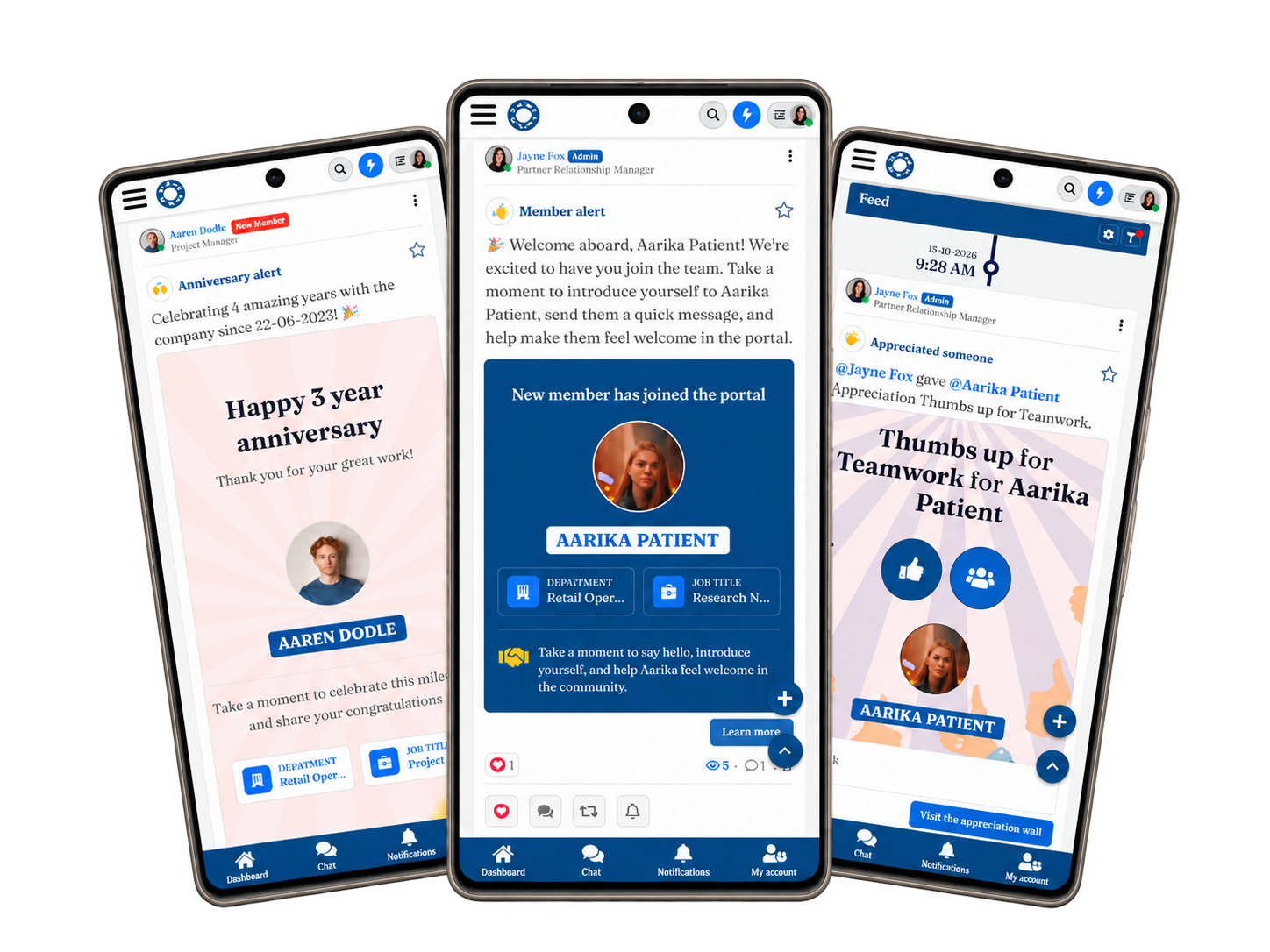
AgilityPortal's employee communication platform brings announcements, workplace conversations, mobile access and engagement insights into a shared digital workplace.
Your team can publish reviewed updates, make supporting information accessible and give employees a place to ask questions.
For example, when introducing a revised company process, use your approved AI assistant to organise the confirmed facts into a draft. After the process owner checks the wording, publish the announcement in AgilityPortal and link to the full guidance.
How AgilityPortal Can Help
Employees can read the update on desktop or mobile, while comments and follow-up polls help your team identify questions that need answering. Explore the news, feedback and collaboration features to see how these steps fit together.
Use engagement reporting to assess visibility, then check whether employees completed the intended action. Those findings give your next update a better starting point.
Give your employee updates a clear home.
Book an AgilityPortal demo to explore how your team can publish content, connect employees and keep workplace information together.
Employee Updates, Knowledge & Engagement
Turn Reviewed Drafts into Employee Updates That Reach Your Teams
Your draft is ready. Now give it a clear home. AgilityPortal brings announcements, workplace resources and employee conversations into one connected digital workplace. Prepare content with your approved AI assistant, review the details, then publish the finished message where employees can find it on desktop or mobile.
Standout feature:
Connect employee news with supporting documents, questions and
feedback. Keep the announcement and the information employees
need to act on it within the same workplace platform.
Employee Announcements
Team & Location Spaces
Mobile Access
Knowledge Sharing
Polls & Feedback
Engagement Insights
Bring an example announcement to your demo. Explore how your team could publish it, organise supporting resources and gather employee feedback. External AI drafting tools are separate services.
Final Thoughts
A faster draft is useful. A clear message that helps employees understand a change and take the next step is the real goal.
Start with one recurring update, such as a newsletter or training reminder.
Give your approved AI assistant a factual brief, refine the wording and check the result. Save what works in your content kit so the next update is easier to prepare.
Keep people responsible for accuracy, tone and sensitive decisions. Then use AgilityPortal to give reviewed content a clear home, connect employees with supporting resources and gather feedback. Look beyond views to check whether the message helped people do what they needed to do.
Ready to improve your employee communication workflow?
Book an AgilityPortal demo to explore how your team can publish updates and keep employees connected.
Related Guides You May Want to Read Next
Ready to put your employee updates content kit into practice? These guides explore communication planning, AI-assisted content creation, audience relevance and ways to measure whether your messages achieved their purpose.
- 7 Practical AI Use Cases to Save Time Without Losing Employee Trust
- Plan Employee Updates with an Internal Communications Calendar
- Measuring Communication Effectiveness: Metrics and KPIs to Track
- Communication Solutions for Distributed Teams Beyond Email
- Workplace Communication Strategy Examples for Operations and IT Leaders
- 7 Signs Your Employee Communication Campaigns Need More Attention
- Employee Communication for Crisis Management: Strategies and Best Practices
- Common Barriers to Improving Workplace Communication
Use these resources alongside your briefs, prompts and review checklist to build a more consistent approach to planning, publishing and evaluating employee updates.
Frequently Asked Questions About AI for Internal Communications
What Is the Best AI for Internal Communications?
The best AI for internal communications depends on the work you need to complete, your information policies and your publishing process.
Test shortlisted tools with the same approved brief, then compare accuracy, tone, editing effort and how clearly each draft explains the required action.
Use the selection criteria above rather than assuming one assistant is best for every task.
How Can AI for Communications Professionals Save Time?
AI for communications professionals can help organise notes, prepare first drafts, summarise approved documents and adapt a longer announcement into a short reminder.
Start with a recurring task and compare the complete preparation time, including review and corrections. A quick draft only helps if it reduces the work needed to produce an accurate final message.
Can Claude AI Write Employee Announcements?
Claude AI can help prepare an employee announcement from an approved factual brief. Specify the audience, tone, length and required action, and ask it to flag missing information separately.
Check the draft against your source before publishing, particularly names, dates, policy conditions and commitments. Follow your organisation's information rules when deciding what to enter.
What Should AI Training for Communications Professionals Include?
AI training for communications professionals should cover briefing, prompting, editing, factual checks, responsible information handling and evaluation.
Include a practical exercise using fictional information: ask colleagues to draft the same announcement, review each version and prepare the approved content for publication. Compare accuracy and clarity alongside speed.
How Can AI and Communications Work Together Without Losing the Human Voice?
AI and communications work together more effectively when the team supplies a specific brief, clear tone guidance and approved writing examples.
Ask for targeted edits, then have an accountable editor check the result.
Remove generic phrases, preserve the speaker's meaning and make sure the message sounds appropriate for the people receiving it.
How Should We Compare Workvivo and AgilityPortal?
Compare Workvivo and AgilityPortal using your actual employee communication requirements. Workvivo offers employee communication capabilities and AI writing assistance; check its current documentation when assessing availability and scope.
Ask both suppliers to demonstrate the same scenario: publishing a location-specific update, linking supporting guidance, collecting questions and reviewing engagement.
Compare usability, permissions, mobile access, implementation support and total costs before deciding.
What Does the CIPR Introduction to AI Course Cover?
The CIPR Introduction to AI course covers applications of artificial intelligence in public relations, including research, planning and content creation, with practical exercises and case studies.
Review the official course description to assess its relevance to your role.
Its PR focus means you should also consider how to apply the learning to employee updates and workplace communication.
Where Can I Find CIPR AI Training?
Explore the CIPR AI training courses for options covering introductory learning and practical prompting skills. Check the current syllabus, delivery format, dates and fees before booking.
Choose training that addresses your team's skills gaps, then reinforce it with your organisation's own content standards and review process.
How Does AgilityPortal Support Employee Communications?
AgilityPortal provides a shared environment for publishing announcements, organising content in team or location Spaces, accessing updates on mobile and gathering employee feedback.
Its communication and collaboration features support the publishing stage after content has been checked and approved. External assistants such as Claude AI remain separate services unless a specific integration has been confirmed.
AI Summary
- AI-assisted employee communication uses artificial intelligence to help plan, draft, edit and adapt workplace messages. Communications teams remain responsible for accuracy, tone, approval and publication.
- Choose an assistant by testing it against your actual tasks, approved information policies and review requirements. Compare factual accuracy, tone and editing effort using the same source brief.
- Tools such as Claude can help turn approved facts into announcement drafts. Specify the audience, format and required action, ask the assistant to flag missing information, and check its output against the original source.
- Build a reusable content kit containing announcement briefs, tone-of-voice guidance, prompts, visual requirements and review checklists. Train colleagues to recognise unsupported claims, preserve important details and handle information responsibly.
- Publish reviewed updates through AgilityPortal, select the appropriate audience and link to supporting resources. Check mobile presentation and keep essential instructions in the message text rather than only inside an image.
- Evaluate communication against its intended outcome. Review available engagement reporting alongside bookings, acknowledgements or completed actions, and use employee questions to improve future updates.
Most Popular Posts

Effective communication among team members is vital for the productivity and success of any organization. Surprisingly, 60% of companies lack a long-term internal communication strategy, which p...


Businesses thrive on communication for efficiency, productivity and accomplishment. When the right information is passed from the right designation in the organization, it promotes positivity an...

Categories
Blog
(3258)
Business Management
(399)
Employee Engagement
(237)
Digital Transformation
(226)
Growth
(152)
Intranets
(142)
Internal communications
(111)
Remote Work
(68)
Sales
(53)
Collaboration
(53)
Customer Experience
(34)
Culture
(30)
Project management
(30)
Knowledge Management
(29)
Leadership
(20)
Comparisons
(9)
News
(1)

Related Posts

How much time does your team spend turning a simple company update into something employees will actually read? AI for internal communications can help you move from rough notes to a clear announcement, newsletter or leadership message, with mo...

What is a case management system, and could it save your team from chasing emails, missing updates, and wondering who's handling what? Imagine a customer complaint or employee enquiry lands in your inbox. Before you can sort it out, you're alre...

AI-assisted software development is rapidly changing how modern businesses build software, and it's happening much faster than many companies expected. From AI coding tools that generate code suggestions in seconds to intelligent testing automation a...

In-house marketing vs agency—where should you put your budget to give your business the best chance of growth? Hiring your own marketer can bring valuable brand knowledge into the business. Working with an agency can give you access to specialist ski...

Are you juggling everything in your business—but struggling to stay on top of your finances? You're not alone. Over 60% of solo entrepreneurs admit they don't feel confident managing their business finances, according to recent surveys. And hon...


Annet Herges
I am a digital nomad, lover of exploring new places and making friends.
I love to travel and I love the internet. I take pictures of my travels and share them on the internet using Instagram.
Traveler, entrepreneur, and community builder. I share my insights on digital marketing and social media while inspiring you to live your fullest life.
Ready to learn more? 👍
One platform to optimize, manage and track all of your teams. Your new digital workplace is a click away. 🚀
Free for 14 days, no credit card required.