
Insight Blog
Agility’s perspectives on transforming the employee's experience throughout remote transformation using connected enterprise tools.
35 minutes reading time
(7028 words)
What Is a Case Management System? 7 Costly Mistakes to Avoid Before You Invest

What Is a Case Management System? 7 Costly Mistakes to Avoid Before You Invest
What is a case management system? Explore how it works, essential features, and seven costly mistakes to avoid when choosing or upgrading your software.
What Is a Case Management System? 7 Costly Mistakes to Avoid Before You Invest

What is a case management system, and could it save your team from chasing emails, missing updates, and wondering who's handling what?
Imagine a customer complaint or employee enquiry lands in your inbox.
Before you can sort it out, you're already:
- Digging through email threads for the full story.
- Chasing someone for a document or update.
- Checking a spreadsheet to see who owns the next step.
- Hoping an important deadline hasn't slipped past.
Sound familiar?
A case management system brings the information, documents, tasks, and conversations linked to each case into one place, helping your team follow it from the first request to resolution.
46%:
of service representatives’ time is spent with customers,
according to Salesforce’s 2025 State of Service report
Look at the work surrounding each case. Administrative tasks and internal responsibilities compete for your team’s attention. When evaluating a case management system, check whether it can reduce repeated data entry, simplify handovers and make relevant information easier to find.
Research context: This finding concerns service representatives, rather than all employees or caseworkers. The report attributes time away from customers partly to administrative tasks and internal responsibilities. It does not establish that the remaining time is wasted or could all be recovered through software.
Source: Salesforce — State of Service, Seventh Edition (2025 report, PDF)
And those competing demands add up.
Salesforce's 2025 State of Service report found that service representatives spend just 46% of their time with customers, partly because administrative tasks and internal responsibilities take up their day.
That finding relates specifically to customer service, but it highlights why the work around a case deserves attention too.
In this guide, you'll learn how case management systems work, which features are worth checking, and seven costly mistakes to avoid before buying or upgrading one—so you can choose a system that actually helps your team.
Key Takeaways
- What is a case management system? It is software that brings case information, documents, conversations and tasks together, helping teams track work from the initial request to resolution.
- Start with your team’s actual problems and workflows. Compare systems against your requirements for usability, reporting, permissions and integrations, and ask suppliers to demonstrate a real case.
- Avoid costly mistakes by checking product fit, protecting sensitive information, validating migrated records and confirming how connections with existing tools will work.
- Compare the complete cost of ownership, including implementation, migration, training, support, integrations and data export. Check whether improving your current setup could address the problems before replacing it.
- Modernize in manageable stages: assess, prioritize, pilot, migrate, train and review. Measure progress against a baseline using indicators such as overdue cases, duplicate entry and report preparation time.
Why Modernising Case Management Takes More Than Buying New Software

Why Modernising Case Management Takes More Than Buying New Software
If your team is already juggling emails, spreadsheets, and shared folders, buying a case management system can feel like the obvious fix. Put everything in one place, automate a few tasks, and the problem disappears. Right?
Only if you've worked out what's causing the problem.
A new system won't decide who should own a complaint, which information staff need to collect, or when an overdue enquiry needs escalating.
Those decisions need to happen before you configure the software. Otherwise, you risk paying to move the same confusion into a different platform.
Think about a complaint that passes between three departments. If nobody knows who's responsible for the final response, a shared dashboard might make the delay easier to see—but someone still needs to take ownership.
Before comparing suppliers, ask yourself:
- Where does work get stuck? Look for repeated delays, missing information, and awkward handovers.
- What does your team need to do better? Set specific goals, such as reducing duplicate entry or assigning every case an owner.
- How will you know the investment worked? Establish a baseline for resolution times, overdue cases, or time spent on administration.
Understanding what is a case management system is a useful starting point. The bigger question is whether the one you choose can support a clearer, more reliable way of working.
Get that right, and you'll have a much stronger basis for deciding which features deserve your budget—and which ones you can leave off the shopping list.
What Is a Case Management System, and What Can It Do for Your Business?
So, what is a case management system? It's software that brings the information, documents, conversations, and tasks linked to an issue into one place.
For your business, that means helping your team spend less time chasing updates and more time moving work forward—with clear ownership from the first enquiry to the final response.
A "case" might sound formal, but it could be something you deal with every day:
- A customer complaint that needs investigating.
- An employee question about leave or pay.
- An insurance claim with supporting documents.
- A service request that needs input from several departments.
Imagine a customer calls for an update. Instead of searching through someone else's inbox or asking three colleagues what happened, an authorised team member can open the case and check its history, outstanding tasks, and next steps.
That's where the business value comes in.
With the right setup, a case management system can help you:
- Reduce repetitive administration through automated assignments, reminders, and status updates.
- Keep work moving by giving each case an owner and making overdue tasks visible.
- Improve continuity so another colleague can pick up a case when someone is away.
- Spot recurring problems by reporting on backlogs, resolution times, and common requests.
- Control access to sensitive information through appropriate permissions.
There's a reason reducing administration matters.
As mention above Salesforce's 2025 State of Service report found that service representatives spend just 46% of their time with customers, partly because of administrative tasks and internal responsibilities.
That finding highlights the pressure on customer service teams; it doesn't mean software alone will recover the remaining time.
Think of it this way: case management is how you organise and resolve the work; the system helps your team follow that process. You still need clear responsibilities and sensible workflows.
And those workflows should fit your business. A customer support team may need complaint tracking and escalation, while an HR team may prioritise confidential enquiries and restricted access. Start with what your people need to achieve, then choose the software that supports them.
What Are the 7 Costly Mistakes to Avoid Before You Invest?
Understanding what is a case management system is the starting point.
Choosing one that fits your business takes a closer look at how your team works, what your information needs, and what you're actually paying for.
Before you commit, watch out for these seven mistakes.

What Are the 7 Costly Mistakes to Avoid Before You Invest?
#1. Buying Software Before Mapping Your Process
A polished demonstration can make everything look easy.
A request arrives, someone picks it up, and the case moves neatly towards resolution. But does that reflect what happens in your business?
Take one real case and follow its journey.
Where does it enter? Who reviews it? What happens when information is missing or the person responsible is away?
Salesforce's explanation of customer service workflows covers these practical details: how requests arrive, who takes action, and when a case is considered resolved. Similarly, GOV.UK's guidance on defining user needs recommends linking technology decisions to identifiable needs.
Before booking demonstrations, write down:
- Your main routes for incoming requests.
- Who owns each stage and handover.
- Where work regularly stalls.
- What triggers an escalation or approval.
The business impact: An unclear process can become an expensive configuration problem. You may pay to build a workflow, discover it doesn't work for your team, and then pay to change it.
Ask the supplier: "Can you demonstrate our actual workflow, including an exception or escalation?"
#2. Assuming Every Case Management System Does the Same Job
Two products can both offer "case management" while supporting very different work.
A customer support team may need response deadlines and a history of customer interactions. An HR team may need confidential employee enquiries, internal approvals, and tightly restricted access. Microsoft documents these differences in its guidance on customer service case management and managing HR cases and requests.
Don't settle for "yes, we support that." Ask the supplier to show it, then explain whether it comes as standard, needs configuration, or requires development.
The business impact: A poor fit can create workarounds, extra licences, and ongoing development costs.
Ask the supplier: "Which of our requirements work as standard, and which need custom development?"
#3. Overlooking Permissions and Sensitive Information
Imagine an employee submits a confidential grievance, and someone outside the investigation team can find it through a search or report. That's a serious problem, even if every other feature works perfectly.
Permissions need to be part of your evaluation from the beginning. Test access using ordinary staff accounts, managers, administrators, and anyone else who will use the system.
Check whether:
- Access can be restricted by case, team, or role.
- Attachments and search results follow the same restrictions.
- Changes to records and permissions are logged.
- Access is removed when someone changes roles or leaves.
The financial stakes can be substantial. IBM's 2025 Cost of a Data Breach Report put the global average breach cost at US$4.44 million. That figure covers breaches across the organisations studied; it isn't an estimate for an incorrectly shared case. It does show why security deserves attention before purchase. See IBM's report announcement.
You can also use Microsoft's post-migration user acceptance testing guidance to help frame checks around record ownership and visibility.
Ask the supplier: "Can we test individual case restrictions, including attachments, searches, and reports, before launch?"
#4. Underestimating Data Migration
Moving records sounds straightforward until you find three versions of the same customer, attachments with no clear owner, and years of inconsistent case statuses.
Uploading everything won't automatically make that information reliable.
Start by deciding what to migrate, what to archive, and what needs cleaning. Then run a trial migration and check complete cases—not just the number of rows imported. Are the documents attached? Are dates correct? Can the right people see the record?
Microsoft Azure's migration guidance describes planning, implementation, and validation as distinct parts of migration. Its Dynamics 365 go-live checklist also includes migration readiness and business sign-off.
The business impact: Missing history and unreliable records can delay decisions, interrupt service, and leave staff checking the old system to finish their work.
Ask the supplier: "How will we validate migrated records, and what is our recovery plan if something is missing?"
#5. Ignoring Integration Requirements
Your new system might work beautifully on its own.
The frustration starts when staff still have to copy information into your CRM, HR platform, or finance software.
"Integrates with" needs unpacking. A scheduled file upload, a one-way connection, and a live two-way integration offer very different experiences.
27%:
of applications were integrated together in the enterprises
represented in Salesforce’s 2026 Connectivity Benchmark Report
Check the connections before you commit. A case management system should fit how information moves through your business. Ask which records sync with your existing tools, how frequently updates happen, who handles failed transfers and what the integration costs.
Survey context: The report surveyed 1,050 enterprise IT leaders across nine markets in October and November 2025. Respondents worked at organisations with at least 1,000 employees. This is enterprise context, not a small-business benchmark or a measure of case management integrations.
Source: Salesforce — 2026 Connectivity Benchmark Report, published 5 February 2026
Salesforce's 2026 Connectivity Benchmark Report found that surveyed enterprises used an average of 957 applications, with only 27% integrated together.
The research covered 1,050 IT leaders globally, so these figures describe enterprise environments rather than a typical small business. Still, they show how fragmented systems can become. Read the 2026 report announcement.
For every proposed connection, establish:
- Which system holds the authoritative record.
- What information moves in each direction.
- How often updates happen.
- Who investigates failed updates.
- What setup and ongoing charges apply.
Microsoft's case-to-resolution process overview provides a useful example of how case management connects with wider business processes.
The business impact: Weak integrations can preserve duplicate entry and conflicting information—the very problems you wanted to solve.
Ask the supplier: "What information moves between systems, how often, and what happens when the connection fails?"
#6. Comparing Licence Prices Instead of Total Costs
A low monthly price can look very different once you add configuration, migration, training, integrations, storage, and support.
Ask for an itemised first-year quote, the expected recurring cost, and the cost of leaving. Include your own team's implementation time in the comparison.
For a simple illustration, £300 a month equals £3,600 a year. Add £4,000 for setup and migration, and the first-year total becomes £7,600 before any other charges.
Those are example figures, but the calculation shows why the subscription alone tells an incomplete story.
GOV.UK's purchasing strategy guidance recommends understanding the full cost of building or buying technology. Its Digital, Data and Technology Playbook includes maintenance, management, operation, and exit in whole-life costs.
Ask the supplier: "What will we pay in year one, what changes at renewal, and what will it cost to export our data?"
#7. Launching Without a Pilot or Success Measures
The demonstration went well. The configuration is finished. Everyone has a login.
You still need to find out whether people can use the system to complete their work.
Run a pilot with the staff who handle cases every day. Include routine requests, complicated handovers, restricted records, and overdue cases. Give users enough training to test the workflow properly, then record what slows them down.
People matter here. Prosci's benchmarking research reports that projects rated as having excellent change management were seven times more likely to meet objectives than those rated poor.
Seven times:
more likely to meet objectives for initiatives rated as having
excellent change management versus those rated poor,
according to Prosci’s benchmarking research
Give your people a practical path through the change. When modernizing case management, involve staff early, test real workflows and provide training before their team goes live. Set clear success measures so you can review whether the new system improves everyday work.
Research context: Prosci presents this finding from its Best Practices in Change Management benchmarking research. It describes an association across change initiatives, not a guaranteed outcome or evidence that a pilot alone produces a sevenfold improvement.
Source: Prosci — The What, Why, Who and How of Change Management, updated 7 August 2026
This is an association across change initiatives, rather than proof that a pilot alone produces that improvement. You can explore the finding in Prosci's explanation of change management.
Before the pilot, establish a baseline for a few useful measures:
- Time taken to assign a case.
- Number of overdue cases.
- Typical resolution time.
- Time spent entering the same information twice.
- Users' ability to complete essential tasks without help.
Microsoft's implementation testing guidance offers a useful framework for testing functionality, integrations, migration, and other parts of the solution before deployment.
The business impact: A pilot gives you a chance to uncover problems while the rollout is still manageable. Baseline measures help you judge whether the investment improves the work after launch.
Ask the supplier: "What must our pilot demonstrate before we roll out, and how will we measure progress afterwards?"
What Should Organizations Look for When Modernizing Case Management?
Knowing what is a case management system helps you understand the basics. When you're modernizing an existing setup, the next question is more practical: will the new system make everyday work easier for your staff and improve the service people receive?
Start with the problems you need to solve, then use the following considerations to assess your options.
#1. Start With the Problems Staff Actually Face
Before comparing dashboards and automation features, talk to the people handling cases every day. They'll usually know exactly where time gets wasted.
Ask them:
- Where do you enter the same information more than once?
- Which tasks involve chasing colleagues for updates?
- What becomes difficult when someone is away?
- Which workarounds have become part of the daily routine?
Imagine a family receiving housing assistance, employment training, and meal support. If each program uses a separate database, staff may repeatedly ask for information the organization already holds.
Look for a system that can reuse appropriate information across programs while respecting access restrictions. The goal is to reduce unnecessary work for staff and the people they support.
#2. Make Information Easier to Find and Share
A referral arrives by email. The assessment goes into a shared folder. Progress notes sit in another database. When someone asks for an update, your team has to piece the story together.
Look for a case record that connects relevant documents, interactions, referrals, and updates. During a demonstration, ask the supplier to find a particular note or attachment—not just show you the main dashboard.
Check that staff can search effectively and quickly understand what has happened, what remains outstanding, and who owns the next step. Access should still depend on their role and responsibilities.
#3. Choose Software That Can Adapt to Different Programs
Programs within the same organization can work very differently. Youth mentoring might track attendance and school engagement, while housing assistance needs eligibility checks, financial documents, and referrals.
Your evaluation should reflect those differences. Ask whether staff can adjust forms, fields, workflows, and reports without commissioning development for every change.
For example, customizable community case management software is an option to explore when different services need different configurations. Have the supplier demonstrate your requirements so you can assess how well the flexibility works in practice.
Also establish who can make changes, what training they need, and whether configuration carries an additional cost.
#4. Don't Overlook the People Who Will Use It
We all know an attractive interface is useful, but everyday usability matters more.
Can a caseworker record a conversation between appointments? Can someone covering an absence understand the case without calling three colleagues?
Let a small group of employees try realistic tasks:
- Create a case and assign it to a colleague.
- Add notes and supporting documents.
- Record a referral and check its status.
- Find information using a phone, if mobile access is needed.
Watch where they hesitate or need help. Those moments tell you more than a polished demonstration.
Training and shared working practices matter too.
Giving attention to improving team dynamics in the workplace can support the transition, particularly when teams need to agree on responsibilities and new ways of sharing information.
#5. Build Privacy and Security Into the Decision
Case records may include financial information, health details, family circumstances, or disclosures of abuse. Assessing how the system protects that information belongs in your initial shortlist criteria.
Ask suppliers to explain—and demonstrate—access permissions, encryption, audit logs, backups, and recovery procedures. Check whether restrictions also apply to attachments, searches, reports, and exported information.
US$4.44 million:
the global average cost of a data breach reported in
IBM’s 2025 Cost of a Data Breach Report
Make information protection part of your shortlist. Case records may contain confidential employee, customer or client details. Check access permissions, audit histories, encryption and recovery procedures, then test whether restrictions also apply to attachments, searches and exports.
Research context: The 2025 report examined breaches experienced by 600 organisations globally between March 2024 and February 2025. Ponemon Institute conducted the research, sponsored and analysed by IBM. The figure is a study average, not an estimate of the cost of a case management incident.
Source: IBM — 2025 Cost of a Data Breach Report announcement, published 30 July 2025
For organizations subject to HIPAA, the U.S. Department of Health and Human Services provides guidance on limiting access to protected health information.
Use the requirements applicable to your organization when assessing access and disclosure controls.
A supplier's security features should support your obligations and internal policies. You'll still need to establish how those features will be configured and managed.
#6. Think About How Teams Work Together
Shared software can make a handover visible, but your teams still need to agree on what that handover means.
When a housing coordinator refers someone to a benefits specialist, who checks that the referral was received? Who follows up if there's no response?
Look for clear assignments, due dates, referral tracking, and status updates. Then test a case that crosses departments—or involves an external provider—to see whether responsibility stays clear throughout.
#7. Look for Reporting That Supports Better Decisions
Funding reports matter, but your system should also help you understand whether services are working.
A youth employment program might record workshop attendance. That tells you how many people participated; it doesn't tell you whether they gained skills, attended interviews, or found employment.
Before evaluating reporting tools, define the questions your team needs to answer.
These might include:
- Which cases are waiting longest for action?
- Where do referrals stall?
- What outcomes are participants achieving?
- Can staff produce required reports without rebuilding spreadsheets?
Ask the supplier to create a sample report using realistic data. Check whether your own team could update it, filter it, and trace the figures back to the underlying records.
#8. Plan for the Transition, Not Just the Purchase
Your new system will inherit old data problems unless you address them during migration. Duplicate records, inconsistent names, and missing information need a plan before anything moves.
Decide which records to migrate, which to retain in an accessible archive, and who will validate the results. Check complete cases, including notes, attachments, dates, and permissions.
A phased rollout can give staff time to learn and help you resolve problems before expanding. Start with a manageable program, but include enough complexity to test the system properly.
Agree on measures before launch, such as fewer repeated entries, faster report preparation, or clearer case handovers. That gives you a basis for judging whether the change delivers value.
#9. Consider the Costs That Aren't on the Price Tag
Compare the complete cost of ownership, including implementation, migration, training, integrations, support, and future changes.
A low subscription fee may offer poor value if every report adjustment needs paid assistance. Equally, a feature-heavy platform may add expense and complexity your organization doesn't need.
Before signing, get clear answers about:
- What implementation includes and what costs extra.
- How licensing changes as users, programs, or storage grow.
- Which changes staff can make themselves.
- What ongoing support covers.
- How you can export records and attachments if you leave.
Ask for an itemized first-year quote and expected recurring costs.
You should be able to explain what the organization is paying for, who will maintain the system, and how it can move its information elsewhere if its needs change.
When Should You Modernise Your Existing Case Management System?
Does your team spend more time keeping the system updated than using it to move cases forward?
That's a good reason to review your setup.
You don't have to wait until the software stops working.
Sometimes, the warning signs are the workarounds people quietly build around it:
- Repeated data entry: Staff copy the same details into several systems or spreadsheets.
- Slow reporting: A straightforward report requires hours of exporting, checking, and reformatting.
- Scattered records: Notes, documents, and conversations are spread across inboxes and shared folders.
- Difficult handovers: Covering a colleague's cases means chasing them for information.
- Unsupported software: Updates or supplier support have ended, making maintenance and security harder to manage.
If several of those sound familiar, it's worth investigating. But first, work out whether the problem comes from the software, its configuration, or the way your team uses it.
Could Your Current System Work Better?
Before committing to a replacement, ask staff to show you the tasks they struggle with.
An outdated form, confusing permissions, or a missing notification might be fixable within your existing platform.
Check with your supplier whether configuration changes, available integrations, or refresher training could address those problems. Compare the cost and likely benefit with replacing the system.
If essential requirements still depend on awkward workarounds—or the product can no longer be supported reliably—a replacement becomes a stronger option.
Modernise in Manageable Stages
Once you've decided what needs to change, give the transition a clear sequence:
- Assess: Map your current workflows, data quality, and recurring problems.
- Prioritise: Agree on the improvements that matter most to staff and service users.
- Pilot: Test representative cases with a small group, including exceptions and handovers.
- Migrate: Clean and transfer the required records, then validate their accuracy and access permissions.
- Train: Give people practical guidance before their team goes live, with support during the transition.
- Review: Compare results with your starting point and adjust what isn't working.
Choose a few measures you can realistically track, such as time spent preparing reports, duplicate entries, overdue cases, or incomplete handovers.
The right time to modernise is when the limitations of your current setup are affecting service—and you have a clear plan for improving it.
Bring Your People, Documents, and Case Discussions Together With AgilityPortal
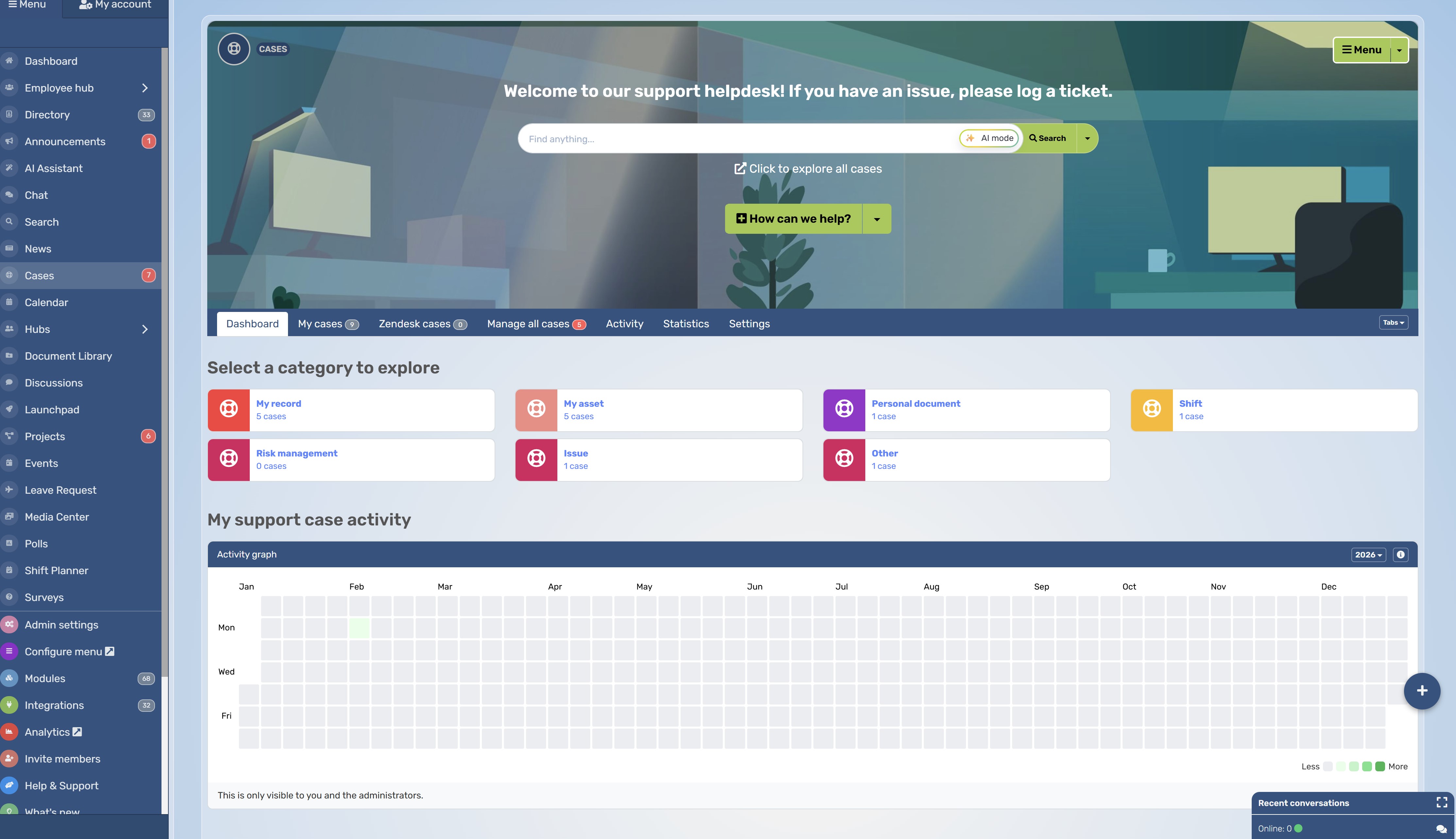
Bring Your People, Documents, and Case Discussions Together With AgilityPortal
When resolving an issue means chasing emails, tracking down documents, and asking who's handling the next step, your team needs an easier way to work together.
AgilityPortal can support the collaboration around case management, giving employees a shared place to access information, discuss issues, and coordinate tasks.
Your team can use it to:
- Organise collaboration in Spaces for relevant departments or teams.
- Keep supporting documents and policies accessible so employees can find the guidance they need.
- Assign follow-up tasks with TaskFlow to make responsibilities and deadlines clearer.
- Discuss updates through chat and discussions as work progresses.
- Stay connected through mobile access, including when employees work across locations.
Already using specialist case management software? AgilityPortal can serve as an employee hub for the communication, knowledge, and teamwork that supports your processes.
Want to see how it could fit your organisation?
Explore AgilityPortal and ask for a demonstration based on how your team works.
AgilityPortal
Bring Your Teams, Documents and Case Discussions Together
Handling a case often means coordinating people, finding supporting documents and following up on outstanding work. AgilityPortal supports the communication and collaboration around case management, helping employees share information and coordinate their next steps.
Use team Spaces to organise collaboration, share policies and supporting documents, discuss updates through chat and discussions, and assign follow-up tasks with TaskFlow. For organisations using specialist case management software, AgilityPortal can provide an employee hub for the knowledge and teamwork that support those processes.
Make the next step clearer
Give teams a shared place to find guidance, discuss work and coordinate responsibilities as they handle enquiries, requests and operational issues.
Final Thoughts on Choose a System That Fits How Your Team Works
The best place to start is with a real case your team has already handled. Pick a customer complaint, employee enquiry, or service request and trace it from arrival to resolution.
Write down who was involved, what information they needed, where delays happened, and how the case was closed. Then use that example as your demonstration script when comparing suppliers.
Ask them to show you:
- How the case enters the system and gets an owner.
- Where staff find documents, notes, and previous conversations.
- What happens when a deadline is missed or someone is away.
- How the case is handed over, resolved, and reported on.
You'll get a clearer picture of whether the software fits your business—and which requirements need extra configuration, training, or budget.
If communication and access to shared knowledge are part of the problem, AgilityPortal can support that work through team Spaces, document sharing, discussions, and task coordination. Assess those capabilities alongside your wider case management requirements.
Choose the system that helps your people handle real work with less friction.
A useful feature should solve a problem you can name.
FAQ on Workplace Operations Platform
What Is the Difference Between Case Management and a CRM?
A CRM primarily helps you manage relationships with customers and prospects, including contact details, sales activity, and communication history.
Case management focuses on moving a particular issue or request through to resolution. Some CRM platforms include case management features, so one system may support both.
Is Case Management Software the Same as a Ticketing System?
They overlap, but the scope can differ.
A ticketing system typically organises incoming requests, assigns them, and tracks responses. Case management software may support longer investigations involving multiple people, documents, decisions, and workflows.
Check what the product actually does rather than relying on its label.
Can Small Businesses Use a Case Management System?
Yes. If enquiries get lost in inboxes or staff struggle to track responsibility, a case management system could help. Start with the essentials: shared records, clear ownership, task tracking, and useful reporting.
Choose a system your team can comfortably afford, maintain, and use.
Can Case Management Software Integrate With Existing Tools?
Many systems offer integrations with email, CRM, HR, document storage, and other business tools. However, availability and functionality vary.
Ask which information transfers, whether updates work in both directions, how frequently they happen, and whether additional charges apply.
How Do You Choose a Case Management System?
Start by documenting your team's workflows and biggest frustrations.
Then compare systems against those requirements, including usability, permissions, reporting, integrations, and total costs.
Ask suppliers to demonstrate a real case from your business and let staff test the shortlisted options before committing.
AI Summary
- What is a case management system? It is software that brings together the information, documents, conversations and tasks associated with a case, helping teams manage it from the initial request through to resolution.
- Cases can include customer complaints, employee enquiries, insurance claims and requests for community services. Requirements vary by industry, so evaluate software against your actual workflows, access restrictions and reporting needs.
- Before investing, avoid seven common mistakes: buying before mapping processes, assuming every system does the same job, overlooking permissions, underestimating migration, ignoring integrations, comparing licence prices alone and launching without a pilot or success measures.
- When modernizing case management, look for searchable records, configurable workflows, clear assignments, appropriate access controls, audit histories and useful reporting. Confirm which capabilities are included and which require additional configuration, development or fees.
- Assess the complete cost of ownership, including implementation, data migration, training, integrations, support and data export. If your current system causes problems, check whether configuration improvements or training could address them before replacing it.
- Use a real case as your supplier demonstration script. Pilot the proposed system with staff, validate migrated information and permissions, and compare results against baseline measures such as assignment times, overdue cases and report preparation time.
Most Popular Posts

Effective communication among team members is vital for the productivity and success of any organization. Surprisingly, 60% of companies lack a long-term internal communication strategy, which p...


Businesses thrive on communication for efficiency, productivity and accomplishment. When the right information is passed from the right designation in the organization, it promotes positivity an...

Categories
Blog
(3256)
Business Management
(399)
Employee Engagement
(237)
Digital Transformation
(226)
Growth
(152)
Intranets
(142)
Internal communications
(110)
Remote Work
(68)
Sales
(53)
Collaboration
(53)
Customer Experience
(34)
Culture
(30)
Project management
(30)
Knowledge Management
(29)
Leadership
(20)
Comparisons
(9)
News
(1)

Related Posts

What is a case management system, and could it save your team from chasing emails, missing updates, and wondering who's handling what? Imagine a customer complaint or employee enquiry lands in your inbox. Before you can sort it out, you're alre...

AI-assisted software development is rapidly changing how modern businesses build software, and it's happening much faster than many companies expected. From AI coding tools that generate code suggestions in seconds to intelligent testing automation a...

In-house marketing vs agency—where should you put your budget to give your business the best chance of growth? Hiring your own marketer can bring valuable brand knowledge into the business. Working with an agency can give you access to specialist ski...

Are you juggling everything in your business—but struggling to stay on top of your finances? You're not alone. Over 60% of solo entrepreneurs admit they don't feel confident managing their business finances, according to recent surveys. And hon...

Which provider gives you better value in the VPSServer vs Hostinger VPS comparison? If you're searching for cheap VPS hosting, it's tempting to focus on the lowest monthly price. But reliability matters too: Hostinger advertises a 99.9% uptime ...


Jill Romford
I am a digital nomad, lover of exploring new places and making friends.
I love to travel and I love the internet. I take pictures of my travels and share them on the internet using Instagram.
Traveler, entrepreneur, and community builder. I share my insights on digital marketing and social media while inspiring you to live your fullest life.
Ready to learn more? 👍
One platform to optimize, manage and track all of your teams. Your new digital workplace is a click away. 🚀
Free for 14 days, no credit card required.