
Insight Blog
Agility’s perspectives on transforming the employee's experience throughout remote transformation using connected enterprise tools.
18 minutes reading time
(3565 words)
The Importance of Having a Knowledge Base – UPDATED 2026

The Importance of a Having a Knowledge Base – UPDATED 2026
This is where a knowledge base plays a crucial role. Implementing a knowledge base can significantly enhance the quality and efficiency of customer service, both internally and externally.
The Importance of a Having a Knowledge Base – UPDATED 2026

When performing tasks within a system or application, it's common to encounter questions or uncertainties. If users are unable to find prompt answers, they are more likely to give up.
In today's interconnected world, people crave convenient access to accurate information. Customers and users prefer to research their own questions and swiftly resolve basic problems rather than relying on support services.
This is where a knowledge base plays a crucial role. Implementing a knowledge base can significantly enhance the quality and efficiency of customer service, both internally and externally.
However, creating a knowledge base can be a challenging endeavor as it necessitates management and maintenance efforts.
19%
of the workweek can be spent searching for and gathering information
According to McKinsey Global Institute, interaction
workers spend around 19% of their workweek searching for and
gathering information needed to complete their jobs.
McKinsey also estimated that making internal knowledge easier to
find and access could reduce the time employees spend searching
for information by approximately 30–35%.
Source: McKinsey Global Institute
Key Takeaways
- A well-organised knowledge base gives employees a central place to find trusted information, reducing time wasted searching across emails, documents, chats, and disconnected systems.
- Knowledge bases improve employee productivity by making policies, procedures, training materials, FAQs, and company knowledge available whenever employees need them.
- Centralising organisational knowledge helps businesses preserve valuable expertise when employees change roles or leave, reducing knowledge loss and supporting business continuity.
- Employee self-service knowledge bases can reduce repetitive questions for HR, IT, and support teams by allowing people to find answers without waiting for someone to respond.
- Modern knowledge management platforms increasingly use AI-powered search, recommendations, and intelligent discovery to help employees find relevant information faster.
- A successful knowledge base requires more than simply uploading documents; businesses need clear ownership, accurate content, permissions, regular updates, and an easy-to-use search experience.
In a Nutshell, What is a Knowledge Base?

In a Nutshell, What is a Knowledge Base?
A knowledge base is an online database that centralizes information related to products, services, departments, subjects, or topics. It serves as a valuable resource for customers and employees by facilitating the collection, organization, retrieval, and sharing of knowledge.
Within a knowledge base, one can find data about the workings of new products, processes, or systems, as well as frequently asked questions (FAQs), troubleshooting guides, and other relevant details.
The information contained within a knowledge base can originate from various sources, although it typically stems from knowledgeable employees with expertise in specific areas.
By offering self-service capabilities, a knowledge base empowers users to find answers on their own. This not only enhances user satisfaction but also leads to significant time and cost savings for your business.
What does the knowledge management process look like?
Good knowledge management doesn't happen simply because a company has somewhere to store documents.
You need a repeatable process for capturing useful information, organising it and making sure employees can actually find it when they need it.
A typical knowledge management process can be broken down into five stages:
- Identify valuable knowledge: Start by working out what employees need to know. This could include policies, procedures, FAQs, project insights, training resources or expertise that currently exists only in someone's head.
- Organise the information: Categorise content logically, add tags and establish consistent naming conventions so information doesn't become another collection of difficult-to-find documents.
- Store knowledge centrally: Move important information into a searchable knowledge base, intranet or digital workplace rather than leaving it scattered across emails, shared drives and individual devices.
- Share and make knowledge discoverable: Employees need to know information exists. Use search, notifications, internal communications and relevant workplace channels to connect people with the right content.
- Review and improve content: Company knowledge changes. Assign content owners, review important resources regularly and remove or update outdated information before employees start relying on it.
The process should also be collaborative. Employees shouldn't just consume company knowledge; they should be able to contribute their experience, suggest improvements and help identify information that's missing.
When that happens, a knowledge-sharing culture begins to develop. Instead of valuable expertise staying trapped within individual teams or employees, it becomes part of the organisation's collective knowledge and remains useful long after the original contributor has moved on.
What can a knowledge base offer your business?
A knowledge base can provide a range of resources to support your business, including:
- User Guides and Video Tutorials: These resources offer step-by-step instructions and video walkthroughs to assist users in navigating and understanding your products.
- Training Materials: Employee manuals, training videos, and other training resources are available to facilitate the professional development of your staff, ensuring they have the necessary knowledge and skills.
- Internal Documentation: A knowledge base can house various internal documents, including standard operating procedures (SOPs), software documentation, process documentation, business requirement documentation, and any other materials that support employees in performing specific tasks.
- Frequently Asked Questions (FAQs): FAQs address common inquiries and provide quick answers to frequently encountered issues, enabling users to find solutions independently.
- HR Documents: Important HR-related documents, such as employee handbooks, evaluation forms, and training templates, can be stored in the knowledge base, making them easily accessible to employees for reference and guidance.
By consolidating these resources in a knowledge base, your business can enhance productivity, ensure consistent information dissemination, and empower employees to access the information they need efficiently.
Follow us and access great exclusive content everyday: Follow us on Google News
Where can businesses use knowledge management?
Knowledge management isn't limited to storing policies or creating an internal wiki. When information is properly organised and searchable, it can support almost every part of a business.
Some of the most common knowledge management use cases include:
- Customer self-service: Create searchable FAQs, troubleshooting guides, product documentation and how-to resources so customers can solve common problems without raising a support ticket.
- Employee onboarding: Give new starters one place to access company policies, standard operating procedures, training materials, department information and answers to common questions from their first day.
- Learning and development: Build a central library of courses, guides, videos and bite-sized learning resources that employees can access whenever they need to develop a new skill.
- IT and HR self-service: Employees can find answers to everyday questions about passwords, software, benefits, holidays, expenses and workplace procedures without waiting for another department to respond.
- Project collaboration: Capture project decisions, lessons learned, templates and best practices so valuable knowledge can be reused instead of teams repeatedly solving the same problems.
- Product development and innovation: Give product teams, developers, designers and other stakeholders somewhere to share research, customer feedback, technical knowledge and ideas.
- Problem-solving: Document successful solutions to recurring business challenges so employees can quickly see what worked previously and apply that knowledge again.
- Preserving employee expertise: Capture important knowledge from experienced employees before they change roles or leave the organisation, reducing the risk of valuable institutional knowledge disappearing with them.
The best opportunities will be different for every organisation. A useful place to start is identifying where employees repeatedly ask the same questions, struggle to find information or depend too heavily on individual colleagues for answers.
Those are usually the areas where better knowledge management can make an immediate difference.
What are the Different Types of knowledge base
Knowledge bases are strong resources for both a company's customers and employees. A knowledge base always seeks to help users find information or solutions without seeking other assistance, including customer support agents, forums like Quora, or even a colleague.
There are mainly two types of knowledge bases.—External knowledge base and Internal knowledge base.
External knowledge base
An external knowledge base, often called a customer self-service library or customer service knowledge base, serves as a centralized hub where customers can find extensive information about a company's products, services, organization, and industry.
The information lets customers sort out their concerns independently and effectively without external assistance.
Internal knowledge base
On the contrary, an internal knowledge base fosters employee collaboration and information sharing.
This centralized information center functions like a knowledge-sharing tool, enabling team members to easily access vital resources and enhancing the efficiency of internal communications.
How can a knowledge base contribute to your business?

How can a knowledge base contribute to your business
By serving as a centralized repository of information, a knowledge base empowers employees with quick access to critical resources and enhances productivity.
A well-structured knowledge base can also effectively address customer inquiries leading to improved efficiency and customer success.
Free ebook: How To Get Your Intranet Off The Ground
Improve Productivity
Imagine the time your employees spend going through their inboxes, disorganized repositories, and PDFs in search of specific information.
Instead, if they have all the information they may require on a well-structured, searchable platform, they could find what they're looking for in minutes and can implement the same instantly.
Provide Support to Team
A valuable knowledge base, acting like a user guide or training manual, can help your customers find answers to most questions independently.
This reduces the load on your customer support team because they stop getting basic or generic queries, enabling them to focus on handling critical issues and tasks.
This also improves customer satisfaction by giving them quick access to solutions.
Serves for Best Practices
The knowledge possessed by your employees can be crucial for the success and sustainability of your business, being the backbone of your operations.
It's important to document that knowledge to avoid having a few people possess a sizable amount of the organization's expertise. Otherwise, you may have a crisis when those employees fall ill or depart.
Enhance Collaboration
Building an internal knowledge base boosts collaboration and communication within an organization. It acts as a centralized information hub, enabling easy access and sharing among all employees.
This prevents information silos and streamlines project collaboration by providing easy access to relevant information.
A knowledge base also serves as a platform for employees to share their expertise, creating a culture of knowledge sharing.
Employee Training
When a knowledge base contains all the information a new employee may require, a company does not have to conduct an extensive onboarding process and provide in-depth training to recruits.
This saves a company time and costs. It allows employees to self-learn about company procedures, HR policies, software, or even background on products to perform effectively.
Enhance customer satisfaction
A well-structured external knowledge base for businesses can help their customers self-serve. If equipped with training manuals, customers can install or troubleshoot any issues they face with their product or service.
Statistics show that 67% of people prefer self-service rather than contact customer support.
It vastly enhances customer satisfaction if people can instantly find solutions and implement them without delay.
Employee Engagement
Most employees don't prefer long meetings and training sessions as they lose focus and miss critical information. A better solution is a knowledge base where information is readily available and can be referred to 24x7.
They can access up-to-date information at their convenience, receive the latest updates and engage in productive discussions.
Improved decision making
When employees have 24x7 access to a well-structured knowledge base, they can have all the required knowledge to make an informed decision.
The decision can include managing any operation, including handling a customer issue or request, handling a PR crisis, or utilizing a budget.
Knowledge preservation
An online knowledge-sharing tool preserves business knowledge by centralizing important information and making it easily accessible.
This helps businesses capture and retain valuable knowledge that might be otherwise lost when employees leave or retire.
This repository of information becomes a resource for future employees to reference, ensuring business continuity and preventing knowledge gaps.
Increased customer retention
One of the biggest challenges customer support agents face is creating a positive customer experience, especially when the customer is irate and frustrated.
A knowledge base provides customers with information 24x7, so they can solve their issues without delay.
This improves customer experience and betters customer retention.
How to create a knowledge base for your business?
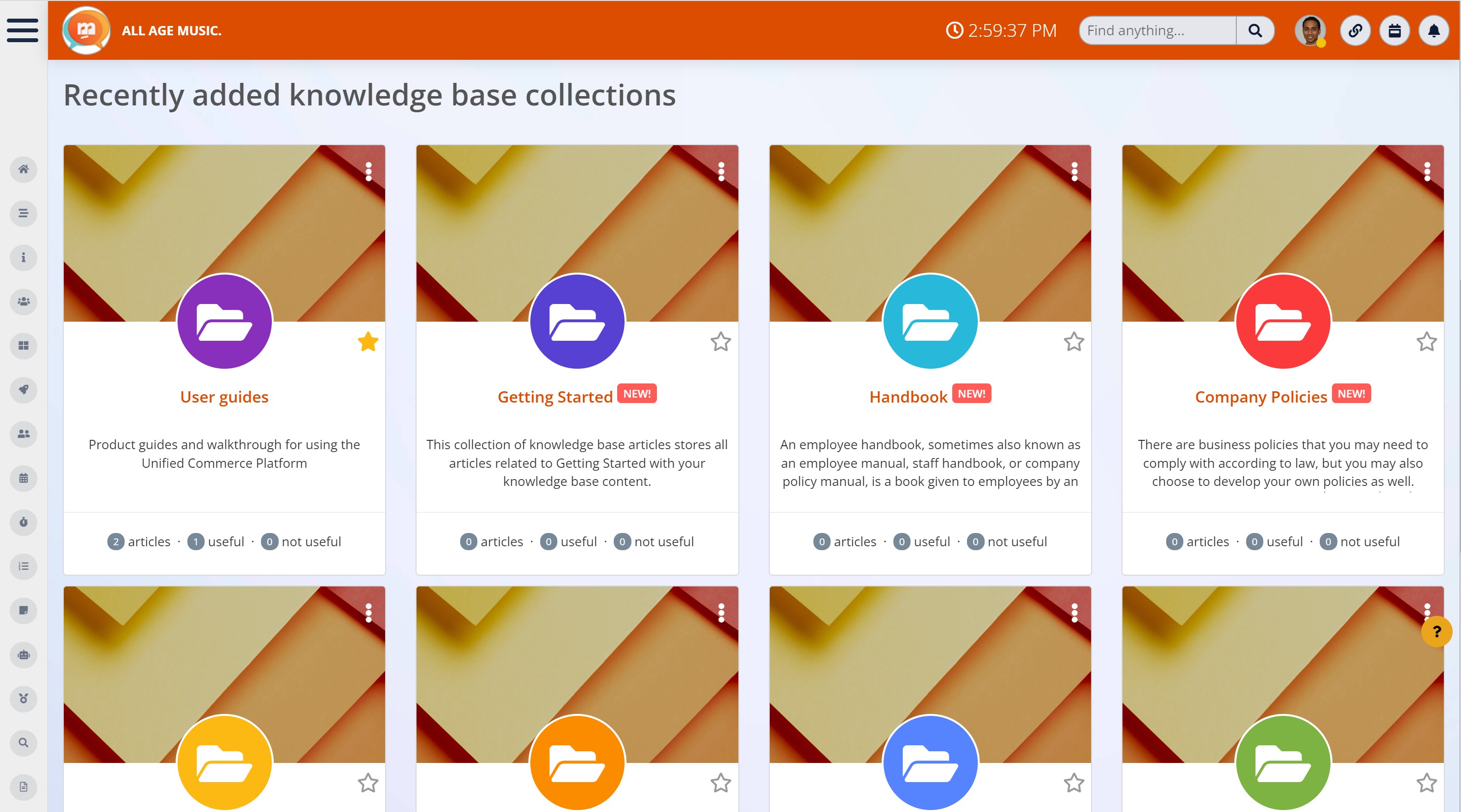
How to create a knowledge base for your business
A knowledge base for your business must be created by centralizing information and resources stored in different sections of your organization. The knowledge base must also be easily accessible to your target audience. Here are a few tips on how to start the process.
Read more: Top 10 Benefits of a Knowledge Base in 2022
Knowledge base purpose identification
First, identify why you need a knowledge base. Is it for your customers or employees? If it is for customers, is it to keep them updated on the latest releases, products, and developments, provide tutorials so they can learn to use the product, or act as a troubleshooting guide? If it is for employees again, start with the information they require.
Identify the core Elements
Identify core elements you would require by analysing the specific needs of your target audience. A few elements that every knowledge base should include are a FAQ section, a search bar for customers to search for specific information, and a quick link to contact support if they need more assistance.
Prepare a KB Structure
Create a well-thought-out structure to organize the content so users can easily navigate through articles. The structure can depend on the knowledge base's audience; for example, an internal knowledge base can be structured with categories like organizational knowledge, employee onboarding, Human Resources, Product, Design, Sales, etc.
Create content
Once you have arrived at a structure, start listing the topics you want to cover and gathering information. One of the easiest ways to develop topic ideas is to check your customer support inbox for commonly asked questions. Collaborating with your customer support agents on subjects they want to be covered also helps.
Organize, Optimize, and Publish
When you have all the content prepared, you must organize them into categories. You need to assign each article to a specific category. If required, you can create subcategories to refine your navigation further. Optimize your content for search engine optimization, and then you are ready to publish.
Collect Feedback and Improve
Using a knowledge base software that enables user feedback is a good idea. Obtain input from clients or staff as well through questionnaires, conversations, etc. Use the feedback to identify knowledge gaps, simplify language to make it more understandable, and correct errors.
Keep up to date
Regularly review articles in your knowledge base to check for information that needs to be updated. Ensure the knowledge base always contains the latest release notes, findings, policies, and information your organization releases. Generate fresh content whenever required.
Wrapping up
In summary, a Knowledge Management system is no longer a luxury or an afterthought. It has become an essential requirement for large organizations in today's business landscape, where leveraging human and knowledge capital is key to success.
Implementing a knowledge base is essential for businesses looking to scale or pivot.
It rapidly lets businesses grow in terms of people and customers by providing the knowledge they need in a single location. It also enhances collaboration while improving productivity and fostering a culture of continuous learning.
Read more: List of knowledge base posts
AI Summary
- A knowledge base creates a central source of trusted company information, helping employees find policies, procedures, guides, and answers without searching across multiple systems.
- Effective knowledge management reduces information silos and makes valuable expertise available across departments instead of leaving important knowledge with individual employees.
- Employee knowledge bases support faster onboarding by giving new starters immediate access to training materials, standard operating procedures, FAQs, and role-specific resources.
- Self-service knowledge management can reduce repetitive questions for HR, IT, and support teams while helping employees solve everyday problems independently.
- Modern knowledge base software can combine intelligent search, AI-powered discovery, permissions, and content management to make organisational knowledge easier to find and maintain.
- Successful knowledge sharing requires clear content ownership, regular reviews, accurate information, and a workplace culture that encourages employees to contribute what they know.
Most Popular Posts

Effective communication among team members is vital for the productivity and success of any organization. Surprisingly, 60% of companies lack a long-term internal communication strategy, which p...


Businesses thrive on communication for efficiency, productivity and accomplishment. When the right information is passed from the right designation in the organization, it promotes positivity an...

Categories
Blog
(3200)
Business Management
(395)
Employee Engagement
(235)
Digital Transformation
(218)
Growth
(150)
Intranets
(142)
Internal communications
(106)
Remote Work
(68)
Sales
(53)
Collaboration
(52)
Customer Experience
(33)
Culture
(30)
Knowledge Management
(29)
Project management
(29)
Leadership
(20)
Comparisons
(9)
News
(1)

Related Posts

Are your company updates reaching everyone—or just the employees who have time to check their inbox? Intranet and digital signage can help you connect with people who rarely sit at a desk, work different shifts or miss announcements buried betw...

How many customers could your business lose while your team is too busy to answer—and could a customer service AI agent help close that gap? Missed calls and unanswered messages can mean lost bookings, frustrated customers and more pressure on employ...

Could AI produce your next workplace video faster—and still deliver a message your employees can trust? As more businesses use video for onboarding, training and leadership updates, one question keeps coming up: will AI replace video editors in...

Could the best machine learning systems help your employees spend less time sorting requests, updating spreadsheets and chasing information—and more time doing useful work? That's the opportunity, but finding the right system starts with knowin...

What would happen to your team's work and customer information if an employee's MacBook disappeared today? If you're wondering how to protect your Mac physically, the answer goes beyond buying a case. A MacBook used at home, on a train or in a ...


Jill Romford
I am a digital nomad, lover of exploring new places and making friends.
I love to travel and I love the internet. I take pictures of my travels and share them on the internet using Instagram.
Traveler, entrepreneur, and community builder. I share my insights on digital marketing and social media while inspiring you to live your fullest life.
Ready to learn more? 👍
One platform to optimize, manage and track all of your teams. Your new digital workplace is a click away. 🚀
Free for 14 days, no credit card required.