
Insight Blog
Agility’s perspectives on transforming the employee's experience throughout remote transformation using connected enterprise tools.
40 minutes reading time
(7931 words)
Remote Staff - 7 Ways to Fix Collaboration Problems and Keep Distributed Teams Connected

Remote Staff - 7 Ways to Fix Collaboration Problems and Keep Distributed Teams Connected
Help remote staff work better together with seven practical fixes for access barriers, scattered information and time-zone delays across your distributed teams.
Remote Staff - 7 Ways to Fix Collaboration Problems and Keep Distributed Teams Connected

Why do your remote staff still struggle to work together when they have the apps, laptops and access they need?
Often, the problem is the small gaps between people and information. Someone can't open the latest document.
An approval gets buried in a private message.
A colleague finishes their day before a crucial update arrives.
These delays leave distributed teams chasing answers instead of moving work forward.
48%
of surveyed employees said their work felt chaotic and fragmented
Microsoft’s 2025 research highlights how scattered work can feel to employees. The finding covers knowledge workers across working arrangements, not remote staff alone. Give updates, documents and decisions clear shared locations.
Source: Microsoft, Breaking down the infinite workday (2025)
Microsoft's 2025 Work Trend Index research found that 48% of employees said their work felt chaotic and fragmented.
That finding covers employees generally, rather than remote workers alone, but it highlights a familiar problem: more messages and meetings don't always bring more clarity.
For businesses, these gaps can mean repeated work, slower decisions and frustrated employees.
For HR and managers, they make it harder to support people and spot what's really holding them back.
So, where should you start? In this article, you'll discover seven practical ways to fix collaboration problems, make information easier to find and improve handoffs across time zones.
You'll also get a simple 30-day action plan to help your team spend less time chasing updates and more time getting things done.
Remote Work Has Changed How Teams Stay Connected

The pandemic pushed many organisations to change how they worked, often with little time to prepare.
Employees moved away from shared offices, and businesses had to find new ways to communicate, coordinate tasks and support their people.
For organisations using remote or hybrid arrangements, engaging remote employees requires ongoing attention. Office conversations and quick desk-side questions need alternatives that work across different locations and schedules.
Regular check-ins, clear communication routines and accessible information can help.
But keeping tasks moving is only part of the job. Employees also need to feel included, understand how their work contributes and know where to turn for support.
When those foundations are missing, everyday work becomes harder. Updates get overlooked, questions go unanswered and colleagues can feel disconnected—even when they're in frequent contact online.
A more sustainable approach starts with practical habits that make work clearer and relationships easier to maintain.
To help you build those habits, we've gathered 20 best practices for engaging remote employees, improving communication and supporting a team that feels connected wherever people work.
Key Takeaways
- Remote staff need reliable access, current information and clear responsibilities to keep work moving.
- Shared instructions and agreed communication rules help employees find answers without checking every channel.
- Distributed teams need clear handoffs with a named owner, next action and deadline that includes the time zone.
- Useful meetings, supportive check-ins and realistic response expectations help people stay connected without being always available.
- Measure access delays, rework and delivery quality alongside employee feedback, rather than relying on online status or message counts.
- Start with one blocked workflow, assign an accountable owner and use a 30-day pilot to test improvements before expanding.
Remote staff can work anywhere—but can they get what they need?
Working from different locations gives employees flexibility and helps businesses bring together people with different skills.
But remote staff still need the right information, dependable access and a clear understanding of who's doing what.
A working internet connection is only the start:
Can employees open the current document?
Do they know where to find a decision?
Can they get help when the person they normally ask is offline?
These everyday details shape how well distributed teams work together.
Remote staff and distributed teams aren't quite the same thing
The terms overlap, but they describe different things:
- Remote staff are employees who work away from a shared company workplace for some or all of their working time.
- Distributed teams are teams spread across different locations, sometimes across countries and time zones.
- A distributed team can include people working from home, several company offices, or mobile and frontline roles.
For example, a business might have an HR manager working from home in London, an operations team in Manchester and customer support employees in Dubai.
They're part of the same organisation, but their working hours and access needs may differ.
Keeping them connected means making information available when they need it, rather than relying on everyone attending the same call.
Flexibility works best when the working process is clear
Managing remote staff becomes easier when the team agrees on a few practical rules:
- Working from different locations? Check that employees can access essential documents and systems from approved devices.
- Covering different shifts? Leave a handoff explaining what's finished, what's next and who owns it.
- Working across time zones? Record important updates and decisions where colleagues can find them later.
- Giving employees more independence? Make priorities, deadlines and support contacts clear.
For employees working from airports, hotels, coworking spaces, or home networks, a company-approved service from a VPN provider can encrypt traffic between their device and the VPN server.
This can add protection when using shared networks, but employees should follow IT's approved connection arrangements. A VPN alone won't resolve missing document permissions or unclear handoffs.
Imagine an employee preparing a customer proposal from a hotel. Their connection works, but the latest pricing document is restricted to another department. The colleague who can approve access has already finished work. The proposal stalls.
The practical fix is to check role-based access beforehand, maintain a clearly labelled pricing document and provide a backup contact for urgent access problems.
Remote working itself isn't the problem. Gallup's 2025 analysis found that 31% of fully remote workers were engaged, compared with 23% of hybrid workers. Those figures don't prove that location causes engagement, but they show why businesses should preserve flexibility while addressing everyday barriers.
Better remote team collaboration starts with a straightforward question: does everyone have the information, access and support they need to move the work forward?
#1. Fix access before asking people to collaborate
Before adding another meeting or asking for faster updates, check whether your remote staff can access what they need.
An employee who can't open a document or use an essential system has a blocker that needs resolving.
A login isn't the same as being ready to work
Signing in successfully doesn't mean someone can complete their job.
Everyday access problems can include:
- Missing permissions for documents or shared folders.
- Access that hasn't been updated after a role change.
- Pages or forms that are difficult to use on mobile.
- Slow connections that make uploading or opening files unreliable.
- Uncertainty about who to contact for help.
These barriers become particularly frustrating for distributed teams. If the person who can resolve the problem works in another time zone, a small issue can hold up the next step until their working day begins.
Imagine a new starter joining their first team meeting. Their account works, but they can't open the onboarding checklist. To help, their manager emails a downloaded copy.
That gets them moving temporarily, but now there are two versions. If HR updates the original, the new employee may continue following outdated instructions.
Resolving the permissions problem would give them access to the maintained version and prevent the same issue recurring.
Test whether employees can complete the actual task
A useful access check follows the work an employee needs to do.
Can they find the instructions, open the document, complete the form and submit it?
Start with these practical steps:
- List what each role needs. Identify essential systems, documents and actions without giving everyone unrestricted access.
- Test with a normal employee account. An administrator's account may hide permissions problems that other users encounter.
- Check realistic working conditions. Include approved mobile devices, accessibility needs and slower connections where relevant.
- Name the support owner. Tell employees where to report problems and who will handle them.
- Provide an urgent escalation route. Explain what to do when blocked access threatens a deadline or customer commitment.
- Review access when circumstances change. Update permissions when employees join, move roles or leave.
The IT Director or IT team should manage technical access. Department managers should confirm what employees need to perform their roles, while HR should communicate employment and role changes promptly.
To check whether the process is improving, track how long essential access problems take to resolve and how many tasks they delay. Those measures reveal more about the barrier than counting successful logins.
Employees should start their working day knowing they can reach the information they need—and where to get help if they can't
#2. Give important information a home people can find
Your remote staff shouldn't need to ask three colleagues and search several apps to find one reliable answer.
Whether it's a policy, customer process or project decision, employees need to know where the current information lives.
For distributed teams, this matters even more.
The person who knows the answer may be offline, working another shift or unavailable when the question comes up.
Stop making employees search five places for one answer
Information often gets scattered through ordinary working habits. Someone emails a document, another person uploads a revised copy, and a manager shares an update in a private message.
Soon, employees are left wondering which version to trust.
Common problems include:
- Duplicate policies with different instructions.
- Outdated guidance that still appears in search results.
- Documents without owners, leaving nobody responsible for checking accuracy.
- Decisions buried in private messages, invisible to people who need them.
Imagine an operations employee finding a returns policy attached to an old chat message. They follow its instructions, unaware that the process has changed. A colleague then has to correct the work and explain the updated policy.
The employee found an answer—but the organisation hadn't made the current answer clear.
Make the current version obvious
Start with the information people use most often, such as onboarding instructions, HR policies and everyday operating procedures.
Give each item a maintained home and make it easy to recognise.
- Keep one authoritative version. Direct employees to the same source rather than circulating competing copies.
- Use descriptive titles. "How to request annual leave" is easier to understand than "HR document v4."
- Assign an owner and review date. Make it clear who checks the content and when it was last reviewed.
- Link to the original. Share its location in messages instead of uploading another attachment.
- Archive outdated content. Where records must be retained, label them clearly and point readers towards the current guidance.
- Let employees report gaps. Provide a simple way to flag missing, confusing or incorrect information.
AgilityPortal's knowledge base, pages and document library can support these shared reference points. For example, a team space can link employees to maintained instructions and relevant documents. The content still needs someone responsible for keeping it useful and accurate.
The Internal Communications Lead should establish publishing conventions, subject experts should own accuracy, and IT should support access and information discovery.
A practical check is to ask a few employees to find five commonly used answers without help. Where do they get stuck? Use those gaps to improve titles, navigation and content.
When employees can find information they trust, they can move work forward without waiting for someone else to explain it.
#3. Agree what belongs in a message, an update or a meeting
When every channel is used for everything, employees have to keep checking everywhere.
A routine question arrives by email, an urgent request appears in chat, and a project decision stays inside a meeting that half the team couldn't attend.
Your remote staff need a shared understanding of where information belongs and when a response is expected. A short agreement can remove much of that guesswork.
"Send me a message" isn't a communication policy
What does "message me when you're done" actually mean?
Which channel should the employee use?
Does the manager need an immediate reply?
What happens if the message arrives after working hours?
Without clear expectations, employees may feel they need to monitor every notification. Others might miss an important request because they reasonably assumed it could wait.
For distributed teams, timing adds another layer. A message sent during one colleague's afternoon might reach another late at night. Its arrival shouldn't automatically create an expectation to respond.
Imagine a manager posting "Can you check this?" without a deadline. One employee interrupts their current task, while another leaves it until tomorrow. Both have made a reasonable judgement—the request simply didn't explain what was needed.
Adding the action, deadline and reason makes the message more useful: "Please check the pricing figures by 2 pm UK time tomorrow so we can send the proposal."
Create a short team communication agreement
Keep the agreement simple enough for people to use during a busy working day.
| Workplace situation | Recommended approach |
| Routine question | Post in the relevant shared team space so others can find the answer |
| Progress update | Update the shared project record with progress, blockers and next steps |
| Time-critical blocker | Use a defined urgent escalation route and explain the impact |
| Complex disagreement | Hold a focused discussion, then document the decision |
| Policy change | Publish centrally and link to the maintained policy |
Alongside these rules, agree on:
- Where updates belong. Name the shared location for project progress, decisions and company announcements.
- Expected response windows. Set realistic expectations around roles, shifts and local working hours.
- What counts as urgent. Give examples, such as a service outage or a blocker threatening a customer deadline.
- Working-hour boundaries. Explain when replies can wait and who provides agreed out-of-hours cover.
- Who handles unresolved questions. Name a contact or escalation route so requests don't disappear between teams.
Department managers and employees should develop the team's agreement together. Internal communications should clarify organisation-wide channels, while HR should help ensure expectations account for workload and different working arrangements.
Publish the agreement somewhere accessible and revisit it when problems recur.
The aim is to help people recognise what needs attention, what can wait and where the answer will be found.
#4. Build handoffs that work across time zones
When one employee finishes their day, another may be getting started.
That can help a business keep work moving, provided the next person knows what has happened and what they need to do.
For distributed teams, a useful handoff prevents a task from depending on someone who is asleep, travelling or away from work.
The next person should be able to start without chasing you
Asynchronous collaboration simply means people contribute at different times, using a shared record to keep everyone informed.
Your remote staff don't need to be online together for every update.
They do need enough context to continue the work confidently.
"Please finish this tomorrow" leaves too much unanswered. What's already complete? Which document should they use? Does "tomorrow" refer to their working day or yours?
A clear handoff answers those questions before the next person has to ask.
Use a handoff note with six essentials
Keep the note short, but include the details someone needs to act:
- Current status: What has been completed, and what stage is the work at?
- Next action: What exactly needs to happen next?
- Owner: Who is responsible, and who provides cover if they're unavailable?
- Deadline: What date, time and time zone apply? Avoid vague instructions such as "end of day."
- Source: Where are the current documents, instructions and recorded decisions?
- Blocker: What remains unresolved, and who can help?
For example, a customer proposal handoff might read:
- Current status: Proposal drafted; pricing checked.
- Next action: Review the delivery dates and approve the final version.
- Owner: Operations lead; deputy provides cover.
- Deadline: 2 pm UK time on 12 October.
- Source: Current proposal linked in the shared project record.
- Blocker: One delivery date needs confirmation from the account manager.
Store the handoff alongside the work it describes. A note buried in a private conversation won't help colleagues who cannot see it.
What happens when international operations lose the update?
Imagine a UK sales team changing a customer's delivery requirement while an overseas operations team is offline. The salesperson sends a private message but doesn't update the shared operational record.
The next shift starts work using the previous instruction. They may have to repeat preparation or pause the order once the change becomes clear.
The problem began when the update failed to reach the place the next team relied on.
A better process would:
- Record the revised requirement in the shared operational record.
- Clearly identify which instruction has changed.
- Assign someone to confirm the next action.
- Flag the relevant deadline and time zone.
- Escalate through an agreed route if the change arrives close to the cutoff.
Specialist shipping, customs and fulfilment tasks still belong in the appropriate operational systems. The collaboration process should help people find and act on the current instructions.
The Operations Manager should define the handoff process, supported by department managers who make sure it works for their teams.
A good handoff gives the next person enough clarity to move forward—and a clear route for help when they can't.
#5. Make meetings earn their place in the calendar
Before sending another invitation, ask a simple question: what will this meeting help us resolve?
A conversation can bring people together, clear up confusion and move a decision forward.
But a call that only repeats information already available elsewhere can interrupt work without helping anyone progress.
Use live time for decisions and difficult conversations
Meetings are useful when people need to:
- Resolve uncertainty: Talk through an unclear requirement or competing priorities.
- Discuss disagreements: Understand different views and agree on a way forward.
- Handle sensitive issues: Give a personal or complex matter the attention it deserves.
- Make a shared decision: Bring the right people together to evaluate options and commit to an action.
Routine reporting can often happen through a short written update. That gives colleagues time to review progress around their schedules and keeps a record they can revisit.
Imagine six people joining a weekly call to read out updates already recorded in their project space. Sharing those updates beforehand could free the meeting for the two blockers that actually need discussion.
The aim is to use everyone's time well while keeping room for conversations that matter.
Leave every useful meeting with a usable record
A productive discussion should leave participants—and colleagues who couldn't attend—clear about what happens next.
Build these habits into meeting planning:
- State the purpose. Explain what needs to be discussed or decided.
- Invite relevant participants. Include people who can contribute, approve or carry out the decision.
- Share background beforehand. Give attendees a chance to understand the issue before the call.
- Record decisions. Capture what was agreed and any important unresolved points.
- Name action owners. Assign each next step to a specific person.
- Set realistic deadlines. Account for workload, dependencies and working hours.
- Consider time zones. Rotate inconvenient recurring meeting times where practical.
16%
year-over-year increase in meetings starting after 8 pm in Microsoft’s analysis
Microsoft’s 2025 report found growth in late-evening meetings. This measures meeting activity, not the share of employees working late. Its telemetry excludes education and EU tenants. Agree working-hour boundaries and rotate inconvenient meeting times where practical.
Source: Microsoft, Breaking down the infinite workday (2025)
Microsoft's 2025 analysis found that meetings starting after 8 pm increased 16% year over year.
This measures a change in meeting activity, not the percentage of employees working late. It highlights why teams should review scheduling and agree on working-hour boundaries.
The meeting organiser should provide the purpose, preparation and decision record. Department managers should review recurring meetings and check whether they still serve a useful purpose.
A meeting earns its place when people leave with greater clarity, a resolved issue or a decision they can act on.
#6. Keep people connected without making them always available
Feeling part of a team shouldn't depend on answering messages instantly or attending every social call.
Employees need opportunities to build relationships, ask for help and contribute without feeling that they must stay online to prove their commitment.
That takes consistent support and consideration for how different people work.
Give people meaningful ways to connect
A useful manager check-in gives someone space to discuss priorities, concerns and development.
It becomes less helpful if it feels like another progress report or a test of whether they've been busy enough.
Businesses can make connection part of everyday work through:
- Supportive check-ins: Discuss workload, blockers and what help would make a difference.
- Buddy support: Give new starters a named colleague they can approach with everyday questions.
- Recognition: Acknowledge useful contributions, including work that happens outside visible meetings.
- Development opportunities: Make training and career conversations accessible across locations and shifts.
- Space for questions: Explain where employees can ask for help without feeling embarrassed.
- Inclusive arrangements: Consider working hours, language differences, accessibility and caring responsibilities.
For example, holding every learning session during head-office hours may repeatedly exclude colleagues elsewhere.
Offering another session or an accessible recording with a way to ask questions gives more people a chance to participate.
Social activities can help too, but participation should be a choice. Some employees prefer a small conversation or a practical shared activity to a large video gathering.
Ask what is getting in the way
When someone becomes quiet or misses an update, start with a conversation.
Their behaviour may reflect a problem you haven't seen.
Managers can ask:
- "What are you waiting on?"
- "Is there anything you can't access?"
- "Which information has been difficult to find?"
- "Are our response expectations realistic?"
Imagine a new starter who rarely contributes during calls. Their manager assumes they're disengaged. In reality, they can't access the background documents and don't know who to ask.
A private check-in reveals the problem and creates an opportunity to resolve it.
45%
of fully remote workers reported experiencing a lot of stress the previous day
Gallup’s 2025 analysis shows why wellbeing belongs in conversations about how work gets done. This is self-reported stress, not a burnout diagnosis or proof that remote working caused it. Hybrid workers reported 46%. Ask about workload, unclear priorities and barriers to getting help.
Wellbeing belongs in these conversations. Gallup's 2025 analysis found that 45% of fully remote workers reported experiencing a lot of stress the previous day.
That is a measure of self-reported stress, not a burnout diagnosis or proof that their working arrangement caused it.
The HR Director should establish support and inclusion expectations.
Department managers should make them part of everyday conversations, while Learning and Development should ensure employees can access relevant training.
People are more likely to ask for help when they know someone will listen—and when raising a difficulty leads to support rather than assumptions.
#7. Measure blocked work and outcomes—not constant online activity
How do you know whether collaboration is improving?
Look at whether people can complete their work, resolve problems and deliver reliable results.
Message counts and online status offer a limited view.
Someone might be active in chat all day because they're chasing missing information. Another person might send fewer messages because they have clear instructions and can concentrate on the task.
A green status light doesn't tell you whether work is moving
Visible activity can help colleagues understand availability, but it needs context before anyone uses it to judge contribution.
Imagine two employees preparing customer proposals. One sends dozens of messages to clarify pricing, find documents and chase approval. The other uses a maintained template and a clear approval process, then submits the proposal with only a few questions.
The first employee appears busier online. That doesn't tell you whose work was more accurate or whether either person had the support they needed.
Ask what the activity reveals about the working process. Are people collaborating effectively, or spending time overcoming obstacles?
Track a small set of meaningful measures
Choose measures that help explain where work slows down and whether your changes make a difference.
- Access-resolution time: How long does it take to restore access to an essential document or system?
- Information-related delays: How often does a task stall because instructions, decisions or approvals are missing?
- Handoff completeness: Does the next person receive the status, action, owner, deadline, source and unresolved issues?
- Avoidable rework: How much work needs correcting because someone used outdated or incomplete information?
- Information discovery: Can employees find the current instructions without asking several colleagues?
- Delivery quality: Is work completed accurately and within agreed deadlines?
- Employee feedback: Do people understand responsibilities and find coordination easier?
For each measure, agree what you're counting, where the information comes from and who reviews it. For example, "handoff completeness" could mean checking a sample of handoffs for the six agreed fields.
Compare results with the team's starting point. If you introduce a new handoff process, record the existing problems first, then review whether missing details and delays decrease. Account for changes in workload or staffing before drawing conclusions.
The Operations team should review workflow and delivery results. HR should assess workload, fairness and employee feedback, while IT should help confirm that the information is accurate and collected appropriately.
Use the findings to investigate problems and improve the process. A useful measure helps you understand why work gets stuck—and what will help people move it forward.
Who owns this when HR, IT and operations see different problems?
An employee can't open a document needed to finish a task. IT sees a permissions issue.
Their manager sees a missed deadline. HR hears that the employee feels unsupported.
Each team sees part of the problem. Resolving it requires clear responsibilities and someone who can bring the right people together.
Employees shouldn't have to work out which department owns every issue before asking for help. Give them a clear starting point, then coordinate the response internally.

Who owns this when HR, IT and operations see different problems?
| Role | Main responsibility | What this looks like in practice |
| HR Director / Chief People Officer | Working expectations, inclusion, support and employee lifecycle processes | Clarify working arrangements, support needs and the changes required when someone joins, moves roles or leaves. |
| CIO / IT Director | Essential access, approved devices and technical support | Make sure people can use the systems their roles require and know how to get technical help. |
| Operations Manager | Handoffs, dependencies, approvals and escalation | Identify where work stalls, assign the next action and arrange cover for time-critical decisions. |
| Internal Communications Lead | Channel guidance and accessible organisational updates | Explain where messages belong and make important updates easy to find across locations and schedules. |
| Department Managers | Priorities, responsibilities and everyday coaching | Set realistic expectations, resolve conflicting priorities and check what is blocking progress. |
| L&D Manager | Documentation, handoff and remote-management skills | Teach employees how to record useful updates and help managers support people across different working arrangements. |
| CISO / privacy lead | Appropriate access controls and review of data collection | Review security risks and proposed monitoring, involving privacy or legal specialists where needed. |
| Employees | Maintain shared records and raise blockers | Record decisions and progress, follow agreed handoff practices and flag missing information or access. |
Name one person to keep the improvement moving
In a smaller business, one person may cover several of these responsibilities. You don't need a separate department for every task, but you do need clarity about who makes decisions and follows up.
For each improvement, name an accountable owner with enough authority to coordinate the work.
If incomplete handoffs are delaying customer orders, for example, the Operations Manager could lead the changes, with IT handling access and department managers agreeing the working process.
Record who owns the improvement, who contributes and where unresolved issues should go. Then check whether employees are getting a useful response.
Shared responsibility works when everyone knows their part—and someone makes sure the problem reaches a resolution.
Where should businesses draw the line on monitoring?
here's a difference between finding out why work gets stuck and tracking someone's every move. Recording how long an access problem takes to resolve can help improve support.
Counting clicks or messages tells you much less about whether an employee is doing useful work.
Access logs can help investigate technical or security issues, but they shouldn't automatically become performance scores. A colleague may spend time reading, planning or speaking with customers without generating much visible activity.
Before introducing monitoring, businesses should:
- Define the purpose: Identify the problem and consider whether a less intrusive approach would solve it.
- Explain what is collected: Tell employees what information is recorded, why and how it will be used.
- Limit access and retention: Restrict who can view records and keep them only as long as needed.
- Provide a concerns route: Give people a clear contact for questions, objections or inaccurate information.
For UK employers, ICO guidance says monitoring must be lawful, fair and transparent, with a necessary and proportionate approach.
A data protection impact assessment is required where the proposed processing is likely to create a high risk to people's rights and freedoms. Involve your privacy lead before rollout, and check current guidance—the ICO notes that this guidance is under review following legislative changes.
Employees should understand how information helps improve their working environment and how decisions affecting them can be questioned.
A 30-day plan to make one remote workflow work better
You don't need to change every process at once.
Start with one recurring task that regularly gets stuck, such as onboarding an employee, approving a document or passing a customer request between locations.
Choose something small enough to test but important enough that an improvement would make a difference. Use the next 30 days to understand the problem, try a practical fix and review the results.
Days 1–7: Find the real blockage
Start by talking to the people doing the work.
Where do they wait?
What do they have to chase?
Which steps regularly need repeating?
- Choose one workflow. Define where it starts, where it ends and what a successful result looks like.
- Ask employees where it gets stuck. Include the people handing work over and those receiving it.
- Map the steps and dependencies. Identify required documents, approvals, systems and contacts.
- Record a baseline. Note current delays, missing information and avoidable rework.
- Assign an accountable owner. Give one person responsibility for coordinating the improvement.
For example, if new starters repeatedly wait for document access, check how HR, managers and IT exchange the information needed to set up their accounts.
Days 8–14: Agree the rules
Use what you've learned to make the next step clearer and easier to complete.
- Test essential access. Check that ordinary employee accounts can complete the required actions.
- Identify the authoritative documents. Make the current instructions easy to recognise and find.
- Publish response expectations. Explain who responds, within what working hours and how urgent issues are escalated.
- Introduce the handoff template. Include status, next action, owner, deadline, source and blockers.
- Review permissions and data collection. Check that access and measurement suit the purpose.
Keep the process simple. Employees should be able to understand what has changed without reading a lengthy manual.
Days 15–21: Test with the people doing the work
Run the revised process with a small group representing the relevant locations, roles and shifts.
- Include different working arrangements. Check whether the process works when colleagues aren't online together.
- Train people using real tasks. Walk through an actual handoff or request.
- Provide a feedback route. Make it easy to report confusion and escalate unresolved problems.
- Watch for extra administration. Check whether new steps save time or simply create more updating.
- Keep human review for consequential decisions. A reminder can prompt action, but approvals affecting people or customers need appropriate oversight.
Ask participants what became easier and what still slowed them down. A process that looks clear on paper may need adjusting once people use it.
Days 22–30: Keep what improves work
Compare the pilot with your starting point, accounting for changes in workload or staffing.
- Review outcomes. Look at access delays, handoff quality, rework and completion times.
- Collect employee feedback. Ask whether responsibilities and instructions are clearer.
- Adjust the process. Remove unnecessary steps and address remaining gaps.
- Expand after resolving problems. Apply useful changes to another workflow or team.
- Set an owner and review date. Make someone responsible for keeping the process current.
One month may not prove a lasting improvement, but it can show whether the change is worth continuing.
The practical test is simple: can the next person find what they need, understand the next action and get help without chasing several colleagues?
Where AgilityPortal can support these changes
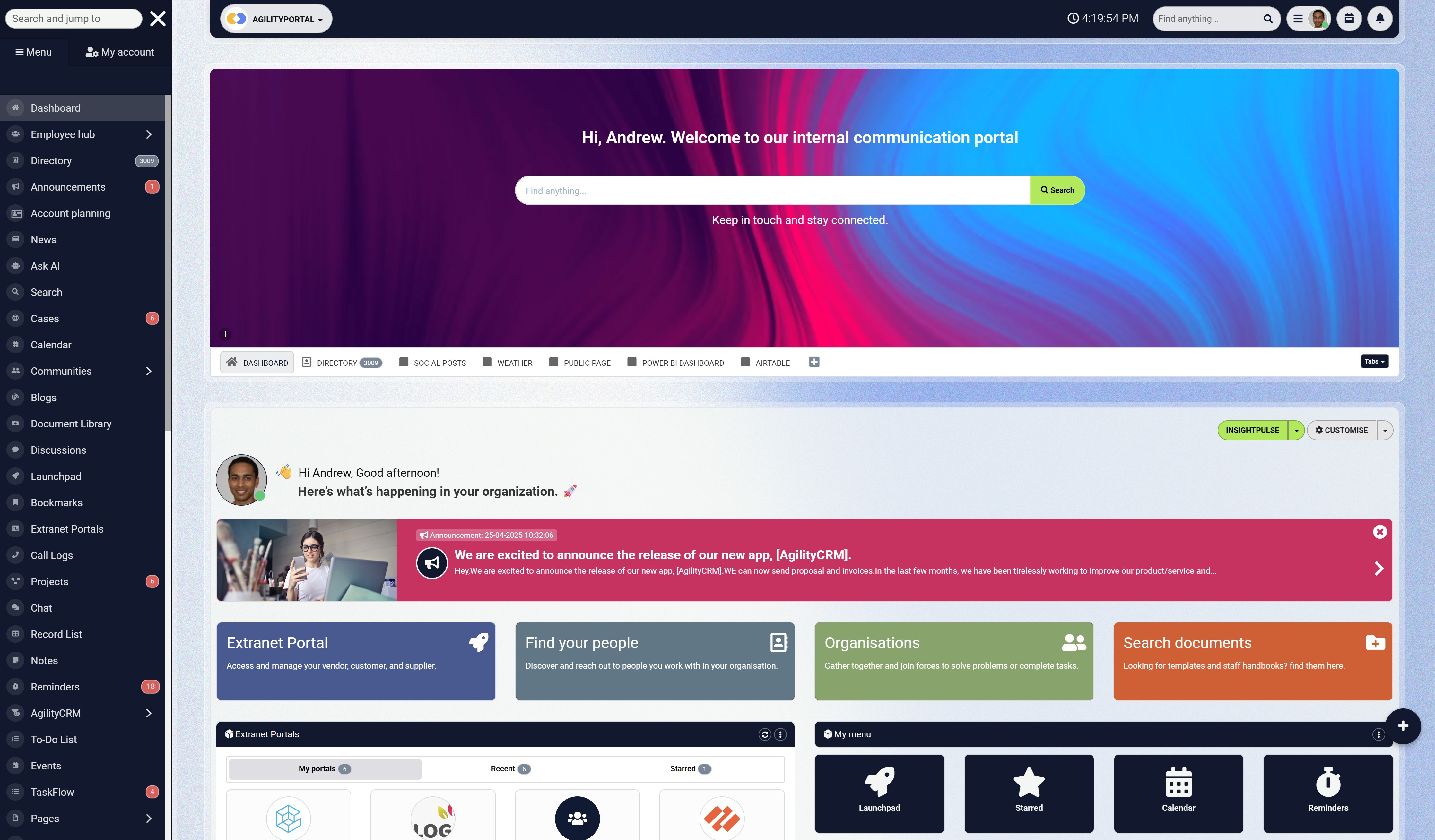
Where AgilityPortal can support these changes
Once the process is clear, employees need somewhere to find instructions, share updates and keep responsibilities visible.
AgilityPortal can support that through:
- Team spaces: Bring relevant discussions, updates and resources together around a team or project.
- Knowledge pages: Give maintained instructions and frequently used answers an accessible home.
- Document libraries: Organise reference materials and apply appropriate access permissions.
- Announcements: Communicate changes and direct employees to the updated guidance.
- Tasks: Make actions, owners and deadlines easier to follow.
For example, an onboarding space could bring together welcome information, links to policies, useful documents and assigned tasks. A new starter would have a clearer starting point, while HR, IT and their manager could coordinate their respective actions.
Someone still needs to maintain the instructions, review permissions and follow up on unfinished work. Combining those responsibilities with shared information gives employees a more dependable way to move forward.
Want to see how this could work for your organisation?
Book an AgilityPortal demo to explore how your teams could organise information, updates and everyday tasks.
Help your people find answers and move work forward
Are your remote staff chasing documents, missing updates or waiting for answers? Give them a shared place to find information, ask questions and coordinate everyday work. AgilityPortal brings team communication, knowledge, documents and tasks together for colleagues working across locations and schedules.
- Organise current policies, instructions and documents in a shared location
- Keep team updates and conversations accessible to colleagues working different hours
- Make task owners and deadlines clear, with access through web and mobile apps
What will distributed teams need next?
As workplace technology changes, employees will need to keep learning how to use it—and how to work well with each other.
Clear writing, sound judgement and dependable handoffs will remain practical priorities, even as more tasks become automated.
The World Economic Forum's Future of Jobs Report 2025 found that employers expect 39% of workers' core skills to change by 2030.
This is an employer forecast covering the wider workforce, not a measurement specific to remote staff. It gives businesses a reason to review training needs rather than assume today's skills will be enough indefinitely.
39%
of workers’ core skills are expected to change by 2030, according to surveyed employers
The World Economic Forum’s 2025 report points to continuing changes in workplace skill needs. This is an employer forecast across the workforce, not a measured change specific to remote employees. Review training needs and help people practise clear writing, sound judgement and effective handoffs.
Build skills that make everyday work easier
For teams working across locations, useful development areas include:
- Writing clear updates: Explain what happened, what needs attention and who should act next.
- Evaluating information: Check sources, dates and accuracy before using guidance or sharing an answer.
- Managing dependencies: Understand how one person's work affects another person's deadline.
- Coaching across locations: Help managers discuss priorities, recognise contributions and address problems fairly.
- Using automation carefully: Check important outputs and keep appropriate human approval for decisions affecting employees or customers.
Imagine an automated summary saying a project is ready for approval when an unresolved issue was missed.
A colleague reviewing it against the shared project record can catch the gap before work moves forward. The technology helps prepare the update; someone still needs to confirm that it reflects reality.
HR and Learning & Development should connect training to these everyday situations. Short sessions using real documents, handoffs and decisions can give employees something they can apply immediately.
The next stage of distributed working will ask people to use new tools with confidence while keeping information clear, responsibilities understood and judgement in human hands.
Conclusion
Keeping remote staff connected starts with making everyday work easier to follow. Employees need reliable information, clear responsibilities and a way to get help when a colleague is unavailable.
As a leader, ask where your team loses time. Can people find the current instructions? Does the next shift have enough context to continue? Do employees feel comfortable raising a problem before it affects a deadline?
You don't need to solve everything at once. Choose one workflow that regularly gets stuck. Check access, improve the handoff and name the person responsible for the next action. Then review the results alongside employee feedback. Keep the changes that help and adjust those that add unnecessary work.
HR, IT and operations all have a role in making this happen.
Together, they can help distributed teams work with greater clarity while preserving the flexibility people value.
The real measure of connection is whether employees can rely on one another, find answers they trust and finish their day knowing they've made useful progress.
Related Guides You May Want to Read Next
Helping remote staff work together starts with clear information, dependable support and shared expectations. These guides explore global team management, information discovery, onboarding and practical ways to keep employees connected.
- What Working Remotely Teaches Leaders About Managing Global Teams
- Employees Can't Find Information at Work — Here's Why It's Costing More Than You Think
- Still Using Teams or Slack Instead of Help Desk Software? Here’s Where Things Can Go Wrong
- How to Streamline Onboarding with a Digital Workplace + Digital Onboarding Examples
- Reducing App Fatigue - Replace Too Many Apps with One Internal Comms Platform
- How to Keep Remote and Frontline Teams Connected Without Relying on Email or WhatsApp
Use these resources to improve how employees find answers, get help and share context across locations, shifts and time zones.
FAQ on Workplace Operations Platform
What is a workplace operations platform?
Enter your text here ...
What are the best workplace operations platforms?
Enter your text here ...
How do workplace operations platforms improve productivity?
Enter your text here ...
What features should workplace operations software include?
Enter your text here ...
Are workplace operations platforms suitable for remote teams?
Enter your text here ...
What is the difference between workplace operations software and project management tools?
Enter your text here ...
Which workplace operations platform is best for frontline employees?
Enter your text here ...
Can workplace operations platforms replace intranet software?
Enter your text here ...
AI Summary
- Remote staff need dependable access, current information and clear responsibilities. Distributed teams can include employees working from home, different offices and mobile or frontline locations.
- The seven practical fixes address access barriers, scattered knowledge, communication rules, time-zone handoffs, meeting habits, employee connection and meaningful measurement.
- Maintain shared instructions with named owners and review dates. Agree where updates belong, when responses are expected and how urgent problems should be escalated.
- Use structured handoffs to keep work moving across schedules. Record the current status, next action, owner, deadline, source documents and unresolved blockers.
- HR, IT, operations and managers should have defined responsibilities. Support employees through useful check-ins and training, and assess monitoring for privacy, fairness and necessity.
- Start with one blocked workflow and run a 30-day pilot. Review access delays, handoff quality, rework, delivery outcomes and employee feedback before expanding the changes.
Most Popular Posts

Effective communication among team members is vital for the productivity and success of any organization. Surprisingly, 60% of companies lack a long-term internal communication strategy, which p...


Businesses thrive on communication for efficiency, productivity and accomplishment. When the right information is passed from the right designation in the organization, it promotes positivity an...

Categories
Blog
(3208)
Business Management
(395)
Employee Engagement
(235)
Digital Transformation
(218)
Growth
(150)
Intranets
(142)
Internal communications
(106)
Remote Work
(68)
Sales
(53)
Collaboration
(53)
Customer Experience
(33)
Culture
(30)
Knowledge Management
(29)
Project management
(29)
Leadership
(20)
Comparisons
(9)
News
(1)

Related Posts

Why do your remote staff still struggle to work together when they have the apps, laptops and access they need? Often, the problem is the small gaps between people and information. Someone can't open the latest document. An approval gets buried...

An AI coworker could help solve a problem most businesses know well: too much knowledge work and too little time. Employees spend their day searching for information, preparing updates and answering the same questions. Having a system tha...

When is the right time to upgrade to a self-hosted AI agent—and how do you know whether switching will solve your team's problems or create more work? Picture an employee asking your AI assistant where to find the latest leave policy. It cannot...

Could an AI coworker take some of the busywork off your team's plate? The best AI coworkers promise to help employees research topics, prepare documents, find information and handle recurring tasks. But choosing one means looking beyond an impressive...

Are your company updates reaching everyone—or just the employees who have time to check their inbox? Intranet and digital signage can help you connect with people who rarely sit at a desk, work different shifts or miss announcements buried betw...


Jill Romford
I am a digital nomad, lover of exploring new places and making friends.
I love to travel and I love the internet. I take pictures of my travels and share them on the internet using Instagram.
Traveler, entrepreneur, and community builder. I share my insights on digital marketing and social media while inspiring you to live your fullest life.
Ready to learn more? 👍
One platform to optimize, manage and track all of your teams. Your new digital workplace is a click away. 🚀
Free for 14 days, no credit card required.