
Insight Blog
Agility’s perspectives on transforming the employee's experience throughout remote transformation using connected enterprise tools.
49 minutes reading time
(9742 words)
Still Using Teams or Slack Instead of Help Desk Software? Here’s Where Things Can Go Wrong

Still Using Teams or Slack Instead of Help Desk Software? Here’s Where Things Can Go Wrong
Still using Teams or Slack for employee support? Learn where chat-led support breaks down and how help desk software improves visibility, accountability and service.
Still Using Teams or Slack Instead of Help Desk Software? Here’s Where Things Can Go Wrong

Have you ever watched a simple IT question turn into a frustrating game of "who's dealing with this?"
An employee cannot access a system, a new starter needs their laptop set up, or someone is locked out of an account—so they send a quick message in Teams or Slack.
It feels like the fastest option at the time.
The trouble is, as a business grows, those quick messages can become an invisible queue.
One request sits in a busy channel, another is buried in a direct message, and nobody is completely sure who owns the next step.
A 2026 TOPdesk survey found that 53% of UK IT professionals are frequently asked to fix minor problems employees could potentially solve themselves with better tools and guidance.
Meanwhile, Slack cites research showing that employees may submit 70% of requests through Slack when given the option.
53%
of UK IT professionals
A 2026 TOPdesk survey found that 53% of UK IT professionals are frequently asked to fix minor problems employees could potentially resolve themselves with better tools and guidance.
Source: TOPdesk survey, 2026
That does not mean Teams and Slack are bad tools.
They are brilliant for communication.
But help desk software gives support requests a proper home, with clear ownership, priorities, updates and a record of what was actually resolved.
In this blog, we will look at where chat-based support can go wrong, when Teams and Slack still make sense, and how to create a simpler, more reliable way for employees to get help.
Key Takeaways
- Teams and Slack are useful for quick support conversations, but chat alone is not a reliable system for managing employee requests at scale.
- Help desk software gives every IT, HR, payroll or onboarding request a clear owner, priority, status and record of resolution.
- A ticketing system helps prevent support requests from being missed in busy channels, direct messages and reply threads.
- The best help desk solutions connect with Teams and Slack, so employees can ask for help in familiar tools while support teams manage requests properly.
- Knowledge articles, self-service and automation reduce repeat questions and give IT more time to fix the underlying causes of employee issues.
- AgilityPortal Cases brings help desk ticketing into a wider digital workplace where teams can also manage communication, documents, policies, forms and onboarding.
Why the Teams App and Slack App Became the Unofficial Support Desk

Why the Teams App and Slack App Became the Unofficial Support Desk
Let's be honest: when something breaks at work, most people are not thinking, "I should log a formal support request."
They just want help quickly. So they open the Teams app or Slack app, message someone in IT and hope the issue gets sorted.
That makes complete sense.
These apps are already open all day, people know how to use them, and it is much easier to send a quick message than fill out a form when you are locked out of a system or your laptop has stopped working.
You can add a screenshot, send a voice note, jump on a quick call, or screen-share the problem in seconds.
For smaller teams, this informal approach can work well for a while.
Everyone knows each other, IT can see most messages, and urgent problems are usually easy to spot.
This is particularly useful in fast-moving businesses, such as logistics teams using freight forwarding management software, where a system issue can quickly affect shipment visibility, customer updates and day-to-day operations.
Teams and Slack are also genuinely useful during a major issue, when IT needs to share updates quickly and keep everyone in the loop.
The challenge is what happens when the number of employees, requests and systems starts growing.
70%
of employee requests
Slack has cited research showing that employees may submit 70% of their requests through Slack when they have the option. This is why businesses should make chat a simple entry point, while using help desk software to track and manage the work properly.
Source: Slack, citing Spoke research
Slack has cited research showing that employees may submit 70% of their requests through Slack when they have the option.
That is not a reason to force people away from chat. It is a reason to make chat the easy front door to support, while ensuring each important request is captured, assigned and tracked properly behind the scenes.
Here's Where Chat-Led Support Starts to Break Down
Teams and Slack are great for quick conversations, but they are not designed to manage a growing number of employee support requests on their own.
Once messages become the main way people report problems, it becomes surprisingly easy for important work to slip through the cracks.
A proper ticketing system gives every request a unique reference number, a clear owner and a visible status. It also helps IT understand how urgent an issue really is.
For example, one employee struggling to connect to Wi-Fi is not the same as an entire team being unable to access payroll, but both can look equally urgent when they arrive as messages in the same chat channel.
Good help desk solutions bring order without making support feel slow or complicated.
They can route requests to the right person, set response and resolution targets, maintain a secure audit trail and keep employees updated automatically.
That means people are not left wondering whether IT has seen their message or whether they need to chase again.
The request gets buried
A request can easily disappear in a busy Teams channel, a Slack direct message, a reply thread or beneath a string of emoji reactions.
Nobody is necessarily ignoring the employee; the problem is that chat relies too heavily on someone remembering to come back to it.
A ticketing system makes every request visible until it is resolved. It gives the employee something concrete to refer to and gives the support team a shared place to manage the work.
Nobody knows who owns the next step
In chat, one IT team member may assume a colleague has picked up the issue, while the employee assumes IT is already working on it. Meanwhile, nothing actually moves forward.
A ticketing system service desk removes that uncertainty.
Each request is assigned to a named person or team, with clear next steps and escalation rules if it is not resolved in time.
Everything suddenly sounds urgent
When people need help, their issue always feels urgent to them—and that is understandable.
But IT still needs a fair way to separate a minor inconvenience from an outage that could stop an entire department from working.
Help desk solutions allow teams to assess urgency, business impact and priority consistently. That makes it easier to deal with genuine emergencies quickly without letting routine requests get forgotten.
The business cannot learn from the pattern
A chat history is not the same as useful service data.
If IT cannot see the most common request types, repeat device problems, access delays or average resolution times, it cannot properly fix the root cause.
A ticketing system turns everyday support activity into useful insight.
Over time, this helps businesses reduce repeat issues, improve self-service guidance and give employees a much smoother experience when they need help.
Chat Messages or a Ticketing System: What Changes in Real Workplace Situations?
Chat is useful when an employee needs a quick answer, but it can become risky when the request involves access, sensitive information, system outages or work that needs to be tracked properly.
The table below shows how a ticketing system and help desk solutions give teams a clearer, safer way to manage common employee issues.

Chat Messages or a Ticketing System: What Changes in Real Workplace Situations?
| Workplace situation | What can go wrong in chat alone | Better approach |
| A new employee needs access to key systems | The message reaches the wrong person, approval details are missing, or the request is forgotten | Use a request form with manager approval and automatic routing to the correct IT team |
| The payroll system stops working | Updates become scattered across several Teams or Slack chats, leaving employees unsure what is happening | Create a major-incident workflow in the ticketing system service desk and publish one clear status update |
| An employee cannot find an important policy | IT spends time repeatedly answering a question that a clear knowledge article could resolve | Link employees to a searchable, approved policy source and keep the article up to date |
| A laptop issue needs remote access | There may be no recorded consent, audit trail or clear summary of the actions taken | Use a ticket with an approved remote-support process, including access controls and session records |
| An HR question includes sensitive information | Personal details may be shared in a broad channel or direct message without the right controls | Use a private, access-controlled case workflow with the correct HR owner |
The Risks Are Bigger Than Just a Slow Reply
When an employee's support request gets lost in Teams or Slack, the obvious problem is delay.
They cannot get into a system, finish a task or move on with their day.
But the bigger issue is what happens behind the scenes when chat becomes the main way a business manages IT and HR support.
Over time, it can affect employee trust, expose sensitive information, create compliance headaches and leave IT constantly reacting instead of fixing the problems that keep coming back.
Employees Start to Lose Confidence in Support
Most employees do not care whether their request begins in a chat, a portal or an email.
They just want to know three things: has someone seen it, who is dealing with it, and when will it be fixed?
Imagine a salesperson who cannot access the CRM before an important client call.
They message IT in Slack, someone reacts with a thumbs-up, and then nothing else happens. The IT team may be busy, but from the employee's point of view, they have been ignored. They might send more messages, copy in their manager or try to find an unofficial workaround.
That is how a small support issue turns into frustration between departments.
A ticketing system gives employees a proper confirmation, clear updates and a visible record that someone owns the problem. It may sound simple, but that clarity makes people feel supported rather than forgotten.
Sensitive Information Can End Up in the Wrong Place
Chat feels informal, which is exactly why people often share more than they should.
An employee might send a screenshot containing payroll information, a medical document, a password reset code, bank details or customer data because they are simply trying to get help quickly.
The risk is not that Teams or Slack are automatically unsafe. The risk is relying on informal behaviour when the request really needs a secure, controlled workflow.
For example, an employee might message HR about a health-related absence in a shared channel by mistake. Or a manager may forward an access request that includes personal information to several people, just to make sure somebody sees it.
With the right help desk solutions, sensitive requests can be directed into a private case, limited to the people who genuinely need access, and recorded properly.
26%
of breaches studied
IBM's 2025 Cost of a Data Breach report found that human error accounted for 26% of the breaches studied. Clear support processes, employee guidance and secure request routes help reduce avoidable mistakes when people are under pressure.
Source: IBM Cost of a Data Breach Report, 2025
This matters because people are still a major part of the security picture.
IBM's 2025 Cost of a Data Breach report found that human error accounted for 26% of the breaches studied.
That does not mean chat causes data breaches. It does show why businesses need clear processes, staff guidance and safe support routes instead of expecting everyone to make the right judgement under pressure. IBM's Cost of a Data Breach Report 2025
Compliance Becomes Harder to Prove
For many requests, especially access, HR, payroll or security issues, it is not enough to say, "We sorted it in a chat."
A business may need to show who asked for access, who approved it, what was changed, when it happened and when the request was closed.
This is especially important in regulated industries, but it is good practice for any organisation that wants to stay in control.
Take a new starter who needs access to financial records. If the request is handled through several Teams messages, can IT easily prove that the right manager approved it?
Can they show exactly when access was granted or removed?
A ticketing system service desk creates that record automatically, without turning every request into a mountain of paperwork.
IT Ends Up Fighting the Same Fires Every Day
The real cost of chat-led support is not just individual requests. It is the loss of time spent dealing with the same avoidable issues again and again.
A 2026 TOPdesk survey found that 53% of UK IT professionals said they were frequently asked to resolve minor technical problems that employees could potentially handle themselves with better tools, guidance and resources.
53%
of UK IT professionals
A 2026 TOPdesk survey found that 53% of UK IT professionals were frequently asked to resolve minor technical problems employees could potentially handle themselves with better tools, guidance and resources.
Source: TOPdesk survey, 2026
That is a warning sign for businesses: if employees cannot find a clear answer, IT becomes the default search engine.
For instance, if ten employees message IT each month because they cannot connect to the company VPN, the business has a bigger problem than ten separate chat messages.
It may need a clearer guide, a better onboarding process or a technical fix. Without support data, that pattern stays hidden.
A ticketing system helps IT see what is repeatedly slowing people down.
From there, the team can create knowledge articles, automate simple requests and spend more time preventing problems instead of just replying to them. TOPdesk survey coverage
A Realistic Example: The Access Request That Became a Monday-Morning Problem
Picture this.
A new employee is due to start on Monday, but on Friday afternoon they realise they cannot access the HR platform.
They send their manager a quick message in Teams. The manager forwards it to an IT group, and somebody replies, "Looking into it."
It sounds harmless, but the message arrives at the end of a busy week.
The manager's approval is never formally recorded, nobody assigns the request to a specific IT person, and the chat gets pushed further down the screen by other messages. By Monday morning, the new starter is sitting there unable to complete their onboarding, access key documents or begin the work they were hired to do.
HR may think IT has it covered.
IT may assume the manager still needs to approve access. The employee does not know who to ask next, so they start sending more messages. Everyone is trying to help, but the process has failed them.
The frustrating part is that this is completely avoidable.
With a proper ticketing system, the employee or manager could submit one simple access request.
The form would capture the new starter's role, the systems they need and the manager's approval. It would then go straight to the right IT team, with a clear deadline and status updates that both the employee and manager can see.
More importantly, the business could see whether this is happening repeatedly. If onboarding access requests are regularly delayed, that is not just an IT problem.
It is a sign that the onboarding process needs attention.
What Help Desk Software Actually Adds
Good help desk solutions are not about making employees fill in endless forms or adding unnecessary red tape.
They are about making sure nobody has to chase a message, guess who is responsible or wonder whether their request has been forgotten.
A ticketing system service desk gives every support request a proper place to live. Instead of relying on a busy chat channel, a direct message or somebody's memory, the request becomes visible work that can be assigned, tracked and resolved.
Here is what that looks like in real life:
- Every request has a home. A ticket is created, so an access issue, laptop fault or HR query does not disappear beneath newer chat messages.
- The right person sees it. Requests can be routed to IT, HR, payroll, facilities or another team automatically, rather than being forwarded from person to person.
- Real emergencies are easier to spot. Priority rules help teams separate a single password reset from a business-wide outage that is stopping people from doing their jobs.
- Employees know what to expect. Response and resolution targets give people a clearer idea of when they will hear back, instead of leaving them to repeatedly ask for an update.
- Sensitive work has the right controls. Access requests, payroll issues and personal HR matters can follow an approval process rather than being handled through informal messages.
- People can solve simple problems themselves. A useful knowledge base can answer common questions, such as how to reset a password, request equipment or connect to the VPN, before a ticket even needs to be raised.
- Routine work can move faster. Automation can acknowledge requests, assign them to the right queue and handle straightforward tasks without making an employee wait for a manual response.
- IT and HR can see what is really going wrong. Reporting shows where support demand is building, which issues keep coming back and where employees are getting stuck.
- There is a proper record of what happened. An audit history shows who requested something, who approved it, what action was taken and when the request was closed.
It is also worth knowing the difference between a help desk and a service desk.
A help desk usually focuses on everyday support, such as fixing a device problem, resetting access or answering an employee question.
A service desk goes further by managing broader IT services, service requests, approvals and changes across the organisation.
You do not always need the most complex system from day one.
But once support requests are being lost, repeated or handled through scattered chats, a structured ticketing system becomes less of a "nice to have" and more of a practical way to keep employees productive.
For a clearer breakdown, see Atlassian's explanation of help desks, service desks and ITSM.
The Better Answer Is Not to Ban Chat—It Is to Connect It
Telling employees, "Stop messaging IT in Teams or Slack and use this portal instead," rarely goes down well. If the portal feels slow, confusing or like extra work, people will simply go back to sending direct messages when they need help.
And honestly, you cannot blame them. When someone is locked out of a system, their laptop will not connect, or they need urgent access before a client meeting, they want the quickest route to a real person.
The better approach is to let employees start where they already work, while making sure the request does not stay trapped in a chat thread.
For example, an employee could message an IT support channel in the Teams app or Slack app, then create a ticket with one simple action. The request is sent to the right team, given a reference number and tracked properly in the background.
The employee can still receive updates in Teams or Slack, so they do not have to keep checking a separate portal or chase someone for an answer.
Behind the scenes, the ticketing system keeps the important details together: who raised the request, who approved it, who owns it, what action was taken and whether it has been resolved. That gives IT the structure it needs without taking away the convenience employees want.
It also creates a useful habit over time. If the same questions keep coming up—how to reset a password, request software, access payslips or connect to the VPN—the business can turn those answers into clear knowledge articles on the intranet.
Employees get help faster, and IT is not stuck answering the same question over and over again.
This is why modern help desk solutions increasingly integrate with Teams and Slack.
The goal is not to make employees change how they work. It is to make everyday support easier for them while giving IT a reliable ticketing system service desk to manage the work properly. See how help desk software can integrate with Microsoft Teams.
Who Should Own a Better Employee Support Experience?
If you are wondering how to manage IT support requests from employees without everything ending up in Teams or Slack, the answer is not simply "leave it to IT."
A good support experience needs a few people across the business to play their part.
The IT team may run the internal IT ticketing system, but HR, managers, security and internal communications all help make sure employees know where to go, what information to provide and how their request will be handled.
This matters whether you are choosing the best help desk software for internal IT teams or setting up a simpler process for a growing business.
The tool helps, but clear ownership is what stops support from becoming a confusing mix of messages, forwarded emails and missed requests.
| Role | Responsibility | Why it matters |
| CIO or IT Director | Sets the overall support strategy, service standards and investment in help desk software | Keeps employee support from becoming an unmeasured collection of Teams messages, Slack DMs and spreadsheets |
| IT Service Desk Manager | Manages ticket triage, workflows, queues, escalation rules and reporting | Makes sure every request has an owner and employees receive a consistent level of support |
| HR Director | Ensures HR support requests are easy to raise, confidential and employee-friendly | Employees often need IT and HR support at the same time, especially during onboarding, leave or payroll issues |
| CISO or Data Protection Officer | Sets rules for sensitive data, access requests, security approvals and audit records | Helps prevent passwords, personal information and confidential data from being handled carelessly in chat |
| Internal Communications Lead | Makes support routes, policies, guides and self-service resources easy to find | Even the best employee support portal will fail if people do not know it exists or cannot find the right information |
| Department Managers | Approve relevant requests and encourage their teams to use the agreed support process | Stops managers from becoming an informal forwarding service for every access, device or software request |
| Employees | Use the right support route and give enough useful context about the issue | Helps IT resolve requests faster, with less back-and-forth and fewer misunderstandings |
When everyone understands their role, the choice between an employee support portal vs Teams becomes much clearer.
Teams and Slack can still be a convenient place to start a conversation, but a structured help desk process gives every request the ownership, visibility and follow-up it needs.
A Practical Checklist for Moving Beyond Chat-Only Support
Moving away from chat-only support does not mean switching everything off overnight or forcing employees into a complicated new system.
The goal is simply to make it easier for people to get help, while giving IT, HR and managers a clearer way to manage what happens next.
An all-in-one employee platform can be a sensible solution here. Rather than sending employees between a separate intranet, knowledge base, help desk, forms tool and communication app, it can bring key information and support routes into one familiar place.
For example, employees could find a policy, submit an IT request, check an update, complete a form and access onboarding information without having to guess which tool they need.
Here is a practical way to make the move.
1. Start with the support requests you already receive
Look through the messages currently arriving in Teams, Slack, email and direct messages. You do not need to analyse every single one. Start with the ten most common requests.
These may include:
- Password resets
- Software access
- New-starter equipment
- Laptop or mobile-device problems
- VPN and Wi-Fi issues
- Payroll or benefits questions
- Policy queries
- Facilities requests
This gives you a realistic picture of where employees are getting stuck and which requests are taking up the most time.
2. Separate simple questions from requests that need control
Not every message needs to become a ticket. A quick question such as "Where can I find the holiday policy?" may be better answered by a clear knowledge article.
However, requests involving system access, payroll, employee records, medical information, equipment, security or approvals should have a structured route. These are the areas where a business needs to know who requested something, who approved it and what happened next.
A good rule is simple: if the request could affect security, compliance, someone's pay, their ability to work or access to company systems, it should not live only in chat.
3. Agree what belongs in chat, a ticket or self-service
Employees should not have to work this out for themselves.
Publish clear guidance, such as:
- Use Teams or Slack: for quick questions, urgent incident updates and simple conversations.
- Raise a ticket: for IT faults, access requests, equipment, HR cases and anything that needs follow-up.
- Use self-service: for common answers, approved forms, guides and repeatable requests.
An all-in-one platform can help by showing these options together in one employee dashboard, rather than making people search through different systems.
4. Keep categories simple at the beginning
Do not create twenty categories and a complicated process before you even know how employees will use it.
Start with clear categories such as IT support, access requests, HR support, payroll, facilities and onboarding.
Each category should have:
- A named owner or team
- A basic priority level
- A simple escalation route
- A target response time
- A target resolution time where possible
You can add more detail later, once you have real request data.
5. Plan your data migration before switching systems
If you already have requests sitting in spreadsheets, email inboxes, old help desk software or shared folders, decide what is genuinely worth moving.
Usually, you should migrate:
- Open tickets that still need action
- Important request history
- Active employee records and user details
- Knowledge articles that are accurate and still useful
- Current approval workflows
- Essential attachments and audit records
Do not blindly move every outdated document, closed request or duplicate file. That simply carries old clutter into the new system.
Before migration, clean up old categories, remove duplicate knowledge articles, check permissions and agree who owns the data.
Run a small test migration first, check that records, attachments, dates, owners and access controls have transferred correctly, then move the remaining approved data.
6. Test the new support process with real employee scenarios
Testing should not only mean checking whether a form submits successfully. Ask a small group of employees, managers, IT and HR team members to test real situations from start to finish.
For example, test:
- A new starter requesting laptop access and software permissions
- An employee reporting a lost work phone
- A manager approving a payroll-related change
- An employee finding a policy without raising a ticket
- A frontline worker submitting a request from a mobile device
- A major system outage requiring updates to everyone
- An HR request containing confidential information
Check whether the request reaches the right person, whether approvals work, whether notifications are clear, whether access is restricted properly and whether the employee can see the outcome.
It is also worth running a short pilot with one department before rolling out to the whole company. Their feedback will show you where the wording, forms, categories or navigation need improving.
7. Connect Teams and Slack instead of fighting them
Employees will still use chat, and that is fine. Where possible, connect your help desk or employee platform with Teams and Slack so people can create a request, receive updates or find approved answers without changing their normal routine.
The key is that the message should become structured work when it needs to. Chat can stay convenient, while the ticketing system keeps ownership, approvals and records in one place.
8. Make managers part of the solution
Managers often become the unofficial support desk because employees trust them and know they will respond. Give managers a clear process for raising or approving requests, and show them where to direct their teams.
This prevents every manager from creating their own workaround through email chains and chat groups.
9. Put support guidance where employees can actually find it
Your intranet or employee hub should clearly show:
- How to get IT support
- How to raise an HR or payroll request
- Where to find common answers
- What information employees should include
- What should never be shared in chat
- How to check the status of a request
The easier this is to find, the less likely employees are to send a message to the first person they think might help.
10. Measure whether things are genuinely improving
Once the process is live, track a small set of useful measures:
- Number of requests by category
- First-response time
- Average resolution time
- Number of overdue tickets
- Repeat requests
- Self-service article views
- Requests resolved without IT intervention
- Employee satisfaction after support is completed
These figures will tell you whether the new process is actually helping employees, not just creating more admin.
11. Review, improve and remove friction
Enter your text Review the data and feedback every quarter. If employees are still messaging IT directly about the same issue, do not just tell them to stop. Ask why the official route is not working.
Maybe the form is too long. Maybe the knowledge article is hard to find. Maybe the ticket category is confusing. Or maybe the process needs a faster path for urgent problems.
The best support process is not the strictest one. It is the one employees will actually use because it gets them the help they need without making them jump through hoops....
Why Purpose-Built Remote Support Software Makes More Sense
When an IT issue needs more than a quick message or screen share, dedicated remote support software gives the team the right tools to solve it properly. It is built around the full support process, not just a conversation between an employee and IT.
With the right platform, IT can provide attended support when someone needs immediate help, or securely access approved managed devices when the employee is unavailable.
Technicians can view and control remote computers, transfer files, restart a device and continue troubleshooting once it comes back online—all without jumping between different tools.
It also gives the business more control.
IT can manage technician permissions from one place, keep a clearer record of support activity, use session features such as chat, recording and multi-monitor access, and connect remote support with its help desk, ITSM or PSA system. Some platforms also include endpoint management features for patching, device inventory and routine automation.
In short, Teams and Slack are useful for starting the conversation.
Dedicated remote support software gives IT the secure access, visibility and practical tools needed to finish the job.
How AgilityPortal Helps Bring Employee Support Into One Place
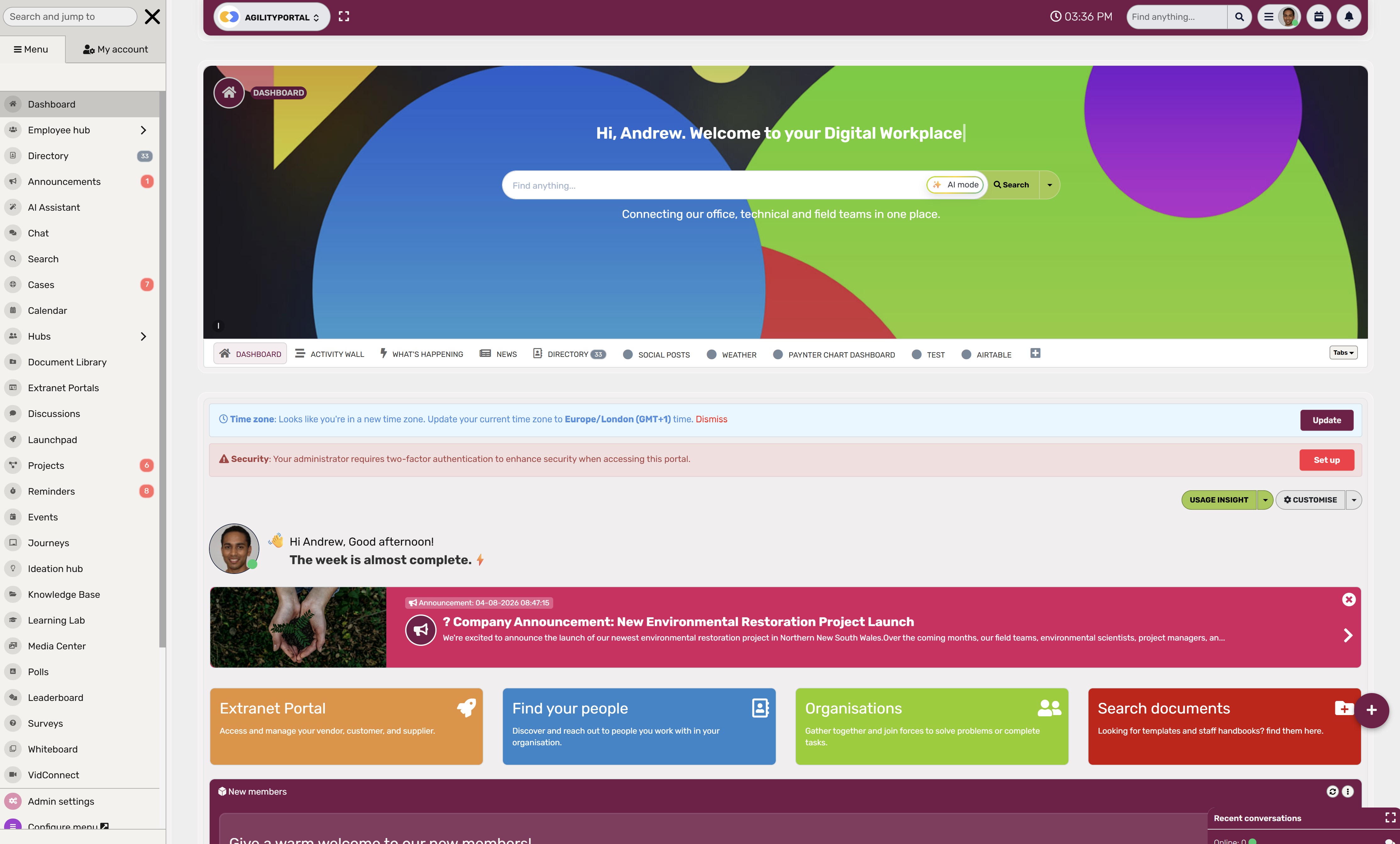
How AgilityPortal Helps Bring Employee Support Into One Place
When employees need help, they should not have to guess whether to message someone in Teams, search through old emails, ask their manager, or try to find the right form.
AgilityPortal gives remote and distributed teams one central place to find information, communicate and get support.
AgilityPortal Cases is AgilityPortal's built-in help desk module.
It helps organisations streamline help desk ticketing by turning employee questions, IT problems, HR requests and service issues into trackable cases with clear ownership and visibility.
Instead of important requests getting lost in chat, employees can raise a case directly through AgilityPortal.
The right person or team can then review it, assign it, update its status and keep a complete record of what happened from the first request through to resolution.
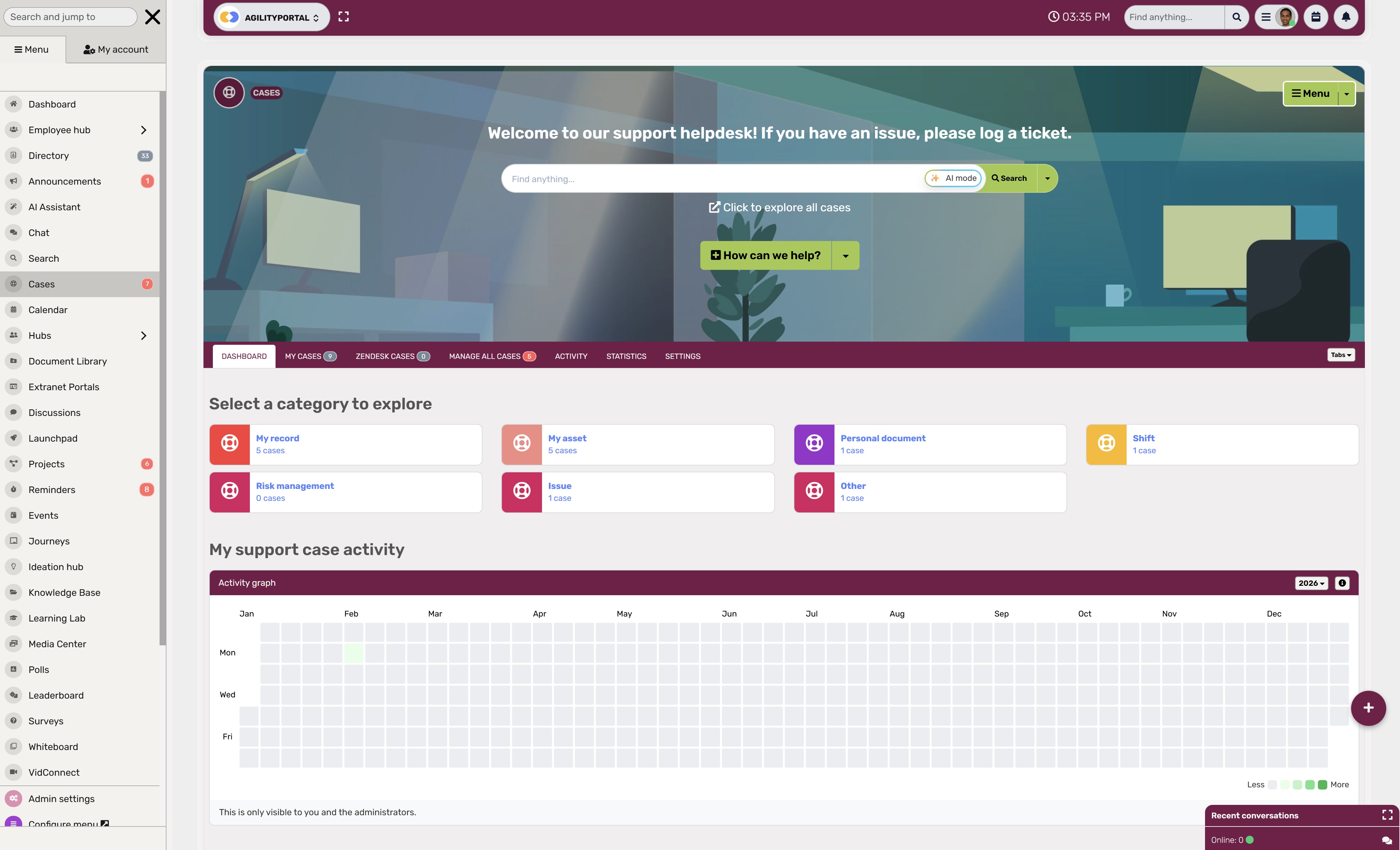
AgilityPortal Cases can help teams manage:
AgilityPortal Cases can help teams manage:
- IT support requests, device issues and software-access requests
- HR, payroll, onboarding and employee-service questions
- Case assignment, status updates and internal notes
- Request categories, priorities and ownership
- Attachments, supporting information and conversation history
- Approvals and follow-up actions
- Case tracking, reporting and recurring-issue visibility
- Employee notifications, so people know their request has been received and what is happening next
The bigger advantage is that Cases is part of AgilityPortal's wider digital workplace suite.
Alongside help desk ticketing, organisations can manage employee communications, policies, documents, knowledge articles, onboarding, forms, approvals, tasks, training, announcements, directories and team collaboration in one connected platform.
That means an employee who needs help can first search for an answer in the knowledge base, read the relevant policy, complete an approved form or raise a case if they still need support.
IT and HR teams spend less time directing people between different tools, while employees get a simpler and more consistent experience wherever they work.
AgilityPortal
Bring Employee Support and Help Desk Ticketing Into One Place
AgilityPortal Cases is AgilityPortal’s built-in help desk module for managing IT support, HR questions, payroll queries, onboarding requests and other employee cases. Instead of allowing important requests to get lost in Teams, Slack, email or direct messages, teams can create trackable cases with clear ownership, categories, priorities, status updates, conversation history, attachments and internal notes. As part of AgilityPortal’s all-in-one digital workplace suite, Cases works alongside employee communications, knowledge articles, policies, forms, approvals, documents, onboarding and mobile access—helping remote and frontline teams find answers, raise requests and stay informed in one familiar place.
Chat starts the conversation. AgilityPortal Cases helps manage what happens next.
What This Means for the Future of Employee Support
Employee support is moving away from the old habit of messaging somebody in IT and hoping they are available. That may work in a small office, but it does not give employees the clear, reliable experience they now expect—especially when teams are remote, hybrid, spread across different sites or working on the frontline.
The future is not about removing the human side of support. It is about using technology to handle the simple things quickly, so people can focus on the problems that genuinely need their attention.
AI, for example, can help sort an incoming request, suggest the right category and surface a useful knowledge article before an employee needs to wait for someone to respond. If someone asks how to reset a password, connect to the VPN or request annual leave, they may be able to get an answer in seconds.
But AI should not be left to deal with everything. Complex technical faults, confidential HR concerns, security incidents and issues affecting someone's pay or wellbeing still need a real person who understands the context and takes responsibility for the outcome. The best support experience combines fast self-service with easy access to human help when it matters.
Employees will also expect more visibility. Think about how people track a delivery, bank transfer or online order: they can see that it has been received, what stage it is at and when to expect an update. Workplace support should not feel less clear than that. When an employee raises an IT, HR or payroll request, they should not have to keep sending messages just to find out whether somebody has seen it.
Better support data will matter too. Instead of judging IT only on how many tickets were closed, businesses will be able to see why employees are contacting support in the first place. If hundreds of people need help accessing the same system, the answer may not be to close tickets faster. It may be to improve the login process, rewrite the guidance or fix the underlying technology issue.
Most importantly, support needs to work for everyone. A desk-based employee may be happy using Teams or Slack all day, while a frontline worker may only have access to a mobile phone during a break. A good employee support process gives both people a simple way to find answers, raise a request and check progress without feeling like they are being passed from one tool to another.
Benefits of Remote Technical Support
Remote technical support has become a practical part of how modern businesses keep people productive.
Instead of waiting for an IT technician to be physically available, employees can get help wherever they are—at home, in the office, on-site or travelling.
For many organisations, the benefits come down to quicker support, better coverage, lower costs and stronger control over devices.
The exact value will depend on the business, but these are the main reasons remote IT support is now so widely used.
1. Help Is Available When Employees Need It
With traditional in-person IT support, an employee may have to wait for a technician to visit their desk or site before a problem can be diagnosed. That can be frustrating when the issue involves their main laptop, a system they need for a client call or software required to do their job.
Remote support lets IT connect to approved devices from wherever they are. This means internal IT teams and managed service providers can support employees across different locations and time zones, often with extended coverage or 24/7 support where needed.
For remote and hybrid teams, that flexibility is essential. As long as the right permissions and software are in place, IT can investigate and resolve many issues without asking the employee to travel to an office or wait for an on-site visit.
2. Faster, Clearer Communication
When a device problem happens, employees want to know that someone has seen it and is dealing with it. Remote IT support makes that easier by allowing employees and technicians to communicate through the company's approved channels while the issue is being investigated.
A technician can ask questions, view the problem, share guidance and keep the employee updated without long phone calls or unnecessary back-and-forth. That can be especially helpful for smaller issues that are easy to solve once IT can see what is happening.
It also reduces the temptation for employees to try risky workarounds, such as downloading unapproved software or changing settings they do not fully understand. Getting quick help protects both productivity and security.
3. Lower Support Costs
Yep remote support can reduce the cost of IT because technicians do not need to spend as much time travelling between offices, sites or employee homes. Instead, they can handle many issues from one central location.
It also allows IT teams to use their time more efficiently. While one device is restarting, installing an update or running a check, the technician may be able to work on another request. This does not mean rushing people through support—it means removing wasted time from the process.
For smaller businesses, remote support can also make external IT services more affordable because the provider does not need to send someone on-site for every routine issue.
4. Better Device Security and Control
Also remote support is not only about fixing problems after they happen. It can also help IT prevent issues before they affect employees.
When devices are connected through approved remote support and management tools, IT can check configurations, apply software updates, manage access permissions and monitor whether devices meet company security standards.
Many of these checks can be automated, which helps keep remote and office-based devices consistent.
If a laptop is lost, compromised or behaving unusually, IT may also be able to respond faster by restricting access, reviewing device activity or taking steps to secure company information.
That gives businesses more confidence that employees can work from anywhere without losing control of their technology.
How Change Management Helps Remote Support Tools Actually Get Used
Buying remote support software is the easy part. The harder part is getting IT teams, managers and employees to use it properly every day.
A new tool can have great features, but it will not deliver much value if people keep falling back on old habits, such as calling IT, sending direct messages in Teams or Slack, or trying to fix problems themselves.
That is where change management matters. It helps people understand why the new process is being introduced, how it will make their work easier and what they need to do differently.
Frameworks such as Prosci's ADKAR model are useful because they focus on the people behind the technology: awareness, desire, knowledge, ability and reinforcement.
In other words, employees need to know why the change is happening, want to support it, understand how the new tool works, feel confident using it and receive ongoing encouragement to keep using it.
Why Typical Rollouts Often Struggle
Many businesses treat a remote support rollout as a simple go-live event. They buy the software, install it, send one training email and assume everyone will immediately follow the new process.
In reality, people do not change how they work just because a new platform is available. If employees find it easier to message somebody in Teams, they will probably keep doing that.
If IT technicians are unclear about when to use remote sessions or how to record their work, they may return to their old methods too.
A successful rollout needs to focus on more than technical setup.
Why Typical Rollouts Often Struggle
Many businesses treat a remote support rollout as a simple go-live event. They buy the software, install it, send one training email and assume everyone will immediately follow the new process.
In reality, people do not change how they work just because a new platform is available. If employees find it easier to message somebody in Teams, they will probably keep doing that. If IT technicians are unclear about when to use remote sessions or how to record their work, they may return to their old methods too.
A successful rollout needs to focus on more than technical setup.
1. Build Awareness and Give People a Reason to Care
Explain why the business is introducing remote support tools. The reason should be practical, not vague.
For example, the goal may be to help employees get faster support, reduce technician travel time, improve visibility over unresolved issues, strengthen device security or provide better support for remote and frontline teams.
When people understand the benefit to them, they are far more likely to adopt the new way of working.
2. Give People the Knowledge and Confidence to Use It
Employees need to know exactly how to request help. IT teams need to know how to start secure remote sessions, record key actions, manage permissions and close requests properly.
Keep training simple and relevant. Show employees what to do when they need help, rather than overwhelming them with every feature. Give IT teams practical scenarios they are likely to face, such as supporting a remote employee with a software problem or helping a new starter access an approved system.
3. Reinforce the New Process Over Time
One training session is rarely enough. Managers and IT leaders should keep reinforcing the agreed process, answer questions and watch for places where employees are still using workarounds.
Useful measures include remote-session usage, ticket resolution times, repeat issues, employee satisfaction and the number of requests still arriving through informal chat messages. If adoption is low, do not assume employees are being difficult. Find out what is making the new process harder than it needs to be.
A thoughtful change-management approach turns remote support software from another unused licence into a tool that genuinely helps employees get back to work faster.
Final Thoughts
Employees do not message IT in Teams or Slack because they are trying to avoid the proper process.
Most of the time, they are just trying to get back to work.
Their laptop is not connecting, they need access to a system, they cannot find an important document, or something has stopped them from doing their job.
Sending a quick message feels like the fastest and most natural thing to do.
That is why chat should still have a place in employee support. Teams and Slack are brilliant for quick conversations, urgent updates and keeping people connected.
The problem starts when those messages become the only record of a request, with no clear owner, priority, approval trail or way to see whether the issue was actually resolved.
A well-designed help desk gives businesses the structure they need without making employees jump through hoops.
When it connects with the tools people already use, employees can still ask for help in a familiar way while IT, HR and managers gain the visibility needed to manage requests properly.
The best employee support experience is not the one with the most messages. It is the one where people know where to ask, who owns the answer and what happens next.
Frequently Asked Questions About Help Desk Software
Can Microsoft Teams be used as a help desk?
Microsoft Teams can be a useful place for employees to ask for help, share screenshots and receive updates. But Teams alone is not a complete help desk. It does not naturally give every request a ticket number, clear ownership, priority level, approval trail or reliable reporting.
The best approach is to connect Teams with Microsoft help desk software so employees can raise requests in a familiar place while IT manages them properly in the background.
Can Slack replace help desk software?
Slack can work for very small teams with only a few support requests each week. Once request volumes increase, though, it becomes difficult to track what has been completed, who owns each issue and whether employees are waiting for an update.
Slack works best as a simple entry point that connects to help desk software, rather than as the only place where support requests live.
What is the difference between help desk software and a ticketing system?
A ticketing system is mainly used to log, track and close support requests. Help desk software usually goes further by adding request routing, priorities, service-level targets, knowledge articles, automation, reporting and employee self-service.
In simple terms, ticketing tracks the request; help desk software helps the business manage the whole support experience.
Why do IT support requests get lost in Teams or Slack?
Messages compete with ordinary conversation, direct messages, replies, reactions and new updates. A request may be seen but not assigned, or someone may assume a colleague is dealing with it.
A ticket makes the work visible until it is resolved, so support does not rely on someone remembering to come back to a message.
Should employees have to use a support portal?
Employees need a support route that is quick and easy to use. If a portal is difficult to find or takes too long, people will naturally return to Teams, Slack or direct messages.
The strongest setup gives employees a choice: they can start in a familiar channel, but the important request is still captured as a trackable case or ticket.
What should never be sent in an IT support chat?
Employees should never send passwords, authentication codes, bank details, unnecessary personal information, confidential HR information or sensitive customer data through an informal chat.
Businesses should clearly explain what can be shared in chat and provide a secure route for anything more sensitive.
Which workplace operations platform is best for frontline employees?
Good internal help desk software should include ticket management, request categories, assignment rules, priority settings, approvals, status updates, a knowledge base, reporting, audit history and integrations with tools employees already use.
For remote teams, mobile access and employee self-service are especially important.
How can help desk software improve onboarding?
Help desk software can bring new-starter requests into one workflow. HR or managers can request laptops, software, email accounts, system permissions, training and policy access without relying on scattered messages.
This gives the new employee a smoother first day and helps IT see what still needs to be completed.
Do small businesses need help desk software?
Not every small business needs a large, complex IT service management platform. But if employees regularly chase updates, requests are missed, or one person is keeping everything in their head, a simple help desk can make a real difference.
The right solution should match the size of the business and make support easier—not create more admin.
What are some help desk software examples?
Common help desk software examples include AgilityPortal Cases, Freshservice, Jira Service Management, Zendesk, SysAid, ManageEngine ServiceDesk Plus and ServiceNow.
The best choice depends on whether you need IT support, HR cases, employee service management, customer support, asset management or a broader digital workplace platform.
Is help desk software open source a good option?
Help desk software open source options can be attractive for businesses that want more control over customisation, hosting and data. However, they often need more technical expertise to install, secure, maintain and update.
For a business without dedicated technical resources, a cloud-based platform may be easier to launch and manage. The right choice comes down to budget, internal expertise, security requirements and how much flexibility you need.
What is SysAid help desk software used for?
SysAid help desk software is an IT service management platform used to manage employee support requests, tickets, assets, workflows and automation.
It is often considered by IT teams that need more structured service desk capabilities.
Before choosing any platform, check whether it suits your actual workflow. A small business may need simple ticketing and knowledge sharing, while a larger organisation may need approvals, asset management, integrations and detailed reporting.
What should I look for in the top help desk software?
The top help desk software is not always the one with the longest feature list. Look for a system that employees will actually use, works with your current tools and gives your support team clear visibility.
Prioritise ease of use, ticket tracking, automated routing, self-service, security controls, reporting, mobile access and integrations with Teams or Slack.
Do I need to compare a top 10 help desk software list?
A top 10 help desk software list can be useful for building a shortlist, but do not choose a platform purely because it appears at the top of a comparison article.
First, write down the problems you need to solve. For example: Are requests getting lost? Do you need HR and IT cases in one place? Do employees need mobile access? Do you need a knowledge base? Then compare tools based on those needs.
Is there a help desk download for Windows 10?
Most modern help desk platforms are cloud-based, meaning employees and support teams can access them through a web browser without needing a separate help desk download for Windows 10.
Some providers also offer desktop or mobile apps, but the important thing is that the system works reliably across the devices your employees use, including Windows laptops, mobiles and shared frontline devices.
What does "help desk me" mean?
People often search for help desk me when they need immediate workplace IT support or are trying to find the right internal support contact. A well-designed employee portal should make that easy by showing a clear "Get Help" or "Raise a Case" option, alongside answers to common questions.
Employees should never have to hunt through old chats or ask several colleagues just to find out where to get support.
AI Summary
- Teams and Slack make it easy for employees to ask for help, but chat messages alone can become difficult to track as support requests grow.
- Help desk software turns IT, HR, payroll, onboarding and employee-service requests into trackable tickets with clear ownership, priorities, updates and resolution records.
- A ticketing system helps prevent important requests from being missed in busy channels, direct messages, reply threads or informal conversations.
- The strongest approach is not to ban workplace chat, but to connect Teams and Slack to a structured help desk workflow that employees can use without unnecessary friction.
- Secure help desk solutions can support approvals, audit histories, sensitive HR or access requests, self-service knowledge articles and reporting on recurring employee issues.
- AgilityPortal Cases helps remote and distributed teams streamline help desk ticketing alongside employee communications, knowledge, policies, forms, onboarding and workplace collaboration.
Most Popular Posts

Effective communication among team members is vital for the productivity and success of any organization. Surprisingly, 60% of companies lack a long-term internal communication strategy, which p...


Businesses thrive on communication for efficiency, productivity and accomplishment. When the right information is passed from the right designation in the organization, it promotes positivity an...

Categories
Blog
(3228)
Business Management
(396)
Employee Engagement
(235)
Digital Transformation
(220)
Growth
(151)
Intranets
(142)
Internal communications
(110)
Remote Work
(68)
Sales
(53)
Collaboration
(53)
Customer Experience
(33)
Culture
(30)
Knowledge Management
(29)
Project management
(29)
Leadership
(20)
Comparisons
(9)
News
(1)

Related Posts

Have you ever welcomed a new employee, shared a mountain of information, and wondered how much they'll remember by tomorrow? A clear presentation can make the first day easier by showing new starters who to contact, where to find key informatio...

What would your leadership team do if a serious allegation about your business started spreading online before anyone knew whether it was true? That's where crisis communication and management really matter. An employee spots the post, screensh...

AI for personal injury law firms is becoming part of everyday casework. These tools can help teams sort through medical records, build timelines, draft demand packages and find details buried in a big case file. That could free up attorneys and...

Ever left an online meeting unsure what was decided—and wondered how to run an effective meeting without wasting everyone's time? A call can bring a distributed team together quickly, but when it starts late, includes people who don't know why ...

Where can I send a fax from in my area when a document needs to go out today? The answer might be a nearby print or shipping shop, a library or an online fax service, but what's available depends on your location. The UPS Store lists a ne...


Jill Romford
I am a digital nomad, lover of exploring new places and making friends.
I love to travel and I love the internet. I take pictures of my travels and share them on the internet using Instagram.
Traveler, entrepreneur, and community builder. I share my insights on digital marketing and social media while inspiring you to live your fullest life.
Ready to learn more? 👍
One platform to optimize, manage and track all of your teams. Your new digital workplace is a click away. 🚀
Free for 14 days, no credit card required.