
Insight Blog
Agility’s perspectives on transforming the employee's experience throughout remote transformation using connected enterprise tools.
25 minutes reading time
(5008 words)
Best SharePoint Team Site Examples In 2026 (+ Templates You Can Copy)

Best SharePoint Team Site Examples In 2026 (+ Templates You Can Copy)
Discover the best SharePoint team site examples, templates, and ideas for modern workplaces. Learn how to build better collaboration and communication hubs.
Best SharePoint Team Site Examples In 2026 (+ Templates You Can Copy)

Why do so many SharePoint team sites become difficult to use after launch?
In many organisations, the issue is not SharePoint itself — it's the experience employees have when trying to use it.
Poor navigation, cluttered document libraries, and outdated layouts often make collaboration harder instead of easier.
Before long, teams go back to using email threads, chats, or disconnected folders to get work done.
The impact is bigger than most businesses realise.
Research from Gartner shows that up to 70% of digital transformation projects fail because of poor user adoption, which is exactly why modern SharePoint Team Site Templates and employee-focused intranet design have become critical for workplace engagement and collaboration.
70%
project failure rate
Research from Gartner shows that up to 70% of digital transformation projects fail due to poor user adoption, highlighting why modern SharePoint Team Site Templates and employee-focused intranet design are critical for workplace engagement and collaboration.
Source: Gartner Research
That's a huge productivity drain caused by poorly organised digital workplaces and disconnected systems.
The good news is that modern SharePoint team sites can work extremely well when designed properly.
The Best SharePoint Team Site Examples focus on usability, collaboration, employee engagement, and fast access to information — not just storing documents.
In this guide, you'll discover practical SharePoint Team Site Examples, modern SharePoint Team Site Templates, creative SharePoint Team Site Ideas, and the differences between a SharePoint Team Site Vs Communication Site so you can build a workspace employees will actually use.
Key Takeaways
- The best SharePoint Team Site Examples focus on employee experience, usability, and collaboration rather than acting as simple document storage systems.
- Modern SharePoint Team Site Templates help businesses standardise navigation, improve internal communication, and increase employee adoption across departments.
- Understanding the difference between a SharePoint Team Site Vs Communication Site is critical for building an effective digital workplace and intranet strategy.
- Successful SharePoint Team Site Ideas often include mobile-friendly layouts, knowledge management features, dashboards, and Microsoft Teams integration.
- Businesses investing in employee communication software, intranet platforms, and digital workplace solutions should prioritise simplicity, searchability, and accessibility.
What Is a SharePoint Team Site?
A SharePoint Team Site is a collaboration-focused workspace inside Microsoft 365.
It gives teams one central place to share documents, manage tasks, communicate updates, and organise project or department information.
Instead of sending files through email or storing everything in random folders, a team site helps employees find what they need faster and work together in a more structured way.
How SharePoint Team Sites Work
Sharepoint online sites are usually connected to Microsoft 365 Groups, which means they can work alongside tools like Teams, Outlook, Planner, OneDrive, and shared calendars.
A typical team site may include:
- document libraries for shared files
- task lists or project trackers
- team news and updates
- shared calendars
- quick links to important tools
- pages for policies, processes, or project information
Why SharePoint Team Site Templates Matter
Sharepoint app Site Templates help organisations create structured workspaces without building everything from scratch.
Instead of every department creating a different layout, templates give teams a consistent starting point. This makes the site easier to manage, easier to use, and faster to launch.
Common template use cases include:
- HR team sites
- project management sites
- IT support hubs
- onboarding workspaces
- operations team sites
- knowledge-sharing portals
SharePoint Site Templates List
The sharepoint home site templates list includes different layouts designed for specific business needs. These templates can help teams set up sites for communication, collaboration, training, events, and internal operations.
For example, a business might use:
- an onboarding template for new employees
- a project template for delivery teams
- a department template for HR, IT, or finance
- a knowledge base template for internal documentation
- an event planning template for company activities
How SharePoint Page Templates Help
SharePoint page templates are useful when you want different pages to follow the same structure and design.
This is helpful for creating pages such as:
- team announcements
- department dashboards
- policy pages
- training resources
- meeting notes
- company updates
- process guides
The benefit is simple: employees get a familiar layout every time, which makes the site easier to scan and use.
What Makes a Good SharePoint Team Site?
The best SharePoint team sites are not overloaded with features. They are simple, organised, and built around how employees actually work.
A good team site should have:
- clear navigation
- well-organised documents
- strong search functionality
- useful quick links
- mobile-friendly pages
- clear ownership
- regularly updated content
Done properly, a SharePoint Team Site becomes more than a file library. It becomes a working hub where teams can collaborate, find information, and stay aligned.
SharePoint Team Site Vs Communication Site
One of the biggest mistakes organisations make when building SharePoint is choosing the wrong type of site from the start. While both options are built inside Microsoft 365, they serve very different purposes.
A SharePoint Team Site is designed for collaboration.
It helps smaller groups of employees work together, share files, manage projects, and communicate daily.
A Communication Site, on the other hand, is built for broadcasting information across the organisation. It's typically used for company news, leadership updates, HR announcements, and internal communications.
Understanding the difference between the two can help you build a much better employee experience and avoid creating confusing digital workspaces.

SharePoint Team Site Vs Communication Site
Key Differences Between Team Sites and Communication Sites
| Feature | Team Site | Communication Site |
| Primary Purpose | Collaboration and teamwork | Company-wide communication |
| Audience | Departments or project teams | Entire organisation |
| Permissions | Members can edit and contribute | Mostly read-only for employees |
| Main Content | Tasks, files, workflows, projects | News, updates, announcements |
| Microsoft 365 Group Connected | Yes | Usually no |
| Best For | Daily operational work | Internal communication strategy |
When to Use a SharePoint Team Site
A SharePoint Team Site is best when employees need to collaborate daily, share files, manage projects, and work together in one shared workspace. These sites are commonly used by HR, IT, operations, and project teams because they support document collaboration, task management, and internal teamwork.
For example, a project team may use a team site to manage timelines, meeting notes, shared documents, and workflows in one place. The focus is on collaboration and productivity rather than simply sharing company news.
When to Use a Communication Site
A Communication Site is designed for company-wide communication rather than active teamwork. Businesses typically use these sites for leadership updates, HR announcements, policies, employee news, and internal campaigns.
Unlike Team Sites, most employees consume information instead of editing content directly. Communication Sites are usually more visual and focused on improving employee engagement across the organisation.
Which Option Is Better?
If your goal is collaboration and teamwork, a SharePoint Team Site is usually the better choice. If your focus is internal communication and company updates, a Communication Site makes more sense.
Most organisations use both together as part of a modern intranet strategy.
Best SharePoint Team Site Examples
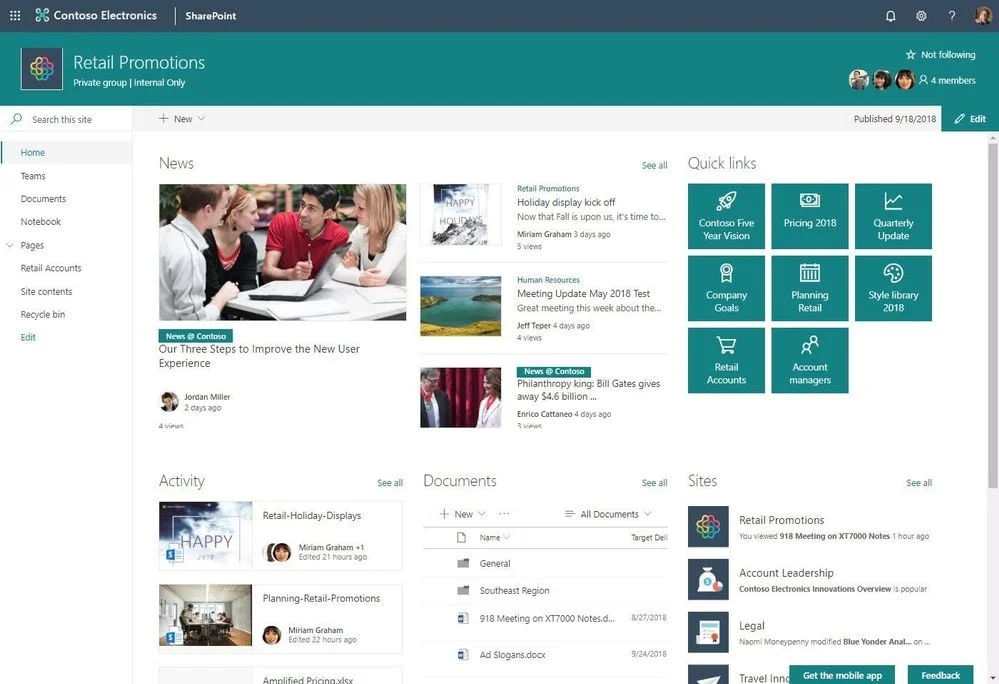
Best SharePoint Team Site Examples
One of the biggest reasons SharePoint deployments fail is because companies build sites around document storage instead of employee experience.
The Best SharePoint Team Site Examples focus on usability, collaboration, navigation, and making information easy to access.
If you're planning a new intranet or improving an existing Microsoft 365 environment, reviewing modern SharePoint Team Site Examples can give you practical ideas you can actually apply.
Below are some of the most effective layouts businesses use today, along with useful SharePoint Team Site Templates and inspiration for better digital workplace design.
1. HR SharePoint Team Site Example

SharePoint Employee Onboarding Site Example
An HR-focused team site is usually built around onboarding, policies, employee resources, and internal processes.
Many companies also include benefits information, leave request forms, training content, and company announcements in one central hub.
The best HR sites are simple to navigate because employees often access them when they urgently need information. Many organisations replacing outdated systems with a modern SharePoint alternative now prioritise faster search functionality, mobile-friendly layouts, and easier access to HR resources across distributed teams.
Good HR team site ideas include:
- new employee onboarding hubs
- benefits and payroll pages
- HR knowledge bases
- training resource centres
- employee recognition sections
2. IT Helpdesk Team Site Example

IT Helpdesk Team Site Example
IT departments often use SharePoint team sites as internal support hubs where employees can access troubleshooting guides, submit requests, download software, or review security policies.
These sites work best when they reduce the number of repetitive support tickets by making answers easy to find.
Common features include:
- IT request forms
- device setup documentation
- password reset instructions
- software download areas
- cybersecurity updates
This is one of the most practical SharePoint Team Site Templates because it combines knowledge management with operational support.
3. Project Management Team Site Example

Project Management Team Site Example
Project-based SharePoint Team Site Examples are designed to keep teams aligned around timelines, deliverables, shared files, and ongoing collaboration.
These sites often integrate with Microsoft Teams, Planner, and Power BI to create a more connected workspace.
Popular features include:
- project timelines
- task tracking
- milestone dashboards
- meeting notes
- shared document libraries
Many organisations choose this structure because it improves visibility across remote and hybrid teams while reducing communication silos.
4. Remote Collaboration Team Site Example

Remote Collaboration Team Site Example
Since hybrid work became standard, businesses have started building more collaboration-focused team sites that combine communication, knowledge sharing, and employee engagement.
These sites often include:
- embedded Microsoft Teams chats
- shared calendars
- company updates
- video announcements
- collaboration spaces
This approach works especially well for distributed teams that need a central workspace instead of relying on disconnected tools.
Interestingly, this is also where businesses often compare a SharePoint Team Site Vs Communication Site, since remote collaboration frequently requires elements of both.
5. Operations Team Site Example

Operations Team Site Example
Operations teams usually need fast access to procedures, compliance documents, workflows, and reporting tools.
The best SharePoint Team Site Ideas for operations focus heavily on structure and accessibility.
Typical features include:
- SOP libraries
- compliance documentation
- workflow tracking
- incident reporting
- operational dashboards
These sites are particularly valuable for organisations managing multiple locations, frontline workers, or regulated processes.
SharePoint Team Site Templates You Can Copy

SharePoint Team Site Templates
Choosing the right SharePoint Team Site Templates can dramatically improve employee adoption, collaboration, and internal communication.
The best templates are not overloaded with features — they are designed around how employees actually work and access information daily.
For organisations researching modern intranet software, employee collaboration tools, or digital workplace platforms, these template ideas can provide a strong starting point for building a more connected workspace.
1. Minimal Team Collaboration Template
One of the most effective SharePoint Team Site Templates is a simple collaboration-focused workspace built around clarity and usability.
These templates work well for project teams, remote departments, and hybrid workplaces that need fast access to files and updates without overwhelming employees.
A strong collaboration template usually includes:
- clean navigation menus
- quick links to important tools
- shared document libraries
- task tracking
- team announcements
- Microsoft Teams integration
This type of layout is commonly used by businesses searching for:
- employee collaboration software
- team collaboration platforms
- digital workplace solutions
- intranet software for remote teams
2. Employee Onboarding Team Site Template
Employee onboarding templates are designed to help new hires settle in faster while reducing pressure on HR teams.
These SharePoint Team Site Ideas are particularly valuable for companies with hybrid or distributed workforces.
Most onboarding templates include:
- welcome pages
- training resources
- employee handbooks
- new hire checklists
- department contacts
- company policies
Businesses researching:
3. Knowledge Management Team Site Template
Knowledge management templates focus on helping employees find information quickly without relying on endless chats or email chains. These are some of the Best SharePoint Team Site Examples because they reduce duplicated work and improve information accessibility.
Key features often include:
- search-first navigation
- structured knowledge bases
- wiki-style documentation
- categorised resources
- FAQs and troubleshooting guides
This structure aligns strongly with searches around:
- knowledge management systems
- internal knowledge base software
- enterprise search solutions
- document management systems
4. Modern Department Portal Template
Department portal templates are designed for HR, IT, finance, operations, and leadership teams that need a central place for communication, reporting, and workflows.
These templates commonly include:
- KPI dashboards
- internal announcements
- workflow shortcuts
- reporting widgets
- integrated Microsoft 365 apps
They are popular among organisations researching:
- employee portal software
- department intranet examples
- workplace communication tools
- enterprise collaboration platforms
5. Mobile-Friendly SharePoint Team Site Templates
Modern businesses increasingly need mobile-first intranet experiences, especially for frontline workers, deskless employees, and remote teams.
The best mobile-friendly SharePoint Team Site Templates focus on:
- responsive layouts
- simplified navigation
- quick-access buttons
- mobile document access
- easy search functionality
This is especially important for companies exploring:
- frontline worker communication tools
- deskless workforce software
- mobile intranet platforms
- employee communication apps
SharePoint Team Site Ideas to Improve Engagement
One of the biggest problems with many intranet platforms is that employees stop using them after the initial launch. The best SharePoint Team Site Ideas focus on creating a workplace experience that employees actually want to return to daily.
Modern businesses are no longer looking for simple document storage.
They want employee engagement platforms, digital workplace solutions, and collaboration software that improve communication, productivity, and knowledge sharing across the organisation.
Add Interactive Dashboards
Interactive dashboards can make a SharePoint Team Site feel more useful and dynamic instead of looking like a static file repository.
Many organisations now integrate Power BI dashboards directly into SharePoint to display real-time business insights, department KPIs, project progress, and operational metrics.
This works especially well for organisations researching:
- employee dashboard software
- workplace analytics tools
- digital workplace dashboards
- employee productivity software
The more useful information employees can access from one place, the more likely they are to use the platform consistently.
Create a Better Employee Experience
The Best SharePoint Team Site Examples are designed around employees rather than departments.
Personalised content, role-based navigation, and employee recognition features can significantly improve engagement and usability.
For example, HR employees may see onboarding tools and policies, while frontline workers might access schedules, safety procedures, and operational updates.
This creates a more personalised digital workplace experience instead of forcing every employee to navigate the same cluttered interface.
This approach aligns closely with searches around:
- employee experience platforms
- employee communication software
- internal communication tools
- workplace engagement software
Improve Search and Knowledge Discovery
One of the most valuable SharePoint Team Site Ideas is improving how employees find information.
Poor search experiences are one of the main reasons employees avoid using intranet systems.
Modern SharePoint environments often use:
- structured metadata
- smart tagging
- content categorisation
- optimised search experiences
This helps employees locate policies, documents, training resources, and internal knowledge faster.
Businesses exploring:
- enterprise search software
- knowledge management systems
- document management software
- internal knowledge base tools
Typically prioritise this area heavily.
Integrate Microsoft Teams and Viva
Many companies now combine SharePoint with Microsoft Teams and Microsoft Viva to create a more connected digital workplace platform.
This integration can improve:
- team collaboration
- employee communication
- workflow management
- knowledge sharing
- hybrid work experiences
Instead of switching between disconnected tools, employees can access conversations, files, tasks, and updates from one ecosystem.
Use Video and Visual Content
Video content has become increasingly important in modern intranet design because employees engage more with visual content than long blocks of text.
Popular ideas include:
- leadership video updates
- employee training videos
- onboarding tutorials
- internal company announcements
- knowledge-sharing walkthroughs
This is particularly effective for remote teams, frontline workers, and businesses trying to improve internal communication and employee engagement across distributed workplaces.
Common Mistakes Companies Make With SharePoint Team Sites
Overcomplicated Navigation
One of the most common problems with SharePoint Team Sites is overly complex navigation.
Many organisations create too many pages, menus, and document libraries, making it difficult for employees to find what they need quickly.
When users have to spend too much time searching for information, adoption drops and employees often return to email or shared drives instead.
Treating SharePoint Like a File Dump
Many businesses use SharePoint purely for document storage without thinking about structure, usability, or employee experience.
Over time, this creates cluttered environments filled with outdated files, duplicate documents, and disconnected content.
The Best SharePoint Team Site Examples focus on organisation, searchability, and clear content management rather than simply uploading files.
Ignoring Mobile Users
A modern SharePoint Team Site should work well across desktops, tablets, and mobile devices.
This is especially important for frontline workers, hybrid teams, and remote employees who rely on mobile access throughout the day.
Poor mobile experiences often result in lower employee engagement and reduced platform usage.
No Governance or Ownership
Another major issue is the lack of ownership.
Without clear governance, SharePoint sites quickly become outdated and unreliable.
Employees lose trust in the platform when pages contain old information, broken links, or inconsistent content. Successful organisations usually assign departments or site owners responsibility for maintaining content and permissions.
Poor User Adoption Strategy
Even well-designed SharePoint Team Site Templates can fail if employees are not properly introduced to the platform.
Many companies launch new intranet environments without onboarding, training, or internal communication plans.
Employees need to understand how the platform improves their daily work; otherwise, adoption and long-term engagement will always remain a challenge.
What Makes the Best SharePoint Team Site Examples Successful?
The Best SharePoint Team Site Examples are successful because they focus on employee experience rather than simply acting as document storage systems.
Modern businesses want digital workplace platforms that improve collaboration, simplify communication, and help employees find information quickly without frustration.
The most effective SharePoint Team Sites are usually designed around usability, accessibility, and daily workflows.
They make it easier for employees to collaborate, manage documents, and stay connected across departments and remote teams.
Simple Navigation
One of the most important features of a successful SharePoint Team Site is simple navigation.
Employees should be able to locate tools, pages, and documents within a few clicks instead of searching through endless folders and menus.
The best intranet platforms often include:
- clean menu structures
- clear page categories
- quick-access links
- simplified document libraries
This is especially important for organisations investing in employee communication software, digital workplace solutions, and enterprise collaboration tools.
Strong Search Experience
A poor search experience is one of the fastest ways to reduce intranet adoption.
Employees expect modern workplace platforms to function like consumer search engines where information can be found quickly and easily.
Successful SharePoint Team Site Templates often include:
- structured metadata
- smart document tagging
- searchable knowledge bases
- organised content categories
This supports businesses looking for:
- enterprise search software
- knowledge management systems
- document management platforms
- internal knowledge base tools
Clear Ownership
The best SharePoint Team Site Examples are actively maintained rather than abandoned after launch.
Without clear ownership, sites quickly become outdated and cluttered.
Successful organisations typically assign responsibility for:
- updating content
- managing permissions
- maintaining navigation
- reviewing outdated resources
This helps improve trust, accuracy, and long-term employee engagement.
Mobile Accessibility
Modern employees expect mobile access to workplace information, especially remote teams, frontline workers, and hybrid employees.
A mobile-friendly SharePoint Team Site improves accessibility and allows employees to stay connected from anywhere.
Strong mobile intranet experiences often include:
- responsive layouts
- simplified navigation
- mobile document access
- quick communication tools
This aligns with growing demand for:
- mobile intranet software
- deskless workforce platforms
- employee apps for frontline workers
Employee-Centric Design
The most successful SharePoint Team Site Ideas are designed around employee needs rather than organisational structure.
Instead of overwhelming users with too much information, the best sites personalise content and prioritise usability.
This may include:
- role-based dashboards
- personalised content feeds
- employee recognition sections
- department-specific resources
Employee-centric design plays a major role in improving internal communication and digital workplace adoption.
Integrated Collaboration Tools
Modern SharePoint environments work best when integrated with Microsoft Teams, Viva, Planner, and other collaboration platforms. Employees should not have to constantly switch between disconnected tools just to complete simple tasks.
Integrated collaboration tools help improve:
- team communication
- workflow management
- project collaboration
- document sharing
- employee productivity
This is why many organisations now view SharePoint as part of a wider employee experience platform rather than simply a file management system.
Alternatives to Traditional SharePoint Team Sites

Alternatives to Traditional SharePoint Team Sites
Many organisations begin with SharePoint but later search for alternative intranet software because of complexity, low employee adoption, and difficult navigation.
While SharePoint is powerful, many businesses want a more modern digital workplace platform that is easier for employees to use daily.
This is why searches for terms like employee communication software, modern intranet platforms, employee experience platforms, and team collaboration tools continue to grow.
Modern alternatives focus more on usability, communication, and employee engagement rather than just document storage.
Businesses increasingly want platforms that combine:
- internal communication tools
- knowledge management systems
- employee apps
- social intranet features
- collaboration software
- mobile-first experiences
This is especially important for hybrid workplaces, remote teams, and frontline workers who need quick access to information from any device.
Platforms like AgilityPortal take a more connected approach by combining communication, knowledge sharing, collaboration, and employee engagement into one digital workplace solution.
For most businesses, the biggest priority is simplicity. Employees are far more likely to use a platform that feels intuitive, modern, and easy to navigate every day.
AgilityPortal
A Modern Alternative to Traditional SharePoint Team Sites
AgilityPortal helps businesses centralise employee communication, collaboration, company knowledge, documents, and workplace updates into one connected digital workplace platform.
Instead of managing disconnected SharePoint Team Sites, emails, chats, and document libraries, AgilityPortal creates a modern employee experience designed for communication, engagement, knowledge sharing, and hybrid collaboration.
Start your 14-day free trial — no credit card required.Final Thoughts on SharePoint Team Site Examples
The best SharePoint Team Site Examples are not necessarily the ones with the most features or the most complex layouts.
The most successful sites are usually the simplest — built around usability, collaboration, and helping employees find information quickly.
Throughout this guide, we explored practical SharePoint Team Site Templates, modern SharePoint Team Site Ideas, and the differences between a SharePoint Team Site Vs Communication Site.
Whether you are building an HR portal, project workspace, knowledge base, or employee intranet, the goal should always be the same: create a workplace experience employees actually want to use.
Modern businesses are increasingly searching for:
- employee communication software
- digital workplace platforms
- intranet software
- employee experience platforms
- knowledge management systems
- collaboration tools for remote teams
Because employee expectations have changed dramatically. Workers now expect workplace technology to feel simple, fast, mobile-friendly, and easy to navigate.
In reality, employee adoption matters far more than feature lists. A clean and organised SharePoint Team Site will almost always outperform a complicated platform that employees avoid using.
If your current intranet feels cluttered, outdated, or difficult to manage, this is a good opportunity to review the overall employee experience and identify where improvements can be made.
AI Summary
- The best SharePoint Team Site Examples focus on employee collaboration, usability, and communication rather than simply acting as document storage systems.
- Many organisations struggle with low SharePoint adoption because of poor navigation, cluttered document libraries, outdated layouts, and confusing user experiences.
- Understanding the difference between a SharePoint Team Site Vs Communication Site is essential when building a modern intranet or digital workplace platform.
- Modern SharePoint Team Site Templates help businesses standardise collaboration, improve employee engagement, and simplify internal communication across departments.
- Successful SharePoint Team Site Ideas often include mobile-friendly layouts, Microsoft Teams integration, knowledge management features, dashboards, and enterprise search.
- Businesses investing in employee intranet software, digital workplace platforms, and collaboration tools should prioritise simplicity, accessibility, and employee adoption.
FAQ: SharePoint Team Site Examples
What is a SharePoint Team Site used for?
A SharePoint Team Site is used to help employees collaborate, share files, manage projects, and centralise workplace information inside Microsoft 365.
Many businesses use SharePoint collaboration sites for HR portals, project workspaces, knowledge management, and internal communication.
What is the difference between a SharePoint Team Site and Communication Site?
A SharePoint Team Site is designed for collaboration and teamwork, while a Communication Site focuses more on company-wide updates and internal communication.
Team Sites are ideal for departments and project teams, whereas Communication Sites work better for announcements, leadership updates, and employee intranet examples.
What are the best SharePoint Team Site examples?
The best SharePoint workspace examples usually include HR portals, IT helpdesk hubs, onboarding sites, project management workspaces, and knowledge-sharing platforms.
Successful SharePoint portal examples focus on usability, employee engagement, and easy navigation.
Are there free SharePoint Team Site templates?
Yes, Microsoft provides several free Microsoft SharePoint templates through the SharePoint Look Book and Microsoft 365 ecosystem.
These templates include layouts for onboarding, collaboration, department sites, communication hubs, and SharePoint document management.
How do I improve SharePoint Team Site engagement?
Improving engagement often starts with better intranet design ideas, cleaner navigation, mobile accessibility, and more personalised content.
Businesses also improve adoption by integrating Microsoft 365 collaboration tools such as Teams, Viva, and Power BI directly into their SharePoint environment.
What should a modern SharePoint Team Site include?
A modern SharePoint intranet should include strong search functionality, mobile-friendly layouts, collaboration tools, dashboards, employee communication features, and structured document management.
The best sites are simple, easy to navigate, and designed around employee workflows.
Can SharePoint Team Sites work for remote teams?
Yes, SharePoint Team Sites work well for remote and hybrid teams when combined with Microsoft Teams and other Microsoft 365 collaboration tools.
Many businesses use them as part of a wider digital workplace platform to support communication, knowledge sharing, and remote collaboration.
What are the alternatives to SharePoint Team Sites?
Businesses looking for simpler employee experiences often explore alternatives such as employee intranet software, digital workplace platforms, and team collaboration software like AgilityPortal, Workvivo, or other modern intranet solutions designed around communication and employee engagement.
Most Popular Posts

Effective communication among team members is vital for the productivity and success of any organization. Surprisingly, 60% of companies lack a long-term internal communication strategy, which p...


Businesses thrive on communication for efficiency, productivity and accomplishment. When the right information is passed from the right designation in the organization, it promotes positivity an...
Categories
Blog
(3012)
Business Management
(380)
Employee Engagement
(225)
Digital Transformation
(194)
Growth
(143)
Intranets
(137)
Remote Work
(63)
Sales
(53)
Collaboration
(48)
Customer Experience
(30)
Culture
(30)
Project management
(29)
Knowledge Management
(28)
Leadership
(20)
Comparisons
(9)
News
(1)

Related Posts

Generative AI has rapidly moved from trend to transformative force, reshaping industries across the board. But perhaps its most visible impact has been in the marketing world—streamlining everything from ad creation to email copywriting in seco...

Many businesses still rely on software that was built 10, 15, or even 20 years ago. At first glance, these systems may seem cost-effective because they are already paid for and deeply embedded into daily operations. However, beneath the s...

Artificial intelligence is everywhere right now. From employee communication platforms and HR software to project management tools and company knowledge bases, businesses are racing to add AI to their workplace technology stack. The promise is ...

Launching a startup is exciting, but it can also be expensive if you build the wrong product. That's why many founders choose to start with a Minimum Viable Product (MVP) before committing significant time and money to full-scale development. A...

Walk into almost any workplace today and you'll find employees juggling a growing number of tools. One platform for chat, another for project management, a separate HR system, multiple document repositories, and countless email chains just to g...


Jill Romford
I am a digital nomad, lover of exploring new places and making friends.
I love to travel and I love the internet. I take pictures of my travels and share them on the internet using Instagram.
Traveler, entrepreneur, and community builder. I share my insights on digital marketing and social media while inspiring you to live your fullest life.
Ready to learn more? 👍
One platform to optimize, manage and track all of your teams. Your new digital workplace is a click away. 🚀
Free for 14 days, no credit card required.