
Insight Blog
Agility’s perspectives on transforming the employee's experience throughout remote transformation using connected enterprise tools.
29 minutes reading time
(5803 words)
Why Most AI Workplace Integrations Fail (And How to Prepare Your Company for Success)

Why Most AI Workplace Integrations Fail (And How to Prepare Your Company for Success)
Learn what companies should prepare before integrating AI into workplace tools, including governance, security, employee training, data quality, and change management strategies.
Why Most AI Workplace Integrations Fail (And How to Prepare Your Company for Success)

Artificial intelligence is everywhere right now. From employee communication platforms and HR software to project management tools and company knowledge bases, businesses are racing to add AI to their workplace technology stack.
The promise is exciting: faster processes, smarter decisions, reduced workloads, and improved productivity.
But here's the reality—simply adding AI to your workplace tools doesn't guarantee success.
According to research from McKinsey & Company, while nearly 80% of organizations are experimenting with AI in some form, only a small percentage have successfully integrated it at scale and are seeing significant business value.
The gap isn't caused by poor technology.
More often, it's because companies jump into AI without laying the proper groundwork first.
80%
of organizations
According to McKinsey & Company, nearly 80% of organizations are experimenting with AI, yet only a small percentage have successfully integrated AI at scale and are generating significant business value from their investments.
Source: McKinsey & Company
Think of AI like building a house.
Most businesses get excited about the finished result, but they forget that the foundation has to come first.
If your data is disorganized, your employees aren't trained, your security policies are unclear, or your processes are inconsistent, AI will simply amplify those existing problems rather than solve them.
That's exactly what this article is about.
We'll walk through the key things every company should prepare before integrating AI into workplace tools, including data readiness, employee adoption, governance, security, compliance, and change management.
By the end, you'll have a practical roadmap for introducing AI in a way that delivers real business value instead of becoming another expensive technology experiment.
Key Takeaways
- Successful AI adoption starts with preparation, not technology. Organizations must address data, processes, governance, security, and employee readiness before implementation.
- Many AI workplace integrations fail because of poor data quality, outdated systems, weak governance, unclear objectives, and low employee adoption rather than limitations of the AI itself.
- AI is transforming the workplace by automating repetitive tasks, improving access to information, enhancing decision-making, and helping employees work more efficiently.
- Building trust is essential for long-term AI success. Employees are more likely to embrace AI tools when they are secure, reliable, transparent, and supported by clear policies.
- Companies that prepare properly can reduce risk, accelerate adoption, improve productivity, and create a stronger foundation for sustainable AI-driven business growth.
How AI Is Changing the Workplace

How AI Is Changing the Workplace
Artificial intelligence is quickly becoming part of everyday work.
What started as a technology used by large enterprises is now helping organizations of all sizes automate tasks, improve productivity, and support employees in their daily roles.
One of the biggest ways AI is changing the workplace is by reducing repetitive work. Tasks that once took hours—such as writing meeting summaries, answering common employee questions, generating reports, and processing routine requests—can now be completed in minutes.
AI is also transforming how employees find information. Instead of searching through emails, documents, and multiple systems, employees can simply ask a question and receive an answer instantly.
This improves productivity and reduces frustration.
Other areas where AI is making an impact include:
- Automating repetitive administrative tasks and workflows.
- Providing faster employee support through AI assistants and chatbots.
- Improving decision-making by analyzing large amounts of business data.
- Enhancing workplace communication through content creation and translation.
- Helping employees access company knowledge more quickly.
The most important thing to understand is that AI is not replacing the workplace—it is reshaping it.
Organizations that prepare properly can use AI to help employees work smarter, eliminate time-consuming tasks, and focus on higher-value activities that drive business growth.
Why Preparing Your Business for AI Is the Most Important Part
One of the biggest misconceptions about artificial intelligence is that success depends on choosing the right AI tool.
In reality, the technology itself is often the easiest part of the process.
The real challenge is making sure your business is ready to use it effectively.
Think about it this way.
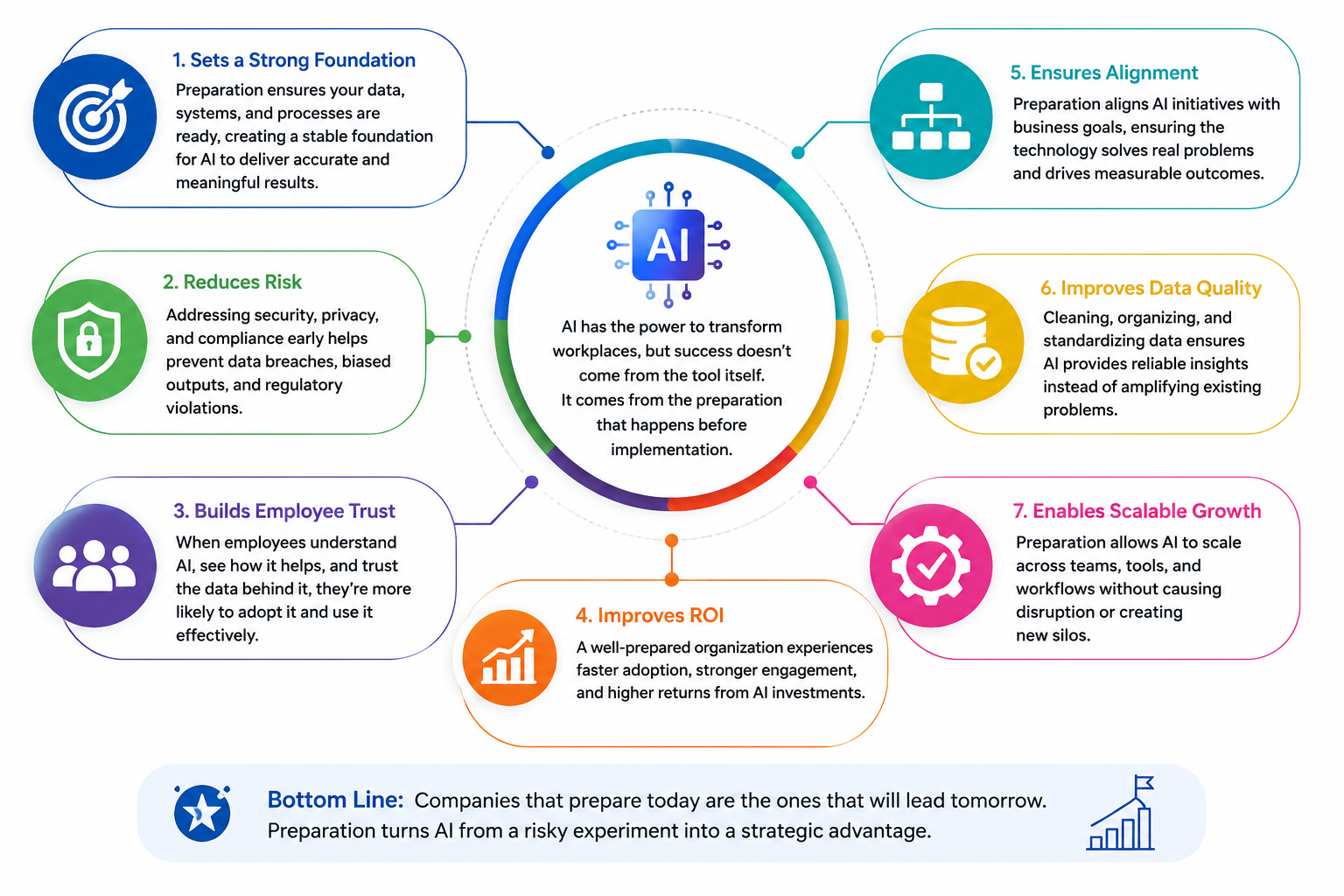
If your employees struggle to find information today, your processes are inconsistent, and your company data is scattered across multiple systems, adding AI won't magically fix those issues.
In many cases, it can actually make them more visible. AI learns from the information and processes you already have. If those foundations are weak, the results will be too.
This is where many organizations run into problems:
- Old systems can't keep up with AI's demands. Legacy software often lacks the integrations, processing capabilities, and flexibility needed to support modern AI-powered workflows.
- Scattered data makes AI models less effective. When information is stored across disconnected platforms, spreadsheets, emails, and file repositories, AI struggles to provide accurate insights and recommendations.
- Weak security opens doors to compliance issues and reputational damage. Without proper governance, access controls, and data protection measures, organizations risk exposing sensitive information and violating regulations.
Why Preparing Your Business for AI Is the Most Important Part
That's why preparation matters so much.
Before introducing AI into workplace tools, organizations need to understand exactly what problems they are trying to solve.
- Are you looking to reduce repetitive administrative work?
- Improve employee productivity?
- Make it easier for staff to access company knowledge?
The clearer your objectives, the easier it becomes to measure success.
This is also where AI integration services can play a valuable role by helping businesses align their goals with the right technology and implementation strategy.
Preparation also helps build trust among employees.
Whenever new technology is introduced, people naturally have questions.
- Will AI replace jobs?
- Will it monitor employees?
- How will it change daily work?
Addressing these concerns early and providing proper training can significantly improve adoption and reduce resistance.
Another critical factor is data quality.
AI systems rely on accurate information to deliver useful outputs.
If your documents are outdated, policies are inconsistent, or company knowledge is poorly organized, employees may receive inaccurate recommendations or answers. Taking time to clean up and structure information before deployment can dramatically improve the value AI delivers.
Ultimately, companies that see the greatest return from AI are not necessarily the ones with the most advanced technology.
They're the ones that invest time in planning, governance, employee education, process improvement, and technology readiness before implementation begins.
When those pieces are in place, AI becomes a powerful business tool that helps employees work smarter, make better decisions, and achieve measurable business outcomes.
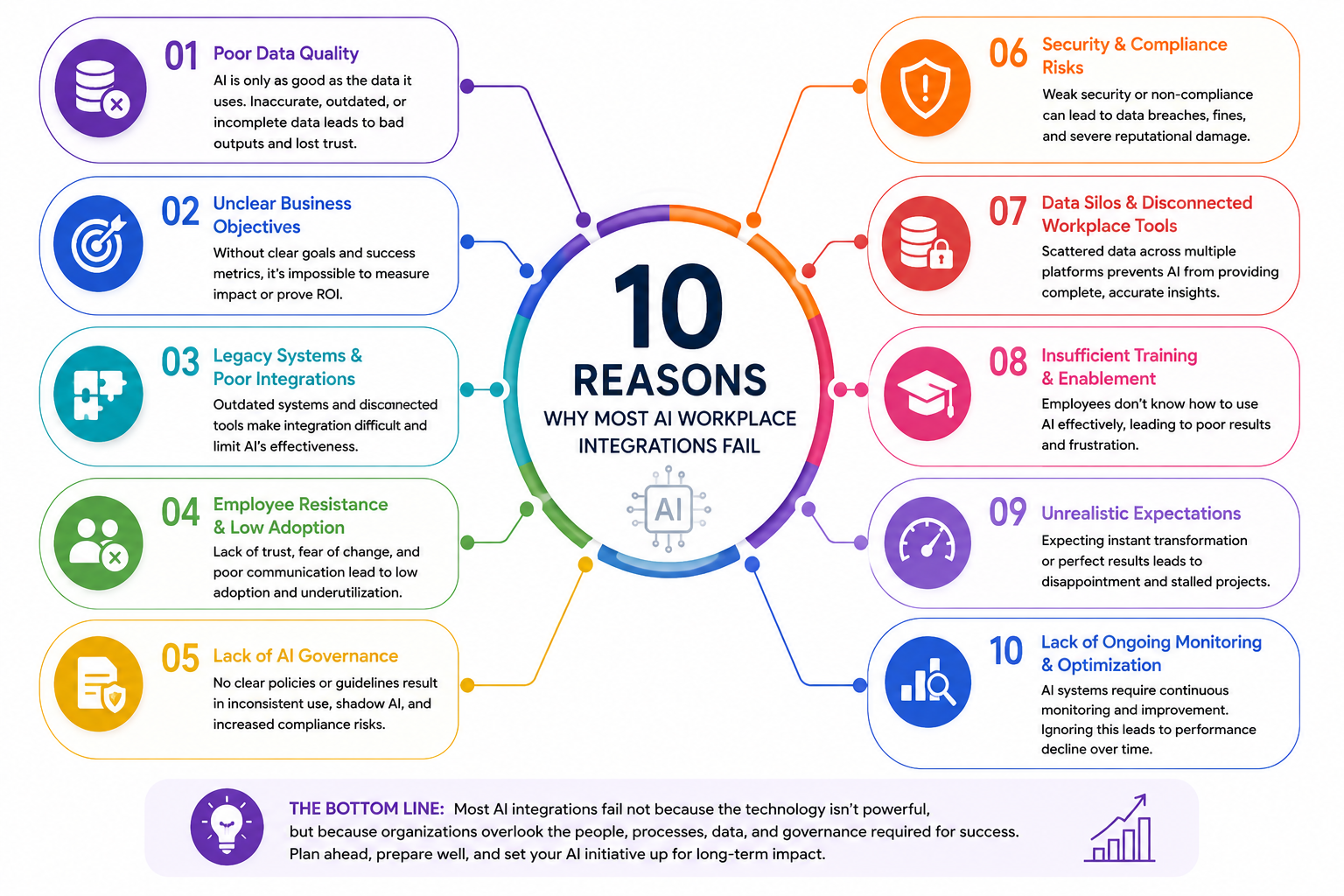
10 Reasons Why Most AI Workplace Integrations Fail
Despite the excitement surrounding artificial intelligence, many workplace AI projects fail to deliver the results companies expect.
The reason is rarely the AI technology itself.
More often, businesses rush into implementation without addressing the people, processes, data, and systems that AI depends on.
Below are some of the most common reasons AI workplace integrations fail.
10 Reasons Why Most AI Workplace Integrations Fail
1. Poor Data Quality
AI is only as good as the information it can access. If company data is outdated, duplicated, inaccurate, or spread across multiple systems, AI tools will struggle to provide reliable insights.
Poor data quality often leads to incorrect recommendations, inaccurate reporting, and reduced trust in the technology.
- A company deploys an AI-powered knowledge assistant, but employees receive conflicting answers because policies are stored across SharePoint sites, PDFs, emails, and outdated intranet pages that haven't been reviewed in years.
- An HR team uses AI to answer employee questions about benefits and leave policies, only to discover that the AI is referencing old documents that no longer reflect the company's current policies and procedures.
2. Unclear Business Objectives
Many organizations adopt AI because it is the latest trend rather than because they have a clear problem to solve.
Without defined goals and success metrics, it becomes difficult to measure value or determine whether the implementation is actually delivering results.
- A business purchases an AI platform because competitors are doing the same, but leadership never defines whether the goal is to improve productivity, reduce support tickets, increase employee engagement, or automate administrative tasks.
- Teams spend months implementing AI features without identifying key performance indicators, making it impossible to determine whether the investment generated any measurable return.
3. Legacy Systems and Outdated Technology
Older workplace systems were not designed to support modern AI capabilities.
Limited integrations, outdated infrastructure, and incompatible software can create significant barriers that slow down deployment and reduce the effectiveness of AI-powered tools.
- A manufacturing company attempts to integrate AI across its operations but discovers that several critical business systems were built more than a decade ago and cannot easily connect to modern AI services.
- Employees continue switching between multiple disconnected applications because the organization's existing software lacks the APIs and integrations needed to support AI-driven workflows.
4. Employee Resistance and Low Adoption
Even the most advanced AI solution will fail if employees don't use it. Workers often worry about job displacement, increased monitoring, or changes to established workflows.
Without proper communication and training, resistance can quickly derail an AI initiative.
- Customer service representatives avoid using a new AI assistant because they fear management will use AI-generated productivity metrics to monitor their performance more closely.
- Employees continue relying on manual processes because they don't understand how AI can help them perform their jobs more efficiently and accurately.
5. Lack of AI Governance
Organizations that fail to establish clear policies around AI usage often face inconsistent adoption and increased risk.
Employees need guidance on when, where, and how AI should be used, especially when handling sensitive business information.
- Different departments adopt different AI tools without approval, creating a situation where company information is being uploaded to multiple third-party platforms with little oversight.
- Employees unknowingly share confidential business information with public AI models because there are no documented guidelines explaining what data can and cannot be used.
6. Security and Compliance Risks
AI systems frequently process large amounts of company and customer data.
Weak security controls can expose organizations to compliance violations, data breaches, regulatory penalties, and reputational damage. Security must be built into every stage of the AI implementation process.
- An employee uploads customer records into a public AI chatbot to generate a report, unknowingly creating a potential compliance violation and exposing sensitive information.
- A company deploys AI-powered tools without conducting a proper security review, only to discover later that access controls allow unauthorized users to view confidential information.
7. Disconnected Workplace Tools
Many businesses operate dozens of different workplace applications that don't communicate effectively with one another. When data remains trapped in silos, AI struggles to provide complete answers and meaningful insights, limiting its overall value.
- Employee data resides in the HR system, documents are stored in SharePoint, projects are managed elsewhere, and internal communications happen in another platform, making it difficult for AI to provide a complete view of the organization.
- Managers expect AI to deliver business insights, but critical information remains fragmented across multiple systems that were never designed to work together.
8. Insufficient Employee Training
Providing access to AI tools is not the same as teaching employees how to use them effectively.
Without training, many users either avoid AI completely or use it incorrectly, reducing productivity gains and increasing business risks.
- Employees ask vague questions and receive poor responses because they have never been trained on prompt writing or how to interact effectively with AI tools.
- Teams become frustrated with AI because they expect perfect answers without understanding its limitations or how to verify outputs.
9. Unrealistic Expectations
AI can improve productivity and automate repetitive work, but it is not a magic solution that instantly fixes every business challenge.
Companies that expect immediate transformation often become disappointed when results take time to materialize.
- Leadership expects AI to reduce operating costs within a few weeks, despite the fact that successful adoption typically requires process changes, training, and ongoing optimization.
- Organizations invest heavily in AI and assume it will automatically improve productivity without first addressing inefficient workflows and outdated processes.
10. Lack of Ongoing Monitoring and Optimization
Successful AI adoption is not a one-time project.
AI systems require ongoing evaluation, feedback, updates, and optimization. Organizations that deploy AI and then ignore it often see performance decline over time.
- An AI chatbot performs well during launch but gradually becomes less useful because new policies, procedures, and business information are never added to its knowledge base.
- Business leaders fail to track adoption rates, employee satisfaction, and performance metrics, making it difficult to identify areas that require improvement.
Most AI workplace integrations fail because businesses focus on the technology before addressing the foundation that supports it.
Companies that invest in data readiness, employee training, security, governance, change management, and modern workplace infrastructure are significantly more likely to achieve measurable results and long-term success from their AI initiatives.
Key Areas Companies Must Prepare Before AI Integration
Once you've identified why AI projects fail, the next step is understanding how to avoid those mistakes.
Successful AI adoption doesn't start with selecting a tool or signing a contract with a vendor. It starts with preparation.
The organizations seeing the greatest success with AI are the ones that take time to build a strong foundation before deployment. They ensure their data is ready, their employees understand the technology, and their systems can support AI-powered workflows.
Think of it as preparing your business for a major transformation rather than simply installing another piece of software.
Here are the key areas every company should focus on before integrating AI into workplace tools.
1. Establish Clear Business Objectives
Before investing in any AI solution, define exactly what success looks like.
Many organizations make the mistake of implementing AI because competitors are doing it or because leadership feels pressure to embrace the latest technology trend.
Instead, start by identifying the specific business problem you want AI to solve.
- Reducing the amount of time employees spend searching for information across multiple systems and documents.
- Automating repetitive administrative tasks such as data entry, report generation, meeting summaries, or employee onboarding activities.
- Improving employee support by providing instant answers to common HR, IT, and workplace-related questions.
The clearer your objectives are, the easier it becomes to measure ROI and determine whether the implementation is delivering real business value.
2. Review Data Quality
Data is the fuel that powers AI. If the data feeding your AI systems is inaccurate, outdated, incomplete, or fragmented, the results will be unreliable.
Before implementation, conduct a thorough review of your organization's information assets.
- Remove duplicate documents and outdated policies that could cause AI systems to provide conflicting answers.
- Standardize naming conventions, document structures, and data formats across departments.
- Ensure company knowledge bases contain current and accurate information that employees can trust.
Many AI projects struggle not because the technology is flawed, but because the underlying information is disorganized.
3. Create AI Governance Policies
AI introduces new risks that require clear rules and oversight.
Employees need guidance on how AI should be used, what information can be shared, and where AI-generated content fits into business processes.
A formal governance framework helps ensure AI is used responsibly and consistently.
- Define which AI tools are approved for business use and which are prohibited.
- Establish approval processes for departments that want to adopt new AI solutions.
- Create guidelines that prevent employees from entering confidential customer, financial, or legal information into public AI systems.
Without governance, organizations often end up with multiple unsanctioned AI tools operating across the business with little oversight.
4. Assess Security and Compliance Risks
Security should be one of the first conversations when planning an AI initiative.
Many AI platforms process large volumes of sensitive information, making data protection essential.
Organizations must understand how data is stored, processed, and protected.
- Review GDPR obligations and industry-specific compliance requirements before sharing data with AI providers.
- Implement role-based permissions to control who can access AI-generated information.
- Evaluate third-party vendors to ensure they meet your organization's security and compliance standards.
Failing to address security early can create significant financial, legal, and reputational risks.
5. Train Employees Early
One of the fastest ways to derail an AI project is to assume employees will automatically understand how to use it.
Successful AI adoption requires education, communication, and hands-on training.
Employees need to understand not only how AI works but also how it can improve their day-to-day responsibilities.
- Provide workshops that teach employees how to create effective prompts and evaluate AI-generated responses.
- Show teams how AI can eliminate repetitive work rather than replace human expertise.
- Create role-specific training programs that demonstrate practical use cases relevant to each department.
Employees who understand AI are far more likely to embrace it and use it effectively.
6. Prepare for Change Management
AI changes how people work, and change can create uncertainty.
Even when AI is introduced with positive intentions, employees may worry about job security, performance monitoring, or increased automation.
This is why change management should be a core part of every AI initiative.
- Clearly communicate why AI is being introduced and how it will benefit employees.
- Address concerns about automation replacing jobs by focusing on augmentation rather than replacement.
- Include employees in pilot programs and gather feedback throughout the rollout process.
When employees feel involved, adoption rates are typically much higher.
7. Audit Existing Workplace Tools
AI performs best when it can access information across the organization.
Before implementation, review the tools employees currently use and identify potential integration challenges.
Many organizations discover that their technology stack contains disconnected systems that prevent AI from delivering its full potential.
- Review employee intranets, communication platforms, document management systems, and HR software.
- Identify duplicate systems that create information silos and data inconsistencies.
- Determine whether existing tools support modern APIs and AI integrations.
The goal is to create a connected digital workplace where AI can access the information employees need.
8. Measure Success from Day One
Many organizations launch AI projects without establishing clear success metrics.
As a result, leadership struggles to determine whether the initiative is creating value.
Before deployment, define the metrics that matter most to your business.
- Measure reductions in time spent searching for information.
- Track improvements in employee productivity and task completion rates.
- Monitor AI adoption rates, user satisfaction scores, and operational cost savings.
Having clear benchmarks allows you to demonstrate ROI and continuously improve your AI strategy over time.
Preparing for AI is not just a technical exercise. It's a business transformation initiative that touches people, processes, technology, security, and culture.
Organizations that invest time in preparation are far more likely to see meaningful results, while those that rush implementation often end up disappointed by poor adoption, inaccurate outputs, and limited business value.
The most successful AI implementations happen when businesses prepare first and deploy second.
How to Prepare Your Company for AI Success in 7 Steps
Now that we've covered the common reasons AI workplace integrations fail, the next question is obvious: what should companies do differently?
The good news is that successful AI adoption isn't reserved for large enterprises with massive budgets.
In most cases, success comes down to preparation, planning, and having the right foundations in place before implementation begins.
Rather than treating AI as a technology project, think of it as a business transformation initiative that affects people, processes, data, and workplace culture.
The table below shows practical access concerns that need planning before workplace AI goes live:
| Workplace area | Access risk | Preparation requirement |
| HR workflows | Sensitive employee details appear in broad search results | Role-based access tied to job function |
| Meeting summaries | Private decisions reach employees outside the project | Participant-based storage and sharing rules |
| Customer portals | Internal notes appear in customer-facing responses | Separate internal and external knowledge sources |
| Productivity reporting | Individual activity data creates trust concerns | Aggregated reporting with clear purpose and ownership |
Start With a Real Business Problem
One of the best ways to ensure success is to focus on a specific challenge that AI can solve.
For example:
- Employees spend too much time searching for information.
- HR teams are overwhelmed with repetitive questions.
- Managers struggle to analyze large volumes of data.
- Support teams spend hours handling routine requests.
Starting with a clear problem makes it easier to measure results and demonstrate value.
Organize and Clean Your Data
AI performs best when it has access to accurate, current, and well-structured information.
Before deployment:
- Remove outdated documents and duplicate files.
- Review policies and procedures for accuracy.
- Consolidate information stored across disconnected systems.
- Create a single source of truth wherever possible.
The cleaner your data, the more useful your AI tools will be.
Prepare Employees Early
AI adoption is often more about people than technology.
Employees need to understand:
- Why AI is being introduced.
- How it will help them in their role.
- What tasks it can automate.
- What limitations it has.
Providing training and clear communication from the start helps reduce resistance and encourages adoption.
Strengthen Security and Governance
Before employees begin using AI tools, establish clear guidelines and controls.
This should include:
- Approved AI platforms and applications.
- Data privacy and security policies.
- Rules for handling confidential information.
- Processes for reviewing AI-generated content.
Strong governance reduces risk and builds confidence across the organization.
Modernize Where Necessary
Many businesses discover that outdated systems become a barrier to successful AI implementation.
Review your existing workplace technology and identify:
- Legacy applications that cannot integrate with AI.
- Information silos that limit access to data.
- Manual processes that could be automated.
- Systems that create duplicate or inconsistent information.
AI delivers the most value when connected to a modern digital workplace environment.
Start Small and Scale Gradually
ne of the most effective strategies is to begin with a focused pilot project.
For example:
- Deploy an AI-powered employee knowledge assistant.
- Automate onboarding documentation.
- Introduce AI meeting summaries.
- Use AI to support HR or IT helpdesk requests.
Small wins build confidence, generate employee buy-in, and provide valuable lessons before expanding AI across the organization.
Measure and Improve Continuously
AI is not a one-time deployment.
The most successful organizations continuously evaluate performance and look for opportunities to improve.
Track metrics such as:
- Employee adoption rates.
- Time savings.
- Productivity improvements.
- Employee satisfaction.
- Cost reductions.
Regular measurement helps ensure AI continues delivering value as the business evolves.
Companies that succeed with AI don't simply buy the latest tools and hope for the best. They prepare their data, train their employees, strengthen security, establish governance, and create a clear roadmap for adoption.
When businesses take this approach, AI becomes more than just another workplace technology. It becomes a strategic advantage that helps employees work smarter, improves decision-making, and creates lasting business value.
Common Reasons AI Workplace Integrations Fail
By this point, it's easy to see why simply purchasing an AI solution isn't enough.
While AI has the potential to improve productivity, automate repetitive work, and help employees make better decisions, many organizations never achieve those benefits.
The reality is that most AI failures have very little to do with the technology itself. Instead, they occur because businesses fail to prepare their people, processes, data, and systems before deployment.
In fact, recent research found that 66% of employees admit to using unauthorized AI tools at work when official guidance is unclear, creating significant security, compliance, and governance risks for organizations.
This highlights a growing challenge: employees are often adopting AI faster than businesses can establish policies and controls.
Below are some of the most common reasons workplace AI initiatives struggle or fail altogether.
66%
of employees
Recent research found that 66% of employees admit to using unauthorized AI tools at work when official guidance is unclear, creating significant security, compliance, and governance risks for organizations.
Source: Workplace AI Adoption Research
Poor Quality Data
AI systems depend on reliable information to generate accurate responses and recommendations.
When company data is incomplete, outdated, duplicated, or spread across multiple locations, AI tools become far less effective.
For example, if employees store information across emails, shared drives, intranet pages, PDFs, and spreadsheets, AI may pull conflicting information from multiple sources. Instead of improving productivity, employees spend more time verifying whether the AI's answers are correct.
Lack of Employee Training
Many organizations assume employees will naturally know how to use AI once it's available. Unfortunately, that's rarely the case.
Without proper training, employees often struggle to write effective prompts, evaluate AI-generated outputs, or understand the technology's limitations. This leads to frustration, low adoption rates, and poor results.
For example, an employee might ask vague questions and receive generic responses, leading them to conclude that the AI tool isn't useful when the real issue is a lack of training.
No Governance Framework
AI needs clear rules and boundaries. Without governance, employees often adopt different AI tools independently, creating inconsistent processes and unnecessary risk.
A governance framework should define:
- Which AI tools employees can use.
- What company data can be shared.
- How AI-generated content should be reviewed.
- Who is responsible for oversight and compliance.
Without these guidelines, AI adoption can quickly become chaotic and difficult to manage.
Unrealistic Expectations
One of the biggest mistakes companies make is expecting AI to deliver immediate transformation.
AI is not a magic button that instantly solves productivity challenges, fixes broken processes, or eliminates inefficiencies. Like any major business initiative, successful implementation takes planning, testing, training, and continuous improvement.
Organizations that expect overnight results often become disappointed before the technology has had an opportunity to demonstrate its value.
Weak Leadership Support
Successful AI adoption requires strong leadership involvement. When executives treat AI as a technology project rather than a business transformation initiative, projects often lose momentum.
Employees look to leadership for direction. If leaders fail to communicate the purpose of AI, provide resources, or actively support adoption efforts, employees are less likely to embrace the change.
Strong leadership helps create alignment, establish priorities, and ensure AI initiatives remain connected to business goals.
Security Concerns
AI systems frequently process sensitive business information, making security a critical consideration.
Organizations that fail to assess security risks before deployment may expose confidential employee records, customer information, financial data, or intellectual property.
For example, employees may unknowingly upload confidential information into public AI platforms without understanding where that data is stored or how it may be used. This can create significant compliance and reputational risks.
Resistance to Change
People naturally resist changes that affect how they work. AI often creates concerns around job security, workplace monitoring, and changing responsibilities.
If employees believe AI is being introduced to replace them rather than support them, resistance can quickly emerge.
Successful organizations address these concerns early by clearly explaining how AI will help employees eliminate repetitive tasks, improve productivity, and focus on higher-value work rather than replacing human expertise.
Most AI workplace integrations fail because organizations focus on the technology before addressing the fundamentals. Companies that invest in data readiness, employee training, governance, leadership alignment, security, and change management create a much stronger foundation for long-term success.
The organizations winning with AI aren't necessarily using the most advanced tools. They're the ones doing the preparation work before implementation begins.
Why Building Trust in AI Is Essential
When companies talk about integrating AI into workplace tools, the conversation often focuses on productivity, automation, and efficiency. However, one of the most important factors for long-term success is trust.
Employees need confidence that the AI tools they use are secure, accurate, and reliable.
If an AI system delivers inconsistent answers, exposes sensitive information, or produces questionable results, adoption can quickly stall. Instead of improving workflows, the technology can create uncertainty, frustration, and resistance across the organization.
That's why organizations must look beyond AI features and evaluate how trustworthy the technology really is.
Reliability Creates Confidence
Employees are far more likely to embrace AI when it consistently provides accurate and useful information. Reliable AI tools help teams make decisions faster, complete tasks more efficiently, and reduce time spent searching for information.
For example:
- An AI-powered knowledge assistant should provide consistent answers based on approved company information.
- AI-generated reports and recommendations should be accurate enough for employees to trust and act upon.
- Workplace AI tools should perform consistently as business needs and company data evolve.
When employees can depend on AI, adoption naturally increases.
Security Must Be a Priority
AI systems often have access to sensitive company information, employee records, customer data, and business processes. Without proper security controls, organizations risk creating new vulnerabilities.
Key considerations include:
- Protecting confidential business information from unauthorized access.
- Preventing employees from accidentally sharing sensitive data with public AI tools.
- Ensuring AI platforms meet organizational security and compliance requirements.
- Monitoring AI systems for unusual activity or potential threats.
Strong security practices help protect both the organization and employee trust.
Governance Helps Reduce Risk
As AI becomes more embedded into daily work, businesses need clear policies that define how it should be used.
This includes:
- Establishing approved AI tools and platforms.
- Defining what data can and cannot be shared with AI systems.
- Creating review processes for AI-generated content.
- Ensuring compliance with industry regulations and privacy requirements.
Governance helps organizations maintain control while enabling employees to use AI responsibly.
The most successful AI initiatives are not always the ones with the most advanced technology. They are the ones where employees trust the systems they are using.
When AI is secure, reliable, transparent, and properly governed, employees are more likely to embrace it as a tool that helps them work smarter. That trust becomes the foundation for successful adoption, stronger collaboration, and better business outcomes across the organization.
Final Thoughts
Artificial intelligence has the potential to transform the workplace, but successful AI adoption starts long before the technology is deployed.
While many organizations focus on selecting the right AI tools, the companies that achieve the best results are the ones that invest time in preparation.
As we've explored throughout this guide, common challenges such as poor data quality, outdated systems, weak governance, security concerns, and employee resistance can quickly derail even the most promising AI initiatives.
The good news is that these issues are largely preventable when businesses take a strategic approach to implementation.
The key is to view AI as more than a software upgrade. It's a business transformation that affects how employees work, how information flows through the organization, and how decisions are made.
By establishing clear objectives, improving data quality, training employees, strengthening security, and creating a governance framework, organizations can build a strong foundation for long-term success.
The workplace of the future will undoubtedly be powered by AI, but the organizations that benefit the most won't necessarily be those with the most advanced technology.
They'll be the companies that prepare properly, earn employee trust, and implement AI in a way that supports people rather than disrupts them.
If you're considering integrating AI into workplace tools, don't start with the technology. Start with the foundation. That's what ultimately determines whether AI becomes a costly experiment or a powerful driver of productivity, innovation, and business growth.
AI Summary
- Successfully integrating AI into workplace tools requires preparation across people, processes, data, security, and technology rather than simply selecting an AI platform and deploying it.
- Organizations that achieve the best results from AI typically focus on data quality, employee training, governance, compliance, and change management before implementation begins.
- Common reasons AI workplace integrations fail include poor data quality, outdated systems, weak security controls, unclear business objectives, low employee adoption, and unrealistic expectations.
- AI is changing the workplace by automating repetitive tasks, improving access to information, enhancing decision-making, streamlining employee support, and helping teams work more efficiently.
- Building trust is critical for AI adoption. Employees are more likely to embrace AI tools when they are secure, reliable, transparent, and supported by clear governance policies.
- Companies that prepare properly can reduce risk, accelerate adoption, improve productivity, strengthen decision-making, and create a stronger foundation for long-term AI success.
Most Popular Posts

Effective communication among team members is vital for the productivity and success of any organization. Surprisingly, 60% of companies lack a long-term internal communication strategy, which p...


Businesses thrive on communication for efficiency, productivity and accomplishment. When the right information is passed from the right designation in the organization, it promotes positivity an...

Categories
Blog
(3176)
Business Management
(393)
Employee Engagement
(234)
Digital Transformation
(214)
Growth
(149)
Intranets
(141)
Internal communications
(106)
Remote Work
(68)
Sales
(53)
Collaboration
(52)
Customer Experience
(32)
Culture
(30)
Knowledge Management
(29)
Project management
(29)
Leadership
(20)
Comparisons
(9)
News
(1)

Related Posts

Most workplace incidents do not start with one dramatic failure. They usually begin with something ordinary: a blocked walkway, rushed manual handling, a poorly set-up workstation, unclear procedures, or a safety concern that nobody reported. U...

Are you still relying on spreadsheets to manage your customer data? If so, you're not alone—but you might be holding your business back. A study by Forrester found that 68% of sales professionals waste time switching between tools to find customer in...

Cyber Essentials is often described as a technical certification, but it is really a practical test of whether a business has the basics under control. That matters because cyber incidents rarely stay inside the IT department. They can interrupt payr...

Outsourced IT support becomes worth considering when technology problems stop being minor inconveniences and begin affecting how the business operates. A slow laptop or one-off password reset is manageable. But recurring downtime, unresolved support ...

An intranet network example in business could be as simple as a central employee hub where people find company policies, announcements, forms, training, documents and team updates. In practice, managing it well takes more than putting files beh...


Jill Romford
I am a digital nomad, lover of exploring new places and making friends.
I love to travel and I love the internet. I take pictures of my travels and share them on the internet using Instagram.
Traveler, entrepreneur, and community builder. I share my insights on digital marketing and social media while inspiring you to live your fullest life.
Ready to learn more? 👍
One platform to optimize, manage and track all of your teams. Your new digital workplace is a click away. 🚀
Free for 14 days, no credit card required.