
Insight Blog
Agility’s perspectives on transforming the employee's experience throughout remote transformation using connected enterprise tools.
58 minutes reading time
(11516 words)
Best Workplace Operations Platforms for Modern Businesses in 2026

Best Workplace Operations Platforms for Modern Businesses
Discover the best workplace operations platforms for managing communication, workflows, employee engagement, task management, and collaboration in one place. Compare features, pricing, pros, and ideal use cases.
Best Workplace Operations Platforms for Modern Businesses

Most businesses today are drowning in disconnected workplace tools.
One platform handles communication, another manages projects, another stores documents, while HR teams rely on separate systems for onboarding, engagement, and employee updates.
The result? Employees waste time switching between apps, managers struggle to maintain visibility across teams, and important information constantly gets lost between systems.
That's exactly why businesses are increasingly searching for the best workplace operations platforms to centralize communication, automate workflows, and improve operational efficiency.
The shift toward hybrid and remote work has dramatically changed how businesses operate.
According to Microsoft's Work Trend Index, over 70% of employees now want flexible remote work options, while business leaders are under increasing pressure to maintain productivity, collaboration, and operational visibility across distributed teams.
At the same time, Gartner predicts that by 2027, nearly 50% of large enterprises will rely on unified digital workplace platforms to reduce operational fragmentation and improve employee experience.
50%
of large enterprises
According to Gartner, by 2027, nearly 50% of large enterprises will rely on unified digital workplace platforms to reduce operational fragmentation and improve employee experience.
Source: Gartner
The operational challenges are becoming harder to ignore.
Research from Atlassian found that employees switch between workplace applications nearly 1,200 times per day, creating constant interruptions that reduce focus and productivity.
Meanwhile, Gallup reports that disengaged employees cost the global economy an estimated $8.9 trillion annually in lost productivity, much of which is tied to poor communication, disconnected systems, and inefficient workplace processes.
$8.9T
annual productivity loss
According to Gallup, disengaged employees cost the global economy an estimated $8.9 trillion annually in lost productivity, much of which is linked to poor communication, disconnected systems, and inefficient workplace processes.
Source: Gallup
Modern businesses are now realizing that workplace operations are no longer just about project management or internal communication alone.
Companies need centralized systems that combine communication, workflow automation, knowledge management, employee engagement, document collaboration, approvals, analytics, and mobile accessibility into one connected digital workplace.
This is where modern workplace operations software is changing the game.
Instead of forcing employees to jump between dozens of disconnected apps, businesses are adopting unified workplace operations platforms that streamline daily work, improve cross-team collaboration, reduce operational bottlenecks, and create a more connected employee experience.
These platforms are rapidly becoming the operational backbone of modern organizations, especially for hybrid teams, frontline workers, and fast-growing companies managing complex workflows across multiple departments.
In this guide, we'll break down the best workplace operations platforms available today, compare their features, strengths, pricing, and ideal use cases, and help you determine which solution is the best fit for your business
Key Takeaways
- Workplace operations platforms help businesses centralize communication, workflows, collaboration, and operational visibility into one connected digital workplace.
- Hybrid and remote work environments have increased demand for workplace management software that supports mobile employees, distributed teams, and frontline workers.
- Businesses using disconnected workplace tools often experience productivity loss, operational silos, poor communication, and inefficient workflow management.
- The best workplace operations software combines employee communication, workflow automation, document management, analytics, and team collaboration into a unified platform.
- Modern organizations increasingly prioritize scalability, employee experience, operational efficiency, and system integrations when selecting workplace collaboration platforms.
What Is a Workplace Operations Platform?
A workplace operations platform is a centralized digital system designed to help businesses manage communication, workflows, employee collaboration, daily operations, and internal processes from one connected workspace.
Instead of relying on disconnected tools for messaging, project management, file sharing, employee engagement, approvals, and operational tracking, businesses use workplace operations software to bring everything together into a single platform.
This helps teams work faster, stay aligned, and reduce operational bottlenecks across departments.
Modern companies are increasingly investing in workforce software because workplace operations have become far more complex in hybrid and remote environments.
Employees now work across multiple locations, devices, and time zones, making it difficult for managers to maintain visibility and consistency without centralized systems.
According to Gartner, organizations using connected digital workplace platforms often experience higher employee productivity, better collaboration, and improved operational efficiency compared to businesses using fragmented workplace tools.
Today, many of the top workplace operations platforms combine features traditionally spread across intranet systems, project management tools, collaboration apps, and employee communication software into one integrated experience.
How workplace operations platforms help businesses run more efficiently
Modern workplace operations software is designed to simplify how businesses manage their workforce, communication, and day-to-day operations.
Here's what these platforms are commonly used for:
Help businesses Centralized Communication
Employees can access company announcements, chat channels, updates, documents, and team discussions from one place instead of jumping between multiple applications.
This improves:
- Internal communication
- Employee engagement
- Cross-team collaboration
- Information visibility
Improves Workflow Automation
Businesses use workplace operations platforms to automate repetitive operational tasks such as:
- Employee onboarding
- Approval workflows
- Leave requests
- Document sign-offs
- IT requests
- Compliance tracking
Automation helps reduce manual admin work while improving consistency and accountability.
Helps Coordinate Employee Within The Workforce
Many businesses also use these systems alongside workforce management software companies to improve workforce coordination, scheduling, operational oversight, and employee productivity.
Some platforms include:
- Shift management
- Employee directories
- Performance tracking
- Department management
- Task assignments
- Operational reporting
These capabilities are becoming increasingly important for hybrid, remote, and frontline workforces.
Knowledge Sharing and Document Management
A major challenge for growing businesses is keeping company knowledge organized and accessible.
Workplace operations platforms help centralize:
- SOPs
- Policies
- Training materials
- HR documentation
- Internal wikis
- Shared files
This reduces knowledge silos and makes onboarding significantly easier for new employees.
Better Visibility Across Business Operations
One of the biggest advantages of workplace operations software is operational visibility.
Managers and leadership teams can monitor:
- Workflow progress
- Team activity
- Operational bottlenecks
- Employee engagement
- Communication trends
- Department performance
This helps businesses make faster and more informed decisions.
The difference between workplace operations software and traditional intranet tools
Traditional intranet platforms were originally built as static internal websites where businesses could publish company news and store documents.
While useful at the time, many older intranets lack the flexibility modern businesses now require.
Modern workplace operations platforms go much further by combining:
- Employee communication
- Workflow automation
- Collaboration tools
- Task management
- Mobile accessibility
- Employee engagement features
- Operational analytics
For example, traditional intranets mainly focused on information publishing, while modern workforce management software examples like AgilityPortal, Monday.com, ClickUp, and Microsoft Viva focus on improving real-time collaboration and operational efficiency.
Today's businesses increasingly prefer connected workplace ecosystems instead of relying on separate tools for communication, collaboration, and operations management.
As hybrid work continues to grow, workplace operations platforms are quickly becoming the operational backbone of modern organizations.
Why Businesses Are Investing in Workplace Operations Platforms
Businesses are investing heavily in workplace operations platforms because managing modern teams has become far more complex.
Remote work, hybrid collaboration, and digital transformation have created growing challenges around communication, workflow management, and operational visibility.
Instead of relying on disconnected systems, companies are now adopting centralized workforce software that combines communication, collaboration, workflow automation, and employee management into one connected platform.
Gartner predicts digital workplace technology will continue becoming a core business priority as organizations focus on productivity and employee experience.
Remote and hybrid work created operational complexity
Hybrid and remote work have changed how businesses operate.
Teams now work across multiple locations and devices, making it difficult to maintain communication and operational consistency without centralized workplace systems.
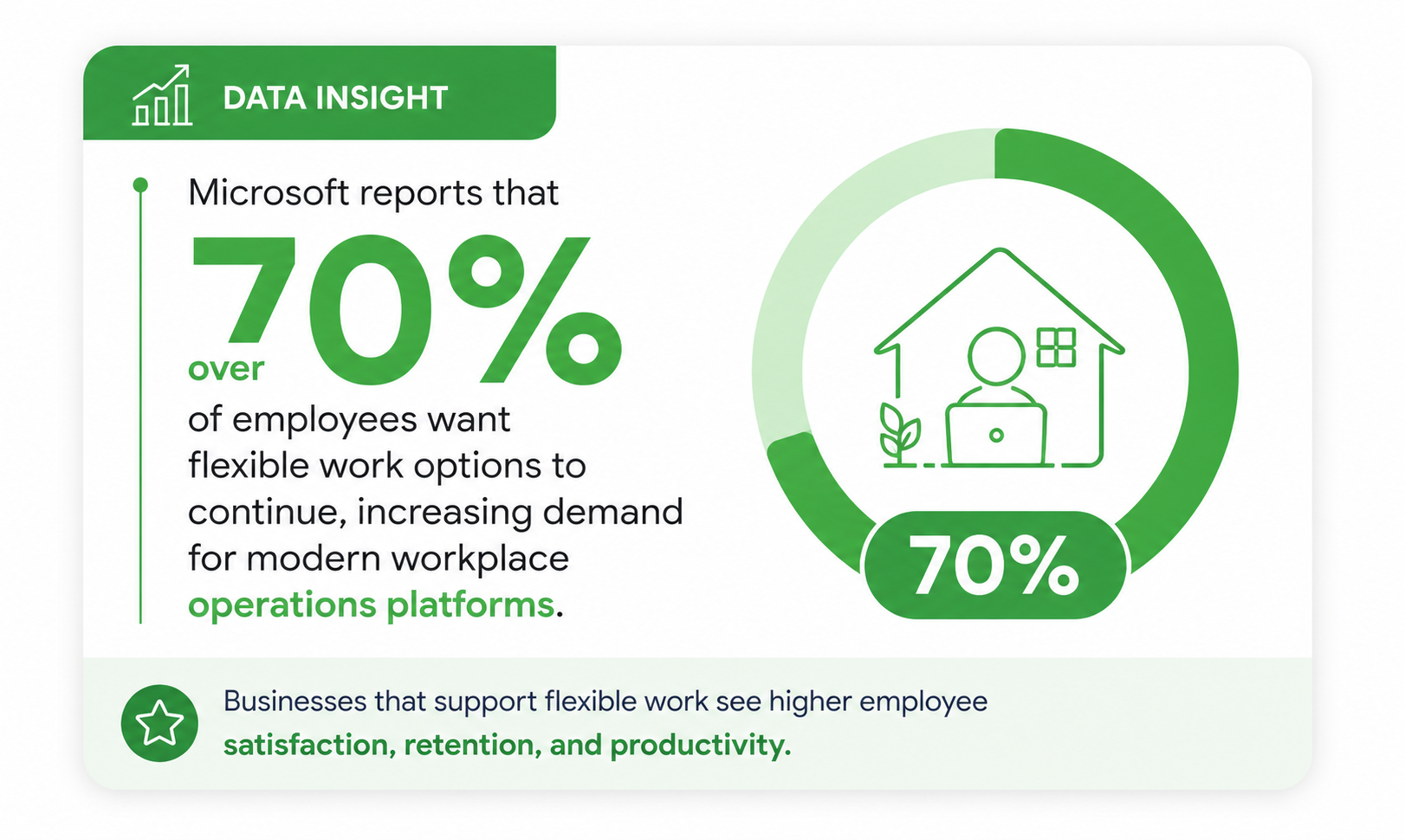
Microsoft reports that over 70% of employees want flexible work options to continue, increasing demand for modern workplace operations platforms.
Many businesses are now turning to workforce management software companies that provide mobile access, employee communication tools, workflow automation, and operational oversight designed for distributed teams.
These platforms help businesses keep employees connected while improving coordination across remote, hybrid, and frontline workforces.
Disconnected systems reduce productivity and employee experience
Many businesses still rely on multiple disconnected tools for communication, documents, project management, and approvals. This often creates operational silos and slows productivity.
Research from Atlassian found employees switch between apps nearly 1,200 times per day, leading to constant interruptions and reduced efficiency.
Modern workforce software solves this problem by centralizing communication, collaboration, knowledge management, workflows, and operational processes into one digital workplace platform.
When employees can access everything from a single system, businesses often improve collaboration, onboarding, productivity, and employee experience.
1,200
app switches per day
According to Atlassian, employees switch between apps nearly 1,200 times per day, creating constant interruptions, lost focus, and reduced workplace efficiency.
Source: Atlassian
Companies need better visibility across teams and workflows
As organizations grow, maintaining visibility across workflows and departments becomes harder. Managers often struggle to track approvals, monitor workloads, and identify operational bottlenecks across multiple systems.
Modern workplace operations platforms provide centralized dashboards, workflow tracking, reporting, and analytics that improve operational visibility.
Many popular workforce management software examples now include task tracking, employee engagement analytics, approval management, and department reporting tools.
This helps businesses make faster decisions while improving accountability and operational efficiency.
Employee communication and operations now overlap
Communication and operations are now deeply connected inside modern businesses.
Employees increasingly rely on workplace platforms not only for messaging, but also for onboarding, approvals, collaboration, company updates, and daily operational tasks.
Businesses are moving away from standalone communication tools and adopting unified workplace operations software that combines employee engagement, workflow management, knowledge sharing, and collaboration into one connected ecosystem.
This is why many of the top workplace operations platforms now focus on both employee experience and operational efficiency together, helping businesses create more connected, productive, and engaged workplaces.
Key Features to Look for in the Best Workplace Operations Platforms
Choosing the right workplace operations platform is no longer just about messaging or project management.
Modern businesses need connected systems that improve collaboration, automate repetitive tasks, support employee productivity, and create a better digital employee experience across the organization.
The best workplace productivity software helps businesses simplify operations while keeping employees connected, informed, and aligned across every department.
Internal communication and company-wide announcements
Strong internal communication features help businesses keep employees informed, connected, and engaged regardless of where they work.
Modern employee communication platforms centralize company updates, leadership announcements, discussions, and department collaboration into one digital workspace.
Key features often include:
- Real-time company news feeds that allow businesses to distribute important updates quickly across departments and remote teams.
- Team messaging channels that improve collaboration between employees, managers, and operational teams without relying heavily on email.
- Employee directories with searchable profiles, departments, and reporting structures that make it easier to connect with coworkers.
- Social engagement tools such as reactions, comments, polls, and recognition features that help improve workplace culture and participation.
- Targeted announcements that allow HR and leadership teams to send updates to specific offices, departments, regions, or frontline groups.
Workflow automation and approvals
Workflow automation tools help organizations reduce manual work while improving operational consistency and accountability.
Businesses increasingly rely on business process automation software to simplify repetitive operational tasks and approvals.
Common workflow capabilities include:
- Automated leave requests and approval routing that reduce HR administration and speed up employee requests.
- Digital onboarding workflows that guide new hires through training, document submission, and compliance tasks automatically.
- IT and operational request forms that help businesses manage support tickets, equipment requests, and internal service processes more efficiently.
- Multi-stage approval chains that improve governance for procurement, finance, compliance, and policy sign-offs.
Employee engagement and feedback tool
Employee engagement software has become a major priority for businesses focused on retention, culture, and workplace performance.
Modern digital workplace platforms now include tools that help organizations measure employee sentiment and improve workforce engagement.
Important engagement features may include:
- Pulse surveys that collect real-time employee feedback and help leadership identify workplace concerns early.
- Recognition systems that encourage peer appreciation, employee rewards, and company-wide acknowledgment programs.
- Employee wellbeing check-ins that help organizations monitor morale and workplace satisfaction across hybrid teams.
- Interactive discussion spaces where employees can share ideas, ask questions, and participate in company conversations.
- Feedback reporting dashboards that help HR teams track engagement trends and participation levels over time.
- Employee recognition leaderboards that create stronger workplace culture and improve team motivation.
Knowledge management and document sharing
One of the biggest operational challenges businesses face is organizing company knowledge across multiple systems.
Knowledge management software helps centralize business information so employees can quickly access the resources they need.
Modern document management features often include:
- Centralized document libraries that store policies, procedures, training resources, and operational documentation securely.
- Smart search functionality that helps employees locate files, SOPs, and internal knowledge faster.
- Version control systems that reduce confusion by ensuring employees always access the latest approved document versions.
- Permission-based access controls that help businesses manage sensitive information across departments and external users.
- Collaborative editing tools that allow teams to work together on shared documents and operational resources in real time.
Task management and operational tracking
Task management tools help businesses organize projects, monitor progress, and improve operational accountability.
Many workplace collaboration platforms now combine task coordination with communication and workflow visibility.
Useful operational management features may include:
- Shared project boards that allow teams to organize operational tasks, deadlines, and responsibilities visually.
- Progress tracking systems that help managers monitor workloads and identify delayed tasks before they become bottlenecks.
- Calendar and scheduling tools that improve coordination across departments, projects, and operational activities.
- Department-based workspaces that help businesses separate projects, workflows, and operational responsibilities more effectively.
Mobile access for frontline and remote employees
Mobile workplace accessibility has become essential as businesses continue supporting remote, field-based, and frontline workers.
Employees increasingly expect secure access to workplace systems from smartphones and tablets.
Strong mobile workplace platforms typically provide:
- Dedicated mobile apps that allow employees to access communication tools, company updates, and operational workflows from anywhere.
- Push notifications that keep remote and frontline workers informed about urgent announcements, approvals, and team activity.
- Offline access capabilities that allow employees to continue viewing important resources even with limited internet connectivity.
- Mobile-friendly employee hubs that simplify onboarding, shift updates, training access, and company communication for deskless teams.
- Multi-device synchronization that ensures employees receive a consistent experience across desktop, tablet, and mobile platforms.
Integrations With Business Applications and Enterprise Systems
Modern workplace integration capabilities are critical for reducing software silos and improving operational efficiency.
Businesses increasingly prefer connected workplace ecosystems that integrate with existing enterprise tools.
Many workplace operations platforms now support:
- Microsoft 365 integrations for document collaboration, Outlook syncing, SharePoint connectivity, and Teams communication.
- Google Workspace integrations that support shared calendars, Gmail access, cloud file storage, and collaborative editing.
- HR software connectivity that synchronizes employee profiles, onboarding data, payroll systems, and organizational structures.
- CRM integrations that help operational teams connect customer information, workflows, and internal collaboration processes together.
- Third-party API access that allows businesses to connect operational systems, custom applications, and automation tools more easily.
- Single sign-on functionality that improves security while simplifying employee access across workplace applications.
Analytics, Dashboards, and Workplace Reporting Tools
Data visibility has become one of the most valuable features inside modern workplace management platforms.
Businesses now rely on operational analytics to improve decision-making, employee productivity, and organizational performance.
Advanced reporting features often include:
- Real-time workplace dashboards that provide visibility into employee activity, engagement, and operational workflows.
- Communication analytics that help businesses measure announcement reach, platform adoption, and employee participation.
- Workflow reporting tools that identify bottlenecks, delayed approvals, and operational inefficiencies across departments.
- Employee usage insights that help organizations understand how teams interact with workplace systems and digital tools.
- Custom reporting capabilities that allow leadership teams to track operational KPIs, productivity metrics, and engagement trends.
10 of The Best Workplace Operations Platforms Compared
| Platform | Best For | Key Strength | Mobile App | Paid or Free |
| AgilityPortal | All-in-one workplace operations | Communication + operations | Yes | Paid |
| Microsoft Viva | Microsoft ecosystem | Enterprise integrations | Yes | Paid |
| Monday.com | Workflow management | Visual workflows | Yes | Paid |
| ClickUp | Operations + tasks | Productivity features | Yes | Paid |
| Asana | Project operations | Task coordination | Yes | Paid |
| Notion | Documentation workflows | Knowledge management | Yes | Free/Paid |
| Slack | Team communication | Messaging | Yes | Free/Paid |
| Wrike | Enterprise workflows | Resource management | Yes | Paid |
| Bitrix24 | SMB operations | CRM + collaboration | Yes | Free/Paid |
| Zoho Workplace | Budget-conscious teams | Business suite | Yes | Paid |
Detailed Review of the Best Workplace Operations Platforms
Choosing the right workplace operations platform can dramatically improve communication, workflow efficiency, employee engagement, and overall business productivity.
Below is a detailed review of the best workplace operations platforms businesses are using to manage hybrid teams, streamline operations, and create more connected digital workplaces.
#1. AgilityPortal — The All-in-One Workplace Platform for Hybrid Teams
#1. AgilityPortal — The All-in-One Workplace Platform for Hybrid Teams
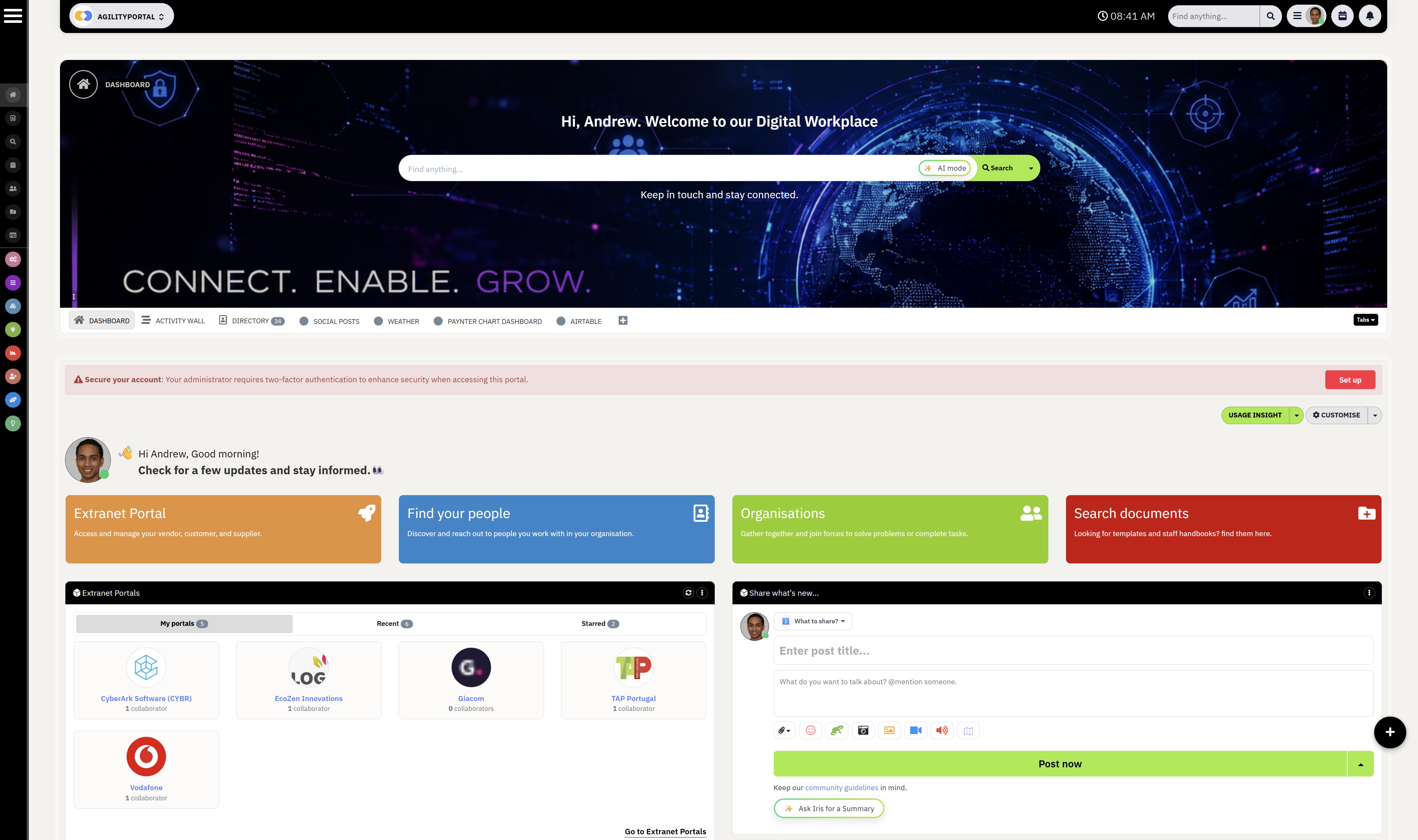
The AgilityPortal App helps businesses centralize communication, workflows, collaboration, and employee engagement into one connected digital workplace.
Unlike traditional intranet software or standalone chat tools, AgilityPortal App is designed to simplify workplace operations for hybrid, remote, and frontline teams.
The platform allows businesses to manage company communication, automate approvals, organize documents, and improve operational visibility from a single workspace accessible on desktop and mobile devices.
Workplace Operations Platforms
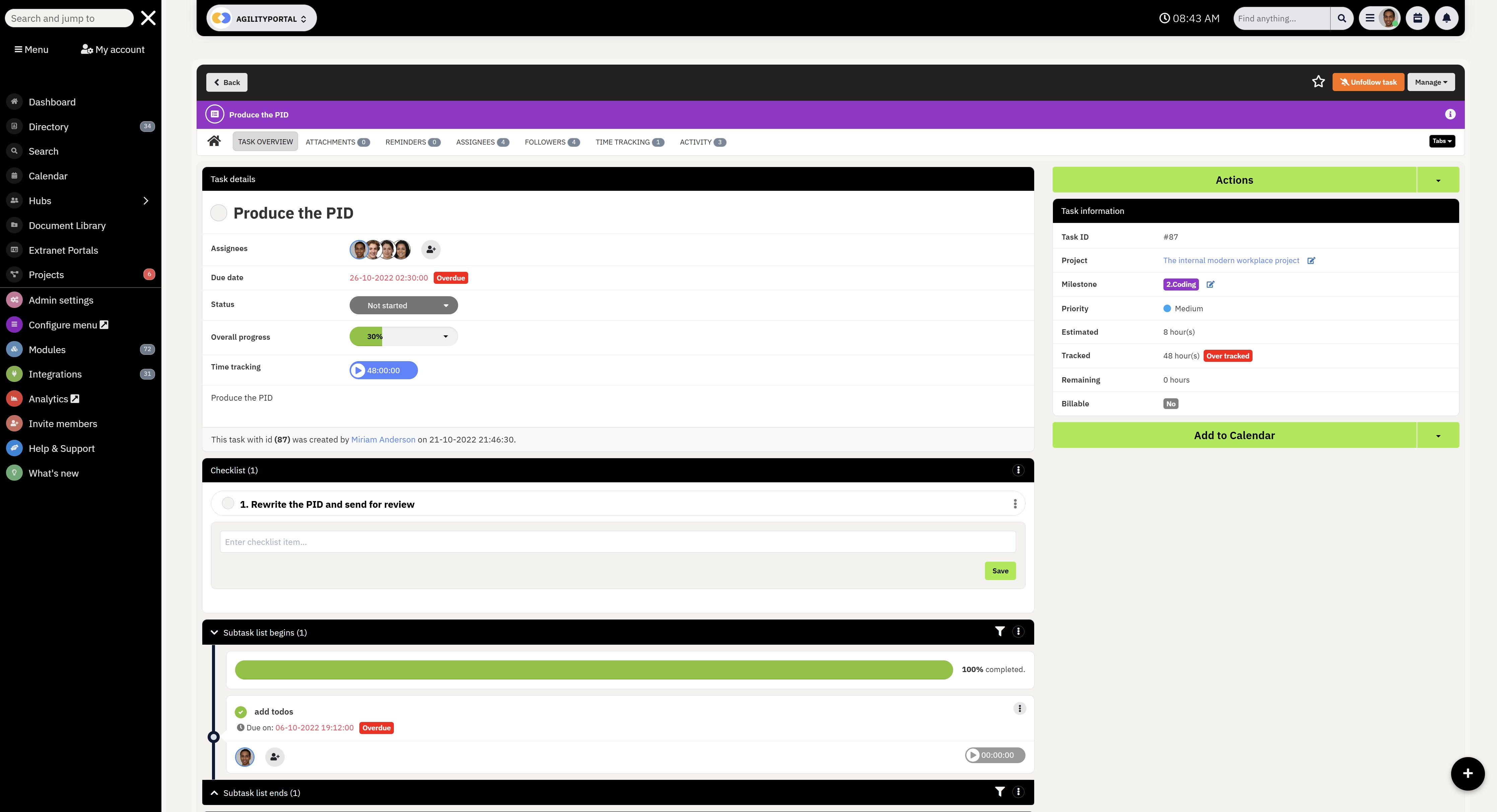
Key capabilities include:
- Centralized employee communication tools that support announcements, messaging, team collaboration, and company-wide updates.
- Workflow automation features that simplify onboarding, approvals, HR requests, and operational processes.
- Secure document and knowledge management tools that organize company files, SOPs, and training resources in one searchable hub.
- Mobile-first functionality that keeps frontline and remote employees connected from anywhere.
- Employee engagement features including social feeds, polls, recognition tools, and workplace feedback systems.
AgilityPortal is ideal for businesses looking to reduce software fragmentation while improving productivity, collaboration, and employee experience across the organization.
#2. Microsoft Viva — The Best Workplace Platform for Microsoft 365 Environments

#2. Microsoft Viva — The Best Workplace Platform for Microsoft 365 Environments
Microsoft Viva is a workplace experience platform built for organizations already using the Microsoft ecosystem.
Designed to work alongside Microsoft Teams and Microsoft 365, Viva helps businesses improve employee communication, learning, engagement, and knowledge sharing across large enterprises.
The platform focuses heavily on employee experience and internal connectivity, making it popular among enterprise organizations managing hybrid and remote teams.
Key capabilities include:
- Deep Microsoft Teams integration that centralizes workplace communication, company updates, and collaboration inside one familiar environment.
- Employee engagement and wellbeing tools that help businesses measure workforce sentiment and improve workplace culture.
- Knowledge management features powered by Microsoft SharePoint and AI-driven content discovery.
- Learning and training modules that allow organizations to deliver courses, onboarding, and professional development directly inside the platform.
- Enterprise-grade security, compliance, and identity management supported through the broader Microsoft ecosystem.
Microsoft Viva works best for large organizations already invested in Microsoft 365 that want to extend collaboration, employee experience, and workplace engagement without introducing an entirely separate digital workplace platform.
#3. Monday.com — The Best Workflow Management Software for Operational Teams
Monday.com is a highly visual work operating system designed to help businesses manage projects, workflows, task tracking, and daily operations from one centralized platform.
It is widely used by organizations looking for flexible workflow management software that can support marketing, HR, IT, operations, and project coordination teams.
The platform is particularly popular with businesses that need customizable operational workflows without relying on complex enterprise systems.
Key capabilities include:
- Visual workflow boards that help teams organize projects, operational tasks, deadlines, and business processes more efficiently.
- Custom automation tools that reduce repetitive manual work by automating approvals, notifications, task assignments, and operational updates.
- Team collaboration features that allow employees to communicate, share files, and manage projects directly inside shared workspaces.
- Resource planning and workload management tools that help managers balance team capacity and improve operational efficiency.
- Business dashboard and reporting features that provide real-time visibility into project progress, team productivity, and workflow performance.
#4. ClickUp — The Best All-in-One Productivity and Task Management Platform

#4. ClickUp — The Best All-in-One Productivity and Task Management Platform
ClickUp is a flexible workplace productivity platform designed to help businesses manage tasks, documents, communication, goals, and operational workflows from one centralized workspace.
The platform is widely used by teams looking to replace multiple disconnected productivity tools with a single work management solution.
Key capabilities include:
- Advanced task management software that supports checklists, dependencies, recurring tasks, sprint planning, and customizable workflow views.
- Built-in document collaboration tools that allow teams to create internal wikis, SOPs, project documentation, and shared operational resources.
- Workplace automation features that streamline repetitive business processes, task assignments, notifications, and project updates automatically.
- Goal tracking and productivity dashboards that help businesses monitor KPIs, team performance, and operational progress in real time.
- Team collaboration tools including chat, comments, whiteboards, and shared workspaces that improve communication across departments.
ClickUp is commonly chosen by organizations searching for productivity management software, collaborative work management tools, project tracking platforms, and operational workflow systems that combine flexibility, scalability, and centralized workplace organization.
#5. Asana — The Best Work Coordination Software for Cross-Functional Teams

#5. Asana — The Best Work Coordination Software for Cross-Functional Teams
Asana is a collaborative work management platform designed to help businesses organize projects, streamline team coordination, and improve operational planning across departments.
Key capabilities include:
- Project planning tools that help teams organize timelines, assign responsibilities, and manage business initiatives with greater clarity.
- Workflow coordination features that improve collaboration between departments by centralizing tasks, conversations, files, and operational updates.
- Timeline and workload management functionality that allows managers to balance resources and monitor project progress more effectively.
- Process tracking automation that reduces manual follow-ups by automatically updating statuses, reminders, and operational workflows.
- Enterprise collaboration capabilities that support goal management, strategic planning, and operational reporting across large organizations.
Asana is commonly selected by businesses searching for team coordination software, enterprise project management tools, workflow planning systems, and collaborative productivity platforms that improve visibility across multiple teams and operational processes.
#6. Notion — The Best Knowledge Management and Workspace Organization Platform

#6. Notion — The Best Knowledge Management and Workspace Organization Platform
Notion is a flexible digital workspace platform built for businesses that want to centralize documentation, team collaboration, project organization, and internal knowledge management in one place.
Its highly customizable workspace structure allows teams to build internal wikis, operational hubs, project trackers, and collaborative knowledge bases without needing complex technical setup.
Key capabilities include:
- Centralized knowledge base tools that help businesses organize SOPs, company policies, onboarding guides, and operational documentation inside searchable workspaces.
- Collaborative note-taking and document editing features that allow teams to work together on projects, meeting notes, and internal resources in real time.
- Workspace customization functionality that supports dashboards, task tracking, content planning, databases, and team collaboration from one connected platform.
- Project and productivity management features that help businesses organize workflows, assign responsibilities, and monitor operational tasks visually.
- AI-powered workspace assistance that helps employees summarize content, generate ideas, organize notes, and improve internal productivity workflows.
#7. Slack — The Best Team Messaging Platform for Fast Workplace Communication

#7. Slack — The Best Team Messaging Platform for Fast Workplace Communication
Slack is a workplace messaging and collaboration platform designed to help teams communicate faster through real-time chat, channels, file sharing, and app integrations.
The platform is widely used by startups, technology companies, remote teams, and fast-moving organizations that rely heavily on instant communication and cross-team collaboration.
Its channel-based communication model makes it easier for employees to organize conversations, reduce email dependency, and improve day-to-day team coordination.
Key capabilities include:
- Real-time business messaging channels that help teams organize conversations by department, project, client, or operational workflow.
- Workplace collaboration tools that support direct messaging, group discussions, file sharing, voice calls, and quick decision-making across distributed teams.
- Extensive third-party integrations with productivity apps, CRMs, project management systems, cloud storage platforms, and enterprise software tools.
- Workflow builder functionality that allows businesses to automate routine communication processes, approvals, notifications, and employee requests.
- Searchable conversation history that helps employees quickly locate files, past discussions, operational updates, and shared knowledge across the organization.
Slack is commonly chosen by businesses searching for team chat software, workplace messaging platforms, remote collaboration tools, business communication apps, and employee collaboration systems that prioritize speed, flexibility, and real-time communication.
#8. Wrike — The Best Enterprise Work Management Platform for Complex Operations
#8. Wrike — The Best Enterprise Work Management Platform for Complex Operations
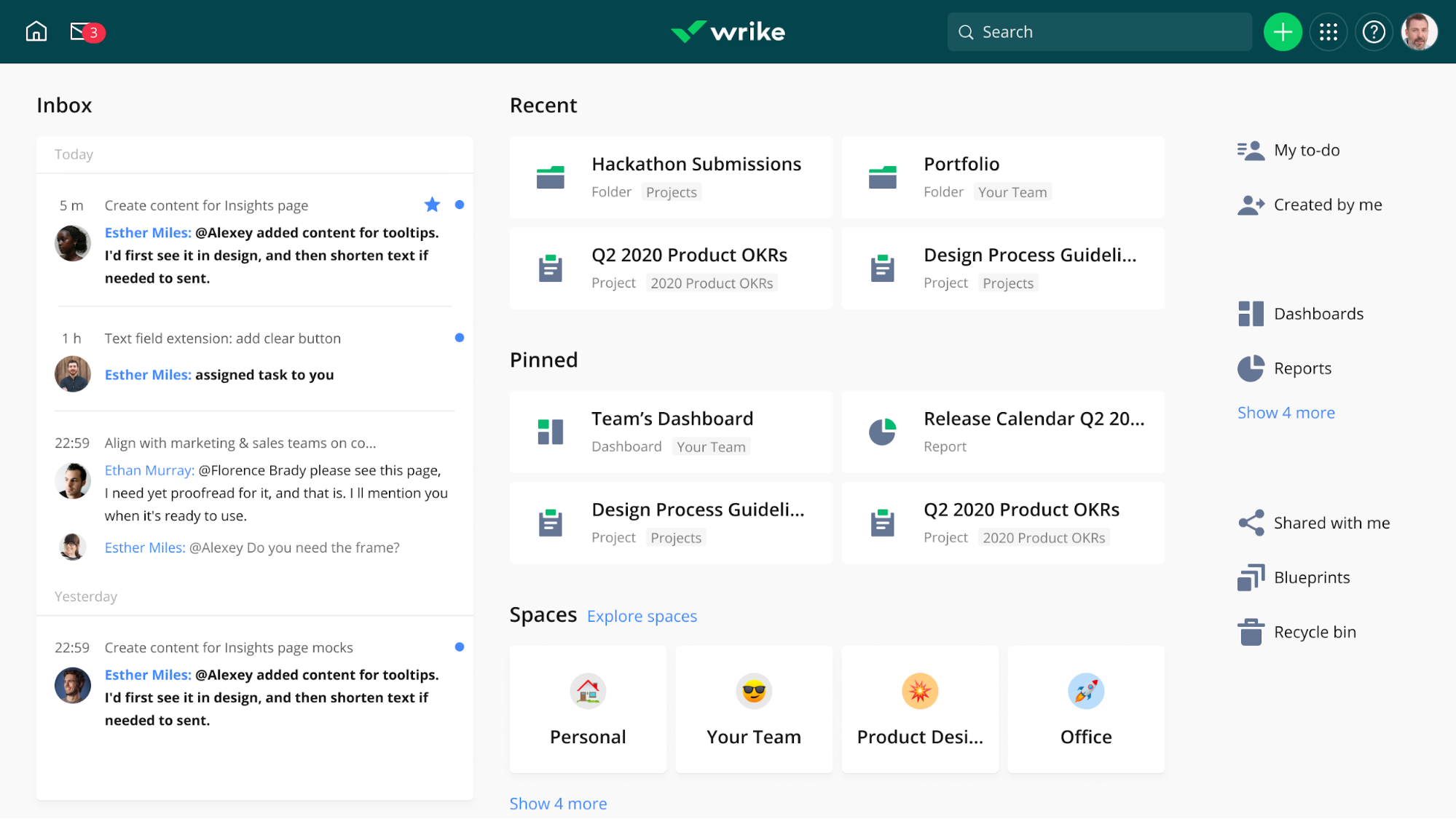
Wrike is an enterprise work management platform designed to help businesses manage large-scale projects, operational workflows, resource planning, and cross-functional collaboration from one centralized system.
The platform is commonly used by enterprise teams that need advanced project visibility, workload management, and operational control across multiple departments.
Its strong reporting and planning capabilities make it particularly valuable for organizations managing complex business operations and high-volume project environments.
Key capabilities include:
- Enterprise project management tools that help businesses coordinate large operational initiatives, track milestones, and manage multi-team workflows more efficiently.
- Advanced workload and resource management features that allow managers to balance team capacity, monitor productivity, and prevent operational bottlenecks.
- Custom workflow configuration that supports approval processes, department-specific operations, and scalable business process management.
- Real-time collaboration functionality that centralizes project discussions, file sharing, task updates, and operational communication across distributed teams.
- Business intelligence dashboards and reporting tools that provide operational insights, project analytics, performance tracking, and executive-level visibility.
#9. Bitrix24 — The Best Business Operations Platform for SMBs and Internal Collaboration
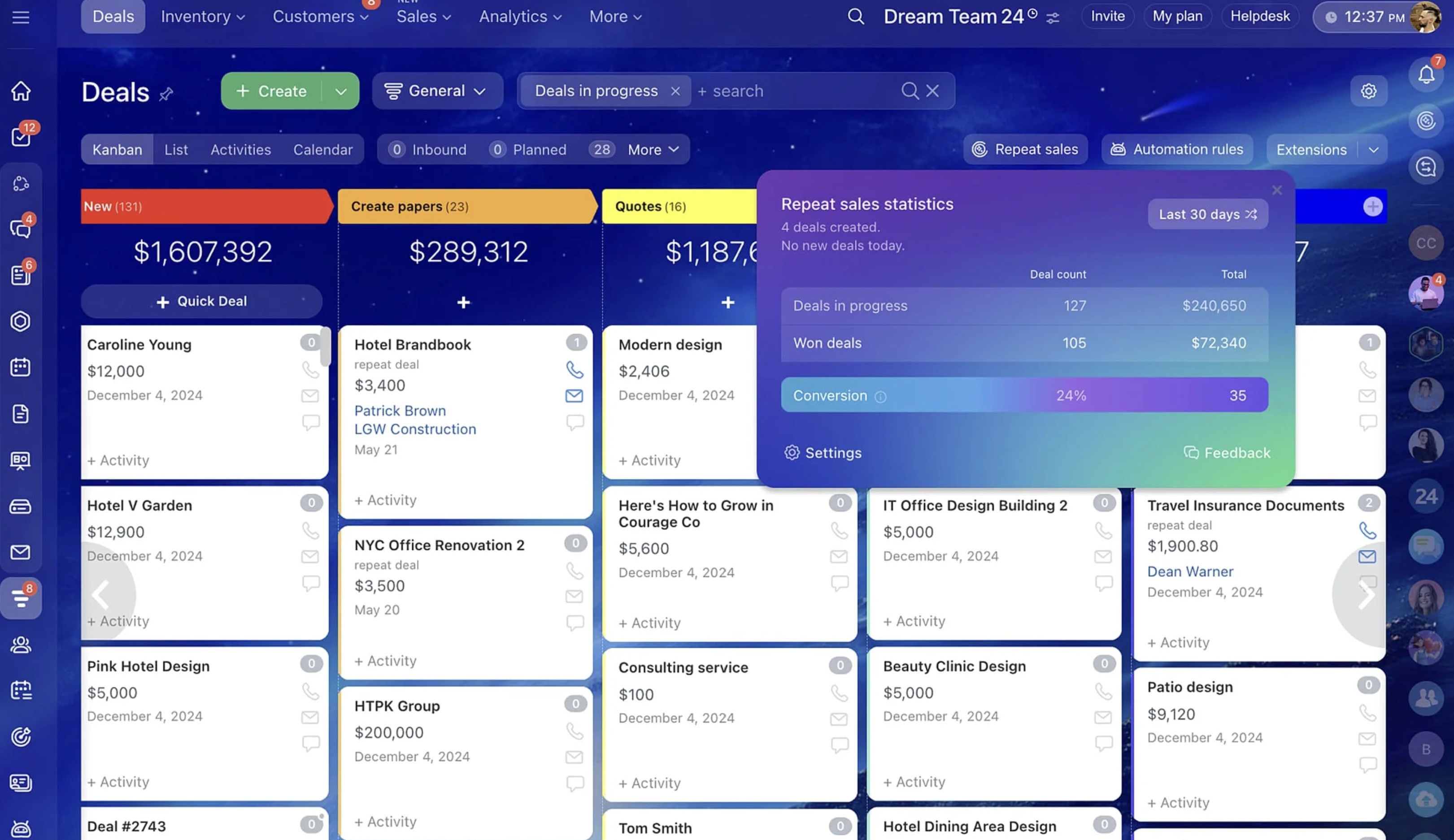
#9. Bitrix24 — The Best Business Operations Platform for SMBs and Internal Collaboration
Bitrix24 is an all-in-one business management platform designed to help small and medium-sized businesses manage communication, collaboration, CRM operations, task management, and internal workflows from one connected workspace.
The platform combines workplace collaboration tools with customer management and operational coordination features, making it popular among growing businesses looking to reduce software sprawl.
Its broad feature set makes it useful for organizations that want both internal workplace management and customer-facing operational tools within a single ecosystem.
Key capabilities include:
- Integrated business communication features including team chat, video conferencing, activity feeds, company announcements, and collaborative workspaces.
- Built-in CRM and client management tools that help businesses manage sales pipelines, customer communication, lead tracking, and operational workflows together.
- Task and project coordination functionality that supports team collaboration, workflow planning, deadlines, recurring tasks, and operational tracking.
- Document management and knowledge-sharing features that centralize company files, internal resources, shared drives, and collaborative editing tools.
- Employee management capabilities that support calendars, attendance tracking, work reports, automation rules, and internal process management.
#10. Zoho Workplace
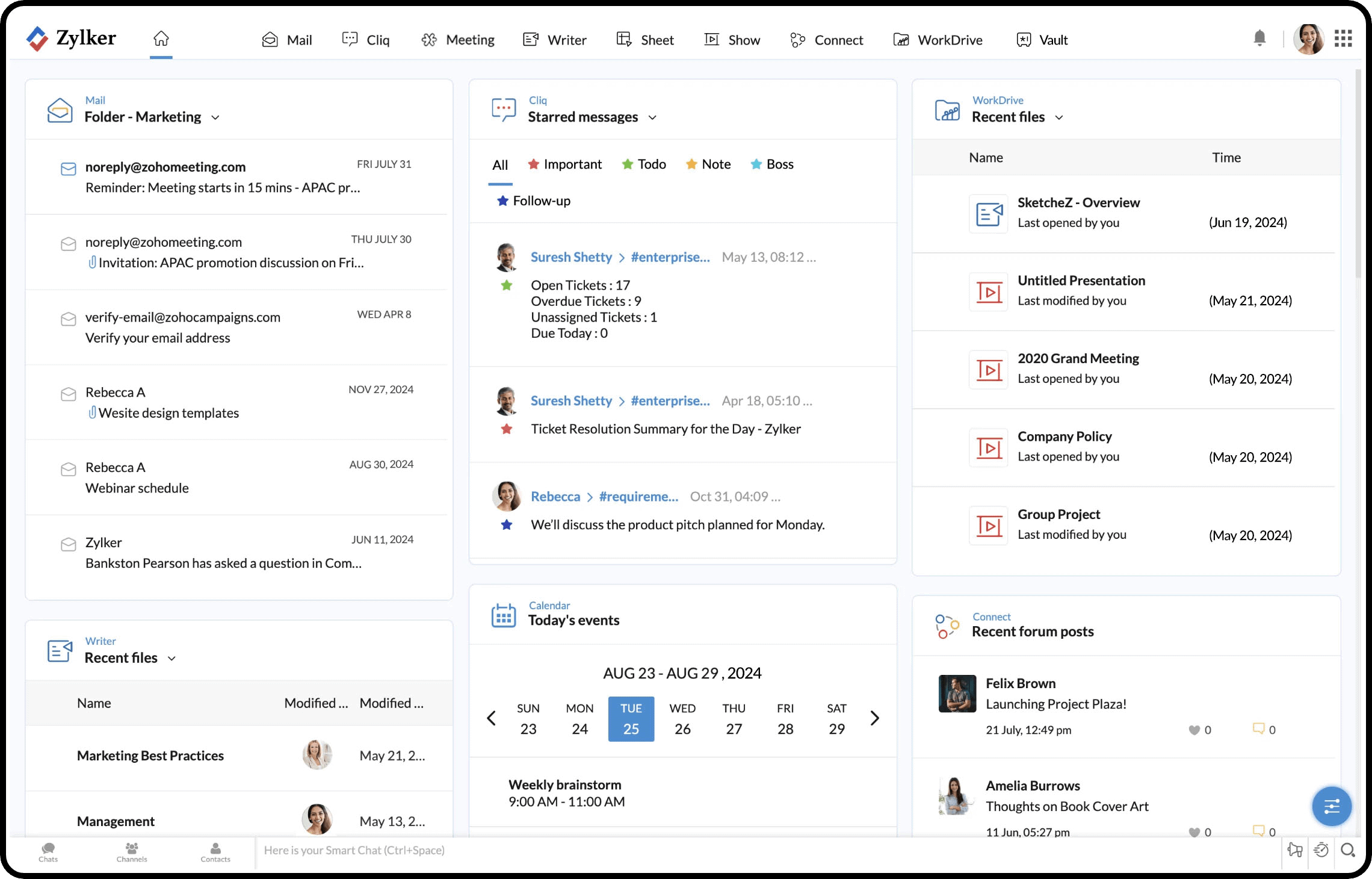
#10. Zoho Workplace
Zoho Workplace is a cloud-based business productivity and collaboration suite designed to help organizations manage communication, documents, email, meetings, and team collaboration from one connected platform.
It is especially popular with startups, SMBs, and cost-conscious businesses looking for an affordable alternative to larger enterprise workplace ecosystems.
The platform combines workplace collaboration tools with business productivity applications, making it a practical option for teams that want centralized communication and operational organization without enterprise-level pricing.
Key capabilities include:
- Business email and communication tools that support secure company email, team messaging, video meetings, and workplace collaboration across departments.
- Cloud document management functionality that allows teams to create, edit, share, and collaborate on files in real time using integrated office productivity apps.
- Team collaboration workspaces that centralize projects, shared resources, calendars, operational discussions, and internal business communication.
- Workflow and productivity integrations that connect CRM systems, HR tools, finance applications, and operational software into one business ecosystem.
- Administrative security and access controls that help businesses manage permissions, compliance, user authentication, and organizational data protection.
Which Workplace Operations Platform Is Best for Your Business
Choosing the right workplace operations platform depends on your business size, workforce structure, operational complexity, and long-term growth plans.
Some businesses prioritize communication and employee engagement, while others focus more on workflow automation, task coordination, or enterprise reporting.

Which Workplace Operations Platform Is Best for Your Business
Best for small businesses
Small businesses often need affordable workplace software that combines collaboration, communication, and productivity tools without requiring large IT teams.
- Zoho Workplace offers cost-effective collaboration and productivity features.
- Bitrix24 combines CRM, communication, and workflow management in one platform.
- ClickUp helps smaller teams centralize tasks, projects, and workplace organization
Best for enterprise organizations
Large enterprises typically require stronger governance, analytics, integrations, and operational visibility across departments.
- Microsoft Viva integrates deeply with Microsoft 365 environments.
- Wrike supports advanced resource planning and enterprise workflow management.
- Asana helps large organizations coordinate cross-functional operational teams.
Best for remote and hybrid teams
Remote and hybrid teams need better visibility, communication, and shared access.
- AgilityPortal centralizes updates, workflows, and documents.
- Slack supports fast team messaging.
- Notion helps teams organize knowledge.
Best for frontline workers
Frontline teams need mobile-first access and simple communication.
- AgilityPortal supports deskless employees with mobile updates, workflows, and engagement tools.
- Microsoft Viva can support larger enterprise workforces.
- Bitrix24 offers basic employee coordination features.
Best all-in-one workplace operations platform
For businesses looking for an all-in-one workplace operations platform, AgilityPortal stands out by combining employee communication, workflow automation, document management, team collaboration, and employee engagement into one connected digital workplace.
Unlike disconnected workplace tools, the platform helps businesses centralize operational processes, improve internal communication, and support hybrid and frontline employees from a single workspace.
With mobile access, knowledge management, analytics dashboards, and workflow management features built in, AgilityPortal helps organizations improve productivity, reduce operational silos, and create a more connected employee experience across remote, hybrid, and office-based teams.
Common Problems Businesses Face Without a Workplace Operations Platform
As businesses grow, managing communication, workflows, employee collaboration, and operational processes becomes increasingly difficult without a centralized workplace operations platform.
Many organizations rely on disconnected workplace tools that create communication gaps, slow decision-making, and reduce productivity across departments.
Below are some of the most common workplace challenges businesses experience — along with real-world scenarios, the impact these issues create, and how modern workplace management software helps solve them.

Common Problems Businesses Face Without a Workplace Operations Platform
Employees cannot find important information
One of the biggest workplace productivity problems is employees wasting time searching for files, policies, onboarding documents, or operational updates spread across multiple systems.
For example, a healthcare company may store HR policies in SharePoint, onboarding documents in Google Drive, training videos in Dropbox, and internal updates in email threads. New employees often struggle to locate critical information quickly.
The impact can include:
- Slower onboarding
- Repeated employee questions
- Productivity loss
- Operational confusion
A centralized digital workplace platform solves this by creating a searchable knowledge hub where employees can access company resources, SOPs, training materials, and internal documents from one location.
Teams rely on too many disconnected tools
Many businesses use separate systems for chat, task management, file sharing, onboarding, approvals, and employee communication. Over time, this creates operational silos and fragmented workflows.
For example, a marketing agency may use Slack for messaging, Trello for projects, Dropbox for files, Zoom for meetings, and email for approvals. Employees constantly switch between systems just to complete simple tasks.
This often leads to:
- Missed updates
- Duplicate work
- Poor visibility
- Reduced operational efficiency
Unified workplace operations software helps businesses centralize communication, workflows, collaboration, and operational management into one connected platform.
Poor internal communication slows down work
Communication breakdowns are one of the fastest ways businesses lose productivity.
Employees miss important updates, managers repeat instructions, and teams become disconnected.
For instance, a retail company with frontline workers may rely heavily on email communication, even though many employees rarely check company email during shifts. Critical operational updates can easily be missed.
The result may include:
- Delayed responses
- Operational errors
- Low employee engagement
- Customer service issues
Modern employee communication platforms solve this through mobile notifications, company news feeds, chat channels, announcements, and targeted workplace communication tools.
Operational bottlenecks become difficult to identify
Without centralized operational visibility, businesses often struggle to identify workflow delays, approval bottlenecks, or overloaded departments.
For example, an HR department handling onboarding manually through spreadsheets and emails may experience delayed approvals, incomplete paperwork, and inconsistent onboarding experiences across locations.
This creates:
- Slower workflows
- Administrative inefficiencies
- Compliance risks
- Frustrated employees
Workplace operations platforms improve visibility through workflow automation, reporting dashboards, approval tracking, and operational analytics that help businesses identify issues faster.
Employee engagement decreases over time
Disconnected workplaces often make employees feel isolated, especially in hybrid or remote work environments.
When employees lack visibility, recognition, and communication, engagement naturally declines.
For example, remote employees working across different regions may rarely interact with leadership or other departments outside scheduled meetings. Over time, employees may feel disconnected from company culture.
The long-term impact can include:
- Higher employee turnover
- Reduced morale
- Lower productivity
- Poor workplace culture
Modern workplace collaboration platforms improve employee engagement through social feeds, recognition tools, surveys, employee communities, and centralized communication that helps employees feel more connected to the organization.
How Workplace Operations Platforms Improve Employee Experience
Modern businesses are no longer deploying workplace operations platforms simply to improve communication.
Companies are investing in digital workplace software because disconnected systems directly affect employee productivity, engagement, onboarding, and operational efficiency.
Below are real-world style scenarios showing how businesses improved employee experience after deploying workplace operations platforms.
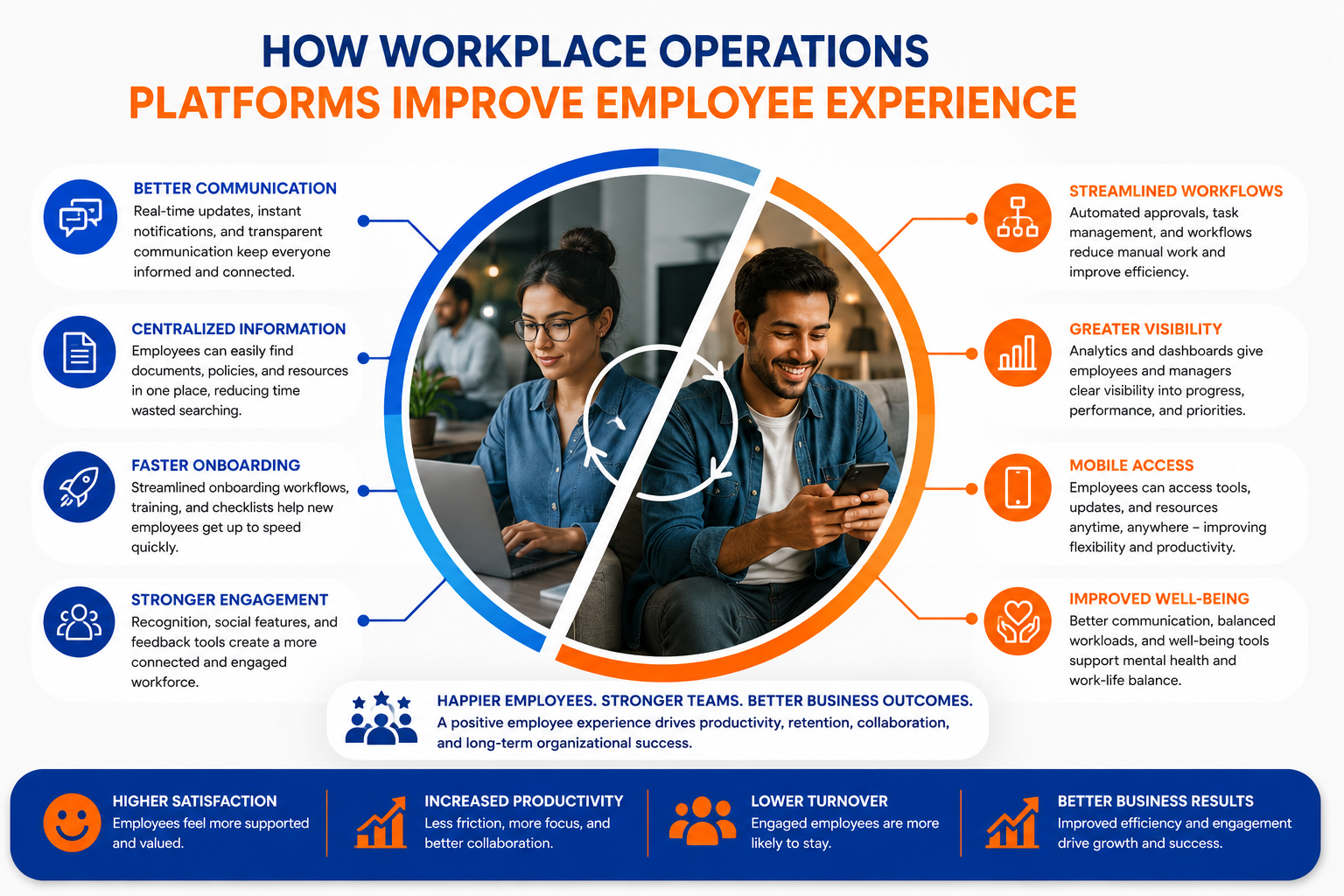
How Workplace Operations Platforms Improve Employee Experience
Better communication improves transparency
A fast-growing logistics company operating across five locations struggled with fragmented communication.
Office employees relied on email, while warehouse teams mainly communicated through WhatsApp groups and paper notices pinned to walls.
As the company scaled, employees frequently missed operational updates, shift changes, and compliance announcements.
Leadership also noticed growing frustration because employees felt disconnected from company decisions.
After deploying a centralized employee communication platform, the company introduced:
- Mobile push notifications for operational updates
- Department communication channels
- Company-wide announcements
- Leadership updates through a social feed
Within six months, employee feedback surveys showed workers felt significantly more informed and connected to leadership. Managers also reported fewer communication breakdowns and faster response times across departments.
Centralized systems reduce frustration
A professional services company used separate systems for file storage, project management, HR requests, and internal communication. Employees constantly switched between tools just to complete simple operational tasks.
New employees especially struggled because company knowledge was scattered across email threads, shared drives, and outdated internal documents.
To solve this, the business implemented a workplace operations platform that centralized:
- Knowledge management
- Workflow approvals
- Internal communication
- Shared documents
- Operational resources
The impact was immediate.
Employees spent less time searching for information, onboarding became smoother, and project coordination improved across teams.
Internal feedback highlighted:
- Faster access to company resources
- Reduced operational confusion
- Less dependency on managers for basic information
- Better collaboration between departments
Faster onboarding improves productivity
A healthcare organization with remote administrative staff faced onboarding delays because training materials, policies, and compliance forms were managed manually through email and spreadsheets.
New hires often waited days for access to important resources, creating inconsistent onboarding experiences and slowing productivity.
The company deployed a digital workplace platform with onboarding automation and centralized training resources.
The new onboarding process included:
- Automated onboarding workflows
- Digital document access
- Role-specific training hubs
- Progress tracking dashboards
- Mobile-friendly onboarding access
Within a few months, the HR team reported significantly faster onboarding completion rates.
New employees also reached productivity milestones sooner because they could access everything they needed from one centralized system.
Employee surveys showed stronger confidence during the onboarding process and reduced frustration during the first few weeks of employment.
Employees feel more connected to the business
A remote-first technology company noticed declining employee engagement after expanding internationally.
Employees rarely interacted outside project meetings, and many team members felt disconnected from company culture.
Leadership introduced a workplace collaboration platform designed to improve employee engagement and internal community building.
The company launched:
- Employee recognition programs
- Interactive social feeds
- Team discussion spaces
- Company culture groups
- Employee feedback polls
Over time, participation in internal discussions increased significantly, and engagement surveys showed stronger employee satisfaction across remote teams.
Managers also noticed employees collaborating more naturally across departments, helping improve innovation and workplace culture.
Mobile access improves frontline engagement
A hospitality business employing frontline workers across multiple sites struggled to keep employees informed because many workers did not regularly access company email systems.
Important updates regarding schedules, training, compliance, and operational procedures were often missed.
The company introduced a mobile-first workplace operations platform that allowed employees to:
- Receive instant mobile notifications
- Access schedules and company updates
- Complete training from mobile devices
- Submit operational requests digitally
- Communicate directly with management
The impact was substantial:
- Higher employee participation
- Faster communication across locations
- Reduced scheduling confusion
- Improved compliance training completion
Employee feedback showed workers appreciated having a simple mobile workplace hub that gave them easier access to communication and operational tools without needing desktop systems.
Workplace Operations Trends Shaping the Future
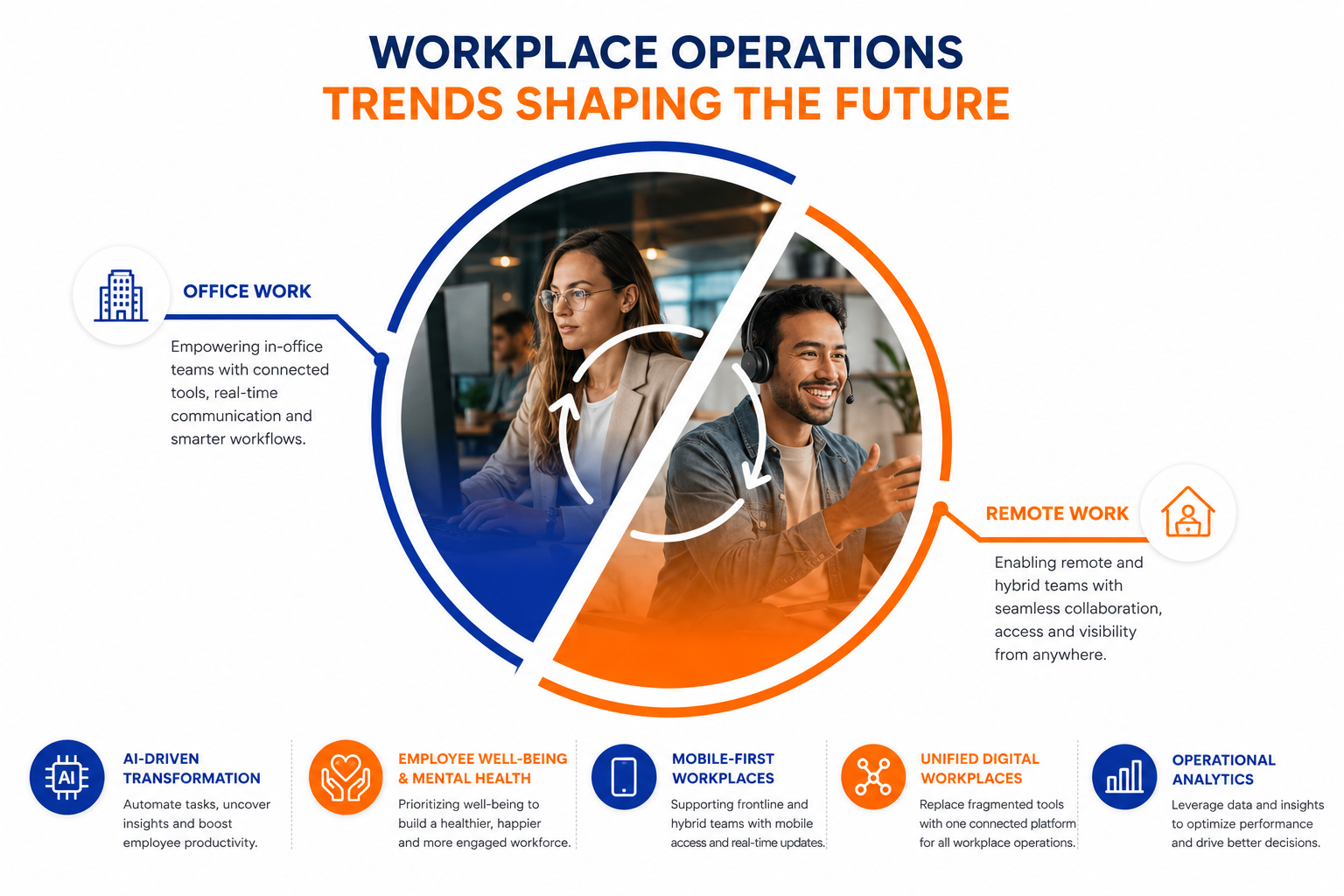
Workplace Operations Trends Shaping the Future
AI-powered workplace automation
Artificial intelligence is rapidly changing how businesses manage workplace operations, communication, and employee productivity. Modern workplace operations platforms now use AI-powered automation to streamline repetitive tasks, improve workflow management, and reduce operational bottlenecks across departments.
Many organizations are deploying AI-driven workplace tools to automate onboarding, generate operational insights, improve knowledge discovery, and simplify internal communication.
AI assistants can now help employees locate documents faster, summarize workplace conversations, automate approvals, and reduce administrative workload.
This shift is having a major impact on employee productivity because workers spend less time managing manual processes and more time focused on high-value work. Businesses also gain better operational visibility through predictive analytics, workflow intelligence, and real-time reporting dashboards.
As AI workplace automation continues evolving, businesses adopting intelligent workplace platforms are expected to improve efficiency, decision-making, and overall workforce productivity significantly.
Employee experience becoming an operational priority
Employee well-being and mental health are becoming major operational priorities for modern businesses, especially as hybrid and remote work environments continue to expand. Many organizations now recognize that disconnected communication, poor workplace visibility, and excessive operational complexity can directly contribute to employee stress and burnout.
Workplace operations platforms are increasingly being designed to improve employee experience by simplifying communication, reducing operational friction, and creating more connected digital workplaces. Features such as employee recognition tools, feedback systems, pulse surveys, workload visibility, and flexible collaboration spaces help businesses better understand employee sentiment and workplace engagement.
Companies are also using workplace analytics to identify burnout risks, communication gaps, and overloaded teams before these issues affect retention or productivity. Businesses prioritizing employee well-being often experience stronger engagement, lower turnover, improved collaboration, and healthier workplace culture overall.
As employee expectations continue shifting, organizations that invest in workplace experience and mental well-being will likely gain a long-term advantage in retention, productivity, and workforce stability.
Rise of mobile-first digital workplaces
The growth of frontline workforces and remote teams is accelerating demand for mobile-first workplace operations platforms.
Employees increasingly expect instant access to workplace communication, operational workflows, training resources, and collaboration tools directly from mobile devices.
Businesses in industries such as healthcare, logistics, hospitality, construction, and retail are especially prioritizing mobile workplace solutions because many employees rarely work from traditional office environments.
Mobile-first digital workplaces help organizations improve communication speed, employee participation, and operational responsiveness across distributed teams.
Modern workplace platforms now support mobile onboarding, push notifications, digital forms, workflow approvals, training modules, and team collaboration directly through mobile applications.
This reduces dependency on desktop systems and improves operational accessibility for frontline employees.
As workplace mobility continues expanding, businesses investing in mobile workplace technology are likely to see stronger employee engagement, faster communication, and improved operational efficiency across remote and deskless workforces.
More companies replacing fragmented software stacks
Many businesses are moving away from fragmented workplace software environments that rely on multiple disconnected applications for communication, collaboration, workflow management, and document storage.
Maintaining separate systems often creates operational silos, productivity loss, inconsistent employee experiences, and rising software costs.
Organizations are increasingly adopting unified workplace operations platforms that centralize communication, workflows, knowledge management, employee engagement, and operational visibility into one connected ecosystem.
This shift helps businesses simplify workplace operations while improving system adoption and reducing complexity for employees.
A unified digital workplace also improves data consistency, operational reporting, workflow visibility, and cross-department collaboration. Employees no longer need to constantly switch between multiple workplace applications just to complete everyday operational tasks.
As digital transformation continues accelerating, businesses replacing fragmented software stacks are expected to improve operational efficiency, employee productivity, and overall workplace experience significantly.
Operational analytics becoming essential
Operational analytics are becoming a critical component of modern workplace management platforms.
Businesses increasingly rely on workplace data to understand employee engagement, workflow efficiency, communication effectiveness, and operational performance across departments.
Modern workplace operations software now includes dashboards and reporting tools that help leadership identify bottlenecks, monitor employee participation, analyze workflow completion rates, and track organizational productivity trends in real time.
This level of operational visibility allows businesses to make faster, data-driven decisions while proactively identifying workplace challenges before they impact performance or employee experience.
Companies can also use workplace analytics to improve onboarding, optimize communication strategies, and measure collaboration effectiveness across hybrid teams.
As workplace operations become more digital and distributed, organizations that leverage operational analytics effectively will gain stronger visibility, better decision-making capabilities, and improved long-term business agility.
Final Thoughts on Choosing the Best Workplace Operations Platform
Choosing the best workplace operations platform is no longer just about communication or task management alone.
Modern businesses need connected workplace software that improves collaboration, streamlines workflows, centralizes company knowledge, and supports hybrid and frontline employees from one digital workplace.
The right workplace management platform can reduce operational silos, improve employee engagement, and increase productivity across departments.
Businesses should focus on scalability, mobile accessibility, workflow automation, integrations, and employee experience before making a decision.
Platforms like AgilityPortal help organizations unify communication, operations, and collaboration into one connected workplace ecosystem built for modern teams.
FAQ on Workplace Operations Platform
What is a workplace operations platform?
A workplace operations platform is a centralized digital workplace system that helps businesses manage communication, workflows, employee collaboration, documents, onboarding, and operational processes from one connected platform. Modern workplace operations software is designed to improve productivity, reduce operational silos, and support hybrid, remote, and frontline employees more effectively.
What are the best workplace operations platforms?
Some of the best workplace operations platforms include AgilityPortal, Microsoft Viva, Monday.com, ClickUp, Asana, Slack, Notion, Wrike, Bitrix24, and Zoho Workplace. The right platform depends on business size, operational complexity, communication needs, workflow automation requirements, and whether teams are office-based, hybrid, or frontline employees.
How do workplace operations platforms improve productivity?
Workplace operations platforms improve productivity by centralizing communication, reducing app switching, automating workflows, improving document access, and streamlining operational processes. Employees spend less time searching for information or managing disconnected tools, allowing teams to collaborate faster and work more efficiently across departments.
What features should workplace operations software include?
The best workplace operations software should include employee communication tools, workflow automation, document management, knowledge sharing, analytics dashboards, mobile access, employee engagement tools, task management, onboarding workflows, and integrations with business applications like Microsoft 365, Google Workspace, and HR systems.
Are workplace operations platforms suitable for remote teams?
Yes, workplace operations platforms are especially valuable for remote and hybrid teams because they centralize communication, collaboration, company updates, workflows, and shared knowledge into one digital workplace. Modern platforms also improve visibility, employee engagement, and operational consistency across distributed workforces.
What is the difference between workplace operations software and project management tools?
Project management tools mainly focus on tasks, deadlines, and project coordination, while workplace operations platforms manage broader business operations including communication, employee engagement, workflows, onboarding, knowledge management, collaboration, and operational visibility across the entire organization.
Which workplace operations platform is best for frontline employees?
AgilityPortal is one of the strongest workplace operations platforms for frontline employees because it offers mobile-first communication, operational workflows, employee engagement tools, mobile notifications, document access, and workforce collaboration features designed specifically for deskless and distributed teams.
Can workplace operations platforms replace intranet software?
Yes, many modern workplace operations platforms can replace traditional intranet software by combining internal communication, document management, collaboration, employee engagement, workflow automation, and knowledge sharing into one connected digital workplace platform.
AI Summary
- Workplace operations platforms help businesses centralize communication, workflow management, collaboration, employee engagement, and operational processes into one connected digital workspace.
- Modern workplace management software is designed to support hybrid teams, remote employees, frontline workers, and distributed organizations operating across multiple locations and devices.
- Businesses use workplace operations software to improve internal communication, automate approvals, streamline onboarding, organize company knowledge, and reduce operational silos.
- The best workplace operations platforms often include employee communication tools, workflow automation, task management, document collaboration, analytics dashboards, and mobile workplace access.
- Popular workplace operations platforms include AgilityPortal, Microsoft Viva, Monday.com, ClickUp, Asana, Notion, Slack, Wrike, Bitrix24, and Zoho Workplace.
- Before selecting a workplace operations platform, businesses should compare scalability, integrations, mobile functionality, automation capabilities, user adoption, security controls, and long-term operational flexibility.
Most Popular Posts

Effective communication among team members is vital for the productivity and success of any organization. Surprisingly, 60% of companies lack a long-term internal communication strategy, which p...


Businesses thrive on communication for efficiency, productivity and accomplishment. When the right information is passed from the right designation in the organization, it promotes positivity an...

Categories
Blog
(3214)
Business Management
(396)
Employee Engagement
(235)
Digital Transformation
(219)
Growth
(150)
Intranets
(142)
Internal communications
(107)
Remote Work
(68)
Sales
(53)
Collaboration
(53)
Customer Experience
(33)
Culture
(30)
Knowledge Management
(29)
Project management
(29)
Leadership
(20)
Comparisons
(9)
News
(1)

Related Posts

Choosing the best ERP for Shopify often starts when the workarounds stop working. Your store shows stock that the warehouse can't find. Wholesale orders live in spreadsheets. Finance spends days reconciling payouts, while customer service...

Could choosing the wrong proxy disrupt your team's work or increase costs without improving results? When comparing rotating proxies vs static proxies, the answer depends on what your business needs: a consistent IP address for an ongoing sessi...

What happens when a buyer asks Google for the best employee communication platform—and discovers competing brands before reaching your website? Choosing the best link building services can help a digital workplace business strengthen its broade...

Could gaps in digital accessibility be stopping your employees from completing the training they need to do their jobs? Imagine a new starter opening a mandatory course, only to discover they can't follow the audio, navigate the quiz with a keyboard ...

The Amazon advertising agency landscape has changed dramatically over the past two years. With the introduction of AI-powered shopping experiences, Amazon Rufus, advanced attribution reporting, Sponsored Brands Video, and Amazon DSP enhancement...


Jill Romford
I am a digital nomad, lover of exploring new places and making friends.
I love to travel and I love the internet. I take pictures of my travels and share them on the internet using Instagram.
Traveler, entrepreneur, and community builder. I share my insights on digital marketing and social media while inspiring you to live your fullest life.
Ready to learn more? 👍
One platform to optimize, manage and track all of your teams. Your new digital workplace is a click away. 🚀
Free for 14 days, no credit card required.