
Insight Blog
Agility’s perspectives on transforming the employee's experience throughout remote transformation using connected enterprise tools.
1 hour and 1 minute reading time
(12240 words)
Best Client & Partner Portal Platforms for Secure Collaboration and Business Growth

Best Client & Partner Portal Platforms for Secure Collaboration and Business Growth
Looking for the best client and partner portal platform? Compare the top solutions for collaboration, document sharing, onboarding, communication, and external stakeholder engagement.
Best Client & Partner Portal Platforms for Secure Collaboration and Business Growth

This is why many organizations are investing in a modern client and partner portal to create a centralized, secure environment where external users can access documents, collaborate with teams, complete onboarding tasks, receive updates, and find the resources they need without relying on endless email chains.
The need for better partner collaboration has never been greater.
According to Canalys, channel partners influence approximately 70% of global technology spending, highlighting how critical effective partner relationships have become for business growth.
Organizations that provide partners with the right tools, training, and resources are often better positioned to increase revenue, improve engagement, and scale their partner ecosystem successfully.
70%
of global technology spending
According to Canalys, channel partners influence approximately 70% of global technology spending, highlighting how critical effective partner collaboration, partner enablement, and strong partner relationships have become for sustainable business growth.
Source: Canalys Channel Ecosystem Research
However, choosing the right platform is not always straightforward.
Some solutions focus heavily on document management, while others specialize in partner enablement, customer self-service, onboarding, training, or external collaboration.
Understanding which platform best aligns with your business goals is essential for long-term success.
In this guide, we'll explore the best client and partner portal platforms available today, comparing their features, strengths, pricing, and ideal use cases.
You'll learn what makes a great partner portal, the key features to look for, and how leading solutions help organizations streamline communication, improve onboarding, enhance security, and build stronger relationships with both clients and business partners.
We'll review popular platforms including AgilityPortal, MangoApps, Zoho Creator, Salesforce Experience Cloud, Microsoft SharePoint, HubSpot Customer Portal, Huddle, SuiteDash, Clinked, and ThoughtFarmer, helping you determine which solution is best suited for your organization's collaboration and growth objectives.
Key Takeaways
- Enterprise collaboration software must reduce security, compliance, and operational risk as teams scale, not introduce new blind spots.
- Disconnected tools create hidden productivity loss, with employees spending significant time searching for information across systems.
- A true business collaboration platform connects communication, documents, tasks, and context in one governed environment.
- Advanced capabilities like contextual search, analytics, mobile access, and role-based permissions separate platforms from basic tools.
- Enterprises outgrow standalone collaboration tools quickly; long-term success depends on governance, adoption, and scalability.
What Is a Client and Partner Portal?
As businesses grow, they often need a better way to collaborate with people outside their organization.
Whether it's customers, suppliers, distributors, consultants, or channel partners, sharing information through email alone quickly becomes difficult to manage.
This is where a client and partner portal becomes valuable.
A client and partner portal is a secure online platform that gives external users controlled access to documents, communications, resources, training materials, support information, and collaboration tools.
Instead of relying on endless email chains, spreadsheets, and file-sharing links, organizations can provide a centralized workspace where external stakeholders can find everything they need.
Modern partner portal software and client portal platforms help businesses improve collaboration, streamline onboarding, strengthen security, and deliver a more professional experience to both clients and business partners.
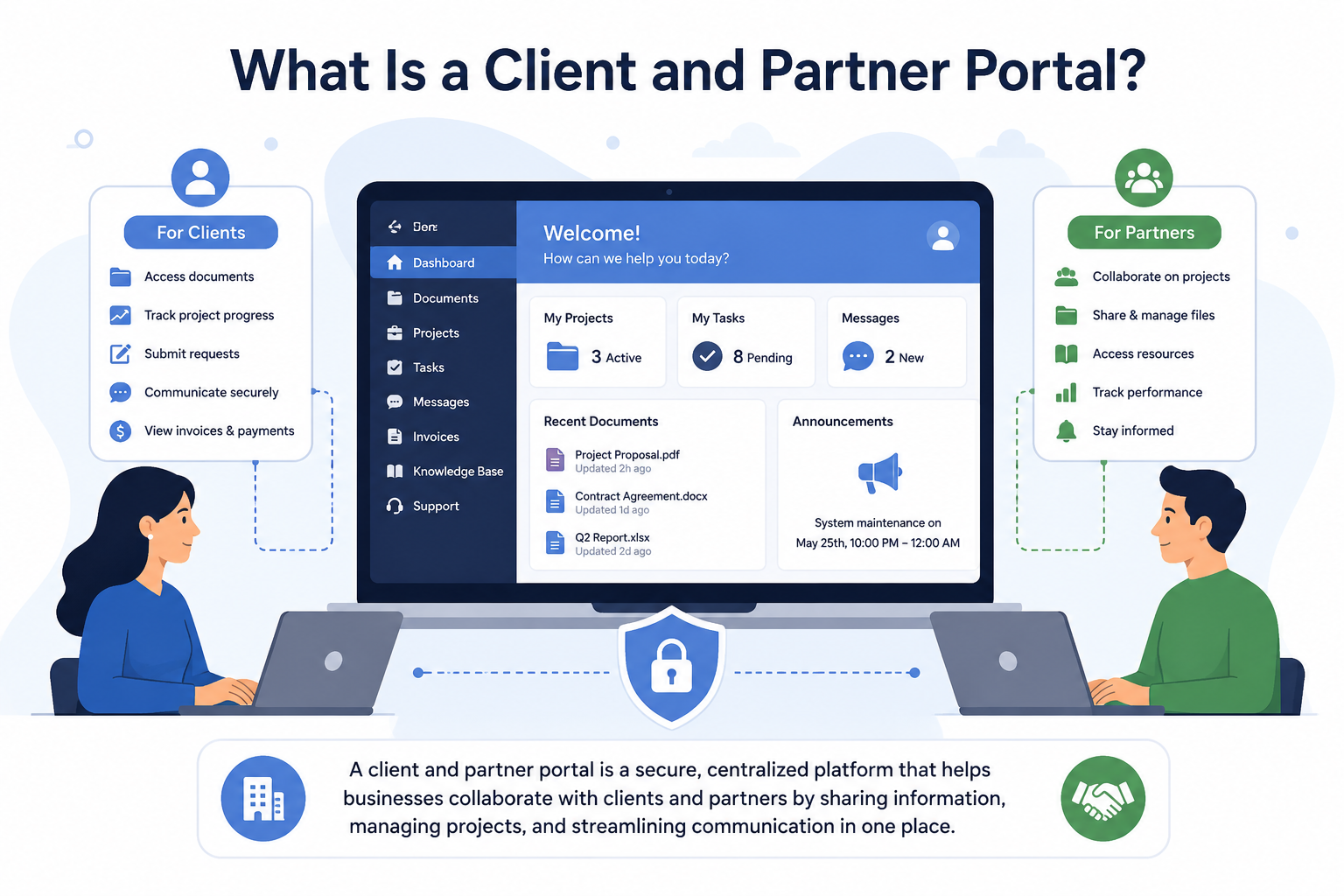
What Is a Client and Partner Portal
Definition of a Client Portal
A client portal is a secure digital space designed specifically for customers and clients. It allows businesses to share information, manage projects, exchange documents, and provide self-service access to resources without requiring constant back-and-forth communication.
Client portals are commonly used by professional services firms, agencies, legal practices, accounting firms, healthcare providers, consultants, and software companies.
The primary purpose of a client portal is to improve the customer experience while reducing administrative work for internal teams.
Common Client Portal Use Cases
Businesses use client portals for a variety of purposes, including:
- Secure document sharing
- Project collaboration
- Customer support requests
- Contract and proposal management
- Invoice and billing access
- Knowledge base access
- Service updates and announcements
- Client onboarding processes
For example, a marketing agency may provide clients with a portal where they can review campaign reports, approve creative assets, access project updates, and communicate directly with account managers.
Benefits of a Client Portal
Businesses use client portals for a variety of purposes, including:
- Secure document sharing
- Project collaboration
- Customer support requests
- Contract and proposal management
- Invoice and billing access
- Knowledge base access
- Service updates and announcements
- Client onboarding processes
For example, a marketing agency may provide clients with a portal where they can review campaign reports, approve creative assets, access project updates, and communicate directly with account managers.
Related Partner Portal Guides You May Want to Read
Looking to improve partner collaboration, secure document sharing, supplier communication, and external stakeholder access? The resources below explore partner portals, supplier portals, extranets, intranet security, and secure collaboration platforms.
- Types of Intranet Security
- Intranets vs Extranets
- Best Extranet Portal Software
- Internet vs Intranet vs Extranet
- What Is an Extranet Used For?
- Partner and Supplier Portal Collaboration Platform
- Extranet Software for Secure Client Collaboration
- How Strategic Technology Partnerships Drive Business Innovation
Together, these resources help businesses understand how to build stronger partner relationships, improve external collaboration, secure shared information, and create a more connected partner ecosystem.
Definition of a Partner Portal
A partner portal is designed to support external business relationships rather than direct customers. It provides channel partners, distributors, resellers, suppliers, consultants, and affiliates with the resources they need to collaborate effectively and drive business growth.
Partner portals play a critical role in partner enablement, helping organizations scale their partner ecosystem while maintaining consistency, visibility, and control.
Unlike a client portal, a partner portal often includes training programs, certifications, marketing resources, sales tools, deal registration systems, and performance analytics.
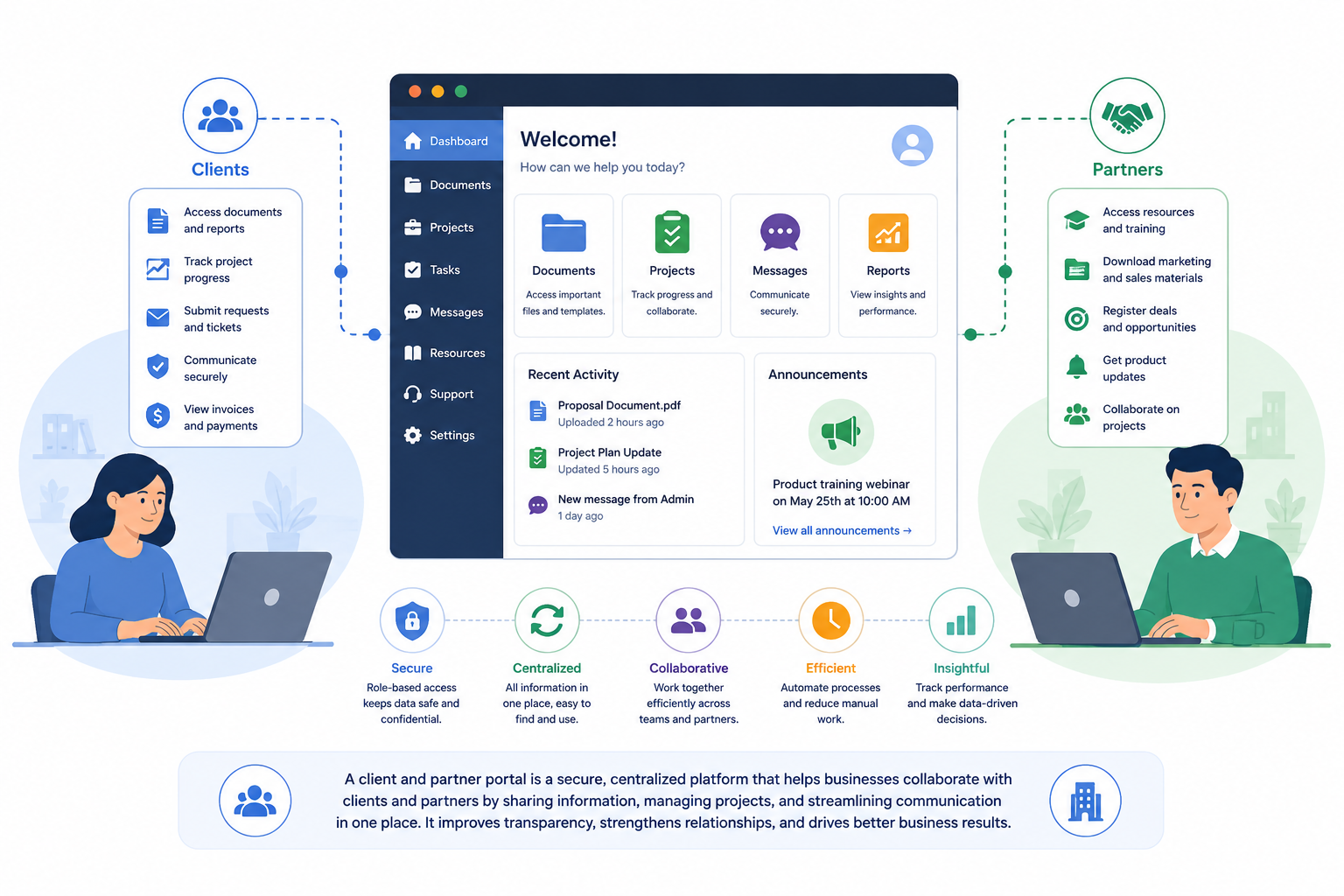
Definition of a Partner Portal
Who Uses Partner Portals?
Partner portals are commonly used by:
- Channel Partners - Organizations that help sell, implement, or support a company's products and services.
- Distributors - Companies responsible for distributing products through various sales channels and markets.
- Resellers - Businesses that purchase products or services and sell them directly to end customers.
- Suppliers - Vendors and service providers who collaborate with organizations throughout the supply chain.
- Consultants and Strategic Partners - Professional advisors and service providers who require access to documentation, training materials, and project resources.
Benefits of a Partner Portal
A dedicated partner portal software solution helps businesses:
- Accelerate partner onboarding
- Improve partner engagement
- Simplify resource sharing
- Deliver consistent training experiences
- Track partner performance
- Increase channel sales effectiveness
- Improve communication across partner networks
- Strengthen partner relationships
Client Portal vs Partner Portal
Although both solutions provide secure external collaboration, they serve different purposes and audiences.
A client portal focuses on delivering services, support, and information directly to customers, while a partner portal is designed to enable external business partners to sell, support, distribute, or promote products and services.
The table below highlights some of the key differences.
| Feature | Client Portal | Partner Portal |
| Secure Communication | ✓ | ✓ |
| Document Sharing | ✓ | ✓ |
| Customer Support Access | ✓ | Limited |
| Partner Training & Certifications | Limited | Extensive |
| Deal Registration | No | Yes |
| Marketing Asset Library | Limited | Yes |
| Sales Enablement Tools | No | Yes |
| Performance Analytics | Basic | Advanced |
| Knowledge Base Access | ✓ | ✓ |
| Collaboration Features | Moderate | High |
In many modern organizations, the distinction between client portals and partner portals is becoming less defined.
Businesses increasingly want a single platform that supports both customer engagement and partner collaboration while maintaining separate permissions and experiences for each audience.
This is why many organizations are adopting all-in-one client and partner portal platforms that combine communication, document management, onboarding, training, knowledge sharing, and collaboration within a single secure environment.
Why Businesses Are Investing in Client and Partner Portals
As organizations expand their networks of customers, partners, suppliers, distributors, consultants, and resellers, managing external relationships becomes increasingly complex.
Traditional methods such as email chains, shared drives, spreadsheets, and disconnected communication tools often create inefficiencies that slow growth and frustrate stakeholders.
A modern client and partner portal provides a centralized digital workspace where external users can securely access documents, collaborate with teams, complete onboarding tasks, receive updates, and find the resources they need without constantly contacting internal staff.
Research from Gartner suggests that employees spend a significant portion of their workweek searching for information, while external stakeholders often face similar challenges when resources are scattered across multiple systems.
By implementing a dedicated partner portal software or client collaboration platform, businesses can streamline operations, improve engagement, and strengthen long-term relationships.
Improved External Collaboration
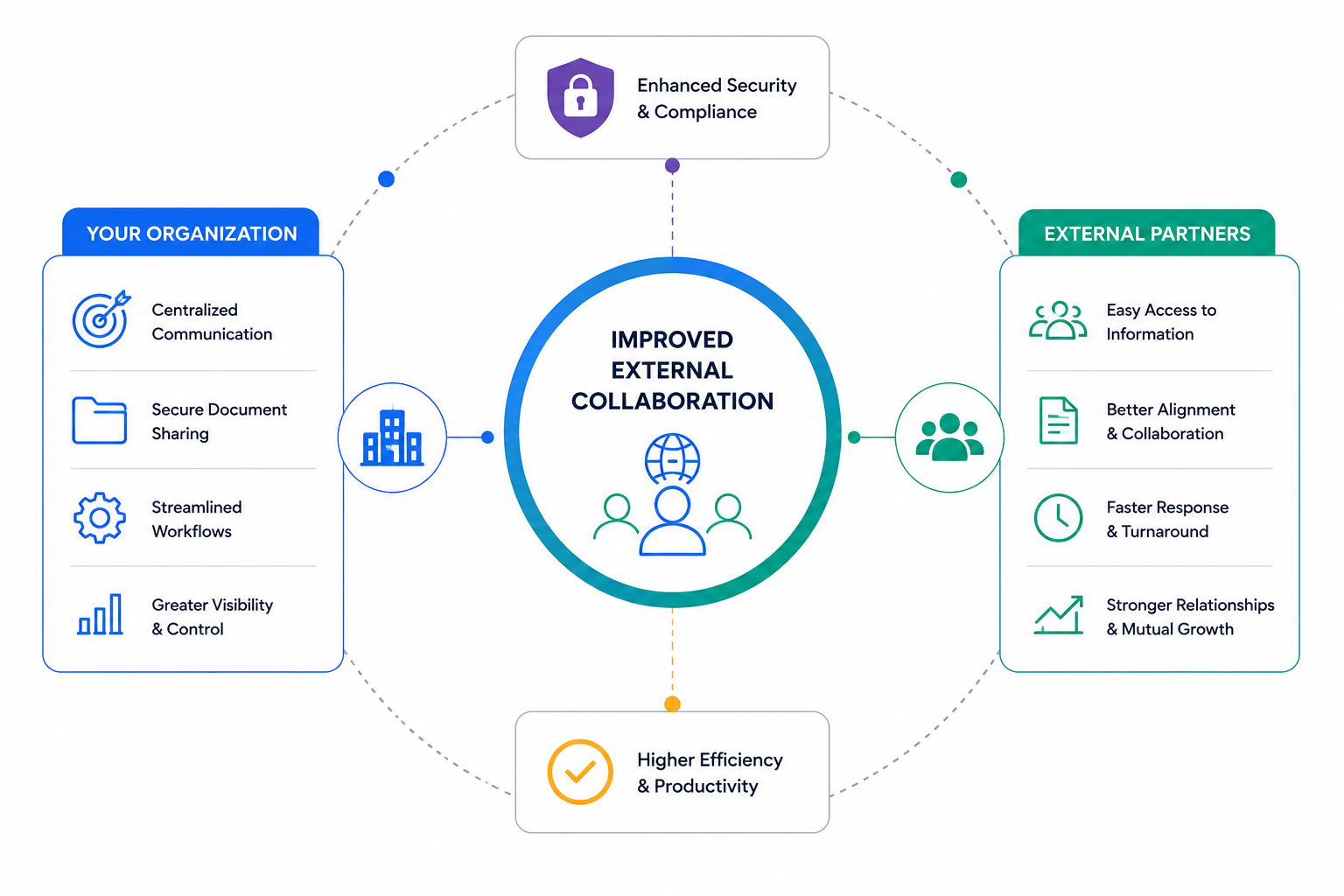
Improved External Collaboration
One of the biggest reasons companies invest in a client and partner portal platform is to improve collaboration with external stakeholders.
Whether working with channel partners, vendors, consultants, suppliers, or customers, organizations need a secure and organized way to share information and communicate effectively.
Without a centralized platform, important conversations often become buried in email threads, making it difficult to track decisions, updates, and project progress.
A portal creates a single source of truth where everyone can access the latest information and collaborate in real time.
Benefits of improved collaboration include:
- Centralized communication and announcements
- Shared workspaces for projects and initiatives
- Real-time document collaboration
- Reduced information silos
- Improved visibility across teams and partner organizations
- Faster decision-making and issue resolution
Organizations that prioritize partner collaboration software often experience stronger relationships, improved productivity, and better business outcomes.
Faster Client and Partner Onboarding
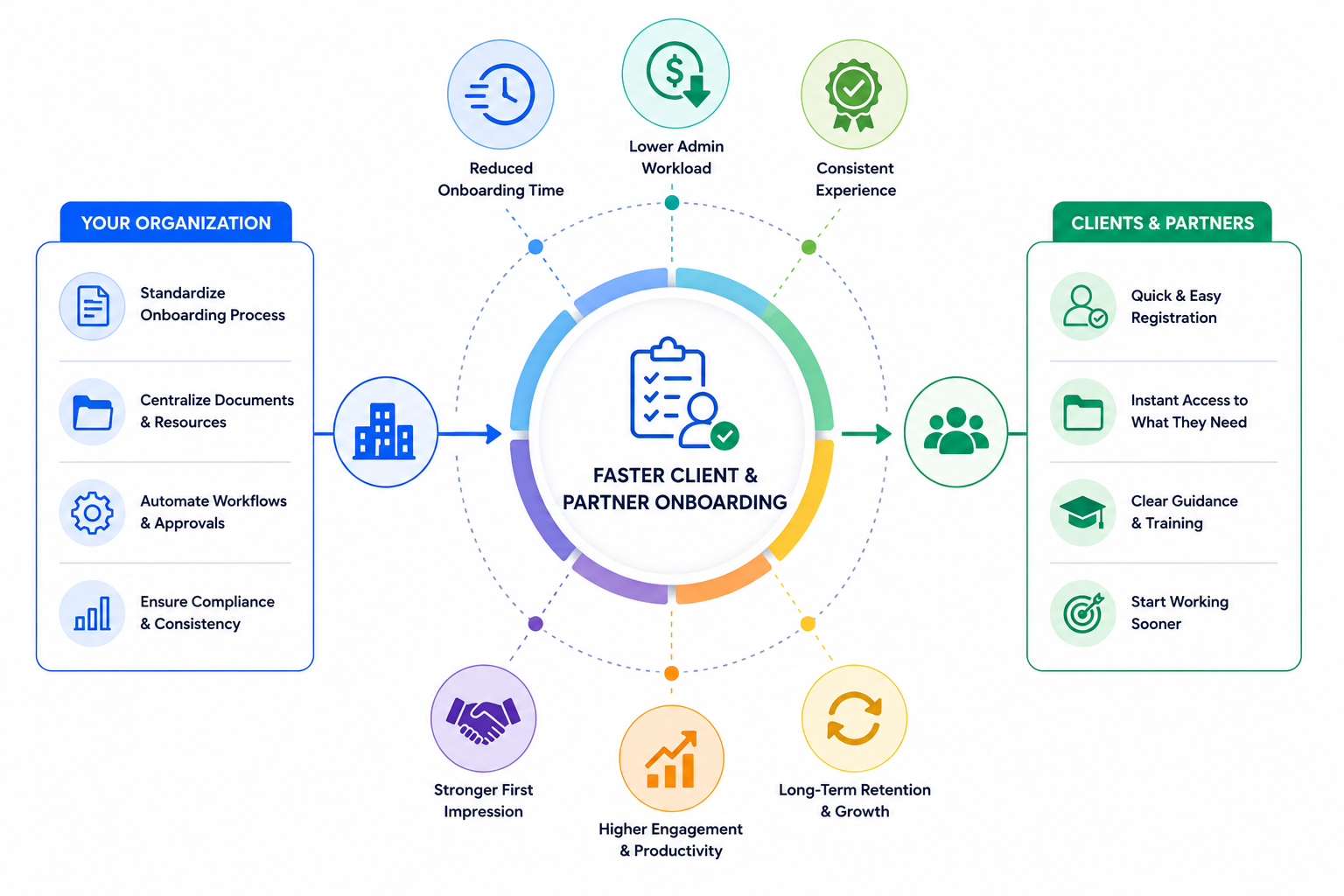
Faster Client and Partner Onboarding
Onboarding new clients, suppliers, distributors, or channel partners can be a time-consuming process when information is spread across multiple systems.
New stakeholders often struggle to locate training materials, contracts, policies, product information, and key contacts.
A dedicated partner onboarding portal simplifies this process by providing everything in one location. New users gain immediate access to the resources they need, helping them become productive much faster.
A well-designed onboarding experience can include:
- Welcome guides and onboarding checklists
- Training videos and learning resources
- Product documentation
- Knowledge base articles
- Certification programs
- Frequently asked questions
- Contact directories
Businesses that invest in partner enablement software and onboarding portals often reduce administrative workload while accelerating time-to-value for both clients and partners.
Reduced Email Overload
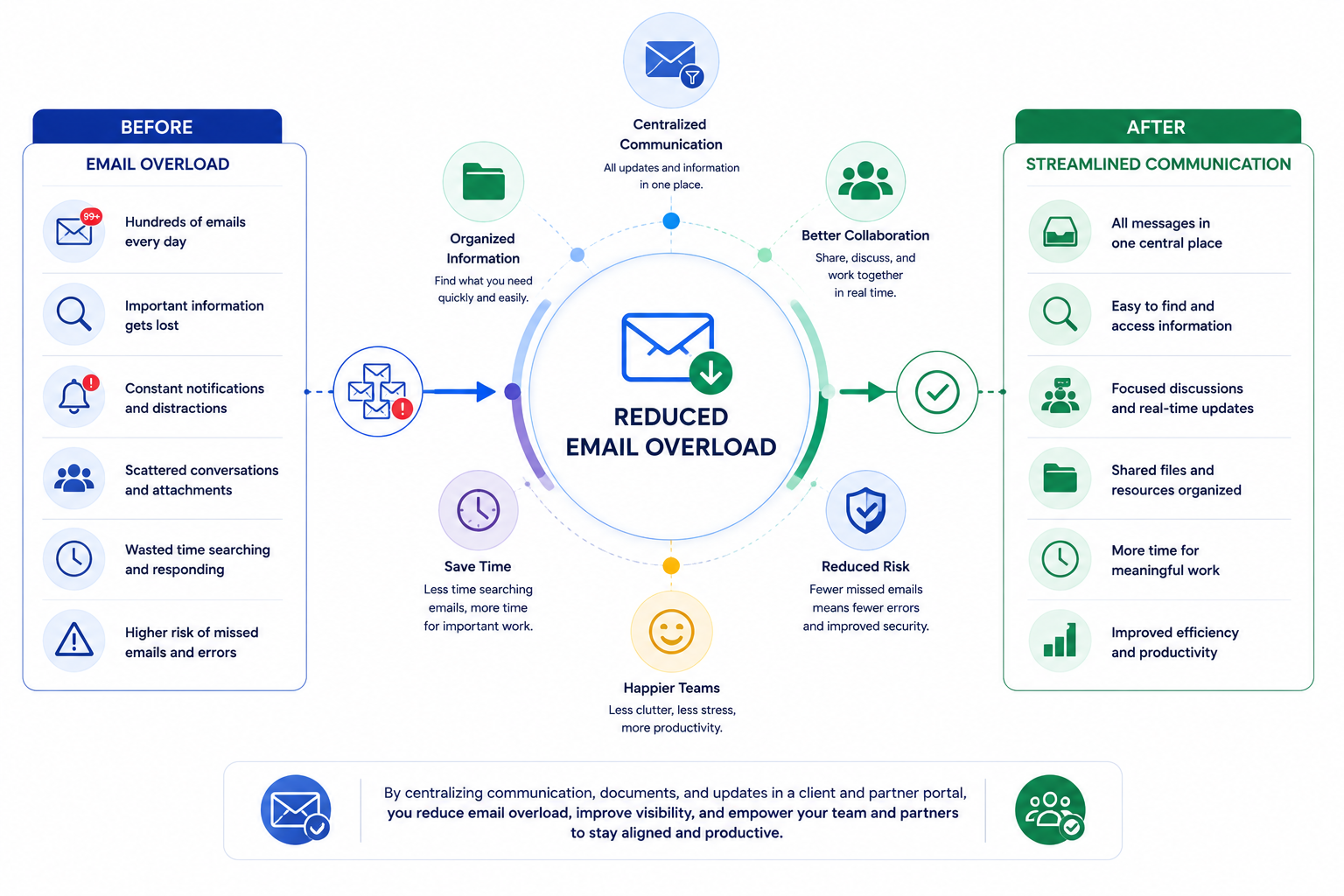
Reduced Email Overload
Email remains one of the most common communication tools in business, but it often creates confusion when managing large partner networks or multiple client relationships.
Critical information becomes buried in inboxes, attachments become outdated, and team members struggle to determine which version of a document is the most current.
This can lead to delays, duplicate work, and missed opportunities.
A client portal software solution helps reduce email dependency by centralizing communication and resources in a single platform.
Organizations can:
- Publish announcements and updates
- Share documents securely
- Manage discussions and conversations
- Create searchable knowledge libraries
- Provide self-service access to information
Instead of sending repetitive emails, businesses can empower partners and clients to find answers themselves, improving efficiency for everyone involved.
Better Document Management
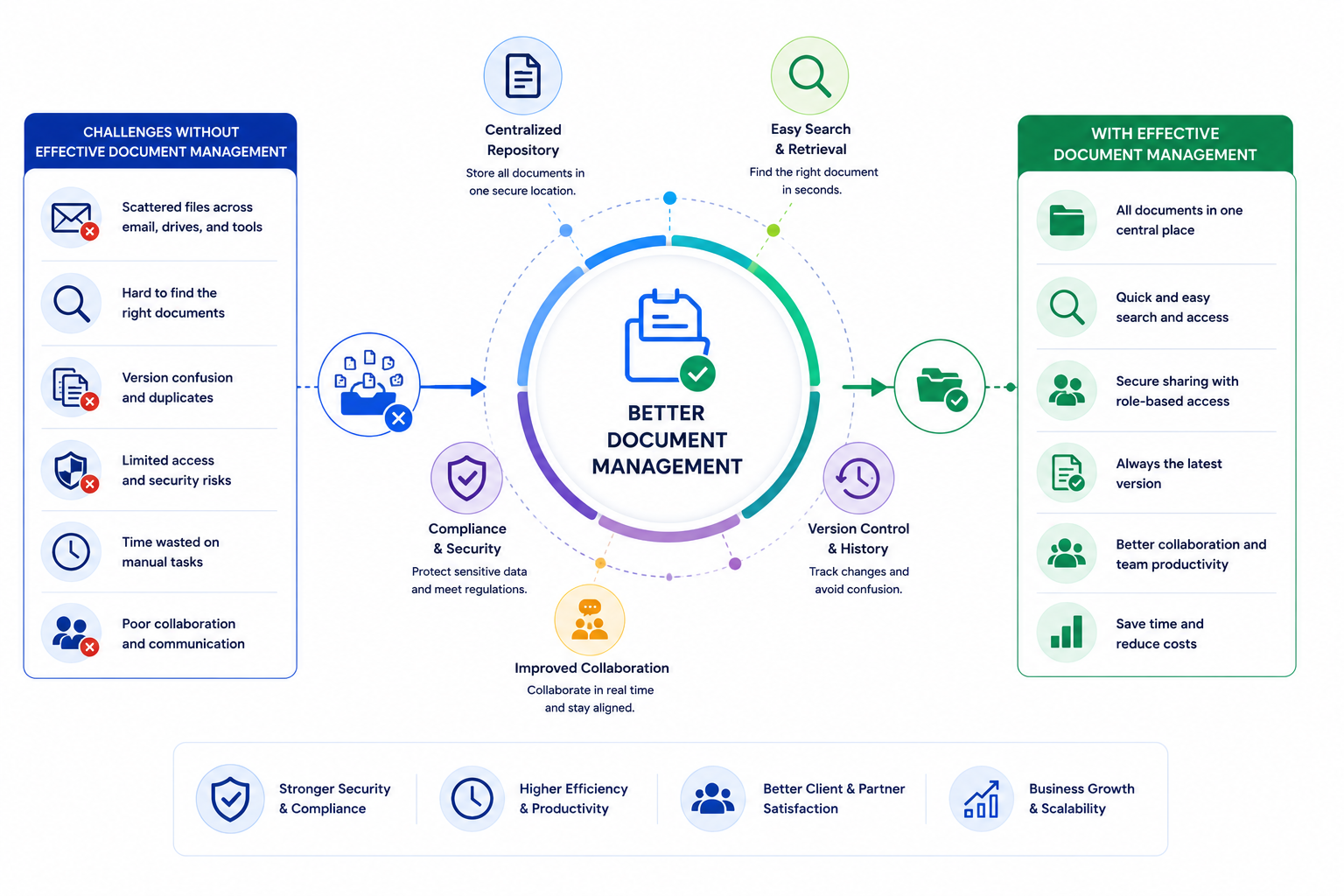
Better Document Management
Managing contracts, proposals, policies, training materials, and shared resources can quickly become overwhelming when documents are stored across multiple locations.
Modern document management portals help organizations maintain control over business-critical information while ensuring external stakeholders always access the latest versions.
Key document management capabilities include:
- Secure file storage
- Version control
- Role-based access permissions
- Approval workflows
- Document search functionality
- Audit trails and activity tracking
- Cloud-based accessibility
A centralized document sharing platform eliminates confusion, reduces duplication, and improves overall knowledge management across the organization.
Stronger Security and Compliance
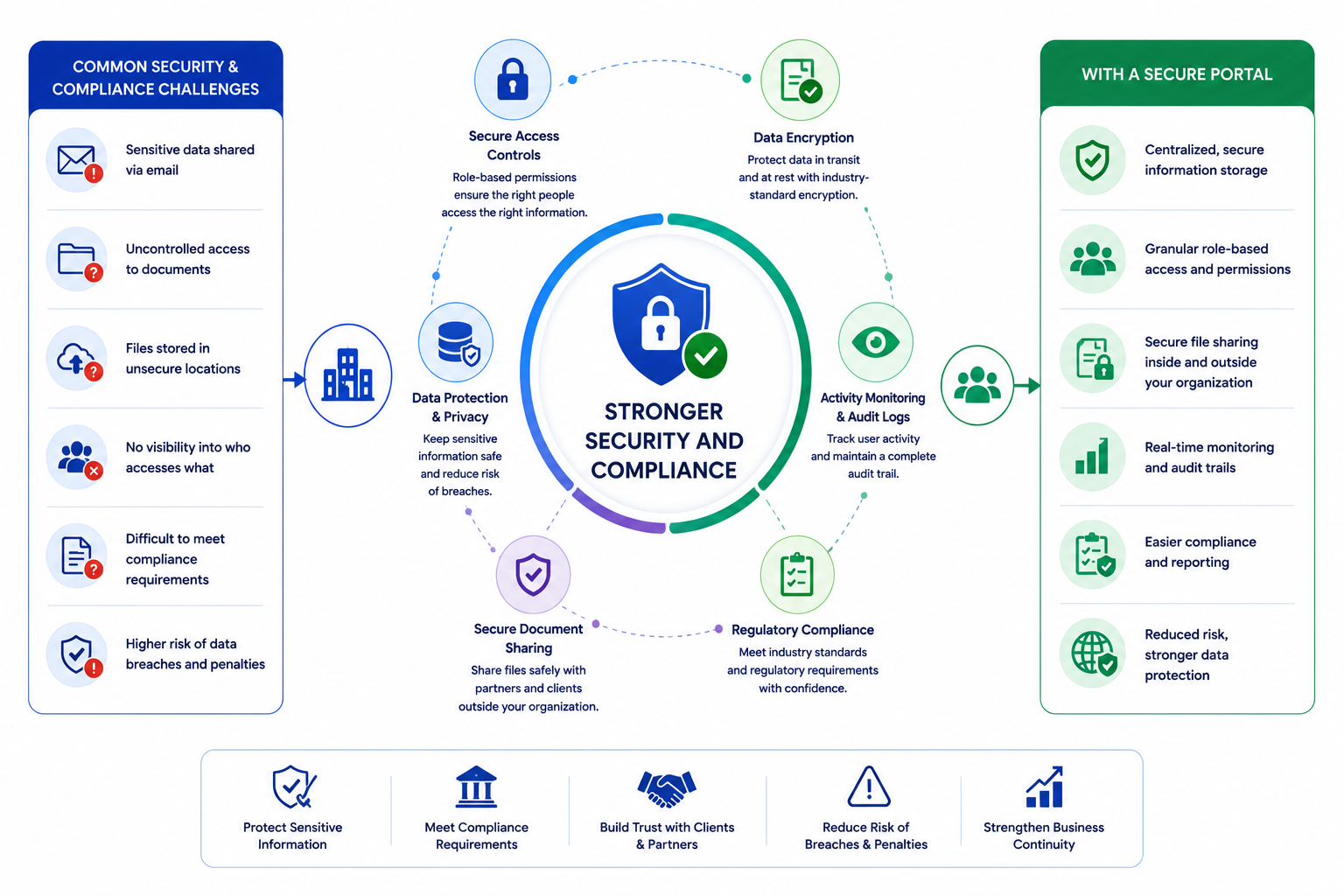
Stronger Security and Compliance
Security remains a major concern when sharing sensitive information with external parties.
Organizations must ensure that confidential documents, customer information, contracts, and intellectual property remain protected at all times.
A professional client and partner portal provides significantly greater control than email attachments or public file-sharing tools.
Security features commonly include:
- Role-based permissions
- Multi-factor authentication (MFA)
- Single Sign-On (SSO)
- Encryption in transit and at rest
- Audit logs and reporting
- Compliance controls
- Secure document sharing
For industries such as healthcare, financial services, government, education, and legal services, these security measures help support compliance requirements while reducing operational risk.
Increased Customer and Partner Satisfaction
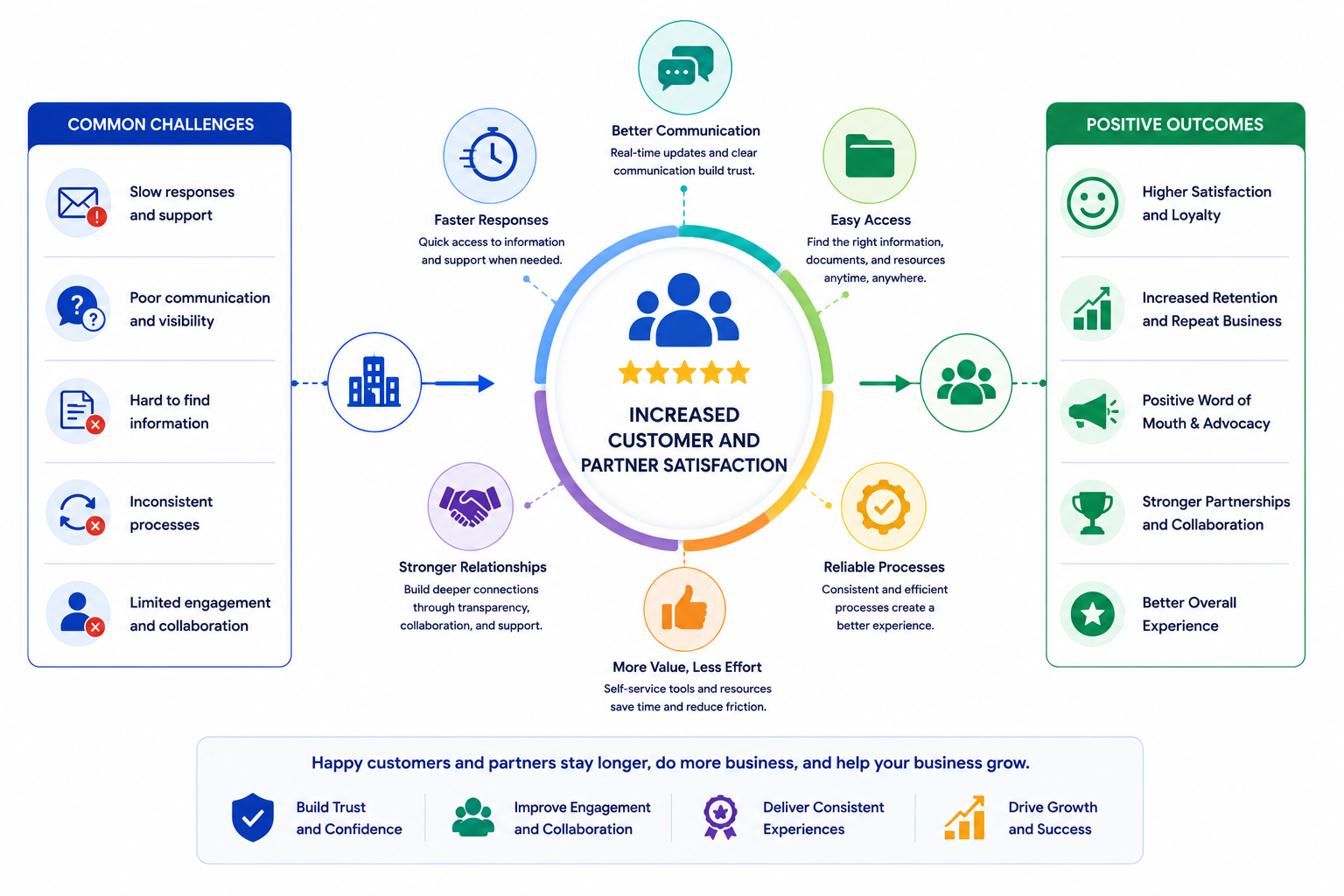
Increased Customer and Partner Satisfaction
Ultimately, businesses invest in portals because they improve the overall experience for clients and partners.
People want quick access to information, simple communication channels, and self-service tools that help them get their work done efficiently.
A modern customer portal platform or partner experience platform creates a more professional and engaging experience that strengthens relationships over time.
Satisfied clients and partners benefit from:
- Faster access to information
- Reduced response times
- Better communication
- Easier collaboration
- Greater transparency
- Improved support experiences
- More productive business relationships
When clients and partners can easily find what they need, they become more engaged, more loyal, and more likely to continue doing business with your organization.
Businesses that successfully implement a robust client and partner portal solution often see improvements in retention, satisfaction, collaboration, and long-term revenue growth.
Why Your Business Might Need a Client and Partner Portal
If you're still managing clients, partners, suppliers, or distributors through email, shared folders, and disconnected communication tools, you're likely wasting valuable time and creating unnecessary friction for everyone involved.
A modern client and partner portal gives your external stakeholders a secure, centralized place to access documents, collaborate with your team, complete onboarding activities, and stay informed.
Instead of chasing information across multiple systems, your clients and partners can quickly find what they need, when they need it.
Whether you're looking to improve partner engagement, streamline onboarding, strengthen security, or reduce administrative work, investing in the right partner portal software can have a significant impact on your business operations and long-term growth.
Improve External Collaboration
Your clients and partners need easy access to information, resources, and communication channels. Without a centralized platform, conversations become fragmented across emails, phone calls, messaging apps, and file-sharing tools.
A dedicated partner collaboration platform creates a single source of truth where everyone can collaborate more efficiently.
Accelerate Client and Partner Onboarding
First impressions matter. If new clients or partners struggle to find training materials, documentation, or support resources, adoption can slow down significantly.
A partner onboarding portal helps you create a structured onboarding experience that gets external users productive faster.
This can include:
- Welcome guides
- Training materials
- Knowledge base articles
- Product documentation
- Certification programs
- Onboarding checklists
Reduce Email Overload
Most organizations rely too heavily on email to manage external relationships. Over time, important information becomes buried in inboxes, making it difficult to track conversations and locate documents.
A client portal software solution allows you to centralize communication and provide self-service access to resources.
As a result, you can:
- Reduce repetitive questions
- Minimize email dependency
- Improve response times
- Increase operational efficiency
- Deliver a better user experience
Organize Documents More Effectively
Managing contracts, policies, proposals, marketing assets, and training resources across multiple systems creates confusion and increases risk.
A modern document management portal helps you maintain control over important information while ensuring external users always access the latest version.
Key capabilities include:
- Secure document sharing
- Version control
- Approval workflows
- Role-based permissions
- Searchable resource libraries
- Audit trails
Strengthen Security and Compliance
Sharing sensitive business information through email attachments or public file-sharing services can expose your organization to unnecessary security risks.
A dedicated client and partner portal provides advanced security controls designed to protect confidential information.
Common security features include:
- Single Sign-On (SSO)
- Multi-factor authentication
- Role-based access controls
- Encryption
- Activity tracking
- Compliance reporting
Increase Client and Partner Satisfaction
Ultimately, your clients and partners want quick access to information and a simple way to work with your organization.
When you provide a professional, easy-to-use portal experience, you remove friction from the relationship and make it easier for external stakeholders to succeed.
This often leads to:
- Higher engagement
- Faster onboarding
- Improved retention
- Better collaboration
- Stronger partner relationships
- Increased customer loyalty
Organizations that invest in modern client and partner portal platforms often discover that improved collaboration, communication, and accessibility directly contribute to business growth and long-term success.
Key Features You Should Look for in a Client and Partner Portal
Not all client and partner portals are created equal. Some platforms focus primarily on file sharing, while others provide a complete ecosystem for partner engagement, customer collaboration, onboarding, training, communication, and knowledge management.
If you're evaluating a partner portal platform, customer portal software, or external collaboration solution, it's important to focus on features that will improve both user experience and operational efficiency.
Below are the most important capabilities to consider before making your investment
Centralized Document Management
External users don't want to wait for answers that could be found in seconds.
A built-in knowledge management system helps reduce support requests by giving users instant access to important resources whenever they need them.
Your portal should include:
- Knowledge base articles
- FAQs
- User guides
- Product documentation
- Process documentation
- Video tutorials
- Searchable content libraries
A strong knowledge hub improves user satisfaction while reducing the workload on your support and account management teams.
Self-Service Knowledge Hub
One of the primary reasons organizations implement a client and partner portal is to eliminate the confusion caused by scattered files and outdated documents.
A centralized document repository ensures that clients, partners, suppliers, and vendors can quickly access the information they need without contacting your team.
Look for features such as:
- Secure file storage
- Version control
- Document approvals
- Folder permissions
- File previews
- Advanced search functionality
- Cloud-based access
The best document collaboration software makes it easy to manage contracts, proposals, product documentation, training materials, policies, and marketing assets from a single location.
Granular Access Controls
Not every user should have access to every document or workspace.
Whether you're working with customers, distributors, suppliers, consultants, or resellers, you need complete control over who can view, edit, upload, or download information.
Key security features should include:
- Role-based permissions
- User groups
- Department access controls
- Private workspaces
- Single Sign-On (SSO)
- Multi-factor authentication (MFA)
- Audit logs
Strong access controls help protect sensitive business information while ensuring users only see content relevant to them.
Real-Time Communication Tools
Effective collaboration requires more than simply sharing files.
Modern partner collaboration software should provide communication tools that allow teams and external stakeholders to stay connected without relying solely on email.
Look for:
- Team chat
- Direct messaging
- Discussion forums
- Announcements
- Activity feeds
- Group conversations
- Video meeting integrations
Organizations that centralize communication often experience faster response times and stronger engagement across their partner ecosystem.
Automated Business Processes
Manual processes create delays, increase administrative workload, and often lead to errors.
The best client and partner portals help automate repetitive tasks so your team can focus on higher-value activities.
Popular automation capabilities include:
- Approval workflows
- Document review processes
- Partner onboarding workflows
- Task assignments
- Automated notifications
- Reminder systems
- Form routing
Workflow automation helps improve consistency, increase efficiency, and deliver a better experience for both employees and external stakeholders.
Partner Onboarding and Learning Tools
If you work with channel partners, distributors, franchises, or resellers, training is essential for long-term success.
A dedicated partner enablement platform should help you educate, certify, and support partners throughout their journey.
Look for functionality such as:
- Online training courses
- Learning pathways
- Certifications
- Skills assessments
- Product training
- Compliance training
- Progress tracking
Well-trained partners are more likely to engage with your organization, represent your brand effectively, and contribute to revenue growth.
Mobile Access for Remote Users
Today's workforce is more mobile than ever. Many partners, suppliers, contractors, and field-based employees need access to information while working remotely.
A modern portal should provide a consistent experience across:
- Smartphones
- Tablets
- Laptops
- Desktop computers
Mobile-friendly portals improve accessibility and ensure users can stay productive regardless of their location.
This is particularly important for organizations with frontline workers, field sales teams, external consultants, and distributed partner networks.
Reporting and Performance Insights
You cannot improve what you cannot measure.
Analytics and reporting tools provide valuable visibility into how clients and partners interact with your portal, helping you identify opportunities for improvement.
Useful reporting capabilities include:
- User activity tracking
- Document engagement metrics
- Content performance reports
- Partner participation levels
- Training completion rates
- Search analytics
- Adoption reporting
These insights help organizations optimize onboarding programs, improve content effectiveness, and increase overall partner engagement.
Integration With Existing Business Systems
Your portal should work seamlessly with the tools your organization already uses.
Look for platforms that integrate with:
- Microsoft 365
- Google Workspace
- Salesforce
- HubSpot
- CRM systems
- Helpdesk platforms
- Learning Management Systems
- Document management solutions
Strong integrations eliminate duplicate work and create a more connected digital workplace experience.
Scalability for Future Growth
The portal you choose today should still support your business in five years.
As your customer base, partner network, and content library grow, your platform should be able to scale without requiring a complete replacement.
Consider:
- User limits
- Storage capacity
- Performance at scale
- Customization options
- Multi-language support
- Multi-brand capabilities
- Enterprise security features
Choosing a scalable client and partner portal solution helps protect your investment while supporting long-term business growth.
Comparison Table of the Best Client and Partner Portal Platforms
Choosing the right client and partner portal can significantly impact how effectively you collaborate with customers, partners, suppliers, and external stakeholders.
To help you compare the leading solutions on the market, we've evaluated the best client portal software and partner portal platforms based on features, usability, security, scalability, integrations, and overall value.
| Platform | Best For | Free Trial | Key Strength |
| AgilityPortal | All-in-one Enterprise workplace operations | Yes | Client & Partner, Employee Collaboration |
| MangoApps | Enterprise portals | Yes | Employee + External Portals |
| Zoho Creator | Custom portals | Yes | Flexibility |
| Salesforce Experience Cloud | Large enterprises | Yes | CRM Integration |
| Microsoft SharePoint | Microsoft ecosystem | No | Document Management |
| HubSpot Customer Portal | Documentation workflows | Yes | Support Management |
| Huddle | Secure document collaboration | Yes | Compliance |
| SuiteDash | SMBs | Yes | Client Management |
| Clinked | Client collaboration | Yes | File Sharing |
| ThoughtFarmer | Knowledge sharing | Yes | Internal & External Collaboration |
Detailed Review of the 10 Best Client and Partner Portal Platforms
To help you make an informed decision, we've reviewed the best client and partner portal platforms, comparing their key features, strengths, ideal use cases, pricing, and potential limitations.
#1. AgilityPortal
AgilityPortal is an all-in-one client and partner portal platform designed to help organizations improve external collaboration, streamline onboarding, centralize knowledge, and strengthen relationships with clients, suppliers, distributors, and business partners. The platform combines communication, document management, training, and engagement tools within a single secure workspace.
Best For- Growing businesses
- Partner-driven organizations
- Client service teams
- Supplier collaboration
- Channel partner management
- Client & Partner Portal: Create branded collaboration spaces for external stakeholders.
- Document Management: Securely store, organize, and share business-critical files.
- Knowledge Base: Centralize guides, policies, FAQs, and resources.
- Partner Onboarding: Accelerate onboarding with structured workflows and training.
- Learning Management System: Deliver courses, certifications, and compliance training.
- Team Communication: Chat, announcements, discussions, and updates.
- Role-Based Permissions: Control access to sensitive content and resources.
- Mobile Access: Keep users connected from any device.
- Easy to use and deploy
- Combines multiple tools into one platform
- Strong collaboration and communication features
- Excellent knowledge management capabilities
- Supports both client and partner use cases
- Some advanced integrations may require configuration
- Enterprise deployments may require onboarding support
- Starts from $199 per month for up to 500 users. Custom enterprise plans are available.
A technology company uses AgilityPortal to onboard channel partners, share sales resources, manage training certifications, and provide a centralized portal where partners can access documentation, company updates, and support materials from a single location.
Client & Partner Portal Platform
Built for Client Collaboration, Partner Portals & Secure External Workspaces
AgilityPortal is a client and partner portal platform that helps organizations centralize external collaboration, secure document sharing, partner onboarding, communication, training, knowledge management, and engagement in one easy-to-use digital workspace.
A strong option for organizations looking to manage clients, suppliers, distributors, resellers, vendors, consultants, and partners from one secure branded portal.
#2. MangoApps
MangoApps is a digital workplace and partner portal platform that helps organizations centralize communication, document management, training, and external collaboration. The platform supports both employee and partner experiences, making it a popular choice for businesses that want to manage internal teams and external stakeholders from a single solution.
Best For- Mid-sized businesses
- Enterprise organizations
- Channel partner programs
- Franchise networks
- Organizations managing internal and external users
- Partner Portal Software: Create secure workspaces for partners and external users.
- Document Management: Share files, policies, and resources in one location.
- Learning Management: Deliver training courses and certifications.
- Team Communication: Announcements, chat, discussions, and social feeds.
- Knowledge Base: Centralized resource libraries and documentation.
- Mobile App: Access content and collaborate from any device.
- Workflow Automation: Automate approvals and business processes.
- Analytics & Reporting: Track engagement and platform usage.
- Comprehensive feature set
- Strong communication capabilities
- Supports both employees and partners
- Good mobile experience
- Flexible customization options
- Interface can feel overwhelming for new users
- Advanced features may require additional setup
- Pricing is not publicly available
Custom pricing based on organization size and requirements. Contact MangoApps for a quote.
What G2 Users Say"Having communication, training, files, and collaboration tools all in one platform makes managing teams much easier."
"The mobile experience is excellent and helps keep both employees and external stakeholders connected."
Employee Experience & Intranet Platform
Built for Internal Communication, Employee Engagement & Digital Workplace Collaboration
MangoApps is an employee experience platform and digital workplace solution that helps organizations centralize communication, knowledge sharing, employee engagement, file management, workflows, and collaboration across desk-based and frontline teams.
A strong option for organizations looking to connect employees, improve communication, and centralize workplace resources in one digital hub.
#3. Zoho Creator
Zoho Creator is a low-code application development platform that allows businesses to build custom client portals, partner portals, supplier portals, and self-service customer experiences without extensive coding. Its flexibility makes it ideal for organizations with unique workflows and specific collaboration requirements.
Best For- Small and mid-sized businesses
- Organizations needing custom portals
- Service-based companies
- Supplier management
- Businesses already using Zoho products
- Custom Portal Builder: Create tailored client and partner experiences.
- Workflow Automation: Automate approvals, forms, and business processes.
- Document Management: Securely store and share files.
- Self-Service Portals: Allow users to access information independently.
- Forms & Data Collection: Capture and manage business data efficiently.
- CRM Integration: Connect with Zoho CRM and other business applications.
- Mobile Access: Access portals from desktop or mobile devices.
- Analytics & Reporting: Monitor portal activity and business performance.
- Highly customizable
- Strong automation capabilities
- Easy integration with the Zoho ecosystem
- No extensive coding required
- Good value for growing businesses
- Requires setup and customization
- Can have a learning curve for non-technical users
- Advanced functionality may require developer support
Subscription-based pricing with multiple tiers depending on users, applications, and business requirements.
What G2 Users Say"Zoho Creator gives us the flexibility to build exactly what our business needs without developing custom software from scratch."
"The workflow automation and form-building capabilities have helped streamline several manual processes across our organization."
Low-Code Portal Builder
Built for Custom Client Portals, Business Apps & Workflow Automation
Zoho Creator is a low-code application platform that helps businesses build custom client portals, partner portals, supplier portals, internal apps, forms, approval workflows, and self-service experiences without starting from scratch.
A strong option for teams that want to build tailored portals and automate business processes without relying heavily on traditional software development.
#4. Salesforce Experience Cloud
Salesforce Experience Cloud is a powerful customer, client, and partner portal platform built for organizations that need deep CRM integration and advanced relationship management capabilities. It enables businesses to create branded digital experiences where customers, partners, distributors, and suppliers can collaborate, access resources, manage opportunities, and engage with teams.
Best For- Large enterprises
- Salesforce users
- Channel partner programs
- Customer communities
- Global organizations
- Partner Relationship Management (PRM): Manage partner onboarding, engagement, and performance.
- Client & Partner Portals: Create personalized digital experiences for external users.
- Deal Registration: Allow partners to submit and track sales opportunities.
- Knowledge Management: Share articles, documentation, and support resources.
- CRM Integration: Connect directly with Salesforce data and workflows.
- Community Management: Build customer and partner communities.
- Workflow Automation: Automate approvals, notifications, and processes.
- Analytics & Dashboards: Track engagement, pipeline activity, and partner performance.
- Deep Salesforce integration
- Highly scalable platform
- Strong partner management capabilities
- Extensive customization options
- Powerful reporting and analytics
- Can be expensive for smaller businesses
- Requires Salesforce expertise
- Implementation can be complex
Custom pricing based on Salesforce licensing, users, and business requirements.
What G2 Users Say"Experience Cloud provides a seamless way to connect partners and customers directly to our Salesforce ecosystem."
"The flexibility and customization options are impressive, allowing us to build a portal tailored to our exact business needs."
CRM-Powered Digital Experience Platform
Built for Customer Portals, Partner Communities & CRM-Connected Experiences
Salesforce Experience Cloud is a digital experience platform that helps organizations create branded customer portals, partner communities, self-service hubs, knowledge centers, and CRM-connected collaboration experiences.
A strong option for larger organizations that want to connect external portals directly with Salesforce CRM data, workflows, and customer records.
#5. Microsoft SharePoint
Microsoft SharePoint is one of the most widely used collaboration and document management platforms in the world. As part of the Microsoft 365 ecosystem, it enables organizations to create client portals, partner portals, intranets, and secure document-sharing environments while integrating with tools such as Teams, Outlook, and OneDrive.
Best For- Microsoft 365 customers
- Enterprise organizations
- Document-heavy businesses
- Compliance-focused industries
- Internal and external collaboration
- Document Management: Store, organize, and manage files securely.
- Partner Extranet Sites: Create dedicated spaces for clients and partners.
- Microsoft Teams Integration: Collaborate directly within Microsoft workflows.
- Knowledge Management: Build internal and external resource hubs.
- Permission Controls: Manage access at site, folder, and document levels.
- Workflow Automation: Automate business processes using Power Automate.
- Search Functionality: Quickly locate documents and content.
- Compliance & Security: Enterprise-grade governance and security controls.
- Deep Microsoft 365 integration
- Strong document management capabilities
- Highly secure and scalable
- Extensive customization options
- Suitable for large organizations
- Complex to configure and manage
- Requires ongoing administration
- User experience can feel outdated compared to modern portal platforms
Included with many Microsoft 365 business and enterprise plans, with additional costs for advanced functionality and storage.
What G2 Users Say"SharePoint provides excellent document management and integrates seamlessly with the Microsoft tools we use every day."
"The platform is powerful, but it often requires technical expertise to configure and maintain effectively."
Document Management & Collaboration Platform
Built for Document Management, Knowledge Sharing & Microsoft 365 Collaboration
Microsoft SharePoint is a document management platform and enterprise collaboration solution that helps organizations manage content, create intranet sites, share knowledge, and collaborate across the Microsoft 365 ecosystem.
A popular choice for enterprises seeking centralized document storage and Microsoft integration, though many organizations require additional customization for external collaboration and partner portal functionality.
#6. HubSpot Customer Portal
HubSpot Customer Portal is a customer self-service solution designed to help businesses improve support experiences and reduce the volume of repetitive service requests. Built into HubSpot Service Hub, it allows customers to track tickets, communicate with support teams, and access updates through a centralized portal.
Best For- Customer support teams
- SaaS companies
- Service-based businesses
- HubSpot users
- Growing organizations
- Customer Portal: Allow customers to view and manage support tickets.
- Ticket Tracking: Provide real-time visibility into request status.
- Knowledge Base Integration: Help users find answers independently.
- CRM Integration: Connect customer interactions directly to HubSpot CRM.
- Self-Service Support: Reduce support workload through automated access to resources.
- Customer Communication: Centralize conversations and updates.
- Reporting & Analytics: Track support performance and customer satisfaction.
- Workflow Automation: Automate ticket routing and notifications.
- Easy to set up and use
- Seamless integration with HubSpot CRM
- Improves customer support efficiency
- Strong self-service capabilities
- User-friendly interface
- Primarily focused on customer support use cases
- Limited partner enablement functionality
- Advanced features require higher-tier plans
Available as part of HubSpot Service Hub plans, with pricing varying based on users and functionality requirements.
What G2 Users Say"The customer portal gives our clients complete visibility into their support requests without needing to contact our team for updates."
"The integration with HubSpot makes it easy to manage customer interactions and improve the overall support experience."
Customer Self-Service Platform
Built for Customer Support, Ticket Management & Self-Service Experiences
HubSpot Customer Portal is a customer self-service solution that enables businesses to manage support requests, improve customer communication, and provide real-time ticket visibility through a centralized customer experience platform.
A strong option for organizations focused on customer support and service delivery, though it offers fewer partner management and external collaboration features than dedicated partner portal platforms.
#7. Huddle
Huddle is a secure collaboration and document management platform designed for organizations that need to share sensitive information with clients, partners, suppliers, and external stakeholders. It is particularly popular in regulated industries where compliance, governance, and secure document sharing are critical.
Best For- Government organizations
- Financial services
- Healthcare providers
- Legal firms
- Compliance-focused businesses
- Secure Client Portals: Share confidential information safely with external users.
- Document Management: Organize, review, and control business-critical files.
- Version Control: Ensure users always access the latest document version.
- Collaboration Workspaces: Work with clients and partners in dedicated environments.
- Approval Workflows: Streamline document reviews and approvals.
- Activity Tracking: Monitor user actions and document engagement.
- Mobile Access: Access content securely from anywhere.
- Compliance Controls: Support governance and regulatory requirements.
- Strong security and compliance features
- Excellent document control capabilities
- Easy external collaboration
- Detailed audit trails
- Suitable for highly regulated industries
- Less focused on partner enablement
- Interface can feel dated compared to newer platforms
- Pricing may be expensive for smaller organizations
Custom pricing based on users, storage requirements, and business needs.
What G2 Users Say"Huddle makes it easy to securely collaborate with clients while maintaining strict control over sensitive documents."
"The document versioning and approval workflows help ensure everyone is working from the most up-to-date information."
Secure Document Collaboration Platform
Built for Secure File Sharing, Client Collaboration & Regulatory Compliance
Huddle is a secure collaboration platform designed to help organizations manage confidential documents, collaborate with external stakeholders, and maintain compliance across highly regulated industries such as government, healthcare, legal, and financial services.
A strong choice for organizations that prioritize security, governance, and controlled collaboration when working with clients, partners, contractors, and external stakeholders.
#8. SuiteDash
SuiteDash is an all-in-one client portal platform that combines CRM, project management, file sharing, invoicing, and customer collaboration tools into a single solution. It is designed to help businesses manage client relationships while providing a professional self-service portal experience.
Best For
- Agencies
- Consultants
- Professional services firms
- Small businesses
- Client-focused organizations
Key Features
- Client Portal Software: Create branded portals for customers and clients.
- Project Management: Track tasks, projects, and deliverables.
- Secure File Sharing: Exchange documents and files securely.
- CRM Functionality: Manage client information and interactions.
- Invoicing & Billing: Send invoices and manage payments.
- Workflow Automation: Automate repetitive administrative tasks.
- Client Messaging: Communicate directly through the platform.
- White Label Branding: Customize the portal with your own branding.
Pros
- Comprehensive all-in-one solution
- Strong client management capabilities
- White-label portal experience
- Good value for small businesses
- Reduces the need for multiple tools
Cons
- User interface can feel overwhelming initially
- Less focused on partner enablement use cases
- Some advanced features require configuration
Pricing
Subscription-based pricing with multiple plans available depending on features and business requirements.
What G2 Users Say
"SuiteDash helped us replace several separate tools with a single platform for managing clients, projects, files, and invoices."
"The white-label functionality allows us to provide a professional client experience while keeping everything under our own brand."
Client Portal & Business Management Platform
Built for Client Management, Project Collaboration & Business Automation
SuiteDash is an all-in-one client portal platform that combines CRM, project management, invoicing, file sharing, workflow automation, and customer collaboration tools into a single business management solution.
A popular choice for service-based businesses looking to replace multiple tools with a single platform for managing clients, projects, documents, billing, and communication.
#9. Clicked
Clinked is a cloud-based client portal and collaboration platform designed to help businesses securely share documents, manage projects, and communicate with clients, partners, and external stakeholders. Its white-label capabilities make it particularly appealing for organizations that want to deliver a branded client experience.
Best For- Agencies
- Consultants
- Professional services firms
- Accounting firms
- Client-facing businesses
- Client Portal Software: Create secure branded portals for customers and partners.
- Document Sharing: Upload, organize, and share files securely.
- Project Collaboration: Manage tasks, discussions, and project updates.
- White Label Branding: Customize the portal with your company's branding.
- Team Communication: Collaborate through discussions and messaging.
- File Version Control: Track document changes and updates.
- Mobile Access: Access files and collaborate from anywhere.
- Activity Tracking: Monitor engagement and user activity.
- Easy to use and deploy
- Strong white-label capabilities
- Secure file sharing and collaboration
- Good client communication tools
- Mobile-friendly platform
- Limited workflow automation features
- Less suitable for large enterprise deployments
- Fewer integrations than some competitors
Subscription-based pricing with plans available for businesses of different sizes.
What G2 Users Say"Clinked provides a simple and professional way to collaborate with clients while keeping documents organized and secure."
"The white-label functionality allows us to create a seamless experience that feels like an extension of our own business."
Client Portal & Collaboration Platform
Built for Secure Client Collaboration, File Sharing & White-Label Portals
Clinked is a client portal software platform that helps businesses securely share files, manage projects, collaborate with customers, and deliver a fully branded client experience through customizable workspaces.
A solid choice for businesses looking to provide clients with a professional, branded portal for collaboration, communication, and document management.
#10. ThoughtFarmer
ThoughtFarmer is a digital workplace and knowledge management platform that helps organizations improve collaboration, information sharing, and communication with both internal teams and external stakeholders. Its strength lies in creating centralized knowledge hubs that make information easy to find and maintain.
Best For- Mid-sized businesses
- Enterprise organizations
- Knowledge-driven companies
- Professional services firms
- Organizations managing large amounts of content
- Knowledge Management Platform: Create a centralized repository for business information.
- Client & Partner Workspaces: Share content securely with external users.
- Document Management: Store, organize, and manage files in one location.
- Employee & Partner Directory: Connect users across teams and organizations.
- Collaboration Tools: Support discussions, updates, and knowledge sharing.
- Advanced Search: Quickly locate documents, people, and resources.
- Mobile Access: Access information from anywhere.
- Analytics & Insights: Measure content engagement and platform adoption.
- Excellent knowledge management capabilities
- Powerful search functionality
- Easy content creation and publishing
- Strong internal and external collaboration tools
- User-friendly interface
- Less focused on customer support workflows
- Limited partner enablement features compared to specialist platforms
- Pricing is not publicly available
Custom pricing based on users, deployment requirements, and business needs.
What G2 Users Say"ThoughtFarmer has made it much easier for employees and external stakeholders to find the information they need without wasting time searching."
"The platform provides an intuitive way to organize knowledge and improve collaboration across the organization."
Knowledge Management & Digital Workplace Platform
Built for Knowledge Sharing, Internal Communication & Information Discovery
ThoughtFarmer is a knowledge management platform and digital workplace solution that helps organizations centralize company knowledge, improve information discovery, and connect employees through searchable content, collaboration tools, and communication features.
A strong option for organizations looking to reduce information silos, improve knowledge sharing, and make company information easier to find and manage.
Common Problems Solved by Client and Partner Portal Software
Many organizations continue to manage customers, suppliers, distributors, consultants, and channel partners using disconnected systems that create inefficiencies, increase risk, and limit growth.
A modern client and partner portal helps eliminate these challenges by centralizing communication, knowledge sharing, document access, and external collaboration.
Knowledge Silos Make Information Difficult to Find
When important documents, training materials, contracts, and business resources are spread across email inboxes, shared drives, cloud storage platforms, and messaging apps, external stakeholders struggle to find what they need.
These knowledge silos often lead to delays, frustration, and repeated requests for information.
Inefficient Partner Onboarding Slows Time-to-Value
Without a structured partner onboarding process, new partners often face confusion when trying to access training, certifications, product documentation, and support resources. This can delay partner activation, reduce engagement, and impact revenue opportunities.
Limited Partner Engagement and Activity Tracking
Many organizations have little visibility into how partners interact with content, training programs, sales resources, and company updates.
Without partner analytics and engagement tracking, it becomes difficult to identify inactive partners, measure success, or optimize partner programs.
Unsecure Document Sharing Creates Compliance Risks
Relying on email attachments and public file-sharing tools can expose sensitive business information to unauthorized access.
Organizations that handle confidential client data, contracts, financial records, or intellectual property need secure document sharing and access controls to reduce risk.
Poor External Communication Impacts Collaboration
When communication occurs across multiple disconnected channels, important updates are often missed, conversations become fragmented, and collaboration suffers.
A centralized communication platform helps keep clients, partners, suppliers, and stakeholders aligned.
Lack of a Centralized Partner Resource Center
Partners frequently need access to sales playbooks, marketing materials, pricing information, product documentation, and training resources.
Without a dedicated partner resource center, users waste valuable time searching for information or contacting support teams.
Inconsistent Customer and Partner Experiences
Different onboarding processes, communication methods, and resource locations can create an inconsistent experience for external users.
A centralized portal helps standardize interactions and ensures every client or partner receives the same high-quality experience.
Growing Administrative Workloads for Internal Teams
Without self-service capabilities, employees often spend significant time answering repetitive questions, sharing documents, managing access requests, and supporting onboarding activities.
A self-service portal reduces administrative burden while improving efficiency across the organization.
How to Choose the Right Client and Partner Portal
Selecting the right client and partner portal software is about more than comparing features and pricing.
The ideal platform should align with your business goals, support your external stakeholders, and scale as your organization grows.
Whether you're looking for a customer portal, partner management platform, supplier portal, or external collaboration software, evaluating the following factors will help you make a more informed decision.

How to Choose the Right Client and Partner Portal
Identify Your External Audience
Before comparing vendors, start by understanding who will be using the portal.
Different platforms are designed for different audiences, and selecting the wrong type of solution can create unnecessary complexity.
For example, a client-facing organization may prioritize customer support and document sharing, while a channel-focused business may need partner onboarding, certifications, and deal registration capabilities.
Consider whether your portal will support:
- Clients and customers
- Channel partners
- Distributors and resellers
- Suppliers and vendors
- Consultants and contractors
- Franchisees
- External stakeholders
Understanding your audience will help narrow down the features and functionality that matter most.
Evaluate Security and Compliance Requirements
External collaboration often involves sharing confidential information, contracts, pricing data, training materials, and intellectual property. As a result, security should be one of your highest priorities when evaluating portal software.
Look for platforms that provide:
- Role-based access controls
- Single Sign-On (SSO)
- Multi-factor authentication (MFA)
- Secure document sharing
- Audit logs
- Data encryption
- Compliance reporting
Organizations operating in industries such as healthcare, finance, government, and legal services should pay particular attention to compliance capabilities and data protection standards.
Consider Integration Requirements
A portal should work alongside your existing business systems rather than create another isolated platform.
The best solutions integrate with the tools your employees and partners already use daily, helping reduce duplication and improve efficiency.
Common integrations include:
- Microsoft 365
- Google Workspace
- Salesforce CRM
- HubSpot CRM
- Microsoft Teams
- Learning Management Systems
- Helpdesk software
- HR platforms
- Cloud storage providers
Strong integrations create a more connected digital workplace and improve the overall user experience.
Review Scalability and Growth Potential
The platform you choose today should still meet your needs as your organization grows.
Many businesses start with a small partner network but eventually expand to support hundreds or even thousands of external users. Choosing a scalable solution can help avoid costly migrations in the future.
Important considerations include:
- User capacity
- Storage limits
- Performance at scale
- Multi-location support
- Multi-language capabilities
- Custom branding options
- Enterprise administration controls
A scalable portal platform allows you to support future growth without sacrificing performance or usability.
Assess User Experience and Adoption
Even the most feature-rich portal will fail if people find it difficult to use.
External users expect modern, intuitive experiences similar to the consumer applications they use every day. If navigation is confusing or content is difficult to find, adoption rates will suffer.
When evaluating a portal, consider:
- Ease of navigation
- Mobile responsiveness
- Search functionality
- User interface design
- Self-service capabilities
- Accessibility features
- Onboarding experience
A user-friendly platform encourages engagement and reduces the need for ongoing support.
Compare Total Cost of Ownership
Pricing should never be the only factor in your decision, but it remains an important consideration.
Many organizations focus solely on subscription costs while overlooking implementation, training, customization, support, and ongoing administration expenses.
When comparing solutions, evaluate:
- Software licensing fees
- Implementation costs
- User-based pricing
- Storage charges
- Integration costs
- Training requirements
- Support and maintenance fees
The most affordable platform isn't always the best value. Instead, focus on the solution that delivers the greatest long-term return on investment while meeting your business requirements.
By carefully evaluating your audience, security needs, integrations, scalability, user experience, and total cost of ownership, you'll be in a much stronger position to select a client and partner portal platform that supports collaboration, improves engagement, and helps your organization grow more effectively.
Final Thoughts on Choosing the Best Workplace Operations Platform
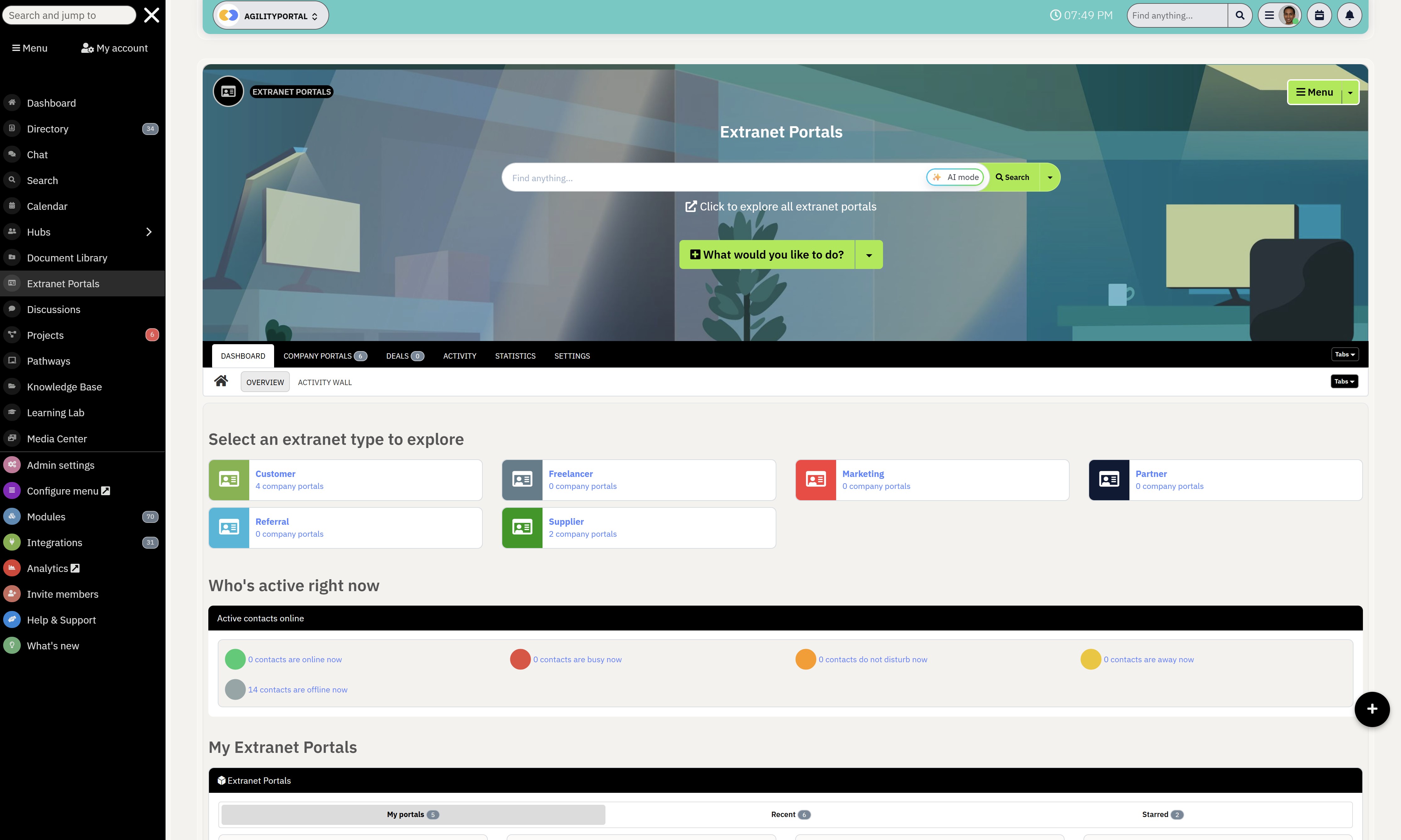
Final Thoughts on Choosing the Best Workplace Operations Platform
Many client and partner portal solutions only solve one problem, such as file sharing or customer support.
AgilityPortal combines communication, knowledge management, onboarding, training, and collaboration into a single platform, helping organizations manage external relationships more effectively.
Key Features:- Dedicated Client & Partner Workspaces – Create secure spaces for customers, suppliers, distributors, and partners.
- Document Management – Share contracts, policies, sales resources, and training materials securely.
- Knowledge Base – Give users self-service access to guides, FAQs, and documentation.
- Partner Onboarding – Streamline onboarding with structured learning paths and workflows.
- Built-In LMS – Deliver partner training, certifications, and compliance programs.
- Collaboration Tools – Chat, announcements, discussions, tasks, and calendars in one place.
- Role-Based Permissions – Control exactly who can access specific content and resources.
- White-Label Branding – Customize the portal with your logo, colors, and domain.
- Analytics & Reporting – Track engagement, content usage, and training completion.
Unlike traditional portal software that requires multiple third-party tools, AgilityPortal provides a complete client and partner engagement platform designed to improve collaboration, simplify onboarding, centralize knowledge, and strengthen external relationships.
Book a free demo to see how AgilityPortal can help you create a more connected and productive partner ecosystem.
Drive faster, more connected client and partner collaboration with AgilityPortal.
Reduce administrative workload and improve engagement with a centralized client and partner portal.
Book a demo to see how AgilityPortal helps you:
- Centralize documents, communication, training, and resources in one secure platform
- Improve client and partner satisfaction with self-service access to the information they need
- Scale onboarding, collaboration, and knowledge sharing through a branded portal accessible from any device
Partner Enablement Platform
Uplevel Your Partner Enablement
Give partners, distributors, suppliers, and resellers one secure hub for onboarding, training, documents, deal registration, communication, and collaboration.
AgilityPortal helps you reduce partner friction, improve engagement, and make it easier for every partner to find what they need to sell, support, and grow faster.
Book a Free Demo
No credit card required · See the platform in action
Frequently Asked Questions on Best Client & Partner Portal Platforms
What is a client and partner portal?
A client and partner portal is a secure online platform that allows businesses to share documents, communicate, collaborate, provide training, and manage relationships with customers, suppliers, distributors, consultants, and business partners.
It serves as a centralized hub where external users can access resources and information without relying on email.
What are the benefits of a client portal?
A client portal improves communication, simplifies document sharing, enhances security, and provides self-service access to information.
Businesses often use client portals to reduce administrative workload, improve customer satisfaction, and create a more professional client experience.
What is the difference between a customer portal and a partner portal?
A customer portal is designed to support customers by providing access to support resources, documents, and account information.
A partner portal focuses on enabling distributors, resellers, suppliers, and channel partners with training, sales resources, onboarding materials, and collaboration tools.
Can a partner portal improve onboarding?
Yes. A partner onboarding portal helps new partners quickly access training materials, product information, certifications, and company resources.
This reduces onboarding time, improves engagement, and helps partners become productive faster.
Are client and partner portals secure?
Most modern client and partner portal platforms include enterprise-grade security features such as role-based permissions, Single Sign-On (SSO), multi-factor authentication (MFA), encryption, and audit logs to protect sensitive business information.
Which is the best client and partner portal platform?
The best platform depends on your business requirements.
Organizations looking for an all-in-one solution often choose AgilityPortal, while others may prefer Salesforce Experience Cloud, SharePoint, MangoApps, or SuiteDash based on their specific collaboration, CRM, or document management needs.
How much does a client and partner portal cost?
Pricing varies significantly depending on the platform, number of users, storage requirements, and feature set.
Some solutions start at under $100 per month, while enterprise platforms can cost several thousand dollars per month depending on customization and licensing requirements.
Can small businesses use partner portals?
Absolutely. Many modern partner portal solutions are designed specifically for small and growing businesses.
They help improve collaboration, centralize resources, automate onboarding, and create a professional experience without requiring a large IT team.
AI Summary
- Client and partner portal platforms help organizations centralize communication, document sharing, onboarding, training, and collaboration with customers, suppliers, distributors, consultants, and business partners.
- The best client portal software provides secure access to files, knowledge bases, support resources, and self-service tools, reducing email dependency and improving the user experience.
- Modern partner portal software helps businesses onboard partners faster, improve engagement, streamline training, and provide easy access to sales, marketing, and operational resources.
- Leading solutions such as AgilityPortal, MangoApps, Salesforce Experience Cloud, SharePoint, and SuiteDash offer varying levels of partner management, external collaboration, workflow automation, and knowledge management capabilities.
- When evaluating a client and partner portal, businesses should compare security controls, role-based permissions, integrations, scalability, mobile access, analytics, and ease of administration.
- Organizations that invest in the right external collaboration platform often improve partner productivity, strengthen customer relationships, accelerate onboarding, and create more efficient business operations.
Most Popular Posts

Effective communication among team members is vital for the productivity and success of any organization. Surprisingly, 60% of companies lack a long-term internal communication strategy, which p...


Businesses thrive on communication for efficiency, productivity and accomplishment. When the right information is passed from the right designation in the organization, it promotes positivity an...
Categories
Blog
(2972)
Business Management
(373)
Employee Engagement
(223)
Digital Transformation
(191)
Growth
(142)
Intranets
(136)
Remote Work
(63)
Sales
(53)
Collaboration
(48)
Customer Experience
(30)
Culture
(29)
Knowledge Management
(28)
Project management
(28)
Leadership
(20)
Comparisons
(9)
News
(1)

Related Posts

This is why many organizations are investing in a modern client and partner portal to create a centralized, secure environment where external users can access documents, collaborate with teams, complete onboarding tasks, receive updates, and find the...

Partner collaboration has become a critical part of business growth, especially for organizations that rely on distributors, resellers, suppliers, affiliates, consultants, and channel partners to generate revenue. Yet surprisingly, many compani...

Most businesses invest heavily in marketing, advertising, social media, and SEO to attract new customers, but many overlook one of their most valuable marketing assets: their employees. That's where employee engagement comes in. Employee engage...

If you're searching for a SharePoint alternative for partner collaboration, you're certainly not alone. As businesses become increasingly reliant on distributors, suppliers, resellers, consultants, franchisees, and strategic partners, the abili...

Partner enablement software has become essential for businesses that rely on distributors, resellers, affiliates, consultants, suppliers, and channel partners to generate revenue. As partner networks grow, many organizations struggle with inconsisten...


Jill Romford
I am a digital nomad, lover of exploring new places and making friends.
I love to travel and I love the internet. I take pictures of my travels and share them on the internet using Instagram.
Traveler, entrepreneur, and community builder. I share my insights on digital marketing and social media while inspiring you to live your fullest life.
Ready to learn more? 👍
One platform to optimize, manage and track all of your teams. Your new digital workplace is a click away. 🚀
Free for 14 days, no credit card required.