
Insight Blog
Agility’s perspectives on transforming the employee's experience throughout remote transformation using connected enterprise tools.
30 minutes reading time
(6089 words)
Why AgilityPortal Is the Better SharePoint Alternative for Partner Collaboration

Why AgilityPortal Is the Better SharePoint Alternative for Partner Collaboration
Looking for a SharePoint alternative for partner collaboration? Compare AgilityPortal vs SharePoint for external collaboration, partner portals, document sharing, onboarding, and secure partner engagement.
Why AgilityPortal Is the Better SharePoint Alternative for Partner Collaboration

If you're searching for a SharePoint alternative for partner collaboration, you're certainly not alone.
As businesses become increasingly reliant on distributors, suppliers, resellers, consultants, franchisees, and strategic partners, the ability to collaborate effectively outside the organization has become a major competitive advantage.
In fact, research from Canalys found that channel partners influence approximately 70% of global technology spending, highlighting just how important partner relationships have become for business growth.
At the same time, IDC reports that employees spend nearly 20% of their workweek searching for information, and external partners often face the same challenge when resources, documents, and communications are scattered across multiple systems.
Many organizations turn to Microsoft SharePoint because it is already part of their Microsoft 365 environment.
While SharePoint is excellent for document management and internal collaboration, businesses often discover that creating a truly engaging partner experience requires significant customization, ongoing administration, and additional tools.
20%
of the workweek
According to IDC, employees spend nearly 20% of their workweek searching for information, while external partners often face the same challenge when resources, documents, and communications are scattered across multiple systems.
Source: IDC
That's where dedicated partner collaboration platforms like AgilityPortal come into the conversation.
Think about it this way: if your partners cannot quickly find sales materials, onboarding guides, training resources, product updates, or important company announcements, they're less likely to stay engaged and less likely to help drive revenue.
The easier it is for partners to access information and collaborate with your team, the more successful your partner ecosystem becomes.
In this article, we'll compare AgilityPortal vs SharePoint for external collaboration and explore which platform delivers the better experience for partner onboarding, document sharing, communication, training, knowledge management, security, and overall partner engagement.
By the end of this guide, you'll understand:
- Where SharePoint performs well for external collaboration
- The common limitations organizations face when using SharePoint as a partner portal
- Why many businesses are looking for a modern SharePoint alternative for partner collaboration
- Which platform provides the best value for managing and growing partner relationships
- How to choose the right solution for your organization's partner ecosystem
Whether you're managing a handful of strategic partners or a global network of hundreds of resellers and distributors, this comparison will help you determine which platform is best equipped to support your long-term partner collaboration strategy.
Key Takeaways
- Many organizations use SharePoint for external collaboration but often discover it lacks the onboarding, engagement, and partner enablement capabilities required for a modern partner portal.
- Partner collaboration platforms should do more than share documents; they should support partner onboarding, training, communication, deal registration, and knowledge management.
- IDC reports that employees spend nearly 20% of their workweek searching for information, highlighting the importance of centralized knowledge sharing for both employees and external partners.
- AgilityPortal combines partner portals, secure document sharing, governance controls, partner communications, and training tools within a single platform.
- Businesses looking for a SharePoint alternative for partner collaboration often prioritize ease of use, partner engagement, security, and faster partner onboarding experiences.
What Is External Collaboration?
External collaboration is simply the process of working with people outside your organization while giving them secure access to the information, resources, and tools they need to do their jobs effectively.
Think about the number of people who contribute to your business beyond your employees.
You may have channel partners selling your products, suppliers providing services, consultants supporting projects, distributors expanding your market reach, or clients collaborating on shared initiatives.
All of these relationships depend on communication, information sharing, and collaboration.
The problem is that many organizations still rely on disconnected emails, shared drives, spreadsheets, and multiple applications to manage these relationships.
As partner networks grow, this approach quickly becomes difficult to manage and often creates frustration for both internal teams and external stakeholders.
This is why businesses are increasingly investing in partner collaboration software, partner portals, external collaboration platforms, and partner enablement solutions that centralize communication, document sharing, onboarding, and training in one secure location.
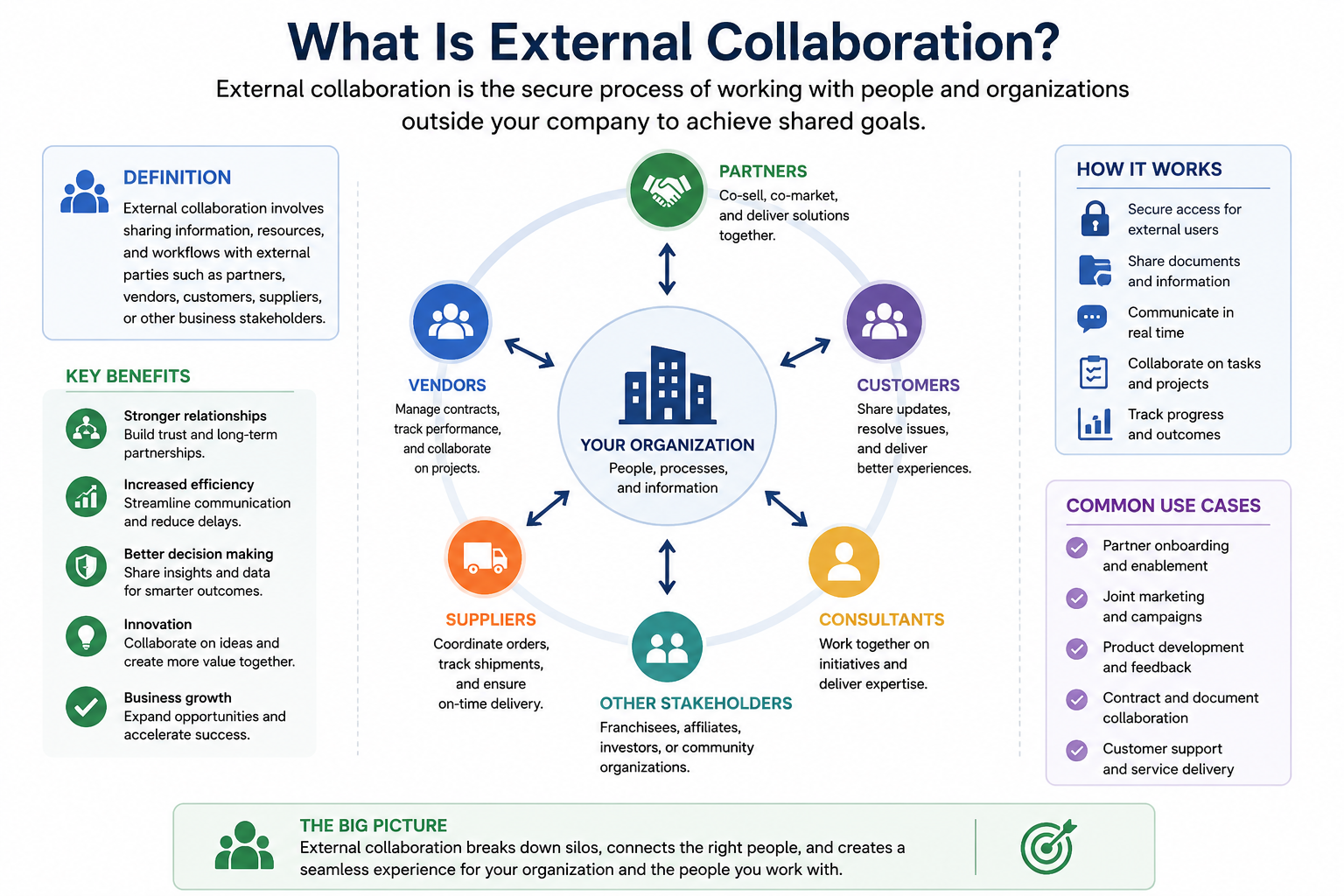
What Is External Collaboration?
Why External Collaboration Matters
External collaboration has become a critical business strategy because modern organizations rarely operate alone.
According to Canalys, channel partners influence approximately 70% of global technology spending, demonstrating how much revenue businesses generate through their partner ecosystems.
When partners can easily access sales resources, product information, training materials, company announcements, and support documentation, they are better equipped to represent your brand and drive business growth.
Effective external collaboration helps organizations:
- Improve partner engagement and participation
- Accelerate partner onboarding processes
- Increase channel sales performance
- Simplify supplier and vendor management
- Strengthen customer and client relationships
- Improve knowledge sharing across partner networks
- Reduce email overload and information silos
- Maintain secure document sharing and compliance
Whether you're managing a reseller program, supplier network, franchise operation, or strategic alliance, having a dedicated partner portal or external collaboration platform can significantly improve efficiency and partner satisfaction.
Common Challenges Organizations Face
While the benefits are clear, many organizations struggle to create a seamless collaboration experience for external users.
One of the biggest challenges is information being scattered across multiple systems.
Important documents may be stored in SharePoint, conversations happen in email, training materials live in another platform, and product updates are buried inside chat applications. This fragmentation makes it difficult for partners to find what they need quickly.
Poor partner engagement is another common issue. If partners have to navigate complex systems or spend too much time searching for information, adoption rates often decline.
Research from IDC found that employees spend nearly 20% of their workweek searching for information, and external partners frequently experience the same frustration.
Document management can also become increasingly difficult as partner programs grow. Businesses often struggle to ensure that partners always have access to the latest product sheets, pricing documents, marketing assets, and training resources.
Security is another major concern. Organizations need to provide external access while maintaining strict control over sensitive information. Without proper permissions and governance, businesses risk exposing confidential data to the wrong users.
Finally, many companies lack visibility into partner activity.
They cannot easily track which resources are being used, which training programs are being completed, or whether partners are actively engaging with company content.
These challenges are exactly why many organizations start looking for a SharePoint alternative for partner collaboration. They need a solution that combines secure document management with communication, onboarding, training, analytics, and partner engagement capabilities in a single platform.
Related Partner Portal Guides You May Want to Read
Looking to improve partner collaboration, secure document sharing, supplier communication, and external stakeholder access? The resources below explore partner portals, supplier portals, extranets, intranet security, and secure collaboration platforms.
- Types of Intranet Security
- Intranets vs Extranets
- Best Extranet Portal Software
- Internet vs Intranet vs Extranet
- What Is an Extranet Used For?
- Partner and Supplier Portal Collaboration Platform
- Extranet Software for Secure Client Collaboration
- How Strategic Technology Partnerships Drive Business Innovation
Together, these resources help businesses understand how to build stronger partner relationships, improve external collaboration, secure shared information, and create a more connected partner ecosystem.
Overview of AgilityPortal
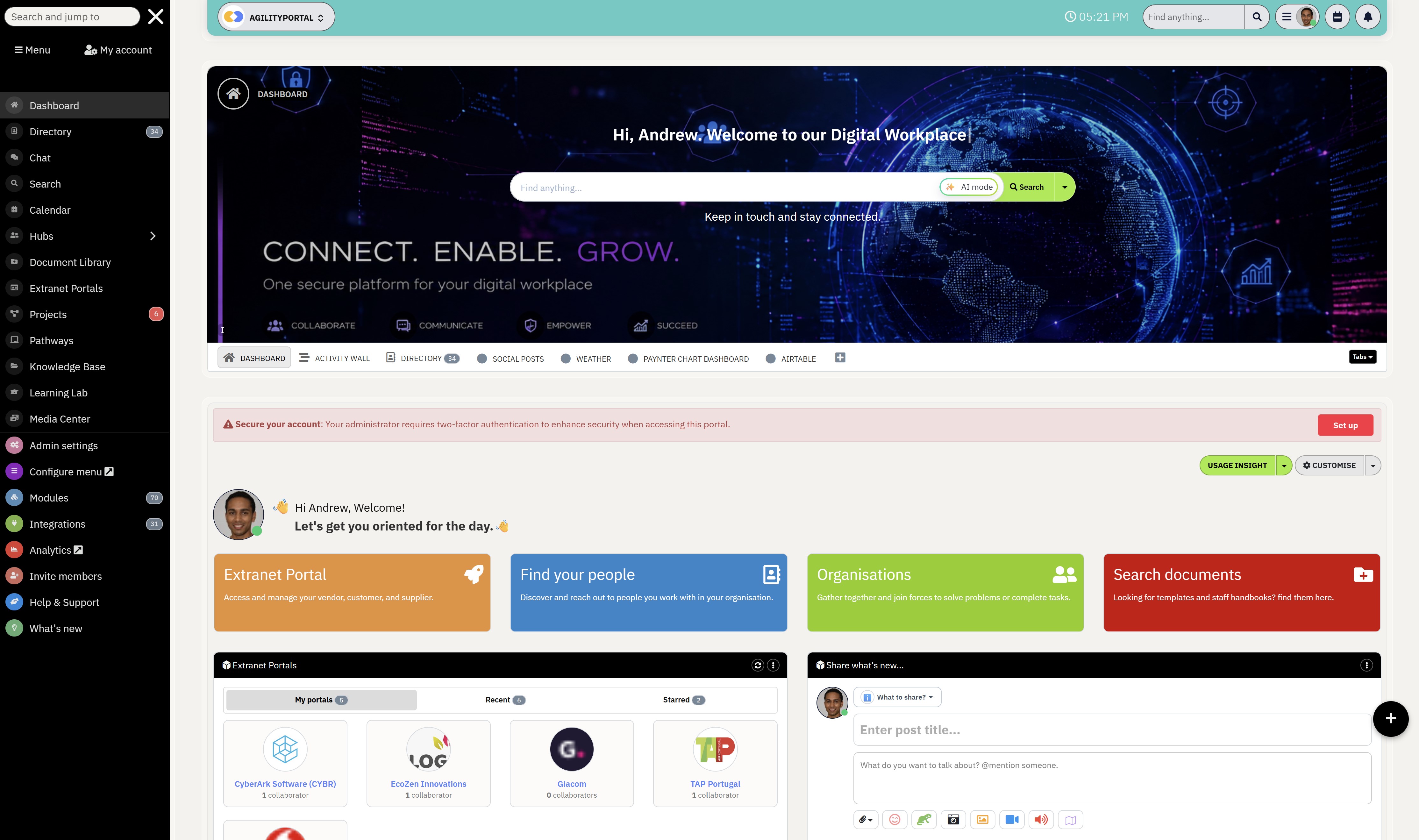
Overview of AgilityPortal
If you're searching for a SharePoint alternative for partner collaboration, you're probably looking for more than just a place to store documents.
You need a platform that helps partners access resources, communicate effectively, complete training, and stay engaged.
AgilityPortal is an all-in-one partner portal software and digital workplace platform designed to help organizations manage partner collaboration, document sharing, onboarding, and communication from a single secure location.
Unlike SharePoint, which focuses primarily on document management, AgilityPortal combines collaboration, knowledge management, training, and partner engagement into one easy-to-use platform.
Key Features for External Collaboration- Dedicated partner portals
- Secure document libraries
- Role-based permissions
- Partner onboarding workflows
- Knowledge bases and resource centers
- Mobile app access
- Announcements and news feeds
- Built-in learning management system (LMS)
- Partner directory and contact management
Whether you're managing suppliers, distributors, franchisees, vendors, or channel partners, AgilityPortal helps create a connected partner ecosystem while reducing the complexity of managing multiple tools.
For businesses looking for a modern external collaboration platform, AgilityPortal provides everything needed to improve partner communication, knowledge sharing, onboarding, and long-term engagement.
AgilityPortal
Why Choose AgilityPortal for Partner Collaboration and External Collaboration?
AgilityPortal is a modern partner portal software and external collaboration platform designed to help organizations securely collaborate with distributors, resellers, suppliers, vendors, franchisees, consultants, and strategic partners. Unlike traditional document management tools, AgilityPortal combines partner onboarding, deal registration, knowledge management, secure document sharing, training, governance controls, and partner communications into a single platform. This allows businesses to create a connected partner ecosystem while improving engagement, productivity, and long-term partner success.
Compare real user reviews before choosing your partner collaboration platformOverview of Microsoft SharePoint
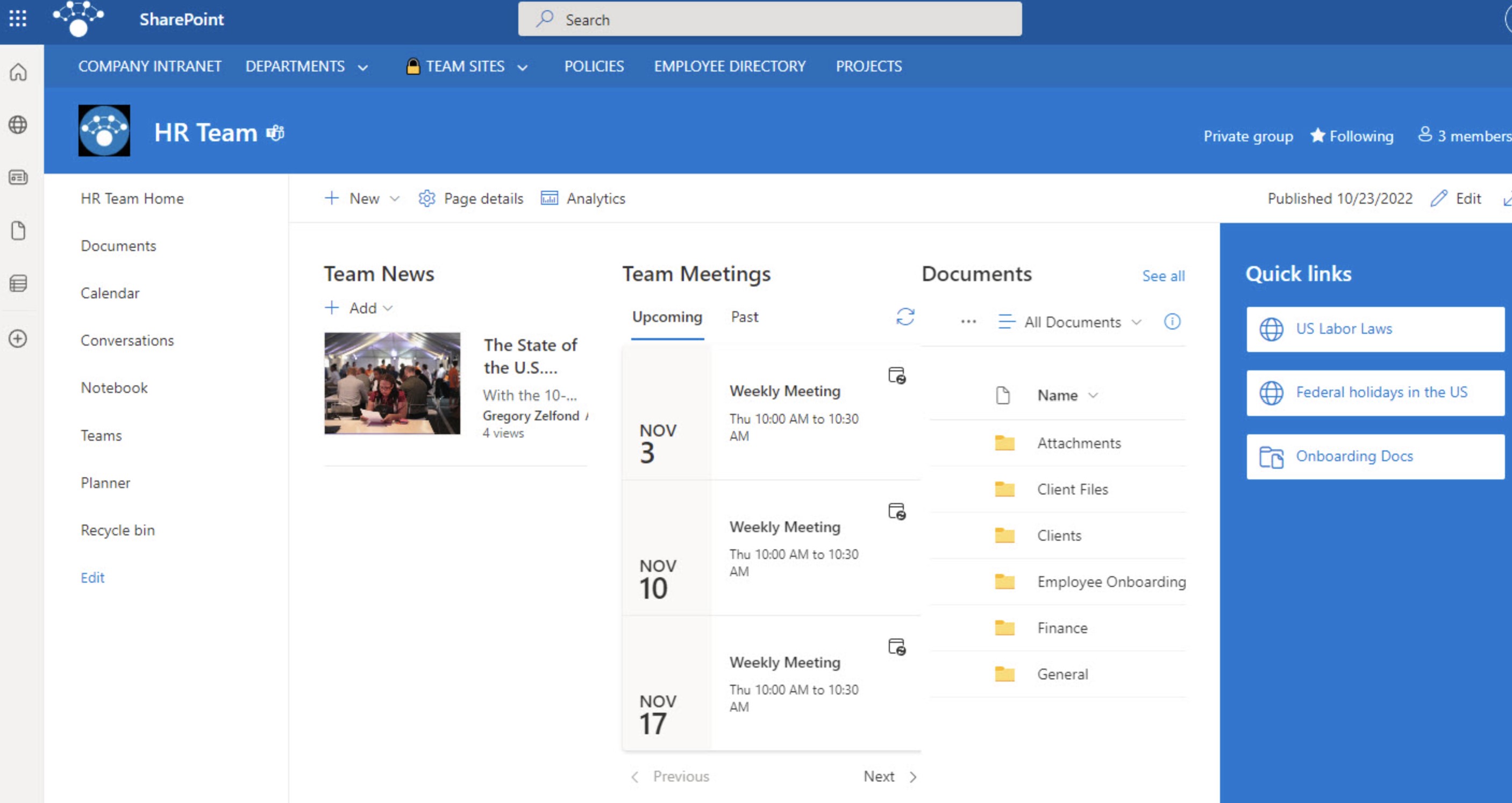
Overview of Microsoft SharePoint
Microsoft SharePoint is one of the most widely used document management systems and collaboration platforms in the world.
As part of Microsoft 365, it helps organizations store files, manage content, create team sites, and collaborate internally.
Many businesses also use SharePoint for external collaboration, giving partners, vendors, suppliers, and customers access to documents and shared resources through extranet sites.
How Businesses Use SharePointCommon use cases include:
- Document management and file sharing
- Team collaboration sites
- Knowledge management
- Vendor and supplier portals
- Customer resource centers
- Microsoft 365 integration
While SharePoint is excellent for managing documents, many organizations find it challenging to use as a dedicated partner portal.
Common issues include:
- Complex setup and administration
- Requires Microsoft expertise
- Licensing and access management challenges
- Limited partner engagement features
- Separate tools often needed for onboarding and training
- Can be difficult for external users to navigate
This is why many businesses eventually start looking for a SharePoint alternative for partner collaboration that combines document sharing, communication, onboarding, training, and partner engagement within a single platform.
Microsoft SharePoint
Why Choose SharePoint for External Collaboration and Document Management?
Microsoft SharePoint is one of the most widely used document management systems and collaboration platforms in the world. As part of Microsoft 365, it helps organizations manage documents, create team sites, share content, and collaborate internally and externally. Many businesses use SharePoint as a partner portal by creating extranet sites for suppliers, vendors, distributors, and customers. While SharePoint offers strong governance, security, and document management capabilities, organizations often require additional customization and third-party tools to support partner onboarding, partner engagement, deal registration, training, and partner enablement initiatives.
Compare real user reviews before choosing your external collaboration platformAgilityPortal vs SharePoint Feature Comparison
Before comparing features side by side, it's important to remember that SharePoint and AgilityPortal were designed with different goals in mind.
SharePoint excels at document management and internal collaboration, while AgilityPortal focuses on partner enablement, external collaboration, onboarding, communication, and partner engagement.
The comparison below highlights the key differences that organizations should consider when evaluating a SharePoint alternative for partner collaboration and building a secure, scalable partner portal.
| Feature | AgilityPortal | SharePoint |
| Partner Portal | ✅ Native | ⚠ Requires customization |
| External User Management | ✅ Built-in | ⚠ Complex |
| Partner Onboarding | ✅ Native workflows | ❌ Limited |
| Knowledge Base | ✅ Included | ⚠ Requires setup |
| Mobile App | ✅ Native iOS & Android | ⚠ Limited experience |
| LMS & Training | ✅ Included | ❌ Requires third-party tools |
| Partner News Feed | ✅ Included | ❌ Not native |
| Search & Knowledge Discovery | ✅ Centralized search across documents, training, resources, and communications | ⚠ Search can become fragmented across sites and libraries |
| Secure File Sharing | ✅ Included | ✅ Yes |
| Role-Based Permissions | ✅ Yes | ✅ Yes |
| Analytics & Reporting | ✅ Built-in | ⚠ Additional setup |
| Microsoft 365 Integration | ✅ Yes | ✅ Native |
| Deal Registration | ✅ Built-in | ❌ Not native |
| Governance Controls | ✅ Built-in governance for external users, roles, approvals, and content access | ⚠ Requires configuration and admin expertise |
| Sensitive Information Controls | ✅ Control access by partner type, role, workspace, document library, and permission level | ⚠ Possible, but requires careful setup |
| Content Updates | ✅ Easy to update partner resources, news, documents, and training materials | ⚠ Can become difficult across multiple sites and libraries |
| Intuitive User Experience | ✅ Simple, modern, partner-friendly interface | ⚠ Can feel complex for external users |
Partner Onboarding: Which Platform Delivers a Better Experience?
First impressions matter, especially when bringing new partners into your ecosystem.
Whether you're onboarding resellers, distributors, suppliers, affiliates, or channel partners, the process needs to be simple, consistent, and easy to follow.
A poor onboarding experience often leads to lower partner engagement, slower time-to-value, and increased support requests.
Key onboarding priorities include:
- Providing a clear and structured onboarding journey.
- Ensuring easy access to training and documentation.
- Reducing the need for manual support and follow-ups.
- Accelerating partner readiness and productivity.
SharePoint Onboarding Challenges
Many organizations attempt to use SharePoint as a partner onboarding solution, but it wasn't specifically designed for partner enablement.
New partners often need to navigate multiple sites, document libraries, and folders to find the information they need.
As partner programs grow, maintaining content, permissions, and training resources can also create additional administrative overhead.
Common challenges include:
- Information spread across multiple sites and folders.
- Complex permission management for different partner groups.
- Limited onboarding workflows and guided experiences.
- Increased administrative effort to maintain content.
AgilityPortal Partner Onboarding Experience
AgilityPortal takes a more structured approach to partner onboarding by providing guided onboarding journeys, training pathways, welcome resources, and centralized knowledge hubs from day one.
Instead of searching across multiple locations, partners can access documents, training materials, product information, and company updates from a single partner portal.
This helps organizations improve adoption, accelerate onboarding, and create a more professional partner experience.
Benefits of AgilityPortal include:
- Centralized access to all onboarding resources.
- Guided learning paths and training programs.
- Consistent onboarding experiences for every partner.
- Faster partner activation and engagement.
Real-World Example
Imagine a technology company onboarding more than 500 channel partners across multiple regions.
Using AgilityPortal, every new partner receives access to a dedicated onboarding pathway containing product training, sales resources, certification courses, marketing materials, and support documentation.
Rather than relying on emails and shared folders, everything is delivered through a centralized partner enablement platform, making it easier to scale onboarding while ensuring every partner receives the same consistent experience.
In this scenario, the company can:
- Standardize onboarding across all regions and partner types.
- Reduce onboarding time through self-service resources.
- Improve partner participation in training and certifications.
- Scale partner enablement without increasing administrative workload.
Document Management and Knowledge Sharing
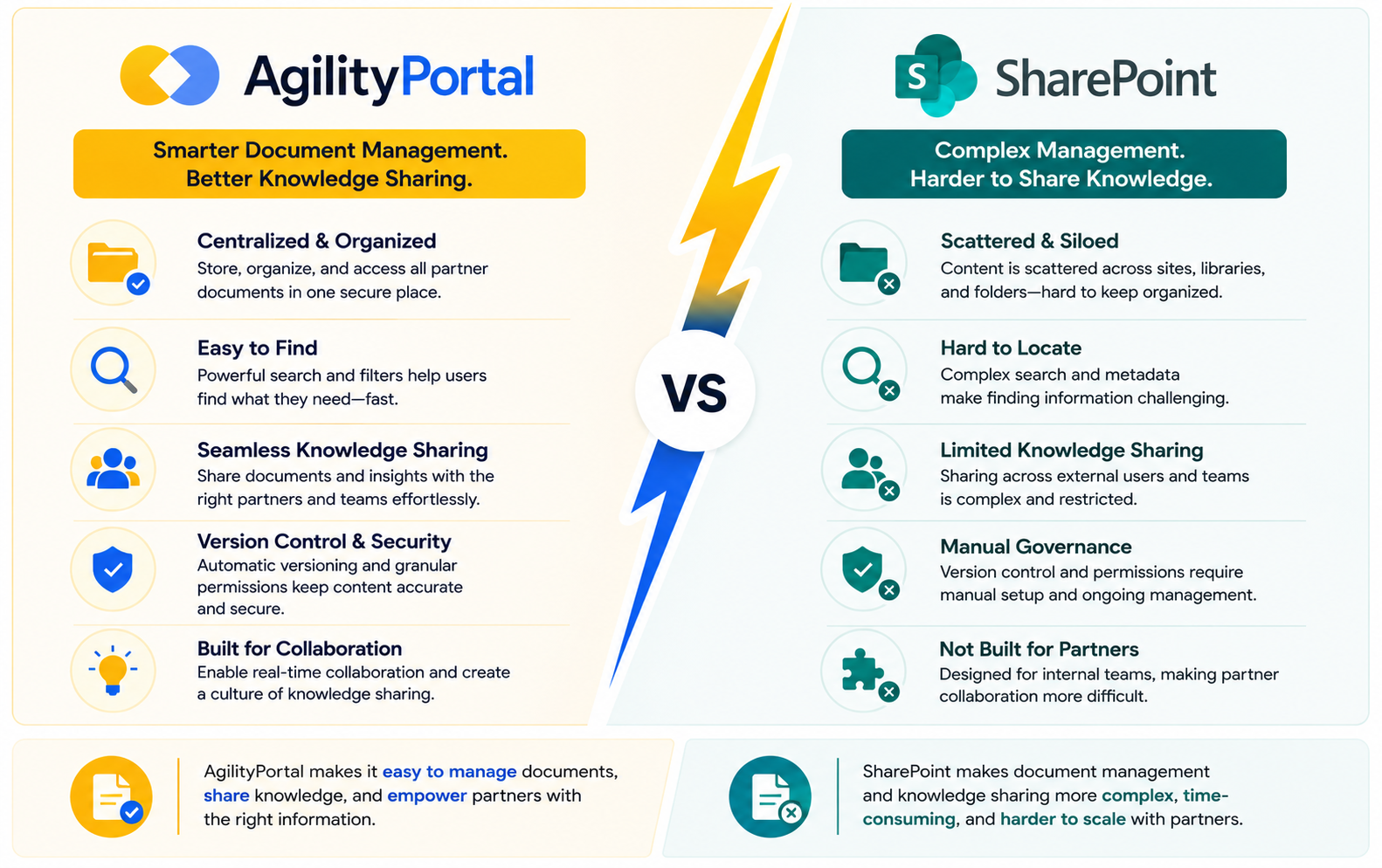
Document Management and Knowledge Sharing
One of the biggest challenges in any partner ecosystem is making sure partners can quickly find the information they need.
Whether it's sales collateral, pricing documents, training materials, product guides, or compliance resources, access to accurate information can directly impact partner productivity and performance.
Research from IDC found that employees spend nearly 20% of their workweek searching for information, and external partners often face the same frustration when content is spread across multiple systems.
This is why effective document management, knowledge sharing, and knowledge management have become essential components of any successful partner portal software.
How SharePoint Handles Document Collaboration
There's no doubt that SharePoint is a powerful document management system. It offers features such as version control, document storage, co-authoring, and deep integration with Microsoft 365 applications like Word, Excel, and Teams.
For organizations already invested in the Microsoft ecosystem, these capabilities can provide a solid foundation for managing business documents and collaborating on content.
However, when it comes to supporting external users, some challenges often emerge. As document libraries grow, partners may struggle to locate the right information quickly.
Content can become scattered across multiple sites and folders, search results may return too many irrelevant items, and navigation can become increasingly difficult for first-time users.
Common SharePoint challenges include:
- Complex folder structures
- Difficult content discovery
- Search complexity
- Lower user adoption among external users
- Information spread across multiple sites
How AgilityPortal Improves Knowledge Access
AgilityPortal takes a different approach by focusing on simplicity, discoverability, and user experience.
Instead of requiring partners to navigate multiple sites and document libraries, information is organized through centralized knowledge bases, resource centers, and categorized content libraries.
Partners can quickly find training materials, sales resources, onboarding documentation, product information, and company updates from a single location.
This reduces frustration, improves self-service access, and helps partners become productive faster.
Key advantages include:
- Centralized knowledge base
- Partner resource centers
- Organized content libraries
- AI-powered search capabilities
- Intuitive navigation
- Faster access to critical information
For businesses looking for a SharePoint alternative for partner collaboration, the ability to make information easy to find can have a significant impact on partner engagement, onboarding success, and overall collaboration effectiveness.
After all, the best document management platform isn't simply the one that stores information—it's the one that helps people find and use it when they need it most.
Communication and Partner Engagement
Building a successful partner ecosystem isn't just about sharing documents. Partners need regular communication, timely updates, training opportunities, and a sense of connection with your organization.
Without engagement, even the best partner programs can struggle with low adoption, poor participation, and reduced revenue growth.
Research from Gallup shows that highly engaged teams are more productive and deliver better business outcomes. The same principle applies to partner networks.
When partners feel informed, supported, and connected, they are more likely to promote your products, participate in training, and contribute to long-term business growth.
Communication and Partner Engagement
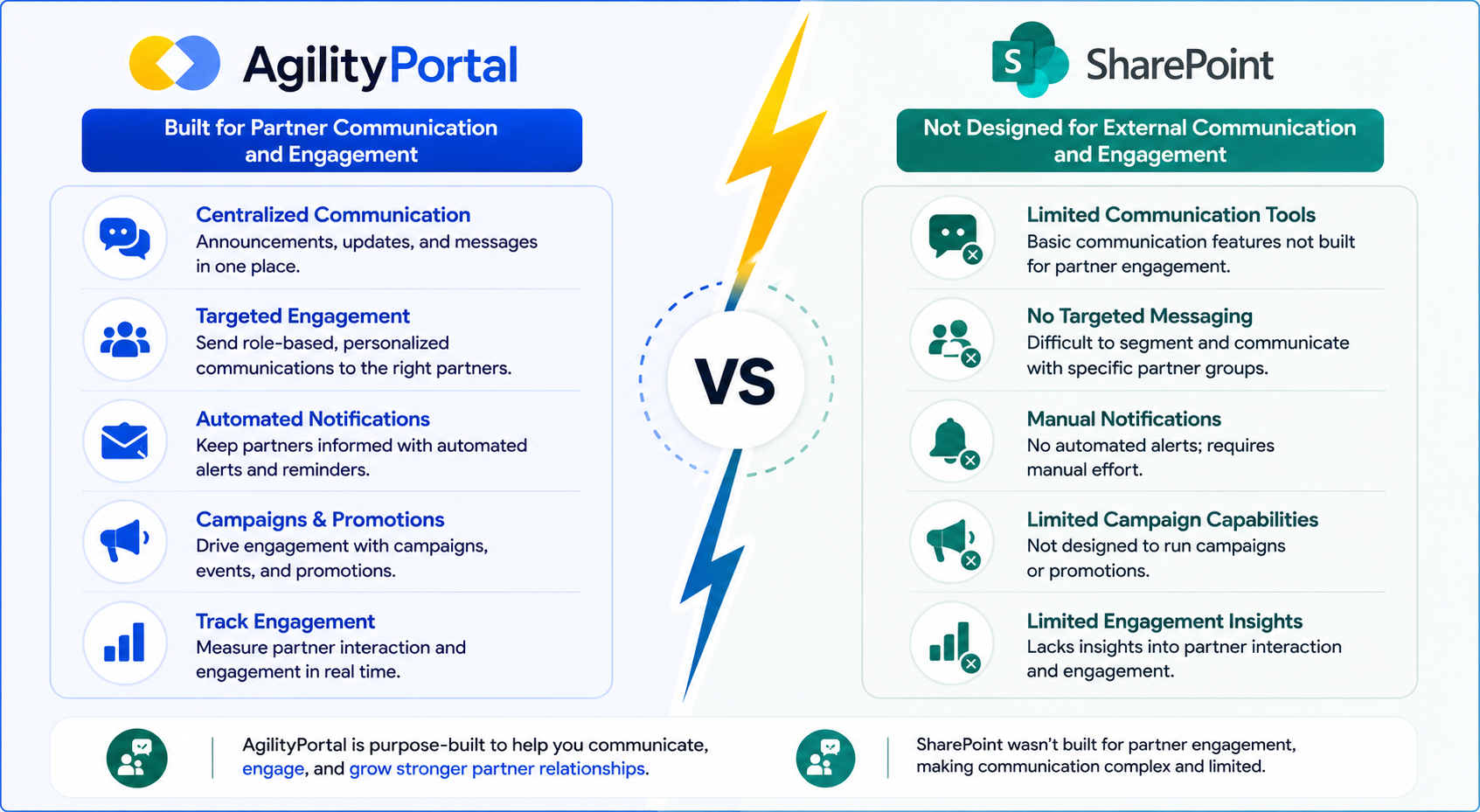
Why SharePoint Struggles With Partner Engagement
SharePoint was primarily designed as a document management and collaboration platform rather than a dedicated partner engagement platform.
While it excels at storing and sharing files, it offers limited native tools for building an active partner community.
Many organizations find themselves relying on additional Microsoft applications or third-party tools to manage announcements, discussions, surveys, events, and ongoing partner communications. This can create a fragmented experience where partners need to switch between multiple systems to stay informed.
Common challenges include:
- Primarily document-focused experience
- Limited social engagement features
- No built-in recognition or rewards
- Requires additional tools for community engagement
- Can lead to lower partner participation
AgilityPortal's Engagement Features
AgilityPortal was designed to keep partners informed, connected, and engaged from a single platform.
Instead of treating communication as an afterthought, it provides organizations with multiple ways to interact with distributors, resellers, suppliers, affiliates, and channel partners.
Partners can access company news, product updates, training announcements, events, and discussions without leaving the platform.
Key engagement features include:
- News feeds and company updates
- Announcements and alerts
- Polls and surveys
- Community discussions
- Events and webinars
- Knowledge sharing spaces
- Mobile notifications
- Partner communities
By centralizing communication and collaboration, businesses can create a more engaging partner experience while reducing reliance on email.
Keeping Partners Informed and Productive
The most successful partner programs understand that engagement directly impacts performance.
Partners who regularly consume content, participate in training, attend webinars, and interact with company updates are often better equipped to represent your brand and generate revenue.
For example, when a new product launches, organizations can instantly distribute training materials, sales resources, marketing assets, and announcements through a centralized partner portal. Instead of waiting for email responses or searching multiple systems, partners have immediate access to the information they need.
This not only improves partner adoption but also helps organizations increase partner productivity, strengthen relationships, and maximize the value of their channel partner management strategy.
In many cases, better communication and engagement lead to faster onboarding, improved partner satisfaction, and stronger long-term business results.
User Experience and Ease of Adoption
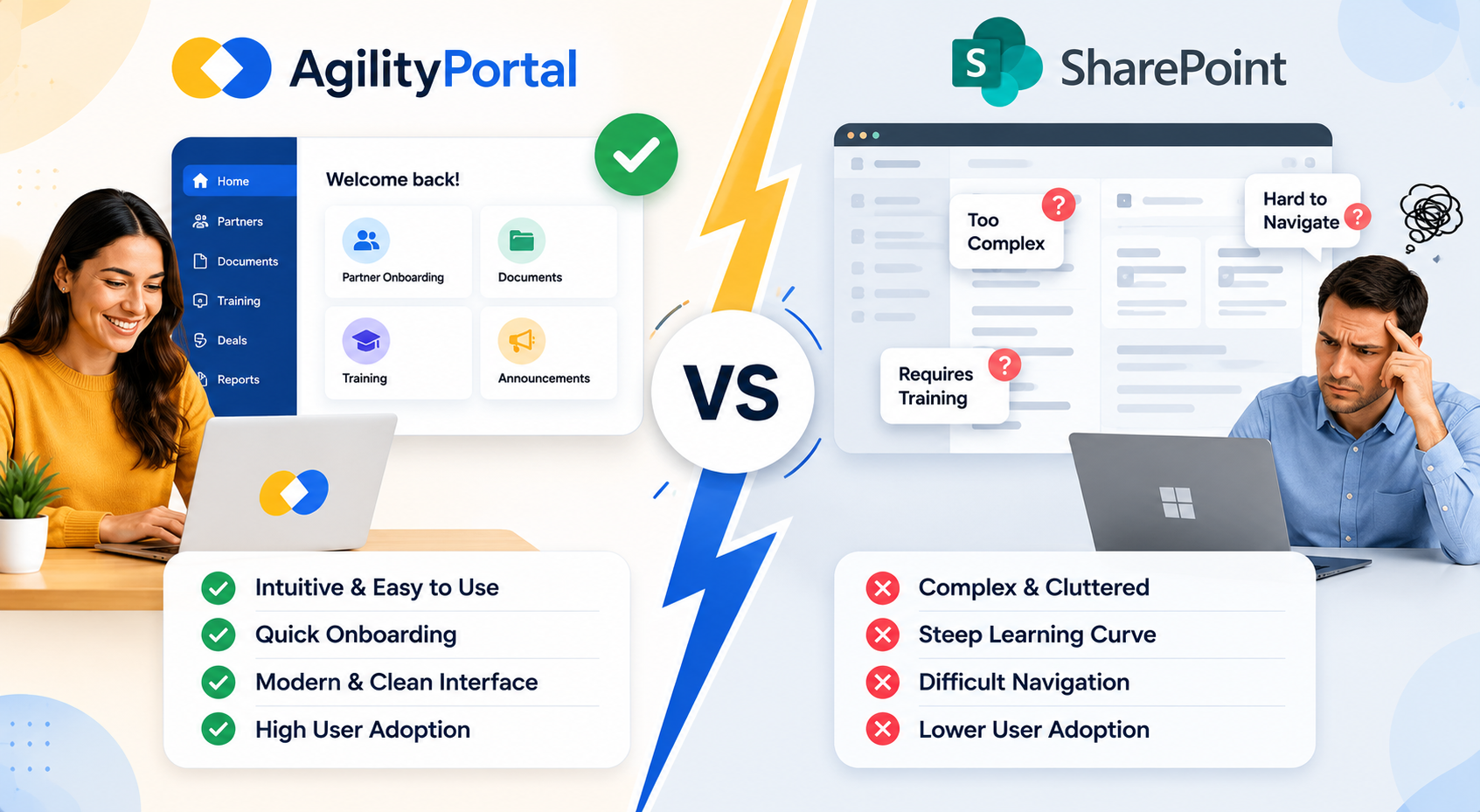
No matter how powerful a platform is, it won't deliver results if partners don't actually use it. One of the biggest reasons partner portals fail is poor user adoption.
If external users find the platform difficult to navigate, struggle to locate information, or require extensive training just to complete simple tasks, engagement quickly drops.
When evaluating a SharePoint alternative for partner collaboration, it's important to consider not only features but also how easy the platform is for partners to learn and use.
User Experience and Ease of Adoption
SharePoint Learning Curve
SharePoint is a powerful platform, but many organizations find that it comes with a steeper learning curve, particularly for external users. Partners who only log in occasionally may struggle with navigation, multiple document libraries, and complex site structures.
As partner portals expand, administrators may also face additional challenges managing permissions, maintaining content, and supporting external users.
Common challenges include:
- Complex navigation structures
- Multiple sites and document libraries
- Ongoing administration requirements
- Customization and maintenance overhead
- Additional training often required for external users
AgilityPortal User Experience
AgilityPortal was designed with usability in mind.
The platform offers a modern, intuitive interface that feels familiar from the moment users log in.
Instead of navigating multiple systems, partners can access documents, announcements, training materials, knowledge bases, and collaboration tools from a single location.
This simplicity helps reduce onboarding time and encourages faster adoption across partner networks.
Key advantages include:
- Consumer-friendly interface
- Faster user adoption
- Mobile-first experience
- Simplified navigation
- Centralized partner resources
- Reduced training requirements
Why Adoption Matters
A collaboration platform only delivers value when people actually use it.
Research from Gartner found that nearly 47% of digital workers struggle to find the information they need to perform effectively, while IDC reports that employees spend almost 20% of their workweek searching for information.
47%
struggle to find information
Research from Gartner found that nearly 47% of digital workers struggle to find the information they need to perform effectively, while IDC reports that employees spend almost 20% of their workweek searching for information.
Sources: Gartner & IDC
For partners, these challenges can lead to frustration, lower engagement, and missed business opportunities. If partners cannot quickly access training, sales materials, product updates, or support resources, productivity suffers and adoption rates decline.
That's why many organizations looking for a partner portal software solution prioritize ease of use alongside security and functionality.
A platform that is simple, intuitive, and easy to navigate is far more likely to drive engagement, improve partner satisfaction, and support long-term collaboration success.
Pricing and Total Cost of Ownership
When comparing platforms, many businesses focus on the monthly subscription price.
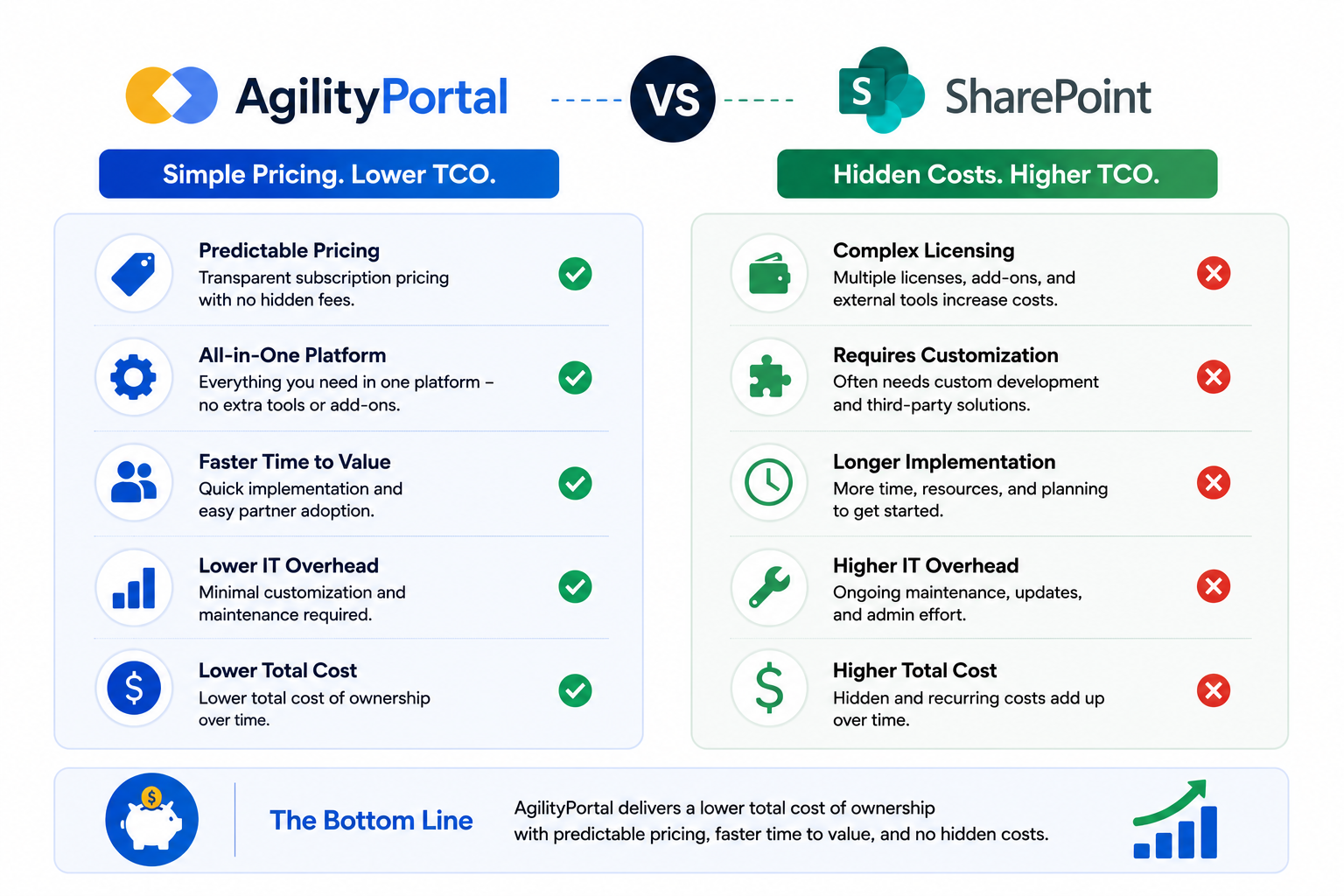
While pricing is important, it rarely tells the full story. The real question is how much the platform will cost over time once you factor in setup, customization, training, maintenance, and ongoing administration.
For organizations evaluating a SharePoint alternative for partner collaboration, understanding the total cost of ownership can help avoid unexpected expenses and ensure you're investing in a solution that delivers long-term value.
Pricing and Total Cost of Ownership
Understanding SharePoint Costs
At first glance, SharePoint can seem like the obvious choice, especially for businesses already using Microsoft 365.
Since it's part of the Microsoft ecosystem, many organizations assume there will be little or no additional investment required.
However, partner portals often require much more than basic document storage.
Businesses frequently need custom partner onboarding experiences, branded partner portals, governance controls, training systems, deal registration processes, and partner communication tools.
As a result, costs can quickly extend beyond licensing fees and may include:
- Microsoft licensing costs
- External user access and management
- Development and customization work
- Consulting and implementation services
- Ongoing administration and maintenance
- Additional third-party tools for training and engagement
AgilityPortal Pricing Approach
AgilityPortal takes a different approach by providing partner onboarding, partner communications, document management, knowledge sharing, training, governance controls, and deal registration within a single platform.
Instead of stitching together multiple solutions, organizations can manage their entire partner ecosystem from one location. This often reduces deployment time, simplifies administration, and lowers the need for ongoing customization.
Key advantages include:
- Predictable subscription pricing
- Faster deployment
- Lower customization requirements
- Built-in partner portal capabilities
- Reduced reliance on third-party tools
- Simplified management for external users
Hidden Costs Organizations Often Miss
One of the biggest mistakes businesses make is focusing only on software licensing while overlooking operational costs.
For example, if partners struggle to find information, require constant support, or need additional training just to navigate the platform, those costs can add up quickly. Lost productivity, lower partner engagement, delayed onboarding, and increased administrative workload all have a financial impact.
The most cost-effective solution isn't always the cheapest platform on paper.
It's the platform that helps partners become productive faster, reduces support overhead, improves adoption, and supports long-term business growth.
When evaluating a partner portal software solution, consider not only what you'll pay for the software itself, but also the time, resources, and effort required to manage it successfully over the years ahead.
Which Businesses Should Choose SharePoint?
SharePoint remains a strong choice for organizations that are heavily invested in the Microsoft ecosystem and primarily need a platform for document management, content storage, and internal collaboration.
Businesses already using Microsoft 365, Teams, OneDrive, and other Microsoft applications can benefit from SharePoint's deep integrations and enterprise-grade security capabilities.
It is particularly well suited to organizations that manage large volumes of documents, require advanced version control, and have dedicated IT teams capable of handling customization, governance, and ongoing administration.
For internal collaboration projects, SharePoint can provide a centralized environment for storing files, managing knowledge, and supporting departmental workflows.
However, organizations looking to build a partner portal, improve partner onboarding, increase partner engagement, or create a dedicated external collaboration platform may find that additional customization and third-party tools are required.
In these situations, businesses often begin exploring a SharePoint alternative for partner collaboration that offers more built-in functionality for external users.
Which Businesses Should Choose AgilityPortal?
AgilityPortal is ideal for organizations that need more than simple document sharing.
If your business relies on distributors, resellers, suppliers, franchisees, consultants, affiliates, or strategic partners, having a dedicated partner portal can dramatically improve communication, onboarding, training, and collaboration.
Unlike traditional document management platforms, AgilityPortal was designed to help organizations build stronger partner relationships while providing a secure and engaging experience for external users.
The platform is particularly well suited for channel partner programs that need structured onboarding, deal registration, training, and partner enablement capabilities.
Franchises can use AgilityPortal to distribute operational resources, company updates, and training materials across multiple locations.
Supplier networks benefit from secure document sharing, governance controls, and centralized communication, while membership organizations and associations can create private collaboration spaces for members.
Professional services firms, technology vendors, manufacturers, and growing businesses that depend on partner engagement will find AgilityPortal especially valuable.
By combining communication, knowledge management, onboarding, training, and collaboration into a single platform, organizations can create a more connected and productive partner ecosystem while reducing administrative complexity.
Why Many Organizations Are Moving Beyond SharePoint for Partner Collaboration
As partner ecosystems become larger and more complex, many organizations are discovering that traditional document management platforms are no longer enough.
Modern partners expect a simple, engaging, and self-service experience that allows them to access information, complete training, register deals, and stay informed without relying on constant support from internal teams.
While SharePoint remains a powerful document management solution, businesses are increasingly looking for dedicated partner portal software and partner enablement platforms that offer a more complete approach to external collaboration.
This shift is being driven by the need for better partner engagement, faster onboarding, stronger governance controls, and easier access to business-critical information.
sharepoint alternative for partner collaboration
The Shift Toward Dedicated Partner Portals
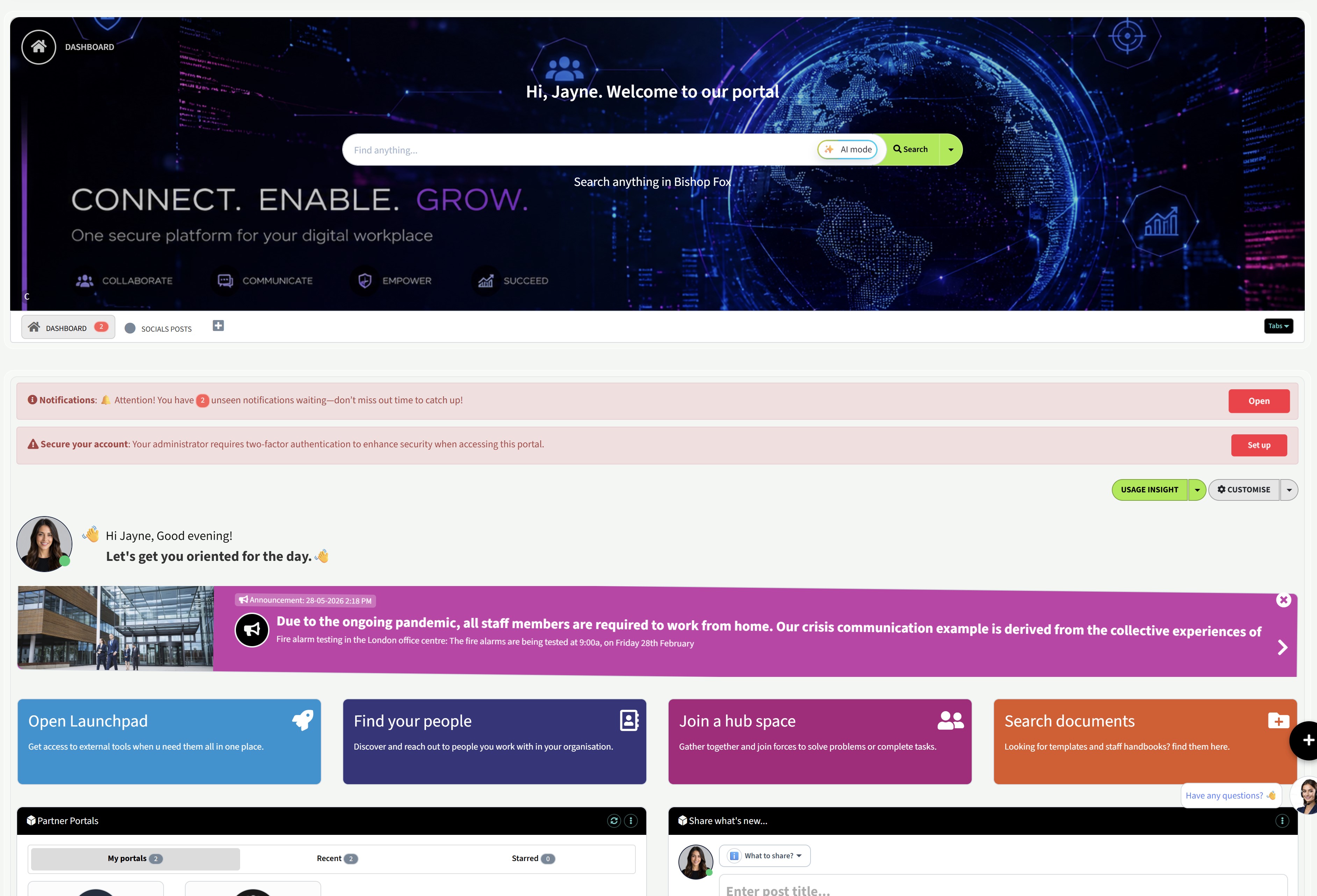
Dedicated partner portals are designed specifically for managing relationships with distributors, resellers, suppliers, affiliates, franchisees, and other external users.
Rather than focusing solely on document storage, they provide a complete environment for communication, collaboration, onboarding, training, and partner management.
Organizations making the move often report benefits such as:
- Higher partner adoption and engagement
- Simplified onboarding experiences
- Faster access to training and resources
- Improved communication and collaboration
- Centralized knowledge management
- Better governance and security controls
- Reduced support requests from partners
- More efficient deal registration processes
- Improved visibility into partner activity
- Stronger long-term partner relationships
For many businesses, the goal is no longer just sharing documents.
It's creating a connected partner ecosystem where external users can quickly find information, stay informed, collaborate effectively, and contribute to business growth.
This is why dedicated partner collaboration platforms continue to gain momentum as organizations look beyond SharePoint for a more complete partner experience.
Final Verdict: AgilityPortal vs SharePoint for External Collaboration
Both platforms offer strong collaboration capabilities, but they serve different purposes.
SharePoint is an excellent choice for organizations focused on document management and already invested in the Microsoft ecosystem.
However, businesses looking to improve partner collaboration, partner onboarding, partner engagement, and channel partner management may find AgilityPortal better suited to their needs.
With built-in partner portals, training, deal registration, governance controls, communication tools, and knowledge management features, AgilityPortal provides a more complete solution for organizations managing external partners and growing a successful partner ecosystem.
Frequently Asked Questions
Is SharePoint good for partner collaboration?
SharePoint can support partner collaboration through extranets, document sharing, and Microsoft 365 integrations.
However, many organizations find it requires significant customization to deliver the onboarding, communication, training, and engagement features needed for a modern partner portal.
What is the best SharePoint alternative for partner collaboration?
The best SharePoint alternative for partner collaboration depends on your requirements.
AgilityPortal is a popular choice for organizations that need partner onboarding, deal registration, partner training, secure document sharing, knowledge management, and partner communications within a single platform.
Can SharePoint be used as a partner portal?
Yes, SharePoint can be configured as a partner portal.
However, creating a dedicated partner experience often requires additional development, governance planning, and ongoing administration compared to purpose-built partner portal software.
What features should a partner collaboration platform include?
A modern partner collaboration platform should include secure document sharing, partner onboarding, training, knowledge bases, communication tools, role-based permissions, governance controls, deal registration, analytics, and mobile access.
How does AgilityPortal compare to SharePoint for external users?
AgilityPortal was designed specifically to support external collaboration and partner engagement.
It combines partner onboarding, training, communication, document management, and partner enablement features in a single platform, making it easier for external users to navigate and adopt.
Is AgilityPortal a Microsoft SharePoint replacement?
For organizations primarily focused on partner collaboration, partner enablement, and external user engagement, AgilityPortal can serve as a strong SharePoint alternative.
Businesses that need a dedicated partner portal often choose AgilityPortal because it offers many of the features they would otherwise need to build separately on SharePoint.
AI Summary
- Many organizations use SharePoint for external collaboration, but it often requires customization to support partner onboarding, training, communication, deal registration, and partner engagement.
- A dedicated SharePoint alternative for partner collaboration helps businesses centralize partner portals, secure document sharing, knowledge management, and external user collaboration in one platform.
- AgilityPortal is designed to support distributors, resellers, suppliers, vendors, franchisees, affiliates, and channel partners through a secure and easy-to-use partner portal.
- Partner collaboration platforms should make it easy for external users to access documents, training materials, product updates, announcements, and support resources without searching across multiple systems.
- Key features to compare include partner onboarding, role-based permissions, governance controls, sensitive information access, partner communications, mobile access, analytics, and deal registration.
- Businesses looking beyond SharePoint often prioritize faster partner adoption, better engagement, easier administration, stronger knowledge sharing, and a more intuitive external collaboration experience.
Most Popular Posts

Effective communication among team members is vital for the productivity and success of any organization. Surprisingly, 60% of companies lack a long-term internal communication strategy, which p...


Businesses thrive on communication for efficiency, productivity and accomplishment. When the right information is passed from the right designation in the organization, it promotes positivity an...

Categories
Blog
(3220)
Business Management
(396)
Employee Engagement
(235)
Digital Transformation
(220)
Growth
(150)
Intranets
(142)
Internal communications
(108)
Remote Work
(68)
Sales
(53)
Collaboration
(53)
Customer Experience
(33)
Culture
(30)
Knowledge Management
(29)
Project management
(29)
Leadership
(20)
Comparisons
(9)
News
(1)

Related Posts

Where can I send a fax from in my area when a document needs to go out today? The answer might be a nearby print or shipping shop, a library or an online fax service, but what's available depends on your location. The UPS Store lists a ne...

AI in internal communications can help a small team turn one important update into useful messages, answers and resources for employees—but only when the information is accurate and a person checks the result. Comms teams are expected to keep p...

How is Edge AI changing business operations in 2026, and when does it make sense to process data near where it is created instead of sending it all to the cloud? The investment forecasts point to growing interest: Capgemini Research Institute's...

Choosing the best ERP for Shopify often starts when the workarounds stop working. Your store shows stock that the warehouse can't find. Wholesale orders live in spreadsheets. Finance spends days reconciling payouts, while customer service...

Could choosing the wrong proxy disrupt your team's work or increase costs without improving results? When comparing rotating proxies vs static proxies, the answer depends on what your business needs: a consistent IP address for an ongoing sessi...


Jill Romford
I am a digital nomad, lover of exploring new places and making friends.
I love to travel and I love the internet. I take pictures of my travels and share them on the internet using Instagram.
Traveler, entrepreneur, and community builder. I share my insights on digital marketing and social media while inspiring you to live your fullest life.
Ready to learn more? 👍
One platform to optimize, manage and track all of your teams. Your new digital workplace is a click away. 🚀
Free for 14 days, no credit card required.