
Insight Blog
Agility’s perspectives on transforming the employee's experience throughout remote transformation using connected enterprise tools.
38 minutes reading time
(7691 words)
SharePoint Replacement - Best Alternatives for Modern Intranets in 2026

SharePoint Replacement: Best Alternatives for Modern Intranets in 2026
Looking for a SharePoint replacement? Discover the best SharePoint alternatives for modern intranets, employee communication, collaboration, and digital workplaces.
SharePoint Replacement: Best Alternatives for Modern Intranets in 2026

Many organizations looking for a SharePoint replacement online are reaching a point where SharePoint no longer matches how modern teams actually work.
What started as a document repository has gradually become difficult to manage, expensive to customize, and frustrating for employees to use daily.
Businesses now want faster communication, better mobile access, simpler collaboration, and cleaner document management without relying heavily on IT teams to maintain everything behind the scenes.
In fact, research from Gartner shows that nearly 50% of digital workplace projects struggle with low employee adoption because platforms become too complex or disconnected from daily workflows.
At the same time, Forrester reports that employees can spend over 20% of their workweek searching for information spread across multiple systems.
That growing frustration is one of the biggest reasons companies are actively searching for SharePoint alternatives for document management and modern intranet platforms that are easier to navigate and actually improve productivity.
50%
of workplace projects
Research from Gartner shows that nearly 50% of digital workplace projects struggle with low employee adoption because platforms become too complex or disconnected from employees’ daily workflows.
Source: Gartner
This article explains, in simple terms, why so many businesses are replacing SharePoint, what problems companies commonly face with outdated intranet systems, and what to look for in a modern alternative.
It also compares leading intranet platforms, explores migration challenges, and shows how organizations can move away from SharePoint without disrupting employees, communication, or day-to-day operations.
What's The Problem With SharePoint?
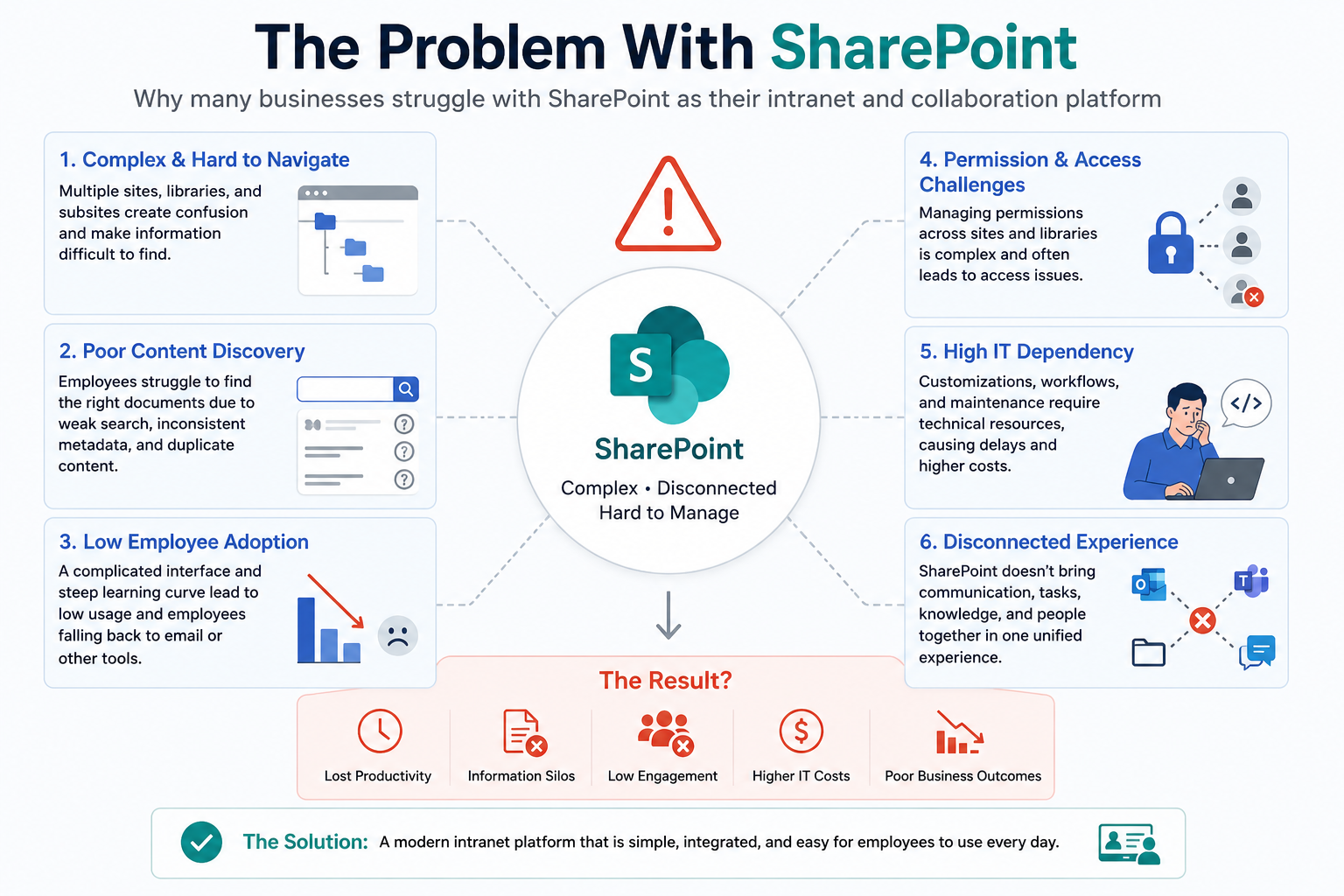
What's The Problem With SharePoint
The biggest SharePoint frustrations usually come down to usability, collaboration, and content discovery.
While the platform is powerful, many businesses feel it has become overly complicated for everyday employees.
Here are some of the most common complaints organizations mention when evaluating SharePoint alternatives for document management:
- Limited real-time collaboration compared to newer cloud platforms
- Employees cannot easily see which SharePoint sites they have access to
- File sharing and permissions become difficult to manage at scale
- Path-length and filename restrictions create unnecessary complexity
- Deeply nested pages make knowledge management difficult
- Clunky user interfaces reduce employee adoption
- Syncing and version-control issues frustrate teams
- Employees often rely on Slack, email, or Google Drive instead
For example, an employee trying to locate a policy document may need to search across multiple SharePoint sites, folders, and document libraries before finding the correct version.
Over time, this creates productivity loss and information silos across departments.
Many organizations are now realizing that modern intranet software should not just store files — it should improve communication, simplify collaboration, and help employees find information quickly without friction.
Key Takeaways
- Many businesses search for a SharePoint replacement because employees struggle with complex navigation, low adoption, and difficult document discovery.
- Modern intranet platforms focus more heavily on employee communication, knowledge sharing, collaboration, and mobile accessibility.
- Successful SharePoint migration starts with cleaning outdated content, simplifying permissions, and improving the employee experience before moving files.
- The best SharePoint alternatives for document management reduce workplace complexity by centralising communication, files, workflows, and company knowledge into one platform.
- Businesses should prioritise usability, employee adoption, search functionality, integrations, and long-term scalability when evaluating modern intranet software.
Why Companies Are Replacing SharePoint
For years, Microsoft SharePoint was considered the default solution for company intranets and document management.
It helped businesses store files, build internal portals, and manage collaboration across departments. But the way people work has changed dramatically.
Today's employees expect fast communication, mobile access, modern collaboration tools, and simple user experiences that feel more like consumer apps than traditional enterprise software.
As a result, many organizations are now searching for a SharePoint replacement online that offers better usability, stronger employee engagement, and easier document collaboration.
Research from Gartner suggests that nearly half of digital workplace projects struggle because employees simply do not adopt the tools provided to them.
In many cases, businesses invest heavily in intranet software only to discover that employees continue using email, Slack, WhatsApp, or Google Drive because the official intranet feels too difficult or outdated.
Modern businesses are also actively searching for SharePoint alternatives for document management because managing files across multiple SharePoint sites often becomes confusing as organizations grow.
Employees frequently waste time searching for documents, navigating permissions, or trying to locate the latest version of important files.
The Shift From Document Repositories to Modern Digital Workplaces
Traditional intranets were originally designed to function mainly as file repositories. Their primary purpose was storing documents and providing basic internal pages.
But modern digital workplaces now need to support communication, engagement, collaboration, workflow automation, and knowledge sharing all in one place.
For example, a remote marketing team today may need:
- Shared project workspaces
- Company announcements
- Team chat
- Mobile notifications
- Collaborative document editing
- Employee recognition tools
- AI-powered search
Older SharePoint environments often require multiple add-ons, custom development work, or separate Microsoft tools to achieve this experience.
This is one reason businesses are increasingly moving toward modern intranet software platforms like AgilityPortal, Workvivo, and Simpplr that combine communication, collaboration, and document management into a simpler user experience.
For instance:
- A healthcare organization may need frontline workers to access policies quickly from mobile devices.
- A construction company may require site teams to upload photos and documents from the field.
- A remote SaaS company may want one centralized employee hub instead of scattered Microsoft folders and disconnected apps.
Modern intranet platforms are increasingly designed around employee experience rather than just file storage.
Why SharePoint No Longer Fits Many Modern Teams
One of the biggest complaints companies have about SharePoint is complexity. While the platform is powerful, many organizations feel it requires too much technical administration and ongoing management just to maintain a clean and usable intranet.
Some common problems businesses experience include:
- Complicated site structures
- Poor navigation
- Low employee adoption
- Difficult permission management
- Outdated page layouts
- Heavy IT dependency
- Slow onboarding for new employees
For example, employees in larger organizations often complain that finding documents inside SharePoint feels like "searching through folders inside folders." Over time, businesses create hundreds of disconnected SharePoint sites, making information difficult to discover.
Another issue is employee engagement. Traditional SharePoint environments were not originally built to function as social intranet platforms.
Modern employees now expect:
- News feeds
- Reactions and comments
- Mobile-first communication
- Personalized dashboards
- Activity streams
- Real-time collaboration
This is where newer employee experience platforms are outperforming older intranet systems.
Even companies already invested in Microsoft 365 are beginning to realize they still need a more user-friendly employee communication platform layered on top of their existing infrastructure.
The Growing Demand for Employee Experience Platforms
The rise of hybrid work and distributed teams has changed what businesses expect from intranet software. Companies no longer want static internal portals that employees rarely visit.
They want digital workplace platforms that employees actively use every day.
Modern businesses are prioritizing:
- Internal communication software
- Employee engagement tools
- AI-powered enterprise search
- Mobile intranet access
- Workflow automation
- Social collaboration features
- Centralized knowledge management
For example, a logistics company with deskless workers may need push notifications and mobile updates for drivers. A nonprofit organization may need multilingual communication tools to support global volunteers.
A professional services firm may need secure client collaboration spaces alongside internal communication.
This shift is driving rapid growth in modern intranet and employee portal software solutions.
Platforms like AgilityPortal are gaining traction because they combine:
- Employee communication
- Team collaboration
- Document management
- Social intranet functionality
- Knowledge sharing
- Mobile engagement
inside one connected digital workplace platform rather than forcing businesses to piece together multiple disconnected tools.
In simple terms, businesses are no longer just replacing SharePoint because of document management issues. They are replacing it because employees now expect a completely different type of workplace experience.
The Biggest Problems With SharePoint Today
Many businesses searching for a SharePoint replacement online are not necessarily looking for more features — they are looking for something employees will actually use.
While Microsoft SharePoint remains powerful, many organizations struggle with usability, employee adoption, and long-term management complexity.
One of the biggest complaints is poor user experience.
Employees often find SharePoint difficult to navigate, especially when companies have multiple disconnected sites, outdated folders, and inconsistent document structures. Over time, information becomes buried across departments, making even simple searches frustrating.
For example, an employee trying to find the latest HR policy may end up searching through several SharePoint libraries, old team sites, or duplicated documents before locating the correct version.
Another major issue is cost. Many organizations underestimate the ongoing expense of SharePoint customization, administration, governance, and IT support. As businesses scale, maintaining SharePoint environments often requires developers, consultants, or dedicated administrators just to keep the platform organized and functional.
Companies also increasingly search for SharePoint alternatives for document management because collaboration inside SharePoint can feel disconnected compared to modern employee experience platforms.
Teams frequently end up relying on Slack, WhatsApp, Google Drive, or email instead of using the company intranet itself.
According to Gartner, employees spend a significant portion of their workweek searching for information across disconnected systems, while poor intranet adoption continues to be a major challenge for digital workplace projects.
This is one of the biggest reasons businesses are now moving toward simpler, more modern intranet platforms that combine communication, collaboration, and document management into one connected experience.
6 Things To Look For in a SharePoint Alternative
Choosing the right SharePoint replacement online is not just about replacing document storage.
Modern businesses need intranet software that improves communication, simplifies collaboration, and helps employees find information quickly without relying heavily on IT teams.
The best SharePoint alternatives for document management combine employee communication, knowledge sharing, mobile access, and collaboration tools into one connected digital workplace platform.
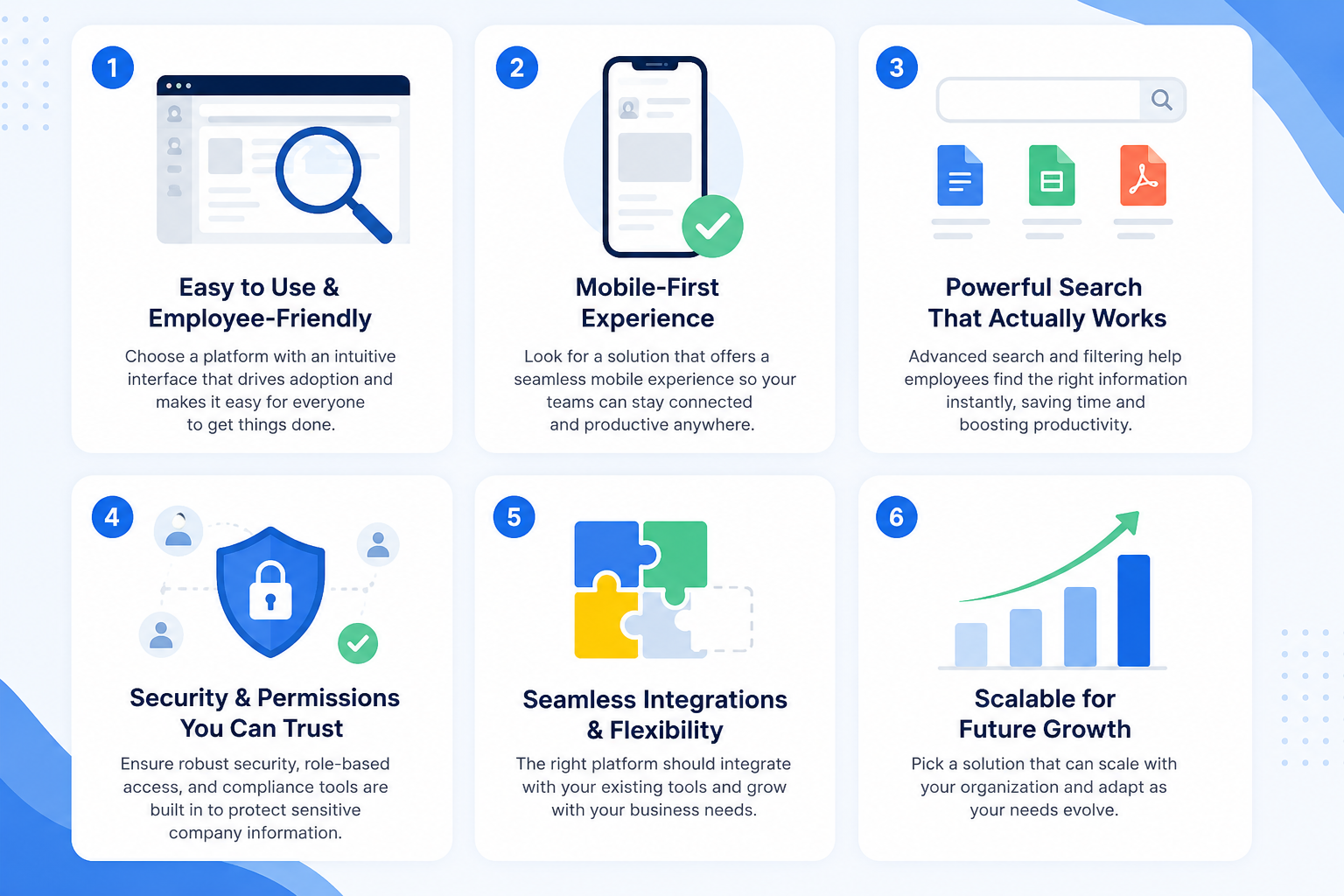
6 Things To Look For in a SharePoint Alternative
#1. Simple and Intuitive User Experience
One of the biggest reasons companies replace Microsoft SharePoint is because employees struggle to use it efficiently. A modern intranet should feel simple from day one, even for non-technical users.
For example, new employees should be able to log in and immediately understand where to find company updates, HR documents, team workspaces, and announcements without needing training sessions or IT support.
Key things businesses should look for include:
- Easy employee onboarding
- Clean and organized navigation
- Personalized dashboards
- Fast access to documents and tools
- Mobile-friendly user experience
- Reduced learning curve for employees
Modern platforms like AgilityPortal focus heavily on user adoption because even powerful software becomes useless if employees avoid using it.
#2. Built-In Communication and Engagement Tools
Traditional intranet systems were originally designed around document storage, but modern workplaces need much stronger communication capabilities.
Employees now expect real-time updates, social collaboration, and interactive company communication.
For example, remote teams may need instant company-wide announcements, department news feeds, or employee recognition features to keep teams engaged and connected.
Modern employee communication platforms often include:
- Social news feeds
- Team chat and messaging
- Company announcements
- Employee recognition systems
- Comments and reactions
- Polls and surveys
- Video and event updates
Businesses increasingly want intranet software that employees actively visit daily rather than a static portal that only stores files.
#3. Centralized Document and Knowledge Management
One major reason companies search for SharePoint alternatives for document management is because information often becomes scattered across multiple SharePoint sites over time.
A modern intranet platform should make finding information simple and fast.
Employees should not need to search through endless folders or outdated team sites just to locate one document.
Strong knowledge management features usually include:
- AI-powered enterprise search
- Centralized document libraries
- Smart version control
- Knowledge hubs and FAQs
- Content tagging and categorization
- AI-assisted document discovery
- File collaboration tools
For example, a healthcare company may need employees to instantly access updated compliance policies, while a construction business may require field teams to retrieve safety documents directly from mobile devices.
#4. Strong Integrations With Existing Business Tools
Most companies already use multiple workplace tools, so a modern intranet should connect easily with existing systems instead of replacing everything completely.
Businesses often want their intranet platform to act as a central hub where employees can access communication, files, calendars, HR tools, and project updates in one place.
Important integrations may include:
- Microsoft 365
- Google Workspace
- Slack
- HR and payroll systems
- CRM software
- Project management tools
- Cloud storage platforms
- Single sign-on (SSO)
For example, companies using Microsoft Teams may still want a more engaging employee portal layered on top of their Microsoft environment.
#5. Mobile-First and Frontline Worker Support
Many older intranet systems were designed mainly for office-based desktop users.
Modern businesses now need mobile-first platforms that support remote employees, frontline workers, and distributed teams.
For example, hospitality staff, healthcare workers, or logistics drivers may rely entirely on mobile devices to receive company updates and access important documents.
Key mobile features businesses should look for include:
- Mobile apps for iOS and Android
- Push notifications
- Offline document access
- Multi-device synchronization
- Mobile-friendly dashboards
- Frontline communication tools
- Quick access to company resources
Companies increasingly want employee portal software that keeps workers connected regardless of location.
#6. Security, Permissions, and Governance
Security remains one of the most important factors when choosing a modern intranet platform.
Businesses need to ensure employees can access the right information while protecting sensitive company data.
Modern enterprise collaboration platforms should provide strong governance controls without becoming overly difficult to manage.
Important security features include:
- Role-based permissions
- Enterprise-grade encryption
- Compliance management tools
- Audit logs and reporting
- Secure file sharing
- Single sign-on authentication
- Department-level access controls
For example, HR teams may require restricted access to employee records, while finance departments may need additional compliance controls for sensitive documents.
The best modern intranet platforms balance strong security with ease of use, helping businesses stay compliant without creating unnecessary friction for employees.
7 Best SharePoint Replacement Platforms Compared
| Platform | Best For | Key Strength | Weakness |
| AgilityPortal | Mid-sized & enterprise teams | All-in-one employee experience, Fair Pricing, Easy to use, Best UX and UI | Smaller brand awareness |
| Workvivo | Employee engagement | Social intranet UX | Limited document depth |
| Staffbase | Internal communications | Enterprise comms | Higher pricing |
| Simpplr | AI-powered intranet | Modern UI | Expensive scaling |
| LumApps | Google Workspace users | Strong Google integration | Setup complexity |
| Confluence | Technical teams | Documentation | Weak employee engagement |
| SharePoint | Microsoft enterprises | Deep Microsoft ecosystem | Poor usability |
How To Evaluate and Test SharePoint Alternatives
Choosing the right SharePoint replacement online starts with understanding what your teams actually need.
While Microsoft SharePoint is powerful, many businesses discover they are paying for complexity, features, and administration that employees rarely use.
When evaluating SharePoint alternatives for document management, businesses should focus on usability, collaboration, search, automation, and long-term cost rather than feature overload.
Here are some of the most important things companies should evaluate before switching platforms:
- Is the platform easy for non-technical employees to use?
- Can employees quickly find documents and company information?
- Does it support real-time collaboration and version control?
- Is the mobile experience modern and user-friendly?
- Can it automate workflows and repetitive business tasks?
- Does it integrate with Microsoft 365, Google Workspace, Slack, or HR tools?
- How difficult is the migration process?
- What are the long-term licensing and maintenance costs?
- Will employees actually adopt the platform daily?
For example, a company may realize they do not need dozens of advanced SharePoint customization options.
Instead, they may simply want a centralized employee hub where teams can communicate, collaborate, share files, and locate information quickly without navigating multiple disconnected sites.
The best modern intranet platforms simplify work, improve employee adoption, and reduce friction across communication and document management rather than adding more complexity.
AgilityPortal — Best SharePoint Replacement for Employee Communication, Knowledge Management & Modern Intranets
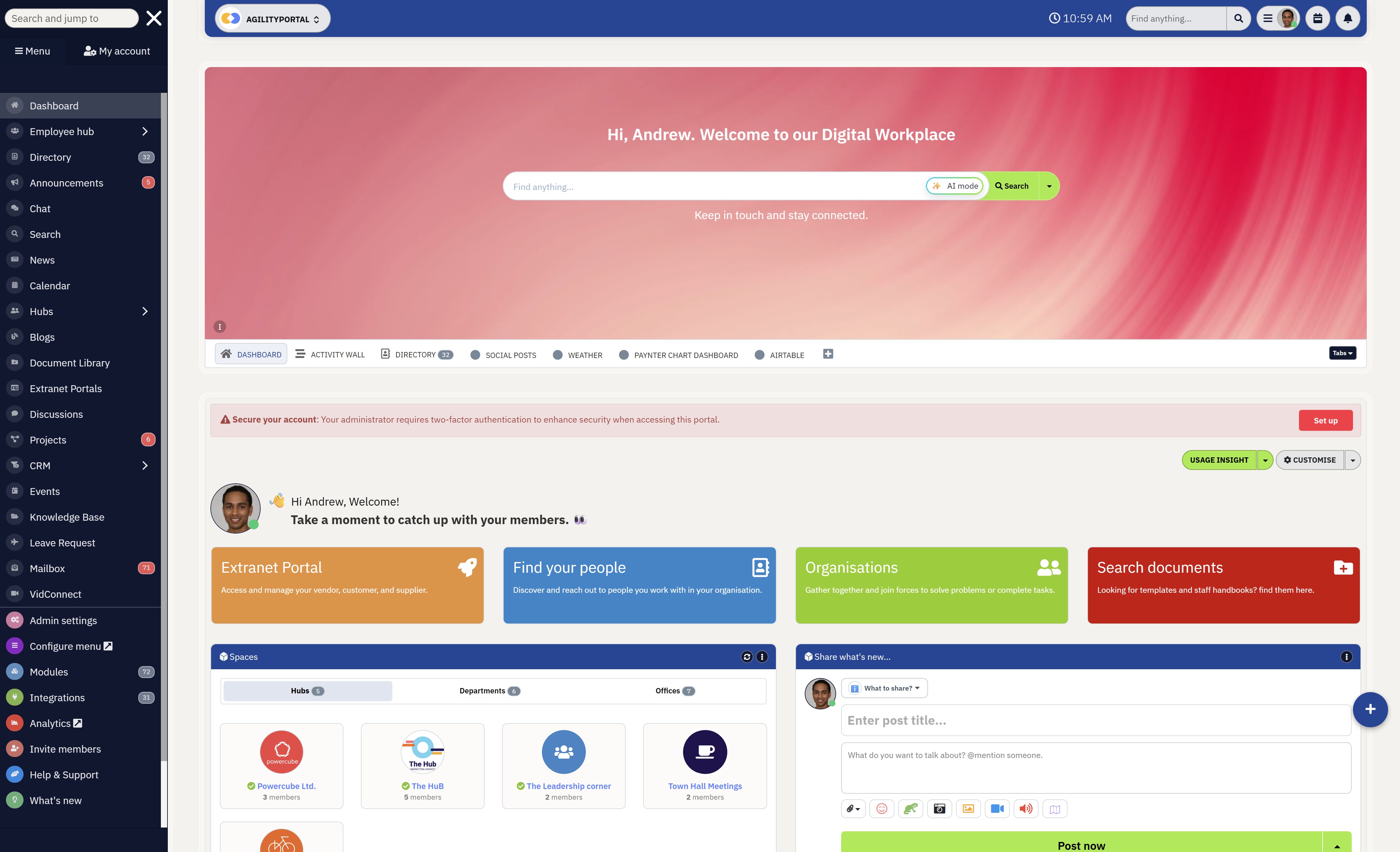
AgilityPortal — Best SharePoint Replacement for Employee Communication, Knowledge Management & Modern Intranets
If you're looking for a SharePoint replacement online that combines internal communication, document management, collaboration, and employee engagement into one platform, then AgilityPortal is one of the strongest modern intranet alternatives available today.
AgilityPortal focuses heavily on usability and employee adoption, which is one of the biggest reasons businesses move away from Microsoft SharePoint in the first place.
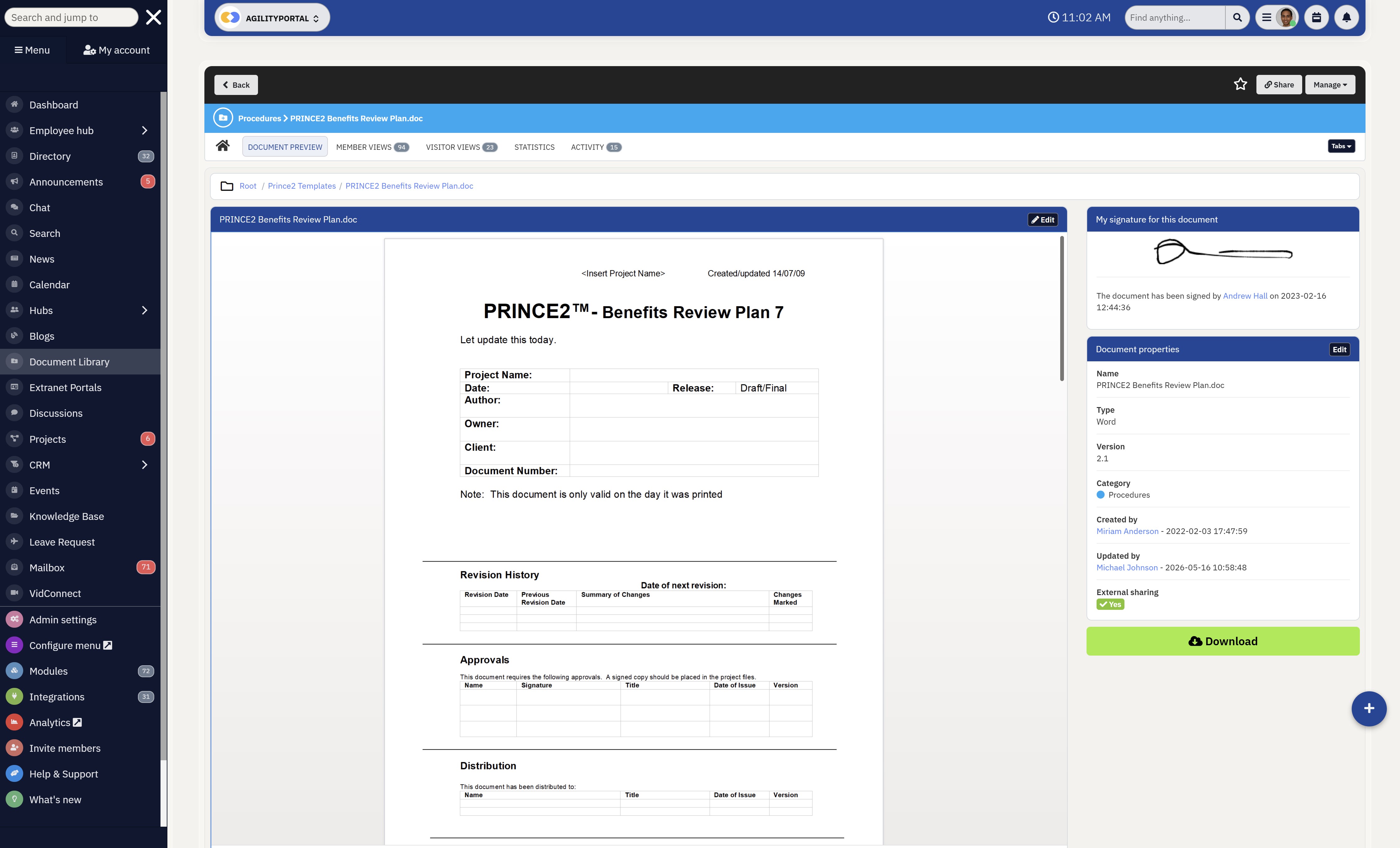
Unlike traditional intranet systems that often feel technical and difficult to manage, AgilityPortal was designed to help teams communicate, collaborate, and share knowledge without needing extensive training or IT involvement.
The platform combines employee communication tools, knowledge management, social intranet capabilities, document collaboration, and mobile accessibility into one connected digital workplace experience.
For organizations frustrated by disconnected SharePoint sites, buried documents, and low employee engagement, AgilityPortal offers a much cleaner and easier-to-manage alternative
Key Features
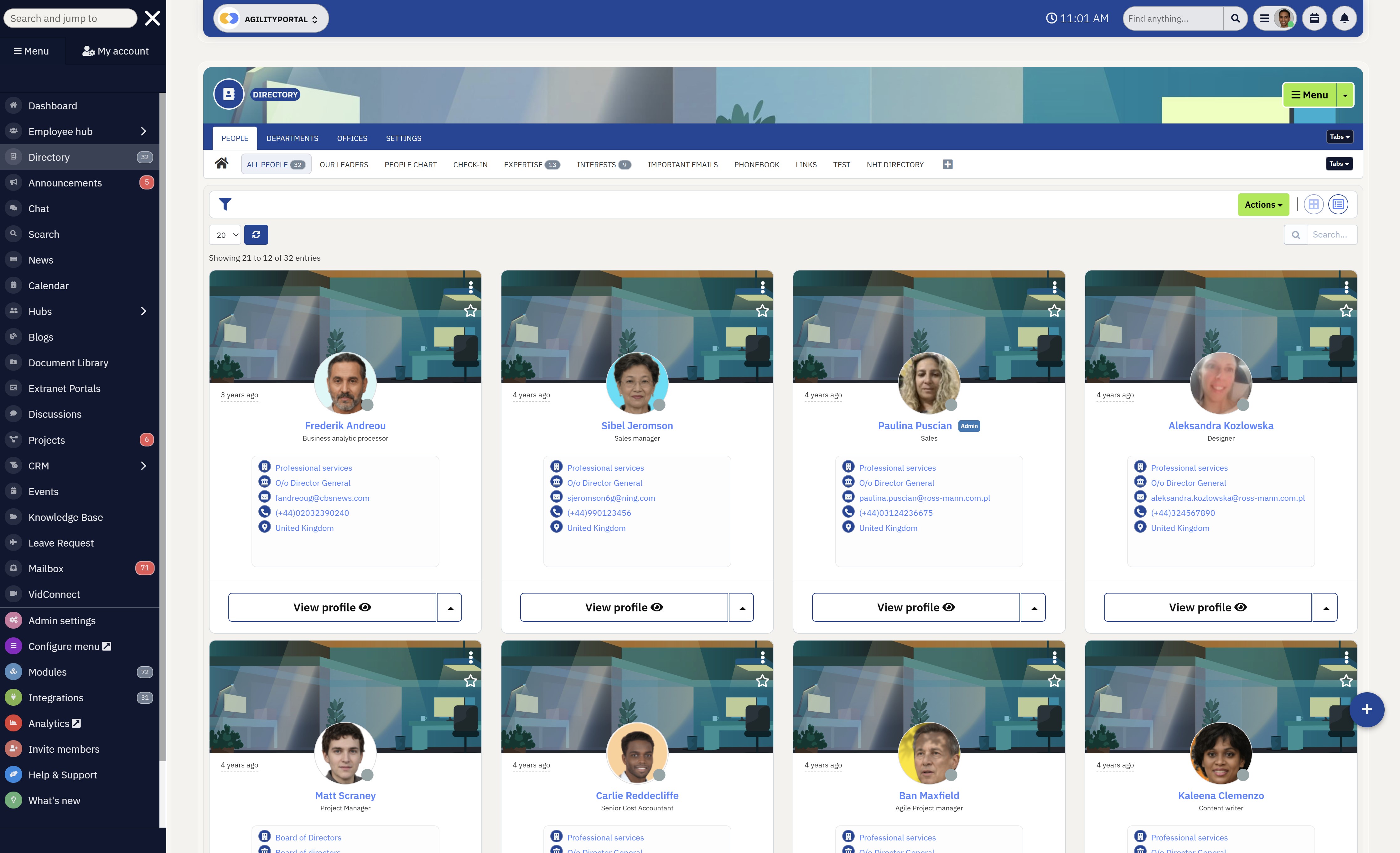
Key Features
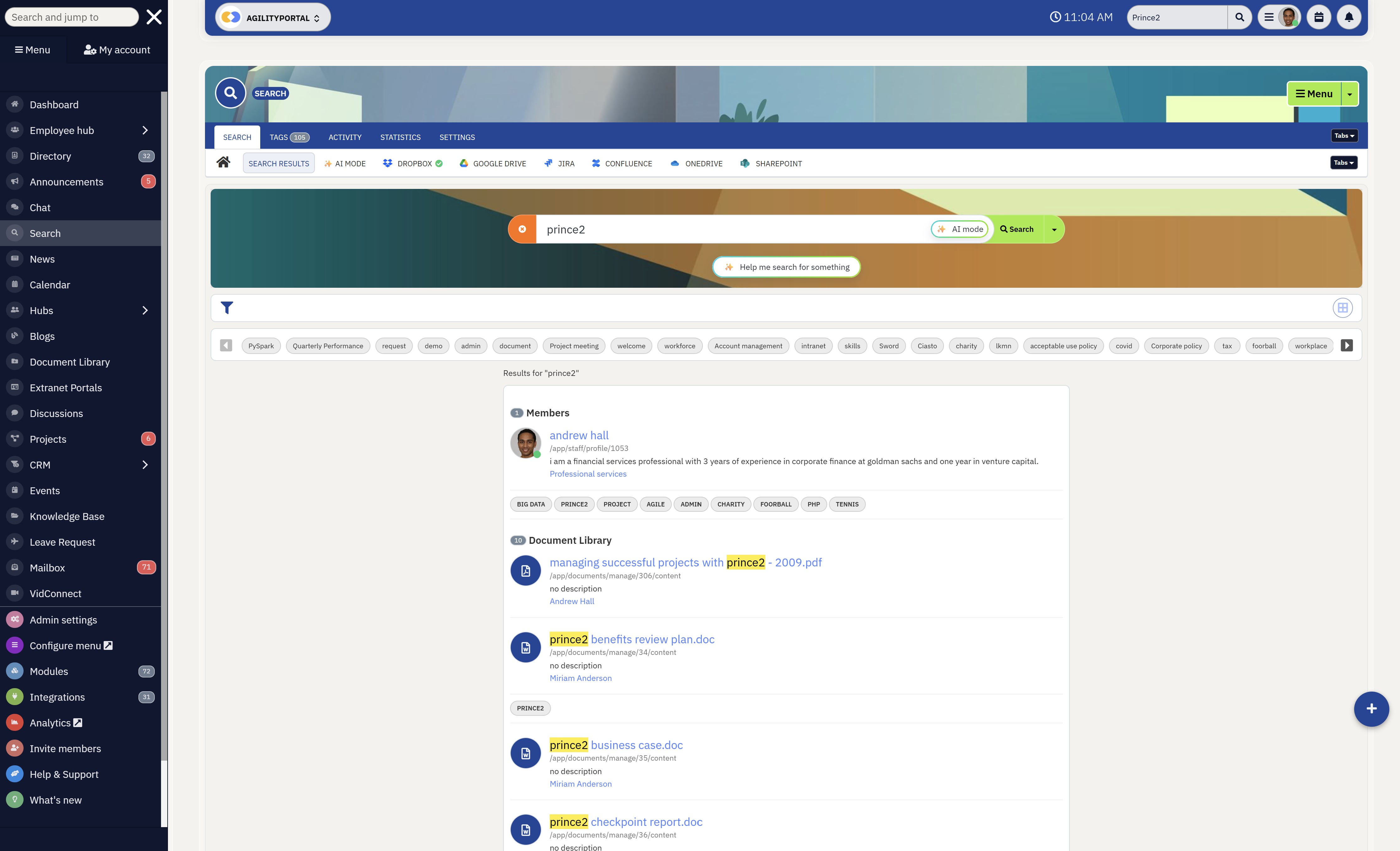
Who It's Best For
AgilityPortal is ideal for businesses that want more than just document storage.
It works particularly well for organizations trying to replace outdated intranet systems with a modern employee experience platform.
It is especially useful for:
- Mid-sized and enterprise organizations
- Hybrid and remote teams
- Frontline workforces
- Companies struggling with low SharePoint adoption
- Businesses wanting one centralized communication hub
- Organizations looking for easier document collaboration and knowledge sharing
Unlike SharePoint, which often requires technical administration and customization, AgilityPortal focuses on simplicity, usability, and fast employee adoption.
Most teams can get started quickly without needing developers or extensive onboarding.
Pricing
AgilityPortal offers flexible pricing depending on company size, features, and deployment requirements.
Pricing typically includes:
- Employee communication tools
- Document management
- Team collaboration
- Social intranet features
- Mobile apps
- Knowledge management
- Migration support options
- Enterprise integrations and security controls
Custom enterprise pricing is also available for larger organizations requiring advanced governance, onboarding assistance, and migration services from SharePoint or legacy intranet platforms.
Top SharePoint Replacement
A Modern Intranet Platform Built for Employee Communication, Collaboration & Knowledge Management
AgilityPortal is a modern SharePoint replacement online designed for businesses that want a simpler and more engaging way to manage employee communication, collaboration, documents, and company knowledge from one centralized platform. Unlike traditional intranet systems, AgilityPortal combines social collaboration, document management, AI-powered search, team communication, and employee engagement tools into one secure digital workplace platform.
Businesses replacing SharePoint often choose AgilityPortal because it is easier to use, faster to deploy, mobile-friendly, and designed to improve employee adoption without the complexity of managing multiple disconnected SharePoint sites and document libraries.
See why businesses are moving away from outdated intranet systems and choosing AgilityPortal to centralize communication, collaboration, and workplace knowledge.Microsoft SharePoint — Best for Microsoft 365 Document Management and Enterprise Intranets
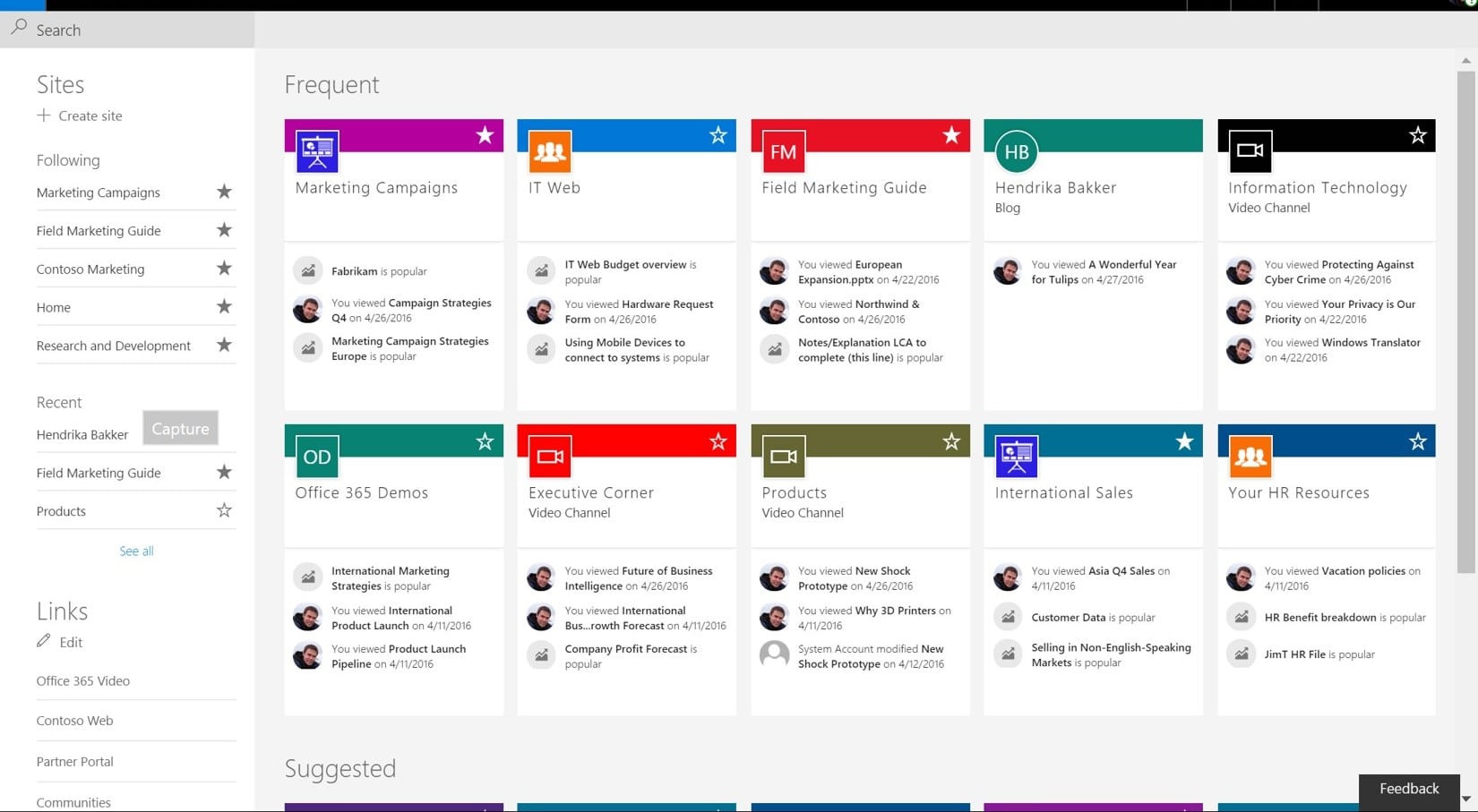
Microsoft SharePoint — Best for Microsoft 365 Document Management and Enterprise Intranets
If your organization is already deeply invested in the Microsoft ecosystem, SharePoint can still be a strong option for enterprise document management, compliance, and internal file storage.
Many large enterprises continue using SharePoint because it integrates tightly with Microsoft Teams, OneDrive, Outlook, and the wider Microsoft 365 environment.
However, businesses searching for a SharePoint replacement online are often doing so because the platform becomes difficult to manage as organizations grow.
While SharePoint is extremely flexible, many companies feel that flexibility comes at the cost of usability, employee adoption, and ongoing administration.
One of the biggest challenges with SharePoint is that everyday employees often struggle to use it efficiently without training.
Over time, organizations can end up with deeply nested team sites, disconnected document libraries, and fragmented communication experiences that reduce productivity instead of improving it.
For example, employees may store files across multiple SharePoint sites, Microsoft Teams channels, and OneDrive folders, making it difficult to know where the latest document version actually lives.
Key Features
Common Pain Points
Who It's Best For
SharePoint is best suited for:
- Large enterprises already using Microsoft 365
- Organizations requiring advanced compliance controls
- Businesses with dedicated IT administration teams
- Companies needing complex document governance
For businesses wanting a simpler employee experience, many organizations now evaluate SharePoint alternatives for document management that focus more heavily on communication, usability, collaboration, and employee engagement rather than technical customization.
Other SharePoint Alternatives To Include
- Workvivo
- Simpplr
- Staffbase
- LumApps
- Atlassian
Microsoft SharePoint
Enterprise Document Management and Intranet Software for Microsoft 365 Environments
Microsoft SharePoint is one of the most widely used enterprise intranet platforms and document management systems for organizations already operating within the Microsoft 365 ecosystem. It provides businesses with centralized file storage, team collaboration spaces, workflow automation, and enterprise-level governance capabilities.
While SharePoint remains a powerful solution for large enterprises, many businesses searching for a SharePoint replacement online often cite complexity, difficult navigation, low employee adoption, and ongoing administration overhead as major challenges when scaling modern digital workplaces.
SharePoint is commonly used by enterprises needing advanced document governance, Microsoft integration, and large-scale intranet management capabilities.AgilityPortal vs SharePoint: Which Modern Intranet Platform Is Better for Employee Experience?
Businesses comparing AgilityPortal and Microsoft SharePoint are usually trying to solve the same problem: creating a modern digital workplace that employees actually use.
While SharePoint remains one of the most recognized enterprise intranet systems, many organizations are now moving toward newer employee experience platforms that focus more heavily on communication, usability, collaboration, and employee engagement.
For companies looking for a modern intranet solution, employee portal software, or a centralized workplace hub, the differences between the two platforms become very noticeable once teams begin using them daily.
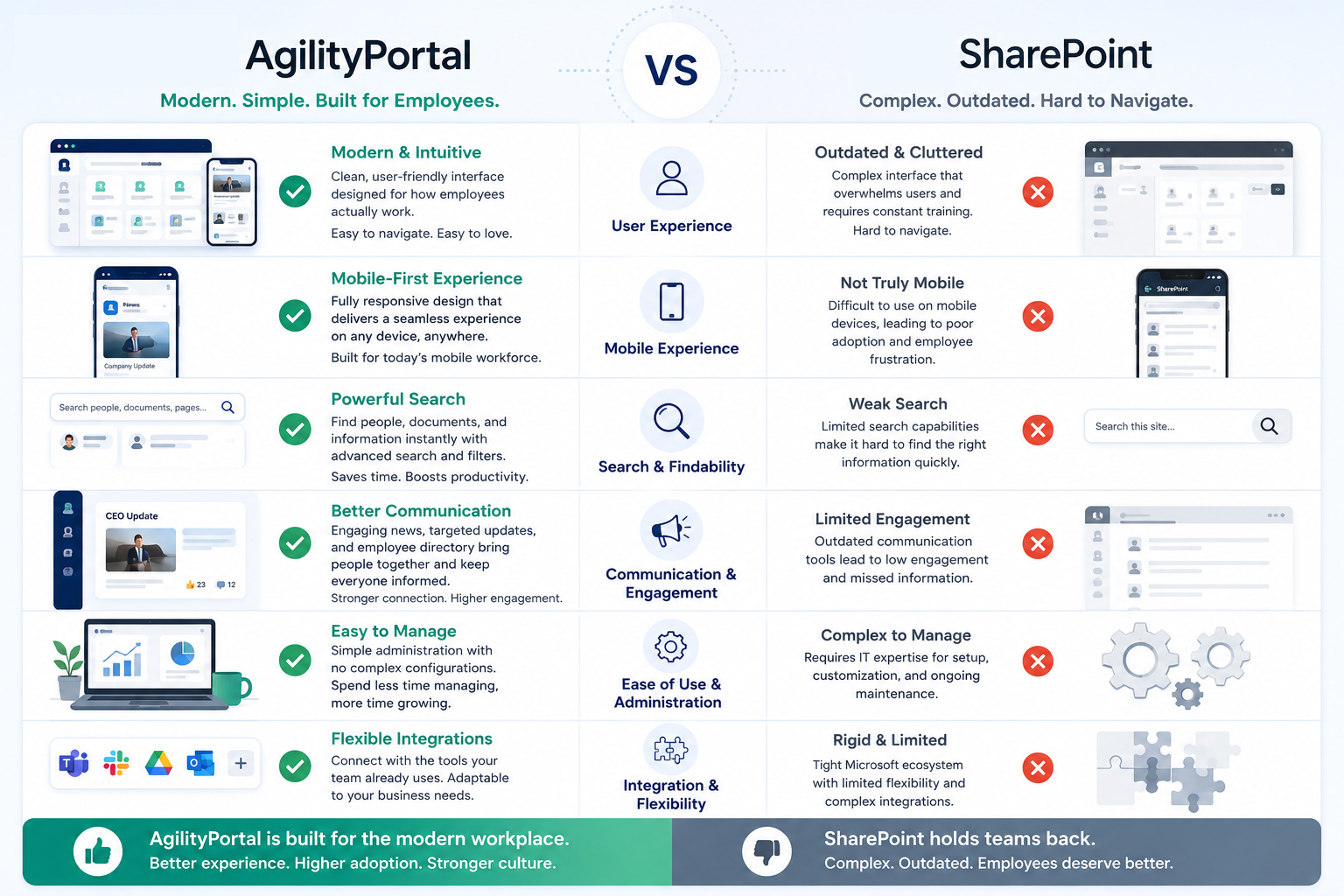
AgilityPortal vs SharePoint: Which Modern Intranet Platform Is Better for Employee Experience?
User Experience and Employee Adoption
One of the biggest differences between AgilityPortal and SharePoint is usability.
Many companies searching for a modern intranet platform are frustrated because employees often avoid using SharePoint unless absolutely necessary.
AgilityPortal focuses heavily on employee adoption by offering a cleaner interface, simplified navigation, and a faster onboarding experience.
AgilityPortal strengths:
- Modern and intuitive interface
- Faster employee onboarding
- Easier navigation and search
- Personalized dashboards
- Reduced learning curve for non-technical users
SharePoint challenges:
- Complex site structures
- Difficult navigation
- Steeper learning curve
- Heavy dependency on IT setup
- Lower employee engagement over time
For example, a new employee can typically start using AgilityPortal immediately, while SharePoint often requires training sessions just to understand team sites, document libraries, and permissions.
Communication and Collaboration Features
Modern businesses need more than just document storage.
They need internal communication software that keeps employees connected across departments and locations.
This is where AgilityPortal positions itself more as an employee engagement platform rather than simply a document repository.
AgilityPortal includes:
- Social news feeds
- Team chat and messaging
- Employee recognition tools
- Company-wide announcements
- Department collaboration spaces
- Engagement analytics and surveys
SharePoint typically relies on:
- Additional Microsoft tools
- Separate Teams integrations
- More complex communication workflows
- Traditional intranet-style publishing
For remote and hybrid teams, having communication, collaboration, and knowledge sharing inside one connected platform often improves employee participation significantly.
Deployment and Administration
Another major reason businesses evaluate SharePoint competitors is the long-term administration burden.
While SharePoint offers extensive customization capabilities, many organizations discover that maintaining those environments becomes resource-intensive and difficult to scale cleanly.
AgilityPortal advantages:
- Faster deployment
- Lower IT dependency
- Easier administration
- Simpler permission management
- Reduced maintenance overhead
SharePoint limitations:
- Complex governance structures
- Ongoing customization costs
- Technical administration requirements
- Higher implementation complexity
For growing companies without large IT departments, simplicity often becomes more valuable than endless customization flexibility.
Mobile Experience and Frontline Accessibility
Today's workforce is increasingly mobile, especially in industries with remote employees, frontline staff, or distributed teams.
AgilityPortal was designed with mobile-first employee communication in mind, making it easier for employees to access updates, documents, and collaboration tools from anywhere.
AgilityPortal mobile features:
- Mobile-friendly intranet experience
- Push notifications
- Frontline communication tools
- Fast mobile access to documents
- Employee engagement on mobile devices
Common SharePoint mobile frustrations:
- Inconsistent mobile usability
- Complex navigation on smaller screens
- Limited frontline engagement experience
- Heavy reliance on Microsoft app ecosystem
For industries like healthcare, hospitality, logistics, and nonprofits, mobile usability can heavily influence
Total Cost and Long-Term ROI
One area businesses often underestimate when evaluating enterprise intranet software is total cost of ownership.
SharePoint licensing may initially appear cost-effective for Microsoft 365 customers, but costs often increase through:
- Custom development
- IT administration
- External consultants
- Ongoing maintenance
- Employee training
- Migration and restructuring projects
AgilityPortal focuses on delivering a more streamlined employee experience with lower operational complexity.
Businesses often choose AgilityPortal because:
- Employees adopt it faster
- Training requirements are lower
- Communication becomes centralized
- Maintenance overhead is reduced
- Deployment is quicker
- Teams spend less time searching for information
For organizations prioritizing usability, collaboration, employee engagement, and simpler intranet management, modern employee experience platforms are increasingly replacing traditional intranet systems.
SharePoint Migration Challenges
Migrating away from Microsoft SharePoint is rarely just a technical project.
For most businesses, it involves reorganizing years of documents, improving knowledge management, and helping employees adapt to a new way of working.
Many companies searching for a SharePoint replacement online underestimate how complicated migration can become if there is no clear structure, communication plan, or cleanup process in place beforehand.
The good news is that most migration problems are predictable and avoidable with proper planning.
Migrating Documents and Permissions
One of the biggest migration challenges is dealing with years of disorganized files, broken permissions, and duplicate content spread across multiple SharePoint sites.
In many organizations, documents have been stored across different departments for years without proper governance or structure.
Common migration issues include:
- Legacy folder structures
- Duplicate documents
- Broken sharing permissions
- Outdated file ownership
- Inconsistent naming conventions
- Difficult-to-track document versions
For example, businesses often discover multiple versions of the same HR policy stored across different SharePoint team sites with completely different permission settings.
Before migrating to a modern intranet platform or employee portal software, companies should first audit and organize their content properly.
Employee Resistance to Change
Even when employees dislike SharePoint, migration projects can still create anxiety if teams feel workflows are changing too quickly.
One of the biggest reasons digital workplace migrations fail is poor communication during the rollout process.
Common employee concerns include:
- Fear of losing documents
- Confusion about new workflows
- Lack of onboarding or training
- Worries about productivity disruption
- Resistance to learning another platform
For example, employees who already struggle with technology may avoid using the new intranet entirely if onboarding is rushed or unclear.
Organizations that communicate early, involve employees during testing, and provide simple training usually see much higher adoption rates.
Cleaning Outdated Content Before Migration
Many companies treat migration as a copy-and-paste exercise, but this often recreates the same problems inside the new platform.
Migrating outdated or unused content simply transfers clutter from one intranet to another.
Businesses should review:
- Old team sites
- Inactive document libraries
- Duplicate folders
- Unused workspaces
- Outdated policies
- Archived project files
For example, some organizations discover that employees only actively use a small percentage of the documents currently stored inside SharePoint.
Cleaning content before migration helps improve search quality, usability, and employee adoption in the new digital workplace platform.
Maintaining Business Continuity During Migration
One major concern businesses have when replacing SharePoint is avoiding disruption to daily operations.
Employees still need access to files, communication tools, and workflows while migration is happening.
Successful migration strategies usually include:
- Staged department rollouts
- Parallel platform environments
- Pilot testing groups
- Employee onboarding plans
- Gradual document migration
- Clear communication timelines
For example, many organizations migrate one department at a time instead of moving the entire company at once. This reduces confusion and allows teams to identify issues before expanding the rollout.
Common SharePoint Migration Mistakes
One of the biggest mistakes companies make is focusing entirely on technology while ignoring employee experience and adoption.
A modern intranet platform should simplify work, not recreate the same complexity employees already disliked in SharePoint.
Common migration mistakes include:
- Migrating everything without cleanup
- Overcomplicating folder structures again
- Ignoring employee onboarding
- Failing to define governance rules
- Choosing software based only on features
- Not testing the employee experience first
For example, some businesses move thousands of outdated files into a new intranet platform only to discover employees still cannot find what they need.
The most successful migrations focus on simplicity, communication, employee usability, and creating a centralized knowledge hub employees genuinely want to use daily.
How To Replace SharePoint Without Disrupting Teams
Replacing Microsoft SharePoint does not need to be chaotic or risky.
The companies that successfully move to a modern intranet platform usually follow a simple rule: improve the employee experience first, then migrate the technology around it.
Businesses searching for a SharePoint replacement online often fail because they move too much content too quickly, ignore employee adoption, or recreate the same complicated structure inside the new platform.
The goal should be to simplify communication, improve document access, and reduce friction for employees from day one.
Start With a Phased Rollout
One of the biggest mistakes companies make is trying to replace SharePoint company-wide overnight.
This usually creates confusion, support tickets, and frustrated employees.
Instead, roll out the new intranet gradually.
A phased rollout allows you to:
- Test the platform safely
- Identify migration issues early
- Gather employee feedback
- Improve onboarding before full deployment
- Reduce disruption across departments
A simple approach is:
- Start with one department
- Migrate their key documents and workflows
- Train a small pilot group
- Collect feedback for 2–4 weeks
- Improve the setup before expanding
For example, many organizations begin with HR or Internal Communications because these teams manage company-wide information employees access frequently.
The benefit of this approach is lower migration risk and much faster employee adoption.
Focus on Employee Adoption First
Most intranet projects fail because employees do not use the platform consistently.
A modern employee portal should make work easier immediately.
Before migrating, identify:
- What employees struggle with today
- Which documents they access most
- Which communication tools they already use
- What workflows create frustration
Then simplify those areas first.
Practical ways to improve adoption include:
- Keep navigation simple
- Limit unnecessary folders
- Create quick-start video guides
- Use mobile-friendly onboarding
- Train department champions
- Pin important resources clearly
For example, instead of uploading thousands of old documents immediately, prioritize:
- HR policies
- Team communication
- Company announcements
- Frequently used templates
- Key operational documents
Employees adopt new platforms faster when they instantly see value.
Consolidate Communication and Knowledge Into One Platform
One major reason companies replace SharePoint is tool sprawl.
Employees often jump between:
- SharePoint
- Teams
- Slack
- Google Drive
- Shared network folders
This creates fragmented communication and makes finding information difficult.
A better approach is centralizing:
- Company announcements
- Documents
- Team collaboration
- Knowledge bases
- Employee communication
- Policies and procedures
For example, instead of storing HR updates in email and policies in SharePoint, place everything inside one searchable employee hub.
The benefits include:
- Faster document discovery
- Reduced duplicate files
- Better employee engagement
- Less internal confusion
- Improved knowledge sharing
Modern digital workplace platforms work best when employees know exactly where to go for information.
Use Integrations to Reduce Workflow Disruption
One reason SharePoint migrations become difficult is because businesses try to replace every tool at once.
That usually creates resistance.
Instead, keep the tools employees already rely on and integrate them into the new platform where possible.
Useful integrations often include:
- Microsoft 365
- Google Workspace
- Slack
- Teams
- HR systems
- Project management tools
- Cloud storage platforms
For example, employees may still use Microsoft Teams for meetings while using a modern intranet platform for communication, knowledge management, and document collaboration.
This approach reduces disruption because employees do not need to completely change how they work overnight.
Measure Intranet Success After Migration
Migration success should not be measured by how many files were moved. It should be measured by whether employees actually use the new platform effectively.
Track metrics such as:
- Employee login frequency
- Search success rates
- Document usage
- Time spent locating information
- Employee engagement levels
- Mobile adoption
- Communication reach
For example, if employees can now find HR policies in seconds instead of searching multiple SharePoint sites, the migration is already improving productivity.
Successful companies continue optimizing the platform after launch by:
- Removing unused content
- Improving navigation
- Monitoring search behavior
- Gathering employee feedback regularly
The best modern intranet platforms evolve alongside the business instead of becoming another outdated document repository employees avoid using.
FAQ
What Is the Best SharePoint Replacement?
The best SharePoint replacement online depends entirely on how your business works and what problems you are trying to solve.
For example:
- Mid-sized companies often prioritize ease of use, employee communication, and fast deployment.
- Enterprise organizations may require advanced governance, compliance, and large-scale document management.
- Frontline teams usually need mobile-first communication and simple access to information.
- Remote companies often focus on collaboration, employee engagement, and centralized knowledge sharing.
Platforms like AgilityPortal are popular because they combine communication, collaboration, document management, and employee engagement into one modern intranet platform instead of forcing businesses to manage multiple disconnected tools.
The best approach is choosing software that employees will actually use daily rather than selecting the platform with the longest feature list.
Why Are Companies Moving Away From SharePoint?
Many organizations move away from Microsoft SharePoint because the platform becomes difficult to manage as businesses grow.
The most common reasons include:
- Complex site structures
- Low employee adoption
- Difficult navigation
- Poor document discoverability
- Expensive customization projects
- High IT maintenance requirements
- Fragmented communication experiences
For example, employees often struggle to locate files across multiple SharePoint sites, document libraries, and Teams channels. Over time, this creates productivity loss and information silos.
Modern businesses now want simpler employee experience platforms that improve communication, collaboration, and knowledge management without the technical overhead.
Is SharePoint Outdated?
SharePoint is not necessarily outdated, but many businesses feel the traditional intranet experience no longer matches how modern teams work.
For organizations already heavily invested in Microsoft 365, SharePoint can still work well for enterprise document storage, governance, and compliance.
However, many companies now prefer modern digital workplace platforms that offer:
- Better mobile experiences
- Simpler collaboration
- Faster enterprise search
- Social communication tools
- Easier onboarding
- Higher employee engagement
The shift is less about SharePoint being obsolete and more about businesses wanting platforms employees actively enjoy using.
How Hard Is It To Migrate Away From SharePoint?
The difficulty of migrating away from SharePoint depends on:
- The amount of content stored
- Folder complexity
- Custom workflows
- Permissions structure
- Employee adoption planning
For example, organizations with years of unmanaged SharePoint sites may first need to clean duplicate files, outdated documents, and broken permissions before migration begins.
The easiest migrations usually happen when businesses:
- Start with a phased rollout
- Clean old content first
- Train employees early
- Migrate department-by-department
- Focus on usability instead of recreating old structures
Most businesses discover migration becomes much easier when the new platform simplifies workflows instead of adding more complexity.
What Features Should a Modern Intranet Have?
Modern intranet software should do far more than simply store files.
The best employee portal platforms help teams communicate, collaborate, and access information quickly from one centralized location.
Key features businesses should look for include:
- Employee communication tools
- AI-powered enterprise search
- Mobile-friendly access
- Team collaboration workspaces
- Document management and version control
- Knowledge management capabilities
- Employee engagement features
- Workflow automation
- Secure permissions and governance
- Integration with Microsoft 365 and other workplace tools
For example, a modern intranet should allow employees to quickly find policies, communicate with teams, access documents, and receive company updates without navigating multiple disconnected systems.
AI Summary
- Many businesses search for a SharePoint replacement when their intranet becomes difficult to manage, hard to navigate, and poorly adopted by employees.
- Modern SharePoint alternatives focus on employee communication, document management, knowledge sharing, mobile access, and easier collaboration across teams.
- SharePoint is still powerful for Microsoft 365 environments, but many organizations struggle with complex site structures, permission issues, and poor content discovery.
- The best modern intranet platforms help businesses centralise documents, announcements, team communication, workflows, and company knowledge into one easy-to-use hub.
- Before migrating from SharePoint, companies should audit existing content, remove outdated documents, simplify permissions, and roll out the new platform in phases.
- Successful SharePoint migration depends on employee adoption, clean information architecture, strong search, clear ownership, and choosing software teams will actually use.
Most Popular Posts

Effective communication among team members is vital for the productivity and success of any organization. Surprisingly, 60% of companies lack a long-term internal communication strategy, which p...


Businesses thrive on communication for efficiency, productivity and accomplishment. When the right information is passed from the right designation in the organization, it promotes positivity an...
Categories
Blog
(2932)
Business Management
(365)
Employee Engagement
(221)
Digital Transformation
(190)
Growth
(140)
Intranets
(134)
Remote Work
(63)
Sales
(53)
Collaboration
(47)
Customer Experience
(30)
Culture
(29)
Knowledge Management
(28)
Project management
(28)
Leadership
(20)
Comparisons
(9)
News
(1)

Related Posts

Many organizations looking for a SharePoint replacement online are reaching a point where SharePoint no longer matches how modern teams actually work. What started as a document repository has gradually become difficult to manage, expensive to ...

In today's fast-paced and interconnected business world, effective communication, streamlined workflows, and efficient collaboration are essential for organizational success. That's where intranet apps come in. These powerful tools offer a cent...

Tennis Ball Transfer is an excellent activity for encouraging a group to practice cooperating, coordinating efforts, and learning to operate more effectively. Delegates must assess their performance and devise new problem-solving solutions. This exer...

Most businesses don't really think about directory service failures until everything suddenly stops working. One minute your employees are logging into apps, accessing files, joining meetings, and sending messages normally — then out of nowhere...

Many businesses still rely on spreadsheets, outdated systems, and disconnected tools to manage company assets, but this approach creates more problems than most leaders realize. From missing equipment and duplicate software purchases to delayed...


Jill Romford
I am a digital nomad, lover of exploring new places and making friends.
I love to travel and I love the internet. I take pictures of my travels and share them on the internet using Instagram.
Traveler, entrepreneur, and community builder. I share my insights on digital marketing and social media while inspiring you to live your fullest life.
Ready to learn more? 👍
One platform to optimize, manage and track all of your teams. Your new digital workplace is a click away. 🚀
Free for 14 days, no credit card required.