
Insight Blog
Agility’s perspectives on transforming the employee's experience throughout remote transformation using connected enterprise tools.
33 minutes reading time
(6655 words)
The Hidden Cost of Waiting: Why Businesses Choose Outsourced IT Support

The Hidden Cost of Waiting: Why Businesses Choose Outsourced IT Support
Discover how delayed IT support increases downtime, security risks and employee frustration—and when outsourced IT support becomes the smarter choice.
The Hidden Cost of Waiting: Why Businesses Choose Outsourced IT Support

Open with a familiar situation: slow systems, unresolved tickets, delayed onboarding and recurring technical problems that appear individually manageable.
Introduce outsourced IT support in the first paragraph as a proactive response—not simply a cheaper replacement for internal employees.
Establish the article's purpose: explaining the financial, operational, security and employee costs of waiting, along with how to decide whether outsourcing is appropriate.
48%
of UK businesses
According to the UK Government Cyber Security Breaches Survey 2025/26, 48% of UK businesses use an external cybersecurity provider. This rises to 64% of small businesses and 70% of medium-sized businesses.
A strong current statistic for the introduction is that 48% of UK businesses use an external cybersecurity provider, rising to 64% of small businesses and 70% of medium-sized businesses.
This supports the argument that external expertise is already a mainstream business decision as mentioned on the UK Government Cyber Security Breaches Survey 2025/26.
Key Takeaways
- Waiting to improve IT support can create hidden costs through recurring downtime, delayed projects, employee workarounds, and growing security exposure.
- Outsourced IT support can provide broader expertise, proactive monitoring, predictable capacity, faster escalation, and extended support coverage.
- Businesses can choose fully outsourced, co-managed, helpdesk-only, or specialist support depending on their internal resources and operational requirements.
- Outsourcing creates its own risks, including unclear responsibilities, weak service-level agreements, excessive supplier access, hidden charges, and vendor lock-in.
- Providers should be assessed on security, resolution performance, communication, scalability, contract terms, and employee experience—not price alone.
- Outsourcing IT work does not outsource accountability; an internal leader must continue to oversee strategy, risk, access, and provider performance.
What Does Outsourced IT Support Actually Mean?
Outsourced IT support means asking an external provider to manage some or all of the technology support your business needs.
That might include fixing everyday technical problems, managing user accounts, maintaining devices, monitoring networks, protecting business data or helping the organisation plan future technology investments.
The important phrase here is "some or all." Outsourcing IT doesn't necessarily mean removing an internal IT department or handing complete control of your systems to another company.
Businesses can choose from several support models depending on their size, existing expertise and operational requirements.
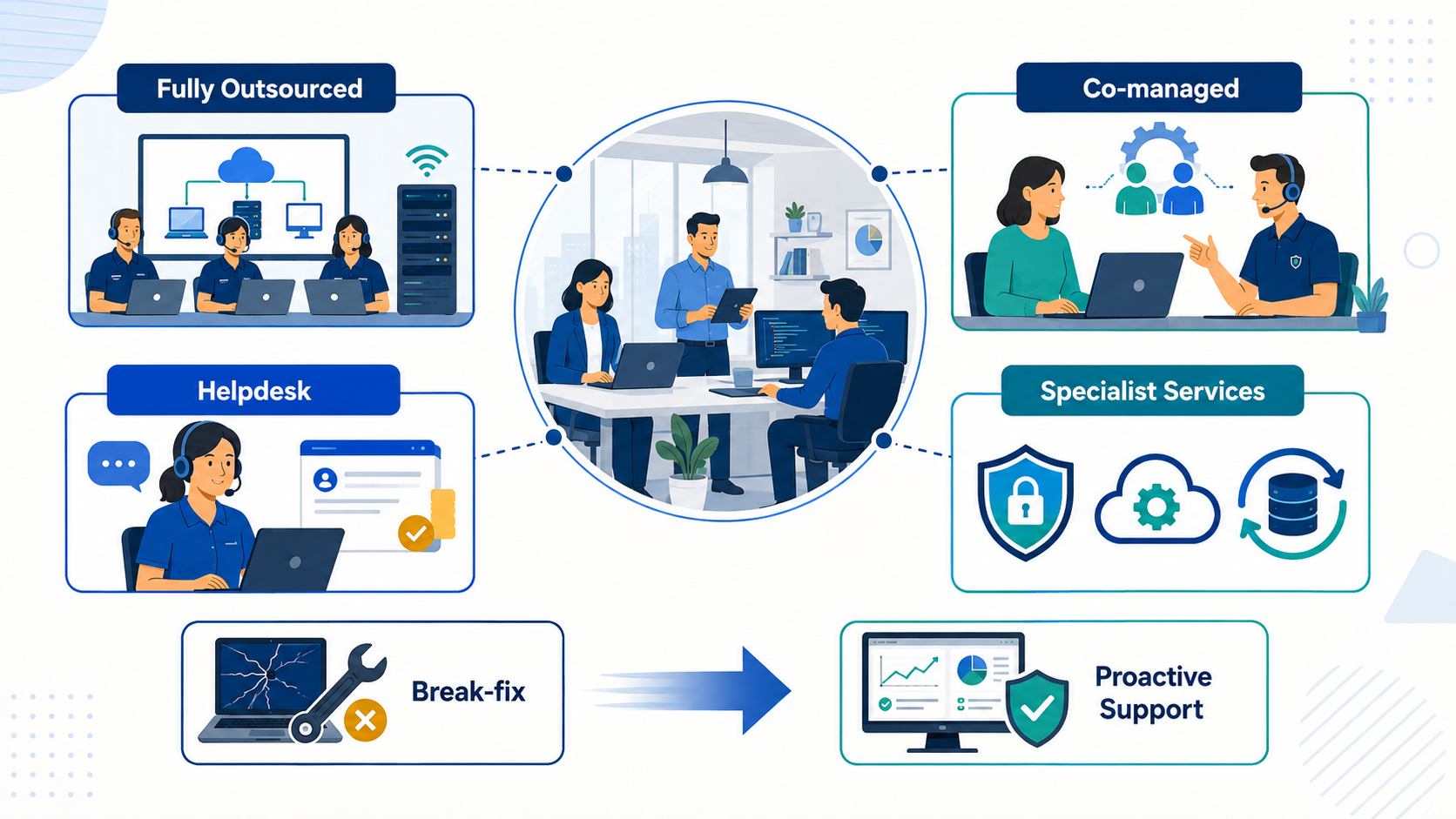
What Does Outsourced IT Support Actually Mean
Fully outsourced IT support
With a fully outsourced model, an external provider effectively becomes the organisation's IT department.
Employees contact the provider when they experience a problem, while the provider manages agreed responsibilities such as:
- Technical support and troubleshooting.
- Employee account creation and removal.
- Device setup and maintenance.
- Software updates and patching.
- Network and server monitoring.
- Data backup and recovery.
- Cybersecurity protection.
- Technology planning and reporting.
This model is often suitable for smaller and growing businesses that depend heavily on technology but don't have the resources or need to build a complete internal IT team.
The provider may support employees remotely, visit the workplace when physical assistance is required or combine both approaches. Regional services, such as IT managed services in Greenville, illustrate how organisations can access ongoing technical support while retaining the option of local assistance when an issue cannot be resolved remotely.
Co-managed IT support
Co-managed support works alongside an existing internal IT team rather than replacing it. Responsibilities are divided according to capacity, skills and business priorities.
For example, an internal IT manager might retain responsibility for technology strategy, business applications and senior stakeholder relationships. The external provider could then handle routine support tickets, device monitoring, after-hours coverage or specialist cybersecurity work.
This arrangement can be particularly useful when an internal team understands the organisation well but is overwhelmed by day-to-day requests. It also gives businesses access to specialist skills without needing to recruit a full-time expert for every technical discipline.
However, the division of responsibilities must be clear. If employees, internal IT and the external provider don't know who owns a particular problem, tickets can be passed between teams while the underlying issue remains unresolved.
Outsourced helpdesk or service-desk support
Some businesses outsource only their employee helpdesk. Instead of asking a colleague or manager for assistance, employees contact a central support team through a portal, phone number, email address or live chat.
The helpdesk may handle common issues such as:
- Password resets.
- Login and access problems.
- Software errors.
- Email configuration.
- Printer and connectivity issues.
- Device troubleshooting.
- Requests for approved applications.
More complicated incidents can then be escalated to an internal IT specialist or another external technical team.
This approach can improve consistency and free internal employees from repetitive requests. But it only works when the provider understands the organisation's systems, communicates clearly and gives employees a straightforward way to track their requests.
Specialist outsourced IT services
A business can also retain its internal support function while outsourcing areas that require deeper expertise or continuous coverage. These services might include cybersecurity monitoring, cloud infrastructure management, disaster recovery, data backup, compliance support or major technology projects.
This allows an organisation to fill a specific skills or capacity gap without outsourcing every part of its IT operation.
For instance, an internal team may be capable of supporting employees during normal working hours but unable to monitor security alerts around the clock. A specialist provider can cover that gap while the internal team maintains control of its wider technology environment.
Break-fix support versus proactive managed services
Break-fix support is the more traditional approach: something stops working, the business contacts a technician, and the technician charges to repair it. There may be little or no ongoing monitoring between incidents.
That can appear economical when problems are rare. The weakness is that the provider is generally paid after something has already failed. There's less incentive or opportunity to identify ageing equipment, missing updates, weak backups or recurring faults before they interrupt employees.
Proactive managed support takes a different approach. The provider usually charges a recurring fee to monitor systems, perform maintenance, manage updates and respond to problems under an agreed service-level agreement.
The aim isn't simply to repair technology faster. It's to reduce the number and severity of incidents in the first place.
Outsourced IT support and managed IT services therefore overlap, but they aren't automatically the same thing. Outsourcing describes who performs the work; managed services describe an ongoing, proactive method of delivering it. A business can outsource occasional break-fix work without receiving a managed service, just as it can outsource only one carefully defined part of its wider IT operation.
Related IT Support, Managed Services & Workplace Technology Guides
Outsourced IT support is only one part of building a reliable and secure digital workplace. These related AgilityPortal guides explore managed IT services, business downtime, ageing technology, cybersecurity, outsourcing risks, employee experience and the support processes organisations need as they grow.
- Why Growing Companies Need Reliable Business IT Services to Manage Downtime
- How to Streamline Business Operations With the Right IT Support
- The Hidden Role of Managed IT in Employee Engagement
- How Outdated Workplace Technology Quietly Drains Employee Productivity
- How Managed IT Services Help Growing Companies Scale
- IT Outsourcing Mistakes Businesses Make and How to Avoid Them
- Outsourcing Examples That Show Why Clear Processes Matter
- Why Businesses Are Moving Towards End-to-End IT Solutions
- Five Essential Cybersecurity Controls for Small Businesses
- IT Challenges for Remote Teams and How Businesses Can Overcome Them
Together, these guides strengthen the topic cluster around outsourced IT support, managed IT services, business IT support, proactive monitoring, cybersecurity, downtime reduction, employee productivity and scalable workplace technology.
The Real Cost Isn't the Support Contract—It's the Waiting
The monthly cost of outsourced IT support is easy to see because it appears clearly on an invoice. The cost of waiting is much harder to identify.
It's spread across interrupted meetings, delayed projects, frustrated employees, repeated login problems and managers spending time chasing technical fixes. Because these losses occur in small amounts across different departments, they rarely appear as a single expense in the company accounts.
That can create a false sense of saving. The business believes it's keeping IT costs under control, while employees quietly lose productive time and unresolved risks continue to build.
Small Technical Interruptions Quietly Drain Productive Time
Not every IT problem causes a complete system outage.
Most workplace technology problems are much less dramatic:
- A laptop takes several minutes to start.
- An employee repeatedly loses access to an application.
- The office Wi-Fi drops during video meetings.
- A shared drive becomes slow or unavailable.
- Software freezes during an important task.
- Password resets take hours to complete.
- Remote employees struggle to connect securely.
Each interruption may appear minor. But when the same problem affects several people or keeps returning, the lost time quickly adds up.
Imagine an employee losing ten minutes each morning because their computer is slow, followed by another fifteen minutes dealing with an unreliable application later in the day. That's nearly two hours of lost time every week—and it's happening before anyone counts the time spent reporting the problem or attempting to fix it.
Multiply that across 50, 100 or 500 employees and what looked like a small technical inconvenience becomes a measurable productivity problem.
This is why businesses need to look beyond major outages. As our guide to outdated workplace technology and employee productivity explains, ageing hardware and unreliable workplace systems can quietly damage productivity, employee experience and security long before they completely fail.
The important question isn't simply, "Is the system still working?" It's whether employees can use it reliably without constant delays, interruptions or workarounds.
Internal Employees Become Unofficial IT Support
When there's no clear support process, employees usually turn to the person who appears most comfortable with technology.
That might be an operations manager, office administrator, developer or technically confident colleague. Before long, that person becomes the unofficial IT helpdesk.
They're asked to:
- Reset passwords.
- Configure new devices.
- Troubleshoot printers.
- Investigate software errors.
- Set up employee accounts.
- Explain how workplace applications work.
- Contact technology suppliers.
- Help remote employees connect.
- Recover missing files.
Helping a colleague occasionally isn't necessarily a problem. The difficulty begins when informal IT support becomes an expected part of someone's job without being planned, measured or properly resourced.
A department manager may spend several hours each week dealing with access requests rather than managing their team. A software developer may be pulled away from product development to investigate laptop problems. An operations employee may become responsible for systems they were never trained to administer securely.
This creates several hidden costs. Skilled employees are diverted from higher-value work, support quality becomes inconsistent, and the business becomes dependent on knowledge held by one or two individuals.
It also frustrates employees. They don't know who owns the problem, when it will be resolved or whether they need to keep chasing for an update.
A central support desk can remove much of this uncertainty. Employees have one recognised place to report problems, tickets can be prioritised properly, and recurring issues become visible rather than disappearing into private messages and hallway conversations.
The broader employee impact matters as well. Our article on managed IT and employee engagement looks at how slow systems, disconnected tools and poor support experiences create workplace friction that can gradually weaken productivity and engagement.
Delayed Maintenance Turns Manageable Problems Into Expensive Incidents
Some of the most expensive IT failures begin as routine maintenance tasks that were repeatedly postponed.
Software updates are delayed because no convenient time can be found. An ageing server remains in use because it hasn't failed yet. Backup reports aren't checked because everyone assumes the backups are working. System documentation is left unfinished because the employee who understands the setup is still available.
Eventually, one of those assumptions fails.
A routine software vulnerability becomes a security incident. An unsupported device stops working at a critical moment. A backup cannot be restored. A key employee leaves and takes essential system knowledge with them.
This is technical debt in practical terms: the business saves time or money today by postponing necessary work, but makes future problems more difficult and expensive to resolve.
Common warning signs include:
- Operating systems or applications reaching the end of support.
- Security patches being applied inconsistently.
- Backups running without regular recovery tests.
- Former employees retaining unnecessary system access.
- Network equipment operating without active monitoring.
- System credentials being shared informally.
- Important technical procedures remaining undocumented.
- Recurring faults being temporarily fixed rather than investigated.
Proactive IT support changes the focus from repairing failures to reducing the likelihood of those failures occurring. Systems can be monitored, updates scheduled, backups tested and recurring incidents investigated before they create wider disruption.
That doesn't mean every failure can be prevented. Hardware can still break, services can experience outages and cyber incidents can still occur. The difference is that the organisation has greater visibility, clearer responsibilities and a prepared response.
As AgilityPortal's guide to business IT services and downtime explains, proactive monitoring helps organisations identify warning signs earlier and respond before an isolated problem spreads across the business.
Growth Exposes Weaknesses That Smaller Teams Could Work Around
Informal IT arrangements can appear to work when a business has ten employees in one location. Everyone knows whom to ask for help, new accounts are created manually and technical knowledge is shared through conversation.
That approach becomes harder to sustain when the organisation grows.
New employees need accounts, devices and application permissions. Remote teams require secure access from different locations. New departments adopt additional software. Managers need reliable information about licences, security and system ownership.
Processes that once depended on memory and goodwill begin to break down.
For example, a small business might onboard one employee every few months. An office manager can create the necessary accounts manually without causing much disruption. If the company suddenly hires 30 people across three locations, that same process can leave employees waiting days for access.
Growth can expose problems with:
- Employee onboarding and offboarding.
- Software licence management.
- Device procurement and configuration.
- Remote access and cybersecurity.
- Application permissions.
- Data backup and recovery.
- Support coverage across locations and time zones.
- Documentation and knowledge transfer.
- Communication during service interruptions.
These weaknesses don't only affect IT. HR may struggle to deliver a consistent onboarding experience, managers can't get new employees productive quickly, and internal communications teams may lack a reliable way to explain outages or system changes.
Reliable technology is therefore part of operational readiness.
If the support model can't scale with employee numbers, locations and applications, technology becomes a barrier to growth rather than something that enables it.
| Warning Sign | Hidden Business Cost | Practical Response |
| Repeated system interruptions | Employees lose productive time throughout the day | Monitor systems and investigate the root cause |
| Long support queues | Employees become frustrated and create unsafe workarounds | Define response and resolution targets |
| Informal IT assistance | Skilled employees are pulled away from their actual responsibilities | Introduce a central support desk |
| Delayed software patching | Systems remain exposed to known vulnerabilities | Establish a managed patching schedule |
| Ageing hardware | Slow performance and an increased risk of unexpected failure | Maintain a planned replacement cycle |
| Untested backups | Data may not be recoverable after an incident | Test backup restoration regularly |
| Poor employee onboarding | New starters take longer to become productive | Standardise device and account provisioning |
| Undocumented systems | The organisation becomes dependent on individual employees | Maintain central technical documentation |
| Rapid business growth | Existing support processes become overloaded | Adopt a scalable or co-managed support model |
| Unclear ownership | Problems are passed between teams without being resolved | Assign responsibility and create an escalation process |
Waiting can feel like the cautious financial choice because it avoids an immediate support expense.
In reality, the business may already be paying through lost employee time, delayed projects, security exposure and recurring operational disruption.
The purpose of outsourced IT support isn't to create another monthly cost. It's to replace unpredictable disruption with a clearer, more accountable and more proactive way of keeping employees working.
Why Businesses Choose Outsourced IT Support Before Something Fails
Businesses don't have to wait for a server failure, cyberattack or company-wide outage before reviewing their IT support.
In fact, the best time to strengthen IT support is while systems are still operating and the organisation has enough time to make a careful decision.
Waiting for a serious incident usually means choosing a provider under pressure, when employees are unable to work and every hour of disruption matters.
The scale of the sector shows that outsourced support is no longer an unusual option.
UK government research identified 12,867 active managed service providers, employing 343,762 people and generating approximately £51 billion in revenue. This demonstrates how widely organisations now depend on external technology expertise. UK Government research on managed service providers
So, why do businesses make the move before something breaks?
They gain access to broader technical expertise
A small internal IT team may understand the organisation extremely well, but it cannot realistically specialise in every area of modern business technology.
Supporting a growing organisation can require expertise in:
- Cybersecurity.
- Cloud infrastructure.
- Microsoft 365 or Google Workspace.
- Network management.
- Identity and access management.
- Data backup and disaster recovery.
- Mobile device management.
- Software integration.
- Compliance and data protection.
- Employee helpdesk support.
Recruiting a full-time specialist for every discipline would be unrealistic for many small and medium-sized businesses. An outsourced provider gives the organisation access to a wider technical team without requiring it to create every role internally.
This doesn't make the internal team less valuable. It allows internal employees to draw on specialist knowledge when a problem extends beyond their experience or available capacity.
Support capacity becomes more predictable
Internal support teams can quickly become overwhelmed during busy periods. A major software rollout, office move or recruitment drive can create a sudden increase in tickets while the team still needs to manage its normal responsibilities.
Holiday, illness or employee turnover can also leave the business with limited support coverage.
An outsourced provider can offer additional capacity without the organisation having to recruit and train employees every time demand increases. Businesses can agree support hours, response targets and escalation processes in advance.
For organisations seeking regional assistance, alot of businesses choose Bryley's IT helpdesk because it show how businesses can access a dedicated support function for everyday technical problems rather than allowing requests to build up informally inside the organisation.
However, the contract must define exactly what the helpdesk covers. A quick initial response isn't enough if tickets remain unresolved for days. Businesses should measure resolution times, recurring incidents and employee satisfaction—not simply how quickly a ticket receives an acknowledgement.
Complex incidents can be escalated faster
Many common technical problems can be solved by a general support technician. Others require deeper knowledge.
A network failure, suspected data breach or cloud configuration issue shouldn't depend on one employee searching for an answer while the business waits. A mature outsourced provider should have different levels of technical expertise and a clear process for escalating complex incidents.
That can give the business quicker access to:
- Senior infrastructure engineers.
- Cybersecurity specialists.
- Cloud architects.
- Network engineers.
- Backup and recovery specialists.
- Software and integration experts.
The value isn't simply having more people available. It's getting the problem to the right person without unnecessary delays.
This is particularly important when an incident affects several departments or customer-facing services.
AgilityPortal's guide to streamlining business operations with IT support explains how timely technical assistance can reduce operational disruption and allow employees to remain focused on business priorities.
Proactive monitoring identifies problems earlier
Traditional break-fix support begins when someone reports a failure. Proactive IT support begins earlier.
A managed provider may monitor servers, networks, devices, backups and security alerts continuously.
This can help identify warning signs such as:
- A server running out of storage.
- A backup repeatedly failing.
- An ageing device developing hardware problems.
- Unusual account activity.
- Missing security updates.
- Declining network performance.
- An application approaching its licence limit.
- Repeated errors affecting the same group of employees.
Monitoring cannot guarantee that nothing will go wrong. What it can do is give the organisation a better opportunity to respond before a minor warning becomes a serious interruption.
That distinction matters. Repairing an incident quickly is useful, but preventing avoidable disruption is more valuable.
Learn more about reliable business IT services and downtime, businesses often recognise the value of proactive monitoring only after an outage has already interrupted operations.
Employees can receive support beyond normal office hours
Business systems rarely stop being important at 5 p.m.
Remote employees may work flexible hours, frontline teams may operate in shifts, and global organisations may have people working across several time zones.
An internal team operating during standard office hours may be unable to support every employee when they need assistance. Depending on the contract, an outsourced provider may offer extended-hours or 24/7 coverage.
This can be valuable for:
- International teams.
- Shift-based workplaces.
- Customer service operations.
- Healthcare and care organisations.
- Logistics and manufacturing businesses.
- Employees travelling for work.
- Remote and hybrid teams.
Businesses should check what "24/7 support" really means. Some providers offer a fully staffed helpdesk at all times, while others provide only emergency assistance outside normal hours. The difference should be clear before the service begins.
The support model can scale as the business grows
Growth increases the number of employees, devices, accounts, applications and support requests that need to be managed.
A support process that worked for 20 employees may struggle with 100. Opening a new office, entering another market or acquiring another company can place even greater pressure on internal resources.
Outsourced support can make it easier to increase capacity without rebuilding the IT department each time headcount changes.
The provider may help with:
- Preparing and securing new devices.
- Creating employee accounts.
- Assigning application permissions.
- Supporting new offices.
- Managing software licences.
- Onboarding remote employees.
- Integrating new systems.
- Removing access promptly when employees leave.
Our article on how managed IT services enable growing companies explores how external IT capacity can support faster onboarding, new system deployment and business expansion without overwhelming internal teams.
Scalability must still be planned. Businesses should confirm how pricing changes as employee numbers increase and whether the provider has enough capacity to maintain service quality during rapid growth.
The business becomes less dependent on one person
Some organisations depend heavily on a single IT manager, developer or technically knowledgeable employee. That person may understand every system, password, supplier and workaround.
While their experience is valuable, this concentration of knowledge creates a serious operational risk.
What happens if they're unavailable, leave the company or become overwhelmed during an incident?
Outsourced support can reduce this dependency by documenting systems, sharing responsibilities and creating repeatable processes. The provider should maintain current records covering infrastructure, licences, access procedures, backups and supplier relationships.
The aim isn't to remove internal knowledge. It's to ensure important systems don't depend entirely on one person's memory.
Internal IT leaders can focus on strategic work
One of the strongest reasons to outsource routine support is to give internal IT leaders more time to work on the future of the business.
When an IT director spends most of the week dealing with password resets, printer problems and basic software issues, there's less time available for:
- Improving cybersecurity.
- Reviewing technology costs.
- Modernising outdated systems.
- Supporting business growth.
- Planning integrations.
- Improving the employee technology experience.
- Developing data and AI strategies.
- Strengthening disaster recovery.
- Working with leadership on digital transformation.
Outsourcing routine tasks can create space for this strategic work, provided responsibilities are divided clearly.
The external provider should handle agreed operational activities while internal leaders retain ownership of business priorities, risk and technology strategy. Outsourcing the work doesn't mean outsourcing accountability.
Ultimately, businesses choose outsourced IT support before something fails because preparation gives them more control. They can compare providers carefully, document their systems, negotiate meaningful service levels and introduce the new support process without the pressure of an active crisis.
The goal isn't to assume that an external provider will prevent every technical problem. It's to build a support model with enough expertise, capacity and accountability to identify issues earlier—and respond properly when something does go wrong.
What Does Poor IT Support Feel Like for Employees?
Poor IT support is more than a technical inconvenience. It shapes how employees feel about the organisation and whether they can do their jobs confidently.
When support channels are unclear, employees repeat the same problem to several people, chase updates and create unauthorised workarounds just to keep working.
Remote employees can feel unsupported, while managers lose confidence in workplace technology.
Imagine a new employee spending their first two days waiting for application access. HR assumes IT owns the request, IT is waiting for managerial approval, and the employee doesn't know whom to contact.
Instead of feeling welcomed and productive, they're left frustrated, dependent on colleagues and questioning how organised the business is.
A documented support process should assign ownership before the employee starts, confirm approvals, prepare accounts and provide one clear contact for problems.
Good IT support doesn't simply repair devices. It removes uncertainty, protects productive time and gives every employee, wherever they work, a reliable route to help.
Here's Where Outsourcing Can Create New Risks
Outsourcing IT support can improve capacity and expertise, but it also introduces risks that businesses shouldn't ignore.
If too much knowledge sits with the provider, internal teams may lose visibility of systems, decisions and recurring problems. Poor response times or vague service-level agreements can leave employees waiting, while hidden charges and long contracts may make switching providers difficult.
Security deserves particular attention. External technicians may need privileged access to accounts, devices and business data.
Without strict access controls, activity monitoring and prompt removal of unnecessary permissions, that access can increase exposure. IBM highlights third-party access as an overlooked data-protection risk, reinforcing why supplier access must be carefully governed.
Employees can also feel disconnected when the helpdesk is impersonal or unfamiliar with how the organisation works. Repeating context to different technicians quickly damages confidence.
Clear ownership is the answer. Contracts should define responsibilities, resolution targets, security requirements, escalation routes, data-handling rules and exit arrangements.
The right model depends on the business. In-house support offers control, outsourcing provides breadth and capacity, while co-managed IT combines internal knowledge with external expertise.
Cost matters, but system complexity, security, coverage and employee experience should ultimately drive the choice rather than price alone or short-term convenience.
What Should Businesses Check Before Outsourcing IT Support?
Choosing an IT support provider shouldn't begin with comparing monthly prices.
First, the business needs to understand what support it requires, where its current weaknesses are and what responsibilities it's prepared to hand over.
Use the following steps to assess providers and build a support arrangement that works in practice.
1. Document your current technical problems
Create an honest record of the issues affecting employees and operations. Include slow systems, recurring software faults, security concerns, access delays, unreliable hardware and tasks the internal team cannot manage effectively.
This helps potential providers understand the real requirement instead of proposing a generic support package.
2. Measure ticket volumes and recurring incidents
Review how many support requests the business receives, what causes them and how long they take to resolve. If no formal ticketing system exists, speak to managers and employees to identify common problems.
Look for patterns. Ten password-reset requests may be inconvenient, but ten reports of the same application failure could indicate a deeper problem.
3. Calculate the effect of downtime on employees
Don't measure downtime only by whether an entire system is unavailable. Include employees waiting for account access, restarting slow devices, chasing updates or relying on manual workarounds.
Estimate how many people are affected, how long each interruption lasts and which business processes are delayed. This provides a more realistic view of what poor IT support is costing.
4. Decide what must remain internally controlled
Not every responsibility should automatically be outsourced. The organisation may want to retain control of technology strategy, sensitive applications, supplier decisions, security policies or senior-user access.
Document which activities the provider will own, which remain internal and which require joint approval. This reduces gaps and prevents both sides from assuming the other is responsible.
5. Compare fully managed and co-managed support
A fully managed provider can operate as the organisation's external IT department. A co-managed provider supports an existing internal team by adding capacity or specialist expertise.
The correct model depends on the business's existing skills, headcount, system complexity and growth plans. Organisations with an experienced IT leader may need additional helpdesk and cybersecurity capacity rather than a complete replacement.
6. Define response and resolution expectations
A rapid acknowledgement doesn't necessarily mean a rapid solution. Service-level agreements should distinguish between:
- Initial response time.
- Target resolution time.
- Incident priority.
- Escalation time.
- Support hours.
- Emergency assistance.
- Planned maintenance.
- Communication during an outage.
Define what counts as critical, high, medium and low priority. A company-wide outage should never be treated in the same way as a routine software request.
7. Review security certifications and controls
Ask providers how they protect their own systems and your business environment. Relevant checks may include recognised security certifications, employee screening, security awareness training, vulnerability management and incident-response procedures.
Certifications can provide useful evidence, but they shouldn't replace practical questions. Ask how the provider controls privileged access, stores credentials, monitors technician activity and reports a suspected breach.
8. Identify who can access systems and data
Outsourced technicians may require access to employee accounts, business applications, cloud environments and sensitive information.
The business should know:
- Which technicians can access its systems.
- What level of permission they receive.
- How access is approved.
- Whether shared administrator accounts are used.
- How activity is recorded.
- When permissions are reviewed.
- How access is removed when a technician leaves.
Access should follow the principle of least privilege: providers receive only the permissions required to perform the agreed work.
9. Clarify backup and disaster-recovery responsibilities
Never assume that the provider is responsible for backups simply because it manages other systems.
Confirm what data is backed up, how frequently backups run, where copies are stored and how long information is retained. More importantly, establish how often recovery is tested.
The agreement should also explain who leads the response after ransomware, data loss, hardware failure or a major cloud outage.
10. Establish onboarding and offboarding procedures
The support process should help new employees become productive quickly while ensuring former employees lose access promptly.
Document who approves:
- New user accounts.
- Devices and equipment.
- Application permissions.
- Shared-drive access.
- Security groups.
- Remote-access privileges.
- Account suspension and deletion.
Connect HR, managers and IT through a consistent workflow so requests don't depend on informal emails or individual memory.
11. Agree communication and escalation channels
Employees should know exactly how to request help. That might be through a service portal, email address, telephone number, live chat or mobile application.
The business also needs a separate escalation route for serious incidents and unresolved tickets. Name the provider contacts and internal decision-makers responsible when normal support processes aren't working.
During widespread disruption, employees should receive timely updates rather than repeatedly contacting the helpdesk for information.
12. Examine exclusions, charges and contract terms
A low monthly price may exclude work the business assumes is included.
Check for additional charges covering:
- On-site visits.
- Out-of-hours assistance.
- Project work.
- Hardware installation.
- Cloud migrations.
- Security incidents.
- Disaster recovery.
- Third-party applications.
- Employee onboarding.
- Excess support hours.
Review the contract length, renewal process, price increases and termination notice. The organisation should also understand how its documentation, credentials and data will be returned if the relationship ends.
13. Require meaningful service reporting
Provider reports should help the business make decisions—not simply present a collection of technical numbers.
Useful reporting may include:
- Number and type of support requests.
- Response and resolution performance.
- Reopened tickets.
- Recurring incidents.
- System availability.
- Security events.
- Patch and backup status.
- Employee satisfaction.
- Outstanding risks.
- Recommended improvements.
Reports should be clear enough for both IT and business leaders to understand.
14. Assign an internal relationship owner
Outsourcing IT support doesn't remove internal accountability. Someone inside the organisation must own the relationship.
This person should review provider performance, approve priorities, coordinate internal stakeholders and make sure business concerns aren't reduced to isolated support tickets.
Depending on the organisation, ownership may sit with the CIO, IT Director, Operations Director or another senior manager with enough authority to resolve problems.
15. Review performance regularly
Provider assessment shouldn't stop once the contract is signed. Hold regular service reviews and compare actual performance against agreed expectations.
Ask practical questions:
- Are employees receiving faster support?
- Are recurring problems being eliminated?
- Has downtime decreased?
- Are security actions completed on time?
- Is the provider communicating clearly?
- Are hidden charges appearing?
- Can the support model scale with the business?
A strong provider should be willing to discuss weaknesses and demonstrate improvement. If the same failures continue without explanation or corrective action, the organisation may need to change the service, renegotiate responsibilities or consider another provider.
The goal isn't to find a provider that promises nothing will ever go wrong. It's to choose one that understands the business, manages risks transparently and responds effectively when employees need help.
Is Waiting Actually Saving the Business Money?
Avoiding an IT support contract can look like a saving because there is no monthly invoice to explain. But the absence of a visible expense doesn't mean the business is avoiding costs.
Those costs often appear elsewhere: employees waiting for access, managers troubleshooting devices, projects delayed by system problems and teams creating risky workarounds. A missed update or untested backup may seem harmless until it contributes to an outage, data loss or security incident.
The correct question isn't simply whether outsourced support is cheaper than doing nothing. Businesses should compare the contract cost with the time already being lost, the likelihood of disruption and the consequences of critical systems becoming unavailable.
Outsourcing won't automatically solve every problem and an expensive provider can still deliver poor service. Before committing, leaders should define their requirements, calculate operational exposure and agree measurable response and resolution targets.
The decision should be based on evidence, service needs and acceptable risk—not fear, persuasive sales claims or price alone. Waiting only saves money when the existing support model can genuinely protect productivity, security and business continuity.
If it cannot, postponing action simply shifts the cost from a predictable contract to unpredictable failures later for everyone involved.
Final Thoughts
Fix the Support Model Before Employees Lose Confidence
Outsourced IT support shouldn't be viewed simply as a way to reduce staffing costs. The real decision is whether the organisation has enough expertise, capacity and resilience to keep its technology working as employees and business demands change.
Recurring login problems, slow devices and unresolved tickets may appear manageable when considered separately. Together, they consume productive time, delay projects and gradually weaken employees' confidence in the systems they're expected to use.
Outsourcing can provide broader expertise, proactive monitoring and more consistent support, but it isn't automatically the right answer. Some organisations need a fully managed service, while others are better suited to an internal or co-managed model. Whichever approach is chosen, responsibilities, security controls, response targets and escalation routes must be clear.
The cost of waiting should also be judged honestly. Avoiding a support contract may reduce visible expenditure, but it doesn't remove the cost of downtime, employee workarounds, security exposure or delayed growth.
The strongest support model is ultimately the one that prevents avoidable disruption and gives employees a reliable route to help. Workplace technology only creates business value when people can depend on it to do their jobs.
AI Summary
- Outsourced IT support allows an external provider to manage some or all of a business’s helpdesk, infrastructure, cybersecurity, cloud systems, devices and technical maintenance.
- Businesses often outsource IT support when recurring downtime, unresolved tickets, limited internal expertise and growing support demands begin affecting employees and operations.
- Support models include fully outsourced IT, co-managed services that supplement an internal team, outsourced helpdesks and specialist services such as cybersecurity or disaster recovery.
- Potential benefits include broader technical expertise, proactive monitoring, faster escalation, predictable support capacity, extended coverage and less dependence on one internal employee.
- Risks include weak service-level agreements, slow response times, excessive supplier access, hidden charges, vendor lock-in and the loss of important internal system knowledge.
- Before choosing a provider, businesses should define responsibilities, review security controls, agree response and resolution targets, examine contract exclusions and assign an internal relationship owner.
Most Popular Posts

Effective communication among team members is vital for the productivity and success of any organization. Surprisingly, 60% of companies lack a long-term internal communication strategy, which p...


Businesses thrive on communication for efficiency, productivity and accomplishment. When the right information is passed from the right designation in the organization, it promotes positivity an...

Categories
Blog
(3214)
Business Management
(396)
Employee Engagement
(235)
Digital Transformation
(219)
Growth
(150)
Intranets
(142)
Internal communications
(107)
Remote Work
(68)
Sales
(53)
Collaboration
(53)
Customer Experience
(33)
Culture
(30)
Knowledge Management
(29)
Project management
(29)
Leadership
(20)
Comparisons
(9)
News
(1)

Related Posts

Choosing the best ERP for Shopify often starts when the workarounds stop working. Your store shows stock that the warehouse can't find. Wholesale orders live in spreadsheets. Finance spends days reconciling payouts, while customer service...

Could choosing the wrong proxy disrupt your team's work or increase costs without improving results? When comparing rotating proxies vs static proxies, the answer depends on what your business needs: a consistent IP address for an ongoing sessi...

What happens when a buyer asks Google for the best employee communication platform—and discovers competing brands before reaching your website? Choosing the best link building services can help a digital workplace business strengthen its broade...

Could gaps in digital accessibility be stopping your employees from completing the training they need to do their jobs? Imagine a new starter opening a mandatory course, only to discover they can't follow the audio, navigate the quiz with a keyboard ...

The Amazon advertising agency landscape has changed dramatically over the past two years. With the introduction of AI-powered shopping experiences, Amazon Rufus, advanced attribution reporting, Sponsored Brands Video, and Amazon DSP enhancement...


Jill Romford
I am a digital nomad, lover of exploring new places and making friends.
I love to travel and I love the internet. I take pictures of my travels and share them on the internet using Instagram.
Traveler, entrepreneur, and community builder. I share my insights on digital marketing and social media while inspiring you to live your fullest life.
Ready to learn more? 👍
One platform to optimize, manage and track all of your teams. Your new digital workplace is a click away. 🚀
Free for 14 days, no credit card required.