
Insight Blog
Agility’s perspectives on transforming the employee's experience throughout remote transformation using connected enterprise tools.
38 minutes reading time
(7632 words)
Managed IT Support Services: Why Smart Workplaces Act Before a Costly Cyberattack

Managed IT Support Services: Why Smart Workplaces Act Before a Costly Cyberattack
Discover how managed IT support services protect growing workplaces, reduce downtime and close cybersecurity gaps before they become costly incidents.
Managed IT Support Services: Why Smart Workplaces Act Before a Costly Cyberattack

Modern workplaces depend on cloud platforms, employee devices, business applications and remote access to function.
But as that digital environment expands, so does the number of systems that someone must monitor, update and protect.
That is why more organisations are considering managed IT support services instead of expecting a small internal team—or one overstretched employee—to manage everything.
20%
of UK businesses
The UK Government’s 2025 Cyber Security Breaches Survey estimated that 20% of businesses had experienced at least one cybercrime during the previous 12 months.
This isn't simply about fixing laptops.
The UK Government's 2025 Cyber Security Breaches Survey estimated that 20% of businesses had experienced at least one cybercrime during the previous 12 months.
Among affected businesses, phishing was by far the most common form of cybercrime. Meanwhile, the World Economic Forum found that 85% of organisations reporting insufficient cyber resilience also lacked critical cybersecurity skills and people. UK Government, World Economic Forum
Outsourcing can provide specialist knowledge, round-the-clock monitoring and predictable support costs. But handing an external company access to critical systems introduces its own risks.
This guide will explain what managed support actually includes, when outsourcing makes sense and how to choose a provider without surrendering control of your technology or data
Key Takeaways
- Managed IT support services provide proactive monitoring, maintenance and employee support instead of waiting for technology to fail.
- Ordinary managed IT support does not automatically include advanced cybersecurity services such as penetration testing, SOC monitoring or managed detection and response.
- Outsourcing can provide broader technical expertise, extended coverage and predictable costs, but the contract must clearly define services, exclusions and response times.
- Businesses should retain control of their data, administrator accounts, documentation and technology strategy even when daily IT work is outsourced.
- Organisations with an existing IT team may benefit from co-managed support that adds specialist skills and capacity without replacing internal ownership.
Managed IT Support Services Aren't Just an External Helpdesk
It's easy to assume that managed IT support services are simply an external helpdesk employees contact when their laptop freezes or they forget a password.
Technical support is certainly part of the service, but a capable managed service provider should be doing considerably more behind the scenes.
The real purpose of managed IT support is to keep an organisation's technology reliable, secure and ready to support its employees. Rather than waiting for systems to fail, the provider continuously monitors the IT environment, addresses emerging problems and helps the business prepare for future risks.
That proactive approach matters.
The UK Government's 2025 Cyber Security Breaches Survey estimated that 43% of businesses had identified a cybersecurity breach or attack during the previous 12 months. It also estimated that 20% of businesses had experienced at least one cybercrime, with phishing involved in 93% of the cybercrimes reported by affected businesses. UK Government
For a growing workplace, the question is no longer just, "Who will fix the computer?" It's also, "Who is monitoring our systems, protecting employee accounts and ensuring we can recover when something goes wrong?"
43%
identified a breach or attack
The UK Government’s 2025 Cyber Security Breaches Survey estimated that 43% of businesses had identified a cybersecurity breach or attack during the previous 12 months.
20%
experienced at least one cybercrime
93%
of affected businesses reported phishing
What does a managed IT provider actually manage?
The precise service depends on the provider and contract, but managed support will usually cover several connected areas.
- User helpdesk and technical support - Employees need somewhere to go when they can't access a system, connect to the network or use an essential business application. A managed helpdesk receives these requests, troubleshoots the problem and escalates more serious issues. This affects more than convenience. When employees repeatedly lose time waiting for technical problems to be resolved, productivity suffers and people begin creating insecure workarounds.
- Device setup and maintenance - A managed provider can configure laptops, mobile devices and workstations before they reach employees. That includes installing approved applications, applying security policies and ensuring devices meet the organisation's standards. Providers can also support joiner, mover and leaver processes. New employees receive the access they need, changing roles trigger permission reviews, and departing employees have their access removed promptly.
- Network and infrastructure monitoring - Managed providers monitor networks, servers, storage and other critical infrastructure for performance problems or suspicious behaviour. This allows them to investigate warning signs before an overloaded server or failed component causes a wider outage. The UK Government's 2025–2026 cyber research found that smaller organisations particularly valued MSPs because they could provide proactive monitoring outside ordinary working hours. That offers a level of coverage that a small internal team may struggle to maintain.
- Software updates and patch management - Cybercriminals regularly exploit known software vulnerabilities. A managed provider should track the software used across the organisation, test relevant updates and install security patches within an agreed timeframe.This sounds routine, but it's one of the most important parts of the service. An application that appears to be working normally may still contain a vulnerability that attackers already know how to exploit.
- Identity and access management - Providers can help businesses manage user accounts, permissions, multifactor authentication and privileged access. The objective is to ensure that people can reach the information they need without giving everyone unnecessary access to sensitive systems. However, this responsibility must be carefully controlled. A provider managing administrator accounts may effectively hold the keys to the organisation's technology environment.
- Cloud platform administration - Modern workplaces may rely on Microsoft 365, Google Workspace, cloud-hosted applications and several specialist business platforms. Managed support can handle configuration, licences, permissions, integrations and day-to-day administration across these systems. Organisations evaluating regional specialists, including providers promoted among Austin's top cybersecurity services, should check whether cloud security, threat monitoring and incident response are included in the core package or charged separately.
- Data backups and recovery - A provider should manage scheduled backups and monitor whether they complete successfully. More importantly, it should regularly test whether the information can actually be restored. A green "backup completed" notification offers little reassurance if the organisation discovers during a crisis that the files are corrupted or the recovery process takes several days.Cybersecurity monitoring - Cybersecurity support may include endpoint protection, suspicious-login monitoring, email security, vulnerability scanning and incident response. Some businesses will need more advanced services, such as a security operations centre or managed detection and response.
These protections shouldn't be assumed.
IBM reported that the global average cost of a data breach reached $4.99 million in 2026, illustrating why businesses need to establish exactly who monitors threats and responds when an incident occurs. IBM
Vendor management, documentation and reporting - A managed provider may also coordinate with software vendors, manage licences and maintain records covering devices, configurations and support procedures.That documentation must remain accessible to the business. If the relationship ends, the organisation should be able to transfer its systems to another provider without losing critical technical knowledge.
Ultimately, managed IT support is not one isolated service. It's a combination of employee support, preventative maintenance, security and operational planning.
The best providers don't simply respond when something breaks; they help reduce the chance of that disruption happening in the first place.
$4.99M
average breach cost
According to IBM’s 2026 Cost of a Data Breach Report, the global average cost of a data breach reached $4.99 million. The finding highlights why businesses must clearly establish who monitors threats, investigates security alerts and responds when an incident occurs.
Managed IT, Managed Security and Break-Fix Support Aren't the Same Thing
IT support providers often use similar language to describe very different services.
That can leave businesses believing they have comprehensive protection when they may have purchased little more than technical support and basic system monitoring.
Understanding the differences matters because each model solves a different problem.

Managed IT, Managed Security and Break-Fix Support Aren't the Same Thing
| Support model | How it works | Best suited to |
| Break-fix support | A provider is contacted after a device, application or system stops working. The business normally pays per incident or for the time required to resolve it. | Very small organisations with simple technology and infrequent support requirements |
| Managed IT services | The provider continuously monitors, maintains and supports the organisation's technology for an agreed monthly fee. | Businesses wanting predictable costs, proactive maintenance and regular employee support |
| Co-managed IT | An external provider works alongside the internal IT team, adding specialist skills, tools or additional capacity. | Organisations with existing IT employees who need greater coverage or expertise |
| Managed security services | Security specialists monitor threats, investigate suspicious activity and help the organisation prevent and respond to cyber incidents. | Organisations that need advanced cybersecurity monitoring and response capabilities |
Break-fix support waits for something to go wrong
The break-fix model is reactive. If an employee's laptop fails, a server becomes unavailable or a business application stops working, the company contacts the provider and asks for help.
This can seem inexpensive when problems are rare. However, the provider has little incentive or opportunity to monitor the organisation's wider technology environment. It may fix the immediate issue without addressing the underlying cause or spotting other emerging risks.
There is also less certainty around costs. One serious outage can produce a significant and unexpected bill, especially when urgent or out-of-hours assistance is required.
Managed IT services focus on prevention
Managed IT services operate differently. The provider takes continuing responsibility for agreed areas of the technology environment. This normally includes monitoring, maintenance, patching, backups and employee support.
Instead of waiting for a server to fail, the provider may detect declining performance and intervene before employees are affected. Instead of discovering that devices are months behind on security updates, it should have a process for identifying and installing missing patches.
The monthly subscription model can also make costs easier to forecast. However, businesses should still examine the contract carefully. Major projects, hardware replacement, on-site visits and out-of-hours support may be charged separately.
Co-managed IT strengthens an existing team
Outsourcing doesn't have to mean replacing the internal IT department. Under a co-managed arrangement, an external provider works alongside the organisation's existing technology team.
For example, internal IT employees may retain responsibility for workplace applications, employee relationships and long-term technology planning. The managed provider might handle overnight monitoring, routine helpdesk requests, patch management or a specialist area such as cloud security.
This model can be particularly useful when the internal team understands the organisation well but lacks the capacity to provide round-the-clock coverage or maintain expertise across every technology it uses.
Responsibilities must still be documented clearly. Without agreed ownership, each team may assume the other is monitoring a system or responding to a particular type of incident.
Managed security services go deeper into cyber risk
Managed security services concentrate specifically on detecting, investigating and responding to cyber threats.
Depending on the agreement, this may include:
- Security operations centre monitoring
- Managed detection and response
- Security information and event management
- Threat intelligence
- Vulnerability assessments
- Penetration testing
- Incident investigation and response
- Compliance monitoring
- Cybersecurity awareness training
This is where businesses need to be careful: ordinary managed IT support does not automatically include advanced cybersecurity protection.
A provider might install antivirus software, apply security patches and enable multifactor authentication without operating a security operations centre or actively investigating suspicious activity. Similarly, routine vulnerability scanning is not the same as penetration testing, and receiving automated security alerts is not the same as having specialists respond to them.
Before signing a contract, ask the provider to explain exactly what happens when a credible threat is detected. Who reviews the alert? How quickly will someone investigate it? Who contains the affected account or device? Is incident response included, or will it trigger an additional charge?
The right model depends on the organisation's size, internal expertise, technology environment and exposure to risk. Some smaller businesses may only require well-managed IT support with sensible security controls. Others will need a co-managed arrangement or a dedicated managed security provider.
What matters is knowing what you have purchased—and not discovering the gaps during an actual cyberattack.
Related Managed IT Support, Cybersecurity & Business Continuity Guides
Managed IT support services are only one part of building a reliable and secure digital workplace. These related AgilityPortal guides explore IT outsourcing, managed services, cybersecurity, threat detection, business continuity, remote-work security and the practical controls organisations need to reduce downtime and protect critical systems.
- How Managed IT Services Support Agile Workplace Growth
- Why Growing Companies Need Reliable Business IT Services
- IT Outsourcing Mistakes Businesses Make and How to Avoid Them
- What Is Outsourcing? Why Companies Use External Service Providers
- The Cybersecurity Blind Spots Businesses Miss: Is MDR the Answer?
- Why Is Cybersecurity Important? The Real Cost of Ignoring Digital Risk
- Five Must-Have Cybersecurity Controls for Small Businesses
- Managing Digital Risks From Remote and Hybrid Working
- Essential Digital Business Continuity Strategies for Modern Workplaces
- Business Continuity Plans vs Incident Response: What Is the Difference?
Together, these guides strengthen the topic cluster around managed IT support services, outsourced IT support, managed service providers, cybersecurity monitoring, managed detection and response, remote-work security, disaster recovery and business continuity.
The Real Warning Signs Usually Appear Before a Major Failure
Major IT failures rarely arrive without warning. There are usually smaller signs first: unresolved support tickets, recurring login problems, missed software updates and employees quietly creating their own workarounds.
Individually, these problems can feel manageable. Together, they often reveal that the organisation's technology has become too complex for the people currently supporting it.
The danger is waiting until a serious outage, data breach or ransomware attack forces the business to act. By then, the organisation is making urgent decisions under pressure instead of choosing the right support model carefully.
Your IT team spends every day reacting
A capable IT team can still become trapped in reactive work. Employees report the same problems, updates fail repeatedly and account-access requests consume time that should be spent improving systems.
Common warning signs include:
- Support tickets remain open for days.
- The same technical problems keep returning.
- Software updates are repeatedly postponed.
- New devices take too long to configure.
- Former employees retain access longer than they should.
- Senior IT employees spend time resetting passwords.
- Important projects are delayed by routine support work.
- Employees stop reporting issues because they expect a slow response.
This isn't necessarily evidence of a poor IT team. More often, it means demand has grown faster than the organisation's support capacity.
A managed or co-managed provider can take responsibility for repetitive work such as first-line support, device monitoring and patch management. That gives internal IT employees more time to focus on infrastructure improvements, security planning and business-critical projects.
However, outsourcing will not solve inefficient processes automatically. If recurring incidents aren't documented and their root causes aren't investigated, the company may simply pay an external provider to manage the same problems repeatedly.
Nobody is clearly responsible for cybersecurity
Cybersecurity sometimes becomes an informal responsibility shared between IT, operations, HR and senior management. Everyone has a small part to play, but nobody owns the complete picture.
IT may manage devices and accounts. HR handles employee policies and leavers. Operations manages business continuity. Leadership approves spending. The problem appears when these responsibilities aren't connected.
For example, who is responsible for checking whether:
- Privileged accounts are regularly reviewed?
- Departing employees lose access immediately?
- Security patches are installed on time?
- Suspicious login alerts are investigated?
- Employees receive cybersecurity training?
- Backups can be restored successfully?
- Third-party providers follow suitable security practices?
- An incident-response plan is maintained and tested?
If the answer changes depending on who is asked, the organisation has an ownership problem.
The UK Government's 2025–2026 Cyber Security Breaches Survey found that senior management involvement in cybersecurity varied considerably by business size. It averaged 31% across businesses, increasing to 52% among medium-sized businesses and 68% among large businesses.
This matters because cybersecurity cannot remain an informal technical task; it needs visible leadership and defined accountability. Learn more on the UK Government website.
A managed provider can supply monitoring and specialist knowledge, but the business must still appoint an internal owner. Technical work can be outsourced. Accountability cannot.
Remote and hybrid work have expanded the attack surface
Traditional office security relied heavily on a controlled network, company-owned computers and employees working from known locations. That boundary is now much harder to define.
Remote and hybrid employees may access company information through home networks, mobile devices, cloud applications and shared workspaces. Some will work from hotels, cafés or client locations. Others may use personal devices when a company device is unavailable.
Every additional account, device and application creates another possible route into the organisation.
The risk increases when businesses don't have a complete view of:
- Which devices can access company systems
- Whether those devices are encrypted and updated
- Which cloud applications employees use
- Who has administrative permissions
- Where sensitive files are being shared
- Whether multifactor authentication is enforced
- How access is removed when someone leaves
- What happens if a device is lost or stolen
Cloud technology and remote work are not inherently unsafe. The problem is inconsistent management. A well-configured cloud platform with strong identity controls can be safer than a poorly maintained office server. But that protection depends on someone continuously managing permissions, devices and security settings.
Technology problems are starting to affect employees
Technology failure doesn't always appear as a dramatic outage. It can emerge as hundreds of small interruptions spread across the working week.
An employee waits for a password reset.
A new starter can't access an essential folder. A manager uses a personal file-sharing account because the approved platform is too slow. A remote worker misses an important meeting because their application hasn't updated correctly.
These incidents create several wider problems.
Lost working timeA ten-minute technical problem may appear minor. When it affects dozens or hundreds of employees repeatedly, the cumulative productivity loss becomes significant.
Frustration and unsafe workaroundsEmployees usually want to complete their work, not deliberately ignore IT policies. If approved technology is unreliable, they may turn to personal email, consumer storage services or unauthorised applications.
This creates shadow IT: technology being used without the knowledge or approval of the people responsible for security.
Poor onboardingNew employees form an early opinion of the organisation through its technology. Missing accounts, incorrect permissions and delayed equipment make the company appear disorganised and prevent people from becoming productive.
Reduced trust in workplace technologyWhen employees repeatedly experience failures, they stop trusting new tools and processes. Even useful technology can face resistance because previous rollouts created frustration.
Greater pressure on internal teamsEmployee frustration eventually reaches IT, HR and operations. IT receives more tickets, HR handles onboarding complaints and managers spend time chasing access requests. What began as a technology issue becomes an employee-experience problem.
The business doesn't have a tested recovery planMany organisations believe they have a recovery plan because data is being backed up. Unfortunately, having backups and being able to recover the business are not the same thing.
A backup might be incomplete, corrupted, too old or accessible through the same compromised accounts as the original data. Even when the information is available, the organisation may not know which systems should be restored first.
Business leaders should be able to answer four straightforward questions:
- When was the last backup successfully restored during a test?
- Who takes control if systems are encrypted or become unavailable?
- How quickly could employees resume critical work?
- Who contacts customers, insurers, regulators and other affected parties?
If those answers are unclear, the recovery plan isn't ready.
IBM reported that the global average cost of a data breach reached $4.99 million in 2026, driven partly by rising detection, escalation and lost-business costs.
That figure covers large organisations across multiple markets, so it should not be treated as the expected cost for every business. It does, however, demonstrate that the damage continues after the technical breach itself. Disruption, investigation, recovery and lost customer confidence all add to the impact. IBM
A managed provider can support backup monitoring, disaster recovery and incident response. But businesses should insist on regular recovery exercises rather than accepting a report that simply says the backup completed.
The most important warning sign is not one broken laptop or a single delayed ticket. It's a pattern showing that the organisation no longer has the capacity, visibility or ownership needed to manage its technology safely.
Recognising that pattern early gives the business time to strengthen internal resources, introduce co-managed support or choose appropriate managed IT support services before a manageable weakness becomes a major failure.
Why Smart Workplaces Outsource Before Something Goes Wrong
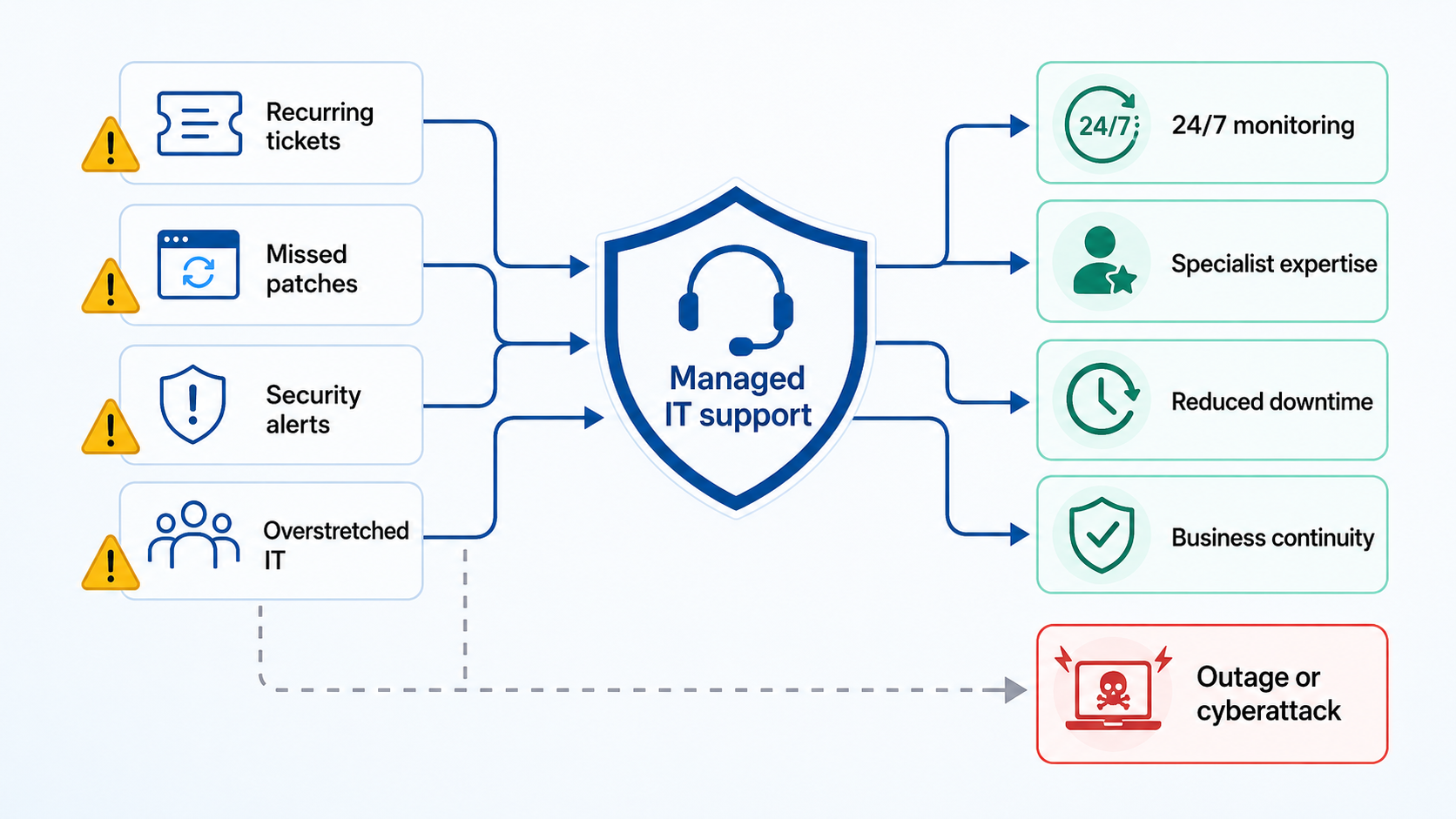
Why Smart Workplaces Outsource Before Something Goes Wrong
Many businesses only consider outsourced IT support after a major outage, security incident or wave of employee complaints. At that point, the decision is being made under pressure.
A better time to consider managed IT support services is when the organisation is growing, its systems are becoming more complicated and the internal team can still manage the transition properly.
Outsourcing can provide specialist skills, extended support and proactive maintenance without the cost of building a large internal department. However, it isn't automatically safer or more cost-effective.
The outcome depends on the provider, the contract and how well the organisation retains control of its technology.
The practical goal isn't to outsource everything. It's to identify where external expertise can strengthen the business without weakening internal ownership.
Access to skills that are difficult to maintain internally
Modern IT environments require knowledge across cloud platforms, networks, employee devices, cybersecurity, identity management, backups and regulatory requirements. Finding one employee who is genuinely experienced in every area is unrealistic.
Even larger IT departments can struggle to maintain specialist knowledge while also handling daily support requests. Cybersecurity skills are particularly difficult to recruit and retain.
The World Economic Forum reported that only 14% of organisations believed they had the skilled people needed for the current cybersecurity environment. It also estimated that the global shortage had reached approximately 4.8 million cybersecurity professionals. World Economic Forum
- The benefit: A managed provider can give the business access to a broader team of specialists. Instead of relying on one generalist, the organisation may be able to call on people experienced in Microsoft 365, cloud infrastructure, networking, backups and threat response.
- The risk: Access to a larger team doesn't guarantee quality. The provider may assign junior technicians, outsource work to subcontractors or lack experience with the organisation's industry and systems.
- The practical response: Ask who will actually deliver the service. Check qualifications, relevant certifications, escalation procedures and customer references. The business should also retain an internal owner who understands its systems, priorities and risks.
External specialists can provide expertise, but they should not become the only people who understand how the organisation's technology works.
Support doesn't stop when the working day ends
Technology problems don't follow office hours.
A server can fail overnight, an employee account can be compromised on a Sunday and an urgent security vulnerability can be announced just before a bank holiday.
A small internal team may provide excellent support during the working day but struggle to monitor systems continuously. Expecting employees to remain permanently on call is neither reliable nor sustainable.
The UK Government's 2025–2026 Cyber Security Breaches Survey found that managed service providers were commonly used by smaller organisations facing capacity constraints.
Participants identified access to 24/7 monitoring and proactive action outside normal working hours as a significant advantage over relying solely on in-house staff. UK Government
- The benefit: Extended monitoring means warning signs can be investigated before employees return to work. A provider may detect a failed backup, unusual login or network outage while the office is empty.
- The risk: Some providers describe their service as 24/7 when only automated monitoring operates outside business hours. A system may generate an alert overnight without a qualified person reviewing it until the next morning.
- The practical response: Ask what "24/7 support" actually means. Confirm whether trained staff actively monitor alerts, which incidents trigger an immediate response and how quickly the provider must act. These commitments should appear in the service-level agreement.
Receiving an alert and responding to it are two different services.
Predictable costs make technology easier to plan
Maintaining an internal IT function involves more than salaries. Businesses must consider recruitment, training, software tools, employee benefits, holiday cover and the cost of replacing people who leave.
Managed services normally use a monthly subscription based on factors such as employee numbers, devices, locations and required services. This can make ordinary technology spending easier to forecast.
- The benefit: The organisation gains a clearer monthly cost and may avoid recruiting separate specialists for every technology it uses. Support can also scale as employees and locations are added.
- The risk: The advertised monthly fee may not represent the complete cost. Projects, hardware installation, cloud migrations, on-site visits and out-of-hours assistance may be charged separately. Some contracts also limit the number of devices, tickets or support hours included.
- The practical response: Request a complete pricing schedule before signing. Ask the provider to identify exclusions and give realistic examples of work that would incur additional charges. The business should understand how costs change when it hires more people, opens another location or needs emergency support.
Predictable pricing is valuable, but only when the contract is transparent.
Proactive maintenance can prevent avoidable disruption
Reactive support focuses on restoring technology after it fails. Managed support should reduce the likelihood of the failure happening in the first place.
This includes monitoring device health, installing patches, checking backups, reviewing capacity and investigating recurring employee problems.
Imagine that a software provider announces a critical vulnerability on Friday afternoon. A proactive IT partner assesses the risk, tests the update and installs the security patch overnight. Employees return on Monday without noticing anything happened.
A reactive organisation may delay the update because nobody owns the process. If attackers exploit the vulnerability, Monday morning begins with locked accounts, unavailable systems and an emergency response.
- The benefit: Planned maintenance is generally less disruptive and less expensive than an emergency recovery effort.
- The risk: Poorly managed updates can also cause outages. Automatically installing every patch without testing may break an essential application or create compatibility problems.
- The practical response: Agree on a documented patch-management process. It should explain how updates are assessed, tested, scheduled and rolled back if something goes wrong. Critical vulnerabilities may require urgent action, but that action should still be controlled.
Proactive support isn't about making random changes more frequently. It's about identifying risk early and responding through a repeatable process. For instance, companies relying on technology managed by AdRem benefit from comprehensive IT management that ensures seamless operations and minimal downtime.
Internal teams get time back for strategic work
Internal IT employees often understand the organisation better than any external provider. They know how departments operate, which applications employees depend on and where technology creates frustration.
Unfortunately, that knowledge is wasted when experienced team members spend most of their time resetting passwords, configuring laptops and responding to recurring support tickets.
- The benefit: Outsourcing routine work can free internal employees to focus on system improvements, cybersecurity planning, automation and the overall digital employee experience. These are the projects that help the business operate better rather than simply keeping existing technology alive.
- The risk: If too much knowledge is transferred to the provider, the internal team may gradually lose visibility and control. The organisation can become dependent on a supplier it finds difficult or expensive to replace.
- The practical response: Divide responsibilities deliberately. The provider might manage monitoring, routine maintenance and first-line support, while internal IT retains responsibility for strategy, governance, architecture and supplier oversight. Documentation, configurations and account credentials should remain accessible to the business.
The strongest arrangement is usually a partnership. The provider contributes additional skills and capacity, while the internal team retains the business knowledge and authority required to direct the service.
Outsourcing before something goes wrong gives an organisation time to establish that relationship properly. It can compare providers, define responsibilities, test recovery procedures and correct weaknesses without the pressure of an active crisis. That preparation—not outsourcing alone—is what makes the workplace more resilient.
Managed IT Support Versus an In-House Team: Which Is Better?
There isn't a universal answer. The right choice depends on the organisation's size, technology environment, security requirements and existing employees.
An in-house team offers direct control and a closer understanding of how the business operates.
Managed IT support can provide broader expertise, extended coverage and more predictable costs. Neither model is automatically cheaper, safer or more effective.
The useful question isn't simply, "Should we outsource IT?" It's, "Which responsibilities must stay inside the business, and where would external support make us stronger?"
| Consideration | In-house IT | Managed IT support |
| Business knowledge | Usually understands employees, processes and internal priorities more deeply | Must learn the organisation and maintain accurate documentation |
| Specialist coverage | Expertise is limited by the size and experience of the team | Can provide access to specialists across cloud, infrastructure and security |
| Availability | Depends on staffing levels, holidays and on-call arrangements | Can include 24/7 monitoring and out-of-hours support |
| Control | Technology decisions and access remain directly inside the organisation | Control is shared with a third party that may hold privileged access |
| Cost structure | Includes salaries, recruitment, benefits, tools and training | Usually based on a contracted monthly fee plus possible additional charges |
| Scalability | Expansion may require recruitment and additional tools | Support can often be expanded as users, devices and locations increase |
| Provider risk | Less operational dependence on an external supplier | Requires contract management, security reviews and third-party oversight |
The Questions Worth Asking Before Signing Anything
A polished sales presentation can make almost every managed IT provider sound capable. The real differences usually appear in the contract, service boundaries and answers to detailed questions.
Before signing, involve the people responsible for IT, cybersecurity, operations, procurement, HR and data protection. Each team will see risks that others may miss.
Use the following questions to establish exactly what the provider will manage, how it will protect the organisation and what happens if the relationship ends.
Question 1. Which services are included in the monthly fee?
Ask for a complete service schedule, not a general promise of "fully managed IT."
The provider should identify whether the monthly price covers:
- Employee helpdesk support
- Device monitoring and maintenance
- Software patching
- Cloud administration
- User account management
- Backups and recovery
- Cybersecurity monitoring
- On-site assistance
- Out-of-hours support
- Reporting and service reviews
Confirm whether pricing is calculated per user, device, location or support hour. This will help the business understand how costs could change as it grows.
Question 2. What is specifically excluded?
Exclusions can be just as important as included services.
Major projects, hardware installation, office moves, cloud migrations and emergency recovery work are often charged separately. Some providers may also exclude older equipment, unsupported applications or technology purchased through another supplier.
Ask for exclusions in writing. If the provider says something will be handled "when required," establish whether that means it is included or simply available at an additional cost.
Question 3. Is cybersecurity included or sold separately?
Basic IT support and advanced cybersecurity are not the same service.
A provider may install antivirus software and security patches without offering active threat monitoring, managed detection and response, penetration testing or incident investigation.
Ask the provider to explain:
- Which security tools are included
- Who reviews security alerts
- How quickly credible threats are investigated
- Whether suspicious devices can be isolated
- Whether incident response is included
- Which security services cost extra
The term "cybersecurity included" is too broad to accept without a detailed explanation.
Question 4. Do you provide genuine 24/7 monitoring and response?
Some providers advertise 24/7 service when only their automated tools operate overnight.
Ask whether trained people are available at all times. Find out which alerts trigger immediate action and which are placed in a queue until the following working day.
The service-level agreement should define:
- Monitoring hours
- Helpdesk availability
- Response targets
- Escalation procedures
- Out-of-hours charges
- Emergency contact methods
Continuous monitoring provides limited protection if nobody responds to the alerts.
Question 5. Where will our business and employee data be stored?
The provider may handle employee records, support tickets, device information, administrative credentials and system documentation.
Establish which countries and cloud platforms will store or process that information. Ask whether data is encrypted, how long it is retained and whether backups are stored in separate locations.
For organisations subject to UK GDPR, data location alone does not determine compliance. The business must also understand the lawful transfer mechanisms, security controls and organisations involved in processing the data.
Question 6. Which subcontractors will have access?
The company signing the contract may not perform every part of the service itself.
Providers sometimes use subcontracted helpdesks, cloud platforms, security operations centres and remote technicians. Those organisations may gain access to sensitive systems or information.
Ask for a list of relevant subprocessors and establish:
- What each company does
- Where it operates
- Which data it can access
- How the provider evaluates its security
- How customers are notified about changes
A provider should not be vague about who can enter the organisation's systems.
Question 7. What security certifications do you hold?
Relevant certifications can provide evidence that the provider follows defined controls, but they should not be treated as a guarantee.
Depending on the service and industry, useful evidence may include:
- Cyber Essentials or Cyber Essentials Plus
- ISO/IEC 27001
- SOC 2 reports
- Penetration-test summaries
- Independent security assessments
- Staff qualifications
- Relevant sector-specific certifications
Check the certification's scope and expiry date. An ISO 27001 certificate covering one office or limited service does not necessarily cover everything the provider will deliver.
Question 8. How do you protect privileged administrator accounts?
Managed providers often hold powerful access to cloud platforms, networks, servers and employee devices. If one of those accounts is compromised, an attacker may gain entry to multiple systems.
Ask whether the provider uses:
- Multifactor authentication
- Separate administrator accounts
- Least-privilege access
- Privileged access management
- Time-limited permissions
- Login monitoring
- Regular access reviews
- Session recording
- Immediate access removal for departing technicians
Administrator credentials should never be shared casually between several employees.
Question 9. How often do you test incident-response procedures?
A written incident-response plan is useful, but an untested plan may fail during a real emergency.
Ask how often the provider runs exercises and whether customers participate. The testing should cover technical containment as well as communication, decision-making and recovery.
Useful scenarios include:
- Ransomware
- Compromised administrator accounts
- Cloud platform outages
- Data theft
- Failed backups
- Attacks against the provider itself
Request evidence of lessons learned and improvements made after previous exercises.
Question 10. Can you support our compliance obligations?
The provider should understand the regulatory and contractual requirements relevant to the organisation. These might include UK GDPR, financial regulations, healthcare requirements or customer security standards.
However, be cautious if a provider promises that purchasing its service will make the business "fully compliant." Compliance normally depends on technology, policies, employee behaviour, documentation and management oversight.
Ask which responsibilities the provider will handle, what evidence it supplies and which obligations remain with the organisation.
Question 11. Who owns our documentation and configurations?
The business should retain access to information about its own technology environment.
This includes:
- Network diagrams
- Device inventories
- System configurations
- Administrator accounts
- Licence information
- Backup procedures
- Security policies
- Support history
- Vendor contacts
- Recovery instructions
The contract should establish that this documentation belongs to the customer and must be returned in a usable format when the agreement ends.
Question 12. Can we access our systems without going through you?
A provider should not become the only route into the organisation's technology.
The business should retain appropriate administrative access to its cloud accounts, domains, backups and critical platforms. That access must be controlled securely, but it should exist independently of the provider.
Otherwise, a contract dispute, supplier failure or cyberattack against the provider could leave the organisation locked out of its own systems.
Question 13. What happens to our data when the contract ends?
Ask how the provider will return, transfer and delete information when the relationship finishes.
The exit process should explain:
- Which data will be returned
- The format in which it will be supplied
- How long the transfer will take
- Whether assistance is included
- When remaining copies will be deleted
- How deletion will be confirmed
- What information must be retained for legal reasons
Do not wait until cancellation to discover that data export involves unexpected fees or technical restrictions.
Question 14. How quickly can we exit or move to another provider?
Review contract length, notice periods, automatic renewals and early-termination charges.
The provider should also explain how it supports the transition to another supplier. A professional exit process includes transferring documentation, credentials, configurations and relevant support history without obstructing the replacement provider.
A long contract is not automatically a problem, but the organisation must understand the commercial and operational consequences of leaving.
Question 15. Can you provide relevant customer references?
Request references from organisations of a similar size, sector and technical complexity.
Generic testimonials may show that customers are satisfied, but they won't reveal whether the provider can meet your particular requirements.
Ask references about:
- Response times
- Quality of communication
- Recurring problems
- Cybersecurity incidents
- Unexpected charges
- Service during major outages
- Account management
- Contract renewal
- Provider support during difficult situations
The way a provider performs when everything is working is important. How it behaves when something goes badly wrong tells you much more.
A trustworthy provider should welcome detailed questions and answer them clearly. If the sales team avoids discussing exclusions, administrative access, incident response or contract exit, treat that as a warning sign.
Choosing managed IT support services means giving another organisation significant responsibility for the systems employees depend on. That decision should be based on verifiable controls and clear commitments—not confidence created by a polished proposal.
Final Thoughts - Outsource the Work, Not the Responsibility
Managed IT support services can give growing workplaces access to specialist skills, proactive monitoring and reliable technical support that may be difficult or expensive to maintain internally. They can reduce pressure on overstretched teams, improve response times and help businesses address technology risks before they develop into serious disruption.
But outsourcing IT does not mean handing over every technology decision and hoping the provider takes care of it.
The organisation remains responsible for protecting its employee and customer data, understanding its most critical systems and deciding how much risk it is prepared to accept. It must also know who has administrative access, how security incidents will be handled and whether backups can actually be restored.
The strongest relationships combine external expertise with clear internal ownership. The provider manages agreed services and supplies additional skills, while the business retains control of strategy, governance, data and supplier oversight.
That requires more than signing a contract. Responsibilities should be documented, service performance reviewed and security controls tested regularly. Employees also need clear guidance on where to request support, how to report suspicious activity and what to expect during an outage.
Most importantly, businesses should not wait for ransomware, system failure or a serious data breach before reviewing their support arrangements. A crisis is the worst time to compare providers, negotiate contracts or discover that nobody owns the recovery process.
Acting earlier gives the organisation time to identify its weaknesses, evaluate providers properly and choose a support model that fits its employees, technology and level of risk.
Outsource the repetitive work. Bring in specialist knowledge where it adds value. But never outsource visibility, control or accountability.
AI Summary
- Managed IT support services provide ongoing technical support, infrastructure monitoring, device management, software updates, cloud administration, backups and cybersecurity assistance.
- Managed IT support differs from break-fix support because the provider proactively monitors and maintains technology instead of responding only after something fails.
- Standard managed IT support does not automatically include advanced cybersecurity services such as penetration testing, a security operations centre or managed detection and response.
- Outsourcing can give growing businesses access to specialist skills, extended support coverage and more predictable costs without requiring a large internal IT department.
- Businesses should confirm what the monthly fee includes, how security alerts are handled, where data is stored and whether trained specialists provide genuine 24/7 response.
- A managed provider can perform technical work, but the organisation must retain control of its data, administrator accounts, technology strategy and cybersecurity responsibilities.
- Businesses with capable internal IT employees may benefit from a co-managed model that adds specialist expertise and capacity without replacing the existing team.
Most Popular Posts

Effective communication among team members is vital for the productivity and success of any organization. Surprisingly, 60% of companies lack a long-term internal communication strategy, which p...


Businesses thrive on communication for efficiency, productivity and accomplishment. When the right information is passed from the right designation in the organization, it promotes positivity an...

Categories
Blog
(3214)
Business Management
(396)
Employee Engagement
(235)
Digital Transformation
(219)
Growth
(150)
Intranets
(142)
Internal communications
(107)
Remote Work
(68)
Sales
(53)
Collaboration
(53)
Customer Experience
(33)
Culture
(30)
Knowledge Management
(29)
Project management
(29)
Leadership
(20)
Comparisons
(9)
News
(1)

Related Posts

Choosing the best ERP for Shopify often starts when the workarounds stop working. Your store shows stock that the warehouse can't find. Wholesale orders live in spreadsheets. Finance spends days reconciling payouts, while customer service...

Could choosing the wrong proxy disrupt your team's work or increase costs without improving results? When comparing rotating proxies vs static proxies, the answer depends on what your business needs: a consistent IP address for an ongoing sessi...

What happens when a buyer asks Google for the best employee communication platform—and discovers competing brands before reaching your website? Choosing the best link building services can help a digital workplace business strengthen its broade...

Could gaps in digital accessibility be stopping your employees from completing the training they need to do their jobs? Imagine a new starter opening a mandatory course, only to discover they can't follow the audio, navigate the quiz with a keyboard ...

The Amazon advertising agency landscape has changed dramatically over the past two years. With the introduction of AI-powered shopping experiences, Amazon Rufus, advanced attribution reporting, Sponsored Brands Video, and Amazon DSP enhancement...


Jill Romford
I am a digital nomad, lover of exploring new places and making friends.
I love to travel and I love the internet. I take pictures of my travels and share them on the internet using Instagram.
Traveler, entrepreneur, and community builder. I share my insights on digital marketing and social media while inspiring you to live your fullest life.
Ready to learn more? 👍
One platform to optimize, manage and track all of your teams. Your new digital workplace is a click away. 🚀
Free for 14 days, no credit card required.