
Insight Blog
Agility’s perspectives on transforming the employee's experience throughout remote transformation using connected enterprise tools.
26 minutes reading time
(5143 words)
7 Hidden Cybersecurity Risks Putting Your Distributed Workforce in Danger

7 Hidden Cybersecurity Risks Putting Your Distributed Workforce in Danger
Discover seven hidden cybersecurity risks affecting distributed teams and learn how stronger access controls, communication and IT support can protect your workforce.
7 Hidden Cybersecurity Risks Putting Your Distributed Workforce in Danger

The most serious cybersecurity risks for distributed teams do not always begin with a sophisticated attack.
They often start with an employee connecting through an unsecured home network, using a personal device or sharing sensitive information through an unauthorised application.
According to IBM's Cost of a Data Breach Report 2024, the global average cost of a data breach reached $4.88 million, a 10% increase from the previous year.
The report also found that 40% of breaches involved data stored across multiple environments, including public cloud, private cloud and on-premises systems.
Traditional office-based security controls were designed for employees working in one location, using company-managed devices and accessing systems through a protected corporate network.
That model no longer reflects how many organisations operate.
Gartner forecasts that by 2025, 80% of enterprise workloads will be deployed in the cloud, increasing the importance of securing remote access, cloud applications and distributed data.
Remote and hybrid employees now move between home offices, shared workspaces, customer sites and public networks—often while accessing the same company data from several different devices.
80%
of enterprise workloads
Gartner forecast that by 2025, 80% of enterprise workloads would be deployed in the cloud, increasing the importance of securing remote access, cloud applications and distributed company data.
Source: Gartner forecast
This flexibility helps people work from almost anywhere, but it also expands the organisation's digital attack surface.
Verizon's 2024 Data Breach Investigations Report found that the human element was involved in 68% of breaches, including social engineering attacks, errors and misuse.
IT teams may have limited visibility over which devices employees use, where documents are stored and who can access sensitive information. When workplace tools and data are scattered across multiple platforms, maintaining consistent security policies becomes considerably harder.
Even a seemingly minor weakness—such as an outdated laptop, reused password or forgotten employee account—can provide an entry point into the wider digital workplace.
Verizon reported that compromised credentials were involved in 24% of breaches analysed in its 2024 report, while vulnerability exploitation accounted for 14%.
Once compromised, attackers may be able to access company conversations, employee records, shared documents and connected business systems.
In this article, we examine seven commonly overlooked cybersecurity risks facing distributed workforces, the practical steps organisations can take to reduce them and the warning signs that additional or outsourced IT expertise may be required.
Key Takeaways
- Distributed work expands the digital attack surface by introducing more devices, networks, identities, applications and access points.
- Common hidden risks include unsecured personal devices, weak authentication, phishing, shadow IT and incomplete employee offboarding.
- Multifactor authentication, role-based access, managed devices and regular permission reviews provide essential layers of protection.
- A secure digital workplace reduces risk by centralising communication, documents, policies and company knowledge within a governed environment.
- External IT support may be necessary when internal teams cannot maintain updates, monitor threats or support employees across every location.
7 Hidden Cybersecurity Risks Facing Distributed Teams
Cybersecurity becomes harder when employees, devices and company information are spread across different locations.
The danger is not simply that remote workers operate outside the office. It is that organisations can lose visibility over how people access systems, where they store information and which applications they use to communicate.
Many vulnerabilities also appear harmless when viewed individually. A personal laptop, an old employee account or an unofficial file-sharing application may not immediately trigger concern.
However, these gaps can give attackers a route into email accounts, internal conversations, employee records and other connected systems.
Here are seven hidden cybersecurity risks organisations should address when managing a distributed workforce.

7 Hidden Cybersecurity Risks Facing Distributed Teams
1. Unsecured Personal Devices
Allowing employees to use personal laptops, tablets and mobile phones can help organisations introduce remote working quickly and reduce equipment costs.
However, bring-your-own-device arrangements also create security risks when personal devices do not meet the same standards as company-managed equipment.
An employee's device may contain outdated software, unapproved applications or malware downloaded through personal activity. It may also be shared with family members, protected by a weak password or connected to an unsecured home or public network.
If that device is used to access company systems, these weaknesses become a business risk.
A clear device-management policy should define which devices employees can use, what information they can access and the minimum security requirements they must meet.
Organisations should consider:
- Requiring encryption on approved devices
- Enabling automatic operating-system and application updates
- Installing endpoint protection
- Separating personal and company information
- Preventing sensitive files from being downloaded to unmanaged devices
- Removing workplace access when a device is lost, replaced or no longer authorised
The UK National Cyber Security Centre recommends assessing what business information personal devices can access and applying controls appropriate to the sensitivity of that information. Its bring-your-own-device guidance provides a useful starting point for organisations developing a BYOD policy.
2. Weak Passwords and Inconsistent Authentication
Passwords remain one of the easiest security controls to get wrong.
Distributed employees may have accounts across email, cloud storage, communication platforms, HR software and customer systems. When people are expected to remember numerous passwords, they often reuse them or choose credentials that are easy to guess.
A password stolen from one service may then allow an attacker to access several connected workplace systems.
This risk increases when different departments manage accounts independently or when access permissions are not reviewed regularly.
Single sign-on can reduce password fatigue by allowing employees to access approved applications through one centrally managed identity. However, it should be supported by additional controls, including:
- Multifactor authentication
- Role-based permissions
- Conditional access policies
- Login monitoring and unusual-activity alerts
- Regular access reviews
- Immediate account suspension when an employee leaves
The strongest approach is to provide each employee with only the access required for their role. Permissions should be updated when responsibilities change and removed promptly during offboarding.
The US Cybersecurity and Infrastructure Security Agency recommends using phishing-resistant MFA wherever possible, particularly for email, file storage and remote-access systems. Its multifactor authentication guidance explains why passwords alone provide insufficient protection.
3. Phishing Attacks Disguised as Everyday Communication
Phishing messages have become harder to identify because attackers no longer rely entirely on obvious spelling mistakes or suspicious attachments.
They can imitate managers, suppliers, colleagues and IT support teams while using information collected from company websites or social media to make requests appear convincing.
Distributed workers may be particularly vulnerable because they rely heavily on email, workplace chat and video meetings. They cannot always turn to the person sitting next to them to confirm whether a request is genuine.
An attacker might ask an employee to:
- Reset a password through a fake login page
- Download an urgent document
- Approve an unexpected payment
- Share a verification code
- Grant remote access to a device
- Change a supplier's bank details
Cybersecurity awareness training should use realistic examples that reflect the messages employees receive in their daily work.
Organisations should also establish a simple method for reporting suspicious activity and clearly explain how genuine IT teams will contact employees.
For sensitive requests, employees should be encouraged to verify the sender through a separate trusted channel. A quick phone call or message sent through an approved internal platform can prevent a convincing impersonation attempt from becoming a serious incident.
4. Shadow IT and Scattered Company Information
Shadow IT occurs when employees use applications, storage services or communication tools that have not been reviewed or approved by the organisation. This often happens because the official system is difficult to use, employees do not know it exists or a team needs to solve an immediate problem.
The employee may believe they are simply working more efficiently.
However, IT teams cannot protect systems they do not know about.
Sensitive files could be stored in personal cloud accounts, confidential conversations could take place through consumer messaging applications and important documents could be shared using unrestricted links.
Former employees may retain access, while the organisation may have no reliable record of where information is held.
Scattered tools can also create multiple versions of policies, procedures and business documents. Employees may act on outdated information because they cannot identify the authoritative version.
A centralised digital workplace gives employees an approved place to communicate, access documents and find company knowledge. Platforms such as AgilityPortal can help organisations reduce unnecessary tool switching by bringing internal communication, controlled workspaces, knowledge and document access into one environment.
However, technology alone will not eliminate shadow IT.
Organisations must also understand why employees adopt unauthorised tools and make approved alternatives easy to find and use.
5. Poor Onboarding and Offboarding Controls
Cybersecurity problems can begin on an employee's first day and continue long after they leave.
A rushed onboarding process may give someone more access than their role requires, while incomplete offboarding can leave accounts, sessions and shared links active indefinitely.
These gaps become more likely when HR, IT and department managers use separate systems or assume another team has completed the necessary action.
A repeatable onboarding process should cover:
- Identity verification
- Role-based access approval
- Device registration
- Multifactor authentication setup
- Security and data-handling training
- Acceptance of relevant workplace policies
Offboarding should be treated as an equally important security process. It should include terminating active sessions, disabling accounts, recovering company devices, removing third-party application access and transferring ownership of documents, projects and shared resources.
Access should also be reviewed when an employee changes department, receives a promotion or moves into a temporary role. Otherwise, permissions can accumulate over time and provide access to systems the employee no longer needs.
6. Sensitive Information Shared Through the Wrong Channels
Information does not need to be stolen by an attacker to become exposed.
Employees can accidentally share confidential data in public chatrooms, unrestricted folders, large distribution lists or external collaboration spaces.
This can include:
- Employee and payroll information
- Customer records
- Financial documents
- Passwords or access credentials
- Contracts and legal correspondence
- Internal strategy documents
The risk increases when collaboration platforms are poorly configured or employees cannot tell the difference between public, private and external spaces.
Organisations should introduce clear information-classification rules explaining what can be shared, where it can be stored and who should have access. Permission-controlled spaces, private communication channels and document restrictions should be used for sensitive work.
Access permissions must also be reviewed regularly. A private workspace is not truly private if it still contains former employees, unnecessary external guests or people who have changed roles.
Digital workplace and collaboration tools can strengthen security by centralising information and controlling access, but only when they are configured and governed properly. Giving everyone unrestricted access may be convenient, but it undermines the purpose of using a controlled platform.
7. Limited Monitoring and Overstretched Internal IT Teams
Supporting a distributed workforce requires more than responding when an employee cannot log in.
IT teams must manage devices, review permissions, maintain updates, investigate suspicious activity and support employees working across different locations and time zones.
For a small internal team, that workload can quickly become unmanageable. Routine security tasks may be delayed while urgent support requests consume the available time.
This creates a reactive environment in which problems are addressed only after they interrupt work or expose company information.
Warning signs that an organisation may need additional IT or cybersecurity support include:
- Security updates are regularly postponed.
- Employees wait too long for technical assistance.
- Nobody consistently reviews access permissions.
- Device and application inventories are incomplete.
- The business has no documented incident-response plan.
- Former employee accounts remain active.
- Remote employees operate across several countries or time zones.
- Internal IT spends most of its time reacting to recurring problems.
Outsourced IT or cybersecurity support can provide additional monitoring, specialist knowledge and extended coverage. It does not necessarily mean replacing the internal IT team.
A provider may handle specific areas such as endpoint management, helpdesk support, security monitoring, vulnerability management or incident response.
Before outsourcing, the organisation should clearly define responsibilities, access levels, response times and reporting requirements. External support is only effective when the provider understands the organisation's systems and works within an agreed security and governance framework.
Related Distributed Workforce, Cybersecurity & Business Continuity Guides
Protecting a distributed workforce requires more than antivirus software and strong passwords. These related AgilityPortal guides explore remote-work security, managed threat detection, access control, employee awareness, incident response and the business continuity measures organisations need to protect people, information and critical workplace systems.
- The Cybersecurity Blind Spots Businesses Miss: Is Managed Detection and Response the Answer?
- Why Is Cybersecurity Important? The Real Cost of Ignoring Digital Risk
- Is Your Remote Workforce a Security Risk? Next-Generation Defences You Need
- Managing Digital Risks From Remote and Hybrid Working
- Five Must-Have Cybersecurity Controls for Small Businesses
- IT Challenges for Businesses With Remote Teams and How to Overcome Them
- Five Key Trends in Cloud-Based Intranet Security and Access Control
- Expert Tips to Maximise the Impact of Your Cybersecurity Strategy
- Essential Digital Business Continuity Strategies for the Modern Workplace
- Business Continuity Plans vs Incident Response: What Is the Difference?
Together, these guides strengthen the topic cluster around distributed workforce security, remote-work cybersecurity, managed detection and response, access management, cloud security, employee awareness, outsourced IT support, incident response and digital business continuity.
Signs Additional IT or Cybersecurity Support May Be Needed
Not every organisation needs to outsource its entire IT operation.
However, distributed working can place internal teams under considerable pressure, particularly when they are expected to manage technical support, device security, software updates, access permissions and threat monitoring across multiple locations.
The clearest warning sign is that important security work is repeatedly postponed because the team is occupied with everyday support requests.
Other indicators include:
- Security patches and software updates are regularly delayed.
- Employees wait too long for technical support.
- Nobody consistently reviews user accounts and access permissions.
- Former employees retain access to workplace systems.
- The organisation lacks a documented incident-response process.
- Devices and business applications are not centrally inventoried.
- Remote employees operate across several countries or time zones.
- Internal IT spends most of its time reacting to recurring problems.
- Security alerts are generated but not investigated promptly.
- The business lacks specialist knowledge in areas such as endpoint security, compliance or threat monitoring.
Outsourced support does not have to replace the internal IT department.
External specialists can supplement the existing team by providing extended helpdesk coverage, vulnerability management, endpoint protection, security monitoring or incident-response expertise.
Providers such as ChaceTech in the IT sector illustrate the types of services available, including threat monitoring, patch management, endpoint protection, firewall management and cybersecurity guidance.
Organisations should still evaluate any provider carefully, paying particular attention to its experience, response times, security controls, reporting procedures and understanding of relevant compliance requirements.
Before granting an external provider access to company systems, both parties should clearly document who is responsible for each security function, which systems the provider can access and how incidents will be escalated.
Outsourcing can provide valuable expertise and capacity, but accountability for protecting company and employee information ultimately remains with the organisation.
How a Secure Digital Workplace Reduces Everyday Risk
How a Secure Digital Workplace Reduces Everyday Risk
A secure digital workplace cannot replace endpoint protection, professional threat monitoring or an experienced IT team.
It will not remove malware from an infected laptop or investigate a suspected data breach. However, it can reduce many of the everyday behaviours and information gaps that make distributed organisations more vulnerable.
One of the biggest risks facing distributed teams is fragmentation.
When employees cannot find an approved tool or the information they need, they often create their own solution.
They may open a personal cloud-storage account, start an unofficial messaging group or download documents to an unmanaged device. Each workaround creates another location that IT teams must identify, monitor and protect.
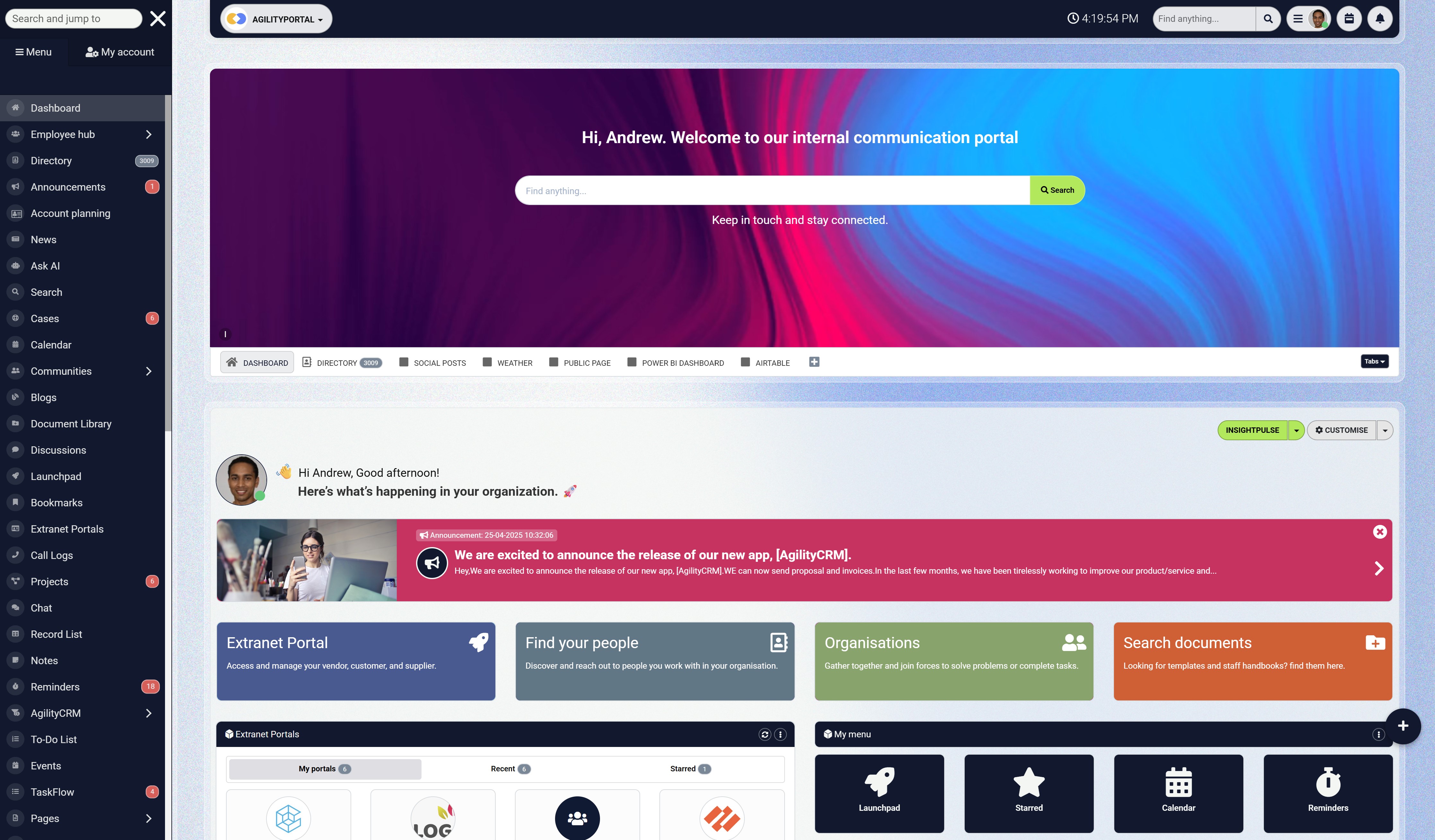
A platform such as AgilityPortal helps reduce this fragmentation by giving employees a central place to communicate, collaborate, access documents and find company knowledge.
Instead of relying on disconnected email chains and unauthorised applications, teams can work within approved spaces governed by the organisation.
Centralised Company Communication
Centralised communication makes it easier to establish which messages and information employees can trust.
Official announcements, policy changes and operational updates can be published through a recognised company channel rather than becoming buried in email inboxes or scattered across different messaging applications.
This becomes particularly important during a security incident.
If employees need to change a password, avoid a suspicious message or disconnect from a compromised system, administrators can distribute the warning quickly through a channel employees already use.
Controlled Spaces and Document Access
Not every employee needs access to every conversation, document or project.
Permission-controlled spaces allow organisations to separate information by department, location, team or responsibility.
Sensitive documents can be made available only to authorised members, while broader company information remains accessible to the wider workforce. These controls reduce unnecessary exposure and make it easier to review who can access important content.
Permissions must still be configured carefully and checked regularly. A controlled workspace loses its value if former employees, unnecessary guests or people who have changed roles continue to have access.
Role-Based Permissions and SSO Integration
Role-based permissions help organisations follow the principle of least privilege by giving employees access only to the features and information required for their work. This limits the potential damage if an account is compromised and reduces accidental access to sensitive material.
Single sign-on integration can also improve security by connecting workplace access to a centrally managed identity provider.
IT teams can apply consistent authentication requirements and remove access more efficiently when an employee leaves. SSO should be combined with multifactor authentication and strong identity-management policies rather than treated as a complete security solution on its own.
A Reliable Home for Policies and Security Guidance
Cybersecurity policies provide little protection if employees cannot find or understand them.
A digital workplace can act as a central, searchable location for acceptable-use policies, BYOD rules, password guidance, incident-reporting instructions and security training resources.
Employees should be able to quickly answer practical questions such as:
- Can I access company information from my personal device?
- Which file-sharing services am I allowed to use?
- How should I report a suspicious message?
- Who should I contact if my device is lost?
- Can confidential information be shared in a team workspace?
Making this guidance easily accessible helps employees make safer decisions without waiting for an IT team member to respond.
More Consistent Onboarding
A structured digital workplace gives new employees one reliable place to find security policies, approved applications, training materials and support contacts.
This reduces the chance that they will rely on outdated instructions or ask colleagues to share access informally.
Onboarding content can explain how to set up multifactor authentication, recognise phishing attempts, handle company information and report a suspected incident.
The same platform can reinforce this guidance through reminders, announcements and updated knowledge articles.
AgilityPortal
Give Distributed Employees One Controlled Place to Communicate and Work
Cybersecurity risks increase when employees communicate through unofficial applications, store documents in personal accounts or cannot identify which workplace information they should trust. AgilityPortal gives distributed organisations a central digital workplace for employee communication, company knowledge, policies, documents and operational updates.
Instead of relying on scattered email threads, consumer messaging applications and disconnected file-sharing tools, organisations can provide approved communication channels and permission-controlled spaces. This helps reduce unnecessary information fragmentation while giving employees a consistent way to access the resources they need from different locations.
Reduce everyday risk caused by scattered workplace tools
Centralise important communication, security guidance, documents, onboarding information and urgent company announcements while controlling access through roles, permissions and identity-provider integrations.
A Practical Distributed-Workforce Security Checklist
Cybersecurity policies can look comprehensive on paper while leaving important gaps in everyday operations.
A practical review should examine how employees actually access information, communicate and receive support—not simply which security tools the organisation has purchased.
Use the following questions to assess whether your distributed workforce is adequately protected.
1. Is MFA Enabled for Every Important System?
Multifactor authentication should protect email, cloud storage, workplace platforms, financial systems and administrative accounts.
Prioritise phishing-resistant authentication methods where possible and investigate any business-critical application that does not support MFA.
2. Are Personal Devices Governed by a Written Policy?
A bring-your-own-device policy should define which personal devices are permitted, the security standards they must meet and what company information employees can access.
It should also explain whether the organisation can remove business data if a device is lost, compromised or no longer authorised.
3. Can Access Be Removed Immediately When Someone Leaves?
The organisation should be able to disable accounts, terminate active sessions and remove third-party application access as soon as an employee or contractor leaves.
HR, IT and department managers must clearly understand who initiates and confirms each offboarding action.
4. Do Employees Know How to Report Suspicious Messages?
Employees should not have to search through an old policy to find out how to report a suspected phishing attempt.
Provide a simple and well-publicised reporting channel, and reassure employees that reporting a potential mistake quickly is more important than trying to hide it.
5. Is Company Information Stored in Approved Systems?
Identify where employees store files, hold conversations and manage shared knowledge.
If people regularly use personal storage accounts or unauthorised messaging applications, investigate why the approved workplace tools are not meeting their needs.
A centralised digital workplace can reduce this risk by giving employees a recognised place to access company documents, policies, announcements and conversations.
6. Are Permissions Reviewed Regularly?
Access permissions should be reviewed when an employee joins, changes role or leaves.
Periodic checks can also reveal forgotten accounts, unnecessary administrator privileges and external guests who no longer require access.
7. Does IT Have Enough Capacity to Support Every Location?
Distributed employees may work across several offices, homes, countries and time zones.
IT teams need sufficient capacity to handle support requests while continuing to manage patches, devices, access controls, backups and security alerts.
If internal capacity is no longer sufficient, the organisation may need co-managed or outsourced support.
Before you choose Charter Technology Solutions or any other IT provider, assess its response times, security capabilities, geographic coverage, escalation procedures and experience supporting distributed workforces.
Confirm exactly which responsibilities remain with the internal team and which will transfer to the provider.
8. Is There a Documented Incident-Response Plan?
A security incident is the wrong time to decide who should contact employees, isolate devices or communicate with customers.
The response plan should identify decision-makers, escalation routes, technical responsibilities and internal communication channels.
The plan should also be tested.
A short tabletop exercise can reveal missing contact details, unclear responsibilities and unrealistic assumptions before the organisation faces a real incident.
If several of these questions cannot be answered confidently, the organisation likely has operational security gaps that require attention. Start with the areas presenting the greatest risk, assign clear owners and review progress regularly.
Distributed-workforce security is not a one-time project; it requires consistent management as employees, devices and workplace systems change.
Final Thoughts - Building a Safer Digital Workplace for Distributed Teams
Distributed working is not inherently unsafe.
However, it creates more identities, devices, applications and access points for organisations to manage. Security controls that worked within a single office cannot always provide the same protection when employees access company information from home networks, personal devices and locations across different time zones.
Protecting a distributed workforce therefore requires a layered approach. Strong passwords and multifactor authentication can protect employee accounts, while device-management policies, automatic updates and endpoint security can reduce technical vulnerabilities. Clear onboarding and offboarding processes help prevent excessive or forgotten access, and regular employee training makes phishing and social engineering attacks easier to recognise.
Technology is only part of the answer. Employees also need approved channels for communication, a reliable place to find company policies and a simple way to report suspicious activity. When information is scattered across disconnected applications and personal accounts, IT teams lose visibility and employees are more likely to make unsafe decisions.
Businesses should regularly assess whether their internal IT team has enough capacity to support every employee, investigate security alerts and maintain essential controls. Where specialist knowledge or additional coverage is required, carefully selected external support can strengthen the internal team without removing organisational accountability.
The goal is not to eliminate every possible risk—that is unrealistic. It is to remove avoidable weaknesses, detect suspicious activity sooner and ensure employees know what to do when something goes wrong.
AgilityPortal helps distributed organisations bring communication, knowledge and collaboration into one controlled digital workplace. Explore how a centralised employee platform can support a more connected, informed and security-aware workforce.
AI Summary
- Distributed workforces face increased cybersecurity risks because employees access company systems from different locations, networks, applications and devices.
- Common hidden risks include unsecured personal devices, weak passwords, phishing attacks, shadow IT, poor access management and sensitive information being shared through inappropriate channels.
- Businesses should use multifactor authentication, single sign-on, role-based permissions, device-management policies and structured onboarding and offboarding processes.
- A centralised digital workplace can reduce avoidable risks by giving employees approved communication channels, controlled document access and a reliable place to find security policies.
- Digital workplace software does not replace endpoint protection, professional threat monitoring, incident-response planning or an appropriately resourced IT team.
- Organisations may need additional or outsourced IT support when security updates are delayed, access permissions are not reviewed or internal teams spend most of their time reacting to problems.
Most Popular Posts

Effective communication among team members is vital for the productivity and success of any organization. Surprisingly, 60% of companies lack a long-term internal communication strategy, which p...


Businesses thrive on communication for efficiency, productivity and accomplishment. When the right information is passed from the right designation in the organization, it promotes positivity an...

Categories
Blog
(3214)
Business Management
(396)
Employee Engagement
(235)
Digital Transformation
(219)
Growth
(150)
Intranets
(142)
Internal communications
(107)
Remote Work
(68)
Sales
(53)
Collaboration
(53)
Customer Experience
(33)
Culture
(30)
Knowledge Management
(29)
Project management
(29)
Leadership
(20)
Comparisons
(9)
News
(1)

Related Posts

Choosing the best ERP for Shopify often starts when the workarounds stop working. Your store shows stock that the warehouse can't find. Wholesale orders live in spreadsheets. Finance spends days reconciling payouts, while customer service...

Could choosing the wrong proxy disrupt your team's work or increase costs without improving results? When comparing rotating proxies vs static proxies, the answer depends on what your business needs: a consistent IP address for an ongoing sessi...

What happens when a buyer asks Google for the best employee communication platform—and discovers competing brands before reaching your website? Choosing the best link building services can help a digital workplace business strengthen its broade...

Could gaps in digital accessibility be stopping your employees from completing the training they need to do their jobs? Imagine a new starter opening a mandatory course, only to discover they can't follow the audio, navigate the quiz with a keyboard ...

The Amazon advertising agency landscape has changed dramatically over the past two years. With the introduction of AI-powered shopping experiences, Amazon Rufus, advanced attribution reporting, Sponsored Brands Video, and Amazon DSP enhancement...


Jill Romford
I am a digital nomad, lover of exploring new places and making friends.
I love to travel and I love the internet. I take pictures of my travels and share them on the internet using Instagram.
Traveler, entrepreneur, and community builder. I share my insights on digital marketing and social media while inspiring you to live your fullest life.
Ready to learn more? 👍
One platform to optimize, manage and track all of your teams. Your new digital workplace is a click away. 🚀
Free for 14 days, no credit card required.