
Insight Blog
Agility’s perspectives on transforming the employee's experience throughout remote transformation using connected enterprise tools.
23 minutes reading time
(4606 words)
7 Intranet Security Threats Smart Businesses Can’t Afford to Ignore

7 Intranet Security Threats Smart Businesses Can’t Afford to Ignore
Discover seven intranet security threats businesses cannot ignore and learn how to protect employee data, accounts and connected workplace systems.
7 Intranet Security Threats Smart Businesses Can’t Afford to Ignore

Your company intranet may feel like a private, protected space, but that does not automatically make it secure.
Modern intranet platforms sit at the centre of daily work, giving employees access to company announcements, policies, HR records, internal conversations, shared documents and connected business applications.
This makes the platform incredibly useful, but it also means a compromised account could give an attacker access to a significant amount of sensitive workplace information. Every connected business application adds another vendor to the mix, which is why strong third party risk management is essential for vetting how those integrations handle and protect your data.
The threat is not theoretical.
The UK Government's 2026 Cyber Security Breaches Survey found that 38% of businesses experienced phishing attacks, making phishing the most common type of cyberattack reported.
Verizon also found that compromised credentials provided the initial entry point in 22% of the data breaches it analysed.
An attacker does not always need to defeat an advanced security system; sometimes, they only need to trick one employee into revealing a password or approving a fraudulent login request.
38%
of businesses
The UK Government’s 2026 Cyber Security Breaches Survey found that 38% of businesses experienced phishing attacks, making phishing the most commonly reported type of cyberattack.
However, stolen credentials are only one part of the problem.
Common intranet security threats also include excessive user permissions, inactive employee accounts, outdated software, unsecured integrations and confidential files being shared with the wrong audience.
These weaknesses can remain unnoticed because authorised users and compromised accounts may appear legitimate until unusual activity is identified.
The consequences can extend beyond losing a document.
A breach could expose employee information, disrupt internal communication, damage trust and provide attackers with a route into other connected systems. With the global average cost of a data breach reaching $4.99 million in 2026, according to IBM, treating company intranet security as a minor IT concern is a risk businesses cannot afford to take.
A secure digital workplace therefore requires more than a password and an assumption that internal content is safe.
Businesses need strong authentication, carefully managed access permissions, reliable offboarding, security monitoring and employees who understand how to recognise suspicious activity.
Understanding the following seven intranet security risks is the first step towards protecting your people, workplace data and wider business systems.
Key Takeaways
- Common intranet security threats include stolen credentials, excessive permissions, inactive accounts, phishing, unpatched software and unsecured integrations.
- Multi-factor authentication, single sign-on and role-based access controls can reduce the risk of unauthorised access to workplace information.
- Employee permissions should be reviewed regularly and removed immediately when someone changes roles or leaves the organisation.
- Audit logs, suspicious-login alerts and prompt security patching help businesses detect and address potential intranet vulnerabilities.
- Secure intranet software must be supported by employee awareness, careful configuration and a documented incident-response process.
Why intranet security deserves more attention
Modern intranets are no longer simple noticeboards used to publish company news.
They have become central digital workplaces where employees access policies, HR information, shared documents, internal conversations, training materials and connected business applications.
Bringing these resources together makes work easier, but it can also increase the potential attack surface. One compromised employee account could expose sensitive content, allow an attacker to impersonate a trusted colleague or provide a route into connected systems.
This is particularly concerning because internal platforms often appear trustworthy.
Employees may be less cautious when opening a link, downloading a file or responding to a request that appears to come from someone inside the organisation.
38%
of businesses
Experienced phishing attacks, according to the UK Government’s 2026 Cyber Security Breaches Survey.
22%
of reviewed breaches
Used compromised credentials as the initial method of access, according to Verizon.
These findings show why businesses must protect both their
workplace technology and the people using it.
The UK Government's 2026 Cyber Security Breaches Survey found that 38% of businesses experienced phishing attacks.
Meanwhile, Verizon reported that compromised credentials were used as the initial access method in 22% of the breaches it reviewed.
These findings show why businesses must protect both their workplace technology and the people using it.
A secure company intranet requires more than passwords and restricted URLs. It needs strong identity controls, carefully managed permissions, regular security updates, activity monitoring and a clear response plan.
Businesses without sufficient internal expertise may also benefit from working with specialists such as Contigo's security experts to monitor threats, strengthen security controls and respond to suspicious activity.
7 intranet security threats businesses cannot ignore

7 intranet security threats businesses cannot ignore
1. Weak or stolen employee passwords
Passwords remain one of the easiest ways for attackers to gain unauthorised access. Employees may reuse the same password across several services, choose credentials that are easy to guess or unknowingly disclose them through a phishing email or fake login page.
Once an attacker obtains valid credentials, their activity may initially look like normal employee behaviour.
They could read confidential announcements, download documents, access employee profiles or send convincing messages from a trusted account.
Businesses can reduce this risk by requiring strong, unique passwords and enabling multi-factor authentication.
Single sign-on can also centralise authentication and help IT teams disable access quickly when suspicious activity is detected.
2. Excessive user permissions
Not every employee needs access to every page, document or administrative function.
However, permissions often accumulate as people change roles, join new projects or temporarily receive additional responsibilities.
This creates unnecessary exposure. An employee may retain access to payroll information, leadership discussions or confidential project spaces long after they need it. If their account is compromised, the attacker inherits those permissions.
Role-based access control helps limit employees to the information required for their jobs. Administrators should also review permissions regularly and remove access that is no longer justified.
Following the principle of least privilege reduces the damage that one compromised account can cause.
3. Former employees with active accounts
Delayed offboarding is a serious but preventable security weakness. When someone leaves the organisation, their access to the employee portal, shared documents and connected applications should be removed immediately.
Inactive accounts can remain unnoticed for months, particularly when user management is handled manually. These accounts may be targeted by attackers because they are less likely to be monitored or reported by the former employee.
Connecting the platform to a central identity provider or HR system can make offboarding more reliable. Organisations should establish a documented process that removes access, ends active sessions, transfers ownership of important content and records the action for auditing purposes.
4. Phishing and social engineering
Phishing is not limited to external email. Attackers who compromise an employee account can use internal messages, comments or notifications to impersonate someone colleagues already trust.
For example, an attacker could pose as a manager, share a malicious document or ask an employee to enter their credentials into a fake page. Because the request appears to come from inside the company, recipients may respond without the caution they would apply to an unknown sender.
Technical controls should be supported by regular employee awareness training. Staff need a straightforward way to report suspicious messages, and administrators should be able to investigate unusual logins, unexpected downloads and abnormal communication patterns.
5. Outdated software and unpatched vulnerabilities
Legacy intranet software, outdated plugins and neglected integrations can contain vulnerabilities that attackers know how to exploit. Delaying an update may feel less disruptive in the short term, but it can leave a known security gap open for weeks or months.
The risk extends beyond the core platform.
Themes, extensions, APIs, authentication tools and document integrations must also be maintained. One vulnerable component can weaken the security of the wider digital workplace.
Businesses should maintain an inventory of connected software, monitor vendor security notices and apply critical patches promptly.
If an older platform is no longer supported, migration should become a security priority rather than a future improvement project.
6. Accidental data sharing
Not every data exposure is caused by a malicious attacker.
Employees can accidentally upload a confidential file to the wrong space, select an organisation-wide audience or create a public sharing link without understanding who can open it.
Poorly designed permissions make these mistakes more likely. If access settings are confusing, users may default to the broadest option simply to complete their work.
A secure intranet should make the safest sharing choice the easiest one.
Clear audience labels, permission warnings, restricted public links and approval controls can reduce mistakes. Organisations should also classify sensitive information so employees understand what can be shared and where it belongs.
7. Unsecured integrations and third-party applications
Modern employee platforms commonly connect to HR software, cloud storage, calendars, communication tools, analytics services and AI applications.
These integrations improve productivity, but each connection introduces another potential route to workplace data.
An integration may request more access than it needs, retain data longer than expected or use an API key that is poorly protected. Employees may also connect unauthorised tools without IT approval, creating security gaps that administrators cannot see.
Before approving an integration, businesses should assess what information it can access, where that information is processed and how the provider protects it.
Access tokens and API permissions should be reviewed regularly, while unused integrations should be removed. The goal is not to avoid connected tools but to ensure every connection has a clear business purpose and an appropriate level of access.
Related Intranet Security, Cybersecurity & Business Continuity Guides
Protecting a company intranet requires more than passwords and access restrictions. These related AgilityPortal guides explore cybersecurity, managed threat detection, remote-work risks, IT outsourcing, incident response and the practical controls organisations need to protect employees, workplace data and connected business systems.
- The Cybersecurity Blind Spots Businesses Miss: Is MDR the Answer?
- Why Is Cybersecurity Important? The Real Cost of Ignoring Digital Risk
- Five Must-Have Cybersecurity Controls for Small Businesses
- Managing Digital Risks From Remote and Hybrid Working
- Business Continuity Plans vs Incident Response: What Is the Difference?
- Essential Digital Business Continuity Strategies for Modern Workplaces
- How Managed IT Services Support Agile Workplace Growth
- Why Growing Companies Need Reliable Business IT Services
- IT Outsourcing Mistakes Businesses Make and How to Avoid Them
- What Is Outsourcing? Why Companies Use External Service Providers
Together, these guides strengthen the topic cluster around intranet security, secure digital workplaces, identity and access management, cybersecurity monitoring, remote-work security, incident response, disaster recovery and business continuity.
Warning signs your intranet may not be secure
Security weaknesses are not always obvious.
Your employee portal may appear to work normally while inactive accounts, excessive permissions and unmonitored login attempts quietly increase the organisation's exposure.
The following warning signs suggest that your company intranet needs a closer security review.
Multi-factor authentication is not required
Passwords alone provide limited protection.
If an employee's credentials are stolen through phishing, malware or password reuse, an attacker may be able to sign in without facing another security check.
Multi-factor authentication adds an additional verification step, such as an authenticator app, security key or one-time code.
It does not eliminate account compromise, but it makes stolen passwords considerably less useful.
Employees share administrator accounts
Shared administrator credentials make it difficult to determine who changed a setting, accessed confidential information or approved a new integration. They also increase the likelihood of passwords being stored insecurely or passed between colleagues.
Every administrator should have an individual account. Administrative actions should be recorded, and elevated permissions should only be provided to people who genuinely require them.
Enter your custom HTML codes in this section ...
Access permissions are rarely reviewed
Employee responsibilities change over time, but their access rights are often left untouched.
Someone who moves department may retain access to confidential projects, HR records or management spaces associated with their previous position.
Permissions should be reviewed periodically and whenever an employee changes roles.
Applying role-based access control and the principle of least privilege helps ensure that users can only access the information needed for their current work.
Former employees remain in the directory
An account that remains active after an employee leaves can become an easy target. Because nobody is regularly using or checking it, suspicious activity may go unnoticed.
Offboarding should immediately disable access, close active sessions and revoke connections to integrated applications.
Linking account management to the organisation's identity provider or HR system can reduce the risk of inactive accounts being overlooked.
There is no reliable audit trail
Without audit logs, administrators may struggle to determine who downloaded a sensitive document, changed a permission or accessed the platform from an unusual location.
A secure intranet should record important user and administrator actions.
It should also generate alerts for suspicious behaviour, such as repeated failed logins, unexpected administrative changes or access attempts from unfamiliar devices and locations.
Security updates are frequently delayed
Delayed patches can leave known vulnerabilities open to exploitation.
This risk can affect the core platform as well as plugins, authentication services, APIs and third-party integrations.
Organisations should establish clear responsibility for monitoring security notices, testing updates and applying critical fixes. If the existing platform is no longer supported by its vendor, replacing it should be treated as a security requirement.
Employees can create unrestricted public links
Public sharing links are convenient, but they can expose confidential files outside the organisation. A link may be forwarded, indexed or left active long after its original purpose has ended.
External sharing should be restricted according to the sensitivity of the content. Where public links are necessary, organisations should use expiration dates, passwords, download restrictions and activity logs.
Security decisions are based on assumptions rather than evidence
A generic security checklist is useful, but it cannot account for every organisation's sector, systems and threat profile.
A healthcare provider, financial company and manufacturing business may use similar workplace technology while facing very different attackers, regulations and operational consequences.
For example, data from enkompas provides valuable insights into industry-specific cyber threats, helping organisations tailor their security posture to address actual risks rather than theoretical ones.
Businesses should combine threat intelligence with vulnerability assessments, platform audit data and an understanding of where their most sensitive information is stored.
This evidence-based approach helps security teams prioritise the weaknesses most likely to cause real harm instead of spreading resources evenly across every possible threat.
How to reduce intranet security risks
Reducing intranet security risks starts with controlling who can access the platform and what they can see.
Role-based access control should limit employees to the documents, spaces and administrative tools required for their jobs. Permissions should be reviewed whenever someone changes roles and removed immediately when they leave.
Single sign-on can centralise identity management, while multi-factor authentication adds protection if a password is stolen. Businesses should also encrypt workplace data both while it is being transferred and when it is stored.
Security teams need visibility into how the platform is used. Audit logs should record logins, downloads, permission changes and administrative activity.
Alerts can then flag suspicious behaviour, such as repeated failed logins, unusual locations or large document downloads.
Software updates and security patches should be applied promptly across the core platform, plugins and connected applications. Employees also need practical training on phishing, password security, confidential data and suspicious internal messages.
Finally, every organisation should maintain a documented incident-response plan. It should identify who investigates an alert, how compromised accounts are contained, when affected people are informed and how normal service is restored.
Testing this process regularly helps the business respond calmly and quickly when a genuine security incident occurs.
What to look for in secure intranet software
When comparing intranet software, do not accept vague claims that a platform is "secure" or "enterprise-grade." Ask the vendor to explain how its security controls work and provide evidence where possible.
Start with the platform's security architecture and hosting environment.
Find out where company data is stored, whether it is encrypted in transit and at rest, and how customer information is isolated. If multiple organisations share the same infrastructure, the vendor should explain how it prevents one customer from accessing another customer's data.
Access control is equally important. Look for role-based permissions, single sign-on, multi-factor authentication, automatic account deactivation and detailed audit logs. Administrators should be able to control access at platform, group, space and content levels without creating an unmanageable permissions structure.
Ask how frequently backups are created, where they are stored and how quickly services can be restored. A backup has little value if the provider has never tested whether it can recover data successfully.
Review relevant compliance credentials, independent audits and penetration-testing practices. Depending on your organisation, this may include GDPR controls, SOC 2 reports or ISO 27001 certification.
Finally, assess the vendor's transparency. A trustworthy provider should clearly explain its incident-response process, software update policy, subprocessors and breach-notification procedure. If the answers remain unclear, treat that uncertainty as a security risk.
How AgilityPortal supports a more secure digital workplace
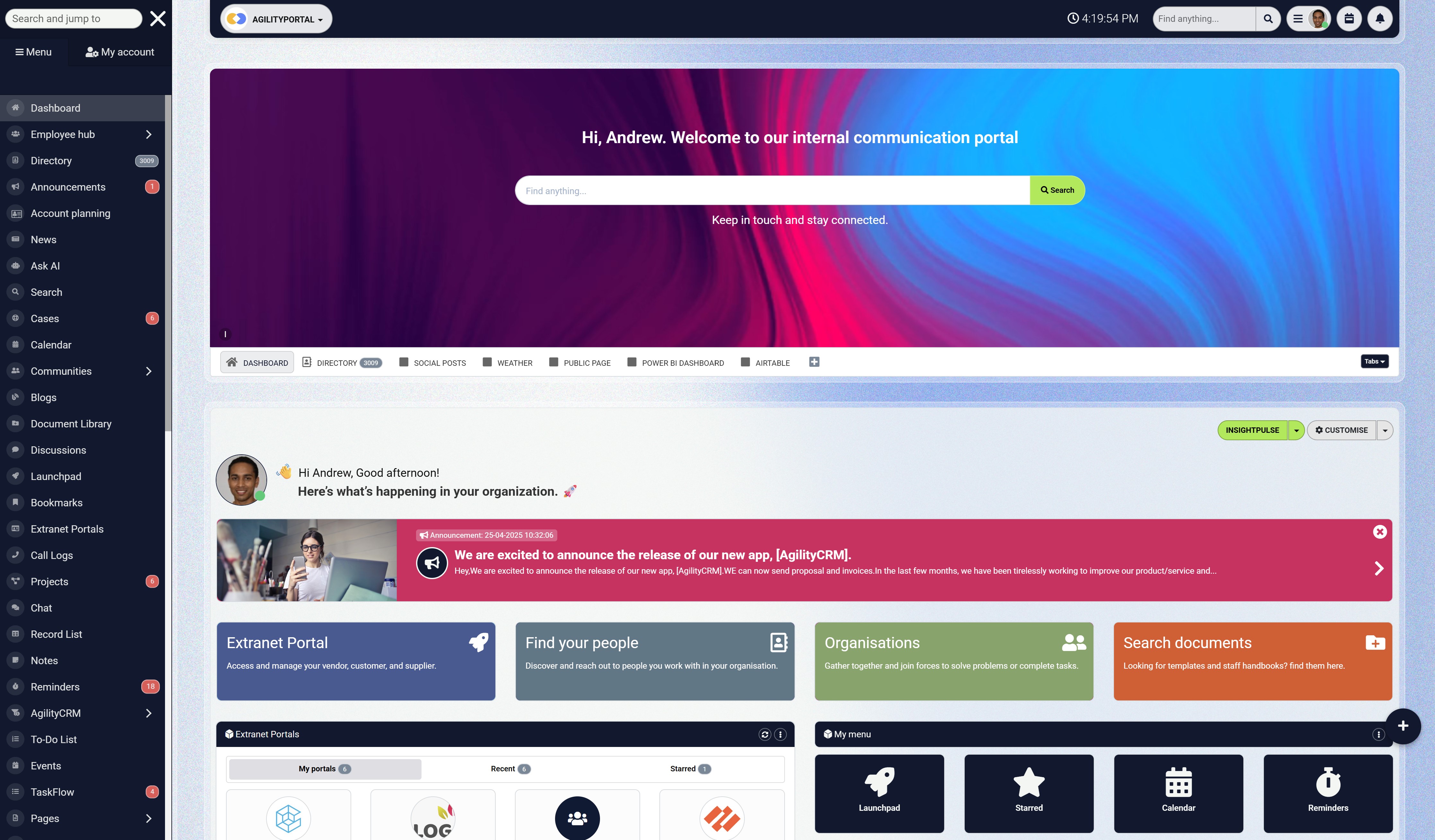
How AgilityPortal supports a more secure digital workplace
An intranet should make workplace information easier to access without giving every employee unrestricted access to everything. AgilityPortal helps organisations create a central digital workplace where company news, policies, documents, employee information and internal conversations can be managed within a governed environment.
Role-based access controls allow administrators to determine which employees can view, create or manage different areas of the platform. Teams can create controlled spaces for departments, projects or leadership groups while keeping sensitive information away from employees who do not require it.
AgilityPortal also supports single sign-on and SAML-based authentication, helping organisations centralise account access through identity providers such as Microsoft Entra ID, Okta and Google. This can make onboarding and offboarding more reliable, reduce password-related risks and help IT teams remove access when an employee leaves.
Administrative oversight is equally important. Audit capabilities help authorised administrators review platform activity and investigate changes when necessary. Secure cloud hosting, private file storage and infrastructure-level security controls provide additional protection for workplace content and employee data.
However, no intranet platform can replace an organisation's wider cybersecurity responsibilities. Businesses must still configure permissions correctly, review user access, train employees, secure connected applications and maintain an incident-response process. The platform supplies the controls, but effective governance determines how well those controls protect the organisation.
For businesses replacing scattered communication tools or an outdated intranet, AgilityPortal provides one governed place for communication, knowledge sharing and collaboration. This reduces reliance on uncontrolled email chains, public links and disconnected systems where confidential information can be difficult to monitor.
Looking for a secure intranet for your organisation?
Start a 14-day AgilityPortal trial and explore how a governed digital workplace can support safer communication and collaboration.
AgilityPortal
A Governed Digital Workplace for Safer Employee Communication and Collaboration
AgilityPortal gives organisations one central digital workplace for managing company communications, documents, policies, employee knowledge and collaboration. Granular permissions help administrators control who can access sensitive content, while centralised identity management supports safer onboarding and offboarding.
Control Who Can Access Workplace Information
Use role-based permissions, private spaces, single sign-on and administrative oversight to reduce unnecessary access and keep sensitive workplace information available to the employees who genuinely need it.
Final Thoughts
Intranet security is not a one-time software setting or a responsibility that belongs exclusively to the IT department. It requires continuous attention as employees join or leave, permissions change, new integrations are connected and cyber threats evolve.
The right technology provides essential controls such as multi-factor authentication, role-based access, encryption, audit logs and suspicious-activity alerts. However, these features only protect the organisation when they are configured correctly and reviewed regularly. An advanced security feature that remains disabled offers no practical protection.
Employees also play an important role. They need to recognise phishing attempts, protect their login details and understand how to handle confidential workplace information. Regular, practical training is more effective than expecting people to remember a security policy they read once.
Businesses should review account access, software updates, audit records and connected applications as part of an ongoing security programme. They should also test their incident-response process before a real breach occurs.
A secure intranet should help employees collaborate without exposing the organisation to unnecessary risk. By combining reliable technology with clear policies, employee awareness and regular oversight, businesses can protect sensitive information while maintaining a digital workplace people can use confidently.
AI Summary
- Modern intranets store company policies, employee records, internal conversations, shared documents and links to connected workplace systems, making them valuable targets for cybercriminals.
- Common intranet security threats include stolen passwords, excessive permissions, inactive employee accounts, phishing, unpatched software, accidental data sharing and unsecured third-party integrations.
- Multi-factor authentication and single sign-on can strengthen account security, but businesses must also review permissions and remove access promptly when employees leave.
- Role-based access control limits employees to the information and administrative tools required for their jobs, reducing the potential impact of a compromised account.
- Audit logs and security alerts help administrators identify unusual logins, unexpected permission changes, large document downloads and other suspicious activity.
- Businesses should apply security patches promptly, control public sharing links and assess the permissions granted to HR, storage, communication and AI integrations.
- Secure intranet software should provide encryption, reliable backups, data isolation, granular access controls, audit logging and transparent security documentation.
- Technology alone cannot protect an organisation. Employee awareness, regular security reviews and a tested incident-response plan are also essential.
Most Popular Posts

Effective communication among team members is vital for the productivity and success of any organization. Surprisingly, 60% of companies lack a long-term internal communication strategy, which p...


Businesses thrive on communication for efficiency, productivity and accomplishment. When the right information is passed from the right designation in the organization, it promotes positivity an...

Categories
Blog
(3214)
Business Management
(396)
Employee Engagement
(235)
Digital Transformation
(219)
Growth
(150)
Intranets
(142)
Internal communications
(107)
Remote Work
(68)
Sales
(53)
Collaboration
(53)
Customer Experience
(33)
Culture
(30)
Knowledge Management
(29)
Project management
(29)
Leadership
(20)
Comparisons
(9)
News
(1)

Related Posts

Choosing the best ERP for Shopify often starts when the workarounds stop working. Your store shows stock that the warehouse can't find. Wholesale orders live in spreadsheets. Finance spends days reconciling payouts, while customer service...

Could choosing the wrong proxy disrupt your team's work or increase costs without improving results? When comparing rotating proxies vs static proxies, the answer depends on what your business needs: a consistent IP address for an ongoing sessi...

What happens when a buyer asks Google for the best employee communication platform—and discovers competing brands before reaching your website? Choosing the best link building services can help a digital workplace business strengthen its broade...

Could gaps in digital accessibility be stopping your employees from completing the training they need to do their jobs? Imagine a new starter opening a mandatory course, only to discover they can't follow the audio, navigate the quiz with a keyboard ...

The Amazon advertising agency landscape has changed dramatically over the past two years. With the introduction of AI-powered shopping experiences, Amazon Rufus, advanced attribution reporting, Sponsored Brands Video, and Amazon DSP enhancement...


Jill Romford
I am a digital nomad, lover of exploring new places and making friends.
I love to travel and I love the internet. I take pictures of my travels and share them on the internet using Instagram.
Traveler, entrepreneur, and community builder. I share my insights on digital marketing and social media while inspiring you to live your fullest life.
Ready to learn more? 👍
One platform to optimize, manage and track all of your teams. Your new digital workplace is a click away. 🚀
Free for 14 days, no credit card required.