
Insight Blog
Agility’s perspectives on transforming the employee's experience throughout remote transformation using connected enterprise tools.
55 minutes reading time
(11049 words)
Why 70% of Operations Software Fails (And the Top 12 Operations Management Software That Actually Work)

Why 70% of Operations Software Fails (And the Top 12 Operations Management Software You Should Consider)
Discover why 70% of operations software implementations fail and explore the top 12 operations management software solutions that actually improve efficiency, visibility, and growth.
Why 70% of Operations Software Fails (And the Top 12 Operations Management Software You Should Consider)

Most companies don't fail because of bad strategy.
They fail because their operations software creates complexity instead of clarity.
Studies across digital transformation projects consistently show high failure rates — poor adoption, low visibility, budget overruns, and internal resistance.
Here's the uncomfortable truth:
Buying operations management software doesn't fix broken processes.
But choosing the right one?
That changes everything.
In this guide, we'll break down:
- Why 70% of operations software implementations fail
- The hidden red flags most leaders ignore
- And if your stuck we will provide a list of the Top 10 operations management software platforms that actually deliver results
70%
failure rate
Research across enterprise technology and digital transformation initiatives shows that up to 70% of implementations fail to meet their intended objectives. The most common causes include poor user adoption, lack of executive ownership, unclear operational strategy, and weak change management.
Source: Multiple enterprise transformation and software implementation studies
What Is a Operations Management Software?

What Is a Operations Management Software
Let's break this down properly — because a lot of people throw the term around without really understanding what it means.
An operations management software (often called operations software) is a technology platform that helps businesses plan, execute, monitor, and optimise their core operational processes in real time.
It connects strategy (what needs to be achieved) with execution (how work actually gets done) — and ensures teams, workflows, and resources stay aligned.
It helps you coordinate tasks, manage performance, track accountability, and remove bottlenecks without relying on disconnected spreadsheets or scattered systems.
Modern operations management software goes beyond basic task tracking.
It automates workflows, provides real-time dashboards, integrates with CRM and finance systems, and often includes operational risk management tools to identify disruptions, compliance gaps, and performance threats before they escalate.
The goal isn't just managing activity.
It's running operations with visibility, control, and measurable efficiency.
Key Takeaways
- Up to 70% of operations software implementations fail due to poor adoption, unclear strategy, and weak executive ownership.
- The best operations management tools unify workflows, reporting, communication, and compliance into one connected system.
- Real-time dashboards and operational visibility reduce bottlenecks and improve decision-making accuracy.
- User adoption matters more than feature depth — systems must simplify daily work to drive measurable ROI.
- Scalable operations software integrates with finance, HR, CRM, and other core systems to eliminate data silos.
What Modern Operations Management Software Should Include

What Modern Operations Management Software Should Include
Not all operations management tools are built the same.
If you're investing in operations software today, it needs to support how modern businesses actually run — across departments, locations, and even in the field.
Here's what truly matters.
Modern platforms should include workflow automation that reduces manual handoffs and eliminates repetitive administrative tasks. If teams are still chasing updates or duplicating data, the system isn't doing its job.
Strong task and project management capabilities are essential. Leaders need visibility into who is responsible, what stage work is in, and where delays are forming — without digging through emails or spreadsheets.
Real-time dashboards are non-negotiable. Decision-makers should be able to see live KPIs, operational bottlenecks, workload distribution, and performance metrics without waiting for end-of-week reports.
Document and knowledge management should be embedded directly into workflows. Teams must be able to access procedures, compliance documentation, and operational guides within the system — not stored separately in another platform.
Cross-team collaboration features ensure departments don't operate in silos. Communication, updates, and status changes should happen inside the operational environment, not outside it.
Compliance tracking and audit trails are increasingly critical, especially for regulated industries. Built-in controls help reduce risk and support accountability.
Reporting and analytics must go beyond static summaries. Modern systems should provide trend analysis, forecasting, and measurable performance insights.
And if your organisation has mobile or distributed teams, field operations management software capabilities are essential. Field staff should be able to update tasks, access documentation, capture data, and communicate in real time from any location.
If an operations platform lacks these core components, it's not a modern system — it's just digital paperwork.
28%
of the workweek
According to McKinsey, employees can spend up to 28% of their workweek searching for information across disconnected systems.
Source: McKinsey Global Institute
Why 70% of Operations Software Fails
The uncomfortable reality is this:
Most operations software doesn't fail because the technology is broken.
It fails because organisations approach implementation strategically wrong.
Operations software amplifies whatever structure already exists inside a business. If your processes are unclear, your ownership is weak, or your teams aren't aligned, the software simply magnifies those problems.
Here are the five most common reasons implementations collapse.
1. No Clear Operational Strategy Before Purchase
Many companies buy operations software before clearly defining what they're trying to fix.
Leadership sees inefficiencies, communication breakdowns, or reporting gaps — and assumes a platform will solve them. So they start evaluating features instead of mapping workflows.
This leads to "feature shopping."
Decision-makers compare automation capabilities, dashboards, integrations, and AI tools without first answering fundamental questions:
- Where are our bottlenecks?
- Which workflows cause the most delay?
- What does operational success actually look like?
Without documented workflows and defined performance metrics, software selection becomes guesswork.
The result? A powerful tool layered on top of undefined processes — which only creates structured chaos.
2. Poor User Adoption
Even the most advanced operations management software fails if employees don't use it consistently.
Adoption drops when platforms are overly complex, unintuitive, or require extensive training just to complete basic tasks. Frontline teams quickly revert to familiar habits — spreadsheets, email threads, informal chats.
The issue isn't resistance to change. It's friction.
If the system adds steps instead of removing them, people bypass it. And when teams operate outside the official platform, data becomes incomplete. Reporting becomes unreliable. Leadership loses trust in the system.
Operations software succeeds only when it simplifies daily work — not when it demands extra effort.
3. Lack of Executive Ownership
Many implementations are driven by IT departments rather than operations leadership.
IT ensures technical deployment. But operational transformation requires strategic ownership from those accountable for performance metrics.
When executive sponsors are absent:
- Success metrics are unclear.
- Accountability is undefined.
- Adoption becomes optional rather than enforced.
Operations software is not a technical upgrade. It's an organisational shift.
Without leadership alignment and clear accountability, the platform becomes another tool — not a performance driver.
4. Over-Customisation
Customisation often feels like control.
Organisations want the platform tailored precisely to their workflows, terminology, and reporting structures. In moderation, that makes sense.
But excessive customisation introduces long-term problems:
- Development costs escalate.
- Deployment timelines stretch.
- Upgrades become risky and expensive.
Over time, the system becomes fragile. Each update requires testing. Each integration demands adjustment.
Instead of enabling agility, the platform becomes rigid infrastructure that slows innovation.
The irony? Companies customise to improve flexibility — but end up reducing it.
5. No Integration with Existing Systems
Operations don't exist in isolation.
They intersect with CRM systems, HR platforms, finance tools, inventory systems, payroll software, and communication platforms.
When operations software does not integrate seamlessly:
- Data must be manually transferred.
- Teams duplicate entries across systems.
- Reports pull inconsistent information.
Disconnected systems undermine automation and distort reporting accuracy.
If leadership cannot trust the data, they stop relying on the platform for decision-making.
And once trust disappears, so does long-term adoption.
6. Rising Security and Compliance Pressure
Operations software now handles sensitive business data — financial reports, employee records, vendor contracts, workflow documentation, and more.
With increasing regulatory scrutiny and cyber risk, platforms must provide robust access controls, audit trails, and structured data governance.
Many legacy systems were not designed with modern compliance frameworks in mind.
As compliance expectations rise, outdated operational platforms become a liability rather than an asset.
7. Customisation That Turns Into Long-Term Technical Debt
When you combine unclear strategy, low adoption, weak ownership, heavy customisation, and poor integration, failure becomes predictable.
The 70% failure rate isn't about bad vendors.
It's about misalignment between software capability and organisational readiness.
Operations software works — but only when implemented with discipline, clarity, and leadership accountability.
8. Difficulty Demonstrating Measurable ROI
Perhaps the most overlooked challenge is proving tangible return on investment.
Leadership wants clear answers:
- Has cycle time improved?
- Have operational costs decreased?
- Has productivity increased?
- Are teams collaborating more effectively?
Many organisations struggle to extract these metrics directly from their operations software. Without measurable outcomes, the platform becomes a cost centre rather than a strategic advantage.
Operations software today is expected to do more than manage tasks. It must unify systems, enable real-time insight, improve adoption, maintain compliance, and demonstrate measurable business impact.
When any of these components are missing, performance gaps appear.
That's why so many implementations underdeliver — not because the idea of operations software is flawed, but because the execution doesn't align with modern operational complexity.
Related Workforce Management & Remote Team Guides You Should Explore Next
If you're evaluating workforce software, labor management systems, or looking to improve scheduling, compliance, and team performance, these practical guides will help you dive deeper into workforce strategy, remote management, and operational optimization.
- Workforce Management: What Is WFM?
- Most Common Workforce Management Metrics
- Top Workforce Management Companies
- Workforce Management vs Human Resource Management
- Best Workforce Scheduling App Options
- Remote Workforce: Must-Have Tools
- Distributed Workforce Strategies for Successful Management
- Deskless Workforce Training: Challenges and Solutions
- Maintaining Employee Mental Health with a Remote Workforce
- Overcoming Remote Work Challenges & Workforce Disruptions
- Frontline Workforce Inclusion Examples
- Building High-Performance Teams: Real Examples
- Factors That Influence Workforce Management
- AI’s Impact on Workforce Diversity and Inclusion
- Financial Stress, Employee Wellbeing & Employer Support
How We Evaluated These Operations Software Platforms
There are a lot of vendors claiming their operations software will eliminate inefficiencies, improve visibility, and "transform" your business.
Most of them look impressive on a landing page.
But polished marketing doesn't fix broken workflows. And long feature lists don't guarantee operational performance.
So instead of repeating vendor claims, we applied a structured evaluation framework to assess each platform objectively.
Here's exactly how we broke it down.
Feature Depth
First, we looked beyond surface-level task tracking.
We examined whether each platform could:
- Automate complex workflows
- Provide real-time operational dashboards
- Track KPIs across departments
- Identify bottlenecks proactively
- Support cross-functional collaboration
- Offer performance visibility at scale
Basic task managers didn't score highly. We prioritised systems that genuinely optimise execution — not just organise activity.
Usability & Adoption
A powerful system is useless if teams avoid it.
We assessed:
- Interface clarity
- Ease of onboarding
- Mobile experience quality
- Dashboard simplicity
- Automation setup complexity
If a platform required heavy configuration or extensive training just to function properly, it scored lower. Ease of use drives adoption — and adoption drives ROI.
Scalability
Some tools work well for small teams but struggle in larger, multi-department environments.
We evaluated:
- Multi-location support
- Department-level visibility
- Role-based permissions
- Enterprise configuration flexibility
- Performance under higher user volumes
Solutions capable of supporting both growing companies and enterprise environments scored higher.
Compliance & Risk Controls
Operational exposure is a serious business risk.
We looked at whether each system could:
- Maintain structured audit trails
- Enforce approval workflows
- Track accountability across processes
- Store historical operational records
- Support governance and oversight controls
Platforms relying heavily on manual oversight ranked lower than those with built-in safeguards.
Reporting & Analytics
Data without insight is noise.
We assessed:
- Real-time dashboard availability
- Customisable reporting
- Department-level drill-down capabilities
- Historical trend analysis
- Visual clarity of performance data
Systems that turn operational data into actionable decisions — not just static reports — performed best.
Integrations
No operations software operates in isolation.
We evaluated integration capabilities with:
- CRM systems
- HR platforms
- Finance and payroll tools
- ERP systems
- Communication platforms
Seamless integration reduces duplication, prevents errors, and strengthens automation reliability.
Pricing Transparency
Hidden costs erode trust.
We examined:
- Clear pricing tiers
- Visibility of add-ons
- Contract flexibility
- Implementation fees
- Upgrade transparency
Platforms that required multiple sales calls just to understand pricing scored lower on transparency.
Customer Support & Vendor Reliability
When operations depend on software, downtime isn't acceptable.
We looked at:
- Support availability
- Response time reputation
- Training resources
- Documentation quality
- Implementation assistance
Reliable vendor support increases long-term operational success.
Real User Feedback
Finally, we reviewed verified user ratings from trusted review platforms.
We analysed:
- Repeated complaints
- Implementation challenges
- Long-term satisfaction trends
- Reported scalability concerns
- Documented ROI outcomes
Marketing claims were not considered without validation from real-world user experience.
Too many comparison articles rank platforms based on popularity or affiliate incentives.
We didn't.
Our evaluation focused on operational impact, scalability, usability, risk control, and measurable performance — because those are the factors that determine whether operations software actually improves execution.
Transparency builds trust.
And when you're choosing a system that directly impacts productivity, cost control, and performance, trust matters.
Top 12 Operations Management Software Platforms
This is where you explain:
- What's going wrong
- Why people are frustrated
- What it costs them (time, money, engagement)
This builds urgency
Operations Management Software Comparison Table
| Rank | App | Feature | Best For | Pricing |
| 1 | AgilityPortal | Unified ops + comms, workflows, dashboards, docs, governance | Companies that want ops visibility + collaboration in one place | Custom / quote |
| 2 | monday.com | Visual workflows, automations, dashboards, integrations | Teams that run ops via boards + automation | From €9/seat/month (billed annually) |
| 3 | Asana | Cross-team work mgmt, dependencies, timelines, reporting | Structured project + ops execution | Starter from $10.99/user/month (billed annually) |
| 4 | ClickUp | Custom workflows, docs, dashboards, automation, AI options | Teams wanting one flexible ops workspace | Unlimited from $7/user/month (billed annually) |
| 5 | Wrike | Enterprise workflow mgmt, approvals, workload, reporting | Ops teams needing enterprise controls | Varies / quote |
| 6 | Smartsheet | Spreadsheet-style ops control, automation, reporting | Excel-heavy orgs modernising ops | Varies / quote |
| 7 | Odoo | Modular ERP (ops + inventory + finance + HR), workflows | Businesses wanting ERP-style ops coverage | Varies (module-based) |
| 8 | Zoho Projects | Tasks, time tracking, automation, reporting | Budget-conscious SMB ops | From ~$4/user/month (typically annual) |
| 9 | SAP Business One | ERP + finance + supply chain operations | Mid-market needing ERP ops depth | Quote |
| 10 | Oracle NetSuite | Full cloud ERP + operations + financials | Large orgs needing end-to-end ERP | Quote |
| 11 | Trello | Kanban workflows, lightweight automation, templates | Simple operational coordination | Standard from $5/user/month (billed annually) |
| 12 | Microsoft Dynamics 365 | ERP/CRM modules, process automation, reporting | Enterprises with complex systems | Varies (module-based) |
#1. AgilityPortal: Unified Operations Software for Visibility, Control & Compliance
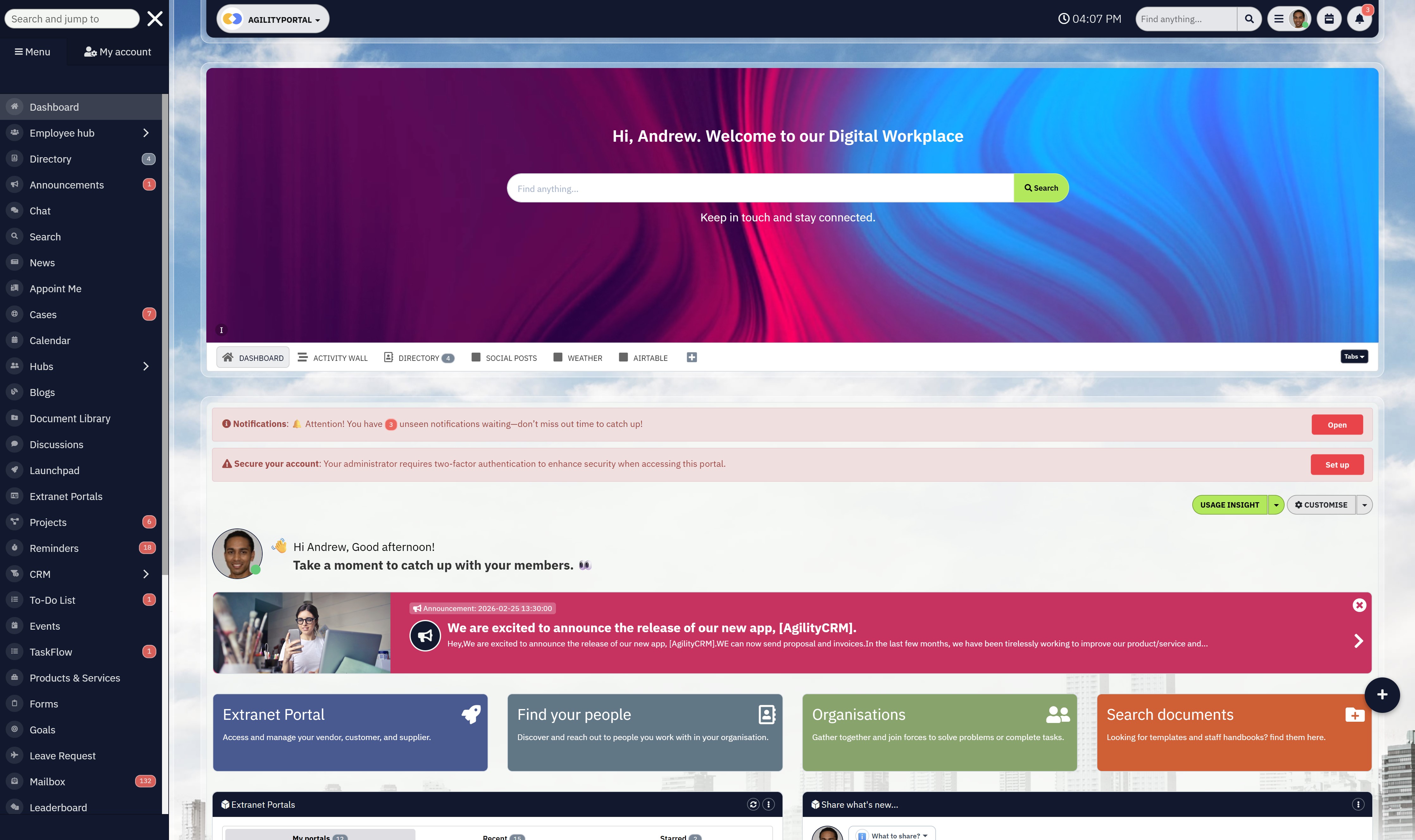
#1. AgilityPortal: Unified Operations Software for Visibility, Control & Compliance
AgilityPortal is a modern operations software platform built for organisations that need structured control across workflows, teams, and departments — not just task tracking.
While many operations management tools focus narrowly on projects or isolated processes, AgilityPortal connects workflow automation, internal communication, document governance, compliance tracking, and real-time dashboards into one centralised operational system.
For businesses struggling with fragmented platforms, limited visibility, or inconsistent execution, this isn't just another productivity app — it functions as a unified operational control layer.
Instead of switching between disconnected tools for tasks, communication, reporting, and documentation, teams operate inside one structured environment.
AgilityPortal provides live department dashboards, workflow accountability, role-based visibility, and audit-ready documentation — helping leaders maintain clarity without relying on spreadsheets or manual reporting.
It's fully cloud-based and accessible via desktop and mobile, making it suitable for hybrid teams, distributed departments, and operational leadership.

What Our Customers Like
AgilityPortal stands out because it treats operations as an integrated system rather than separate modules.
Workflow management connects directly with communication channels, file management, approvals, and reporting dashboards — reducing fragmentation across departments.
The platform uses role-based dashboards so executives, department heads, and frontline managers each see relevant operational metrics.
Real-time reporting gives leadership clear insight into workflow progress, bottlenecks, and accountability — without needing complex BI tools.
Built-in compliance features such as approval chains, audit logs, and document control help reduce operational risk while strengthening governance.
Who Is AgilityPortal For?AgilityPortal is ideal for:
- Growing organisations managing multiple departments
- Operations leaders who need real-time performance visibility
- Companies replacing spreadsheets and disconnected systems
- Businesses operating in regulated or compliance-sensitive industries
- Teams seeking both operational coordination and internal communication in one platform
What We Don't Like
AgilityPortal is not designed as a lightweight, single-purpose task manager.
Companies looking for a very basic checklist-style tool may find the broader operational capabilities more than they need.
It is best suited for organisations that require structured oversight and cross-functional coordination.
PricingAgilityPortal operates on a SaaS subscription model based on organisation size and required modules.
Pricing scales with growth, making it suitable for expanding companies as well as established enterprises.
Because it combines workflow management, communication, dashboards, and governance controls in one system, many organisations use it to replace multiple standalone tools — which can reduce overall software costs.
AGILITYPORTAL
Operations Software for Visibility, Control & Cross-Team Execution
AgilityPortal is a modern operations software platform designed to unify workflow coordination, internal communication, document governance, and real-time dashboards so teams can execute faster with fewer bottlenecks and less operational chaos.
Flexible SaaS pricing — scalable based on team size and modules.
#2. monday.com: Visual Workflow Management for Structured Operations
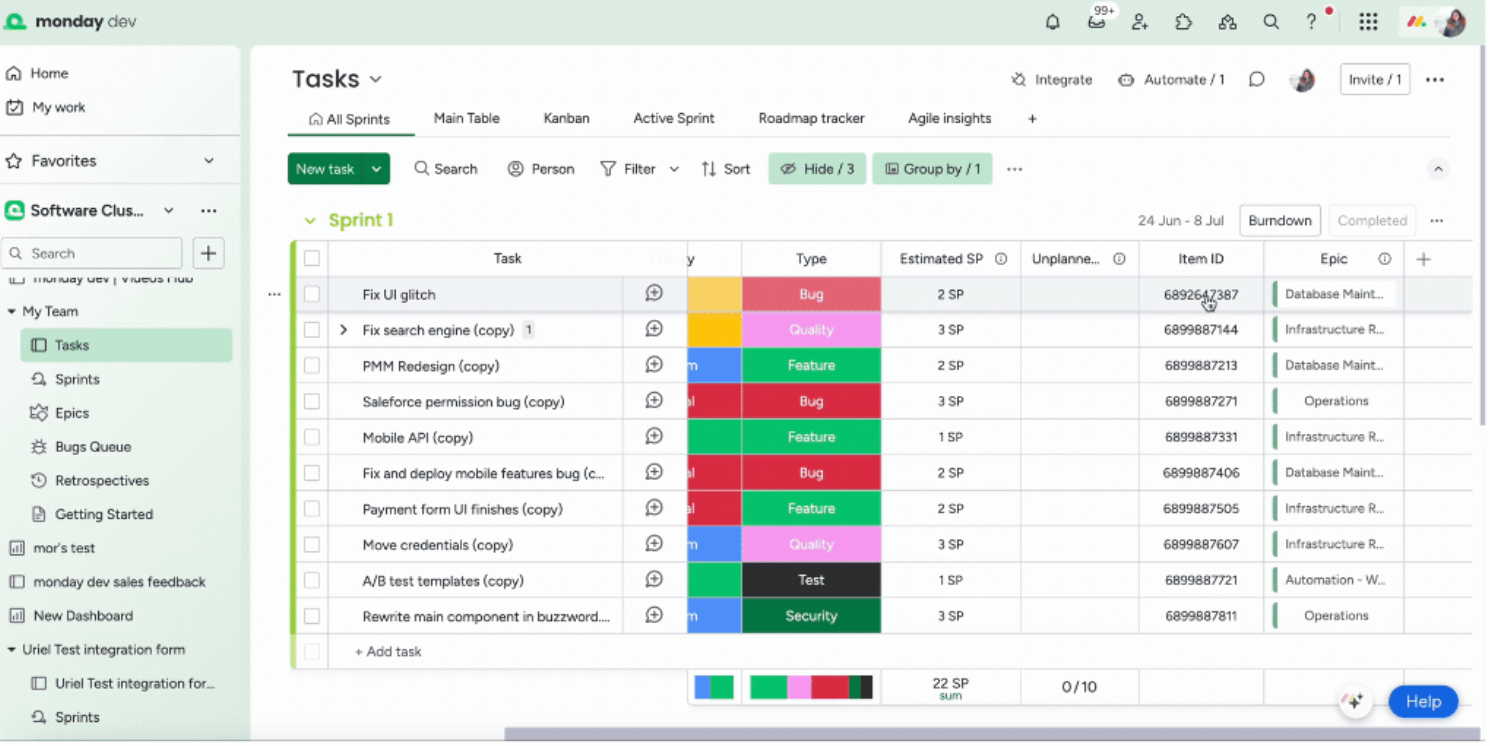
#2. monday.com: Visual Workflow Management for Structured Operations
monday.com is a flexible work management platform designed to help teams organise workflows, automate processes, and improve operational transparency.
Unlike traditional task managers, monday.com uses visual boards and customisable workflows to give teams a clear picture of how work moves across departments. It's widely adopted by organisations that want structure without heavy technical implementation.
For businesses seeking adaptable manufacturing operations management software, monday.com provides automation, reporting dashboards, and cross-team visibility within an intuitive interface.
Its strength lies in making complex workflows easier to understand. Teams can track progress, assign ownership, automate repetitive updates, and monitor deadlines in a centralised workspace.
Because it's cloud-based and highly configurable, it works well for companies managing multiple projects, campaigns, or operational processes simultaneously.
What Users Like
monday.com is known for its visual clarity. Boards, timelines, and status columns make it easy to see exactly where tasks stand.
Automation features reduce repetitive administrative work. Teams can trigger notifications, move items automatically, and update statuses based on predefined rules.
The platform integrates with a wide range of third-party systems, including CRM, marketing, communication, and productivity tools, which helps reduce duplication.
Dashboards provide consolidated reporting across multiple boards, giving managers broader operational visibility without needing external analytics tools.
Its flexibility also allows teams to configure workflows around their existing processes rather than forcing rigid structures.
Who Is monday.com For?
monday.com is ideal for:
- Teams that prefer visual workflow management
- Marketing, operations, and project teams needing cross-functional coordination
- Mid-sized organisations seeking structured but flexible process control
- Companies wanting automation without enterprise-level complexity
It performs particularly well in environments where transparency and collaboration are priorities.
What We Don't Like
While highly flexible, monday.com can become complex when heavily customised. As boards and automations scale, configuration management may require additional oversight.
Advanced reporting and enterprise controls may require higher-tier plans, which increases overall cost.
Organisations needing deep ERP-style financial or compliance management may find it better suited as an operational coordination layer rather than a full enterprise system.
Pricing
monday.com operates on a tiered SaaS pricing model based on features and user count.
Entry-level plans provide basic workflow functionality, while higher tiers unlock automation limits, advanced dashboards, integrations, and enterprise controls.
Costs increase as teams scale, so organisations should evaluate long-term usage requirements before committing to higher-tier plans.
monday.com
Visual Workflow & Operations Management Platform
monday.com is a visual workflow and operations management software that enables teams to plan projects, automate processes, track performance, and coordinate cross-functional work within a flexible board-based system.
#3. Asana: Structured Work Management for Cross-Team Execution
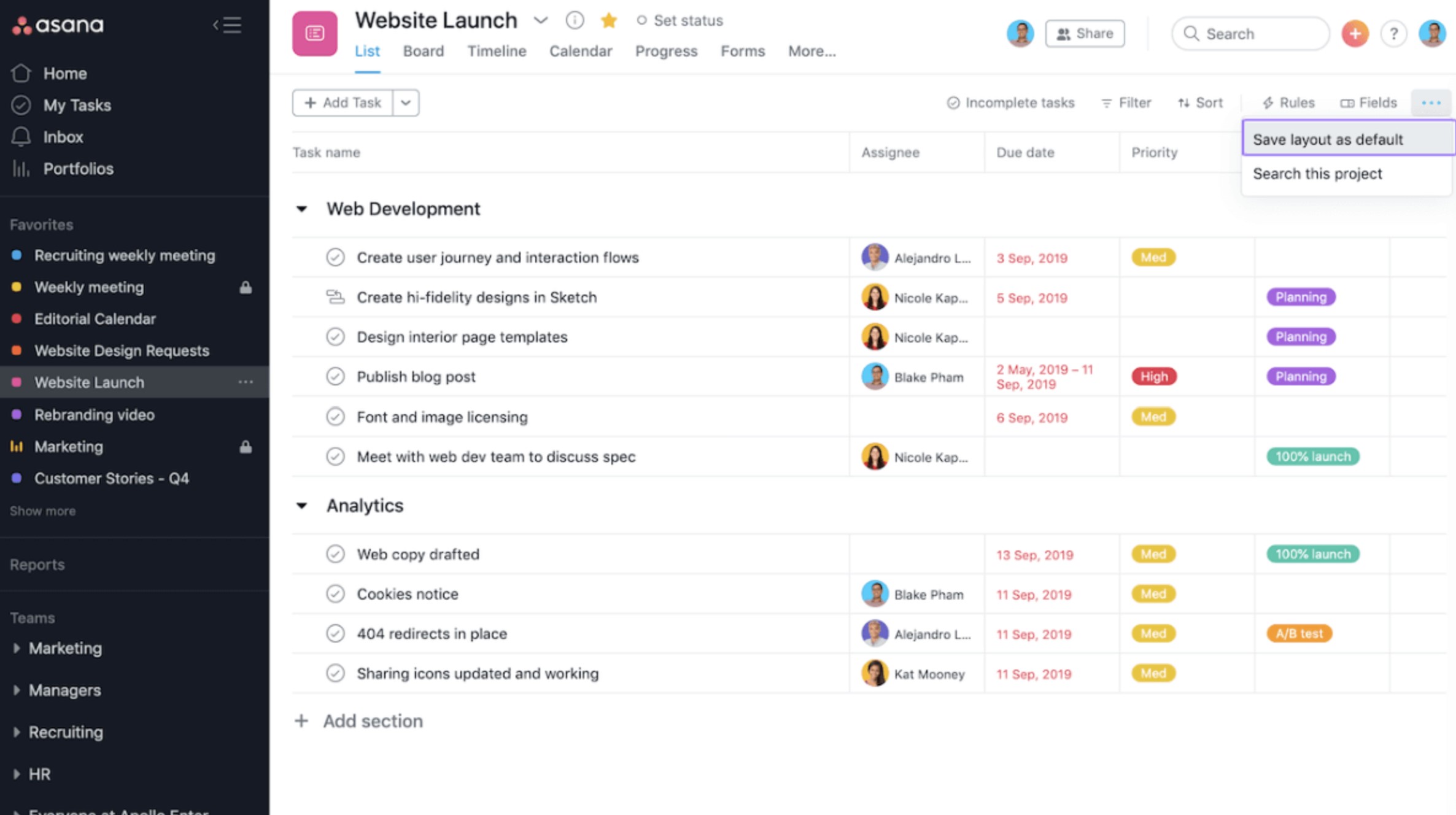
#3. Asana: Structured Work Management for Cross-Team Execution
Asana is a widely used work management platform designed to help teams organise projects, assign responsibilities, and track progress with clarity.
Rather than focusing purely on task lists, Asana structures work around timelines, dependencies, and milestones — making it easier to see how individual actions connect to larger operational goals.
For organisations evaluating modern operations and maintenance software, Asana offers a clean interface, collaborative features, and reporting dashboards that support coordinated execution across departments.
Its strength lies in visibility. Managers can track workload distribution, monitor deadlines, and identify bottlenecks before they escalate into delays.
Because it's cloud-based and intuitive, teams can deploy it quickly without heavy technical configuration.
What Users LikeAsana is known for its simplicity and structured layout. Tasks can be organised into projects, broken into subtasks, and connected through dependencies to reflect real operational flow.
Timeline and calendar views make planning easier, especially for teams managing overlapping initiatives.
Built-in reporting dashboards provide performance insight without requiring separate analytics software.
Collaboration features such as comments, file attachments, and status updates reduce reliance on email and scattered communication.
Its clean interface lowers the learning curve, which helps drive user adoption.
Who Is Asana For?Asana works well for:
- Cross-functional teams managing structured projects
- Operations and marketing departments coordinating campaigns or launches
- Mid-sized organisations needing visibility into task ownership
- Companies seeking structured execution without ERP-level complexity
It performs particularly well where project coordination and deadline management are central priorities.
What We Don't LikeWhile strong for project execution, Asana is not a full operational control system. It does not provide deep financial tracking, compliance management, or enterprise resource planning capabilities.
As complexity increases, reporting may require higher-tier plans to unlock advanced dashboards and controls.
Organisations seeking end-to-end operational governance may need additional systems alongside Asana.
PricingAsana follows a tiered SaaS pricing model based on features and user count.
Entry-level plans cover basic task and project management, while higher tiers unlock advanced reporting, automation rules, and administrative controls.
Pricing scales with usage, so organisations should assess future growth needs before selecting a plan.
Asana
Structured Project & Workflow Management Platform
Asana is a cloud-based project and operations management software that helps teams organise tasks, manage timelines, track dependencies, and improve cross-functional coordination within a clean and structured interface.
#4. ClickUp: Highly Customisable Operations & Productivity Management
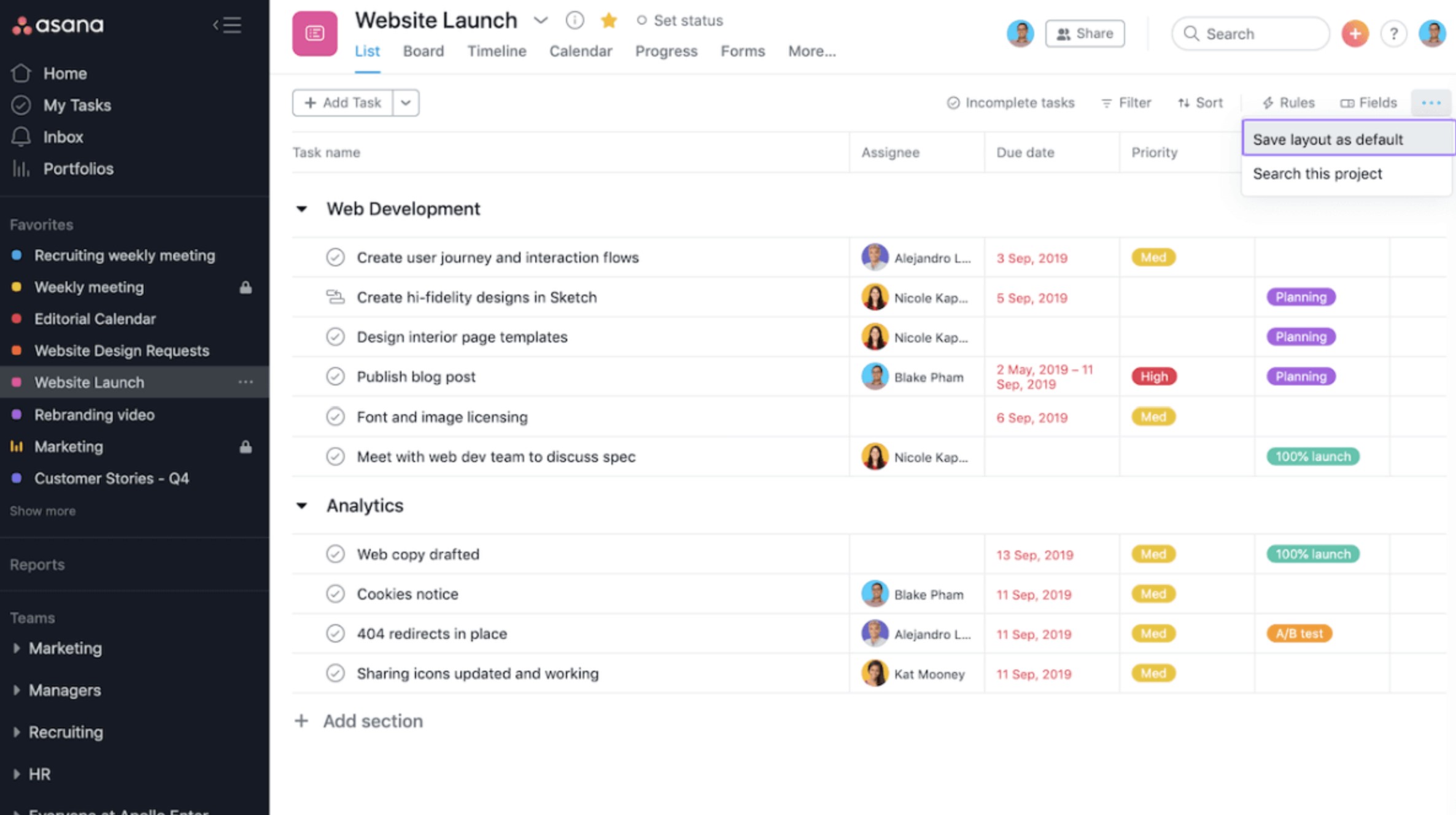
#4. ClickUp: Highly Customisable Operations & Productivity Management
ClickUp positions itself as an "all-in-one" productivity platform, combining task management, documentation, goal tracking, and workflow automation in a single workspace.
For organisations comparing modern operations management tools, ClickUp stands out for flexibility. It allows teams to design workflows that mirror how they already operate — rather than forcing rigid structures.
Instead of offering one fixed framework, ClickUp provides multiple views (List, Board, Gantt, Calendar, Timeline) so departments can manage operations in the format that suits them best.
This makes it particularly attractive to growing teams that need adaptable process control.
What Users LikeClickUp's biggest strength is configurability.
Teams can customise:
- Status workflows and task stages
- Custom fields for operational tracking
- Automation rules for recurring processes
- Dashboards for department-level KPIs
- Permission controls by role or team
It also combines documentation ("Docs"), goal tracking, and task management inside one environment, reducing the need for separate tools.
Automation capabilities help eliminate repetitive updates, while dashboards provide visibility into workload, progress, and performance metrics.
For companies wanting flexibility without investing in enterprise ERP systems, ClickUp offers a broad feature set at competitive pricing tiers.
Who Is ClickUp For?ClickUp is well suited for:
- Fast-growing startups needing scalable process control
- Operations teams managing diverse workflows
- Cross-functional organisations requiring custom structures
- Businesses replacing multiple lightweight productivity apps
It performs particularly well when teams want one configurable system rather than multiple specialised tools.
What We Don't LikeThe depth of customisation can become overwhelming.
Without clear governance, workspaces may become inconsistent across departments. Over-configuration can also introduce administrative overhead.
Some advanced reporting, automation limits, and enterprise controls are restricted to higher-tier plans.
Organisations requiring strict compliance frameworks or deep financial integration may still need complementary systems.
PricingClickUp operates on a tiered SaaS model, including a free plan with limited features.
Paid plans unlock increased automation limits, advanced dashboards, permissions, and reporting controls.
Pricing remains competitive compared to many other operations software platforms, making it appealing for scaling teams — though costs increase as advanced features are added.
ClickUp
All-in-One Productivity & Operations Management Platform
ClickUp is a flexible operations management software platform that combines task management, workflow automation, documentation, goal tracking, and reporting into a single customisable workspace.
#5. Wrike: Enterprise-Grade Work & Operations Management
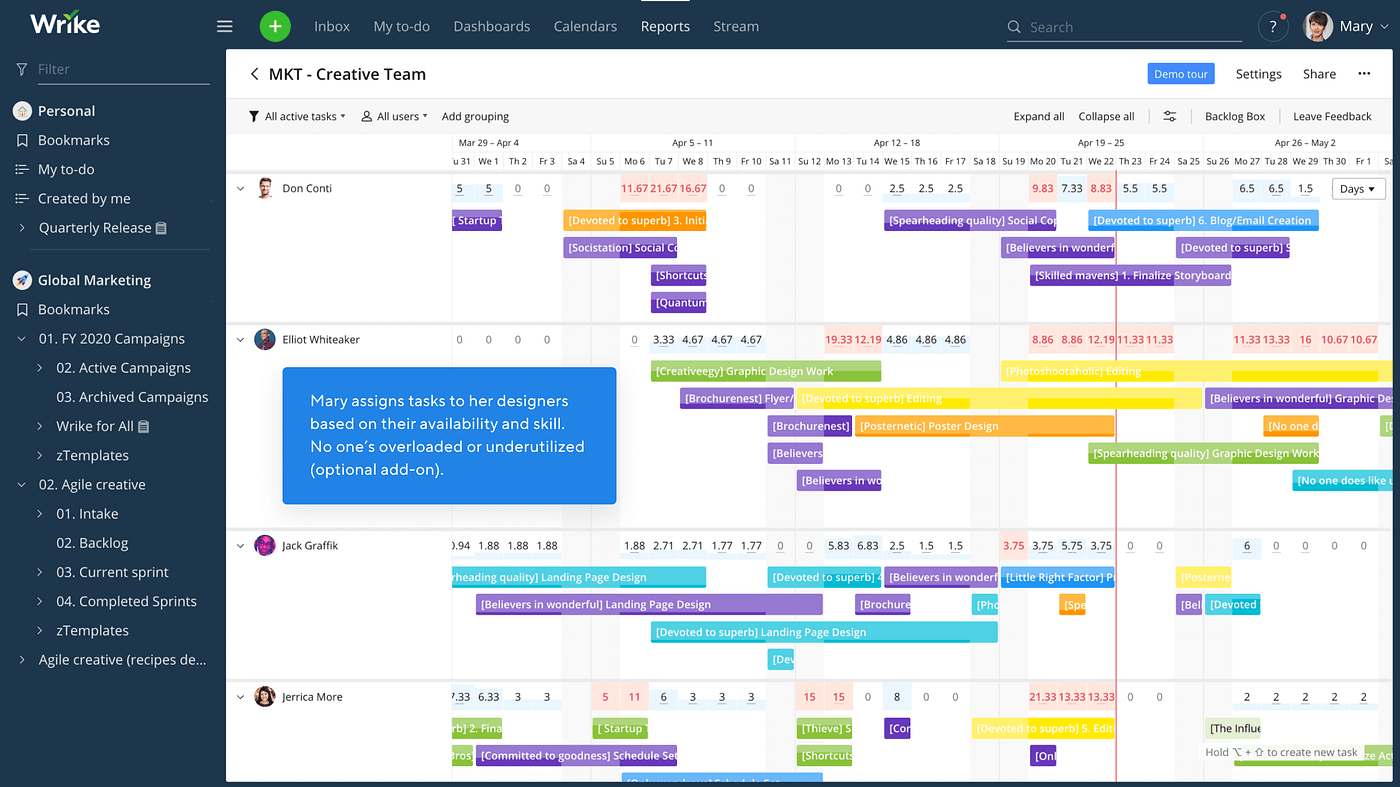
#5. Wrike: Enterprise-Grade Work & Operations Management
Wrike is a robust work management platform built for organisations that require structured control, advanced reporting, and enterprise-level oversight.
Unlike lightweight task managers, Wrike is designed to handle complex operational environments with multiple teams, layered approvals, and detailed performance tracking.
For companies evaluating scalable saas operations management software, Wrike provides workload management, automation, and in-depth analytics within a controlled framework.
Its architecture is particularly suited for businesses that need visibility across departments without sacrificing governance.
What Users Like
Wrike is known for strong enterprise capabilities, including:
- Advanced reporting dashboards
- Resource and workload management
- Custom request forms for structured intake
- Approval workflows and permission controls
- Portfolio-level visibility across projects
Managers can monitor capacity, track progress against timelines, and identify delays before they impact delivery.
The reporting layer is more advanced than many mid-market tools, allowing leadership to drill into performance data without external BI software.
Wrike also integrates with major CRM, marketing, and productivity platforms, reducing operational silos.
Who Is Wrike For?
Wrike works best for:
- Enterprise operations teams
- Marketing and creative departments with approval-heavy workflows
- Companies managing high volumes of structured requests
- Organisations requiring tighter governance and reporting control
It performs especially well where structured oversight and performance tracking are critical.
What We Don't Like
Wrike's enterprise focus can make it feel complex for smaller teams.
Initial configuration may require careful setup to align workflows properly. Advanced features and reporting are typically available on higher-tier plans.
For companies looking for lightweight coordination rather than structured oversight, Wrike may be more system than necessary.
Pricing
Wrike operates on a tiered SaaS pricing model, with entry plans covering core task management.
Advanced reporting, resource management, and enterprise controls are available in higher-tier or custom enterprise plans.
Pricing increases based on feature access and scale, making it more suitable for mid-sized to large organisations rather than small teams seeking minimal functionality.
Wrike
Enterprise Work & Operations Management Platform
Wrike is an enterprise-grade work and operations management software designed to help organisations manage complex workflows, resource allocation, approvals, and performance reporting within a structured and scalable environment.
#6. Smartsheet: Spreadsheet-Style Operations Management with Automation
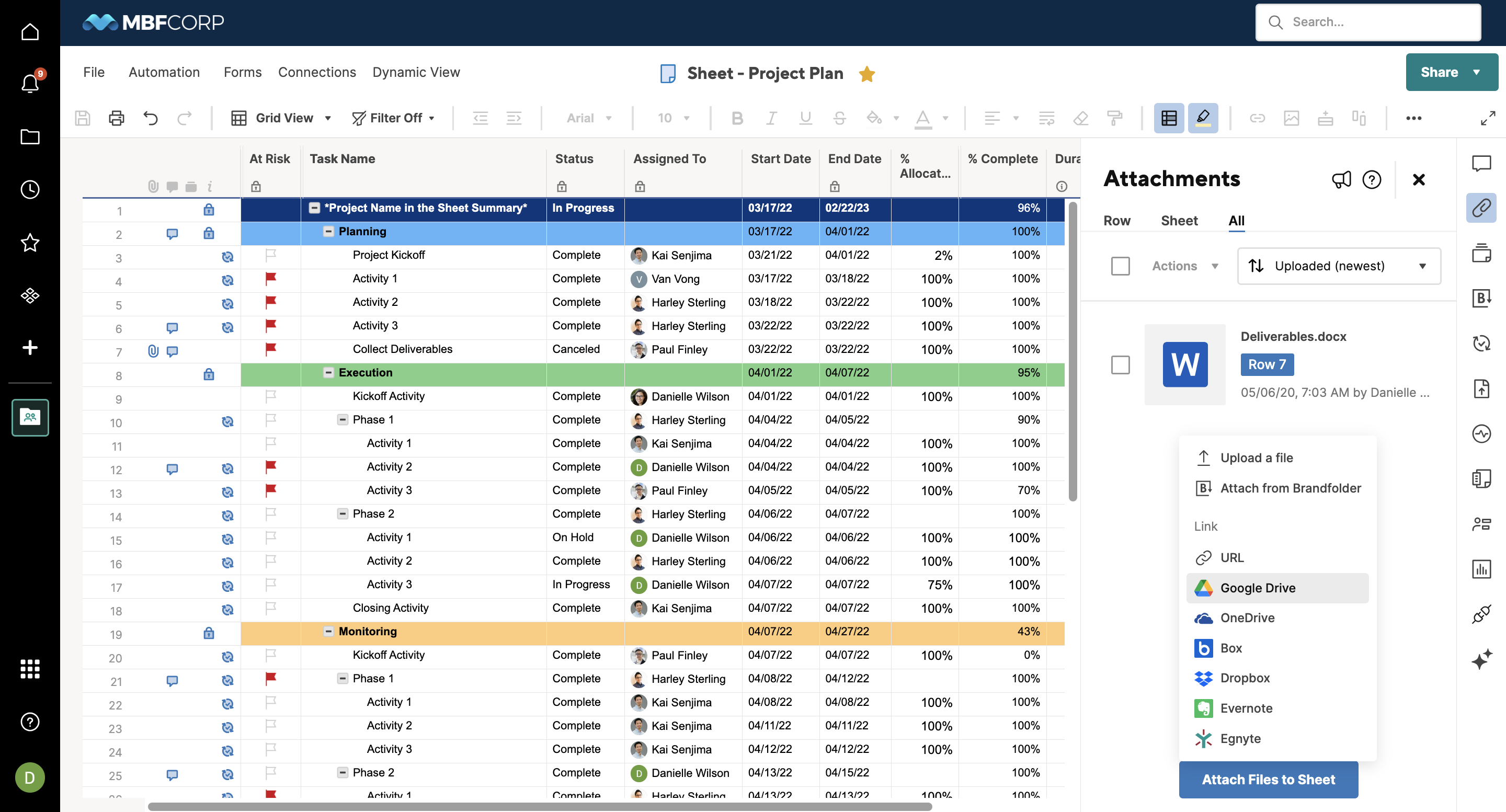
#6. Smartsheet: Spreadsheet-Style Operations Management with Automation
Smartsheet is a work and operations management platform built around a familiar spreadsheet-style interface — but enhanced with automation, collaboration, and reporting features.
For organisations that have historically relied on Excel to manage processes, Smartsheet offers a structured upgrade without forcing teams to abandon a format they already understand.
When evaluating modern operations management tools, Smartsheet appeals to businesses that want more control and visibility while maintaining grid-based workflow management.
It bridges the gap between traditional spreadsheets and fully visual project management systems.
What Users Like
Smartsheet's biggest advantage is familiarity combined with structure.
Key strengths include:
- Grid-based workflow tracking with automation rules
- Conditional formatting and formula support
- Shared sheets with permission controls
- Approval workflows and alerts
- Dashboard creation for operational reporting
Teams can build structured operational trackers, automate status updates, and create consolidated dashboards without switching environments.
Because it supports formulas and logic, it works well for operational tracking scenarios that require calculations, forecasting, or structured data management.
Who Is Smartsheet For?
Smartsheet works best for:
- Operations teams transitioning from Excel
- Organisations managing structured data-heavy workflows
- Companies requiring grid-based control with automation
- Mid-sized teams wanting reporting without enterprise ERP complexity
It performs particularly well in environments where process tracking relies on tabular data.
What We Don't Like
While powerful, Smartsheet's spreadsheet format can feel less intuitive for teams that prefer visual boards or timeline-based views.
As workflows scale, sheet management can become complex without strong governance.
Advanced features and enterprise controls are typically locked behind higher-tier plans.
Organisations looking for deep financial management or full ERP integration may require additional systems.
Pricing
Smartsheet follows a tiered SaaS pricing model based on user count and feature access.
Core plans cover sheet collaboration and automation, while higher tiers unlock advanced reporting, governance controls, and enterprise-level management features.
Costs increase with scale and advanced functionality, making it most suitable for structured mid-market and enterprise environments.
Smartsheet
Spreadsheet-Style Work & Operations Management Platform
Smartsheet is a cloud-based work and operations management software that combines spreadsheet familiarity with automation, collaboration, and reporting tools to help teams manage projects and operational workflows efficiently.
#7. Odoo: Modular ERP & Operations Management in One Ecosystem
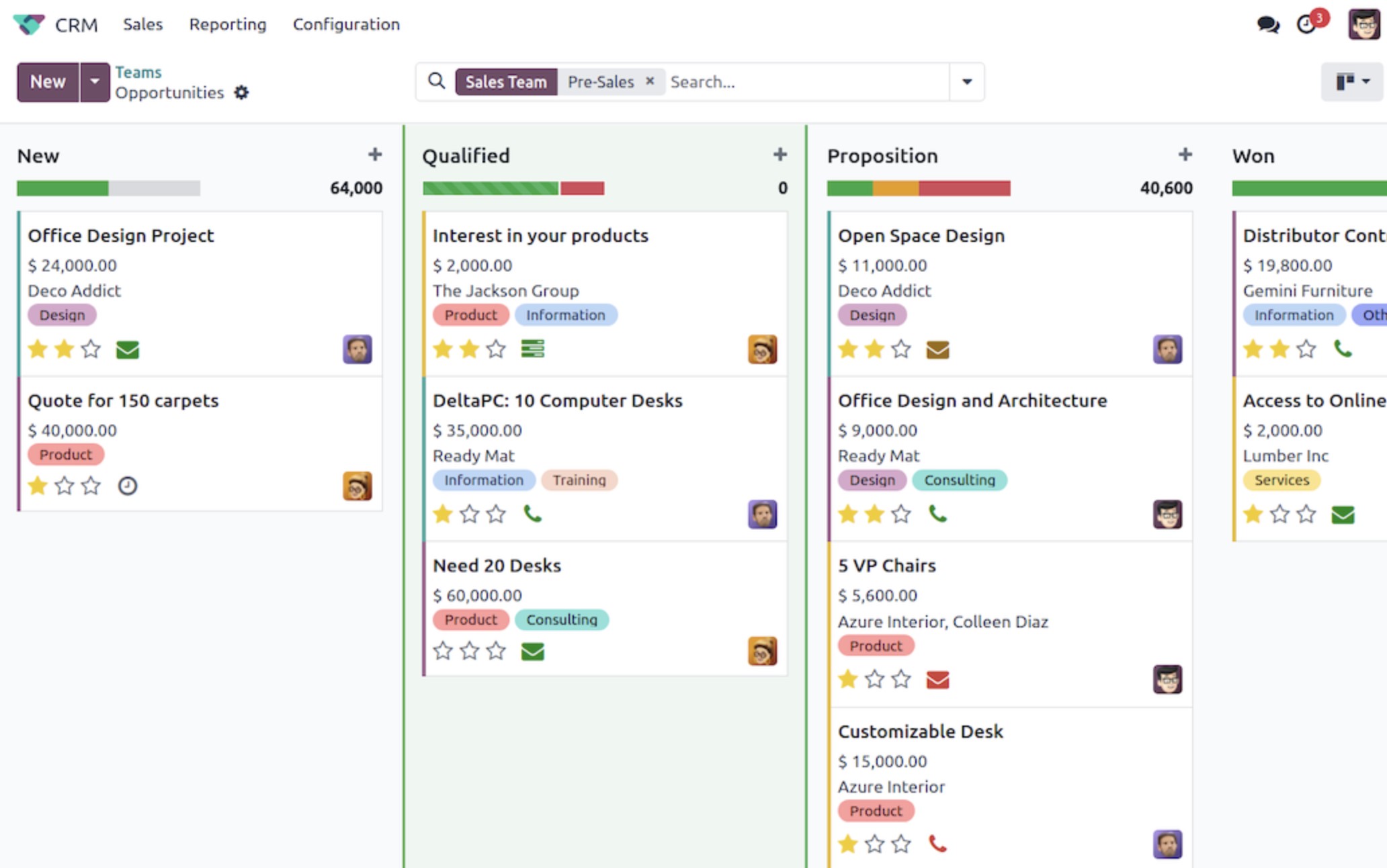
#7. Odoo: Modular ERP & Operations Management in One Ecosystem
Odoo is a modular business management platform that combines ERP functionality with operational control tools across departments.
Like AgilityPortal, Odoo aims to centralise business processes into a unified system. However, while AgilityPortal focuses strongly on workflow coordination, communication, and operational visibility, Odoo leans heavily into ERP-style management — covering finance, inventory, manufacturing, HR, CRM, and more within a modular framework.
For organisations evaluating scalable company operations software, Odoo offers broad system coverage rather than just task or project management.
Instead of stitching together multiple specialised apps, companies can activate modules based on operational needs — creating a connected business environment.
What Users LikeOdoo's biggest strength is modular flexibility.
Businesses can implement:
- Inventory and supply chain management
- Accounting and financial reporting
- CRM and sales workflows
- HR and payroll modules
- Manufacturing and production tracking
This allows companies to manage operations, finance, and logistics within one ecosystem.
Because modules are integrated by design, data flows more consistently between departments compared to disconnected tools.
For growing businesses seeking ERP-level operational control without immediately investing in large enterprise platforms, Odoo provides a scalable pathway.
Who Is Odoo For?Odoo works best for:
- Businesses needing ERP-style operational coverage
- Companies managing inventory, supply chain, or production workflows
- Organisations wanting modular system expansion
- Growing enterprises seeking integrated finance + operations control
It performs particularly well where operational management intersects with accounting and inventory systems.
What We Don't LikeOdoo's modular flexibility can introduce complexity.
Implementing multiple modules often requires configuration expertise, and deeper customisation may demand technical support.
User experience can feel less streamlined compared to platforms that prioritise interface simplicity.
For organisations primarily seeking workflow visibility and team coordination — without ERP-level financial depth — lighter platforms may feel easier to deploy.
PricingOdoo operates on a modular pricing model.
Costs vary depending on selected modules and user count. Entry pricing can appear competitive, but total investment increases as additional modules are activated.
Because of its ERP-style architecture, implementation and configuration costs should also be considered when budgeting.
Odoo
Modular ERP & Operations Management Platform
Odoo is a modular ERP and operations management software platform that helps businesses manage finance, inventory, purchasing, sales, and internal operations through connected apps in one ecosystem.
#8. Zoho Projects: Affordable Project & Operations Coordination for Growing Teams

#8. Zoho Projects: Affordable Project & Operations Coordination for Growing Teams
Zoho Projects is a cloud-based project and task management platform designed to help teams plan, track, and deliver work efficiently.
As part of the broader Zoho ecosystem, it integrates naturally with Zoho CRM, finance, and collaboration tools — making it appealing to businesses already operating within that environment.
For companies exploring practical operations management tools without enterprise-level cost, Zoho Projects offers structured task tracking, time management, and reporting in a budget-friendly package.
It focuses on organised execution rather than heavy ERP-style governance.
What Users Like
Zoho Projects delivers solid functionality at a competitive price point.
Key strengths include:
- Task and milestone tracking
- Gantt charts and timeline planning
- Time tracking and billing integration
- Workflow automation rules
- Issue tracking and team collaboration tools
The interface is straightforward, making it accessible for teams that need structure without complexity.
Because it connects with other Zoho products, data can move more seamlessly between sales, finance, and operational teams.
For small to mid-sized organisations seeking reliable project coordination, it provides strong value relative to cost.
Who Is Zoho Projects For?
Zoho Projects works best for:
- Small to mid-sized businesses
- Teams already using the Zoho ecosystem
- Organisations seeking affordable operational coordination
- Departments managing structured projects with timeline visibility
It performs particularly well in environments where cost control is a priority.
What We Don't Like
Zoho Projects is primarily project-focused rather than a full operational control platform.
It does not provide deep compliance management, enterprise governance layers, or ERP-style financial control.
Advanced reporting and customisation options may be more limited compared to higher-end enterprise tools.
Organisations with complex multi-department operational oversight requirements may require additional systems.
Pricing
Zoho Projects operates on a tiered SaaS pricing model, including a limited free plan for small teams.
Paid plans remain competitively priced compared to many other operations platforms, making it one of the more accessible entry points in the market.
Costs increase based on user count and feature access, but overall pricing remains attractive for growing businesses.
Zoho Projects
Affordable Project & Operations Management Software
Zoho Projects is a cloud-based project and operations management software designed to help teams plan work, track progress, manage timelines, and improve collaboration without enterprise-level complexity.
#9. SAP Business One: ERP-Driven Operational Control for Growing Enterprises

#9. SAP Business One: ERP-Driven Operational Control for Growing Enterprises
SAP Business One is an enterprise resource planning (ERP) platform designed for small to mid-sized businesses that need deeper financial and operational integration.
Unlike lightweight coordination tools, SAP Business One focuses on unifying finance, supply chain, inventory, sales, and purchasing into a single structured system.
For organisations evaluating robust operations management tools, SAP Business One delivers end-to-end business visibility rather than just task or workflow tracking.
It is built to centralise operational data, reduce duplication, and strengthen financial oversight across departments.
What Users LikeSAP Business One is valued for its structured ERP foundation.
Key strengths include:
- Integrated financial management and reporting
- Inventory and supply chain tracking
- Procurement and order management workflows
- Real-time business performance dashboards
- Strong data governance and audit controls
Because operational data connects directly to financial records, leadership gains clearer insight into profitability and cost control.
The platform also supports multi-location management and industry-specific configurations, making it adaptable for manufacturing, wholesale, and distribution environments.
Who Is SAP Business One For?SAP Business One works best for:
- Mid-sized businesses needing ERP-level integration
- Companies managing inventory and supply chains
- Organisations requiring strong financial oversight
- Growing enterprises replacing disconnected legacy systems
It performs particularly well in operational environments where finance and logistics are tightly connected.
What We Don't LikeSAP Business One is not a lightweight solution.
Implementation often requires consulting support, configuration expertise, and structured onboarding.
The interface may feel complex for teams accustomed to modern SaaS-style simplicity.
For companies seeking flexible workflow coordination without deep ERP financial management, it may be more system than necessary.
PricingSAP Business One operates on a custom pricing model.
Costs vary based on deployment type (cloud or on-premise), user licenses, and required modules.
Because it is ERP-focused, organisations should also account for implementation, configuration, and long-term support costs when evaluating total investment.
SAP Business One
ERP-Driven Operations & Financial Management for Growing Businesses
SAP Business One is an integrated enterprise resource planning (ERP) software designed for small to mid-sized businesses that need structured financial control, supply chain oversight, and operational visibility in a unified system.
#10. Oracle NetSuite: Enterprise Cloud ERP for End-to-End Operational Control
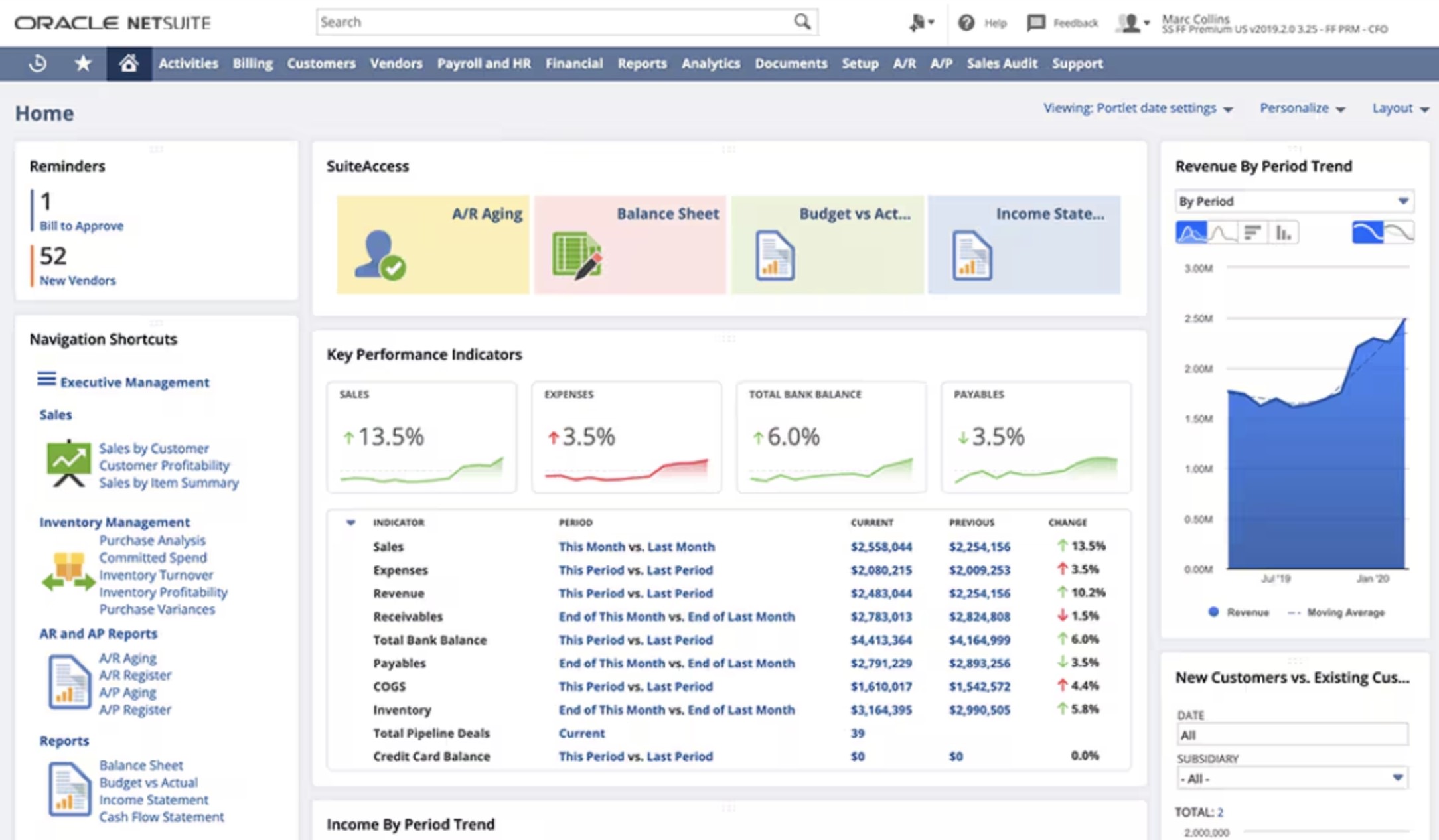
#10. Oracle NetSuite: Enterprise Cloud ERP for End-to-End Operational Control
Oracle NetSuite is a cloud-based ERP platform designed to provide large and fast-growing organisations with complete operational and financial visibility.
Unlike mid-market project tools, NetSuite is built as a full business management system — connecting finance, procurement, inventory, order management, and reporting within a unified cloud architecture.
For companies assessing enterprise-level operations management tools, Oracle NetSuite delivers deep integration between operational execution and financial performance.
It is designed for organisations that require structured governance, scalability, and global operational oversight.
What Users LikeNetSuite is known for its comprehensive coverage across business functions.
Core strengths include:
- Real-time financial and operational reporting
- Inventory and supply chain management
- Order-to-cash process automation
- Multi-entity and multi-currency support
- Advanced analytics and forecasting tools
Because finance and operations operate inside the same system, leadership gains stronger control over margins, costs, and performance metrics.
The cloud-based model also supports international operations and remote accessibility without on-premise infrastructure.
For large organisations scaling rapidly, NetSuite provides structured control with enterprise-grade stability.
Who Is Oracle NetSuite For?NetSuite works best for:
- Large or rapidly scaling organisations
- Businesses requiring global operational oversight
- Companies needing deep financial integration with operations
- Enterprises replacing fragmented legacy ERP systems
It performs particularly well in environments where operational complexity spans multiple regions, subsidiaries, or product lines.
What We Don't LikeOracle NetSuite is a significant investment.
Implementation can be complex and may require specialised consulting partners.
The platform's depth means it can feel overwhelming for smaller teams or businesses without dedicated internal system administrators.
For organisations seeking lightweight workflow management rather than full ERP transformation, it may exceed operational needs.
PricingOracle NetSuite operates on a custom enterprise pricing model.
Costs depend on modules, user licenses, business size, and implementation scope.
Because it is positioned as a full ERP system, total investment includes licensing, deployment, configuration, and ongoing support considerations.
Oracle NetSuite
Cloud ERP & Enterprise Operations Management Platform
Oracle NetSuite is a cloud-based enterprise operations management software that unifies finance, supply chain, inventory, and business performance reporting into a single scalable ERP system designed for growing and global organisations.
#11. Trello: Simple Kanban-Based Workflow Coordination
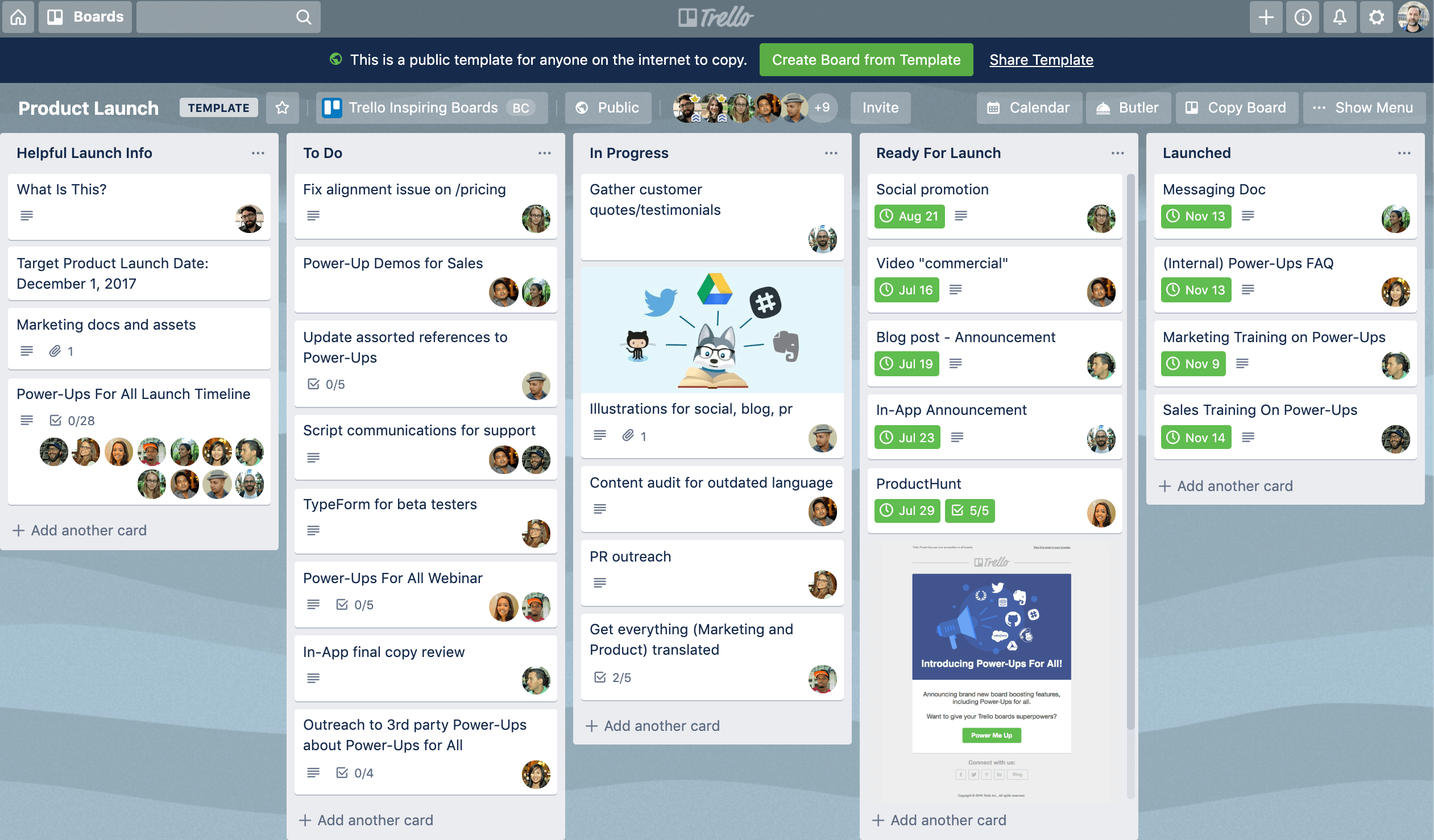
#11. Trello: Simple Kanban-Based Workflow Coordination
Trello is a lightweight, visual task management platform built around the Kanban board concept.
Unlike full-scale ERP or enterprise operations management tools, Trello focuses on simplicity. It allows teams to organise work into boards, lists, and cards — making workflow stages easy to visualise at a glance.
For businesses that need basic coordination without heavy configuration, Trello offers an intuitive starting point.
Its strength is clarity. Teams can see what's planned, in progress, and completed without navigating complex dashboards or reports.
What Users Like
Trello is popular because it's easy to use and quick to deploy.
Key advantages include:
- Drag-and-drop Kanban boards
- Simple task assignment and due dates
- Checklists and attachments within cards
- Basic automation through "Butler" rules
- Wide range of third-party integrations
The visual format makes it easy for teams to understand workflow status instantly.
Because it requires minimal setup, organisations can begin using it within minutes.
For small teams, Trello reduces email dependency and provides structured task visibility without overwhelming features.
Who Is Trello For?
Trello works best for:
- Small teams and startups
- Departments managing straightforward workflows
- Organisations needing lightweight operational coordination
- Teams transitioning away from informal task tracking
It performs particularly well in environments where simplicity and speed matter more than deep reporting.
What We Don't Like
Trello is not designed for complex operational oversight.
It lacks advanced reporting, structured governance controls, and enterprise-level compliance features found in more robust operations software platforms.
As teams scale, board management can become cluttered, and visibility across multiple projects may require additional configuration.
Organisations requiring detailed analytics or multi-department dashboards may outgrow Trello quickly.
Pricing
Trello offers a free plan with core Kanban functionality.
Paid tiers unlock additional automation, advanced views, and administrative controls.
Pricing remains affordable compared to enterprise systems, making it accessible for small teams — but growing organisations may need higher-tier plans to expand functionality.
Trello
Simple Kanban-Based Workflow Management
Trello is a visual workflow management software built around Kanban boards. It helps teams organise tasks, track progress, and coordinate projects through an intuitive drag-and-drop interface designed for simplicity.
#12. Microsoft Dynamics 365: Enterprise Operations & Business Management at Scale
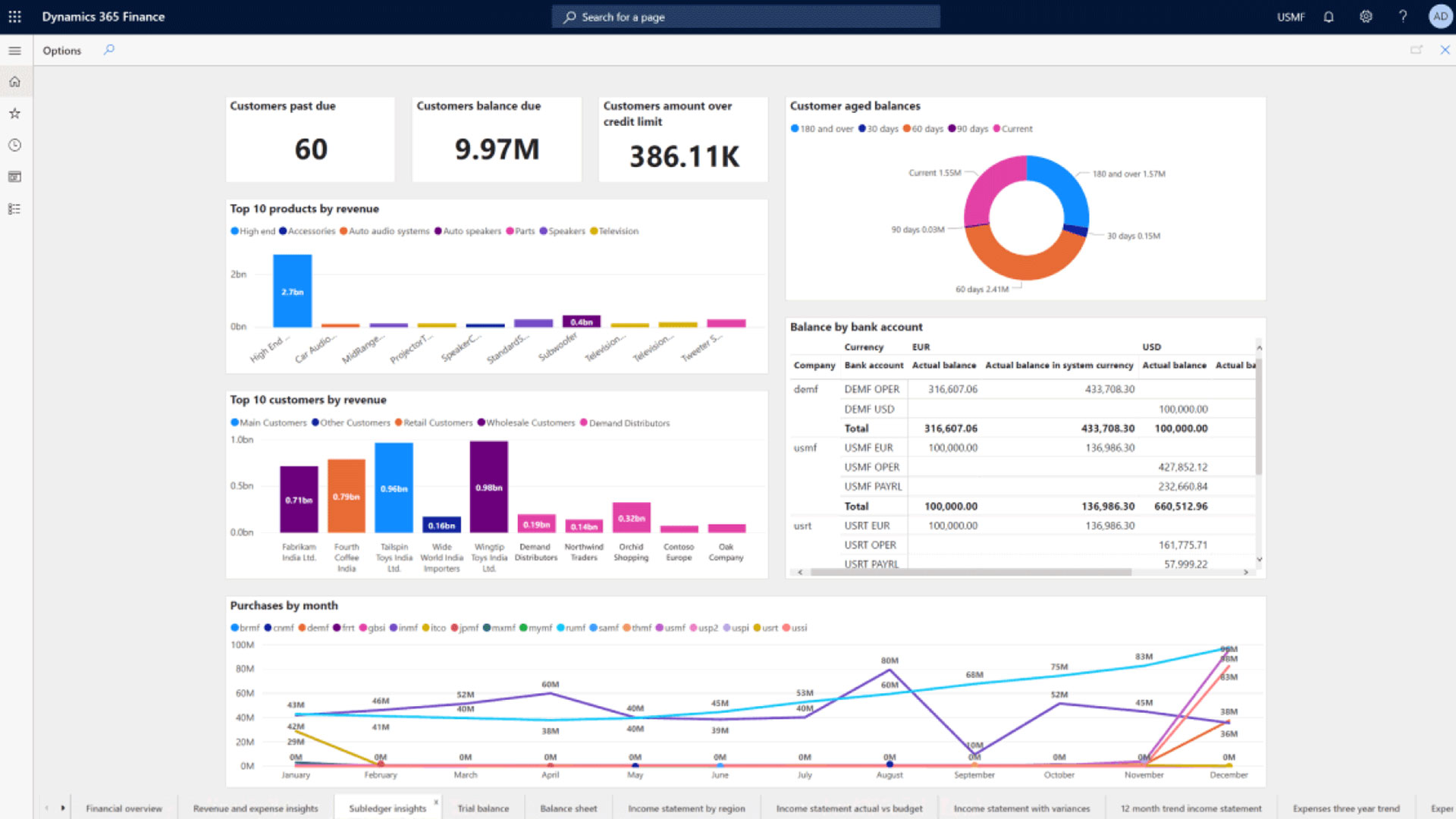
#12. Microsoft Dynamics 365: Enterprise Operations & Business Management at Scale
Microsoft Dynamics 365 is a comprehensive business application platform that combines ERP and CRM capabilities within a modular cloud ecosystem.
Unlike lightweight coordination tools, Dynamics 365 is built to manage complex operational environments — connecting finance, supply chain, sales, customer service, and project operations under one structured system.
For organisations evaluating advanced operations management tools, Dynamics 365 provides deep integration between operational workflows and financial performance data.
It is designed for enterprises that require structured governance, scalability, and cross-department visibility.
What Users Like
Dynamics 365 delivers enterprise-grade functionality across multiple business areas.
Core strengths include:
- Integrated finance and operations management
- Supply chain and inventory oversight
- Project operations and resource planning
- Advanced reporting and analytics
- Role-based dashboards and permission controls
Because modules are connected within the same ecosystem, data flows consistently across departments.
Organisations already using Microsoft's broader technology stack often benefit from tighter integration and familiar user environments.
For large businesses managing complex operational structures, Dynamics 365 provides a scalable and controlled framework.
Who Is Microsoft Dynamics 365 For?
Dynamics 365 works best for:
- Large enterprises with multi-department operations
- Organisations requiring deep ERP and CRM integration
- Companies managing global supply chains
- Businesses replacing legacy enterprise systems
It performs particularly well in environments where operational complexity intersects with financial governance and customer management.
What We Don't Like
Dynamics 365 is not a lightweight solution.
Implementation can be resource-intensive and may require certified partners or consultants.
Licensing structures can become complex depending on modules selected.
For smaller organisations or teams seeking straightforward workflow coordination, it may exceed operational requirements.
Pricing
Microsoft Dynamics 365 operates on a modular pricing model.
Costs vary depending on selected applications (Finance, Supply Chain, Project Operations, CRM modules) and user licensing levels.
Because it is positioned as an enterprise platform, total investment should factor in configuration, deployment, and ongoing support costs alongside subscription fees.
Microsoft Dynamics 365
Enterprise ERP & Operations Management Platform
Microsoft Dynamics 365 is a comprehensive enterprise operations management platform that combines ERP and CRM capabilities. It supports finance, supply chain, project operations, and business process automation for large and complex organisations.
How to Select the Right Operations Platform (Without Becoming Another Failure Statistic)
Choosing the wrong system is expensive.
Choosing the right one requires discipline.
Here's a practical framework to evaluate any operational platform properly — before contracts are signed and budgets are locked in.
Step 1: Identify Operational Friction Points
Before reviewing vendors, audit your current processes.
Where are delays happening?
Which approvals stall progress?
Where does information get lost?
Which reports take hours to compile?
Document bottlenecks clearly. A workflow management system should solve defined execution gaps — not vague frustration.
If you can't describe the problem in measurable terms, no software will fix it.
Step 2: Define Measurable Performance Outcomes
Avoid selecting tools based on features alone.
Instead, define what improvement looks like:
- Reduced cycle time
- Lower operational cost per project
- Increased team productivity
- Improved cross-department visibility
- Stronger compliance oversight
Clear KPIs turn software into a performance driver rather than a digital filing cabinet.
Operational technology should move metrics — not just organise tasks.
Step 3: Prioritise User Adoption Over Feature Depth
Complex systems often impress decision-makers but frustrate employees.
The right business operations platform should:
- Simplify daily workflows
- Reduce manual updates
- Provide intuitive dashboards
- Require minimal training
If teams avoid the system, data becomes incomplete and reporting loses credibility.
Adoption determines long-term ROI — not the length of the feature list.
Step 4: Run a Controlled Pilot Before Full Rollout
Never deploy company-wide immediately.
Test the system with:
- One department
- A cross-functional team
- A defined operational workflow
Monitor usage patterns, friction points, and reporting accuracy.
A structured pilot phase reveals configuration gaps and adoption challenges before they scale across the organisation.
Step 5: Insist on Clear, Real-Time Reporting
Operational clarity depends on visibility.
Before committing, ensure the platform provides:
- Live dashboards
- Department-level drill-downs
- Transparent activity logs
- Clear performance indicators
If leadership must manually compile reports, the system isn't delivering operational insight.
Data should drive decisions automatically — not require weekly spreadsheet consolidation.
The right operational management solution aligns with your workflows, supports measurable improvement, and earns consistent adoption across teams.
The wrong one becomes another expensive tool that looked impressive during the demo.
Execution discipline — not marketing claims — determines success.
Here Are the Common Mistakes Businesses Make When Choosing Operations Software
This is where most companies go wrong.
They don't fail because there aren't good platforms available.
They fail because they choose based on the wrong criteria.
If you want your operations software investment to deliver measurable impact, avoid these common mistakes.
1. Choosing Based on Features Instead of Problems
It's easy to get impressed by long feature lists.
AI dashboards. Advanced automation. Custom fields. Integrations everywhere.
But if you haven't clearly defined your operational bottlenecks, features are meaningless.
Software should solve a specific execution problem — not just look powerful in a demo.
When companies shop features instead of fixing friction points, they end up with complexity rather than clarity.
2. Ignoring Adoption Risk
Decision-makers often assume teams will "just adapt."
They won't.
If the platform feels complicated, slow, or disruptive to daily work, employees revert to email, spreadsheets, and side conversations.
Low adoption quietly kills ROI.
When evaluating any operational management system, ask one critical question:
Will our frontline teams actually use this every day?
3. Underestimating Implementation Effort
Many organisations treat deployment like flipping a switch.
In reality, implementation requires:
- Workflow mapping
- Role definition
- Permission setup
- Training
- Change management
If internal ownership is weak, the rollout stalls.
And stalled rollouts rarely recover.
Operations platforms require operational leadership — not just IT involvement.
4. Over-Customising Too Early
Flexibility is powerful. But over-customisation creates fragility.
Companies often redesign every workflow before understanding how the system performs in its default state.
The result?
Long setup timelines.
Higher costs.
Harder upgrades later.
Start simple. Optimise after adoption stabilises.
5. Failing to Evaluate Integration Depth
No operational system works alone.
If your platform doesn't connect cleanly to finance tools, HR systems, CRM platforms, or reporting environments, you'll create data silos.
Manual exports. Duplicate entries. Reporting inconsistencies.
Disconnected systems undermine operational visibility and destroy trust in dashboards.
Integration quality matters more than integration quantity.
6. Overlooking Compliance and Risk Controls
Many companies focus on productivity but ignore governance.
Modern operations involve documentation, approvals, data access controls, and audit readiness.
If compliance isn't built into workflows, accountability becomes manual — and manual oversight breaks under scale.
Operational oversight should be embedded, not improvised.
7. Choosing Based on Brand Name Alone
Well-known platforms feel safe.
But popularity doesn't guarantee alignment with your processes.
Every organisation operates differently. A system that works for a global enterprise may be excessive for a mid-sized team — and vice versa.
Fit matters more than brand recognition.
8. Not Calculating Total Cost of Ownership
Subscription pricing is only part of the equation.
You must also consider:
- Implementation time
- Training effort
- Productivity dips during rollout
- Custom development
- Ongoing admin overhead
The cheapest plan upfront isn't always the lowest long-term cost.
Choosing the wrong operational platform doesn't just waste budget.
It creates friction, reduces trust in data, and slows execution across the organisation.
The right decision isn't about buying the most advanced system.
It's about selecting the one your teams will actually use — consistently, at scale, with measurable impact.
Final Verdict
The biggest risk isn't selecting the "wrong" operations software.
It's implementing any platform without first fixing the underlying process.
Software does not create operational discipline. It exposes it.
If workflows are unclear, ownership is weak, and accountability is inconsistent, even the most advanced system will amplify those flaws. You don't get transformation — you get structured inefficiency.
Operations software should remove friction, not introduce it.
It should reduce manual work, clarify responsibility, and provide real-time visibility — not add extra steps or layers of complexity. If teams feel slowed down instead of supported, adoption drops. And once adoption drops, value disappears.
The companies that succeed with operational platforms follow a simple principle:
They optimise process first.
Then they layer technology on top.
They don't chase features.
They prioritise usability.
They don't deploy blindly.
They measure impact.
Winning organisations aren't the ones with the longest feature list.
They're the ones where the system is used consistently, data is trusted, and execution becomes predictable.
That's the difference between owning software — and letting software own you.
Frequently Asked Questions
What is operations software?
Operations software is a digital system designed to manage workflows, coordinate teams, track performance, enforce compliance, and provide real-time operational visibility.
Unlike isolated task apps, modern platforms centralise execution across departments — helping businesses reduce bottlenecks, improve accountability, and monitor KPIs in one environment.
Common operations management software examples include platforms like Asana and Trello for project coordination, as well as broader systems such as ERP platforms for financial and supply chain control.
What is operations management software?
Operations management software is a structured business platform that helps organisations plan, execute, and optimise day-to-day processes.
It typically includes:
- Workflow automation
- Task and project tracking
- Performance dashboards
- Reporting and analytics
- Compliance oversight
The goal is not just task organisation — it's measurable operational control.
Why do operations management systems fail?
Up to 70% of implementations underperform due to:
- Poor user adoption
- Unclear operational strategy
- Weak executive ownership
- Limited integration with finance, HR, or CRM systems
- Over-customisation before stabilisation
The issue is rarely the tool itself. It's misalignment between process readiness and system deployment.
Is operations software the same as ERP?
No.
ERP (Enterprise Resource Planning) systems focus primarily on finance, supply chain, procurement, and accounting control.
Operations software often focuses more on workflow visibility, cross-team coordination, dashboards, and execution oversight — though some platforms blend both approaches
What is the best operations management software?
There is no universal "best."
The best solution depends on:
- Company size
- Operational complexity
- Compliance requirements
- Integration needs
- Budget
Enterprise organisations may lean toward ERP-driven platforms, while mid-sized teams often prefer flexible workflow systems.
For organisations seeking unified execution, platforms like AgilityPortal operations management solutions combine workflow control, communication, and dashboards into one environment.
What is the best PMO software?
The best PMO (Project Management Office) software depends on governance needs and reporting depth.
PMO-focused platforms typically offer:
- Portfolio visibility
- Resource allocation tracking
- Cross-project reporting
- Risk management tools
Enterprise tools such as Microsoft Dynamics 365 or structured workflow systems may suit complex environments.
What is the best WFM software?
WFM (Workforce Management) software focuses on scheduling, time tracking, labour forecasting, and compliance.
It is different from general operations platforms but can overlap in workforce visibility.
The best WFM software supports automation, payroll integration, and labour cost monitoring.
Which BPM tool is the best?
Business Process Management (BPM) tools are designed to model, automate, and optimise business processes.
The best BPM solution depends on:
- Process complexity
- Need for modelling and analytics
- Integration requirements
- Compliance oversight
Strong BPM tools support structured workflows and measurable process optimisation rather than simple task lists.
Are there free operations management software options?
Yes, some platforms offer limited free plans.
Search queries like operations management software free or best operations management software free often surface entry-level tiers from project management tools.
However, free versions typically:
- Limit automation
- Restrict reporting
- Cap user numbers
- Exclude compliance features
They may work for small teams but rarely support enterprise-scale operations.
What are operations management tools and techniques?
Operations management tools and techniques include both software and analytical methods.
Examples include:
- Workflow automation systems
- KPI dashboards
- Lean process models
- Six Sigma methodologies
- Resource planning frameworks
Many platforms combine digital execution tools with operational models and analytical approaches to improve efficiency.
What are the 4 types of operations management?
The four core types of operations management commonly referenced are:
- Process-based operations
- Project-based operations
- Manufacturing operations
- Service-based operations
Each requires different tools, visibility levels, and performance measurement strategies.
Where can I find an operational tools list?
An operational tools list typically includes:
- Project and task management platforms
- Workflow automation software
- ERP systems
- BPM tools
- Workforce management systems
- Reporting and analytics dashboards
The right combination depends on your business model and operational scale.
Is AgilityPortal software suitable for operations management?
AgilityPortal provides an operations-focused platform that unifies workflows, communication, document governance, and real-time dashboards.
For companies looking to consolidate multiple tools into one structured system, AgilityPortal software acts as a central execution layer.
What about tools like Asana or Trello?
Platforms like Asana and Trello are popular for workflow coordination and project tracking.
They work well for structured task management but may require additional systems for compliance oversight, ERP integration, or advanced analytics in larger organisations.
What is agency software in operations?
Agency software typically refers to platforms built for marketing, consulting, or creative agencies.
These systems often combine:
- Project management
- Client communication
- Billing and invoicing
- Resource allocation
They serve a specific operational model rather than broad enterprise operations.
Are Reddit discussions reliable for finding the best operations management software?
Searches like best operations management software Reddit can provide user opinions and implementation feedback.
However, Reddit discussions are anecdotal and should be combined with structured evaluation criteria, verified reviews, and direct platform trials.
AI Summary
- Up to 70% of operations software implementations fail due to poor adoption, unclear strategy, and weak executive ownership — not because the technology itself is flawed.
- Modern operations management tools must unify workflows, reporting, collaboration, and compliance into one connected system to eliminate data silos.
- Real-time dashboards and operational visibility help leaders identify bottlenecks, monitor performance, and prevent execution breakdowns before they escalate.
- User adoption drives ROI — systems that reduce friction and simplify daily work consistently outperform feature-heavy but complex platforms.
- Strong integration across finance, HR, CRM, and other business systems is critical to maintaining accurate reporting and automation reliability.
- The right operations software aligns with clear process design and measurable KPIs, transforming execution from reactive to controlled and predictable.
Most Popular Posts

Effective communication among team members is vital for the productivity and success of any organization. Surprisingly, 60% of companies lack a long-term internal communication strategy, which p...


Businesses thrive on communication for efficiency, productivity and accomplishment. When the right information is passed from the right designation in the organization, it promotes positivity an...
Categories
Blog
(2986)
Business Management
(376)
Employee Engagement
(223)
Digital Transformation
(192)
Growth
(143)
Intranets
(137)
Remote Work
(63)
Sales
(53)
Collaboration
(48)
Customer Experience
(30)
Culture
(29)
Knowledge Management
(28)
Project management
(28)
Leadership
(20)
Comparisons
(9)
News
(1)

Related Posts

Recruitment challenges remain one of the biggest obstacles to growth for deep tech companies in 2026. As demand for AI engineers, data scientists, robotics specialists, semiconductor experts, and biotech researchers continues to rise, organizat...

The rise of artificial intelligence is transforming the way SEO professionals research keywords, analyze competitors, monitor rankings, and optimize content. According to a 2024 HubSpot survey, more than 64% of marketers already use AI tools in...

The DEI maturity model represents a structured approach to assessing and enhancing diversity, equity, and inclusion within corporate environments. This model serves as a crucial framework for organizations aiming to not only diversify their wor...

If you've ever managed relationships with partners, distributors, resellers, suppliers, or clients, you've probably experienced the frustration of searching through endless email threads, outdated spreadsheets, and scattered documents just to find a ...

We all know that Fund management plays a critical role in the success of any partner program. Whether you're managing marketing development funds (MDF), co-marketing budgets, partner incentives, rebates, training initiatives, or broader partner ...


Jill Romford
I am a digital nomad, lover of exploring new places and making friends.
I love to travel and I love the internet. I take pictures of my travels and share them on the internet using Instagram.
Traveler, entrepreneur, and community builder. I share my insights on digital marketing and social media while inspiring you to live your fullest life.
Ready to learn more? 👍
One platform to optimize, manage and track all of your teams. Your new digital workplace is a click away. 🚀
Free for 14 days, no credit card required.