
Insight Blog
Agility’s perspectives on transforming the employee's experience throughout remote transformation using connected enterprise tools.
26 minutes reading time
(5120 words)
Cyber Essentials Explained: What UK Businesses Need to Know in 2026

Cyber Essentials Explained: What UK Businesses Need to Know in 2026
Learn what Cyber Essentials means, its five security controls, certification routes and practical steps global businesses can take in 2026.
Cyber Essentials Explained: What UK Businesses Need to Know in 2026

Cyber Essentials is often described as a technical certification, but it is really a practical test of whether a business has the basics under control. That matters because cyber incidents rarely stay inside the IT department.
They can interrupt payroll, lock employees out of systems, expose customer information and leave managers trying to explain what happened.
The latest UK government survey found that 43% of businesses identified a cyber breach or attack during the previous 12 months. For medium-sized businesses this rose to 65%, and for large businesses it reached 69%.
Phishing was the most common threat, affecting 38% of businesses.
43%
of businesses
The latest UK government survey found that 43% of businesses identified a cyber breach or attack during the previous 12 months. The rate rose to 65% for medium-sized businesses and 69% for large businesses.
As Turn Key's IT professionals put it, strong cyber security is not only about responding when something goes wrong; it is about identifying weaknesses early, reducing disruption and keeping critical systems available.
That is exactly where Cyber Essentials helps: it gives businesses a clear, practical baseline for securing devices, accounts, software and everyday access.
For organisations operating internationally, Cyber Essentials is particularly relevant when they have UK staff, work with UK customers, bid for UK contracts or need to reassure partners that their everyday security controls are not being ignored.
This guide explains what the scheme covers, what certification involves, where businesses get caught out and how to make security easier for employees to follow.
Key Takeaways
- Cyber Essentials is the UK government-recommended baseline for protecting organisations against common online threats.
- The scheme focuses on five practical controls: firewalls, secure configuration, security updates, user access control and malware protection.
- Certification can strengthen customer trust and support tender requirements, but it does not guarantee a business will never experience a cyber attack.
- Cyber Essentials only works when technical controls are supported by clear policies, role-specific training and easy incident reporting.
- Cyber Essentials Plus assesses the same five controls but adds independent technical testing to provide a higher level of assurance.
- Long-term cyber resilience depends on regular reviews, clear ownership and making secure behaviour easy for employees to follow.
So, what is Cyber Essentials actually?
Cyber Essentials is the UK government-recommended minimum standard for cyber security.
It is designed to help organisations of any size put essential protections in place against the most common online threats, such as phishing, malware, unauthorised access and attacks that exploit outdated software.
The scheme was developed by the National Cyber Security Centre (NCSC) and focuses on five core technical controls:
- Firewalls and secure internet connections
- Secure configuration of devices and software
- Security update management
- User access control
- Malware protection
Put simply, Cyber Essentials checks whether the digital "doors" to your business are properly locked.
It looks at the everyday settings and processes that can stop a straightforward attack from becoming a serious operational problem.
That said, certification is not a guarantee that a business will never experience a breach. Sophisticated attacks, employee mistakes, supplier vulnerabilities and new threats can still create risk. It is also not a replacement for GDPR compliance, ISO 27001 certification, a tested incident-response plan or proper supplier due diligence. Those areas need their own attention.
Cyber Essentials should not sit solely with the IT team either.
IT may manage the technical controls, but HR needs secure onboarding and leaver processes, managers need to reinforce good practice, and employees need to know how to spot and report something suspicious.
Although Cyber Essentials is a UK scheme, it is relevant for global organisations with UK employees, customers, suppliers or public-sector contracts. It provides a recognised baseline that shows the organisation takes practical cyber security seriously.
Why businesses are taking Cyber Essentials more seriously in 2026
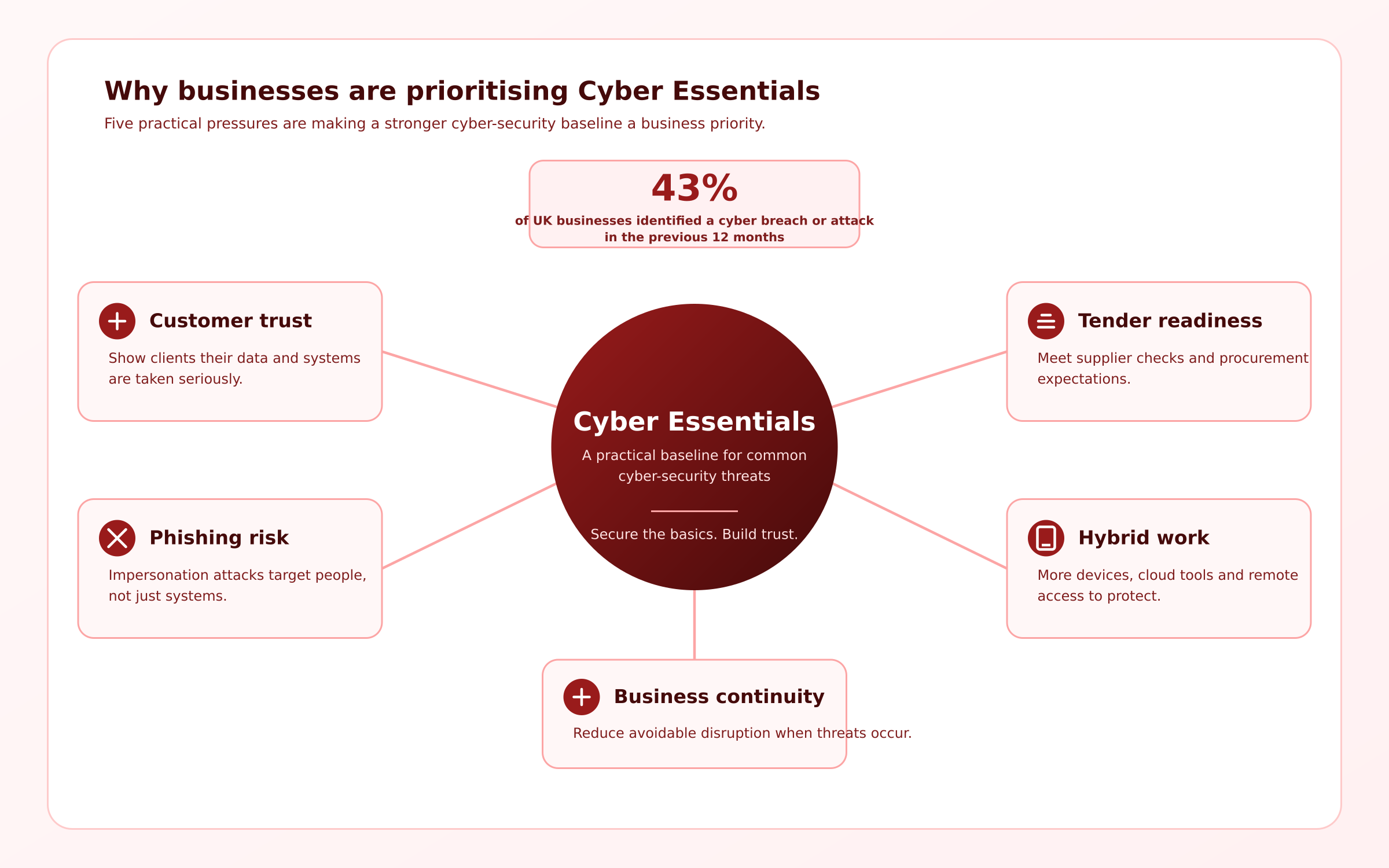
Why businesses are taking Cyber Essentials more seriously in 2026
Cyber security has become a business issue, not simply an IT task.
Customers increasingly expect proof that the companies they work with are protecting data responsibly, while procurement teams often include security questions in supplier questionnaires and tender processes. For some organisations, Cyber Essentials certification can be the difference between progressing to the next stage of a contract opportunity or being ruled out early.
The workplace has also changed. Employees now access company systems through cloud platforms, home networks, mobile devices and shared online tools. This flexibility helps people work efficiently, but it also creates more places where poor access controls, outdated software or weak passwords can cause real problems.
Phishing, impersonation and compromised accounts remain especially disruptive because they target people as much as technology. A convincing message can appear to come from a manager, supplier or finance colleague, making it easy for a rushed employee to click a malicious link or share sensitive information.
43%
of businesses
The latest UK government survey found that 43% of businesses identified a cyber breach or attack in the previous 12 months. The figure is likely conservative because it only includes incidents organisations were able to identify and willing to report.
Unnoticed attacks and unreported incidents are not fully reflected in the data.
The latest UK government survey found that 43% of businesses identified a cyber breach or attack in the previous 12 months. The figure is important, but it is likely conservative: it only includes incidents organisations were able to identify and willing to report. That means unnoticed attacks and unreported incidents are not fully reflected in the data.
As NSSAZ's website highlights through its focus on managed IT and security support, businesses need a structured approach to protecting systems, not a last-minute response after something has already gone wrong. Cyber Essentials gives organisations a clear starting point: secure the basics, document the process and make security part of everyday work.
Related Cybersecurity, Employee Security and Business Resilience Guides
Cyber Essentials is a practical starting point, but long-term cyber resilience also depends on secure remote working, strong access controls, employee awareness, proactive testing and a clear plan for responding to threats. These AgilityPortal guides explore the wider steps businesses can take to protect their people, systems and sensitive information.
- 5 Must-Have Cyber Security Control Measures for Small Businesses – practical security controls that help smaller organisations reduce common risks.
- Why Is Cybersecurity Important? The Real Cost of Ignoring Data Protection – understand why cyber security affects business continuity, trust and long-term growth.
- How To Take Control of Your Remote Work Cybersecurity Strategy – protect remote employees, devices, networks and sensitive business data.
- Cybersecurity: 5 Key Trends in Cloud-Based Intranet Security and Access Control – explore access management, secure workplace technology and cloud security priorities.
- The Role Of Penetration Testing In Cybersecurity Strategy – learn how testing can uncover weaknesses before attackers exploit them.
- What Is QR Phishing? How Quishing Can Steal Your Data – help employees recognise a growing phishing threat across mobile and workplace devices.
- Why Is Continuous Exposure Validation in Cybersecurity Important? – move beyond one-off checks and validate whether security controls work over time.
- The Cybersecurity Blind Spots Businesses Miss – understand where managed detection and response can support stronger threat visibility.
- Managed IT Support Services: Why Smart Workplaces Act Before a Costly Cyberattack – see how proactive IT support can help maintain secure, reliable workplace technology.
- 7 Hidden Cybersecurity Risks Putting Your Distributed Workforce in Danger – identify common security gaps affecting remote and distributed teams.
The five Cyber Essentials requirements, in plain English
Cyber Essentials is built around five core controls.
They are not complicated concepts, but they do require consistent attention.
Together, they help prevent the common weaknesses cyber criminals look for first.
| Control | What it means in practice | Common workplace failure |
| Firewalls | Create a security barrier between your network, devices and the internet. This includes properly securing business routers and internet-connected systems. | Default router settings are never changed, or unknown devices are allowed onto the network. |
| Secure configuration | Set up laptops, phones, software and cloud tools securely from day one. Remove unnecessary apps, accounts and settings that could create an opening for attackers. | A new starter receives a device with too much access, unnecessary software or weak default settings. |
| Security update management | Keep operating systems, apps, browsers and security tools supported and updated. Attackers often use known weaknesses that already have a security fix available. | Teams continue using old software because updating it feels inconvenient or may interrupt work. |
| User access control | Give employees access only to the systems and information they need for their role. Review access when someone changes jobs or leaves the company. | Shared accounts are used, former employees still have access, or too many people have administrator privileges. |
| Malware protection | Use appropriate tools and safe working practices to prevent, detect and contain malicious software, including ransomware and spyware. | Employees install unapproved software, download unsafe files or ignore warnings from security tools. |
The NCSC describes these five areas as baseline controls designed to protect organisations against the most common internet-based threats. They are not a one-off tick-box exercise.
A firewall only helps if it is configured correctly, updates only help if they are applied promptly, and access controls only work if managers notify IT when someone joins, changes role or leaves.
For most businesses, the practical challenge is making these controls part of normal working life.
Employees should not need to guess which software is approved, where to report a suspicious email or who can grant access to a new system. Clear policies, simple training and an easy-to-find security hub make a substantial difference.
Cyber Essentials vs Cyber Essentials Plus: Which One Do You Need?
Both Cyber Essentials and Cyber Essentials Plus assess the same five essential security controls: firewalls, secure configuration, security update management, user access control and malware protection.
The real difference is how those controls are checked.
Cyber Essentials is the standard starting point for most businesses. Your organisation completes a verified self-assessment, which is then reviewed by an independent assessor. It is a practical way to demonstrate that your business has the core cyber-security controls in place and is often enough for smaller organisations, first-time applicants and businesses responding to basic supplier-security requirements.
Cyber Essentials Plus builds on that same foundation but adds independent technical testing. A qualified assessor tests systems and devices to confirm the controls are working in practice, rather than relying only on the organisation's assessment responses. This gives customers, partners and procurement teams a higher level of assurance.
Cyber Essentials Plus can make more sense when:
- A customer, tender or framework specifically requires it.
- Your business handles sensitive personal, financial or commercial data.
- You have a larger or more complex network.
- Employees work remotely across multiple devices and locations.
- You want independent validation of your existing cyber controls.
- You operate in a higher-risk or highly regulated sector.
The right choice should come down to your customer requirements, risk profile, technology setup and the level of assurance your business genuinely needs—not prestige.
Cyber Essentials is still a meaningful baseline, while Cyber Essentials Plus is the stronger option when you need to prove that those baseline controls work in the real world.
Here's Where It Gets Complicated: Security Is Also a People Problem
Strong cyber security protects systems, data and customer trust. But even the best technical controls can be weakened when employees find security rules difficult to understand, too restrictive or impossible to follow during a busy working day.
That is the central challenge. Businesses need secure access, approved software and clear processes. Yet if those processes slow people down or feel disconnected from how they actually work, staff may look for shortcuts. They might reuse a password, send a document through a personal app, share an account with a colleague or download a tool that has not been approved.
This is especially common in modern workplaces. Remote employees may use home Wi-Fi and personal devices. Frontline teams may not have regular access to a company laptop or email account. Managers may urgently need to onboard someone before a shift starts. In each case, the pressure to get work done can create risk if secure options are unclear or unavailable.
Shadow IT is a good example. An employee may use a free file-sharing tool because it is faster than finding the approved platform. Their intention is usually to be helpful, not careless. However, the business may lose control over where sensitive information is stored, who can access it and how long it remains available.
The practical answer is to make secure behaviour the easiest option. Give employees simple, approved tools. Use clear language instead of technical jargon. Provide role-specific training, especially for people handling payroll, customer data or finance. Make it easy to request access, report a suspicious email or find the latest policy without having to ask around.
This is why HR should care about Cyber Essentials. HR owns important moments where security can either be strengthened or overlooked, including onboarding, offboarding, policy communication and employee training.
A security process that ignores employee experience is far more likely to be ignored, bypassed or misunderstood.
A Realistic Workplace Example: The Convincing Payroll Email
Imagine it is the day before payroll is due to run.
A payroll administrator receives an email that appears to come from a senior executive. The message is urgent and asks them to update an employee's bank details before the payment file is submitted.
The email looks genuine. It uses the executive's name, refers to a real employee and asks for a quick response. Under pressure to avoid delaying payroll, the administrator makes the change without independently verifying the request.
What happened next?The email was a phishing attempt. The sender's address was similar to the executive's, but not identical. The new bank details belonged to a fraudster, not the employee.
The business and employee impactThe immediate impact is financial, but the disruption often goes further:
- Salary may be sent to the wrong account.
- The employee may not receive their pay on time.
- Payroll, finance, HR and IT teams lose time investigating the incident.
- The business may need to contact its bank, insurers and legal advisers.
- Employees may lose confidence in how the organisation handles sensitive information.
- The organisation may need to assess whether personal data has been exposed.
A strong Cyber Essentials approach reduces the chance of this type of attack succeeding:
- Multi-factor authentication: Require MFA on email and payroll systems so a compromised password alone cannot grant access.
- Independent verification: Require staff to confirm bank-detail changes through a known phone number, secure HR workflow or in-person process—not by replying to the original email.
- Clear reporting route: Give employees a phishing-reporting button or a named person/team to contact when an email feels suspicious.
- Role-specific training: Payroll, HR and finance teams should receive practical examples of impersonation and payment-diversion fraud.
- A central policy hub: Keep payment-change procedures, escalation routes and security guidance in one easy-to-find location so staff can verify the process quickly.
The lesson is simple: employees should never have to choose between doing their job quickly and doing it securely.
Who Should Own Cyber Essentials Inside the Business?
Cyber Essentials needs clear accountability, but it should not be handed entirely to one person or team.
IT may manage most of the technical work, yet good security depends on decisions made across the business—from the board approving investment to a manager reporting that a former employee still has system access.
| Role | Responsibility | Why it matters |
| Board and C-suite | Set the organisation's risk appetite, approve resources and hold leaders accountable for cyber resilience. | Security needs visible executive ownership, not just an annual compliance discussion. |
| CIO or IT Director | Implement and maintain the technical controls, including devices, systems, access and updates. | Turns Cyber Essentials requirements into day-to-day operational practice. |
| CISO or security lead | Assess risk, oversee assurance, monitor threats and coordinate incident-readiness planning. | Keeps security controls aligned with changing risks and business priorities. |
| HR Director | Build security into onboarding, role changes, offboarding, policies and employee learning. | Many access and behaviour risks begin or end with people processes. |
| Data Protection Officer | Advise on personal-data handling, privacy risks and potential breach obligations. | Cyber security and data protection often overlap, especially when employee or customer data is involved. |
| Department managers | Reinforce procedures, identify risky workarounds and ensure their teams complete relevant training. | Managers see where policies fail in real working conditions. |
| Employees | Follow security processes, protect their accounts and report suspicious activity promptly. | Employees are often the first people to spot phishing, lost devices or unusual access requests. |
The strongest approach is to assign a named Cyber Essentials owner—usually within IT or security—while making the responsibilities of HR, managers and senior leaders equally clear.
That prevents security from becoming an isolated technical project that loses momentum once the assessment is complete.
The Policies That Make Certification Stick After the Audit
Achieving Cyber Essentials certification is a positive step, but the real value comes from maintaining those standards after the assessment is complete. That means turning technical requirements into short, clear policies employees can actually understand and follow.
A 20-page policy document hidden in a shared folder will not change behaviour.
Employees need practical guidance that explains what is expected, why it matters and what to do if something goes wrong.
Your policy set should cover the following areas:
- Acceptable use of company devices and software: Explain which devices, apps and storage tools are approved for work, and when employees need permission before installing something new.
- Passwords, passkeys and multi-factor authentication: Set clear rules for creating and protecting accounts. Employees should never share passwords, reuse work passwords for personal accounts or approve an unexpected MFA request.
- Access requests, leavers and role changes: Define who can request access, who approves it and how quickly access must be removed when someone leaves or changes role. This prevents old accounts and unnecessary permissions from being forgotten.
- Bring-your-own-device rules: If personal phones, tablets or laptops are used for work, explain the minimum security requirements, what business data can be accessed and what happens if the device is lost.
- Software updates and unsupported technology: Make it clear that security updates are not optional. Employees need to know how and when updates will be applied, and what to do if a device or application is no longer supported.
- Reporting suspicious emails, lost devices and possible incidents: Give staff a simple reporting route and make it clear that reporting quickly is more important than being certain. A suspicious email, misplaced laptop or unusual login request should never be ignored.
- Third-party tools and supplier access: Set approval rules for new software, freelancers, agencies and suppliers that need access to company data or systems. Teams should know not to sign up to new tools using company information without a security review.
- Remote working and public Wi-Fi: Explain how employees should connect securely when working from home, travelling or using shared networks. This includes using approved devices, avoiding sensitive work on unsecured public Wi-Fi and keeping screens protected from casual viewing.
The key is to make every policy easy to find at the moment it is needed. A modern digital workplace such as AgilityPortal can provide one trusted place for security policies, urgent updates, short training content, required acknowledgements and incident-reporting guidance.
That gives employees less reason to rely on outdated documents, unclear advice or unofficial workarounds.
Cyber Essentials becomes far more effective when employees see security as part of normal work—not as a once-a-year form they need to complete.
A Practical Cyber Essentials Readiness Checklist
Before starting a Cyber Essentials assessment, take time to check the basics properly. The goal is not to rush through a questionnaire; it is to understand where systems, accounts and people processes may leave the business exposed.
Use this checklist to prepare.
- Confirm what is in scope
Include office networks, remote workers, cloud systems, mobile devices, home-working setups and any subsidiaries or locations included in the certification. - Create a complete asset inventory
List company laptops, desktops, mobile devices, servers, software, cloud services and privileged accounts. You cannot protect technology you do not know exists. - Review firewall and router settings
Check that network equipment is securely configured, default passwords have been changed and unnecessary services are not exposed to the internet. - Remove old accounts and unnecessary access
Disable former employee accounts, stop shared logins and remove administrator rights where they are not genuinely needed. - Check that software and devices are supported and patched
Identify unsupported operating systems, outdated applications and devices that no longer receive security updates. Apply outstanding patches and make a replacement plan where needed. - Enforce multi-factor authentication
Turn on MFA for email, cloud platforms, payroll, finance and other systems containing sensitive information wherever it is available. - Test malware protection and secure backups
Confirm that anti-malware controls are active and updating correctly. Check that important data is backed up securely and that backups can actually be restored when needed. - Review starter, mover and leaver processes with HR
Make sure access is provided appropriately when people join, reviewed when roles change and removed promptly when employment ends. - Train employees with examples that match their role
Payroll, HR, finance, customer service and frontline teams face different risks. Use realistic examples rather than generic security slides. - Document incident reporting and escalation routes
Employees should know exactly how to report phishing emails, lost devices, suspicious logins or possible data exposure. Include who responds, who is informed and when external advice may be needed. - Get senior review of the evidence
Ask a board member or senior leader to review the assessment information, key risks and action plan. Cyber security needs visible accountability at the top. - Use official readiness resources before applying
Review the official Cyber Essentials question set and readiness guidance before submitting your assessment. This helps uncover gaps early, when they are easier and less costly to fix.
A well-prepared assessment should leave your organisation with more than a certificate. It should give you clearer ownership, stronger everyday controls and a practical plan for maintaining them.
What Cyber Essentials Does Not Solve on Its Own
Cyber Essentials is an important foundation, but it is not a complete cyber-security strategy. It helps businesses strengthen the everyday controls that prevent many common attacks, yet it cannot remove every risk.
For example, certification cannot stop every social-engineering attempt. A convincing phishing email, fraudulent phone call or impersonation message can still target an employee. Technical protections help, but people also need confidence, clear reporting routes and regular guidance on what suspicious activity looks like.
Cyber Essentials also does not replace a tested incident-response plan. If a serious incident occurs, the business still needs to know who leads the response, how systems will be contained, when customers or regulators may need to be informed and how normal operations will be restored.
It is not automatic GDPR compliance either. Cyber security supports data protection, but GDPR covers wider responsibilities, including lawful processing, data retention, transparency and individuals' rights.
Businesses should also avoid assuming that certification assesses every external risk. It does not provide a full review of every supplier, contractor, cloud platform or SaaS tool that may access company data. Supplier due diligence and software approval processes still matter.
Finally, Cyber Essentials does not remove the need for ongoing training and governance. Security settings can drift, people change roles, new software is introduced and threats continue to evolve. Certification should be treated as a strong baseline—not a reason to stop improving.
What Changes Next for Global Businesses?
Cyber security expectations are becoming more practical and more visible.
Customers, procurement teams and business partners increasingly want evidence that a supplier has basic controls in place before they share data, grant system access or award a contract. For organisations with UK operations or customers, Cyber Essentials can provide a recognised starting point for those conversations.
AI is also creating new questions around data handling and access. Employees may use AI tools to summarise documents, draft content or search for information, but businesses need clear rules about what information can be entered, which tools are approved and who can access the resulting data. Existing access controls, software approval processes and employee guidance will become even more important.
Security training will need to become more specific too.
A once-a-year presentation is rarely enough. Finance and payroll teams need help spotting payment fraud, HR teams need guidance need guidance on handling personal data, and frontline employees need simple instructions they can use from a mobile device during a busy shift.
Fast, trusted employee communication will matter more during an incident. If a company account is compromised or a system needs to be taken offline, employees need clear updates on what has happened, what they should do and where to find the latest guidance.
The strongest organisations will connect cyber security, privacy, HR and operational resilience instead of treating them as separate projects. That approach protects systems, but it also helps employees respond calmly and confidently when something goes wrong.
Conclusion direction
Cyber Essentials is valuable because it makes cyber security less abstract.
Instead of beginning with complicated tools or dramatic threat scenarios, it asks whether a business is managing the everyday basics that attackers commonly exploit.
For global organisations, it can also provide a useful common baseline across UK operations, suppliers and teams. But the certificate is not the finish line. The bigger goal is a workplace where secure access, updated devices, sensible permissions and prompt reporting are simply part of how work gets done.
That takes more than IT configuration. It needs clear ownership, practical policies, regular communication and employees who know exactly what to do when something does not look right.
The businesses that get this right protect more than systems—they protect trust, continuity and the people relying on them.
AI Summary
- Cyber Essentials is the UK government-recommended baseline for helping organisations protect themselves from common online threats.
- The certification centres on five technical controls: firewalls, secure configuration, security update management, user access control and malware protection.
- Cyber Essentials can support customer trust and tender requirements, but it does not guarantee that an organisation will never experience a cyber incident.
- Cyber Essentials Plus covers the same controls as Cyber Essentials, with independent technical testing to verify that protections work in practice.
- Effective cyber security requires more than IT settings: HR, managers and employees need clear policies, appropriate access processes and role-specific training.
- The strongest organisations treat Cyber Essentials as an ongoing security standard, using regular reviews, clear ownership and simple reporting processes to keep controls effective.
Most Popular Posts

Effective communication among team members is vital for the productivity and success of any organization. Surprisingly, 60% of companies lack a long-term internal communication strategy, which p...


Businesses thrive on communication for efficiency, productivity and accomplishment. When the right information is passed from the right designation in the organization, it promotes positivity an...

Categories
Blog
(3260)
Business Management
(399)
Employee Engagement
(238)
Digital Transformation
(226)
Growth
(152)
Intranets
(142)
Internal communications
(111)
Remote Work
(68)
Sales
(53)
Collaboration
(53)
Customer Experience
(34)
Culture
(30)
Project management
(30)
Knowledge Management
(29)
Leadership
(20)
Comparisons
(9)
News
(1)

Related Posts

Ever cancelled a meeting to give your team more focus time, only to watch that time disappear into Slack pings, email alerts and "quick questions"? That's how context switching at work can eat into the time you thought you'd got back. In a rece...

How much time does your team spend turning a simple company update into something employees will actually read? AI for internal communications can help you move from rough notes to a clear announcement, newsletter or leadership message, with mo...

What is a case management system, and could it save your team from chasing emails, missing updates, and wondering who's handling what? Imagine a customer complaint or employee enquiry lands in your inbox. Before you can sort it out, you're alre...

AI-assisted software development is rapidly changing how modern businesses build software, and it's happening much faster than many companies expected. From AI coding tools that generate code suggestions in seconds to intelligent testing automation a...

In-house marketing vs agency—where should you put your budget to give your business the best chance of growth? Hiring your own marketer can bring valuable brand knowledge into the business. Working with an agency can give you access to specialist ski...


Jill Romford
I am a digital nomad, lover of exploring new places and making friends.
I love to travel and I love the internet. I take pictures of my travels and share them on the internet using Instagram.
Traveler, entrepreneur, and community builder. I share my insights on digital marketing and social media while inspiring you to live your fullest life.
Ready to learn more? 👍
One platform to optimize, manage and track all of your teams. Your new digital workplace is a click away. 🚀
Free for 14 days, no credit card required.